The build is done, the tests are green, and the only question left is the one that wakes people at 2 a.m.: how does this code reach production without taking the site down if it’s wrong? That is the discipline of release strategy — the deliberate choice of how new code is exposed to live traffic, how fast, to whom, and how quickly you can take it back. It is a different problem from CI/CD: your pipeline answers “is the artifact good enough to ship”; the strategy answers “how do I expose it so a mistake costs a few requests instead of an outage.” Get the pipeline right and ship with the wrong strategy, and you still have a bad night.
Four strategies cover almost every situation, and they are not interchangeable: rolling replaces instances a few at a time, blue-green stands up a complete second copy and flips all traffic at once, canary sends a small slice of real traffic to the new version then widens, and feature flags ship the code dark and turn behaviour on with a config switch. Each maps to specific Azure machinery — deployment slots for blue-green, Container Apps revisions for canary, Application Gateway or Front Door weights for HTTP splitting, Azure App Configuration for flags. The art is matching the strategy to the blast radius you can tolerate, your app’s statefulness, and your budget.
This article gives you the mental models first — crisp, so you can reason about a new situation rather than memorise a recipe — then the comparison grids and decision tables a senior engineer uses, a walk through the real Azure architecture, a hands-on lab on App Service slots and Container Apps revisions, and a troubleshooting playbook for when a “safe” swap still breaks. It maps to the deployment-strategy objectives in AZ-400. By the end you will stop reaching for the same swap every time and start choosing the release that fits the change.
What problem this solves
A deploy is the most dangerous routine act in operations. Most outages are not random hardware failures; they are changes you made on purpose, shipped without a way to limit or undo the damage. The naïve model — stop the app, copy new bits, start the app — fails on three counts at once: downtime during the swap, no fast undo if the new version is broken, and all-or-nothing exposure (every user hits the bad version at once). Fine for a hobby site; unacceptable for anything with users, money, or a brand. The strategies here exist to break that all-or-nothing coupling.
What breaks without a strategy is predictable and expensive. A bad migration locks a table and the whole site 500s. A config typo points the app at the wrong database and every login fails. A memory leak that only shows under load hits 100% of users before your dashboards refresh. Then the worst part: rollback. If “going back” means re-running the pipeline against the old commit, that is five to fifteen minutes of continued outage while the build runs — when what you needed was a five-second flip. The gap between “30 seconds of traffic lost for 2% of users” and “down for 20 minutes for everyone” is almost entirely the release strategy, not the bug.
Who hits this: every team shipping more than occasionally. It bites hardest on stateful apps (a schema change can’t be blue-green’d as casually as stateless code), apps with long-lived connections (WebSockets, gRPC streams a swap severs), high-traffic services where even 1% is thousands of users, and teams that conflate deploy with release. The fix is not a tool you buy — it is a per-change decision, and the discipline to make rollback a flip, not a rebuild.
Learning objectives
By the end of this article you can:
- Explain rolling, blue-green, canary, feature flags in one sentence each, and the failure mode each protects against.
- Separate deploy from release and explain why feature flags are the only strategy that fully decouples them.
- Map each strategy to its Azure service: deployment slots, Container Apps revisions + weights, Application Gateway/Front Door routing, and App Configuration flags.
- Pick the right strategy using a decision table keyed on blast radius, statefulness, traffic volume and rollback speed.
- Apply the expand/contract pattern so a schema change survives a swap or rollback without corrupting data.
- Estimate rollback time and blast radius per strategy and explain the cost trade-off (a parked copy doubles compute; a canary slice barely costs anything).
- Stand up a blue-green swap and a weighted canary on Container Apps with
azand Bicep, and roll each back safely. - Diagnose “the swap succeeded but the site broke” failures — cold target, slot-sticky settings, severed connections, schema skew — and fix them.
Prerequisites & where this fits
You should be comfortable that Azure runs your app on a managed platform — App Service, Container Apps, or AKS — able to run az in Cloud Shell, read JSON, and understand basic HTTP and the difference between a process and a container. Knowing what a CI/CD pipeline does (build, test, produce an artifact) is assumed; this article picks up after the artifact exists. Choosing the compute platform itself is upstream of this: see Azure App Service vs Container Apps vs AKS: Choose the Right Compute.
This sits in the DevOps / delivery track and builds on platform mechanics: App Service slots in Setting Up Azure App Service Deployment Slots: Swap, Warm-Up and Slot-Sticky Settings, Container Apps in Deploy Your First Container App: HTTP Microservice with Scale-to-Zero and Managed Ingress, and flags in Azure App Configuration in Production: Dynamic Refresh, Feature Flags, Key Vault References, and Snapshots. It is the conceptual layer above them — those tell you how to operate the lever, this one which lever to pull and why. Observability is the silent partner: a canary is only as good as your ability to see it failing, so Azure Monitor and Application Insights: Full-Stack Observability is a hard dependency.
Here is the map of which Azure service implements which strategy, so the rest of the article has a home for every term:
| Strategy | Native App Service path | Native Container Apps path | HTTP-layer path | Where this article goes deep |
|---|---|---|---|---|
| Rolling | Multi-instance plan (platform rolls) | New revision ramps as old scales down | n/a (instance-level) | Core concepts |
| Blue-green | Deployment slots + swap | Two revisions, 100/0 then flip | Two backend pools, switch | Lab + deep section |
| Canary | Slots + az webapp traffic-routing |
Revision traffic weights | Front Door / App GW weights | Lab + deep section |
| Feature flag | App code reads App Configuration | Same | n/a (in-app) | Deep section |
Core concepts
Five mental models make every later decision obvious — internalise these and you can reason about a strategy you have never used.
Deploy is not release. A deploy puts new bits where they can run; a release is the moment real users experience the new behaviour. The naïve model fuses them. Every strategy here prises them apart: blue-green deploys to a parked copy then releases with a swap; canary deploys to a revision then releases gradually by weight; feature flags deploy code that runs in production but is released to nobody until you toggle a flag. Seeing them as separate events shifts the question from “how do I deploy safely” to “how do I release safely.”
Blast radius is the number you are actually managing. Every strategy is a knob on how many users feel a mistake before you catch it. All-or-nothing deploy = 100%; a ten-instance rolling deploy two at a time briefly exposes ~20%; a 5% canary exposes 5%; a flag on an internal ring exposes 0% of customers. The job is to keep it small enough that monitoring catches a problem before it reaches everyone. There is no safe deploy — only a small enough blast radius and a fast enough undo.
Rollback speed is a property of the strategy, not the bug. When something is wrong, all that matters is how fast you stop the bleeding. A pipeline rollback (rebuild the old commit) is minutes; a blue-green swap-back is seconds because the old version is still parked and warm; a canary rollback sets the new weight to 0 (one API call); a feature-flag rollback flips the flag off, propagating in seconds with no deploy at all. Choosing a strategy pre-decides your worst-case recovery time — choose so recovery is a flip.
State is what makes this hard. Stateless code is easy to swap — any instance serves any request. With shared state — a schema, a cache format, a message contract — old and new must coexist, because during any rollout or rollback both are live against the same data. A migration that drops a column the old version still reads breaks it the instant you canary the new one. This is why the database is the hardest part of every strategy and why expand/contract exists. Stateless: pick any strategy. Stateful: keep N and N-1 compatible.
Health gates turn a strategy into a system. A canary nobody watches is just a slow blast radius. It becomes safe only when an automatic gate — error rate, latency, a KQL query against Application Insights — decides whether to widen or roll back. The term is progressive delivery: deploy → expose a slice → evaluate against a health signal → proceed or abort, automatically. Without that step you have a manual canary depending on a human at a dashboard; with it, the rollout defends itself.
The vocabulary in one table
Pin down every moving part before the deep sections — the mental model side by side:
| Term | One-line definition | Where it lives on Azure | Why it matters |
|---|---|---|---|
| Deploy | Bits placed where they can run | Slot, revision, image | Not the same as release |
| Release | Users actually see new behaviour | Swap / weight / flag | The event you must control |
| Blast radius | % of users a mistake reaches | A property of the strategy | The number you manage |
| Rollback | Returning to the previous version | Swap-back / weight 0 / flag off | Should be a flip, not a rebuild |
| Slot | A swappable copy of an App Service app | App Service plan | The blue-green primitive |
| Revision | An immutable snapshot of a Container App | Container Apps | The canary/blue-green primitive |
| Traffic weight | % of requests to a slot/revision | Slot routing / revision weights | The canary control |
| Expand/contract | Add new schema, run both, remove old | Database | Keeps N and N-1 compatible |
| Progressive delivery | Gradual rollout gated by health signals | Pipeline + Monitor | Strategy + automatic evaluation |
The four strategies, side by side
Before going deep on each, here is the comparison every architect carries in their head. This single grid answers most “which one” questions:
| Dimension | Rolling | Blue-green | Canary | Feature flag |
|---|---|---|---|---|
| What moves | Instances, N at a time | All traffic at once | A % slice, growing | A config switch |
| Second full copy? | No | Yes (the green env) | No (one extra revision) | No |
| Blast radius | ~(batch/total) % at a time | 100% at the flip | As small as 1% | 0% until you toggle |
| Rollback | Roll instances back (minutes) | Swap back (seconds) | Set weight 0 (seconds) | Flip off (seconds) |
| Extra cost | None | ~2× compute while parked | ~1 extra small replica | App Configuration (cheap) |
| Mixed-version window | Yes (during the roll) | No (clean cut) | Yes (canary + stable) | Yes (flag on for some) |
| Best for | Stateless, frequent deploys | Clean cutover, fast undo | Risky changes, real-traffic proof | Decoupling release, A/B, kill switch |
| Main risk | Both versions live mid-roll | Cost; cold target on swap | Needs good monitoring | Flag debt; testing N states |
| Azure primitive | Plan instances / revision ramp | Slots / two revisions | Traffic weights | App Configuration |
The headline trade-off is between blast radius, cost, and complexity. Blue-green buys the cleanest cutover and fastest rollback but pays for a second full environment. Canary buys the smallest blast radius for almost no cost but demands monitoring you trust. Rolling is free and simple but always leaves both versions live during the roll. Feature flags are the most powerful — fully decoupling release from deploy — but bring flag debt and a combinatorial testing burden. Nothing is free; you always trade one of these three for another.
Rolling deployments
A rolling deployment replaces running instances with the new version a batch at a time, never taking the whole fleet down. Run ten instances and roll two at a time: eight old + two new, then six + four, until all ten are new. There is no second environment and no separate “release” event — the release is the roll. App Service does this implicitly on a multi-instance plan; Container Apps does it when a new revision ramps up while the old one drains under a single-revision policy.
The defining property — and risk — is the mixed-version window: for the duration of the roll, requests hit both versions at once. If they are wire-compatible and share no incompatible state, that window is harmless. If not — the new version expects a column the old hasn’t migrated, or changes a response shape a caller depends on — it is an outage in slow motion. Rolling is the natural default for stateless, backward-compatible changes, and a poor fit for any breaking contract or schema change.
The knobs that govern a rolling deploy, and what each does:
| Knob | What it controls | Typical default | When to change | Trade-off |
|---|---|---|---|---|
| Batch size / max surge | How many instances update at once | 20% (platform-dependent) | Smaller = safer, slower | Smaller batches lengthen the roll |
| Max unavailable | How many can be down during the roll | 0 with surge | Keep ≥ capacity to hold load | 0 needs spare capacity to surge into |
| Health check | What “healthy” means before continuing | HTTP 200 on a path | Always set a real readiness path | A bad path stalls or false-passes the roll |
| Min ready / soak | Wait before advancing the batch | seconds | Raise to let metrics settle | Longer soak = longer roll |
| Instance count | Total fleet size | plan-dependent | More instances = finer granularity | 1 instance = no rolling at all (downtime) |
A practical note that catches people: rolling needs more than one instance to mean anything. On a single-instance plan there is no fleet to roll — a deploy restarts the one worker and you get a brief outage; the safety property starts at two instances and gets finer as the count rises. On Container Apps, single-revision mode is rolling by default: a new revision is created, traffic shifts as it becomes healthy, the old one drains. You opt into blue-green or canary by switching to multiple-revision mode and managing weights yourself.
So rolling is the right default for stateless, backward-compatible, low-risk changes (cheap, no second environment, minimal ceremony), but the wrong tool for a breaking API/contract change (the mixed-version window serves incompatible responses), a breaking schema migration without expand/contract (old and new hit the same DB at once), a high-risk change where you want a measured slice rather than progressive exposure to everyone, or anything you may need to undo in seconds (rolling instances back is minutes, not seconds).
Blue-green deployments
A blue-green deployment runs two complete environments. Blue serves 100% of traffic; green is a full, parked copy where you deploy and validate with zero production traffic. When green is verified you flip the router so all traffic goes to green in one atomic step. Blue is now idle but still running — the whole point: if green misbehaves you flip straight back in seconds, no rebuild, because blue never went anywhere. On the next release the roles invert.
On Azure, the canonical blue-green primitive is the App Service deployment slot — a fully functional copy of your app on the same plan with its own hostname. You deploy to the staging slot, warm it, smoke-test its URL, then swap. The swap is not a redeploy: App Service warms the target, then re-points the production hostname to the already-running staging workers — which is why it is near-instant and why rollback is a second swap. The deep mechanics — warm-up, slot-sticky settings, swap-with-preview — are in Setting Up Azure App Service Deployment Slots: Swap, Warm-Up and Slot-Sticky Settings; here we care about why and when.
The properties that make blue-green attractive, and the costs that make it a choice rather than a default:
| Property | Blue-green gives you | The catch |
|---|---|---|
| Clean cutover | No mixed-version window — one atomic flip | Everyone moves at once → 100% blast radius at the flip |
| Instant rollback | Swap back in seconds; old env still warm | Only true until you reuse/redeploy the old slot |
| Pre-flip validation | Smoke-test green on its real URL before traffic | Validation must be honest; a cold green fails on first real hit |
| Zero-downtime | Warm-up means no cold start at the flip | Skipping warm-up reintroduces cold-start latency |
| Cost | — | ~2× compute while green is parked and running |
The subtle failure mode: blue-green is all-or-nothing at the flip. It eliminates the mixed-version window but does not reduce blast radius — at the swap, 100% of users move to the new version. Its safety comes entirely from (a) validating green before the flip and (b) flipping back instantly. Weak validation means blue-green happily swaps a broken version to everyone, with only fast rollback to save you — the key distinction from canary, which never exposes everyone at once.
Two things must travel correctly across a swap or it breaks despite “succeeding”:
| Concern | What goes wrong | The fix |
|---|---|---|
| Slot-sticky settings | A connection string meant for staging follows the app into production (or vice versa) | Mark environment-specific app settings as slot setting (deployment slot setting = sticky) so they stay with the slot |
| Warm-up | The swap re-points traffic to a cold worker → first requests are slow / 502 | Configure WEBSITE_SWAP_WARMUP_PING_PATH (and count) so the platform warms the target before completing the swap |
Blue-green fits when you want a clean, reversible cutover and can either tolerate the brief 100% exposure or trust your pre-flip validation. It is a poor fit when even seconds of everyone on a bad version is unacceptable (use canary), or when a parked copy isn’t justified for a low-risk change (use rolling).
Canary deployments
A canary deployment sends a small, controlled slice of real production traffic — 1%, 5%, 10% — to the new version while everyone else stays on stable. You watch the canary: error rate, latency, business metrics. Healthy → widen in steps (5% → 25% → 50% → 100%); bad → drop to 0%, having exposed only a handful of users. The name is the coal-mine canary — a small sacrificial sample that warns of danger before it reaches everyone. Canary has the smallest possible blast radius for code changes and is the foundation of progressive delivery.
Azure gives you canary at two layers. On App Service, az webapp traffic-routing splits traffic by percentage between the production and a target slot — a built-in canary on slots. On Container Apps, multiple-revision mode plus traffic weights lets ingress split requests by weight, a first-class primitive with no extra infrastructure. At the edge, Application Gateway or Front Door weight two backend pools for canary across any backend including AKS or VMs. Gateway mechanics are in Application Gateway v2 WAF: End-to-End TLS, mTLS, and Custom Rule Tuning; the AKS ingress equivalent in Fixing AKS Ingress: 502/504 Backends, Application Routing Add-on Quirks, and Key Vault TLS Failures.
How the same canary is expressed across Azure surfaces:
| Surface | How you split traffic | Granularity | Sticky sessions? | Notes |
|---|---|---|---|---|
| App Service slots | az webapp traffic-routing set --distribution staging=10 |
Percentage | Via x-ms-routing-name cookie |
Built on the same slots as blue-green |
| Container Apps revisions | Traffic weights per revision (sum = 100) | Percentage | Optional affinity setting | First-class; label revisions for stable URLs |
| Front Door | Weighted routing across origins | Percentage / latency | Session affinity available | Global edge; good for multi-region |
| Application Gateway | Two backend pools, weighted | Percentage (path/weight) | Cookie affinity | L7; pairs with WAF |
What makes canary work — and what teams skip — is the evaluation step. A canary is only as safe as your ability to detect it is unhealthy faster than you widen it: an automatic health signal, like a KQL query in Application Insights comparing the canary’s error rate and P95 latency to stable. Without Azure Monitor and Application Insights: Full-Stack Observability wired into the rollout, you have a canary nobody is watching — almost nothing over a slow rolling deploy.
The progression and gates as you would run them:
| Step | Canary weight | What to watch | Proceed if | Roll back if |
|---|---|---|---|---|
| 0 | 0% (deploy only) | Startup, health probe | Revision/slot healthy | Won’t start |
| 1 | 5% | Error rate vs stable, P95 latency | Δ within tolerance for soak window | Error rate or latency spikes |
| 2 | 25% | Same + saturation (CPU/mem, SNAT) | Stable over soak | Any regression vs baseline |
| 3 | 50% | Same + downstream load (DB, APIs) | Stable | Downstream strain appears |
| 4 | 100% | Full metrics; retire old revision | Clean for full soak | Anything off → weight back to 0 |
Canary’s weakness is its dependencies: it requires observability you trust and leaves both versions live (same schema/contract rules as rolling). It also needs enough traffic that 5% is a statistically meaningful sample — on a low-traffic service that might be three requests an hour, telling you nothing. For high-traffic, higher-risk changes wanting real-world proof before full exposure, canary is the safest strategy there is; for a low-traffic internal app it is overkill.
Canary vs A/B testing — not the same thing
People conflate these because both split traffic, but the intent differs, which changes how you build them:
| Aspect | Canary | A/B test |
|---|---|---|
| Goal | Is the new version safe? (operational) | Which variant performs better? (product) |
| Split basis | Random % of traffic | Often by user attribute/cohort (sticky per user) |
| Duration | Minutes to hours (then 100% or 0%) | Days to weeks (statistical significance) |
| Decision signal | Errors, latency, saturation | Conversion, engagement, revenue |
| Azure primitive | Traffic weights / slots | Feature flags with targeting filters |
| Who owns it | SRE / platform | Product / data |
The upshot: do a canary with traffic weights watching operational metrics; do an A/B test with feature flags and targeting watching product metrics over a longer window. Using one mechanism for the other’s job is a common, costly mistake.
Feature flags
A feature flag (feature toggle) gates behaviour behind a runtime switch. The new feature ships to production inside the artifact but wrapped in if (featureManager.IsEnabled("NewCheckout")), so it does nothing until the flag is on. This is the cleanest separation of deploy and release: the bits are live and fully deployed, but the behaviour is released only when you flip the flag, with no deployment at all — and turning it off returns the old behaviour instantly. The flag is the release, the kill switch, and the rollback, in one config value.
On Azure, the managed home for flags is Azure App Configuration: flags with labels (per-environment), percentage rollout, and targeting filters (specific users, groups, or a rollout % per audience). The .NET/Java/JS Feature Management libraries read and refresh flags dynamically, so flipping a flag in the portal changes behaviour in running pods within seconds. The production patterns (dynamic refresh, labels, Key Vault-backed flags) are in Azure App Configuration in Production: Dynamic Refresh, Feature Flags, Key Vault References, and Snapshots.
Flags are unusually versatile — several jobs that look different but share one mechanism:
| Use of a flag | What it does | Example |
|---|---|---|
| Release toggle | Decouple deploy from release; turn a feature on when ready | Ship checkout v2 dark, flip on at launch |
| Kill switch | Instantly disable a misbehaving feature without a deploy | Turn off a flaky recommendation widget |
| Ops toggle | Shed load or degrade gracefully under stress | Disable expensive reports during an incident |
| Percentage rollout | Release to 5% → 50% → 100% of users by config | Gradual exposure without traffic routing |
| Targeting / A/B | Enable for a cohort and measure | New UI for beta users only |
| Permission/entitlement | Gate a feature to a plan tier | Premium-only export |
The power comes with a tax. Each flag multiplies the code paths to test — two flags make four interacting combinations. Worse is flag debt: a “temporary” flag lives on for two years, nobody remembers what it does, and the code is a thicket of dead conditionals. The discipline: treat release flags as short-lived — flip on, bake, then delete the flag and the old branch — and inventory long-lived flags (kill switches, entitlements) explicitly.
The trade-offs in one view:
| Pro | Con |
|---|---|
| Decouples deploy from release completely | Each flag multiplies testable code paths |
| Rollback = flip off, no deploy, seconds | Flag debt if not retired |
| Enables percentage rollout and A/B in app | Logic lives in code + config (two places) |
| Kill switch for incidents | Stale flags become hidden landmines |
| Works on any platform (it’s in your code) | Needs a config store + refresh discipline |
| Test in prod safely (dark launch) | A flag is a config change → still a change to manage |
Feature flags fit when you need to release independently of deploy (a launch decoupled from the ship), want a kill switch, run an A/B experiment, or need percentage rollout inside the app. They are not a substitute for blue-green or canary — a flag cannot protect you from a bad deployment (a broken container, a failed migration), only a bad feature. The mature answer uses both: infrastructure strategy for the deploy, flags for the feature.
The database problem: expand/contract
Every strategy above assumes old and new can coexist, because during any rollout or rollback they do. For stateless code that is automatic; for the database it is the hardest problem in release engineering, where careful teams still cause outages. The rule is blunt: a schema change must stay backward-compatible with the running code, in both directions, for the whole rollout and any possible rollback. A migration that drops or renames a column the old version still reads breaks it the instant both are live — which a canary, a rolling deploy, and a blue-green rollback all guarantee.
The pattern that makes this safe is expand/contract (parallel-change). You never change a column’s meaning in one step: expand — add the new shape additively so old and new both work — deploy and fully roll out the code using it, then only later, once nothing reads the old shape, contract by removing it. The migration spans multiple releases, and each step is individually safe to roll back.
The canonical example — renaming name to full_name without breaking anyone:
| Phase | Database action | Code behaviour | Safe to roll back? |
|---|---|---|---|
| Expand | Add full_name column (nullable); backfill |
Old code writes name; new code writes both |
Yes — old column untouched |
| Migrate | Dual-write both columns; backfill old rows | New code reads full_name, falls back to name |
Yes — both columns populated |
| Roll out | (no DDL) | Deploy new version everywhere; verify | Yes — name still present |
| Contract | Drop name column |
New code only uses full_name |
No — only after full rollout & soak |
The discipline that prevents data-loss incidents:
| Rule | Why |
|---|---|
| Additive changes only during a rollout (add columns/tables, never drop/rename in place) | Old version must keep working while both are live |
| Make new columns nullable or give a default | Old code that doesn’t set them must still insert |
| Dual-write during the transition | Both versions read consistent data regardless of who wrote it |
| Decouple schema deploy from code deploy | The DB change ships before the code that needs it, as its own step |
| Contract (drop old) only after the new code is at 100% and soaked | Dropping early breaks any old instance still live or rolled-back-to |
| Never run a long, locking migration synchronously during a swap | A table lock turns a “safe” deploy into a global outage |
This is why stateless services pick any strategy freely while stateful changes force a multi-release expand/contract dance regardless of the strategy on top. The strategy controls how the code rolls out; expand/contract controls how the data shape rolls out so every intermediate state — including a rollback — is valid.
Architecture at a glance
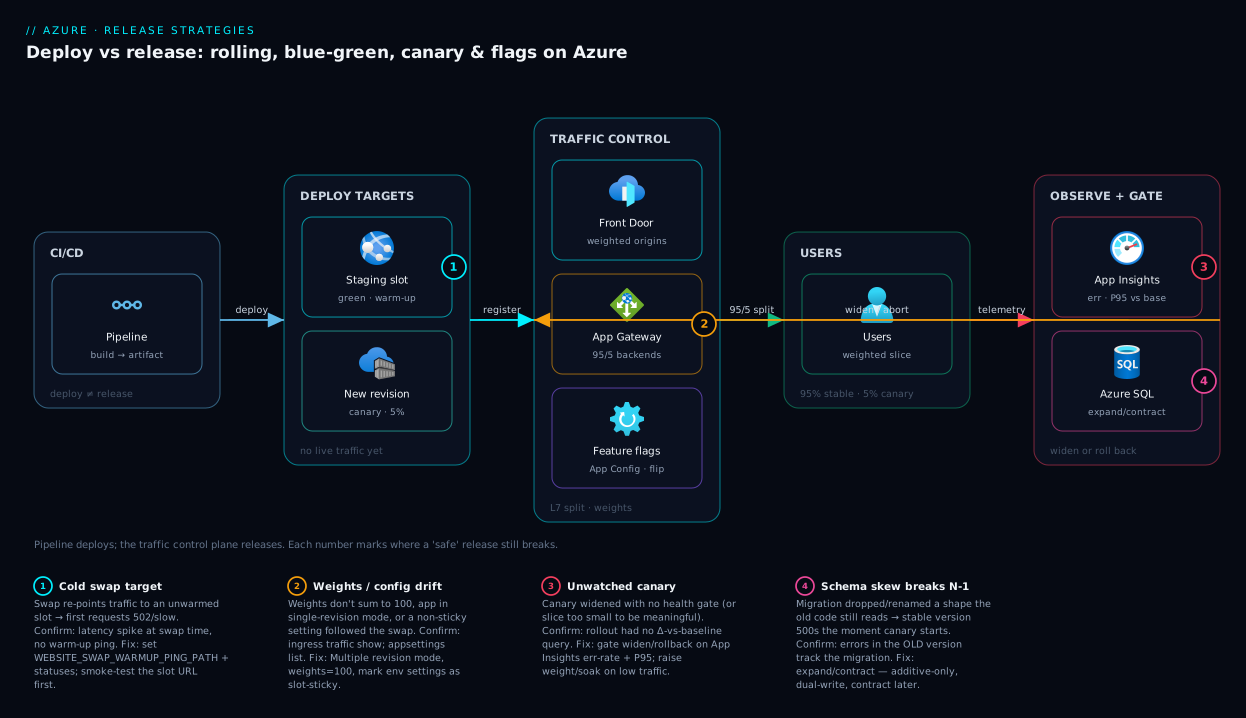
The diagram traces a single release left to right across the surfaces that implement these strategies. On the left, the CI/CD pipeline produces an immutable artifact and pushes it — it deploys, it does not release. The artifact lands on the deploy targets: an App Service staging slot (the parked green) and a new Container Apps revision (the canary target), neither taking customer traffic yet — the deploy/release separation made physical.
In the middle sits the traffic control plane — the routers deciding who sees what: slot traffic-routing and Container Apps revision weights for percentage splits, with Front Door / Application Gateway at the edge for HTTP-level canary across any backend. Reading Azure App Configuration, the app also honours feature flags, gating behaviour independently of the serving version. On the right, users get their slice — 95% stable, 5% canary — while the observability loop (Application Insights + Azure Monitor) compares the canary to baseline and feeds the gate that decides widen or roll back. The numbered badges mark the four common failures — cold swap target, mis-stuck slot setting, unwatched canary, schema skew — and the arrows show why rollback is a flip of the control plane, never a pipeline rebuild.
Real-world scenario
Northwind Retail runs its e-commerce checkout on Azure: a stateless ASP.NET API on App Service (Premium v3, four instances) behind Front Door, an Azure SQL database, and Container Apps for a newer recommendations microservice. They deploy several times a week. Historically they shipped straight to production on Fridays and were bitten twice — a checkout bug that 500’d every order for eleven minutes, and a migration that locked the Orders table at peak. The mandate after the second incident: no release exposes a defect to more than a small fraction of customers, and rollback takes seconds.
For the checkout API they adopted blue-green via slots: the pipeline deploys to staging, smoke-tests the slot URL with warm-up, then swaps. They marked the SQL connection string and App Configuration endpoint as slot settings, and rollback became a single swap-back — about eight seconds, blue still warm. For the riskier, fast-changing recommendations service on Container Apps they run a canary: every release creates a new revision at 5% weight, and an Azure Monitor alert compares the canary’s exception rate and P95 latency to stable over a ten-minute soak. Within tolerance, a pipeline stage widens to 50% then 100%; otherwise it sets the weight to 0.
The migration problem they solved with expand/contract. Adding a loyalty_tier concept shipped as its own release that only added a nullable column and backfilled in the background — no lock, no rename. The code reading it shipped in the next release behind a feature flag (LoyaltyPricing), turned on for internal staff, then 10% of customers, then everyone, watching conversion in Application Insights throughout. The old path and the flag were retired two weeks later.
The payoff was concrete. A bad recommendations build went out; the canary caught a 4× latency regression at 5% weight and auto-rolled-back in under two minutes — ~1 in 20 recommendation calls affected, zero checkouts. A checkout regression that slipped past smoke tests was swapped back in eight seconds when on-call saw the error spike — a few hundred requests of impact instead of an eleven-minute outage. The lesson: the strategy is chosen per service and per change — blue-green for the stable money path, canary for the fast-moving service, flags for the feature whose release had to decouple from its deploy. No single strategy fit everything, and that is the point.
Advantages and disadvantages
The honest two-column view, strategy by strategy:
| Strategy | Advantages | Disadvantages |
|---|---|---|
| Rolling | No second environment; cheap; simple; built into the platform | Both versions live during the roll; rollback is minutes; no measured slice |
| Blue-green | Clean atomic cutover; rollback in seconds; validate before flip; zero-downtime | ~2× cost while parked; 100% blast radius at the flip; cold-target risk |
| Canary | Smallest blast radius; real-traffic proof; auto-rollback by weight; cheap | Needs trustworthy monitoring; both versions live; needs enough traffic to be meaningful |
| Feature flag | Decouples deploy from release; instant kill switch; A/B + % rollout in app; any platform | Flag debt; combinatorial test burden; logic split across code + config |
When each matters most: rolling for low-risk, stateless, frequent changes — the platform default is fine. Blue-green for a clean, reversible cutover of a stable service you can afford to duplicate; the value is the eight-second rollback, not the swap. Canary when the change is risky and you have the traffic and observability to make a 5% sample meaningful — it protects everyone else while you find out. Feature flags when the release decision is separate from the deploy (a launch date, an experiment, an entitlement) or you want a kill switch. Mature systems use all four — infrastructure strategy for the deploy, flags for the feature — chosen per change.
Hands-on lab
This lab is free-tier-friendly where possible (Container Apps has a generous free grant; slots need a paid App Service plan). You will (1) do a blue-green swap on App Service and roll it back, and (2) run a weighted canary on Container Apps and roll it back. Everything is az; teardown is at the end.
Part A — Blue-green with App Service slots
Slots require Standard (S1) or higher (Basic supports a limited slot count; Free/Shared support none). Create a plan, app, and a staging slot:
RG=rg-release-lab
LOC=eastus
PLAN=plan-release-lab
APP=app-release-$RANDOM   # globally unique

az group create -n $RG -l $LOC

# S1 supports up to 5 deployment slots
az appservice plan create -n $PLAN -g $RG --sku S1 --is-linux

az webapp create -n $APP -g $RG --plan $PLAN \
  --runtime "NODE:20-lts"

# Create the staging slot (the "green" environment)
az webapp deployment slot create -n $APP -g $RG --slot staging
Set a slot-sticky app setting to prove it stays put across the swap — this is the setting that, done wrong, causes the classic post-swap break:
# Mark APP_ENV as a slot setting on production and staging
az webapp config appsettings set -n $APP -g $RG \
  --slot-settings APP_ENV=production

az webapp config appsettings set -n $APP -g $RG --slot staging \
  --slot-settings APP_ENV=staging
Deploy “v1” to production and “v2” to staging (any trivial difference); the mechanic that matters is the swap itself. Configure warm-up so the swap doesn’t expose a cold worker:
# Warm-up ping path used during the swap
az webapp config appsettings set -n $APP -g $RG --slot staging \
  --settings WEBSITE_SWAP_WARMUP_PING_PATH=/ WEBSITE_SWAP_WARMUP_PING_STATUSES=200
Now the swap — the blue-green release. App Service warms staging, then re-points the production hostname to it:
az webapp deployment slot swap -n $APP -g $RG --slot staging --target-slot production
Verify production serves v2 and confirm the sticky setting did not follow — production should still read APP_ENV=production even though the live app came from staging:
az webapp config appsettings list -n $APP -g $RG \
  --query "[?name=='APP_ENV'].value" -o tsv
# expected: production  (sticky setting stayed with the slot)
Roll back — a second swap puts v1 back in seconds, since the old version is still parked and warm in the staging slot:
az webapp deployment slot swap -n $APP -g $RG --slot staging --target-slot production
You can also run a percentage canary on top of slots without swapping — az webapp traffic-routing set --distribution staging=10 routes 10% to staging, show inspects it, and clear returns to 100% production.
The Bicep equivalent for the slot and a swap-warmup setting:
param appName string
param location string = resourceGroup().location

resource plan 'Microsoft.Web/serverfarms@2023-12-01' = {
  name: 'plan-release-lab'
  location: location
  sku: { name: 'S1', tier: 'Standard' }
  properties: { reserved: true } // Linux
}

resource site 'Microsoft.Web/sites@2023-12-01' = {
  name: appName
  location: location
  properties: { serverFarmId: plan.id }
}

resource staging 'Microsoft.Web/sites/slots@2023-12-01' = {
  parent: site
  name: 'staging'
  location: location
  properties: { serverFarmId: plan.id }
}

resource stagingSettings 'Microsoft.Web/sites/slots/config@2023-12-01' = {
  parent: staging
  name: 'appsettings'
  properties: {
    WEBSITE_SWAP_WARMUP_PING_PATH: '/'
    WEBSITE_SWAP_WARMUP_PING_STATUSES: '200'
  }
}
Part B — Canary with Container Apps revisions
Create a Container Apps environment and an app in multiple-revision mode so two revisions can take weighted traffic:
ENV=cae-release-lab
CAPP=ca-release-lab

az containerapp env create -n $ENV -g $RG -l $LOC

# Multiple-revision mode is what enables canary weights
az containerapp create -n $CAPP -g $RG --environment $ENV \
  --image mcr.microsoft.com/k8se/quickstart:latest \
  --target-port 80 --ingress external \
  --revision-suffix v1 \
  --revisions-mode multiple
Deploy a second revision (the canary). A new image or any template change creates a new revision:
az containerapp update -n $CAPP -g $RG \
  --image mcr.microsoft.com/k8se/quickstart:latest \
  --revision-suffix v2
List revisions to get their names, then split traffic 95% stable / 5% canary:
az containerapp revision list -n $CAPP -g $RG \
  --query "[].{name:name, active:properties.active, weight:properties.trafficWeight}" -o table

# weights must sum to 100; replace the suffixes with the listed revision names
az containerapp ingress traffic set -n $CAPP -g $RG \
  --revision-weight ${CAPP}--v1=95 ${CAPP}--v2=5
This is the canary. Watch the canary revision’s health (in real life, an Application Insights query comparing exception rate and latency to stable, which the rollout gate keys on). Widen if healthy:
az containerapp ingress traffic set -n $CAPP -g $RG \
  --revision-weight ${CAPP}--v1=50 ${CAPP}--v2=50
# then to 0/100 to complete the rollout
az containerapp ingress traffic set -n $CAPP -g $RG \
  --revision-weight ${CAPP}--v1=0 ${CAPP}--v2=100
Roll back — set the canary’s weight to 0 and stable back to 100, in one call:
az containerapp ingress traffic set -n $CAPP -g $RG \
  --revision-weight ${CAPP}--v1=100 ${CAPP}--v2=0
The Bicep shape for weighted traffic across two revisions:
resource app 'Microsoft.App/containerApps@2024-03-01' = {
  name: 'ca-release-lab'
  location: location
  properties: {
    managedEnvironmentId: env.id
    configuration: {
      activeRevisionsMode: 'Multiple'
      ingress: {
        external: true
        targetPort: 80
        traffic: [
          { revisionName: 'ca-release-lab--v1', weight: 95 }
          { revisionName: 'ca-release-lab--v2', weight: 5, label: 'canary' }
        ]
      }
    }
    template: {
      revisionSuffix: 'v2'
      containers: [
        { name: 'app', image: 'mcr.microsoft.com/k8se/quickstart:latest' }
      ]
    }
  }
}
Teardown
az group delete -n $RG --yes --no-wait
Expected results: in Part A the production hostname serves v2 after the swap and v1 again after the rollback, within seconds, with APP_ENV staying production throughout (proving the sticky setting). In Part B, ~5% of requests to the app’s URL hit the v2 revision at the 95/5 split, shifting as you change weights, and returning fully to v1 on rollback.
Common mistakes & troubleshooting
The recurring ways a “safe” release breaks anyway — symptom, why, how to confirm, fix:
| # | Symptom | Root cause | How to confirm | Fix |
|---|---|---|---|---|
| 1 | First requests after a swap are slow or 502 | Swap re-pointed traffic to a cold target (no warm-up) | App Insights shows a latency spike at swap time; no warm-up ping configured | Set WEBSITE_SWAP_WARMUP_PING_PATH + statuses; verify warm-up before completing swap |
| 2 | App breaks after swap with wrong config (e.g. hits dev DB) | Connection string was not a slot setting, so it followed the app across the swap | az webapp config appsettings list — the setting moved |
Mark environment-specific settings as slot settings (sticky) |
| 3 | Canary “passes” but everyone breaks at 100% | Canary slice too small to be statistically meaningful (low traffic) | Canary saw only a handful of requests over the soak | Increase canary weight/soak, or use blue-green for low-traffic apps |
| 4 | Rollback didn’t actually revert | Old version was already redeployed/overwritten in the slot/revision; or DB schema already contracted | The “previous” slot/revision no longer holds the old bits | Keep the previous version parked until the new one is soaked; never contract schema early |
| 5 | Old version 500s the moment the canary starts | Schema skew — migration changed a shape the old code reads | Errors in the stable version correlate with the migration, not the new code | Use expand/contract; additive-only during rollout; contract later |
| 6 | WebSocket/gRPC clients drop at the swap/roll | Long-lived connections are severed when the worker behind them goes away | Client reconnect storm at swap time | Drain connections; design clients to reconnect; prefer canary with affinity for stateful sessions |
| 7 | Container Apps weights “don’t apply” | App is in single-revision mode, so only one revision is active | az containerapp show --query properties.configuration.activeRevisionsMode returns Single |
Switch to Multiple revision mode before setting weights |
| 8 | Traffic weights rejected | Weights across active revisions don’t sum to 100 | az containerapp ingress traffic show totals ≠ 100 |
Set all active revision weights so they sum to exactly 100 |
| 9 | Flag flip doesn’t change behaviour | App reads flags at startup only, no dynamic refresh | Behaviour changes only after a restart | Enable App Configuration dynamic refresh + sentinel key; verify refresh interval |
| 10 | Two flags interact and produce a broken state | Untested combination of flag states | The bug only appears with flag A on and flag B off | Test the relevant flag combinations; minimise concurrent in-flight flags; retire stale flags |
| 11 | Slot canary cookie pins testers to staging permanently | x-ms-routing-name cookie set, never cleared |
Same user always lands on staging | Clear the routing cookie / use the documented override to force production |
| 12 | Blue-green “rollback” still shows the bug | The bug was in shared state (DB/cache), not the code — flipping code back doesn’t undo the data change | Data written by the bad version persists after swap-back | Roll back data too (or design forward-fix); never let a release write irreversible state unguarded |
Two diagnostic distinctions that save the most time:
| Distinction | The trap | How to tell them apart |
|---|---|---|
| Code rollback vs state rollback | Swapping back the code doesn’t undo a bad migration or poisoned cache | If errors persist after a clean swap-back, the damage is in shared state — fix the data, not the version |
| Deploy failure vs feature failure | A broken container is not a flag problem; a bad feature is not a deploy problem | If it won’t start, it’s a deploy issue (use blue-green/canary); if it starts but behaves wrong, it may be a flag/feature issue |
Best practices
- Separate deploy from release. Deploy to a slot/revision taking no customer traffic; make “release” an explicit, reversible step (swap, weight, or flag flip).
- Make rollback a flip, never a rebuild. Keep the previous version parked and warm so worst-case recovery is seconds (swap-back / weight 0 / flag off), not a pipeline run.
- Pick the strategy per change, not per team. Low-risk stateless → rolling; clean reversible cutover → blue-green; risky, needs proof → canary; release-decoupled or experimental → flags. Mix them.
- Never reduce a canary to theatre. Without an automatic health gate it is just a slow rolling deploy. Wire error-rate/latency comparisons in Application Insights into the rollout decision.
- Treat the database as a separate, multi-release rollout. Expand/contract: additive-only during the rollout, dual-write through the transition, contract only after the new code is at 100% and soaked.
- Mark environment-specific config as slot-sticky. Connection strings, App Configuration endpoints, identity settings — so a swap never carries the wrong config into production.
- Always warm the target before a swap. Configure swap warm-up so the flip never exposes a cold worker; smoke-test the slot URL first.
- Keep release flags short-lived; inventory long-lived ones. Flip, soak, then delete the flag and the dead branch. Track kill switches and entitlements to avoid flag debt.
- Design clients to reconnect. WebSocket/gRPC/streaming clients must survive a worker going away, or every swap is a reconnect storm.
- Soak before you widen. Hold each canary step long enough for metrics — including downstream load and saturation — to settle; don’t jump 5% → 100% in a minute.
- Automate the rollback trigger. The gate that widens the rollout should also abort it; humans on dashboards are a backup, not the primary control.
- Practise rollback. Run a swap-back and a weight-0 in a game day so under real pressure the team reaches for the flip reflexively.
Security notes
Release machinery is a privileged surface. Slot, revision, and flag controls all change what production runs, so the permission to swap a slot or set a traffic weight is effectively permission to deploy to production — scope it with RBAC to the pipeline identity and release engineers, not everyone with reader on the resource group. Prefer a managed identity for the deploying pipeline over a long-lived service principal secret; patterns are in Managed Identity on Azure: System-Assigned vs User-Assigned Patterns.
The non-obvious risk is configuration leaking across a slot swap. Settings not marked slot-sticky travel with the app on swap — promoting a staging connection string (or a staging secret) into production, or demoting production’s into staging. Mark environment-specific and secret-bearing settings as slot settings, and back secret values with Key Vault references rather than raw values, so the secret is never duplicated into a slot at all (Azure Key Vault: Secrets, Keys, and Certificates Explained).
Feature flags deserve the same scrutiny as code: a flag gating entitlement or access is a security control, and flipping it is privileged — restrict write access, audit changes, and never let an unauthenticated path read a flag that reveals an unreleased feature. For canary and blue-green behind a gateway, ensure the staging URL and canary revision are not publicly indexable and carry the same WAF/auth as production — a forgotten, internet-exposed *-staging.azurewebsites.net running pre-release code is a real exposure. Finally, a kill-switch flag is your fastest response to a feature-level security problem: put risky features behind one so you can disable them in seconds without a deploy.
Cost & sizing
Release strategy has a direct, often-overlooked line on the bill. The driver: does the strategy need a second full environment (expensive), a small extra slice (cheap), or almost nothing (a config store)?
| Strategy | What you pay extra for | Rough cost impact | Notes |
|---|---|---|---|
| Rolling | Nothing beyond your normal fleet | ~0 | Uses existing instances; may need 1 spare to surge |
| Blue-green (slots) | Slots share the same plan — no extra plan cost | ~0 extra* | The cost win vs a separate environment |
| Blue-green (separate env) | A full duplicate environment while parked | ~2× compute | Only if green is a separate plan/cluster |
| Canary (Container Apps) | One extra small revision/replica | Cents–small | Canary can run minimal replicas |
| Canary (Front Door/App GW) | The gateway you likely already run | Marginal | Weighting is config, not extra SKU |
| Feature flags | App Configuration store | ~₹0–1,000/mo | Free tier; Standard adds SLA, geo-replication |
*The key nuance: App Service deployment slots run on the same plan as production, so they do not double your compute bill — you use spare capacity on the plan you already pay for. This is why slot-based blue-green is far cheaper than a separate green environment; “blue-green is expensive” is only true when green is a separate plan or cluster. Container Apps canary is similarly cheap — the canary revision scales to few replicas (even zero between tests) on a per-use model.
Sizing guidance: App Service slots need Standard (S1) or higher for a useful count (5 on Standard, 20 on Premium v3; Basic limited, Free/Shared none), and since slots share the plan’s instances, size for production load plus headroom for a warm staging slot. Container Apps canary is marginal under consumption — keep minReplicas low. Feature flags ride App Configuration’s Free tier for small workloads; move to Standard for the SLA, higher request limits, or geo-replication. The rule: use slots for blue-green, keep canary replicas minimal, and retire stale flags.
Interview & exam questions
Q1. What is the difference between a deployment and a release? A deployment places new bits where they can run (a slot, a revision) without exposing them to users; a release is the moment users experience the new behaviour. Blue-green, canary, and especially feature flags exist to decouple the two so you deploy safely and release deliberately.
Q2. Explain blue-green vs canary, and the key difference. Blue-green flips all traffic to a full second environment at once (clean cutover, fast rollback, 100% blast radius at the flip); canary sends a small slice to the new version and widens gradually (smallest blast radius, needs trustworthy monitoring). The difference: blue-green never reduces blast radius — it relies on pre-flip validation and fast rollback — while canary exposes only a fraction at a time.
Q3. Which Azure service implements blue-green for App Service, and why is the swap fast? Deployment slots. You deploy to a staging slot and swap with production; it is fast because it is not a redeploy — App Service warms the target then re-points the production hostname to the already-running staging workers, which is also why rollback is just a second swap.
Q4. How do you do a canary on Azure Container Apps? Put the app in multiple-revision mode, create a new revision, and assign traffic weights (e.g. 95/5) across revisions via ingress; the platform splits requests by weight. Widen by changing weights, roll back by setting the canary’s weight to 0.
Q5. What problem do feature flags solve that blue-green and canary cannot? They fully decouple deploy from release: code ships to production dark and is released by flipping a config switch with no deployment. That enables release on a business schedule, kill switches, A/B testing, and per-cohort rollout — none of which an infrastructure swap can do, because those operate on versions, not features.
Q6. Why is a database schema change the hardest part of any release strategy? Because during any gradual rollout or rollback, old and new code are live simultaneously against the same database. A change that drops or renames a shape the old code reads breaks it instantly. You must keep N and N-1 compatible — which expand/contract enforces.
Q7. Describe expand/contract. Add the new schema shape additively (expand) so old and new both work, deploy the code that uses it and dual-write through the transition, fully roll out, then remove the old shape (contract) only after nothing reads it. The migration spans multiple releases and every intermediate state — including a rollback — stays valid.
Q8. A canary “passed” but the full rollout broke everyone. What went wrong? The slice was probably too small to be statistically meaningful — 5% of a low-traffic app may be a few requests that never hit the bug — or the failure only shows under the full load/saturation the canary never reached. Increase the weight/soak, or use blue-green for low-traffic services.
Q9. What is a “slot setting” and why does it matter for blue-green? A slot setting is an app setting or connection string marked sticky to its slot, so it does not follow the app across a swap. Environment-specific config (the production DB connection string) must stay with production; if it isn’t sticky, a swap carries a staging value into production and breaks the app despite the swap “succeeding”.
Q10. How does rollback differ across the four strategies? Rolling: roll the instances back to the old version — minutes. Blue-green: swap back to the still-warm old slot — seconds. Canary: set the new version’s weight to 0 — seconds, one API call. Feature flag: flip the flag off — seconds, with no deploy at all. The strategy you pick predetermines your worst-case recovery time.
Q11. What is progressive delivery? Releasing in stages — deploy → expose a slice → evaluate against an automatic health signal → proceed or abort — rather than all at once. The defining addition over a manual canary is the automatic evaluation gate (comparing canary error rate/latency to baseline in Application Insights) that widens or rolls back with no human in the loop.
Q12. When would you deliberately choose rolling over blue-green or canary? When the change is low-risk, stateless, and backward-compatible and you deploy frequently — rolling is free, built into the platform, and adds no ceremony. The mixed-version window is harmless for compatible changes, so blue-green or canary would be over-engineering.
Quick check
- In one sentence, what is the difference between deploy and release?
- Which strategy has the smallest blast radius for a code change, and what does it require to be safe?
- Which Azure service implements feature flags, and what does flipping a flag not require?
- Why can you not safely run a canary across a breaking schema change without extra work — and what pattern fixes it?
- Slot-based blue-green is cheap because of one specific fact about App Service slots. What is it?
Answers
- A deploy puts new bits where they can run (a slot/revision) without exposing them; a release is the moment users experience the new behaviour. Strategies decouple the two.
- Canary — a small % of traffic to the new version. Safe only with trustworthy monitoring (an automatic gate comparing canary to baseline) and enough traffic for the slice to be meaningful.
- Azure App Configuration (with the Feature Management libraries). Flipping a flag requires no deployment — a config change that propagates via dynamic refresh in seconds.
- Because during a canary both versions run against the same database, and dropping/renaming a shape the old code reads breaks it instantly. Expand/contract (additive, dual-write, contract later) keeps N and N-1 compatible.
- Deployment slots run on the same App Service plan as production, using spare capacity you already pay for — so they don’t double the compute bill the way a separate green environment would.
Glossary
- Deploy — Placing new bits where they can run (a slot, revision, image), without exposing them to users.
- Release — The moment real users experience the new behaviour; the event a strategy controls.
- Rolling deployment — Replacing instances a batch at a time, leaving both versions live during the roll.
- Blue-green deployment — Two full environments (blue live, green parked), flipping all traffic to green at once; rollback flips back.
- Canary deployment — A small % of real traffic to the new version, watched, then widened or rolled back on health.
- Feature flag (toggle) — A runtime switch gating behaviour; also a kill switch, % rollout, and A/B mechanism.
- Blast radius — The fraction of users a mistake reaches before you catch it; the number a strategy manages.
- Rollback — Returning to the previous version; ideally a flip (swap-back / weight 0 / flag off), not a rebuild.
- Deployment slot — A swappable copy of an App Service app on the same plan; the blue-green primitive.
- Revision (Container Apps) — An immutable snapshot of a container app; weighted across revisions for canary/blue-green.
- Slot setting (slot-sticky) — An app setting/connection string pinned to its slot so it does not follow a swap.
- Expand/contract (parallel-change) — Add new schema additively, run both shapes, remove the old later — so every state is valid.
- Progressive delivery — Gradual rollout gated by automatic health-signal evaluation (canary plus an automated widen/abort).
- Flag debt — Stale, never-retired feature flags that pile up as untested, confusing dead conditionals.
- Dark launch — Deploying a feature with its flag off, so the code is live but released to nobody.
Next steps
- Operate the blue-green lever in depth — warm-up, swap-with-preview, slot-sticky settings: Setting Up Azure App Service Deployment Slots: Swap, Warm-Up and Slot-Sticky Settings.
- Run feature flags in production — dynamic refresh, labels, targeting filters, Key Vault-backed flags: Azure App Configuration in Production: Dynamic Refresh, Feature Flags, Key Vault References, and Snapshots.
- Build the health gate a canary needs — failures, latency, custom KQL to drive widen/rollback: Azure Monitor and Application Insights: Full-Stack Observability.
- Wire these stages into a pipeline — reusable stage/job/step templates for deploy-then-release gates: Azure DevOps YAML Template Libraries: Reusable Stage, Job & Step Templates at Scale.
- Choose the compute before the strategy — it shapes which primitives you get: Azure App Service vs Container Apps vs AKS: Choose the Right Compute.