There is a version of EC2 that costs up to 90% less than the price on the pricing page, uses the exact same instance types, the same AMIs, the same networking, and the same everything — and most teams either never turn it on because it sounds scary, or turn it on wrong and get a fleet that churns so hard it looks broken. That version is Spot. It is not a different service, a lesser tier, or a preview: a Spot Instance is an ordinary EC2 instance running on spare capacity that AWS has not sold as On-Demand or Reserved, offered at a deep discount on the condition that AWS can take it back with about two minutes’ notice when a paying On-Demand customer wants it.
That single condition — AWS can reclaim it — is the whole game. Everything that makes Spot cheap and everything that makes Spot dangerous flows from it. Get the mental model right and Spot is the biggest single line-item saving available on EC2: a CI fleet, a Kubernetes batch pool, a video-encoding farm, or a stateless web tier can run at 50–70% off routinely and up to 90% off on quiet pools, for zero code change beyond handling an interruption gracefully. Get it wrong — one instance type, the cheapest pool, no diversification, no drain handler — and you get a machine that interrupts every few minutes, drops requests, loses half-finished jobs, and convinces the whole team Spot “doesn’t work in production.”
This guide teaches the production-safe version. You will learn how the modern smoothed price replaced the old bidding model and why the max-price cap defaults to On-Demand; what a capacity pool is and why diversification across instance types and AZs is the number-one durability lever; exactly how the 2-minute interruption notice and the earlier, softer rebalance recommendation reach you through IMDS and EventBridge; which allocation strategy to pick (price-capacity-optimized, almost always); how to run Spot safely via Auto Scaling mixed-instances policies, EC2 Fleet, and inside EKS/ECS/Karpenter/Batch; how to drain gracefully with checkpointing and the node-termination-handler; and precisely which workloads belong on Spot and which will hurt you. There is a copy-pasteable lab that builds a diversified mixed-instances ASG and an EventBridge drain rule, and a troubleshooting playbook for the failure modes you will hit.
What problem this solves
On-Demand EC2 is priced for certainty: you pay a fixed hourly rate and AWS promises the instance stays until you stop it. That certainty is expensive, and for a large class of workloads you do not need it. A CI job that reruns on failure, a frame in a render queue, a Spark task, a stateless container behind a load balancer, a fuzzing worker — none of these care if the individual machine dies, as long as the work eventually completes somewhere. Paying the full On-Demand premium for interruption-tolerant work is pure waste, often the single largest avoidable cost on a compute bill.
Spot fixes the price. What it introduces is a new failure mode you must design for: the instance can disappear. The problems teams hit are almost always self-inflicted by ignoring that fact. A fleet pinned to one instance type in one AZ rides a single capacity pool, so when that pool tightens, every instance gets reclaimed at once and the service falls over. A fleet on the lowest-price allocation strategy is deliberately packed into the cheapest, shallowest pool, which is exactly the pool most likely to be reclaimed. A stateful app — a database primary, a build with local state, a licensed-per-node product — put on Spot loses data or breaks licensing when reclaimed. And a fleet with no interruption handler turns every reclaim into dropped connections and 5xx errors instead of a graceful drain.
Everyone who runs compute at any scale hits this decision: developers who want cheaper CI, platform engineers building Kubernetes node pools, data teams running Spark and Batch, and finance asking why the EC2 bill is 3× what it should be. The skill is not “turn on Spot” — it is knowing which workloads tolerate interruption, how to diversify so interruptions are rare and isolated, and how to handle the two-minute notice so a reclaim is a non-event. That skill also shows up directly on the exams: SAA-C03 and SOA-C02 expect you to reason about Spot vs On-Demand vs Savings Plans, mixed-instances Auto Scaling, and interruption handling; the Cost-Optimization pillar of the Well-Architected Framework treats Spot as a core lever.
Learning objectives
By the end of this article you can:
- Explain the Spot model precisely — spare capacity, up to 90% off, the modern smoothed price vs the retired bidding model, and why the
max-pricecap defaults to On-Demand. - Define a capacity pool (instance type × AZ × OS × tenancy) and use diversification as your primary durability lever.
- Handle interruptions — read the 2-minute notice from IMDS
spot/instance-action, catch it and the earlier rebalance recommendation on EventBridge, and name the three reclaim reasons. - Choose an allocation strategy — why price-capacity-optimized is the default recommendation over capacity-optimized and (especially) lowest-price.
- Run Spot at scale — build an ASG mixed-instances policy (On-Demand base + Spot percentage), and know when to reach for EC2 Fleet, Spot Fleet, Karpenter, ECS/Fargate Spot, and Batch.
- Drain gracefully — checkpointing, connection draining, lifecycle hooks, stateless design, and the node-termination-handler (IMDS vs Queue Processor).
- Decide what belongs on Spot — the good fits (CI, batch, render, stateless web, big-data) and the ones that will hurt you (stateful singletons, per-node licensing, long non-checkpointed jobs).
- Estimate savings and diagnose churn — read Spot price history, the Spot placement score, and the interruption signals, and fix the classic “constantly interrupted / can’t launch” failures.
Prerequisites & where this fits
You should be comfortable launching an EC2 instance, reading an instance name like m7g.2xlarge (see Choosing the Right EC2 Instance Type: Families, Naming & Right-Sizing), and the basics of Auto Scaling groups, launch templates, security groups, and IAM roles. You will use the AWS CLI v2 and, optionally, Terraform. A free-tier account is enough for the lab if you keep instances to t3.micro/t4g.micro and tear down promptly.
Spot is one axis of a two-axis decision. The first axis is which hardware shape you need (the instance family/size); the second axis is how you pay for it — On-Demand, Spot, Savings Plans, Reserved, or Capacity Blocks. This article is entirely about the purchasing axis for interruption-tolerant work; picking the family is a separate skill covered in the instance-types article. Spot also sits underneath almost every scaling and container topic: you attach it to an Auto Scaling group (Auto Scaling with Launch Templates: A Hands-On Guide), and it is where Graviton and containers get cheapest (ECS vs EKS on Fargate vs EC2: Choosing Your Container Path). Where this table below says “must tolerate interruption,” that is the load-bearing prerequisite for everything else.
| You should already know | Why it matters here | If you’re shaky, start with |
|---|---|---|
| Launching an EC2 instance + AMIs | Spot instances are EC2 instances | Launch Your First EC2 Instance |
| Reading instance names / families | Diversification means picking many comparable types | EC2 instance types & families |
| Auto Scaling groups + launch templates | The primary safe way to run Spot | Auto Scaling with launch templates |
| Security groups & IAM roles | Instances need them regardless of purchase model | VPC security groups; IAM roles |
| CloudWatch & EventBridge basics | Interruption signals arrive as events | CloudWatch/EventBridge fundamentals |
| That some workloads tolerate loss | The one non-negotiable Spot prerequisite | This article |
Core concepts
A Spot Instance is an EC2 instance that runs on spare EC2 capacity — physical capacity in an Availability Zone that AWS has not committed to an On-Demand or Reserved customer at this moment. Because it is spare, AWS discounts it heavily (up to 90% off the On-Demand rate), and because it is only spare, AWS reserves the right to reclaim it — the interruption — when the capacity is needed elsewhere or the price moves past your cap. Everything else is machinery around those two facts.
The unit that governs availability is the Spot capacity pool: the set of unused instances sharing the same instance type, Availability Zone, operating system, and tenancy. c7g.2xlarge / Linux / us-east-1a is one pool; c7g.2xlarge / Linux / us-east-1b is a different pool; m7i.2xlarge / Linux / us-east-1a is yet another. A Spot request draws from one or more pools, and an interruption is a per-pool event — when a pool tightens, instances in that pool are reclaimed. This is why diversification across many pools is the master lever: if your fleet spans ten pools and one is reclaimed, you lose ~10% and the rest keep serving.
The price you pay is the current Spot price for the pool, which since November 2017 moves smoothly based on long-term supply and demand — no more second-by-second auction. You may set a maximum price (the most you are willing to pay per hour); if you do not, it defaults to the On-Demand price, and you simply pay the prevailing Spot price up to that cap. The interruption arrives with a 2-minute warning in the normal case, plus an earlier rebalance recommendation that says “this pool is getting risky” before the hard notice. Handling those signals — drain, checkpoint, reschedule — is what separates production Spot from a science experiment.
| Term | What it is | Why it matters |
|---|---|---|
| Spot Instance | An EC2 instance on spare capacity at a deep discount | The cheapest way to run interruption-tolerant compute |
| Spot capacity pool | Instances of one type, in one AZ, one OS, one tenancy | The unit of availability; interruptions hit per-pool |
| Spot price | The current, smoothly-varying price for a pool | What you actually pay; set by supply/demand trends |
Maximum price (max-price) |
Your per-hour cap; defaults to On-Demand | Below On-Demand = fewer usable pools + more interruptions |
| Interruption | AWS reclaiming the instance | The one failure mode Spot adds; design for it |
| 2-minute notice | The interruption warning via IMDS + EventBridge | Your window to drain and checkpoint |
| Rebalance recommendation | Earlier “elevated risk” signal | Lets you act before the hard notice |
| Allocation strategy | How a fleet/ASG chooses pools | price-capacity-optimized = fewest interruptions for the price |
| Diversification | Spreading across many pools | The #1 durability lever |
| Interruption behavior | terminate / stop / hibernate on reclaim | Determines whether state survives |
| Capacity Rebalancing | ASG/Fleet proactively replaces at-risk instances | Launch a replacement before the 2-min notice |
| On-Demand base | A guaranteed floor of On-Demand in a mixed fleet | Survival when Spot is region-wide unavailable |
How Spot compares to the other purchasing models
Spot is one of five ways to pay for EC2 capacity. They are not mutually exclusive — a mature fleet blends them: Reserved Instances or Savings Plans for the always-on baseline, On-Demand for unpredictable spikes and the mixed-fleet base, and Spot for the interruption-tolerant bulk.
| Model | You commit to | Discount vs On-Demand | Interruptible? | Capacity guarantee | Best for |
|---|---|---|---|---|---|
| On-Demand | Nothing | 0% (baseline) | No | Best-effort | Spiky, short, must-not-be-reclaimed work |
| Spot | Nothing | Up to 90% | Yes (2-min notice) | None | Fault-tolerant, flexible, stateless work |
| Savings Plans | $/hr for 1 or 3 yrs | ~Up to 72% | No | No (it’s a billing discount) | Steady baseline across families/regions |
| Reserved Instances | A specific config, 1/3 yrs | ~Up to 72% | No | Optional zonal capacity reservation | Steady, known-shape baseline |
| Capacity Blocks / ODCR | A reserved window/slot | Varies | No | Yes | GPU/ML bursts needing guaranteed capacity |
Spot’s superpower is zero commitment — you can turn it on and off freely and it stacks on top of a Savings Plan (a Spot instance can still draw down a Compute Savings Plan’s committed spend). Its weakness is zero guarantee. The art is putting the right workloads on it.
The Spot pricing model: how “up to 90% off” actually works
The modern smoothed price replaced bidding
If you learned Spot before 2018, unlearn the auction. In the old model you literally bid a price; if your bid beat the market clearing price you ran, and the moment the volatile market price spiked above your bid you were reclaimed instantly. Prices swung wildly second-to-second, bidding strategy was a dark art, and a bad bid could get you interrupted constantly or overpay in a spike. In November 2017 AWS replaced this with a smoothed price set by long-term supply and demand trends. You no longer bid; prices change gradually and predictably; and the thing you can still set — a maximum price — is a safety cap, not a bid that determines whether you win an auction.
| Dimension | Old bidding model (pre-Nov 2017) | Modern smoothed model (today) |
|---|---|---|
| How price is set | Real-time auction / market clearing | Long-term supply & demand trend |
| Volatility | High, second-to-second swings | Low, gradual changes |
| What you set | A bid (determines if you run) | An optional max price (safety cap only) |
| Interruption trigger | Market price > your bid (common) | AWS needs capacity back (price is rarely the trigger) |
| Default max price | You had to choose a bid | On-Demand price (recommended: leave default) |
| Strategy needed | Bid tuning, price watching | Diversify pools; pick an allocation strategy |
The maximum price cap — and why you should usually leave it alone
Your maximum price is the most you will pay per instance-hour. If the Spot price for a pool is at or below your max, you run and pay the Spot price (not your max). If it rises above your max, your instance is interrupted (reason: price) or a new launch in that pool is refused (price-too-low). The default max is the On-Demand price, and AWS’s own guidance is to leave it at the default. Lowering it does not make you pay less on average — you already pay the market Spot price — it only removes pools from consideration (any pool whose price is above your cap becomes unusable) and adds a price-based interruption reason you otherwise almost never see. Both effects reduce durability. The only time to set a max below On-Demand is a hard financial rule (“never pay more than X for this batch”), and even then you are trading availability for a price ceiling.
| Setting | Values | Default | When to change | Trade-off / gotcha |
|---|---|---|---|---|
| Max price | Any $/hr up to On-Demand (can’t exceed OD by default) | On-Demand price | Only for a hard cost ceiling | Lower cap = fewer usable pools + price interruptions |
| Interruption behavior | terminate | stop | hibernate |
terminate |
Persistent workloads that resume | stop/hibernate need a persistent request + EBS root |
| Request type | one-time | persistent |
one-time (via RunInstances) |
Want auto-relaunch after interruption | Persistent requests re-request until cancelled |
| Block duration (legacy) | — | Deprecated | Do not design around it | Removed for new customers; don’t rely on it |
| Valid until / from | Timestamp | None | Bounded fleet requests | Mostly for Spot Fleet / one-off fleets |
| Launch group | Group name | None | All-or-nothing pool launch (Spot Fleet) | Rarely needed; reduces flexibility |
What actually determines your discount
The depth of your discount is a property of the pool, not something you negotiate. Newer generations and less-popular sizes/AZs tend to be deeper spare pools and thus cheaper. The practical way to see today’s numbers is describe-spot-price-history, and the practical way to estimate durability before launching is the Spot placement score (covered below) and the Spot Instance Advisor (which publishes typical savings % and interruption frequency per type per region).
| Factor | Effect on Spot price / discount | Practical read |
|---|---|---|
| Instance generation | Newer gens often deeper/cheaper spare | Prefer current-gen (m7/c7/r7) types |
| Popularity of the pool | Popular pools = thinner spare = pricier & more reclaimed | Diversify into less-contended pools |
| Availability Zone | Prices differ per AZ for the same type | Span AZs; let the strategy pick the deep one |
| Region | Big regional differences | Some regions/AZs far cheaper for the same type |
| Time / demand cycle | Gradual moves with demand | Smoothed — no need to time it to the second |
| Your max price | Only caps usable pools; doesn’t lower what you pay | Leave at On-Demand default |
# See the last 6 hours of Spot prices for a few comparable types in one AZ
aws ec2 describe-spot-price-history \
  --instance-types m7i.large c7i.large m7g.large c7g.large \
  --product-description "Linux/UNIX" \
  --availability-zone us-east-1a \
  --start-time "$(date -u -v-6H +%Y-%m-%dT%H:%M:%SZ 2>/dev/null || date -u -d '6 hours ago' +%Y-%m-%dT%H:%M:%SZ)" \
  --query 'reverse(sort_by(SpotPriceHistory,&Timestamp))[:12].[Timestamp,InstanceType,SpotPrice]' \
  --output table
Capacity pools and diversification: the #1 durability lever
What defines a pool
A Spot capacity pool is a four-way key. Change any component and it is a different pool with its own price and its own availability. The reason diversification works is arithmetic: interruptions are per-pool, so if your target capacity is spread across N independent pools, a single pool’s reclaim costs you roughly 1/N of the fleet instead of all of it.
| Pool dimension | Example value | Note |
|---|---|---|
| Instance type | c7g.2xlarge |
The biggest diversification axis — use many comparable types |
| Availability Zone | us-east-1a |
Span ≥3 AZs; each AZ is an independent pool |
| Operating system | Linux/UNIX, Windows |
Windows pools price and behave differently |
| Tenancy | default, dedicated |
Dedicated tenancy is a separate (smaller, pricier) pool |
Diversification is the master lever
If you remember one thing about Spot durability, make it this: more pools = fewer, smaller interruptions. A fleet allowed to draw from m and c and r families, across large/xlarge/2xlarge sizes, across three AZs, has dozens of pools to choose from; capacity has to get tight in many places at once to hurt you. A fleet locked to c7g.2xlarge in us-east-1a has exactly one pool — a single point of failure with a 2-minute fuse. Diversify on instance type first (comparable vCPU/memory, mix families and generations and sizes), then AZs, and let the allocation strategy pick the deepest pools. If your app can’t be pinned to a family, use attribute-based instance type selection (ABS) to auto-include every type matching a vCPU/memory spec.
| Diversification lever | How it helps durability | Rough impact |
|---|---|---|
| More instance types | Each type is an independent pool | Highest — go from 1 to 6–10 comparable types |
| More Availability Zones | Each AZ is an independent pool per type | High — always span ≥3 AZs |
| Mixed generations/sizes | Older gens & odd sizes are deeper spare | Medium — include m6i alongside m7i, mix large/xlarge |
| Attribute-based selection (ABS) | Auto-includes all matching types | High + low-maintenance — one spec, many pools |
| Multiple families (M/C/R) | Widens the pool set dramatically | High if the app tolerates the ratio spread |
price-capacity-optimized strategy |
Picks deep and cheap pools | High — the single best default setting |
Here is why the math matters. Consider three configurations for the same 20-instance fleet:
| Config | Types × AZs | Pools | If one pool is reclaimed | Interruption blast radius |
|---|---|---|---|---|
| Pinned | 1 type × 1 AZ | 1 | Whole fleet (20) gone | Catastrophic |
| Modest | 2 types × 2 AZs | 4 | ~5 instances | Noticeable |
| Diversified | 6 types × 3 AZs | 18 | ~1–2 instances | Non-event |
Spot placement score — check before you commit
Before you deploy a large Spot fleet, the Spot placement score tells you how likely a given capacity ask is to succeed with minimal interruption, per Region or AZ, on a 1–10 scale (10 = best). Feed it your target capacity and either an instance-type list or ABS requirements; it returns scored placements so you can choose the region/AZ combination most likely to hold. It reflects current conditions and is a planning aid, not a guarantee.
| Placement score | Interpretation | Action |
|---|---|---|
| 8–10 | High likelihood to fulfill with low interruption | Deploy here |
| 5–7 | Moderate; may see some interruptions | Diversify more or split across regions |
| 1–4 | Low; capacity is tight for this ask | Add types/AZs, reduce target, or pick another region |
# Score placing 40 vCPUs of comparable types across single-AZ targets in us-east-1
aws ec2 get-spot-placement-scores \
  --target-capacity 40 --target-capacity-unit-type vcpu \
  --single-availability-zone \
  --instance-types m7i.large c7i.large m7g.large c7g.large r7i.large \
  --region-names us-east-1 \
  --query 'SpotPlacementScores[].[AvailabilityZoneId,Score]' --output table
Interruptions: the 2-minute notice, the rebalance recommendation, and reclaim reasons
An interruption is not random punishment — it is AWS reclaiming spare capacity, and it is signposted. You get up to two independent, escalating signals, and both are delivered two ways (in-instance via IMDS, and out-of-band via EventBridge) so you can react from inside the box or from a central handler.
The two signals, escalating
The rebalance recommendation is the early, soft signal: “capacity for this instance’s pool is at elevated risk of interruption.” It can arrive well before the hard notice (often minutes), giving orchestration time to launch a replacement first. The 2-minute interruption notice is the hard, final signal: this instance will be interrupted, here is the action (terminate/stop/hibernate) and the time (~2 minutes out). Build for the hard notice as your guaranteed floor; use the rebalance recommendation as a bonus head-start.
| Signal | Lead time | IMDS path | EventBridge detail-type | What to do |
|---|---|---|---|---|
| Rebalance recommendation | Earlier (often minutes), not guaranteed | latest/meta-data/events/recommendations/rebalance |
EC2 Instance Rebalance Recommendation |
Proactively launch a replacement, start draining |
| 2-minute interruption notice | ~120 seconds, guaranteed when reclaimed | latest/meta-data/spot/instance-action |
EC2 Spot Instance Interruption Warning |
Stop taking work, checkpoint, deregister, drain |
| (Legacy) termination time | Same as above | latest/meta-data/spot/termination-time |
— | Older field; prefer instance-action |
Reading the notice from inside the instance (IMDS)
The interruption notice appears at the metadata endpoint 169.254.169.254. When there is no interruption, spot/instance-action returns HTTP 404; when one is scheduled it returns HTTP 200 with a JSON body {"action":"terminate","time":"2026-07-14T11:32:00Z"}. With IMDSv2 (the modern, recommended default) you must first fetch a token. A drain agent polls this endpoint every ~5 seconds.
# On the instance: IMDSv2 token, then poll the interruption endpoint
TOKEN=$(curl -sX PUT "http://169.254.169.254/latest/api/token" \
  -H "X-aws-ec2-metadata-token-ttl-seconds: 21600")

# 404 = no interruption; 200 + JSON = you have ~2 minutes
curl -s -H "X-aws-ec2-metadata-token: $TOKEN" \
  -w "\nHTTP:%{http_code}\n" \
  http://169.254.169.254/latest/meta-data/spot/instance-action

# The earlier, softer signal:
curl -s -H "X-aws-ec2-metadata-token: $TOKEN" \
  http://169.254.169.254/latest/meta-data/events/recommendations/rebalance
| IMDS path | Returns when interruption scheduled | Returns otherwise |
|---|---|---|
spot/instance-action |
200 + {"action","time"} |
404 Not Found |
events/recommendations/rebalance |
200 + {"noticeTime"} |
404 Not Found |
spot/termination-time (legacy) |
200 + ISO-8601 timestamp |
404 Not Found |
meta-data/instance-life-cycle |
Always spot on a Spot instance |
spot |
Catching signals centrally with EventBridge
Polling from inside every instance works, but the scalable pattern is an EventBridge rule that catches the interruption and rebalance events for the whole account and routes them to a target — a Lambda that deregisters the instance from its target group and drains connections, an SSM Automation, or an SNS topic. This is also how the node-termination-handler Queue Processor and Karpenter work.
EventBridge detail-type |
source |
Fires when | Typical target |
|---|---|---|---|
EC2 Spot Instance Interruption Warning |
aws.ec2 |
2-min notice issued | Lambda/SSM to drain + deregister |
EC2 Instance Rebalance Recommendation |
aws.ec2 |
Elevated interruption risk | Lambda/SSM to pre-drain; ASG replaces |
EC2 Instance State-change Notification |
aws.ec2 |
Instance enters shutting-down/terminated |
Cleanup, metrics |
EC2 Instance-terminate Lifecycle Action |
aws.autoscaling |
ASG lifecycle hook heartbeat | Complete the hook after drain |
{
  "source": ["aws.ec2"],
  "detail-type": [
    "EC2 Spot Instance Interruption Warning",
    "EC2 Instance Rebalance Recommendation"
  ]
}
Why you were reclaimed — the three reasons
Every interruption has a reason, visible on the Spot request status and in CloudTrail/console. In the modern model capacity is by far the most common; price is rare (only if you set a low max); constraint is a config-driven edge case.
| Reason | What triggered it | How common (modern model) | Mitigation |
|---|---|---|---|
| capacity | AWS needs the spare capacity back for On-Demand | Most common | Diversify pools; price-capacity-optimized; Capacity Rebalancing |
| price | Spot price rose above your max price | Rare (only if max < On-Demand) | Leave max at On-Demand default |
| constraint | A constraint changed (e.g. target capacity, valid-until) | Uncommon | Review Fleet/request constraints |
What happens on reclaim — terminate, stop, or hibernate
The interruption behavior decides whether anything survives. The default is terminate — the instance is gone, EBS root deleted per its DeleteOnTermination flag, instance-store data lost. With a persistent request you can choose stop (instance stops, EBS root and attached EBS volumes persist, restarts when capacity returns) or hibernate (RAM is written to the EBS root and restored on resume). Persistent behaviors need supported instance types, an EBS-backed root, and enough EBS space.
| Behavior | Request type needed | State that survives | When to use | Gotcha |
|---|---|---|---|---|
| terminate (default) | one-time or persistent | Nothing on the instance | Stateless, replaceable work | Instance-store & non-persistent EBS gone |
| stop | persistent | EBS root + attached EBS | Resume same box when capacity returns | Pays for stopped EBS; must have capacity to restart |
| hibernate | persistent | RAM → EBS, then EBS | Fast warm resume with in-memory state | Size/AMI constraints; encrypted root; EBS must fit RAM |
Allocation strategies: pick price-capacity-optimized
When a fleet or ASG needs to launch Spot, the allocation strategy decides which pools it draws from. This is the highest-leverage single setting after diversification, and the recommendation is simple: use price-capacity-optimized for almost everything.
price-capacity-optimized(recommended default, launched Nov 2022): looks at pools with the most available capacity, then among those picks the lowest-price ones. You get close-to-lowest cost and low interruptions. This is AWS’s blanket recommendation for Spot.capacity-optimized: picks the pools with the most available capacity (lowest interruption rate), ignoring price. Best when interruptions are very expensive and you don’t care about the small price delta.capacity-optimized-prioritized: capacity-optimized, but honors an instance-type priority order you set (best-effort). Use when you have a real preference order (e.g. Graviton first) but still want capacity-driven placement.lowest-price: packs into the cheapest N pools. Highest interruption risk, worst diversification — the classic newbie trap. Effectively deprecated byprice-capacity-optimized; avoid.diversified(Spot Fleet term): spreads evenly across all pools.
| Strategy | How it picks pools | Interruption rate | Diversification | When to use |
|---|---|---|---|---|
| price-capacity-optimized | Deepest-capacity pools, then cheapest among them | Low | Good | Almost everything (recommended default) |
| capacity-optimized | Deepest-capacity pools (ignores price) | Lowest | Good | When an interruption is very costly |
| capacity-optimized-prioritized | Capacity-first, honoring your priority list | Low | Good | You have a genuine type preference order |
| lowest-price | The N cheapest pools | High | Poor | Legacy only; don’t use in production |
| diversified (Spot Fleet) | Spread across all pools | Low | Best spread | Spot Fleet spreading; superseded for most |
Not every product exposes every strategy. Here is what each Spot-capable service supports:
| Strategy | ASG mixed-instances | EC2 Fleet | Spot Fleet |
|---|---|---|---|
| price-capacity-optimized | Yes | Yes | Yes |
| capacity-optimized | Yes | Yes | Yes |
| capacity-optimized-prioritized | Yes | Yes | Yes |
| lowest-price | Yes | Yes | Yes |
| diversified | No | No | Yes |
SpotInstancePools (N) applies to |
lowest-price only | lowest-price only | lowest-price only |
Running Spot at scale: ASG, Fleet, and orchestrators
You almost never run raw RunInstances --instance-market-options in production. You attach Spot to a manager that requests, diversifies, and replaces for you. The workhorse is the Auto Scaling group mixed-instances policy.
ASG mixed-instances policy — the production default
A mixed-instances policy lets one ASG run both On-Demand and Spot across many instance types, governed by an InstancesDistribution. The two dials that matter most are OnDemandBaseCapacity (an absolute floor of always-on On-Demand) and OnDemandPercentageAboveBaseCapacity (the On-Demand vs Spot split above that floor). A classic safe recipe: base = 1 On-Demand (guarantees the service never fully collapses if Spot is unavailable) and 0% On-Demand above base = 100% Spot for the rest — or 30% On-Demand / 70% Spot if you want more On-Demand cushion. Set SpotAllocationStrategy = price-capacity-optimized, list 6–10 comparable instance types in the overrides, span ≥3 AZs via subnets, and turn on Capacity Rebalancing so the ASG launches a replacement on the rebalance signal.
| Parameter | Meaning | Default | Recommended | Gotcha |
|---|---|---|---|---|
OnDemandBaseCapacity |
Absolute # of On-Demand as the base floor | 0 |
1+ for prod services; 0 for pure batch |
Counts toward total desired capacity |
OnDemandPercentageAboveBaseCapacity |
% On-Demand of capacity above the base | 100 |
0–30 (i.e. 70–100% Spot) |
100 = no Spot above base at all |
SpotAllocationStrategy |
How Spot pools are chosen | lowest-price |
price-capacity-optimized |
Default is the bad one — always override |
SpotInstancePools |
# of pools for lowest-price only |
2 |
N/A (ignored by price/capacity strategies) | Silently ignored unless strategy is lowest-price |
SpotMaxPrice |
Max price for Spot | empty = On-Demand | Leave empty | Setting it low reduces usable pools |
OnDemandAllocationStrategy |
How On-Demand types are chosen | lowest-price |
prioritized if you have a preference |
Minor vs the Spot knobs |
Overrides (Overrides[]) |
The list of instance types (+ weights) | — | 6–10 comparable types | Too few = single points of failure |
capacity_rebalance (CapacityRebalance) |
Replace at-risk Spot proactively | false |
true |
Off by default; the biggest availability win |
# Create a mixed-instances ASG: On-Demand base 1, 70% Spot above base,
# price-capacity-optimized, 6 comparable types across 3 AZ subnets.
aws autoscaling create-auto-scaling-group \
  --auto-scaling-group-name spot-web-asg \
  --min-size 3 --max-size 12 --desired-capacity 6 \
  --vpc-zone-identifier "subnet-0aaa,subnet-0bbb,subnet-0ccc" \
  --health-check-type ELB --health-check-grace-period 120 \
  --capacity-rebalance \
  --mixed-instances-policy '{
    "LaunchTemplate": {
      "LaunchTemplateSpecification": {
        "LaunchTemplateName": "spot-web-lt", "Version": "$Latest"
      },
      "Overrides": [
        {"InstanceType": "m7i.large"}, {"InstanceType": "m6i.large"},
        {"InstanceType": "c7i.large"}, {"InstanceType": "c6i.large"},
        {"InstanceType": "m7g.large"}, {"InstanceType": "c7g.large"}
      ]
    },
    "InstancesDistribution": {
      "OnDemandBaseCapacity": 1,
      "OnDemandPercentageAboveBaseCapacity": 30,
      "SpotAllocationStrategy": "price-capacity-optimized"
    }
  }'
# Terraform equivalent — the same policy, declaratively.
resource "aws_autoscaling_group" "spot_web" {
  name                = "spot-web-asg"
  min_size            = 3
  max_size            = 12
  desired_capacity    = 6
  vpc_zone_identifier = [aws_subnet.a.id, aws_subnet.b.id, aws_subnet.c.id]
  health_check_type   = "ELB"
  capacity_rebalance  = true # launch a replacement on the rebalance signal

  mixed_instances_policy {
    instances_distribution {
      on_demand_base_capacity                  = 1
      on_demand_percentage_above_base_capacity = 30
      spot_allocation_strategy                 = "price-capacity-optimized"
      # spot_max_price left empty => defaults to the On-Demand price
    }

    launch_template {
      launch_template_specification {
        launch_template_id = aws_launch_template.spot_web.id
        version            = "$Latest"
      }
      # Diversify across 6 comparable pools (mix families, gens, arch)
      override { instance_type = "m7i.large" }
      override { instance_type = "m6i.large" }
      override { instance_type = "c7i.large" }
      override { instance_type = "c6i.large" }
      override { instance_type = "m7g.large" }
      override { instance_type = "c7g.large" }
    }
  }

  tag {
    key                 = "Name"
    value               = "spot-web"
    propagate_at_launch = true
  }
}
If you don’t want to hand-list types, use attribute-based instance type selection in the overrides — specify vCPU and memory ranges and ASG auto-includes every matching current-gen type, which maximises pools with no maintenance:
    launch_template {
      launch_template_specification {
        launch_template_id = aws_launch_template.spot_web.id
        version            = "$Latest"
      }
      override {
        instance_requirements {
          vcpu_count   { min = 2  max = 4 }
          memory_mib   { min = 4096 max = 16384 }
          # optionally: cpu_manufacturers, instance_generations, burstable_performance
        }
      }
    }
EC2 Fleet and Spot Fleet — when you outgrow (or predate) the ASG
Spot Fleet is the older API; EC2 Fleet is the newer, more capable single-request API for launching a target capacity of On-Demand + Spot across many launch-template overrides. For most people the ASG mixed-instances policy is the right default — it integrates with scaling policies, health checks, and lifecycle hooks. Reach for EC2 Fleet when you need a one-shot instant fleet, fine-grained weighted capacity, or fleet behavior outside an ASG (e.g. Batch and EMR use fleets under the hood).
| Feature | ASG mixed-instances | EC2 Fleet | Spot Fleet (legacy) |
|---|---|---|---|
| Mix On-Demand + Spot | Yes | Yes | Yes |
| Multiple instance types | Yes (overrides / ABS) | Yes | Yes |
| Allocation strategies | Yes | Yes | Yes (+ diversified) |
| Capacity Rebalancing | Yes | Yes | Yes |
| Scaling policies + health checks | Yes (native) | No (you wire it) | No |
| Lifecycle hooks | Yes | No | No |
| Request types | Maintain (implicit) | instant/request/maintain |
request/maintain |
| Recommended for | Most workloads | Advanced/one-shot, weighted | Legacy; migrate to EC2 Fleet/ASG |
Spot in containers and big-data — where it shines
Container and batch platforms are the best home for Spot because their schedulers already treat nodes as cattle. Each platform has a native way to ask for Spot and to handle the interruption.
| Platform | How you request Spot | Interruption handling | Notes |
|---|---|---|---|
| ECS on EC2 | Capacity provider on a Spot ASG | ECS drains task on SIGTERM + stopTimeout; managed termination protection |
Use a capacity provider strategy weighting Spot |
| Fargate Spot | capacityProviderStrategy = FARGATE_SPOT |
2-min SIGTERM to the task |
Serverless Spot; no nodes to manage |
| EKS managed node group | capacityType: SPOT + multiple instanceTypes |
Run node-termination-handler; MNG applies rebalance handling | List many types for diversification |
| EKS + Karpenter | spec.requirements karpenter.sh/capacity-type: [spot] |
Karpenter watches the interruption SQS queue, cordons + drains, consolidates | Modern default; diversifies automatically |
| AWS Batch | Compute env type: SPOT, bidPercentage, SPOT_PRICE_CAPACITY_OPTIMIZED |
Batch reschedules failed/interrupted jobs | Ideal — jobs are retryable by design |
| EMR | Instance fleets with Spot for task/core | EMR reschedules tasks; keep primary On-Demand | Put task nodes on Spot, primary on On-Demand |
node-termination-handler on Kubernetes
On self-managed or MNG-based EKS you run the AWS Node Termination Handler (NTH) to turn interruption signals into graceful cordon + drain. It has two modes:
| Mode | How it detects | Events handled | Best for |
|---|---|---|---|
| IMDS mode | DaemonSet polls IMDS on each node | Spot 2-min notice, rebalance recommendation, scheduled maintenance | Simple, per-node; smaller clusters |
| Queue Processor | Deployment reads an SQS queue fed by EventBridge | Spot interruption, rebalance, ASG lifecycle, scheduled events, instance-state | Larger clusters; centralised; ASG-integrated |
Karpenter has this built in — it watches the same interruption SQS queue natively, so on a Karpenter cluster you usually don’t deploy NTH separately.
Graceful interruption handling: make a reclaim a non-event
The goal is that losing an instance changes nothing a user can see. Four design principles get you there, and each maps to a concrete mechanism you already have.
| Technique | Protects against | How | Where it lives |
|---|---|---|---|
| Stateless design | Data loss on reclaim | No local state; session in Redis/DynamoDB, data in S3/RDS | App architecture |
| Checkpointing | Losing long-running progress | Periodically write progress to S3/DynamoDB; resume from last checkpoint | Batch/render/ML jobs |
| Idempotent, re-drivable work | Duplicate/lost jobs | SQS with visibility timeout + DLQ; job reruns safely | Queue-worker pattern |
| Connection draining | Dropped in-flight requests | Deregister from ALB target group; deregistration_delay finishes in-flight |
ALB/NLB + drain handler |
| Lifecycle hook | Terminating before cleanup done | ASG Terminating:Wait hook; complete after drain |
Auto Scaling group |
| Capacity Rebalancing | Serving from a doomed instance | ASG launches replacement on rebalance signal, then drains | ASG / EC2 Fleet |
Within the two-minute window you have a budget. A sensible sequence for a web node:
| Time remaining | Action |
|---|---|
| T-120s (notice received) | Flag node “draining”; stop accepting new work/connections |
| T-118s | Deregister from ALB target group (starts deregistration_delay) |
| T-110s → T-20s | Let in-flight requests finish; flush buffers; checkpoint to S3 |
| T-20s | Complete ASG lifecycle hook (CompleteLifecycleAction) |
| T-0s | Instance terminated; ASG/scheduler already replaced it |
A minimal in-instance drain agent (systemd unit or DaemonSet) is just the IMDS poll plus a deregister call:
#!/usr/bin/env bash
# spot-drain.sh — poll IMDSv2 for the 2-min notice, then drain.
IMDS="http://169.254.169.254"
while true; do
  TOKEN=$(curl -sX PUT "$IMDS/latest/api/token" \
    -H "X-aws-ec2-metadata-token-ttl-seconds: 60")
  CODE=$(curl -s -o /dev/null -w "%{http_code}" \
    -H "X-aws-ec2-metadata-token: $TOKEN" \
    "$IMDS/latest/meta-data/spot/instance-action")
  if [ "$CODE" = "200" ]; then
    IID=$(curl -s -H "X-aws-ec2-metadata-token: $TOKEN" \
      "$IMDS/latest/meta-data/instance-id")
    # Deregister from the target group so the ALB stops sending traffic
    aws elbv2 deregister-targets --target-group-arn "$TG_ARN" \
      --targets Id="$IID"
    # ...checkpoint, flush, then let systemd stop the app gracefully
    exit 0
  fi
  sleep 5
done
What to run on Spot — and what never to
The decision is entirely about interruption tolerance. If losing an instance mid-task means “reschedule and move on,” Spot is a gift. If it means “data loss, corruption, or a broken license,” stay On-Demand.
| Great on Spot | Why it fits | Caveat |
|---|---|---|
| CI/CD build & test runners | Reruns on failure; bursty | Cache dependencies in S3/EFS to speed re-runs |
| Batch / queue workers | Idempotent, re-drivable via SQS | Set visibility timeout > task time; use a DLQ |
| Big-data (Spark/EMR task nodes) | Framework reschedules tasks | Keep primary/driver On-Demand |
| Video/3D render farms | Per-frame, embarrassingly parallel | Checkpoint per frame; write output to S3 |
| Stateless web/API tier | Behind ALB + ASG; any node is replaceable | Diversify + drain; keep an On-Demand base |
| ML training with checkpoints | Resume from last checkpoint | Checkpoint often; consider stop/hibernate |
| Kubernetes stateless pods | Scheduler reschedules pods | Use PodDisruptionBudgets + NTH/Karpenter |
| Ephemeral dev/test environments | Disposable by nature | Fine to lose; huge savings |
| Never / careful on Spot | Why it hurts | Do instead |
|---|---|---|
| Stateful database primary | Reclaim = data loss / failover storm | On-Demand/RIs; RDS/Aurora managed |
| Single stateful singleton | No replica to fail over to | On-Demand, or make it HA first |
| Per-node licensed software | License tied to node = churn breaks it | On-Demand with stable nodes |
| Long non-checkpointed jobs | Hours of work lost on reclaim | Add checkpointing first, then Spot |
| Sticky-session apps w/o external store | Reclaim drops user sessions | Externalise sessions, then Spot |
| Latency-critical w/ no headroom | Interruptions add tail latency | On-Demand base + Spot burst |
| Zonal capacity you must hold | Spot has no capacity guarantee | On-Demand Capacity Reservations |
| Windows w/ heavy per-instance setup | Slow boot amplifies churn cost | Bake AMIs; prefer On-Demand if churny |
Architecture at a glance
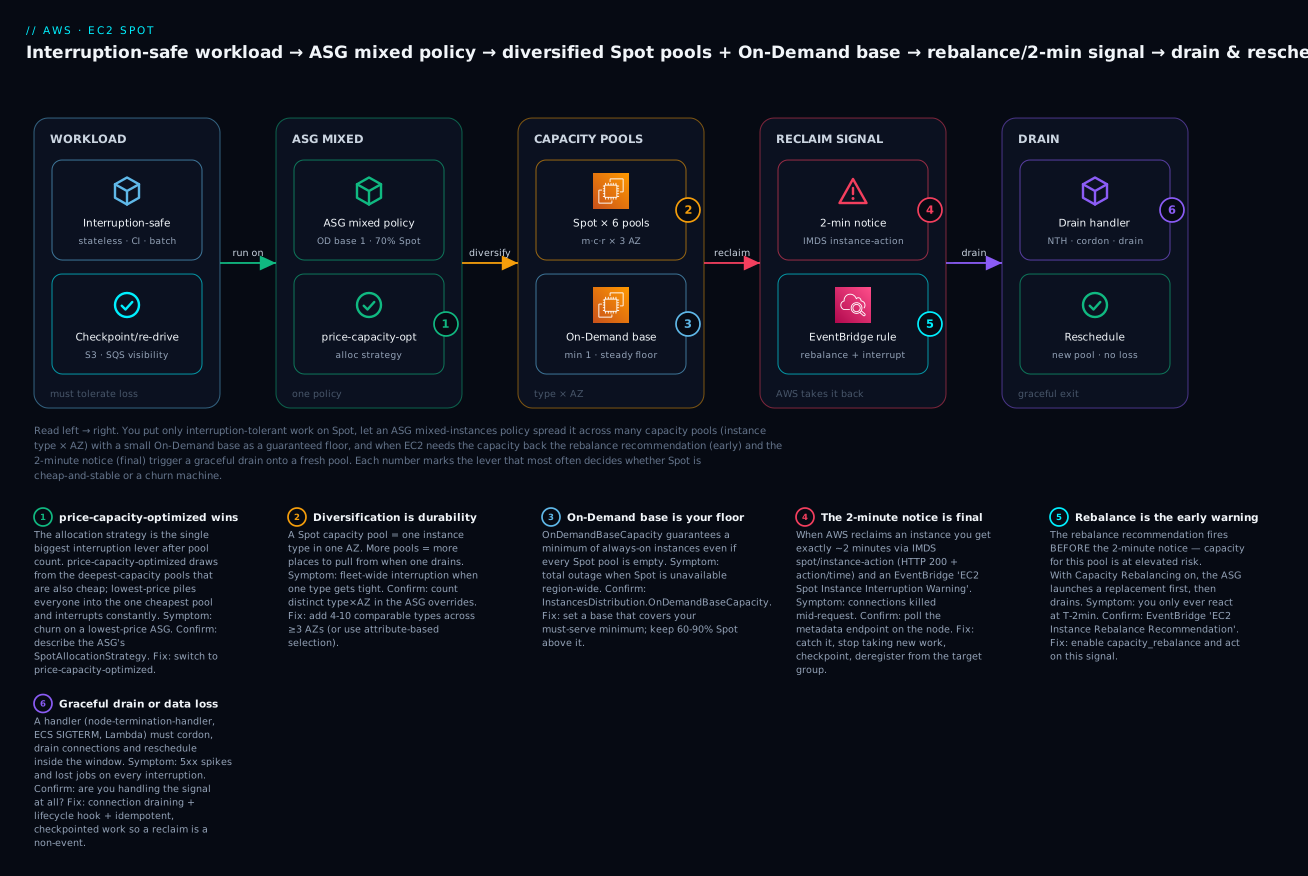
Trace one interruption-tolerant workload from left to right and you can see every lever in a single path. You put only interruption-safe work on Spot — stateless services, CI, batch — and you make it checkpoint or re-drive so losing a node loses no work. That workload runs behind an Auto Scaling group mixed-instances policy: a small On-Demand base as a guaranteed floor plus a large Spot percentage above it, with the price-capacity-optimized allocation strategy choosing pools. The ASG spreads instances across many capacity pools — comparable instance types × three AZs — so any single pool’s reclaim is a scratch, not a wound. When AWS needs the capacity back, two signals fire: the earlier rebalance recommendation and the final 2-minute notice, delivered through both IMDS (spot/instance-action) and an EventBridge rule. A drain handler (node-termination-handler, an ECS SIGTERM, or a Lambda) catches the signal, deregisters the node from the target group, drains in-flight connections, checkpoints, and lets the ASG reschedule onto a fresh pool — no dropped requests, no lost jobs.
Real-world scenario
Streamforge, a fictional media-tech startup, runs a video-transcoding pipeline on EC2: users upload source video, a fleet of workers pull jobs from SQS, transcode each into an adaptive-bitrate ladder, and write the output to S3. At launch they ran the whole thing On-Demand on c6i.4xlarge — a compute-heavy job, sized right for the shape — and the EC2 line was $48,000/month and climbing. The workload was screaming to be on Spot: every job was idempotent (already re-driven via SQS visibility timeout + a DLQ), stateless (source and output both in S3), and per-job (losing a worker mid-transcode just meant the message reappeared and another worker picked it up).
Their first attempt at Spot failed, and it failed in the classic way. An engineer created a Spot Fleet pinned to c6i.4xlarge in a single AZ on the lowest-price strategy — one shallow, popular, contended pool. During a busy afternoon that pool tightened and AWS reclaimed the entire fleet within ten minutes. Jobs piled up in SQS, the transcode SLA blew, and the team’s takeaway was “Spot isn’t stable enough for us.” They rolled back to On-Demand and ate the bill for another quarter.
The fix was diversification and the right manager. They rebuilt on an Auto Scaling group mixed-instances policy: OnDemandBaseCapacity: 2 (enough to always drain the queue at a baseline), OnDemandPercentageAboveBaseCapacity: 0 (100% Spot above the base), SpotAllocationStrategy: price-capacity-optimized, and ten comparable compute-biased types in the overrides — c7i, c6i, c7g, c6g, m7i, m6i in 4xlarge and 2xlarge — across three AZs. That is roughly 40+ capacity pools. They enabled Capacity Rebalancing and deployed a tiny drain agent that, on the 2-minute notice, stopped pulling from SQS and let the in-flight message’s visibility timeout expire so another worker retried it. They also added an EventBridge rule on the interruption and rebalance events feeding a CloudWatch dashboard so they could see interruptions instead of guessing.
The result: interruptions still happen — several a day — but each one now costs one job’s retry, invisible against the queue. The blended On-Demand-plus-Spot bill dropped from $48,000 to about $12,500/month, a ~74% cut, with the transcode SLA better than before because they could now afford to run a larger fleet and clear the queue faster. The lesson Streamforge learned is the lesson of this whole article: Spot didn’t change between attempt one and attempt two — diversification and the allocation strategy did.
Advantages and disadvantages
| Advantages | Disadvantages |
|---|---|
| Up to 90% cheaper than On-Demand (routinely 50–70%) | Can be reclaimed with ~2 minutes’ notice |
| Same instances, AMIs, networking as On-Demand | No capacity guarantee — Spot can be unavailable |
| Zero commitment; turn on/off freely | Requires interruption-tolerant workload design |
| Stacks on top of Savings Plans discounts | Poorly diversified fleets churn badly |
| Diversification makes interruptions rare & isolated | Separate vCPU quota from On-Demand (a common surprise) |
| Native support in ASG/Fleet/EKS/ECS/Batch/EMR | Not for stateful primaries, licensed-per-node, non-checkpointed jobs |
| Huge fit for CI, batch, render, big-data, stateless web | Windows / slow-boot workloads amplify churn cost |
| Placement score + Advisor let you plan durability | Interruption handling is your responsibility |
The trade-off resolves cleanly by workload. For fault-tolerant, flexible, stateless work, the advantages dominate and there is rarely a reason not to run most of the fleet on Spot with an On-Demand base. For stateful, singleton, or licensed work, the disadvantages are disqualifying and you should stay On-Demand (or make the workload HA first). The mistake is treating it as all-or-nothing: the right answer is almost always a blend — On-Demand base for the must-serve floor, Spot for everything above it.
Hands-on lab
This lab builds a diversified mixed-instances Auto Scaling group (On-Demand base 1, 70% Spot, price-capacity-optimized, six comparable types across three AZs), an EventBridge rule that catches Spot interruption and rebalance events, verifies diversification, and tears everything down. It is free-tier-friendly if you use t3.micro/t4g.micro and delete promptly. ⚠️ Costs money if left running: even Spot instances bill per-second, and the ALB (if you add one) bills hourly — do the teardown.
Step 0 — Prerequisites
aws sts get-caller-identity            # confirm the account/identity
aws configure get region               # confirm your default region
VPC=$(aws ec2 describe-vpcs --filters Name=isDefault,Values=true \
  --query 'Vpcs[0].VpcId' --output text)
# Grab three default subnets in three AZs
SUBNETS=$(aws ec2 describe-subnets --filters Name=vpc-id,Values=$VPC \
  --query 'Subnets[?MapPublicIpOnLaunch==`true`].SubnetId | [:3]' --output text \
  | tr '\t' ',')
echo "VPC=$VPC  SUBNETS=$SUBNETS"
Step 1 — A launch template (the fleet’s blueprint)
AMI=$(aws ssm get-parameters \
  --names /aws/service/ami-amazon-linux-latest/al2023-ami-kernel-default-x86_64 \
  --query 'Parameters[0].Value' --output text)

aws ec2 create-launch-template \
  --launch-template-name spot-lab-lt \
  --launch-template-data "{
    \"ImageId\": \"$AMI\",
    \"InstanceType\": \"t3.micro\",
    \"MetadataOptions\": {\"HttpTokens\": \"required\"},
    \"TagSpecifications\": [{\"ResourceType\":\"instance\",
      \"Tags\":[{\"Key\":\"Name\",\"Value\":\"spot-lab\"}]}]
  }"
Expected: a JSON block with LaunchTemplateId starting lt-…. Note HttpTokens: required enforces IMDSv2.
Step 2 — The mixed-instances ASG
aws autoscaling create-auto-scaling-group \
  --auto-scaling-group-name spot-lab-asg \
  --min-size 2 --max-size 6 --desired-capacity 4 \
  --vpc-zone-identifier "$SUBNETS" \
  --capacity-rebalance \
  --mixed-instances-policy '{
    "LaunchTemplate": {
      "LaunchTemplateSpecification": {"LaunchTemplateName":"spot-lab-lt","Version":"$Latest"},
      "Overrides": [
        {"InstanceType":"t3.micro"},  {"InstanceType":"t3a.micro"},
        {"InstanceType":"t2.micro"},  {"InstanceType":"t3.small"},
        {"InstanceType":"t3a.small"}, {"InstanceType":"t2.small"}
      ]
    },
    "InstancesDistribution": {
      "OnDemandBaseCapacity": 1,
      "OnDemandPercentageAboveBaseCapacity": 30,
      "SpotAllocationStrategy": "price-capacity-optimized"
    }
  }'
Expected: no output on success. Give it ~60–90s to launch instances.
Step 3 — Verify diversification and the Spot/On-Demand split
aws autoscaling describe-auto-scaling-groups \
  --auto-scaling-group-names spot-lab-asg \
  --query 'AutoScalingGroups[0].Instances[].[InstanceId,InstanceType,AvailabilityZone,LifecycleState]' \
  --output table

# How many are Spot vs On-Demand? (Spot instances show a lifecycle of "spot")
IDS=$(aws autoscaling describe-auto-scaling-groups \
  --auto-scaling-group-names spot-lab-asg \
  --query 'AutoScalingGroups[0].Instances[].InstanceId' --output text)
aws ec2 describe-instances --instance-ids $IDS \
  --query 'Reservations[].Instances[].[InstanceId,InstanceType,Placement.AvailabilityZone,InstanceLifecycle]' \
  --output table
Expected: four instances; one with InstanceLifecycle = null/absent (On-Demand base) and the rest showing spot. You should see a mix of instance types and AZs — that is your diversification working. InstanceLifecycle: spot is how you tell a Spot instance apart from On-Demand.
Step 4 — An EventBridge rule to catch interruptions
# Rule matching both Spot signals
aws events put-rule --name spot-lab-interruptions \
  --event-pattern '{
    "source": ["aws.ec2"],
    "detail-type": [
      "EC2 Spot Instance Interruption Warning",
      "EC2 Instance Rebalance Recommendation"
    ]
  }'

# Target an SNS topic (create one first, or point at a Lambda/SSM doc)
TOPIC=$(aws sns create-topic --name spot-lab-alerts --query TopicArn --output text)
aws events put-targets --rule spot-lab-interruptions \
  --targets "Id=1,Arn=$TOPIC"
Expected: FailedEntryCount: 0 from put-targets. Now any Spot interruption or rebalance in the account publishes to the topic. (You generally can’t force an interruption on demand — AWS does it when it needs capacity — so this rule is the production pattern rather than something you’ll reliably trigger in the lab.)
Step 5 — Peek at prices and placement scores
aws ec2 describe-spot-price-history \
  --instance-types t3.micro t3a.micro t3.small \
  --product-description "Linux/UNIX" \
  --start-time "$(date -u +%Y-%m-%dT%H:%M:%SZ)" \
  --query 'SpotPriceHistory[].[AvailabilityZone,InstanceType,SpotPrice]' --output table

aws ec2 get-spot-placement-scores \
  --target-capacity 10 --target-capacity-unit-type vcpu \
  --instance-types t3.micro t3a.micro t3.small t2.micro \
  --region-names "$(aws configure get region)" \
  --query 'SpotPlacementScores[].[Region,Score]' --output table
Step 6 — Teardown (do this!)
aws autoscaling delete-auto-scaling-group \
  --auto-scaling-group-name spot-lab-asg --force-delete   # ⚠️ terminates instances
aws events remove-targets --rule spot-lab-interruptions --ids 1
aws events delete-rule --name spot-lab-interruptions
aws sns delete-topic --topic-arn "$TOPIC"
aws ec2 delete-launch-template --launch-template-name spot-lab-lt
| Resource | Created in step | Ongoing cost | Teardown |
|---|---|---|---|
| Launch template | 1 | None | delete-launch-template |
| Auto Scaling group | 2 | Per-second instance cost | delete-auto-scaling-group --force-delete |
| EC2 instances (Spot + 1 OD) | 2 (by ASG) | Per-second | Terminated by ASG delete |
| EventBridge rule + target | 4 | None | remove-targets + delete-rule |
| SNS topic | 4 | None (until published a lot) | delete-topic |
Common mistakes & troubleshooting
The playbook below is the heart of running Spot in production. Each row is a real failure mode with the exact way to confirm it and the fix.
| # | Symptom | Root cause | Confirm (exact command / console path) | Fix |
|---|---|---|---|---|
| 1 | Instances interrupted constantly (every few min) | Too few pools and/or lowest-price strategy — you’re pinned to the shallowest, most-contended pool |
aws autoscaling describe-auto-scaling-groups → check SpotAllocationStrategy and count Overrides[] |
Switch to price-capacity-optimized; add 6–10 comparable types across ≥3 AZs |
| 2 | Whole fleet reclaimed at once | Single instance type × single AZ = one pool | Console → EC2 → the fleet all same type/AZ; ASG has 1 override / 1 subnet | Diversify types and subnets/AZs; enable capacity-rebalance |
| 3 | Can’t launch Spot — InsufficientInstanceCapacity |
No spare capacity in the chosen pool(s) right now | Spot request → Status = capacity-not-available; describe-spot-instance-requests |
Add more types/AZs; use price-capacity-optimized; check placement score; retry / other region |
| 4 | Can’t launch — MaxSpotInstanceCountExceeded / VcpuLimitExceeded |
Hit the Spot vCPU quota (separate from On-Demand!) | Service Quotas → EC2 → “All Standard … Spot Instance Requests” (vCPUs) | Request a Spot quota increase (see Service Quotas & Limit Increases) |
| 5 | Launch fails — SpotMaxPriceTooLow |
Your max-price is below the current Spot price |
Spot request Status = price-too-low; compare to describe-spot-price-history |
Remove the cap (default to On-Demand) or raise it |
| 6 | Interruption handler never fires | IMDSv2 enforced but agent uses IMDSv1 (no token) → 401; or EventBridge rule pattern wrong | On node: curl IMDS without token → 401; check aws events describe-rule pattern |
Use IMDSv2 token in the agent; fix detail-type/source in the rule |
| 7 | 5xx spikes on every interruption | No connection draining / no deregistration before termination | ALB access logs show resets at reclaim time; no deregister-targets call |
Add drain handler (deregister + deregistration_delay); set an ASG lifecycle hook |
| 8 | Stateful workload lost data on reclaim | Ran a stateful/singleton on Spot; instance-store or non-persistent EBS gone | It’s instance store, or EBS DeleteOnTermination=true; interruption behavior terminate |
Move state off-box (S3/RDS/EFS); use On-Demand for primaries |
| 9 | Long job lost hours of progress | No checkpointing; terminate behavior |
Job has no resume point; started from scratch | Checkpoint to S3/DynamoDB and resume; or stop/hibernate (persistent request) |
| 10 | On-Demand cost didn’t drop after “enabling Spot” | OnDemandPercentageAboveBaseCapacity still 100, or base too high |
InstancesDistribution.OnDemandPercentageAboveBaseCapacity == 100 |
Set it to 0–30; keep a small base only |
| 11 | ASG launches only On-Demand, never Spot | Spot pools unavailable for the listed types, or price cap too low, or no capacity | describe-scaling-activities shows Spot launch failures |
Add more/newer types; remove max-price cap; span more AZs |
| 12 | Rebalance replacements churn the fleet | Capacity Rebalancing replacing aggressively in a thin region | Frequent capacity-rebalance scaling activities |
Diversify more so replacements land in deep pools; or accept it as the price of proactivity |
| 13 | Karpenter/EKS nodes drain ungracefully | No NTH (non-Karpenter) or PDBs too strict | Pods evicted with errors; no cordon before terminate | Deploy NTH (queue mode) or Karpenter; set sane PodDisruptionBudgets |
| 14 | Windows / slow-boot fleet feels unstable | Boot time ≈ interruption interval; churn cost amplified | Instances spend much of their life booting | Bake AMIs; reduce boot work; keep more On-Demand base |
Spot error & status-code reference
Beyond exceptions, Spot requests carry a status code that tells you exactly where you are. Read it from aws ec2 describe-spot-instance-requests --query 'SpotInstanceRequests[].Status' or in the console under EC2 → Spot Requests.
| Code / status | Meaning | Likely cause | How to confirm | Fix |
|---|---|---|---|---|
InsufficientInstanceCapacity |
No Spot capacity in the pool | Contended/thin pool right now | Request status capacity-not-available |
More types/AZs; price-capacity-optimized; retry |
capacity-not-available |
Same as above (request status) | No spare capacity for the ask | describe-spot-instance-requests |
Diversify; check placement score |
SpotMaxPriceTooLow / price-too-low |
Max price < current Spot price | You lowered the cap | Compare to describe-spot-price-history |
Default max to On-Demand or raise it |
MaxSpotInstanceCountExceeded |
Hit Spot request limit | Spot vCPU quota reached | Service Quotas → Spot vCPUs | Request a quota increase |
VcpuLimitExceeded |
Spot vCPU quota exceeded | Separate from On-Demand quota | Service Quotas console | Increase Spot vCPU quota |
instance-terminated-by-price |
Interrupted, reason price | Spot price passed your max | Spot request history | Remove/raise the max-price cap |
instance-terminated-no-capacity |
Interrupted, reason capacity | AWS needed capacity back | Spot request history | Diversify; Capacity Rebalancing |
instance-terminated-capacity-oversubscribed |
Pool oversubscribed | Too many requests, thin pool | Spot request history | Spread across more pools/AZs |
pending-evaluation / pending-fulfillment |
Request being processed | Normal, transient | Request status | Wait; if stuck, check capacity |
fulfilled |
Running normally | — | Request status | Nothing — healthy |
constraint-not-fulfillable |
A request constraint can’t be met | Bad valid-until / launch group | Request status | Loosen constraints |
Decision table — from symptom to first move
| If you see… | It’s probably… | Do this |
|---|---|---|
| Frequent interruptions across the fleet | Poor diversification or lowest-price |
Add pools; switch to price-capacity-optimized |
capacity-not-available at launch |
Contended pool(s) | Add types/AZs; check placement score; try another region |
price-too-low |
Max-price cap too low | Default cap to On-Demand |
VcpuLimitExceeded / MaxSpotInstanceCountExceeded |
Spot quota, not On-Demand | Raise the Spot vCPU quota |
| Bill didn’t drop | Still mostly On-Demand | Lower OnDemandPercentageAboveBaseCapacity |
| 5xx at reclaim time | No draining | Deregister + drain + lifecycle hook |
| Data loss on reclaim | Stateful on Spot | Externalise state; On-Demand for primaries |
| Only On-Demand ever launches | Spot unavailable for your types | Diversify; remove price cap; more AZs |
The three nastiest failures deserve a paragraph each. The single-pool wipeout (rows 1–2) is the most common and most damaging: a fleet on lowest-price or one instance type looks fine for days, then a capacity event reclaims everything in minutes. It always traces back to diversification, and the fix is always the same — many comparable types, ≥3 AZs, price-capacity-optimized. The silent quota wall (row 4) blindsides people because Spot vCPU quota is a separate Service Quota from On-Demand; a brand-new account can have plenty of On-Demand headroom and a tiny (or zero, for accelerated families) Spot quota, so Spot “mysteriously won’t launch.” Always check Service Quotas → EC2 → …Spot Instance Requests (measured in vCPUs) before a big Spot rollout. The unhandled interruption (rows 6–7) turns a routine reclaim into a user-visible outage: if IMDSv2 is enforced and your drain agent forgot the token, every metadata call 401s and the handler never sees the notice, so the instance vanishes mid-request with no draining. Test the token path explicitly.
Best practices
| # | Rule | Why it matters |
|---|---|---|
| 1 | Diversify aggressively — 6–10 comparable types across ≥3 AZs (or ABS) | Interruptions become rare and isolated; it’s the #1 lever |
| 2 | Use price-capacity-optimized everywhere |
Lowest interruptions for near-lowest price; the blanket default |
| 3 | Keep an On-Demand base for anything user-facing | Guarantees a floor if Spot is region-wide unavailable |
| 4 | Leave max-price at the On-Demand default |
Lowering it only removes pools and adds price interruptions |
| 5 | Enable Capacity Rebalancing | Replace at-risk instances before the 2-minute notice |
| 6 | Handle the 2-minute notice (IMDS or EventBridge) | Drain + checkpoint turns a reclaim into a non-event |
| 7 | Design stateless / idempotent / checkpointed | The prerequisite that makes interruptions harmless |
| 8 | Put only interruption-tolerant work on Spot | Stateful/licensed/uncheckpointed work doesn’t belong |
| 9 | Check the Spot placement score before big rollouts | Plan durability instead of discovering it in prod |
| 10 | Watch interruptions via the EventBridge dashboard/metrics | See churn early; you can’t fix what you can’t see |
| 11 | Raise the Spot vCPU quota ahead of scale | Avoid the silent quota wall on launch day |
| 12 | Use the right manager — ASG mixed-instances (or Karpenter for K8s) | Get diversification, replacement, and health checks for free |
Security notes
Spot instances are ordinary EC2 instances, so all standard EC2 security applies unchanged: instance profiles with least-privilege IAM, security groups, IMDSv2 enforced (HttpTokens: required), encrypted EBS, and running in private subnets behind a NAT/ALB as appropriate. There are a few Spot-specific angles worth calling out.
| Control | What it protects | How to apply |
|---|---|---|
| IMDSv2 required | Metadata/credential theft via SSRF | Launch template MetadataOptions.HttpTokens=required; your drain agent must send the token |
| Least-privilege drain role | Blast radius of a compromised node | The drain agent needs only elasticloadbalancing:DeregisterTargets + minimal ASG hooks — not * |
| Service-linked role | Fleet management permissions | AWSServiceRoleForEC2Spot / …SpotFleet are auto-created; don’t over-scope them |
ec2:RunInstances conditions |
Enforcing Spot-only or type limits | IAM ec2:InstanceMarketType condition key can require spot; restrict types/regions |
| Encrypted EBS + no secrets on instance-store | Data exposure on shared spare hardware | KMS-encrypt EBS; never persist secrets to ephemeral instance-store |
| Tag-based controls | Governance across mixed fleets | Enforce tags via launch template + SCPs; cost-allocate Spot separately |
| CloudTrail on Spot APIs | Audit of fleet/quota changes | RequestSpotInstances, CreateFleet, ModifySpotFleetRequest are logged |
The most-missed item is the drain agent’s IAM scope: teams give it a broad role “to be safe,” which is exactly backwards — a Spot node runs untrusted-ish workloads and gets replaced constantly, so it should carry the smallest possible permissions. Scope its role to deregistering itself and completing lifecycle actions, nothing more.
Cost & sizing
Spot’s whole point is cost, so size the savings, not the box. The bill is driven by how much of your fleet is Spot, how deep the discount runs in your chosen pools, and how much churn you incur (each replacement re-runs boot work, and any non-checkpointed lost work is wasted spend).
| Cost driver | Effect on the bill | Lever |
|---|---|---|
| Spot % of the fleet | Directly sets your discount depth | Raise Spot% above the base as tolerance allows |
| Pool choice / discount depth | 50–90% off varies by pool | price-capacity-optimized finds deep+cheap pools |
| Churn rate | Boot re-work + lost uncheckpointed work | Diversify to cut interruptions; checkpoint |
| On-Demand base size | The un-discounted floor | Keep the base as small as SLA allows |
EBS on stop/hibernate |
Stopped instances still pay for EBS | Use terminate unless resume is worth it |
| Data transfer / NAT | Unchanged by Spot | Same optimisation as any EC2 fleet |
A worked estimate makes it concrete. Suppose a 10-instance c7i.2xlarge fleet in us-east-1, On-Demand ≈ $0.357/hr each (illustrative), and Spot ≈ $0.12/hr (≈66% off, illustrative — always check live prices). With a mixed policy of 1 On-Demand base + 9 Spot:
| Component | On-Demand only | Mixed (1 OD + 9 Spot) | Note |
|---|---|---|---|
| 10 × On-Demand @ $0.357/hr | $3.57/hr | — | Baseline |
| 1 × On-Demand base @ $0.357/hr | — | $0.357/hr | The guaranteed floor |
| 9 × Spot @ ~$0.12/hr | — | $1.08/hr | ~66% off, illustrative |
| Hourly total | $3.57/hr | ~$1.44/hr | ~60% cheaper |
| Monthly (730 hr) | ~$2,606 | ~$1,051 | ~$1,555/mo saved (~₹1.3 lakh) |
Free-tier note: the free tier covers 750 hrs/month of t2.micro/t3.micro On-Demand, not Spot specifically — Spot has no separate free tier, but it bills per-second at the discounted rate, so a t3.micro Spot instance run for the lab costs fractions of a cent. The real cost risk in the lab is forgetting to delete the ASG (it keeps launching instances) — hence the teardown step. Prices above are illustrative; always confirm with describe-spot-price-history and the AWS Pricing Calculator for your region.
Interview & exam questions
Q1. What is a Spot Instance and where does the discount come from? An EC2 instance running on spare EC2 capacity offered at up to 90% off On-Demand, on the condition that AWS can reclaim it with a ~2-minute notice when the capacity is needed. Same hardware/AMI/networking as On-Demand — only the price and the interruptibility differ. Maps to SAA-C03 cost-optimization.
Q2. How does the modern Spot price model differ from the old one? The pre-2017 model was a real-time auction where you bid and were interrupted when the market price beat your bid. Since Nov 2017 the price is smoothed on long-term supply/demand; you no longer bid. You may set an optional max price (default On-Demand) that acts only as a safety cap.
Q3. What is a Spot capacity pool, and why does diversification matter? A pool is instances of one instance type, in one AZ, one OS, one tenancy. Interruptions are per-pool, so spreading a fleet across many pools means a single pool’s reclaim costs only a fraction of the fleet. Diversification is the #1 durability lever.
Q4. Which allocation strategy should you use, and why?
price-capacity-optimized for almost everything — it draws from the deepest-capacity pools and, among those, the cheapest, giving low interruptions at near-lowest cost. Avoid lowest-price (packs into the shallowest, most-reclaimed pool).
Q5. Describe the interruption signals and how you receive them.
An earlier, soft rebalance recommendation (elevated risk) and a hard 2-minute interruption notice. Both arrive via IMDS (spot/instance-action, events/recommendations/rebalance) and EventBridge (EC2 Spot Instance Interruption Warning, EC2 Instance Rebalance Recommendation).
Q6. How do you run Spot safely in an Auto Scaling group?
A mixed-instances policy: OnDemandBaseCapacity for a floor, OnDemandPercentageAboveBaseCapacity for the split, SpotAllocationStrategy = price-capacity-optimized, 6–10 comparable types in the overrides across ≥3 AZs, and CapacityRebalance = true.
Q7. What are the three interruption reasons? capacity (AWS needs it back — most common), price (Spot price passed your max — rare with default), and constraint (a request constraint changed). In the modern model, capacity dominates.
Q8. What’s the difference between terminate, stop, and hibernate on interruption?
terminate (default) destroys the instance; stop (persistent request) preserves EBS and restarts when capacity returns; hibernate writes RAM to EBS for a warm resume. Stop/hibernate need a persistent request and EBS-backed root.
Q9. A team says “Spot keeps interrupting our whole fleet.” First questions?
How many instance types and AZs (pools)? Which allocation strategy? If it’s one type/one AZ or lowest-price, that’s the bug — diversify and switch to price-capacity-optimized. Also check they enabled Capacity Rebalancing.
Q10. Why won’t Spot launch even though On-Demand works fine?
Likely the separate Spot vCPU quota (Service Quotas → …Spot Instance Requests) — new accounts often have low/zero Spot quota, especially for accelerated families — or a too-low max-price, or no capacity in the chosen pools.
Q11. Which workloads should never go on Spot? Stateful database primaries, single stateful singletons without a replica, per-node licensed software, and long non-checkpointed jobs. These lose data or break on reclaim; keep them On-Demand or make them HA first.
Q12. How do you handle Spot in Kubernetes?
Either managed node groups with capacityType: SPOT + the node-termination-handler (IMDS or Queue Processor mode), or Karpenter with capacity-type: spot, which natively watches the interruption SQS queue and cordons/drains. Use PodDisruptionBudgets.
Quick check
- Your Spot fleet is pinned to
c7g.2xlargeinus-east-1aon thelowest-pricestrategy and gets reclaimed in bulk. What two changes fix it? - You set
max-priceto half the On-Demand rate to “save more.” What actually happens? - Which two IMDS paths surface the 2-minute notice and the rebalance recommendation, and what HTTP code means “no interruption”?
- In an ASG mixed-instances policy, which parameter guarantees a floor of always-on instances, and which sets the Spot/On-Demand split above it?
- Spot won’t launch but On-Demand does, in a new account. What’s the most likely cause and where do you check?
Answers
- Diversify across many comparable types and ≥3 AZs (more pools), and switch the strategy to
price-capacity-optimized. Enabling Capacity Rebalancing helps too. - You don’t save more — you already pay the market Spot price. You only make fewer pools usable (any pool above your cap is excluded) and introduce price-based interruptions, reducing durability. Leave it at the On-Demand default.
latest/meta-data/spot/instance-action(2-minute notice) andlatest/meta-data/events/recommendations/rebalance(rebalance). HTTP 404 means no interruption; 200 + JSON means you’re being reclaimed.OnDemandBaseCapacity(absolute floor of On-Demand) andOnDemandPercentageAboveBaseCapacity(the split above the base — e.g. 30 = 30% On-Demand / 70% Spot).- The separate Spot vCPU quota (Service Quotas → EC2 → “All Standard … Spot Instance Requests,” measured in vCPUs). New accounts often have low/zero Spot quota; request an increase.
Glossary
| Term | Definition |
|---|---|
| Spot Instance | An EC2 instance on spare capacity at up to 90% off, reclaimable with ~2 minutes’ notice |
| Spot capacity pool | The set of unused instances of one type, in one AZ, one OS, one tenancy |
| Spot price | The current, smoothly-varying price for a pool, set by supply/demand trends |
| Maximum price | Your per-hour cap on what you’ll pay; defaults to the On-Demand price |
| Interruption | AWS reclaiming a Spot instance when it needs the capacity or price passes your cap |
| 2-minute notice | The hard interruption warning via IMDS spot/instance-action + EventBridge |
| Rebalance recommendation | An earlier, softer “elevated interruption risk” signal |
| Allocation strategy | How a fleet/ASG chooses pools (price-capacity-optimized, etc.) |
| price-capacity-optimized | The recommended strategy — deepest-capacity pools, then cheapest among them |
| Diversification | Spreading a fleet across many pools to make interruptions rare and isolated |
| Mixed-instances policy | An ASG config running On-Demand + Spot across many types |
| On-Demand base | A guaranteed minimum of On-Demand instances in a mixed fleet |
| Capacity Rebalancing | ASG/Fleet proactively replacing at-risk Spot before the 2-minute notice |
| Interruption behavior | What happens on reclaim: terminate, stop, or hibernate |
| Spot placement score | A 1–10 score of how likely a Spot ask is to succeed per Region/AZ |
| node-termination-handler | A Kubernetes agent that turns interruption signals into graceful drains |
| Attribute-based selection (ABS) | Specifying vCPU/memory requirements so ASG auto-includes matching types |
Next steps
- Attach Spot to a real scaling setup — Auto Scaling with Launch Templates: A Hands-On Guide is where the mixed-instances policy lives.
- When the fleet won’t scale — work the Auto Scaling “not scaling” troubleshooting playbook alongside this article’s interruption playbook.
- Pick the right shapes to diversify across — Choosing the Right EC2 Instance Type: Families, Naming & Right-Sizing tells you which types are truly comparable.
- Run Spot under containers — ECS vs EKS on Fargate vs EC2: Choosing Your Container Path covers where Karpenter, ECS capacity providers, and Fargate Spot fit.
- Clear the quota wall first — Service Quotas & Limit Increases: A Hands-On Guide so your Spot vCPU quota is ready before launch day.