Quick take: Amazon EKS splits a Kubernetes cluster into two halves with a hard line between them. The control plane — the API servers and etcd — is run by AWS across three Availability Zones; you never SSH into it, patch it, or scale it, and you pay a flat ~$0.10 per hour per cluster for it. The data plane — the worker capacity your pods actually run on — is yours to choose and own: managed node groups (EC2 in an Auto Scaling group EKS upgrades for you), self-managed nodes (your AMI, your
bootstrap), or Fargate profiles (a serverless micro-VM per pod, no nodes at all). eksctl is the fast path that wires all of it — control plane, VPC, IAM roles, node group, add-ons — from oneClusterConfigYAML in about fifteen minutes. Get the two IAM roles, the subnet tags, or the authentication mode wrong and you will stare at nodes that never join,kubectlthat saysUnauthorized, or a Fargate pod stuckPendingforever.
A platform team I advised spun up their first EKS cluster from the console wizard on a Thursday, deployed a workload, and by Friday could not run kubectl get pods — every command returned error: You must be logged in to the server (Unauthorized). Nothing was broken. The cluster was ACTIVE, the two nodes were Ready, the pods were running. The problem was authorization: the engineer who had created the cluster held the implicit admin grant, and only she could talk to it. When she went on leave, her teammate’s IAM role was mapped nowhere — not in the legacy aws-auth ConfigMap, not as an access entry — so the API server authenticated his token, found no Kubernetes group, and refused every request. The fix took ninety seconds once someone understood the model: one aws eks create-access-entry plus one associate-access-policy, and he was in. But for a day the whole team believed the cluster was down.
This article is the hands-on, production-grade path to your first EKS cluster and the mental model that keeps you out of that Friday. You will learn the managed-control-plane-versus-data-plane split and why it changes how you think about upgrades and cost; the Kubernetes version lifecycle on EKS (standard versus extended support, and how you upgrade one minor at a time); the four ways to create a cluster — eksctl, Console, Terraform, CloudFormation — compared fairly; the three compute options and exactly when each wins; the cluster IAM role and the node IAM role with their required managed policies; the VPC and subnet requirements including the kubernetes.io/role/elb tags and the VPC CNI IP-per-pod model, IP exhaustion, and prefix delegation; authentication and authorization — the legacy aws-auth ConfigMap versus EKS access entries and access policies, aws eks update-kubeconfig, and RBAC; and the managed add-ons (VPC CNI, CoreDNS, kube-proxy, EBS/EFS CSI). Then you build the real thing with an eksctl ClusterConfig (a managed node group and a Fargate profile), wire kubeconfig, deploy an nginx Deployment and confirm it lands on both nodes and Fargate, see the equivalent Terraform, and tear it all down. Because you will return to this mid-incident, every option, limit, error string, and failure mode is laid out as scannable tables.
If you are still deciding whether EKS is even the right container platform for you, read Choosing Your Container Path on AWS: ECS vs EKS vs Fargate first — this guide assumes you have already chosen Kubernetes.
What problem this solves
You have decided on Kubernetes — for the ecosystem, the portability, the Helm charts, the operators, the team’s existing muscle memory. Now you need a cluster on AWS that is highly available, secure, upgradeable, and not a second full-time job to operate. Running Kubernetes the hard way means standing up and forever babysitting your own control plane: three etcd members with backups and quorum, redundant API servers behind a load balancer, the scheduler and controller-manager, certificate rotation, and a version upgrade dance you perform by hand every few months while praying nothing drifts. That is weeks of setup and a permanent on-call burden for infrastructure that delivers zero business value — it just has to work.
Amazon Elastic Kubernetes Service (EKS) removes exactly that half. AWS runs the control plane for you: a minimum of two API server instances and three etcd nodes spread across three Availability Zones in an account AWS owns, health-checked and auto-replaced, patched for CVEs, and exposed to you as a single HTTPS endpoint. You get a conformant, upstream Kubernetes — the same API your Helm charts and kubectl already speak — without owning the parts that page you at 3 a.m. What you keep is the data plane (the worker capacity) and everything you deploy onto it, which is where your actual decisions live.
What breaks without EKS, or with it misconfigured: you run your own control plane and an etcd disk fills or loses quorum and the whole cluster is bricked. Or you adopt EKS but confuse the cluster role (which lets the EKS service manage AWS resources on your behalf) with the node role (which lets your EC2 workers register and pull images), and your nodes never join — kubectl get nodes returns nothing while you restart things that were never wrong. Or you place worker nodes in subnets you forgot to tag, and every type: LoadBalancer Service sits on <pending> because the controller cannot find a subnet to put the load balancer in. Or you pack too many pods onto a t3.medium, the VPC CNI runs out of IP addresses, and new pods wedge in ContainerCreating with failed to assign an IP address to container. Or you set the cluster endpoint to private-only with no VPN or bastion and lock yourself out entirely. Every one of these is a setup mistake, one or two layers below the symptom — and every one is in this guide.
Who hits this: every team standing up their first EKS cluster, and plenty of teams on their tenth who still treat cluster creation as a checklist they copied from a blog. The teams that suffer are the ones who click the console wizard, watch it go green, and never build the mental model of which half AWS owns, which half they own, and how identity flows from IAM into Kubernetes RBAC. The teams that thrive treat the cluster as code — an eksctl ClusterConfig or a Terraform module in version control — so the whole thing is reproducible, reviewable, and rebuildable.
Here is the two-halves model as a single table. Internalise this split and every later decision — upgrades, cost, IAM, networking — has an obvious home.
| Layer | Who owns it | What is in it | You configure | You are billed for |
|---|---|---|---|---|
| Control plane | AWS (managed) | API servers, etcd, scheduler, controller-manager, cloud-controller | Version, endpoint access, logging, encryption | Flat ~$0.10/hr per cluster |
| Data plane | You | Worker capacity: EC2 nodes and/or Fargate pods | Node groups, Fargate profiles, AMIs, scaling | EC2/Fargate compute + EBS + data transfer |
| Networking | Shared | VPC, subnets, ENIs, security groups, VPC CNI | VPC, subnet tags, CNI settings, endpoint access | NAT gateways, data transfer, ELBs |
| Identity | You | Cluster role, node role, IRSA/Pod Identity, access entries | IAM roles, access entries, aws-auth, RBAC | Nothing (IAM is free) |
| Add-ons | Shared | VPC CNI, CoreDNS, kube-proxy, CSI drivers | Managed add-on versions + config | Compute the add-on pods consume |
Learning objectives
By the end of this article you can:
- Explain the EKS shared-responsibility split — what the managed control plane does, what you own in the data plane, and how that changes upgrades, cost, and troubleshooting.
- Choose a cluster-creation path — eksctl, Console, Terraform, or CloudFormation — and justify it against reproducibility, speed, and team fit.
- Author an eksctl
ClusterConfigthat provisions a control plane, a managed node group, a Fargate profile, IAM/OIDC, and managed add-ons in one file. - Wire the two IAM roles correctly — the cluster role and the node role — with the exact managed policies each requires, and the Fargate pod execution role.
- Meet the VPC and subnet requirements — two AZs, public/private subnets, the
kubernetes.io/role/elbandinternal-elbtags — and reason about the VPC CNI IP-per-pod model, IP exhaustion, and prefix delegation. - Grant cluster access with modern access entries and access policies (and read/repair a legacy
aws-authConfigMap), then connect withaws eks update-kubeconfig. - Install and version managed add-ons and understand the compatibility and conflict-resolution rules.
- Diagnose the classic setup failures —
Unauthorized, nodes not joining, IP exhaustion, FargatePending, add-on version conflicts, and endpoint lockout — from symptom to exact confirming command to fix.
Prerequisites & where this fits
This is an advanced article. You should be comfortable with core Kubernetes objects (Pod, Deployment, Service, namespace, RBAC), with AWS IAM roles and trust policies, and with VPC fundamentals. If VPC subnets and route tables are fuzzy, read Build a VPC From Scratch: Subnets, Route Tables & Internet Gateway first — EKS networking assumes you can reason about public versus private subnets and NAT.
You need these tools locally: the AWS CLI v2 (configured with a principal that can create EKS clusters, IAM roles, and VPC resources), kubectl (a minor version within one of your cluster’s, e.g. 1.29–1.31 for a 1.30 cluster), eksctl (0.190+ for the newest features), and optionally Terraform 1.5+. Confirm your identity before anything else — nearly every access problem later traces back to which IAM principal you are.
aws sts get-caller-identity          # who am I? note this ARN — it becomes the cluster's implicit admin
aws --version                        # aws-cli/2.x
eksctl version                       # 0.19x
kubectl version --client             # client within one minor of the cluster
Where this fits in the bigger picture: creating the cluster is step one of a platform. After this you will grant pods fine-grained AWS permissions with IRSA and EKS Pod Identity, expose HTTP with the AWS Load Balancer Controller and Ingress, and — when a workload will not schedule — work the Pod Pending & CrashLoopBackOff playbook. This article is the foundation all three build on.
| You should already know | Why it matters here |
|---|---|
| Kubernetes objects (Pod/Deployment/Service/RBAC) | You deploy onto the cluster and RBAC is half of access control |
| IAM roles + trust policies | The cluster role, node role, and Fargate role are trust-policy-gated |
| VPC subnets, route tables, NAT, IGW | Nodes live in private subnets that must route to the API and ECR |
| Security groups | The cluster↔node SG rules decide whether nodes join |
| Container images + registries (ECR) | Nodes pull images; the node role needs registry read |
| Load balancers (ALB/NLB) conceptually | Subnet tags and the LB controller expose Services |
Core concepts
Start with the vocabulary, because EKS overloads a few familiar words and the failures cluster around the seams.
The control plane is the managed Kubernetes brain: API server (the front door every kubectl and controller talks to), etcd (the strongly-consistent key-value store that holds all cluster state), the scheduler (decides which node a pod lands on), the controller-manager (drives Deployments, ReplicaSets, and friends toward desired state), and the cloud-controller-manager (integrates with AWS — provisions load balancers, EBS volumes). AWS runs all of it, replicated across three AZs, behind one cluster endpoint (an HTTPS URL like https://ABCD.gr7.ap-south-1.eks.amazonaws.com). You cannot log into these machines; you interact only through the API.
The data plane is where your pods run. It is EC2 worker nodes, Fargate micro-VMs, or both. Each worker runs a kubelet (the node agent that talks to the API server and manages pod lifecycle), a container runtime (containerd), kube-proxy (programs iptables/IPVS for Service routing), and the VPC CNI (aws-node, which wires pods into your VPC). Nodes join the cluster by authenticating to the API server and reporting Ready.
The VPC is your network. The control plane reaches into it through cross-account elastic network interfaces (X-ENIs) — EKS places ENIs in your subnets so the API server can talk to kubelets (for kubectl exec, logs, and metrics). Your nodes reach out to the control-plane endpoint over 443. Pods get real VPC IP addresses from the VPC CNI, which is why IP planning matters so much on EKS.
Identity flows in two stages you must not conflate. Authentication answers “who are you?” — EKS maps your AWS IAM identity (via a signed token from aws eks get-token) to a Kubernetes user/groups, through either the legacy aws-auth ConfigMap or modern access entries. Authorization answers “what may you do?” — standard Kubernetes RBAC (Roles, ClusterRoles, bindings) or EKS access policies. Unauthorized is an authentication failure; Forbidden is an authorization failure. Reading the exact word tells you which half to fix.
| Term | One-line definition | Where it bites when wrong |
|---|---|---|
| Control plane | AWS-managed API server + etcd + controllers | Version skew blocks upgrades; endpoint lockout |
| Data plane | Your worker capacity (EC2 nodes / Fargate) | Nodes not joining; no capacity to schedule |
| Node | An EC2 worker running kubelet + containerd + CNI | NotReady; failed to join |
| kubelet | Node agent; talks to API server | Version-skew errors; node NotReady |
VPC CNI (aws-node) |
Gives each pod a real VPC IP from ENIs | IP exhaustion; ContainerCreating stalls |
| kube-proxy | Programs Service routing on each node | Service traffic blackholes |
| CoreDNS | In-cluster DNS | Name resolution fails cluster-wide |
| Cluster endpoint | The HTTPS API URL | Private-only lockout; timeouts |
| X-ENI | Cross-account ENI for control→node comms | exec/logs fail if SG blocks 10250 |
| Access entry | IAM→Kubernetes identity mapping via EKS API | Unauthorized if your principal has none |
| IRSA / Pod Identity | Pod-level AWS permissions | Pods get AccessDenied to AWS APIs |
| OIDC provider | Cluster’s identity issuer for IRSA | IRSA broken if not associated |
And the object-to-owner mapping — who is responsible for keeping each piece healthy:
| Component | Managed by | Upgraded by | Fails how |
|---|---|---|---|
| API server / etcd | AWS | You trigger; AWS executes | Almost never; AWS auto-heals |
| Scheduler / controllers | AWS | AWS | Transparent |
| Worker nodes (managed NG) | You (EKS assists) | Managed rolling upgrade | Won’t join; NotReady; capacity |
| Worker nodes (self-managed) | You | You (ASG + AMI + drain) | Bootstrap/AMI/skew issues |
| Fargate pods | AWS runs the micro-VM | AWS patches | Profile selector miss; limits |
| VPC CNI / CoreDNS / kube-proxy | You (as add-ons) | You (managed add-on update) | Version conflict; IP exhaustion |
| Load balancers, EBS volumes | AWS (via cloud-controller) | N/A | Subnet tags; IAM |
Kubernetes versions and the upgrade lifecycle
EKS tracks upstream Kubernetes closely but on its own support calendar, and understanding that calendar is what keeps you off an unsupported version at renewal time.
A Kubernetes minor version (1.29, 1.30, 1.31 …) gets standard support on EKS for roughly 14 months from the day EKS makes it available. After standard support ends, the version rolls into extended support for up to 12 additional months — during which you keep receiving security patches but pay a higher control-plane rate (~$0.60/hr instead of ~$0.10/hr, a 6× jump per cluster). When extended support ends, EKS auto-upgrades your cluster to the next supported version whether you are ready or not. The lesson: budget an upgrade cadence, because standing still eventually costs 6× and then upgrades you anyway.
| Support phase | Duration | Control-plane price | Patches? | Your obligation |
|---|---|---|---|---|
| Standard support | ~14 months per minor | ~$0.10/hr | Yes | Plan the next upgrade |
| Extended support | Up to ~12 more months | ~$0.60/hr | Security only | Upgrade before it ends |
| End of extended | — | — | No | EKS force-upgrades you |
Upgrades follow strict rules. You move one minor version at a time (1.29 → 1.30, never 1.29 → 1.31 in a single jump). You upgrade the control plane first, then your node groups, then your add-ons — in that order, because the control plane must be at or ahead of the nodes. The Kubernetes version-skew policy allows a kubelet to trail the API server by a limited number of minors (recent Kubernetes permits up to three), and EKS blocks a control-plane upgrade that would push nodes outside the allowed skew; best practice is to keep nodes within one minor of the control plane and upgrade them promptly after the plane.
| Upgrade step | Command surface | What it does | Watch for |
|---|---|---|---|
| 1. Pre-flight | eksctl / console upgrade insights |
Flags deprecated APIs, add-on compat | Deprecated API usage blocks a clean move |
| 2. Control plane | aws eks update-cluster-version |
Rolls API servers to the new minor | ~10–20 min; irreversible (no downgrade) |
| 3. Node groups | aws eks update-nodegroup-version |
Rolling replace with new AMI | PDBs can stall the drain |
| 4. Add-ons | aws eks update-addon |
Moves CNI/CoreDNS/kube-proxy versions | Match to the new K8s minor |
| 5. Verify | kubectl get nodes, app smoke test |
Confirms Ready + workloads healthy |
Skew warnings in kubelet logs |
| Version-skew rule | Value / behaviour | Consequence if violated |
|---|---|---|
| One minor per upgrade | 1.29→1.30 only | API rejects a two-minor jump |
| Control plane ≥ nodes | Plane upgraded first | Nodes on a newer minor than the plane are unsupported |
| kubelet trails API by ≤ N | Recent K8s allows up to 3 | EKS blocks the plane upgrade that would exceed it |
| kubectl within ±1 of API | e.g. 1.29–1.31 for 1.30 | Odd errors/omissions with far-off clients |
| Downgrade | Not supported | You cannot roll a control plane back |
Two practical notes. First, check deprecated APIs before you upgrade — a workload still calling a removed API (say an old Ingress or PodSecurityPolicy API) will break the moment the plane moves; the EKS console’s Upgrade Insights and tools like kubent (kube-no-trouble) surface these. Second, managed node groups make step 3 a one-click rolling upgrade — EKS cordons, drains (respecting PodDisruptionBudgets), and replaces each node with a new AMI — whereas self-managed nodes make it your script. This is a major reason to prefer managed node groups.
Ways to create a cluster: eksctl, Console, Terraform, CloudFormation
There are four sanctioned ways to create an EKS cluster, and they trade speed against reproducibility against blast-radius. Pick deliberately; do not let “whatever the tutorial used” become your production standard.
eksctl is the official-community CLI (originally Weaveworks) purpose-built for EKS. You describe the whole cluster — control plane, VPC (it can create a sensible default one), IAM roles, OIDC, node groups, Fargate profiles, add-ons — in a single ClusterConfig YAML (apiVersion: eksctl.io/v1alpha5), then eksctl create cluster -f cluster.yaml. Under the hood it orchestrates CloudFormation stacks, so you get rollback-on-failure for free. It is the fastest path from zero to a working, correctly-wired cluster, and it knows the defaults — subnet tags, the OIDC provider, the node role policies — so you do not forget them.
The Console wizard is fine for learning and for a throwaway cluster, but it is click-ops: not reproducible, easy to misconfigure quietly, and painful to code-review. Use it to look at a cluster, not to build one you will keep.
Terraform is the right answer for an organisation that already runs infrastructure as code. You get a single state file, plan/apply review, drift detection, and composition with the rest of your AWS estate (VPC, IAM, RDS). You can write the raw resources (aws_eks_cluster, aws_eks_node_group, aws_eks_fargate_profile) or lean on the excellent community terraform-aws-modules/eks/aws module, which bakes in the same defaults eksctl knows. The cost is more upfront boilerplate than eksctl.
CloudFormation (or CDK) is native IaC with no extra tool to install, and it is what eksctl generates anyway. Choose it when your shop standardises on CloudFormation; otherwise Terraform or eksctl are more ergonomic for EKS specifically.
| Dimension | eksctl | Console | Terraform | CloudFormation |
|---|---|---|---|---|
| Speed to first cluster | Fastest (one command) | Fast (wizard) | Medium (write HCL) | Medium (write templates) |
| Reproducible / version-controlled | Yes (YAML) | No | Yes | Yes |
| Reviewable diffs | Partial | No | Yes (plan) |
Yes (change sets) |
| Knows EKS defaults | Yes (best) | Partial | Via module | You supply them |
| Composes with wider estate | Weak | No | Strong | Strong (AWS-native) |
| Rollback on failure | Yes (CFN under it) | N/A | Manual | Yes |
| Best for | Fast start, labs, small teams | Learning, inspection | IaC-first orgs | AWS-native IaC shops |
| Drift detection | No | No | Yes | Yes (drift detection) |
| eksctl command | What it does |
|---|---|
eksctl create cluster -f cfg.yaml |
Create everything from a ClusterConfig |
eksctl create cluster --name X --fargate |
Quick cluster with a default Fargate profile |
eksctl get cluster |
List clusters in the region |
eksctl create nodegroup -f cfg.yaml |
Add a node group to an existing cluster |
eksctl create fargateprofile --cluster X --namespace ns |
Add a Fargate profile |
eksctl utils update-kube-proxy --cluster X |
Update a core add-on |
eksctl upgrade cluster --name X --version 1.30 |
Upgrade the control plane |
eksctl delete cluster -f cfg.yaml |
Tear the whole stack down |
A pragmatic recommendation: use eksctl for labs and to learn the shape of a correct cluster, then translate that shape into Terraform for anything you will keep. This article shows both.
Compute options: managed node groups vs self-managed vs Fargate
The single biggest data-plane decision is what your pods run on. EKS gives three options, and mature clusters often mix them — a managed node group for the general fleet, Fargate for spiky or isolation-sensitive workloads.
Managed node groups are EC2 instances in an Auto Scaling group that EKS provisions and lifecycle-manages for you. You pick the instance type(s), min/max/desired counts, and AMI family; EKS handles the launch template, the join bootstrap, and — critically — managed upgrades that cordon, drain (honouring PodDisruptionBudgets), and rolling-replace nodes with a new AMI. You do not write a bootstrap.sh. This is the default choice for most clusters: you keep node-level control (SSH, DaemonSets, GPUs, local storage) without owning the upgrade choreography.
Self-managed nodes are an Auto Scaling group you own end to end — your launch template, your AMI, your bootstrap.sh (or nodeadm on AL2023) to join the cluster. You reach for this only when you need something managed node groups do not offer: a fully custom AMI, exotic bootstrap, a specific OS, or per-node behaviour outside the managed envelope. The price is that upgrades, patching, and join debugging are all yours.
Fargate profiles run each pod in its own serverless micro-VM — no nodes to see, patch, or scale. You create a profile that selects pods by namespace (and optionally labels); any pod that matches lands on Fargate, sized to its own CPU/memory requests, billed per-pod per-second. It is the strongest workload isolation AWS offers (one kernel per pod) and it removes node ops entirely, but it comes with real limits: no DaemonSets, no privileged pods, no HostNetwork/HostPort, no GPUs, no EBS volumes (EFS only), a per-pod ceiling (up to ~16 vCPU / 120 GB), and Fargate pods must run in private subnets. Fargate also has a slower cold start than a warm node.
| Factor | Managed node group | Self-managed nodes | Fargate profile |
|---|---|---|---|
| You manage the AMI/OS | No (EKS-optimised) | Yes | No (none exists) |
| Node upgrades | Managed rolling | Your script | N/A (no nodes) |
Bootstrap (bootstrap.sh) |
Handled for you | You write it | N/A |
| DaemonSets | Yes | Yes | No |
| GPUs / special instances | Yes | Yes | No |
| EBS volumes | Yes | Yes | No (EFS only) |
| Privileged / HostNetwork | Yes | Yes | No |
| Isolation | Shared kernel per node | Shared kernel per node | Micro-VM per pod |
| Scaling | Cluster Autoscaler / Karpenter | You wire it | Automatic per pod |
| Billing granularity | Per instance-second | Per instance-second | Per pod-second |
| Cold start | Fast (warm node) | Fast | Slower (VM per pod) |
| Best for | General fleet, most workloads | Custom AMI/OS needs | Spiky, isolated, batch, few-pod ns |
Key managed-node-group settings you will set, and their gotchas:
| Setting | Values / example | Default | When to change | Gotcha |
|---|---|---|---|---|
instanceTypes |
["t3.medium"], mixed list |
— | Cost/perf; Spot needs a list | One type limits Spot diversity |
minSize/maxSize/desiredCapacity |
2 / 4 / 2 |
— | Scale envelope | Min too low → no HA |
amiFamily |
AmazonLinux2023, Bottlerocket |
AL2023 | Security/OS choice | AL2 is deprecating; move to AL2023 |
volumeSize |
20–100 GiB |
20 | Image/log density | Small disk → image-pull no space left |
privateNetworking |
true/false |
false | Nodes in private subnets | true needs NAT/endpoints to reach ECR/API |
capacityType |
ON_DEMAND / SPOT |
On-Demand | Cost | Spot needs interruption-tolerant workloads |
labels / taints |
role: general / NoSchedule |
none | Scheduling control | Taint with no toleration = pods Pending |
ssh.allow |
true + key |
false | Break-glass access | Prefer SSM over open SSH |
updateConfig.maxUnavailable |
1 or a % |
1 | Upgrade speed vs safety | Too high drains too many at once |
Key Fargate profile fields:
| Field | Meaning | Rule |
|---|---|---|
name |
Profile identifier | Unique per cluster |
selectors[].namespace |
Namespace to match (required) | Pod’s namespace must equal this |
selectors[].labels |
Optional label match | ALL listed labels must match |
subnets |
Where Fargate pods run | Private subnets only |
podExecutionRoleArn |
Role Fargate uses to pull images/log | Needs AmazonEKSFargatePodExecutionRolePolicy |
A subtlety that trips everyone: on a Fargate-only cluster, CoreDNS will sit Pending because its Deployment defaults to EC2 nodes that do not exist. You must either create a Fargate profile that selects the kube-system namespace and remove the eks.amazonaws.com/compute-type: ec2 constraint, or run at least one node group for system pods. eksctl’s --fargate handles this for you; hand-rolled clusters do not.
IAM: the cluster role and the node role
EKS uses two completely separate IAM roles, and swapping or omitting one is the single most common setup failure. They are not interchangeable and they trust different services.
The cluster IAM role is assumed by the EKS service itself so it can manage AWS resources on your behalf — create the cross-account ENIs, wire load balancers, and so on. Its trust policy allows the principal eks.amazonaws.com, and it carries the managed policy AmazonEKSClusterPolicy. You attach this role to the cluster at creation time.
The node IAM role is assumed by the EC2 worker instances (via an instance profile) so the kubelet can register with the cluster and pull images. Its trust policy allows ec2.amazonaws.com, and it needs three managed policies: AmazonEKSWorkerNodePolicy (register with the cluster), AmazonEC2ContainerRegistryReadOnly (pull images from ECR), and AmazonEKS_CNI_Policy (the VPC CNI’s permission to manage ENIs and IPs). You attach this role to the node group. Missing any of the three is a classic “nodes never join” cause.
There is also a Fargate pod execution role — trusted by eks-fargate-pods.amazonaws.com, carrying AmazonEKSFargatePodExecutionRolePolicy — that Fargate uses to pull the pod’s image and ship its logs. And separately, for giving your application pods AWS permissions, you use IRSA or Pod Identity (a different mechanism entirely — see the IRSA hands-on); do not overload the node role with app permissions, or every pod on the node inherits them.
| Role | Trusted principal | Required managed policy | Attached to | Omitting it → |
|---|---|---|---|---|
| Cluster role | eks.amazonaws.com |
AmazonEKSClusterPolicy |
The cluster | Cluster can’t manage AWS resources; create fails |
| Node role | ec2.amazonaws.com |
AmazonEKSWorkerNodePolicy |
Node group | Nodes can’t register → never join |
| Node role | ec2.amazonaws.com |
AmazonEC2ContainerRegistryReadOnly |
Node group | ImagePullBackOff on ECR images |
| Node role | ec2.amazonaws.com |
AmazonEKS_CNI_Policy |
Node group | CNI can’t assign IPs → pods stuck |
| Fargate role | eks-fargate-pods.amazonaws.com |
AmazonEKSFargatePodExecutionRolePolicy |
Fargate profile | Fargate pods can’t pull/log → Pending/fail |
| App perms | pods.eks.amazonaws.com (Pod Identity) or OIDC (IRSA) |
Your custom policy | ServiceAccount | Pods get AccessDenied to AWS APIs |
| Common node-role add-on policy | Why add it |
|---|---|
AmazonSSMManagedInstanceCore |
Shell into nodes via SSM Session Manager (no open SSH) |
AmazonEBSCSIDriverPolicy |
If the EBS CSI driver uses the node role (prefer IRSA) |
CloudWatchAgentServerPolicy |
Node/container metrics to CloudWatch |
A note on IAM best practice: attach AmazonEKS_CNI_Policy to the node role for a quick start, but in production move it off the node role and onto the VPC CNI’s service account via IRSA/Pod Identity, so the broad ENI-management permission is scoped to the aws-node pods rather than granted to every workload sharing the node.
VPC, subnets, and the VPC CNI
EKS networking is where “it created fine but nothing works” lives. Get the subnets, tags, and CNI capacity right up front and you avoid a whole category of pain.
Subnet requirements
A cluster needs subnets in at least two Availability Zones. The standard production shape is public subnets (for internet-facing load balancers and NAT gateways) plus private subnets (where you put worker nodes and Fargate pods). The control plane needs to place its cross-account ENIs into subnets you designate; those should be spread across your AZs. Worker nodes belong in private subnets in almost every real deployment — they reach the control-plane endpoint and ECR outbound through a NAT gateway or, cheaper at scale, VPC endpoints (interface endpoints for eks, ecr.api, ecr.dkr, sts, logs, and the S3 gateway endpoint for image layers).
The subnet tags that make load balancers work
For the in-cluster controllers to auto-discover which subnets to place load balancers in, you tag them:
| Tag | Value | Put on | What it enables |
|---|---|---|---|
kubernetes.io/role/elb |
1 |
Public subnets | Internet-facing ELBs auto-discover these |
kubernetes.io/role/internal-elb |
1 |
Private subnets | Internal ELBs auto-discover these |
kubernetes.io/cluster/<name> |
owned or shared |
Subnets (legacy) | Older auto-discovery / ownership hint |
Miss the elb tag on public subnets and every type: LoadBalancer Service or internet-facing Ingress sits on <pending> with an event like could not find any suitable subnets for creating the ELB. This is the number-one “my Service has no external IP” cause, and it is a tagging problem, not a controller bug.
| Subnet requirement | Value / rule | Gotcha |
|---|---|---|
| AZ count | ≥ 2 | Single-AZ cluster is not supported |
| Free IPs for control-plane ENIs | A handful per subnet | Tiny subnets starve X-ENIs |
| Node subnet routing | To API endpoint + ECR | Private subnet needs NAT or endpoints |
| Public LB subnets | Tagged role/elb |
Untagged → LB <pending> |
| Private LB subnets | Tagged role/internal-elb |
Untagged → internal LB <pending> |
| Subnet size vs pod density | See CNI math below | /26 subnet exhausts IPs fast |
The VPC CNI IP-per-pod model
This is the concept that surprises people coming from other clouds. The Amazon VPC CNI (aws-node) gives every pod a real, routable IP address from your VPC subnet — not an overlay IP. That is wonderful for network transparency (pods are first-class VPC citizens, security groups and flow logs just work) and brutal for IP planning: pod density per node is capped by how many IPs the instance’s ENIs can hold, and a busy cluster can exhaust a subnet’s addresses.
The default max-pods-per-node formula is (number of ENIs × (IPv4 addresses per ENI − 1)) + 2. Each instance type has fixed ENI and IP-per-ENI limits, so:
| Instance type | ENIs | IPv4 / ENI | Default max pods | With prefix delegation |
|---|---|---|---|---|
t3.small |
3 | 4 | 11 | up to 110 |
t3.medium |
3 | 6 | 17 | up to 110 |
t3.large |
3 | 12 | 35 | up to 110 |
m5.large |
3 | 10 | 29 | up to 110 |
m5.xlarge |
4 | 15 | 58 | up to 110 |
c5.xlarge |
4 | 15 | 58 | up to 110 |
m5.4xlarge |
8 | 30 | 234 | up to 250 |
Two consequences. First, a small node like t3.medium tops out at 17 pods by default — and system pods (aws-node, kube-proxy, CoreDNS) eat into that — so a handful of nodes runs out of pod slots surprisingly fast. Second, every running pod consumes a subnet IP; a /24 node subnet (251 usable) with dense nodes can exhaust addresses, and then new pods wedge in ContainerCreating with the CNI logging failed to assign an IP address to container.
Prefix delegation — the fix for both problems
Prefix delegation flips the CNI from handing out single IPs to handing out /28 prefixes (16 IPs) per ENI slot, so a node can address far more pods without attaching more ENIs — raising the ceiling to 110 pods (instances with ≤ 30 vCPUs) or 250 (larger), and using subnet space more efficiently. You enable it on the VPC CNI add-on:
kubectl set env daemonset aws-node -n kube-system \
  ENABLE_PREFIX_DELEGATION=true WARM_PREFIX_TARGET=1
| CNI setting | Purpose | Default | When to change |
|---|---|---|---|
ENABLE_PREFIX_DELEGATION |
/28 prefixes → far more pods/IP-efficient | false |
High pod density; IP pressure |
WARM_PREFIX_TARGET |
Pre-warm prefixes for fast pod starts | 1 |
Latency-sensitive scale-up |
WARM_IP_TARGET / MINIMUM_IP_TARGET |
Pre-warm individual IPs | unset | Tighten IP hoarding on small subnets |
AWS_VPC_K8S_CNI_CUSTOM_NETWORK_CFG |
Put pods in a different subnet than the node | false |
Node subnet too small; separate pod CIDR |
ENABLE_POD_ENI |
Security groups per pod | false |
Pod-level SG isolation |
AWS_VPC_K8S_CNI_EXTERNALSNAT |
Control SNAT for pod egress | false |
Pods egress via NAT with their own IP |
If you take one thing from this section: size your node subnets for peak pod count, and turn on prefix delegation before you need it, not after the pager fires. For a deep treatment, the Pod Pending & CrashLoopBackOff playbook walks the CNI-exhaustion failure end to end.
Cluster endpoint access
The cluster API endpoint can be public, public + private, or private-only:
| Endpoint mode | kubectl from internet |
Nodes reach API via | Risk |
|---|---|---|---|
| Public (default) | Yes | Public path | Endpoint exposed (restrict CIDRs) |
| Public + private | Yes (from allowed CIDRs) | Private VPC path | Balanced; common production choice |
| Private only | No (needs VPN/bastion) | Private VPC path | Lockout if you have no in-VPC access |
Restrict public access with publicAccessCidrs (e.g. your office/VPN egress). Do not flip to private-only unless you already have a VPN, Direct Connect, or bastion inside the VPC — otherwise the moment it takes effect, your own kubectl times out and you have locked yourself out of your cluster.
Authentication and authorization: aws-auth vs access entries
This is the subsystem behind that Friday-morning Unauthorized, and EKS is mid-migration between two mechanisms, so you need to understand both.
The legacy path: the aws-auth ConfigMap
Historically, EKS mapped AWS IAM identities to Kubernetes users/groups through a single ConfigMap named aws-auth in the kube-system namespace. You edited its mapRoles and mapUsers blocks to grant access, mapping an IAM role ARN to Kubernetes groups like system:masters (admin) or a custom RBAC group. It works, but it is dangerous: it is one YAML document guarding all cluster access, a typo or a bad indent can lock everyone out, there is no API-level audit of who changed access, and you have to already have access to edit it — a chicken-and-egg problem when you are locked out.
# aws-auth ConfigMap (legacy) — one typo here can brick access for everyone
apiVersion: v1
kind: ConfigMap
metadata: { name: aws-auth, namespace: kube-system }
data:
  mapRoles: |
    - rolearn: arn:aws:iam::111122223333:role/eks-node-role
      username: system:node:{{EC2PrivateDNSName}}
      groups: [system:bootstrappers, system:nodes]
    - rolearn: arn:aws:iam::111122223333:role/DevOps
      username: devops
      groups: [system:masters]
The modern path: access entries + access policies
Since 2023, EKS supports access entries managed through the EKS API itself — no ConfigMap editing. You create an access entry for an IAM principal (aws eks create-access-entry), then associate an access policy that grants a level of access (aws eks associate-access-policy). AWS ships curated access policies that map to standard Kubernetes RBAC:
| Access policy | Grants | Scope |
|---|---|---|
AmazonEKSClusterAdminPolicy |
Full cluster-admin |
Whole cluster |
AmazonEKSAdminPolicy |
Admin within namespaces | Cluster or namespace |
AmazonEKSEditPolicy |
Read/write workloads | Cluster or namespace |
AmazonEKSViewPolicy |
Read-only | Cluster or namespace |
AmazonEKSAdminViewPolicy |
View incl. more resource types | Cluster or namespace |
Access entries are safer (API-driven, auditable via CloudTrail, no risky ConfigMap), and they can be created with Terraform/CloudFormation at cluster-build time, so access is code, not a post-create manual edit. This is the recommended path for all new clusters.
The cluster’s authentication mode decides which mechanisms are live:
| Auth mode | aws-auth active? | Access entries active? | Use when |
|---|---|---|---|
CONFIG_MAP |
Yes | No | Legacy clusters only |
API_AND_CONFIG_MAP |
Yes | Yes | Migration period (recommended default) |
API |
No | Yes | New clusters, all-in on access entries |
| aws-auth ConfigMap | Access entries |
|---|---|
Edit YAML in kube-system |
EKS API / IaC calls |
| No native audit trail | CloudTrail-audited |
| Typo can lock out everyone | Isolated per-principal, safer |
| Must already have access to edit | Managed out-of-band via IAM |
| No curated permission levels | Curated access policies |
| Hard to express in IaC cleanly | First-class Terraform/CFN resources |
Who is the cluster’s first admin?
When you create a cluster, the IAM principal that created it is granted implicit cluster-admin — this is why the creator can always get in and a teammate cannot until mapped. Modern clusters expose this as bootstrapClusterCreatorAdminPermissions (default true); set it false if you want to manage all access explicitly through access entries from the start.
Connecting kubectl
Whichever mechanism grants you access, you connect the same way — aws eks update-kubeconfig writes a kubeconfig context that calls aws eks get-token under the hood (an exec plugin) to present a signed IAM token to the API server:
aws eks update-kubeconfig --name kv-eks-lab --region ap-south-1
kubectl config current-context      # arn:aws:eks:ap-south-1:1111...:cluster/kv-eks-lab
kubectl get svc                      # a successful call proves auth + authz
If that last command returns Unauthorized, your token authenticated but your identity maps to nothing — create an access entry. If it returns Forbidden, you are mapped but your RBAC does not permit the action — associate a broader access policy or add an RBAC binding.
Cluster add-ons
A bare EKS control plane is not enough to run pods — it needs the networking, DNS, and Service-routing agents on the data plane. EKS packages these as managed add-ons: AWS-curated, versioned bundles it installs and updates for you, so you stop hand-applying manifests and hoping the version matches your Kubernetes minor.
The three core add-ons every cluster needs: VPC CNI (vpc-cni, pod networking), CoreDNS (coredns, in-cluster DNS), and kube-proxy (kube-proxy, Service routing). Beyond those, common managed add-ons include the EBS CSI driver (persistent block volumes), EFS CSI driver (shared file storage), the EKS Pod Identity Agent (modern pod IAM), ADOT (OpenTelemetry), and the Mountpoint for S3 CSI driver.
| Add-on | Add-on name | Purpose | Needs IAM? |
|---|---|---|---|
| VPC CNI | vpc-cni |
Pod networking / IPs | Yes (AmazonEKS_CNI_Policy, via IRSA) |
| CoreDNS | coredns |
In-cluster DNS | No |
| kube-proxy | kube-proxy |
Service routing (iptables/IPVS) | No |
| EBS CSI | aws-ebs-csi-driver |
Block PVs | Yes (AmazonEBSCSIDriverPolicy) |
| EFS CSI | aws-efs-csi-driver |
Shared file PVs | Yes (EFS policy) |
| Pod Identity Agent | eks-pod-identity-agent |
Pod-level IAM (modern) | No (it enables it) |
| Snapshot controller | snapshot-controller |
Volume snapshots | No |
| ADOT | adot |
OpenTelemetry collector | Yes (for exporters) |
Managed add-ons carry an add-on version tied to the Kubernetes minor, and updates use a conflict-resolution strategy so your customisations are not silently clobbered:
| Add-on concept | Values | Meaning |
|---|---|---|
addonVersion |
v1.x.y-eksbuild.z |
Must be compatible with the cluster’s K8s minor |
resolveConflicts |
NONE |
Fail the update if you changed managed fields |
resolveConflicts |
OVERWRITE |
EKS wins; your manual edits are replaced |
resolveConflicts |
PRESERVE |
Keep your edits; update the rest |
serviceAccountRoleArn |
An IAM role ARN | Wire IRSA to the add-on’s service account |
# List what versions are compatible with your cluster, then install the EBS CSI add-on
aws eks describe-addon-versions --addon-name aws-ebs-csi-driver \
  --kubernetes-version 1.30 --query 'addons[].addonVersions[].addonVersion' --output table

aws eks create-addon --cluster-name kv-eks-lab --addon-name aws-ebs-csi-driver \
  --service-account-role-arn arn:aws:iam::111122223333:role/kv-ebs-csi-irsa \
  --resolve-conflicts OVERWRITE
Prefer managed add-ons over self-applied manifests: EKS keeps them compatible across upgrades, surfaces health, and updates them with one call. The trade-off is slightly less freedom to customise — which is what resolveConflicts: PRESERVE is for.
Architecture at a glance
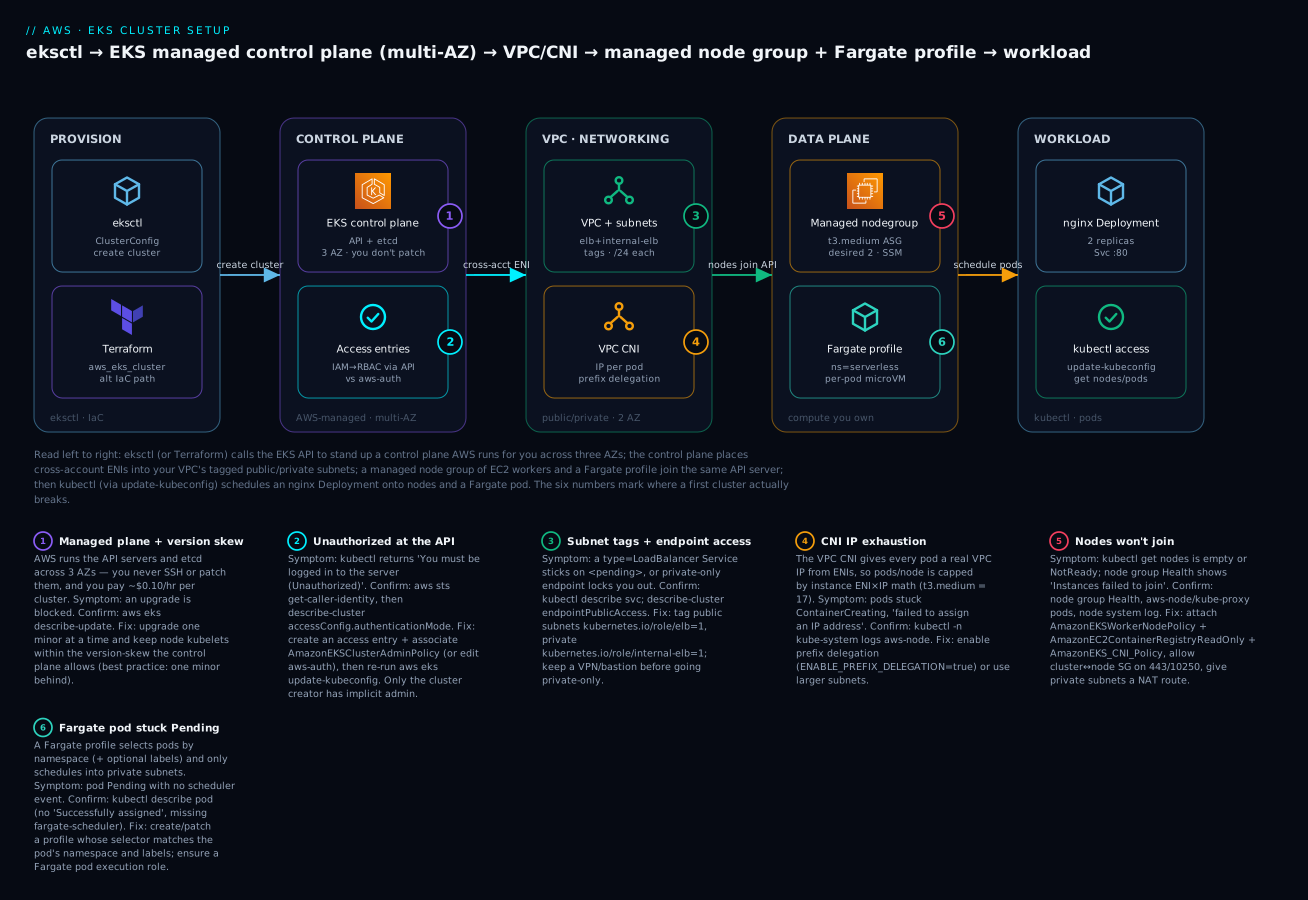
The diagram shows the exact cluster you build in the lab, read left to right. On the far left, eksctl (or, on the alternate IaC path, Terraform) calls the EKS API to create the cluster. The control plane — API server and etcd across three AZs — is stood up and run by AWS; you never touch those machines, and access to the API is gated by access entries that map your IAM identity into Kubernetes RBAC. The control plane reaches into your VPC through cross-account ENIs placed in the tagged public/private subnets; the VPC CNI hands every pod a real VPC IP. Your data plane joins that same API server: a managed node group of t3.medium EC2 workers in an Auto Scaling group, plus a Fargate profile that runs pods in the serverless namespace as per-pod micro-VMs. Finally, kubectl — pointed at the cluster by aws eks update-kubeconfig — schedules an nginx Deployment whose replicas land on the nodes, while a pod in serverless lands on Fargate. The six numbered badges mark exactly where a first cluster breaks: managed-plane version skew, the Unauthorized at the API, subnet tags and endpoint access, CNI IP exhaustion, nodes failing to join, and a Fargate pod stuck Pending.
Real-world scenario
FleetPulse, a logistics-analytics startup (fictional, but the failure is real), was migrating from a self-hosted Kubernetes cluster to EKS to stop babysitting etcd. Their platform engineer, Anitha, stood up a cluster with an eksctl ClusterConfig: ap-south-1, Kubernetes 1.29, one managed node group of three t3.medium nodes in private subnets, the three core add-ons, and a Fargate profile for their batch namespace of nightly report jobs. It came up clean in seventeen minutes. Deployments ran. Everyone moved on.
Six weeks later the platform started rejecting new pods during the evening traffic peak. kubectl get pods showed a growing tail of pods stuck in ContainerCreating; kubectl describe pod on any of them showed the CNI event failed to assign an IP address to container. Nothing was crashing — pods simply could not get networked. Anitha’s first instinct was capacity, so she bumped the node group’s desiredCapacity from three to six. It bought twenty minutes, then the wall returned. She suspected a CNI bug and considered rolling back the add-on. Meanwhile the nightly batch Fargate jobs, in a separate namespace, kept running perfectly — a clue she initially dismissed.
The real cause was two problems compounding. First, the VPC CNI IP-per-pod ceiling: a t3.medium tops out at 17 pods by default, and with system pods and their fairly dense microservices, each node was near its pod cap — adding nodes helped only until the next limit. Second, and worse, the node subnets were /26 (only 59 usable IPs each), chosen months earlier “to keep the address plan tidy.” Because the VPC CNI gives every pod a real subnet IP, the subnets themselves were running out of addresses — no number of nodes could fix a subnet with no free IPs. The Fargate jobs kept working because Fargate pods drew from a different, roomier private subnet.
The fix had two parts, applied in a maintenance window. They enabled prefix delegation on the VPC CNI (ENABLE_PREFIX_DELEGATION=true, WARM_PREFIX_TARGET=1), which raised the per-node pod ceiling toward 110 and used IP space far more efficiently by handing out /28 prefixes. And they added a pair of larger private subnets (/22, ~1,000 IPs each) across two AZs, tagged kubernetes.io/role/internal-elb, and migrated the node group into them. Post-change, pods scheduled instantly and the subnet had four-figure headroom. The postmortem’s lesson, now a rule in their platform runbook: on EKS you are not sizing subnets for nodes, you are sizing them for pods — every pod is a VPC IP, so plan node subnets for peak pod count and enable prefix delegation from day one. The whole incident was a networking mistake baked in at cluster-setup time, invisible until scale exposed it.
Advantages and disadvantages
EKS is the right call for a lot of teams and the wrong one for some. Be honest about the trade.
| Advantages | Disadvantages |
|---|---|
| AWS runs the control plane (HA, patched, no etcd ops) | Flat ~$0.10/hr/cluster even when idle |
| Conformant upstream Kubernetes — full ecosystem/portability | Kubernetes is genuinely complex to operate well |
| Managed node groups automate node upgrades | You still own nodes, scaling, add-ons, RBAC |
| Fargate removes node ops for suitable workloads | Fargate limits: no DaemonSets/GPU/EBS/privileged |
| Deep AWS integration (IAM/IRSA, ELB, EBS/EFS, VPC CNI) | VPC CNI IP-per-pod needs careful subnet planning |
| Access entries make identity auditable and code-driven | Two-mechanism auth (aws-auth vs entries) confuses |
| Multi-AZ by default; strong isolation options | Multi-cluster/at-scale ops is a real discipline |
| Works with Terraform/eksctl/CFN as code | More moving parts than ECS for simple apps |
When the advantages matter: you have Kubernetes skills or need its ecosystem (operators, Helm, CRDs), you run many services, you want portability, or you have compliance needs that map to per-pod isolation. When the disadvantages dominate: a small team running a handful of simple web services will often ship faster and cheaper on ECS/Fargate — revisit Choosing Your Container Path on AWS if that describes you. EKS rewards teams that will invest in the platform; it punishes teams that want a black box.
Hands-on lab
You will create a real EKS cluster with eksctl — a control plane, a managed node group, a Fargate profile, IAM/OIDC, and the core add-ons — from one ClusterConfig. Then you wire kubeconfig, deploy nginx onto the nodes, deploy a second workload that lands on Fargate, verify both, and tear it all down. A parallel Terraform section shows the equivalent raw resources.
⚠️ Cost warning. An EKS cluster bills a flat ~$0.10/hr (~₹9/hr, ~$73/month) for the control plane the moment it is
ACTIVE— there is no free tier for the control plane. On top, the twot3.mediumnodes, any NAT gateway eksctl creates (~$0.045/hr each + data), the EBS volumes, and Fargate pod-seconds all bill. Budget on the order of ₹15–25/hr (~$0.20–0.30/hr) while this lab runs, and do the teardown in step 8 the moment you are done. Do not leave this running overnight.
Step 1 — Author the ClusterConfig
Create kv-eks-lab.yaml. This one file provisions everything correctly-tagged and wired:
apiVersion: eksctl.io/v1alpha5
kind: ClusterConfig

metadata:
  name: kv-eks-lab
  region: ap-south-1
  version: "1.30"

iam:
  withOIDC: true                      # enable the OIDC provider for IRSA later

managedNodeGroups:
  - name: ng-general
    instanceType: t3.medium
    desiredCapacity: 2
    minSize: 2
    maxSize: 4
    volumeSize: 20
    privateNetworking: true           # nodes in private subnets (needs NAT — eksctl makes one)
    labels: { role: general }
    tags: { project: kv-eks-lab }

fargateProfiles:
  - name: fp-serverless
    selectors:
      - namespace: serverless         # any pod in this namespace runs on Fargate

addons:
  - name: vpc-cni
  - name: coredns
  - name: kube-proxy

cloudWatch:
  clusterLogging:
    enableTypes: ["api", "audit", "authenticator"]
This config makes eksctl create a VPC with correctly-tagged public/private subnets across AZs, the cluster and node IAM roles with the right policies, the OIDC provider, a two-node managed group in private subnets, a Fargate profile for the serverless namespace, and the three core add-ons.
Step 2 — Create the cluster
eksctl create cluster -f kv-eks-lab.yaml
This runs for 15–20 minutes (the control plane alone is ~10). eksctl streams CloudFormation progress. Expected tail:
[✔]  EKS cluster "kv-eks-lab" in "ap-south-1" region is ready
[ℹ]  kubectl command should work with "~/.kube/config", try 'kubectl get nodes'
eksctl writes your kubeconfig automatically. Confirm the cluster and its authentication mode:
aws eks describe-cluster --name kv-eks-lab --region ap-south-1 \
  --query 'cluster.{status:status,version:version,authMode:accessConfig.authenticationMode,endpoint:endpoint}'
Expected:
{ "status": "ACTIVE", "version": "1.30", "authMode": "API_AND_CONFIG_MAP", "endpoint": "https://ABCD1234.gr7.ap-south-1.eks.amazonaws.com" }
Step 3 — Wire kubeconfig and verify nodes
Even though eksctl set kubeconfig, run the canonical command so you know it for other clusters:
aws eks update-kubeconfig --name kv-eks-lab --region ap-south-1
kubectl get nodes -o wide
Expected — two nodes, Ready, on private IPs:
NAME                                          STATUS   ROLES    AGE   VERSION
ip-192-168-12-34.ap-south-1.compute.internal  Ready    <none>   3m    v1.30.x-eks-...
ip-192-168-45-67.ap-south-1.compute.internal  Ready    <none>   3m    v1.30.x-eks-...
Confirm the core add-on pods are running:
kubectl get pods -n kube-system
# expect aws-node (CNI) and kube-proxy on EACH node, plus coredns (2 replicas)
Step 4 — Deploy nginx onto the managed nodes
kubectl create deployment nginx --image=nginx:1.27 --replicas=2
kubectl expose deployment nginx --port=80 --target-port=80 --name=nginx-svc   # ClusterIP
kubectl get pods -o wide
Expected — two nginx pods Running, and their NODE column shows the ip-… node names, confirming they landed on EC2 workers:
NAME                    READY   STATUS    NODE
nginx-xxxx-aaaaa        1/1     Running   ip-192-168-12-34.ap-south-1.compute.internal
nginx-xxxx-bbbbb        1/1     Running   ip-192-168-45-67.ap-south-1.compute.internal
Smoke-test the Service from inside the cluster:
kubectl run curl --rm -it --image=curlimages/curl --restart=Never -- \
  curl -s -o /dev/null -w "%{http_code}\n" http://nginx-svc
# expect: 200
Step 5 — Deploy a workload that lands on Fargate
The Fargate profile selects the serverless namespace, so anything you deploy there runs on a micro-VM with no node:
kubectl create namespace serverless
kubectl -n serverless create deployment web --image=nginx:1.27
kubectl -n serverless get pods -o wide
Fargate pods take longer to start (a micro-VM is provisioned per pod). After a minute or two, expected — the NODE column shows a fargate-ip-… name, proving it is on Fargate, not your node group:
NAME                  READY   STATUS    NODE
web-xxxx-ccccc        1/1     Running   fargate-ip-192-168-70-12.ap-south-1.compute.internal
Confirm the split at a glance:
kubectl get pods -A -o wide | grep -E 'nginx|web'
# nginx pods → ip-…  (EC2 nodes) ; web pod → fargate-ip-… (Fargate)
Step 6 — Grant a teammate access with an access entry
Prove the modern auth path. Map another IAM role (say arn:aws:iam::111122223333:role/DevOps) to cluster-admin without touching aws-auth:
aws eks create-access-entry --cluster-name kv-eks-lab \
  --principal-arn arn:aws:iam::111122223333:role/DevOps --type STANDARD

aws eks associate-access-policy --cluster-name kv-eks-lab \
  --principal-arn arn:aws:iam::111122223333:role/DevOps \
  --access-scope type=cluster \
  --policy-arn arn:aws:eks::aws:cluster-access-policy/AmazonEKSClusterAdminPolicy
That principal can now aws eks update-kubeconfig and use the cluster — no ConfigMap edit, fully auditable in CloudTrail.
Step 7 — (Optional) Add a managed add-on
Install the EBS CSI driver as a managed add-on (needed for persistent volumes). First create its IRSA role (eksctl helps), then:
eksctl create iamserviceaccount --cluster kv-eks-lab --region ap-south-1 \
  --namespace kube-system --name ebs-csi-controller-sa \
  --attach-policy-arn arn:aws:iam::aws:policy/service-role/AmazonEBSCSIDriverPolicy \
  --role-only --role-name kv-ebs-csi-irsa --approve

aws eks create-addon --cluster-name kv-eks-lab --addon-name aws-ebs-csi-driver \
  --service-account-role-arn arn:aws:iam::111122223333:role/kv-ebs-csi-irsa \
  --resolve-conflicts OVERWRITE
aws eks describe-addon --cluster-name kv-eks-lab --addon-name aws-ebs-csi-driver \
  --query 'addon.status'      # expect "ACTIVE"
Step 8 — Teardown (do this now)
kubectl delete namespace serverless          # remove Fargate pods first (optional, tidy)
eksctl delete cluster -f kv-eks-lab.yaml      # deletes cluster, node group, VPC, roles, add-ons
Expected tail: [✔] all cluster resources were deleted. Verify nothing lingers (each item below still bills):
aws eks list-clusters --region ap-south-1                 # kv-eks-lab should be gone
aws ec2 describe-nat-gateways --region ap-south-1 \
  --filter Name=state,Values=available --query 'NatGateways[].NatGatewayId'   # should be empty
| Teardown item | Command | Why it matters |
|---|---|---|
| Cluster + node group | eksctl delete cluster |
Stops the $0.10/hr + EC2 |
| NAT gateway | check describe-nat-gateways |
~$0.045/hr each, easy to orphan |
| Load balancers (if you made any) | kubectl delete svc before cluster delete |
Orphaned ELBs bill + block VPC delete |
| EBS volumes from PVs | check describe-volumes |
Retain-policy PVs survive cluster delete |
| CloudWatch log groups | aws logs delete-log-group |
Minor, but tidy |
The equivalent in Terraform
The same cluster as raw Terraform resources — cluster role, cluster, node role + policies, node group, Fargate role + profile, and a modern access entry. (Assume a VPC module has produced private_subnet_ids and public_subnet_ids.)
# --- Cluster IAM role ---
resource "aws_iam_role" "cluster" {
  name = "kv-eks-cluster-role"
  assume_role_policy = jsonencode({
    Version   = "2012-10-17"
    Statement = [{ Effect = "Allow", Principal = { Service = "eks.amazonaws.com" }, Action = "sts:AssumeRole" }]
  })
}
resource "aws_iam_role_policy_attachment" "cluster" {
  role       = aws_iam_role.cluster.name
  policy_arn = "arn:aws:iam::aws:policy/AmazonEKSClusterPolicy"
}

# --- Control plane ---
resource "aws_eks_cluster" "this" {
  name     = "kv-eks-lab"
  version  = "1.30"
  role_arn = aws_iam_role.cluster.arn

  vpc_config {
    subnet_ids              = concat(var.private_subnet_ids, var.public_subnet_ids)
    endpoint_private_access = true
    endpoint_public_access  = true
    public_access_cidrs     = ["203.0.113.0/24"]   # your VPN egress — not 0.0.0.0/0
  }
  access_config {
    authentication_mode                         = "API_AND_CONFIG_MAP"
    bootstrap_cluster_creator_admin_permissions = true
  }
  enabled_cluster_log_types = ["api", "audit", "authenticator"]
  depends_on                = [aws_iam_role_policy_attachment.cluster]
}

# --- Node IAM role: the three required policies ---
resource "aws_iam_role" "node" {
  name = "kv-eks-node-role"
  assume_role_policy = jsonencode({
    Version   = "2012-10-17"
    Statement = [{ Effect = "Allow", Principal = { Service = "ec2.amazonaws.com" }, Action = "sts:AssumeRole" }]
  })
}
resource "aws_iam_role_policy_attachment" "node" {
  for_each = toset([
    "arn:aws:iam::aws:policy/AmazonEKSWorkerNodePolicy",
    "arn:aws:iam::aws:policy/AmazonEC2ContainerRegistryReadOnly",
    "arn:aws:iam::aws:policy/AmazonEKS_CNI_Policy",
  ])
  role       = aws_iam_role.node.name
  policy_arn = each.value
}

# --- Managed node group ---
resource "aws_eks_node_group" "general" {
  cluster_name    = aws_eks_cluster.this.name
  node_group_name = "ng-general"
  node_role_arn   = aws_iam_role.node.arn
  subnet_ids      = var.private_subnet_ids
  instance_types  = ["t3.medium"]
  scaling_config { desired_size = 2, min_size = 2, max_size = 4 }
  update_config  { max_unavailable = 1 }
  depends_on     = [aws_iam_role_policy_attachment.node]
}

# --- Fargate pod execution role + profile ---
resource "aws_iam_role" "fargate" {
  name = "kv-eks-fargate-role"
  assume_role_policy = jsonencode({
    Version   = "2012-10-17"
    Statement = [{ Effect = "Allow", Principal = { Service = "eks-fargate-pods.amazonaws.com" }, Action = "sts:AssumeRole" }]
  })
}
resource "aws_iam_role_policy_attachment" "fargate" {
  role       = aws_iam_role.fargate.name
  policy_arn = "arn:aws:iam::aws:policy/AmazonEKSFargatePodExecutionRolePolicy"
}
resource "aws_eks_fargate_profile" "serverless" {
  cluster_name           = aws_eks_cluster.this.name
  fargate_profile_name   = "fp-serverless"
  pod_execution_role_arn = aws_iam_role.fargate.arn
  subnet_ids             = var.private_subnet_ids     # private only
  selector { namespace = "serverless" }
}

# --- Modern access entry (no aws-auth) ---
resource "aws_eks_access_entry" "devops" {
  cluster_name  = aws_eks_cluster.this.name
  principal_arn = "arn:aws:iam::111122223333:role/DevOps"
  type          = "STANDARD"
}
resource "aws_eks_access_policy_association" "devops_admin" {
  cluster_name  = aws_eks_cluster.this.name
  principal_arn = "arn:aws:iam::111122223333:role/DevOps"
  policy_arn    = "arn:aws:eks::aws:cluster-access-policy/AmazonEKSClusterAdminPolicy"
  access_scope { type = "cluster" }
}
terraform apply builds the identical topology, and because access is an aws_eks_access_entry resource, teammate access ships with the cluster instead of being a manual afterthought. For a production estate, the community terraform-aws-modules/eks/aws module wraps all of this with sane defaults — but writing it raw once, as above, is how you learn what the module hides.
Common mistakes & troubleshooting
This is the section you will return to mid-incident. Work it top to bottom: read the exact symptom, run the confirm command, apply the fix. The playbook first, then an error reference, then prose on the nastiest three.
| # | Symptom | Root cause | Confirm (exact command / path) | Fix |
|---|---|---|---|---|
| 1 | kubectl: You must be logged in to the server (Unauthorized) |
Your IAM principal is mapped nowhere (no access entry / not in aws-auth) | aws sts get-caller-identity; aws eks describe-cluster --name X --query cluster.accessConfig.authenticationMode |
aws eks create-access-entry + associate-access-policy (or add to aws-auth); re-run update-kubeconfig |
| 2 | Error from server (Forbidden): ... cannot list resource |
Authenticated but RBAC/access-policy too narrow | kubectl auth can-i list pods |
Associate a broader access policy (AmazonEKSEditPolicy/Admin) or add an RBAC binding |
| 3 | kubectl get nodes empty; node group Health Instances failed to join |
Node role missing a policy, SG blocks 443, no route to API/ECR | Console → node group Health; node system log via SSM | Attach all three node policies; allow node↔cluster SG on 443; give private subnets a NAT route |
| 4 | Nodes NotReady |
aws-node (CNI) or kube-proxy not running; version skew |
kubectl -n kube-system get pods -o wide |
Ensure/repair the core add-ons; align node minor to control plane |
| 5 | Pods stuck ContainerCreating: failed to assign an IP address to container |
VPC CNI IP exhaustion (per-node cap or subnet out of IPs) | kubectl describe pod; kubectl -n kube-system logs ds/aws-node |
Enable prefix delegation (ENABLE_PREFIX_DELEGATION=true); use larger subnets |
| 6 | Fargate pod stuck Pending, no scheduler event |
No Fargate profile matches the pod’s namespace/labels, or pod not in private subnet | kubectl describe pod (missing fargate-scheduler/Successfully assigned) |
Create/patch a profile whose selector matches namespace + labels; profiles use private subnets |
| 7 | type: LoadBalancer Service stuck <pending> external IP |
Public subnets not tagged kubernetes.io/role/elb, or no LB controller |
kubectl describe svc (could not find any suitable subnets) |
Tag subnets; install the AWS Load Balancer Controller |
| 8 | kubectl times out / connection refused |
Endpoint set private-only with no VPN/bastion (lockout) | aws eks describe-cluster --query cluster.resourcesVpcConfig.endpointPublicAccess |
Re-enable public access via the EKS API, or connect through a VPN/bastion in the VPC |
| 9 | Add-on DEGRADED / update fails on conflict |
You edited a managed field; resolveConflicts=NONE |
aws eks describe-addon --query addon.status |
Re-run update with --resolve-conflicts OVERWRITE (or PRESERVE to keep edits) |
| 10 | Control-plane upgrade blocked | Nodes too far behind (skew), deprecated API in use, or insufficient IPs for surge | aws eks describe-update; Upgrade Insights; kubent |
Upgrade nodes to within skew first; remove deprecated APIs; free subnet IPs |
| 11 | CoreDNS pods Pending on a Fargate-only cluster |
CoreDNS defaults to EC2 nodes that do not exist | kubectl -n kube-system describe pod coredns-... |
Add a Fargate profile for kube-system; patch off the compute-type: ec2 annotation; restart CoreDNS |
| 12 | kubectl exec/logs: error dialing backend |
Cluster SG can’t reach kubelet on 10250 | kubectl -n kube-system logs ... fails; check SG rules |
Allow cluster SG → node SG inbound TCP 10250 |
| 13 | New teammate Unauthorized though cluster works for you |
Only the creator holds implicit admin | aws eks list-access-entries --cluster-name X |
Add an access entry for their principal (never share credentials) |
| 14 | Cluster create fails subnets ... not in at least two AZs |
Subnets span only one AZ | aws ec2 describe-subnets --query 'Subnets[].AvailabilityZone' |
Provide subnets in ≥ 2 AZs |
| 15 | ImagePullBackOff on ECR images (nodes only) |
Node role lacks AmazonEC2ContainerRegistryReadOnly, or no route to ECR |
kubectl describe pod; aws iam list-attached-role-policies |
Attach the ECR read policy; add NAT or ECR VPC endpoints |
Error / status reference
| Message / status | Meaning | Likely cause | Fix |
|---|---|---|---|
You must be logged in to the server (Unauthorized) |
AuthN failed at the API | Principal not mapped | Access entry / aws-auth |
Error from server (Forbidden) |
AuthZ failed (RBAC) | Mapped but under-permissioned | Broader access policy / RBAC |
couldn't get current server API group list: ... connection refused |
Can’t reach endpoint | Wrong kubeconfig / private-only / network | update-kubeconfig; check endpoint mode |
failed to assign an IP address to container |
CNI out of IPs | Per-node cap or subnet exhausted | Prefix delegation / larger subnet |
Instances failed to join the kubernetes cluster |
Nodes never registered | Role/SG/subnet/route | Node policies + SG + NAT |
0/2 nodes are available: Insufficient cpu |
Scheduling | Requests exceed capacity | Bigger/more nodes; lower requests |
0/2 nodes are available: ... had taint |
Scheduling | Taint without toleration | Add toleration or remove taint |
no space left on device (pull) |
Node disk full | volumeSize too small / image bloat |
Increase volumeSize; prune |
ResourceInUseException (create-addon) |
Add-on already present | Duplicate install | update-addon instead of create |
InvalidParameterException: subnets ... two AZs |
Cluster create | Single-AZ subnets | Provide ≥ 2 AZs |
Node condition NotReady |
kubelet unhealthy | CNI/kube-proxy down; skew | Repair add-ons; align versions |
error dialing backend (exec/logs) |
Control→node blocked | SG 10250 closed | Open cluster SG → node SG 10250 |
The three that will actually page you
1. Unauthorized when nothing is broken. This is the most common and most disorienting EKS failure because the cluster is perfectly healthy — nodes Ready, pods running — and yet kubectl refuses you. The mechanism: aws eks get-token presents a signed IAM token; the API server authenticates it, then looks up your principal in the access-entry table (or aws-auth); finding nothing, it returns Unauthorized. The trap is that the cluster creator always works, so whoever built it never sees the problem and assumes everyone has access. Confirm with aws sts get-caller-identity (are you even the principal you think you are? A different profile, an assumed role, or SSO can change your ARN) and aws eks list-access-entries. Fix by creating an access entry for the real principal — never by sharing the creator’s credentials. Build this into cluster creation with aws_eks_access_entry so access is code from day one.
2. Nodes that never join. You create a node group and kubectl get nodes stays empty; the console node group shows Instances failed to join the kubernetes cluster. The node’s kubelet is trying to register and failing, almost always for one of: the node role is missing one of its three policies (so it cannot register or the CNI cannot get IPs); the security groups block the node↔control-plane path on 443; the private subnet has no route to the endpoint or to ECR (no NAT, no VPC endpoints), so the node cannot pull the CNI image or reach the API; or a subnet/AMI mismatch. Confirm by connecting to a node via SSM Session Manager (why you attach AmazonSSMManagedInstanceCore) and reading /var/log/messages and journalctl -u kubelet, and by checking whether aws-node and kube-proxy pods exist. Fix the specific gap — this is why eksctl and the terraform-aws-modules/eks module are worth using: they wire the role, SG, and routing correctly so you rarely hit this.
3. IP exhaustion at scale (the FleetPulse failure). Because the VPC CNI assigns every pod a real VPC IP, you can run out of addresses two ways: per-node (the instance’s ENI/IP cap — 17 pods on a t3.medium) or per-subnet (the subnet itself has no free IPs). The symptom is pods wedged in ContainerCreating with failed to assign an IP address to container, and the seductive wrong fix is “add more nodes” — which does nothing when the subnet is the bottleneck. Confirm with kubectl -n kube-system logs ds/aws-node and by checking free IPs in the node subnets (aws ec2 describe-subnets --query 'Subnets[].AvailableIpAddressCount'). Fix by enabling prefix delegation (ENABLE_PREFIX_DELEGATION=true) to pack far more pods per node and use IP space efficiently, and by sizing node subnets for peak pod count, not node count. Plan this before you scale, because retrofitting subnets on a live cluster is a migration, not a setting.
Best practices
- Treat the cluster as code. An eksctl
ClusterConfigor Terraform module in version control — never a console click-path you cannot reproduce or review. - Use managed node groups for the general fleet so node upgrades are a managed rolling operation, not a script you maintain. Reach for self-managed only when you truly need a custom AMI or bootstrap.
- Adopt access entries, not
aws-auth. Setauthentication_mode = API(orAPI_AND_CONFIG_MAPduring migration) and grant access with access policies as code. Avoid ever hand-editing theaws-authConfigMap. - Never map humans to
system:masterscasually. Use scoped access policies (View/Edit/Admin) and namespaces; reserve cluster-admin for a break-glass role. - Size node subnets for pods, not nodes, and enable prefix delegation before you need it. Every pod is a VPC IP.
- Tag subnets at creation —
kubernetes.io/role/elbon public,internal-elbon private — so load balancers just work. - Keep the endpoint public + private with restricted
publicAccessCidrs, not wide-open and not private-only-without-a-bastion. - Use managed add-ons and keep their versions aligned to the Kubernetes minor; wire add-on permissions through IRSA/Pod Identity, not the node role.
- Move
AmazonEKS_CNI_Policyoff the node role onto the CNI’s service account in production, so ENI-management permission is scoped toaws-node. - Plan the upgrade cadence. Do not drift onto extended support (6× the control-plane price) and then get force-upgraded. Test upgrades in a non-prod cluster first, and check deprecated APIs with
kubent. - Enable control-plane logging (
api,audit,authenticator) so the nextUnauthorized/Forbiddenis diagnosable from CloudWatch. - Turn on the deployment/PDB hygiene that lets managed node-group upgrades drain cleanly — PodDisruptionBudgets that are neither too strict (stall the drain) nor absent (drop all replicas at once).
Security notes
EKS security is layered; setup decisions lock in several layers.
- Least-privilege pod IAM. Do not grant application permissions on the node role — every pod on the node inherits them. Use IRSA or Pod Identity to scope AWS permissions to a specific ServiceAccount. See the IRSA hands-on.
- Restrict the API endpoint. Prefer public + private with
publicAccessCidrslimited to your VPN/office egress; combine with private access so nodes never traverse the public path. - Encrypt secrets at rest with KMS. Enable envelope encryption of Kubernetes secrets in etcd with a customer-managed KMS key at cluster creation (
--encryption-config). - Lock down node access. No open SSH — use SSM Session Manager for break-glass. Prefer Bottlerocket (minimal, immutable, image-based OS) for a smaller attack surface than a general Linux AMI.
- Network policy. The VPC CNI supports Kubernetes NetworkPolicy (and security groups per pod via
ENABLE_POD_ENI) — segment east-west traffic; do not run a flat cluster. - Audit access as code. Access entries are CloudTrail-audited; enable the
auditandauthenticatorcontrol-plane logs and alert on unexpectedsystem:mastersuse. - Scan images and pin digests. Pull from ECR with scan-on-push; reference images by digest in production so a moved tag cannot swap your workload.
- Keep current. An unpatched Kubernetes minor is a CVE surface — the upgrade cadence is a security control, not just an availability one.
| Security control | Where you set it | Default | Recommendation |
|---|---|---|---|
| Secrets envelope encryption (KMS) | Cluster create --encryption-config |
off | On, customer-managed key |
| Endpoint public access CIDRs | resourcesVpcConfig |
0.0.0.0/0 |
Your VPN/office egress only |
| Authentication mode | access_config |
API_AND_CONFIG_MAP |
API (access entries) for new clusters |
| Pod IAM | IRSA / Pod Identity | node role | Scoped ServiceAccount roles |
| Node OS | node group AMI | AL2023 | Bottlerocket for immutability |
| Node shell access | SSH / SSM | — | SSM only; no open SSH |
| Control-plane logs | enabled_cluster_log_types |
off | api,audit,authenticator at least |
| NetworkPolicy | VPC CNI | disabled | Enable and segment |
Cost & sizing
EKS has no free-tier control plane, so cost discipline starts at creation.
| Cost driver | Rough rate (ap-south-1) | Notes |
|---|---|---|
| Control plane | ~$0.10/hr (~₹9/hr, ~$73/mo) | Flat, per cluster, even idle. No free tier |
| Extended-support surcharge | ~$0.60/hr on old minors | 6× — stay on supported versions |
| EC2 worker nodes | Per instance-second | e.g. t3.medium ~$0.042/hr on-demand |
| Fargate pods | Per vCPU-sec + GB-sec | Sized to each pod’s requests |
| NAT gateway | ~$0.045/hr + $0.045/GB | One per AZ adds up; consider VPC endpoints |
| EBS (node + PV volumes) | ~$0.08–0.10/GB-mo (gp3) | 20 GiB/node default |
| Load balancers | ~$0.02–0.025/hr + LCU | Per ELB the Service/Ingress creates |
| Data transfer / VPC endpoints | Varies | Cross-AZ and egress add up at scale |
Sizing guidance. Start the general node group at 2 × t3.medium (min 2 for HA) and let Cluster Autoscaler or Karpenter grow it — do not over-provision on day one. Remember the pod ceiling (17 on t3.medium): if you need pod density, either go bigger (m5.xlarge → 58, or m5.4xlarge → 234) or enable prefix delegation to lift small instances toward 110. Use Fargate for spiky or few-pod namespaces where paying per-pod beats keeping a node warm, and Spot capacity (a diversified instanceTypes list) for interruption-tolerant batch. Cost-optimise the network too: at scale, VPC interface + S3 gateway endpoints for ECR/S3/logs are often cheaper than a fat NAT bill, and keeping traffic in-AZ avoids cross-AZ transfer.
| Sizing lever | Small/dev | Production baseline | Scale-out |
|---|---|---|---|
| Node group | 2 × t3.medium | 3 × m5.large (multi-AZ) | Karpenter, mixed On-Demand/Spot |
| Pods/node | default (17) | prefix delegation (110) | prefix delegation + custom networking |
| Node subnets | /24 | /22 per AZ | /20+ per AZ |
| Fargate | for serverless/batch |
isolated/spiky namespaces | broad, per-workload |
| Endpoint egress | 1 NAT GW | NAT per AZ or VPC endpoints | VPC endpoints (cost) |
Rough monthly floor for a modest production cluster (control plane + 3 × m5.large on-demand + one NAT + a couple of ELBs) lands around $250–400/month (~₹21,000–34,000) before data transfer — the control plane is only ~$73 of that, so nodes and networking dominate. A dev cluster you run 8 hours a day and tear down nightly can be a fraction of that. The cheapest EKS cluster is one you deleted when you stopped using it — which is why the lab’s teardown matters.
Interview & exam questions
Q1. What does AWS manage in EKS versus what do you own? AWS runs the control plane — API servers and etcd across three AZs, patched and auto-healed — for a flat ~$0.10/hr per cluster. You own the data plane (EC2 nodes and/or Fargate pods), networking (VPC, subnets, CNI settings), identity (roles, access entries, RBAC), and everything you deploy. Maps to SAA-C03/DVA-C02.
Q2. Differentiate the cluster IAM role and the node IAM role. The cluster role is assumed by the EKS service (eks.amazonaws.com) and carries AmazonEKSClusterPolicy. The node role is assumed by the EC2 workers (ec2.amazonaws.com) and needs three policies: AmazonEKSWorkerNodePolicy, AmazonEC2ContainerRegistryReadOnly, and AmazonEKS_CNI_Policy. Swapping them or omitting a node policy is the classic “nodes won’t join.” (SOA-C02)
Q3. When would you choose Fargate over a managed node group? For spiky, bursty, isolated, or few-pod workloads where per-pod billing and per-pod micro-VM isolation beat keeping a node warm, and where you accept the limits (no DaemonSets, GPUs, EBS, privileged, and a slower cold start). Managed node groups win for the general fleet and anything needing those features. (SAA-C03)
Q4. Why might a type: LoadBalancer Service stay <pending>? The public subnets are not tagged kubernetes.io/role/elb=1 (internal ones need internal-elb), so the controller cannot auto-discover a subnet, or the AWS Load Balancer Controller is not installed. Confirm with kubectl describe svc and tag the subnets / install the controller. (SOA-C02)
Q5. Explain the VPC CNI IP-per-pod model and IP exhaustion. The VPC CNI gives every pod a real VPC IP from the node’s ENIs, so pods-per-node is capped by the instance’s ENI×IP limits (17 on a t3.medium) and every pod consumes a subnet IP. Exhaustion shows as failed to assign an IP address to container. Fix with prefix delegation and larger subnets. (SAA-C03/ANS)
Q6. aws-auth ConfigMap versus access entries — which and why? aws-auth is a single ConfigMap mapping IAM to RBAC — one typo can lock out everyone, and it is hard to audit. Access entries manage the same mapping through the EKS API with curated access policies, CloudTrail auditing, and IaC support. Prefer access entries (authentication_mode = API) for new clusters. (SCS/DVA-C02)
Q7. Walk through an EKS upgrade. Check deprecated APIs, upgrade the control plane one minor at a time, then node groups (managed = rolling drain/replace), then add-ons to compatible versions, then verify. You cannot skip minors or downgrade, and nodes must stay within the allowed version skew of the plane. (SOA-C02)
Q8. A teammate gets Unauthorized but the cluster is healthy — why? Only the cluster creator holds implicit admin; the teammate’s IAM principal is mapped nowhere. Create an access entry and associate an access policy for their principal; never share credentials. (SCS)
Q9. What are the risks of a private-only cluster endpoint? With no public access and no VPN/Direct-Connect/bastion inside the VPC, your own kubectl cannot reach the API — a self-inflicted lockout. Keep public+private with restricted CIDRs unless you have verified in-VPC connectivity. (ANS/SCS)
Q10. Why prefer managed add-ons over kubectl apply of manifests? EKS keeps managed add-ons compatible with the cluster’s Kubernetes version, surfaces health, updates them with one API call, and offers conflict resolution (OVERWRITE/PRESERVE). Self-applied manifests drift and break on upgrade. (DVA-C02)
Q11. How do you give a pod AWS permissions without over-granting the node? Use IRSA (OIDC-federated role per ServiceAccount) or EKS Pod Identity — never the node role, which every pod on the node would inherit. Scope a role to the ServiceAccount and its exact permissions. (SCS/DVA-C02)
Q12. What creates the kubectl connection and how does auth actually work? aws eks update-kubeconfig writes a context with an exec plugin that runs aws eks get-token, producing a signed STS token; the API server verifies it, maps the IAM identity to Kubernetes groups (access entry or aws-auth), then RBAC/access-policies authorize the request. (DVA-C02)
Quick check
- What is the flat hourly cost of an EKS control plane, and is there a free tier for it?
- Name the three managed policies a worker node role requires.
- Which subnet tag makes internet-facing load balancers auto-discover a subnet, and where do you put it?
- A
t3.mediummaxes at how many pods by default, and what feature raises that ceiling? - Your teammate gets
Unauthorizedon a healthy cluster. In two steps, how do you fix it the modern way?
Answers
- ~$0.10/hr (~$73/month) per cluster, billed whenever it is
ACTIVE, and there is no free tier for the control plane. Old minors on extended support cost ~$0.60/hr. AmazonEKSWorkerNodePolicy,AmazonEC2ContainerRegistryReadOnly, andAmazonEKS_CNI_Policy— omitting any is a common “nodes won’t join.”kubernetes.io/role/elb=1on the public subnets (internal LBs usekubernetes.io/role/internal-elb=1on private subnets). Missing it → Service<pending>.- 17 pods by default (
(3 ENIs × (6 IPv4 − 1)) + 2); prefix delegation (ENABLE_PREFIX_DELEGATION=true) raises it toward 110. aws eks create-access-entryfor their IAM principal, thenaws eks associate-access-policywith e.g.AmazonEKSClusterAdminPolicy— noaws-authedit, CloudTrail-audited.
Glossary
- Control plane — the AWS-managed Kubernetes API servers, etcd, scheduler, and controllers, run across three AZs; you never patch or SSH into it.
- Data plane — your worker capacity where pods run: EC2 nodes (managed or self-managed) and/or Fargate.
- eksctl — the official-community CLI that provisions a full EKS cluster from a
ClusterConfigYAML, orchestrating CloudFormation underneath. - Managed node group — an EC2 Auto Scaling group EKS provisions and lifecycle-manages, including rolling, drain-aware upgrades.
- Self-managed node — an ASG you own end to end (AMI, launch template, bootstrap) for cases managed groups do not cover.
- Fargate profile — a rule that selects pods by namespace (and optional labels) to run as serverless per-pod micro-VMs in private subnets.
- Cluster IAM role — the role EKS assumes (
eks.amazonaws.com) to manage AWS resources; carriesAmazonEKSClusterPolicy. - Node IAM role — the role EC2 workers assume (
ec2.amazonaws.com); needs the worker-node, ECR-read, and CNI policies. - VPC CNI — the
aws-nodeplugin that gives every pod a real VPC IP from ENIs; the reason IP planning matters on EKS. - Prefix delegation — a CNI mode that assigns /28 prefixes per ENI, lifting the per-node pod ceiling toward 110/250 and using IPs efficiently.
- aws-auth ConfigMap — the legacy
kube-systemConfigMap mapping IAM identities to Kubernetes RBAC groups; error-prone and being superseded. - Access entry — the modern EKS-API way to map an IAM principal to cluster access, paired with curated access policies; auditable and IaC-friendly.
- Managed add-on — an AWS-curated, versioned bundle (VPC CNI, CoreDNS, kube-proxy, EBS/EFS CSI, …) EKS installs and updates for you.
- Version skew — the allowed gap between the control-plane and node Kubernetes minors; EKS blocks upgrades that would exceed it.
- Cluster endpoint — the HTTPS API URL; can be public, public+private, or private-only (which can lock you out without in-VPC access).
Next steps
- Give your pods scoped AWS permissions the right way with IRSA and EKS Pod Identity: Hands-On Pod IAM Permissions.
- Expose HTTP(S) properly with The AWS Load Balancer Controller & Ingress on EKS — and finally clear those
<pending>Services. - When a workload will not schedule, work the EKS Pod Pending & CrashLoopBackOff Troubleshooting playbook end to end.
- Revisit the platform decision with Choosing Your Container Path on AWS: ECS vs EKS vs Fargate if EKS feels heavier than your workload needs.
- Solidify the network underneath it all with Build a VPC From Scratch: Subnets, Route Tables & Internet Gateway.