A pod in your EKS cluster needs to read one S3 bucket. The quickest way to make that work is also the most dangerous one: attach s3:GetObject to the node instance role — the IAM role on the EC2 worker node — and the pod’s SDK, falling back to the instance metadata service, picks the permission up for free. It works on the first try. It also just handed that same S3 access to every other pod scheduled on that node: the logging sidecar, the third-party agent you helm install-ed last week, the next tenant’s workload, and anything an attacker lands after a container escape. CloudTrail will record the node role making the call, so you cannot even tell which pod read the data. You have traded thirty seconds of setup for a blast radius the size of the whole node.
The correct answer is per-pod IAM identity: each workload assumes its own narrowly scoped role, gets short-lived credentials, and can be audited individually. AWS gives you two mechanisms to do this. IRSA (IAM Roles for Service Accounts) — the original, since 2019 — federates your cluster’s OIDC issuer into IAM so a Kubernetes ServiceAccount can exchange a projected token for role credentials via sts:AssumeRoleWithWebIdentity. EKS Pod Identity — GA since late 2023 — does the same job with a node agent and a simple association, no per-cluster OIDC provider and a trust policy that is identical across every cluster. Both replace the node role. Neither uses a long-lived access key.
This is the reference that takes you from “why is my pod using the node role?” to a working, least-privilege setup in both mechanisms. It treats pod identity as what it actually is — an OIDC token exchange (IRSA) or an agent-brokered association (Pod Identity) that ends in short-lived STS credentials — and walks every moving part: the OIDC provider and its thumbprint, the eks.amazonaws.com/role-arn annotation, the trust-policy sub/aud conditions that decide who may assume, the webhook that injects the env vars and mounts the token, the runtime credential chain, and the agent endpoint at 169.254.170.23. You build the exact same S3-reader workload twice — once with IRSA, once with Pod Identity — prove it is denied a second bucket, then tear it down. The bulk is a rigorous IRSA vs Pod Identity vs node role comparison and a 15-row troubleshooting playbook with the real STS error strings. It maps to the security and container domains of DVA-C02, SAA-C03, SOA-C02 and SCS-C02.
What problem this solves
Kubernetes has its own identity for a pod — the ServiceAccount — but AWS has never heard of it. When your code calls s3.GetObject, the AWS SDK needs AWS credentials, and by default on an EC2-backed node the only credentials in reach are the node’s instance profile: the IAM role attached to the worker node so the kubelet can join the cluster, pull images from ECR, and run the VPC CNI. That role is deliberately powerful (it can manipulate ENIs) and it is shared by every pod on the node. Using it for application permissions is the container-era version of putting the root account’s keys in a shared environment variable.
What breaks without per-pod identity is least privilege and auditability, quietly, until a security review or an incident. Grant the node role the union of every permission every pod needs, and each pod now has the superset — the payments pod can read the analytics bucket, the analytics pod can write to the payments queue, and a single compromised container inherits all of it. There is no per-workload scoping, no per-workload rotation, and no per-workload trail: CloudTrail’s userIdentity is the node role and the instance ID, so “who deleted the objects?” resolves to “some pod on i-0abc123, good luck.” Teams paper over this with long-lived IAM user access keys baked into Kubernetes Secrets — which is worse: the keys never expire, leak in kubectl describe, get committed to Git, and survive the pod that used them.
Who hits this: everyone who runs a real workload on EKS past “hello world.” It bites hardest on multi-tenant clusters (many teams, one node pool — the node role becomes a shared-secret nightmare), on regulated workloads (SCS-C02, PCI, SOC 2 all want per-workload identity and rotation), and on anyone doing a security review who discovers that “the pod can read S3” actually means “any pod on any node can read all S3 the node role allows.” The fix is to give the pod its own identity. IRSA and Pod Identity are the two supported, keyless ways to do exactly that — and the rest of this article is how each one works, wire by wire, and how to debug it when the pod stubbornly keeps using the node role anyway.
Here is the whole decision on one screen — the three ways a pod can get AWS credentials, and why only two of them are acceptable:
| Mechanism | How the pod gets creds | Scope | Rotation | Audit (CloudTrail identity) | Verdict |
|---|---|---|---|---|---|
| Node instance role | SDK falls back to IMDS → instance profile | Every pod on the node | Node role creds rotate, but scope is shared | Node role + instance ID (can’t tell which pod) | ❌ Over-privileged; use only for kubelet/CNI |
| Long-lived IAM user key | Access key in a Kubernetes Secret / env var | Whatever the user has | Never (until you rotate manually) | The IAM user (shared, leaks easily) | ❌ Never do this |
| IRSA | Projected OIDC token → AssumeRoleWithWebIdentity |
Per ServiceAccount | Short-lived STS creds, auto-refreshed | Assumed-role session per SA | ✅ Original, works everywhere incl. Fargate |
| EKS Pod Identity | Agent brokers creds via association | Per ServiceAccount | Short-lived, auto-refreshed | Assumed-role session + pod/ns/sa session tags | ✅ Simpler trust, cross-cluster; EC2 nodes only |
Learning objectives
By the end of this article you can:
- Explain why the node instance role is the wrong place for application permissions (shared blast radius, no per-pod audit) and lock IMDS down so pods can’t reach it.
- Stand up IRSA end to end: enable the cluster OIDC provider, register it as an IAM identity provider, write an IAM role whose trust policy federates that provider with the correct
subandaudconditions, attach a scoped permissions policy, and annotate a ServiceAccount witheks.amazonaws.com/role-arn. - Trace the IRSA runtime flow: the Pod Identity webhook injects
AWS_ROLE_ARN/AWS_WEB_IDENTITY_TOKEN_FILE, kubelet mounts the projected token, and the SDK callssts:AssumeRoleWithWebIdentityto get short-lived credentials. - Stand up EKS Pod Identity: install the Pod Identity Agent add-on and create a pod identity association — with no OIDC provider and no SA annotation.
- Choose correctly between IRSA, Pod Identity, and the node role on setup effort, trust model, cross-account, cross-cluster reuse, Fargate support, and rotation.
- Scope least-privilege permissions per workload and assume a role cross-account from a pod (direct OIDC federation vs role chaining).
- Run a symptom → root cause → confirm → fix playbook for the whole failure field: pod using the node role,
AccessDeniedfromAssumeRoleWithWebIdentity,InvalidIdentityToken, Pod Identity not injecting, cross-account denials, and creds that don’t refresh.
Prerequisites & where this fits
You should be comfortable with the EKS basics: a cluster has a managed control plane and worker nodes (EC2 in a managed node group, or Fargate), each node has an instance profile (IAM role), and you talk to the cluster with kubectl. You should know that a ServiceAccount is a namespaced Kubernetes identity that pods run as (the default SA if you don’t set serviceAccountName), and that a Pod references one. On the AWS side you need IAM roles, trust policies vs permissions policies, and the idea that STS issues short-lived credentials. You’ll want the aws, eksctl, and kubectl CLIs installed and a cluster you can afford to run (the control plane is not free — see Cost & sizing).
This sits in the Containers track and is the security spine under everything you deploy on EKS. Build the cluster itself first in Amazon EKS: Standing Up a Cluster with eksctl, Node Groups & kubectl Access; when pods won’t schedule or crash, the companion is EKS Pod Troubleshooting: Pending, CrashLoopBackOff, ImagePull & CNI IP Exhaustion. The IAM machinery underneath — how a role trust is evaluated and how one principal assumes another — is Cross-Account Access with IAM Roles & sts:AssumeRole: A Hands-On Guide, and when the token exchange returns AccessDenied you debug it with Debugging IAM ‘Access Denied’: Policy Evaluation Logic, SCPs, Boundaries & a Playbook. If you are still deciding whether EKS is even the right runtime, see Choosing Your AWS Container Path: ECS vs EKS vs Fargate.
Before the deep dive, fix where each piece of the problem lives, so you look in the right layer first:
| Layer | What lives here | Failures it causes | First place to look |
|---|---|---|---|
| Kubernetes ServiceAccount | The pod’s identity + role-arn annotation |
Wrong SA, missing annotation, pod not restarted | kubectl get sa -o yaml; pod’s serviceAccountName |
| Admission webhook | Injects env vars + mounts the projected token | Env unset, no token volume, pod falls to node role | kubectl exec -- env | grep AWS_ |
| Projected token | The signed OIDC JWT (sub/aud/exp) |
Wrong audience, expired, clock skew | Decode the token file inside the pod |
| IAM OIDC provider | IAM’s trust of the cluster issuer (IRSA only) | Provider not registered, wrong ARN | aws iam list-open-id-connect-providers |
| IAM role trust policy | Who may assume (sub/aud / pods.eks…) |
AccessDenied on the assume call |
aws iam get-role --query Role.AssumeRolePolicyDocument |
| IAM permissions policy | What the role can do | AccessDenied on the actual S3/DynamoDB call |
aws iam list-attached-role-policies; simulate-principal-policy |
| Pod Identity agent | Brokers creds on the node (Pod Identity only) | No creds — agent add-on missing/not on node | kubectl get ds eks-pod-identity-agent -n kube-system |
Core concepts
The AWS SDK credential provider chain — and where the node role sneaks in
Every AWS SDK resolves credentials by walking a provider chain in order and taking the first one that yields credentials. The exact order differs slightly between SDKs, but the invariants that matter for EKS are the same everywhere: explicit env keys win first, then web identity (IRSA), then container credentials (Pod Identity and ECS), and — dead last — EC2 instance metadata (the node role). The whole reason a pod “accidentally uses the node role” is that nothing earlier in the chain produced credentials, so the SDK walked all the way to IMDS.
| Order (representative) | Provider | Trigger | On EKS this is… |
|---|---|---|---|
| 1 | Static env keys | AWS_ACCESS_KEY_ID + AWS_SECRET_ACCESS_KEY |
A long-lived key you should not be using |
| 2 | Web identity | AWS_WEB_IDENTITY_TOKEN_FILE + AWS_ROLE_ARN |
IRSA (webhook injects these) |
| 3 | Shared config/credentials | ~/.aws/credentials, profiles |
Rare in a container |
| 4 | Container credentials | AWS_CONTAINER_CREDENTIALS_FULL_URI / RELATIVE_URI |
Pod Identity (agent) and ECS task roles |
| 5 | EC2 IMDS | Reachable 169.254.169.254 instance profile |
The node role — the fallback you don’t want |
Two consequences fall straight out of this table. First, if the IRSA env vars are present, the SDK uses IRSA and never reaches IMDS — so a correct IRSA setup is self-enforcing as long as the webhook injected the vars. Second, if neither web-identity nor container creds are present, the SDK silently uses the node role — no error, just the wrong identity. That silent fallback is the single most common source of confusion, and the first thing you confirm with aws sts get-caller-identity.
Why the node role is architecturally wrong
The node role isn’t “insecure” in isolation — it’s coarse. Its problem is granularity: the unit of permission is the node, but the unit of workload is the pod, and many pods share a node.
| Property | Node instance role | Per-pod role (IRSA / Pod Identity) |
|---|---|---|
| Granted to | The EC2 node (kubelet) | One ServiceAccount |
| Shared by | Every pod scheduled on that node | Only pods using that SA |
| Blast radius of a compromise | All permissions of the node role | Just that workload’s scoped policy |
| CloudTrail identity | Node role + instance ID | Assumed-role session (traceable to SA) |
| Rotation | Node role creds rotate; scope is static | Short-lived per-session creds |
| Right use | kubelet, ECR pull, VPC CNI, EBS CSI | Application AWS permissions |
| Least privilege | Impossible (union of all pods) | One role per workload |
The node role should carry only what the node itself needs — typically the managed policies AmazonEKSWorkerNodePolicy, AmazonEC2ContainerRegistryReadOnly, and (unless you moved the CNI to IRSA) AmazonEKS_CNI_Policy. Application permissions do not belong here. If you find s3:* or dynamodb:* on a node role, that is the bug.
Per-pod identity is only half the defence — you also want to make the node-role fallback physically unreachable from a pod by hardening IMDS. These are the exact knobs:
| Setting | Values | Recommended | Effect | Gotcha |
|---|---|---|---|---|
HttpTokens (IMDSv2) |
optional / required |
required |
Forces session-token IMDSv2; blocks trivial SSRF reads | Ancient SDKs may not speak IMDSv2 |
HttpPutResponseHopLimit |
1–64 |
1 |
A pod is one hop away → can’t reach 169.254.169.254 |
Some host-network agents legitimately need 2 |
HttpEndpoint |
enabled / disabled |
enabled (with hop 1) |
Disabling entirely breaks kubelet/CNI | Don’t disable on the node — restrict the hop instead |
Pod-level egress to 169.254.169.254 |
NetworkPolicy deny | Deny for app namespaces | Blocks metadata even if hop limit is loose | Needs a CNI that enforces NetworkPolicy |
CNI AWS_VPC_K8S_CNI_EXTERNALSNAT etc. |
— | Leave default | — | Unrelated; don’t confuse with IMDS |
IRSA — the four parts and how they connect
IRSA is an OIDC federation: your cluster is an OpenID Connect identity provider, IAM trusts it, and a pod exchanges a signed token for role credentials. Four pieces must line up.
| Part | What it is | Where it lives | Created by |
|---|---|---|---|
| OIDC provider | The cluster’s issuer URL registered as an IAM identity provider | IAM (account-global) | eksctl utils associate-iam-oidc-provider or aws iam create-open-id-connect-provider |
| IAM role + trust policy | Trust federates the OIDC provider; conditions pin sub/aud |
IAM | You / eksctl create iamserviceaccount |
| Permissions policy | The scoped s3:GetObject … the workload actually needs |
IAM (attached to the role) | You |
| ServiceAccount annotation | eks.amazonaws.com/role-arn: arn:aws:iam::…:role/… |
Kubernetes (namespaced) | kubectl annotate / manifest / eksctl |
The issuer URL looks like https://oidc.eks.ap-south-1.amazonaws.com/id/EXAMPLED539D4633E53DE1B716D3041E. Every cluster has one; enabling IRSA means registering it in IAM so STS will accept tokens it signs. The provider’s audience (client ID) is sts.amazonaws.com, and its thumbprint is the SHA-1 of the issuer’s TLS CA — eksctl and modern IAM compute it for you.
The projected ServiceAccount token
The token the pod presents is not a legacy, never-expiring Kubernetes Secret token. It is a projected service account token — a short-lived, audience-scoped JWT that kubelet mounts into the pod and rotates automatically. The webhook configures the projection with audience: sts.amazonaws.com so the token is only valid for the STS exchange.
| JWT claim | Value on an IRSA token | Why it matters |
|---|---|---|
iss |
https://oidc.eks.<region>.amazonaws.com/id/<hash> |
Must match the registered OIDC provider |
sub |
system:serviceaccount:<namespace>:<serviceaccount> |
The trust policy pins this — who may assume |
aud |
sts.amazonaws.com |
The trust policy pins this — must not be blank |
exp |
~1 hour (default 86400s max, rotated early) | Expired token → InvalidIdentityToken |
iat / nbf |
Issue / not-before time | Clock skew here → token validation fails |
kubernetes.io |
ns / pod / SA / uid metadata | Informational; ties the token to the pod |
The token file lands at /var/run/secrets/eks.amazonaws.com/serviceaccount/token. kubelet re-writes it well before expiry (at ~80% of its lifetime), and a modern SDK re-reads the file on each refresh — which is why you must never cache the token or the STS creds beyond their TTL.
EKS Pod Identity — agent and association
Pod Identity removes the OIDC plumbing. Instead of federating a per-cluster issuer into IAM, you install a node agent and create an association that maps (cluster, namespace, service account) → IAM role. The agent brokers credentials locally; the SDK reaches it through the container-credentials provider.
| Part | What it is | Where it lives | Created by |
|---|---|---|---|
| Pod Identity Agent | A DaemonSet on every node, listening on 169.254.170.23:80 |
Kubernetes (kube-system) as an EKS add-on |
aws eks create-addon --addon-name eks-pod-identity-agent |
| IAM role + trust | Trust is just Service: pods.eks.amazonaws.com |
IAM | You |
| Permissions policy | Same scoped policy as IRSA | IAM (attached) | You |
| Pod identity association | The (cluster, ns, sa) → role mapping |
EKS control plane | aws eks create-pod-identity-association |
When a pod using an associated SA starts, the agent (via a mutating webhook baked into the add-on) injects AWS_CONTAINER_CREDENTIALS_FULL_URI=http://169.254.170.23/v1/credentials and a token file the agent uses to authenticate the pod to itself. The SDK fetches credentials from that endpoint; behind the scenes the agent calls the EKS Auth API (eks-auth:AssumeRoleForPodIdentity) to mint credentials for the associated role and attaches session tags for the cluster, namespace, service account and pod.
| Env var injected | IRSA | Pod Identity |
|---|---|---|
AWS_ROLE_ARN |
✅ the role to assume | — |
AWS_WEB_IDENTITY_TOKEN_FILE |
✅ /var/run/secrets/eks.amazonaws.com/serviceaccount/token |
— |
AWS_STS_REGIONAL_ENDPOINTS |
✅ regional |
— |
AWS_CONTAINER_CREDENTIALS_FULL_URI |
— | ✅ http://169.254.170.23/v1/credentials |
AWS_CONTAINER_AUTHORIZATION_TOKEN_FILE |
— | ✅ agent token path |
AWS_REGION / AWS_DEFAULT_REGION |
✅ (both) | ✅ (both) |
IRSA, wire by wire
Step 1 — the OIDC provider
IRSA begins by making IAM trust your cluster’s OIDC issuer. You need the issuer URL, then you register it once per cluster (it is account-global — reused by every IRSA role in that cluster).
# The cluster's OIDC issuer URL
aws eks describe-cluster --name kloudvin-eks \
  --query 'cluster.identity.oidc.issuer' --output text
# -> https://oidc.eks.ap-south-1.amazonaws.com/id/EXAMPLED539D4633E53DE1B716D3041E

# Register it as an IAM OIDC identity provider (eksctl does the thumbprint for you)
eksctl utils associate-iam-oidc-provider \
  --cluster kloudvin-eks --region ap-south-1 --approve

# Verify it now exists in IAM
aws iam list-open-id-connect-providers
The registered provider’s ARN is arn:aws:iam::111122223333:oidc-provider/oidc.eks.ap-south-1.amazonaws.com/id/EXAMPLED539D4633E53DE1B716D3041E. That ARN is the Principal.Federated in every IRSA trust policy for this cluster.
| OIDC provider field | Value | Note |
|---|---|---|
| Provider URL | oidc.eks.<region>.amazonaws.com/id/<hash> |
The issuer minus https:// |
| Audience (client ID) | sts.amazonaws.com |
Required; the token’s aud must match |
| Thumbprint | SHA-1 of the issuer CA | Auto-computed by eksctl/IAM; only matters on private CAs |
| ARN | arn:aws:iam::<acct>:oidc-provider/oidc.eks…/id/<hash> |
Used as Federated in trust policies |
| Scope | One per cluster, account-global | Reused by all IRSA roles for that cluster |
Step 2 — the trust policy (the part people get wrong)
The trust policy answers who may assume this role. For IRSA it federates the OIDC provider and pins two conditions. Get either condition wrong and STS returns AccessDenied.
{
  "Version": "2012-10-17",
  "Statement": [{
    "Effect": "Allow",
    "Principal": {
      "Federated": "arn:aws:iam::111122223333:oidc-provider/oidc.eks.ap-south-1.amazonaws.com/id/EXAMPLED539D4633E53DE1B716D3041E"
    },
    "Action": "sts:AssumeRoleWithWebIdentity",
    "Condition": {
      "StringEquals": {
        "oidc.eks.ap-south-1.amazonaws.com/id/EXAMPLED539D4633E53DE1B716D3041E:aud": "sts.amazonaws.com",
        "oidc.eks.ap-south-1.amazonaws.com/id/EXAMPLED539D4633E53DE1B716D3041E:sub": "system:serviceaccount:apps:s3-reader"
      }
    }
  }]
}
| Trust element | Correct value | Common mistake | Result of the mistake |
|---|---|---|---|
Principal.Federated |
The exact OIDC provider ARN | ARN of a different cluster / not registered | Not authorized to perform sts:AssumeRoleWithWebIdentity |
Action |
sts:AssumeRoleWithWebIdentity |
sts:AssumeRole |
Assume fails — wrong action for web identity |
…:aud condition |
sts.amazonaws.com |
Omitted | Any authenticated token passes the aud check |
…:sub condition |
system:serviceaccount:<ns>:<sa> |
Omitted, or wrong ns/sa | Any SA in the cluster can assume, or yours can’t |
| Condition operator | StringEquals (exact) |
StringLike without care |
Over-broad match (e.g. * lets every SA in) |
The :sub condition is the security boundary. Omit it and you have a confused deputy: any pod in the cluster, in any namespace, can assume this role by using its own projected token — because they all pass the aud check. Always pin :sub to the exact system:serviceaccount:<namespace>:<serviceaccount>. Use StringLike with a wildcard only deliberately, e.g. system:serviceaccount:apps:* to let every SA in the apps namespace share a role (rare, and a smell).
Step 3 — the permissions policy
The trust policy said who; the permissions policy says what. Scope it to the exact resource ARNs — one bucket, not s3:*.
{
  "Version": "2012-10-17",
  "Statement": [{
    "Sid": "ReadOneBucket",
    "Effect": "Allow",
    "Action": ["s3:GetObject", "s3:ListBucket"],
    "Resource": [
      "arn:aws:s3:::kloudvin-irsa-demo",
      "arn:aws:s3:::kloudvin-irsa-demo/*"
    ]
  }]
}
Note the two ARNs: s3:ListBucket is a bucket-level action (resource = the bucket), s3:GetObject is an object-level action (resource = bucket/*). Miss the bucket-level ARN and aws s3 ls fails while aws s3 cp works — a classic half-scoped policy.
Step 4 — the ServiceAccount annotation
Finally, tell Kubernetes which role this ServiceAccount maps to. The annotation is what the webhook reads to inject AWS_ROLE_ARN.
apiVersion: v1
kind: ServiceAccount
metadata:
  name: s3-reader
  namespace: apps
  annotations:
    eks.amazonaws.com/role-arn: arn:aws:iam::111122223333:role/kloudvin-irsa-s3-reader
    # optional: eks.amazonaws.com/sts-regional-endpoints: "true"  (default true)
    # optional: eks.amazonaws.com/token-expiration: "86400"
| SA annotation | Purpose | Default | When to change |
|---|---|---|---|
eks.amazonaws.com/role-arn |
The role the pod assumes (required) | — | Always set it |
eks.amazonaws.com/sts-regional-endpoints |
Use the regional STS endpoint | true |
Rarely; keep regional for latency/resilience |
eks.amazonaws.com/token-expiration |
Projected token TTL (seconds) | 86400 |
Lower for stricter rotation; kubelet still rotates early |
Step 5 — the runtime flow
Before the sequence, know exactly what the admission webhook mutates onto the pod — this is the surface you inspect when injection “didn’t happen”:
| Mutation | Value | Confirm inside the pod |
|---|---|---|
Env AWS_ROLE_ARN |
The role from the SA annotation | env | grep AWS_ROLE_ARN |
Env AWS_WEB_IDENTITY_TOKEN_FILE |
/var/run/secrets/eks.amazonaws.com/serviceaccount/token |
env | grep TOKEN_FILE |
Env AWS_STS_REGIONAL_ENDPOINTS |
regional |
env | grep REGIONAL |
Env AWS_REGION / AWS_DEFAULT_REGION |
The cluster region | env | grep REGION |
| Projected volume | aws-iam-token (SA token, aud=sts.amazonaws.com) |
mount | grep eks.amazonaws.com |
| Volume mount | Read-only at the token path | cat $AWS_WEB_IDENTITY_TOKEN_FILE |
Deploy a pod that references the SA and the machinery runs itself. Here is the exact sequence, and it explains every symptom in the playbook later.
| # | What happens | Where | What can break |
|---|---|---|---|
| 1 | Pod is created referencing SA s3-reader |
API server → webhook | Webhook down → no injection → node role |
| 2 | Webhook injects AWS_ROLE_ARN, AWS_WEB_IDENTITY_TOKEN_FILE, AWS_STS_REGIONAL_ENDPOINTS, mounts the projected-token volume |
Admission | SA not annotated / pod pre-existing → not injected |
| 3 | kubelet writes the projected JWT (aud=sts, sub=ns:sa) to the token file |
Node | Token audience wrong → validation fails |
| 4 | App starts; SDK sees web-identity env, reads the token | Pod | Old SDK ignores env → falls to IMDS (node role) |
| 5 | SDK calls sts:AssumeRoleWithWebIdentity with the token |
STS | Trust sub/aud/provider mismatch → AccessDenied |
| 6 | STS validates the JWT signature against the OIDC JWKS, checks trust conditions | STS | Clock skew / unreachable JWKS → InvalidIdentityToken |
| 7 | STS returns short-lived creds (~1h) | STS → SDK | — |
| 8 | SDK caches creds, refreshes before expiry from the rotating token | Pod | Old SDK doesn’t refresh → expiry error after ~1h |
| 9 | The actual s3:GetObject call is signed with those creds |
AWS API | Permissions policy too narrow → AccessDenied (not STS) |
The AssumeRoleWithWebIdentity request/response is the crux; knowing its fields makes the CloudTrail entries readable.
| Field | Request / response | Value on our workload |
|---|---|---|
RoleArn (req) |
Role to assume | arn:aws:iam::111122223333:role/kloudvin-irsa-s3-reader |
WebIdentityToken (req) |
The projected JWT | The token file contents |
RoleSessionName (req) |
Session label | SDK-generated (e.g. botocore-session-…) |
DurationSeconds (req) |
Credential TTL | 3600 default (≤ role max session duration) |
Credentials (resp) |
AccessKeyId/SecretAccessKey/SessionToken |
Short-lived STS creds |
AssumedRoleUser (resp) |
The resulting principal | arn:aws:sts::111122223333:assumed-role/kloudvin-irsa-s3-reader/<session> |
SubjectFromWebIdentityToken (resp) |
Echo of the token sub |
system:serviceaccount:apps:s3-reader |
EKS Pod Identity, wire by wire
Step 1 — install the agent add-on
Pod Identity’s runtime is a DaemonSet. Install it as a managed add-on; it appears in kube-system and must be running on the node your pod lands on.
aws eks create-addon --cluster-name kloudvin-eks \
  --addon-name eks-pod-identity-agent

# Verify the DaemonSet is up on every node
kubectl get daemonset eks-pod-identity-agent -n kube-system
# DESIRED CURRENT READY   ...   should equal your node count
The agent’s runtime facts — useful when creds don’t appear and you’re checking where the SDK is meant to reach:
| Agent fact | Value | Note |
|---|---|---|
| Add-on name | eks-pod-identity-agent |
Managed EKS add-on |
| Runs as | DaemonSet in kube-system |
One agent pod per node (EC2 only) |
| Credential endpoint (IPv4) | 169.254.170.23:80 |
Link-local; AWS_CONTAINER_CREDENTIALS_FULL_URI path /v1/credentials |
| Credential endpoint (IPv6) | [fd00:ec2::23]:80 |
For IPv6 clusters |
| Networking | hostNetwork: true |
The link-local IP lives on the node |
| Underlying API | eks-auth:AssumeRoleForPodIdentity |
The agent calls this to mint creds |
| Minimum cluster | EKS 1.24+ | Older clusters must use IRSA |
| Fargate | Unsupported | No node to run the DaemonSet |
Step 2 — the (much simpler) trust policy
There is no OIDC provider and no per-cluster hash. The role trusts a single AWS service principal, and it needs sts:TagSession because Pod Identity attaches session tags.
{
  "Version": "2012-10-17",
  "Statement": [{
    "Effect": "Allow",
    "Principal": { "Service": "pods.eks.amazonaws.com" },
    "Action": ["sts:AssumeRole", "sts:TagSession"]
  }]
}
This exact trust policy works on any cluster in the account — nothing in it is cluster-specific. That is Pod Identity’s headline advantage: one role definition, reusable everywhere, no trust edits when you spin up a new cluster.
Step 3 — attach the same permissions policy
The permissions policy is identical to IRSA — the scoped s3:GetObject/s3:ListBucket on one bucket. What the role can do is orthogonal to how the pod assumes it.
Step 4 — create the association
Instead of annotating the SA, you create an association in the EKS control plane. The SA itself needs no annotation — just its plain name and namespace.
aws eks create-pod-identity-association \
  --cluster-name kloudvin-eks \
  --namespace apps \
  --service-account pi-s3-reader \
  --role-arn arn:aws:iam::111122223333:role/kloudvin-pi-s3-reader

# List associations to confirm
aws eks list-pod-identity-associations --cluster-name kloudvin-eks
| Association field | Purpose | Gotcha |
|---|---|---|
--cluster-name |
Which cluster the mapping applies to | Wrong cluster → no creds |
--namespace |
The SA’s namespace | Must match the pod’s namespace exactly |
--service-account |
The SA name | Must match serviceAccountName exactly |
--role-arn |
The IAM role to broker | Role trust must allow pods.eks.amazonaws.com |
| (session tags) | Auto-added: cluster/ns/sa/pod | Usable in policies via aws:PrincipalTag (ABAC) |
Because the association carries session tags, you can write ABAC policies keyed on aws:PrincipalTag/kubernetes-namespace — grant a role access only to resources tagged with the same namespace, and one role safely serves many teams.
IRSA vs Pod Identity vs node role — the rigorous comparison
Both IRSA and Pod Identity give a pod its own role with short-lived creds; the node role does not. Between the two good options, the choice is about trust model, cross-cluster reuse, cross-account, and where you run (Fargate). This is the table to memorize.
| Dimension | Node role | IRSA | EKS Pod Identity |
|---|---|---|---|
| Granularity | Per node (shared) | Per ServiceAccount | Per ServiceAccount |
| Setup per cluster | None (already there) | Register OIDC provider once | Install agent add-on once |
| Setup per workload | — | Role + trust (OIDC sub) + SA annotation | Role + trust + association (no annotation) |
| Trust policy | n/a | Federated OIDC + sub/aud conditions (cluster-specific) |
Service: pods.eks.amazonaws.com (generic) |
| Cross-cluster role reuse | n/a | Trust names one cluster’s provider → edit per cluster | Same role, any cluster — no trust change |
| Cross-account | n/a | Direct: target-account role trusts the OIDC provider | Role chaining (assoc role assumes target) |
| Rotation | Node creds rotate; scope static | Short-lived STS creds, auto-refresh | Short-lived, auto-refresh |
| Session tags (ABAC) | No | Not by default | Yes (cluster/ns/sa/pod) automatically |
| Fargate support | n/a | Yes | No (agent is a DaemonSet — EC2 nodes only) |
| Self-managed / on-prem (Anywhere) | n/a | Works via OIDC | Newer; check add-on support |
| CloudTrail identity | Node role + instance ID | Assumed-role session | Assumed-role session + session tags |
| Minimum plumbing | — | OIDC provider + webhook (managed) | Agent add-on |
| Introduced | Always | 2019 | Late 2023 (GA) |
When to pick which
| If you… | Pick | Why |
|---|---|---|
| Run pods on Fargate | IRSA | Pod Identity’s agent can’t run on Fargate |
| Reuse one role across many clusters | Pod Identity | Generic trust — no per-cluster OIDC edits |
| Want the simplest new-workload setup | Pod Identity | One create-pod-identity-association, no annotation, no OIDC math |
| Want ABAC by namespace/SA out of the box | Pod Identity | Session tags are automatic |
| Assume a role directly in another account | IRSA | Target-account role can trust the OIDC provider (one hop) |
| Have an existing, working IRSA estate | Keep IRSA (migrate opportunistically) | Both can coexist; migrate per workload |
| Run EKS Anywhere / very old clusters | IRSA | Broadest support surface |
| Need application AWS perms at all | Either — never the node role | The node role is not for app permissions |
A pragmatic rule for greenfield EC2-node clusters: default to Pod Identity for its simpler trust and cross-cluster reuse, and reach for IRSA specifically when you’re on Fargate or you need direct cross-account OIDC federation.
Scoping least privilege per workload
The mechanism gets the pod an identity; the permissions policy decides whether that identity is least-privilege. One role per workload, resource-scoped ARNs, no wildcards. A few worked examples:
| Workload | Actions | Resource scope | Anti-pattern to avoid |
|---|---|---|---|
| Read one config bucket | s3:GetObject, s3:ListBucket |
bucket + bucket/* |
s3:* on * |
| Write to one queue | sqs:SendMessage |
one queue ARN | sqs:* on * |
| Read/write one table | dynamodb:GetItem, PutItem, Query |
one table ARN (+ index ARN) | dynamodb:* |
| Read one secret | secretsmanager:GetSecretValue |
one secret ARN | secretsmanager:GetSecretValue on * |
| Publish one topic | sns:Publish |
one topic ARN | sns:* |
| Decrypt with one key | kms:Decrypt |
one key ARN + kms:ViaService condition |
kms:* on * |
Reinforce scoping with conditions. The most useful keys for pod workloads:
| Condition key | Use | Example | Pairs best with |
|---|---|---|---|
aws:PrincipalTag/kubernetes-namespace |
ABAC — grant only to the caller’s namespace | resource tag must equal the namespace | Pod Identity (auto session tags) |
aws:PrincipalTag/kubernetes-service-account |
ABAC per SA | fence by SA name | Pod Identity |
s3:prefix |
Fence one team into a bucket path | ListBucket limited to team-a/* |
Shared buckets |
kms:ViaService |
Key usable only through one service | s3.ap-south-1.amazonaws.com |
Encrypted S3/EBS |
aws:SourceVpce |
Calls only via a VPC endpoint | your interface endpoint ID | Private clusters |
aws:RequestedRegion |
Lock the role to one region | ap-south-1 |
Blast-radius control |
Validate before you ship with aws iam simulate-principal-policy against the role ARN — it evaluates the effective permissions including boundaries and (in the console policy simulator) SCPs.
Cross-account access from a pod
A pod frequently needs a resource in another account (shared data lake, central logging). There are two patterns, and IRSA and Pod Identity differ here.
| Pattern | How it works | IRSA | Pod Identity |
|---|---|---|---|
| Direct OIDC federation | Register the cluster’s OIDC provider in the target account; a role there trusts it with the sub condition; the pod’s token assumes it directly (one hop) |
✅ supported | ✗ (no OIDC to federate) |
| Role chaining | Pod assumes a local role (IRSA or PI); that role has sts:AssumeRole on a cross-account role that trusts it; the app does a second AssumeRole |
✅ | ✅ |
Direct federation (IRSA) — a role in Account B trusts the cluster’s OIDC provider, registered in B:
{
  "Effect": "Allow",
  "Principal": { "Federated": "arn:aws:iam::BBBBBBBBBBBB:oidc-provider/oidc.eks.ap-south-1.amazonaws.com/id/EXAMPLED539D4633E53DE1B716D3041E" },
  "Action": "sts:AssumeRoleWithWebIdentity",
  "Condition": { "StringEquals": {
    "oidc.eks.ap-south-1.amazonaws.com/id/EXAMPLED539D4633E53DE1B716D3041E:sub": "system:serviceaccount:apps:cross-acct-reader",
    "oidc.eks.ap-south-1.amazonaws.com/id/EXAMPLED539D4633E53DE1B716D3041E:aud": "sts.amazonaws.com"
  }}
}
Role chaining (works for both) — the local role gets permission to assume the remote one, and the app calls sts:AssumeRole a second time. The mechanics of the second hop, and how the two trust policies must agree, are covered in depth in Cross-Account Access with IAM Roles & sts:AssumeRole: A Hands-On Guide. The constraints that bite when you wire this up:
| Constraint | Direct OIDC federation (IRSA) | Role chaining (both) |
|---|---|---|
| Hops to the target | 1 (token → target role) | 2 (local role → target role) |
| Where the OIDC provider lives | Target account | Cluster account only |
| Session duration cap | Role max session duration | Capped at 1h when chaining |
ExternalId in trust |
Not applicable (OIDC sub is the guard) |
Optional, on the second hop |
| Who edits the target trust | Target-account admin | Target-account admin |
| Works for Pod Identity | ✗ | ✅ |
Chained sessions can’t be re-chained past AWS limits and the effective session duration is capped by the shortest hop — plan for one chain, not three.
Architecture at a glance
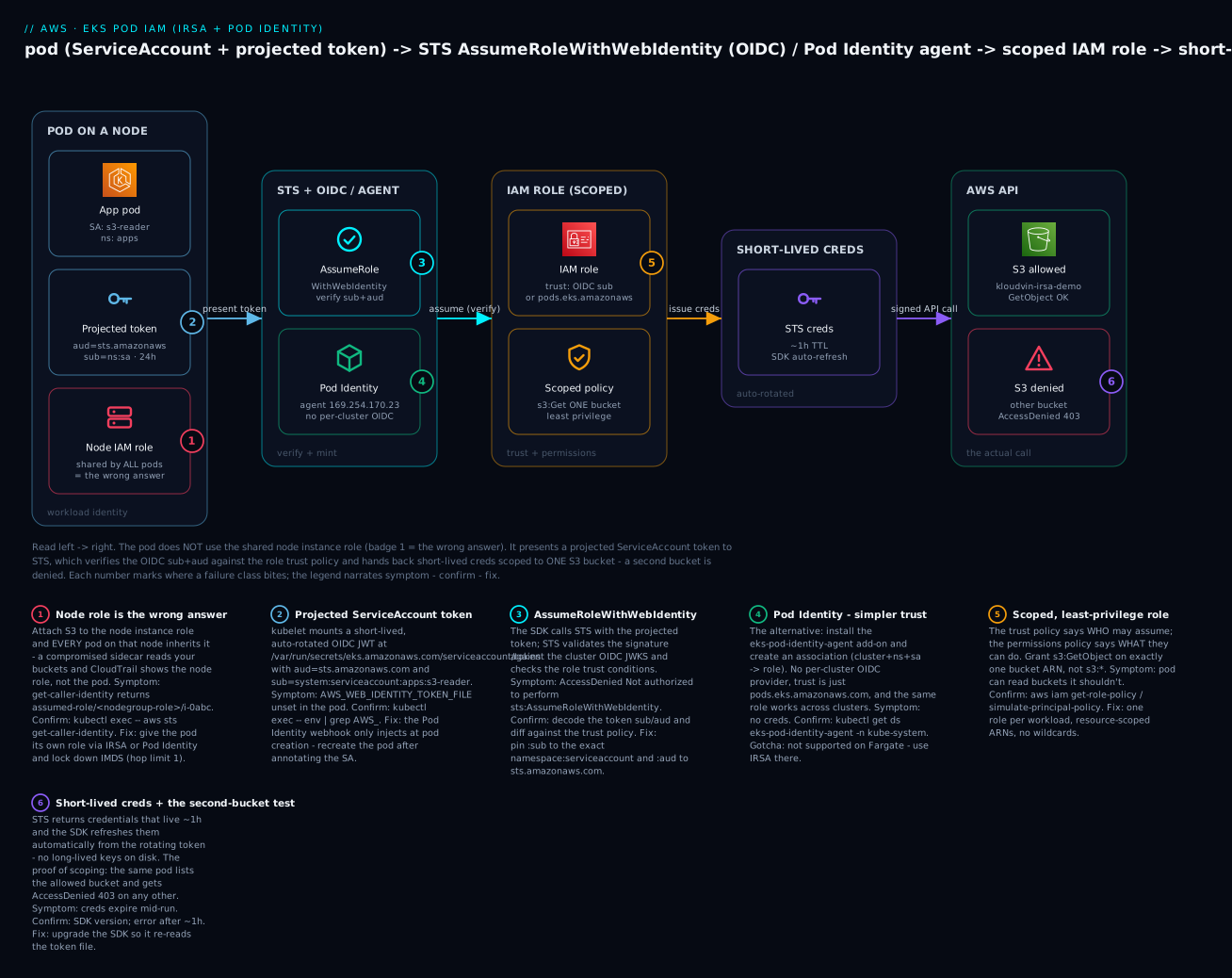
The diagram traces the real path a pod’s AWS call takes and pins each failure class to the exact hop where it bites. Read it left to right. The pod runs as ServiceAccount s3-reader and is handed a projected OIDC token (aud=sts.amazonaws.com, sub=system:serviceaccount:apps:s3-reader) — crucially it does not use the shared node instance role sitting next to it (badge 1, the wrong answer). The SDK presents that token to STS AssumeRoleWithWebIdentity, which verifies the signature and the sub/aud against the scoped IAM role’s trust policy; the alternative Pod Identity path (the node agent at 169.254.170.23, no OIDC) converges on the same role. STS returns short-lived credentials (~1h, auto-refreshed), and the pod finally calls the AWS API — reading the one allowed S3 bucket and getting AccessDenied 403 on any other, which is the proof that scoping works. Each numbered badge marks a failure class; the legend narrates symptom · confirm · fix.
Real-world scenario
Meridian Retail runs a 40-node EKS cluster (ap-south-1) shared by six squads: checkout, catalog, search, recommendations, fraud, and a platform team. In year one they shipped fast the wrong way — the node group’s instance role accumulated s3:*, dynamodb:*, sqs:*, and secretsmanager:GetSecretValue on *, because “the pods need it.” Every pod on every node had the union. It worked, and nobody looked, until a dependency in the recommendations service shipped a vulnerable image and an attacker got RCE in that container.
The incident review was brutal precisely because of the node role. From the recommendations pod, the attacker curled 169.254.169.254, lifted the node role credentials, and — because the node role was a superset — enumerated and exfiltrated objects from the checkout PII bucket, a workload the recommendations team had no business touching. CloudTrail showed the reads, but the userIdentity was arn:aws:sts::…:assumed-role/eksNodeGroupRole/i-0abc123 — the platform team could not tell which pod had done it without correlating instance-to-pod scheduling by timestamp. Blast radius: the entire node role. Attribution: none.
The remediation was a two-week migration to per-pod identity, and they chose Pod Identity for new work and kept IRSA where it already existed. First they enabled the OIDC provider (it was already on for a legacy IRSA workload) and installed the eks-pod-identity-agent add-on. Then, workload by workload, they created one role per ServiceAccount with a policy scoped to exactly that workload’s resources — checkout’s role could read only the checkout bucket and write only the checkout table; recommendations’ role could read only the recommendations feature store and had no S3 write anywhere. They stripped the node role back to AmazonEKSWorkerNodePolicy, AmazonEC2ContainerRegistryReadOnly, and the CNI policy, and — the step that closes the door — set the node IMDS hop limit to 1 and required IMDSv2, so a compromised pod can no longer curl the node role at all.
The measurable outcome: the recommendations role, re-tested against the checkout bucket, now returns AccessDenied — the exact test in this article’s lab. CloudTrail entries became assumed-role/checkout-app/… and assumed-role/reco-app/…, so every AWS action is attributable to a named workload. When they later added a second cluster in ap-south-2 for DR, the Pod Identity roles moved over with zero trust-policy edits because the trust is just pods.eks.amazonaws.com — the one place Pod Identity paid off immediately over IRSA, whose trust policies would each have needed the new cluster’s OIDC provider ARN added. The lesson they wrote into their platform runbook: the node role is for the node; every workload gets its own role; and you lock IMDS so “just use the node role” stops being physically possible.
Advantages and disadvantages
IRSA
| Advantages | Disadvantages |
|---|---|
| Works everywhere — EC2 nodes and Fargate, EKS Anywhere | Per-cluster OIDC provider to register and reason about |
| Direct cross-account via OIDC federation (one hop) | Trust policy is cluster-specific (edit per cluster to reuse a role) |
| Mature (2019), huge ecosystem, every controller supports it | Easy to mis-scope the trust (sub/aud footguns) |
| No extra DaemonSet on the node | The SA annotation is a manual, easy-to-typo step |
| Standard OIDC — auditable, portable mental model | Sharing a role across clusters means multiple providers in one trust |
EKS Pod Identity
| Advantages | Disadvantages |
|---|---|
Generic trust (pods.eks.amazonaws.com) — reuse a role across clusters unchanged |
No Fargate support (agent is a DaemonSet) |
| Simplest per-workload setup — one association, no annotation, no OIDC | Requires the agent add-on running on every node |
| Session tags (cluster/ns/sa/pod) enable ABAC automatically | Newer (2023) — some tools/controllers still assume IRSA |
| Nothing cluster-specific in IAM to maintain | Cross-account is role chaining (no direct OIDC federation) |
| Association lives in the EKS control plane (visible via API) | Agent is one more component to monitor/upgrade |
The trade-off that usually decides it: Fargate forces IRSA, and cross-cluster reuse rewards Pod Identity. On a plain EC2-node cluster with no Fargate and a future second cluster, Pod Identity is less to get wrong. If your platform is already all-IRSA and working, there is no urgency to migrate — the two coexist per-workload.
Hands-on lab
You’ll build the same S3-reader pod twice — once with IRSA, once with Pod Identity — prove it can read one bucket and is denied another, then tear everything down. ⚠️ The EKS control plane costs ~$0.10/hour (~$73/month) and is not free-tier — run this on an existing cluster or delete the cluster after. Nodes, if you launch them for this, also cost. S3, STS and Pod Identity add no meaningful charge.
Assumptions: an EKS cluster kloudvin-eks in ap-south-1 with at least one EC2 node group (Pod Identity needs EC2 nodes), kubectl context set, and aws/eksctl installed. Replace 111122223333 with your account ID.
Part 0 — set up the buckets and namespace
export ACCOUNT_ID=111122223333
export REGION=ap-south-1
export CLUSTER=kloudvin-eks

# Two buckets: one the pod may read, one it must be denied
aws s3api create-bucket --bucket kloudvin-irsa-demo \
  --region $REGION --create-bucket-configuration LocationConstraint=$REGION
aws s3api create-bucket --bucket kloudvin-irsa-forbidden \
  --region $REGION --create-bucket-configuration LocationConstraint=$REGION
echo "hello from the allowed bucket" > hello.txt
aws s3 cp hello.txt s3://kloudvin-irsa-demo/hello.txt

kubectl create namespace apps
Part A — IRSA
A1. Enable the OIDC provider (idempotent):
eksctl utils associate-iam-oidc-provider \
  --cluster $CLUSTER --region $REGION --approve
aws iam list-open-id-connect-providers   # confirm it exists
A2. Create the scoped permissions policy:
cat > s3-read-policy.json <<'EOF'
{ "Version": "2012-10-17", "Statement": [{
  "Sid": "ReadOneBucket", "Effect": "Allow",
  "Action": ["s3:GetObject","s3:ListBucket"],
  "Resource": ["arn:aws:s3:::kloudvin-irsa-demo","arn:aws:s3:::kloudvin-irsa-demo/*"] }] }
EOF
aws iam create-policy --policy-name kloudvin-s3-read \
  --policy-document file://s3-read-policy.json
A3. Create the role + trust + SA in one shot with eksctl (it builds the OIDC trust, attaches the policy, and annotates the SA):
eksctl create iamserviceaccount \
  --cluster $CLUSTER --region $REGION \
  --namespace apps --name s3-reader \
  --role-name kloudvin-irsa-s3-reader \
  --attach-policy-arn arn:aws:iam::$ACCOUNT_ID:policy/kloudvin-s3-read \
  --approve
Verify the SA is annotated:
kubectl get sa s3-reader -n apps -o jsonpath='{.metadata.annotations.eks\.amazonaws\.com/role-arn}{"\n"}'
# -> arn:aws:iam::111122223333:role/kloudvin-irsa-s3-reader
A4. Run a pod using that SA (the amazon/aws-cli image is perfect for probing):
kubectl run irsa-test -n apps --image=amazon/aws-cli \
  --overrides='{"spec":{"serviceAccountName":"s3-reader"}}' \
  --command -- sleep 3600
kubectl wait --for=condition=Ready pod/irsa-test -n apps --timeout=60s
A5. Prove the identity and the scoping:
# Who am I? -> the IRSA role, NOT the node role
kubectl exec -n apps irsa-test -- aws sts get-caller-identity
# Arn: arn:aws:sts::111122223333:assumed-role/kloudvin-irsa-s3-reader/botocore-session-...

# Confirm the env the webhook injected
kubectl exec -n apps irsa-test -- env | grep AWS_
# AWS_ROLE_ARN=... AWS_WEB_IDENTITY_TOKEN_FILE=/var/run/secrets/eks.amazonaws.com/serviceaccount/token ...

# Allowed bucket -> works
kubectl exec -n apps irsa-test -- aws s3 ls s3://kloudvin-irsa-demo
# 2026-07-14 ... hello.txt

# Forbidden bucket -> AccessDenied (this is the win)
kubectl exec -n apps irsa-test -- aws s3 ls s3://kloudvin-irsa-forbidden
# An error occurred (AccessDenied) when calling the ListObjectsV2 operation: Access Denied
A6. Terraform equivalent (OIDC data source → role with a web-identity trust → policy → annotated SA):
data "aws_eks_cluster" "this" { name = "kloudvin-eks" }

locals {
  oidc = replace(data.aws_eks_cluster.this.identity[0].oidc[0].issuer, "https://", "")
}

data "aws_iam_openid_connect_provider" "eks" { url = data.aws_eks_cluster.this.identity[0].oidc[0].issuer }

data "aws_iam_policy_document" "trust" {
  statement {
    actions = ["sts:AssumeRoleWithWebIdentity"]
    principals {
      type        = "Federated"
      identifiers = [data.aws_iam_openid_connect_provider.eks.arn]
    }
    condition {
      test     = "StringEquals"
      variable = "${local.oidc}:sub"
      values   = ["system:serviceaccount:apps:s3-reader"]
    }
    condition {
      test     = "StringEquals"
      variable = "${local.oidc}:aud"
      values   = ["sts.amazonaws.com"]
    }
  }
}

resource "aws_iam_role" "irsa" {
  name               = "kloudvin-irsa-s3-reader"
  assume_role_policy = data.aws_iam_policy_document.trust.json
}

resource "aws_iam_role_policy" "s3" {
  role   = aws_iam_role.irsa.id
  policy = jsonencode({ Version = "2012-10-17", Statement = [{
    Effect = "Allow", Action = ["s3:GetObject","s3:ListBucket"],
    Resource = ["arn:aws:s3:::kloudvin-irsa-demo","arn:aws:s3:::kloudvin-irsa-demo/*"] }] })
}

resource "kubernetes_service_account" "s3_reader" {
  metadata {
    name      = "s3-reader"
    namespace = "apps"
    annotations = { "eks.amazonaws.com/role-arn" = aws_iam_role.irsa.arn }
  }
}
Part B — EKS Pod Identity
B1. Install the agent add-on:
aws eks create-addon --cluster-name $CLUSTER --addon-name eks-pod-identity-agent
kubectl get daemonset eks-pod-identity-agent -n kube-system   # READY == node count
B2. Create a role with the Pod Identity trust and attach the SAME policy:
cat > pi-trust.json <<'EOF'
{ "Version": "2012-10-17", "Statement": [{
  "Effect": "Allow",
  "Principal": { "Service": "pods.eks.amazonaws.com" },
  "Action": ["sts:AssumeRole","sts:TagSession"] }] }
EOF
aws iam create-role --role-name kloudvin-pi-s3-reader \
  --assume-role-policy-document file://pi-trust.json
aws iam attach-role-policy --role-name kloudvin-pi-s3-reader \
  --policy-arn arn:aws:iam::$ACCOUNT_ID:policy/kloudvin-s3-read
B3. Create the association and a plain (un-annotated) SA + pod:
kubectl create serviceaccount pi-s3-reader -n apps   # NOTE: no annotation

aws eks create-pod-identity-association \
  --cluster-name $CLUSTER --namespace apps \
  --service-account pi-s3-reader \
  --role-arn arn:aws:iam::$ACCOUNT_ID:role/kloudvin-pi-s3-reader

kubectl run pi-test -n apps --image=amazon/aws-cli \
  --overrides='{"spec":{"serviceAccountName":"pi-s3-reader"}}' \
  --command -- sleep 3600
kubectl wait --for=condition=Ready pod/pi-test -n apps --timeout=60s
B4. Prove it — note the different env and session:
kubectl exec -n apps pi-test -- aws sts get-caller-identity
# Arn: arn:aws:sts::111122223333:assumed-role/kloudvin-pi-s3-reader/eks-kloudvin-eks-...

kubectl exec -n apps pi-test -- env | grep AWS_CONTAINER
# AWS_CONTAINER_CREDENTIALS_FULL_URI=http://169.254.170.23/v1/credentials
# AWS_CONTAINER_AUTHORIZATION_TOKEN_FILE=/var/run/secrets/pods.eks.amazonaws.com/serviceaccount/eks-pod-identity-token

kubectl exec -n apps pi-test -- aws s3 ls s3://kloudvin-irsa-demo         # works
kubectl exec -n apps pi-test -- aws s3 ls s3://kloudvin-irsa-forbidden    # AccessDenied
B5. Terraform equivalent (add-on → role with pods.eks… trust → policy → association):
resource "aws_eks_addon" "pod_identity" {
  cluster_name = "kloudvin-eks"
  addon_name   = "eks-pod-identity-agent"
}

data "aws_iam_policy_document" "pi_trust" {
  statement {
    actions = ["sts:AssumeRole", "sts:TagSession"]
    principals { type = "Service"  identifiers = ["pods.eks.amazonaws.com"] }
  }
}

resource "aws_iam_role" "pi" {
  name               = "kloudvin-pi-s3-reader"
  assume_role_policy = data.aws_iam_policy_document.pi_trust.json
}

resource "aws_iam_role_policy_attachment" "pi_s3" {
  role       = aws_iam_role.pi.name
  policy_arn = aws_iam_policy.s3_read.arn
}

resource "aws_eks_pod_identity_association" "s3" {
  cluster_name    = "kloudvin-eks"
  namespace       = "apps"
  service_account = "pi-s3-reader"
  role_arn        = aws_iam_role.pi.arn
}
Part C — teardown
# Pods
kubectl delete pod irsa-test pi-test -n apps

# Pod Identity association + role
ASSOC=$(aws eks list-pod-identity-associations --cluster-name $CLUSTER \
  --query 'associations[?serviceAccount==`pi-s3-reader`].associationId' --output text)
aws eks delete-pod-identity-association --cluster-name $CLUSTER --association-id $ASSOC
aws iam detach-role-policy --role-name kloudvin-pi-s3-reader \
  --policy-arn arn:aws:iam::$ACCOUNT_ID:policy/kloudvin-s3-read
aws iam delete-role --role-name kloudvin-pi-s3-reader
# Optional: aws eks delete-addon --cluster-name $CLUSTER --addon-name eks-pod-identity-agent

# IRSA (eksctl deletes the CloudFormation stack incl. the role + SA)
eksctl delete iamserviceaccount --cluster $CLUSTER --namespace apps --name s3-reader

# Shared policy + buckets + namespace
aws iam delete-policy --policy-arn arn:aws:iam::$ACCOUNT_ID:policy/kloudvin-s3-read
aws s3 rb s3://kloudvin-irsa-demo --force
aws s3 rb s3://kloudvin-irsa-forbidden --force
kubectl delete namespace apps
⚠️ The OIDC provider (from associate-iam-oidc-provider) is safe to leave — it’s free and shared. Delete the cluster separately if you spun one up only for this lab; that is the line item that costs money.
Common mistakes & troubleshooting
Almost every IRSA/Pod Identity ticket is one of the classes below. The first move is always the same: run kubectl exec <pod> -- aws sts get-caller-identity and read the Arn. It tells you instantly whether you’re using the right role, the node role, or failing to assume at all.
| # | Symptom | Root cause | Confirm (exact command) | Fix |
|---|---|---|---|---|
| 1 | Pod uses the node role, not the SA role | Webhook didn’t inject (SA annotation typo, or pod created before annotation) | kubectl exec … -- env | grep AWS_ROLE_ARN is empty; get-caller-identity shows assumed-role/<nodegroup-role>/i-… |
Fix eks.amazonaws.com/role-arn on the SA; recreate the pod (kubectl rollout restart) — webhook only mutates at creation |
| 2 | Pod uses node role, env is set | SDK too old to read AWS_WEB_IDENTITY_TOKEN_FILE |
env shows the vars but get-caller-identity still shows node role |
Upgrade the SDK (boto3 ≥1.9.x era, Go SDK v2, JS v2/v3, Java v2) |
| 3 | AccessDenied … not authorized to perform: sts:AssumeRoleWithWebIdentity |
Trust :sub mismatch (wrong namespace or SA name) |
Decode the token sub; compare to trust: aws iam get-role --role-name … --query 'Role.AssumeRolePolicyDocument' |
Set :sub to the exact system:serviceaccount:<ns>:<sa> |
| 4 | Same AccessDenied, :sub looks right |
Trust :aud missing or wrong (not sts.amazonaws.com) |
Check the aud condition in the trust policy |
Add …:aud = sts.amazonaws.com (StringEquals) |
| 5 | Not authorized … AssumeRoleWithWebIdentity, trust conditions correct |
Wrong OIDC provider ARN in Principal.Federated (different cluster / not registered) |
aws iam list-open-id-connect-providers; diff the hash vs the cluster issuer |
Register the correct provider; fix the Federated ARN |
| 6 | No OpenIDConnect provider found in your account for … |
OIDC provider never registered in IAM | aws iam list-open-id-connect-providers returns nothing matching |
eksctl utils associate-iam-oidc-provider --cluster … --approve |
| 7 | InvalidIdentityToken: Couldn't retrieve verification key … |
STS can’t fetch the JWKS, or clock skew on the node | date on the node vs real time; STS reachability |
Fix NTP/chrony; ensure regional STS reachable (VPC endpoint if private) |
| 8 | InvalidIdentityToken / token rejected |
Token audience mismatch or expired projected token | Decode the token aud/exp inside the pod |
Ensure projection audience: sts.amazonaws.com; recreate pod |
| 9 | Pod Identity: no creds at all | Agent add-on missing or not running on that node | kubectl get ds eks-pod-identity-agent -n kube-system; is a pod on this node? |
aws eks create-addon --addon-name eks-pod-identity-agent |
| 10 | Pod Identity: still no creds, agent healthy | Association namespace/SA mismatch | aws eks list-pod-identity-associations … vs kubectl get pod -o jsonpath='{.spec.serviceAccountName}' |
Recreate the association with the exact ns + SA; restart the pod |
| 11 | Pod Identity on Fargate: no creds | Agent is a DaemonSet — can’t run on Fargate | Is the pod on a Fargate profile? kubectl get pod -o wide (node = fargate-…) |
Use IRSA for Fargate workloads |
| 12 | Cross-account AssumeRole denied |
Target role trust doesn’t allow the source (no OIDC in target / missing chaining perm) | Read the target role trust; CloudTrail in the target account | Register the OIDC provider in the target acct or grant sts:AssumeRole on the local role + chain |
| 13 | Creds expire mid-run (ExpiredToken after ~1h) |
Very old SDK not refreshing web-identity creds / token file not re-read | SDK version; error appears ~1h after start | Upgrade the SDK — modern ones re-read the rotating token automatically |
| 14 | AccessDenied on the actual S3/DynamoDB call (role assumed fine) |
Assume succeeded but the permissions policy is too narrow / wrong ARN | get-caller-identity shows the right role; aws iam simulate-principal-policy the role |
Fix the permissions policy (not the trust) — add the correct action/resource ARN |
| 15 | Pod can still reach the node role via IMDS | IMDS not locked down; app curls 169.254.169.254 deliberately |
kubectl exec … -- curl -s http://169.254.169.254/latest/meta-data/iam/… returns the node role |
Set node IMDS hop limit = 1, require IMDSv2; block 169.254.169.254 egress from pods |
The STS / error-string reference
When the assume fails, the exact string pins the layer. Keep this next to the playbook.
| Error string | Layer | Likely cause | Fix |
|---|---|---|---|
Not authorized to perform sts:AssumeRoleWithWebIdentity |
Trust policy | :sub/:aud mismatch, wrong action |
Align trust conditions to the token |
No OpenIDConnect provider found in your account for … |
IAM provider | Provider not registered / wrong URL | Register the cluster’s OIDC provider |
InvalidIdentityToken: Couldn't retrieve verification key |
STS ↔ JWKS | JWKS unreachable (private cluster) or clock skew | Route to STS/JWKS; fix NTP |
InvalidIdentityToken (audience) |
Token | aud ≠ registered audience |
Fix projection audience sts.amazonaws.com |
ExpiredTokenException |
Creds | STS creds past TTL, SDK didn’t refresh | Upgrade SDK; don’t cache creds |
AccessDenied (on S3/DDB, not STS) |
Permissions policy | Action/resource not allowed | Fix the permissions policy, not the trust |
Unable to locate credentials / NoCredentialProviders |
SDK chain | Nothing in the chain produced creds (IMDS blocked, no IRSA/PI) | Ensure IRSA/PI injected; or intentionally none |
WebIdentityErr (Go) / botocore … AssumeRoleWithWebIdentity (py) |
SDK | Web-identity provider raised | Read the wrapped STS error above |
403 calling 169.254.170.23 (Pod Identity) |
Agent | Token file mismatch / agent auth | Recreate pod; check the agent add-on version |
Decision table — which identity am I actually using?
Read the Arn from aws sts get-caller-identity and jump straight to the cause:
get-caller-identity Arn looks like… |
It’s probably… | Do this |
|---|---|---|
assumed-role/<nodegroup-role>/i-0abc… |
Node role — IRSA/PI not active | Check env injection (rows 1–2); recreate the pod |
assumed-role/<your-irsa-role>/botocore-session-… |
IRSA working | Nothing — if the app still fails it’s a permissions issue (row 14) |
assumed-role/<your-pi-role>/eks-<cluster>-… |
Pod Identity working | Nothing — permissions issue if the call still fails |
An AccessDenied before any call |
Assume failed — trust problem | Rows 3–6 (trust sub/aud/provider) |
Unable to locate credentials |
Chain produced nothing | IMDS blocked and no IRSA/PI — inject one |
The three nastiest failures, in full
The pod that keeps using the node role. You annotated the SA, but get-caller-identity still shows the node role. Ninety percent of the time the pod was created before the annotation (or before the SA existed) — the webhook only mutates pods at admission, so an existing pod never got the env vars or the token mount. kubectl rollout restart deployment/<name> (or delete the bare pod) and it’s fixed. The other cause is a typo in the annotation key — it must be exactly eks.amazonaws.com/role-arn; a wrong domain or a trailing space means the webhook sees no annotation and skips injection silently. Confirm which by kubectl exec -- env | grep AWS_ROLE_ARN: empty means “not injected” (annotation/restart), populated-but-still-node-role means “SDK too old” (upgrade).
AccessDenied from AssumeRoleWithWebIdentity with a correct-looking sub. The token’s sub is system:serviceaccount:apps:s3-reader, and your trust says the same — yet it’s denied. Two subtle causes dominate. First, namespace drift: the SA is annotated in apps but the pod runs in apps-staging, so the real token sub is …:apps-staging:s3-reader and the trust’s apps doesn’t match. Always compare the live token, not the manifest. Second, a missing :aud paired with a StringLike :sub wildcard someone added “to make it work” — which quietly widened the trust to every SA. Decode the actual token (kubectl exec -- cat $AWS_WEB_IDENTITY_TOKEN_FILE and base64-decode the middle segment) and diff sub/aud against the trust policy character for character.
Pod Identity works on some nodes, not others. New pods on some nodes get creds; on others they fall to no-creds or the node role. The agent is a DaemonSet, so the culprit is almost always a node where the agent pod isn’t Ready — a node that came up before the add-on, a node with a taint the agent doesn’t tolerate, or a Fargate pod (where the agent can’t run at all). kubectl get pods -n kube-system -l app.kubernetes.io/name=eks-pod-identity-agent -o wide and line the node names up against where your workload lands. Fix: ensure the DaemonSet tolerates your node taints and covers every node group; move Fargate workloads to IRSA.
Best practices
- Never put application permissions on the node role. Keep it to
AmazonEKSWorkerNodePolicy,AmazonEC2ContainerRegistryReadOnly, and the CNI/EBS-CSI policies the node itself needs. - One role per workload (per ServiceAccount). Do not share a role across unrelated workloads; the whole point is per-pod blast-radius isolation.
- Pin the trust
:subto the exactsystem:serviceaccount:<ns>:<sa>and always set:aud = sts.amazonaws.com. Never ship an aud-only trust. - Scope permissions to resource ARNs, not
*. Use conditions (aws:PrincipalTag,s3:prefix,kms:ViaService) to fence shared resources. - Lock down IMDS: require IMDSv2 and set the node hop limit to 1 so pods physically cannot reach
169.254.169.254and grab the node role. - Default new EC2-node workloads to Pod Identity for its generic trust and cross-cluster reuse; use IRSA on Fargate and for direct cross-account OIDC federation.
- Recreate pods after changing a SA annotation or association — the webhook and agent inject only at pod creation.
- Keep SDKs current. Old SDKs ignore web-identity env and skip credential refresh; both manifest as “mystery node role” or “expires after an hour.”
- Use
aws iam simulate-principal-policyto prove least privilege before shipping, and re-test the denied path (the second bucket) — a passing allow test doesn’t prove scoping. - Audit via CloudTrail on the assumed-role session name (IRSA) or session tags (Pod Identity); alert on the node role making application-shaped calls.
- Use
StringLikesub wildcards sparingly and only intra-namespace; never*across namespaces. - Terraform/GitOps the roles, trusts, and associations so trust conditions are reviewed, not hand-edited in the console.
Security notes
The threat model for pod identity is: stop one compromised pod from becoming account-wide access. Each control below closes a specific path.
| Control | What it stops | How |
|---|---|---|
| Per-pod role (IRSA/PI) | Lateral blast radius | A compromised pod has only its scoped policy, not the node’s union |
| IMDSv2 + hop limit 1 | Node-role theft via IMDS | Pods can’t reach 169.254.169.254; SSRF can’t hop to metadata |
:sub condition |
Confused deputy | Only the named SA can assume — not every SA in the cluster |
:aud condition |
Token misuse | Only tokens minted for STS are accepted |
| Resource-scoped policy | Over-broad data access | Role touches only the named ARNs |
| Session tags + ABAC (PI) | Cross-tenant access | Policy keyed on kubernetes-namespace fences tenants |
| Short-lived creds | Long-lived key leakage | Nothing durable to steal; creds expire in ~1h |
kms:ViaService / conditions |
Key misuse | Keys usable only through the intended service |
| Deny long-lived keys (SCP/policy) | Baked-in IAM user keys | Force IRSA/PI; block iam:CreateAccessKey broadly |
| Namespace-scoped SAs + RBAC | Pod impersonating another SA | Kubernetes RBAC controls who can create pods with which SA |
Two subtleties worth internalizing. First, the trust policy is the real access-control decision — the permissions policy only matters after a principal is allowed to assume. An over-broad trust (missing :sub) is a bigger hole than an over-broad permissions policy, because it lets the wrong workload in. Second, IRSA and Pod Identity remove long-lived secrets from the cluster entirely — there is no access key in a Kubernetes Secret to leak in kubectl get secret -o yaml, land in an etcd backup, or get committed to Git. That property alone justifies the migration off node-role/access-key patterns.
Cost & sizing
IRSA and Pod Identity themselves are free — there is no charge for the OIDC provider, the webhook, the Pod Identity agent add-on, AssumeRoleWithWebIdentity, or AssumeRoleForPodIdentity. What costs money is the cluster underneath them.
| Item | Cost | Notes |
|---|---|---|
| EKS control plane | ~$0.10/hour (~$73/month) per cluster (standard support) | The main line item; extended-support versions cost more |
| EC2 worker nodes | Per instance-hour | You pay for the nodes regardless of identity mechanism |
| Fargate pods | Per vCPU/GB-hour | IRSA only (no Pod Identity on Fargate) |
| IRSA / OIDC provider | $0 | No charge to register or use |
| Pod Identity agent add-on | $0 | Runs on your nodes; uses trivial CPU/memory |
AssumeRoleWithWebIdentity / AssumeRoleForPodIdentity |
$0 | STS/EKS-auth calls are not billed |
| S3 (lab) | Cents | GetObject/ListBucket on a few objects |
| CloudTrail | Management events free (first copy) | Data events (S3 object-level) cost extra if enabled |
Sizing note: the Pod Identity agent consumes only a few millicores and tens of MB per node — negligible. The real “sizing” decision is cluster count: because IRSA trust is per-cluster, a fleet of clusters multiplies the trust-policy maintenance, whereas Pod Identity’s generic trust scales to N clusters with the same roles — an operational cost saving, not a dollar one. Rough INR framing: a single always-on EKS control plane is about ₹6,000/month before nodes, so tear the lab cluster down if you created it just for this.
Interview & exam questions
Q1. Why is attaching application permissions to the node instance role a bad idea? Because the node role is shared by every pod on the node, so all of them inherit the permission — there is no per-workload least privilege, and CloudTrail attributes calls to the node role and instance, not the pod. A single compromised container gets the union of everything the node role allows. (SAA-C03 / SCS-C02)
Q2. What are the four moving parts of IRSA? The cluster OIDC provider registered in IAM; an IAM role whose trust policy federates that provider with sub/aud conditions; a scoped permissions policy; and a ServiceAccount annotated with eks.amazonaws.com/role-arn. At runtime the webhook injects env vars and the SDK calls sts:AssumeRoleWithWebIdentity. (DVA-C02)
Q3. What does the IRSA trust policy’s sub condition contain, and why is it critical? system:serviceaccount:<namespace>:<serviceaccount>. It pins which Kubernetes ServiceAccount may assume the role. Omit it and any SA in the cluster — passing only the aud check — can assume the role (a confused-deputy hole). (SCS-C02)
Q4. What API call does an IRSA pod make, and what does it exchange? sts:AssumeRoleWithWebIdentity, exchanging the projected ServiceAccount token (an OIDC JWT with aud=sts.amazonaws.com) for short-lived role credentials. STS validates the JWT against the cluster’s OIDC JWKS and the trust conditions. (DVA-C02)
Q5. How does EKS Pod Identity differ from IRSA in setup? Pod Identity needs no per-cluster OIDC provider and no SA annotation — you install the Pod Identity Agent add-on once and create a pod identity association mapping (cluster, ns, sa) → role. The role’s trust is simply Service: pods.eks.amazonaws.com. (SAA-C03)
Q6. Why can’t you use EKS Pod Identity on Fargate? The Pod Identity Agent runs as a DaemonSet on EC2 nodes; Fargate has no node to schedule it on. Use IRSA for Fargate workloads. (SAA-C03)
Q7. A pod’s aws sts get-caller-identity returns the node role ARN. Name two causes. The pod was created before the SA was annotated (webhook injects only at creation — recreate the pod), or the SDK is too old to read AWS_WEB_IDENTITY_TOKEN_FILE and falls back to IMDS. A third is an annotation typo. (SOA-C02)
Q8. You get AccessDenied on AssumeRoleWithWebIdentity, but the actual S3 policy looks fine. Where do you look? The trust policy, not the permissions policy — specifically the :sub (namespace/SA) and :aud conditions and the OIDC provider ARN. The permissions policy only matters after the assume succeeds. (SCS-C02)
Q9. What does InvalidIdentityToken usually indicate? The projected token failed STS validation — commonly clock skew on the node, an unreachable JWKS (private cluster with no route to STS), or an audience mismatch. Fix NTP, ensure STS reachability, and confirm aud=sts.amazonaws.com. (SOA-C02)
Q10. How do you scope an IRSA role to exactly one S3 bucket for reads? Grant s3:GetObject on arn:aws:s3:::bucket/* and s3:ListBucket on arn:aws:s3:::bucket (two ARNs — object-level vs bucket-level). Wildcards or a single ARN produce a half-working or over-broad policy. (DVA-C02)
Q11. How would a pod assume a role in another AWS account? With IRSA, register the cluster’s OIDC provider in the target account and have a role there trust it with the sub condition — a direct one-hop AssumeRoleWithWebIdentity. Alternatively (and required for Pod Identity), role-chain: assume a local role, which then assumes the cross-account role. (SAA-C03)
Q12. Why lock down IMDS on EKS nodes, and how? So a compromised pod can’t curl 169.254.169.254 and steal the node role. Require IMDSv2 and set the instance metadata hop limit to 1, which prevents containers (one network hop away) from reaching the metadata endpoint. (SCS-C02)
Quick check
- You attach
dynamodb:*to the node role so one pod can use DynamoDB. What have you actually granted, and to whom? - In an IRSA trust policy, what exact string goes in the
:subcondition, and what happens if you omit it? - Which API does an IRSA pod call, and which does the Pod Identity agent call on the pod’s behalf?
- Your pod’s
get-caller-identityshows the node role even though the SA is annotated. What’s the most likely fix? - You need pod identity on a Fargate profile. IRSA or Pod Identity — and why?
Answers
- You granted every pod on that node full DynamoDB access, attributed in CloudTrail to the node role and instance ID — not the pod. It’s over-privileged and unauditable; use a per-pod role instead.
system:serviceaccount:<namespace>:<serviceaccount>— it pins which ServiceAccount may assume the role. Omit it and any SA in the cluster (passing only theaudcheck) can assume the role — a confused-deputy vulnerability.- The IRSA pod calls
sts:AssumeRoleWithWebIdentitydirectly. For Pod Identity, the pod fetches creds from the agent, which callseks-auth:AssumeRoleForPodIdentitybehind the scenes. - Recreate the pod (
kubectl rollout restart/ delete it) — the webhook injects the env vars and token mount only at pod creation, so a pod that predated the annotation never got them. (Also check for an annotation typo and an old SDK.) - IRSA — the Pod Identity Agent is a DaemonSet and can’t run on Fargate, so associations produce no credentials there. IRSA’s token projection works on Fargate.
Glossary
- IRSA (IAM Roles for Service Accounts) — The 2019 mechanism that federates a cluster’s OIDC issuer into IAM so a ServiceAccount can assume a role via
AssumeRoleWithWebIdentity. - EKS Pod Identity — The 2023 mechanism using a node agent and a
(cluster, ns, sa) → roleassociation, with no per-cluster OIDC provider. - Node instance role — The IAM role on an EC2 worker node (its instance profile), used by kubelet/CNI; the wrong place for application permissions.
- OIDC provider — The cluster’s OpenID Connect issuer registered as an IAM identity provider; the trust anchor for IRSA.
- Projected ServiceAccount token — A short-lived, audience-scoped OIDC JWT kubelet mounts into the pod and rotates automatically.
- Trust policy (assume-role policy) — The policy on a role that defines who may assume it (
Principal+ conditions). - Permissions policy — The policy that defines what an assumed role may do (actions + resources).
sub(subject) — The token claimsystem:serviceaccount:<ns>:<sa>that the trust policy pins.aud(audience) — The token claim,sts.amazonaws.comfor IRSA, that the trust policy pins.sts:AssumeRoleWithWebIdentity— The STS call that exchanges a web-identity (OIDC) token for role credentials.- Pod Identity Agent — The
eks-pod-identity-agentadd-on DaemonSet that brokers credentials at169.254.170.23. - Pod identity association — The EKS resource mapping a ServiceAccount to an IAM role for Pod Identity.
- Session tags — Key/value tags (cluster/ns/sa/pod) that Pod Identity attaches to the assumed session for ABAC.
- IMDS / IMDSv2 — The EC2 instance metadata service at
169.254.169.254; locking it down (hop limit 1) stops pods stealing the node role. - Confused deputy — A trust that’s too permissive (e.g. aud-only, no
sub), letting an unintended principal assume the role.
Next steps
- Build the cluster these roles attach to in Amazon EKS: Standing Up a Cluster with eksctl, Node Groups & kubectl Access.
- When pods won’t start or crash-loop before they ever reach the SDK, work through EKS Pod Troubleshooting: Pending, CrashLoopBackOff, ImagePull & CNI IP Exhaustion.
- Master the second hop of cross-account access in Cross-Account Access with IAM Roles & sts:AssumeRole: A Hands-On Guide.
- Debug the
AccessDeniedyou’ll eventually hit with Debugging IAM ‘Access Denied’: Policy Evaluation Logic, SCPs, Boundaries & a Playbook. - Decide whether EKS is even the right runtime in Choosing Your AWS Container Path: ECS vs EKS vs Fargate.