Quick take: the AWS Load Balancer Controller is the piece that turns a Kubernetes Ingress into a real Application Load Balancer and a Service of type
LoadBalancerinto a Network Load Balancer — provisioning the AWS resources out-of-band from your cluster, watching your manifests, and reconciling listeners, target groups, rules, and target registration as pods come and go. It replaces the legacy in-tree Kubernetes cloud provider (which only ever gave you a Classic Load Balancer per Service) with something production-grade:target-type: ipso the ALB talks straight to pod IPs, ACM TLS termination, WAF/Shield association, and — the cost saver everyone misses — an IngressGroup that folds many Ingresses onto one shared ALB. Get the IRSA role, the subnet tags, or the security-group chain wrong and you will stare at an Ingress with a blankADDRESS, a controller inCrashLoopBackOff, or an ALB returning503because no target ever went healthy.
A platform team I worked with had a clean EKS cluster, a working Deployment, and a Service — and an Ingress object that had sat with an empty ADDRESS field for three days. No ALB. No error in kubectl get ingress. They had followed a blog, applied the manifest, and assumed EKS would “just make a load balancer” the way a managed platform does. It does not. Kubernetes has no built-in Ingress implementation — an Ingress resource is inert until a controller reconciles it. They had never installed the AWS Load Balancer Controller. Once we installed it (Helm chart, an IRSA ServiceAccount with the IAM policy attached) the controller’s first reconcile threw couldn't auto-discover subnets because the VPC’s public subnets were not tagged kubernetes.io/role/elb. Two tags later, the ALB appeared in ninety seconds. Not a Kubernetes bug. Not an app bug. A controller-not-installed bug followed by a missing-subnet-tag bug — both one layer below where they were looking.
This article is the hands-on, production-grade path to load balancing on EKS with the AWS Load Balancer Controller: what the controller actually watches and provisions (Ingress → ALB, Service LoadBalancer → NLB, TargetGroupBinding → an existing target group), how to install it with Helm on an IRSA identity plus the subnet tags it depends on, every alb.ingress.kubernetes.io/* annotation that matters (target-type ip vs instance, scheme, listen ports, SSL redirect, the ACM certificate-arn and SSL policy, health checks, target-group attributes, WAF/Shield, and IngressGroup ordering), the NLB side via service.beta.kubernetes.io/aws-load-balancer-*, TargetGroupBinding, ExternalDNS for Route 53, and the readiness gate that keeps rolling deploys from dropping traffic. You will build the real thing with aws, kubectl, helm, and Terraform, verify a healthy ip target group, add a second Ingress to the same IngressGroup, and tear it down — mind the ALB cost. Because you will return to this mid-incident, the annotations, limits, error strings, and playbook are laid out as scannable tables.
By the end you will stop guessing. When an Ingress produces no ALB you will localise it to the exact hop — controller not running, IRSA denied, subnet tags missing, wrong ACM ARN, backend SG blocking the pod, or a health check pointed at the wrong path — and fix it because you understand what the controller is for, not by re-applying the manifest and hoping.
What problem this solves
You have a container running on EKS. Now it has to be reachable from the internet: on a stable DNS name, over HTTPS with a real certificate, load-balanced across pods that live in private subnets and get replaced constantly, without you hand-building an ALB and re-registering targets every deploy. Kubernetes gives you the Ingress and Service abstractions to declare that intent — but on a raw cluster those objects do nothing, because Kubernetes ships no load balancer of its own. Something has to translate them into AWS infrastructure.
The AWS Load Balancer Controller (formerly the AWS ALB Ingress Controller, rewritten as the v2 AWS Load Balancer Controller) is that translator. It runs as a Deployment inside your cluster, watches Ingress and Service objects, and calls the Elastic Load Balancing, EC2, ACM, and WAF APIs to create and continuously reconcile the matching AWS resources. Declare an Ingress with ingressClassName: alb and it provisions an ALB with listeners, rules, and target groups. Declare a Service of type: LoadBalancer with the right annotation and it provisions an NLB. As pods scale, roll, and die, the controller registers and deregisters their IPs in the target group so traffic only ever reaches healthy pods.
What breaks without it, or with it misconfigured: your Ingress sits with a blank ADDRESS forever because nothing reconciles it. You fall back to the legacy in-tree provider and every Service spins up a separate Classic Load Balancer — an old, expensive, per-Service sprawl with no path routing. You expose ten microservices and pay for ten ALBs because you never learned that an IngressGroup collapses them onto one. You point TLS at an ACM certificate in the wrong Region and the HTTPS listener silently never appears. You use target-type: ip but forget that the ALB now talks straight to pod IPs, so the pods’ security group blocks it and every target is unhealthy, and the ALB returns 503. You deploy a new version and drop in-flight requests because you never enabled the pod readiness gate. Every one of these is a controller or annotation mistake, three layers down from the symptom — and every one is in this guide.
Who hits this: essentially every team running web apps, APIs, or gRPC services on EKS. It bites hardest on teams who came from a managed PaaS and expect load balancers to appear by magic, and on teams who treat the controller as a black box — they copy annotations from a gist, it “works” once, and then they have no mental model when an Ingress produces no ALB or a target will not go healthy. The fix is almost never “re-apply.” It is “read the controller logs and find the object that is lying — the ServiceAccount, the subnet tags, the ACM ARN, the backend SG, or the health check — and make it tell the truth.”
To frame the field, here is the core mapping the controller implements — the Kubernetes object you declare, and the AWS resource it provisions and owns.
| You declare | With | Controller provisions | Layer |
|---|---|---|---|
Ingress (ingressClassName: alb) |
alb.ingress.kubernetes.io/* annotations |
An Application Load Balancer (+ listeners, rules, target groups) | L7 (HTTP/HTTPS/gRPC) |
Service type: LoadBalancer |
service.beta.kubernetes.io/aws-load-balancer-* + loadBalancerClass |
A Network Load Balancer (+ listeners, target groups) | L4 (TCP/UDP/TLS) |
TargetGroupBinding (CRD) |
targetGroupARN, serviceRef |
Nothing new — binds a Service to an existing target group | Registration only |
IngressClassParams (CRD) |
cluster-wide defaults | Shared defaults for many Ingresses (scheme, tags, group) | Config |
Learning objectives
By the end of this article you can:
- Explain what the AWS Load Balancer Controller does — how it watches Ingress → ALB and Service
LoadBalancer→ NLB, and why it replaced the legacy in-tree cloud provider (Classic Load Balancers). - Install the controller with Helm on an IRSA identity: create the OIDC provider, attach the
AWSLoadBalancerControllerIAMPolicy, annotate the ServiceAccount, and apply the subnet tags (kubernetes.io/role/elb,internal-elb,cluster/<name>) it depends on. - Author an Ingress end to end: choose
target-type: ipvsinstance, setscheme, listen ports, SSL redirect, the ACMcertificate-arnand SSL policy, health-check path, and target-group attributes. - Share one ALB across many Ingresses with an IngressGroup (
group.name/group.order) to cut cost, and understand how annotations merge across the group. - Provision an NLB from a
Service(aws-load-balancer-type: external,nlb-target-type: ip,scheme) and bind to an existing target group withTargetGroupBinding. - Wire ExternalDNS for Route 53 records, enable the pod readiness gate, and reason about deregistration so rolling deploys never drop traffic.
- Build the whole stack in a hands-on lab with
aws eks/iam/helm/kubectland Terraform, verify healthyiptargets, add a second Ingress to the group, and tear it down with nothing billable left. - Run a symptom → confirm → fix playbook for no ALB, unhealthy targets,
504from the ALB, a cert that never applies, controllerCrashLoop, IngressGroup conflicts,NotFoundsubnets, and ExternalDNS silence.
Prerequisites & where this fits
You need a running EKS cluster with worker nodes (managed node group or Fargate profile) and kubectl context pointed at it — the companion hands-on EKS Cluster Setup with eksctl (Hands-On) builds exactly that. You need to understand IRSA — how a Kubernetes ServiceAccount maps to an IAM role through the cluster’s OIDC provider — because the controller is an IRSA workload; that is covered in depth in EKS IRSA: Pod IAM Permissions (Hands-On). You should know VPC basics — public vs private subnets and how security groups are stateful allow-lists — from VPC, Subnets, Route Tables & Security Groups Explained, and how private subnets reach out via NAT Gateway & Private-Subnet Egress Hands-On. Comfort with helm, kubectl, the aws CLI v2, and applying a small Terraform config is assumed.
This sits in the Containers track, at the networking edge of EKS. For the load-balancer layer itself — listeners, rules, target-group attributes, health-check reason codes, and the ALB HTTP status codes — keep Application Load Balancer & Target Groups Hands-On nearby; this article drives an ALB through Kubernetes, but that one is the ALB reference. For DNS — ALIAS records, routing policies, health checks — read Route 53 Records & Routing Policies (Hands-On); ExternalDNS in this article automates exactly those records. For the platform decision of ECS vs EKS vs Fargate, see ECS vs EKS vs Fargate: Choosing Your Container Path; for the broader compute menu, AWS Compute Compared: EC2, Lambda, ECS & EKS. When the ALB starts returning 5xx, the general playbook in ALB 502/503/504 Troubleshooting complements the EKS-specific one below.
Here is where the controller fits in the build order — what must exist before each step.
| Building block | Must exist first | Provided by | This article |
|---|---|---|---|
| EKS cluster + node group/Fargate | Account, VPC | eksctl hands-on | Assumed |
| OIDC provider for the cluster | EKS cluster | This + IRSA article | Created in lab |
| VPC CNI (Amazon VPC CNI) | Cluster | EKS default add-on | Assumed (needed for ip mode) |
Subnet tags (role/elb, internal-elb) |
VPC subnets | Your networking baseline | Created in lab |
| IRSA role + IAM policy for the controller | OIDC provider | This article | Created in lab |
| Controller (Helm release) | IRSA SA, CRDs | This article | Installed in lab |
| ACM certificate (for HTTPS) | A domain / Route 53 zone | ACM | Referenced by ARN |
| Ingress / Service manifests | Controller running | This article | Applied in lab |
Core concepts
The controller has a small but precise vocabulary. People blur “Ingress” (the Kubernetes object) with “ALB” (the AWS resource), or think the controller is the load balancer. It is not — it is a reconciler that turns declared intent into AWS resources and keeps them in sync. Nail these terms and every annotation later has an obvious home.
An Ingress is a Kubernetes object describing L7 HTTP routing (hosts, paths → Services). It is inert without a controller. An IngressClass (spec.controller: ingress.k8s.aws/alb) tells Kubernetes which controller owns Ingresses that reference it; you select it per-Ingress with spec.ingressClassName: alb. The AWS Load Balancer Controller watches those Ingresses and provisions an ALB. A Service of type: LoadBalancer (with the right annotation/loadBalancerClass) is watched and provisioned as an NLB. target-type decides what the target group registers: ip (pod IPs directly, via the VPC CNI) or instance (node instances on a NodePort). IRSA (IAM Roles for Service Accounts) is how the controller pod gets AWS permissions without static keys — its ServiceAccount is annotated with a role ARN and the cluster’s OIDC provider vouches for it. An IngressGroup lets several Ingresses share one ALB.
Here is the core vocabulary in one place.
| Term | One-line definition | Kind | You touch it when |
|---|---|---|---|
| AWS Load Balancer Controller | In-cluster Deployment that reconciles Ingress/Service → ALB/NLB | Deployment (kube-system) | Installing, upgrading, reading logs |
| Ingress | L7 HTTP routing intent (host/path → Service) | K8s object | Exposing an HTTP app via ALB |
| IngressClass | Names the controller that owns an Ingress | K8s object | Selecting alb vs another controller |
| IngressClassParams | Cluster-scoped default params for a class | CRD (elbv2.k8s.aws) |
Shared scheme/tags/group defaults |
target-type |
What the TG registers: ip (pods) or instance (nodes) |
Annotation | Choosing pod-IP vs NodePort routing |
| IngressGroup | Many Ingresses → one shared ALB | Annotation (group.name) |
Cost-saving, path/host merge |
TargetGroupBinding |
Binds a Service to an existing TG ARN | CRD | Provisioning ALB/TG out of band (Terraform) |
| IRSA | ServiceAccount ↔ IAM role via OIDC | IAM + SA annotation | Giving the controller AWS rights |
| Readiness gate | Pod is Ready only when healthy in the TG | Namespace label | Zero-drop rolling deploys |
| ExternalDNS | Separate controller: Ingress/Service → Route 53 records | Deployment | Automating DNS names |
What it replaced: the in-tree cloud provider
Before this controller, Kubernetes’ in-tree AWS cloud provider handled Service type: LoadBalancer by creating a Classic Load Balancer (CLB) per Service, and there was no first-class Ingress support at all. The v2 controller is a strict upgrade: modern ALB/NLB, pod-IP targeting, ACM/WAF integration, and shared ALBs.
| Capability | Legacy in-tree provider | AWS Load Balancer Controller |
|---|---|---|
Service LoadBalancer → |
Classic Load Balancer (CLB) | NLB (external) or CLB (legacy mode) |
| Ingress support | None (needs a separate ingress controller) | Native → ALB |
| Target type | Instance/NodePort only | ip (pod) or instance |
| TLS via ACM | Limited (CLB) | ALB + NLB, per-listener certs |
| WAF / Shield | No | Yes (annotations) |
| Share one LB across apps | No | IngressGroup (one ALB, many Ingresses) |
| Advanced routing (redirect, fixed-response, weighted) | No | Yes (actions.* annotations) |
| Readiness gate (safe rollouts) | No | Yes |
| Where the logic runs | kube-controller-manager (control plane) | In-cluster Deployment you install/own |
The CRDs the controller installs
Installing the controller adds two Custom Resource Definitions. You rarely author IngressClassParams by hand, but TargetGroupBinding is the escape hatch for provisioning the ALB in Terraform and letting the controller only manage target registration.
| CRD | API group | Purpose |
|---|---|---|
TargetGroupBinding |
elbv2.k8s.aws/v1beta1 |
Bind a Service to an existing target group ARN (controller manages registration + backend SG rules) |
IngressClassParams |
elbv2.k8s.aws/v1beta1 |
Cluster-scoped defaults referenced by an IngressClass (scheme, group, tags, subnets, IP address type) |
Installing the controller: IRSA, Helm, and subnet tags
Installation is three things done in order: give the controller an AWS identity (IRSA), install the Helm chart, and make sure the subnets are tagged so the controller can place load balancers. Skip any one and you get a specific, recognisable failure.
Prerequisites checklist
| Prerequisite | Why | How to verify |
|---|---|---|
| IAM OIDC provider on the cluster | IRSA trust anchor | aws eks describe-cluster --query cluster.identity.oidc.issuer + aws iam list-open-id-connect-providers |
| Amazon VPC CNI installed | target-type: ip needs pods with VPC IPs |
kubectl get ds aws-node -n kube-system |
| Subnet tags on VPC subnets | Auto-discovery of where to place LBs | aws ec2 describe-subnets --query 'Subnets[].Tags' |
IAM policy AWSLoadBalancerControllerIAMPolicy |
Controller calls ELB/EC2/ACM/WAF APIs | aws iam list-policies --query "Policies[?PolicyName=='AWSLoadBalancerControllerIAMPolicy']" |
Helm 3 + kubectl context |
Install method | helm version, kubectl config current-context |
cert-manager (only if installing via raw manifests) |
Webhook TLS | Not needed with the Helm chart (self-signs) |
The IAM policy — what the controller is allowed to do
The controller’s IAM policy is broad because it creates and mutates load balancers, listeners, target groups, rules, and security groups, reads subnets, and reads ACM/WAF/Shield. Download the official policy JSON from the controller’s GitHub release (match the version to the chart you install) rather than writing your own.
| Permission group | Example actions | Why the controller needs it |
|---|---|---|
| ELBv2 manage | elasticloadbalancing:CreateLoadBalancer, CreateTargetGroup, CreateListener, CreateRule, RegisterTargets, ModifyListener |
Build and reconcile ALB/NLB from Ingress/Service |
| ELBv2 read | elasticloadbalancing:Describe* |
Discover/reconcile existing resources |
| EC2 read | ec2:DescribeSubnets, DescribeSecurityGroups, DescribeVpcs, DescribeInstances |
Subnet auto-discovery, target placement |
| EC2 SG manage | ec2:CreateSecurityGroup, AuthorizeSecurityGroupIngress, RevokeSecurityGroupIngress, CreateTags |
Manage the frontend + backend SGs |
| ACM | acm:ListCertificates, DescribeCertificate |
Attach certs by ARN, auto-discover by host |
| WAF / Shield | wafv2:AssociateWebACL, shield:CreateProtection |
wafv2-acl-arn, shield-advanced-protection |
| Cognito | cognito-idp:DescribeUserPoolClient |
auth-type: cognito on listeners |
| IAM (scoped) | iam:CreateServiceLinkedRole |
ELB service-linked role bootstrap |
# Download the policy that matches your controller version, then create it once per account
curl -sSo iam_policy.json \
  https://raw.githubusercontent.com/kubernetes-sigs/aws-load-balancer-controller/v2.7.2/docs/install/iam_policy.json

aws iam create-policy \
  --policy-name AWSLoadBalancerControllerIAMPolicy \
  --policy-document file://iam_policy.json
Pin the version. The policy grows over releases; a controller newer than its policy fails a new API call with
AccessDenied, and a controller older than an annotation you use ignores it. Match chartappVersion↔ policy version ↔ theimage.tag.
IRSA: the ServiceAccount ↔ role mapping
The controller is a pod, so it uses IRSA, not an instance profile. eksctl does the OIDC + role + ServiceAccount dance in one command; the annotation on the SA is what actually wires it.
# 1) Ensure the cluster has an IAM OIDC provider
eksctl utils associate-iam-oidc-provider --cluster kv-eks --approve

# 2) Create the IRSA ServiceAccount (role + trust + SA annotation) in kube-system
eksctl create iamserviceaccount \
  --cluster kv-eks \
  --namespace kube-system \
  --name aws-load-balancer-controller \
  --role-name AmazonEKSLoadBalancerControllerRole \
  --attach-policy-arn arn:aws:iam::123456789012:policy/AWSLoadBalancerControllerIAMPolicy \
  --approve
| IRSA moving part | Value | Failure if wrong |
|---|---|---|
| SA name/namespace | kube-system/aws-load-balancer-controller |
Chart’s SA won’t match; --set serviceAccount.name must equal it |
| SA annotation | eks.amazonaws.com/role-arn: arn:aws:iam::…:role/AmazonEKSLoadBalancerControllerRole |
No annotation → pod uses node role → AccessDenied |
Role trust sub |
system:serviceaccount:kube-system:aws-load-balancer-controller |
Mismatch → AssumeRoleWithWebIdentity fails |
Role trust aud |
sts.amazonaws.com |
Wrong audience → token rejected |
| Attached policy | AWSLoadBalancerControllerIAMPolicy |
Missing → CrashLoop with AccessDenied |
Install via Helm
helm repo add eks https://aws.github.io/eks-charts
helm repo update eks

helm install aws-load-balancer-controller eks/aws-load-balancer-controller \
  -n kube-system \
  --set clusterName=kv-eks \
  --set serviceAccount.create=false \
  --set serviceAccount.name=aws-load-balancer-controller \
  --set region=ap-south-1 \
  --set vpcId=vpc-0abc123
| Helm value | What it sets | Note |
|---|---|---|
clusterName |
Required — tags/discovery scope | Must match the real cluster name exactly |
serviceAccount.create |
Create a new SA or reuse | false when eksctl/Terraform made the IRSA SA |
serviceAccount.name |
SA to run as | Must equal the IRSA SA name |
region |
Region for API calls | Optional; auto-detected via IMDS, set it on Fargate |
vpcId |
VPC to operate in | Optional; auto-detected, set it on Fargate/isolated setups |
replicaCount |
Controller replicas | Default 2; leader-elected, only one active |
image.tag |
Controller image version | Match the IAM policy version |
enableShield / enableWaf / enableWafv2 |
Toggle those integrations | Leave on if you use the annotations |
ingressClassParams.* / createIngressClassResource |
Auto-create the alb IngressClass |
Handy; else create the IngressClass yourself |
Verify the install before touching Ingress:
kubectl -n kube-system get deploy aws-load-balancer-controller
kubectl -n kube-system rollout status deploy/aws-load-balancer-controller
kubectl -n kube-system logs deploy/aws-load-balancer-controller | tail -20
Expected: 2/2 replicas ready and logs ending in successfully ... leader election with no AccessDenied.
Subnet tags — the auto-discovery the controller depends on
When an Ingress or Service does not name its subnets, the controller auto-discovers them by tag. Internet-facing load balancers go in subnets tagged for public ELBs; internal ones go in subnets tagged for internal ELBs. Miss the tags and you get unable to discover at least one subnet.
| Tag key | Value | Put it on | Enables |
|---|---|---|---|
kubernetes.io/role/elb |
1 (or empty) |
Public subnets | Internet-facing ALB/NLB placement |
kubernetes.io/role/internal-elb |
1 (or empty) |
Private subnets | Internal ALB/NLB placement |
kubernetes.io/cluster/<cluster-name> |
owned or shared |
Both | Legacy cluster association (recommended; required in older controller versions) |
aws ec2 create-tags --resources subnet-pub-a subnet-pub-b \
  --tags Key=kubernetes.io/role/elb,Value=1
aws ec2 create-tags --resources subnet-prv-a subnet-prv-b \
  --tags Key=kubernetes.io/role/internal-elb,Value=1
| Install method | How | Best for |
|---|---|---|
| Helm (this article) | helm install … eks/aws-load-balancer-controller |
Most setups; version-pinned, upgradable |
| Raw manifests | kubectl apply the release YAML |
Needs cert-manager; more moving parts |
| eksctl (SA only) | eksctl create iamserviceaccount then Helm |
Best IRSA ergonomics + Helm install |
| Terraform | helm_release + IRSA role |
GitOps/IaC pipelines (shown in the lab) |
Ingress annotations, end to end
Everything you configure about the ALB lives in the Ingress’s alb.ingress.kubernetes.io/* annotations. This is the densest, most-referenced part of the controller — enumerate it once and keep it open. The two structural choices come first: target type and scheme.
target-type: ip vs instance
This is the single most important annotation. ip registers pod IPs directly in the target group — the ALB talks straight to the pod, one hop, and it is required for Fargate (no NodePorts) and for pod-level features. instance registers node instances on a NodePort — the ALB hits a node, then kube-proxy forwards to a pod, possibly on another node.
| Aspect | target-type: ip |
target-type: instance |
|---|---|---|
| Target group registers | Pod IPs (VPC CNI) | Node instance IDs on a NodePort |
| Service type needed | ClusterIP is fine |
Must be NodePort (or LoadBalancer) |
| Path to pod | ALB → pod (one hop) | ALB → node:NodePort → kube-proxy → pod |
| Fargate support | Yes (only option) | No (no host to NodePort) |
| Source IP preservation | Pod sees ALB IP (X-Forwarded-For for real client) | Same; extra SNAT hop |
| Security group | Backend SG must allow ALB → pod on container port | Node SG must allow ALB → node on NodePort range |
| Scale ceiling | Bounded by pod IPs per node (CNI/prefix delegation) | Bounded by NodePort range |
| Default | Newer charts default to ip when omitted |
Explicit instance for NodePort designs |
| When to pick | Most apps; Fargate; want direct pod routing | Large clusters wanting fewer TG registrations |
Traffic & listener annotations
| Annotation | Example | Meaning |
|---|---|---|
alb.ingress.kubernetes.io/scheme |
internet-facing / internal |
Public vs internal ALB (drives subnet tag used) |
alb.ingress.kubernetes.io/target-type |
ip / instance |
See table above |
alb.ingress.kubernetes.io/listen-ports |
'[{"HTTP":80},{"HTTPS":443}]' |
Which listeners the ALB opens |
alb.ingress.kubernetes.io/ssl-redirect |
'443' |
Redirect all HTTP → HTTPS (adds a 301 on :80) |
alb.ingress.kubernetes.io/backend-protocol |
HTTP / HTTPS |
Protocol ALB → target (HTTPS for end-to-end TLS) |
alb.ingress.kubernetes.io/ip-address-type |
ipv4 / dualstack |
IPv4 or dual-stack ALB |
alb.ingress.kubernetes.io/subnets |
subnet-a,subnet-b |
Override auto-discovery explicitly |
alb.ingress.kubernetes.io/load-balancer-attributes |
idle_timeout.timeout_seconds=60 |
ALB attributes (idle timeout, HTTP/2, access logs) |
alb.ingress.kubernetes.io/tags |
team=payments,env=prod |
Tag the ALB and its resources |
TLS: ACM certificate + SSL policy
TLS on the ALB is terminated with an ACM certificate referenced by ARN — and the number-one mistake is a certificate in the wrong Region or not yet ISSUED. The ALB and the ACM cert must be in the same Region.
| Annotation | Example | Meaning / gotcha |
|---|---|---|
alb.ingress.kubernetes.io/certificate-arn |
arn:aws:acm:ap-south-1:123…:certificate/abc |
The ACM cert; same Region as the ALB, status ISSUED |
| (auto-discovery) | (omit the ARN) | Controller matches an ACM cert whose domain covers the Ingress host |
alb.ingress.kubernetes.io/ssl-policy |
ELBSecurityPolicy-TLS13-1-2-2021-06 |
Cipher/protocol policy on the HTTPS listener |
alb.ingress.kubernetes.io/listen-ports |
'[{"HTTPS":443}]' |
Must include HTTPS or no TLS listener is created |
alb.ingress.kubernetes.io/ssl-redirect |
'443' |
Force HTTP→HTTPS |
alb.ingress.kubernetes.io/mutual-authentication |
'[{"port":443,"mode":"verify",...}]' |
mTLS (trust store) on the listener |
Common SSL policies — prefer a TLS 1.3 policy unless a client forces older.
| SSL policy | Protocols | Use for |
|---|---|---|
ELBSecurityPolicy-TLS13-1-2-2021-06 |
TLS 1.3 + 1.2 | Default modern choice |
ELBSecurityPolicy-TLS13-1-2-Res-2021-06 |
TLS 1.3 + 1.2 (restricted ciphers) | Hardened / compliance |
ELBSecurityPolicy-FS-1-2-Res-2020-10 |
TLS 1.2, forward-secrecy only | PFS-required, no TLS 1.3 clients |
ELBSecurityPolicy-2016-08 |
TLS 1.0–1.2 | Legacy clients (avoid; weak) |
Health-check annotations
The health check is per target group. Point it at a real endpoint that returns a code in success-codes or every target stays unhealthy and the ALB returns 503.
| Annotation | Default | Note |
|---|---|---|
alb.ingress.kubernetes.io/healthcheck-path |
/ |
Point at a real 200 route (e.g. /healthz) |
alb.ingress.kubernetes.io/healthcheck-port |
traffic-port |
Or a dedicated health port |
alb.ingress.kubernetes.io/healthcheck-protocol |
HTTP |
HTTPS if backend-protocol: HTTPS |
alb.ingress.kubernetes.io/success-codes |
200 |
Widen (e.g. 200-299) if the app returns 204/301 |
alb.ingress.kubernetes.io/healthcheck-interval-seconds |
15 |
Lower = faster detection, more probes |
alb.ingress.kubernetes.io/healthcheck-timeout-seconds |
5 |
Must be < interval |
alb.ingress.kubernetes.io/healthy-threshold-count |
2 |
Consecutive OKs to mark healthy |
alb.ingress.kubernetes.io/unhealthy-threshold-count |
2 |
Consecutive fails to mark unhealthy |
Target-group attributes
Set via one annotation as key=value pairs; these tune draining, stickiness, and the balancing algorithm.
| Attribute | Example | Effect |
|---|---|---|
deregistration_delay.timeout_seconds |
30 |
Connection draining window on pod removal |
stickiness.enabled / stickiness.type |
true / lb_cookie |
Session affinity (cookie or app cookie) |
load_balancing.algorithm.type |
least_outstanding_requests |
Better than round-robin for uneven latency |
slow_start.duration_seconds |
30 |
Ramp traffic to newly healthy targets |
target_group_health.dns_failover.minimum_healthy_targets.count |
1 |
Zonal DNS failover threshold |
alb.ingress.kubernetes.io/target-group-attributes: >-
  deregistration_delay.timeout_seconds=30,
  stickiness.enabled=true,
  load_balancing.algorithm.type=least_outstanding_requests
Security: WAF, Shield, SGs, and auth
The controller can associate a WAFv2 web ACL, enable Shield Advanced, restrict inbound CIDRs, and even offload authentication to Cognito or an OIDC IdP at the listener — the request is authenticated before it ever reaches a pod.
| Annotation | Example | Purpose |
|---|---|---|
alb.ingress.kubernetes.io/wafv2-acl-arn |
arn:aws:wafv2:…:regional/webacl/… |
Attach a WAFv2 (regional) web ACL |
alb.ingress.kubernetes.io/waf-acl-id |
<id> |
Attach a WAF Classic (regional) ACL |
alb.ingress.kubernetes.io/shield-advanced-protection |
'true' |
Enable AWS Shield Advanced on the ALB |
alb.ingress.kubernetes.io/security-groups |
sg-frontend |
Use your own frontend SG(s) (disables auto-managed frontend SG) |
alb.ingress.kubernetes.io/manage-backend-security-group-rules |
'true' |
Let controller manage backend SG rules even with custom frontend SG |
alb.ingress.kubernetes.io/inbound-cidrs |
203.0.113.0/24 |
Restrict who can reach the ALB |
alb.ingress.kubernetes.io/auth-type |
cognito / oidc |
Authenticate at the listener |
alb.ingress.kubernetes.io/auth-idp-cognito |
'{"userPoolARN":…}' |
Cognito user-pool config for auth |
Advanced routing: actions and conditions
Beyond host/path, the controller supports ALB actions (redirect, fixed 200/503 response, weighted forward for canaries) and conditions (headers, query strings, source IP) via annotations referenced by an Ingress rule using the special use-annotation backend.
| Annotation | Does | Use for |
|---|---|---|
alb.ingress.kubernetes.io/actions.<name> |
Define a redirect / fixed-response / weighted forward | Canary (forward with two target groups + weights), HTTP→apex redirect, maintenance page |
alb.ingress.kubernetes.io/conditions.<name> |
Match header/query/source-IP/host | A/B by header, allowlist by source IP |
IngressGroup: one ALB across many Ingresses
By default, every Ingress = its own ALB. Ten services, ten ALBs, ten hourly charges. An IngressGroup collapses multiple Ingress resources — even across namespaces — onto one shared ALB, merging their rules by order. This is the biggest cost lever on EKS ingress and the reason teams do not run an ALB per microservice.
Add group.name to each Ingress that should share the ALB; group.order sets rule precedence (lower first). Annotations that configure the load balancer itself (scheme, certificate, WAF) must be consistent across the group or the controller reports a conflict.
| Annotation | Example | Meaning |
|---|---|---|
alb.ingress.kubernetes.io/group.name |
kv-shared |
Ingresses with the same name share one ALB |
alb.ingress.kubernetes.io/group.order |
10 |
Rule evaluation order within the group (−1000…1000, default 0) |
| Model | ALBs | Cost | Blast radius | Use when |
|---|---|---|---|---|
| One ALB per Ingress (no group) | N | N × hourly + LCU | Isolated per app | Strict tenant isolation, different WAF/scheme |
| IngressGroup (shared) | 1 | 1 × hourly + LCU | Shared — a bad rule can shadow another | Many apps, same scheme/cert, cost matters |
| Behaviour | Explicit group (group.name) |
Implicit group (per-Ingress) |
|---|---|---|
| Ingresses share one ALB | Yes (same group.name) |
No — one ALB each |
| Cross-namespace sharing | Yes | n/a |
| Rule ordering | group.order (lower wins) |
Single Ingress |
| LB-level annotations | Must agree across members | Per-Ingress |
| Deleting one member | ALB stays for the rest | ALB deleted |
Guardrail: because any Ingress can join a named group and inject rules onto a shared ALB, restrict who can create Ingresses (RBAC) and consider
IngressClassParamswith a fixed group, or the controller flag that limits which groups are allowed. A carelessgroup.ordercan shadow another team’s path.
Service type: LoadBalancer → NLB
For L4 (raw TCP/UDP, TLS passthrough, ultra-low latency, or non-HTTP protocols) you want an NLB, and you get one from a Service of type: LoadBalancer — not an Ingress. The catch: by default the legacy in-tree provider grabs type: LoadBalancer Services and makes a CLB. To have the AWS Load Balancer Controller make an NLB instead, you set aws-load-balancer-type: external (and nlb-target-type), or the modern spec.loadBalancerClass: service.k8s.aws/nlb.
Annotation (service.beta.kubernetes.io/aws-load-balancer-…) |
Example | Meaning |
|---|---|---|
-type |
external |
Controller manages it (NLB); omit → legacy CLB |
-nlb-target-type |
ip / instance |
Pod IPs vs node NodePort (same trade-off as ALB) |
-scheme |
internet-facing / internal |
Public vs internal NLB |
-subnets |
subnet-a,subnet-b |
Override subnet discovery |
-ssl-cert |
arn:aws:acm:… |
ACM cert for a TLS listener on the NLB |
-ssl-ports |
443 |
Which ports terminate TLS |
-backend-protocol |
ssl / tcp |
Protocol NLB → target |
-healthcheck-protocol / -healthcheck-path / -healthcheck-port |
HTTP / /healthz / traffic-port |
NLB health check |
-cross-zone-load-balancing-enabled |
true |
Even spread across AZs (NLB off by default; may add cross-AZ data cost) |
-proxy-protocol |
* |
Enable Proxy Protocol v2 (preserve client IP) |
-eip-allocations |
eipalloc-a,eipalloc-b |
Static EIPs per AZ (internet-facing NLB) |
apiVersion: v1
kind: Service
metadata:
  name: web-nlb
  annotations:
    service.beta.kubernetes.io/aws-load-balancer-type: external
    service.beta.kubernetes.io/aws-load-balancer-nlb-target-type: ip
    service.beta.kubernetes.io/aws-load-balancer-scheme: internet-facing
spec:
  type: LoadBalancer
  loadBalancerClass: service.k8s.aws/nlb   # modern, explicit; avoids the legacy CLB
  selector: { app: web }
  ports:
    - port: 80
      targetPort: 8080
ALB vs NLB — pick by layer and need.
| Dimension | ALB (from Ingress) | NLB (from Service) |
|---|---|---|
| OSI layer | L7 (HTTP/HTTPS/gRPC) | L4 (TCP/UDP/TLS) |
| Routing | Host/path rules, headers, redirects, auth | Flow hashing (5-tuple) |
| TLS | Terminate (ACM), SNI, mTLS | Terminate (ACM) or passthrough |
| Source IP to pod | Via X-Forwarded-For |
Preserved (ip mode) / Proxy Protocol |
| Latency | Higher (L7 parsing) | Lowest |
| WAF | Yes | No (put WAF on CloudFront/ALB in front) |
| Static IP | No (DNS name; use Global Accelerator) | Yes (EIP per AZ) |
| Best for | Web/API/gRPC, path routing, one shared ALB | TCP services, extreme throughput, static IP |
aws-load-balancer-type value |
Result | Managed by |
|---|---|---|
| (unset) | Classic Load Balancer | Legacy in-tree provider |
nlb |
NLB via legacy in-tree provider (older) | In-tree (deprecated path) |
external |
NLB via the AWS Load Balancer Controller | The controller (use this) |
spec.loadBalancerClass: service.k8s.aws/nlb |
NLB via the controller (modern, explicit) | The controller |
TargetGroupBinding — bind to an existing target group
Sometimes you want Terraform (or another team) to own the ALB, listeners, and target group, and only let the controller register pods into that group. TargetGroupBinding does exactly that: point it at a targetGroupARN and a Service, and the controller keeps the group’s targets in sync (and, optionally, manages the backend SG rules) without creating the load balancer.
apiVersion: elbv2.k8s.aws/v1beta1
kind: TargetGroupBinding
metadata:
  name: web-tgb
spec:
  serviceRef:
    name: web
    port: 80
  targetGroupARN: arn:aws:elasticloadbalancing:ap-south-1:123456789012:targetgroup/web/abc123
  targetType: ip
  networking:
    ingress:
      - from:
          - securityGroup:
              groupID: sg-alb-frontend
        ports:
          - protocol: TCP
            port: 8080
| Field | Meaning |
|---|---|
targetGroupARN |
The existing TG the controller registers into |
targetType |
ip or instance (must match the TG) |
serviceRef.name/port |
The Service whose endpoints become targets |
networking.ingress |
Backend SG rules the controller manages (allow the ALB SG → pods) |
ExternalDNS, readiness gates, and pod deregistration
Three finishing pieces make ingress on EKS production-safe: automatic DNS, safe rollouts, and clean draining.
ExternalDNS — Route 53 records, automatically
The AWS Load Balancer Controller creates the ALB but does not create DNS records. ExternalDNS is a separate controller that watches Ingress/Service objects and writes Route 53 records (an ALIAS to the ALB) for the host you declare. It has its own IRSA identity with route53:ChangeResourceRecordSets and ListHostedZones on the target zone.
| Piece | Value | Note |
|---|---|---|
| Install | Helm chart external-dns (or manifests) |
Separate from the LB controller |
| IRSA policy | route53:ChangeResourceRecordSets, ListHostedZones, ListResourceRecordSets |
Scope to the hosted-zone ARN |
| Trigger annotation | external-dns.alpha.kubernetes.io/hostname: app.kloudvin.com |
On the Ingress/Service |
| Record type | ALIAS (A/AAAA) → ALB DNS name | Zero-cost ALIAS, not CNAME |
--policy |
sync / upsert-only |
sync also deletes records it owns |
| TXT registry | Ownership marker record | Prevents ExternalDNS fighting other tools |
Pod readiness gate — don’t send traffic to a pod that isn’t a healthy target yet
By default a pod is Ready as soon as its container probes pass — but the ALB target group may not have marked it healthy yet, so a rolling deploy can shift traffic to a pod the ALB will 503. The pod readiness gate ties pod readiness to target-group health: label the namespace and the controller injects a readiness gate so a pod is Ready only once it is healthy in the target group. This is essential for zero-drop rollouts.
kubectl label namespace default elbv2.k8s.aws/pod-readiness-gate-inject=enabled
| Concern | Without readiness gate | With readiness gate |
|---|---|---|
| Pod marked Ready | On container probe pass | On target-group health = healthy |
| Rolling deploy | Can 502/504 briefly (target still initial) |
Old pods kept until new ones are real targets |
| Requirement | — | Namespace label + target-type: ip |
Deregistration & draining
On scale-in or a rolling update, the controller deregisters the pod IP from the target group and the ALB drains in-flight requests for deregistration_delay.timeout_seconds before the target is fully removed. Pair a sensible drain window with a preStop hook and terminationGracePeriodSeconds so the pod does not exit before the ALB stops sending it new connections.
| Setting | Where | Effect |
|---|---|---|
deregistration_delay.timeout_seconds |
TG attribute (annotation) | How long the ALB drains before dropping the target |
terminationGracePeriodSeconds |
Pod spec | K8s wait before SIGKILL |
preStop hook (sleep) |
Container | Keep serving during deregistration propagation |
| Readiness gate | Namespace label | Adds pods to rotation only when truly healthy |
Architecture at a glance
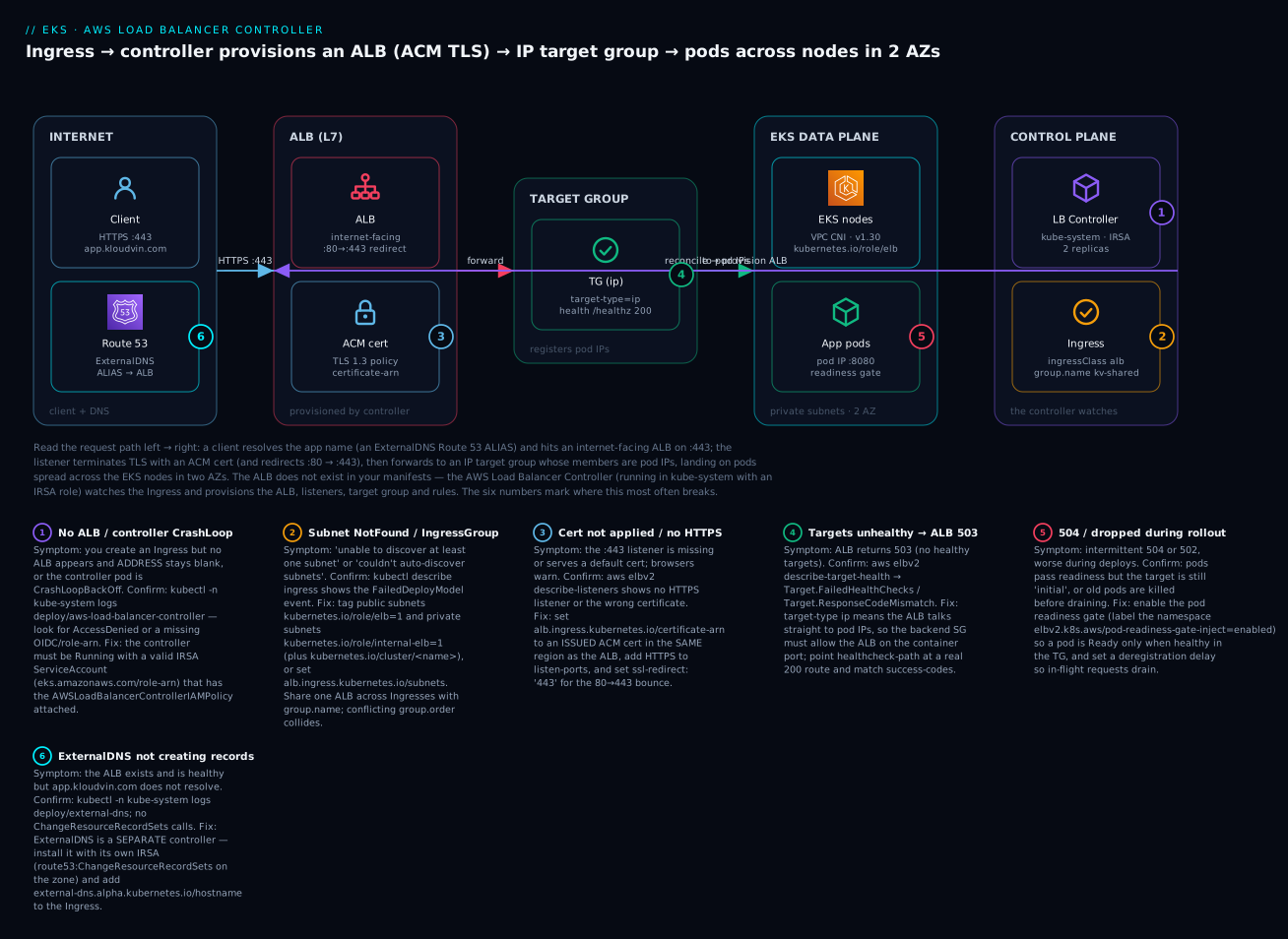
The diagram below is the exact system you build in the lab, read left to right along the request path. A client resolves app.kloudvin.com — an ExternalDNS-created Route 53 ALIAS pointing at the ALB — and hits an internet-facing ALB on :443. The ALB’s HTTPS listener terminates TLS with an ACM certificate (and a :80 listener 301-redirects to :443), then forwards to an IP target group whose members are pod IPs, landing on pods spread across the EKS nodes in two AZs. Crucially, the ALB is not in your manifests: the AWS Load Balancer Controller, running in kube-system under an IRSA role, watches the Ingress (ingressClassName: alb, group.name: kv-shared) and provisions the ALB, listeners, target group, and rules. The six numbered badges mark where this most often breaks — no ALB / controller CrashLoop, subnet tags / IngressGroup, the ACM cert, unhealthy ip targets, 504/rollout drops, and ExternalDNS silence — each narrated in the legend as symptom · confirm · fix.
Real-world scenario
LedgerLoop, a Pune fintech, ran eight microservices on EKS behind eight separate ALBs — one per team’s Ingress — created ad hoc as services shipped. The monthly bill showed roughly ₹1,700/service just in ALB hours plus LCUs before a single byte of useful traffic, and the security team could not get a consistent WAF applied because each ALB was configured differently. Worse, a Friday deploy of the payments service caused a two-minute burst of 504s: the rollout marked new pods Ready on their liveness probe, Kubernetes shifted traffic, but the ALB target group had not finished health-checking the new pod IPs, so requests hit initial targets and timed out.
The platform team did three things. First, they consolidated onto one shared ALB with an IngressGroup: every Ingress got alb.ingress.kubernetes.io/group.name: ll-prod and a distinct group.order, all using target-type: ip, scheme: internet-facing, and a single wildcard ACM certificate for *.ledgerloop.in. Eight ALBs became one; the ELB line on the bill dropped by roughly 80%, and because the certificate and WAF now lived on one load balancer, the security team attached a WAFv2 web ACL with alb.ingress.kubernetes.io/wafv2-acl-arn once and covered everything.
Second, they killed the 504 storm by enabling the pod readiness gate — kubectl label namespace payments elbv2.k8s.aws/pod-readiness-gate-inject=enabled — so a new pod became Ready only after the ALB target group reported it healthy. The rolling update now held the old pods until the new pods were real, healthy targets; the next payments deploy shifted zero failed requests. They also set deregistration_delay.timeout_seconds=30 and a 15-second preStop sleep so draining pods finished in-flight requests.
Third, they automated DNS. Instead of a human editing Route 53 after each new service, they installed ExternalDNS with its own IRSA role scoped to the ledgerloop.in hosted zone; each Ingress carried external-dns.alpha.kubernetes.io/hostname, and the ALIAS records appeared and updated automatically. The one incident during the migration was self-inflicted and instructive: a new service’s Ingress landed with a blank ADDRESS. The controller log read couldn't auto-discover subnets — the team had added two new private subnets for capacity but forgotten to tag them kubernetes.io/role/internal-elb. Two create-tags calls later, the service joined the shared ALB. The lesson stuck: on EKS, an Ingress that produces no ALB is almost always the controller, the IRSA policy, or a subnet tag — never “Kubernetes being slow.”
Advantages and disadvantages
| Advantages | Disadvantages |
|---|---|
| Native Ingress → ALB and Service → NLB, fully reconciled | The ALB/NLB is created out-of-band — not in Terraform state unless you use TargetGroupBinding |
target-type: ip routes straight to pods (one hop; Fargate-capable) |
ip mode means the backend SG must allow the ALB → pod, a common miss |
| IngressGroup shares one ALB across many apps (big cost saver) | Shared ALB = shared blast radius; a bad group.order can shadow another team |
| ACM TLS, WAF/Shield, Cognito/OIDC auth, redirects, weighted canaries | Broad IAM policy; the controller can create/modify LBs and SGs account-wide |
| Readiness gate enables zero-drop rolling deploys | Requires extra setup (namespace label, ip mode) that teams skip and then drop traffic |
| Replaces the legacy CLB-per-Service sprawl | Two controllers to run/upgrade if you also want DNS (ExternalDNS) |
| Reconciles as pods scale/roll — no manual target registration | Version drift (chart ↔ IAM policy ↔ CRDs) causes subtle AccessDenied/ignored-annotation bugs |
The controller wins decisively for any real workload on EKS: the alternative is hand-managing ALBs and re-registering targets every deploy, or living with CLB sprawl. The disadvantages are almost all operational discipline items — version-pin the chart and policy together, tag subnets, allow the ALB to reach pods, and enable the readiness gate — which is exactly what the lab and playbook below drill.
Hands-on lab
You will install the controller (IRSA + Helm), deploy an app, expose it via an Ingress that provisions an internet-facing ALB with an ACM cert and SSL redirect, verify the ALB and healthy ip targets, then add a second Ingress in the same IngressGroup — and tear it all down. aws, eksctl, helm, kubectl, and Terraform are shown. ⚠️ Cost note: an ALB is not free — it bills per hour plus LCUs (a few rupees/hour). If you create a NAT gateway or interface endpoints for node egress they bill too. Tear down when done.
Lab variables
| Variable | Example | Notes |
|---|---|---|
| Region | ap-south-1 |
Mumbai |
| Cluster | kv-eks |
Existing EKS cluster with a node group |
| VPC | vpc-0abc123 |
2 public + 2 private subnets, 2 AZs |
| Public subnets | subnet-pub-a, subnet-pub-b |
Tag kubernetes.io/role/elb=1 |
| Private subnets | subnet-prv-a, subnet-prv-b |
Tag kubernetes.io/role/internal-elb=1 |
| App image | public.ecr.aws/nginx/nginx:stable |
Public; no ECR auth |
| Container port | 80 |
nginx default |
| ACM cert ARN | arn:aws:acm:ap-south-1:123…:certificate/abc |
Same Region as the ALB, status ISSUED |
| Hostname | app.kloudvin.com |
In a Route 53 hosted zone you control |
Step 1 — OIDC provider + IAM policy + IRSA ServiceAccount
# OIDC provider (idempotent)
eksctl utils associate-iam-oidc-provider --cluster kv-eks --approve

# IAM policy (once per account)
curl -sSo iam_policy.json \
  https://raw.githubusercontent.com/kubernetes-sigs/aws-load-balancer-controller/v2.7.2/docs/install/iam_policy.json
aws iam create-policy --policy-name AWSLoadBalancerControllerIAMPolicy \
  --policy-document file://iam_policy.json

# IRSA ServiceAccount in kube-system
eksctl create iamserviceaccount --cluster kv-eks \
  --namespace kube-system --name aws-load-balancer-controller \
  --role-name AmazonEKSLoadBalancerControllerRole \
  --attach-policy-arn arn:aws:iam::123456789012:policy/AWSLoadBalancerControllerIAMPolicy \
  --approve
Step 2 — Tag the subnets
aws ec2 create-tags --resources subnet-pub-a subnet-pub-b \
  --tags Key=kubernetes.io/role/elb,Value=1
aws ec2 create-tags --resources subnet-prv-a subnet-prv-b \
  --tags Key=kubernetes.io/role/internal-elb,Value=1
# (recommended) cluster association
aws ec2 create-tags --resources subnet-pub-a subnet-pub-b subnet-prv-a subnet-prv-b \
  --tags Key=kubernetes.io/cluster/kv-eks,Value=shared
Step 3 — Install the controller via Helm
helm repo add eks https://aws.github.io/eks-charts && helm repo update eks

helm install aws-load-balancer-controller eks/aws-load-balancer-controller \
  -n kube-system \
  --set clusterName=kv-eks \
  --set serviceAccount.create=false \
  --set serviceAccount.name=aws-load-balancer-controller \
  --set region=ap-south-1 --set vpcId=vpc-0abc123

kubectl -n kube-system rollout status deploy/aws-load-balancer-controller
Expected: deployment "aws-load-balancer-controller" successfully rolled out, 2/2 ready.
Step 4 — Deploy the app + Service + IngressClass
# app.yaml
apiVersion: apps/v1
kind: Deployment
metadata: { name: web }
spec:
  replicas: 3
  selector: { matchLabels: { app: web } }
  template:
    metadata: { labels: { app: web } }
    spec:
      containers:
        - name: web
          image: public.ecr.aws/nginx/nginx:stable
          ports: [{ containerPort: 80 }]
---
apiVersion: v1
kind: Service
metadata: { name: web }
spec:
  selector: { app: web }
  ports: [{ port: 80, targetPort: 80 }]   # ClusterIP is fine for target-type: ip
---
apiVersion: networking.k8s.io/v1
kind: IngressClass
metadata: { name: alb }
spec: { controller: ingress.k8s.aws/alb }
kubectl apply -f app.yaml
kubectl label namespace default elbv2.k8s.aws/pod-readiness-gate-inject=enabled
Step 5 — Ingress that provisions an internet-facing ALB (ACM + SSL redirect)
# ingress-web.yaml
apiVersion: networking.k8s.io/v1
kind: Ingress
metadata:
  name: web
  annotations:
    alb.ingress.kubernetes.io/scheme: internet-facing
    alb.ingress.kubernetes.io/target-type: ip
    alb.ingress.kubernetes.io/listen-ports: '[{"HTTP":80},{"HTTPS":443}]'
    alb.ingress.kubernetes.io/ssl-redirect: '443'
    alb.ingress.kubernetes.io/certificate-arn: arn:aws:acm:ap-south-1:123456789012:certificate/abc
    alb.ingress.kubernetes.io/ssl-policy: ELBSecurityPolicy-TLS13-1-2-2021-06
    alb.ingress.kubernetes.io/healthcheck-path: /
    alb.ingress.kubernetes.io/success-codes: '200'
    alb.ingress.kubernetes.io/group.name: kv-shared
    alb.ingress.kubernetes.io/group.order: '10'
    external-dns.alpha.kubernetes.io/hostname: app.kloudvin.com
spec:
  ingressClassName: alb
  rules:
    - host: app.kloudvin.com
      http:
        paths:
          - path: /
            pathType: Prefix
            backend:
              service: { name: web, port: { number: 80 } }
kubectl apply -f ingress-web.yaml
Step 6 — Verify the ALB and targets
# The Ingress ADDRESS appears within ~1-2 min = the ALB DNS name
kubectl get ingress web -w

# Find the ALB the controller created (tagged with the group/cluster)
ALB_ARN=$(aws elbv2 describe-load-balancers \
  --query "LoadBalancers[?contains(LoadBalancerName, 'k8s-kvshared')].LoadBalancerArn | [0]" --output text)

# Target group + health — expect "healthy" for 3 pod IPs
TG_ARN=$(aws elbv2 describe-target-groups --load-balancer-arn $ALB_ARN \
  --query 'TargetGroups[0].TargetGroupArn' --output text)
aws elbv2 describe-target-health --target-group-arn $TG_ARN \
  --query 'TargetHealthDescriptions[].{ip:Target.Id,state:TargetHealth.State}'

# Hit it (HTTP should 301 to HTTPS)
ADDR=$(kubectl get ingress web -o jsonpath='{.status.loadBalancer.ingress[0].hostname}')
curl -s -o /dev/null -w "%{http_code}\n" http://$ADDR/        # 301
curl -s -o /dev/null -w "%{http_code}\n" -k https://$ADDR/    # 200
Expected: three healthy pod-IP targets, 301 on HTTP, 200 on HTTPS.
Step 7 — Add a second Ingress in the SAME IngressGroup
Create a second app (api) and expose it on /api via a second Ingress sharing group.name: kv-shared. No new ALB is created — the rule is merged onto the existing one.
# ingress-api.yaml (after deploying an "api" Service on port 80)
apiVersion: networking.k8s.io/v1
kind: Ingress
metadata:
  name: api
  annotations:
    alb.ingress.kubernetes.io/scheme: internet-facing
    alb.ingress.kubernetes.io/target-type: ip
    alb.ingress.kubernetes.io/group.name: kv-shared
    alb.ingress.kubernetes.io/group.order: '20'
spec:
  ingressClassName: alb
  rules:
    - host: app.kloudvin.com
      http:
        paths:
          - path: /api
            pathType: Prefix
            backend:
              service: { name: api, port: { number: 80 } }
kubectl apply -f ingress-api.yaml
# Same ALB, now two rules; confirm only ONE ALB exists for the group
aws elbv2 describe-load-balancers \
  --query "length(LoadBalancers[?contains(LoadBalancerName,'k8s-kvshared')])"   # -> 1
aws elbv2 describe-rules --listener-arn <https-listener-arn> \
  --query 'Rules[].Conditions'
Step 8 — Teardown
⚠️ Delete the Ingresses first so the controller tears down the ALB; if you delete the controller while an Ingress exists, the ALB is orphaned and keeps billing.
| # | Resource | Command | Billable if left? |
|---|---|---|---|
| 1 | Ingresses (both) | kubectl delete ingress web api |
Yes — ALB survives if skipped |
| 2 | App workloads | kubectl delete -f app.yaml |
Node capacity |
| 3 | Confirm ALB gone | aws elbv2 describe-load-balancers (group ALB absent) |
Yes (ALB hourly + LCU) |
| 4 | ExternalDNS records | ExternalDNS deletes owned records (policy sync) |
Route 53 query/zone |
| 5 | Controller (optional) | helm uninstall aws-load-balancer-controller -n kube-system |
No |
| 6 | IRSA SA + role/policy | eksctl delete iamserviceaccount … / aws iam delete-policy |
No |
| 7 | Subnet tags (optional) | aws ec2 delete-tags … |
No |
The same install in Terraform
# Assumes the EKS cluster + OIDC provider already exist (data sources)
data "aws_eks_cluster" "this" { name = "kv-eks" }
data "aws_eks_cluster_auth" "this" { name = "kv-eks" }

provider "helm" {
  kubernetes {
    host                   = data.aws_eks_cluster.this.endpoint
    cluster_ca_certificate = base64decode(data.aws_eks_cluster.this.certificate_authority[0].data)
    token                  = data.aws_eks_cluster_auth.this.token
  }
}

# IAM policy from the downloaded JSON
resource "aws_iam_policy" "lbc" {
  name   = "AWSLoadBalancerControllerIAMPolicy"
  policy = file("${path.module}/iam_policy.json")
}

# IRSA role trusting the controller's ServiceAccount via the cluster OIDC provider
data "aws_iam_openid_connect_provider" "eks" {
  url = data.aws_eks_cluster.this.identity[0].oidc[0].issuer
}

data "aws_iam_policy_document" "trust" {
  statement {
    actions = ["sts:AssumeRoleWithWebIdentity"]
    effect  = "Allow"
    principals {
      type        = "Federated"
      identifiers = [data.aws_iam_openid_connect_provider.eks.arn]
    }
    condition {
      test     = "StringEquals"
      variable = "${replace(data.aws_iam_openid_connect_provider.eks.url, "https://", "")}:sub"
      values   = ["system:serviceaccount:kube-system:aws-load-balancer-controller"]
    }
    condition {
      test     = "StringEquals"
      variable = "${replace(data.aws_iam_openid_connect_provider.eks.url, "https://", "")}:aud"
      values   = ["sts.amazonaws.com"]
    }
  }
}

resource "aws_iam_role" "lbc" {
  name               = "AmazonEKSLoadBalancerControllerRole"
  assume_role_policy = data.aws_iam_policy_document.trust.json
}
resource "aws_iam_role_policy_attachment" "lbc" {
  role       = aws_iam_role.lbc.name
  policy_arn = aws_iam_policy.lbc.arn
}

resource "helm_release" "lbc" {
  name       = "aws-load-balancer-controller"
  repository = "https://aws.github.io/eks-charts"
  chart      = "aws-load-balancer-controller"
  namespace  = "kube-system"
  version    = "1.7.2" # chart version; pin it

  set {
    name  = "clusterName"
    value = "kv-eks"
  }
  set {
    name  = "region"
    value = "ap-south-1"
  }
  set {
    name  = "vpcId"
    value = "vpc-0abc123"
  }
  set {
    name  = "serviceAccount.create"
    value = "true"
  }
  set {
    name  = "serviceAccount.name"
    value = "aws-load-balancer-controller"
  }
  set {
    name  = "serviceAccount.annotations.eks\\.amazonaws\\.com/role-arn"
    value = aws_iam_role.lbc.arn
  }
  depends_on = [aws_iam_role_policy_attachment.lbc]
}
The provider is configured from the cluster endpoint + CA + token, which only exist after the cluster does — so on a cold apply that also builds the cluster, split into two applies (cluster first, then this) or you will hit Kubernetes cluster unreachable. terraform destroy removes the release and IRSA, but the ALB is created by the controller, not this state — delete Ingresses first.
Common mistakes & troubleshooting
This is the section you will return to. Each row maps a real failure to the exact command that confirms it and the fix. The controller’s own logs (kubectl -n kube-system logs deploy/aws-load-balancer-controller) and the Ingress events (kubectl describe ingress <name>) are your two primary instruments.
| # | Symptom | Root cause | Confirm (exact command) | Fix |
|---|---|---|---|---|
| 1 | Ingress created, ADDRESS blank, no ALB |
Controller not installed/running | kubectl -n kube-system get deploy aws-load-balancer-controller |
Install the Helm chart; ensure pods Running |
| 2 | Controller pod CrashLoopBackOff |
IRSA missing/wrong; AccessDenied |
kubectl -n kube-system logs deploy/aws-load-balancer-controller shows AccessDenied/WebIdentityErr |
Attach AWSLoadBalancerControllerIAMPolicy; fix SA role-arn annotation + OIDC trust sub |
| 3 | Event couldn't auto-discover subnets / NotFound |
Subnet tags missing | kubectl describe ingress web → FailedDeployModel; aws ec2 describe-subnets --query 'Subnets[].Tags' |
Tag public kubernetes.io/role/elb=1, private internal-elb=1; or set alb.ingress.kubernetes.io/subnets |
| 4 | ALB up, all targets unhealthy → 503 |
Backend SG blocks ALB→pod, or wrong health path | aws elbv2 describe-target-health --target-group-arn $TG → Target.FailedHealthChecks/ResponseCodeMismatch |
Allow ALB SG → pod SG on container port; point healthcheck-path at a real 200 route |
| 5 | 504 Gateway Timeout from ALB |
Pod not ready, app slow, or SG blocks the probe/traffic port | describe-target-health shows initial/Target.Timeout; check pod logs |
Enable readiness gate; open backend SG on the port; raise idle_timeout/app timeout |
| 6 | HTTPS listener missing / cert not applied | certificate-arn wrong Region, not ISSUED, or HTTPS not in listen-ports |
aws elbv2 describe-listeners --load-balancer-arn $ALB (no 443); aws acm describe-certificate |
Use an ISSUED ACM cert in the ALB’s Region; add {"HTTPS":443} to listen-ports |
| 7 | IngressGroup conflict / rules collide | Two Ingresses same group.order, or clashing LB-level annotations |
kubectl describe ingress → conflicting event; controller log |
Give distinct group.order; make scheme/cert/WAF consistent across the group |
| 8 | target-type: ip targets never register |
VPC CNI not giving pod VPC IPs, or Service selector wrong | kubectl get endpoints web; kubectl get pods -o wide |
Ensure VPC CNI healthy; fix Service selector/targetPort |
| 9 | Service LoadBalancer made a CLB, not NLB |
Legacy in-tree provider handled it | aws elbv2 describe-load-balancers (none) but a Classic LB exists |
Add aws-load-balancer-type: external + nlb-target-type, or loadBalancerClass: service.k8s.aws/nlb |
| 10 | ExternalDNS not creating records | Not installed, wrong IRSA, or zone mismatch | kubectl -n kube-system logs deploy/external-dns; no ChangeResourceRecordSets |
Install ExternalDNS with route53:* IRSA scoped to the zone; add the hostname annotation |
| 11 | Traffic dropped during rollout (brief 5xx) | No readiness gate; traffic shifts before targets healthy | kubectl get pod -o yaml lacks the readiness-gate condition |
kubectl label namespace … elbv2.k8s.aws/pod-readiness-gate-inject=enabled + target-type: ip |
| 12 | ALB orphaned after teardown (still billing) | Controller deleted while Ingress existed | aws elbv2 describe-load-balancers shows a k8s-* ALB with no Ingress |
Recreate the Ingress, let controller delete it, or delete the ALB manually |
| 13 | Annotation ignored / not taking effect | Wrong prefix, controller too old, or on the wrong object | kubectl describe ingress; controller version vs annotation |
Use alb.ingress.kubernetes.io/* on the Ingress; upgrade chart + IAM policy together |
| 14 | New API call fails AccessDenied after upgrade |
IAM policy older than the controller image | Controller log names the denied action | Re-download iam_policy.json for the new version; update the policy |
Controller log & event error reference
| Log / event string | Meaning | Fix |
|---|---|---|
AccessDenied … not authorized to perform elasticloadbalancing:CreateLoadBalancer |
IRSA policy missing/old | Attach/refresh AWSLoadBalancerControllerIAMPolicy |
WebIdentityErr … AssumeRoleWithWebIdentity |
OIDC trust mismatch | Fix trust sub/aud; SA role-arn annotation |
couldn't auto-discover subnets |
No tagged subnets for the scheme | Tag subnets (role/elb / internal-elb) |
unable to resolve at least one subnet |
Subnets in wrong AZ/VPC, or too few | Provide ≥2 subnets in ≥2 AZs |
conflicting … group.order / ingress group conflict |
Duplicate order or clashing annotations | Distinct group.order; consistent LB annotations |
certificate … not found |
Wrong ARN/Region or not ISSUED |
Correct certificate-arn, same Region |
Failed build model … backend not found |
Service/port in the rule doesn’t exist | Fix backend.service.name/port |
SecurityGroup … rule already exists / SG limit |
Backend SG rule churn / limit | Reduce SGs; use shared backend SG |
ALB HTTP status-code reference (what the ALB itself returns)
| Code | Meaning | Likely cause on EKS | Fix |
|---|---|---|---|
301 |
Redirect | ssl-redirect: '443' bouncing HTTP→HTTPS |
Expected |
400 |
Bad Request | Malformed request / header | Client-side |
403 |
Forbidden | WAF rule, inbound-cidrs, or auth |
Check WAFv2 ACL / CIDR allowlist |
460 |
Client closed connection | Client timed out before ALB responded | Client/network; check slow backend |
463 |
Too many X-Forwarded-For IPs |
XFF chain too long | Trim upstream proxies |
464 |
Incompatible protocol | HTTP/2 vs gRPC mismatch | Set backend-protocol-version |
502 |
Bad Gateway | Pod returned malformed response / crashed / TLS mismatch | Fix app; match backend-protocol |
503 |
Service Unavailable | No healthy targets | Fix health check + backend SG (rows 4/5) |
504 |
Gateway Timeout | Target too slow / SG blocks / not ready | Readiness gate, SG, timeouts (row 5) |
561 |
Auth error | IdP (Cognito/OIDC) returned an error | Fix auth-* config |
The two nastiest real failures deserve spelling out. The blank-ADDRESS Ingress (rows 1–3) is the classic first encounter: an Ingress applies cleanly, kubectl get ingress shows no ADDRESS, and nothing errors at the kubectl layer because the controller is where reconciliation happens. The discipline is always the same — kubectl -n kube-system logs deploy/aws-load-balancer-controller and kubectl describe ingress <name>; the answer is almost always controller-not-running, AccessDenied from a bad IRSA, or couldn't auto-discover subnets from a missing tag. The target-type: ip security-group trap (rows 4–5) is the sneakiest at scale: because ip mode makes the ALB talk directly to pod IPs (not to a node NodePort), the ALB’s traffic must be allowed into the pods’ backend security group on the container port. Teams that came from instance mode open the node SG, see targets stay unhealthy, and burn an hour before realising the traffic now lands on the pod ENI’s SG. The controller can manage this backend SG rule for you — but only if you did not hand it a custom frontend SG without also setting manage-backend-security-group-rules.
Best practices
- Version-pin the trio together — Helm chart, controller image, and the
iam_policy.json— and upgrade them as a set; drift is the root of “annotation ignored” and “newAccessDenied” bugs. - Run the controller as an IRSA workload, never on the node instance role — least privilege and clean auditing of who created which load balancer.
- Tag subnets once in your VPC IaC (
role/elb,internal-elb,cluster/<name>) so every future Ingress auto-discovers placement — no per-Ingresssubnetsannotation. - Default to
target-type: ipfor direct pod routing (and it is mandatory on Fargate); reach forinstanceonly when you deliberately want NodePort semantics or fewer target registrations at very large scale. - Collapse apps onto one ALB with an IngressGroup where scheme/cert/WAF are shared — it is the single biggest ingress cost lever on EKS.
- Always enable the pod readiness gate (
ipmode + namespace label) so rolling deploys add pods to the ALB only when they are truly healthy targets — this eliminates deploy-time 5xx. - Terminate TLS with ACM in the ALB’s Region, prefer a TLS 1.3 SSL policy, and set
ssl-redirect: '443'so plain HTTP always bounces to HTTPS. - Let the controller manage the backend SG rule (or set
manage-backend-security-group-rules) so the ALB can reach pods on the container port — the most common503cause inipmode. - Automate DNS with ExternalDNS (its own scoped IRSA) rather than hand-editing Route 53 after each service.
- Use
TargetGroupBindingwhen you want Terraform to own the ALB/TG and the controller to own only pod registration — it keeps the load balancer in IaC state. - Restrict who can create Ingresses (RBAC) and constrain allowed
group.names so a carelessgroup.ordercannot shadow another team’s routes on a shared ALB. - Delete Ingresses before uninstalling the controller (or before
terraform destroy) so ALBs are torn down, not orphaned and billing.
Security notes
Ingress on EKS is a public front door; secure it at identity, network, and edge layers.
| Control | What to do | Why |
|---|---|---|
| Controller IRSA least-privilege | Use the official policy; do not broaden it | The controller can create/modify LBs and SGs account-wide |
| Frontend restriction | inbound-cidrs and/or a WAFv2 ACL (wafv2-acl-arn) |
Cut bot/scanner traffic before it reaches pods |
| DDoS | shield-advanced-protection: 'true' on critical ALBs |
Managed L3/L4 + L7 DDoS mitigation |
| TLS | ACM cert (same Region), TLS 1.3 SSL policy, ssl-redirect |
No plaintext; modern ciphers |
| End-to-end encryption | backend-protocol: HTTPS to pods if required |
Encrypt ALB→pod, not just client→ALB |
| Auth offload | auth-type: cognito/oidc on the listener |
Authenticate at the edge, before app code |
| Backend SG scoping | Allow only the ALB frontend SG → pods on the port | No direct internet path to pods |
| Internal exposure | scheme: internal + private subnet tags |
Keep internal services off the public internet |
| ExternalDNS scope | IRSA scoped to the specific hosted zone | Limit blast radius of DNS changes |
| IngressGroup RBAC | Constrain who can join which group.name |
Prevent rule shadowing on shared ALBs |
| Access logs | load-balancer-attributes: access_logs.s3.enabled=true |
Audit and incident forensics |
Cost & sizing
You pay for the load balancers the controller creates (ALB/NLB hours + LCUs/NLCUs), plus data transfer, plus any NAT/endpoints node egress and, if enabled, WAF and Shield Advanced. The controller itself is just two small pods. The EKS control plane has its own hourly charge (separate topic).
| Cost component | Driver | Approx (ap-south-1 / Mumbai) | Lever |
|---|---|---|---|
| ALB | Hours + LCUs (new conns, active conns, bandwidth, rule evals) | ~$0.0225/hr + LCU | IngressGroup: one ALB for many apps |
| NLB | Hours + NLCUs | ~$0.0225/hr + NLCU | Consolidate; only where L4 is needed |
| Controller pods | 2 small pods | Node capacity only | replicaCount: 2 (leader-elected) |
| WAFv2 | Web ACL + rules + requests | ~$5/ACL/mo + per-rule + per-M req | Share one ACL across the shared ALB |
| Shield Advanced | Subscription | ~$3,000/mo (org-wide) | Only for critical, targeted workloads |
| Cross-AZ (NLB) | Cross-zone LB data | Per-GB | Leave cross-zone off unless you need even spread |
| ExternalDNS | Route 53 zone + queries | ~$0.50/zone/mo + queries | One zone, ALIAS (free) records |
Worked example — the ingress layer for a 10-service platform, contrasting the two models over ~730 hr/mo:
| Line | Per-Ingress ALBs (10) | IngressGroup (1 ALB) |
|---|---|---|
| ALB hours | 10 × $0.0225 × 730 ≈ $164 | 1 × $0.0225 × 730 ≈ $16 |
| LCUs (light) | ~10 × $6 ≈ $60 | ~$8–15 (aggregate) |
| WAFv2 ACLs | 10 × ~$5 ≈ $50 | 1 × ~$5 ≈ $5 |
| Rough ingress total | ≈ $274/mo (~₹22,800) | ≈ $30–36/mo (~₹2,700) |
The headline lever is unmistakable: an IngressGroup turns ten ALBs into one and collapses the ingress bill by roughly 8×, while also letting one WAF ACL and one certificate cover everything. Secondary levers: keep NLB cross-zone off unless you need perfectly even spread (it adds per-GB data cost), scope Shield Advanced to only the ALBs that need it, and prefer ip targets to avoid an extra SNAT hop. On us-east-1 the same numbers run roughly 15–20% lower.
Interview & exam questions
Q1. What does the AWS Load Balancer Controller do, and what did it replace? It runs in-cluster and reconciles Kubernetes objects into AWS load balancers: an Ingress (ingressClassName: alb) into an ALB, and a Service type: LoadBalancer into an NLB. It replaces the legacy in-tree cloud provider, which only made a Classic Load Balancer per Service and had no Ingress support. (SAA-C03, DVA-C02)
Q2. What is the difference between target-type: ip and instance? ip registers pod IPs directly in the target group (via the VPC CNI), so the ALB talks straight to the pod and it works on Fargate; instance registers node instances on a NodePort and relies on kube-proxy for the final hop. ip needs the pods’ backend security group to allow the ALB. (SAA-C03, SOA-C02)
Q3. How does the controller get AWS permissions? Through IRSA: its kube-system/aws-load-balancer-controller ServiceAccount is annotated with an IAM role ARN, and the cluster’s OIDC provider lets the pod assume that role via AssumeRoleWithWebIdentity. The role has the AWSLoadBalancerControllerIAMPolicy. (DVA-C02, SCS-C02)
Q4. Your Ingress has a blank ADDRESS and no ALB appears. How do you diagnose it? Check the controller is running (kubectl -n kube-system get deploy aws-load-balancer-controller), read its logs for AccessDenied or couldn't auto-discover subnets, and kubectl describe ingress for events. The usual causes are controller-not-installed, bad IRSA, or missing subnet tags. (SOA-C02)
Q5. What subnet tags does the controller need and why? kubernetes.io/role/elb=1 on public subnets (internet-facing LBs) and kubernetes.io/role/internal-elb=1 on private subnets (internal LBs), so the controller can auto-discover where to place the load balancer; the kubernetes.io/cluster/<name> tag associates subnets with the cluster. (SAA-C03, SOA-C02)
Q6. How do you serve many apps from one ALB, and why? Give each Ingress the same alb.ingress.kubernetes.io/group.name (an IngressGroup), with distinct group.order for rule precedence. The controller merges them onto one shared ALB, cutting cost dramatically versus one ALB per Ingress and letting a single cert/WAF cover all. (SAA-C03)
Q7. How do you make a Service produce an NLB rather than a CLB? Set service.beta.kubernetes.io/aws-load-balancer-type: external with nlb-target-type (or, modern, spec.loadBalancerClass: service.k8s.aws/nlb). Without either, the legacy in-tree provider makes a Classic Load Balancer. (SAA-C03, DVA-C02)
Q8. What is a TargetGroupBinding and when would you use it? A CRD that binds a Kubernetes Service to an existing target group ARN; the controller then only manages target registration (and optionally backend SG rules), not the load balancer. Use it when Terraform owns the ALB/TG and you want it in IaC state. (DVA-C02)
Q9. How do you attach TLS to an ALB Ingress, and what is the most common mistake? Set alb.ingress.kubernetes.io/certificate-arn to an ACM cert and include {"HTTPS":443} in listen-ports. The most common mistake is a certificate in the wrong Region or not ISSUED, which silently yields no HTTPS listener. (SOA-C02, SCS-C02)
Q10. What is the pod readiness gate and what problem does it solve? Labeling a namespace elbv2.k8s.aws/pod-readiness-gate-inject=enabled makes the controller add a readiness gate so a pod is Ready only when it is healthy in the ALB target group. This prevents rolling deploys from shifting traffic to pods the ALB has not yet health-checked, eliminating deploy-time 5xx. (DVA-C02, SOA-C02)
Q11. Your ALB returns 503 with all targets unhealthy, but the app is fine. Name two likely causes. The pods’ backend security group does not allow the ALB on the container port (in ip mode the ALB reaches the pod directly), or the health-check path/matcher is wrong so the app returns a non-200. (SAA-C03, SOA-C02)
Q12. Why can deleting the controller before deleting Ingresses cost you money? The ALB is created out-of-band by the controller; if the controller is gone while an Ingress still exists, nothing reconciles the ALB away — it becomes orphaned and keeps billing hourly. Always delete Ingresses (or destroy the Ingress Terraform resource) first. (SOA-C02)
Quick check
- Kubernetes ships no Ingress implementation — so what actually turns your
Ingressinto an ALB on EKS? - You need the ALB to send traffic straight to pods (and you run on Fargate). Which
target-typedo you set, and what must the pods’ security group allow? - You have ten services and ten ALBs. What one annotation collapses them onto a single ALB, and what sets rule order?
- Your HTTPS listener never appears though you set
certificate-arn. Name the two most likely reasons. - A rolling deploy briefly returns 5xx as new pods come up. What feature fixes it, and how do you enable it?
Answers
- The AWS Load Balancer Controller — an in-cluster Deployment that watches Ingresses (
ingressClassName: alb) and provisions/reconciles the ALB, listeners, target groups, and rules. target-type: ip(mandatory on Fargate). The pods’ backend security group must allow the ALB’s frontend SG on the container port, since the ALB talks directly to pod IPs.alb.ingress.kubernetes.io/group.name(an IngressGroup) shares one ALB;group.ordersets rule precedence (lower first).- The ACM certificate is in the wrong Region (must match the ALB) or is not
ISSUED; or HTTPS is not inlisten-ports({"HTTPS":443}missing). - The pod readiness gate — label the namespace
elbv2.k8s.aws/pod-readiness-gate-inject=enabled(withtarget-type: ip) so a pod isReadyonly when it is a healthy ALB target.
Glossary
| Term | Definition |
|---|---|
| AWS Load Balancer Controller | In-cluster Deployment that reconciles Ingress → ALB and Service LoadBalancer → NLB, replacing the legacy in-tree cloud provider. |
| Ingress | A Kubernetes object declaring L7 HTTP routing (host/path → Service); inert without a controller. |
| IngressClass | Names the controller that owns an Ingress (spec.controller: ingress.k8s.aws/alb), selected per-Ingress with ingressClassName. |
| IngressGroup | A set of Ingresses sharing one ALB via a common group.name, with group.order setting rule precedence. |
target-type |
Whether the target group registers pod IPs (ip, via the VPC CNI) or node instances on a NodePort (instance). |
| IRSA | IAM Roles for Service Accounts — maps a Kubernetes ServiceAccount to an IAM role through the cluster’s OIDC provider. |
AWSLoadBalancerControllerIAMPolicy |
The IAM policy granting the controller its ELB/EC2/ACM/WAF permissions; version-matched to the controller. |
| Subnet tags | kubernetes.io/role/elb (public), internal-elb (private), cluster/<name> — how the controller auto-discovers where to place load balancers. |
| ACM certificate | An AWS Certificate Manager cert (referenced by ARN, same Region as the ALB) used to terminate TLS on the HTTPS listener. |
TargetGroupBinding |
A CRD binding a Service to an existing target group ARN; the controller manages only target registration. |
| NLB | Network Load Balancer (L4), provisioned from a Service type: LoadBalancer with aws-load-balancer-type: external. |
| ExternalDNS | A separate controller that writes Route 53 records (ALIAS to the LB) from Ingress/Service annotations. |
| Pod readiness gate | A mechanism making a pod Ready only when it is healthy in the ALB target group, for zero-drop rollouts. |
| Deregistration delay | The connection-draining window the ALB honours before removing a deregistered target. |
| LCU | Load Balancer Capacity Unit — the usage-based dimension (connections, bandwidth, rule evals) that bills alongside ALB hours. |
Next steps
- Build the cluster first if you have not: EKS Cluster Setup with eksctl (Hands-On) gives you the cluster, node group, and OIDC provider this article assumes.
- Master the identity the controller relies on: EKS IRSA: Pod IAM Permissions (Hands-On) explains the ServiceAccount ↔ role ↔ OIDC trust that also secures your app pods.
- Go deep on the load balancer itself: Application Load Balancer & Target Groups Hands-On covers listeners, rules, target-group attributes, and health-check reason codes the controller drives — and ALB 502/503/504 Troubleshooting for 5xx incidents.
- Automate the DNS names: Route 53 Records & Routing Policies (Hands-On) is the reference behind the ALIAS records ExternalDNS creates.
- Reconsider the platform if needs change: ECS vs EKS vs Fargate: Choosing Your Container Path and AWS Compute Compared: EC2, Lambda, ECS & EKS.