It is 02:00, an on-call page just fired, and a Fargate task that has read the same bucket for a year is now returning 403 AccessDenied on GetObject. You own the bucket. You wrote the IAM policy. The Policy Simulator says Allow. And S3 still says no. Every S3 engineer meets this wall, and the reflex — widen the identity policy, add s3:*, maybe make the bucket public “just to test” — is almost always wrong, because the layer that denied you is usually a layer you never touched. The real skill is not writing S3 policies; it is locating, in under two minutes, which of nine independent policy sources across four services returned the deny — and then fixing that one, at least privilege, not carpet-bombing the whole stack.
A single S3 request is adjudicated by more moving parts than any other AWS API. Before S3 ever consults its own bucket policy, the request can be killed by a Service Control Policy or Resource Control Policy at the Organizations boundary, by a VPC endpoint policy on the network path, or by Block Public Access. Then the caller’s IAM identity policy must allow it — but so must any permission boundary on that principal and any session policy stapled on at AssumeRole, because your effective permission is the intersection of all three. If the object is encrypted with a customer-managed key, a completely different service — KMS — gets a veto through its key policy, its grants, or the key’s own state. And even with every policy perfect, Object Lock, a legal hold, requester-pays, cross-account object ownership, or a mis-scoped presigned URL can each produce a 403 that looks identical to a permissions problem but isn’t one. Nine sources, four services, one three-digit status code.
This article is the cross-service decision tree that collapses those nine sources back to one. It is the diagnostic companion to Securing Amazon S3: Bucket Policies, Block Public Access and the 403 Playbook, which teaches how to set up the access-control stack; here you learn how to decode a denial under pressure — read the 2023-era detailed AccessDenied message that now names the offending policy type, pull the exact denied API call and principal from CloudTrail data events, run the IAM Policy Simulator while knowing precisely what it cannot see, and walk a request path badge by badge until the guilty layer confesses. The general IAM evaluation mechanics live in Debugging IAM ‘Access Denied’: Policy Evaluation Logic, SCPs, Boundaries and a Playbook; this is that model applied to the one service where it hurts most. Read the prose once; keep the master table open at 02:00.
What problem this solves
The problem is time and blast radius. A misdiagnosed 403 costs an afternoon of widening the wrong policy, and it costs security posture: the industry-standard “fix” of attaching AdministratorAccess or slapping "Principal": "*" on a bucket converts a five-minute layer diagnosis into a permanent audit finding and, in the worst case, a data-leak headline. The denial was always precisely locatable. What was missing was a method — a way to look at the shape of the error and the CloudTrail record and say “that is the KMS key policy” or “that is a session policy from the SSO broker” without touching anything else first.
What breaks without this method is repeatable and expensive. Cross-account data-lake reads half-configured so one door is open and one is shut. SSE-KMS rollouts where the S3 permissions are flawless and the key denies everyone. VPC-only architectures where a bucket works from a laptop and 403s from every EC2 instance. Compliance guardrails — force-TLS, force-SSE, org-perimeter SCPs — that deny correctly but with a message the on-call engineer can’t parse. Object Lock in Compliance mode returning 403 on a delete that no one, not even the account root, can perform. Each of these is a different layer with a different fix, and treating them all as “the IAM policy is too narrow” is how teams end up over-permissioned and still broken.
Who hits this hardest: anyone running cross-account buckets (the AND rule, plus a third door on the KMS key), encrypted workloads (the KMS gate that masquerades as an S3 problem), VPC-only or PrivateLink designs (endpoint policies and aws:SourceVpce conditions), regulated estates with SCPs/RCPs and Object Lock, and anyone who has ever handed a presigned URL to a browser and watched it expire mid-upload. The fix is never “open it wider until it works.” The fix is “read the denial, name the layer, correct that layer.” This article makes that reflex automatic.
Learning objectives
By the end of this article you can:
- Enumerate every source of an S3
403 AccessDenied— SCP, RCP, VPC endpoint policy, Block Public Access, bucket policy, IAM identity policy, permission boundary, session policy, KMS key policy/grant/state, Object Lock, requester-pays, cross-account ownership, presigned-URL failure — and state which service each lives in. - Read the 2023+ detailed
AccessDeniedmessage and map its reason clause (explicit deny in a service control policy,in a permissions boundary,in a resource-based policy,no identity-based policy allows, and the KMS variants) directly to the layer and the fix. - Enable and query CloudTrail S3 data events to see the exact denied API call, principal, source IP and VPC endpoint — and know why
cloudtrail lookup-eventswill not show them. - Use the IAM Policy Simulator correctly, knowing its blind spots (session policies, KMS key policies, BPA, VPC endpoint policies, cross-account resource policies) so a green “Allow” never fools you again.
- Distinguish the “it’s actually KMS” 403 — where
s3:GetObjectis perfect and the deny iskms:Decrypton the key — from a genuine S3 denial, including the cross-account three-door case and KMS grants. - Untangle the
s3:ListBucketvss3:GetObjectconfusion, including why a missing object returns403(not404 NoSuchKey) when you lacks3:ListBucket, so a “permissions” 403 can really be a typo’d key. - Diagnose the write/delete-only 403s — Object Lock retention (Governance vs Compliance), legal hold, requester-pays, cross-account object ownership — that no amount of IAM widening will fix.
- Reproduce, diagnose and fix three real 403s end to end with
awsCLI and Terraform, then tear it all down.
Prerequisites & where this fits
You should be comfortable creating buckets, uploading and downloading objects, and reading an ARN, a JSON policy and a sts:AssumeRole flow — if not, do the hands-on Amazon S3 Fundamentals Hands-On: Buckets, Objects, Versioning and Presigned URLs first. You should understand the difference between an identity-based policy (attached to a principal) and a resource-based policy (attached to the bucket or the KMS key), and know that a role session is what actually calls S3 after an assume-role. This article assumes the setup knowledge from Securing Amazon S3: Bucket Policies, Block Public Access and the 403 Playbook — how BPA, Object Ownership, bucket policies and condition keys are configured — and turns it around to diagnosis.
Where it fits: this is the S3-specific application of the general authorization model in Debugging IAM ‘Access Denied’: Policy Evaluation Logic, SCPs, Boundaries and a Playbook. That article owns the universal evaluation logic (how Allow/Deny/boundary/SCP/session combine across any service); this one owns the parts that are unique to S3 and its neighbours — the KMS gate, Object Lock, requester-pays, ownership, presigned URLs, the ListBucket/GetObject split, the S3 detailed message and S3 data events. For the audit trail you will lean on throughout, the mechanics of trails, data events and Config live in AWS CloudTrail and Config: Audit and Compliance at Scale. On the certification map, this is core to SCS-C02 (Security Specialty) and SOA-C02 (SysOps), and heavily tested in SAA-C03 and DVA-C02.
Core concepts
Five ideas make every later diagnosis mechanical. Learn them once and the master table stops being a lookup and becomes a reflex.
One request, up to nine deny sources, four services. An S3 API call is not authorized by “the S3 policy.” It is authorized by a pipeline that stitches together policies from Organizations (SCP, RCP), VPC networking (endpoint policy), S3 (Block Public Access, bucket policy, ACL/ownership, Object Lock, requester-pays), IAM (identity policy, permission boundary, session policy) and KMS (key policy, grants, key state). Any one of them can return the deny, and the fix lives in whichever one it was — not necessarily the one you control.
Explicit Deny wins, everywhere, always. The evaluation starts at an implicit deny (nothing is allowed until something allows it). An Allow lifts it. But a single explicit Deny in any policy in scope — SCP, RCP, bucket policy, identity policy, boundary, session, VPC endpoint policy — ends the evaluation with a denial that no number of Allows can overturn. When “adding another Allow changes nothing,” you are looking at an explicit Deny; stop adding Allows and go find it.
Same-account is OR; cross-account is AND; SSE-KMS adds a third door. Inside one account, GetObject is allowed if either the identity policy or the bucket policy allows it. Across accounts, both must allow — independently. And if the object is SSE-KMS with a customer-managed key, a third independent grant is required on the KMS key. The majority of cross-account 403s are simply “one of the two-or-three doors is shut.”
The effective identity permission is an intersection, not a union. People think of an IAM policy as the whole story. It isn’t. The caller’s effective permission is identity policy ∩ permission boundary ∩ session policy (each present layer narrows it further). An action allowed by the identity policy is still denied if the boundary doesn’t also allow it, or if a session policy passed at AssumeRole doesn’t. These two — boundary and session — are invisible in the bucket, invisible in most dashboards, and the cause of the nastiest “but my policy allows it!” 403s.
Read the message first, then confirm with CloudTrail. Since 2023 the S3 AccessDenied message increasingly names the policy type that denied you — “with an explicit deny in a service control policy,” “in a permissions boundary,” “in a resource-based policy,” or “because no identity-based policy allows.” That one clause collapses nine layers to one. CloudTrail data events then give you the ground truth: the exact eventName, the errorCode, the real userIdentity (often not who you assumed), the sourceIPAddress and the vpcEndpointId. Message narrows it; CloudTrail proves it.
Every source of a deny — the master map
Pin the whole field before the deep sections. This is the diagnostic index; every row gets its own section below.
| Deny source | Lives in (service) | Grants or only denies? | Signature in the error / behaviour | First thing to confirm |
|---|---|---|---|---|
| Service Control Policy (SCP) | Organizations | Only caps (Deny) | …explicit deny in a service control policy |
Read the account’s OU SCPs |
| Resource Control Policy (RCP) | Organizations | Only caps (Deny) | …explicit deny in a resource control policy |
Read RCPs on the resource’s OU |
| VPC endpoint policy | VPC networking | Only caps | Fails only from inside the VPC | describe-vpc-endpoints + its policy |
| Block Public Access | S3 | Only vetoes public | A “public” grant still 403s | get-public-access-block (acct + bucket) |
| Bucket policy (explicit Deny) | S3 | Grants + Deny | …explicit deny in a resource-based policy |
get-bucket-policy; read the conditions |
| Bucket policy (missing principal) | S3 | Grants | Cross-account 403; no resource-based policy allows |
get-bucket-policy; is the role named? |
| IAM identity policy | IAM | Grants + Deny | no identity-based policy allows the … action |
simulate-principal-policy |
| Permission boundary | IAM | Only caps | Denied though identity policy allows | get-role/get-user; boundary attached? |
| Session policy | IAM/STS | Only caps | Denied only for the assumed session | Inspect the AssumeRole call / broker |
| KMS key policy / grant | KMS | Grants (key use) | 403 names kms:Decrypt + a key ARN |
get-key-policy + list-grants |
| KMS key state | KMS | Blocks | KMSInvalidStateException / disabled |
describe-key → KeyState |
| Object Ownership / ACL | S3 | Grants (legacy) | Owner 403s on another account’s object | get-object-acl shows a foreign owner |
| Object Lock / legal hold | S3 | Blocks write/delete | 403 only on overwrite/delete of a version | get-object-retention / -legal-hold |
| Requester Pays | S3 | Blocks | 403 without x-amz-request-payer |
get-bucket-request-payment |
| Presigned URL failure | S3/SigV4 | — | 403 Request has expired / SignatureDoesNotMatch |
Inspect expiry, method, signer |
The evaluation pipeline as a diagnostic order
Work the layers in the order S3 effectively resolves them, because the early ones short-circuit. If an SCP or a bucket-policy Deny is killing the request, nothing you do to the identity policy or the KMS key will ever matter — so rule the short-circuiting layers out first.
| Order | Layer | Question | If it denies, the tell is… | Grants or only caps |
|---|---|---|---|---|
| 0 | Implicit deny | Does anything allow this? | no identity-based policy allows… |
Baseline |
| 1 | Explicit Deny (any policy) | Does any policy Deny this? |
Adding Allows changes nothing | Caps (absolute) |
| 2 | SCP / RCP | Does the org boundary allow it? | …in a service/resource control policy |
Caps |
| 3 | VPC endpoint policy | Allowed through the endpoint? | Fails only from inside the VPC | Caps |
| 4 | Block Public Access | Is it “public,” and is BPA on? | A public grant is inert | Caps (never grants) |
| 5 | Object Ownership / ACL | Does an ACL grant (if ACLs on)? | Owner 403s on foreign-written object | Grants (legacy) |
| 6 | Bucket policy | Does the resource policy allow? | …in a resource-based policy / not named |
Grants + Deny |
| 7 | IAM identity ∩ boundary ∩ session | Does the caller’s effective set allow? | no identity-based policy allows… |
Grants + Deny/caps |
| 8 | KMS key policy / grant / state | May the principal use the key? | 403 names kms:* + a key ARN |
Grants (key use) |
| 9 | Object condition (Lock / requester-pays) | Any object-level block? | 403 only on write/delete, or needs a header | Blocks |
The OR / AND / third-door truth table
Most cross-account 403s are one of these seven rows. Memorise it.
| Scenario | Identity allows? | Bucket policy allows? | KMS key allows? | Explicit Deny anywhere? | Result |
|---|---|---|---|---|---|
| Same account, unencrypted | Yes | (any) | n/a | No | Allow (OR) |
| Same account, unencrypted | No | Yes | n/a | No | Allow (OR) |
| Same account, unencrypted | No | No | n/a | No | Deny (implicit) |
| Any account | (any) | (any) | (any) | Yes | Deny (Deny wins) |
| Cross account, unencrypted | Yes | No | n/a | No | Deny (one door shut) |
| Cross account, unencrypted | Yes | Yes | n/a | No | Allow (both doors) |
| Cross account, SSE-KMS | Yes | Yes | No | No | Deny (third door — the key) |
The vocabulary in one table
These terms recur; the glossary repeats them for lookup.
| Term | One-line definition | Role in a 403 |
|---|---|---|
| Implicit deny | The default: nothing allows it | Base state; message no … policy allows |
| Explicit Deny | A statement with Effect: Deny |
Beats every Allow; ends evaluation |
| Permission boundary | Managed policy capping a principal’s max | Intersects the identity policy — hidden cap |
| Session policy | Policy passed at AssumeRole/federation |
Intersects further — invisible in the bucket |
| SCP | Org guardrail on member accounts | Caps every principal in the account |
| RCP | Org guardrail on resources (S3/KMS/…) | Caps access to the resource, org-wide |
| VPC endpoint policy | Policy on the S3 gateway/interface endpoint | Caps calls that traverse the endpoint |
| KMS key policy | Resource policy on the encryption key | Authoritative for kms:Decrypt/GenerateDataKey |
| KMS grant | Programmatic delegation of key ops | An alternate path to key permission |
| Object Lock | WORM retention / legal hold on a version | Blocks overwrite/delete, not read |
| Object Ownership | Who owns written objects; ACLs on/off | Owner-403 on cross-account writes |
| Requester Pays | Requester pays for request + transfer | 403 without the request-payer header |
| Presigned URL | Time-limited signed link, acts as signer | Expiry/method/signer failures 403 |
The IAM identity layer — action, resource, boundary, session
Start where most people start and most people stop too early: the caller’s identity permissions. An identity policy can deny you four different ways, and only the first is the one everyone checks.
| Way the identity layer denies | What it looks like | Confirm | Fix |
|---|---|---|---|
| Missing action | no identity-based policy allows the s3:GetObject action |
simulate-principal-policy --action-names s3:GetObject |
Add the exact action (not a near-neighbour) |
| Wrong Resource ARN | ListBucket works, GetObject 403s (or reverse) |
Read Resource per statement |
Bucket ARN for bucket actions, bucket/* for objects |
Explicit Deny in the policy |
explicit deny in an identity-based policy |
Grep attached policies for Effect:Deny |
Scope or remove the Deny |
| A condition evaluated false | Denied under some contexts only | Inspect the statement’s Condition |
Meet the condition (MFA, tag, region, …) |
The Resource-ARN split is the single most common self-inflicted S3 403, and it deserves its own reference because bucket actions and object actions need different ARNs — mixing them denies you with a perfectly reasonable-looking policy.
| Action | Level | Resource ARN it needs | Wrong ARN that 403s |
|---|---|---|---|
s3:ListBucket |
Bucket | arn:aws:s3:::b |
arn:aws:s3:::b/* |
s3:GetObject |
Object | arn:aws:s3:::b/* |
arn:aws:s3:::b |
s3:PutObject |
Object | arn:aws:s3:::b/* |
arn:aws:s3:::b |
s3:DeleteObject |
Object | arn:aws:s3:::b/* |
arn:aws:s3:::b |
s3:GetObjectVersion |
Object | arn:aws:s3:::b/* |
arn:aws:s3:::b |
s3:ListBucketVersions |
Bucket | arn:aws:s3:::b |
arn:aws:s3:::b/* |
s3:GetBucketPolicy |
Bucket | arn:aws:s3:::b |
arn:aws:s3:::b/* |
s3:GetObjectTagging |
Object | arn:aws:s3:::b/* |
arn:aws:s3:::b |
s3:PutObjectRetention |
Object | arn:aws:s3:::b/* |
arn:aws:s3:::b |
s3:ListAllMyBuckets |
Account | * |
any bucket ARN |
| Prefix scope | Object | arn:aws:s3:::b/logs/* |
arn:aws:s3:::b/logs |
The two invisible caps — boundary and session
Here is where the identity layer gets genuinely hard, and why the Policy Simulator’s green “Allow” lies to you. The identity policy is necessary but not sufficient. The real answer is the intersection of every cap on the principal.
| Layer | Attached to | Effect on the effective permission | Where a 403 hides |
|---|---|---|---|
| Identity policy | User / role | Grants (the union of attached policies) | Missing action, wrong ARN, explicit Deny |
| Permission boundary | User / role | Caps — final permission is identity ∩ boundary |
Boundary omits s3:GetObject, so it’s denied |
| Session policy | The role session (passed at AssumeRole) |
Caps further — … ∩ session |
Broker/SSO scoped the session down |
| Resource (bucket) policy | The bucket | Grants (and cross-account is mandatory) | Not named; explicit Deny; wrong ARN |
A permission boundary is a managed policy that sets the maximum permissions a principal can ever have; the effective set is the intersection of the identity policy and the boundary. If your developer role has a boundary that grants read-only S3 and someone adds s3:PutObject to the identity policy, the PutObject is still denied — the boundary never allowed it. The tell: the identity policy visibly grants the action, yet you’re denied, and get-role shows a PermissionsBoundary.
A session policy is even sneakier because it exists only for the life of one role session. When code calls sts:AssumeRole with --policy (an inline session policy) or --policy-arns, the resulting credentials are capped to role permissions ∩ session policy. SSO brokers, CI systems and “scoped credential” tools routinely pass a session policy that grants far less than the role. Nothing in the bucket, the role’s attached policies, or the Policy Simulator reveals it — you have to inspect the actual AssumeRole call. When a role works from one entry point and 403s from another with identical role ARNs, suspect a session policy.
# Reproduce a session-policy cap: assume a role but scope the session to ListBucket only.
aws sts assume-role \
  --role-arn arn:aws:iam::111122223333:role/app-reader \
  --role-session-name scoped \
  --policy '{"Version":"2012-10-17","Statement":[{"Effect":"Allow","Action":"s3:ListBucket","Resource":"arn:aws:s3:::my-bucket"}]}'
# Now GetObject with these creds 403s — even though role/app-reader allows GetObject —
# because the SESSION POLICY intersection removed it.
The bucket policy layer — explicit Deny and condition-triggered denials
The bucket policy grants cross-account access and, far more often in a 403 investigation, denies through a guardrail. A hardened bucket carries Deny statements for TLS, encryption and data-perimeter, and every one of them will happily deny a legitimate caller who trips the condition. When the message says with an explicit deny in a resource-based policy, this is the layer — and the Condition block tells you exactly what you violated.
| Condition-triggered Deny | Denies when… | Error signature / how it feels | Confirm | Fix (satisfy the condition) |
|---|---|---|---|---|
aws:SecureTransport (Bool false) |
Request not over TLS | Old SDK / http:// endpoint 403s |
get-bucket-policy; look for the Deny |
Use https://; upgrade SDK to SigV4 |
s3:x-amz-server-side-encryption |
PutObject without the right SSE header |
PUT 403s “explicit deny” | Inspect the PUT headers | Send --sse aws:kms or rely on bucket default |
s3:x-amz-server-side-encryption-aws-kms-key-id |
Wrong KMS key on write | PUT 403s naming the key condition | Compare the key id you sent | Send the exact allowed key ARN |
aws:SourceIp (NotIpAddress) |
Caller’s public egress IP not in range | Works from office, 403s from cloud | Check your public (NAT) IP | Add the egress CIDR; prefer VPCe over IP |
aws:SourceVpce |
Not the named VPC endpoint | 403s only from inside a VPC | Compare the vpce-… id |
Match the endpoint or add it to the list |
aws:PrincipalOrgID |
Caller not in the org | Cross-account partner 403s | Compare the caller’s org id | Add the account to the org / widen |
s3:x-amz-content-sha256 |
Unsigned payload where signing is required | Streaming upload 403s | Check for UNSIGNED-PAYLOAD |
Send a signed payload |
s3:DataAccessPointArn |
Not via the required access point | Direct bucket call 403s | Check you’re calling the AP ARN | Call through the access point |
aws:SourceArn / aws:SourceAccount |
Confused-deputy guard mismatch | CloudFront/logging 403s | Decode the source service ARN | Match the distribution/service ARN |
Two distinct bucket-policy failures live here and must not be conflated. The first is an explicit Deny you tripped (the table above) — the message contains explicit deny in a resource-based policy. The second is a missing grant in a cross-account read — the bucket policy simply never named the external principal, so there is no Deny, just no Allow on the resource side; the message reads because no resource-based policy allows the s3:GetObject action. The confirm command is the same (get-bucket-policy), but the fix is opposite: for the first you relax or satisfy a condition, for the second you add the principal (with both the bucket ARN and the bucket/* ARN).
# The condition-triggered Deny confirm: pull the policy and read the Condition blocks.
aws s3api get-bucket-policy --bucket my-bucket --query Policy --output text | jq '.Statement[] | select(.Effect=="Deny")'
Block Public Access, ACLs and Object Ownership
These three S3-native layers cause a specific, recognisable class of 403 — and because setup is covered in depth in the S3 security companion, here the focus is purely the diagnostic signature of each.
Block Public Access (BPA) never grants; it only vetoes grants S3 deems public. The signature is unmistakable: you deliberately made something public — a public-read object, a "Principal":"*" policy — and it still 403s. The trap is that a *-principal statement scoped only by aws:SourceIp is still public to BPA (an IP allow-list is not authentication), so PutBucketPolicy is rejected or the grant is inert.
| BPA setting | Blocks | Signature when it bites |
|---|---|---|
BlockPublicAcls |
New public ACLs (rejects the call) | PutObjectAcl public-read fails |
IgnorePublicAcls |
Existing public ACLs (ignores them) | Old public-read object 403s anonymously |
BlockPublicPolicy |
New public bucket policies (rejects) | PutBucketPolicy “public policies blocked” |
RestrictPublicBuckets |
Effect of an existing public policy | Anonymous/cross-account use of a * policy 403s |
Object Ownership / ACLs cause the cross-account ownership 403, one of the three nastiest cases (full prose later). The signature: the bucket owner gets 403 on GetObject for objects that another account wrote, and only those objects. Confirm with get-object-acl — the Owner is a canonical ID that isn’t yours.
| Ownership setting | ACLs | Who owns a written object | 403 it causes |
|---|---|---|---|
BucketOwnerEnforced |
Disabled | Always the bucket owner | None (this is the fix) |
BucketOwnerPreferred |
Enabled | Owner if writer sends bucket-owner-full-control |
Owner-403 if writer omits the ACL |
ObjectWriter |
Enabled | The writing account | Owner-403 on every cross-account write |
A companion signature: once ACLs are disabled (BucketOwnerEnforced), any request that still sends an ACL header fails with AccessControlListNotSupported (HTTP 400, not 403) — a different error that means “stop sending --acl,” not “you lack permission.”
The “it’s actually KMS” layer
This is the deny that wastes the most senior-engineer hours, because the 403 comes from S3 but the cause is in a different console entirely. If an object is encrypted with a customer-managed KMS key, reading it needs s3:GetObject and kms:Decrypt; writing it needs s3:PutObject and kms:GenerateDataKey. The S3 permissions can be flawless and the key denies you — and the tell is that the error names a kms:* action and a key ARN, not S3.
| S3 operation (SSE-KMS) | S3 permission | KMS permission | 403 signature if KMS is missing |
|---|---|---|---|
GetObject |
s3:GetObject |
kms:Decrypt |
…is not authorized to perform: kms:Decrypt on … key/… |
PutObject |
s3:PutObject |
kms:GenerateDataKey |
names kms:GenerateDataKey + key ARN |
CopyObject |
s3:GetObject + s3:PutObject |
kms:Decrypt + kms:GenerateDataKey |
whichever key op is missing |
UploadPart (multipart) |
s3:PutObject |
kms:GenerateDataKey |
names kms:GenerateDataKey |
| Cross-account read | s3:GetObject + bucket policy |
kms:Decrypt in key policy and caller IAM |
key policy didn’t name the external principal |
The key can deny through several distinct mechanisms, and you must check each — a missing key-policy statement is common, but so is a key that delegates to IAM but the caller’s IAM lacks kms:Decrypt, or a grant that should exist and doesn’t, or a kms:ViaService/encryption-context condition that excludes the call, or simply a key state of disabled or pending deletion.
| KMS deny mechanism | What went wrong | Confirm | Fix |
|---|---|---|---|
| Key policy omits the principal | The key policy never grants the caller kms:Decrypt |
aws kms get-key-policy --key-id k --policy-name default |
Add a statement granting the principal the key op |
| No IAM delegation | Key policy delegates to IAM (Enable IAM policies) but caller IAM lacks kms:Decrypt |
Check both key policy and identity policy | Add kms:Decrypt to the caller’s IAM policy |
| Cross-account: key policy | External principal not named on the key | get-key-policy on the owner account’s key |
Add the external account/role to the key policy |
| Cross-account: caller IAM | Key policy allows the account, but caller’s IAM doesn’t allow kms:Decrypt |
Check the caller-account identity policy | Grant kms:Decrypt on the caller side too |
| Missing grant | A service/role relied on a KMS grant that was retired | aws kms list-grants --key-id k |
Recreate the grant (create-grant) |
kms:ViaService condition |
Key restricted to S3 in region X; call came via region Y | Read the key-policy Condition |
Match the s3.<region>.amazonaws.com value |
| Encryption-context condition | Key policy requires an encryption context S3 didn’t send | Read kms:EncryptionContext* conditions |
Relax the condition (S3 sets object ARN as context) |
| Key state disabled/pending | The key is Disabled or PendingDeletion |
aws kms describe-key --key-id k --query KeyMetadata.KeyState |
Enable the key / cancel deletion |
The KMS error codes are worth memorising because they separate policy from state — a policy problem you fix in the key policy, a state problem you fix by enabling the key.
| KMS-related code | HTTP | Meaning | Fix in |
|---|---|---|---|
AccessDenied naming kms:Decrypt + key ARN |
403 | Key policy/grant/IAM denies key use | Key policy / grant / caller IAM |
AccessDenied naming kms:GenerateDataKey |
403 | Same, on write | Key policy / grant |
KMSInvalidStateException |
400 | Key is disabled or pending deletion | Enable / cancel deletion |
KMS.DisabledException |
400 | Key explicitly disabled | Re-enable the key |
KMSInvalidKeyUsageException |
400 | Wrong key spec/usage for the op | Use a symmetric encryption key |
KMS.NotFoundException |
400 | Key id/alias doesn’t exist (or wrong region) | Fix the key id / region |
AccessDeniedException from KMS on cross-account |
403 | Key policy didn’t name the external principal | Add to the key policy |
The perimeter layers — SCP, RCP and VPC endpoint policy
Above the account sit two Organizations guardrails that most bucket owners forget they’re subject to, and on the network path sits a third. All three are caps — they can only deny, never grant — and all three produce a 403 that no amount of bucket-or-IAM editing will fix, because the layer that denied you is not one you were editing.
| Perimeter layer | Scope | Applies to | Error signature | Where to look |
|---|---|---|---|---|
| SCP | Org OU → member account | IAM principals in the account (not the resource) | …explicit deny in a service control policy |
Organizations → the account’s OU SCPs |
| RCP | Org OU → resources | Access to S3/KMS/etc. resources, org-wide | …explicit deny in a resource control policy |
Organizations → RCPs on the resource OU |
| VPC endpoint policy | The gateway/interface endpoint | Any call that traverses the endpoint | Fails only from inside the VPC | describe-vpc-endpoints → PolicyDocument |
The SCP is the classic “widening the IAM policy changes nothing” 403: an OU-level Deny s3:* (perhaps guarded by “unless from our VPCE” or “unless region = ap-south-1” or “unless MFA present”) caps every principal in the account, so the fix is at the OU, not the bucket. The RCP (a 2024 addition) is the resource-side mirror: an org can attach a policy that denies access to its S3 buckets unless the principal is in the org — a partner who used to work suddenly 403s with a resource-control-policy clause. The VPC endpoint policy is the one with the cleanest fingerprint: the identical call succeeds from your laptop and 403s from an EC2/Fargate task, because the task’s traffic goes through a gateway endpoint whose policy caps it — and it often pairs with a bucket-side aws:SourceVpce condition, so you must read both ends of the perimeter.
# Confirm a VPC endpoint policy is the culprit: read the endpoint's own policy.
aws ec2 describe-vpc-endpoints \
  --filters Name=service-name,Values=com.amazonaws.ap-south-1.s3 \
  --query 'VpcEndpoints[].{id:VpcEndpointId,policy:PolicyDocument}' --output json
Object Lock, legal hold and retention — the write/delete-only 403
Every layer so far can deny a read. This one cannot — it only denies overwrites and deletes, which is exactly why it fools people: GetObject works perfectly, so “it can’t be permissions,” yet DeleteObject on a specific version returns 403 that no IAM change fixes. S3 Object Lock enforces WORM (write-once-read-many) through a retention mode with a retain-until date, and/or an independent legal hold.
| Protection | Retain-until date? | Who can shorten / remove it | Delete/overwrite of the version | Permission/header to override |
|---|---|---|---|---|
| Governance retention | Yes | A principal with the bypass permission | 403 unless bypassed | s3:BypassGovernanceRetention + header x-amz-bypass-governance-retention:true |
| Compliance retention | Yes | No one — not even the account root | 403 until the date passes | None — you wait it out |
| Legal hold | No (indefinite) | A principal with s3:PutObjectLegalHold |
403 while hold is ON | Turn the hold OFF first |
The diagnostic signatures, and why each is distinct from a permissions problem:
| Symptom | It’s… | Confirm | Fix |
|---|---|---|---|
DeleteObject/overwrite 403s, GetObject fine, Governance mode |
Governance retention | aws s3api get-object-retention --bucket b --key k --version-id v |
Add s3:BypassGovernanceRetention + send the bypass header |
| Same, but even root 403s and bypass header does nothing | Compliance retention | get-object-retention shows Mode=COMPLIANCE |
Wait until RetainUntilDate; nothing overrides it |
| Delete 403s though retention expired/absent | Legal hold ON | aws s3api get-object-legal-hold --bucket b --key k --version-id v |
put-object-legal-hold --legal-hold Status=OFF (needs the permission) |
| Lifecycle can’t expire locked objects | Any lock | Lifecycle rule silently skips protected versions | Expected — locks outrank lifecycle |
# The tell: a delete that 403s where GetObject succeeds — check for a lock.
aws s3api get-object-retention  --bucket my-wormbucket --key ledger/2026.json --version-id abc123
aws s3api get-object-legal-hold --bucket my-wormbucket --key ledger/2026.json --version-id abc123
# Governance-mode delete WITH bypass (needs s3:BypassGovernanceRetention):
aws s3api delete-object --bucket my-wormbucket --key ledger/2026.json --version-id abc123 \
  --bypass-governance-retention
Requester Pays, presigned URLs and the ListBucket-vs-GetObject trap
Three more S3-specific 403 classes that have nothing to do with your IAM policy.
Requester Pays. When a bucket owner enables Requester Pays, the requester must be authenticated and must acknowledge the charge with x-amz-request-payer: requester on every call; anonymous requests and requests missing the header get 403.
| Requester-pays fact | Implication |
|---|---|
| Header required | Missing x-amz-request-payer: requester → 403 |
| Anonymous blocked | Only authenticated principals may request |
Requester needs s3:GetObject |
The normal grant still applies on top |
| Confirm | aws s3api get-bucket-request-payment --bucket b shows Payer=Requester |
aws s3api get-object --bucket open-data-requester-pays --key big.parquet out.parquet \
  --request-payer requester        # omit --request-payer and it 403s
Presigned URLs. A presigned URL performs one operation as the signer, and it fails in ways that look like permissions but aren’t. Crucially, a presigned URL created by a role session is only valid while that session’s temporary credentials are — so a URL “signed for 7 days” dies when the role session expires, often within the hour.
| Presigned-URL failure | Error | Root cause | Fix |
|---|---|---|---|
| Link used after expiry | 403 Request has expired |
X-Amz-Expires window elapsed |
Re-sign; use short, honest TTLs |
| Signed for GET, used with PUT | 403 SignatureDoesNotMatch |
HTTP method is part of the signature | Re-sign for the exact method |
| Extra/missing headers | 403 SignatureDoesNotMatch |
Signed headers must match sent headers | Sign exactly the headers you send |
| Worked, now 403s | 403 AccessDenied |
Signer’s role session expired or permission revoked | Re-sign with a live, permitted signer |
| Wrong region | 403 SignatureDoesNotMatch / AuthorizationHeaderMalformed |
Region is in the SigV4 scope | Sign with the bucket’s region |
| SSE-KMS object | 403 naming kms:Decrypt |
Signer lacks kms:Decrypt on the key |
Grant the signer the key op |
The s3:ListBucket vs s3:GetObject trap. These are different actions on different resources, and the confusion runs deeper than the ARN split — it changes what a missing object returns. S3 deliberately hides object existence from principals who cannot list the bucket: if you have s3:ListBucket, a GetObject on a non-existent key returns 404 NoSuchKey; if you do not have s3:ListBucket, that same missing key returns 403 AccessDenied. So a “permissions” 403 can actually be a typo in the key name — the object never existed, and S3 masked the 404 as a 403 to avoid leaking that fact.
| You have… | Key exists? | Result | What it really means |
|---|---|---|---|
s3:GetObject + s3:ListBucket |
Yes | 200 |
Normal read |
s3:GetObject + s3:ListBucket |
No | 404 NoSuchKey |
The key genuinely doesn’t exist |
s3:GetObject only (no ListBucket) |
No | 403 AccessDenied |
Masked 404 — the key may just be missing |
s3:ListBucket only (no GetObject) |
Yes | 403 on Get; ListBucket works |
Can enumerate, can’t read |
| Neither | (any) | 403 on both |
True permissions deny |
The operational rule: when you get a 403 on GetObject and you lack s3:ListBucket, do not assume it’s a policy problem — first prove the key exists (grant s3:ListBucket temporarily, or head-object from an admin principal). Half of these “denials” are a wrong prefix or a missing trailing character in the key.
Reading the denial — detailed message, CloudTrail data events, Policy Simulator
You now know every layer. The last skill is extracting, from the failure itself, which layer — and that comes from three instruments.
The 2023+ detailed AccessDenied message
Modern S3 AccessDenied messages name the policy type that denied you. Map the clause straight to the layer.
| Reason clause in the message | Layer that denied | Fix |
|---|---|---|
no identity-based policy allows the … action |
IAM identity (implicit) — or a boundary/session that removed it | Add the action + right ARN; check boundary/session |
with an explicit deny in an identity-based policy |
IAM identity Deny |
Find and scope the Deny |
with an explicit deny in a resource-based policy |
Bucket policy Deny (condition) |
Satisfy the condition (TLS/SSE/VPCe) |
because no resource-based policy allows the … action |
Bucket policy (cross-account, missing principal) | Add the principal to the bucket policy |
with an explicit deny in a service control policy |
SCP | Adjust the OU’s SCP |
with an explicit deny in a resource control policy |
RCP | Adjust the OU’s RCP |
with an explicit deny in a VPC endpoint policy |
VPC endpoint policy | Add the action/resource to the endpoint policy |
with an explicit deny in a permissions boundary |
Permission boundary | Widen the boundary |
with an explicit deny in a session policy |
Session policy (assume-role) | Widen the session policy at AssumeRole |
names kms:Decrypt/kms:GenerateDataKey + a key ARN |
KMS key policy/grant | Grant the key op on the key |
The one nuance to internalise: the message names the policy type only when the deny is explicit. An implicit deny from a boundary or session policy (it simply doesn’t grant the action) still reads no identity-based policy allows — which is why you must actively check for a boundary and a session policy whenever the identity policy looks sufficient.
CloudTrail data events — the ground truth
S3 object-level calls (GetObject, PutObject, DeleteObject, list-objects) are data events, and — unlike management events — they are not logged by default. You must enable them on a trail or CloudTrail Lake event data store with an advanced event selector for AWS::S3::Object. Once on, a denied call is captured with everything you need to place the deny.
| CloudTrail field | What it tells you in a 403 investigation |
|---|---|
eventName |
The exact API (GetObject, PutObject, DeleteObjects, …) |
errorCode |
AccessDenied, NoSuchKey, KMS.DisabledException, … |
errorMessage |
The full detailed reason clause (the table above) |
userIdentity.type / .arn |
Who actually called — often not the role you assumed |
userIdentity.sessionContext |
The role, session name, and whether MFA was present |
requestParameters.bucketName / .key |
The exact bucket and object key (catches typos) |
resources |
The bucket/object/KMS-key ARNs in play |
sourceIPAddress |
The caller’s IP — public egress vs a VPC address |
vpcEndpointId |
The vpce-… if it traversed an endpoint (VPCe denies) |
additionalEventData |
SSE algorithm, x-amz-id-2, cipher — flags SSE-KMS calls |
readOnly |
Read vs mutate — narrows Object Lock cases |
The critical operational gotcha: aws cloudtrail lookup-events only searches management events, so it will never return your denied GetObject. To find a data-event 403 you query the delivered logs (Athena over the CloudTrail S3 bucket) or CloudTrail Lake (SQL over an event data store).
| Instrument | Covers data events? | How you query | Latency |
|---|---|---|---|
cloudtrail lookup-events |
No (management only) | CLI, last 90 days | Minutes |
| CloudTrail → S3 log files + Athena | Yes (if enabled) | SQL over partitioned logs | ~5–15 min delivery |
| CloudTrail Lake | Yes (if the EDS captures them) | SQL, aws cloudtrail start-query |
~Minutes |
| S3 server access logs | Yes (separate mechanism) | Parse text logs / Athena | Best-effort, delayed |
-- CloudTrail Lake: find who was denied on which key in the last day.
SELECT eventtime, useridentity.arn, errorcode, errormessage,
       element_at(requestparameters, 'bucketName') AS bucket,
       element_at(requestparameters, 'key')        AS key,
       sourceipaddress, vpcendpointid
FROM   <event_data_store_id>
WHERE  eventsource = 's3.amazonaws.com'
  AND  errorcode  = 'AccessDenied'
  AND  eventtime > timestamp '2026-07-13 00:00:00'
ORDER  BY eventtime DESC;
The IAM Policy Simulator — and its blind spots
aws iam simulate-principal-policy evaluates a principal’s identity policies (and can factor in permission boundaries and SCPs) against an action and resource. It is excellent for the identity layer — and dangerous if you trust its “allowed” past that layer, because it is blind to most of the S3 stack. This is exactly why “the simulator says Allow” is a trap, not an all-clear.
| Layer | Does the Policy Simulator evaluate it? | Consequence |
|---|---|---|
| Identity policy | Yes | Reliable for missing action / wrong ARN |
| Permission boundary | Yes (if you include it) | Good, if you remember to |
| SCP | Yes (simulate-principal-policy with org data) |
Good for org denies |
| Session policy | No | A scoped session still 403s — simulator says Allow |
| Resource (bucket) policy | Partial (--resource-policy), unreliable cross-account |
Cross-account AND logic not modelled well |
| KMS key policy | No | SSE-KMS 403 invisible to the simulator |
| Block Public Access | No | A BPA-vetoed public grant looks allowed |
| VPC endpoint policy | No | Endpoint denies invisible |
| Object Lock / requester-pays | No | Write/delete blocks invisible |
# Use it for what it's GOOD at: the identity layer, with the boundary included.
aws iam simulate-principal-policy \
  --policy-source-arn arn:aws:iam::111122223333:role/app-reader \
  --action-names s3:GetObject s3:ListBucket \
  --resource-arns arn:aws:s3:::my-bucket/data/report.csv arn:aws:s3:::my-bucket \
  --query 'EvaluationResults[].{action:EvalActionName,decision:EvalDecision}' --output table
# A green "allowed" here means the IDENTITY layer is fine — nothing more.
Architecture at a glance
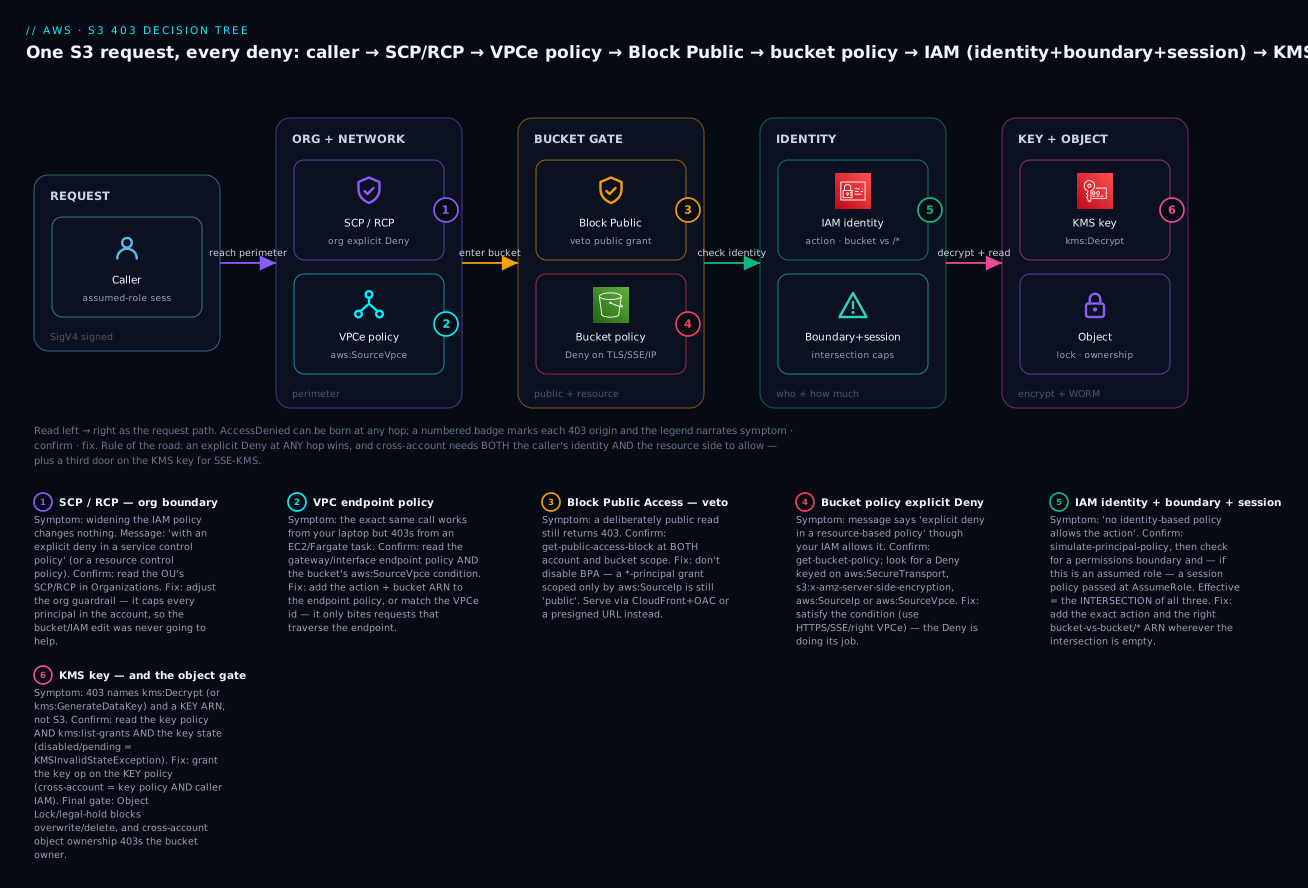
The diagram traces one S3 request left to right through every layer that can return a 403, with a numbered badge on each deny origin and a legend that narrates symptom · confirm · fix. On the left, the caller — usually an assumed-role session, not a user — makes a SigV4-signed request. It first meets the org and network perimeter: a Service Control Policy or Resource Control Policy (badge 1) can cap every principal in the account, and a VPC endpoint policy (badge 2) caps anything traversing the endpoint — the deny that bites only from inside the VPC. The request then reaches the bucket gate: Block Public Access (badge 3) vetoes any public grant, and the bucket policy (badge 4) can explicit-Deny on a TLS/SSE/IP/VPCe condition or simply fail to name a cross-account principal. Next, identity: the caller’s IAM identity policy must allow the exact action on the exact bucket-vs-bucket/* ARN (badge 5), narrowed by any permission boundary and session policy — the intersection that the Policy Simulator can’t fully see. Finally the key and object layer: for an SSE-KMS object the KMS key must grant kms:Decrypt (badge 6), and even then Object Lock, a legal hold, or cross-account object ownership can 403 a write or delete. Only a request that collected an Allow (identity OR bucket policy same-account; both, plus the key, cross-account) and passed every perimeter with no explicit Deny reaches the object; anything else exits as 403 AccessDenied, which you decode back to the badge that stopped it.
Real-world scenario
Aureus Analytics runs a 30-account AWS Organization with a shared data-lake bucket, aureus-lake-prod-111122223333, in the data-prod account, encrypted with a customer-managed KMS key and fronted by a compliance guardrail: an org SCP denies s3:* unless the caller is in the org, an RCP denies access to lake buckets from outside the org, and every object over a year old is under Object Lock in Governance mode. Three teams read the lake. Over one launch week, four different 403s land on the same on-call engineer, and the value of the decision tree is that each is a different layer — treating them all as “the IAM policy is wrong” would have failed four times.
Monday — the analytics reader 403s cross-account. The lake-reader role in account 444455556666 has a clean identity policy allowing s3:GetObject on the lake, and simulate-principal-policy returns Allow. That green result is the trap. CloudTrail Lake shows the denied GetObject with errorMessage = …with an explicit deny in a resource-based policy and a populated vpcEndpointId. The lake bucket policy carried a data-perimeter Deny requiring aws:SourceVpce to match data-prod’s endpoint — but the reader came through the analytics account’s endpoint. Fix: rewrite the perimeter Deny to accept either endpoint via a multi-value aws:SourceVpce list. Ten minutes, because they read the message instead of the simulator.
Tuesday — a 403 that names a key. The same lake-reader, unchanged, now 403s — and the CloudTrail errorMessage references kms:Decrypt on a key ARN, not S3. A platform rotation had swapped in a new customer-managed key whose key policy granted kms:Decrypt only to a named admin role, and did not restore Enable IAM policies delegation. The S3 permission never changed; the key started denying. Fix at the key, not the data service: add lake-reader (and the cross-account analytics principal) to the key policy with kms:Decrypt, and turn on an S3 Bucket Key to blunt the now-higher KMS bill. Runbook line: an S3 403 that mentions a key ARN is a KMS problem.
Wednesday — a delete that even admins can’t do. A data-engineering cleanup job 403s on DeleteObject for last year’s partitions, though the role has s3:DeleteObject and the Policy Simulator is green. GetObject on the same keys works. get-object-retention shows Mode=GOVERNANCE with a future RetainUntilDate. The job lacked s3:BypassGovernanceRetention and wasn’t sending the bypass header. Fix: grant the narrow bypass permission to the cleanup role and add --bypass-governance-retention — not widening S3 permissions, which would have done nothing.
Thursday — the “missing” object that was a typo. A new microservice 403s on GetObject for curated/2026/06/summary.json. Its role has s3:GetObject but deliberately not s3:ListBucket (least privilege). The team spent an hour widening the bucket policy before someone head-object’d the key from an admin and got 404 — the service was requesting curated/2026/6/summary.json (no zero-padding); the object never existed, and because the role lacked s3:ListBucket, S3 masked the 404 as a 403. Fix: correct the key in the caller, and add a lint check. The engineer’s note: a GetObject 403 without s3:ListBucket might just be a wrong key. Four pages, four layers, one method.
Advantages and disadvantages
The multi-layer, deny-by-default model is what makes S3 safe to run at scale across thousands of accounts — and what makes a 403 a skill rather than a lookup. The trade-off is explicit.
| Advantages of the layered model | Disadvantages / costs |
|---|---|
| Defence in depth — one misconfigured layer can’t leak data | More layers = more places a request silently dies |
| Central teams can guarantee limits (SCP/RCP/BPA) no owner can exceed | The denying layer is often not the one you control |
| The detailed message now names the policy type | Only for explicit denies; implicit ones stay vague |
| CloudTrail data events give exact ground truth | Off by default; cost money; not in lookup-events |
Explicit Deny gives hard, unbypassable guardrails |
“Adding an Allow” wastes hours against a Deny |
| KMS adds an auditable second authorization | An SSE-KMS 403 masquerades as an S3 problem |
| Object Lock enforces true WORM | 403s a delete that no permission can perform |
The layering pays off most in regulated, multi-account estates, where an SCP/RCP guarantee and Object Lock compliance are worth the diagnostic overhead. In a single-account side project, most layers are dormant — no SCP, no cross-account AND, no VPCe, no KMS — and a 403 collapses to “identity policy or bucket policy,” a two-minute check. The cost is entirely in the middle: teams that grew into multi-account and cross-account patterns without learning the decision tree, who fight each new 403 from scratch.
Hands-on lab
You will reproduce three distinct 403s, diagnose each with CloudTrail data events and the IAM Policy Simulator, fix each at the correct layer, then tear everything down. Free-tier-safe except a few cents of S3/KMS/CloudTrail and the ~$1/month KMS key (deleted at the end). Use a sandbox account. Replace 111122223333 with your account id; the cross-account step needs a second account 444455556666 you control (or read it as a walkthrough).
Step 0 — Confirm who you are, and turn on S3 data events. Half of all “impossible” 403s are “you’re not the principal you think,” and you can’t investigate data-event denials you never logged.
aws sts get-caller-identity
# Expected: { "Account": "111122223333", "Arn": "arn:aws:iam::111122223333:user/you" }

REGION=ap-south-1
BUCKET=kv-403-lab-$RANDOM
TRAILBUCKET=kv-403-trail-$RANDOM
aws s3api create-bucket --bucket $BUCKET      --region $REGION --create-bucket-configuration LocationConstraint=$REGION
aws s3api create-bucket --bucket $TRAILBUCKET --region $REGION --create-bucket-configuration LocationConstraint=$REGION
Create a trail with an advanced event selector for S3 object data events (management events alone will not capture GetObject denials). Give CloudTrail permission to write to the trail bucket first (console does this automatically; via CLI attach the standard CloudTrail bucket policy), then:
aws cloudtrail create-trail --name kv-403-trail --s3-bucket-name $TRAILBUCKET
aws cloudtrail put-event-selectors --trail-name kv-403-trail \
  --advanced-event-selectors '[{
     "Name":"S3 object data events",
     "FieldSelectors":[
       {"Field":"eventCategory","Equals":["Data"]},
       {"Field":"resources.type","Equals":["AWS::S3::Object"]}]}]'
aws cloudtrail start-logging --name kv-403-trail
⚠️ Data events bill at ~$0.10 per 100,000 events. This lab generates a handful; the cost is fractions of a cent. Stop logging at teardown.
Step 1 — Reproduce 403 #1: a bucket-policy VPC-endpoint condition. Attach a bucket policy that denies everything except calls from a VPC endpoint that your CLI (running over the internet) is not using — so you get denied, exactly as a mis-scoped perimeter would deny a legitimate caller.
cat > /tmp/vpce-deny.json <<JSON
{ "Version":"2012-10-17","Statement":[
  { "Sid":"OnlyFromOurVpce","Effect":"Deny","Principal":"*","Action":"s3:*",
    "Resource":["arn:aws:s3:::$BUCKET","arn:aws:s3:::$BUCKET/*"],
    "Condition":{"StringNotEquals":{"aws:SourceVpce":"vpce-0nonexistent000"}} } ]}
JSON
aws s3api put-bucket-policy --bucket $BUCKET --policy file:///tmp/vpce-deny.json

echo "hello" > /tmp/o.txt
aws s3api put-object --bucket $BUCKET --key o.txt --body /tmp/o.txt
# Expected: An error occurred (AccessDenied) ... with an explicit deny in a resource-based policy
Diagnose #1. The message already names the layer (resource-based policy). Prove it with CloudTrail after a minute, and confirm the Policy Simulator (identity layer) is green — the classic mismatch that tells you the deny is elsewhere.
aws iam simulate-principal-policy \
  --policy-source-arn "$(aws sts get-caller-identity --query Arn --output text)" \
  --action-names s3:PutObject --resource-arns arn:aws:s3:::$BUCKET/o.txt \
  --query 'EvaluationResults[].EvalDecision' --output text
# Expected: allowed   <-- identity layer is fine; the deny is the bucket policy condition

aws s3api get-bucket-policy --bucket $BUCKET --query Policy --output text | jq '.Statement[]|select(.Effect=="Deny").Condition'
# Expected: the aws:SourceVpce StringNotEquals condition you tripped
Fix #1. Satisfy the condition or scope the Deny. Here, remove the perimeter Deny (in production you’d correct the vpce-… id or add yours to a multi-value list).
aws s3api delete-bucket-policy --bucket $BUCKET
aws s3api put-object --bucket $BUCKET --key o.txt --body /tmp/o.txt   # Expected: succeeds
Step 2 — Reproduce 403 #2: SSE-KMS missing kms:Decrypt. Encrypt an object with a customer-managed key whose policy grants you Encrypt/GenerateDataKey but not Decrypt, then try to read it — the S3 permission is perfect, the key denies.
KEYID=$(aws kms create-key --description kv-403-lab \
  --query KeyMetadata.KeyId --output text)
ME=$(aws sts get-caller-identity --query Arn --output text)
ACCT=$(aws sts get-caller-identity --query Account --output text)

# Key policy: allow admin + GenerateDataKey/Encrypt to you, but NOT Decrypt.
cat > /tmp/key-policy.json <<JSON
{ "Version":"2012-10-17","Statement":[
  { "Sid":"Admin","Effect":"Allow","Principal":{"AWS":"arn:aws:iam::$ACCT:root"},"Action":"kms:*","Resource":"*"},
  { "Sid":"NoDecryptForCaller","Effect":"Deny","Principal":{"AWS":"$ME"},"Action":"kms:Decrypt","Resource":"*"} ]}
JSON
aws kms put-key-policy --key-id $KEYID --policy-name default --policy file:///tmp/key-policy.json

aws s3api put-object --bucket $BUCKET --key enc.txt --body /tmp/o.txt \
  --server-side-encryption aws:kms --ssekms-key-id $KEYID     # Expected: succeeds (GenerateDataKey allowed)
aws s3api get-object --bucket $BUCKET --key enc.txt /tmp/back.txt
# Expected: An error occurred (AccessDenied) ... is not authorized to perform: kms:Decrypt on ... key/...
Diagnose #2. The error names kms:Decrypt and a key ARN — that alone places the layer. Note the Policy Simulator is useless here (it can’t see KMS), so go straight to the key policy and list-grants.
aws kms get-key-policy --key-id $KEYID --policy-name default --query Policy --output text | jq '.Statement[]|select(.Effect=="Deny")'
aws kms list-grants --key-id $KEYID --query 'Grants[].{grantee:GranteePrincipal,ops:Operations}' --output json
# Expected: the explicit Deny on kms:Decrypt for your ARN; no compensating grant
Fix #2. Grant kms:Decrypt on the key (not S3). Remove the Deny by restoring an allow-all-to-account key policy.
cat > /tmp/key-policy2.json <<JSON
{ "Version":"2012-10-17","Statement":[
  { "Sid":"Admin","Effect":"Allow","Principal":{"AWS":"arn:aws:iam::$ACCT:root"},"Action":"kms:*","Resource":"*"} ]}
JSON
aws kms put-key-policy --key-id $KEYID --policy-name default --policy file:///tmp/key-policy2.json
aws s3api get-object --bucket $BUCKET --key enc.txt /tmp/back.txt   # Expected: succeeds
Step 3 — Reproduce 403 #3: cross-account object ownership. With ACLs enabled (ObjectWriter), an object written by another account is owned by that account, and you — the bucket owner — 403 on it. If you have a second account, have its role PutObject here; otherwise read the diagnosis. First flip ownership to the legacy mode that allows the trap:
aws s3api put-bucket-ownership-controls --bucket $BUCKET \
  --ownership-controls 'Rules=[{ObjectOwnership=ObjectWriter}]'
# (From account 444455556666, its role writes without granting bucket-owner-full-control:)
#   aws s3api put-object --bucket kv-403-lab-XXXX --key foreign.txt --body f.txt
# Now as the BUCKET OWNER:
aws s3api get-object --bucket $BUCKET --key foreign.txt /tmp/f.txt
# Expected (for the foreign-written object): An error occurred (AccessDenied)
Diagnose #3. The tell is that the owner 403s on specific objects — the ones another account wrote. get-object-acl shows a foreign canonical owner.
aws s3api get-object-acl --bucket $BUCKET --key foreign.txt \
  --query 'Owner' --output json
# Expected: an Owner ID / DisplayName that is NOT your account — that's the whole bug
Fix #3. Disable ACLs going forward (BucketOwnerEnforced) so the bucket owner owns every future object, and re-own existing foreign objects with an in-place copy.
aws s3api put-bucket-ownership-controls --bucket $BUCKET \
  --ownership-controls 'Rules=[{ObjectOwnership=BucketOwnerEnforced}]'
# Re-own an existing foreign object by copying it in place (now you own the copy):
aws s3api copy-object --bucket $BUCKET --key foreign.txt \
  --copy-source $BUCKET/foreign.txt --metadata-directive COPY
aws s3api get-object --bucket $BUCKET --key foreign.txt /tmp/f.txt   # Expected: succeeds
Step 4 — Terraform equivalent (reproducible guardrails). The same three layers, as code, so a team can stand up (and destroy) the scenario deterministically.
resource "aws_s3_bucket" "lab" { bucket = "kv-403-lab-tf-111122223333" }

# Layer: Object Ownership (BucketOwnerEnforced disables the cross-account trap)
resource "aws_s3_bucket_ownership_controls" "lab" {
  bucket = aws_s3_bucket.lab.id
  rule { object_ownership = "BucketOwnerEnforced" }
}

# Layer: bucket-policy VPC-endpoint perimeter Deny (repro #1)
resource "aws_s3_bucket_policy" "lab" {
  bucket = aws_s3_bucket.lab.id
  policy = jsonencode({ Version = "2012-10-17", Statement = [{
    Sid = "OnlyFromOurVpce", Effect = "Deny", Principal = "*", Action = "s3:*",
    Resource  = [aws_s3_bucket.lab.arn, "${aws_s3_bucket.lab.arn}/*"],
    Condition = { StringNotEquals = { "aws:SourceVpce" = "vpce-0abc123def456" } }
  }]})
}

# Layer: SSE-KMS default (repro #2 lives on the KEY policy, managed separately)
resource "aws_kms_key" "lab" { description = "kv-403-lab"; enable_key_rotation = true }
resource "aws_s3_bucket_server_side_encryption_configuration" "lab" {
  bucket = aws_s3_bucket.lab.id
  rule {
    apply_server_side_encryption_by_default {
      sse_algorithm     = "aws:kms"
      kms_master_key_id = aws_kms_key.lab.arn
    }
    bucket_key_enabled = true
  }
}

# Layer: CloudTrail S3 data events (so denials are actually logged)
resource "aws_cloudtrail" "lab" {
  name                          = "kv-403-trail"
  s3_bucket_name                = aws_s3_bucket.trail.id
  include_global_service_events = false
  advanced_event_selector {
    name = "S3 object data events"
    field_selector { field = "eventCategory"; equals = ["Data"] }
    field_selector { field = "resources.type"; equals = ["AWS::S3::Object"] }
  }
}
Step 5 — Teardown (avoid lingering charges).
aws cloudtrail stop-logging --name kv-403-trail
aws cloudtrail delete-trail --name kv-403-trail
aws s3 rm s3://$BUCKET      --recursive
aws s3 rm s3://$TRAILBUCKET --recursive
aws s3api delete-bucket --bucket $BUCKET
aws s3api delete-bucket --bucket $TRAILBUCKET
aws kms schedule-key-deletion --key-id "$KEYID" --pending-window-in-days 7   # ⚠️ CMK: 7–30 day window
⚠️ A customer-managed KMS key bills ~$1/month while it exists and can only be scheduled for deletion. Schedule it now so it stops billing.
Common mistakes & troubleshooting
This is the playbook — the reason to keep this article open at 02:00. Work it top-down: rule out the short-circuiting layers (explicit Deny, SCP, BPA) first, and always read the errorMessage before touching anything — it names the layer. Start with the 30-second triage, then the master decision tree, then the two reference tables.
30-second triage — the pattern maps to the layer
| If you see… | It’s probably… | Do this first |
|---|---|---|
| Broadening the IAM policy changes nothing | An explicit Deny (bucket / SCP / RCP) | Read the reason clause; stop adding Allows |
| The same call works from your laptop, 403s from EC2/Fargate | VPC endpoint policy or aws:SourceVpce |
Read the endpoint policy + bucket condition |
| A deliberately public read is blocked | Block Public Access | get-public-access-block (account + bucket) |
| 403 names a KMS key ARN | The KMS gate | Fix the key policy/grant, not S3 |
simulate-principal-policy says Allow but you’re still denied |
A layer the simulator can’t see (session/KMS/BPA/VPCe/resource) | Go to CloudTrail; read the message |
| Owner 403s on objects another account wrote | Object Ownership (ACLs on) | get-object-acl → foreign owner |
GetObject 403s and you lack s3:ListBucket |
Possibly a missing key masked as 403 | head-object from an admin; check the key |
| 403 only on delete/overwrite, read is fine | Object Lock / legal hold | get-object-retention / -legal-hold |
| 403 on a bucket you don’t own, needs a header | Requester Pays | Add --request-payer requester |
SignatureDoesNotMatch / RequestTimeTooSkewed |
Not IAM — clock / region / creds | Fix NTP / region / credentials |
The master decision tree
| # | Exact error / symptom | Layer | Root cause | Confirm (CloudTrail / IAM policy sim / console) | Fix |
|---|---|---|---|---|---|
| 1 | no identity-based policy allows the s3:GetObject action |
IAM identity (implicit) | Missing action or wrong ARN | simulate-principal-policy --action-names s3:GetObject |
Add the exact action + correct ARN |
| 2 | ListBucket works, GetObject 403s (or reverse) |
IAM / bucket ARN | Bucket-vs-bucket/* ARN mixup |
Read Resource per statement |
Bucket ARN for bucket actions, bucket/* for objects |
| 3 | Identity policy visibly allows it, still 403 | Permission boundary | Boundary omits the action (intersection) | get-role/get-user → PermissionsBoundary |
Add the action to the boundary |
| 4 | Works from one entry point, 403s from another (same role) | Session policy | AssumeRole passed a scoped session policy | Inspect the AssumeRole call / SSO broker |
Widen the session policy |
| 5 | with an explicit deny in an identity-based policy |
IAM identity Deny |
A Deny statement in an attached policy |
Grep attached policies for Effect:Deny |
Scope or remove the Deny |
| 6 | with an explicit deny in a resource-based policy |
Bucket policy Deny |
Condition tripped (TLS/SSE/IP/VPCe) | get-bucket-policy; read Condition |
Satisfy the condition (HTTPS/SSE/right VPCe) |
| 7 | Cross-account 403, no resource-based policy allows… |
Bucket policy (missing principal) | External role not named on the resource | get-bucket-policy; is the role ARN there? |
Add the principal (bucket ARN + bucket/*) |
| 8 | with an explicit deny in a service control policy |
SCP | Org guardrail caps the account | Organizations → the account’s OU SCPs | Adjust the SCP at the OU |
| 9 | with an explicit deny in a resource control policy |
RCP | Org resource perimeter denies external access | Organizations → RCPs on the resource OU | Adjust the RCP |
| 10 | Same call 403s only from inside a VPC | VPC endpoint policy | Endpoint policy caps the call | describe-vpc-endpoints → PolicyDocument |
Add the action/ARN to the endpoint policy |
| 11 | A “public” read still returns 403 | Block Public Access | BPA vetoes the public grant | get-public-access-block (account + bucket) |
Front with CloudFront/OAC or presign — don’t disable BPA |
| 12 | PutBucketPolicy rejected “public policies are blocked” |
BlockPublicPolicy |
Principal:"*" scoped only by aws:SourceIp |
Check the policy for * + SourceIp |
De-publicise (VPCe / OrgID / named principal) |
| 13 | Owner 403s on objects another account wrote | Object Ownership | ObjectWriter — the writer owns them |
get-object-acl shows a foreign owner |
BucketOwnerEnforced; re-copy to re-own |
| 14 | AccessControlListNotSupported (400) |
ACLs disabled | Call sends an ACL header | The request has --acl/x-amz-acl |
Remove the ACL header |
| 15 | 403 names kms:Decrypt + a key ARN |
KMS key policy | Key doesn’t grant the caller | get-key-policy + list-grants |
Grant kms:Decrypt on the key |
| 16 | PutObject 403 names kms:GenerateDataKey |
KMS | Missing GenerateDataKey on the key |
get-key-policy |
Add kms:GenerateDataKey to the caller on the key |
| 17 | Cross-account SSE-KMS read 403 | KMS (cross-account) | Key policy missing external principal, or caller IAM missing kms:Decrypt |
Read key policy AND caller IAM | Grant on the key policy AND the caller IAM (both doors) |
| 18 | KMSInvalidStateException / KMS.DisabledException |
KMS key state | Key disabled or pending deletion | describe-key --query KeyMetadata.KeyState |
Enable the key / cancel deletion |
| 19 | DeleteObject/overwrite 403s, read fine |
Object Lock (Governance) | Retention with a retain-until date | get-object-retention → Mode=GOVERNANCE |
Grant s3:BypassGovernanceRetention + send the bypass header |
| 20 | Same, but even root 403s, bypass no help | Object Lock (Compliance) | Compliance retention — nothing overrides | get-object-retention → Mode=COMPLIANCE |
Wait until RetainUntilDate |
| 21 | Delete 403s though retention expired | Legal hold | Legal hold is ON | get-object-legal-hold → Status=ON |
put-object-legal-hold Status=OFF |
| 22 | 403 on someone else’s bucket needing a header | Requester Pays | Missing x-amz-request-payer |
get-bucket-request-payment → Payer=Requester |
Add --request-payer requester |
| 23 | Presigned URL 403 Request has expired |
Presigned (expiry) | X-Amz-Expires elapsed or signer session ended |
Inspect the URL’s expiry / signer TTL | Re-sign with a live, permitted signer |
| 24 | Presigned URL 403 SignatureDoesNotMatch |
Presigned (method/header) | Wrong HTTP method or header mismatch | Compare method/headers to what was signed | Re-sign for the exact method + headers |
| 25 | GetObject 403, no s3:ListBucket, key uncertain |
Masked 404 | Object doesn’t exist; S3 hides it as 403 | head-object from an admin; add ListBucket |
Fix the key; the “deny” was a typo |
| 26 | SignatureDoesNotMatch / RequestTimeTooSkewed / PermanentRedirect |
Not IAM | Clock skew, wrong region, wrong key | aws --debug; check clock/region |
Fix NTP / use the bucket’s region / verify creds |
| 27 | AllAccessDisabled (403) |
Account-level | Billing/legal hold on the account | Check account/billing status | Resolve with AWS Support/billing |
The condition-key deny reference
When the action and ARN are right but a condition evaluated false, the layer is a policy Condition. This is the quiet-denier lookup.
| Condition key | Denies when… | Confirm | Common trap |
|---|---|---|---|
aws:SecureTransport |
Request not over TLS | Retry with https:// |
Old SDK / HTTP endpoint |
s3:x-amz-server-side-encryption |
PutObject without the SSE header |
Inspect PUT headers | Rely on bucket default or send --sse aws:kms |
s3:x-amz-server-side-encryption-aws-kms-key-id |
Wrong KMS key on write | Compare the key id sent | Sent the default key, policy wants a specific one |
aws:SourceVpce |
Not the named VPC endpoint | Compare the vpce-… id |
Second endpoint; use …IfExists for non-VPC calls |
aws:SourceVpc |
Wrong VPC | Compare the vpc-… id |
Peered VPC not in the list |
aws:SourceIp |
Public egress IP not in range | Check the public (NAT) IP | It’s the NAT/egress IP, not the private VPC IP |
aws:PrincipalOrgID |
Caller not in the org | Compare the org id | Hard-coded old org id after a migration |
aws:PrincipalTag / aws:RequestTag |
ABAC tag mismatch | Compare principal/request tags | Missing/typo’d tag on the role or request |
s3:x-amz-acl |
Required canned ACL absent | Check the write’s ACL | Only relevant while ACLs enabled |
aws:SourceArn / aws:SourceAccount |
Confused-deputy source mismatch | Decode the source service ARN | CloudFront OAC / logging service principal |
s3:DataAccessPointArn |
Not via the required access point | Check you called the AP ARN | Called the bucket directly |
aws:MultiFactorAuthPresent |
MFA required, absent | Was the session MFA’d? | Console vs CLI session difference |
kms:ViaService |
Key call not via the allowed service/region | Read the key-policy condition | Wrong region in s3.<region>.amazonaws.com |
s3:x-amz-content-sha256 |
Unsigned payload where signing required | Check for UNSIGNED-PAYLOAD |
Streaming client sends unsigned payload |
The three nastiest, in prose
1. The SSE-KMS 403 that is really a KMS problem. This is the single most misdiagnosed S3 denial. Everything about the error says S3 — it’s a GetObject, the status is 403, the console is S3 — but the cause is a different service. The one reliable tell is the errorMessage: if it names kms:Decrypt (or kms:GenerateDataKey) and a key ARN, stop looking at S3 entirely. Your s3:GetObject is fine; the key is refusing to decrypt. There are five sub-cases, and you must check them in order: (a) the key policy doesn’t name your principal; (b) the key delegates to IAM (Enable IAM policies) but your identity policy lacks kms:Decrypt; © cross-account — the key policy must name the external principal and the caller’s IAM must allow it (two doors on the key, on top of the two on S3, for a total of four grants for a cross-account SSE-KMS read); (d) a grant that a service relied on was retired (list-grants); (e) a kms:ViaService or encryption-context condition excludes the call. The fix is always at the key, never at S3 — and the deepest trap is spending an hour widening S3 permissions that were never the problem.
2. The cross-account object-ownership trap. You own the bucket. You have s3:GetObject on bucket/*. You get 403 — but only on some objects, the ones a different account uploaded. With legacy ObjectWriter ownership (ACLs enabled), the writer owns the object it creates, so unless that writer sent a bucket-owner-full-control ACL, the bucket owner has no permission to its own bucket’s object. get-object-acl is the smoking gun: the Owner is a canonical ID that isn’t yours. The reason this is nasty is that it’s intermittent by object — the bucket “works” for everything you wrote and 403s for everything a partner wrote, which reads like flaky permissions rather than an ownership model. The fix is Object Ownership = BucketOwnerEnforced, which disables ACLs so the bucket owner owns every future object, plus a one-time in-place copy-object to re-own the existing foreign objects. Set BucketOwnerEnforced on every new bucket and this entire class disappears.
3. The s3:ListBucket-vs-s3:GetObject confusion. Two failure shapes hide here. First, the ARN split: s3:ListBucket is a bucket action needing arn:aws:s3:::bucket, while s3:GetObject is an object action needing arn:aws:s3:::bucket/* — grant one ARN and the other action 403s, which looks like a partial outage. Second, and far subtler: S3 masks a missing object as a 403 for principals who lack s3:ListBucket. If you have s3:ListBucket, a GetObject on a key that doesn’t exist returns 404 NoSuchKey (honest). If you don’t have s3:ListBucket — the common least-privilege posture for a read-only app role — that same non-existent key returns 403 AccessDenied, because S3 refuses to confirm or deny the key’s existence to someone who can’t list. The result: a wrong prefix or a missing zero-pad in the key name presents as a permissions denial, and teams widen policies for an hour chasing a typo. The rule: on a GetObject 403 where the role lacks s3:ListBucket, prove the key exists (head-object from an admin principal) before assuming the policy is wrong.
Best practices
- Read the
errorMessagefirst, every time. Since 2023 it names the policy type for explicit denies —service control policy,resource-based policy,permissions boundary,resource control policy. That clause is faster than any command. - Turn on S3 data events on a trail or CloudTrail Lake for buckets that matter — you cannot investigate a denial you never logged, and
lookup-eventswill never show data events. - Trust the Policy Simulator only for the identity layer. A green “allowed” means the identity policy is fine and nothing else — it cannot see session policies, KMS, BPA, VPC endpoint policies or cross-account resource logic.
- When adding an Allow changes nothing, hunt the explicit
Deny. It’s a bucket-policy condition, an SCP, an RCP, or an identity/boundary/sessionDeny. Stop widening; go read policies. - Treat cross-account as two doors — three or four with SSE-KMS. Identity + bucket policy, plus (for SSE-KMS) the key policy and the caller’s
kms:Decrypt. Configure them together, not one page later. - Suspect the invisible caps. On “but my IAM allows it,” check for a permission boundary (
get-role) and a session policy (theAssumeRolecall) before touching the bucket. - On a KMS-named 403, fix the key, not S3. Grant the key op on the key policy or via a grant; verify the key state isn’t
Disabled/PendingDeletion. - Get the Resource ARN right by reflex: bucket ARN for
ListBucket/bucket actions,bucket/*for object actions, two statements when you need both. - Set
BucketOwnerEnforcedon every bucket to erase the cross-account-ownership trap and the public-ACL class in one setting. - On a
GetObject403 withouts3:ListBucket, verify the key exists first — S3 masks a missing object as a 403. - For write/delete-only 403s, check Object Lock and requester-pays before IAM — no identity change fixes a Compliance-mode retention or a missing request-payer header.
- Prefer
aws:SourceVpce/aws:PrincipalOrgIDoveraws:SourceIpin conditions — IP allow-lists read as “public” to BPA and break from cloud egress.
Security notes
The debugging table and the security posture are two sides of one coin: every layer that can deny you is a layer that protects the data, and the temptation under a 403 page is to weaken it.
| Principle | Why it matters in a 403 | How |
|---|---|---|
| Least-privilege on the fix | The denial is a chance to grant exactly what’s needed | Add the specific action + ARN, never s3:* or public |
| Never disable BPA to “fix” a 403 | BPA rarely is the deny, and disabling it opens a leak | Front with CloudFront/OAC or presign |
Keep explicit-Deny guardrails |
Force-TLS/SSE/perimeter Denies are working when they 403 you | Satisfy the condition; don’t delete the guardrail |
| KMS as a second authorization layer | The key is authoritative for the key | Scope kms:Decrypt/GenerateDataKey to real consumers only |
| Boundaries and SCPs are guarantees | They deny because central policy says so | Change them centrally, with review — not by local override |
| Object Lock is integrity, not a bug | A Compliance-mode 403 is the control working | Design bypass roles narrowly; never loosen the mode |
| Log the denials | CloudTrail data events are the audit trail and the debugger | Enable on sensitive buckets; alarm on AccessDenied spikes |
| Don’t leak object existence | The 403-masks-404 behaviour is deliberate | Keep least-privilege reads without s3:ListBucket where apt |
Cost & sizing
The diagnostic capabilities cost almost nothing; the two line items to watch are CloudTrail data events and the KMS requests that SSE-KMS drives.
| Item | What drives cost | Rough cost | Note / free-tier |
|---|---|---|---|
| IAM Policy Simulator | — | Free | Always free |
get-bucket-policy / get-key-policy / describe-key |
— | Free | Standard API calls |
| CloudTrail management events | — | Free (first copy) | On by default |
| CloudTrail data events | Per event logged | ~$0.10 / 100k events | The lever — scope selectors to buckets that matter |
| CloudTrail Lake | Ingest + scan | ~$2.50/GB ingest; query per GB scanned | Cheaper than Athena for ad-hoc if already ingesting |
| Athena over CloudTrail logs | Per TB scanned | ~$5/TB scanned | Partition by date to cut scan cost |
| S3 server access logs | Storage of logs | S3 storage rates | Free-ish but noisy; prefer data events |
| SSE-KMS requests | Decrypt/GenerateDataKey per object op |
~$0.03 / 10k requests | Enable S3 Bucket Keys — up to ~99% fewer calls |
| Customer-managed KMS key | Per key/month | ~$1/key/mo | AWS-managed key is free; CMK is ~$1 |
The practical guidance: scope data-event selectors to the buckets you actually need to audit rather than “all S3,” because on a high-traffic estate “log every object event everywhere” is the surprise line on the CloudTrail bill. When SSE-KMS is in play, always turn on S3 Bucket Keys — at any real object volume the KMS request cost dwarfs the ~$1/month key, and Bucket Keys cut it by up to 99% while also reducing the CloudTrail KMS-event volume you pay to store. For ad-hoc denial hunts, partition your CloudTrail-log Athena table by date so a “who was denied yesterday” query scans megabytes, not terabytes.
Interview & exam questions
Q1. List the policy sources that can produce an S3 403 AccessDenied. SCP, RCP, VPC endpoint policy, Block Public Access, bucket policy (explicit Deny or missing principal), IAM identity policy, permission boundary, session policy, KMS key policy/grant/state, and object-level blocks (Object Lock, requester-pays, cross-account ownership). Any explicit Deny among them wins. (SCS-C02, SAA-C03)
Q2. The IAM policy allows s3:GetObject and the Policy Simulator says Allow, but you’re denied. Name three layers the simulator can’t see. Session policies (passed at AssumeRole), KMS key policies (SSE-KMS objects), Block Public Access, VPC endpoint policies, and cross-account resource-policy logic. The simulator validates only the identity layer. (SCS-C02, DVA-C02)
Q3. A GetObject 403 message names kms:Decrypt and a key ARN. Which layer, and where’s the fix? The KMS key. The object is SSE-KMS with a key that doesn’t grant the caller kms:Decrypt — fix the key policy (or add a grant), not the S3 or IAM policy. Cross-account needs the key policy to name the external principal and the caller’s IAM to allow kms:Decrypt. (SCS-C02)
Q4. Why can a GetObject on an existing-looking key return 403 instead of 404? If the caller lacks s3:ListBucket, S3 masks a non-existent object as 403 AccessDenied (rather than 404 NoSuchKey) to avoid leaking object existence. So the “denial” may be a wrong key. Grant s3:ListBucket or head-object from an admin to confirm. (DVA-C02, SCS-C02)
Q5. Same-account vs cross-account: how many policies must allow an S3 GetObject? Same-account: one (identity OR bucket policy). Cross-account: both (identity AND bucket policy). SSE-KMS adds a third — the KMS key policy — and cross-account SSE-KMS effectively needs four grants. (SAA-C03, SCS-C02)
Q6. A DeleteObject 403s though the role has s3:DeleteObject and GetObject works. Likely cause? Object Lock. Governance-mode retention needs s3:BypassGovernanceRetention plus the bypass header; Compliance-mode retention blocks everyone (even root) until the retain-until date; a legal hold blocks deletes until turned off. (SCS-C02, SOA-C02)
Q7. What does the reason clause with an explicit deny in a service control policy tell you, and where do you fix it? An SCP at the Organizations OU denies the action for every principal in the account. The fix is at the OU (Organizations), not the bucket or IAM — widening those does nothing. (SCS-C02)
Q8. How do you find the exact denied S3 API call and principal, and why won’t cloudtrail lookup-events show it? Enable S3 data events and query the delivered logs via Athena or CloudTrail Lake — lookup-events returns only management events, so object-level denials never appear there. (SOA-C02, SCS-C02)
Q9. A bucket works from your laptop but 403s from an EC2 instance in a VPC. Prime suspect? The VPC endpoint policy (or a bucket-side aws:SourceVpce condition) — the instance’s traffic traverses the S3 gateway endpoint, whose policy caps the call. Read both the endpoint policy and the bucket condition. (SAA-C03, ANS-C01)
Q10. Bucket owner 403s on objects another account uploaded. What setting fixes it and how? Object Ownership = BucketOwnerEnforced, which disables ACLs so the bucket owner owns every object going forward; re-own existing foreign objects with an in-place copy-object. (SAA-C03, SCS-C02)
Q11. What is a permission boundary, and how does it produce a 403 that a wider identity policy won’t fix? A managed policy that caps a principal’s maximum permissions; the effective set is identity ∩ boundary. If the boundary omits the action, it’s denied no matter how permissive the identity policy — you must widen the boundary. (SCS-C02, DVA-C02)
Q12. A presigned URL that worked yesterday now 403s. Two likely causes? The X-Amz-Expires window elapsed, or the signer’s temporary role-session credentials expired (a URL “signed for 7 days” is only valid while the signer’s session is). Re-sign with a live, still-permitted signer. (DVA-C02)
Quick check
- A 403 message ends with
with an explicit deny in a resource-based policy. Which layer, and is the fix to add an Allow or satisfy a condition? - The Policy Simulator says Allow but you’re still denied on an SSE-KMS object. What’s the most likely layer, and why is the simulator silent?
- You have
s3:GetObjectbut nots3:ListBucket, and aGetObjectreturns 403. Before editing any policy, what must you rule out? - Which S3 403s appear only on write or delete, never on read? Name two.
- Why won’t
aws cloudtrail lookup-eventshelp you find a deniedGetObject?
Answers
- The bucket policy, via an explicit
Deny— almost always aCondition(TLS, SSE,aws:SourceIp,aws:SourceVpce). The fix is to satisfy the condition (use HTTPS/SSE/the right endpoint) or scope theDeny; adding an Allow elsewhere cannot beat an explicitDeny. - The KMS key policy/grant. The object is SSE-KMS and the caller lacks
kms:Decrypton the key. The Policy Simulator evaluates only identity policies (and boundaries/SCPs), never KMS key policies — so it shows Allow while the key denies. - That the object actually exists. Without
s3:ListBucket, S3 returns 403 for a missing key (masking the 404).head-objectfrom an admin, or grants3:ListBuckettemporarily — the “denial” may be a wrong key. - Object Lock (Governance/Compliance retention) and legal hold — both block overwrite/delete of a protected version while reads succeed. (Cross-account object ownership can also 403 reads, but the lock/hold class is write/delete-only.)
- Because
lookup-eventssearches only management events. Object-levelGetObjectis a data event, which is off by default and, once enabled, is read from the delivered logs (Athena) or CloudTrail Lake — never fromlookup-events.
Glossary
- Implicit deny — The default state: a request is denied until a policy explicitly allows it; the message reads
no … policy allows the action. - Explicit Deny — A statement with
Effect: Deny; overrides every Allow and ends evaluation. When adding Allows changes nothing, an explicit Deny is denying you. - Permission boundary — A managed policy that caps a principal’s maximum permissions; effective permission is
identity policy ∩ boundary. - Session policy — An inline/managed policy passed at
sts:AssumeRole(or federation) that further caps the session; invisible in the bucket and the Policy Simulator. - SCP (Service Control Policy) — An Organizations guardrail that caps what IAM principals in a member account can do; a Deny shows as
explicit deny in a service control policy. - RCP (Resource Control Policy) — An Organizations guardrail on resources (S3, KMS, and others) that caps access org-wide; a Deny shows as
explicit deny in a resource control policy. - VPC endpoint policy — A policy on the S3 gateway/interface endpoint that caps calls traversing it; denies only bite requests that go through the endpoint.
- Block Public Access (BPA) — Account/bucket settings that veto public ACLs and policies; never grants, only vetoes; treats
Principal:"*"+aws:SourceIpas still public. - Object Ownership — A bucket setting controlling who owns written objects and whether ACLs work;
BucketOwnerEnforceddisables ACLs and erases the cross-account-ownership 403. - KMS key policy — The resource policy on a KMS key, authoritative for
kms:Decrypt/GenerateDataKey; an SSE-KMS 403 that names a key ARN lives here. - KMS grant — A programmatic delegation of specific key operations to a principal; an alternate path to key permission that
list-grantsreveals. - Object Lock — WORM protection on an object version via Governance/Compliance retention and/or legal hold; blocks overwrite/delete, not read.
- Requester Pays — A bucket mode where the requester pays for requests and transfer and must send
x-amz-request-payer: requester; missing header → 403. - Presigned URL — A time-limited SigV4-signed link that performs one operation as the signer; fails on expiry, method/header mismatch, or a lapsed signer session.
- CloudTrail data events — Object-level S3 event logging (Get/Put/Delete/List objects), off by default, not returned by
lookup-events; the ground truth for a denial. s3:ListBucketvss3:GetObject— A bucket action (ARNbucket) vs an object action (ARNbucket/*); lackingListBucketalso makes a missing object return 403 instead of 404.
Next steps
- Set up the access-control stack correctly in the first place with Securing Amazon S3: Bucket Policies, Block Public Access and the 403 Playbook.
- Master the universal authorization model behind every layer here in Debugging IAM ‘Access Denied’: Policy Evaluation Logic, SCPs, Boundaries and a Playbook.
- If buckets, versioning and presigned URLs are still new, ground yourself with Amazon S3 Fundamentals Hands-On: Buckets, Objects, Versioning and Presigned URLs.
- Build the audit trail this playbook depends on — trails, data events and Config rules — with AWS CloudTrail and Config: Audit and Compliance at Scale.
- Extend the data-perimeter idea org-wide: pair SCPs, RCPs and VPC endpoint policies so no bucket in any account can be reached from outside your organization.