Quick take: three S3 features — versioning, lifecycle rules, and replication — turn a plain bucket into a managed data platform: undo for every overwrite and delete, automatic tiering down the cold ladder, and a second copy in another Region. Each one also has a landmine. Versioning silently doubles or triples storage if you never expire noncurrent versions. Lifecycle rules delete data you meant to keep, or make the bill rise when tiny objects hit the 128 KB IA floor. Replication quietly does nothing for objects that already existed, and stalls forever on SSE-KMS objects if you skip one key grant. This is the hands-on playbook that gets all three right the first time.
An engineering team enabled S3 versioning on their primary bucket after a bad sync overwrote a week of reports — smart move, versioning is the undo button. Eighteen months later a FinOps review found the bucket was 2.9× larger than the data it held: every nightly overwrite of the same 4,000 report objects had kept every previous version, on S3 Standard, forever, because nobody had written a noncurrent-version expiration rule. The undo button was working perfectly; it was just never told to forget. One lifecycle rule — keep the three newest noncurrent versions, tier the rest to Glacier at 30 days, delete them at 365 — cut the bucket back to 1.1× and kept the safety net. That is the whole shape of S3 data management: the features are individually simple, and the cost and correctness live entirely in how they interact.
This article is the hands-on companion to Amazon S3 Storage Classes and Lifecycle and Amazon S3 Fundamentals Hands-On. Where those cover the what, this one is the do: you will enable versioning and watch version IDs and delete markers appear, author a lifecycle policy (Standard-IA at 30 days, Glacier Flexible at 90, expire noncurrent versions at 365, abort incomplete multipart uploads at 7), and stand up Cross-Region Replication with a KMS-encrypted replica in a second Region — all with real aws s3api commands and the equivalent Terraform, then tear it down. Every knob is enumerated: version states, delete-marker mechanics, MFA delete, the minimum-days and 128 KB rules per storage class, Intelligent-Tiering versus manual lifecycle, CRR versus SRR, Replication Time Control, delete-marker replication, SSE-KMS cross-account keys, two-way replication, and S3 Batch Replication for objects that already exist.
By the end you will stop treating versioning as “free insurance” (it is billed insurance you must age out), stop writing lifecycle rules that only address current versions (the classic leak on a versioned bucket), and stop being surprised when replication ignores your existing objects or fails silently on encrypted ones. You will keep the tables here open during a design review, and reach for the troubleshooting playbook the first time a GET returns a 404 you did not expect.
What problem this solves
A raw S3 bucket has no memory and no reach. Overwrite an object and the old bytes are gone. Delete it and it is gone permanently — no undo, no trash. It lives in exactly one Region, so a Regional impairment or an accidental bucket-wide mistake has no fallback. And it stays on whatever storage class you wrote it to forever, paying the hot-tier rate for data nobody reads. Every one of those is a production incident waiting to happen: a bad deploy that re-uploads corrupt files, a aws s3 rm --recursive fat-finger, a compliance auditor asking for a copy in a second Region, a bill that grows monotonically because cold data never moves.
Versioning, lifecycle, and replication each close one of those gaps — but the failure mode when they are configured carelessly is worse than not using them, because the cost and the data loss are silent. Versioning without noncurrent-version expiration turns a linear storage bill into one that grows with your write rate, not your data size. A lifecycle expiration rule with a wrong filter deletes a prefix you needed. A replication rule that looks green in the console replicates zero of the ten million objects that were already there before you turned it on. None of these throw an error at configuration time; they surface weeks later as a cost spike, a missing object, or an empty DR bucket during the one incident you built it for.
Who hits this: every team that keeps important data on S3 — but it bites hardest where writes are frequent (versioning cost), where data ages predictably (lifecycle), and where a second copy is a compliance or DR requirement (replication). Media platforms, data lakes, backup targets, SaaS products retaining user content, and anyone under a regulatory retention mandate all live here. The skill is not turning the features on — the console makes that a three-click job — it is understanding the interactions well enough to avoid the silent-cost and silent-loss traps. Here is the field this article covers, each feature paired with the pain it removes and the trap it introduces:
| Feature | Pain it removes | The trap it introduces | The control that defuses it |
|---|---|---|---|
| Versioning | No undo for overwrite/delete | Noncurrent versions billed forever | NoncurrentVersionExpiration + keep N newest |
| Delete markers | Accidental delete is recoverable | Markers pile up, GETs 404 | ExpiredObjectDeleteMarker cleanup |
| MFA delete | Credential theft can’t wipe history | Root-only, easy to lock yourself out | Enable deliberately, document the root path |
| Lifecycle transition | Cold data stuck on hot tier | Tiny objects hit 128 KB floor → bill rises | ObjectSizeGreaterThan gate |
| Lifecycle expiration | Stale data billed forever | Wrong filter deletes wanted data | Test filter with list-objects first |
| Abort incomplete MPU | Invisible orphaned-part cost | (none — pure win) | Add to every bucket, always |
| Intelligent-Tiering | Guessing the access pattern | Per-object fee on tiny-object swarms | Use for large/unknown objects only |
| CRR / SRR | Single-Region / single-copy risk | Existing objects never back-filled | S3 Batch Replication |
| SSE-KMS replication | Encrypted DR copy | Silent FAILED without key grants | Cross-account KMS grant + opt-in |
Learning objectives
By the end of this article you can:
- Enable and suspend versioning on a bucket, read version IDs, and explain exactly what a delete marker is, how it makes a
GETreturn 404, and how to restore the object or permanently delete a version. - Configure MFA delete, know why it is root-only and console-impossible, and avoid locking yourself out of your own bucket.
- Author a lifecycle policy that transitions current and noncurrent versions, expires objects and old versions, aborts incomplete multipart uploads, and cleans up expired delete markers — respecting the minimum-days-per-class and 128 KB rules.
- Choose between S3 Intelligent-Tiering and an explicit lifecycle policy, and explain the monitoring-fee mechanics that decide it.
- Set up Cross-Region Replication (CRR) and Same-Region Replication (SRR): the versioning prerequisite, the IAM replication role, replication rules, and how to verify with the replication status header and CloudWatch metrics.
- Handle the hard cases: Replication Time Control (RTC) and its 15-minute SLA, delete-marker replication, replicating SSE-KMS objects across accounts, two-way (bidirectional) replication with replica modification sync, and S3 Batch Replication for objects that already exist.
- Do the storage-cost math on versioning and replication so a “safety” feature does not quietly become the biggest line on the bill.
- Map all of this to AWS Certified Solutions Architect – Associate (SAA-C03) and Developer – Associate (DVA-C02) storage, data-management, and resiliency objectives.
Prerequisites & where this fits
You should be comfortable with S3 basics from Amazon S3 Fundamentals Hands-On: a bucket is a Region-scoped container; an object is a blob plus metadata addressed by a key; prefixes are the slash-delimited key segments people treat as folders; and S3 gives eleven nines (99.999999999%) of durability on the multi-AZ classes. You should be able to run the AWS CLI — especially the lower-level aws s3api commands, which expose versioning, lifecycle and replication that the high-level aws s3 verbs hide — read JSON output, and follow Terraform aws provider resources. Knowing how S3 bills (per-GB-month by class, per-request, per-GB transfer) matters here because versioning, lifecycle and replication are all, at bottom, billing decisions. A working grasp of SSE-KMS encryption and IAM roles helps for the replication section.
This sits in the Storage & Data Management track and is the practical layer beneath several neighbours. It builds directly on Amazon S3 Storage Classes and Lifecycle (the class trade-offs this lab automates) and pairs with Securing Amazon S3: Bucket Policies, Block Public Access & the 403 Playbook (a replica bucket is a new public-exposure surface you must lock down). It is upstream of a full backup posture — once you can replicate and version, AWS Backup: Centralized Cross-Account Backup Hands-On and AWS Backup and Disaster Recovery: Protect Workloads Across Regions turn it into a governed retention and recovery plan. The IAM replication role and cross-account KMS grants lean on AWS Organizations and IAM Foundations, and you audit every lifecycle and replication change with AWS CloudTrail and Config.
A quick map of who owns what, so a data-management review talks to the right people:
| Layer | What lives here | Who usually owns it | What it can cause if wrong |
|---|---|---|---|
| Producers (apps, pipelines) | PutObject, the class written, tags |
App / data team | Cold data written to Standard; no tags to filter on |
| Versioning config | Enabled / Suspended, MFA delete | Platform / security | Versions never expiring → cost leak; lockout via MFA delete |
| Lifecycle policy | Transition / expiration / abort rules | Platform + FinOps | Wrong filter deletes data; tiny-object cost regression |
| Replication config | Rules, IAM role, KMS, RTC | Platform + security | Silent no-op on existing objects; FAILED on SSE-KMS |
| Destination bucket | Versioning, ownership, encryption, BPA | Platform (maybe another account) | Replication rejected; replica publicly exposed |
| Cost & audit | Cost Explorer, Storage Lens, CloudTrail | FinOps + security | Missing the version/replication cost until the invoice |
Core concepts
Seven mental models make every later decision obvious.
Versioning turns a key into a stack. Enable versioning and a key stops holding one object and starts holding an ordered stack of versions, each with a unique version ID. A PUT pushes a new version on top (the current version); the ones underneath become noncurrent versions. Nothing is overwritten in place and nothing is billed less — you now pay for every version in the stack until a lifecycle rule or an explicit delete removes it. Versioning is set at the bucket level and has exactly three states: never-versioned (Unversioned), Enabled, and Suspended (you can never go back to Unversioned).
A delete is not a delete — it is a marker. On a versioned bucket, a DELETE without a version ID does not remove data. It pushes a delete marker — a special, zero-byte version with its own version ID — onto the top of the stack. The object now appears deleted (a plain GET returns 404 Not Found with an x-amz-delete-marker: true header), but every real version is still there underneath, still billed. Remove the delete marker (delete its version ID) and the object reappears. This is what makes versioning an undo button — and what makes delete markers accumulate if you never clean them up.
Permanent deletion requires a version ID. The only way to actually free the bytes of a version is to DELETE it with its specific version ID. That is irreversible — there is no undo for a versioned delete. This is also the operation MFA delete guards: with it on, permanently deleting a version (or changing the versioning state) requires a valid MFA token, so a stolen access key alone cannot wipe your history.
Lifecycle is a daily, asynchronous rules engine. A lifecycle configuration is a list of rules, each with a filter (prefix, tag, object size, or the whole bucket) and one or more actions: transition (move to a colder class), expiration (delete), the noncurrent-version variants of both, abort incomplete multipart upload, and expired-object delete-marker cleanup. S3 evaluates the rules once per day in the background — nothing moves at a precise instant — and the age clock runs from the object’s creation date, not last access.
Replication is an asynchronous, forward-only copy of new objects. Turn on replication and S3 copies objects (and their metadata, tags, ACLs) from a source bucket to a destination bucket in the background. Two hard facts define it: it requires versioning on both buckets, and it only replicates objects created after the rule exists — everything already in the bucket is ignored until you run a Batch Replication job. Cross-Region Replication (CRR) copies to another Region (DR, latency, compliance); Same-Region Replication (SRR) copies within one Region (log aggregation, account separation, sovereignty).
Replication is not synchronous and not guaranteed instant — unless you buy RTC. By default most objects replicate within minutes, but there is no SLA and large objects can lag. Replication Time Control (RTC) adds a contractual 15-minute SLA for 99.99% of objects, plus CloudWatch replication metrics and events, for a per-GB fee. You add RTC when a downstream system depends on the replica being fresh; you skip it when eventual is fine.
Encryption and identity gate replication. Replicating SSE-KMS objects is off by default and must be opted into: you name the source key(s) to decrypt and a destination key to re-encrypt with, and the S3 replication role needs kms:Decrypt on the source key and kms:Encrypt on the destination key. Cross-account, the destination key policy and bucket policy must trust the source’s replication role. Miss one grant and encrypted objects sit in a permanent FAILED replication status while unencrypted ones sail through — the single most common replication mystery.
The vocabulary in one table
Pin down every moving part before the deep sections. The glossary repeats these for lookup; this is the mental model side by side:
| Concept | One-line definition | Where it lives | Why it matters |
|---|---|---|---|
| Versioning | Keep every version of a key as a stack | Bucket setting | Undo for overwrite/delete; bills every version |
| Version ID | Unique string identifying one version | Per version | The handle for restore or permanent delete |
| Current version | The top of the stack a plain GET returns | Per key | What callers see; everything else is noncurrent |
| Noncurrent version | A previous version kept by versioning | Per key | Silent cost leak without its own rule |
| Delete marker | Zero-byte placeholder that hides an object | Top of stack | A DELETE makes one; GET returns 404 |
| MFA delete | Require MFA to purge versions / change state | Bucket + root | Blocks credential-theft data loss |
| Lifecycle rule | Filter + action(s) evaluated daily | Bucket lifecycle config | Automates tiering and expiry |
| Transition | Move an object to a colder class after N days | Lifecycle action | The saving mechanism; each move billed |
| Expiration | Delete an object (or add a marker) after N days | Lifecycle action | Stops paying for stale data |
| Abort incomplete MPU | Delete half-finished multipart uploads | Lifecycle action | Reclaims invisible billed storage |
| Intelligent-Tiering | Auto-move objects by observed access | Storage class | No retrieval fee; per-object monitoring fee |
| CRR / SRR | Cross-Region / Same-Region replication | Replication rule | Second copy for DR / compliance |
| Replication role | IAM role S3 assumes to copy objects | IAM | Wrong perms → nothing replicates |
| RTC | 15-min replication SLA + metrics | Replication rule | Predictable freshness, per-GB fee |
| Batch Replication | On-demand job to replicate existing objects | S3 Batch Operations | The only way to back-fill pre-existing data |
Versioning: every write kept, every delete a marker
Versioning is the foundation — lifecycle noncurrent rules and all replication depend on it — so get its mechanics exact before anything else.
The three states, and the one-way door
A bucket is in exactly one of three versioning states, and the transition from Enabled is a one-way door: you can only move to Suspended, never back to Unversioned.
| State | New object gets | Existing versions | How you get here | Gotcha |
|---|---|---|---|---|
| Unversioned (default) | No version ID (implicit null) |
n/a | Bucket default | Overwrite/delete is destructive, no undo |
| Enabled | A unique version ID | All retained | put-bucket-versioning Status=Enabled |
You now pay for every version |
| Suspended | The null version (overwrites prior null) |
Retained, still billed | put-bucket-versioning Status=Suspended |
Suspending does not delete existing versions |
The most misunderstood row is Suspended: people suspend versioning to “stop paying for versions” and are shocked the bill does not drop, because suspension only stops creating new versions — every version already in the stack stays and stays billed. To actually reclaim that storage you must expire the noncurrent versions with a lifecycle rule (below), not suspend.
Enable versioning with the CLI:
aws s3api put-bucket-versioning \
  --bucket kv-data-prod \
  --versioning-configuration Status=Enabled

# Verify
aws s3api get-bucket-versioning --bucket kv-data-prod
# -> { "Status": "Enabled" }
And in Terraform (note it is a separate resource from the bucket in the modern provider):
resource "aws_s3_bucket" "data" {
  bucket = "kv-data-prod"
}

resource "aws_s3_bucket_versioning" "data" {
  bucket = aws_s3_bucket.data.id
  versioning_configuration {
    status = "Enabled"   # or "Suspended"
  }
}
Version IDs, current vs noncurrent, and how to read the stack
Once versioning is on, every PUT returns a VersionId, and list-object-versions shows the whole stack — current and noncurrent versions plus any delete markers — in one call. This is the command you live in when debugging “where did my object go?”:
# Overwrite the same key three times, then inspect the stack
for n in 1 2 3; do
  echo "revision $n" > report.txt
  aws s3api put-object --bucket kv-data-prod --key reports/report.txt --body report.txt
done

aws s3api list-object-versions --bucket kv-data-prod --prefix reports/report.txt \
  --query 'Versions[].{VersionId:VersionId,IsLatest:IsLatest,Size:Size,Modified:LastModified}' \
  --output table
Expected: three rows, exactly one with IsLatest: true (the current version); the other two are noncurrent. The fields you will reason about:
Field (in list-object-versions) |
Meaning | Why you read it |
|---|---|---|
VersionId |
Unique handle for this version | Pass it to GET/DELETE a specific version |
IsLatest |
true for the current version |
Tells current from noncurrent |
LastModified |
When this version was written | Drives noncurrent age clock |
Size |
Bytes of this version | Every version’s size is billed |
StorageClass |
Class of this specific version | Versions tier independently |
ETag |
Content hash | Detect duplicate re-uploads |
Key |
The object key | Same key, many versions |
Read or download a specific version by passing its ID — this is how you recover an overwritten file without touching the current one:
aws s3api get-object --bucket kv-data-prod --key reports/report.txt \
  --version-id "3sL4kqtJlcpXroDTDmJ.rmSpXd3dIbrHY" recovered.txt
Delete markers: the 404 that isn’t a deletion
Delete a versioned object without a version ID and S3 inserts a delete marker — the object “disappears” but nothing is freed. Understanding this table is the difference between calm and panic during an incident:
| Operation | What happens on a versioned bucket | Is data freed? | How to reverse |
|---|---|---|---|
DELETE key (no version ID) |
Inserts a delete marker as current version | No | Delete the marker’s version ID |
GET key (marker on top) |
404 Not Found, x-amz-delete-marker: true |
n/a | Remove marker, or GET a specific version ID |
DELETE key with a version ID (a real version) |
Permanently removes that version’s bytes | Yes | Irreversible |
DELETE key with a delete-marker’s version ID |
Removes the marker → object reappears | n/a (restores) | (this is the restore) |
LIST (default) |
Marker hides the key from a normal listing | n/a | list-object-versions shows it |
PUT a new object to the same key |
New current version on top of the marker | No | Object is “back” via a new write |
Watch the whole cycle end to end — delete, confirm the 404, then restore by removing the marker:
# 1. Soft-delete: inserts a delete marker
aws s3api delete-object --bucket kv-data-prod --key reports/report.txt
# -> returns "DeleteMarker": true and the marker's "VersionId"

# 2. A plain GET now 404s
aws s3api get-object --bucket kv-data-prod --key reports/report.txt out.txt \
  || echo ">> 404 as expected: a delete marker is on top"

# 3. Find the delete marker's version ID
MARKER=$(aws s3api list-object-versions --bucket kv-data-prod --prefix reports/report.txt \
  --query 'DeleteMarkers[?IsLatest==`true`].VersionId | [0]' --output text)

# 4. Restore by deleting the marker
aws s3api delete-object --bucket kv-data-prod --key reports/report.txt --version-id "$MARKER"
# -> object is visible again; the prior current version is restored
MFA delete: strong protection, root-only, easy to lock yourself out
MFA delete raises the bar for the two most destructive operations on a versioned bucket. Its constraints are unusual and worth memorising because they trip everyone the first time:
| Aspect | MFA delete behaviour | Consequence |
|---|---|---|
| What it guards | Permanently deleting a version and changing versioning state | A stolen access key alone can’t purge history |
| Who can enable/disable it | Only the bucket-owning root account | An IAM admin cannot turn it on |
| How to enable it | CLI/API only, with --mfa "<serial> <code>" |
Not possible in the console, awkward in Terraform |
| What it does not guard | Inserting delete markers, normal PUT/GET | Soft-delete still works without MFA |
| The lockout risk | Lose the root MFA device → can’t purge or suspend | Document the root recovery path first |
Enabling it is a root-credentials operation that appends the MFA serial and current token:
# Run as the ROOT account, with a hardware/virtual MFA device
aws s3api put-bucket-versioning \
  --bucket kv-data-prod \
  --versioning-configuration Status=Enabled,MFADelete=Enabled \
  --mfa "arn:aws:iam::111122223333:mfa/root-account-mfa-device 123456"
Because it is root-only and console-impossible, MFA delete is reserved for a small set of genuinely irreplaceable, compliance-critical buckets. For most buckets, Object Lock (WORM retention) is the better, IAM-manageable control; reach for MFA delete only when the requirement is explicitly “even a compromised root-adjacent credential must not be able to purge versions,” and only after you have proven you can produce the root MFA token on demand.
The cost of keeping versions
Versioning’s bill is not proportional to your data — it is proportional to your write rate, and that is the trap. A single key overwritten daily accumulates a version per day; a year later you are paying for 365 copies of one logical object. The knobs that bound it:
| Driver | Effect on cost | The control | Rule of thumb |
|---|---|---|---|
| Overwrite frequency | Each overwrite adds a billed version | NoncurrentVersionExpiration | Expire noncurrent after 30–90 d unless compliance says otherwise |
| Noncurrent versions on hot class | Dead versions billed at Standard rate | NoncurrentVersionTransition | Tier noncurrent to IA/Glacier quickly |
| Number kept | All versions kept by default | NewerNoncurrentVersions = N | Keep the 2–5 newest, expire the rest |
| Delete markers | Zero-byte but clutter + LIST cost | ExpiredObjectDeleteMarker | Auto-clean dangling markers |
| Large-object churn | Version size × versions | Size-aware filter + expiry | Watch big objects rewritten often |
The single most important habit: on any versioned bucket, always pair versioning with a noncurrent-version lifecycle rule. Versioning without expiry is not a safety net, it is a slow leak.
Lifecycle rules: transition, expire, and stop the leaks
Lifecycle is how objects and versions move and disappear on a schedule you set, with no human in the loop. On a versioned bucket every rule has two halves — one for current versions, one for noncurrent — and forgetting the second half is the number-one lifecycle mistake.
The actions, end to end
| Action | What it does | Applies to | Key parameter |
|---|---|---|---|
| Transition | Move current version to a colder class | Current objects | Days + target class |
| NoncurrentVersionTransition | Same, for previous versions | Noncurrent versions | NoncurrentDays (+ keep N newest) + class |
| Expiration | Delete current object (or add a marker if versioned) | Current objects | Days or Date |
| NoncurrentVersionExpiration | Permanently delete old versions | Noncurrent versions | NoncurrentDays (+ keep N newest) |
| AbortIncompleteMultipartUpload | Delete unfinished multipart uploads | In-progress MPUs | DaysAfterInitiation |
| ExpiredObjectDeleteMarker | Remove delete markers with no versions behind them | Versioned buckets | boolean |
A subtlety that surprises people: on a versioned bucket, Expiration on a current object does not delete data — it inserts a delete marker (a soft delete). Only NoncurrentVersionExpiration (and an explicit versioned delete) frees bytes. So a rule with only Expiration on a versioned bucket grows the version stack rather than shrinking it.
Minimum days and the 128 KB rule, per class
Transitions are downhill-only and several have a minimum age; the IA classes also enforce a 128 KB minimum object size that S3 applies whether you like it or not. This is the table that prevents the “my bill went up” incident:
| Transition target | Minimum age before transition | Minimum billable size | Min storage duration (early-delete floor) | S3 skips objects under 128 KB? |
|---|---|---|---|---|
| Standard-IA | 30 days | 128 KB | 30 days | Yes — not transitioned to IA |
| One Zone-IA | 30 days | 128 KB | 30 days | Yes — not transitioned to IA |
| Glacier Instant Retrieval | 0 days (can be day 1) | 128 KB | 90 days | No (but 128 KB billing floor) |
| Glacier Flexible Retrieval | 0 days | (40 KB overhead) | 90 days | No |
| Glacier Deep Archive | 0 days | (40 KB overhead) | 180 days | No |
Two facts save the most money and confusion: S3 will not transition objects smaller than 128 KB to Standard-IA or One Zone-IA at all (it is not cost-effective, so it silently leaves them), and chaining transitions (IA then Glacier) means the object pays the IA minimum-duration floor before it can move on. Always gate IA transitions with an ObjectSizeGreaterThan filter so you are explicit rather than relying on the silent skip.
Filters: prefix, tag, size, or the whole bucket
A rule’s filter decides which objects it touches. Combine conditions with And; an empty filter means the whole bucket.
| Filter type | Matches | Use when | Watch-out |
|---|---|---|---|
Prefix |
Keys starting with a string | Folder-style layout (logs/, raw/) |
Re-keying changes what matches |
Tag (key=value) |
Objects carrying that tag | Cross-cutting policy independent of path | Must tag at/after write; tag costs apply |
ObjectSizeGreaterThan |
Objects above N bytes | Avoid the 128 KB IA penalty | Combine with the transition |
ObjectSizeLessThan |
Objects below N bytes | Expire tiny junk; keep big stuff | — |
And (prefix + tags + size) |
All conditions at once | Precise targeting | Every condition must match |
(empty {}) |
Entire bucket | Bucket-wide expiry/archive | Easy to over-apply — dangerous |
The canonical policy: IA@30 → Glacier@90 → expire noncurrent@365 + abort-MPU@7
This is the exact policy the lab applies — the one from the brief. As a CLI JSON document, with both current and noncurrent halves plus abort-MPU and delete-marker cleanup:
cat > lifecycle.json <<'JSON'
{
  "Rules": [
    {
      "ID": "tier-current-and-expire-noncurrent",
      "Filter": { "And": { "Prefix": "reports/", "ObjectSizeGreaterThan": 131072 } },
      "Status": "Enabled",
      "Transitions": [
        { "Days": 30, "StorageClass": "STANDARD_IA" },
        { "Days": 90, "StorageClass": "GLACIER" }
      ],
      "NoncurrentVersionTransition": {
        "NoncurrentDays": 30,
        "NewerNoncurrentVersions": 3,
        "StorageClass": "GLACIER"
      },
      "NoncurrentVersionExpiration": {
        "NoncurrentDays": 365,
        "NewerNoncurrentVersions": 3
      },
      "AbortIncompleteMultipartUpload": { "DaysAfterInitiation": 7 },
      "Expiration": { "ExpiredObjectDeleteMarker": true }
    }
  ]
}
JSON

aws s3api put-bucket-lifecycle-configuration \
  --bucket kv-data-prod --lifecycle-configuration file://lifecycle.json
The same policy in Terraform — the form you keep in version control and review in PRs:
resource "aws_s3_bucket_lifecycle_configuration" "data" {
  bucket = aws_s3_bucket.data.id
  # depends_on ensures versioning is on before lifecycle noncurrent rules apply
  depends_on = [aws_s3_bucket_versioning.data]

  rule {
    id     = "tier-current-and-expire-noncurrent"
    status = "Enabled"

    filter {
      and {
        prefix                   = "reports/"
        object_size_greater_than = 131072 # 128 KB — skip the IA floor
      }
    }

    transition {
      days          = 30
      storage_class = "STANDARD_IA"
    }
    transition {
      days          = 90
      storage_class = "GLACIER"
    }

    noncurrent_version_transition {
      noncurrent_days           = 30
      newer_noncurrent_versions = 3
      storage_class             = "GLACIER"
    }
    noncurrent_version_expiration {
      noncurrent_days           = 365
      newer_noncurrent_versions = 3
    }

    abort_incomplete_multipart_upload {
      days_after_initiation = 7
    }

    expiration {
      expired_object_delete_marker = true
    }
  }
}
The versioning-specific knobs and the leak each one plugs:
| Setting | What it controls | Default if unset | Cost leak it prevents |
|---|---|---|---|
NoncurrentVersionTransition |
Tier old versions to a colder class | Old versions stay on current class | Standard rate for dead versions |
NoncurrentVersionExpiration |
Delete old versions after N days | Kept forever | Unbounded version accumulation |
NewerNoncurrentVersions |
Keep the N most-recent old versions | All kept | Over-deleting recent history |
ExpiredObjectDeleteMarker |
Remove dangling delete markers | They linger | LIST cost + confusing 404s |
AbortIncompleteMultipartUpload |
Clean half-uploaded parts | Parts billed indefinitely | Invisible orphaned-part cost |
Timing: it’s daily and asynchronous
Applying a lifecycle policy does not move anything this second. Newly-eligible objects transition over the next day or so, so verify over days, not minutes.
| You’d expect | What actually happens | Why |
|---|---|---|
| Objects move at midnight on day N | They move on a daily pass at/after day N | Async, batched evaluation |
| Policy applies instantly to all objects | It rolls out over the next day(s) | Background processing at scale |
head-object flips class immediately |
It flips once the transition completes | Eventual, per-object |
| The bill drops the moment you apply | It trends down over the following days | Transition then prorated billing |
Intelligent-Tiering vs manual lifecycle
Manual lifecycle asks you to know the access pattern and encode it as ages. S3 Intelligent-Tiering is the class for when you do not: S3 watches each object and moves it between access tiers automatically, with no retrieval fees and no inter-tier transition charges, for a small per-object monitoring-and-automation fee.
| IT access tier | Object moves here after | Retrieval latency | Retrieval fee | Opt-in? |
|---|---|---|---|---|
| Frequent Access | Default on write / on access | Milliseconds | None | No (default) |
| Infrequent Access | 30 consecutive days no access | Milliseconds | None | No (automatic) |
| Archive Instant Access | 90 consecutive days no access | Milliseconds | None | No (automatic) |
| Archive Access (opt-in) | 90+ days (configurable) | Minutes–hours (restore) | None | Yes |
| Deep Archive Access (opt-in) | 180+ days (configurable) | ~12 h (restore) | None | Yes |
The decision between letting S3 decide (Intelligent-Tiering) and deciding yourself (lifecycle):
| Situation | Choose | Why |
|---|---|---|
| Unknown / changing access pattern | Intelligent-Tiering | Auto-optimizes, no retrieval-fee risk |
| Large objects, unpredictable re-reads | Intelligent-Tiering | Monitoring fee negligible; safe from retrieval fees |
| Predictable age-based cool-down | Manual lifecycle | Cheaper — no per-object monitoring fee |
| Millions of tiny (<128 KB) objects | Manual lifecycle (or Standard) | Per-object IT fee dominates; IT does not monitor <128 KB anyway |
| Compliance archive with a fixed schedule | Manual lifecycle → Deep Archive | You control exactly when it moves |
| Mixed-temperature bucket, no clear rule | Intelligent-Tiering | Each object tiers independently |
A practical combination the brief hints at: use Intelligent-Tiering as the storage class for the unpredictable bulk, and a lifecycle rule alongside it purely for AbortIncompleteMultipartUpload and noncurrent-version expiration — IT handles the tiering, lifecycle handles the version hygiene IT does not touch.
Replication: CRR, SRR, and every moving part
Replication makes S3 copy objects from a source bucket to a destination bucket automatically. It is the DR and compliance workhorse — and the feature with the most silent failure modes, every one of which this section defuses.
CRR vs SRR: same mechanism, different geography
| Dimension | Cross-Region Replication (CRR) | Same-Region Replication (SRR) |
|---|---|---|
| Destination Region | A different Region | The same Region |
| Primary use | DR, lower-latency reads, data sovereignty across Regions | Log aggregation, account isolation, compliance in-Region |
| Data transfer cost | Cross-Region transfer billed per GB | No cross-Region transfer charge |
| Versioning required | Both buckets | Both buckets |
| Everything else | Identical rules, role, RTC, KMS | Identical rules, role, RTC, KMS |
Both are configured the exact same way; the only real difference is whether the destination is in another Region (and therefore whether you pay inter-Region transfer). A single replication configuration can even fan out to multiple destination buckets.
What replicates, and what pointedly does not
This table is the one that prevents “why is my replica empty?” and “why did my delete not propagate?”:
| Item | Replicated? | Notes |
|---|---|---|
| Objects created after the rule | Yes | The core behaviour |
| Objects that existed before the rule | No | Use S3 Batch Replication to back-fill |
| Object metadata, tags, ACLs | Yes | Kept in sync |
| SSE-S3 encrypted objects | Yes | Transparent |
| SSE-KMS encrypted objects | Only if opted in | Needs source/dest keys + KMS grants |
| SSE-C encrypted objects | No | Customer-provided keys not supported |
| Delete markers (plain DELETE) | Only if DeleteMarkerReplication enabled (v2 config) |
Off by default in many setups |
| Deletes with a version ID (permanent version delete) | Never | Deliberate — stops malicious/accidental purge propagating |
| Objects replicated into this bucket from elsewhere | No (by default) | Prevents replication chains/loops |
| Lifecycle actions on the source | No | Lifecycle is per-bucket; set rules on the replica too |
The two rows people miss most: existing objects are ignored (a rule turned on today does nothing for yesterday’s data), and version-ID deletes never replicate (by design, so a malicious purge on the source cannot wipe the DR copy). If you want soft deletes mirrored, you must explicitly enable delete-marker replication.
The replication role: least-privilege IAM S3 assumes
S3 needs an IAM role it can assume to read from the source and write to the destination. The permissions split cleanly across source and destination:
| Permission | On which resource | Why it is needed |
|---|---|---|
s3:GetReplicationConfiguration, s3:ListBucket |
Source bucket | Read the rules and list objects |
s3:GetObjectVersionForReplication |
Source objects | Read the object versions to copy |
s3:GetObjectVersionAcl, s3:GetObjectVersionTagging |
Source objects | Copy ACLs and tags |
s3:ReplicateObject, s3:ReplicateDelete, s3:ReplicateTags |
Destination bucket objects | Write the replica, mirror deletes/tags |
kms:Decrypt |
Source KMS key (source Region) | Decrypt SSE-KMS objects to read them |
kms:Encrypt (and GenerateDataKey) |
Destination KMS key (dest Region) | Re-encrypt on write to the replica |
The Terraform for the role and its trust policy — S3 (s3.amazonaws.com) is the principal that assumes it:
resource "aws_iam_role" "replication" {
  name = "s3-crr-role"
  assume_role_policy = jsonencode({
    Version = "2012-10-17"
    Statement = [{
      Effect    = "Allow"
      Principal = { Service = "s3.amazonaws.com" }
      Action    = "sts:AssumeRole"
    }]
  })
}

resource "aws_iam_role_policy" "replication" {
  role = aws_iam_role.replication.id
  policy = jsonencode({
    Version = "2012-10-17"
    Statement = [
      {
        Effect   = "Allow"
        Action   = ["s3:GetReplicationConfiguration", "s3:ListBucket"]
        Resource = [aws_s3_bucket.source.arn]
      },
      {
        Effect   = "Allow"
        Action   = ["s3:GetObjectVersionForReplication",
                    "s3:GetObjectVersionAcl", "s3:GetObjectVersionTagging"]
        Resource = ["${aws_s3_bucket.source.arn}/*"]
      },
      {
        Effect   = "Allow"
        Action   = ["s3:ReplicateObject", "s3:ReplicateDelete", "s3:ReplicateTags"]
        Resource = ["${aws_s3_bucket.replica.arn}/*"]
      }
    ]
  })
}
The replication rule itself
With versioning on both buckets and the role in place, the replication configuration lives on the source bucket. Terraform (v2 config, with delete-marker replication explicit):
resource "aws_s3_bucket_replication_configuration" "crr" {
  bucket = aws_s3_bucket.source.id
  role   = aws_iam_role.replication.arn
  depends_on = [aws_s3_bucket_versioning.source]

  rule {
    id       = "crr-reports"
    status   = "Enabled"
    priority = 1

    filter { prefix = "reports/" }

    delete_marker_replication { status = "Enabled" }

    destination {
      bucket        = aws_s3_bucket.replica.arn
      storage_class = "STANDARD_IA"   # replica can use a cheaper class

      # RTC: 15-minute SLA + metrics
      replication_time {
        status = "Enabled"
        time { minutes = 15 }
      }
      metrics {
        status = "Enabled"
        event_threshold { minutes = 15 }
      }
    }
  }
}
The rule fields you actually set:
| Field | Purpose | Notes |
|---|---|---|
status |
Enable/disable the rule | Enabled / Disabled |
priority |
Order when rules overlap | Higher wins on conflict |
filter |
Prefix / tag scope | Empty = whole bucket |
delete_marker_replication |
Mirror soft deletes | Off by default; enable to propagate 404s |
destination.bucket |
Target bucket ARN | Can be cross-account |
destination.storage_class |
Class to write the replica in | Often IA/Glacier to save cost |
destination.account + access_control_translation |
Cross-account ownership | Give dest account object ownership |
replication_time (RTC) |
15-min SLA | Enables metrics + per-GB fee |
source_selection_criteria |
Include SSE-KMS objects | Required for encrypted replication |
existing_object_replication |
(Batch Replication marker) | Existing objects still need a Batch job |
Replication Time Control (RTC) and the 15-minute SLA
Default replication is best-effort. RTC makes it contractual:
| Aspect | Without RTC | With RTC |
|---|---|---|
| Freshness | Most objects in minutes, no guarantee | 99.99% within 15 minutes, backed by an SLA |
| Large-object lag | Can be significant | Bounded by the SLA |
| Metrics | None built-in | BytesPendingReplication, OperationsPendingReplication, ReplicationLatency in CloudWatch |
| Events | None | S3 replication events (e.g. object missed the 15-min threshold) |
| Cost | Storage + requests + transfer | + per-GB RTC fee |
| When to use | Eventual consistency is fine | A downstream system reads the replica and needs it fresh |
Turn RTC on when something depends on the replica being current — a cross-Region read replica of a data lake an analytics job hits, or a compliance requirement that says “within 15 minutes.” Leave it off for cold DR copies where an hour of lag is irrelevant, and save the per-GB fee.
Replicating SSE-KMS objects (and across accounts)
By default, replication skips SSE-KMS-encrypted objects — this is the single most common “replication is broken” call. You must opt in on three fronts: name the source key(s) in source_selection_criteria, provide a destination key, and grant the role the KMS permissions.
  # inside the replication rule
  source_selection_criteria {
    sse_kms_encrypted_objects { status = "Enabled" }
  }
  destination {
    bucket = aws_s3_bucket.replica.arn
    encryption_configuration {
      replica_kms_key_id = aws_kms_key.dest.arn   # destination-Region key
    }
  }
Plus the KMS statements on the replication role (source-key Decrypt, dest-key Encrypt/GenerateDataKey). Cross-account, the destination KMS key policy must additionally trust the source’s replication role, or every encrypted object lands in FAILED:
| Requirement for SSE-KMS replication | Where it goes | Symptom if missing |
|---|---|---|
sse_kms_encrypted_objects enabled |
Source replication rule | Encrypted objects silently not replicated |
Source key kms:Decrypt |
Replication role policy | Replication FAILED (can’t read source) |
Destination key kms:Encrypt/GenerateDataKey |
Replication role policy | Replication FAILED (can’t write replica) |
| Destination key policy trusts the role | Destination KMS key policy (cross-account) | FAILED with KMS AccessDenied in CloudTrail |
| Destination bucket policy allows the role | Destination bucket (cross-account) | Replication rejected at the bucket |
Existing objects: S3 Batch Replication
Because replication only touches objects created after the rule, back-filling the data that was already there is a separate, explicit operation: S3 Batch Replication, an S3 Batch Operations job that replicates existing objects on demand.
# Kick off Batch Replication for objects that predate the replication rule
aws s3control create-job \
  --account-id 111122223333 \
  --operation '{"S3ReplicateObject":{}}' \
  --report '{"Bucket":"arn:aws:s3:::kv-batch-reports","Format":"Report_CSV_20180820","Enabled":true,"Prefix":"batch-repl","ReportScope":"AllTasks"}' \
  --manifest-generator '{"S3JobManifestGenerator":{"SourceBucket":"arn:aws:s3:::kv-data-prod","EnableManifestOutput":false,"Filter":{"EligibleForReplication":true}}}' \
  --priority 10 \
  --role-arn arn:aws:iam::111122223333:role/s3-batch-ops-role \
  --no-confirmation-required \
  --region us-east-1
| Scenario | Does normal replication handle it? | What to run |
|---|---|---|
| New object after the rule | Yes | Nothing — automatic |
| Object created before the rule | No | S3 Batch Replication job |
| Previously FAILED replications | No | Batch Replication (re-replicate) |
| A brand-new destination for old data | No | Batch Replication with a manifest |
| One-off audit that all is replicated | n/a | Batch Replication completion report |
Two-way (bidirectional) replication and replica modification sync
For active-active setups you configure replication in both directions (A→B and B→A). To keep metadata changes made on the replica (ACLs, tags, Object Lock retention) flowing back, enable replica modification sync. S3 has built-in loop prevention so A→B→A does not ricochet forever.
| Concern | Mechanism | Why it matters |
|---|---|---|
| Copy both ways | A replication rule on each bucket | Active-active, either Region can be primary |
| Metadata changes on replicas | replica_modification_sync (a.k.a. replica modifications) |
Tag/ACL edits on B propagate back to A |
| Infinite loops | S3 tags replicated objects and won’t re-replicate them | A→B→A stops after one hop |
| Ownership across accounts | access_control_translation + account |
Destination account owns its copies |
| Conflicting writes | Last-writer-wins per object version | No cross-Region locking — design keys to avoid clashes |
Verifying replication
Every object carries an x-amz-replication-status header you can read to know where it stands:
x-amz-replication-status |
Meaning | On which bucket |
|---|---|---|
PENDING |
Queued / in progress | Source |
COMPLETED |
Replicated to all destinations | Source |
FAILED |
Replication failed (perms/KMS) | Source |
REPLICA |
This object is a replica | Destination |
# Check a source object's replication status
aws s3api head-object --bucket kv-data-prod --key reports/report.txt \
  --query 'ReplicationStatus'
# -> "COMPLETED"  (or "PENDING" / "FAILED")
Storage-cost math
Versioning and replication are both “pay for a second (or Nth) copy” features, so the bill can surprise you. Lay the drivers out before you turn anything on.
The full cost surface of these three features:
| Cost driver | What you pay for | Which feature | Watch-out |
|---|---|---|---|
| Versioned storage | Every version’s bytes, per class | Versioning | Grows with write rate, not data size |
| Delete-marker LIST overhead | Marginal, but markers clutter listings | Versioning | Clean with ExpiredObjectDeleteMarker |
| Transition requests | One billed request per object moved | Lifecycle | Huge on tiny-object swarms |
| Retrieval fees | Per-GB read from IA/Glacier | Lifecycle | Can exceed the storage saving |
| Minimum-duration floors | 30/90/180 days billed regardless | Lifecycle | Don’t tier soon-deleted data |
| Replica storage | The destination copy, per class | Replication | Doubles storage (write replica in IA/Glacier) |
| Replication PUT requests | One per replicated object | Replication | Scales with object count |
| Cross-Region transfer | Per-GB out of the source Region | CRR | The main CRR cost; SRR avoids it |
| RTC per-GB fee | The 15-minute SLA | Replication (RTC) | Only pay it where freshness matters |
| KMS Encrypt/Decrypt | Per-request KMS on both sides | SSE-KMS replication | Budget for high-object-count replication |
| Batch Replication | Batch Operations job + per-object fee | Existing-object back-fill | One-off, but real at scale |
A worked example — the “versioning leak” from the intro, made concrete (order-of-magnitude, ap-south-1-ish, illustrative — verify with the AWS Pricing Calculator):
| Setup | Effective stored bytes | Rough monthly INR (1 TB logical) | Note |
|---|---|---|---|
| No versioning | 1.0 TB | ~₹1,900 | Baseline, no undo |
| Versioning, daily overwrite, no expiry (1 yr) | ~2.9 TB | ~₹5,500 | The leak — versions pile up on Standard |
| Versioning + noncurrent→Glacier@30d + expire@365 | ~1.15 TB | ~₹2,300 | Undo kept, leak closed |
| Above + CRR to a second Region (replica in IA) | ~1.15 TB × 2 | ~₹3,700 + transfer | DR copy roughly doubles storage |
| Above + RTC | same | + per-GB RTC fee | Only if freshness is required |
The lesson the numbers teach: versioning’s cost is a policy choice (expire noncurrent and it is cheap), and replication roughly doubles storage plus adds transfer — so write the replica in a cheaper class and only enable RTC where something depends on it.
Architecture at a glance
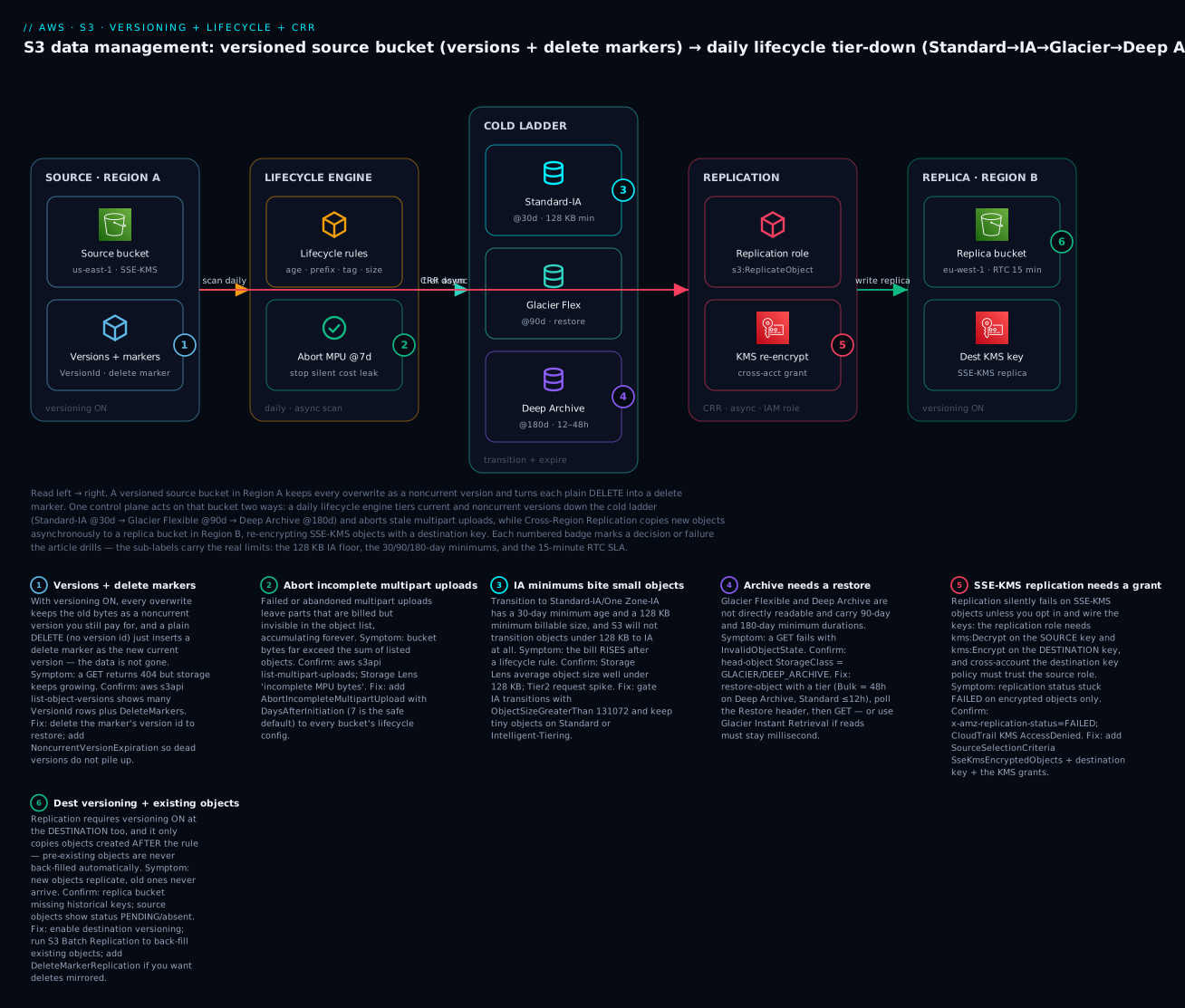
Picture the system left to right as one control surface acting on a versioned bucket. On the left, the source bucket in Region A has versioning on, so every overwrite of a key leaves a stack of versions and every plain delete leaves a delete marker — the “Versions + markers” node. That single bucket is acted on two independent ways by one control plane. Downward, the lifecycle engine scans once a day and moves objects along the cold ladder: current and noncurrent versions transition to Standard-IA at 30 days (only if they clear the 128 KB floor), to Glacier Flexible at 90, and eventually to Deep Archive, while AbortIncompleteMultipartUpload sweeps stale uploads at 7 days so they stop billing invisibly. Rightward, Cross-Region Replication copies each new object asynchronously through the replication IAM role to the replica bucket in Region B, re-encrypting SSE-KMS objects with a destination KMS key and — if RTC is on — landing within the 15-minute SLA.
The six numbered badges mark exactly where money and correctness leak: versions and delete markers growing storage while a GET returns 404 (1), incomplete multipart uploads billing invisibly (2), the 128 KB / 30-day IA minimums that make the bill rise on tiny objects (3), the restore requirement and 180-day minimum on Deep Archive (4), the cross-account KMS grant without which SSE-KMS objects sit in permanent FAILED (5), and the destination-versioning + existing-object rule that means old data never back-fills without a Batch Replication job (6). Read the path once, then use the legend as your pre-flight checklist.
Real-world scenario
PixelVault (a fictional but representative photo-SaaS) stored 40 TB of user-uploaded originals and derived thumbnails in a single pixelvault-uploads bucket in ap-south-1, on S3 Standard, with versioning switched on two years earlier after a botched migration overwrote thousands of originals. Two problems collided. First, a compliance customer signed a contract requiring a second-Region copy of their tenant’s originals within 15 minutes and a 7-year retention on deletions. Second, a FinOps review found the bucket was billing for 68 TB — 1.7× the logical data — because versioning had never been paired with a noncurrent-version rule, and a background job re-uploaded slightly-recompressed thumbnails nightly, minting a new version of each every day.
The platform team designed all three features together. They wrote a lifecycle policy with an ObjectSizeGreaterThan 128 KB gate so the millions of tiny thumbnails stayed on Standard (the 128 KB floor would have raised their cost), transitioned originals (originals/) to Standard-IA at 30 days and Glacier Flexible at 120, and — the fix for the leak — added NoncurrentVersionTransition to Glacier at 30 days and NoncurrentVersionExpiration at 365 while keeping the three newest noncurrent versions as the undo window. A bucket-wide AbortIncompleteMultipartUpload at 7 days reclaimed 900 GB of orphaned multipart parts from failed mobile uploads on the first daily pass.
For the compliance customer they stood up Cross-Region Replication to a new pixelvault-dr-eu bucket in eu-west-1, filtered to that tenant’s originals/tenant-8842/ prefix. Both buckets had versioning on; they created the replication role, and — because originals were SSE-KMS encrypted — they enabled sse_kms_encrypted_objects, provisioned a destination-Region KMS key, and granted the role kms:Decrypt on the source key and kms:Encrypt on the destination key. Because the DR bucket lived in a separate compliance account, they added the source replication role to the destination KMS key policy and the destination bucket policy. They enabled RTC for the 15-minute SLA and delete-marker replication so soft deletes mirrored, but deliberately relied on the fact that version-ID deletes never replicate so a rogue purge on the source could not wipe the DR copy.
Two things went wrong, both instructive. First, the replica bucket stayed empty for the first hour and the team panicked — until they remembered replication ignores pre-existing objects; the tenant’s historical originals needed an S3 Batch Replication job, which they ran with a completion report to prove every object copied. Second, a subset of encrypted objects showed FAILED replication status: the destination KMS key policy trusted the account but not the specific replication role ARN — a one-line key-policy fix. Once corrected, head-object --query ReplicationStatus read COMPLETED across the prefix, CloudWatch ReplicationLatency sat under 15 minutes, and the versioned storage dropped from 68 TB back to 44 TB (logical + a bounded three-version undo window) within two weeks. The compliance contract was met, the leak was closed, and the whole exercise was a single Terraform apply plus one Batch job.
Advantages and disadvantages
The honest two-column trade-off across all three features, then when each side matters:
| Advantages | Disadvantages |
|---|---|
| Versioning is a true undo for overwrite and delete | Every version is billed until you expire it |
| Delete markers make accidental deletes recoverable | Markers accumulate and cause confusing 404s |
| MFA delete blocks credential-theft data loss | Root-only, console-impossible, lockout risk |
| Lifecycle tiers and expires with zero app changes | Wrong filter deletes wanted data; async/daily |
| Abort-MPU reclaims invisible orphaned-part cost | (essentially none — pure win) |
| CRR/SRR gives a second copy for DR/compliance | Roughly doubles storage; CRR adds transfer cost |
| RTC gives a contractual 15-minute freshness SLA | Per-GB RTC fee on top of everything |
| SSE-KMS replication keeps DR copies encrypted | Silent FAILED without the exact key grants |
| Version-ID deletes never replicate (anti-malice) | Surprising if you expected deletes to mirror |
| Batch Replication back-fills existing data on demand | Existing objects are not automatic — easy to forget |
When the advantages dominate: important, mutable data (versioning undo), predictable aging (lifecycle), and a genuine DR/compliance requirement for a second copy (replication). This is the media/SaaS/regulated-data shape where the features pay for themselves many times over. When the disadvantages dominate: high-churn buckets with no noncurrent expiry (the leak), tiny-object swarms (the 128 KB floor), and replication turned on without back-filling existing objects or wiring KMS (the silent no-ops). The skill is recognising which regime you are in before you flip the switch — which is exactly what the tables above are for.
Hands-on lab
A free-tier-friendly, end-to-end walk-through: enable versioning, apply the canonical lifecycle policy, watch versions and delete markers appear, set up CRR to a second Region with a KMS-encrypted replica, and tear it all down. Use unique bucket names (S3 names are globally unique). ⚠️ Cross-Region transfer, KMS requests, and Glacier minimums cost small amounts — the teardown removes everything.
1. Create two versioned buckets in two Regions.
SRC="kv-datamgmt-src-$(date +%s)"
DST="kv-datamgmt-dst-$(date +%s)"
SRC_REGION="ap-south-1"
DST_REGION="eu-west-1"

aws s3api create-bucket --bucket "$SRC" --region "$SRC_REGION" \
  --create-bucket-configuration LocationConstraint="$SRC_REGION"
aws s3api create-bucket --bucket "$DST" --region "$DST_REGION" \
  --create-bucket-configuration LocationConstraint="$DST_REGION"

# Replication REQUIRES versioning on BOTH buckets
aws s3api put-bucket-versioning --bucket "$SRC" \
  --versioning-configuration Status=Enabled
aws s3api put-bucket-versioning --bucket "$DST" \
  --versioning-configuration Status=Enabled

echo "Source: $SRC ($SRC_REGION)  Dest: $DST ($DST_REGION)"
Expected: both create-bucket calls return a Location; the versioning calls are silent success. Confirm with aws s3api get-bucket-versioning --bucket "$SRC" → "Status": "Enabled".
2. Write, overwrite, and delete — observe versions and a delete marker.
for n in 1 2 3; do
  echo "revision $n at $(date)" > report.txt
  aws s3api put-object --bucket "$SRC" --key reports/report.txt --body report.txt
done

# See the version stack (3 versions, one IsLatest=true)
aws s3api list-object-versions --bucket "$SRC" --prefix reports/report.txt \
  --query 'Versions[].{VersionId:VersionId,IsLatest:IsLatest}' --output table

# Soft-delete -> inserts a delete marker
aws s3api delete-object --bucket "$SRC" --key reports/report.txt

# A plain GET now 404s
aws s3api get-object --bucket "$SRC" --key reports/report.txt /dev/null \
  || echo ">> 404 expected: a delete marker is on top"

# Restore by deleting the marker
MARKER=$(aws s3api list-object-versions --bucket "$SRC" --prefix reports/report.txt \
  --query 'DeleteMarkers[?IsLatest==`true`].VersionId | [0]' --output text)
aws s3api delete-object --bucket "$SRC" --key reports/report.txt --version-id "$MARKER"
echo ">> object restored"
Expected: three version rows; the GET after delete fails (404); after removing the marker the object is readable again.
3. Apply the canonical lifecycle policy (IA@30 → Glacier@90 → expire noncurrent@365 + abort-MPU@7).
cat > lab-lifecycle.json <<'JSON'
{
  "Rules": [
    {
      "ID": "tier-and-expire",
      "Filter": { "And": { "Prefix": "reports/", "ObjectSizeGreaterThan": 131072 } },
      "Status": "Enabled",
      "Transitions": [
        { "Days": 30, "StorageClass": "STANDARD_IA" },
        { "Days": 90, "StorageClass": "GLACIER" }
      ],
      "NoncurrentVersionTransition": { "NoncurrentDays": 30, "NewerNoncurrentVersions": 3, "StorageClass": "GLACIER" },
      "NoncurrentVersionExpiration": { "NoncurrentDays": 365, "NewerNoncurrentVersions": 3 },
      "AbortIncompleteMultipartUpload": { "DaysAfterInitiation": 7 },
      "Expiration": { "ExpiredObjectDeleteMarker": true }
    }
  ]
}
JSON

aws s3api put-bucket-lifecycle-configuration \
  --bucket "$SRC" --lifecycle-configuration file://lab-lifecycle.json
aws s3api get-bucket-lifecycle-configuration --bucket "$SRC"
Expected: the get echoes your rule back. (Transitions are async/daily — you will not see objects move during the lab.)
4. Create the replication role and turn on CRR.
ACCOUNT=$(aws sts get-caller-identity --query Account --output text)

cat > trust.json <<'JSON'
{ "Version": "2012-10-17", "Statement": [
  { "Effect": "Allow", "Principal": { "Service": "s3.amazonaws.com" }, "Action": "sts:AssumeRole" } ] }
JSON

aws iam create-role --role-name kv-crr-role \
  --assume-role-policy-document file://trust.json

cat > repl-policy.json <<JSON
{ "Version": "2012-10-17", "Statement": [
  { "Effect": "Allow", "Action": ["s3:GetReplicationConfiguration","s3:ListBucket"],
    "Resource": ["arn:aws:s3:::$SRC"] },
  { "Effect": "Allow", "Action": ["s3:GetObjectVersionForReplication","s3:GetObjectVersionAcl","s3:GetObjectVersionTagging"],
    "Resource": ["arn:aws:s3:::$SRC/*"] },
  { "Effect": "Allow", "Action": ["s3:ReplicateObject","s3:ReplicateDelete","s3:ReplicateTags"],
    "Resource": ["arn:aws:s3:::$DST/*"] } ] }
JSON

aws iam put-role-policy --role-name kv-crr-role \
  --policy-name kv-crr-policy --policy-document file://repl-policy.json

cat > replication.json <<JSON
{ "Role": "arn:aws:iam::$ACCOUNT:role/kv-crr-role",
  "Rules": [ {
    "ID": "crr-reports", "Priority": 1, "Status": "Enabled",
    "Filter": { "Prefix": "reports/" },
    "DeleteMarkerReplication": { "Status": "Enabled" },
    "Destination": { "Bucket": "arn:aws:s3:::$DST", "StorageClass": "STANDARD_IA" } } ] }
JSON

aws s3api put-bucket-replication --bucket "$SRC" \
  --replication-configuration file://replication.json
Expected: role and policy created; put-bucket-replication is silent success. (In production you would also enable RTC and, for SSE-KMS objects, SourceSelectionCriteria + a destination key + KMS grants.)
5. Write a NEW object and verify it replicates.
echo "replicate me" > new.txt
aws s3api put-object --bucket "$SRC" --key reports/new.txt --body new.txt

# Poll the source object's replication status (PENDING -> COMPLETED)
aws s3api head-object --bucket "$SRC" --key reports/new.txt --query 'ReplicationStatus'

# After a minute or two, the replica appears in Region B
aws s3api head-object --bucket "$DST" --key reports/new.txt \
  --query '{Class:StorageClass,ReplStatus:ReplicationStatus}'
Expected: the source shows PENDING then COMPLETED; the destination object appears with ReplicationStatus: REPLICA. (The objects from step 2, created before the rule, do not appear in the replica — that is the existing-object gotcha; back-filling would need Batch Replication.)
6. Tear down (delete all versions and markers in both buckets, then the buckets and role).
purge () {  # delete every version + delete-marker, then the bucket
  local B="$1"
  aws s3api list-object-versions --bucket "$B" \
    --query '{Objects: Versions[].{Key:Key,VersionId:VersionId}}' --output json > v.json
  aws s3api delete-objects --bucket "$B" --delete file://v.json 2>/dev/null || true
  aws s3api list-object-versions --bucket "$B" \
    --query '{Objects: DeleteMarkers[].{Key:Key,VersionId:VersionId}}' --output json > m.json
  aws s3api delete-objects --bucket "$B" --delete file://m.json 2>/dev/null || true
  aws s3 rb "s3://$B" --force
}

# Remove replication config first, then purge both buckets
aws s3api delete-bucket-replication --bucket "$SRC" 2>/dev/null || true
purge "$SRC"
purge "$DST"

aws iam delete-role-policy --role-name kv-crr-role --policy-name kv-crr-policy
aws iam delete-role --role-name kv-crr-role
rm -f report.txt new.txt trust.json repl-policy.json replication.json lab-lifecycle.json v.json m.json
echo "Cleaned up $SRC and $DST"
Expected: both buckets and the role are removed. Costs are negligible (a few tiny objects for a few minutes plus a couple of cross-Region PUTs).
Common mistakes & troubleshooting
The differentiator. Scan the playbook table, then read the detail for the row that bit you. Every symptom maps to an exact confirm command and a fix.
| # | Symptom | Root cause | Confirm with | Fix |
|---|---|---|---|---|
| 1 | GET returns 404 but you never deleted the data |
A delete marker is the current version | aws s3api head-object → x-amz-delete-marker: true; list-object-versions shows the marker |
Delete the marker’s version ID to restore, or GET a specific version ID |
| 2 | Versioned bucket cost climbs forever | Noncurrent versions never expire/tier | list-object-versions shows many versions per key |
Add NoncurrentVersionTransition + NoncurrentVersionExpiration, keep N newest |
| 3 | Suspended versioning but the bill didn’t drop | Suspend stops new versions; existing ones stay | list-object-versions still lists old versions |
Expire noncurrent versions with lifecycle — suspend alone frees nothing |
| 4 | Objects not transitioning when expected | Filter/prefix mismatch, rule disabled, or under 128 KB | get-bucket-lifecycle-configuration; check Status, Filter, object size |
Fix the filter/size gate; enable rule; remember it’s daily/async |
| 5 | Bill rose after a lifecycle rule | Tiny objects hit 128 KB IA floor + per-transition request cost | Storage Lens avg object size < 128 KB; Tier2 request spike | Add ObjectSizeGreaterThan 131072; keep small objects on Standard/IT |
| 6 | Lifecycle deleted data you wanted | Expiration (or noncurrent expiration) too aggressive / wrong filter |
CloudTrail PutBucketLifecycleConfiguration; review the rule’s filter+days |
Restore from a version/replica if still available; tighten filter; raise NoncurrentDays |
| 7 | GET fails with InvalidObjectState |
Object is in Glacier Flexible / Deep Archive | head-object --query StorageClass = GLACIER/DEEP_ARCHIVE |
restore-object with a tier; poll Restore; then GET |
| 8 | Replica bucket is empty; new objects arrive but old ones never do | Replication ignores pre-existing objects | Source objects created before the rule show no replication status | Run S3 Batch Replication to back-fill existing objects |
| 9 | Replication status stuck FAILED on encrypted objects only |
SSE-KMS not opted in / missing KMS grant | head-object --query ReplicationStatus = FAILED; CloudTrail KMS AccessDenied |
Enable SseKmsEncryptedObjects, add dest key, grant kms:Decrypt(src)/kms:Encrypt(dst); cross-account trust the role in the key policy |
| 10 | Nothing replicates at all | Versioning off on destination, or bad replication role | get-bucket-versioning on dest; check role trust/permissions |
Enable dest versioning; fix the role (S3 principal, source read + dest ReplicateObject) |
| 11 | Deletes don’t propagate to the replica | Delete-marker replication disabled (and version-ID deletes never replicate) | Inspect rule for DeleteMarkerReplication; recall version-ID deletes are never mirrored |
Enable DeleteMarkerReplication for soft deletes; accept version-ID deletes won’t propagate by design |
| 12 | Delete markers piling up; listings cluttered, LIST slow | No ExpiredObjectDeleteMarker cleanup |
list-object-versions --query 'DeleteMarkers' shows many |
Add Expiration: { ExpiredObjectDeleteMarker: true } |
| 13 | Mystery storage you can’t see in the console | Orphaned incomplete multipart upload parts | list-multipart-uploads; Storage Lens incomplete-MPU bytes |
Add AbortIncompleteMultipartUpload (7 days) to every bucket |
| 14 | Can’t permanently delete a version / can’t suspend versioning | MFA delete is enabled | get-bucket-versioning shows MFADelete: Enabled |
Supply --mfa "<serial> <code>" as the root account; if the device is lost, use AWS root recovery |
| 15 | RTC objects miss the 15-min SLA sometimes | Very large objects or throttled KMS | CloudWatch ReplicationLatency / OperationsPendingReplication |
Investigate object size / KMS throttling; RTC SLA covers 99.99%, not 100% |
The S3 status and error codes you will actually see across these features:
| Code / status | Where it appears | Meaning | Typical fix |
|---|---|---|---|
404 Not Found + x-amz-delete-marker: true |
GET on a soft-deleted key | A delete marker is current | Remove the marker or GET a version ID |
InvalidObjectState |
GET on a Glacier object | Not directly readable | restore-object first |
ReplicationStatus: PENDING |
Source object header | Replication in progress | Wait; if stuck, check role/KMS |
ReplicationStatus: FAILED |
Source object header | Replication failed | Fix role/KMS/dest-versioning |
ReplicationStatus: REPLICA |
Destination object header | This is a replica (normal) | None — expected on the destination |
AccessDenied (KMS, in CloudTrail) |
SSE-KMS replication | Role can’t decrypt/encrypt | Grant kms:Decrypt/kms:Encrypt; cross-account key policy |
BucketAlreadyOwnedByYou / BucketAlreadyExists |
create-bucket | Name taken (global namespace) | Choose a unique name |
ReplicationConfigurationNotFoundError |
get-bucket-replication | No replication configured | Put a replication configuration first |
The three that cause the most 3 a.m. confusion, expanded:
8. The replica is empty even though replication is “on.” Root cause: replication only copies objects created after the rule; every object already in the bucket is invisible to it. Confirm: the historical objects have no x-amz-replication-status, and they never appear in the destination. Fix: run S3 Batch Replication (an S3 Batch Operations job with S3ReplicateObject) against the existing objects, with a completion report so you can prove the back-fill finished. Then ongoing replication handles everything new.
9. Encrypted objects sit in FAILED while plaintext ones replicate. Root cause: SSE-KMS replication is opt-in and needs three things — SseKmsEncryptedObjects enabled in SourceSelectionCriteria, a destination KMS key, and the replication role granted kms:Decrypt on the source key and kms:Encrypt/GenerateDataKey on the destination key. Cross-account, the destination key policy must also trust the source role ARN specifically (not just the account). Confirm: head-object --query ReplicationStatus returns FAILED on encrypted keys; CloudTrail shows KMS AccessDenied. Fix: wire all three, add the cross-account key-policy trust, then re-replicate the failed objects with Batch Replication.
14. You enabled MFA delete and now can’t manage the bucket. Root cause: MFA delete requires an MFA token for permanent version deletes and for changing the versioning state, and only the root account can toggle it — an IAM admin is stuck. Confirm: get-bucket-versioning shows MFADelete: Enabled. Fix: perform the operation as root with --mfa "<serial> <code>"; if the root MFA device is lost, you must go through AWS root-account recovery. This is why MFA delete is reserved for a few genuinely irreplaceable buckets and always documented with a tested root-recovery path.
Best practices
- On every versioned bucket, always pair versioning with a noncurrent-version lifecycle rule. Versioning without
NoncurrentVersionExpirationis not a safety net — it is a storage leak that grows with your write rate. Keep the N newest as the undo window, expire the rest. - Add
AbortIncompleteMultipartUpload(7 days) to every bucket, always. Orphaned parts are invisible, billed, and accumulate forever. There is no downside; make it a standing default in your bucket module. - Gate IA/Glacier transitions with
ObjectSizeGreaterThan128 KB. The single biggest “the rule made it worse” cause is tiny objects hitting the 128 KB floor and per-transition request cost. - Never rely on
Expirationalone to shrink a versioned bucket — on a versioned bucket it only adds a delete marker. UseNoncurrentVersionExpiration(and clean delete markers) to actually free bytes. - Turn on versioning at the destination before configuring replication. Replication is silently rejected without it. In Terraform, make the replication config
depends_onboth buckets’ versioning resources. - Remember replication ignores existing objects — plan a Batch Replication back-fill whenever you enable replication on a non-empty bucket, and prove it with a completion report.
- Wire SSE-KMS replication explicitly: opt in with
SseKmsEncryptedObjects, provide a destination-Region key, grant the role source-Decryptand dest-Encrypt, and cross-account trust the role in the destination key policy. Test with one encrypted object before trusting the whole bucket. - Write the replica in a cheaper class (Standard-IA or Glacier) unless the DR RTO demands hot reads — replication roughly doubles storage, so the class choice matters.
- Enable RTC only where freshness is a requirement. The 15-minute SLA is worth the per-GB fee for a system that reads the replica, and wasted money for a cold DR copy.
- Set lifecycle rules on the replica bucket too. Lifecycle actions do not replicate; the destination needs its own transition/expiry policy or it stays on the class you replicated it into.
- Keep versioning, lifecycle, and replication config in Terraform, reviewed in PRs. A wrong
NoncurrentDays, a bad filter, or a missing KMS grant is a slow, expensive mistake that review catches. - Test a restore and a failover before you need them. Confirm you can recover a version, remove a delete marker, and read from the replica Region before the incident, not during it.
The signals worth watching after you configure these features:
| Signal | Where to find it | Healthy reading | A bad reading means |
|---|---|---|---|
| Noncurrent-version bytes | S3 Storage Lens / list-object-versions |
Bounded, trending flat | No noncurrent rules → leak |
| Storage by class mix | Cost Explorer (group by class) | Cold bytes leaving Standard over days | Lifecycle not matching / async |
| Average object size (IA prefixes) | S3 Storage Lens | Comfortably > 128 KB | Tiny objects hitting the floor |
| Incomplete-MPU bytes | S3 Storage Lens | Near zero | Missing AbortIncompleteMultipartUpload |
ReplicationLatency |
CloudWatch (RTC metrics) | Under 15 minutes | Large objects / KMS throttling |
OperationsPendingReplication |
CloudWatch | Trending to zero | Backlog — perms/KMS/throughput issue |
FAILED replication status count |
S3 inventory / head-object | Zero | Role or KMS grant missing |
Security notes
- Least-privilege the powerful configuration permissions.
s3:PutBucketVersioning,s3:PutLifecycleConfiguration,s3:PutReplicationConfigurationands3:PutObjectRetentioncan delete data at scale or exfiltrate it to another account. Restrict them to platform/security roles via IAM and SCPs — see AWS Organizations and IAM Foundations. - Scope the replication role tightly. It should read only the source objects it must and write only to the named destination — never
s3:*on*. A over-broad replication role is a cross-account data-exfiltration path. - A replica bucket is a new public-exposure surface. Keep S3 Block Public Access on at the account and bucket level for both source and destination, and apply the same bucket-policy discipline from Securing Amazon S3. Replicating data does not replicate your intent to keep it private.
- Keep replicas encrypted. Replicate SSE-KMS objects with a destination-Region customer-managed key so the DR copy is as protected as the source, and so you can audit decrypts in CloudTrail on both sides. Never let a replica silently downgrade to unencrypted.
- Use version-ID delete immutability as an anti-ransomware control. Because version-ID deletes never replicate, a compromised source credential that purges versions cannot wipe the replica — the DR copy survives a malicious mass-delete. Pair with Object Lock on the replica for true WORM.
- MFA delete for the few irreplaceable buckets. Where even a root-adjacent compromise must not be able to purge history, enable MFA delete (root-only) — but document and test the root-MFA recovery path so you do not lock yourself out.
- Audit every config change with CloudTrail. Log
PutBucketVersioning,PutBucketLifecycleConfiguration,PutBucketReplicationand restore/delete actions so a sudden mass-archive, mass-expire, or a new replication target to an unknown account is attributable — pair with AWS CloudTrail and Config.
The controls that also keep the data-management model honest:
| Control | Mechanism | Secures against | Also prevents |
|---|---|---|---|
| Scoped config IAM | s3:Put* config actions restricted |
Rogue mass-delete/expire/exfil | Accidental data loss |
| Tight replication role | Source-read + dest-write only | Cross-account exfiltration | Over-broad blast radius |
| Block Public Access (both buckets) | Account/bucket setting | Public exposure of source and replica | “The replica is internal” assumption |
| SSE-KMS on replica | Destination-Region CMK | Plaintext DR copy | Unauditable access (CloudTrail decrypts) |
| Version-ID delete immutability | S3 never replicates version-ID deletes | Ransomware/malicious purge | DR copy loss on a source wipe |
| Object Lock on replica | WORM retention | Tampering with the DR copy | Lifecycle/attacker deleting the replica |
| MFA delete (root) | Versioning + MFA | Credential-theft version purge | Accidental version wipe |
| CloudTrail data/mgmt events | API logging | Untraceable config drift | Silent new-replication-target changes |
Cost & sizing
The bill has five levers across these features, and they interact:
- Versioned storage is the sleeper: it is billed per version, so it scales with your write rate, not your data size. A key overwritten daily accumulates ~365 billed versions a year unless a noncurrent rule ages them out. This is the most common surprise line.
- Per-GB-month by class is the lever lifecycle attacks — moving cold versions (current and noncurrent) down the ladder to IA/Glacier is the saving, gated by the 128 KB and minimum-duration floors.
- Request costs matter at scale: each lifecycle transition and each replication PUT is a billed request. A billion-object bucket makes both real.
- Cross-Region transfer is the main CRR cost — every replicated GB leaves the source Region billed per GB. SRR avoids it entirely; that is often the deciding factor between them.
- RTC and KMS are add-ons: the per-GB RTC fee buys the 15-minute SLA, and SSE-KMS replication adds
Encrypt/Decryptrequest costs on both sides that add up at high object counts.
A rough monthly picture for a 10 TB versioned, replicated bucket (order-of-magnitude, ap-south-1/eu-west-1-ish, illustrative — verify with the AWS Pricing Calculator):
| Layout | Effective bytes | Rough monthly INR | Note |
|---|---|---|---|
| 10 TB, no versioning, all Standard | 10 TB | ~₹19,000 | Baseline, no undo, one Region |
| + versioning, daily churn, no expiry (1 yr) | ~24 TB | ~₹46,000 | The leak — versions on Standard |
| + noncurrent→Glacier@30d + expire@365 | ~11.5 TB | ~₹23,000 | Undo kept, leak closed |
| + CRR to Region B (replica in Standard-IA) | 11.5 TB + ~11.5 TB IA | ~₹36,000 + transfer | DR copy roughly doubles storage |
| + RTC on the replicated prefix | same | + per-GB RTC fee | Only where freshness is required |
The cost drivers and the direction each feature pushes them:
| Cost driver | What you pay for | Feature | Watch-out |
|---|---|---|---|
| Versioned storage | Every version’s bytes | Versioning | Grows with write rate; expire noncurrent |
| Transition requests | One per object moved | Lifecycle | Huge on tiny-object swarms |
| Retrieval fees | Per-GB from IA/Glacier | Lifecycle | Can exceed the storage saving |
| Minimum-duration floors | 30/90/180 days billed | Lifecycle | Don’t tier short-lived data |
| Replica storage | The second copy | Replication | Write it in IA/Glacier |
| Replication PUTs | One per replicated object | Replication | Scales with object count |
| Cross-Region transfer | Per-GB out of source Region | CRR | The main CRR cost; SRR avoids it |
| RTC per-GB fee | The 15-min SLA | RTC | Enable selectively |
| KMS requests | Encrypt/Decrypt both sides | SSE-KMS replication | Adds up at high object counts |
Free tier: new AWS accounts get 5 GB of S3 Standard, 20,000 GET and 2,000 PUT requests per month for 12 months — enough for the lab. There is no meaningful free tier for cross-Region transfer or Glacier retrieval, so run the replication and restore steps deliberately and tear down promptly.
Interview & exam questions
1. What exactly is a delete marker, and what happens on a GET when one is present? A delete marker is a special zero-byte version with its own version ID that S3 inserts when you DELETE a versioned object without a version ID. It becomes the current version, so a plain GET returns 404 Not Found with x-amz-delete-marker: true — but every real version is retained underneath and still billed. Delete the marker’s version ID to restore the object.
2. A versioned bucket’s cost keeps climbing though the object count is flat. Why, and what’s the fix? Versioning keeps every overwrite as a noncurrent version, so cost scales with the write rate, not the data size. Without NoncurrentVersionTransition/NoncurrentVersionExpiration, dead versions accumulate on the expensive class forever. Add both, keep the N newest as an undo window, and add ExpiredObjectDeleteMarker cleanup.
3. You suspend versioning to save money and the bill doesn’t drop. Why? Suspending versioning only stops new versions from being created; every version already in the bucket is retained and still billed. To reclaim that storage you must expire the noncurrent versions with a lifecycle rule — suspension alone frees nothing, and you can never return the bucket to the Unversioned state.
4. Name the three prerequisites for S3 replication. (1) Versioning enabled on both source and destination buckets; (2) an IAM role S3 can assume with source-read and destination-write permissions; and (3) a replication configuration on the source. For SSE-KMS objects you additionally need to opt in and wire the source/destination keys and KMS grants.
5. You enabled replication but the destination bucket is empty even though the source has millions of objects. What’s wrong? Replication only copies objects created after the rule exists — pre-existing objects are ignored. Run an S3 Batch Replication job (S3 Batch Operations with S3ReplicateObject) to back-fill the existing objects, ideally with a completion report to confirm every object copied.
6. Encrypted objects show a FAILED replication status while unencrypted ones replicate fine. Diagnose it. SSE-KMS replication is opt-in. You must enable SseKmsEncryptedObjects in SourceSelectionCriteria, provide a destination KMS key, and grant the replication role kms:Decrypt on the source key and kms:Encrypt/GenerateDataKey on the destination key. Cross-account, the destination key policy must trust the source role ARN. CloudTrail will show KMS AccessDenied until the grant is added.
7. What is Replication Time Control and when do you pay for it? RTC is an add-on that replicates 99.99% of objects within 15 minutes, backed by an SLA, and enables CloudWatch replication metrics (BytesPendingReplication, ReplicationLatency) and events, for a per-GB fee. Use it when a downstream system reads the replica and needs it fresh, or a contract specifies a freshness bound; skip it for cold DR copies where an hour of lag is fine.
8. Do deletes replicate? Explain both cases. By default, a plain DELETE (which inserts a delete marker) replicates only if DeleteMarkerReplication is enabled. A DELETE with a version ID (a permanent version delete) is never replicated — deliberately, so a malicious or accidental purge on the source cannot wipe the DR copy. This asymmetry is also a useful anti-ransomware property.
9. CRR vs SRR — when do you choose each? Both use the identical mechanism; the difference is geography. Cross-Region Replication copies to another Region for DR, lower-latency reads, or data sovereignty — and incurs cross-Region transfer cost. Same-Region Replication copies within one Region for log aggregation, account isolation, or in-Region compliance — with no transfer charge. Pick SRR when the requirement is met in-Region to avoid the transfer bill.
10. Why won’t S3 transition your 50 KB objects to Standard-IA, and why is that a feature? S3 does not transition objects smaller than 128 KB to Standard-IA or One Zone-IA because the 128 KB minimum billable size makes it cost-increasing, not decreasing. It is protecting you from a rule that would raise the bill. Gate IA transitions with ObjectSizeGreaterThan 128 KB so the behaviour is explicit, and keep tiny objects on Standard or Intelligent-Tiering.
11. What does MFA delete protect, who can enable it, and what’s the catch? MFA delete requires an MFA token to permanently delete a version and to change the versioning state, so a stolen access key alone cannot purge history. Only the root account can enable it, and only via the CLI/API (not the console). The catch is lockout risk — lose the root MFA device and you cannot purge versions or suspend versioning — so it is reserved for a few irreplaceable buckets with a tested recovery path.
12. How do you keep a two-way (bidirectional) replication setup from looping, and how do metadata edits on the replica get back? S3 tags replicated objects and will not re-replicate an object it received via replication, so A→B→A stops after one hop. To propagate metadata changes (tags, ACLs, Object Lock) made on the replica back to the source you enable replica modification sync. Configure a replication rule on each bucket for the active-active copy.
These map to AWS Certified Solutions Architect – Associate (SAA-C03) — design resilient and cost-optimized storage — and Developer – Associate (DVA-C02) — S3 versioning, lifecycle, and replication operations via the SDK/CLI. A compact cert-mapping for revision:
| Question theme | Primary cert | Exam objective area |
|---|---|---|
| Versioning, delete markers, restore | SAA-C03 / DVA-C02 | Data management; S3 operations |
| Noncurrent-version lifecycle & cost | SAA-C03 | Cost-optimized storage |
| Transition minimums & 128 KB rule | SAA-C03 / DVA-C02 | Lifecycle; storage classes |
| CRR/SRR, role, versioning prereq | SAA-C03 | Design resilient architectures |
| RTC, delete-marker replication | SAA-C03 | Replication & DR |
| SSE-KMS cross-account replication | SAA-C03 / Security | Encryption & cross-account access |
| MFA delete / Object Lock | Security / SAA-C03 | Governance & data protection |
Quick check
- A
GETonreports/summary.pdfreturns 404, but you’re sure nobody deleted the data. What is on top of the version stack, and what are the two ways to read the object again? - You enabled versioning a year ago; the bucket now bills for 2.5× its logical data even though the object count is flat. What did you forget, and which two lifecycle actions fix it?
- Replication is “Enabled” and green, new objects replicate, but the ten million objects that were already in the bucket never appear in the replica. Why, and what do you run?
- Unencrypted objects replicate but SSE-KMS ones sit in
FAILED. Name the three things you must configure (and the extra one for cross-account). - You want a plain
DELETEon the source to also hide the object on the replica, but you do not want a permanent version-ID delete to propagate. Which setting do you enable, and which behaviour is automatic?
Answers
- A delete marker is the current version, so a plain GET 404s. Read the object again by either deleting the delete marker (removing its version ID restores the previous current version) or issuing a GET with a specific version ID of the version you want.
- You forgot to expire noncurrent versions — versioning kept every overwrite. Fix with
NoncurrentVersionTransition(tier old versions to Glacier) andNoncurrentVersionExpiration(delete them after N days), keeping the N newest as an undo window, plusExpiredObjectDeleteMarkercleanup. - Replication only copies objects created after the rule; pre-existing objects are ignored. Run an S3 Batch Replication job (S3 Batch Operations
S3ReplicateObject) to back-fill them, with a completion report to confirm. - (1) Enable
SseKmsEncryptedObjectsinSourceSelectionCriteria; (2) provide a destination KMS key; (3) grant the replication rolekms:Decrypton the source key andkms:Encrypt/GenerateDataKeyon the destination key. Cross-account, additionally make the destination key policy trust the source role ARN. - Enable
DeleteMarkerReplicationso soft deletes (delete markers) propagate. The protection you want is automatic: S3 never replicates a version-ID (permanent) delete, so a purge on the source cannot wipe the replica.
Glossary
- Versioning — a bucket setting that keeps every version of a key as a stack; provides undo for overwrite/delete and bills every version until it is expired.
- Version ID — the unique string identifying one version of an object; the handle you pass to GET or permanently DELETE a specific version.
- Current version — the top of a key’s version stack, returned by a plain GET; every version beneath it is noncurrent.
- Noncurrent version — a previous version retained by versioning; needs its own lifecycle actions (
NoncurrentVersion*) or it leaks cost. - Delete marker — a zero-byte placeholder version inserted by a
DELETEwithout a version ID; makes a plain GET return 404 while the real versions remain. - Permanent (version-ID) delete — a
DELETEthat names a specific version ID and irreversibly frees that version’s bytes; never replicated, and guarded by MFA delete. - MFA delete — a root-only, console-impossible control requiring an MFA token to permanently delete versions or change the versioning state.
- Lifecycle configuration — the set of rules (filter + actions) S3 evaluates daily to transition and expire objects and versions and to abort incomplete uploads.
- Transition / Expiration — lifecycle actions that move an object to a colder class, or delete it (add a marker on a versioned bucket), after N days.
- AbortIncompleteMultipartUpload — a lifecycle action deleting parts of abandoned multipart uploads; reclaims invisible billed storage.
- Intelligent-Tiering — a storage class that auto-moves objects between access tiers by observed access with no retrieval fee, for a per-object monitoring fee.
- Cross-Region Replication (CRR) / Same-Region Replication (SRR) — asynchronous copying of new objects to a destination bucket in another Region (CRR) or the same Region (SRR).
- Replication role — the IAM role S3 assumes to read source objects and write the replica; scoped to source-read and destination-write.
- Replication Time Control (RTC) — an add-on replicating 99.99% of objects within a 15-minute SLA, with CloudWatch metrics and events, for a per-GB fee.
- Delete-marker replication — the optional setting that mirrors soft deletes (delete markers) to the replica; version-ID deletes are never replicated.
- S3 Batch Replication — an S3 Batch Operations job that replicates objects that already existed before the replication rule (or previously failed).
- Replica modification sync — the setting that propagates metadata changes (tags, ACLs, Object Lock) made on a replica back to the source in two-way replication.
- Replication status — the
x-amz-replication-statusheader:PENDING,COMPLETED,FAILEDon the source,REPLICAon the destination.
Next steps
You can now version a bucket safely, age its data down the cold ladder without leaking cost, and stand up an encrypted second copy in another Region. Build outward:
- Foundations: Amazon S3 Fundamentals Hands-On: Buckets, Objects, Versioning & Presigned URLs — the bucket, object and presigned-URL basics beneath everything here.
- The class trade-offs: Amazon S3 Storage Classes and Lifecycle: Optimize Cost Without Losing Data — the per-class minimums, retrieval fees and Glacier restore mechanics this lab automates.
- Lock it down: Securing Amazon S3: Bucket Policies, Block Public Access & the 403 Playbook — keep both source and replica private and diagnose the 403s.
- Govern the copies: AWS Backup: Centralized Cross-Account Backup Hands-On — turn versioning and replication into a centrally-governed, cross-account backup posture.
- Design for DR: AWS Backup and Disaster Recovery: Protect Workloads Across Regions — fit S3 replication into a full multi-Region recovery plan with RPO/RTO targets.