A backup you cannot delete is worth ten backups you can. That single sentence is why AWS Backup exists as a service separate from the per-service snapshot buttons scattered across EC2, RDS, EFS and DynamoDB. Anyone can schedule an EBS snapshot. What ransomware operators and disgruntled admins count on is that whoever holds the account can also erase those snapshots — and most teams discover, mid-incident, that their “backups” lived in the same blast radius as the thing that got compromised. AWS Backup is the answer to that: one policy-driven control plane that captures EC2/EBS, RDS/Aurora, EFS, DynamoDB, FSx, S3, Storage Gateway, Redshift, Neptune, DocumentDB, VMware and more into backup vaults you can seal with Vault Lock so that not even the account root can delete a recovery point before its retention expires, and copy those vaults into a different Region and a different AWS account that the attacker never touched.
This article is the hands-on build. You will learn AWS Backup as an architect uses it in production, not as a tour of console buttons: how a backup plan turns a cron schedule, a backup window, a lifecycle (warm → cold storage → delete) and copy actions into policy; how resource assignment by tag protects tomorrow’s resources without touching the plan; how Vault Lock governance vs compliance mode differ (and why the cooling-off period is the most important number in the whole feature); how Organizations backup policies push one plan across an entire org from a delegated-admin account; how continuous backup / PITR differs from snapshot backups; and how restore testing and Backup Audit Manager turn “we have backups” into “we have proven, compliant, restorable backups.” Every operation is shown twice — an aws backup/aws organizations CLI form and a Terraform form — because you will run one by hand once and codify the other forever.
By the end you will stand up a locked vault, a daily plan with 35-day warm retention, a 90-day cold transition and a cross-account copy, assign resources by tag, fire an on-demand backup, perform a restore, and enable an Audit Manager framework — then tear it down cleanly, understanding exactly which piece (compliance-mode Vault Lock) you must not create in a throwaway lab because it is immutable by design. This is the difference between a nightly job and a recovery capability.
What problem this solves
The pain is specific and it always arrives at the worst time. A production RDS instance is encrypted by ransomware, or a bad migration drops a table, or a departing engineer runs aws ec2 delete-snapshot across the account. You reach for backups and find one of these: the snapshots were in the same account and got deleted too; they existed but nobody ever tested a restore and the restore fails; they were scattered — some EBS snapshots here, an RDS automated backup there, an EFS backup nowhere — with no single place to prove coverage; or they were all in us-east-1, which is the Region that just had the outage you are recovering from.
Without a centralized backup plane, “backup” is a per-service, per-team, per-Region patchwork. EC2 owners use Data Lifecycle Manager, DBAs rely on RDS automated backups, the EFS got forgotten, and DynamoDB point-in-time recovery may or may not be on. There is no single policy, no single report that says “every tagged resource is protected, encrypted, immutable and copied off-account,” and no way to prove any of it to an auditor. When the incident comes, you are assembling a recovery from fragments under time pressure — and discovering the gaps live.
AWS Backup collapses that patchwork into one policy engine with three properties the fragments never had together: immutability (Vault Lock WORM, so a compromised credential cannot destroy the copies), isolation (cross-account copy into a locked-down backup account outside the blast radius), and provability (Audit Manager frameworks and restore testing that continuously verify coverage and recoverability). Here is who feels the absence most:
| Who / workload | What breaks without a central plane | What AWS Backup gives them |
|---|---|---|
| Regulated shops (PCI/HIPAA/SOC 2) | Cannot prove retention/immutability to auditors | Vault Lock + Audit Manager compliance reports |
| Ransomware-target orgs | Attacker deletes snapshots in the same account | Compliance-mode Vault Lock + cross-account copy |
| Multi-account (Organizations) | Every account backs up differently, or not at all | Org backup policies pushed from delegated admin |
| Multi-service data estates | EFS/DynamoDB/FSx forgotten; no single coverage view | One plan spans 15+ resource types by tag |
| DR/BC owners | Backups trapped in the failed Region | Cross-Region copy to a standby Region |
| Teams that “have backups” | Never restore-tested; recovery fails when needed | Automated restore testing jobs + metrics |
Learning objectives
By the end of this article you can:
- Explain AWS Backup’s control-plane model and enumerate which of the 15+ supported services do snapshot, continuous/PITR, and cold-storage backups, and where each nuance bites.
- Author a backup plan end to end — schedule cron, start/completion windows, lifecycle (warm → cold → delete with the 90-day rule), recovery-point tags and copy actions — in both
aws backupCLI and Terraform. - Choose and configure Vault Lock in governance vs compliance mode, reason precisely about the cooling-off period, and know exactly what each mode blocks and for whom (including root).
- Assign resources by tag or resource ID/ARN with conditions, and explain why tag-based selection is the only scalable model.
- Design cross-Region and cross-account copy: delegated admin,
enable-aws-service-access, cross-account backup global setting, destination vault access policies, KMS grants, and org-wide backup policies. - Enable continuous backup / PITR, distinguish it from snapshot backups, and know its limits (35-day window, one continuous rule, no cold tiering).
- Run a restore, stand up restore testing plans, and enable a Backup Audit Manager framework (with its AWS Config dependency) to prove compliance.
- Diagnose the common failure modes — service-role/KMS/window failures, cross-account copy rejections, “cannot delete recovery point,” restore failures and missing PITR — from symptom to exact fix.
Prerequisites & where this fits
You should be comfortable with the AWS CLI and IAM roles, understand what a KMS customer-managed key (CMK) is, and know the basic shape of the services you will protect (an EBS volume, an RDS instance, a DynamoDB table). Multi-account work assumes you know AWS Organizations — a management account, organizational units (OUs), and that some features designate a delegated administrator account so you do not operate from the management account directly. Terraform familiarity helps for the IaC snippets, but each is small and self-contained.
This sits at the top of the data-protection stack. Below it are the per-service primitives: EBS snapshots and Data Lifecycle Manager (see Amazon EBS Volumes, Types & Snapshots: Hands-On), S3 versioning and lifecycle, and RDS automated backups — AWS Backup orchestrates and centralizes all of them. Beside it is the discipline of recovery — RTO/RPO, failover, Route 53 cutover — covered in AWS Backup and Disaster-Recovery Strategies; this article is the backup plane that DR strategy depends on. Above it is org governance: AWS Organizations SCPs & multi-account guardrails and AWS Control Tower guardrails are where backup policies and tag-enforcement live, and AWS Config resource inventory & compliance rules is the engine Audit Manager reads.
A quick map of who owns what during a backup/restore incident, so you escalate to the right layer fast:
| Layer | What lives here | Who usually owns it | Failure classes it causes |
|---|---|---|---|
| Resource + tags | The thing being protected; its backup tag |
App / service team | Untagged → silently unprotected |
| Backup plan + selection | Schedule, window, lifecycle, IAM role | Platform / backup admin | Job fails, missed window, wrong retention |
| Backup vault + Vault Lock | Where recovery points live; immutability | Security / backup admin | Cannot delete (by design), lock mistakes |
| KMS keys | Encryption of vaults and source resources | Security / KMS admin | AccessDenied on backup/copy/restore |
| Organizations | Delegated admin, backup policies, trusted access | Cloud platform (mgmt acct) | Cross-account copy rejected |
| Audit Manager + Config | Frameworks, controls, reports | Compliance / GRC | Controls fail if Config not recording |
Core concepts
Six mental models make every later decision obvious.
AWS Backup is a control plane, not a storage tier. It does not invent a new copy technology; it orchestrates each service’s native mechanism (EBS snapshot, RDS snapshot, EFS backup, DynamoDB export) and files the result — a recovery point — into a backup vault. A recovery point is an immutable reference (arn:aws:backup:...:recovery-point:...) to one backup of one resource at one time. Everything else — plans, selections, vaults, locks, copies — is policy and metadata around recovery points.
A backup plan is policy; a resource assignment is scope. The backup plan says when, how long, where, and to where-else (schedule, retention, vault, copies). The resource assignment (selection) says what — by tag or ARN. They are deliberately separate so one plan protects an ever-growing set of resources: tag a new database backup=daily and it is protected on the next run with no plan edit. A backup plan with no selection backs up nothing; a selection with no plan does nothing.
The vault is where immutability lives. Recovery points sit in a backup vault, which has exactly one KMS key and, optionally, a Vault Lock and an access policy. Vault Lock enforces WORM (write once, read many): retention floors/ceilings and, in compliance mode, true immutability — a locked recovery point cannot be deleted before its retention expires by anyone, including the account root. This is the entire ransomware story: the copies survive even total account compromise.
Snapshot vs continuous are two different backup shapes. A snapshot backup is a periodic point-in-time copy (the vast majority). A continuous backup streams changes to enable point-in-time recovery (PITR) — restore to any second within a window (up to 35 days) — and is supported only for RDS, Aurora, S3 and SAP HANA on EC2. PITR is not a smaller RPO knob you turn on everything; it is a distinct, per-service capability with its own rule flag and its own limits.
Copy is a first-class action, not an afterthought. A plan rule can carry copy actions that clone each recovery point into another vault — in another Region (regional resilience) and/or another account (blast-radius isolation). Cross-account copy is what makes backups survive a credential compromise, and it is gated by Organizations trust, a destination vault access policy, and KMS permissions — three things that fail independently and produce the same “copy job failed” symptom.
Proof is a feature. “We have backups” is a claim; Backup Audit Manager frameworks (built on AWS Config) turn it into evidence — every resource in a plan, encrypted, minimum-retention met, immutable, copied cross-Region — delivered as scheduled compliance reports. Restore testing goes further: it automatically restores recovery points on a schedule, validates them, and tears them down, so “restorable” is measured, not assumed.
The vocabulary in one table
Pin down every moving part before the deep dive. The glossary repeats these for lookup; this is the mental model side by side.
| Term | One-line definition | Where it lives | Why it matters |
|---|---|---|---|
| Backup plan | Policy: schedule, retention, vault, copies | Region, per account | The “when/how long/where” of protection |
| Rule | One schedule+lifecycle+copy unit in a plan | Inside a plan | A plan can have several (daily/weekly/monthly) |
| Resource assignment | Selection of what to back up (tag/ARN) | Attached to a plan | The “what”; tag-based scales |
| Backup vault | Container for recovery points; 1 KMS key | Region, per account | Where immutability + isolation live |
| Recovery point | One backup of one resource at one time | In a vault | The thing you restore or copy |
| Vault Lock | WORM enforcement on a vault | On a vault | Governance vs compliance immutability |
| Cooling-off period | Grace days before compliance lock is final | Vault Lock config | Last window to undo a compliance lock |
| Lifecycle | Warm→cold transition + expiry | On a rule / copy | Cost control; 90-day cold minimum |
| Cold storage | Cheaper archival tier for recovery points | Per supported service | Big savings; early-delete fee |
| Copy action | Clone a recovery point to another vault | On a rule | Cross-Region / cross-account |
| Continuous backup | Change capture enabling PITR | On a rule (flag) | RDS/Aurora/S3/SAP HANA only |
| PITR | Restore to any second in a window (≤35d) | Continuous recovery point | Fine-grained recovery |
| Service role | IAM role AWS Backup assumes | IAM | Backups/restores fail without it |
| Delegated admin | Account that manages org backups | Organizations | Run backup ops off the mgmt account |
| Backup policy | Org JSON policy defining plans org-wide | Organizations | One plan across many accounts |
| Framework | A set of Audit Manager controls | Backup Audit Manager | Proves compliance (via Config) |
Every supported service and its backup shape
The single most useful reference in AWS Backup is what each service actually supports — because the exceptions (no cold tiering on RDS, PITR on only four services, S3’s dependency on versioning) are exactly where plans go wrong. Enumerate it once:
| Service / resource | Backup type | PITR (continuous)? | Cold storage tier? | Key nuances |
|---|---|---|---|---|
| EC2 instance | Snapshot (AMI + EBS) | No | No | Captures all attached EBS + launch metadata |
| EBS volume | Snapshot | No | No | Same tech as native snapshots; keeps source KMS key |
| RDS (non-Aurora) | Snapshot + continuous | Yes (≤35d) | No | Continuous = PITR; cross-Region copy needs shared KMS |
| Aurora cluster | Snapshot + continuous | Yes (≤35d) | No | Cluster-level; continuous PITR to any second |
| EFS | Backup | No | Yes | Independent Backup-managed encryption; cold-tier friendly |
| DynamoDB | Snapshot | No (native PITR separate) | Yes (advanced) | Backup PITR ≠ Backup continuous; opt in to advanced features |
| FSx (Windows/Lustre/ONTAP/OpenZFS) | Snapshot | No | No | Lustre scratch not supported; per-file-system |
| S3 | Snapshot + continuous | Yes (≤35d) | No | Requires bucket versioning; continuous for PITR |
| Storage Gateway (Volume) | Snapshot | No | No | Volume Gateway volumes only |
| Redshift (provisioned/serverless) | Snapshot | No | No | Cluster/namespace snapshots |
| Neptune | Snapshot | No | No | Cluster-level |
| DocumentDB | Snapshot | No | No | Cluster-level |
| Timestream | Snapshot | No | Yes | Table-level |
| SAP HANA on EC2 | Snapshot + continuous | Yes | Yes | Via SSM + Backint agent |
| VMware (Cloud/on-prem) | Snapshot | No | Yes | Via AWS Backup Gateway (virtual appliance) |
| CloudFormation stack | Application (grouped) | No | Yes | Backs up supported resources in a stack as one unit |
Three reading notes that prevent most mistakes: (1) cold storage tiers only on EFS, DynamoDB, Timestream, VMware, SAP HANA and CloudFormation — set MoveToColdStorageAfterDays on an EBS/RDS rule and the transition is silently ignored (the recovery point stays warm and you keep paying warm rates); (2) continuous/PITR is RDS, Aurora, S3 and SAP HANA only — everything else is snapshot-only; (3) S3 backup requires versioning on the bucket or the backup job fails immediately.
Snapshot vs continuous, side by side
| Dimension | Snapshot backup | Continuous backup (PITR) |
|---|---|---|
| Granularity | The scheduled instant only | Any second within the window |
| RPO | = schedule interval (e.g. 24h) | Seconds (change capture) |
| Window | Retention you set (days/years) | Up to 35 days |
| Services | All supported services | RDS, Aurora, S3, SAP HANA only |
| Rule flag | Default | EnableContinuousBackup: true |
| Cold tiering | Where supported | Never (no cold for continuous) |
| Cross-Region/account copy | Copies as snapshot | Copies as a snapshot (not continuous) |
Backup plans: schedule, window, lifecycle, copy
A backup plan is one or more rules. Think of a rule as one recurring job definition: “at this schedule, into this vault, keep it this long, tier it to cold at this point, tag it, and copy it to these other vaults.” Most production plans have two or three rules (a daily rule with 35-day retention, a weekly rule kept a year, a monthly rule kept seven years for compliance). Here is every field of a rule and what it controls:
| Rule field | What it sets | Default | When to change | Gotcha |
|---|---|---|---|---|
| RuleName | Human name for the rule | required | Always | Must be unique within the plan |
| TargetBackupVaultName | Vault the recovery point lands in | required | Per environment/immutability | Vault must exist first |
| ScheduleExpression | Cron/rate for the job | required | Set your RPO | Uses UTC unless timezone set |
| ScheduleExpressionTimezone | Timezone for the schedule | UTC | Local backup windows | Newer field; older plans are UTC |
| StartWindowMinutes | How long after schedule a job may still start | 480 (8h) | Tight change windows | Min 60; miss it → job “EXPIRED” |
| CompletionWindowMinutes | Max time a job may run before cancel | 10080 (7d) | Very large resources | Must be ≥ start window |
| Lifecycle.MoveToColdStorageAfterDays | Warm→cold transition day | none | Cost on long retention | Only tiers on cold-capable services |
| Lifecycle.DeleteAfterDays | Expire (delete) the recovery point | none (keep forever) | Retention policy | Must be ≥ cold + 90 |
| Lifecycle.OptInToArchiveForSupportedResources | Use archive tier where supported | off | Deep long-term archive | Service-dependent |
| RecoveryPointTags | Tags applied to each recovery point | none | Cost allocation, audit | Different from selection tags |
| CopyActions[] | Clone to other vault(s) | none | Cross-Region/account | Each needs its own lifecycle |
| EnableContinuousBackup | Turn on PITR | false | RDS/Aurora/S3/SAP HANA | Ignored on unsupported services |
The schedule (cron)
AWS Backup uses six-field cron: cron(Minutes Hours Day-of-month Month Day-of-week Year), evaluated in UTC unless you set a timezone. Common patterns:
| Intent | Expression | Notes |
|---|---|---|
| Daily 05:00 UTC | cron(0 5 ? * * *) |
The workhorse daily rule |
| Every 12 hours | cron(0 5,17 ? * * *) |
Two fixed times; RPO ~12h |
| Every hour | cron(0 * ? * * *) |
High-frequency; watch job concurrency |
| Weekly Sun 06:00 | cron(0 6 ? * SUN *) |
Long-retention weekly rule |
| Monthly 1st 07:00 | cron(0 7 1 * ? *) |
Compliance monthly rule |
| First Sunday | cron(0 6 ? * 1#1 *) |
n#m = the m-th weekday n |
| Last day of month | cron(0 7 L * ? *) |
L = last |
| Rate form (12h) | rate(12 hours) |
Simpler, but no fixed clock time |
Note the ? in either day-of-month or day-of-week — one must be ? because you cannot constrain both. High-frequency schedules (hourly) create many concurrent jobs; AWS Backup queues them, but a resource can only have one running backup job at a time, so an hourly rule on a huge FSx that takes 90 minutes will start skipping.
The window: start vs completion
The two window settings are the most misunderstood fields in AWS Backup, and they cause the confusing “job never ran” and “job cancelled” symptoms.
| Setting | Question it answers | Default | If exceeded | Tune when |
|---|---|---|---|---|
| StartWindowMinutes | “By when must the job begin?” | 480 (8h) | Job state → EXPIRED (never ran) |
Backups must fit a nightly change window |
| CompletionWindowMinutes | “By when must the job finish?” | 10080 (7d) | Job → ABORTED/cancelled |
Very large first-time backups |
| Interaction | Completion counts from start, not schedule | — | — | Keep completion ≫ start |
| Concurrency | One backup job per resource at a time | — | Later job queues/skips | Space out schedules |
| Missed backup | Start window elapsed before a slot | — | Recorded as missed (Audit Manager control) | Widen start window |
| Timezone | Schedule interpreted in UTC by default | UTC | Jobs run “at the wrong time” | Set ScheduleExpressionTimezone |
If nightly maintenance can only touch the database between 01:00 and 03:00, set StartWindowMinutes: 120 so a job that cannot start in that window is marked missed rather than firing at 06:00 during business hours.
Lifecycle: warm, cold, and the 90-day rule
Every recovery point starts in warm storage (fast restore, higher $/GB). Lifecycle can transition it to cold storage (archival, ~⅕ the price) and later delete it. Two hard rules govern this:
| Lifecycle aspect | Rule / value | Why | Consequence if violated |
|---|---|---|---|
| Minimum days in cold | 90 days | Cold is priced for archival | API rejects Delete < Cold + 90 |
DeleteAfterDays floor |
≥ MoveToColdStorageAfterDays + 90 |
Enforces the 90-day min | InvalidParameterValueException |
| Cold-capable services | EFS, DynamoDB, Timestream, VMware, SAP HANA, CFN | Only these tier | Transition silently ignored elsewhere |
| Early delete before 90d in cold | Charged for the full 90 days | Archival economics | Surprise line item |
| No lifecycle set | Keep forever | Safe default | Unbounded cost growth |
| Continuous (PITR) points | Never tier to cold | Change data is hot | MoveToCold invalid on continuous |
| Copy-action lifecycle | Independent of source rule | Keep copies longer/shorter | Forgetting it → copies kept forever |
A classic mistake: set DeleteAfterDays: 35 and MoveToColdStorageAfterDays: 30 — the API rejects it because 35 < 30 + 90. Either drop the cold transition (keep 35 days warm) or extend deletion to at least 120 days.
Copy actions
A copy action on a rule clones every recovery point that rule creates into another vault, with its own lifecycle. This is how one rule produces a warm 35-day local copy, a cold 1-year cross-Region copy, and a locked cross-account copy — all from a single nightly job.
| Copy dimension | What it protects against | Config surface | Cost impact |
|---|---|---|---|
| Same account, cross-Region | Regional outage / disaster | DestinationBackupVaultArn in another Region |
+ storage + inter-Region transfer |
| Cross-account, same Region | Account compromise / rogue admin | Destination vault ARN in another account | + storage in dest account |
| Cross-account + cross-Region | Both at once (strongest) | Destination ARN, other acct + Region | Both of the above |
| Independent lifecycle | Keep copies longer for compliance | Lifecycle inside the copy action |
Cold tiering on the copy |
| Continuous → snapshot | N/A (a copy of PITR is a snapshot) | Automatic | Copy is point-in-time only |
| KMS re-encryption | Cross-boundary key isolation | Dest vault key (or source key for EBS/RDS) | Grant/share keys or copy fails |
Here is a two-rule plan in the CLI — a daily rule with a cross-Region copy — then the same plan in Terraform.
# Create a plan JSON (daily 05:00 UTC, 35-day warm retention, copy to us-west-2)
cat > plan.json <<'JSON'
{
  "BackupPlanName": "core-daily-plan",
  "Rules": [
    {
      "RuleName": "daily-35d",
      "TargetBackupVaultName": "core-locked-vault",
      "ScheduleExpression": "cron(0 5 ? * * *)",
      "StartWindowMinutes": 120,
      "CompletionWindowMinutes": 1440,
      "Lifecycle": { "DeleteAfterDays": 35 },
      "RecoveryPointTags": { "plan": "core-daily" },
      "CopyActions": [
        {
          "DestinationBackupVaultArn": "arn:aws:backup:us-west-2:111122223333:backup-vault:dr-vault",
          "Lifecycle": { "MoveToColdStorageAfterDays": 90, "DeleteAfterDays": 365 }
        }
      ]
    }
  ]
}
JSON
aws backup create-backup-plan --backup-plan file://plan.json
# → returns BackupPlanId, BackupPlanArn, VersionId
resource "aws_backup_plan" "core" {
  name = "core-daily-plan"

  rule {
    rule_name         = "daily-35d"
    target_vault_name = aws_backup_vault.core.name
    schedule          = "cron(0 5 ? * * *)"
    start_window      = 120   # minutes
    completion_window = 1440  # minutes
    recovery_point_tags = { plan = "core-daily" }

    lifecycle { delete_after = 35 }

    copy_action {
      destination_vault_arn = "arn:aws:backup:us-west-2:111122223333:backup-vault:dr-vault"
      lifecycle {
        cold_storage_after = 90
        delete_after       = 365
      }
    }
  }
}
Backup vaults and Vault Lock (the immutability layer)
A backup vault is a logical container of recovery points with three attributes that matter: exactly one KMS key (fixed at creation for the vault’s own metadata/independent-encryption services), an optional resource-based access policy (who can copy in / operate on it), and an optional Vault Lock. Every account has a Default vault; in production you create purpose-built vaults (core-locked-vault, dr-vault, compliance-7yr) so lock and access policies are scoped, not global.
| Vault flavor | What it is | When to use |
|---|---|---|
| Default vault | Auto-created per Region | Never for production immutability |
| Standard vault (CMK) | You create it with a customer-managed KMS key | The normal production choice |
| Vault + Vault Lock (governance) | Standard vault with removable WORM | Enforce retention; keep an escape hatch |
| Vault + Vault Lock (compliance) | Standard vault with immutable WORM | Ransomware/regulatory immutability |
| Logically air-gapped vault | Always-locked, AWS-owned key, RAM-shareable | Fast cross-account restore without pre-copy |
Governance vs compliance mode
Vault Lock applies a WORM policy to a vault: a minimum and maximum retention, and — in compliance mode — true immutability. The difference between the two modes is who can undo it, and it is the most important decision in the feature.
| Aspect | Governance mode | Compliance mode |
|---|---|---|
| Purpose | Enforce retention with an escape hatch | Absolute immutability (regulatory/ransomware) |
| Can the lock be removed? | Yes, by IAM principals with backup:DeleteBackupVaultLockConfiguration |
No — never, after cooling-off |
| Can retention be shortened? | Yes, by authorized IAM | No |
| Can a recovery point be deleted early? | Yes, by authorized IAM | No — not even by root |
| Cooling-off period | Not applicable | Required, ChangeableForDays ≥ 3 |
| During cooling-off | N/A | Lock is editable/removable |
| After cooling-off | Still removable by IAM | Permanent and immutable |
| Protects against | Accidental deletion, mis-config | Malicious deletion, credential compromise, insider |
| Reversible mistakes? | Yes | No (after cooling-off) — a wrong MaxRetention is forever |
| Lab-safe? | Yes | No — never in a throwaway account |
Read that last row twice. In a lab you use governance mode, always, because compliance mode is immutable by design: if you set a 10-year MaxRetentionDays on a compliance-locked vault and let the cooling-off period pass, those recovery points cost money for ten years and nothing — no IAM policy, no root login, no AWS Support ticket — can delete them early. That is the point of the feature and also the trap.
Vault Lock configuration parameters
| Parameter | Meaning | Governance | Compliance | Constraint |
|---|---|---|---|---|
| MinRetentionDays | Floor: no recovery point kept shorter | optional | optional | Rules can’t set shorter retention |
| MaxRetentionDays | Ceiling: no recovery point kept longer | optional | optional | Rules can’t set longer retention |
| ChangeableForDays | Cooling-off grace (compliance only) | ignored | required, ≥ 3 | The undo window |
| Mode | GOVERNANCE or COMPLIANCE |
— | — | Set once at lock time |
What each state blocks
Once locked, the vault refuses operations that would violate WORM. This table is what you scan when an action is unexpectedly denied:
| Operation | Governance (locked) | Compliance (cooling-off) | Compliance (final) |
|---|---|---|---|
| Add recovery points | Allowed | Allowed | Allowed |
| Delete recovery point before retention | Denied (unless privileged IAM) | Denied | Denied (even root) |
| Delete recovery point after retention | Allowed | Allowed | Allowed |
| Shorten a recovery point’s retention | Denied unless IAM | Denied | Denied |
| Change lock (min/max retention) | Allowed by IAM | Allowed | Denied |
| Remove the lock entirely | Allowed by IAM | Allowed | Denied |
| Delete the vault (non-empty) | Denied | Denied | Denied |
Apply a lock with the CLI (governance — the lab-safe form) and Terraform:
# GOVERNANCE lock: retention floor 7 days, ceiling 3650 days, removable by IAM
aws backup put-backup-vault-lock-configuration \
  --backup-vault-name core-locked-vault \
  --min-retention-days 7 \
  --max-retention-days 3650
# (No changeable-for-days = governance mode)

# COMPLIANCE lock (DO NOT run in a lab): immutable after a 3-day cooling-off
# aws backup put-backup-vault-lock-configuration \
#   --backup-vault-name compliance-7yr \
#   --min-retention-days 30 --max-retention-days 2555 \
#   --changeable-for-days 3
resource "aws_backup_vault" "core" {
  name        = "core-locked-vault"
  kms_key_arn = aws_kms_key.backup.arn
}

# Governance lock (removable) — safe to codify and destroy
resource "aws_backup_vault_lock_configuration" "core" {
  backup_vault_name = aws_backup_vault.core.name
  min_retention_days = 7
  max_retention_days = 3650
  # changeable_for_days = 3   # <-- adding this switches to COMPLIANCE (immutable)
}
The logically air-gapped vault (a newer vault type) deserves a mention: it is always encrypted with an AWS-owned key, is always immutable (compliance-grade), and — uniquely — can be shared across accounts via AWS RAM so a recovery account can restore directly from it without a prior copy. It is the strongest ransomware posture AWS Backup offers, at the cost of losing customer-managed-key control.
Resource assignment: by tag or by resource ID
A plan protects nothing until you attach a resource assignment (called a selection in the API). You scope it two ways — and the choice determines whether your protection scales.
| Selection method | How it works | Scales? | Best for |
|---|---|---|---|
| By tag | Any resource with key=value is included |
Yes — future resources auto-join | Fleet-wide policy |
| By resource ARN | Explicit list of ARNs | No — must edit to add | Pinning one critical resource |
| All-of-type + conditions | Broad type + tag conditions | Yes | “All RDS except tagged exclude” |
| NotResources | Exclude specific ARNs | — | Carve-outs from a broad rule |
| Conditions (rich) | StringEquals/Like on tags | Yes | Environment-scoped policy |
Tag-based selection is the only model that survives contact with a growing account. You define the rule once — “protect everything tagged backup=daily” — and governance (an SCP, a Config rule, a Control Tower control) enforces that every taggable resource carries a backup tag. New database next quarter? It is protected the moment it is tagged, with zero plan changes.
| Tag condition operator | Matches | Example use |
|---|---|---|
| StringEquals | Exact tag value | backup = daily |
| StringLike | Wildcard value | env = prod-* |
| StringNotEquals | Everything except | backup != none |
| StringNotLike | Wildcard exclusion | name != *-scratch |
| Multiple conditions | Logical AND across keys | backup=daily AND env=prod |
| ListOfTags (legacy) | OR across tag entries | Any of several tags |
Assign by tag in CLI and Terraform:
cat > selection.json <<'JSON'
{
  "SelectionName": "tag-backup-daily",
  "IamRoleArn": "arn:aws:iam::111122223333:role/AWSBackupDefaultServiceRole",
  "ListOfTags": [
    { "ConditionType": "STRINGEQUALS", "ConditionKey": "backup", "ConditionValue": "daily" }
  ]
}
JSON
aws backup create-backup-selection \
  --backup-plan-id <plan-id> \
  --backup-selection file://selection.json
resource "aws_backup_selection" "daily" {
  name         = "tag-backup-daily"
  plan_id      = aws_backup_plan.core.id
  iam_role_arn = aws_iam_role.backup.arn

  selection_tag {
    type  = "STRINGEQUALS"
    key   = "backup"
    value = "daily"
  }
}
| Trade-off | Tag-based | ARN-based |
|---|---|---|
| New resources | Auto-protected when tagged | Manual edit each time |
| Risk | Untagged = silently unprotected | Explicit, but stale lists |
| Governance dependency | Needs tag enforcement | None |
| Audit story | “Everything tagged X is covered” | “These exact ARNs” |
| Blast radius of a mistake | A bad tag rule mis-scopes many | One wrong ARN |
| Recommended for | 95% of cases | A single crown-jewel resource |
Cross-Region and cross-account copy
Copying recovery points out of the source account is the control that defeats ransomware and rogue-admin scenarios, because the attacker’s credentials never reach the destination. It has three moving parts that fail independently.
| Copy dimension | Protects against | What must be true |
|---|---|---|
| Cross-Region | Regional disaster/outage | Destination vault exists in the other Region |
| Cross-account | Account compromise, insider, ransomware | Org trust + dest vault access policy + KMS |
| Delegated admin | Operating from the mgmt account (bad practice) | Register a delegated admin account |
| KMS boundary | Key isolation across accounts | Dest key policy allows Backup; source key shared for EBS/RDS |
| Continuous points | (copies become snapshots) | Expected; PITR does not cross the boundary |
Enabling cross-account backup (the Organizations plumbing)
Cross-account copy requires AWS Organizations wiring done once from the management account, then day-to-day operation from a delegated administrator account so you are not living in the management account.
| Step | Command (management account) | Why |
|---|---|---|
| 1. Trusted access | aws organizations enable-aws-service-access --service-principal backup.amazonaws.com |
Lets Backup act org-wide |
| 2. Backup policy type | aws organizations enable-policy-type --root-id r-xxxx --policy-type BACKUP_POLICY |
Enables org backup policies |
| 3. Delegated admin | aws organizations register-delegated-administrator --account-id 444455556666 --service-principal backup.amazonaws.com |
Operate off the mgmt account |
| 4. Cross-account backup | aws backup update-global-settings --global-settings isCrossAccountBackupEnabled=true |
Allow copy jobs across accounts |
| 5. Cross-account monitoring | (console toggle / global setting) | See jobs org-wide |
| 6. Opt-in supported services | aws backup update-region-settings ... |
Each service must be opted in per Region |
| 7. Destination vault policy | put-backup-vault-access-policy (dest account) |
Trust the source to copy in |
The destination vault access policy
The receiving vault must accept recovery points from the source. Its resource-based access policy is what grants that — and a missing or wrong policy is the number-one cause of “copy job failed: AccessDenied.”
| Policy element | Purpose | Typical value |
|---|---|---|
| Principal | Who may copy in | Source account root or org ID |
| Action | Allowed operations | backup:CopyIntoBackupVault |
| Resource | The destination vault | The vault ARN |
| Condition (org) | Restrict to your org | aws:PrincipalOrgID = o-xxxx |
| Deny (hardening) | Block delete before retention | backup:DeleteRecoveryPoint deny |
| Effect | Allow/Deny | Allow for copy-in |
# Run in the DESTINATION (backup) account: allow the whole org to copy in
cat > vault-policy.json <<'JSON'
{
  "Version": "2012-10-17",
  "Statement": [{
    "Effect": "Allow",
    "Principal": "*",
    "Action": "backup:CopyIntoBackupVault",
    "Resource": "*",
    "Condition": { "StringEquals": { "aws:PrincipalOrgID": "o-abc123xyz" } }
  }]
}
JSON
aws backup put-backup-vault-access-policy \
  --backup-vault-name central-backup-vault \
  --policy file://vault-policy.json
data "aws_iam_policy_document" "vault_copy_in" {
  statement {
    effect    = "Allow"
    actions   = ["backup:CopyIntoBackupVault"]
    resources = ["*"]
    principals { type = "AWS", identifiers = ["*"] }
    condition {
      test     = "StringEquals"
      variable = "aws:PrincipalOrgID"
      values   = ["o-abc123xyz"]
    }
  }
}

resource "aws_backup_vault_policy" "central" {
  backup_vault_name = aws_backup_vault.central.name
  policy            = data.aws_iam_policy_document.vault_copy_in.json
}
The KMS nuance that breaks cross-account copy
This is the subtlety that costs people a day. For services with AWS Backup-managed independent encryption (EFS, DynamoDB, S3, VMware, and others), the recovery point is encrypted with the destination vault’s KMS key on copy — clean isolation. But for EBS, EC2, RDS and Aurora, the recovery point keeps the source resource’s KMS key; AWS Backup does not re-encrypt it. So a cross-account/cross-Region copy of an encrypted EBS or RDS backup fails unless the source KMS key policy grants the destination account decrypt/create-grant permission.
| Service | Recovery-point encryption on copy | What you must do for cross-account |
|---|---|---|
| EFS, DynamoDB, S3, Timestream, VMware | Re-encrypted with destination vault key | Dest vault key policy allows Backup |
| EBS, EC2, RDS, Aurora | Keeps source resource key | Share the source KMS key with dest account (key policy + grant) |
| FSx, Redshift, Neptune, DocDB | Keeps source key | Share source key |
| CMK vs AWS-managed key | AWS-managed aws/* keys cannot be shared cross-account |
You must use a customer-managed key for cross-account copy |
The practical rule: use customer-managed KMS keys for anything you will copy cross-account, because the AWS-managed aws/ebs, aws/rds keys cannot be shared, and their recovery points therefore cannot be copied to another account.
Organizations backup policies
Instead of creating the same plan in every account, you author one backup policy (JSON) in the delegated-admin/management account and attach it to an OU or the org root; every account below inherits it and AWS Backup materializes the plan locally. Policies merge down the hierarchy (org-root policy + OU policy + account tags), so you can set a baseline at the root and add stricter rules per OU.
{
  "plans": {
    "org-baseline": {
      "regions": { "@@append": ["us-east-1", "ap-south-1"] },
      "rules": {
        "daily-35d": {
          "schedule_expression": "cron(0 5 ? * * *)",
          "start_backup_window_minutes": "120",
          "target_backup_vault_name": "org-locked-vault",
          "lifecycle": { "delete_after_days": "35" },
          "copy_actions": {
            "arn:aws:backup:us-east-1:444455556666:backup-vault:central-backup-vault": {
              "target_backup_vault_arn": "arn:aws:backup:us-east-1:444455556666:backup-vault:central-backup-vault",
              "lifecycle": { "delete_after_days": "365" }
            }
          }
        }
      },
      "selections": {
        "tags": {
          "select-backup-daily": {
            "iam_role_arn": "arn:aws:iam::$account:role/AWSBackupDefaultServiceRole",
            "tag_key": "backup",
            "tag_value": ["daily"]
          }
        }
      }
    }
  }
}
aws organizations create-policy --type BACKUP_POLICY \
  --name org-baseline-backup --content file://org-backup-policy.json
aws organizations attach-policy --policy-id p-xxxx --target-id ou-xxxx-yyyy
Note $account in the role ARN — the policy language substitutes each account’s ID, so one policy works across every account. Getting the effective policy for an account (aws organizations describe-effective-policy --policy-type BACKUP_POLICY --target-id <acct>) is how you confirm what an account actually inherited after merges.
Continuous backup and PITR
For RDS, Aurora, S3 and SAP HANA on EC2, a rule with EnableContinuousBackup: true creates a continuous backup that captures changes and lets you restore to any point in time within a rolling window of up to 35 days — the difference between “restore last night’s snapshot and lose 18 hours” and “restore to 14:32:07, one second before the bad deploy.”
| Aspect | Continuous / PITR detail |
|---|---|
| Supported services | RDS, Aurora, S3, SAP HANA on EC2 — nothing else |
| Window | Up to 35 days (DeleteAfterDays ≤ 35 on the continuous rule) |
| Rule flag | EnableContinuousBackup: true |
| One per resource | A resource can have one continuous rule at a time |
| No cold tiering | Continuous points cannot move to cold storage |
| Copy behavior | A cross-Region/account copy becomes a snapshot at that instant |
| S3 requirement | Bucket versioning must be enabled |
| Restore | Pick a timestamp; Backup provisions a new resource at that point |
# A continuous rule for PITR (RDS/Aurora/S3) — note DeleteAfter ≤ 35
aws backup create-backup-plan --backup-plan '{
  "BackupPlanName": "pitr-plan",
  "Rules": [{
    "RuleName": "continuous-35d",
    "TargetBackupVaultName": "core-locked-vault",
    "ScheduleExpression": "cron(0 5 ? * * *)",
    "EnableContinuousBackup": true,
    "Lifecycle": { "DeleteAfterDays": 35 }
  }]
}'
rule {
  rule_name                = "continuous-35d"
  target_vault_name        = aws_backup_vault.core.name
  schedule                 = "cron(0 5 ? * * *)"
  enable_continuous_backup = true
  lifecycle { delete_after = 35 }
}
| Snapshot vs continuous decision | Choose snapshot | Choose continuous (PITR) |
|---|---|---|
| Service | Any supported | RDS/Aurora/S3/SAP HANA only |
| RPO need | Hours acceptable | Seconds required |
| Retention need | Months/years | ≤ 35 days |
| Cold tiering | Wanted | Not possible |
| Cost | Lower (periodic) | Higher (change capture) |
| Typical role | Long-term compliance copies | Operational “undo” for prod DBs |
| Common pairing | Weekly/monthly long retention | Daily continuous + snapshot for archive |
A robust production database plan uses both: a continuous rule (35-day PITR for operational recovery) and a snapshot rule with long retention and cross-account copy (for compliance and ransomware isolation), because continuous alone caps at 35 days and does not cross the account boundary as PITR.
Restore, restore testing, and Backup Audit Manager
A backup you have never restored is a hypothesis. AWS Backup gives you three levels of restore assurance: manual restore, automated restore testing, and Audit Manager proof.
Restore
A restore reads a recovery point and provisions a new resource (Backup never overwrites in place). Each service needs different restore metadata (target subnet, instance class, new volume type, etc.).
| Service | Restore produces | Key restore metadata you supply |
|---|---|---|
| EBS | A new volume | AZ, volume type, size, encryption key |
| EC2 | A new instance (from AMI) | Instance type, subnet, SG, IAM profile |
| RDS | A new DB instance | DB instance class, subnet group, SG, name |
| Aurora | A new cluster | Cluster params, subnet group, instance class |
| EFS | New file system or into existing | Full vs item-level; target FS |
| DynamoDB | A new table | New table name; cannot overwrite |
| FSx | A new file system | Throughput, storage, subnet |
| S3 | Objects into a bucket | Target bucket, prefix, version handling |
| Continuous (PITR) | New resource at a timestamp | The point-in-time to restore to |
| Cross-account restore | New resource in dest account | Requires the recovery point in that account |
# Start an RDS restore from a recovery point (metadata is service-specific)
aws backup start-restore-job \
  --recovery-point-arn arn:aws:backup:us-east-1:111122223333:recovery-point:abcd... \
  --iam-role-arn arn:aws:iam::111122223333:role/AWSBackupDefaultServiceRole \
  --resource-type RDS \
  --metadata '{
    "DBInstanceIdentifier": "orders-restored",
    "DBInstanceClass": "db.t3.medium",
    "DBSubnetGroupName": "prod-db-subnets",
    "VpcSecurityGroupIds": "sg-0abc123"
  }'
# Poll: aws backup describe-restore-job --restore-job-id <id>
Restore testing (automated)
Restore testing runs restores for you on a schedule, optionally validates them, and tears them down — turning “restorable” into a measured metric and an Audit Manager control.
| Restore-testing element | What it sets | Example |
|---|---|---|
| RestoreTestingPlan | Schedule + which recovery points | Weekly, latest within 7 days |
| RecoveryPointSelection.Algorithm | Which point to pick | LATEST_WITHIN_WINDOW |
| SelectionWindowDays | How far back to choose from | 7 |
| RecoveryPointTypes | Snapshot and/or continuous | SNAPSHOT |
| RestoreTestingSelection | Which resource type + metadata | RDS with target overrides |
| ValidationWindowHours | How long to keep the restore for checks | 4 |
| Teardown | Auto-delete after validation | Automatic |
aws backup create-restore-testing-plan --restore-testing-plan '{
  "RestoreTestingPlanName": "weekly-rds-test",
  "ScheduleExpression": "cron(0 3 ? * SUN *)",
  "RecoveryPointSelection": {
    "Algorithm": "LATEST_WITHIN_WINDOW",
    "SelectionWindowDays": 7,
    "IncludeVaults": ["*"],
    "RecoveryPointTypes": ["SNAPSHOT"]
  }
}'
Backup Audit Manager
Backup Audit Manager evaluates your backup posture against frameworks — collections of controls — and delivers compliance reports to S3. Critically, its controls are evaluated through AWS Config, so Config must be recording the relevant resource types or every control shows INSUFFICIENT_DATA.
| Control (common) | What it proves |
|---|---|
| Resources protected by backup plan | Every in-scope resource is in a plan |
| Backup plan minimum frequency & retention | Plans meet a floor (e.g. daily, ≥35d) |
| Recovery point minimum retention | Points kept at least N days |
| Recovery point encrypted | All recovery points are encrypted |
| Recovery point manual deletion disabled | Vault Lock is in force (WORM) |
| Last recovery point created within N days | Backups are actually running |
| Cross-Region copy | Recovery points copied to another Region |
| Cross-account copy | Recovery points copied to another account |
| Vault Lock configured (min/max retention) | Vaults are locked to policy |
| Restore time meets target | Restore testing passes within RTO |
| Compliant lifecycle configured | Lifecycle matches policy |
| Backup plans exist for tagged resources | Tag-selected coverage is real |
# A framework with two controls (Config must be recording first)
aws backup create-framework \
  --framework-name core-compliance \
  --framework-controls '[
    {"ControlName":"BACKUP_RECOVERY_POINT_ENCRYPTED"},
    {"ControlName":"BACKUP_RESOURCES_PROTECTED_BY_BACKUP_PLAN"}
  ]'
# Then a report plan to deliver findings to S3:
aws backup create-report-plan --report-plan-name core-compliance-report \
  --report-setting '{"ReportTemplate":"BACKUP_JOB_REPORT"}' \
  --report-delivery-channel '{"S3BucketName":"my-backup-audit-reports"}'
resource "aws_backup_framework" "core" {
  name = "core_compliance"
  control { name = "BACKUP_RECOVERY_POINT_ENCRYPTED" }
  control { name = "BACKUP_RESOURCES_PROTECTED_BY_BACKUP_PLAN" }
}
Encryption and the KMS-per-vault model
Encryption in AWS Backup has two layers, and confusing them is the root of most cross-account/cross-Region copy failures. Every vault has one KMS key. For services with Backup-managed (independent) encryption, that vault key encrypts the recovery point directly. For EBS/EC2/RDS/Aurora/FSx, the recovery point is encrypted with the source resource’s key and the vault key is not used for the data itself — so the source key, not the vault key, is what must be shared to copy cross-account.
| Service | Whose KMS key encrypts the recovery point | Change key on copy? |
|---|---|---|
| EFS | The vault’s key (independent) | Yes → destination vault key |
| DynamoDB | The vault’s key (independent) | Yes → destination vault key |
| S3 | The vault’s key (independent) | Yes → destination vault key |
| Timestream / VMware | The vault’s key (independent) | Yes → destination vault key |
| EBS / EC2 | The source volume’s key | No — keeps source key |
| RDS / Aurora | The source DB’s key | No — keeps source key |
| FSx | The source file-system’s key | No — keeps source key |
| Redshift / Neptune / DocDB | The source resource’s key | No — keeps source key |
The operational consequences, enumerated:
| Scenario | Requirement |
|---|---|
| Cross-account copy of EFS/DynamoDB/S3 | Destination vault key policy allows AWS Backup |
| Cross-account copy of EBS/RDS/Aurora | Source resource key must be a CMK shared with the destination account |
| Any cross-account copy of encrypted data | Source must use a customer-managed key (AWS-managed keys can’t be shared) |
| Cross-Region copy | Destination Region needs a key; independent-encryption services use the dest vault key |
| Restore in another account | That account’s role needs kms:Decrypt/CreateGrant on the relevant key |
Architecture at a glance
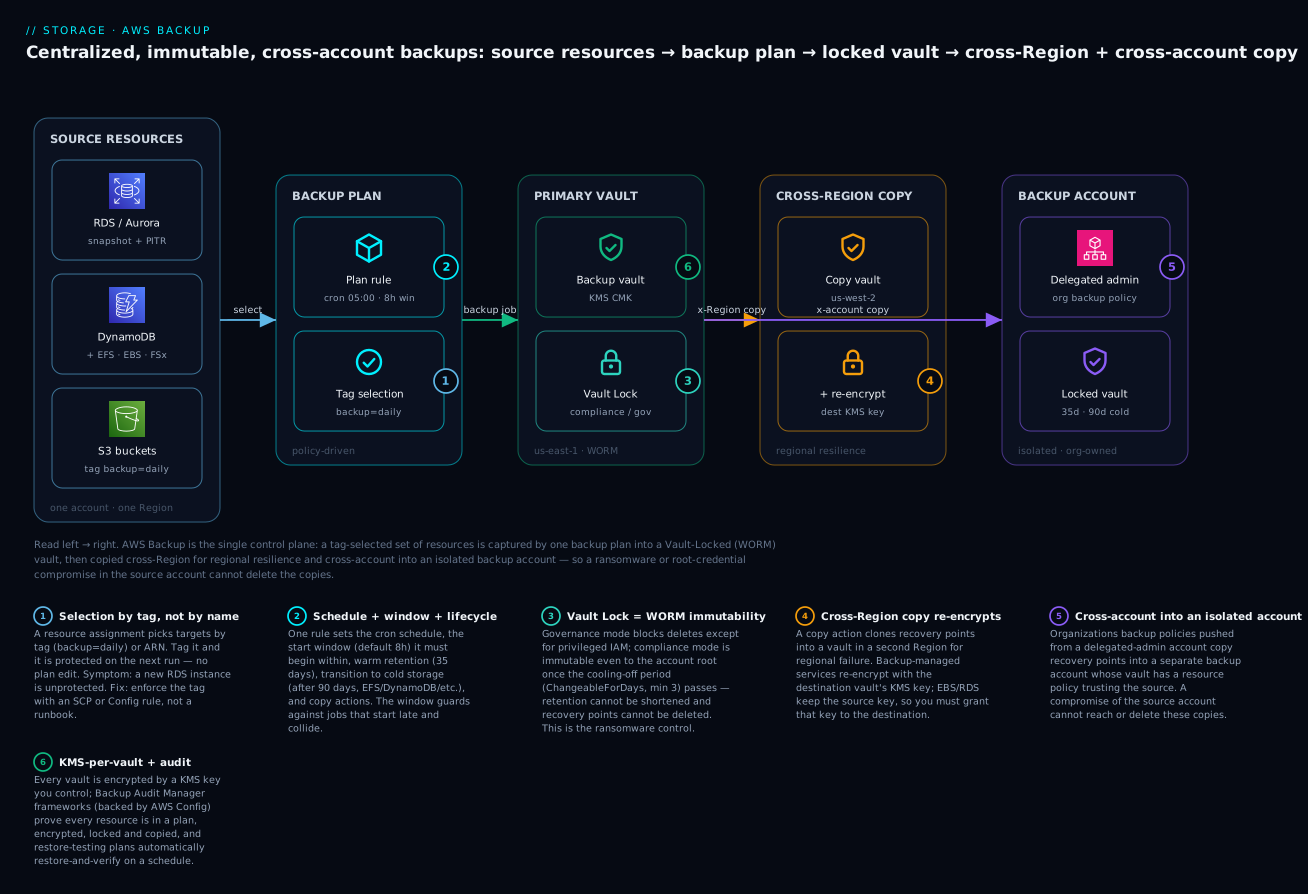
The system reads left to right. A set of source resources — RDS/Aurora, DynamoDB, plus EFS/EBS/FSx and S3 — is selected not by name but by the backup=daily tag, so anything tagged is protected on the next run. One backup plan rule fires on a cron schedule inside a start window, captures each resource into the primary vault in us-east-1, and that vault is sealed with Vault Lock (governance in the lab, compliance in production) making its recovery points WORM-immutable. Two copy actions fan out from that vault: one cross-Region into us-west-2 (re-encrypting with the destination key for independent-encryption services, keeping the source key for EBS/RDS) for regional resilience, and one cross-account into an isolated, org-owned backup account — pushed by an Organizations backup policy from a delegated-admin account — whose locked vault a compromise of the source account can never reach. Numbered badges mark the six decisions that matter: tag selection, schedule+window+lifecycle, Vault Lock WORM, cross-Region re-encryption, cross-account isolation, and the KMS-per-vault + Audit-Manager proof layer.
Real-world scenario
Meridian Health Analytics runs a HIPAA-regulated platform on AWS: a fleet of RDS PostgreSQL databases holding de-identified claims data, a 40 TiB EFS share of imaging derivatives, three DynamoDB tables for the patient-portal session and consent state, and an S3 data lake. Backups were “handled” — RDS automated backups at 7 days, ad-hoc EBS snapshots, EFS nothing, DynamoDB PITR toggled on for two of three tables. Then a contractor’s over-privileged access key leaked, and an attacker ran a script that deleted RDS snapshots and started encrypting the EFS share. The RDS automated backups — in the same account — went with it.
Recovery took 30 hours and lost a day of consent records that had to be re-collected from patients. The post-incident mandate was unambiguous: backups must be immutable and outside the production account, coverage must be provable to auditors, and restores must be tested, not assumed.
The rebuild, done by the platform team over three weeks, is exactly the architecture in this article. They created a dedicated backup account in the Organizations structure, isolated behind an SCP that denies every principal except the backup service role from touching its vaults. In production they built one core plan with three rules: a continuous rule (35-day PITR) for the RDS databases so a bad migration is a one-second undo; a daily snapshot rule (35-day warm) into a compliance-mode Vault-Locked vault; and a cross-account copy action on the daily rule into the backup account’s locked vault, retained 7 years for HIPAA, tiering to cold after 90 days for the cold-capable EFS and DynamoDB data. Because RDS and EBS keep the source KMS key on copy, they migrated those resources to customer-managed keys and shared the keys with the backup account — the one change that had blocked their first copy attempt with AccessDenied.
Selection is entirely tag-based (backup=daily), and a Config rule plus an SCP make the backup tag mandatory on RDS, EFS, DynamoDB and EBS, so nothing is silently unprotected — the exact failure mode that let the third DynamoDB table slip through before. Finally they enabled a Backup Audit Manager framework with the encrypted-recovery-point, protected-by-plan, cross-account-copy and manual-deletion-disabled controls, wired to AWS Config, delivering a monthly compliance report their auditors now accept as evidence, plus a weekly restore-testing plan that restores the latest RDS and EFS recovery points into a scratch VPC, validates, and tears them down. Six months later a developer dropped a production table at 14:30; they restored the database to 14:29:50 via PITR in 22 minutes, lost zero committed data, and the immutable cross-account copies were never even needed — but the auditors saw them, locked, in the report.
Advantages and disadvantages
| Advantages | Disadvantages / limits |
|---|---|
| One control plane over 15+ services | Per-service quirks (cold tiering, PITR) to learn |
| WORM immutability defeats ransomware/insiders | Compliance-mode lock mistakes are irreversible |
| Cross-account copy escapes the blast radius | Cross-account KMS setup is fiddly (source-key services) |
| Tag-based selection scales to future resources | Untagged resources are silently unprotected |
| Org backup policies enforce one plan org-wide | Requires Organizations + delegated-admin setup |
| Audit Manager proves compliance | Controls depend on AWS Config recording |
| Restore testing measures recoverability | Restore-test runs cost money and time |
| Cold storage cuts long-retention cost ~80% | 90-day cold minimum + early-delete fee |
Immutability is the headline advantage and also the sharpest edge. Governance mode gives you WORM with an IAM escape hatch — right for most teams. Compliance mode is genuinely absolute: correct for regulated data and ransomware defense, dangerous in a lab or a hastily-configured vault, because a wrong MaxRetentionDays past the cooling-off period is a bill you cannot stop. The second real trade-off is the source-key KMS behavior for EBS/RDS/Aurora — if you skip migrating to customer-managed keys, cross-account copy simply fails, and it fails at copy time (hours after the backup succeeds), not when you configure it.
Hands-on lab
This lab builds the whole pattern at small scale in one account (single-account stand-in for cross-account so it costs almost nothing), using governance-mode Vault Lock — never compliance in a lab. You will: create a KMS key and a locked vault, build a daily plan (35-day warm + 90-day cold on a cold-capable resource + a copy action), assign by tag, run an on-demand backup, restore it, and enable an Audit Manager framework. Region: us-east-1. Everything here is free-tier-adjacent except the tiny EBS volume and its snapshot (a few paise).
⚠️ Cost & safety notes: the EBS volume + snapshot cost a few US cents; delete them in teardown. Do not run
put-backup-vault-lock-configurationwith--changeable-for-days(compliance) in this lab — that vault becomes immutable and you cannot fully clean up for the cooling-off period. Governance mode (no--changeable-for-days) is fully reversible.
What you will tag and protect:
| Resource | Why chosen | Backup shape |
|---|---|---|
| A 1 GiB EBS volume | Cheapest snapshottable resource | Snapshot |
Tag backup=daily |
Drives tag selection | — |
| KMS CMK | Required for a real vault | Vault encryption |
| Governance Vault Lock | Safe, reversible WORM demo | Immutability |
| Audit Manager framework | Compliance proof | Reporting |
Step 1 — A customer-managed KMS key for the vault
KEY_ID=$(aws kms create-key --description "backup-lab-vault-key" \
  --query KeyMetadata.KeyId --output text)
aws kms create-alias --alias-name alias/backup-lab --target-key-id "$KEY_ID"
echo "Key: $KEY_ID"
Expected: a key ID like 1234abcd-.... Using a CMK (not the aws/backup managed key) is what makes cross-account copy possible later.
Step 2 — A backup vault, then a governance Vault Lock
aws backup create-backup-vault \
  --backup-vault-name lab-locked-vault \
  --encryption-key-arn "arn:aws:kms:us-east-1:$(aws sts get-caller-identity --query Account --output text):key/$KEY_ID"

# GOVERNANCE lock (reversible): min 1 day so the lab can delete quickly, max 3650
aws backup put-backup-vault-lock-configuration \
  --backup-vault-name lab-locked-vault \
  --min-retention-days 1 \
  --max-retention-days 3650
Verify the lock is governance (no cooling-off):
aws backup describe-backup-vault --backup-vault-name lab-locked-vault \
  --query '{Locked:Locked, Min:MinRetentionDays, Max:MaxRetentionDays, Changeable:LockDate}'
Expected: Locked: true, Min: 1, Max: 3650, and no future immutable lock date (governance).
Step 3 — A service role for AWS Backup
aws iam create-role --role-name AWSBackupDefaultServiceRole \
  --assume-role-policy-document '{
    "Version":"2012-10-17",
    "Statement":[{"Effect":"Allow","Principal":{"Service":"backup.amazonaws.com"},"Action":"sts:AssumeRole"}]}'
aws iam attach-role-policy --role-name AWSBackupDefaultServiceRole \
  --policy-arn arn:aws:iam::aws:policy/service-role/AWSBackupServiceRolePolicyForBackup
aws iam attach-role-policy --role-name AWSBackupDefaultServiceRole \
  --policy-arn arn:aws:iam::aws:policy/service-role/AWSBackupServiceRolePolicyForRestores
Also grant this role use of the CMK — add it to the key policy or run aws kms create-grant with --operations Encrypt Decrypt CreateGrant GenerateDataKey. Without this, backups into the vault fail with AccessDenied on the key.
Step 4 — A small tagged resource to protect
AZ=us-east-1a
VOL_ID=$(aws ec2 create-volume --availability-zone $AZ --size 1 --volume-type gp3 \
  --tag-specifications 'ResourceType=volume,Tags=[{Key=backup,Value=daily},{Key=Name,Value=backup-lab-vol}]' \
  --query VolumeId --output text)
echo "Volume: $VOL_ID (tagged backup=daily)"
Step 5 — A backup plan (daily, 35-day warm, 90-day cold, copy action)
For the cold transition to actually apply you would target a cold-capable service (EFS/DynamoDB); on EBS the cold transition is accepted but ignored, so we include it to show the syntax and the 90-day rule, and add a copy action to a second vault (create lab-copy-vault the same way as Step 2 if you want the copy to succeed).
PLAN_ID=$(aws backup create-backup-plan --backup-plan '{
  "BackupPlanName":"lab-daily-plan",
  "Rules":[{
    "RuleName":"daily-35d",
    "TargetBackupVaultName":"lab-locked-vault",
    "ScheduleExpression":"cron(0 5 ? * * *)",
    "StartWindowMinutes":120,
    "CompletionWindowMinutes":1440,
    "Lifecycle":{"MoveToColdStorageAfterDays":90,"DeleteAfterDays":180},
    "RecoveryPointTags":{"plan":"lab-daily"}
  }]
}' --query BackupPlanId --output text)
echo "Plan: $PLAN_ID"
Note DeleteAfterDays:180 ≥ MoveToColdStorageAfterDays:90 + 90 — set them any closer and the API returns InvalidParameterValueException.
Step 6 — Assign resources by tag
ACCT=$(aws sts get-caller-identity --query Account --output text)
aws backup create-backup-selection --backup-plan-id "$PLAN_ID" --backup-selection '{
  "SelectionName":"tag-backup-daily",
  "IamRoleArn":"arn:aws:iam::'"$ACCT"':role/AWSBackupDefaultServiceRole",
  "ListOfTags":[{"ConditionType":"STRINGEQUALS","ConditionKey":"backup","ConditionValue":"daily"}]
}'
The tagged EBS volume is now in scope for the daily rule — and so is any future resource you tag backup=daily.
Step 7 — Run an on-demand backup (don’t wait for the schedule)
JOB_ID=$(aws backup start-backup-job \
  --backup-vault-name lab-locked-vault \
  --resource-arn "arn:aws:ec2:us-east-1:$ACCT:volume/$VOL_ID" \
  --iam-role-arn "arn:aws:iam::$ACCT:role/AWSBackupDefaultServiceRole" \
  --lifecycle '{"DeleteAfterDays":35}' \
  --query BackupJobId --output text)
# Poll until COMPLETED (usually 1-3 min for a tiny volume):
aws backup describe-backup-job --backup-job-id "$JOB_ID" \
  --query '{State:State, Pct:PercentDone, RP:RecoveryPointArn}'
Expected: State moves CREATED → RUNNING → COMPLETED and a RecoveryPointArn appears. Capture it:
RP_ARN=$(aws backup list-recovery-points-by-backup-vault \
  --backup-vault-name lab-locked-vault \
  --query 'RecoveryPoints[0].RecoveryPointArn' --output text)
echo "Recovery point: $RP_ARN"
Step 8 — Restore the recovery point (new volume)
RESTORE_ID=$(aws backup start-restore-job \
  --recovery-point-arn "$RP_ARN" \
  --iam-role-arn "arn:aws:iam::$ACCT:role/AWSBackupDefaultServiceRole" \
  --resource-type EBS \
  --metadata '{"volumeType":"gp3","availabilityZone":"us-east-1a"}' \
  --query RestoreJobId --output text)
aws backup describe-restore-job --restore-job-id "$RESTORE_ID" \
  --query '{Status:Status, Created:CreatedResourceArn}'
Expected: Status reaches COMPLETED and CreatedResourceArn is a new EBS volume (Backup never restores in place). Note the new volume ID — you will delete it in teardown.
Step 9 — Prove immutability (this delete should FAIL)
# Attempt to delete the recovery point before its retention — expect an error
aws backup delete-recovery-point \
  --backup-vault-name lab-locked-vault \
  --recovery-point-arn "$RP_ARN"
Expected: an AccessDeniedException/InvalidRequestException citing the Vault Lock minimum retention — the WORM control working. (Because this is governance mode with a 1-day minimum, the point becomes deletable after 1 day and you can remove the lock; in compliance mode this would be permanent.)
Step 10 — Enable a Backup Audit Manager framework
# Config must be recording for controls to evaluate; then:
aws backup create-framework \
  --framework-name lab_compliance \
  --framework-controls '[
    {"ControlName":"BACKUP_RECOVERY_POINT_ENCRYPTED"},
    {"ControlName":"BACKUP_RESOURCES_PROTECTED_BY_BACKUP_PLAN"}
  ]'
aws backup describe-framework --framework-name lab_compliance \
  --query '{Status:FrameworkStatus, Controls:length(FrameworkControls)}'
Expected: the framework is created and, once AWS Config has evaluated (minutes), controls report COMPLIANT/NON_COMPLIANT per resource. If they read INSUFFICIENT_DATA, Config is not recording the resource types — that is the fix, not a Backup problem.
Step 11 — Terraform equivalent (codify the whole lab)
resource "aws_kms_key" "backup" { description = "backup-lab-vault-key" }

resource "aws_backup_vault" "lab" {
  name        = "lab-locked-vault"
  kms_key_arn = aws_kms_key.backup.arn
}

resource "aws_backup_vault_lock_configuration" "lab" {
  backup_vault_name  = aws_backup_vault.lab.name
  min_retention_days = 1
  max_retention_days = 3650
  # No changeable_for_days => GOVERNANCE (reversible). Add it only for COMPLIANCE.
}

resource "aws_backup_plan" "lab" {
  name = "lab-daily-plan"
  rule {
    rule_name         = "daily-35d"
    target_vault_name = aws_backup_vault.lab.name
    schedule          = "cron(0 5 ? * * *)"
    start_window      = 120
    completion_window = 1440
    lifecycle {
      cold_storage_after = 90
      delete_after       = 180
    }
    recovery_point_tags = { plan = "lab-daily" }
  }
}

resource "aws_backup_selection" "lab" {
  name         = "tag-backup-daily"
  plan_id      = aws_backup_plan.lab.id
  iam_role_arn = aws_iam_role.backup.arn
  selection_tag {
    type  = "STRINGEQUALS"
    key   = "backup"
    value = "daily"
  }
}
Step 12 — Teardown (order matters)
# 1. Delete the restored volume (from Step 8) and the source volume
aws ec2 delete-volume --volume-id <restored-vol-id>
aws ec2 delete-volume --volume-id "$VOL_ID"
# 2. Framework
aws backup delete-framework --framework-name lab_compliance
# 3. Plan pieces: selection then plan
SEL_ID=$(aws backup list-backup-selections --backup-plan-id "$PLAN_ID" \
  --query 'BackupSelectionsList[0].SelectionId' --output text)
aws backup delete-backup-selection --backup-plan-id "$PLAN_ID" --selection-id "$SEL_ID"
aws backup delete-backup-plan --backup-plan-id "$PLAN_ID"
# 4. Recovery point: only after its 1-day governance minimum has passed
aws backup delete-recovery-point --backup-vault-name lab-locked-vault --recovery-point-arn "$RP_ARN"
# 5. Remove the governance lock, then the (now empty) vault
aws backup delete-backup-vault-lock-configuration --backup-vault-name lab-locked-vault
aws backup delete-backup-vault --backup-vault-name lab-locked-vault
# 6. KMS: schedule key deletion (7-30 day waiting period) and the role
aws kms schedule-key-deletion --key-id "$KEY_ID" --pending-window-in-days 7
⚠️ The vault will not delete while it holds recovery points, and a recovery point will not delete before its Vault-Lock minimum retention (1 day here). This is the governance lock doing its job — wait out the day, or, in a real compliance-mode vault, understand that this wait is permanent for the retention period. That is why compliance mode never belongs in a lab.
Common mistakes & troubleshooting
The playbook. Match the symptom, confirm with the exact command, apply the fix.
| # | Symptom | Root cause | Confirm (command / console) | Fix |
|---|---|---|---|---|
| 1 | Backup job → FAILED, “not authorized to perform” |
Service role missing/incomplete policy | describe-backup-job StatusMessage; check role’s attached policies |
Attach AWSBackupServiceRolePolicyForBackup (+ S3/Restore variants) |
| 2 | Job FAILED: AccessDenied on KMS |
Service role lacks key permission | StatusMessage names the key ARN |
Add role to CMK key policy or create-grant (Encrypt/Decrypt/GenerateDataKey) |
| 3 | Job FAILED: resource type not supported |
Service/config not backup-eligible (e.g. Lustre scratch) | Check resource type vs supported list | Use a supported type; opt in the service in Region settings |
| 4 | Job never ran, state EXPIRED |
StartWindowMinutes too short |
list-backup-jobs shows EXPIRED |
Widen start window; space out concurrent schedules |
| 5 | Job ABORTED mid-run |
Exceeded CompletionWindowMinutes |
Job duration vs completion window | Raise completion window for very large resources |
| 6 | create-backup-plan rejected: InvalidParameter |
DeleteAfterDays < MoveToColdStorageAfterDays + 90 |
Read the API error text | Set delete ≥ cold + 90, or drop the cold transition |
| 7 | S3 backup job fails immediately | Bucket versioning not enabled | aws s3api get-bucket-versioning |
Enable versioning on the bucket |
| 8 | Cross-account copy → FAILED AccessDenied |
Destination vault access policy missing/mismatched | get-backup-vault-access-policy in dest account |
Add backup:CopyIntoBackupVault allow with aws:PrincipalOrgID |
| 9 | Cross-account copy of EBS/RDS fails on KMS | Source uses AWS-managed key / key not shared | Check the resource’s KMS key; is it a CMK shared to dest? | Migrate to a CMK and share it with the destination account |
| 10 | Cross-account copy never attempted | Cross-account backup not enabled / no trusted access | describe-global-settings; org list-aws-service-access... |
update-global-settings isCrossAccountBackupEnabled=true; enable service access |
| 11 | delete-recovery-point denied |
Vault Lock (WORM) protecting it — by design | describe-backup-vault shows Locked:true |
Wait for retention; governance-mode lock can be removed by IAM; compliance cannot |
| 12 | Restore job FAILED |
Bad/missing restore metadata (subnet, class, name) | describe-restore-job StatusMessage |
Supply correct service metadata; unique target name |
| 13 | Restore FAILED: KMS in target |
Target role lacks kms:Decrypt/CreateGrant |
StatusMessage names the key | Grant the restore role use of the key in the target account |
| 14 | PITR option not available on a resource | Continuous backup not enabled / unsupported service | Recovery points show only SNAPSHOT type |
Add a rule with EnableContinuousBackup:true (RDS/Aurora/S3/SAP HANA) |
| 15 | A new resource has no backups | Tag selection missed it (untagged) | Resource lacks the selection tag | Tag it backup=daily; enforce the tag via Config/SCP |
| 16 | Audit Manager controls read INSUFFICIENT_DATA |
AWS Config not recording the resource types | Config recorder status | Enable Config recording for those types |
| 17 | Org backup policy not applied to an account | Account not under the attached OU / policy type disabled | describe-effective-policy --policy-type BACKUP_POLICY |
Enable BACKUP_POLICY type; attach to the right OU |
Job status and error reference
| Status / error | Meaning | Typical cause | First move |
|---|---|---|---|
| CREATED | Job accepted, not started | Waiting in queue | Normal; watch it move to RUNNING |
| PENDING | Waiting on a resource/lock | Another job on same resource | Serialize; wait |
| RUNNING | In progress | — | Poll PercentDone |
| COMPLETED | Success; recovery point exists | — | Verify the recovery-point ARN |
| EXPIRED | Start window elapsed | StartWindowMinutes too tight |
Widen window |
| ABORTED | Cancelled (manual or completion window) | Completion window exceeded | Raise completion window |
| FAILED | Error; read StatusMessage |
IAM/KMS/unsupported/network | Match to the playbook row |
| AccessDeniedException | Permission denied | Role or key or vault policy | Fix the specific principal/policy |
| InvalidParameterValueException | Bad parameter | Lifecycle/retention math | Correct the parameter |
| InvalidRequestException (delete RP) | WORM blocks delete | Vault Lock in force | Expected; wait/retention |
| AlreadyExistsException | Name collision | Reused plan/vault name | Use a unique name |
| LimitExceededException | Quota hit | Too many plans/vaults/jobs | Request a quota increase |
IAM permissions reference (who needs what)
| Action | Needed by | For |
|---|---|---|
backup:StartBackupJob |
Operator / automation | Kick an on-demand backup |
backup:StartRestoreJob |
Operator | Restore a recovery point |
sts:AssumeRole (trust backup.amazonaws.com) |
Service role | Backup to act on your behalf |
AWSBackupServiceRolePolicyForBackup |
Service role | Read/snapshot supported resources |
AWSBackupServiceRolePolicyForRestores |
Service role | Provision restored resources |
AWSBackupServiceRolePolicyForS3Backup/Restore |
Service role | S3-specific backup/restore |
kms:Decrypt, kms:GenerateDataKey, kms:CreateGrant |
Service role | Encrypt/decrypt recovery points |
backup:CopyIntoBackupVault |
Destination vault policy | Accept cross-account copies |
backup:DeleteBackupVaultLockConfiguration |
Privileged admin | Remove a governance lock only |
organizations:*Policy*, EnableAWSServiceAccess |
Management account | Org backup policies + trust |
Three failures deserve prose because they eat the most time. The cross-account KMS trap (rows 9, 13): your backups succeed, your same-account copies succeed, and then the cross-account copy fails hours later with AccessDenied on a key — because EBS/RDS/Aurora recovery points keep the source key, and either that key is an unshareable AWS-managed key or its policy does not grant the destination account. The fix is upstream of AWS Backup: the resource must use a customer-managed key, and that key’s policy (plus a grant) must include the destination account. Solve it before you design cross-account copy, not after the first failed job. The “I can’t delete it” ticket (row 11): someone tries to clean up and cannot delete a recovery point or vault; this is not a bug, it is Vault Lock working — confirm the mode (describe-backup-vault → Locked, and whether a compliance lock date has passed) before escalating, because in compliance mode the answer is genuinely “you cannot, by design, until retention expires.” The silent-coverage-gap (row 15): tag-based selection is powerful precisely because it is invisible — a resource that is never tagged is never backed up and never errors. The only defense is enforcement: an AWS Config rule (required-tags) and/or an SCP that denies creating the resource without a backup tag, so “unprotected” becomes impossible rather than merely unlikely.
Best practices
- Isolate backups in a dedicated account. Put your locked copy vaults in a separate Organizations account whose SCP denies everyone but the backup service role — this is the single highest-value control against ransomware and insiders.
- Use compliance-mode Vault Lock for regulated/ransomware-critical data, governance elsewhere. Reserve compliance mode for data you are certain about; its immutability is absolute. Everywhere else, governance mode gives WORM with an escape hatch.
- Always set
ChangeableForDaysdeliberately and test in governance first. Prototype the whole plan with governance locks; only switch the production copy vault to compliance once the retention math is proven. - Select by tag, then enforce the tag. Drive coverage with
backup=daily, and make the tag mandatory via a Config rule and an SCP so nothing is silently unprotected. - Use customer-managed KMS keys for anything copied cross-account. AWS-managed keys cannot be shared; EBS/RDS/Aurora recovery points keep the source key, so a CMK (shared to the destination) is a prerequisite, not an option.
- Pair continuous (PITR) with snapshot rules for databases. Continuous gives seconds-level operational undo (≤35 days); snapshots give long retention and cross-account immutability. Production databases want both.
- Right-size the window to the change window. Set
StartWindowMinutesto the real maintenance window so late jobs are marked missed (and caught by Audit Manager) rather than running during business hours. - Copy cross-Region and cross-account. Regional resilience and blast-radius isolation are different threats; one copy action each.
- Turn on restore testing. A weekly automated restore-and-validate is the only thing that turns “we have backups” into a measured recovery capability.
- Wire Backup Audit Manager to Config and deliver reports. Controls need Config recording; a monthly compliance report is your audit evidence and your coverage alarm.
- Mind the 90-day cold rule and early-delete fees. Only tier cold-capable services, and keep
DeleteAfterDays ≥ cold + 90. - Never operate org backups from the management account. Register a delegated administrator and do daily work there.
Security notes
AWS Backup is a security control as much as an operational one, so treat its own surface with least privilege. The backup service role is powerful — it can read every protected resource and provision restores — so scope restore permissions tightly and separate the backup role from the restore role where your compliance posture demands segregation of duties. The destination vault access policy should never be a blanket Principal: "*" without an aws:PrincipalOrgID (or explicit account) condition; an open copy-in policy lets any account push data into your vault. Deny backup:DeleteRecoveryPoint and backup:PutBackupVaultAccessPolicy on production vaults to everyone except a break-glass role, and layer Vault Lock underneath so the deny is enforced by WORM, not just by an IAM policy someone could change.
| Control | Setting | Why |
|---|---|---|
| Encryption at rest | Customer-managed KMS key per vault | Key control + cross-account shareability |
| Immutability | Vault Lock (compliance for critical data) | WORM survives credential compromise |
| Isolation | Dedicated backup account + SCP | Backups outside the production blast radius |
| Vault access | Access policy with aws:PrincipalOrgID |
Only your org can copy in |
| Least privilege | Separate backup vs restore roles | Segregation of duties |
| Deletion protection | Deny DeleteRecoveryPoint except break-glass |
Belt-and-braces over Vault Lock |
| Audit trail | CloudTrail on all backup:* events |
Detect tampering attempts |
| Tag enforcement | Config required-tags + SCP |
No silent coverage gaps |
Log every backup:* API call to CloudTrail and alert on DeleteBackupVaultLockConfiguration, PutBackupVaultAccessPolicy, and failed DeleteRecoveryPoint attempts — the last one is a ransomware-in-progress signal (the attacker is probing whether your backups are deletable). See AWS CloudTrail, Config & audit compliance for wiring those alerts.
Cost & sizing
AWS Backup itself has no fee for the orchestration; you pay for storage (warm and cold), cross-Region/account data transfer, restores (for some services/tiers), and small charges for Audit Manager evaluations and restore-testing runs. The bill is driven by how much you keep, how long, and how many copies.
| Cost driver | How it is charged | Lever to control it |
|---|---|---|
| Warm storage | Per GB-month, per service | Shorten warm retention; tier to cold |
| Cold storage | ~⅕ of warm, per GB-month | Tier cold-capable services after 90d |
| Early delete (cold) | Full 90-day charge if deleted early | Don’t set delete < cold + 90 |
| Cross-Region copy | Storage in dest + inter-Region transfer | Copy only what needs DR |
| Cross-account copy | Storage in the destination account | Right-size copy retention separately |
| Continuous (PITR) | Change storage, per service | Cap at needed window (≤35d) |
| Restore | Some services/cold/PITR bill per GB | Restore-test smaller sets |
| Audit Manager | Per control evaluation | Scope controls to what matters |
| Restore testing | Restore + temp resource + storage | Short validation window; weekly not daily |
A rough monthly picture for a mid-size estate — 2 TiB of daily backups, 35-day warm, a 1-year cross-account cold copy — illustrates the shape (USD, us-east-1-ish list rates; INR at ~₹83/USD):
| Component | Approx. size/rate | Monthly USD | Monthly INR |
|---|---|---|---|
| Warm storage (2 TiB, 35d churn) | ~2 TiB × $0.05/GB | ~$100 | ~₹8,300 |
| Cold copy (2 TiB, cross-account) | ~2 TiB × $0.01/GB | ~$20 | ~₹1,660 |
| Cross-Region transfer | ~2 TiB × $0.02/GB (one-time-ish) | ~$40 | ~₹3,320 |
| Restore testing (weekly, small) | 4 restores × small | ~$5 | ~₹415 |
| Audit Manager + reports | evaluations + S3 | ~$5 | ~₹415 |
| Indicative total | — | ~$170/mo | ~₹14,000/mo |
The dominant lever is retention × copies: every extra copy and every extra month multiplies storage. Tier aggressively to cold where the service supports it (EFS, DynamoDB), keep warm retention to your operational-recovery need (often 7–35 days), and push only compliance-mandated data to the long, expensive cross-account cold copies. There is no free-tier for AWS Backup storage, but the snapshots underneath EBS/RDS follow their normal pricing, and a tiny lab like this one costs a few US cents.
Interview & exam questions
1. What is the difference between Vault Lock governance and compliance mode?
Governance mode enforces retention floors/ceilings (WORM) but a principal with backup:DeleteBackupVaultLockConfiguration can remove it and delete recovery points early. Compliance mode is immutable: after the cooling-off period (ChangeableForDays, minimum 3) passes, neither the lock nor any recovery point can be deleted or shortened by anyone, including the account root. Governance protects against accidents; compliance protects against malicious/insider deletion. (SCS-C02, SOA-C02)
2. Why might a cross-account copy of an encrypted RDS backup fail while an EFS copy succeeds? RDS/EBS/Aurora recovery points keep the source resource’s KMS key on copy; EFS/DynamoDB/S3 are re-encrypted with the destination vault’s key. So the RDS copy needs the source key to be a customer-managed key shared with the destination account, whereas the EFS copy only needs the destination vault key policy to allow Backup. AWS-managed keys can’t be shared, so they block cross-account copy entirely. (SAP-C02, SCS-C02)
3. Which services support continuous backup / PITR?
RDS, Aurora, S3 and SAP HANA on EC2 — with a window up to 35 days, enabled via EnableContinuousBackup: true. Everything else is snapshot-only. DynamoDB has its own native PITR, distinct from AWS Backup continuous backup. (SAA-C03, DVA-C02)
4. How do you protect backups from a compromised account root? Compliance-mode Vault Lock (immutable even to root) plus cross-account copy into an isolated backup account whose SCP denies all but the backup role — or a logically air-gapped vault. Immutability alone isn’t enough if the copies live in the same account; isolation alone isn’t enough if they’re deletable. You need both. (SCS-C02)
5. What does StartWindowMinutes vs CompletionWindowMinutes control?
StartWindowMinutes is how long after the scheduled time a job may still begin before it’s marked EXPIRED (default 8h, min 60). CompletionWindowMinutes is how long, from start, a job may run before being aborted (default 7 days). Tighten the start window to a maintenance window; keep completion generous for large resources. (SOA-C02)
6. Why is tag-based resource assignment preferred over ARN lists? Tag selection auto-includes future resources the moment they’re tagged, so coverage scales without editing the plan. ARN lists must be manually maintained and drift. The trade-off is that an untagged resource is silently unprotected, so you enforce the tag with Config/SCP. (SAA-C03)
7. What is the 90-day cold-storage rule?
A recovery point must remain in cold storage at least 90 days, so DeleteAfterDays must be ≥ MoveToColdStorageAfterDays + 90; deleting earlier still bills the full 90 days. Only EFS, DynamoDB, Timestream, VMware, SAP HANA and CloudFormation actually tier to cold — on other services the transition is ignored. (SOA-C02)
8. How do Organizations backup policies work?
You enable the BACKUP_POLICY type and trusted access, author a JSON policy defining plans/rules/selections (with $account substitution), and attach it to an OU or root; each account materializes the plan locally, and policies merge down the hierarchy. describe-effective-policy shows what an account actually inherited. (SAP-C02)
9. What does Backup Audit Manager depend on, and what can it prove?
It evaluates controls through AWS Config, so Config must be recording the resource types or controls return INSUFFICIENT_DATA. It can prove resources are protected by a plan, encrypted, meet minimum frequency/retention, are immutable (manual deletion disabled), and are copied cross-Region/account — delivered as scheduled compliance reports. (SCS-C02, SOA-C02)
10. What is restore testing and why does it matter? An AWS Backup feature that automatically restores selected recovery points on a schedule, optionally validates them, and tears them down within a validation window — turning “restorable” into a measured, auditable metric. Untested backups are hypotheses; a restore that fails at incident time is the most expensive discovery in operations. (SOA-C02)
11. Can AWS Backup restore in place / overwrite the source? No. A restore always provisions a new resource (new volume, new DB instance, new table), so you must supply target metadata and often a new name. In-place recovery is a deliberate non-feature to avoid destroying the thing you’re recovering. (DVA-C02)
12. Why put copy vaults in a separate account, and how is access controlled?
To move backups outside the source account’s blast radius so a credential compromise there can’t reach them. Access is controlled by the destination vault’s resource-based access policy (backup:CopyIntoBackupVault gated by aws:PrincipalOrgID), an SCP isolating the backup account, and Vault Lock enforcing immutability. (SCS-C02, SAP-C02)
Quick check
- In which Vault Lock mode can even the account root not delete a recovery point before retention expires?
- Which four services support continuous backup / PITR?
- For a cross-account copy of an encrypted EBS snapshot, whose KMS key must be shared with the destination account?
- If
MoveToColdStorageAfterDaysis 30, what is the minimum legalDeleteAfterDays? - What AWS service must be recording for Backup Audit Manager controls to evaluate?
Answers
- Compliance mode (after the cooling-off /
ChangeableForDaysperiod has elapsed) — it is immutable even to root. - RDS, Aurora, S3, and SAP HANA on EC2 (up to a 35-day PITR window).
- The source EBS volume’s KMS key — EBS/RDS/Aurora recovery points keep the source key on copy, and it must be a customer-managed key shared to the destination.
- 120 days (30 + 90; a recovery point must stay in cold at least 90 days).
- AWS Config — controls evaluate through Config, so it must be recording the relevant resource types.
Glossary
| Term | Definition |
|---|---|
| AWS Backup | A centralized, policy-driven service that orchestrates backup, copy, restore and compliance across 15+ AWS services. |
| Backup plan | A policy of one or more rules defining schedule, retention, lifecycle, vault and copy actions. |
| Rule | One schedule + lifecycle + copy unit within a plan (e.g. a daily rule, a monthly rule). |
| Resource assignment (selection) | The scope of a plan — which resources to protect, chosen by tag or ARN. |
| Backup vault | A container of recovery points with one KMS key, an optional access policy, and an optional Vault Lock. |
| Recovery point | One backup of one resource at one point in time, referenced by an ARN. |
| Vault Lock | WORM enforcement on a vault: retention floors/ceilings and, in compliance mode, immutability. |
| Governance mode | Vault Lock that authorized IAM principals can still remove — WORM with an escape hatch. |
| Compliance mode | Vault Lock that is immutable after the cooling-off period, even to the account root. |
| Cooling-off period | ChangeableForDays (min 3) — the grace window during which a compliance lock can still be undone. |
| Lifecycle | The warm → cold-storage transition and eventual expiry of a recovery point. |
| Cold storage | A cheaper archival tier (~⅕ warm price) with a 90-day minimum; supported on a subset of services. |
| Copy action | A rule setting that clones each recovery point into another vault, cross-Region and/or cross-account. |
| Continuous backup / PITR | Change-capture backup enabling point-in-time recovery within ≤35 days; RDS/Aurora/S3/SAP HANA only. |
| Backup policy | An AWS Organizations JSON policy that defines backup plans centrally and pushes them org-wide. |
| Delegated administrator | An account authorized to manage AWS Backup for the organization instead of the management account. |
| Backup Audit Manager | A feature that evaluates backup posture against control frameworks (via AWS Config) and reports compliance. |
| Restore testing | Automated, scheduled restore-and-validate jobs that measure recoverability and tear themselves down. |
| Logically air-gapped vault | An always-immutable, AWS-owned-key vault shareable cross-account via RAM for direct restore. |
Next steps
- Turn these backups into a full recovery capability — RTO/RPO, DR patterns and Route 53 failover — in AWS Backup and Disaster-Recovery Strategies.
- Understand the block-storage primitive underneath EC2/EBS backups (snapshots, incremental copies, KMS) in Amazon EBS Volumes, Types & Snapshots: Hands-On.
- Pair snapshot backups with object-storage protection — versioning and lifecycle tiering — in S3 Storage Classes and Lifecycle Policies and harden buckets in S3 Bucket Policies & Block Public Access.
- Choose the right database to protect and how its native backups compare in RDS vs DynamoDB vs Aurora, Compared.
- Enforce the
backuptag and push plans org-wide with AWS Organizations SCPs & multi-account guardrails and prove it with AWS Config resource inventory & compliance rules.