The deploy looked clean. The image pulled, the pod scheduled, and then it just sat there: ContainerCreating, minute after minute, while your StatefulSet refused to come up. You run kubectl describe pod and the bottom of the events list is the only honest thing in the cluster — Unable to attach or mount volumes: unmounted volumes=[data], timed out waiting for the condition, or worse, AttachVolume.Attach failed for volume "pvc-…": rpc error: code = Internal. This is the most common stuck-state on Azure Kubernetes Service (AKS) that has nothing to do with your application code. Your container never started because the persistent volume underneath it never became usable, and the storage layer in Kubernetes is deliberately quiet about why.
AKS persists data through the Container Storage Interface (CSI) — a standard plugin contract that lets Kubernetes drive Azure storage without baking provider code into the kubelet. Three CSI drivers ship as managed add-ons: disk.csi.azure.com for Azure Managed Disks (block, ReadWriteOnce, one node at a time), file.csi.azure.com for Azure Files (SMB or NFS shares, ReadWriteMany, many pods at once), and blob.csi.azure.com for Azure Blob Storage via blobfuse or NFS 3.0. A volume failure can bite at any of three stages — provision (create the PV from a PVC), attach (bind a managed disk to the right node VM), or mount (the kubelet makes the filesystem appear inside the pod) — and the symptom you see (Pending PVC, FailedAttachVolume, FailedMount, Mount error(13)) names the stage, not the cause. Localising the failure to one stage and one driver is the entire job.
This is the diagnostic playbook for that job. You will learn to read the PVC → PV → VolumeAttachment → pod chain, to tell a provisioning failure (no PV appeared) from an attach failure (the disk won’t bind to the node) from a mount failure (it attached but the filesystem won’t appear), and to drive the tools that tell the truth: kubectl describe pvc/pod, kubectl get volumeattachment, the CSI controller and node DaemonSet logs, and az to inspect the disk’s managedBy and the node’s data-disk count. Every diagnosis comes with the exact command to confirm it and the precise fix, with StorageClass YAML, az CLI and Bicep throughout. The playbook, error strings, StorageClass parameters and access-mode rules are laid out as scannable tables — read the prose once, then keep the tables open when the pager goes off.
What problem this solves
Stateless pods are easy: if one dies, the scheduler starts another anywhere. Stateful pods are where AKS gets hard, because a pod with a persistent volume is bound to data, and data lives in an Azure resource (a managed disk, a file share) that has its own rules about who can attach it, from where, and how many at once. The moment you add a PersistentVolumeClaim you have coupled Kubernetes scheduling to the Azure storage control plane and the Linux mount stack, and a failure in either freezes your pod in ContainerCreating with an error that points at the symptom rather than the cause.
What breaks without this knowledge: an engineer sees ContainerCreating, assumes the image is slow, waits, then deletes and recreates the pod — which on Azure Disk often makes it worse, because a ReadWriteOnce disk still attached to the old (maybe NotReady) node must detach before it can attach to the new one, and a forced delete can leave it stuck Attached to a dead node for the 6-minute force-detach window. Or they widen a StorageClass to ReadWriteMany on an Azure Disk (which physically cannot do it), or “fix” a permission-denied mount by making the storage account public. Meanwhile the real cause — the node hit its max-data-disks ceiling, the disk and node landed in different availability zones, the StorageClass referenced a deleted secret, or the storage account firewall blocks the node subnet on port 445 — sits there, perfectly diagnosable, ignored.
Who hits this: anyone running databases, queues, search or any StatefulSet on AKS; anyone sharing config or uploads across replicas via Azure Files; anyone who packed too many disk-backed pods onto a small node pool. It bites hardest on zone-pinned Azure Disk workloads (disk and pod must share a zone), on Azure Files SMB mounts (the Mount error(13) family is near-universal for first-timers), and on clusters where a deleted PVC left a PV stuck Terminating behind a finalizer. The fix is almost never “recreate the pod and hope” — it’s “find which stage failed and make it tell the truth.”
To frame the field before the deep dive, here is every symptom class this article covers, the question it forces, and the one place to look first:
| Symptom class | What Kubernetes is telling you | First question to ask | First place to look | Most common single cause |
|---|---|---|---|---|
PVC stuck Pending |
“I could not provision a volume from this claim” | Is the StorageClass/secret/quota the blocker? | kubectl describe pvc events |
Wrong storageClassName, missing secret, or quota |
FailedAttachVolume / attach timeout |
“I could not bind the disk to this node” | Is the node at its disk limit, or zone-mismatched? | kubectl describe pod + kubectl get volumeattachment |
Node at max-data-disks, or disk/node zone mismatch |
FailedMount / MountVolume.SetUp failed |
“The volume is here but the filesystem won’t appear” | Disk filesystem, or Files SMB/NFS reachability? | CSI node DaemonSet logs | Mount error(13) (Files) or fsck/format (Disk) |
Mount error(13) permission denied |
“SMB auth or network to the share failed” | Bad key, firewall, or NSG on 445? | kubectl describe pod + storage account firewall |
Wrong/rotated account key, or 445 blocked |
PVC/PV stuck Terminating |
“Something still references this volume” | Is a finalizer or a still-attached disk holding it? | kubectl get pv -o yaml finalizers |
Finalizer + disk still Attached to a node |
Learning objectives
By the end of this article you can:
- Trace the full PVC → PV → VolumeAttachment → pod mount chain and localise any AKS storage failure to one of three stages: provision, attach, or mount.
- Diagnose a
PendingPVC as a missing/typo’d StorageClass, a missing or wrong-namespace secret, a quota or zone constraint, or aWaitForFirstConsumerbinding that is simply waiting for a schedulable pod — and confirm each. - Diagnose
AttachVolume.Attach failed/ attach timeouts as a node at its max-data-disks limit for its VM size, a disk/node availability-zone mismatch, a disk stillAttachedto another (oftenNotReady) node, or an identity/RBAC gap on the CSI controller. - Diagnose
MountVolume.SetUp failedandMount error(13): Permission deniedon Azure Files as a wrong or rotated storage-account key, a storage-account firewall blocking the node subnet, an NSG blocking port 445, or a missing NTLM/versmount option — and fix each with the rightmountOptionsor network rule. - Recover a PVC or PV stuck in
Terminatingsafely — understanding finalizers,reclaimPolicy: RetainvsDelete, and the 6-minute force-detach window — without orphaning or losing data. - Pick the right access mode (
ReadWriteOnce/ReadWriteMany/ReadWriteOncePod) and driver (Disk vs Files vs Blob) for a workload, and explain why anaccessModes: [ReadWriteMany]on an Azure Disk can never bind. - Drive the core tools fluently:
kubectl describe,kubectl get volumeattachment, CSI controller/node logs, and theaz disk/az vmsscommands that revealmanagedBy, zone, and the node’s disk count.
Prerequisites & where this fits
You should already be comfortable with AKS basics: that a cluster has a node pool of VMs (each VM is a Kubernetes node), that pods are scheduled onto nodes, and that you talk to the cluster with kubectl after az aks get-credentials. You should understand the Kubernetes storage primitives at a high level — a PersistentVolumeClaim (PVC) is a request for storage, a PersistentVolume (PV) is the actual storage that satisfies it, and a StorageClass is the template that says how to dynamically create a PV (which driver, which disk SKU, which reclaim policy). Knowing how to run az in Cloud Shell and read YAML helps. If the cluster control-plane/data-plane split is fuzzy, read AKS Cluster Architecture: Control Plane vs Data Plane Explained first; if you have never stood up a cluster, Your First AKS Cluster: CLI, Portal & Bicep Walkthrough is upstream of this.
This sits in the Observability & Troubleshooting track, specifically the storage corner. It assumes the Azure storage fundamentals — the Azure Storage Account Fundamentals (because Azure Files lives inside a storage account with its own firewall and keys) and the Azure VM Disk Types Explained: Standard, Premium & Ultra (because a PV-backed managed disk has the same SKU, IOPS and zone semantics as any data disk). It pairs with Troubleshooting AKS Ingress: 502/503, TLS & Application Routing — the other half of “the pod is up but something is broken” — and with the image-pull sibling AKS Pod Cannot Pull Image: ACR Authorization Failures, the most common non-storage reason a pod is stuck in ContainerCreating.
A quick map of who owns what during a storage incident, so you escalate to the right person fast:
| Layer | What lives here | Who usually owns it | Failure classes it can cause |
|---|---|---|---|
| App / pod spec | volumeMounts, securityContext, fsGroup |
App / dev team | Permission denied inside the container, wrong mount path |
| PVC / StorageClass | Claim, access mode, parameters, secret ref | Platform / dev | Pending PVC, wrong driver/SKU, missing secret |
| CSI driver (Disk/Files/Blob) | Provision, attach, mount RPCs | Microsoft (managed add-on) | Attach/mount RPC errors, driver-pod crashes |
| Node / kubelet | The actual mount, data-disk slots | Platform (AKS) | FailedMount, max-data-disks, stuck attach |
| Azure storage control plane | Managed disk, file share, zones | Platform + network | Attach timeout, zone mismatch, quota |
| Storage account / network | Firewall, private endpoint, NSG 445 | Network team | Mount error(13), Files unreachable |
Core concepts
Six mental models make every later diagnosis obvious.
The claim and the volume are two objects, and the gap between them is where provisioning fails. A PVC is a request; a PV is the fulfilment. With dynamic provisioning (the AKS norm) you create only the PVC; the external-provisioner sidecar in the CSI controller pod sees it, calls the driver’s CreateVolume RPC, creates the Azure resource (a managed disk or file share), and creates a matching PV bound to your PVC. If the PVC sits Pending, the provision step never completed: the StorageClass is wrong/missing, a referenced secret isn’t there, a quota blocked the create, or — benignly — the StorageClass uses volumeBindingMode: WaitForFirstConsumer and is correctly waiting for a pod before it picks a zone. Pending is overloaded: it means “broken” or “patiently waiting.”
Attach and mount are distinct steps, and only Azure Disk does both. For a managed disk, Kubernetes first attaches it to the node’s VM (an Azure control-plane op that occupies one of the VM’s finite data-disk slots), creating a VolumeAttachment; only then does the kubelet mount the now-visible block device into the pod (format if new, then mount). Two steps, two failure modes: FailedAttachVolume (the disk wouldn’t bind to the VM) vs FailedMount (it bound but the filesystem step failed). For Azure Files and Blob there is no attach — the share is reachable over the network (SMB/NFS/HTTPS) from any node — which is why Files supports ReadWriteMany and Disk does not.
Access mode is a hard physical constraint, not a hint. ReadWriteOnce (RWO) = read-write by pods on one node at a time — all an Azure Disk can do, since it attaches to exactly one VM. ReadWriteMany (RWX) = many nodes mount read-write at once — only Files and Blob can, being network shares. ReadWriteOncePod (RWOP) restricts to one pod. Request RWX from a Disk StorageClass and no PV can ever satisfy it (the PVC hangs); need an RWO disk on two different nodes and one pod never schedules.
A managed disk lives in one availability zone, and the pod must come to it. A zonal PV’s disk is created in a specific zone and can only attach to a node in that same zone. With WaitForFirstConsumer binding (the AKS default for the managed-disk classes) this is handled — the disk is created in the zone where the pod scheduled. But force immediate binding, or drain nodes so the only schedulable node is in a different zone than an existing disk, and the attach fails or the pod never schedules with a “volume node affinity conflict.” Zone is invisible until it bites.
The CSI driver is a managed add-on with an identity that needs Azure permissions. The Disk/Files CSI controller runs as cluster pods and calls Azure (create disk, attach, list shares) using the cluster identity — the kubelet/agentpool managed identity or legacy SPN. If it lacks the right role on the resource group or storage account, provisioning and attach fail with authorization errors that look like driver bugs. (How the cluster authenticates is its own topic — see AKS Managed Identity vs Service Principal: Cluster Auth.)
Finalizers keep a volume alive until it is safe to delete, which is why things hang Terminating. Kubernetes won’t remove a PVC/PV until its finalizers clear — kubernetes.io/pv-protection holds a PV while a pod uses it; the external-attacher’s finalizer holds a VolumeAttachment until the disk detaches. A PV stuck Terminating almost always means a finalizer is correctly refusing to let go because something — a pod, a still-attached disk on a NotReady node — still references it. Remove the real reference, don’t brute-force the finalizer (which orphans the Azure disk and bills you forever).
The vocabulary in one table
Pin down every moving part before the deep sections. The glossary repeats these for lookup; this table is the mental model side by side:
| Concept | One-line definition | Where it lives | Why it matters to volume failures |
|---|---|---|---|
| PVC | A request for storage | Namespace | Stuck Pending = provision failed |
| PV | The actual storage backing a PVC | Cluster-scoped | Stuck Terminating = finalizer/attach holding it |
| StorageClass | Template for dynamic provisioning | Cluster-scoped | Wrong driver/SKU/secret → no bind |
| CSI driver | Plugin that drives Azure storage | kube-system pods + node DaemonSet |
RPC errors come from here |
| VolumeAttachment | Record that a disk is bound to a node | Cluster-scoped | Exists for Disk; stuck = attach problem |
| Access mode | RWO / RWX / RWOP capability | On the PVC/PV | RWX on a Disk can never bind |
volumeBindingMode |
Immediate vs WaitForFirstConsumer |
On the StorageClass | WFC = correct Pending until a pod schedules |
reclaimPolicy |
Delete vs Retain on release |
On the StorageClass/PV | Delete removes the Azure disk; Retain keeps it |
| max-data-disks | Disk slots per VM, by size | Per node (VM SKU) | Hit it → AttachVolume.Attach failed |
| Availability zone | Physical zone of a disk/node | On the disk + node | Disk and node must match |
| Finalizer | A guard that blocks deletion | On PVC/PV/VolumeAttachment | Why Terminating hangs |
Mount error(13) |
SMB “permission denied” | Kubelet mount on a Files share | Bad key / firewall / 445 |
The driver and access-mode reference
Before the per-stage anatomy, two lookup tables you scan first. The first is the driver matrix — which CSI driver backs which Azure storage, what access modes it physically supports, and what it is for. The second is the access-mode contract that decides whether a claim can ever bind.
| Driver (provisioner) | Azure backend | Access modes | Best for | The hard limit that bites |
|---|---|---|---|---|
disk.csi.azure.com |
Managed Disk (block) | RWO, RWOP | Single-writer state: databases, queues, indexes | One node only; node max-data-disks ceiling; zonal |
file.csi.azure.com (SMB) |
Azure Files (SMB 3.x) | RWX, RWO, ROX | Shared config/uploads across replicas | Mount error(13); needs port 445 open |
file.csi.azure.com (NFS) |
Azure Files (NFS 4.1, Premium) | RWX, RWO | High-throughput shared POSIX, no SMB auth | Premium FileStorage only; needs private endpoint / VNet |
blob.csi.azure.com (blobfuse) |
Blob container | RWX, RWO | Large sequential data, AI/analytics datasets | Not a real POSIX FS; metadata ops are slow |
blob.csi.azure.com (NFS 3.0) |
Blob container (NFS 3.0) | RWX, RWO | High-throughput blob over NFS | HNS storage account; VNet/PE required |
| Access mode | Short | Meaning | Which Azure storage can satisfy it | What happens if you ask the wrong one |
|---|---|---|---|---|
| ReadWriteOnce | RWO | RW by pods on one node | Disk, Files, Blob | Fine on Disk; two-node need won’t schedule |
| ReadWriteMany | RWX | RW by pods on many nodes | Files, Blob only | On a Disk SC → PVC hangs Pending forever |
| ReadOnlyMany | ROX | RO by many nodes | Files, Blob (and pre-populated Disk) | Rare; for shared read-only content |
| ReadWriteOncePod | RWOP | RW by exactly one pod | Disk, Files (newer clusters) | Stronger than RWO; blocks a second pod even same node |
Two reading notes that save the most time:
| Distinction | The trap | How to tell them apart |
|---|---|---|
| Disk vs Files for “shared” | Teams reach for Disk then can’t mount it on two pods | If two pods on different nodes must both write → it MUST be Files/Blob (RWX); a Disk physically cannot |
Pending because broken vs because waiting |
Panicking over a healthy WaitForFirstConsumer claim |
kubectl describe pvc: “waiting for first consumer to be created before binding” = healthy; any other event = real failure |
Stage 1 — The PVC stuck in Pending (provisioning failures)
A Pending PVC means dynamic provisioning never produced a PV. Five distinct causes. Scan the matrix, then read the detail for whichever row matches:
| # | Pending cause | Tell-tale signal | Confirm with | Real fix |
|---|---|---|---|---|
| 1 | WaitForFirstConsumer (not broken) |
Event: “waiting for first consumer” | kubectl describe pvc |
Schedule a pod that uses it — it binds then |
| 2 | StorageClass missing / typo’d | Event: “storageclass.storage.k8s.io … not found” | kubectl get sc; kubectl get pvc -o yaml |
Fix storageClassName; create the SC |
| 3 | Access mode impossible for driver | RWX on a Disk SC, no PV ever appears | kubectl describe pvc + SC provisioner |
Use Files/Blob for RWX, or RWO for Disk |
| 4 | Missing/wrong secret for Files | Event: “secret … not found” / 403 from CreateVolume | CSI controller logs; kubectl get secret -n … |
Create the secret; fix *-secret-namespace |
| 5 | Quota / zone / SKU constraint | Event: provisioning failed, quota or SKU error | CSI controller logs; az vm list-usage |
Raise quota; change disk SKU; pick a valid zone |
Cause 1 — WaitForFirstConsumer: the PVC is fine, it’s waiting for you
The AKS managed StorageClasses for Azure Disk (managed-csi, managed-csi-premium) use volumeBindingMode: WaitForFirstConsumer (WFC). That means the PV is deliberately not created until a pod that mounts the PVC is scheduled — so the disk can be created in the same zone as the node the pod lands on. A PVC created with no consuming pod will sit Pending indefinitely, and that is correct behaviour, not a bug.
Confirm. The event text is unambiguous:
kubectl describe pvc data-myapp-0
# Events:
#   Normal  WaitForFirstConsumer  ... waiting for first consumer to be created before binding
Fix. Create a pod (or scale up the StatefulSet) that references the PVC. It binds within seconds of the pod being scheduled. If you genuinely need the PV created up front (rare — e.g. pre-seeding), use a StorageClass with volumeBindingMode: Immediate, but accept the zone-pinning risk that brings.
Cause 2 — StorageClass missing, misspelled, or not the default
If your PVC names a storageClassName that does not exist, no provisioner ever claims it. If you omit storageClassName and no StorageClass is marked default, same result. AKS ships managed-csi as the default on most clusters, but on a locked-down or older cluster the default may be unset or different.
Confirm. List StorageClasses and check the claim:
kubectl get sc
# NAME                  PROVISIONER          ... DEFAULT
# managed-csi (default) disk.csi.azure.com   ... ...
# azurefile-csi         file.csi.azure.com   ...

kubectl get pvc data-myapp-0 -o jsonpath='{.spec.storageClassName}{"\n"}'
kubectl describe pvc data-myapp-0   # look for "...not found"
Fix. Correct the storageClassName, or create the StorageClass. The canonical AKS disk class:
apiVersion: storage.k8s.io/v1
kind: StorageClass
metadata:
  name: managed-csi-premium
provisioner: disk.csi.azure.com
parameters:
  skuName: Premium_LRS      # Standard_LRS | StandardSSD_LRS | Premium_LRS | PremiumV2_LRS | UltraSSD_LRS
reclaimPolicy: Delete       # or Retain to keep the disk on PVC delete
volumeBindingMode: WaitForFirstConsumer
allowVolumeExpansion: true
Cause 3 — You asked for an access mode the driver cannot provide
A PVC with accessModes: [ReadWriteMany] against a Disk-backed StorageClass can never bind — a managed disk attaches to one VM, full stop. The PVC sits Pending with no provisioning error, because the provisioner won’t even try for an impossible request. People stare at it for an hour expecting a timeout that never comes.
Confirm. Cross-check the PVC’s access mode against the StorageClass provisioner:
kubectl get pvc data-myapp-0 -o jsonpath='{.spec.accessModes}{"\n"}'   # e.g. ["ReadWriteMany"]
SC=$(kubectl get pvc data-myapp-0 -o jsonpath='{.spec.storageClassName}')
kubectl get sc "$SC" -o jsonpath='{.provisioner}{"\n"}'                 # disk.csi.azure.com → impossible RWX
Fix. If you need RWX, switch to an Azure Files (or Blob) StorageClass; if you only need single-writer, use ReadWriteOnce on the Disk class. The Files class:
apiVersion: storage.k8s.io/v1
kind: StorageClass
metadata:
  name: azurefile-csi
provisioner: file.csi.azure.com
parameters:
  skuName: Standard_LRS     # Standard_LRS | Premium_LRS (Premium needs the file share in a FileStorage account)
mountOptions:
  - mfsymlinks
  - cache=strict
  - actimeo=30
  - nosharesock
reclaimPolicy: Delete
volumeBindingMode: Immediate
allowVolumeExpansion: true
Cause 4 — Missing or wrong secret for a static/Files volume
For Azure Files (and statically-provisioned disks bound by account key), the CSI driver needs a Kubernetes secret holding the storage-account name and key. If the StorageClass or PV references a secret that doesn’t exist, or points at the wrong secret namespace, CreateVolume/mount fails with “secret not found” or a 403.
Confirm. Read the CSI controller logs for the provision error and check the secret exists where the SC says:
kubectl logs -n kube-system -l app=csi-azurefile-controller -c azurefile --tail=100 \
  | grep -i -E "secret|create.*volume|403"
kubectl get secret azure-storage-account-mysa-secret -n kube-system
Fix. Create the secret (or fix the namespace/name). For dynamic Files provisioning the driver creates the account/share for you; for static binding you supply the account and key:
kubectl create secret generic azure-storage-account-mysa-secret \
  --from-literal=azurestorageaccountname=mysa \
  --from-literal=azurestorageaccountkey="$(az storage account keys list -n mysa -g rg-aks --query [0].value -o tsv)" \
  -n kube-system
Cause 5 — Quota, SKU, or zone constraint rejects the disk create
Provisioning calls Azure, and Azure can say no: the subscription’s regional vCPU/disk quota is exhausted, the requested disk SKU (e.g. UltraSSD_LRS, PremiumV2_LRS) isn’t enabled on the node pool or supported in the zone, or the requested zone has no capacity. The PVC shows a ProvisioningFailed event echoing the Azure error.
Confirm. The event carries the Azure message; corroborate with usage and SKU support:
kubectl describe pvc data-myapp-0   # "...ProvisioningFailed... QuotaExceeded / SkuNotAvailable / zone ..."
az vm list-usage --location centralindia -o table | grep -i -E "Disk|Standard"
Fix. Raise the quota (Azure portal → Quotas), choose a disk SKU your node pool and region/zone support, or remove an explicit zone from the StorageClass to let Azure place it. For Ultra/PremiumV2, the node pool itself must have the capability enabled.
Stage 2 — AttachVolume.Attach failed (the disk won’t bind to the node)
This stage is Azure Disk only — Files and Blob have no attach step. A FailedAttachVolume / AttachVolume.Attach failed event means the PV exists but the managed disk could not bind to the node the pod landed on. Five causes — scan, then read the matching detail:
| # | Attach cause | Tell-tale signal | Confirm with | Real fix |
|---|---|---|---|---|
| 1 | Node at max-data-disks for its VM size | Attach fails on a packed node; fewer pods schedule | kubectl get volumeattachment; VM size max-data-disks |
Bigger VM SKU; more nodes; fewer disks/node |
| 2 | Disk/node availability-zone mismatch | “volume node affinity conflict”; never schedules | kubectl get pv -o yaml (zone) vs node zone |
WFC binding; align zones; recreate disk in node’s zone |
| 3 | Disk still Attached to another node | New node can’t attach; old node NotReady |
az disk show --query managedBy; kubectl get volumeattachment |
Wait force-detach (6 min); detach from dead node |
| 4 | CSI controller identity lacks RBAC | Attach RPC returns AuthorizationFailed | CSI controller logs; role assignment on RG | Grant Contributor on the node RG to the cluster identity |
| 5 | Disk in a different resource group / deleted | Attach can’t find the disk | az disk show 404; PV volumeHandle |
Restore/recreate disk; fix volumeHandle mapping |
Cause 1 — The node hit its max-data-disks ceiling
Every Azure VM size has a fixed maximum number of data disks it can attach, and each ReadWriteOnce PV consumes one slot. A Standard_B2s allows 4, a Standard_D2s_v5 4, a Standard_D4s_v5 8, a 16-vCPU size 32–64; the count scales with VM size and is published in the “Max data disks” column of every VM spec. Pack more disk-backed pods onto a node than it has slots and the next attach fails.
Confirm. Count current attachments and compare to the VM size limit:
# How many volumes are attached, and to which node
kubectl get volumeattachment -o wide | grep <node-name> | wc -l

# The node's VM size (find the max-data-disks for that size in the VM spec)
kubectl get node <node-name> -o jsonpath='{.metadata.labels.node\.kubernetes\.io/instance-type}{"\n"}'

# The error itself
kubectl describe pod myapp-0   # "AttachVolume.Attach failed ... has reached its maximum data disk count"
Fix. Move to a larger VM size (more slots), add more nodes so disk-backed pods spread, or reduce disks per node — there is no setting that raises a VM’s max-data-disks; it’s a property of the SKU. The CSI driver reports maxVolumesPerNode, so current AKS usually avoids over-packing, but explicit nodeSelector/affinity forcing pods onto one node can still hit it.
| VM size (example) | vCPU | Max data disks | Practical RWO PVs/node | When it bites |
|---|---|---|---|---|
Standard_B2s |
2 | 4 | ~3 (after system) | Tiny dev pools, many small DBs |
Standard_D2s_v5 |
2 | 4 | ~3 | Default-ish pool, StatefulSet replicas |
Standard_D4s_v5 |
4 | 8 | ~7 | Mid-size; moderate disk fan-out |
Standard_D8s_v5 |
8 | 16 | ~15 | Larger node, many disks |
Standard_D16s_v5 |
16 | 32 | ~31 | Disk-dense workloads |
Cause 2 — The disk and the node are in different availability zones
A zonal managed disk attaches only to a node in its own zone. If a disk is in zone 2 but the only schedulable node is in zone 1, the pod shows a “volume node affinity conflict” and never schedules (or the attach fails). This appears with Immediate binding (disk placed before the pod’s zone is known), after draining nodes so surviving capacity is in another zone, or when restoring a PV in the wrong zone.
Confirm. Read the PV’s node affinity / zone and compare to node zones:
kubectl get pv <pv-name> -o jsonpath='{.spec.nodeAffinity}{"\n"}'   # shows topology.disk.csi.azure.com/zone
kubectl get nodes -L topology.kubernetes.io/zone                    # each node's zone
kubectl describe pod myapp-0 | grep -i "node affinity"             # "volume node affinity conflict"
Fix. Use WaitForFirstConsumer binding (the default on managed-csi) so the disk is born in the pod’s zone — this prevents the problem entirely. To rescue an existing mismatch, ensure a node exists in the disk’s zone (scale that zone’s pool), or, if data allows, snapshot the disk and recreate the PV in the right zone.
Cause 3 — The disk is still attached to another (often NotReady) node
A ReadWriteOnce disk attaches to only one VM. If the pod moves (node failure, drain, eviction) before the disk detaches from the old node — especially when that node went NotReady abruptly — the new node can’t attach until the old attachment releases. Azure’s force-detach kicks in after roughly 6 minutes of the node being unresponsive; until then the new pod sits in ContainerCreating with Multi-Attach error or an attach timeout.
Confirm. Check what Azure thinks owns the disk, and the VolumeAttachment:
# Disk's current owner VM ('managedBy'); the resource group is the node/MC_ RG
az disk show --ids <disk-resource-id> --query "{state:diskState, owner:managedBy}" -o json
kubectl get volumeattachment | grep <pv-name>
kubectl describe pod myapp-0 | grep -i -E "multi-attach|attach"
Fix. If the old node is truly dead, deleting its Node object (kubectl delete node <old-node>) releases the attachment faster; otherwise wait out the ~6-minute force-detach. Prefer graceful termination so disks detach cleanly on planned moves.
Cause 4 — The CSI controller’s identity lacks permission to attach
The Disk CSI controller calls Azure to attach/detach using the cluster identity (kubelet/agentpool managed identity, or legacy SPN). If it isn’t Contributor (or a custom role with disk read/write/attach actions) on the node resource group (MC_...), attach RPCs fail with AuthorizationFailed.
Confirm. The controller log carries the Azure error:
kubectl logs -n kube-system -l app=csi-azuredisk-controller -c azuredisk --tail=200 \
  | grep -i -E "authoriz|forbidden|does not have"
# Find the cluster's kubelet identity and check its role on the MC_ RG
az aks show -n myaks -g rg-aks --query identityProfile.kubeletidentity.clientId -o tsv
Fix. Grant the cluster’s identity Contributor on the node resource group (AKS normally configures this automatically; custom-identity or BYO setups can miss it):
NODE_RG=$(az aks show -n myaks -g rg-aks --query nodeResourceGroup -o tsv)
az role assignment create --assignee <kubelet-identity-clientId> \
  --role Contributor --scope $(az group show -n "$NODE_RG" --query id -o tsv)
Cause 5 — The disk was deleted or lives where the PV can’t find it
If the underlying managed disk was deleted (or the PV’s volumeHandle points at a disk in another subscription/RG after a restore), attach can’t find it; az disk show --ids $(kubectl get pv <pv> -o jsonpath='{.spec.csi.volumeHandle}') returns 404. Fix: restore the disk from a snapshot, or correct the PV volumeHandle to the disk’s real resource id — exactly the failure that reclaimPolicy: Retain plus snapshots makes recoverable.
Stage 3 — MountVolume.SetUp failed and Mount error(13) (the filesystem won’t appear)
The volume is provisioned and (for Disk) attached, but the kubelet can’t make the filesystem usable inside the pod. For Disk this is a format/fsck/filesystem issue; for Azure Files it is almost always an SMB authentication or network problem surfacing as the infamous Mount error(13): Permission denied. Five causes — scan, then read the matching detail:
| # | Mount cause | Driver | Tell-tale signal | Confirm with | Real fix |
|---|---|---|---|---|---|
| 1 | Mount error(13) wrong/rotated key |
Files (SMB) | “permission denied” right after a key rotation | CSI node logs; storage account key vs secret | Update the secret with the current key |
| 2 | Storage account firewall blocks node subnet | Files/Blob | “permission denied”/timeout; firewall = Selected networks | az storage account show networkRuleSet |
Add node subnet (service endpoint) or private endpoint |
| 3 | NSG/route blocks port 445 (SMB) | Files (SMB) | Mount hangs/timeouts; ISPs/NSG block 445 | nc -zv <sa>.file.core.windows.net 445 from a pod |
Allow 445 egress; use private endpoint / NFS |
| 4 | Disk filesystem corrupt / wrong fsType |
Disk | “mount failed”, fsck errors, wrong fstype | CSI node logs; fsType in SC vs disk |
Fix fsType; fsck via a debug pod; restore |
| 5 | fsGroup/permissions inside the container |
Disk/Files | App can’t write though mount succeeded | Pod securityContext; id in container |
Set fsGroup/mountOptions uid,gid; chown |
Cause 1 — Mount error(13): Permission denied from a wrong or rotated key
Azure Files over SMB authenticates with the storage-account key (unless you use identity-based Kerberos), and the CSI driver stores that key in a Kubernetes secret. Rotate the key (or paste the wrong one) and the secret is stale; every SMB mount fails with Mount error(13): Permission denied. This is the single most common Files failure, and it appears suddenly on previously-working volumes the moment a key rotates.
Confirm. The node DaemonSet logs show the mount(13); compare the secret’s key to the live account key:
kubectl logs -n kube-system -l app=csi-azurefile-node -c azurefile --tail=100 \
  | grep -i -E "mount error|permission denied|13"
# Is the secret's key still valid?
az storage account keys list -n mysa -g rg-aks --query "[].value" -o tsv
kubectl get secret <files-secret> -n kube-system -o jsonpath='{.data.azurestorageaccountkey}' | base64 -d
Fix. Update the secret with the current key (and restart the consuming pods so they remount). Better: avoid the rotation footgun by using identity-based (Kerberos/Entra) authentication for Files, or let dynamic provisioning manage the secret. Quick remediation:
kubectl delete secret <files-secret> -n kube-system
kubectl create secret generic <files-secret> -n kube-system \
  --from-literal=azurestorageaccountname=mysa \
  --from-literal=azurestorageaccountkey="$(az storage account keys list -n mysa -g rg-aks --query [0].value -o tsv)"
Cause 2 — The storage-account firewall blocks the node subnet
If the storage account’s network is set to “Selected networks” (the right security posture) but the AKS node subnet isn’t in the allow-list — and there’s no private endpoint — the mount is rejected and you get Mount error(13) or a timeout. The same applies to Blob. The account exists, the key is right, but the network says no.
Confirm. Inspect the account’s network rules and whether your node subnet is allowed:
az storage account show -n mysa -g rg-aks --query networkRuleSet -o json
# defaultAction: Deny + your node subnet NOT in virtualNetworkRules → blocked
az network vnet subnet show --ids <node-subnet-id> --query "serviceEndpoints" -o json
Fix. Add the AKS node subnet via a service endpoint (Microsoft.Storage) to the account’s allow-list, or — the production-grade answer — use a Private Endpoint so traffic stays on the VNet entirely (see Azure Private Endpoint vs Service Endpoint):
az storage account network-rule add -n mysa -g rg-aks --subnet <node-subnet-id>
# or attach a private endpoint to the file sub-resource and add the private DNS zone privatelink.file.core.windows.net
Cause 3 — Port 445 (SMB) is blocked by an NSG, route, or upstream
SMB rides TCP port 445. If a Network Security Group on the node subnet, a User-Defined Route forcing egress through a firewall, or (in hybrid setups) an on-prem path blocks 445, the Files mount hangs and times out. Many corporate networks and some ISPs block 445 outbound by default. NFS-mode Azure Files uses port 2049 instead and sidesteps this entirely (but requires a private endpoint).
Confirm. Test 445 reachability from inside the cluster:
kubectl run nettest --rm -it --image=nicolaka/netshoot --restart=Never -- \
  nc -zv mysa.file.core.windows.net 445
# "succeeded" → 445 open; timeout/"connection refused" → blocked
Fix. Allow outbound 445 on the node subnet’s NSG (or in the egress firewall), or switch to NFS Azure Files (port 2049) via a private endpoint to avoid 445 and SMB auth altogether. NSG and route debugging itself is covered in AKS Kubenet vs Azure CNI Networking Models Explained for the routing side.
| Protocol | Port | Auth model | Network requirement | Avoids Mount error(13)? |
|---|---|---|---|---|
| SMB 3.x (Files) | 445 | Account key or Kerberos/Entra | 445 reachable; firewall/PE for locked accounts | No — this is where 13 lives |
| NFS 4.1 (Files Premium) | 2049 | Network-based (no key) | Private endpoint / VNet only | Yes — no SMB key/Kerberos |
| blobfuse (Blob) | 443 (HTTPS) | Key / SAS / managed identity | Standard egress; firewall for locked accounts | N/A — different error surface |
| NFS 3.0 (Blob) | 2049 | Network-based | HNS account + private endpoint | Yes — no key auth |
Cause 4 — Disk filesystem mismatch or corruption
For Azure Disk, the kubelet formats a new disk to the StorageClass fsType (default ext4) on first mount, then mounts it. Failures here are rarer but real: a fsType mismatch (disk formatted xfs, SC says ext4), corruption after an unclean detach, or inode exhaustion. The event reads MountVolume.MountDevice failed or mount failed: ... wrong fs type, bad option, bad superblock.
Confirm. Node DaemonSet logs carry the mount/fsck detail:
kubectl logs -n kube-system -l app=csi-azuredisk-node -c azuredisk --tail=200 \
  | grep -i -E "mount failed|fsck|wrong fs type|superblock"
kubectl get sc <sc> -o jsonpath='{.parameters.fsType}{"\n"}'   # what the SC expects
Fix. Align fsType with how the disk was formatted; for corruption, attach the disk to a debug pod/VM and run fsck, then remount. If a snapshot is intact, restoring beats repairing.
Cause 5 — Mount succeeds but the app can’t write (fsGroup / permissions)
The mount works, but the app gets Permission denied writing the path because the container runs as a non-root UID that doesn’t own the directory. On Disk, fix with pod-level fsGroup (Kubernetes chowns the volume to that GID on mount); on Files SMB you can’t chown a share, so pass uid/gid/file_mode/dir_mode as mountOptions.
Confirm. Check the container’s UID and the pod securityContext:
kubectl exec myapp-0 -- id                                   # the UID/GID the app runs as
kubectl get pod myapp-0 -o jsonpath='{.spec.securityContext}{"\n"}'
Fix. For Disk, set securityContext.fsGroup on the pod; for Files, set the ownership in the StorageClass mountOptions:
# Azure Disk: chown the volume to GID 2000 on mount
spec:
  securityContext:
    fsGroup: 2000
---
# Azure Files SMB: force ownership/permissions via mountOptions on the StorageClass
mountOptions:
  - uid=2000
  - gid=2000
  - file_mode=0660
  - dir_mode=0770
  - mfsymlinks
  - nosharesock
Stage 4 — PVC and PV stuck in Terminating (deletion that won’t complete)
Deleting a PVC or PV that hangs in Terminating is its own failure class, and the wrong fix here loses data or orphans billing. The cause is always a finalizer correctly refusing to release the object while something still references it. Four causes — scan, then read the detail:
| # | Terminating cause | Tell-tale signal | Confirm with | Real fix |
|---|---|---|---|---|
| 1 | A pod still uses the PVC | PVC stuck; pv-protection finalizer present |
kubectl get pods referencing the PVC |
Delete/scale down the consuming pods first |
| 2 | Disk still Attached to a node |
PV stuck; VolumeAttachment lingers | kubectl get volumeattachment; az disk show managedBy |
Detach (let force-detach run); delete dead Node object |
| 3 | reclaimPolicy: Retain (working as designed) |
PV goes Released, not deleted; disk persists |
kubectl get pv shows Released |
Manually delete PV + disk, or rebind |
| 4 | Orphaned finalizer after backend gone | Disk already deleted; finalizer still set | az disk show 404 + finalizer present |
Remove the finalizer only when backend truly gone |
Cause 1 — A pod still references the PVC
The kubernetes.io/pvc-protection finalizer keeps a PVC alive while any pod uses it — by design, so you can’t yank storage from under a running pod. Find who’s still mounting it, then delete/scale down those pods; the PVC finishes deleting on its own. Never strip the finalizer while a pod still mounts the volume — you can crash the pod.
kubectl get pods --all-namespaces -o json \
  | jq -r '.items[] | select(.spec.volumes[]?.persistentVolumeClaim.claimName=="data-myapp-0") | .metadata.name'
kubectl get pvc data-myapp-0 -o jsonpath='{.metadata.finalizers}{"\n"}'   # ["kubernetes.io/pvc-protection"]
Cause 2 — The disk is still attached, so the PV won’t release
A PV (and its VolumeAttachment) won’t finish deleting while the managed disk is still attached — particularly to a NotReady node where detach is blocked. Let the ~6-minute force-detach complete, or remove the dead Node object (kubectl delete node <dead-node>); once detached, the PV finishes terminating.
kubectl get volumeattachment | grep <pv-name>     # still present = not detached
az disk show --ids <disk-id> --query "{state:diskState, owner:managedBy}" -o json
Cause 3 — reclaimPolicy: Retain is keeping the disk on purpose
With reclaimPolicy: Retain, deleting the PVC moves the PV to Released and deliberately keeps the Azure disk so you don’t lose data — the disk keeps billing until you act. Not a bug; the safety policy doing its job. To reclaim space, delete the PV then the disk (az disk delete --ids <disk-id>); to reuse the data, clear the PV’s claimRef so a new PVC can bind it.
kubectl get pv <pv-name> -o jsonpath='{.spec.persistentVolumeReclaimPolicy} {.status.phase}{"\n"}'
# "Retain Released" → kept on purpose
Cause 4 — An orphaned finalizer after the backend is genuinely gone
Occasionally the disk has truly been deleted out-of-band, but the PV’s finalizer still blocks deletion. This is the only case where removing the finalizer by hand is correct — and only after az disk show returns 404. Forcing it on a PV whose disk still exists orphans a managed disk you keep paying for, invisible to the cluster.
az disk show --ids <disk-id> -o table         # MUST be 404 / not found first
kubectl patch pv <pv-name> -p '{"metadata":{"finalizers":null}}' --type=merge
The diagnostic toolkit: exact paths
Every diagnosis above used one of a small set of instruments that answer “which stage failed” in under a minute.
| Tool / command | What it tells you | When to reach for it |
|---|---|---|
kubectl describe pvc <pvc> |
Provisioning events, binding mode, “secret not found”, “not found” SC | PVC Pending |
kubectl describe pod <pod> |
FailedAttachVolume / FailedMount events with the real reason |
Pod stuck ContainerCreating |
kubectl get volumeattachment -o wide |
Which disks are attached to which node; lingering attachments | Attach failures, stuck Terminating |
kubectl get pv <pv> -o yaml |
volumeHandle, zone (nodeAffinity), reclaimPolicy, finalizers |
Zone mismatch, Terminating, lost disk |
CSI controller logs (csi-azuredisk/azurefile-controller) |
Provision/attach RPC errors, Azure auth/quota messages | Pending, attach AuthorizationFailed |
CSI node DaemonSet logs (csi-azuredisk/azurefile-node) |
The actual mount/fsck/Mount error(13) line |
FailedMount, permission denied |
az disk show --ids <id> --query managedBy |
Which VM (if any) currently owns the disk; disk state | Multi-attach, stuck attach/detach |
kubectl get node <node> -L topology.kubernetes.io/zone |
The node’s availability zone | Zone-mismatch attach failures |
nc -zv <sa>.file.core.windows.net 445 (from a pod) |
Whether SMB port 445 is reachable | Files mount hangs/timeouts |
The single most useful one-liner to start any storage incident — get the events on the stuck pod, newest last:
kubectl describe pod <pod> | sed -n '/Events:/,$p'
# Read the bottom line: FailedAttachVolume? FailedMount? "max data disk"? "Mount error(13)"?
The StorageClass parameter reference
Most of the durable fixes live in StorageClass parameters and mountOptions. This is the reference for the ones that matter, with their defaults and the gotcha:
| Parameter / field | Applies to | Values | Default | When to change / gotcha |
|---|---|---|---|---|
provisioner |
all | disk.csi.azure.com / file.csi.azure.com / blob.csi.azure.com |
per class | Determines access modes you can get |
skuName |
Disk/Files | Standard_LRS, StandardSSD_LRS, Premium_LRS, PremiumV2_LRS, UltraSSD_LRS |
StandardSSD_LRS (disk) |
Ultra/PremiumV2 need node-pool capability & zone support |
volumeBindingMode |
all | Immediate, WaitForFirstConsumer |
WaitForFirstConsumer (disk) |
Use WFC for zonal disks to avoid zone mismatch |
reclaimPolicy |
all | Delete, Retain |
Delete |
Retain for data you can’t lose; you then manage the disk |
allowVolumeExpansion |
all | true / false |
true (AKS classes) |
Must be true to grow a PVC; disk shrink is never allowed |
fsType |
Disk | ext4, xfs, btrfs |
ext4 |
Must match how the disk is/was formatted |
mountOptions: mfsymlinks |
Files SMB | flag | off | Enables symlink support over SMB; common requirement |
mountOptions: nosharesock |
Files SMB | flag | off | Separate socket per mount; avoids cross-mount stalls |
mountOptions: actimeo=<n> |
Files SMB | seconds | driver default | Attribute cache timeout; tune for metadata-heavy apps |
mountOptions: nconnect=<n> |
Files (NFS) | 1–8 | 1 | Parallel connections; raises throughput on NFS |
mountOptions: uid/gid/file_mode/dir_mode |
Files SMB | numeric | root/0755-ish | Set ownership/permissions you can’t chown on SMB |
networkEndpointType |
Files/Blob | privateEndpoint (or unset) |
unset | Set to provision with a private endpoint automatically |
Architecture at a glance
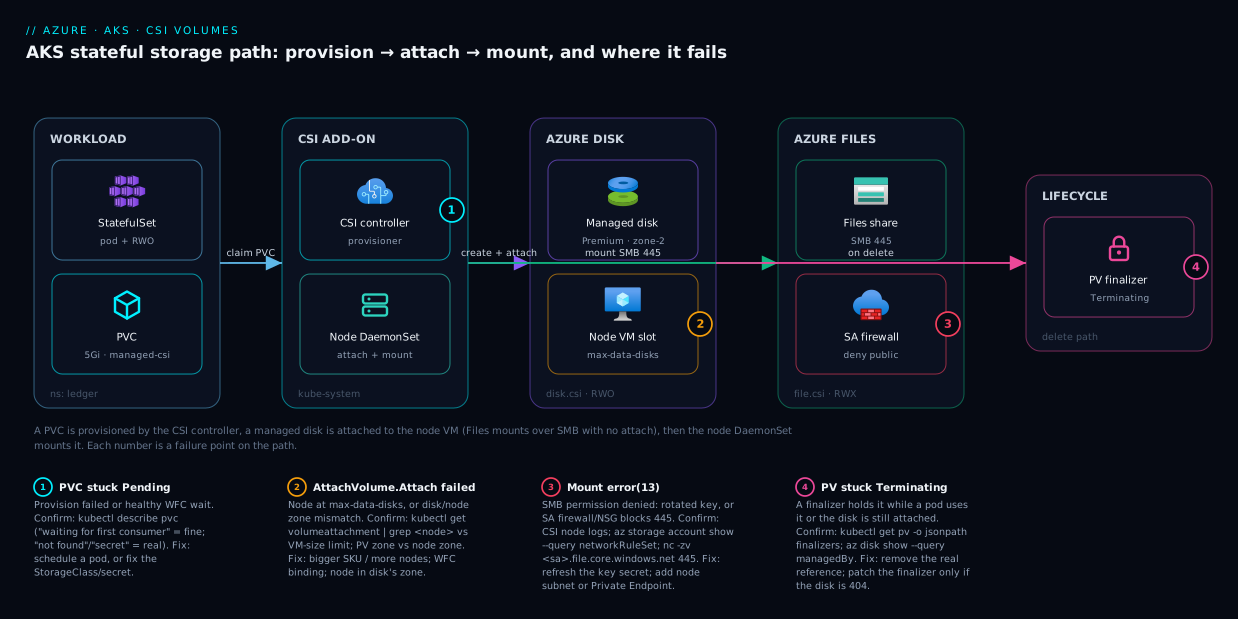
The diagram traces a stateful pod’s storage path exactly as it executes, then marks the failure point at each hop. Read it left to right. A StatefulSet pod is scheduled and declares a PVC; the CSI controller in kube-system (its external-provisioner sidecar) calls the right driver’s CreateVolume against the Azure storage control plane, which materialises either a managed disk in a specific availability zone or an Azure Files share inside a storage account. For a disk, the controller then issues an attach that binds the disk to the node’s VM — occupying one of the VM’s finite max-data-disks slots and creating a VolumeAttachment — after which the CSI node DaemonSet on that node formats and mounts the block device into the pod. For Azure Files there is no attach: the node DaemonSet mounts the share over SMB on port 445 (or NFS on 2049) straight from the storage account, which is why Files can fan out to many pods (ReadWriteMany) while a disk cannot.
The numbered badges sit on the exact hops where each failure class bites: provisioning at the controller (Pending PVC — wrong StorageClass or missing secret), attach at the node-VM boundary (AttachVolume.Attach failed — node at its disk limit or a zone mismatch), the SMB mount at the storage-account edge (Mount error(13) — wrong key or the firewall/NSG blocking 445), and the deletion path (Terminating — a finalizer holding the PV while the disk is still attached). The legend narrates each number as symptom · how to confirm · fix. The whole method is in the picture: localise the symptom to a hop, read the cause, run the named command, apply the fix.
Real-world scenario
Finlark Payments runs a transaction-ledger service on AKS in Central India: a 3-replica StatefulSet (PostgreSQL-style write store), each replica on a Premium_LRS Azure Disk PVC via managed-csi-premium, plus a shared Azure Files volume (ReadWriteMany) holding signed receipt PDFs all replicas write. The pool is three Standard_D4s_v5 nodes (8 max-data-disks each), one per zone.
The incident began during a routine node-pool image upgrade. AKS cordoned and drained zone-2’s node. Replica ledger-1, whose disk lived in zone 2, was evicted and rescheduled — but the only headroom was on the zone-1 node. The pod went ContainerCreating and stayed. The on-call engineer’s first move: delete the pod to “force a reschedule.” It came back on zone-1 again, still stuck. Forty minutes in, the StatefulSet was at 2/3 replicas and write latency climbing.
The breakthrough was reading the bottom of kubectl describe pod ledger-1: volume node affinity conflict and AttachVolume.Attach failed ... disk(...) is in zone centralindia-2. The disk was zone-2, the node zone-1; a zonal Premium disk can only attach in its own zone. Deleting the pod hadn’t helped because the disk never moves — the pod must land on a node in the disk’s zone. kubectl get pv -o yaml confirmed the disk’s zone; kubectl get nodes -L topology.kubernetes.io/zone showed no schedulable zone-2 node during the upgrade window.
While diagnosing the disk, a second alarm fired: every replica failed to write receipt PDFs with Mount error(13): Permission denied on the Azure Files volume — but only on newly upgraded nodes. A security sweep days earlier had set the receipts account to “Selected networks” and allow-listed the old node subnet, but the upgrade rolled nodes into a range the firewall didn’t include, so SMB from the new nodes was rejected. az storage account show --query networkRuleSet showed defaultAction: Deny with the node subnet absent; nc -zv …file.core.windows.net 445 from a new node timed out.
The fix landed in two parts. Immediately: scale the zone-2 pool back up so a zone-2 node existed for ledger-1’s disk — the pod mounted within ninety seconds — and add the new node subnet to the storage account firewall, clearing Mount error(13) fleet-wide. The durable fixes: keep WaitForFirstConsumer (the initial placement was fine; only the forced reschedule during a single-node-per-zone drain broke it) but add a second node per zone so a drain never strands a zone, and replace the brittle firewall subnet list with a Private Endpoint for Files so node-subnet churn can never break SMB again. p99 write latency returned to 4 ms, and the runbook gained one line: “ContainerCreating after a drain = read the describe for zone, not the image pull.”
The incident as a timeline, because the order of moves is the lesson:
| Time | Symptom | Action taken | Effect | What it should have been |
|---|---|---|---|---|
| 09:02 | ledger-1 stuck ContainerCreating after drain |
(alert fires) | — | Read the pod describe bottom line first |
| 09:08 | Still stuck | Delete the pod to “force reschedule” | Reschedules to zone-1, still stuck | Don’t delete — the disk can’t move zones |
| 09:30 | 2/3 replicas, latency rising | kubectl describe pod → “volume node affinity conflict” |
Zone mismatch identified | This was the breakthrough |
| 09:35 | Second alarm | Files writes fail Mount error(13) on new nodes |
Two coupled issues now | Check storage account firewall vs node subnet |
| 09:42 | Root causes found | az storage account show networkRuleSet (subnet absent) |
Firewall blocking new nodes confirmed | — |
| 09:50 | Mitigated | Scale zone-2 pool +1; add node subnet to firewall | Disk attaches; Mount error(13) clears |
Correct day-of fix |
| +1 week | Fixed | 2 nodes/zone; Private Endpoint for Files | No zone-starvation; firewall can’t break on churn | The durable fix |
Advantages and disadvantages
The CSI model — Azure storage driven through a standard Kubernetes plugin — is what makes persistent state on AKS portable and automatic, and it is also what hides the failure causes behind generic events. Weigh it honestly:
| Advantages (why CSI helps you) | Disadvantages (why it bites) |
|---|---|
| Dynamic provisioning: declare a PVC, get a real Azure disk/share automatically — no manual disk creation | The events name the stage (FailedMount), not the cause — you must dig into driver logs |
| Drivers are managed add-ons — patched and upgraded by AKS, no operator toil | The driver runs as cluster pods with an Azure identity; an RBAC gap looks like a mysterious driver bug |
Standard StorageClass/PVC API is portable across clouds and well-documented |
Azure-specific limits (max-data-disks, zonal disks, port 445) leak through the portable abstraction |
WaitForFirstConsumer places zonal disks correctly with zero config |
The same setting makes a healthy PVC sit Pending, which looks broken to the uninitiated |
reclaimPolicy: Retain + snapshots make data recoverable after a bad delete |
reclaimPolicy: Delete (the default) destroys the disk on PVC delete — easy data loss |
Azure Files gives true ReadWriteMany across nodes for shared state |
SMB auth (Mount error(13)) and port 445 are a whole failure family disks never have |
| Finalizers prevent yanking storage from a running pod | Finalizers are exactly why things hang Terminating, and brute-forcing them orphans disks |
The model is right for any AKS workload that needs durable or shared state and wants Azure to manage the underlying storage lifecycle. It bites hardest on zone-sensitive disk workloads during node churn, on Files-backed shares behind a locked-down storage account, and on teams who delete PVCs without understanding reclaim policy. Every disadvantage is manageable — but only if you know it exists, which is the entire point of keeping these tables open during an incident.
Hands-on lab
Reproduce the two most common AKS volume failures — a WaitForFirstConsumer PVC that’s “stuck” (and isn’t), and a real attach/mount on Azure Disk — then a clean teardown. Free-tier-friendly: a tiny one-node cluster, deleted at the end. Run in Cloud Shell (Bash).
Step 1 — Variables and a small cluster.
RG=rg-aks-storage-lab
LOC=centralindia
AKS=aks-storage-lab
az group create -n $RG -l $LOC -o table
az aks create -n $AKS -g $RG --node-count 1 --node-vm-size Standard_D2s_v5 \
  --generate-ssh-keys --enable-managed-identity -o table
az aks get-credentials -n $AKS -g $RG --overwrite-existing
Step 2 — Confirm the CSI drivers and StorageClasses are present (managed add-ons).
kubectl get sc                              # expect managed-csi (default), managed-csi-premium, azurefile-csi
kubectl get pods -n kube-system | grep -E "csi-azuredisk|csi-azurefile"
Expected: the disk and file CSI controller + node pods Running, and the StorageClasses listed.
Step 3 — Create a PVC with NO consuming pod and watch it sit Pending (this is correct).
cat <<'EOF' | kubectl apply -f -
apiVersion: v1
kind: PersistentVolumeClaim
metadata:
  name: lab-disk
spec:
  accessModes: [ReadWriteOnce]
  storageClassName: managed-csi
  resources:
    requests:
      storage: 5Gi
EOF
kubectl get pvc lab-disk                    # STATUS: Pending
kubectl describe pvc lab-disk | grep -A2 Events   # "waiting for first consumer to be created before binding"
This is the lesson: Pending here is healthy WFC behaviour, not a failure.
Step 4 — Add a pod that mounts it; watch the PVC bind and the disk attach.
cat <<'EOF' | kubectl apply -f -
apiVersion: v1
kind: Pod
metadata:
  name: lab-pod
spec:
  containers:
  - name: app
    image: mcr.microsoft.com/cbl-mariner/busybox:2.0
    command: ["sh","-c","echo hello > /data/test.txt && sleep 3600"]
    volumeMounts:
    - name: vol
      mountPath: /data
  volumes:
  - name: vol
    persistentVolumeClaim:
      claimName: lab-disk
EOF
kubectl get pvc lab-disk -w                 # Pending → Bound within ~30s of the pod scheduling (Ctrl-C to stop)
kubectl get volumeattachment                # one attachment now exists (Disk attach step)
kubectl exec lab-pod -- cat /data/test.txt  # "hello" — the disk mounted and is writable
Step 5 — Inspect what was created in Azure (zone + owner).
PV=$(kubectl get pvc lab-disk -o jsonpath='{.spec.volumeName}')
kubectl get pv "$PV" -o jsonpath='{.spec.csi.volumeHandle}{"\n"}'        # the disk resource id
HANDLE=$(kubectl get pv "$PV" -o jsonpath='{.spec.csi.volumeHandle}')
az disk show --ids "$HANDLE" --query "{sku:sku.name, zones:zones, owner:managedBy, state:diskState}" -o json
Expected: the disk’s SKU, its zone (matching the node), and managedBy pointing at the node VM — proof the attach happened.
Step 6 — Reproduce the “stuck Terminating” lesson safely.
kubectl delete pvc lab-disk &               # will hang: pod still uses it (pvc-protection finalizer)
sleep 3; kubectl get pvc lab-disk           # STATUS: Terminating
kubectl get pvc lab-disk -o jsonpath='{.metadata.finalizers}{"\n"}'   # ["kubernetes.io/pvc-protection"]
kubectl delete pod lab-pod                   # remove the real reference
wait                                         # the PVC now finishes deleting on its own
Validation checklist. You saw Pending that was healthy (WFC), watched the bind+attach happen the moment a pod scheduled, confirmed the disk’s zone and owner in Azure, and reproduced Terminating caused by a finalizer — fixed by removing the real reference (the pod), not by brute-forcing the finalizer. The steps mapped to what each proves:
| Step | What you did | What it proves | Real-world analogue |
|---|---|---|---|
| 3 | PVC with no pod sits Pending |
WFC Pending is healthy, not broken |
The “stuck PVC” false alarm |
| 4 | Add pod → bind + VolumeAttachment | Bind/attach is triggered by scheduling | Normal StatefulSet startup |
| 5 | az disk show zone + managedBy |
A PV is a real zonal disk owned by a VM | Zone-mismatch root cause |
| 6 | Delete PVC → Terminating → delete pod |
Finalizers block deletion for safety | The “PVC won’t delete” incident |
Cleanup (avoid lingering disk/cluster charges).
az group delete -n $RG --yes --no-wait
Cost note. A single D2s_v5 node plus a 5 GiB managed disk for an hour is a few tens of rupees; deleting the resource group removes the cluster, the node, and the dynamically-created disk (because the lab PVC used the default reclaimPolicy: Delete). If you had used Retain, you would also need az disk delete — exactly the gotcha the article warns about.
Common mistakes & troubleshooting
This is the playbook — the part you bookmark. First as a scannable table you read when the pager goes off, then the same entries with the full confirm-command detail underneath.
| # | Symptom | Root cause | Confirm (exact cmd / portal path) | Fix |
|---|---|---|---|---|
| 1 | PVC stuck Pending, no provisioning error |
WaitForFirstConsumer with no consuming pod (healthy) |
kubectl describe pvc → “waiting for first consumer” |
Schedule a pod that mounts it; it binds |
| 2 | PVC Pending, “storageclass … not found” |
Wrong/typo’d storageClassName or no default SC |
kubectl get sc; kubectl get pvc -o jsonpath='{.spec.storageClassName}' |
Fix the name; create/mark a default SC |
| 3 | PVC Pending forever, RWX requested |
ReadWriteMany on a disk.csi.azure.com SC (impossible) |
PVC accessModes vs SC provisioner |
Use file.csi.azure.com (Files/Blob) for RWX |
| 4 | PVC Pending, “secret … not found” / 403 |
Missing/wrong secret for Files (or wrong secret-namespace) | CSI controller logs; kubectl get secret -n kube-system |
Create the secret; fix *-secret-namespace |
| 5 | Pod ContainerCreating, AttachVolume.Attach failed … maximum data disk count |
Node at max-data-disks for its VM size | kubectl get volumeattachment | grep <node> | wc -l vs VM size limit |
Larger VM SKU; more nodes; fewer disks/node |
| 6 | Pod won’t schedule, “volume node affinity conflict” | Disk and node in different availability zones | kubectl get pv -o yaml zone vs kubectl get nodes -L topology.kubernetes.io/zone |
WFC binding; ensure a node in the disk’s zone |
| 7 | Pod stuck, Multi-Attach error, old node NotReady |
Disk still Attached to a dead/other node |
az disk show --query managedBy; kubectl get volumeattachment |
Wait ~6 min force-detach; kubectl delete node <dead> |
| 8 | Attach fails, controller log AuthorizationFailed |
CSI controller identity lacks RBAC on node RG | CSI controller logs; role on MC_ RG |
Grant Contributor on the node RG to cluster identity |
| 9 | Azure Files mount fails Mount error(13): Permission denied |
Wrong/rotated storage-account key in the secret | CSI node logs; account key vs secret value | Update the secret with the current key; remount |
| 10 | Files/Blob mount denied or times out | Storage account firewall blocks the node subnet | az storage account show --query networkRuleSet |
Add node subnet (service endpoint) or Private Endpoint |
| 11 | Files SMB mount hangs/timeouts | NSG/route blocks port 445 | nc -zv <sa>.file.core.windows.net 445 from a pod |
Allow 445 egress; or use NFS Files (2049) via PE |
| 12 | Disk mount fails, “wrong fs type/bad superblock” | fsType mismatch or filesystem corruption |
CSI node logs; kubectl get sc -o jsonpath='{.parameters.fsType}' |
Align fsType; fsck via debug pod; or restore |
| 13 | Mount OK but app can’t write (Permission denied) |
Container UID doesn’t own the volume (fsGroup) |
kubectl exec -- id; pod securityContext |
Disk: set fsGroup; Files: uid/gid/file_mode mountOptions |
| 14 | PVC/PV stuck Terminating |
Finalizer holding it (pod uses it, or disk still attached) | kubectl get pv -o jsonpath='{.metadata.finalizers}'; kubectl get volumeattachment |
Remove the real reference; never brute-force unless backend 404 |
| 15 | PV Released, disk still billing after PVC delete |
reclaimPolicy: Retain (working as designed) |
kubectl get pv shows Released |
Delete PV + az disk delete, or clear claimRef to reuse |
| 16 | PVC expand ignored / “field is immutable” | allowVolumeExpansion: false or shrink attempted |
kubectl get sc -o jsonpath='{.allowVolumeExpansion}' |
Set true; only grow (shrink is never allowed) |
The three entries that cause the most wasted hours, with the reasoning behind the one-line fix:
Row 5 — AttachVolume.Attach failed … maximum data disk count. The node filled every data-disk slot its VM size allows (each RWO PV uses one; the count is fixed per SKU — D2s_v5 = 4, D4s_v5 = 8). The event spells out “reached its maximum data disk count.” The only fixes are a larger VM SKU, more nodes so disks spread, or fewer disks per node — there’s no knob to raise a VM’s disk ceiling.
Row 9 — Mount error(13): Permission denied on Azure Files. SMB auth failed — almost always a rotated storage-account key that left the Kubernetes secret stale (it appears suddenly on a working volume the moment a key rotates). Confirm by comparing az storage account keys list to the secret’s decoded key; recreate the secret with the current key and restart consumers, or move to identity-based (Kerberos/Entra) auth so rotation can’t break mounts.
Row 14 — PVC/PV stuck Terminating. A finalizer is correctly refusing to release the object — pvc-protection (a pod still mounts it) or the attacher finalizer (the disk is still attached, often to a NotReady node). Remove the real reference — delete/scale down the consuming pod, or let force-detach run / delete the dead Node object. Only patch out a finalizer once az disk show proves the backend is 404, or you orphan a billing disk.
Best practices
Production-grade rules distilled from the failure modes above:
- Default to
WaitForFirstConsumerfor Azure Disk. It places zonal disks in the pod’s zone and eliminates the “volume node affinity conflict” class. UseImmediateonly with a concrete reason and accept the zone risk. - Run at least two nodes per availability zone for zonal-disk StatefulSets, so a drain or node failure never leaves a zone with no node for a disk to re-attach to.
- Choose access mode by writer topology. Single writer → Azure Disk (RWO); many pods on many nodes writing the same data → Files/Blob (RWX). Never try to share a Disk across nodes.
- Set
reclaimPolicydeliberately.Retainfor anything you can’t lose;Deletefor ephemeral data. Document it so a PVC delete never surprises anyone. - Size node pools against max-data-disks, not just CPU/RAM — count expected RWO PVs per node and pick a SKU whose disk ceiling has headroom.
- Use a Private Endpoint (or NFS) for locked-down Files/Blob, not a hand-maintained subnet allow-list — node subnets churn during upgrades and brittle rules cause
Mount error(13)storms. - Prefer identity-based auth (Kerberos/Entra) for Azure Files over account keys, so a key rotation can never silently break every SMB mount.
- Set the SMB
mountOptionsyou need up front (mfsymlinks,nosharesock,uid/gid/file_modefor non-root containers) — retrofitting means recreating the PV. - Enable
allowVolumeExpansion: trueso you can grow a PVC online; never assume you can shrink (you cannot). - Snapshot stateful disks on a schedule, so a deleted disk or corrupt filesystem is a restore, not a data-loss incident.
- Never brute-force a finalizer without first proving the backend is gone (
az disk showreturns 404) — otherwise you orphan a billing disk. - Read the bottom of
kubectl describe podfirst on anyContainerCreating— the real reason (max data disk,zone,Mount error(13), image pull) is the last event, telling you which playbook row to open.
Security notes
Storage is a data-exfiltration and lateral-movement surface; treat the volume path as security-relevant, not just operational.
- Lock down storage-account network access. Set Files/Blob accounts to “Selected networks” or, better, deny public access and reach them via a Private Endpoint on the cluster VNet. This is both the secure posture and the durable fix for
Mount error(13)firewall failures — a private endpoint, not a fragile subnet list. - Prefer managed identity over keys. Account keys are long-lived bearer secrets granting full data-plane access if leaked. Use identity-based auth for Files (Kerberos/Entra) and managed identity for Blob/blobfuse where supported; where keys are unavoidable, keep them only in the CSI-managed secret, never in a ConfigMap or image. See Managed Identity: System vs User-Assigned Patterns.
- Scope the cluster identity tightly. The CSI controller needs disk/storage permissions on the node resource group, not subscription-wide Owner — over-granting turns a cluster compromise into a subscription compromise.
- Encrypt at rest with customer-managed keys where required. Disks and Files are encrypted by default with platform keys; for regulated data attach a disk encryption set / CMK in Key Vault so you control the key lifecycle.
- Run containers as non-root and mount read-only where possible. Use
securityContext.runAsNonRoot, setfsGroupfor least-privilege ownership, andreadOnly: truewherever the workload only reads — a compromised process then can’t tamper with data. - Scrub secrets from shared logs. When sharing
kubectl describeor driver logs for support, redact storage-account names/keys and resource ids.
Cost & sizing
What drives the storage bill on AKS, and how to right-size without over-provisioning:
| Cost driver | What you pay for | Right-size by | Rough figure (Central India, INR) |
|---|---|---|---|
| Managed Disk capacity | Provisioned GiB, per disk, per SKU | Pick the smallest disk tier that meets IOPS; grow online | Standard SSD ~₹4–5/GiB-mo; Premium ~₹10–12/GiB-mo |
| Disk SKU/IOPS | Premium/Ultra performance tier | Use Standard SSD unless you need Premium IOPS/latency | Ultra adds provisioned IOPS/throughput charges |
Orphaned disks (Retain) |
Disks left after PVC delete | Audit Released PVs and delete unused disks |
A forgotten 256 GiB Premium ≈ ₹2,800/mo for nothing |
| Azure Files capacity | Provisioned (Premium) or used (Standard) GiB | Standard for cool/occasional; Premium only for hot IO | Standard ~₹5/GiB-mo; Premium provisioned higher |
| Files transactions (Standard) | Per-operation cost on Standard tier | Cache/actimeo to cut metadata ops; batch |
Small but real for chatty metadata workloads |
| Snapshots/backup | Incremental snapshot storage | Schedule + retention policy; prune old snapshots | Incremental, far cheaper than full copies |
Sizing rules that matter most:
- The cheapest fix is deleting orphaned disks. A
ReleasedPV from aRetainStorageClass leaves a managed disk billing indefinitely — periodically listReleasedPVs and the disks behind them. This is the single most common “why is storage costing so much” surprise. - Don’t over-provision disk just for slots. Hitting max-data-disks? Adding nodes (or a bigger SKU) is usually cheaper and safer than consolidating onto fewer, larger disks that become contention points.
- Standard SSD is the right default for most stateful workloads; reserve Premium for latency-sensitive databases and Ultra for the rare high-IOPS case (see Azure VM Disk Types Explained).
- There is no AKS “free tier” for persistent storage — disks and file shares bill from creation. A forgotten lab cluster with
Retaindisks is the expensive mistake.
Interview & exam questions
Map to AZ-104, AZ-305, and CKA-style storage questions.
-
What is the difference between the attach and mount stages, and which Azure storage involves both? Attach is the Azure control-plane operation that binds a managed disk to a node’s VM (occupying a data-disk slot, creating a VolumeAttachment); mount is the kubelet making the filesystem appear inside the pod. Only Azure Disk has both stages — Files and Blob are network shares with no attach, which is why they support
ReadWriteManyand Disk does not. -
A PVC is stuck
Pendingwith the event “waiting for first consumer.” Is this a bug? What do you do? No — it’s healthyvolumeBindingMode: WaitForFirstConsumerbehaviour. The PV isn’t created until a pod that mounts the PVC is scheduled, so the disk can be placed in the pod’s zone. The fix is to schedule a consuming pod; it binds within seconds. -
Why can a
ReadWriteManyPVC againstdisk.csi.azure.comnever bind? A managed disk attaches to exactly one VM, so it can only provideReadWriteOnce. RWX requires a network file share — Azure Files or Blob. The provisioner won’t satisfy an impossible request, so the PVC hangs with no provisioning error. -
A pod shows
AttachVolume.Attach failed … maximum data disk count. What’s the cause and the fix? The node has filled every data-disk slot its VM size allows (each RWO PV uses one; the count is fixed per SKU). Fix by moving to a larger VM SKU, adding more nodes so disks spread, or reducing disks per node — there is no setting to raise a VM’s disk ceiling. -
What is “volume node affinity conflict” and how do you prevent it? A zonal managed disk can only attach to a node in its own availability zone; the error means the disk and the only schedulable node are in different zones. Prevent it with
WaitForFirstConsumerbinding (disk born in the pod’s zone) and by running ≥2 nodes per zone so a drain never strands a zone. -
Azure Files mounting fails with
Mount error(13): Permission deniedon a volume that worked yesterday. First hypothesis? A storage-account key rotation left the Kubernetes secret stale — SMB auth now fails. Confirm by comparingaz storage account keys listto the secret’s decoded key; fix by recreating the secret with the current key (or move to identity-based auth to avoid the footgun). -
The same
Mount error(13)appears right after the account was set to “Selected networks.” Why? The storage account firewall now denies the AKS node subnet (not in the allow-list, no private endpoint). Confirm withaz storage account show --query networkRuleSet; fix by adding the node subnet via service endpoint or, better, a Private Endpoint. -
Difference between
reclaimPolicy: DeleteandRetain, and the cost trap?Deleteremoves the underlying Azure disk when the PVC is deleted (data gone).Retainkeeps the disk and moves the PV toReleased(data safe, but the disk keeps billing until you delete it manually). The trap is forgottenReleaseddisks billing forever —Retainfor data you can’t lose,Deletefor ephemeral. -
A PV is stuck
Terminating. How do you resolve it safely? A finalizer is holding it —pvc-protection(a pod still uses it) or the attacher finalizer (disk still attached). Remove the real reference: delete the consuming pod, or let the ~6-minute force-detach run / delete the dead Node object. Only patch out the finalizer afteraz disk showproves the disk is already gone. -
When would you choose Azure Files NFS over SMB for AKS, and how does a non-root container write to a volume? NFS (4.1, Premium FileStorage, port 2049) avoids SMB key/Kerberos auth and the port-445 problem, with better POSIX semantics — at the cost of a private endpoint and a Premium account. For non-root writes: on Disk set pod
securityContext.fsGroup(Kubernetes chowns the volume on mount); on Files SMB you can’t chown a share, so passuid/gid/file_mode/dir_modeasmountOptions. To localise a failure, readkubectl describe pvc(provisioning),kubectl describe pod(FailedAttachVolumevsFailedMount), then CSI controller logs (RPCs) and node logs (theMount error(13)line).
Quick check
- A PVC is
Pendingwith the event “waiting for first consumer to be created before binding.” What’s the fix? - Your pod is stuck
ContainerCreatingandkubectl describe podsaysAttachVolume.Attach failed … maximum data disk count. What’s the root cause? - You set a Files-backed PVC to
ReadWriteManybut switched the StorageClass todisk.csi.azure.com. What happens? - Azure Files mounts fail with
Mount error(13): Permission deniedimmediately after a storage-account key rotation. What broke? - A PV is stuck
Terminatingandaz disk showconfirms the disk still exists and ismanagedBya node. Should you patch out the finalizer?
Answers
- Schedule a pod that mounts the PVC. This is healthy
WaitForFirstConsumerbehaviour — the PV is intentionally not created until a consuming pod is scheduled, so the disk lands in the pod’s zone. It binds within seconds of the pod scheduling. - The node has hit its max-data-disks ceiling for its VM size — every data-disk slot is occupied (each RWO PV uses one). Move to a larger VM SKU, add nodes so disks spread, or reduce disks per node; there’s no knob to raise the limit.
- The PVC hangs
Pendingforever with no provisioning error. A managed disk attaches to one VM and can only doReadWriteOnce; the provisioner won’t satisfy an impossible RWX request. Switch back tofile.csi.azure.com(Files/Blob) for RWX. - The Kubernetes secret holding the storage-account key is now stale — SMB authentication fails with the rotated key. Recreate the secret with the current key (and restart consumers), or move to identity-based auth so rotation can’t break mounts.
- No. The finalizer is correctly holding the PV because the disk is still attached. Remove the real reference first — let force-detach run or delete the dead Node object so the disk detaches. Only patch a finalizer when
az disk showreturns 404.
Glossary
- CSI (Container Storage Interface): the standard plugin contract Kubernetes uses to drive external storage; AKS ships
disk.csi.azure.com,file.csi.azure.comandblob.csi.azure.comas managed add-ons. - PersistentVolumeClaim (PVC): a namespaced request for storage (size, access mode, StorageClass).
- PersistentVolume (PV): the cluster-scoped actual storage that satisfies a PVC; for dynamic provisioning it’s created automatically.
- StorageClass: the template that says how to dynamically provision a PV — which driver, disk SKU, reclaim policy, binding mode and mount options.
- VolumeAttachment: the Kubernetes object recording that a managed disk is attached to a specific node; exists only for Azure Disk.
- Access mode: the concurrency capability of a volume —
ReadWriteOnce(one node),ReadWriteMany(many nodes),ReadWriteOncePod(one pod),ReadOnlyMany. volumeBindingMode:Immediate(create the PV at PVC creation) vsWaitForFirstConsumer(wait for a scheduled pod, so a zonal disk lands in the right zone).reclaimPolicy: what happens to the PV/disk when the PVC is deleted —Delete(remove the disk) orRetain(keep it; PV goesReleased).- max-data-disks: the fixed number of data disks a VM size can attach; each RWO PV consumes one slot, and exceeding it causes
AttachVolume.Attach failed. - Availability zone (disk): a managed disk lives in one zone and can only attach to a node in that same zone.
- Force-detach: Azure’s automatic disk detach from an unresponsive node after ~6 minutes, after which the disk can attach elsewhere.
- Finalizer: a guard on a Kubernetes object that blocks its deletion until cleared; why PVCs/PVs hang
Terminating. Mount error(13): the SMB “Permission denied” error on an Azure Files mount — usually a wrong/rotated key, a storage-account firewall, or blocked port 445.- blobfuse: the FUSE-based mount that exposes a Blob container as a filesystem via
blob.csi.azure.com; not a full POSIX filesystem. - Private Endpoint: a private IP for a storage account on your VNet, the durable way to reach locked-down Files/Blob from AKS nodes without public access.
Next steps
- For the other “the pod is running but it’s broken” half, read Troubleshooting AKS Ingress: 502/503, TLS & Application Routing.
- The most common non-storage
ContainerCreatingcause is image pull — see AKS Pod Cannot Pull Image: ACR Authorization Failures. - To understand the disk SKUs and zones behind your PVs, read Azure VM Disk Types Explained: Standard, Premium & Ultra.
- To lock down the storage account behind Azure Files the right way, read Azure Private Endpoint vs Service Endpoint.
- To mount Azure Files outside Kubernetes (and understand SMB/NFS from first principles), read Azure Files SMB Share: Mount on Windows & Linux Quickstart.