You have a web app running in one Azure region. Users in Mumbai love it; users in London wait two seconds for the first byte because every request crosses an ocean to your origin. Your /static/* assets are re-downloaded on every visit because nothing sits in front of them. And when you patch that single region, the whole site goes dark. Azure Front Door is Microsoft’s answer to all three problems at once: a globally distributed, anycast Layer-7 reverse proxy and CDN that terminates TLS at the network edge (118+ points of presence as of writing), caches your cacheable responses close to users, load-balances and fails over across your origins, and screens traffic through a Web Application Firewall — all behind one hostname.
This is a hands-on implementation guide. By the end you will have a working Front Door Standard or Premium profile, with an endpoint (the hostname users hit), an origin group (your pool of backends with health probes and a load-balancing policy), one or more routes (which domain + path pattern goes to which origin group, and whether the response is cached), an optional custom domain that you validate and bind a managed certificate to, and edge caching tuned with a sensible TTL and query-string behaviour. You will build it three ways — clicking through the portal, scripting it with az afd, and declaring it in Bicep — and you will validate each piece with the exact command that proves it works, then tear it all down so it costs you almost nothing.
The single biggest mistake people make with Front Door is treating it as “a CDN you switch on.” It is a routing engine first. If you don’t internalise the chain — endpoint → route → origin group → origin — and the rule that caching is a property of the route, not the profile, you’ll spend an afternoon wondering why your assets are still slow or why /api/login is being cached. This guide makes that chain concrete, then implements it three ways.
What problem this solves
A single-region web app has three structural weaknesses, and Front Door addresses each:
Latency for distant users. TLS handshake and TCP setup are round-trip-bound. A user 200 ms away from your origin pays that 200 ms several times before the first byte. Front Door terminates the connection at a point of presence (POP) near the user — often single-digit milliseconds away — and reuses warm, pooled connections from the POP to your origin over Microsoft’s backbone. Even for fully dynamic, uncacheable responses, this “split TCP” alone often cuts time-to-first-byte by 30–60% for far-flung users.
Repeated transfer of cacheable content. Images, CSS, JS, fonts, downloadable files, and many API GETs do not change per request. Without an edge cache, every user in every city re-fetches them from your origin, burning origin CPU and egress. Front Door caches them at the POP, so the second user in that region is served from a machine near them and your origin never sees the request.
No global resilience. One region means one blast radius. If that region (or just your app in it) is down or slow, every user is affected. An origin group with two or more origins gives you automatic health-probed failover (priority mode) or active load-spreading (weighted mode) across regions, with no DNS TTL to wait out — the failover happens inside Front Door in seconds.
Who hits this: anyone running a public web app, API, SPA, or static site with a geographically spread audience; teams that need a WAF in front of an origin that has no WAF of its own; and anyone consolidating multiple backends (an App Service for the app, a Storage account for static assets, an APIM gateway for APIs) behind one branded hostname with one TLS certificate. If your entire audience is in one city and your app is internal, you may not need Front Door at all — that honest caveat matters, and we return to it under cost.
Learning objectives
By the end of this article you can:
- Explain the Front Door object model — profile, endpoint, origin group, origin, route, rule set — and how a request flows through it.
- Choose correctly between Front Door Standard and Premium, and know when Azure CDN classic or a regional load balancer is the better tool.
- Create a profile, endpoint, origin group and route end to end in the portal, with
az afd, and in Bicep. - Configure an origin group’s health probe and pick priority (failover) vs weighted (load-spread) load balancing, and reason about latency-sensitive routing.
- Add and validate a custom domain (including the apex/CNAME constraint) and bind an Azure-managed TLS certificate.
- Turn on edge caching on a route with the right TTL, query-string behaviour, and compression — and explain exactly what is and isn’t cacheable.
- Lock the origin down so it accepts traffic only from your Front Door using the
AzureFrontDoor.Backendservice tag and theX-Azure-FDIDheader. - Diagnose the common failures — custom-domain validation stuck, all origins unhealthy, content not caching, WAF false-positive 403 — with the exact log query or
azcommand.
Prerequisites & where this fits
You should have an Azure subscription with rights to create resources in a resource group, the Azure CLI (az version ≥ 2.55 with the front-door commands; modern az includes the az afd group natively) or Cloud Shell, and at least one origin to put behind Front Door — an App Service web app is ideal for this guide, and the lab spins one up for you. Basic familiarity with DNS (CNAME, A/ALIAS, TXT records), HTTP caching headers (Cache-Control, Set-Cookie), and TLS helps, but the guide explains the load-bearing parts.
Front Door sits at the global edge, in front of everything regional. A typical topology is: Front Door (global) → your origin, which might be an Azure App Service, a Blob static website, or an Application Gateway with WAF fronting a private backend. It is frequently confused with Application Gateway, which is regional; the Load Balancer vs Application Gateway decision is adjacent, and the rule of thumb is below. Custom domains depend on public DNS zones and alias records, and dynamic API responses are often cached or rate-limited further with Azure Cache for Redis at the origin.
Here is where Front Door sits relative to the other “put something in front” services, so you reach for the right one:
| Service | Scope | Layer | Best for | Not for |
|---|---|---|---|---|
| Front Door Std/Premium | Global (anycast edge) | L7 (HTTP/S) | Global web apps/APIs, CDN caching, cross-region failover, edge WAF | Non-HTTP protocols; intra-region only |
| Application Gateway | Regional | L7 (HTTP/S) | Regional L7 LB, path routing inside one region, private backends, mTLS | Global edge; CDN caching |
| Azure Load Balancer | Regional | L4 (TCP/UDP) | High-throughput L4 LB, any TCP/UDP port | HTTP-aware routing; caching; TLS offload |
| Traffic Manager | Global | DNS only | DNS-level global routing across endpoints/clouds | TLS offload; caching; per-path routing |
| Azure CDN (classic) | Global edge | L7 | Pure static content delivery (legacy) | New builds — superseded by Front Door |
Core concepts
Front Door has exactly six objects you must understand. Get the chain right and everything else is configuration.
Profile — the top-level container and the place where the tier (Standard or Premium) and the billing live. Everything else (endpoints, origin groups, routes) belongs to one profile. You usually have one profile per application or per environment.
Endpoint — a hostname Front Door gives you, of the form <name>-<hash>.z01.azurefd.net. This is what users (or your custom domain’s CNAME) point at. A profile can hold multiple endpoints; each endpoint can have its own enabled/disabled state and its own set of routes.
Origin — one backend instance (an App Service, a Storage static-website host, an Application Gateway, a public IP, or any reachable hostname). It carries a host name, a host header (the Host Front Door sends to the origin), HTTP/HTTPS ports, a priority and a weight, and — on Premium — an optional private link for private origins.
Origin group — a pool of origins that Front Door treats as one logical backend, with a shared health probe and a load-balancing policy. Failover and load-spread happen inside an origin group, and routes point at origin groups, never directly at a single origin.
Route — the rule that ties it together: this endpoint, these domains, these path patterns, over these protocols, go to this origin group, optionally apply this rule set, and cache the response like this. Caching is configured here — per route — which is the fact people miss most often.
Rule set — an optional ordered list of match/action rules (the Rules Engine) attached to a route, for what the route itself can’t express: rewrite a URL, add/remove a header, redirect HTTP→HTTPS, conditionally override cache key/TTL, block by geo.
Two more mechanics complete the mental model:
The health probe and load balancing. Front Door probes each origin on a configured path/protocol/method/interval and marks it healthy or not. The load-balancing policy then distributes among the healthy origins by priority (lowest number wins; same-priority origins split by weight; fall to the next priority only when all higher ones fail — this is failover), blended with a latency band within which origins are treated as equal.
The cache key and what’s cacheable. When caching is on for a route, Front Door builds a cache key from host + path + your query-string behaviour and keeps the response at the POP for its TTL. Only GET/HEAD responses cache, and never ones with Cache-Control: no-store/private or a Set-Cookie header — the safety net that stops you caching one user’s authenticated page for everyone. (Building block 3 covers TTL and query strings in full.)
Here is the whole object model on one card, with what each object owns:
| Object | What it is | Key properties | Parent | You usually have |
|---|---|---|---|---|
| Profile | Top container + tier/billing | SKU (Standard/Premium), tags | Resource group | 1 per app/env |
| Endpoint | The public hostname | <name>.z01.azurefd.net, enabled state |
Profile | 1–few per profile |
| Origin group | Pool treated as one backend | Health probe, LB policy | Profile | 1 per backend tier |
| Origin | One backend instance | Host name, host header, ports, priority, weight | Origin group | 2+ per group (HA) |
| Route | Domain+path → origin group, + cache | Patterns, protocols, origin group, caching | Endpoint | 1 per logical path set |
| Rule set | Ordered match/action rules | Conditions + actions, association order | Profile (assoc. to route) | 0–1 per route |
Choosing the tier: Standard vs Premium
Front Door (the current generation) comes in two SKUs. Pick deliberately — Premium roughly doubles the base cost and you only want it for what it uniquely adds.
| Capability | Standard | Premium | Notes |
|---|---|---|---|
| Static + dynamic content acceleration | Yes | Yes | Both terminate at the edge and use the backbone |
| Caching, compression, custom domains, managed certs | Yes | Yes | The CDN feature set is in both |
| WAF — custom rules | Yes | Yes | Rate-limit, geo, IP, request conditions |
| WAF — managed rule sets (OWASP DRS, Bot Manager) | No | Yes | The big differentiator; managed rules are Premium-only |
| Private Link origins (reach a private backend) | No | Yes | Connect to a private App Service / internal LB without public exposure |
| Microsoft-managed + customer-managed TLS certs | Yes | Yes | Managed certs auto-renew |
| Base monthly + per-GB + per-request | Lower | Higher | Premium adds managed-WAF + Private Link value |
The decision in one line: the moment you need managed OWASP/Bot WAF rules or a Private Link origin (a private backend with no public exposure), you’re on Premium; for caching plus custom WAF rules in front of public origins — most public web apps — Standard is the cheaper, correct choice. A common path is to start on Standard with a couple of custom WAF rules and move to Premium only when a security review mandates managed OWASP rules or a private backend.
Building block 1 — the origin group and its origins
Start at the backend end of the chain, because routes can’t exist without an origin group to point at.
Pick a load-balancing intent first. Want one origin primary and the other a hot standby? That’s priority mode (origin A at priority 1, B at priority 2; traffic moves to B only when A’s probe fails). Want to spread load across equivalent origins? That’s weighted mode (same priority, weights like 50/50, with latency blended in so users hit the closer one). You can combine them — weights inside a priority tier.
Configure the health probe deliberately. The probe makes failover work, and a bad probe path is the number-one cause of “all my origins unhealthy → 503.” Point it at a shallow, always-200 path (a /health that doesn’t depend on a database that might be down), use HEAD to skip the body, and keep the interval sane — probes come from many POPs, so a heavy, frequent probe generates real load.
Mind the host header. For App Service and Storage origins, set the origin host header to the origin’s own hostname (e.g. myapp.azurewebsites.net), or the origin’s routing/cert logic gets confused and you see 404s or TLS mismatches.
The origin and origin-group settings that matter, with defaults and the gotcha for each:
| Setting | What it controls | Default | When to change | Gotcha |
|---|---|---|---|---|
| Origin host name | The backend’s address FD connects to | (required) | — | Must be reachable from FD; public unless Private Link |
| Origin host header | Host FD sends to the origin |
Origin host name | Multi-tenant origins; vanity host at origin | Wrong value → 404 / cert mismatch / wrong site |
| HTTP / HTTPS port | Ports FD connects on | 80 / 443 | Non-standard origin ports | Must match what the origin actually listens on |
| Priority | Failover order (lower = preferred) | 1 | Active/standby across regions | All-equal priority = no failover, pure spread |
| Weight | Share within a priority tier | 1000 (range 1–1000) | Uneven capacity / canary split | Only matters among same-priority healthy origins |
| Probe path | URL the health probe hits | / |
Always set a real /health |
Heavy/auth path → false unhealthy → 503 |
| Probe protocol / method | HTTP/HTTPS, GET/HEAD | HTTP / HEAD (newer) | Match origin; HEAD to skip body | GET on a big page wastes origin CPU |
| Probe interval | Seconds between probes | 100 s | Faster failover detection | Too frequent × many POPs = real load |
latencySensitivityInMilliseconds |
Latency band treated as “equal” | 50 ms | Wider band to spread more | 0 = strict nearest-only |
The load-balancing modes side by side:
| Mode | How origins are set | Behaviour | Use when |
|---|---|---|---|
| Priority (failover) | Different priority numbers | All traffic to the lowest healthy priority; fail to next on outage | Active/standby DR; one preferred region |
| Weighted (load-spread) | Same priority, different/equal weights | Split among healthy origins by weight, latency-adjusted | Two equivalent regions; canary releases |
| Latency-based (implicit) | Any; tune latencySensitivity |
Prefer nearest/fastest within the band | Always on — Front Door is latency-aware by default |
Building block 2 — routes, path patterns and protocols
A route is where you express “when a request for these domains on these path patterns over these protocols arrives at this endpoint, send it to this origin group (and cache it like this, and run this rule set).” A route belongs to an endpoint and references one origin group.
Path patterns use simple wildcards: /* matches everything, /api/* matches under /api/, an exact /login matches only that. When a request matches more than one route, Front Door uses most-specific-match (the longest, least-wildcarded pattern wins) — this is how you split traffic, with /static/* → a cached Storage origin group and a catch-all /* → the App Service origin group. The forwarding protocol (keep it HttpsOnly to re-encrypt the edge-to-origin hop) and the HTTP→HTTPS redirect (leave it on so cleartext is 301’d at the edge) round out the route; both appear in the table below.
The route settings that decide behaviour:
| Route setting | Values | Default | Effect | Watch-out |
|---|---|---|---|---|
| Domains | endpoint host + custom domains | endpoint host | Which hostnames this route serves | Custom domain must be added + validated first |
| Accepted protocols | HTTP, HTTPS, both | HTTP+HTTPS | Client-side protocols allowed | Pair with redirect to force HTTPS |
| Redirect HTTP→HTTPS | on / off | off | 301 cleartext to TLS at the edge | Leave on for any public site |
| Path patterns | /*, /api/*, exact |
/* |
What this route matches | Most-specific route wins on overlap |
| Origin group | one group | (required) | Where matched traffic goes | Points at a group, never a single origin |
| Forwarding protocol | HttpsOnly / HttpOnly / MatchRequest | HttpsOnly | Edge→origin scheme | Keep HttpsOnly to encrypt the back half |
| Caching | enabled / disabled | disabled | Whether responses are cached at the POP | Off by default — you must enable it |
| Rule set | 0…n associated | none | Match/action overrides | Order of association matters |
Building block 3 — edge caching, TTL and the cache key
Caching is the CDN half of Front Door, and it is off until you enable it on a route. Once on, three things decide cache behaviour: what’s cacheable, the cache key, and the TTL.
What’s cacheable. Only GET/HEAD responses; not if the response says Cache-Control: no-store or private; not if it sets a Set-Cookie header. Authenticated content that emits a session cookie therefore won’t cache — which is the safety net that stops you accidentally caching one user’s page for everyone, but also means an over-eager framework that sets cookies on static GETs will silently defeat your cache.
The cache key and query strings. The key always includes host + path. The query-string behaviour decides whether (and which) query parameters vary the cache:
| Query-string mode | Cache key includes | Use when | Risk if wrong |
|---|---|---|---|
| Ignore query strings | Host + path only | Asset URL fully identifies content (/app.js) |
?v=2 cache-buster ignored → stale asset served |
| Use query string | Host + path + full query | ?id=42 returns different content |
Tracking params (?utm=…) explode cache entries |
| Ignore specified | All params except a named list | Drop only known-noise params (utm_*) |
Must enumerate the noise params |
| Include specified | Only a named list of params | Cache varies on ?id but not on noise |
Forget a real param → wrong content cached |
TTL. By default Front Door honours the origin’s Cache-Control: max-age=... / Expires. Set those at the origin and you control TTL from your code. To force a TTL regardless of origin headers, use a Rules Engine action (Cache expiration: Override with a duration). Long TTL + a content hash in the filename (app.4f3a.js) is the gold standard: immutable assets, instant invalidation by renaming.
Compression. Enable compression on the route and Front Door gzips/brotlis eligible MIME types (text, JSON, JS, CSS) at the edge, shrinking transfer. It only compresses a defined set of content types and only above a minimum size.
Purge when you must. Cache busting by filename is best, but you can force-evict with a purge:
# Purge specific paths (or /* for everything) from the edge cache
az afd endpoint purge \
  --resource-group rg-fd-lab --profile-name fd-shop \
  --endpoint-name shop-edge --content-paths '/static/*' '/index.html'
The caching knobs in one place:
| Caching control | Where set | Default | Effect |
|---|---|---|---|
| Enable caching | Route | Disabled | Turns the CDN on for that route |
| Query-string behaviour | Route | Ignore query strings | How params vary the cache key |
| TTL source | Origin headers / Rule override | Origin Cache-Control/Expires |
How long the POP keeps the object |
| Compression | Route | Disabled | Edge gzip/brotli for text-like types |
| Purge | az afd endpoint purge / portal |
n/a | Manual eviction of paths |
Custom domains and managed TLS
The *.azurefd.net hostname works, but production sites front Front Door with their own domain (www.example.com) and a TLS certificate for it. Three steps: add the domain, validate ownership, then associate it to a route and bind a certificate.
Validation proves you own the domain. Front Door gives you a DNS TXT record (_dnsauth.<subdomain>) to add at your DNS provider; once it’s visible, the domain moves to Approved. Until then the domain is Pending and won’t serve.
The apex/CNAME constraint is the classic trap. Front Door wants you to point the hostname at the endpoint via CNAME (www → shop-edge-xxxx.z01.azurefd.net). But DNS forbids a CNAME at the zone apex (example.com with no subdomain). On Azure DNS you solve this with an alias A/AAAA record that targets the Front Door endpoint resource (apex flattening); on other providers you use their ANAME/ALIAS/CNAME-flattening feature, or front the apex with a redirect to www.
Certificates. Choose an Azure-managed certificate (Front Door issues and auto-renews it for free once the domain is validated — the right default) or bring your own from Key Vault (when you need an EV cert or a wildcard you already own). Managed certs need the domain validated and the CNAME in place to issue.
The custom-domain workflow and its failure points:
| Step | Action | Confirm with | Common failure |
|---|---|---|---|
| 1. Add domain | Register www.example.com on the profile |
az afd custom-domain show → state Pending |
Typo in hostname |
| 2. Get TXT | Front Door emits _dnsauth TXT value |
validationProperties.validationToken |
— |
| 3. Add TXT at DNS | Create the TXT record | nslookup -type=TXT _dnsauth.www.example.com |
Wrong host/zone; TTL not yet propagated |
| 4. Validate | Domain → Approved |
domainValidationState = Approved |
TXT not visible → stuck Pending |
| 5. Point traffic | CNAME (or apex alias) → endpoint | nslookup www.example.com → endpoint |
CNAME at apex (not allowed) |
| 6. Bind cert | Managed cert issues + auto-renews | tlsSettings shows cert state |
Validation/CNAME incomplete → no cert |
| 7. Associate route | Add the domain to a route’s domains | Route shows the custom domain | Forgot to add domain to the route |
Architecture at a glance
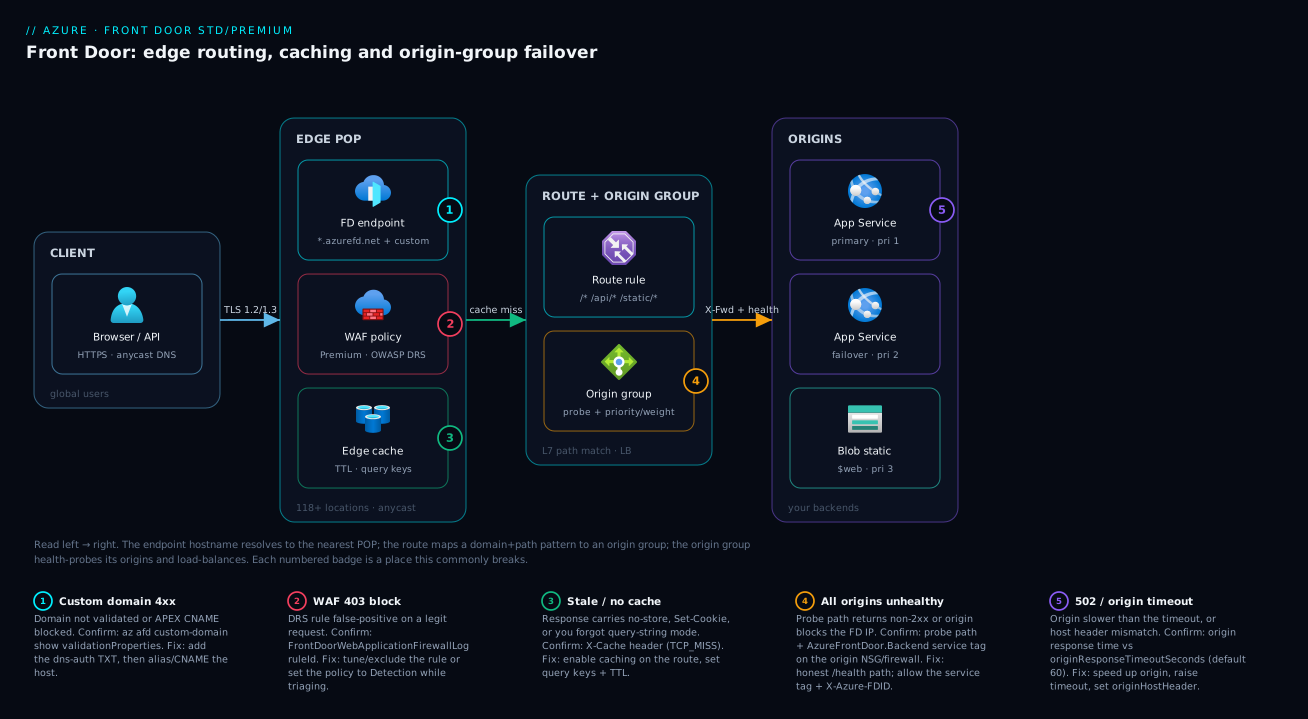
Trace a single request through the system. A user in London types www.shop.example. Anycast DNS resolves it to the nearest Front Door POP — a few milliseconds away, not across the ocean. At that POP the request meets, in order: the endpoint (which custom domain and TLS this is), the WAF policy (on Premium, OWASP managed rules; on Standard, your custom rules) which can block or rate-limit, and then the edge cache — if the object is cached and fresh, the user is served right there and the journey ends. On a cache miss, Front Door evaluates the route: the most-specific path pattern (/static/* vs /api/* vs /*) selects an origin group. The origin group has already been health-probing its origins; the load-balancing policy picks a healthy origin by priority/weight blended with latency, and Front Door forwards the request over Microsoft’s backbone — adding X-Forwarded-For and X-Azure-FDID so the origin knows it came through this Front Door.
The diagram below lays this out left to right as four zones: the client, the edge POP (endpoint + WAF + cache), the route and origin group (path matching and load balancing), and the origins (a primary App Service, a failover App Service, and a Blob static-website origin for assets). Follow the flow arrows — TLS to the edge, cache-miss into routing, then health-checked forwarding to an origin. The five numbered badges mark the places this breaks in practice: a custom-domain validation/CNAME problem at the endpoint (1), a WAF false-positive 403 (2), content that won’t cache (3), all origins marked unhealthy by a bad probe (4), and a 502/timeout when an origin is too slow or has the wrong host header (5). The legend turns each number into a symptom · how to confirm · fix you can act on mid-incident.
Real-world scenario
Saffron Cart, a mid-size Indian D2C retailer, runs its storefront on a single App Service (.NET 8) in Central India. The catalog API, the server-rendered storefront, and a few hundred megabytes of product images and CSS/JS all come from that one app. The platform team is three engineers and the monthly App Service bill is about ₹22,000. Two complaints recur: international shoppers (Gulf NRIs, UK diaspora) say the site is “slow to load,” and every regional maintenance window means a full outage. A Black-Friday-style sale is six weeks out.
They put Front Door Standard in front. The build took an afternoon: one profile, one endpoint, and two origin groups — app-og (the App Service) and static-og (a new Blob $web static website holding images, CSS and JS, populated by their CI). Two routes: /static/* → static-og with caching on, query strings ignored (asset URLs carry a content hash, so no cache-buster needed), 7-day TTL via Cache-Control: max-age=604800, immutable set at upload; and a catch-all /* → app-og with caching off (the storefront sets a session cookie, so it isn’t cacheable anyway, and the API must stay dynamic). They moved www.shop.saffroncart.example onto Front Door with a managed certificate, and pointed the apex at the endpoint with an Azure DNS alias record.
The first measurable win was latency. With assets served from the edge and TLS terminating near the user, time-to-first-byte for Gulf and UK users dropped from ~1.9 s to ~280 ms, and origin egress fell sharply because the second visitor in any region hit the cache. Origin CPU at steady state dropped ~35% simply because it stopped re-serving images. They added a small WAF custom rule: a rate limit of 200 requests/minute per IP on /api/* to blunt scraping, and a geo rule allowing only the regions they ship to for the checkout path.
Then the lab-versus-prod lesson bit. On day two, checkout threw 403 for a slice of legitimate users. The cause was the origin lockdown: they’d allowed the AzureFrontDoor.Backend service tag on the App Service but forgotten the X-Azure-FDID check — and because that tag is shared across all Azure customers’ Front Doors, traffic to the raw *.azurewebsites.net hostname was still getting through. They added a rule requiring X-Azure-FDID to equal their profile’s Front Door ID, and the raw hostname stopped serving. Net effect by sale day: international p95 page load down ~70%, origin egress down ~60%, a clean WAF audit, and ₹2,500/month of Front Door cost that the saved origin egress nearly paid for.
The incident timeline, because the order of moves is the lesson:
| Day | Symptom / goal | Action | Effect |
|---|---|---|---|
| 0 | Slow for distant users; outage on maintenance | Stand up FD Standard, 2 origin groups, 2 routes | Edge TLS + cached assets |
| 0 | Assets re-fetched every visit | /static/* route, caching on, 7-day TTL, ignore query |
Second-visitor hits edge; origin egress drops |
| 1 | Custom domain not serving | Add TXT, validate, apex alias to endpoint, managed cert | www + apex live on TLS |
| 1 | Scraping on /api/* |
WAF custom rate-limit + geo rule | Abusive traffic throttled |
| 2 | Raw *.azurewebsites.net still reachable |
Require X-Azure-FDID = their FDID at the origin |
Origin only serves via their Front Door |
| Sale | International p95 −70%, egress −60% | (run the sale) | No outage; ₹2,500/mo FD cost |
Advantages and disadvantages
Front Door is a powerful default for public web apps, but it adds a layer — weigh it honestly.
| Advantages | Disadvantages |
|---|---|
| Global edge: TLS terminates near users; backbone to origin cuts TTFB even for dynamic content | Adds a hop and a moving part; a misconfigured route/cache can break a working site |
| Built-in CDN caching offloads origin and slashes repeat-transfer egress | Caching is off by default and per-route; easy to forget or to cache the wrong thing |
| Health-probed cross-region failover in seconds — no DNS TTL to wait out | A bad probe path can mark all origins unhealthy and take the whole site down |
| One hostname + one managed, auto-renewing TLS cert in front of many backends | Custom-domain validation + apex/CNAME constraints trip up first-timers |
| Edge WAF (managed OWASP on Premium) screens traffic before it reaches the origin | Managed WAF + Private Link are Premium-only; Premium roughly doubles base cost |
| Rules Engine: redirects, rewrites, header and cache-key control without origin changes | Rule ordering and most-specific-match semantics have a learning curve |
Origin lockdown via service tag + X-Azure-FDID makes the origin private-by-policy |
The service tag alone is shared across tenants — you must also check the FDID header |
When it shines: a geographically spread audience, static + dynamic mix, a need for a WAF the origin lacks, or multi-region resilience. When it’s overkill: a single-region internal app with a local audience, where Application Gateway (regional L7) or just the App Service’s own networking is simpler and cheaper. The disadvantages are all manageable — they’re configuration mistakes, not platform limits — which is exactly why this guide is step-by-step.
Hands-on lab
This is the centerpiece. You will build a complete Front Door Standard profile in front of a real App Service: an origin group with a health probe, a route, edge caching on a static path, and the origin locked to Front Door. You’ll do the portal flow, then the equivalent az CLI, then a Bicep version, validate at each step, and tear it all down. Everything is free-tier-friendly (we use an App Service F1 origin and Front Door’s pay-as-you-go base, all deleted at the end).
Prerequisites for the lab
- Azure CLI ≥ 2.55 signed in (
az login), or Cloud Shell (Bash). - Rights to create resources in a subscription.
- ~30 minutes. Estimated cost if you tear down same-day: well under ₹50.
Set up shared variables and an origin to put behind Front Door:
# Shared variables
RG=rg-fd-lab
LOC=centralindia
PLAN=plan-fd-lab
APP=app-fd-$RANDOM           # globally-unique App Service name → its host is $APP.azurewebsites.net
FD=fd-lab                    # Front Door profile name
EP=edge-$RANDOM              # endpoint name (its hostname gets a hash suffix)
OG=app-origin-group          # origin group name

az group create -n $RG -l $LOC -o table

# An App Service to act as the origin (F1 free tier, Linux, a tiny sample app)
az appservice plan create -n $PLAN -g $RG --is-linux --sku F1 -o table
az webapp create -n $APP -g $RG -p $PLAN --runtime "PHP:8.2" -o table
echo "Origin hostname: $APP.azurewebsites.net"
Expected: a resource group, an F1 Linux plan, and a web app. Browse https://$APP.azurewebsites.net — you should get the App Service default page. That hostname is your origin.
Part A — the portal flow (read-through)
If you prefer clicking, here is the exact path; the CLI in Part B does the same thing reproducibly. Each step lists what you should see.
- Create the profile. Portal → Create a resource → search Front Door and CDN profiles → Create → choose Quick create (not the classic CDN). Set Resource group =
rg-fd-lab, Name =fd-lab, Tier = Standard. Expected: the create blade shows Standard pricing. - Add an endpoint. In the same Quick-create flow, set Endpoint name =
edge-.... Expected: a hostname likeedge-xxxx.z01.azurefd.netis generated. - Add the origin type and origin. Origin type = App services, Origin host name = your
app-fd-….azurewebsites.net. Expected: the origin is added to a default origin group. - Set caching (optional here) — leave caching off for the catch-all in Quick create; you’ll add a cached static route in the CLI part. Click Create. Expected: deployment succeeds in a minute or two.
- Validate. Open the profile → Endpoints → copy the endpoint hostname → browse
https://edge-xxxx.z01.azurefd.net. Expected: the App Service page, now served through Front Door. (First request may take a few seconds while the config propagates to POPs — global propagation can take up to ~10 minutes.) - Inspect the route. Profile → Front Door manager → expand the endpoint → the route shows domains = endpoint host, patterns =
/*, origin group = your group, caching = disabled. This is the chain you built.
The portal Quick-create collapses profile+endpoint+origin+route into one form. For anything real you’ll script it — which is Part B.
Part B — the az CLI build (do this)
This builds the same thing explicitly, so you see every object. Run after the prerequisites above.
Step 1 — Create the profile (Standard).
az afd profile create \
  --resource-group $RG --profile-name $FD \
  --sku Standard_AzureFrontDoor -o table
Expected: a profile resource; sku.name = Standard_AzureFrontDoor.
Step 2 — Create the endpoint (the public hostname).
az afd endpoint create \
  --resource-group $RG --profile-name $FD \
  --endpoint-name $EP --enabled-state Enabled -o table

# Capture the generated hostname for validation later
FQDN=$(az afd endpoint show -g $RG --profile-name $FD --endpoint-name $EP \
  --query hostName -o tsv)
echo "Front Door endpoint: https://$FQDN"
Expected: a hostname like edge-xxxx.z01.azurefd.net printed.
Step 3 — Create the origin group with a health probe and load-balancing settings.
az afd origin-group create \
  --resource-group $RG --profile-name $FD --origin-group-name $OG \
  --probe-request-type HEAD --probe-protocol Https \
  --probe-interval-in-seconds 60 --probe-path "/" \
  --sample-size 4 --successful-samples-required 3 \
  --additional-latency-in-milliseconds 50 -o table
Expected: an origin group; probe protocol Https, path /, interval 60 s. --sample-size and --successful-samples-required define the health-evaluation window; --additional-latency-in-milliseconds is the latency band.
Step 4 — Add the App Service as an origin in that group.
az afd origin create \
  --resource-group $RG --profile-name $FD --origin-group-name $OG \
  --origin-name app-primary \
  --host-name "$APP.azurewebsites.net" \
  --origin-host-header "$APP.azurewebsites.net" \
  --http-port 80 --https-port 443 \
  --priority 1 --weight 1000 \
  --enabled-state Enabled \
  --enforce-certificate-name-check true -o table
Expected: an origin with priority 1, weight 1000, host header equal to the App Service host. Setting --origin-host-header to the App Service hostname is what makes App Service route to the right site.
Step 5 — Create a catch-all route (/*) to the origin group, HTTPS, with HTTP→HTTPS redirect.
az afd route create \
  --resource-group $RG --profile-name $FD --endpoint-name $EP \
  --route-name route-app \
  --origin-group $OG \
  --supported-protocols Http Https \
  --https-redirect Enabled \
  --forwarding-protocol HttpsOnly \
  --patterns-to-match "/*" \
  --link-to-default-domain Enabled -o table
Expected: a route linking the endpoint’s default domain to the origin group, patterns /*, forwarding HttpsOnly, HTTP→HTTPS redirect on. --link-to-default-domain Enabled attaches the *.azurefd.net host to the route.
Step 6 — Validate end to end.
# Give global propagation a moment, then hit the endpoint
echo "Browse: https://$FQDN  (allow up to ~10 min for first global propagation)"
curl -sSI "https://$FQDN" | head -n 15
Expected: an HTTP/2 200 (or 301→200 if you curl http://). Crucially, the response carries a Front Door response header — look for X-Cache and a Front Door Server/route header — proving the request went through Front Door, not direct to the origin.
Step 7 — Add a second, cached route for static content. First create a static origin group pointed at a cacheable path (here we reuse the same App Service host but add a cached route on /static/*; in production this origin group would be your Blob $web host):
# A cached route on /static/* — caching is a property of THE ROUTE
az afd route create \
  --resource-group $RG --profile-name $FD --endpoint-name $EP \
  --route-name route-static \
  --origin-group $OG \
  --supported-protocols Https \
  --forwarding-protocol HttpsOnly \
  --patterns-to-match "/static/*" \
  --link-to-default-domain Enabled \
  --enable-caching true \
  --query-string-caching-behavior IgnoreQueryString \
  --enable-compression true -o table
Expected: a route on /static/* with caching enabled, query strings ignored, compression on. Note that /static/* is more specific than /*, so requests under /static/ use this cached route and everything else uses the catch-all.
Step 8 — Confirm caching is actually happening. Request a static path twice and watch the cache header:
# First request populates the edge; second should report a hit
curl -sSI "https://$FQDN/static/probe.txt" | grep -i -E "x-cache|cache-control"
curl -sSI "https://$FQDN/static/probe.txt" | grep -i -E "x-cache|cache-control"
# Look for X-Cache: TCP_MISS (first) then TCP_HIT / a HIT indication (second)
Expected: the X-Cache header transitions from a miss to a hit on the second call for a cacheable response. (If your origin sets Set-Cookie or Cache-Control: no-store on that path, it will never cache — that’s the safety net, not a bug.)
Step 9 — Lock the origin to Front Door (security hardening). Restrict the App Service to accept traffic only via Front Door, using the service tag and your Front Door ID:
# Get this profile's unique Front Door ID
FDID=$(az afd profile show -g $RG --profile-name $FD --query frontDoorId -o tsv)
echo "Front Door ID (X-Azure-FDID must equal this): $FDID"

# Allow inbound only from the AzureFrontDoor.Backend service tag
az webapp config access-restriction add \
  --resource-group $RG --name $APP \
  --rule-name "AllowFrontDoorOnly" --priority 100 --action Allow \
  --service-tag AzureFrontDoor.Backend
Expected: an access-restriction rule allowing only the Front Door backend service tag. Because that tag is shared across all Azure tenants, you must also require the X-Azure-FDID header to equal your $FDID — enforce that in the App Service (a header check rule, or in app code) so that only your Front Door is accepted. After this, browsing the raw https://$APP.azurewebsites.net directly should be blocked, while the Front Door endpoint keeps working.
Validation checklist. You created a profile, an endpoint, an origin group with a real health probe, an origin with the correct host header and priority/weight, a catch-all route with HTTPS redirect, and a separate cached route for static content — proving caching is per-route — then locked the origin to Front Door. Map of what each step proved:
| Step | What you did | What it proves |
|---|---|---|
| 1–2 | Profile + endpoint | The hostname/tier live independently of origins |
| 3 | Origin group + probe | Health probing is a group property; the probe path matters |
| 4 | Origin with host header | The host header is what makes App Service serve the right site |
| 5 | Catch-all route + redirect | Routes tie domain+path+protocol → origin group |
| 7–8 | Cached static route + verify | Caching is per-route; X-Cache proves edge hits |
| 9 | Origin lockdown | Service tag + X-Azure-FDID makes the origin private-by-policy |
Part C — the Bicep version (declare it)
The same topology as infrastructure-as-code, so it’s reviewable and repeatable. Save as frontdoor.bicep and deploy with az deployment group create.
@description('Existing App Service hostname to use as the origin')
param originHostName string
param profileName string = 'fd-lab'
param endpointName string = 'edge-bicep'

resource profile 'Microsoft.Cdn/profiles@2024-02-01' = {
  name: profileName
  location: 'global'
  sku: { name: 'Standard_AzureFrontDoor' }
}

resource endpoint 'Microsoft.Cdn/profiles/afdEndpoints@2024-02-01' = {
  parent: profile
  name: endpointName
  location: 'global'
  properties: { enabledState: 'Enabled' }
}

resource originGroup 'Microsoft.Cdn/profiles/originGroups@2024-02-01' = {
  parent: profile
  name: 'app-origin-group'
  properties: {
    loadBalancingSettings: {
      sampleSize: 4
      successfulSamplesRequired: 3
      additionalLatencyInMilliseconds: 50
    }
    healthProbeSettings: {
      probePath: '/'
      probeRequestType: 'HEAD'
      probeProtocol: 'Https'
      probeIntervalInSeconds: 60
    }
  }
}

resource origin 'Microsoft.Cdn/profiles/originGroups/origins@2024-02-01' = {
  parent: originGroup
  name: 'app-primary'
  properties: {
    hostName: originHostName
    originHostHeader: originHostName
    httpPort: 80
    httpsPort: 443
    priority: 1
    weight: 1000
    enabledState: 'Enabled'
    enforceCertificateNameCheck: true
  }
}

resource routeApp 'Microsoft.Cdn/profiles/afdEndpoints/routes@2024-02-01' = {
  parent: endpoint
  name: 'route-app'
  dependsOn: [ origin ]
  properties: {
    originGroup: { id: originGroup.id }
    supportedProtocols: [ 'Http', 'Https' ]
    patternsToMatch: [ '/*' ]
    forwardingProtocol: 'HttpsOnly'
    httpsRedirect: 'Enabled'
    linkToDefaultDomain: 'Enabled'
    cacheConfiguration: null   // catch-all: no caching
  }
}

resource routeStatic 'Microsoft.Cdn/profiles/afdEndpoints/routes@2024-02-01' = {
  parent: endpoint
  name: 'route-static'
  dependsOn: [ origin ]
  properties: {
    originGroup: { id: originGroup.id }
    supportedProtocols: [ 'Https' ]
    patternsToMatch: [ '/static/*' ]
    forwardingProtocol: 'HttpsOnly'
    linkToDefaultDomain: 'Enabled'
    cacheConfiguration: {
      queryStringCachingBehavior: 'IgnoreQueryString'
      compressionSettings: {
        isCompressionEnabled: true
        contentTypesToCompress: [
          'text/html', 'text/css', 'application/javascript', 'application/json'
        ]
      }
    }
  }
}

output endpointHost string = endpoint.properties.hostName
Deploy and read back the hostname:
az deployment group create -g $RG \
  --template-file frontdoor.bicep \
  --parameters originHostName="$APP.azurewebsites.net" \
  --query "properties.outputs.endpointHost.value" -o tsv
Expected: the deployment succeeds and prints the Bicep endpoint’s hostname. Note how cacheConfiguration: null on route-app versus a populated cacheConfiguration on route-static encodes the per-route caching rule directly in IaC.
Teardown
# Deletes the Front Door profile, App Service, plan and everything in the RG
az group delete -n $RG --yes --no-wait
Cost note: Front Door Standard’s base is a small monthly charge prorated to the time the profile existed, plus tiny per-GB/per-request fees on the lab’s trivial traffic; the App Service is F1 (free). An hour of this lab is well under ₹50, and deleting the resource group stops all of it.
Common mistakes & troubleshooting
The failures you will actually hit, each with the exact way to confirm and fix it. First as a scannable table, then the detail on the ones that bite hardest.
| # | Symptom | Root cause | Confirm (exact cmd / portal path) | Fix |
|---|---|---|---|---|
| 1 | Custom domain stuck Pending, won’t serve |
DNS-auth TXT record not present/propagated | az afd custom-domain show --query domainValidationState; nslookup -type=TXT _dnsauth.<host> |
Add the _dnsauth TXT with the exact token; wait for propagation |
| 2 | Apex domain won’t point to Front Door | CNAME not allowed at the zone apex | DNS provider rejects apex CNAME | Use Azure DNS alias A/AAAA to the endpoint (or ANAME/redirect to www) |
| 3 | All requests 503 / “all origins unhealthy” | Probe path returns non-2xx, or origin blocks the FD probe | Origin group health in portal; probe /health returns 200 manually |
Point probe at a real always-200 path; allow AzureFrontDoor.Backend |
| 4 | 502 / 504 from Front Door | Origin slower than originResponseTimeoutSeconds (default 60) or wrong host header |
Origin response time; az afd origin show --query originHostHeader |
Speed up origin / raise timeout; set correct origin host header |
| 5 | Static content never caches | Response sets Set-Cookie or Cache-Control: no-store/private; or caching off on the route |
curl -I the asset; check route cacheConfiguration |
Strip cookies on static paths; enable caching on the route |
| 6 | Cache serves stale content after deploy | Ignore query strings + reused filenames; long TTL with no busting |
X-Cache: TCP_HIT on an old object |
Content-hash filenames; or az afd endpoint purge; or shorter TTL |
| 7 | ?v=2 cache-buster ignored |
Query-string mode is IgnoreQueryString |
Route queryStringCachingBehavior |
Switch to UseQueryString or IncludeSpecifiedQueryStrings |
| 8 | Legit users get 403 from the WAF | Managed/custom WAF rule false-positive | FrontDoorWebApplicationFirewallLog → ruleId, action_s = Block |
Tune/exclude that rule; set policy to Detection while triaging |
| 9 | Raw *.azurewebsites.net still reachable |
Only the shared service tag was allowed, not the FDID | curl https://<app>.azurewebsites.net returns 200 |
Require X-Azure-FDID == your frontDoorId at the origin |
| 10 | 404 from origin via Front Door, fine direct | Wrong origin host header → origin serves the wrong site/404 | az afd origin show --query "{h:hostName,hh:originHostHeader}" |
Set originHostHeader to the origin’s own hostname |
| 11 | New config “not working” for minutes | Global POP propagation lag | Works in some regions, not others | Wait up to ~10 min; don’t redeploy in a panic |
| 12 | HTTP not redirecting to HTTPS | Redirect not enabled on the route | Route httpsRedirect |
Set --https-redirect Enabled (or a Rules Engine redirect) |
The expanded reasoning on the ones that cost the most time:
1 & 2 — Custom domain won’t validate or apex won’t point. Front Door validates ownership via a _dnsauth.<subdomain> TXT record; until it’s visible the domain stays Pending and serves nothing. Confirm the state with az afd custom-domain show -g <rg> --profile-name <fd> --custom-domain-name <name> --query domainValidationState and confirm the TXT with nslookup -type=TXT _dnsauth.www.example.com. The apex trap is separate: DNS forbids a CNAME at the zone root, so example.com can’t CNAME to the endpoint. On Azure DNS, create an alias A/AAAA record that targets the Front Door endpoint resource (apex flattening); elsewhere use ANAME/ALIAS or redirect the apex to www.
3 — All origins unhealthy → 503. The health probe decides which origins are eligible; if the probe path returns anything but 2xx from every origin, the group has no healthy member and Front Door returns 503. The two causes are a probe path that legitimately fails (it depends on a downed database, or returns 500) and an origin that blocks the probe because you locked it to Front Door but the probe source isn’t allowed. Confirm by viewing origin-group health in the portal and by curl-ing the probe path against the origin directly. Fix: point the probe at a shallow, always-200 /health, and ensure the origin allows AzureFrontDoor.Backend.
4 — 502/504 from Front Door. Two flavours: the origin is slower than the route’s originResponseTimeoutSeconds (default 60, configurable on the endpoint), so Front Door gives up; or the origin host header is wrong and the origin rejects/misroutes the request. Confirm origin latency from your own APM and the host header with az afd origin show. Fix the slow origin (the real fix), raise the timeout for a legitimately long operation, and set the origin host header to the backend’s own hostname.
8 — WAF blocks legitimate users (403). On Premium with managed OWASP rules, a rule sometimes matches a benign request (a payload that looks like SQL/XSS). Confirm by querying the WAF log for the blocking ruleId:
AzureDiagnostics
| where Category == "FrontDoorWebApplicationFirewallLog"
| where action_s == "Block" and timestamp > ago(1h)
| summarize hits=count() by ruleName_s, ruleId_s, requestUri_s, clientIP_s
| order by hits desc
Fix by adding an exclusion or disabling that specific rule, or switching the policy to Detection mode temporarily so you can see what it would block without breaking users, then re-tighten.
9 — Origin still reachable directly. Allowing AzureFrontDoor.Backend is necessary but not sufficient: that service tag is shared by every Azure customer’s Front Door, so a scanner using their Front Door (or just hitting your origin from an allowed Azure range) can reach you. The fix is to also require the X-Azure-FDID request header to equal your profile’s frontDoorId at the origin. Get it with az afd profile show --query frontDoorId and enforce the header match in the App Service (an inbound rule or app-level check).
Best practices
- Always set a real, shallow health-probe path. A
/healththat returns 200 without depending on a fragile downstream. The default/may be heavy or itself unhealthy, and a bad probe takes the whole site down. - Run at least two origins for anything that needs HA. One origin = one blast radius. Two in different regions with priority (failover) or weight (spread) gives you seconds-fast resilience with no DNS wait.
- Set the origin host header to the origin’s own hostname for App Service and Storage origins, or you’ll get 404s and cert mismatches.
- Decide caching per route, on purpose. Cache
/static/*and other safe GETs; never cache authenticated or cookie-setting routes. Remember caching is off by default. - Use content-hashed filenames for assets (
app.4f3a.js) with a long TTL andIgnore query strings. This gives instant cache invalidation by renaming and avoids stale assets — far better than relying on purges. - Keep
HttpsOnlyforwarding and HTTP→HTTPS redirect on. Encrypt the edge-to-origin hop and never serve cleartext to clients. - Lock the origin to Front Door with the service tag and the
X-Azure-FDIDheader. The service tag alone is shared across tenants; the FDID header makes it your Front Door only. - Start on Standard; move to Premium only for managed WAF or Private Link. Don’t pay for Premium you don’t use.
- Run the WAF in Detection first, then Prevention. Watch the logs for false-positives on real traffic before you start blocking, and keep the
ruleId-level exclusions documented. - Manage the whole topology as Bicep/IaC, reviewed in PRs — a route, cache, or origin change is a production change and should be diffed, not clicked.
- Wait out propagation. New config can take up to ~10 minutes to reach all POPs; “it doesn’t work” for the first few minutes is usually just propagation, not a bug.
- Enable diagnostic logs (
FrontDoorAccessLog,FrontDoorWebApplicationFirewallLog,FrontDoorHealthProbeLog) to a Log Analytics workspace from day one, so you can answer “why” with a query.
Security notes
- WAF in front of the origin. Use the WAF policy (managed OWASP DRS on Premium, custom rules on both) to block common attacks, rate-limit abusive IPs, and geo-restrict where it makes sense — before traffic reaches your origin. Pair it with Application Gateway WAF only if you also need a regional L7 WAF behind Front Door.
- Make the origin private-by-policy. Allow only
AzureFrontDoor.Backendand requireX-Azure-FDIDto equal your profile’sfrontDoorId. On Premium, prefer Private Link origins so the backend has no public exposure at all. - TLS everywhere, and a managed cert. Use Front Door’s free managed certificates (auto-renewing) for custom domains, enforce a modern minimum TLS version, and keep
enforceCertificateNameCheckon so Front Door validates the origin’s certificate name on the back hop. - Don’t cache anything authenticated. A cached page keyed without the user’s identity can leak one user’s content to another. The
Set-Cookie/privatesafety net helps, but verify it — never enable caching on a route that returns per-user content. - Protect the WAF from being a foot-gun. Roll out managed rules in Detection mode, review what they would block, then move to Prevention; document every exclusion so a future engineer knows why a rule is off.
- Scope diagnostics carefully. Access logs contain client IPs and URIs; route them to a Log Analytics workspace with appropriate retention and RBAC, and don’t expose probe paths that reveal internal topology.
- Use DDoS protection at the edge. Front Door absorbs a great deal of volumetric attack at the anycast edge; combine with WAF rate-limiting for application-layer floods.
The security controls and what each buys:
| Control | Mechanism | Protects against | Tier |
|---|---|---|---|
| Managed WAF rules | OWASP DRS / Bot Manager policy | Injection, XSS, known bots | Premium |
| Custom WAF rules | Rate-limit, geo, IP, request match | Scraping, abuse, geo-fencing | Standard + Premium |
| Origin lockdown | AzureFrontDoor.Backend tag + X-Azure-FDID |
Direct-to-origin bypass | Both |
| Private Link origin | Private endpoint to the backend | Any public origin exposure | Premium |
| Managed TLS + min version | Auto-renewing cert, TLS floor | Expiry outages, downgrade | Both |
| Origin cert name check | enforceCertificateNameCheck |
MITM on the edge→origin hop | Both |
Cost & sizing
Front Door billing has three components — a fixed base fee per profile (Premium’s is roughly double Standard’s, for managed WAF + Private Link), data transfer out per GB geo-tiered (usually the largest variable line), and per-request fees plus feature extras. The table below breaks each out.
The right-sizing logic: caching is the lever. The more of your traffic is cacheable static content with a good TTL, the more you offload your origin — and the origin egress you stop paying frequently offsets Front Door’s per-GB, making it close to cost-neutral. For a small-to-mid public site, Standard lands around ₹1,500–4,000/month; Premium starts higher for the base fee. The honest caveat: if your audience is one region and your content isn’t cacheable, Front Door’s CDN benefit is small and a regional Application Gateway (or just the App Service) may be cheaper.
| Cost driver | What you pay for | Rough scale | What reduces it |
|---|---|---|---|
| Base fee (Standard) | Profile + baseline rules/data | Fixed monthly | One profile per env, not per app |
| Base fee (Premium) | + managed WAF + Private Link | ~2× Standard base | Only adopt Premium when you use those |
| Egress (per GB) | Edge→client transfer, geo-tiered | Largest variable line | Caching (serves from edge), compression |
| Requests (per 10k) | Per-request processing | Scales with traffic | Caching reduces origin round-trips |
| Extra WAF / rules | Additional policies, managed rules | Per policy/feature | Keep one well-scoped policy |
| Origin egress (savings) | What you stop paying at the origin | Often offsets FD egress | High cache-hit ratio |
The single biggest cost and performance lever is the same one: enable compression and cache everything safely cacheable with a sensible TTL.
Interview & exam questions
1. Explain the Front Door object chain from hostname to backend. A profile (tier/billing) contains endpoints (public hostnames). Each endpoint has routes that match domain + path pattern + protocol and forward to an origin group. An origin group is a pool of origins (backends) sharing a health probe and a load-balancing policy. Caching and rule sets attach to the route. So: endpoint → route → origin group → origin.
2. Where is caching configured, and what is not cacheable? Caching is a property of the route, not the profile — and it’s off by default. Only GET/HEAD responses cache; responses with Cache-Control: no-store/private or a Set-Cookie header don’t. The cache key is host + path + your chosen query-string behaviour; TTL comes from origin Cache-Control/Expires unless a rule overrides it.
3. Standard vs Premium — what does Premium uniquely add? Both have caching, custom domains, managed certs, and custom WAF rules. Premium uniquely adds managed WAF rule sets (OWASP DRS, Bot Manager) and Private Link origins (reach a private backend without public exposure). Premium’s base cost is roughly double, so pick it only for those features.
4. Priority vs weighted load balancing in an origin group? Priority is failover: traffic goes to the lowest-priority healthy origin and only moves to the next when all higher ones fail. Weighted spreads traffic among same-priority origins by weight, blended with latency. You can combine them (weights within a priority tier). Front Door is always latency-aware via additionalLatencyInMilliseconds.
5. A custom domain is stuck on Pending. What’s wrong and how do you confirm? The DNS-auth TXT record (_dnsauth.<subdomain>) isn’t present or hasn’t propagated, so Front Door can’t validate ownership. Confirm with az afd custom-domain show --query domainValidationState and nslookup -type=TXT _dnsauth.<host>. Add the exact TXT token and wait for propagation; then add the CNAME (or apex alias) and the managed cert will issue.
6. Why can’t you CNAME your apex domain to the endpoint, and what’s the fix? DNS forbids a CNAME at the zone apex (it must coexist with SOA/NS records). On Azure DNS, use an alias A/AAAA record targeting the Front Door endpoint resource (apex flattening). On other providers, use ANAME/ALIAS/CNAME-flattening or redirect the apex to www.
7. All your origins show unhealthy and you get 503. Most likely cause? The health probe path returns non-2xx from every origin (it depends on a downed dependency, or returns 500), or the origin blocks the probe because you locked it to Front Door without allowing the probe. Point the probe at a shallow always-200 /health and ensure the origin allows AzureFrontDoor.Backend.
8. How do you make sure traffic can only reach your origin through Front Door? Allow only the AzureFrontDoor.Backend service tag on the origin and require the X-Azure-FDID header to equal your profile’s frontDoorId. The service tag alone is shared across all tenants, so the FDID header is what makes it your Front Door only. On Premium, Private Link origins remove public exposure entirely.
9. Users get a 502 from Front Door but the origin seems fine. What do you check? The origin is likely slower than the route’s originResponseTimeoutSeconds (default 60 s), or the origin host header is wrong so the origin misroutes/rejects. Compare origin response time to the timeout, and verify originHostHeader matches the backend’s own hostname. Fix the slow path, raise the timeout for legitimately long ops, and correct the host header.
10. A static asset won’t cache even though caching is on. Why? The response likely carries a Set-Cookie header or Cache-Control: no-store/private, which makes it non-cacheable by design, or the request isn’t GET/HEAD. Strip cookies on static paths at the origin and ensure the asset returns a cacheable Cache-Control. Confirm with curl -I on the asset.
11. How do you push a new asset version without waiting for TTL? Best practice: content-hashed filenames (app.4f3a.js) with a long TTL and Ignore query strings — a new filename is a new cache key, so the new version is served immediately and the old one ages out. If you must invalidate in place, az afd endpoint purge --content-paths '/static/*'.
12. Front Door vs Application Gateway — when each? Front Door is global (anycast edge) L7 with CDN caching and cross-region failover — use it for globally distributed web apps/APIs. Application Gateway is regional L7 — use it for path routing and WAF within one region, including private backends and mTLS. They compose: Front Door (global edge) → Application Gateway (regional) → private origin.
These map to AZ-700 (Network Engineer Associate) — design and implement application delivery and load balancing (Front Door, App Gateway, Traffic Manager, Load Balancer) — and touch AZ-104 (configure Front Door/CDN) and AZ-500 (WAF, edge security). A compact cert-mapping:
| Question theme | Primary cert | Objective area |
|---|---|---|
| Object model, routes, origin groups | AZ-700 | Application delivery & load balancing |
| Caching, TTL, query strings | AZ-700 / AZ-104 | Content delivery & CDN |
| WAF (managed/custom), origin lockdown | AZ-500 | Secure networking; edge security |
| Standard vs Premium, Private Link | AZ-700 | Design connectivity & private access |
| Custom domain, managed TLS | AZ-104 | Configure web app delivery |
Quick check
- Which Front Door object does caching attach to, and is it on or off by default?
- You want two origins where the second only takes traffic when the first is down. Which load-balancing mode, and how do you set it?
- Your apex domain
example.comcan’t CNAME to the Front Door endpoint. What’s the Azure DNS fix? - Allowing the
AzureFrontDoor.Backendservice tag on your origin isn’t enough to stop direct access. What else must you require, and why? - A
/static/app.js?v=2cache-buster is being ignored and users get the old file. Which route setting causes this and what do you change it to?
Answers
- Caching attaches to the route, and it is off by default — you must enable it per route. (The cache key is host + path + the route’s query-string behaviour; TTL comes from origin
Cache-Control/Expiresunless a rule overrides it.) - Priority mode: set the preferred origin to priority 1 and the standby to priority 2 in the same origin group. Traffic goes only to the lowest healthy priority and fails over to priority 2 when origin 1’s health probe fails.
- Use an Azure DNS alias A/AAAA record that targets the Front Door endpoint resource (apex flattening), because DNS forbids a CNAME at the zone apex. On non-Azure DNS, use ANAME/ALIAS/CNAME-flattening or redirect the apex to
www. - You must also require the
X-Azure-FDIDheader to equal your profile’sfrontDoorId, because theAzureFrontDoor.Backendservice tag is shared across every Azure tenant’s Front Door — without the FDID check, another customer’s Front Door (or an allowed Azure range) can reach your origin. - The route’s query-string caching behaviour is
IgnoreQueryString, so?v=2doesn’t vary the cache key. Change it toUseQueryString(orIncludeSpecifiedQueryStringsnamingv) — or better, use content-hashed filenames so the version is part of the path.
Glossary
- Profile — the top-level Front Door resource that holds the tier (Standard/Premium) and billing; contains endpoints, origin groups and routes.
- Endpoint — a public hostname Front Door issues (
<name>-<hash>.z01.azurefd.net) that clients or a custom-domain CNAME point at. - Origin — one backend instance (App Service, Storage
$web, App Gateway, IP) with a host name, host header, ports, priority and weight. - Origin group — a pool of origins treated as one backend, sharing a health probe and a load-balancing policy; routes point at origin groups.
- Route — the rule mapping an endpoint’s domains + path patterns + protocols to an origin group, with per-route caching and optional rule sets.
- Rule set / Rules Engine — an ordered list of match/action rules (rewrite, redirect, header/cache-key override, geo-block) associated to a route.
- Health probe — the path/protocol/method/interval Front Door uses to mark each origin healthy or unhealthy.
- Load-balancing policy — how Front Door distributes among healthy origins: priority (failover) and weight (spread), blended with latency sensitivity.
- Cache key — what identifies a cached object: host + path + the route’s query-string behaviour.
- TTL — how long the edge keeps a cached object; sourced from origin
Cache-Control/Expiresunless a rule overrides it. - Query-string caching behaviour — whether/which query parameters vary the cache (Ignore, Use, Include-specified, Ignore-specified).
- Custom domain — your own hostname (e.g.
www.example.com) added to Front Door, validated by a_dnsauthTXT record, then bound to a route and a certificate. - Managed certificate — a free TLS certificate Front Door issues and auto-renews for a validated custom domain.
X-Azure-FDID— a request header Front Door sends to the origin carrying your profile’s uniquefrontDoorId; check it to ensure only your Front Door reaches the origin.AzureFrontDoor.Backendservice tag — the IP range tag for Front Door’s origin-facing traffic; necessary but shared across tenants, so pair it with the FDID header.- Private Link origin — (Premium) a private connection from Front Door to a backend so the origin has no public exposure.
Next steps
You can now stand up Front Door end to end, route by domain and path, cache safely, and lock the origin down. Build outward:
- Next: Application Gateway with WAF, mTLS & End-to-End TLS — the regional L7 layer you place behind Front Door for private backends and mTLS.
- Related: Azure Load Balancer vs Application Gateway — the L4-vs-L7 decision that sits next to “global vs regional.”
- Related: Host a Static Website on Blob Storage with Front Door CDN — make a Storage
$webhost the cheap, cacheable origin for your assets. - Related: Public DNS Zones, Delegation & Alias Records — get the apex alias and CNAME right for your custom domain.
- Related: Azure Cache for Redis: Caching Patterns — cache dynamic data at the origin to complement Front Door’s edge cache.
- Related: Troubleshooting App Service 502/503, Cold Starts & Restart Loops — when the origin behind Front Door is the thing that’s actually failing.