You stand up a virtual machine, give it a friendly hostname, and reach for another VM by name — and nothing resolves. Or you create a Private Endpoint for a storage account, everything looks green in the portal, and your app still connects over the public internet because mystorage.blob.core.windows.net resolves to a public IP instead of the private one. Both failures share a root: by default, a virtual network gives your resources only Azure-provided DNS (the resolver at 168.63.129.16), which resolves public names and the auto-generated internal.cloudapp.net suffix — but it will not host your private records, and it has no idea your Private Endpoint exists. Azure Private DNS Zones are the missing piece: a DNS zone (e.g. corp.kloudvin.com or privatelink.blob.core.windows.net) that lives entirely inside Azure, is never published publicly, and answers queries only for the virtual networks you explicitly link to it.
This article is a build guide. By the end you will have created a private zone, linked it to one or more VNets, switched on auto-registration so VMs register their own A records the moment they boot, and stood up split-horizon (split-brain) DNS so app.kloudvin.com returns a private 10.x address inside the VNet and a public address to the internet. You will also wire up the special privatelink.* zones that make Private Endpoints resolve correctly — the single most common reason teams adopt Private DNS. Everything is shown three ways: the portal click-path, the az CLI command, and a reusable Bicep module, with expected output and a validation at each step.
The mental shift: a private DNS zone is not attached to a VNet the way a subnet is. It is a standalone resource you create once, then associate with VNets through virtual network links. Resolution is decided per-VNet by which zones it is linked to and whether that link has registration enabled. Get that right and the rest — auto-registration, split-horizon, privatelink zones, hub-and-spoke — falls out of it.
What problem this solves
Without private DNS, name resolution inside Azure is crippled in three specific ways, and each one shows up as a different production incident.
You cannot resolve your own machines by a name you control. Azure-provided DNS resolves a VM’s auto-assigned hostname within the same VNet via the internal.cloudapp.net suffix — but only for VMs in that exact VNet, and with a suffix you didn’t choose. The moment you peer two VNets, or want a stable name like db01.corp.kloudvin.com that survives a rebuild with a new IP, the built-in resolver cannot help. Teams paper over this with hosts files, hard-coded IPs, or a self-managed pair of DNS server VMs running BIND or Windows DNS — operational debt you maintain forever.
Private Endpoints resolve to public IPs, so traffic skips the private path entirely. The quiet, dangerous one. A Private Endpoint gives a PaaS resource (storage, SQL, Key Vault) a private IP in your VNet, but the resource’s public FQDN — mydb.database.windows.net — still resolves, by public DNS, to a public IP. Your app keeps using the public FQDN, gets the public IP, and connects over the internet (or fails, if you’ve locked the public path down). The endpoint sits unused while you pay for it. The fix is a privatelink.* private zone that overrides that FQDN to the private IP — and it must be linked to the consumer’s VNet, not just the one holding the endpoint.
The same name has to mean different things inside and outside. A web app at app.kloudvin.com may be reachable publicly through Front Door for customers, while internal services reach it directly on a private IP — same hostname, two answers. Without split-horizon you end up with two names (app.kloudvin.com and app-internal.kloudvin.com), config drift, and certificates that don’t match. A private view of kloudvin.com shadows the public one only for linked VNets, so one name resolves correctly from both sides.
Who hits this: anyone running VMs that talk by name; every team that adopts Private Endpoints; and any workload with a hybrid or multi-environment naming requirement. The cost ranges from “annoying, falls back to IPs” to “we thought traffic was private for six months and it wasn’t.”
Learning objectives
By the end of this article you can:
- Explain the Private DNS Zone model — a standalone zone, virtual network links, and the per-link registration flag — and how the Azure-provided resolver at
168.63.129.16chooses between a private zone and public DNS. - Create a private DNS zone and link it to one or more VNets, in the portal, with
az, and with Bicep, and verify resolution from a VM. - Turn on auto-registration so VMs register and de-register their own A records as they are created, deleted, or change IP — and know the one-link-per-VNet rule that constrains it.
- Add manual records (A, CNAME, SRV, TXT) for resources that don’t auto-register, such as PaaS endpoints, on-prem hosts, and load-balanced front ends.
- Stand up split-horizon DNS so a name resolves to a private IP inside linked VNets and a public IP everywhere else, without name drift.
- Configure the
privatelink.*zones (privatelink.blob.core.windows.net,privatelink.database.windows.net, and friends) so Private Endpoints resolve to their private IPs from every consuming VNet. - Diagnose the classic failures — wrong zone name, link missing on the consumer VNet, custom DNS server bypassing the private zone, two registration links, stale records — using
nslookup/digandaz network private-dnscommands. - Right-size and cost a Private DNS deployment, and place zones correctly in a hub-and-spoke topology.
Prerequisites & where this fits
You should understand the basics of an Azure virtual network (VNet) and subnets — if not, start with Azure Virtual Network, Subnets and NSGs: Networking Fundamentals and Azure VNet IP Address Planning: CIDR, Subnetting and Avoiding Overlap Before You Deploy. Know how DNS works at a high level (zones, records, recursion, TTL), be comfortable running az in Cloud Shell, and able to read JSON. Knowing what a Private Endpoint is helps, since the marquee use case is making them resolve; Azure Private Endpoint vs Service Endpoint: Secure PaaS Access is the primer.
This sits in the Networking track, the name-resolution layer everything above depends on. It is upstream of Azure Private Link and Private DNS: Keeping PaaS Off the Public Internet (this article is the focused build guide for the DNS half), and the private mirror of How to Host Public DNS on Azure DNS: Zone Delegation, Alias Records and Apex Domains — same product family, opposite audience. In hub-and-spoke it pairs with Azure VNet Peering Done Right: Gateway Transit, Global Peering and Transitivity Limits, because peering moves traffic but not DNS — you still link zones to each VNet explicitly.
Who owns which layer, so you call the right person during an incident:
| Layer | What lives here | Who usually owns it | Failure it causes |
|---|---|---|---|
| Public DNS (registrar / Azure DNS public) | Internet records, delegation | DNS / platform team | External name fails; split-horizon public side wrong |
Azure resolver (168.63.129.16) |
Default VNet DNS, recursion | Microsoft (platform) | Bypassed if custom DNS is set |
| Private DNS zone + VNet links | Private records, auto-registration | Network / platform team | Resolves public not private; PE unusable |
| Custom DNS servers (if set) | Conditional forwarding, on-prem zones | Network team | Private zone bypassed; must forward to 168.63.129.16 |
| The resource (VM / PE) | The actual IP resolved to | App / platform team | Record points at a dead/old IP |
Core concepts
Six ideas make every later step obvious; the tables and lab assume them.
A private zone is a standalone resource, linked — not attached — to VNets. You create a Microsoft.Network/privateDnsZones resource whose name is the DNS suffix (e.g. corp.kloudvin.com). It does nothing until you add virtual network links (.../virtualNetworkLinks), each pointing at a VNet, and a VNet resolves a zone only if linked to it. A zone serves up to 1,000 VNet links and a VNet can link to up to 1,000 private zones — so one central zone can serve an entire estate.
The Azure-provided resolver does the choosing, for free, on “default” DNS. Every VNet has a virtual DNS server at the fixed 168.63.129.16. On a query it checks the linked private zones first; on a match (longest suffix) it answers privately, else recurses to public DNS. You don’t point clients at the zone — you leave the VNet’s DNS on “Default (Azure-provided)” and the resolver consults linked zones automatically. The crucial dependency: switch to custom DNS servers and you lose automatic private-zone resolution unless they forward back to 168.63.129.16.
Auto-registration is a per-link switch, and a VNet may have at most one registration link. A link has a registration enabled flag. When true, every VM in that VNet automatically gets an A record (<vmhostname>.<zone>) created at boot, updated if its IP changes, and removed on delete. The hard rule: a VNet can be the registration VNet for only one private zone — it can be resolution-only-linked to many, but registration belongs to exactly one. So you pick one zone (typically corp.kloudvin.com) as the registration target and treat the rest as resolution-only.
Resolution-only vs registration. A link with registration disabled is resolution-only: resources resolve the zone’s records but VMs don’t auto-register. The privatelink.* zones are always resolution-only (PaaS endpoints register via the Private Endpoint, not the VM mechanism). Most links across an estate are resolution-only; the single registration link is the exception.
Split-horizon is just “create a private zone with the same name as a public one.” If you own the public zone kloudvin.com and also create a private kloudvin.com linked to your VNets, linked VNets see the private records (private IPs) while the internet sees the public records. The two zones are independent and Azure never publishes the private one. Put a private A for app.kloudvin.com → 10.20.1.10 in the private zone and a public A/alias for the same name in the public zone; each audience gets its own answer.
privatelink.* zones are the special case that makes Private Endpoints work. Microsoft reserves names of the form privatelink.<service>.<suffix> (e.g. privatelink.blob.core.windows.net). When you create a Private Endpoint, the resource’s public FQDN becomes a CNAME to a *.privatelink.* name, and a matching private zone holds the A record mapping it to the endpoint’s private IP. Link that zone to every VNet that needs the private path and the public FQDN resolves privately. Get the name exactly right (table later) or it silently won’t work.
The vocabulary in one table
Pin down every moving part before the deep sections (the glossary repeats them for lookup):
| Concept | One-line definition | Where it lives | Why it matters |
|---|---|---|---|
| Private DNS zone | A DNS zone hosted in Azure, never public | RG (global resource) | Holds your private records |
| Virtual network link | Association of a zone to one VNet | Child of the zone | A VNet resolves a zone only if linked |
| Registration | Per-link flag: VMs auto-create A records | On the link | One registration link per VNet |
| Resolution-only link | Link with registration off | On the link | Resolves but doesn’t auto-register |
| Azure resolver | The 168.63.129.16 virtual DNS server |
Every VNet | Chooses private zone vs public, free |
| Auto-registration | VM A records created/updated/removed | The registration link | Zero-touch records for VMs |
| Split-horizon | Same name, private inside, public outside | Two same-named zones | One hostname, two audiences |
privatelink.* zone |
Reserved zone making a PE resolve | Resolution-only link | The #1 reason teams adopt private DNS |
| A / CNAME / SOA / SRV / TXT | Record types a zone holds | Record sets | The name→value mappings |
| SOA record | Auto-created zone authority record | Created with the zone | You don’t manage it |
How resolution actually decides: the private zone vs public DNS
Almost every “it resolved to the wrong IP” bug traces to the resolver’s decision. A resource queries 168.63.129.16; if the name suffix-matches a private zone linked to this VNet (longest match wins) and the record exists, it answers privately — otherwise it recurses to public DNS. Two consequences are the whole game:
| Situation | What resolves | Why |
|---|---|---|
| Name in a private zone linked to the VNet | Private record | Resolver checks linked zones first |
| Name in a private zone not linked to the VNet | Public (or NXDOMAIN) | Unlinked zone is invisible to that VNet |
| Name in no private zone | Public answer | Recurses to public DNS |
| VNet on custom DNS servers (no forward) | Whatever they say — zone ignored | Query never reaches 168.63.129.16 |
Custom DNS that forwards to 168.63.129.16 |
Private record (back in play) | Forwarder restores zone consultation |
The custom-DNS row is the most common operational trap: set custom DNS servers on a VNet (for on-prem/AD) and overnight every Private Endpoint and private record stops resolving, because the query never reaches the Azure resolver. We return to the fixes in troubleshooting.
Creating the zone and your first VNet link
Everything starts with a zone and one link. We use corp.kloudvin.com (your internal namespace) throughout; substitute your own.
The portal click-path
- Create a resource → search Private DNS zone → Create.
- Resource group:
rg-dns-lab. Name:corp.kloudvin.com— the name is the DNS suffix (must be a valid domain; Azure does not verify ownership for private zones, so control it to avoid clashes). Review + create → Create. - Open the zone — there’s no link yet, just an empty record list and an auto-created SOA. Go to Virtual network links → Add. Name it (
link-hub), pick the virtual network, and tick Enable auto registration for your one registration VNet (leave it unticked for resolution-only). Create.
That’s the minimum: a zone plus one link. Resources in the linked VNet can now resolve any record you add.
The az CLI
# Variables
RG=rg-dns-lab
LOC=centralindia
ZONE=corp.kloudvin.com
VNET=vnet-hub

# 1. Resource group
az group create -n $RG -l $LOC -o table

# 2. (A VNet to link to — skip if you already have one)
az network vnet create -g $RG -n $VNET --address-prefixes 10.20.0.0/16 \
  --subnet-name snet-workload --subnet-prefixes 10.20.1.0/24 -o table

# 3. Create the private zone (zones are global; location is 'global' implicitly)
az network private-dns zone create -g $RG -n $ZONE -o table
Expected: the zone returns "name": "corp.kloudvin.com" and "numberOfRecordSets": 1 (the SOA). Now link it, with registration ON:
# 4. Link the zone to the VNet WITH auto-registration enabled
az network private-dns link vnet create -g $RG -n link-hub \
  --zone-name $ZONE --virtual-network $VNET --registration-enabled true -o table
Expected: a link with "registrationEnabled": true and "virtualNetworkLinkState": "Completed". The --registration-enabled flag is the difference between an auto-registration link and a resolution-only one (false).
The Bicep module
The reusable unit you copy across environments. Note the link is a child resource of the zone:
@description('Private DNS zone name = the DNS suffix, e.g. corp.kloudvin.com')
param zoneName string = 'corp.kloudvin.com'

@description('Resource ID of the VNet to link with auto-registration')
param registrationVnetId string

// Private DNS zones are GLOBAL resources — location is literally 'global'
resource zone 'Microsoft.Network/privateDnsZones@2024-06-01' = {
  name: zoneName
  location: 'global'
}

// The registration link (one per VNet, max)
resource link 'Microsoft.Network/privateDnsZones/virtualNetworkLinks@2024-06-01' = {
  parent: zone
  name: 'link-hub'
  location: 'global'
  properties: {
    registrationEnabled: true       // <-- auto-registration ON
    virtualNetwork: {
      id: registrationVnetId
    }
  }
}

output zoneId string = zone.id
Deploy with az deployment group create -g rg-dns-lab --template-file zone.bicep --parameters registrationVnetId=<vnet-resource-id>. The location: 'global' line trips up first-timers — private zones are not regional, and a regional location fails validation.
Confirm it works
From a VM in the linked VNet, add a test record and resolve it:
# Add a test A record, then resolve it from a VM in vnet-hub
az network private-dns record-set a add-record -g $RG --zone-name $ZONE \
  --record-set-name test --ipv4-address 10.20.1.250
# On a VM inside vnet-hub:
nslookup test.corp.kloudvin.com     # -> 10.20.1.250 (private), via 168.63.129.16
If nslookup returns 10.20.1.250, the zone, link, and resolver all work. NXDOMAIN means the VM’s VNet isn’t linked, or it’s on custom DNS — both covered in troubleshooting.
Auto-registration: zero-touch records for your VMs
Auto-registration turns a private zone from a manual record list into a living inventory of your VMs. With it enabled on a link, the platform manages this lifecycle with no action required:
| VM event | What happens in the zone | Record name | Timing |
|---|---|---|---|
| VM created in the registration VNet | A record created | <vm-hostname>.<zone> |
~seconds after the NIC gets its IP |
| VM private IP changes (dealloc/realloc) | A record updated to new IP | same | On next IP assignment |
| VM stopped (deallocated) | A record may change/remove | same | Depends on IP retention |
| VM deleted | A record removed | same | Shortly after deletion |
| Hostname changed in the OS | New record may appear | new hostname | After the OS reports it |
The record name is the VM’s hostname, not its Azure resource name — usually the same but they can diverge. The zone becomes self-maintaining: nslookup web01.corp.kloudvin.com works the instant web01 boots and vanishes when you delete the VM, so the auto-registered set never accumulates stale entries.
The constraints you must respect:
| Constraint | Detail | Consequence if violated |
|---|---|---|
| One registration link per VNet | A VNet auto-registers into exactly one zone | Second registration link fails to create |
| Per-link, per-VNet | Only VMs in the registration VNet register | Peered-VNet VMs do not register here |
| Only A records, only VMs | PaaS / LBs / on-prem don’t auto-register | Add those manually |
| Hostname, not resource name | Record = OS hostname | Mismatch confuses lookups |
| No reverse (PTR) | Forward A only | Reverse lookups need a manual PTR zone |
Because auto-registration is scoped to the VNet owning the registration link, a hub-and-spoke estate must choose: give each VNet its own registration zone (like spoke1.corp.kloudvin.com), or let one VNet auto-register and add manual records for the rest. There is no “auto-register everywhere” switch — the one-link-per-VNet rule forbids it.
Toggle registration on an existing link:
# Flip an existing link to resolution-only (registration off)
az network private-dns link vnet update -g $RG -n link-hub \
  --zone-name $ZONE --registration-enabled false -o table
Manual records: A, CNAME, SRV, TXT and the PaaS endpoints
Auto-registration covers your VMs; everything else you add by hand. A private zone supports the standard record set, and the az network private-dns record-set verbs are consistent: <type> add-record appends a value, <type> create makes an empty set with a custom TTL, <type> update changes the TTL.
| Record type | Use it for | Example value | Notes |
|---|---|---|---|
| A | Name → IPv4 | 10.20.1.10 |
Most common; PE records are A |
| AAAA | Name → IPv6 | fd00::10 |
Only if you run IPv6 |
| CNAME | Alias to another name | web01.corp.kloudvin.com |
Cannot exist at the apex |
| SRV | Service location (port + target) | 0 5 443 web01... |
AD-style service discovery |
| TXT | Arbitrary text | "owner=team-a" |
Metadata, verification |
| MX | Mail exchanger | 10 mail.corp... |
Rare in a private zone |
| PTR | Reverse (IP → name) | in in-addr.arpa |
Needs a separate reverse zone |
| SOA | Zone authority (auto) | — | You don’t create/delete it |
Add a manual A record for a load-balanced front end:
# A record for an internal load balancer front end
az network private-dns record-set a add-record -g $RG --zone-name $ZONE \
  --record-set-name api --ipv4-address 10.20.1.100

# CNAME so legacy.corp.kloudvin.com points at api.corp.kloudvin.com
az network private-dns record-set cname set-record -g $RG --zone-name $ZONE \
  --record-set-name legacy --cname api.corp.kloudvin.com

# Set a custom TTL (default is 3600s) on a record set you create explicitly
az network private-dns record-set a create -g $RG --zone-name $ZONE \
  --name shortlived --ttl 60
az network private-dns record-set a add-record -g $RG --zone-name $ZONE \
  --record-set-name shortlived --ipv4-address 10.20.1.77
The same in Bicep, each record set a child of the zone:
resource aApi 'Microsoft.Network/privateDnsZones/A@2024-06-01' = {
  parent: zone
  name: 'api'                  // becomes api.corp.kloudvin.com
  properties: {
    ttl: 3600
    aRecords: [
      { ipv4Address: '10.20.1.100' }
    ]
  }
}

resource cnameLegacy 'Microsoft.Network/privateDnsZones/CNAME@2024-06-01' = {
  parent: zone
  name: 'legacy'
  properties: {
    ttl: 3600
    cnameRecord: { cname: 'api.corp.kloudvin.com' }
  }
}
One apex rule (same as public DNS): you cannot put a CNAME at the zone apex (@) — the apex must hold the SOA. To resolve the bare corp.kloudvin.com, use an A record at @, not a CNAME.
Wiring Private Endpoints: the privatelink.* zones
This is the payoff section — the reason most teams are here. A Private Endpoint gives a PaaS resource a private NIC and IP, but resolution of the resource’s public FQDN must be redirected to that private IP — the job of a privatelink.* private zone.
How it chains together, for storage blob: the endpoint gets a private IP (say 10.20.2.5), and Azure rewrites the public FQDN mystorage.blob.core.windows.net into a CNAME to mystorage.privatelink.blob.core.windows.net. You create a private zone named exactly privatelink.blob.core.windows.net with an A record mystorage → 10.20.2.5 (the “integrate with private DNS” toggle does this) and link it resolution-only to every consuming VNet. Now a query from a linked VNet follows the CNAME, finds the A record, and returns 10.20.2.5; from the internet the same name returns a public IP, because the zone isn’t linked there.
The zone name must match the service exactly. A wrong suffix (privatelink.blob.windows.net instead of privatelink.blob.core.windows.net) leaves the CNAME target with no matching zone and resolution falls through to public — the endpoint looks configured but does nothing. The common ones:
| Azure service (sub-resource) | privatelink zone name |
|---|---|
| Storage — Blob | privatelink.blob.core.windows.net |
| Storage — File | privatelink.file.core.windows.net |
| Storage — Queue/Table/DFS | privatelink.queue/.table/.dfs.core.windows.net |
| Azure SQL Database | privatelink.database.windows.net |
| Cosmos DB (SQL API) | privatelink.documents.azure.com |
| Key Vault | privatelink.vaultcore.azure.net |
| Container Registry | privatelink.azurecr.io |
| App Service / Functions | privatelink.azurewebsites.net |
| Service Bus / Event Hubs | privatelink.servicebus.windows.net |
| Azure Monitor (AMPLS) | privatelink.monitor.azure.com (+ more) |
Create the zone, link it, and let the endpoint populate the record:
PLZONE=privatelink.blob.core.windows.net

# 1. Create the privatelink zone (resolution-only everywhere)
az network private-dns zone create -g $RG -n $PLZONE -o table

# 2. Link it to the consuming VNet (registration OFF — PEs don't auto-register via VM mechanism)
az network private-dns link vnet create -g $RG -n link-blob-hub \
  --zone-name $PLZONE --virtual-network $VNET --registration-enabled false -o table

# 3. When you create the Private Endpoint, attach a private-dns-zone-group so Azure
#    writes the A record automatically into the linked zone:
az network private-endpoint dns-zone-group create -g $RG \
  --endpoint-name pe-blob --name pe-blob-zg \
  --private-dns-zone $PLZONE --zone-name blob
The DNS zone group (dns-zone-group) makes the A record self-maintaining: it ties the endpoint to the zone so the A record is created (and updated if the endpoint IP changes) without you typing IPs. Always prefer it over hand-adding the record — a manual record goes stale if the endpoint is recreated.
The recurring mistake — worth stating loudly — is forgetting to link the privatelink zone to the consumer’s VNet. If your app runs in vnet-spoke-app but the zone is only linked to vnet-hub where the endpoint lives, the app resolves the public IP. Link the zone wherever the clients are, and automate it at scale with Azure Policy (“deploy private DNS zone group on Private Endpoint create”).
Split-horizon: one name, two answers
Split-horizon (split-brain) DNS means the same FQDN returns different addresses depending on who asks. You create a private zone whose name matches a public zone you own, then link it only to the VNets that should see the private view.
For kloudvin.com:
| Audience | Zone consulted | app.kloudvin.com resolves to |
How |
|---|---|---|---|
| Internet user / customer | Public kloudvin.com |
Public IP / Front Door | Normal public recursion |
| Resource in a linked VNet | Private kloudvin.com |
10.20.1.10 (internal) |
Resolver checks linked zone first |
| Resource in an unlinked VNet | Public kloudvin.com |
Public IP / Front Door | No linked zone → recurse |
The two zones are independent and Azure never publishes the private one. You decide per record what each side sees, and can override only the handful of names that need an internal address.
# Public side already exists (Azure DNS public zone or your registrar).
# Create the PRIVATE shadow zone with the SAME name:
az network private-dns zone create -g $RG -n kloudvin.com -o table

# Link it to the internal VNets only
az network private-dns link vnet create -g $RG -n link-internal \
  --zone-name kloudvin.com --virtual-network $VNET --registration-enabled false -o table

# Private answer for app.kloudvin.com inside the VNet
az network private-dns record-set a add-record -g $RG --zone-name kloudvin.com \
  --record-set-name app --ipv4-address 10.20.1.10
Now from inside vnet-hub, nslookup app.kloudvin.com returns 10.20.1.10; from your laptop it returns whatever the public zone says. The win is one hostname and one certificate valid from both sides — no app-internal.kloudvin.com drift, no environment-specific config. The caveat: the private zone shadows the public one for linked VNets, completely hiding the public record there — keep overlapping records intentionally in sync.
Architecture at a glance
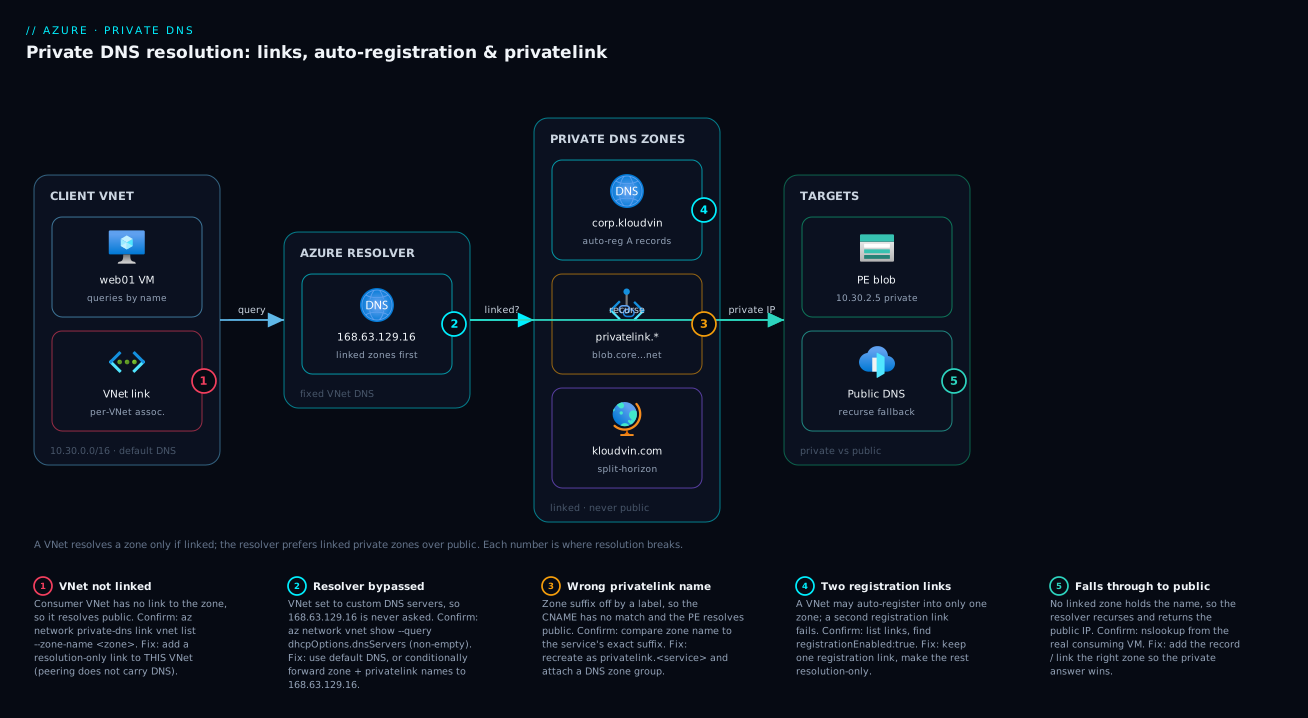
The diagram traces a single DNS query as it really flows and shows where each failure class bites. Read it left to right. A client VM in a linked virtual network asks for a name and sends the query to the Azure-provided resolver at 168.63.129.16 — it never talks to the zone directly. The resolver consults the private DNS zones linked to that VNet: the auto-registration zone corp.kloudvin.com (which holds VM A records that appeared by themselves), the privatelink.blob.core.windows.net zone (which makes a Private Endpoint resolve to its 10.20.2.x private IP), and the split-horizon kloudvin.com shadow zone. If a linked zone holds the longest-suffix match, the resolver answers privately; if not, it recurses to public DNS and returns the public address — which is exactly what an unlinked VNet or an internet client gets.
Follow the numbered badges for the failure map. The query path breaks at the VNet link if the consumer VNet isn’t linked (the storage endpoint then resolves public), at the registration link if you try to add a second one (only one per VNet), and at the resolver hop if the VNet was switched to custom DNS servers that don’t forward to 168.63.129.16 — the single most common “everything stopped resolving” outage. The legend narrates each number as symptom, the exact command to confirm, and the fix. The whole method is: a resource queries the resolver, the resolver prefers linked private zones over public, and every bug is either a missing link, a wrong zone name, or a resolver that was bypassed.
Real-world scenario
Meridian Logistics runs a fleet-tracking platform on Azure in a hub-and-spoke topology in Central India: a hub vnet-hub (10.20.0.0/16) with shared services, and three spokes — vnet-app (10.21.0.0/16), vnet-data (10.22.0.0/16), and vnet-mgmt (10.23.0.0/16) — all peered to the hub. The five-engineer platform team had adopted Private Endpoints for Azure SQL and blob storage, ticking “integrate with a private DNS zone” during creation each time. DNS spend was effectively nil.
The incident surfaced as intermittent slowness in the tracking app plus occasional outright failures writing to blob storage — but only from the app tier, never from the management jump box. The on-call engineer’s first move was to check the endpoints: all healthy, private IPs assigned, “approved.” The storage firewall denied public access. So how was the app reaching storage at all?
The breakthrough came from running nslookup meridianfleet.blob.core.windows.net from an app-tier VM versus the jump box. From the jump box (vnet-mgmt) it returned the private 10.20.2.5; from the app VM (vnet-app) it returned a public IP. The cause: when each endpoint was created, the wizard created the privatelink.blob.core.windows.net and privatelink.database.windows.net zones and linked them — but only to the VNet the wizard defaulted to (the hub, and for one endpoint vnet-mgmt). The spokes vnet-app and vnet-data were never linked. So app-tier resolution fell through to public DNS, returned the public IP, and traffic tried the public path — which the firewall sometimes blocked (the failures) and sometimes allowed via a stale cache (the slowness).
The fix was small, the lesson large. They linked both privatelink.* zones (resolution-only) to every spoke:
for VN in vnet-app vnet-data; do
  for Z in privatelink.blob.core.windows.net privatelink.database.windows.net; do
    az network private-dns link vnet create -g rg-net -n "link-$VN-${Z%%.*}" \
      --zone-name $Z --virtual-network $VN --registration-enabled false
  done
done
Within a minute (the affected records’ TTL was 30s, though cached public answers lingered until theirs expired), app-tier nslookup returned 10.20.2.5 and blob writes went private and stopped failing. To stop future endpoints shipping without DNS wiring, they applied the built-in Azure Policy that deploys a private DNS zone group on endpoint creation, centralised all privatelink.* zones in the hub, and wrote a one-line runbook: “After any Private Endpoint, confirm the privatelink zone is linked to the consumer VNet, not just the endpoint’s VNet.” Cost impact was zero; the architecture was correct except for four missing links.
The incident as a timeline, because the order of moves is the lesson:
| Time | Symptom | Action taken | Effect | What it should have been |
|---|---|---|---|---|
| T+0 | App-tier blob writes slow + failing | Check Private Endpoints | All healthy — confusing | Ask what IP the app resolves |
| T+8m | Still failing | Check storage firewall | Public denied — so how connecting? | Clue: it uses the public FQDN |
| T+15m | Root cause hunt | nslookup from app VM vs jump box |
App gets public, jump box private | The breakthrough |
| T+20m | Cause found | Inspect privatelink zone links | Spokes never linked | — |
| T+25m | Mitigated | Link zones to all spokes | App resolves private; failures clear | Correct fix |
| +1 day | Hardened | Azure Policy + centralise zones | No future endpoint ships without DNS | The durable fix is policy |
Advantages and disadvantages
Private DNS Zones are a managed, no-server way to run private name resolution — mostly upside, with a few sharp edges to design around.
| Advantages (why this model helps you) | Disadvantages (why it bites) |
|---|---|
| Fully managed: no DNS server VMs to patch, scale, or pair for HA | Resolution is per-VNet via links — forget the link and it silently resolves public |
| Auto-registration gives VMs A records with zero effort, self-cleaning | Auto-registration is one zone per VNet — no single central registration zone |
privatelink.* zones make Private Endpoints “just work” with a zone group |
Wrong privatelink suffix fails silently — endpoint looks fine, resolves public |
| Split-horizon is trivial: a same-named private zone, no extra product | A VNet on custom DNS bypasses the resolver unless it forwards to 168.63.129.16 |
| Free for the zone; only tiny per-query/record charges | At hub-spoke scale you link every zone to every VNet — verbose without automation |
| Works with the free Azure resolver — no extra infra for VNet-only resolution | On-prem ↔ Azure resolution needs an Azure DNS Private Resolver (extra) |
| Records via portal/CLI/Bicep/Policy — fully IaC and governable | No DNSSEC or zone transfer (AXFR); not a drop-in for every legacy DNS need |
The model is right for VNet-internal resolution, Private Endpoint integration, and split-horizon — the vast majority of Azure workloads. It bites when resolution must cross on-prem ↔ Azure (add a Private Resolver), when custom DNS is already in play (add conditional forwarding), or at many-VNet scale (add Policy and a naming convention). All three are manageable; none is a reason to run your own DNS fleet.
Hands-on lab
The centerpiece: build the whole thing end to end — a zone, an auto-registration link, two self-registering VMs, a manual record, and a privatelink zone for a storage Private Endpoint — then validate and tear it down. Free-tier-friendly except for two B1s VMs and one storage account (a few rupees for the hour). Run in Cloud Shell (Bash).
Prerequisites: an Azure subscription, Contributor on a resource group (or the subscription), and
az≥ 2.55. Everything below creates resources in one resource group you delete at the end.
Step 1 — Variables and resource group.
RG=rg-dns-lab
LOC=centralindia
ZONE=corp.kloudvin.com
PLZONE=privatelink.blob.core.windows.net
VNET=vnet-lab
SA=sadnslab$RANDOM          # globally-unique storage name
az group create -n $RG -l $LOC -o table
Expected: a resource-group row with "provisioningState": "Succeeded".
Step 2 — Create a VNet with a workload subnet and a PE subnet.
az network vnet create -g $RG -n $VNET --address-prefixes 10.30.0.0/16 \
  --subnet-name snet-workload --subnet-prefixes 10.30.1.0/24 -o table
az network vnet subnet create -g $RG --vnet-name $VNET -n snet-pe \
  --address-prefixes 10.30.2.0/24 -o table
Expected: the VNet and two subnets. Leave it on default DNS — custom DNS servers would stop the private zone being consulted.
Step 3 — Create the private zone and link it WITH auto-registration.
az network private-dns zone create -g $RG -n $ZONE -o table
az network private-dns link vnet create -g $RG -n link-lab \
  --zone-name $ZONE --virtual-network $VNET --registration-enabled true -o table
Expected: the zone shows numberOfRecordSets: 1 (SOA); the link registrationEnabled: true, virtualNetworkLinkState: Completed.
Step 4 — Create two VMs in the workload subnet (they will auto-register).
for VM in web01 web02; do
  az vm create -g $RG -n $VM --image Ubuntu2204 --size Standard_B1s \
    --vnet-name $VNET --subnet snet-workload \
    --admin-username azureuser --generate-ssh-keys --public-ip-address "" \
    --no-wait
done
# wait for both to finish
az vm wait -g $RG -n web01 --created
az vm wait -g $RG -n web02 --created
Expected: both VMs reach Succeeded. --public-ip-address "" (no public IP) is deliberate — this is a private-DNS lab.
Step 5 — Watch auto-registration populate the zone. No DNS commands run — records appear by themselves:
az network private-dns record-set a list -g $RG --zone-name $ZONE \
  --query "[].{name:name, ip:aRecords[0].ipv4Address}" -o table
Expected: web01 and web02 listed with 10.30.1.x addresses you never typed — the zone is now a live inventory.
Step 6 — Validate VM-to-VM resolution by name. Run a command on web01 remotely:
az vm run-command invoke -g $RG -n web01 --command-id RunShellScript \
  --scripts "nslookup web02.corp.kloudvin.com"
Expected: web02.corp.kloudvin.com resolves to its 10.30.1.x private IP, served by 168.63.129.16 — no hosts-file editing.
Step 7 — Add a manual record (for something that doesn’t auto-register).
az network private-dns record-set a add-record -g $RG --zone-name $ZONE \
  --record-set-name api --ipv4-address 10.30.1.100
az vm run-command invoke -g $RG -n web01 --command-id RunShellScript \
  --scripts "nslookup api.corp.kloudvin.com"
Expected: api.corp.kloudvin.com → 10.30.1.100. Manual and auto-registered records coexist in the same zone.
Step 8 — Stand up a storage account + Private Endpoint + privatelink zone.
# Storage account (disable public access to force the private path)
az storage account create -g $RG -n $SA --sku Standard_LRS \
  --kind StorageV2 --public-network-access Disabled -o table

# The privatelink zone, linked resolution-only
az network private-dns zone create -g $RG -n $PLZONE -o table
az network private-dns link vnet create -g $RG -n link-pl-blob \
  --zone-name $PLZONE --virtual-network $VNET --registration-enabled false -o table

# Create the Private Endpoint for the blob sub-resource
SAID=$(az storage account show -g $RG -n $SA --query id -o tsv)
az network private-endpoint create -g $RG -n pe-blob \
  --vnet-name $VNET --subnet snet-pe \
  --private-connection-resource-id $SAID --group-id blob \
  --connection-name pe-blob-conn -o table

# Tie the endpoint to the zone so the A record is written automatically
az network private-endpoint dns-zone-group create -g $RG \
  --endpoint-name pe-blob --name pe-blob-zg \
  --private-dns-zone $PLZONE --zone-name blob -o table
Expected: the endpoint is created and the DNS zone group writes an A record into privatelink.blob.core.windows.net for the account’s private IP (a 10.30.2.x address).
Step 9 — Validate the Private Endpoint resolves privately.
az vm run-command invoke -g $RG -n web01 --command-id RunShellScript \
  --scripts "nslookup $SA.blob.core.windows.net"
Expected: the lookup follows the CNAME to $SA.privatelink.blob.core.windows.net and returns the private 10.30.2.x IP, not a public one. A public IP would mean the privatelink zone isn’t linked to this VNet — the exact failure from the real-world scenario.
Validation checklist. You created a zone, auto-registered two VMs without touching DNS, resolved VM-to-VM by name, added a manual record, and made a Private Endpoint resolve privately via a privatelink zone and zone group. The steps mapped to what each proves:
| Step | What you did | What it proves |
|---|---|---|
| 3 | Zone + registration link | The link activates resolution & registration |
| 5 | Records appeared unprompted | Auto-registration is zero-touch |
| 6 | nslookup web02... from web01 |
VM-by-name works via 168.63.129.16 |
| 7 | Manual api record |
Manual and auto records coexist |
| 8–9 | PE + privatelink zone + zone group | Makes Private Endpoints resolve |
Cleanup (avoid lingering VM/storage charges).
az group delete -n $RG --yes --no-wait
Cost note. Two B1s VMs plus one Standard_LRS account for an hour is well under ₹60; the zones and links are effectively free. Deleting the resource group stops everything, and because the VMs auto-registered, their A records vanish with them.
Common mistakes & troubleshooting
Failures cluster tightly: a missing link, a wrong zone name, a bypassed resolver, or stale state. The playbook — scan the table mid-incident, then the key entries with exact confirm commands underneath.
| # | Symptom | Root cause | Confirm (exact cmd / portal path) | Fix |
|---|---|---|---|---|
| 1 | PE resolves to a public IP from the app | privatelink zone not linked to the consumer VNet | nslookup from app VM; link vnet list --zone-name <plzone> |
Link the zone (registration off) to that VNet |
| 2 | Private records don’t resolve (NXDOMAIN/public) | VNet uses custom DNS servers, bypassing 168.63.129.16 |
vnet show --query dhcpOptions.dnsServers (non-empty) |
Default DNS, or forward zone names to 168.63.129.16 |
| 3 | Second registration link fails to create | One registration link per VNet already exists | link vnet list (find registrationEnabled:true) |
Disable the other, or use a different zone/VNet |
| 4 | VM didn’t auto-register | VM not in the registration VNet, or link resolution-only | Check the link’s registrationEnabled + the VM’s VNet |
Enable registration on the right VNet’s link |
| 5 | PE works in hub, not in spoke | privatelink zone linked only to hub | List zone links; compare to spoke VNet | Link the zone to the spoke too (peering ≠ DNS) |
| 6 | Wrong/old IP returned for a name | Stale record or cached answer (TTL) | record-set a show ...; check TTL |
Update the record; lower TTL before changes |
| 7 | privatelink zone created but PE still public | Wrong zone name (suffix off by a label) | Compare zone name to the service’s exact suffix | Recreate with the exact privatelink.<service> name |
| 8 | Resolves from VM, fails from on-prem | On-prem can’t reach 168.63.129.16 (VNet-internal) |
Query the private name from on-prem → fails | Add DNS Private Resolver inbound endpoint + forwarding |
| 9 | Apex CNAME rejected | CNAME illegal at @ (must hold SOA) |
Error: “CNAME record sets cannot be created at the zone apex” | Use an A record at @, not CNAME |
| 10 | Records gone after VM stop/start | IP changed; auto-registration re-registered | record-set a list shows the new IP |
Use a static private IP or a manual record |
#1 / #5 — The Private Endpoint resolves public (the most common bug)
Run nslookup from the actual consuming VM, not Cloud Shell (which isn’t in your VNet):
az vm run-command invoke -g $RG -n <app-vm> --command-id RunShellScript \
  --scripts "nslookup <account>.blob.core.windows.net"
# Public IP returned  -> the privatelink zone is not linked to THIS VNet
az network private-dns link vnet list -g $RG --zone-name privatelink.blob.core.windows.net \
  --query "[].{link:name, vnet:virtualNetwork.id, reg:registrationEnabled}" -o table
If the consumer VNet isn’t listed, link it (resolution-only). Peering does not carry DNS — every consuming VNet needs its own link.
#2 — Custom DNS servers bypass the private zone
The silent killer in established networks. Check for custom DNS:
az network vnet show -g $RG -n <vnet> --query "dhcpOptions.dnsServers" -o tsv
If that returns IPs (your AD/DNS servers) rather than empty, those servers handle resolution and never consult the private zone. Fixes: revert to default DNS (az network vnet update --dns-servers ''); conditionally forward the private + privatelink.* names to 168.63.129.16; or front them with an Azure DNS Private Resolver. The forwarder approach is standard when you must keep custom DNS for on-prem AD.
#3 / #4 — Auto-registration won’t behave
| If you see… | It’s probably… | Do this |
|---|---|---|
| “registration link already exists” | This VNet already auto-registers into another zone | One registration zone per VNet; resolution-only for the rest |
| VM exists but no A record | VNet’s link is resolution-only (registration off) | Set --registration-enabled true on that link |
| Record name ≠ Azure VM name | Record uses the OS hostname | Align hostname, or add a manual record |
| Peered-VNet VMs don’t register | Registration is per-VNet, not transitive | Give that VNet its own registration zone |
#8 — On-prem can’t resolve Azure private names
168.63.129.16 is reachable only from inside a VNet — on-prem hosts (over VPN/ExpressRoute) cannot query it directly. To let on-prem resolve corp.kloudvin.com or a privatelink name, deploy an Azure DNS Private Resolver with an inbound endpoint (a private IP your on-prem DNS forwards to), plus an outbound endpoint + forwarding ruleset if Azure needs on-prem zones. This replaces the old DNS-forwarder-VM pattern.
Best practices
- Centralise the
privatelink.*zones in one place (usually the hub’s resource group/subscription) and link them out to every consuming VNet. One zone per service, linked widely — not a zone per endpoint. - Enforce DNS wiring with Azure Policy. Apply the built-in “Configure private endpoints to use private DNS zones” / deploy-DNS-zone-group policies so no Private Endpoint is ever created without its A record and link. This is the single highest-leverage control here.
- Pick exactly one registration VNet per zone and keep every other link resolution-only. Do not fight the one-registration-link-per-VNet rule; design around it.
- Leave VNets on default DNS where you can. Only set custom DNS servers when you genuinely need on-prem/AD resolution — and when you do, always conditionally forward private +
privatelinknames to168.63.129.16. - Use a DNS zone group on every Private Endpoint instead of hand-adding A records, so records track endpoint IP changes automatically and never go stale.
- Get the
privatelinksuffix exactly right by copying it from Microsoft’s published list, not from memory — a one-label typo fails silently and wastes hours. - Lower TTLs before a planned change (to 60–300s a day ahead) so cached answers expire fast; raise them back afterwards to cut query volume.
- For split-horizon, keep the private zone minimal — override only the names that need an internal answer, and document that the private zone shadows the public one for linked VNets.
- Name links predictably (
link-<vnet>-<zone>) — at scale you read these lists constantly during triage. - Use static private IPs (or DNS zone groups) for anything code depends on, so an auto-registered record changing IP after a stop/start doesn’t break callers.
- Remember peering moves traffic, not DNS — every new spoke needs explicit links to the zones it resolves.
- Audit links periodically (
az network private-dns link vnet list) to catch consumer VNets that were never linked.
Security notes
Private DNS is a security control as much as a convenience — in the Private Endpoint flow its whole job is keeping traffic off the public internet — so treat its config as security-relevant.
| Concern | Guidance |
|---|---|
| Keep PaaS traffic private | The privatelink zone is what makes a Private Endpoint actually used; an unlinked zone silently takes the public path. Verify with nslookup from real consumers and pair zones with public access disabled (--public-network-access Disabled). |
| RBAC on zones and links | Scope Private DNS Zone Contributor tightly. A malicious or mistaken A record in a linked zone can hijack a name (e.g. api.corp → attacker IP) for every VM in the VNet. |
| No accidental public exposure | Private zones are never published — but a public zone of the same name (split-horizon) is. Put internal-only names in the private zone, not the public one. |
| Don’t leak internal topology | Private zone contents (hostnames, IP plan) are recon material; restrict read access and don’t mirror private records into the public zone. |
| Custom DNS forwarding scope | Forward only the specific private + privatelink names (conditional forwarding), not a blanket *, to keep public resolution predictable. |
| Policy as guardrail | Use Azure Policy to force private DNS integration on Private Endpoints. Deploy-if-not-exists is stronger than a runbook. |
| Audit and diagnostics | Record-set changes flow to the Activity log; alert on changes in sensitive zones to catch hijacks or fat-fingers. |
For the Private Link side of this story, Azure Private Link and Private DNS: Keeping PaaS Off the Public Internet goes deeper on locking the data plane down.
Cost & sizing
Private DNS is one of the cheapest services in Azure and for most workloads rounds to free — but know what meters.
| Cost driver | How it’s charged | Typical magnitude | Notes |
|---|---|---|---|
| Private DNS zone (hosting) | Per zone per month | A few US cents per zone | First 25 zones at the low per-zone rate; negligible |
| DNS queries | Per million queries | Cents per million | VNet-internal queries are cheap; rarely noticed |
| Record sets | Included in zone hosting | — | No separate per-record charge |
| VNet links | No separate charge | Free | Link to as many VNets as needed |
| Auto-registration | No separate charge | Free | Part of the zone/link |
| Azure DNS Private Resolver (optional) | Endpoint-hour + per million queries | The real cost for on-prem resolution | Inbound + outbound endpoints each meter |
Sizing is simple: zones, links, records, and auto-registration are not a cost concern — provision them freely and prefer many resolution-only links over manual records. The one line item that grows is the Azure DNS Private Resolver, billed per endpoint-hour, added only when on-prem ↔ Azure private resolution is required — and even then far cheaper than a pair of HA DNS-forwarder VMs. There is no free-tier limit to worry about because per-zone and per-query costs are trivial; for this article’s lab the only real charges are the VMs and storage you delete at the end.
Interview & exam questions
1. What is an Azure Private DNS zone and how does it differ from Azure DNS (public)? A private zone hosts DNS records that are never published to the public internet and resolve only for the virtual networks you link to the zone. Azure DNS public hosts internet-facing zones resolvable by anyone. Same product family, opposite audience: private = linked VNets only; public = the whole internet.
2. How does a resource in a VNet actually resolve a name from a private zone — do you point it at the zone? No. Resources query the Azure-provided resolver at 168.63.129.16 (on default DNS), which checks the linked private zones first (longest suffix match), answers privately if a record exists, else recurses to public DNS. You never configure clients to use the zone directly; you create the link.
3. What is auto-registration and what is its key constraint? A per-link flag that makes VMs in the registration VNet automatically create, update, and remove their own A records as they’re created, change IP, or are deleted. The constraint: a VNet can be the registration VNet for only one private zone; all its other links must be resolution-only.
4. Why might a Private Endpoint still resolve to a public IP even though it’s healthy? Because the privatelink.* zone holding its A record is not linked to the VNet doing the query (or the suffix is wrong, or the VNet uses custom DNS that bypasses 168.63.129.16). Confirm with nslookup from the actual consuming VM and check the zone’s links. Fix by linking the zone (resolution-only) to that VNet.
5. What is split-horizon DNS on Azure and how do you implement it? It’s making the same FQDN return a private answer inside linked VNets and a public answer everywhere else. You implement it by creating a private zone with the same name as your public zone (e.g. both kloudvin.com) and linking the private one only to the internal VNets. The two zones are independent; Azure never publishes the private one.
6. Why doesn’t VNet peering give peered VMs access to a private zone’s records? Because peering moves traffic, not DNS. Resolution is decided per-VNet by that VNet’s links, and a link is not transitive across peering — a peered VNet needs its own link to the zone.
7. A network team set custom DNS servers on the VNet and all private records stopped resolving. Why, and what are the fixes? Queries go to those servers, not 168.63.129.16, so the private zones are never consulted. Fixes: revert to default DNS; make the custom servers conditionally forward the private + privatelink names to 168.63.129.16; or place an Azure DNS Private Resolver in the path.
8. Which record types can a private zone hold, and what’s the apex restriction? A, AAAA, CNAME, MX, PTR, SRV, TXT, plus an auto-created SOA. The apex restriction is standard: no CNAME at @ because the apex must hold the SOA — use an A record at the apex instead.
9. What is a DNS zone group on a Private Endpoint and why prefer it? An object that ties the endpoint to a private zone so the correct A record is created and kept in sync automatically (including IP changes on recreation). Prefer it over hand-adding the record, which goes stale and breaks resolution silently.
10. How do you let on-premises clients resolve an Azure private zone name? On-prem can’t reach 168.63.129.16 directly. Deploy an Azure DNS Private Resolver with an inbound endpoint (a private IP your on-prem DNS forwards to), plus an outbound endpoint + forwarding ruleset if Azure needs on-prem zones. This replaces the legacy DNS-forwarder-VM pattern.
11. In a hub-and-spoke topology, where should the privatelink.* zones live and how are they linked? Centralise them in the hub (one zone per service) with resolution-only links to every spoke that consumes the endpoints. Use Azure Policy to auto-deploy the DNS zone group on each Private Endpoint so the wiring is never forgotten.
12. What drives the cost of Private DNS, and where can a real bill appear? Zones, links, records, and auto-registration are effectively free (tiny per-zone/per-query charges). The only meaningful cost is the optional Azure DNS Private Resolver, billed per endpoint-hour plus per-query, added only for on-prem ↔ Azure resolution.
These map to AZ-104 (configure name resolution, Private DNS zones, VNet integration) and AZ-700 (design and implement private access to Azure services, Private Endpoints, Private DNS) — split-horizon and privatelink show up most on AZ-700. A compact cert-mapping for revision:
| Question theme | Primary cert | Objective area |
|---|---|---|
| Private zones, links, auto-registration | AZ-104 | Configure name resolution |
| Private Endpoint + privatelink zones | AZ-700 | Private access to Azure services |
| Split-horizon, hub-spoke DNS design | AZ-700 | Design private connectivity |
Custom DNS + forwarding to 168.63.129.16 |
AZ-700 / AZ-104 | Name resolution for VNets |
| DNS Private Resolver (on-prem ↔ Azure) | AZ-700 | Hybrid name resolution |
| Azure Policy for DNS guardrails | AZ-500 / AZ-104 | Governance of network resources |
Quick check
- You leave a VNet on default DNS. A resource queries a name. Which IP does the query go to, and what does that resolver check before recursing to public DNS?
- A Private Endpoint is healthy but the app resolves the storage account to a public IP. Name the single most likely cause and the command you’d run to confirm it.
- True or false: enabling auto-registration on a link in the hub VNet makes VMs in a peered spoke auto-register into that zone.
- You want
app.kloudvin.comto return10.20.1.10inside the VNet but the public Front Door IP on the internet. What do you create, and what’s the one rule about its name? - Your network team set the VNet to use two custom DNS server IPs, and now no private records resolve. Why, and what’s the fix that keeps the custom servers?
Answers
- The query goes to the Azure-provided resolver at
168.63.129.16. It checks the private DNS zones linked to that VNet (longest suffix match) first, answers privately if a record exists, and only then recurses to public DNS. - The
privatelink.blob.core.windows.netzone is not linked to the consumer’s VNet (so resolution falls through to public). Confirm by runningnslookup <account>.blob.core.windows.netfrom the actual consuming VM and listing the zone’s links withaz network private-dns link vnet list --zone-name privatelink.blob.core.windows.net. Fix by linking the zone (resolution-only) to that VNet. - False. Peering moves traffic, not DNS, and auto-registration is per-VNet — only VMs in the registration VNet auto-register. A peered spoke needs its own registration zone (and a VNet can have only one registration link).
- Create a private DNS zone named
kloudvin.com(split-horizon shadow of the public zone), link it to the internal VNets, and add an A recordapp → 10.20.1.10. The rule: the private zone must have the same name as the public zone, and it stays unlinked from anywhere that should see the public answer. - The custom DNS servers receive the queries instead of
168.63.129.16, so the private zones are never consulted. Keep the custom servers by configuring conditional forwarding of the private zone names (and everyprivatelink.*name) to168.63.129.16, or front them with an Azure DNS Private Resolver.
Glossary
- Private DNS zone — a DNS zone (
Microsoft.Network/privateDnsZones) hosted in Azure and never published to the public internet; resolves only for linked VNets. Its name is the DNS suffix. - Virtual network link — the association (
.../virtualNetworkLinks) between a private zone and one VNet; a VNet can resolve a zone only if it has a link to it. - Registration (auto-registration) — a per-link flag that makes VMs in the registration VNet automatically create/update/remove their own A records in the zone.
- Resolution-only link — a link with registration disabled: the VNet can resolve the zone’s records but VMs don’t auto-register into it.
- Azure-provided resolver (
168.63.129.16) — the fixed virtual DNS server in every VNet that consults linked private zones first, then recurses to public DNS; reachable only from inside a VNet. - Split-horizon (split-brain) DNS — serving a different answer for the same name to internal vs external clients, implemented by a private zone with the same name as a public one.
privatelink.*zone — a reserved private zone name (e.g.privatelink.blob.core.windows.net) that holds the A record making a Private Endpoint’s public FQDN resolve to its private IP.- Private Endpoint — a private NIC + IP in your VNet for a PaaS resource; needs a
privatelinkzone to be resolved privately. - DNS zone group — an object tying a Private Endpoint to a private zone so its A record is created and kept in sync automatically.
- SOA record — the auto-created Start of Authority record at the zone apex; you don’t create or delete it.
- A / CNAME / SRV / TXT / PTR — record types: A maps name→IPv4, CNAME aliases a name, SRV advertises a service+port, TXT holds text, PTR is reverse (IP→name) in an
in-addr.arpazone. - Azure DNS Private Resolver — a managed service with inbound/outbound endpoints and forwarding rulesets that bridges DNS between on-premises and Azure private zones, replacing DNS-forwarder VMs.
- Conditional forwarding — configuring a DNS server to forward queries for specific zone names (e.g.
privatelink.*) to another resolver such as168.63.129.16. - Hub-and-spoke — a topology with a central hub VNet and peered spokes; private zones must be linked to each spoke explicitly because peering doesn’t carry DNS.
Next steps
You can now create a private zone, link it to VNets, auto-register VMs, run split-horizon, and make Private Endpoints resolve. Build outward:
- Next: Azure Private Link and Private DNS: Keeping PaaS Off the Public Internet — go deeper on Private Link itself and locking the PaaS data plane down end to end.
- Related: Azure Private Endpoint vs Service Endpoint: Secure PaaS Access — choose the right private-access mechanism before you wire its DNS.
- Related: How to Host Public DNS on Azure DNS: Zone Delegation, Alias Records and Apex Domains — the public-zone counterpart and the other half of split-horizon.
- Related: Azure VNet Peering Done Right: Gateway Transit, Global Peering and Transitivity Limits — because peering moves traffic but never DNS; link your zones to every spoke.
- Related: Troubleshooting DNS on AKS: CoreDNS, Custom Forwarders, Private DNS Zones, and NXDOMAIN Storms — how private zones interact with CoreDNS when the consumers are Kubernetes pods.
- Related: Diagnosing Azure VNet Connectivity: NSGs, UDRs, Effective Routes & Network Watcher — when “it doesn’t resolve” turns out to be “it doesn’t route.”