Quick take: Amazon ElastiCache is a managed in-memory data store — you pick Redis OSS, Valkey or Memcached, and AWS runs the nodes, the replication, the failover, the patching and the backups while you get a microsecond-to-single-digit-millisecond key-value store sitting in your VPC on port 6379. You put it in front of a slower, more expensive system of record — an RDS or Aurora database, a DynamoDB table, an API — so that the hot 5% of reads never touch it. Done right, a cache turns a database melting at 90% CPU into one loafing at 20%, cuts p99 read latency from tens of milliseconds to under one, and drops your database bill because you stop paying for read replicas you only needed to survive traffic. Done wrong, it is a second stateful system that lies to your users (stale data), falls over under a thundering herd when a hot key expires, silently drops to a 0% hit rate after a node replacement, or returns
OOM command not allowedbecause the eviction policy wasnoevictionand nobody set a TTL. This article takes the whole thing apart — engines, the cache-aside / write-through / write-behind patterns, Redis data structures, cluster mode, Multi-AZ failover, Serverless, eviction, security and the metrics that matter — then builds a private, encrypted, Multi-AZ Redis replication group hands-on, implements cache-aside against RDS, and measures the hit-rate jump, in bothawsCLI and Terraform.
Almost every read-heavy application eventually hits the same wall: the database is the bottleneck. The same product page, the same user profile, the same leaderboard, the same feature-flag lookup gets read thousands of times a second, each one a round trip to a relational engine that has to parse SQL, plan the query, walk an index and serialize a row — tens of milliseconds and a chunk of CPU, over and over, for data that changed an hour ago. You can throw a bigger instance at it, or three read replicas, and you will spend real money to paper over the fact that you are asking a database to do a job an in-memory hash table does a thousand times faster. A cache is that hash table, run as a service.
This guide is the complete, decision-by-decision treatment of ElastiCache for Redis for someone who has to operate a cache in production, not just draw it on a whiteboard. We define the caching mental model and where ElastiCache sits between your app and its system of record. We go engine by engine (Redis OSS vs Valkey vs Memcached, and when each is right), pattern by pattern (cache-aside/lazy loading, write-through, write-behind, and TTL-based expiry with the staleness and stampede traps baked into each), structure by structure (strings, hashes, sorted sets for leaderboards, streams — and the caching job each one does), then topology by topology: cluster mode disabled vs enabled, replication + Multi-AZ + automatic failover, the new ElastiCache Serverless, eviction policies and maxmemory, the endpoints (primary, reader, configuration), security (VPC, subnet group, the 6379 security group, encryption in transit and at rest, Redis AUTH and RBAC users), and the CloudWatch metrics that tell you whether the cache is helping or hurting. Then we build one hands-on and prove the hit rate.
By the end you can pick an engine and a topology on purpose, write cache-aside code that does not lie to users or stampede the database, launch a Multi-AZ Redis replication group that is private, encrypted and authenticated, size a node from its metrics, and work a failure — a dead connection, a low hit rate, an eviction storm, a failover blip, an OOM — from symptom to fix. This maps to the caching and performance domains of SAA-C03 (Solutions Architect Associate), DVA-C02 (Developer Associate) and SOA-C02 (SysOps Administrator).
What problem this solves
The problem ElastiCache solves is your database is doing expensive, repetitive read work it should not have to do. A relational query for the same unchanged row is pure waste — CPU spent parsing, planning and fetching data that was identical the last thousand times. Under load that waste becomes the bottleneck: connection pools saturate, p99 latency climbs, and the only knobs the database gives you (a bigger instance, more read replicas) cost more every month and still cap out. A cache moves those hot reads to an in-memory store that answers in microseconds, so the database only sees the first read of each value and every write — a fraction of the traffic.
What breaks without understanding it is rarely the creation — a Redis cluster appears in ten minutes. It is everything a naive cache silently gets wrong. You cache a value with no TTL and never invalidate it, so users see an hour-old price forever. You set maxmemory-policy to the ElastiCache default of volatile-lru, forget to put TTLs on your keys, the node fills, and every write starts failing with OOM command not allowed because there is nothing evictable. A viral event expires a hot key and ten thousand concurrent requests all miss at once and stampede the database into the ground — the exact outage the cache was supposed to prevent. A node gets replaced during maintenance, the cache comes back empty, the hit rate craters to 0%, and the cold database gets the full firehose. You run a KEYS * in a debugging session and block the single-threaded Redis event loop for two seconds, and every user everywhere sees a latency spike. You point the app at the primary endpoint, a failover promotes a replica, the DNS moves, and because the client cached the IP it errors for a minute. Each is a specific, avoidable trap, and each is in this article.
Who hits this: every backend and platform engineer who has ever watched a database redline under read traffic. It bites hardest on teams adding their first cache (the staleness and stampede traps), on people who treat Redis like a database instead of a cache (the eviction and durability traps), on anyone running a leaderboard, session store or rate limiter (the data-structure choices), and on cost-optimizers who do not realize a three-node Multi-AZ replication group bills for all three nodes around the clock. Here is the whole field in one frame — the decisions every ElastiCache deployment forces you to make, whether or not you notice making them:
| The caching decision | The default if you don’t decide | What it costs to get wrong | Where in this article |
|---|---|---|---|
| Which engine? | Whatever the wizard shows first | Missing data structures, or paying for HA you don’t need | Redis vs Memcached vs Valkey |
| Which caching pattern? | Cache-aside, half-implemented | Stale reads, stampedes, or double-writes | Caching patterns |
| Cluster mode on or off? | Disabled (single shard) | A write/memory ceiling, or client CROSSSLOT errors | Cluster mode |
| TTL — and jitter? | No TTL, or one fixed TTL everywhere | Permanent staleness, or a synchronized stampede | Caching patterns / TTL |
| Eviction policy + node size? | volatile-lru, undersized node |
OOM write failures or a low hit rate |
Eviction policies & maxmemory |
| Multi-AZ + failover? | Single node, no replica | Total cache loss + a cold-DB thundering herd on any AZ blip | Replication, Multi-AZ & failover |
| Encryption + AUTH/RBAC? | Off unless you tick it | A wide-open cache reachable by anything in the VPC | Security |
| Which metrics do you watch? | CPUUtilization (the wrong one) |
You miss the real saturation signal (EngineCPUUtilization) |
Monitoring |
Learning objectives
By the end of this article you can:
- Explain what a cache is and is not, and place ElastiCache correctly between your application and its system of record (RDS, Aurora, DynamoDB, an API).
- Choose deliberately among Redis OSS, Valkey and Memcached using real differences — data structures, persistence, replication, threading model, cluster support and cost.
- Implement the three caching patterns — cache-aside (lazy loading), write-through and write-behind — and reason about their consistency, latency and failure trade-offs, plus TTL-based expiry with jitter.
- Map Redis data structures (strings, hashes, lists, sets, sorted sets, streams, bitmaps, HyperLogLog) to real caching jobs — session store, leaderboard, rate limiting, DB read-offload, pub/sub, queue.
- Choose between cluster mode disabled (single shard + replicas) and cluster mode enabled (sharded across 16,384 hash slots), and know how the client differs (MOVED/ASK, CROSSSLOT, hash tags).
- Configure replication, Multi-AZ, automatic failover and the three endpoint types (primary, reader, configuration), and decide when ElastiCache Serverless is the better answer.
- Set eviction policies (
allkeys-lru/lfu,volatile-*,noeviction),maxmemoryand reserved memory so the cache evicts instead of erroring. - Secure the cache: VPC placement, a cache subnet group, a security group on 6379, encryption in transit and at rest, and AUTH token vs RBAC users.
- Read the CloudWatch metrics that matter —
CacheHitRate,Evictions,EngineCPUUtilization,SwapUsage,DatabaseMemoryUsagePercentage,CurrConnections— and act on each. - Run the whole thing hands-on: a private, encrypted, Multi-AZ Redis replication group, cache-aside from an app against RDS, a measured hit-rate jump, and a clean teardown — in
awsCLI and Terraform.
Prerequisites & where this fits
You need an AWS account, the AWS CLI v2 configured with a non-root IAM identity, and a VPC with at least two private subnets in different Availability Zones — a cache belongs on private subnets, reachable only from your app tier. If your networking is fuzzy, build the substrate first with Building an AWS VPC from Scratch: Subnets, Route Tables, IGW & a Public/Private Design. You should be comfortable at a shell, able to read a Terraform resource block, and know basic SQL — the cache sits in front of a database you already understand.
This sits in the Databases track, one layer above the database. It assumes you have already chosen and launched your system of record; the natural predecessor is Launch Amazon RDS (MySQL & PostgreSQL) Hands-On, whose private-subnet, security-group-only design is exactly the shape a cache wants too. If the pressure you are trying to relieve is a slow database rather than a read-volume problem, first confirm the queries themselves are tuned — RDS Performance Insights: Finding and Tuning Slow Queries — because caching a slow query hides it, it does not fix it. When your access pattern is key-value at massive scale, the system of record might be Amazon DynamoDB Tables, Keys & Capacity Hands-On instead of a relational engine — the cache-aside pattern here works the same in front of either. And the cache is one tier of a bigger picture: see where it plugs into The AWS Three-Tier Web Application Architecture.
Here is the assumed knowledge, why each piece matters specifically for running a cache, and where to shore it up:
| You should know… | Why it matters here | Brush up |
|---|---|---|
| What a VPC, subnet and AZ are | The cache needs a subnet group across ≥2 private AZs | Building an AWS VPC from Scratch |
| How a security group works (stateful, allow-only) | The SG on 6379 is the cache’s only firewall | Launch Amazon RDS Hands-On |
| What a relational database costs per read | It’s the pain the cache relieves | RDS Performance Insights |
| Basic key-value thinking | Redis is a key → value store, not tables | This article, Core concepts |
| That a cache can serve stale data | Every pattern trades freshness for speed | This article, Caching patterns |
| Where a cache sits in a web app | It’s the read-path accelerator between app and DB | Three-Tier Web Application Architecture |
Core concepts
Eight mental models make every later decision obvious.
A cache is a fast, lossy copy — never the source of truth. Redis holds a copy of data whose authoritative home is elsewhere (a database, an API). The cache can be wiped, expire, or fall behind, and your application must be correct anyway — every read that misses the cache must be answerable from the system of record. The instant you start treating Redis as the only place a piece of data lives, you have a database with none of a database’s durability guarantees, and one node replacement from data loss.
The whole value is the hit rate. A cache earns its keep only when reads hit it. A hit is answered from memory in microseconds and never touches the database; a miss costs a database round trip plus a cache write, so it is slightly slower than no cache at all. A cache at a 95% hit rate offloads 95% of reads; a cache at 30% is mostly overhead. Everything you tune — TTLs, key design, node size, eviction — is in service of the hit rate.
Redis is (mostly) single-threaded, and that is a feature and a trap. The Redis command loop runs commands one at a time on a single core, which is why every operation is atomic and why it is blindingly fast for small operations — no locks. It is also why one O(N) command on a big key (KEYS *, SMEMBERS on a million-member set, a huge DEL) blocks every other client for the duration. Multithreaded I/O exists in newer versions for network handling, but command execution is still effectively serial. Watch EngineCPUUtilization (the Redis thread), not CPUUtilization (the whole box), to see real saturation.
ElastiCache lives only inside your VPC. There is no public endpoint, ever. A cache node is reachable only from within its VPC (or a peered VPC / VPN / Transit Gateway). Reachability is entirely the attached security group on port 6379 (Redis/Valkey) or 11211 (Memcached). This is why “I can’t connect from my laptop” is almost always correct behaviour, not a bug.
A replication group is one or more shards, each a primary plus replicas. The ElastiCache unit for Redis is a replication group. With cluster mode disabled it is a single shard (node group) — one primary and up to five read replicas. With cluster mode enabled it is up to 500 shards, each its own primary+replicas, with the keyspace partitioned across them. Replication from primary to replica is asynchronous, so a replica can lag the primary by a few milliseconds.
Endpoints hide the nodes, and they move. You never connect to a node’s IP. Cluster mode disabled gives you a primary endpoint (a DNS name that always points at the current write node) and a reader endpoint (which load-balances across replicas for reads). Cluster mode enabled gives you a configuration endpoint the client uses to discover the whole slot map. On a failover the primary endpoint’s DNS is repointed — connect by name, never a cached IP.
Eviction is what makes it a cache, not a database. When a node reaches maxmemory, its eviction policy decides what to drop to make room. A pure cache should evict the least-useful keys (allkeys-lru/allkeys-lfu) and keep serving; a policy of noeviction turns a full cache into one that rejects writes with OOM command not allowed. The ElastiCache default is volatile-lru, which only evicts keys that have a TTL — a subtle trap if your keys have no TTL.
TTL bounds staleness but creates stampedes. A time-to-live on a key guarantees the cache can be at most that stale before the next read refetches. But if thousands of clients hold the same hot key and it expires at the same instant, they all miss at once and stampede the database — the thundering herd. The fixes are TTL jitter (randomize expiry so keys don’t all die together) and a rebuild lock (let one request repopulate while others wait or serve stale).
Here is every moving part of an ElastiCache-for-Redis deployment in one table, with who sets it and the gotcha that bites:
| Building block | What it is | You set it… | Gotcha |
|---|---|---|---|
| Engine + version | Redis OSS / Valkey / Memcached, a version | At create; upgrade later | Engine choice constrains data structures, HA, cluster |
| Node type | The VM size (cache.t4g.micro … cache.r7g.16xlarge) |
At create; modifiable | cache.t burstable throttles; cache.r for memory |
| Cluster mode | Single shard vs sharded (16,384 slots) | At create (migratable, but plan it) | Enabled needs a cluster-aware client; CROSSSLOT limits |
| Replicas per shard | 0–5 read replicas | At create; add/remove later | 0 replicas = no failover, no read scaling |
| Multi-AZ + failover | Replicas in other AZs, auto-promote | At create; toggle later | Needs ≥1 replica; failover is a ~30–60s blip |
| Cache subnet group | Which subnets/AZs nodes may use | At create | Needs ≥2 private AZs for HA |
| Security group | The inbound firewall on 6379 | At create; editable | 0.0.0.0/0 = every VPC workload can read your cache |
| Parameter group | Engine config (maxmemory-policy, etc.) |
Attach at create; edit anytime | Some params need a reboot; default policy is volatile-lru |
| maxmemory-policy | What to evict when full | Parameter group | noeviction → OOM; volatile-* needs TTLs |
| Encryption in transit | TLS on 6379 | At create only | Required for AUTH; adds a tiny latency cost |
| Encryption at rest | KMS on snapshots/backups/disk | At create only | No in-place toggle |
| AUTH token / RBAC | Password or ACL users | At create (RBAC editable) | AUTH requires TLS; RBAC is the modern choice |
| Backups (snapshots) | Point-in-time RDB copies | At create; on demand | Off by default; a snapshot briefly forks memory |
Redis vs Memcached vs Valkey — choosing the engine
ElastiCache offers three engines, and the choice sets the ceiling on everything after it. Memcached is the classic simple cache: a multithreaded, volatile, key-value blob store with client-side sharding and no replication, no failover, no data structures and no persistence. Redis OSS is the rich one: single-threaded command execution, dozens of data structures, replication, Multi-AZ failover, cluster mode, pub/sub, transactions, Lua and snapshots. Valkey is the Linux Foundation’s open-source fork of Redis 7.2 (created after Redis Inc. relicensed Redis away from open source in 2024); ElastiCache added Valkey support and prices it lower than Redis OSS for the same capabilities, because it is wire- and feature-compatible.
The three engines, side by side
| Dimension | Memcached | Redis OSS | Valkey |
|---|---|---|---|
| Model | Volatile key-value blobs | Rich data-structure store | Rich data-structure store (Redis fork) |
| Default port | 11211 | 6379 | 6379 |
| Threading | Multithreaded | Single-threaded command loop | Single-threaded command loop |
| Data structures | Strings only | Strings, hashes, lists, sets, sorted sets, streams, bitmaps, HLL, geo | Same as Redis |
| Replication / read replicas | ❌ None | ✅ Up to 5 per shard | ✅ Up to 5 per shard |
| Multi-AZ / automatic failover | ❌ | ✅ | ✅ |
| Cluster / sharding | Client-side only | ✅ Cluster mode (16,384 slots) | ✅ Cluster mode |
| Persistence / backups | ❌ | ✅ Snapshots (RDB) | ✅ Snapshots |
| Pub/Sub, transactions, Lua | ❌ | ✅ | ✅ |
| Encryption in transit / at rest | In-transit (newer) | ✅ Both | ✅ Both |
| AUTH / RBAC | SASL (limited) | ✅ AUTH + RBAC | ✅ AUTH + RBAC |
| Serverless option | ✅ | ✅ | ✅ (lowest cost) |
| Relative cost | Low | Standard | ~Lower than Redis OSS |
| Best at | Simple, huge, multi-core cache of opaque blobs | Everything else | Everything Redis does, cheaper |
When to pick which
| If you need… | Choose | Why |
|---|---|---|
| The most capable cache with data structures, HA, cluster | Valkey (or Redis OSS) | Full feature set; Valkey is the lower-cost default for new builds |
| Exact compatibility with an existing Redis OSS version/feature | Redis OSS | Match a version or a feature Valkey hasn’t reached yet |
| A dead-simple, multi-threaded cache of small opaque objects, no HA needed | Memcached | Multithreaded scale-out on big nodes, lowest complexity |
| Sorted sets for a leaderboard, streams for a queue, pub/sub | Valkey / Redis OSS | Memcached has none of these |
| Automatic failover and read replicas | Valkey / Redis OSS | Memcached has no replication at all |
| The lowest running cost for a new Redis-compatible workload | Valkey | AWS prices Valkey below Redis OSS for the same shape |
For everything in this article we use Redis-compatible ElastiCache (Redis OSS or Valkey — the commands and Terraform are identical; set engine = "valkey" to save money). Memcached is a genuinely different service and out of scope beyond this comparison. The one-line rule: reach for Memcached only when you want a plain, shardable, multi-core blob cache with no replication; reach for Valkey/Redis for literally everything else.
Caching patterns: cache-aside, write-through, write-behind, TTL
A cache is only as good as the pattern you wrap around it — the rules for when you read it, when you write it, and how data stays consistent with the source. There are three canonical write patterns and one expiry mechanism, and most real systems combine them.
The patterns compared
| Pattern | Who writes the cache | On read | Consistency | Write latency | Failure mode |
|---|---|---|---|---|---|
| Cache-aside (lazy loading) | The app, after a miss | Check cache → miss → read DB → populate | Eventually consistent; stale until TTL/invalidation | Low (write path untouched) | Cold cache; stale reads; stampede on expiry |
| Read-through | The cache library, on a miss | Cache fetches from DB itself | Same as cache-aside | Low | Same, hidden inside the client library |
| Write-through | The app, on every write, synchronously | Cache is already warm | Cache never stale (for written keys) | Higher (write cache + DB) | Caches rarely-read data; cold on new keys |
| Write-behind (write-back) | The app writes cache; cache flushes to DB async | Cache is warm | Cache leads DB; DB eventually consistent | Lowest write latency | Data loss if cache dies before flush |
Cache-aside (lazy loading) — the default, and its read-miss flow
Cache-aside is the pattern you will use 90% of the time. The application, not the cache, owns the logic: on a read it checks Redis first; on a hit it returns immediately; on a miss it reads the database, writes the value back into Redis with a TTL, and returns it. Only data that is actually requested is ever cached (lazy loading), which keeps the cache small and hot. The trade-offs are a cold start (the cache is empty until requests warm it), a staleness window (a cached value can be up to its TTL out of date after the DB changes), and the cache stampede on expiry.
| Step | What happens | Cost |
|---|---|---|
| 1 | App computes the cache key (e.g. product:42) |
— |
| 2 | GET product:42 |
~sub-ms |
| 3a | Hit: value returned, done | Fast path, no DB |
| 3b | Miss: returns nil | ~sub-ms |
| 4 | On miss: query the DB (SELECT … WHERE id=42) |
~ms–tens of ms |
| 5 | On miss: SET product:42 <json> EX 300 (populate + TTL) |
~sub-ms |
| 6 | Return the value to the caller | — |
On a write, cache-aside must invalidate (delete) or update the key, or readers keep the stale copy until the TTL. The common bug is forgetting step-on-write, so the cache serves old data for the whole TTL after every update.
Write-through — freshness at the cost of write latency
Write-through writes the cache and the database together on every write, so a subsequently-read key is always warm and never stale. The cost is on the write path (two writes instead of one) and in memory (you cache data that may never be read). It shines for data that is written once and read constantly, and it is usually combined with cache-aside so that keys not yet written are still lazily loaded and a cache flush can be repopulated.
| Concern | Cache-aside | Write-through |
|---|---|---|
| Read latency (warm) | Low | Low |
| Read latency (cold key) | High (DB fetch) | Low (already written) |
| Write latency | Unchanged | Higher (cache + DB) |
| Staleness | Up to TTL after a DB change | None for written keys |
| Memory efficiency | High (only read data cached) | Lower (writes rarely-read data too) |
| Best for | Read-heavy, tolerant of small staleness | Write-then-read-many, strong freshness |
Write-behind and TTL
Write-behind (write-back) writes only to the cache and flushes to the database asynchronously, giving the lowest possible write latency at the price of durability — if the cache node dies before the flush, those writes are lost. ElastiCache has no built-in write-behind; you would implement it at the application or with a stream + consumer, and you should only do so for data you can afford to lose or reconstruct. For most teams it is a pattern to know, not to use.
TTL (time-to-live) is the safety net under every pattern: set an expiry on each key so the cache self-heals toward the source even if you miss an invalidation. Two rules matter. First, jitter the TTL (base + random(0, spread)) so a batch of keys written together doesn’t all expire together and stampede the DB. Second, size the TTL to your tolerance for staleness and your write rate — short TTLs cut staleness but lower the hit rate (more misses), long TTLs raise the hit rate but widen the staleness window.
| TTL strategy | How | When | Trade-off |
|---|---|---|---|
| Fixed TTL | EX 300 on every key |
Uniform, low-stakes data | Synchronized expiry → stampede risk |
| TTL + jitter | EX 300 + rand(0,60) |
The safe default | Slightly variable freshness |
| No TTL + explicit invalidation | DEL on write |
Data that changes rarely and you control every write path | A missed invalidation = permanent staleness |
| Sliding TTL | Reset TTL on access | Session stores | A hot key can live forever |
| Early recompute / soft TTL | Refresh before hard expiry | Very hot keys | More complexity in the app |
# Cache-aside by hand with redis-cli (TLS + AUTH): miss, populate with a jittered TTL, hit
redis-cli -h $PRIMARY -p 6379 --tls -a "$AUTH_TOKEN" GET product:42            # (nil) -> miss
redis-cli -h $PRIMARY -p 6379 --tls -a "$AUTH_TOKEN" SET product:42 '{"id":42,"price":999}' EX 330  # populate, ~300s+jitter
redis-cli -h $PRIMARY -p 6379 --tls -a "$AUTH_TOKEN" GET product:42            # JSON -> hit
Redis data structures and their caching jobs
Memcached caches opaque blobs; Redis caches structures, and choosing the right one turns a hard problem (a real-time leaderboard, a sliding-window rate limiter) into a two-line operation. This is the single biggest reason to pick Redis/Valkey over Memcached.
The structures and what they’re for
| Structure | Key commands | Caching job it does best |
|---|---|---|
| String | GET/SET/INCR/SETEX |
Cached JSON/HTML, counters, rate-limit tokens, flags |
| Hash | HSET/HGET/HGETALL |
Objects with fields — a user profile or session as one key |
| List | LPUSH/RPOP/LRANGE |
Simple queues, recent-activity feeds, timelines |
| Set | SADD/SISMEMBER/SINTER |
Unique membership, tags, dedup, “who’s online” |
| Sorted set (ZSET) | ZADD/ZRANGE/ZINCRBY/ZREVRANK |
Leaderboards, priority queues, sliding-window rate limits, time-series |
| Stream | XADD/XREAD/XREADGROUP |
Durable event log / message queue with consumer groups |
| Bitmap | SETBIT/BITCOUNT |
Daily-active flags, presence, feature bitmaps (tiny memory) |
| HyperLogLog | PFADD/PFCOUNT |
Approximate unique counts (uniques/day) in ~12 KB |
| Geospatial | GEOADD/GEOSEARCH |
“Nearest N” proximity queries |
Use case → structure → why
| Use case | Structure | Why it fits |
|---|---|---|
| Session store | Hash (or String of JSON) | One key per session, fields for attributes, sliding TTL |
| DB read-offload | String (JSON) | Cache the serialized row/result under a stable key, TTL it |
| Leaderboard | Sorted set | ZINCRBY to score, ZREVRANGE 0 9 for the top 10 — O(log N) |
| Rate limiting | String INCR + EXPIRE, or ZSET |
Fixed-window counter, or sliding-window with sorted timestamps |
| Pub/Sub fan-out | Pub/Sub channels | Push notifications/events to many subscribers (fire-and-forget) |
| Work queue | List or Stream | LPUSH/BRPOP, or Streams with consumer groups + acks |
| Deduplication | Set or HyperLogLog | Exact membership, or approximate cardinality at scale |
| Distributed lock | String SET key val NX PX |
The rebuild lock that stops a cache stampede |
The lesson: before you cache a JSON blob and call it done, ask whether a native structure does the job better. A leaderboard built on a sorted set is a handful of O(log N) commands; the same thing on a relational ORDER BY … LIMIT over a hot table is a recurring performance incident.
Cluster mode: disabled vs enabled
A Redis replication group runs in one of two topologies, and the choice determines your scaling ceiling and how the client must behave.
Disabled vs enabled
| Aspect | Cluster mode disabled | Cluster mode enabled |
|---|---|---|
| Shards (node groups) | Exactly 1 | 1–500 |
| Nodes per shard | 1 primary + 0–5 replicas | 1 primary + 0–5 replicas each |
| Where data lives | All keys on the one primary | Partitioned across 16,384 hash slots |
| Scale writes / memory | Vertically (bigger node) | Horizontally (add shards) |
| Scale reads | Add replicas / reader endpoint | Replicas per shard |
| Client | Any Redis client | Must be cluster-aware (follows MOVED/ASK) |
| Multi-key ops | Any keys | Only within one slot (else CROSSSLOT) |
| Endpoint | Primary + reader endpoints | Configuration endpoint |
| Max data | One node’s memory (up to ~635 GiB on big nodes) | Sum across shards (many TiB) |
| When to use | Most workloads; simplest | Data or write throughput exceeds one node |
Hash slots and the client difference
In cluster mode, every key maps to one of 16,384 hash slots via CRC16(key) mod 16384, and each shard owns a contiguous range of slots. A cluster-aware client caches the slot→shard map from the configuration endpoint and talks directly to the right shard; if it targets the wrong one, the shard replies MOVED (permanently moved, update your map) or ASK (temporarily, during a resharding). A multi-key command (MGET a b c, a transaction) only works if all keys are in the same slot, or you get CROSSSLOT Keys in request don't hash to the same slot. The fix is a hash tag: wrap the part of the key you want to co-locate in braces — user:{123}:profile and user:{123}:cart both hash on 123 and land on the same slot.
| Cluster concept | Rule / value | Why it matters |
|---|---|---|
| Total hash slots | 16,384 (fixed) | The unit of data placement and resharding |
| Slot of a key | CRC16(key) mod 16384 |
Deterministic; same key → same slot always |
| Hash tag | {...} substring hashes the key |
Co-locate related keys to allow multi-key ops |
MOVED redirect |
Slot lives on another shard (permanent) | Client updates its slot map and retries |
ASK redirect |
Slot is migrating (temporary) | Client retries on the new shard for that key only |
CROSSSLOT error |
Multi-key op spans slots | Use hash tags, or split the operation |
| Resharding | Move slots between shards online | Add/remove shards without downtime (brief ASKs) |
# Talk to a cluster-mode-enabled cache: -c makes redis-cli follow MOVED/ASK redirects
redis-cli -c -h $CONFIG_ENDPOINT -p 6379 --tls -a "$AUTH_TOKEN" SET user:{123}:cart '...'
redis-cli    -h $CONFIG_ENDPOINT -p 6379 --tls -a "$AUTH_TOKEN" CLUSTER SLOTS   # inspect the slot map
Replication, Multi-AZ & automatic failover
High availability in ElastiCache-for-Redis is built from replicas and Multi-AZ. A shard has one primary and 0–5 read replicas; the primary asynchronously streams its changes to the replicas. Turn on Multi-AZ with automatic failover and ElastiCache places replicas in different Availability Zones and, if the primary fails its health checks, promotes a replica to primary and repoints the primary endpoint’s DNS at it — no manual intervention.
The HA building blocks
| Concept | What it is | Rule / gotcha |
|---|---|---|
| Primary node | The single writable node in a shard | All writes go here; replication is async |
| Read replica | A read-only copy of the primary | 0–5 per shard; serves reads; can be promoted |
| Replication lag | How far a replica trails the primary | Async → a replica read can be a few ms stale |
| Multi-AZ | Replicas in other AZs | Needs ≥1 replica; survives an AZ outage |
| Automatic failover | Auto-promote a replica on primary failure | ~30–60s detection + DNS repoint |
| Failover blip | The window during a failover | Writes error briefly; clients must reconnect |
Failover behaviour, and what the client must do
| Failover aspect | Behaviour |
|---|---|
| Trigger | Primary fails health checks (hardware, AZ, or a planned replacement) |
| Detection + promote | Typically under ~60 seconds end to end |
| Endpoint | Primary endpoint DNS is repointed to the new primary automatically |
| In-flight writes | Writes during the window fail; the app must retry |
READONLY errors |
Briefly, a replica about to be promoted may reject writes |
| Client duty | Connect by endpoint DNS (never a cached IP), reconnect on error, retry idempotent writes |
| Reader endpoint | Keeps serving reads across the remaining replicas throughout |
Endpoints — primary, reader, configuration
You connect by an endpoint, and which ones you get depends on the topology. Using the wrong endpoint is a common cause of READONLY errors (writing to a reader) and of failovers that “don’t work” (a client pinned to a node IP).
| Endpoint | Topology | Points at | Use it for |
|---|---|---|---|
| Primary endpoint | Cluster mode disabled | The current primary (moves on failover) | All writes and strongly-consistent reads |
| Reader endpoint | Cluster mode disabled | Load-balanced across replicas | Scaling reads; tolerate a few ms of lag |
| Configuration endpoint | Cluster mode enabled | The whole cluster (slot map) | Cluster-aware clients discover all shards |
| Node endpoint | Any | One specific node | Debugging only — never hard-code it in an app |
# Grab the primary and reader endpoints of a cluster-mode-disabled replication group
aws elasticache describe-replication-groups --replication-group-id kv-lab-redis \
  --query 'ReplicationGroups[0].NodeGroups[0].[PrimaryEndpoint.Address,ReaderEndpoint.Address]' \
  --output text
ElastiCache Serverless
ElastiCache Serverless removes node sizing entirely: you create a cache, get a single endpoint, and it scales capacity up and down automatically with your traffic — no node type, no shard count, no replica math. It is Multi-AZ and TLS-encrypted by default. Billing changes shape too: instead of paying per node-hour, you pay for data stored (GB-hour) and ElastiCache Processing Units (ECPUs) consumed per request. It is the right default when your traffic is spiky or unpredictable, or when you simply do not want to manage capacity; a carefully-sized node-based cluster can still be cheaper for a steady, well-understood, high-throughput workload.
| Dimension | Node-based (self-designed) | Serverless |
|---|---|---|
| You choose | Node type, shards, replicas, AZs | Nothing — just create it |
| Scaling | Manual (resize, add shards/replicas) | Automatic, near-instant |
| High availability | You enable Multi-AZ + replicas | Multi-AZ by default |
| Encryption | You enable in-transit/at-rest | On by default |
| Billing | Per node-hour (all nodes) | Data stored (GB-hour) + ECPUs |
| Minimum cost | One node running 24×7 | A small storage floor + usage |
| Best for | Steady, predictable, tuned throughput | Spiky/unknown load, zero-ops |
| Endpoint | Primary/reader/configuration | One endpoint |
| Serverless concept | Note |
|---|---|
| ECPU | Unit of request work billed; roughly scales with commands × data touched |
| Data stored | Billed per GB-hour with a small minimum floor (lower on Valkey) |
| Scaling signal | Tracks throughput and memory; no pre-provisioning |
| Cluster semantics | Sharded under the hood; use hash tags for multi-key ops |
| When it’s cheaper | Bursty or low average utilization where a 24×7 node would idle |
| When node-based wins | Sustained high throughput you can size a cache.r for precisely |
Eviction policies & maxmemory
Each node has a maxmemory (set by its node type, minus a reserved slice), and the maxmemory-policy parameter decides what happens when it fills. This is the single setting most often left wrong, and it is the difference between a cache that quietly evicts cold keys and one that starts rejecting writes.
The policies
| Policy | What it evicts | Reach for it when | Gotcha |
|---|---|---|---|
noeviction |
Nothing — writes fail with OOM |
You use Redis as a durable store, not a cache | A full cache stops accepting writes |
allkeys-lru |
Least-recently-used across all keys | General-purpose cache (recommended) | Evicts anything, including no-TTL keys |
allkeys-lfu |
Least-frequently-used across all keys | Skewed hot/cold access patterns | Slightly more bookkeeping |
allkeys-random |
A random key | Uniform access, rarely useful | Ignores usefulness |
volatile-lru |
LRU among keys with a TTL | Mixed cache + persistent keys | ElastiCache default — no TTLs → OOM |
volatile-lfu |
LFU among keys with a TTL | Same, frequency-based | Same TTL caveat |
volatile-random |
Random among TTL keys | Rare | Same TTL caveat |
volatile-ttl |
The key nearest its expiry | Prefer to drop soonest-expiring | Same TTL caveat |
The trap in bold: ElastiCache defaults to volatile-lru, which only ever evicts keys that carry a TTL. If your application caches keys without a TTL (easy to do), the node fills, volatile-lru finds nothing evictable, and every write fails with OOM command not allowed. For a pure cache, set allkeys-lru (or allkeys-lfu) so any key is fair game.
maxmemory and reserved memory
| Setting | What it does | Default / note |
|---|---|---|
maxmemory |
The memory ceiling before eviction | Set automatically from the node type |
reserved-memory-percent |
Memory held back for overhead (failover, backup fork, replication buffers) | Default 25%; don’t set it to 0 |
maxmemory-policy |
Eviction policy (above) | Default volatile-lru; use allkeys-lru for a cache |
maxmemory-samples |
How many keys LRU/LFU samples per eviction | Default 5; higher = more accurate, more CPU |
# Create a parameter group that makes eviction sane for a cache, then use it on the group
aws elasticache create-cache-parameter-group \
  --cache-parameter-group-name kv-redis7-cache \
  --cache-parameter-group-family redis7 \
  --description "KloudVin lab: cache-friendly eviction"

aws elasticache modify-cache-parameter-group \
  --cache-parameter-group-name kv-redis7-cache \
  --parameter-name-values "ParameterName=maxmemory-policy,ParameterValue=allkeys-lru"
resource "aws_elasticache_parameter_group" "cache" {
  name   = "kv-redis7-cache"
  family = "redis7"

  parameter {
    name  = "maxmemory-policy"
    value = "allkeys-lru"   # a cache should evict, not OOM
  }
}
Security: VPC, subnet group, the 6379 SG, encryption, AUTH & RBAC
A cache is often overlooked in a threat model, yet it holds copies of your hottest data — sessions, profiles, tokens. ElastiCache security is layered, and most of it is decided at create time.
The layers
| Layer | Control | What it stops |
|---|---|---|
| Network reachability | In-VPC only; no public endpoint | Anything outside the VPC |
| Cache subnet group | Private subnets across ≥2 AZs | Placement in a public subnet |
| Security group (6379) | Allow only the app SG | Every other VPC workload reading the cache |
| Encryption in transit | TLS on 6379 | Sniffing on the wire; required for AUTH |
| Encryption at rest | KMS on snapshots/backups | Data exposure from a snapshot |
| AUTH token / RBAC | Password or ACL users | Unauthenticated access from within the VPC |
| IAM | Control-plane permissions | Who can create/modify/delete/snapshot the cache |
The security group — the one firewall
ElastiCache has no inbound rules of its own; reachability is the attached security group. The correct rule is TCP 6379 sourced from the application’s security group id, never a CIDR and never 0.0.0.0/0. Because the cache is in-VPC-only, 0.0.0.0/0 doesn’t expose it to the internet — but it does let every workload in the VPC read and write your cache, which for a session or token store is a real problem.
| Direction | Port | Protocol | Source | Purpose |
|---|---|---|---|---|
| Inbound | 6379 | TCP | App SG id (sg-app) |
App → cache only |
| Inbound | 6379 | TCP | Bastion/SSM host SG (lab) | Admin redis-cli |
| Outbound | all | all | default (SG is stateful) | Return traffic |
| NEVER | 6379 | TCP | 0.0.0.0/0 |
Every VPC workload can read the cache |
Encryption in transit and at rest
| Encryption | Covers | Set when | Note |
|---|---|---|---|
| In transit (TLS) | Client↔node and node↔node traffic on 6379 | Create only | Required to use an AUTH token; connect with --tls |
| At rest (KMS) | On-disk data, snapshots, backups | Create only | aws/elasticache key or your own CMK |
AUTH token vs RBAC
Two ways to authenticate, and RBAC is the modern one. The legacy AUTH token is a single shared password (16–128 chars) every client presents; it requires in-transit encryption. RBAC (Role-Based Access Control), on Redis 6+ and Valkey, defines users with an access string (an ACL of allowed commands and key patterns) grouped into a user group attached to the replication group — so you can give the app a user that can only GET/SET on app:* and an ops user that can run INFO but not FLUSHALL.
| Aspect | AUTH token | RBAC |
|---|---|---|
| Granularity | One shared password | Per-user, per-command, per-key-pattern ACL |
| Least privilege | ❌ All-or-nothing | ✅ Scope commands and keys |
| Rotation | Two-phase ROTATE (set two tokens, then remove old) |
Update the user’s password |
| Requires TLS | ✅ Yes | Recommended |
| Engine | Redis 4+/Valkey | Redis 6+/Valkey |
| Use when | Simplest single-app cache | Anything shared or compliance-sensitive |
# Rotate an AUTH token without downtime: SET a second token, roll clients, then remove the old one
aws elasticache modify-replication-group --replication-group-id kv-lab-redis \
  --auth-token 'NewStr0ng-Token-2026!' --auth-token-update-strategy ROTATE --apply-immediately
# ...after all clients use the new token:
aws elasticache modify-replication-group --replication-group-id kv-lab-redis \
  --auth-token 'NewStr0ng-Token-2026!' --auth-token-update-strategy SET --apply-immediately
Monitoring: the metrics that matter
You cannot tune what you cannot see, and ElastiCache emits a lot of CloudWatch metrics. These are the ones that actually tell you whether the cache is healthy, saturated, or hurting — with the single most common mistake being to watch CPUUtilization (the whole host, misleading on single-threaded Redis) instead of EngineCPUUtilization (the Redis thread).
| Metric | What it tells you | Watch for | Do this |
|---|---|---|---|
CacheHitRate |
% of reads served from cache | Low or falling | Fix TTLs/key design; warm the cache; bigger node |
CacheHits / CacheMisses |
Raw hit/miss counts | Misses dominating | Same as above |
Evictions |
Keys evicted at maxmemory |
Rising / non-zero under pressure | Bigger node, add shards, or check the policy |
EngineCPUUtilization |
The Redis thread CPU | > ~90% sustained | Scale up, shard, or kill O(N) commands/big keys |
CPUUtilization |
Whole-host CPU (all cores) | Less useful for Redis | Use EngineCPUUtilization instead |
DatabaseMemoryUsagePercentage |
% of maxmemory used |
Near 100% | Bigger node/shards, or expect evictions/OOM |
SwapUsage |
Memory swapped to disk | > 0 and growing | Memory pressure — resize; never let it swap |
FreeableMemory |
Reclaimable RAM on the node | Trending to zero | Same — the node is running out of room |
CurrConnections |
Open client connections | Near the limit; unbounded growth | Pool connections; fix leaks |
NewConnections |
Connection churn per interval | High churn | Reuse connections; you’re paying handshake cost |
ReplicationLag |
Seconds a replica trails the primary | High/growing | Reader reads are stale; check replica load |
NetworkBytesIn/Out |
Bandwidth | Near the node’s cap | Bigger node with more network |
CurrItems |
Number of keys stored | Unexpected growth | Missing TTLs; a leak |
The three you alert on first: CacheHitRate (is the cache working?), Evictions + DatabaseMemoryUsagePercentage together (is it too small?), and EngineCPUUtilization (is the single thread saturated?). Everything else is context.
Architecture at a glance
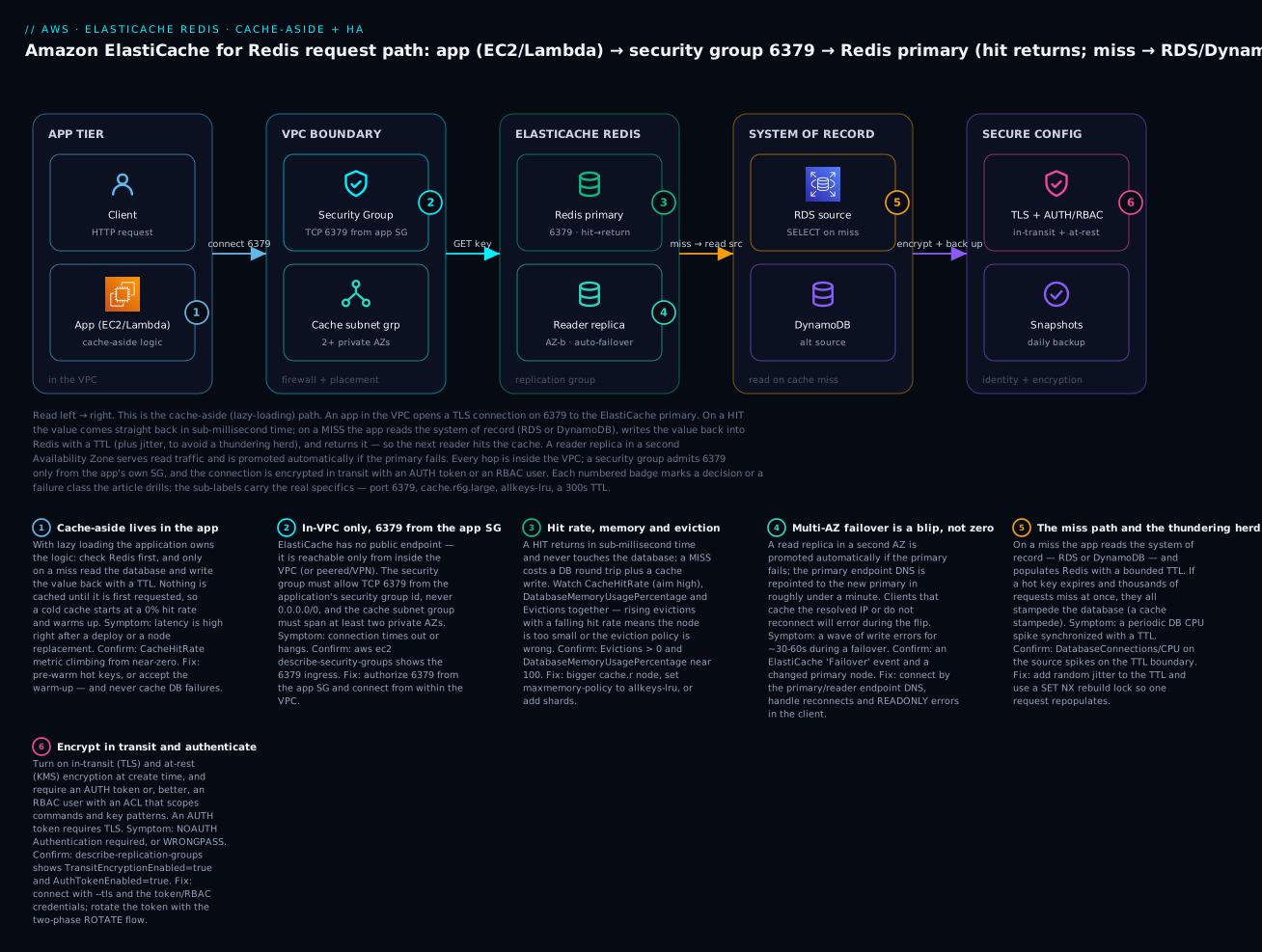
Read the diagram left to right as the real, private, cache-aside request path you are about to build. An application in the VPC — on EC2 or Lambda — opens a TLS connection on 6379 to the ElastiCache primary, through a security group that admits 6379 only from the app’s own SG, into a cache subnet group spanning two private Availability Zones. On a hit, the value returns in sub-millisecond time and the database is never touched. On a miss, the app reads the system of record — an RDS database or a DynamoDB table — writes the value back into Redis with a TTL plus jitter, and returns it, so the next reader hits the cache. A reader replica in the second AZ serves read traffic and is promoted automatically if the primary fails. The connection is authenticated with an AUTH token or an RBAC user and the data is encrypted at rest. Each numbered badge marks a decision or a failure class, and the legend narrates each as symptom, how to confirm, and the fix.
Real-world scenario
Kirana Cart is a fictional Indian grocery-delivery startup running a Django app on ECS Fargate against a db.r6g.large PostgreSQL RDS instance. For a year they had no cache. Every product page rendered ran the same handful of queries — the product row, its price, its stock, the category tree — thousands of times a minute during the evening rush, and the database sat at 80–90% CPU by 7 p.m. every day. They had already added two read replicas (≈$400/month) and were about to add a third when a new architect asked the obvious question: why is the database re-reading a product that changes once a week, ten thousand times an hour?
The first cache made things worse — briefly. The team dropped in a cache.t3.micro Redis node, cache-aside, with a flat 60-second TTL on every key and the ElastiCache default maxmemory-policy of volatile-lru. Three things went wrong within a week. First, the tiny 0.5 GiB node filled almost immediately; because the app set TTLs on product keys but cached the category tree without one, volatile-lru had plenty to evict and the hit rate on categories was near zero — constant misses. Second, the flat 60-second TTL meant that at the top of every minute a wave of hot product keys expired together, and the resulting thundering herd hammered the database with synchronized misses — the CPU graph grew a spike every 60 seconds. Third, when the single node was replaced during a maintenance window, the cache came back empty and the cold database briefly took the full firehose.
The rebuild is exactly this article’s lab. They moved to a Multi-AZ replication group: a cache.r6g.large primary (13+ GiB of memory — room for the whole hot set) plus one replica in a second AZ, automatic failover on, allkeys-lru eviction so nothing could OOM, TLS + an RBAC user scoped to GET/SET on product:* and category:*, and a base 300s TTL with up to 60s of random jitter so keys stopped expiring in lockstep. The category tree got a TTL and an explicit invalidation on the (rare) catalog update. Reads went to the reader endpoint, writes and invalidations to the primary endpoint. They added a SET NX rebuild lock so that when a genuinely hot key expired, one request repopulated it while the rest briefly served the previous value.
The result: the CacheHitRate climbed to 96%, database read load dropped by roughly 90%, and the two read replicas came out (a $400/month saving that more than paid for the cache). Evening database CPU fell from 85% to under 20%, p99 product-page latency dropped from ~40 ms to ~3 ms, and the per-minute CPU spikes vanished once the TTL jitter spread the expiries. The lesson the architect repeated: a cache is not a checkbox — the node size, the eviction policy, the TTL jitter and the stampede lock are the difference between a cache that saves you money and one that quietly hands the database a fresh outage every minute.
Advantages and disadvantages
| Advantages | Disadvantages |
|---|---|
| Microsecond-to-single-ms reads offload the hottest traffic | A second stateful system to run, secure and monitor |
| Managed nodes, patching, replication, failover, backups | Cache-aside/invalidation logic is your code to get right |
| Rich data structures turn hard problems into O(log N) commands | Redis is single-threaded — one big key or KEYS hurts everyone |
| Multi-AZ automatic failover is a toggle, not a project | Failover is a ~30–60s blip clients must handle |
| Cuts database cost (fewer/smaller read replicas) | A three-node Multi-AZ group bills for all three nodes 24×7 |
| Serverless removes capacity planning entirely | Serverless can cost more than a well-sized node at steady load |
| RBAC + TLS + at-rest encryption for a real security posture | Encryption and cluster mode are effectively create-time decisions |
| Stale data is tunable via TTL and invalidation | Stale data is possible — every cache trades freshness for speed |
A cache wins whenever the same data is read far more often than it changes and the read is expensive — which is most read-heavy web workloads. It loses, or hurts, when you cache write-heavy or unique-per-request data (low hit rate, pure overhead), when you treat it as durable (it is not), or when you skip the discipline — TTL jitter, sane eviction, stampede protection, right-sized nodes — that separates a cache that helps from one that adds a failure mode.
Hands-on lab
You will build a private, encrypted, Multi-AZ Redis replication group (cluster mode disabled: one primary + two replicas), lock it to port 6379 from an app security group, force TLS and an AUTH token, set allkeys-lru eviction, then implement cache-aside from a client against a source database and measure the hit-rate jump — then tear it all down. Everything is aws CLI first, with a complete Terraform stack after. This is close to free-tier-friendly with a single cache.t3.micro, but ⚠️ a Multi-AZ three-node group, KMS, backups and cross-AZ data transfer all cost money — do the teardown.
Assumptions: AWS CLI v2 configured, a VPC (vpc-...) with two private subnets in different AZs, an app/admin EC2 host in that VPC with redis-cli (or an SSM session to one), and the app’s security group id. Export a few variables:
export AWS_REGION=us-east-1
export VPC_ID=vpc-0abc123def456
export SUBNET_A=subnet-0aaa11112222      # private, AZ a
export SUBNET_B=subnet-0bbb33334444      # private, AZ b
export APP_SG=sg-0app00appappapp         # SG worn by your app/admin host
export AUTH_TOKEN='Kv-L@b-Redis-Str0ng-Token-2026'   # 16-128 chars
Step 1 — cache subnet group (≥2 private AZs)
aws elasticache create-cache-subnet-group \
  --cache-subnet-group-name kv-lab-redis-subnets \
  --cache-subnet-group-description "Private subnets for the lab Redis" \
  --subnet-ids "$SUBNET_A" "$SUBNET_B"
Expected: JSON describing the subnet group with two subnets in different AZs.
Step 2 — a security group allowing 6379 from the app SG only
REDIS_SG=$(aws ec2 create-security-group --group-name kv-lab-redis-sg \
  --description "ElastiCache Redis lab SG" --vpc-id "$VPC_ID" --query GroupId --output text)

aws ec2 authorize-security-group-ingress \
  --group-id "$REDIS_SG" --protocol tcp --port 6379 \
  --source-group "$APP_SG"
echo "REDIS_SG=$REDIS_SG"
Expected: a sg-... id and an ingress rule allowing TCP 6379 from the app SG only. No 0.0.0.0/0 anywhere.
Step 3 — a cache-friendly parameter group (allkeys-lru)
aws elasticache create-cache-parameter-group \
  --cache-parameter-group-name kv-redis7-cache \
  --cache-parameter-group-family redis7 \
  --description "KloudVin lab: cache-friendly eviction"

aws elasticache modify-cache-parameter-group \
  --cache-parameter-group-name kv-redis7-cache \
  --parameter-name-values "ParameterName=maxmemory-policy,ParameterValue=allkeys-lru"
Expected: the group is created and maxmemory-policy is set to allkeys-lru — so a full cache evicts instead of returning OOM.
Step 4 — create the Multi-AZ replication group (TLS + AUTH + at-rest)
One primary and two replicas, automatic failover, Multi-AZ, encryption in transit and at rest, an AUTH token, on the parameter group from Step 3:
aws elasticache create-replication-group \
  --replication-group-id kv-lab-redis \
  --replication-group-description "KloudVin lab cache-aside Redis" \
  --engine redis --engine-version 7.1 \
  --cache-node-type cache.t3.micro \
  --num-cache-clusters 3 \
  --automatic-failover-enabled \
  --multi-az-enabled \
  --cache-subnet-group-name kv-lab-redis-subnets \
  --security-group-ids "$REDIS_SG" \
  --cache-parameter-group-name kv-redis7-cache \
  --transit-encryption-enabled \
  --at-rest-encryption-enabled \
  --auth-token "$AUTH_TOKEN" \
  --port 6379 \
  --snapshot-retention-limit 1
Expected: JSON with "Status": "creating". Note the flags doing the real work: --num-cache-clusters 3 (1 primary + 2 replicas), --automatic-failover-enabled + --multi-az-enabled (HA), --transit-encryption-enabled (TLS, required for AUTH), --at-rest-encryption-enabled and --auth-token. (Set --engine valkey and --engine-version 8.0 to run the cheaper Valkey instead — everything else is identical.)
Wait for it (5–10 minutes) and grab the endpoints:
aws elasticache wait replication-group-available --replication-group-id kv-lab-redis

PRIMARY=$(aws elasticache describe-replication-groups --replication-group-id kv-lab-redis \
  --query 'ReplicationGroups[0].NodeGroups[0].PrimaryEndpoint.Address' --output text)
READER=$(aws elasticache describe-replication-groups --replication-group-id kv-lab-redis \
  --query 'ReplicationGroups[0].NodeGroups[0].ReaderEndpoint.Address' --output text)
echo "PRIMARY=$PRIMARY"; echo "READER=$READER"
Step 5 — connect over TLS with the AUTH token
From the app/admin host inside the VPC:
redis-cli -h "$PRIMARY" -p 6379 --tls -a "$AUTH_TOKEN" PING
Expected: PONG. If you get NOAUTH Authentication required you dropped -a; if it hangs, you’re not in the VPC or the SG doesn’t allow your host on 6379.
Step 6 — implement cache-aside and measure the hit rate
Reset the stats, then simulate a read pattern: the first read of a key misses (and populates), subsequent reads hit. Here is cache-aside by hand, then the Python the app would run:
redis-cli -h "$PRIMARY" -p 6379 --tls -a "$AUTH_TOKEN" CONFIG RESETSTAT

# 1st read: miss -> populate with a jittered TTL (~300s + up to 60s)
redis-cli -h "$PRIMARY" -p 6379 --tls -a "$AUTH_TOKEN" GET product:42          # (nil)
redis-cli -h "$PRIMARY" -p 6379 --tls -a "$AUTH_TOKEN" SET product:42 '{"id":42,"price":999}' EX 342
# next 100 reads: hits
for i in $(seq 1 100); do
  redis-cli -h "$PRIMARY" -p 6379 --tls -a "$AUTH_TOKEN" GET product:42 >/dev/null
done

redis-cli -h "$PRIMARY" -p 6379 --tls -a "$AUTH_TOKEN" INFO stats | grep -E 'keyspace_(hits|misses)'
Expected: keyspace_hits:100 and keyspace_misses:1 — a 99% hit rate for this key. In CloudWatch, CacheHitRate climbs as real traffic warms the cache. The application version of the same logic:
import json, os, random, redis, psycopg2

r = redis.Redis(host=os.environ["REDIS_PRIMARY"], port=6379, ssl=True,
                password=os.environ["REDIS_AUTH"], decode_responses=True,
                socket_timeout=1, socket_connect_timeout=1)

def get_product(pid: int) -> dict:
    key = f"product:{pid}"
    cached = r.get(key)                       # 1) check cache
    if cached is not None:
        return json.loads(cached)             #    HIT
    row = query_rds(pid)                       # 2) MISS -> system of record (RDS)
    ttl = 300 + random.randint(0, 60)          # 3) jittered TTL to avoid a stampede
    r.set(key, json.dumps(row), ex=ttl)        # 4) populate
    return row

def invalidate_product(pid: int) -> None:
    r.delete(f"product:{pid}")                 # on write: invalidate so readers refetch
For a genuinely hot key, guard the rebuild with a lock so a stampede repopulates once:
def get_hot(pid: int) -> dict:
    key = f"product:{pid}"
    cached = r.get(key)
    if cached is not None:
        return json.loads(cached)
    lock = f"lock:{key}"
    if r.set(lock, "1", nx=True, ex=5):        # only one worker rebuilds
        try:
            row = query_rds(pid)
            r.set(key, json.dumps(row), ex=300 + random.randint(0, 60))
            return row
        finally:
            r.delete(lock)
    return query_rds(pid)                       # others: brief fallback to DB (or serve stale)
Step 7 — (optional) watch a failover
Trigger a test failover and confirm the primary endpoint moves without you changing the connection string:
aws elasticache test-failover --replication-group-id kv-lab-redis \
  --node-group-id 0001
# Reconnect via $PRIMARY (same DNS name) — it now resolves to the promoted node.
Expected: an ElastiCache Failover event; redis-cli -h "$PRIMARY" … PING still returns PONG after a brief reconnect. This is the blip your client must tolerate.
Step 8 — teardown (⚠️ removes everything)
# Delete the replication group (skip a final snapshot for a throwaway lab)
aws elasticache delete-replication-group --replication-group-id kv-lab-redis
aws elasticache wait replication-group-deleted --replication-group-id kv-lab-redis

# Clean up the leftovers
aws elasticache delete-cache-parameter-group --cache-parameter-group-name kv-redis7-cache
aws elasticache delete-cache-subnet-group --cache-subnet-group-name kv-lab-redis-subnets
aws ec2 delete-security-group --group-id "$REDIS_SG"
Expected: each resource deletes. Manual snapshots (if you took any) are not removed with the group — delete them explicitly or they bill.
The whole thing as Terraform
terraform {
  required_providers { aws = { source = "hashicorp/aws", version = "~> 5.0" } }
}
provider "aws" { region = "us-east-1" }

variable "vpc_id"             { type = string }
variable "private_subnet_ids" { type = list(string) }   # two, different AZs
variable "app_sg_id"          { type = string }
variable "auth_token"         { type = string, sensitive = true }

resource "aws_elasticache_subnet_group" "redis" {
  name       = "kv-lab-redis-subnets"
  subnet_ids = var.private_subnet_ids
}

resource "aws_security_group" "redis" {
  name   = "kv-lab-redis-sg"
  vpc_id = var.vpc_id
}
resource "aws_vpc_security_group_ingress_rule" "redis_from_app" {
  security_group_id            = aws_security_group.redis.id
  from_port                    = 6379
  to_port                      = 6379
  ip_protocol                  = "tcp"
  referenced_security_group_id = var.app_sg_id   # source is the app SG, not a CIDR
}

resource "aws_elasticache_parameter_group" "cache" {
  name   = "kv-redis7-cache"
  family = "redis7"
  parameter {
    name  = "maxmemory-policy"
    value = "allkeys-lru"        # evict, never OOM
  }
}

resource "aws_elasticache_replication_group" "redis" {
  replication_group_id = "kv-lab-redis"
  description          = "KloudVin lab cache-aside Redis"

  engine         = "redis"        # or "valkey" (cheaper)
  engine_version = "7.1"
  node_type      = "cache.t3.micro"
  port           = 6379

  num_cache_clusters         = 3           # 1 primary + 2 replicas (cluster mode disabled)
  automatic_failover_enabled = true
  multi_az_enabled           = true

  subnet_group_name  = aws_elasticache_subnet_group.redis.name
  security_group_ids = [aws_security_group.redis.id]
  parameter_group_name = aws_elasticache_parameter_group.cache.name

  transit_encryption_enabled = true        # TLS (required for auth_token)
  at_rest_encryption_enabled = true        # KMS
  auth_token                 = var.auth_token

  snapshot_retention_limit = 1
  apply_immediately        = true
}

output "primary_endpoint" { value = aws_elasticache_replication_group.redis.primary_endpoint_address }
output "reader_endpoint"  { value = aws_elasticache_replication_group.redis.reader_endpoint_address }
terraform apply builds the identical stack; terraform destroy removes it. To run cluster mode enabled instead, drop num_cache_clusters and set num_node_groups (shards) and replicas_per_node_group.
Common mistakes & troubleshooting
The cache playbook. Symptom → root cause → the exact command or console path to confirm → the fix.
| # | Symptom | Root cause | Confirm (exact command / path) | Fix |
|---|---|---|---|---|
| 1 | redis-cli hangs / times out from your laptop |
ElastiCache is in-VPC only — no public endpoint | nslookup $PRIMARY returns a private 10.x/172.x IP; you’re outside the VPC |
Connect from a host in the VPC (EC2/Lambda) or via SSM/VPN — never expose it |
| 2 | Connection refused / timeout from the app |
Security group doesn’t allow the app on 6379 | aws ec2 describe-security-groups --group-ids $REDIS_SG shows no 6379 ingress |
authorize-security-group-ingress --port 6379 --source-group <app-sg> |
| 3 | NOAUTH Authentication required |
An AUTH token is set; the client didn’t send it | describe-replication-groups --query '..AuthTokenEnabled' = true |
Pass the token (redis-cli -a / client password=); over TLS |
| 4 | WRONGPASS invalid username-password |
Wrong/rotated AUTH token, or RBAC user mismatch | Compare the token; check the RBAC user’s access string | Use the current token; for RBAC pass the right user/password |
| 5 | Handshake fails / Error: Connection reset on connect |
In-transit encryption is on but the client isn’t using TLS | describe-replication-groups --query '..TransitEncryptionEnabled' = true |
Connect with --tls (redis-cli) / ssl=True (client) |
| 6 | Low CacheHitRate (lots of misses) |
TTL too short, poor key design, or a cold cache | CloudWatch CacheHitRate/CacheMisses; INFO stats keyspace ratio |
Lengthen/jitter TTLs, fix key naming, pre-warm hot keys |
| 7 | Rising Evictions, DatabaseMemoryUsagePercentage ~100% |
Node too small or wrong eviction policy | CloudWatch Evictions + memory %; INFO memory |
Bigger cache.r node, add shards, or set allkeys-lru |
| 8 | OOM command not allowed when used memory > 'maxmemory' |
noeviction, or volatile-lru with no evictable (TTL) keys |
CONFIG GET maxmemory-policy; check keys have TTLs |
Set allkeys-lru; add TTLs; scale the node |
| 9 | Wave of write errors for ~30–60s | A failover repointed the primary; client didn’t reconnect | ElastiCache Failover event; describe-events |
Connect by endpoint DNS, add reconnect/retry, handle READONLY |
| 10 | READONLY You can't write against a read only replica |
App is writing to the reader endpoint (or a replica) | Check which endpoint the writer uses | Send writes to the primary endpoint; reads to the reader |
| 11 | Periodic DB CPU spike synced to a TTL | Thundering herd — hot keys expire together | DB CPU/connections spike on the TTL boundary | Add TTL jitter; use a SET NX rebuild lock; serve stale on miss |
| 12 | Latency spikes for all clients at once | A single O(N) command blocked the single thread | SLOWLOG GET; look for KEYS, big HGETALL/SMEMBERS/DEL |
Replace KEYS with SCAN; split big keys; avoid O(N) on the hot path |
| 13 | EngineCPUUtilization pinned at ~100% (host CPU looks fine) |
The Redis thread is saturated (host has spare cores) | Compare EngineCPUUtilization vs CPUUtilization |
Scale up, shard (cluster mode), or cut expensive commands |
| 14 | SwapUsage > 0 and climbing |
Memory pressure — the node is swapping | CloudWatch SwapUsage/FreeableMemory |
Resize to more memory; never let a cache swap |
| 15 | CROSSSLOT Keys in request don't hash to the same slot |
Multi-key op across slots in cluster mode | The command touches keys in different slots | Use a hash tag {...} to co-locate, or split the op |
| 16 | MOVED/ASK errors from the app |
Client isn’t cluster-aware in cluster mode | You’re on a config endpoint with a non-cluster client | Use a cluster-mode client (redis-cli -c); follow redirects |
| 17 | max number of clients reached |
Connection leak / no pooling exhausts maxclients |
CloudWatch CurrConnections near the cap |
Pool and reuse connections; fix leaks; bigger node raises the cap |
Redis error / status reference
| Error string | Meaning | Likely cause | Fix |
|---|---|---|---|
NOAUTH Authentication required |
No/invalid auth on a protected cache | Missing AUTH token | Send the token over TLS |
WRONGPASS invalid username-password pair |
Bad credentials | Wrong/rotated token or RBAC user | Use current credentials |
OOM command not allowed … |
Write rejected, memory full | noeviction/no evictable keys |
allkeys-lru; add TTLs; scale |
READONLY You can't write … |
Wrote to a replica | Reader endpoint / post-failover | Write to the primary endpoint |
MOVED <slot> <host> |
Slot lives elsewhere (permanent) | Cluster redirect | Cluster-aware client updates its map |
ASK <slot> <host> |
Slot migrating (temporary) | Resharding in progress | Client retries on the new shard |
CROSSSLOT Keys … |
Multi-key op spans slots | Keys in different slots | Hash tag {...} or split |
CLUSTERDOWN Hash slot not served |
Cluster not fully covered | A shard/slots unavailable | Wait for recovery; check shard health |
LOADING Redis is loading the dataset |
Node still loading into memory | Just started / restored | Retry after it finishes loading |
max number of clients reached |
Hit maxclients |
Too many/leaked connections | Pool connections; scale the node |
ElastiCache node/group states you’ll see
| State | Meaning | Usable? |
|---|---|---|
creating |
Being provisioned | No |
available |
Healthy and serving | Yes |
modifying |
Applying a change | Usually yes |
snapshotting |
Taking a backup (brief memory fork) | Yes (watch memory) |
rebooting cache cluster nodes |
Node restart (e.g. static param) | Briefly no |
deleting |
Being torn down | No |
create-failed |
Provisioning failed | No |
restore-failed |
Snapshot restore failed | No |
The nastiest three, in prose
The eviction/OOM trap. ElastiCache defaults maxmemory-policy to volatile-lru, which only evicts keys that have a TTL. Teams cache some keys with a TTL and others without, the node fills, volatile-lru finds nothing evictable among the no-TTL keys, and every write starts failing with OOM command not allowed when used memory > 'maxmemory' — an outage that looks like Redis “breaking” but is pure configuration. Confirm with redis-cli … CONFIG GET maxmemory-policy and INFO memory. Fix: set allkeys-lru so any key is evictable, ensure your cache keys carry TTLs, and size the node so the hot set fits with reserved-memory-percent headroom.
The thundering herd on expiry. A flat TTL means a batch of hot keys expires at the same instant; the next moment, every request for those keys misses simultaneously and stampedes the database — the exact load spike the cache was meant to absorb, now arriving on a timer. You’ll see a database CPU/connection spike synchronized to the TTL boundary. The fix is layered: jitter every TTL (base + random(0, spread)) so expiries spread out, guard genuinely hot keys with a SET key val NX PX rebuild lock so one request repopulates while others serve stale or briefly wait, and for the hottest keys refresh them before they hard-expire.
The single-threaded self-inflicted stall. Redis executes commands on one thread, so a single O(N) operation — the classic KEYS * in a debugging session, a SMEMBERS on a million-member set, HGETALL on a giant hash, or a huge DEL — blocks every other client for its whole duration, and everyone everywhere sees a latency spike. SLOWLOG GET will show the culprit; EngineCPUUtilization spikes while host CPUUtilization looks calm (other cores idle). The fixes are permanent: never run KEYS in production (use SCAN, which is incremental), avoid unbounded big keys (shard them, or use scan-style iteration), and keep O(N) commands off the hot path entirely.
Best practices
- Use cache-aside as the default, and always invalidate on write. Check cache → miss → DB → populate with a TTL; on every write,
DELor update the key so readers don’t serve stale data for the whole TTL. - Set
allkeys-lru(orallkeys-lfu) for a pure cache. Never leave a cache onnoeviction, and don’t rely onvolatile-lruunless every cache key has a TTL — otherwise you’ll hitOOM. - Always TTL, and always jitter. Give every cached key an expiry (
base + random(0, spread)) so a bad invalidation self-heals and hot keys don’t expire in lockstep and stampede the database. - Protect hot keys with a rebuild lock. A
SET key val NX PXlock lets one request repopulate a stampeding key while others serve stale or wait — cheap insurance against a cache-stampede outage. - Run Multi-AZ with automatic failover for anything important. At least one replica in a second AZ; connect by the primary/reader endpoint DNS, never a node IP, and make the client reconnect and retry on the ~30–60s failover blip.
- Right-size on memory, watch the right CPU. Pick a
cache.r(memory-optimized) node sized so the hot set fits with headroom; alert onEngineCPUUtilization(the Redis thread), notCPUUtilization. - Never run O(N) commands on the hot path. No
KEYS(useSCAN), no giantHGETALL/SMEMBERS/DEL; keep keys bounded so one command can’t block the single thread. - Pool and reuse connections. Connection churn and leaks exhaust
maxclientsand burn CPU on handshakes; use a client-side pool and reuse it. - Secure it like data, because it is. TLS in transit, KMS at rest, an SG that allows 6379 only from the app SG, and an RBAC user scoped to the commands and key patterns the app actually needs.
- Use the right structure for the job. A sorted set for a leaderboard,
INCR+EXPIREfor a rate limiter, a hash for a session — not a JSON blob for everything. - Prefer Valkey for new builds. Same features and commands as Redis OSS, priced lower; set
engine = "valkey"unless you need a specific Redis OSS version or feature. - Never treat the cache as durable. It can be wiped or fail over at any time; every value must be reconstructible from the system of record.
Security notes
ElastiCache security is layered, and the cache holds copies of your hottest, often most sensitive data:
- Network isolation. ElastiCache is in-VPC only with no public endpoint; place it in private subnets and scope the security group to TCP 6379 from the application’s SG — not a CIDR, and never
0.0.0.0/0(which, in-VPC, still lets every workload read your cache). - Encryption in transit. Enable TLS (create-time) so client↔node and node↔node traffic is encrypted; it is also a prerequisite for an AUTH token. Connect with
--tls/ssl=True. - Encryption at rest. Enable KMS at-rest encryption (create-time) so on-disk data, snapshots and backups are encrypted; use a customer-managed CMK when you need key-usage auditing or cross-account snapshot control.
- Authentication. Prefer RBAC users (Redis 6+/Valkey) with a least-privilege access string over the legacy single AUTH token — scope each app to only the commands (
GET/SET) and key patterns (app:*) it needs, and deny the dangerous ones (FLUSHALL,CONFIG,KEYS). Rotate AUTH tokens with the two-phaseROTATEstrategy so there’s no downtime. - Least-privilege IAM for operators. Control who can call
CreateReplicationGroup,ModifyReplicationGroup,DeleteReplicationGroupandCreateSnapshot, and who can read the snapshots (a snapshot is a full copy of your cached data). - Guard the snapshots. At-rest encryption covers them; restrict who can export or copy them, and don’t share them broadly.
- Auditing. CloudTrail logs every ElastiCache control-plane call; combine it with CloudWatch metrics and, where needed, Redis slow-log inspection for data-plane visibility.
Cost & sizing
ElastiCache billing is mostly node-hours, but there are more drivers than one number. Know them so nothing surprises you:
| Cost driver | How it’s billed | Notes / how to control |
|---|---|---|
| Node hours | Per node, per hour, by node type | The biggest lever; a 3-node Multi-AZ group bills 3× a single node |
| Replicas | Each replica is a full billed node | More replicas = more read capacity and more cost |
| Multi-AZ | Replicas in other AZs (node cost) + cross-AZ data transfer | HA has a real, recurring price |
| Node family | cache.t (burstable) < cache.m < cache.r (memory) |
Pay for memory with cache.r; Graviton (g) is cheaper |
| Serverless | Data stored (GB-hour) + ECPUs per request | No idle node cost; can beat node-based for bursty load |
| Backup storage | Free up to the cluster size; overage per GB-month | Long retention / many snapshots add up |
| Data transfer | Cross-AZ replication and client traffic | Keep app and primary in the same AZ where sensible |
| Reserved nodes | 1- or 3-year commit | Up to ~55% off node hours for steady workloads |
Rough sizing to anchor expectations (on-demand, us-east-1, order-of-magnitude — confirm in the calculator; ₹ at ~83/USD):
| Workload | Node type | Topology | Rough USD/mo | Rough INR/mo |
|---|---|---|---|---|
| Free-tier learning | cache.t3.micro | Single node | ~$0 (12 mo) | ~₹0 |
| Small dev cache | cache.t4g.micro | Single node | ~$12 | ~₹1,000 |
| Small HA prod cache | cache.t4g.medium | 1 primary + 1 replica (Multi-AZ) | ~$70 | ~₹5,800 |
| Steady prod cache | cache.r6g.large | 1 primary + 2 replicas | ~$300 | ~₹25,000 |
| Large sharded cache | cache.r6g.xlarge × 3 shards | 3 primaries + 3 replicas | ~$1,800 | ~₹1,50,000 |
| Bursty / unpredictable | Serverless | Auto | Usage-based | Usage-based |
Free tier (first 12 months): 750 hours/month of a cache.t2.micro or cache.t3.micro node. Stay on a single micro node and the lab is effectively free — but a Multi-AZ three-node group is not free-tier-covered, so tear it down. The biggest real-world saving is second-order: a cache that offloads 90% of reads often lets you remove read replicas from the database, which usually more than pays for the cache itself.
Interview & exam questions
1. What is cache-aside (lazy loading), and what are its two main downsides? The app checks the cache, and on a miss reads the database and populates the cache with a TTL. Downsides: a cold cache (empty until warmed, so initial reads miss) and staleness (a cached value can be up to its TTL out of date after a DB change unless you invalidate on write). (DVA-C02, SAA-C03)
2. Cache-aside vs write-through — when would you choose write-through? Write-through writes cache and DB together on every write, so a written key is never stale and is warm on the next read — choose it for data written once and read many times where freshness matters, usually combined with cache-aside. The cost is higher write latency and caching data that may never be read. (DVA-C02)
3. Why is ElastiCache Redis single-threaded a problem, and what triggers it? Commands execute on one thread, so a single O(N) command (KEYS *, SMEMBERS/HGETALL on a huge key, a big DEL) blocks all other clients and spikes latency for everyone. Watch EngineCPUUtilization, use SCAN not KEYS, and avoid big keys. (SOA-C02)
4. What’s the difference between cluster mode disabled and enabled? Disabled is a single shard (one primary + up to 5 replicas), scaled vertically, with a primary and reader endpoint and any client. Enabled shards data across up to 500 node groups over 16,384 hash slots, scaled horizontally, needs a cluster-aware client (MOVED/ASK), limits multi-key ops to one slot, and uses a configuration endpoint. (SAA-C03)
5. A hot key expires and the database gets slammed. Name it and fix it. A cache stampede / thundering herd. Fix with TTL jitter so keys don’t expire together, a SET NX rebuild lock so one request repopulates while others serve stale, and early/background refresh of the hottest keys. (DVA-C02, SAA-C03)
6. Why does a Redis write fail with OOM command not allowed, and how do you fix it? The node hit maxmemory and the eviction policy can’t free anything — either noeviction, or volatile-lru with no TTL-bearing keys to evict. Fix: set allkeys-lru, ensure keys have TTLs, and/or scale the node. (SOA-C02)
7. Which endpoint do you send writes to, and what happens on failover? Writes go to the primary endpoint (a DNS name). On a failover ElastiCache promotes a replica and repoints that DNS to the new primary automatically (~30–60s); clients that connect by name and reconnect recover, while ones caching the IP break. (SAA-C03, SOA-C02)
8. Redis OSS vs Memcached — one deciding factor each way. Redis for data structures, replication, Multi-AZ failover, cluster and persistence; Memcached for a simple, multithreaded, shardable blob cache with no replication when you don’t need any of that. (SAA-C03)
9. How do you secure an ElastiCache Redis cluster? Private subnets, an SG allowing 6379 only from the app SG, TLS in transit, KMS at rest, and RBAC users with least-privilege ACLs (or an AUTH token over TLS). It’s in-VPC only — there’s no public endpoint. (SCS, SAA-C03)
10. When is ElastiCache Serverless the better choice than a node-based cluster? When traffic is spiky or unpredictable, or you want zero capacity management — it scales automatically and bills on data stored + ECPUs. A steady, well-understood high-throughput workload can be cheaper on a precisely-sized cache.r node. (SAA-C03)
11. What data structure powers a real-time leaderboard, and why? A sorted set (ZSET): ZINCRBY to update a score and ZREVRANGE 0 9 for the top ten, both O(log N) — far cheaper than an ORDER BY … LIMIT over a hot relational table. (DVA-C02)
12. Which CloudWatch metric is the real saturation signal for Redis, and why not CPUUtilization? EngineCPUUtilization — it measures the single Redis command thread. CPUUtilization averages all host cores, so a saturated Redis thread can hide behind idle cores and look fine. (SOA-C02)
Quick check
- True/false: ElastiCache Redis has a public endpoint you can reach from the internet if you open the security group.
- What one parameter value turns a cache that returns
OOMinto one that evicts cold keys, and what should it be? - A flat 60-second TTL on all your hot keys causes a database CPU spike every minute. What is it and what’s the fix?
- Which endpoint do writes go to, and what breaks if the client caches its IP?
- Name the metric you should alert on for Redis CPU saturation, and the one that misleads.
Answers
- False. ElastiCache is in-VPC only — there is no public endpoint. You reach it from within the VPC (or peered/VPN); the SG governs which VPC workloads can connect on 6379.
maxmemory-policy, set toallkeys-lru(orallkeys-lfu). The ElastiCache defaultvolatile-lruonly evicts keys with a TTL, so no-TTL keys causeOOM.- A thundering herd / cache stampede — the keys all expire at the same instant and every request misses at once. Fix with TTL jitter and a
SET NXrebuild lock (and early refresh for the hottest keys). - Writes go to the primary endpoint (DNS). If the client caches the resolved IP, a failover repoints the DNS to a new primary and the client keeps hitting the old node — errors until it reconnects by name.
- Alert on
EngineCPUUtilization(the single Redis thread);CPUUtilization(all host cores averaged) misleads because a saturated thread hides behind idle cores.
Glossary
| Term | Definition |
|---|---|
| ElastiCache | AWS-managed in-memory cache service running Redis OSS, Valkey or Memcached in your VPC. |
| Redis OSS / Valkey | Rich single-threaded in-memory data-structure stores; Valkey is the open-source Redis fork AWS prices lower. |
| Memcached | A simple, multithreaded, volatile blob cache with no replication, failover or data structures. |
| Cache-aside (lazy loading) | The app checks the cache and, on a miss, reads the DB and populates the cache with a TTL. |
| Write-through | The app writes cache and DB together on every write, keeping written keys warm and fresh. |
| Write-behind | The app writes the cache, which flushes to the DB asynchronously — lowest write latency, risk of loss. |
| Hit rate | The fraction of reads served from cache; the primary measure of a cache’s value. |
| TTL | Time-to-live; a per-key expiry that bounds staleness and lets the cache self-heal toward the source. |
| Thundering herd / stampede | Many requests missing a hot key at once (often on synchronized expiry) and overloading the DB. |
| Replication group | The ElastiCache Redis unit: one or more shards, each a primary plus 0–5 read replicas. |
| Shard (node group) | A primary and its replicas; cluster mode enabled partitions data across many shards. |
| Cluster mode | Disabled = single shard; enabled = data sharded across up to 500 node groups over 16,384 hash slots. |
| Hash slot | One of 16,384 buckets (CRC16(key) mod 16384) that place a key on a shard in cluster mode. |
| Multi-AZ / automatic failover | Replicas in other AZs with auto-promotion of a replica if the primary fails (~30–60s). |
| Primary / reader / configuration endpoint | DNS names for writes, load-balanced reads, and cluster discovery respectively. |
Eviction policy (maxmemory-policy) |
What Redis drops at maxmemory; allkeys-lru for a cache, noeviction returns OOM. |
| AUTH token / RBAC | A shared password vs per-user ACL access strings scoping commands and key patterns. |
| ECPU | ElastiCache Processing Unit — the per-request compute unit billed on Serverless. |
Next steps
- Get the system of record right underneath the cache: Launch Amazon RDS (MySQL & PostgreSQL) Hands-On.
- Make sure the queries you’re caching aren’t slow to begin with: RDS Performance Insights: Finding and Tuning Slow Queries.
- Cache in front of a key-value store instead of a relational one: Amazon DynamoDB Tables, Keys & Capacity Hands-On.
- See where the cache tier plugs into a full stack: The AWS Three-Tier Web Application Architecture.
- Build the private-network substrate the cache lives in: Building an AWS VPC from Scratch: Subnets, Route Tables, IGW & a Public/Private Design.