Azure Migrate hands you a spreadsheet: 612 servers, each with a readiness verdict, a recommended VM size and a monthly cost estimate. Discovery is done, the assessment is green, the budget is signed. Then someone asks the only question that matters next — “so which ones do we move first, and when?” — and the room goes quiet. That ordering problem is migration wave planning, and it is where most migration programmes quietly fail. Not in the lift, not in the replication, but in the sequencing: an app server moved a sprint before the database it depends on, a “low-risk” file server that turned out to be the auth dependency for nine other systems, a cutover scheduled for the one weekend the finance close runs.
A wave is a batch of workloads you migrate and cut over together as a single, reversible unit of work. Wave planning slices that flat inventory into waves that (1) keep dependent components together so nothing is split across a cutover boundary, (2) cap the blast radius so any failed wave hurts a bounded, recoverable set of systems, (3) sequence from low-risk and low-coupling toward business-critical and tightly-coupled, and (4) land each cutover inside a window the business can absorb. Get this right and migrations become boring — a cadence of small, rehearsed, rollback-ready moves. Get it wrong and you get the migration nobody forgets: the Saturday-night cutover that spilled into Tuesday because three “independent” systems shared a SQL instance nobody mapped.
This article is the planning playbook a senior architect uses to build that wave plan and defend it to a steering committee. You will learn the mental models (dependency, coupling, blast radius, the rollback gate), the grouping rules (what must travel together versus what merely should), how to turn Azure Migrate’s dependency data into concrete move groups, how to tier waves by risk so the program de-risks itself early, and how to pick cutover windows against real business calendars and RTO/RPO targets. The output is a wave table you can put in front of leadership — order, rationale, window and rollback plan per wave — backed by az CLI and Azure Resource Graph queries you can run against your own subscription today.
What problem this solves
The pain arrives at the same moment every time: discovery and assessment are complete, and the program must commit to a sequence. A flat inventory is necessary but useless for execution — it tells you what exists and whether it fits, never in what order to move it. Without a wave plan you get one of two failure modes. The first is paralysis: the team stares at 600 rows, can’t agree where to start, and the migration stalls for a quarter. The second is worse — a confident but wrong order, where someone picks “the easy ones first” by gut, moves an application tier ahead of its database, and discovers mid-cutover that the two were never independent.
What breaks without disciplined wave planning is the cutover itself. Split a dependency across a wave boundary — app in wave 3, its database in wave 5 — and during the gap that app reaches across the network from on-prem to Azure (or back), adding latency, opening firewall holes, and creating a fragile hybrid state someone has to operate. Underestimate the blast radius — pack 40 interdependent systems into one mega-wave to “save weekends” — and a single failure forces you to roll back all 40, turning a contained incident into a program-level crisis. Misjudge the window — cut over a payroll system the night before pay-run — and a 30-minute hiccup becomes a business event with the CFO on the call.
Who hits this: every datacentre-exit and lift-and-shift program beyond a handful of servers. It bites hardest on estates with shared infrastructure (one SQL instance serving many apps, a central Active Directory, a shared file server), undocumented dependencies, and rigid business calendars. The fix is not a tool — Azure Migrate gives you the data — it is a method for converting that data into a defensible order.
Learning objectives
By the end of this article you can:
- Define a migration wave and explain why dependency integrity, blast-radius limits, risk ordering and cutover windows are the four constraints that shape it.
- Convert Azure Migrate dependency data into concrete move groups — the components that must migrate together — and distinguish hard (“must”) from soft (“should”) grouping rules.
- Tier workloads by risk and coupling, and sequence waves so the program de-risks early: pilot, then low-risk independent, then progressively more critical.
- Apply a blast-radius cap to wave sizing, and weigh many small waves (low risk, more weekends) against few large waves (fewer weekends, higher risk).
- Select cutover windows against a business calendar and per-workload RTO/RPO, and choose between a hard cutover and a replication-based near-zero-downtime cutover.
- Build a defensible wave-plan table — order, contents, rationale, window, rollback — backed by
azCLI or Azure Resource Graph evidence. - Run a cutover with an explicit go/no-go gate and a rollback plan, and know the conditions under which you abort and revert.
Prerequisites & where this fits
You should have already completed discovery and assessment. Wave planning consumes their output: a server inventory with readiness verdicts, sizing and a dependency map. If you haven’t run that step, start with Azure Migrate discovery, assessment and dependency mapping and the Azure Migrate appliance setup that feeds it. You should also know, at a decision level, which tool moves which workload — covered in Azure Migrate vs Site Recovery vs Database Migration Service.
This sits in the plan phase of the Cloud Adoption Framework’s migration motion, after assess and before migrate. It assumes you understand recovery objectives — RTO (how long you can be down) and RPO (how much data you can lose) — from Business continuity and disaster recovery: RTO/RPO fundamentals, because those numbers drive both the cutover method and the window. Familiarity with az JSON output and basic KQL helps, since you’ll query the assessment data programmatically.
Here is the map of who owns which input to the plan, so you pull the right people into planning rather than discovering the gap during cutover:
| Input to wave plan | Where it comes from | Who owns it | What a gap here causes |
|---|---|---|---|
| Server inventory + sizing | Azure Migrate assessment | Cloud/platform team | Wrong VM SKU, surprise cost at cutover |
| Dependency map | Azure Migrate dependency analysis | Cloud team + app owners | Split dependency, broken app post-move |
| Business criticality tier | App owners / business | Business stakeholders | Critical app in an early risky wave |
| RTO / RPO per workload | Business + BCDR policy | Business + BCDR owner | Wrong cutover method, missed SLA |
| Change/freeze calendar | Business / change board | Change manager | Cutover collides with a freeze or peak |
| Network/firewall topology | Network team | Network team | Hybrid traffic blocked mid-migration |
| Rollback capability | Migration tooling design | Migration lead | No safe abort, forced to push through |
Core concepts
Five mental models make every wave-planning decision obvious. Hold these and the ordering stops being a debate and becomes arithmetic.
A wave is a reversible unit of cutover, not a unit of copying. You can replicate hundreds of servers in parallel for weeks — replication is cheap, continuous and low-risk because the source keeps running. The wave is defined by the cutover: the moment you switch users and traffic from on-prem to Azure and (for most methods) stop the source. Everything in a wave cuts over in one coordinated window and shares one rollback decision. So sizing a wave means sizing the cutover — how many systems you will switch, and possibly revert, in a single night.
Dependency is directional; coupling is about how tightly the cutover binds. A dependency is “A calls B” — an app server depends on its database, a web tier depends on an auth service. Coupling is how damaging it is to separate them across a cutover boundary: a synchronous, chatty, latency-sensitive dependency (app↔database on the same LAN) is tightly coupled and must move together; an asynchronous, occasional, latency-tolerant dependency (a nightly batch that drops a file) is loosely coupled and can span a boundary safely. Wave planning is mostly the work of finding the tight couplings in the dependency graph and refusing to cut across them.
Blast radius is what one failed wave can take down. Every wave you cut over is a bet. The blast radius is the set of systems and users affected if that bet loses and you must roll back. A small wave (a handful of loosely-coupled systems) has a small blast radius — a contained, recoverable incident. A mega-wave has a large one — a failure becomes a program crisis. Capping blast radius is the single most important risk lever in the whole plan, and it directly trades against calendar: smaller waves mean more cutover weekends.
The program should de-risk itself over time, not save the hard part for last. Order waves so the first ones are low-stakes and teach you the runbook — a throwaway pilot, then independent low-criticality systems — and the last ones are the business-critical, tightly-coupled crown jewels you attempt only once the team has cut over a dozen waves flawlessly. You build trust on safe waves, then spend it on the dangerous ones. A program that front-loads its riskiest cutover is one bad night from cancellation.
Every cutover has a gate and a clock. A cutover is not “flip it and hope.” It is: rehearse → freeze → cut over → validate against a checklist → hit a go/no-go gate → commit or roll back. The clock is the window — the agreed downtime the business grants — and inside it sits the point of no return, after which rollback costs more than fixing forward. Wave planning fixes the window (from RTO and the calendar) and the rollback method (from the migration tool) before the night, so the go/no-go decision is mechanical, not heroic.
The vocabulary in one table
Pin down every moving part before the deep sections. The glossary repeats these for lookup; this is the mental model side by side:
| Term | One-line definition | Why it shapes the wave plan |
|---|---|---|
| Wave | A batch migrated and cut over as one reversible unit | The atom of the plan; sized by cutover risk |
| Move group | The set of components that must migrate together | A wave is built from whole move groups, never half of one |
| Dependency | “A calls B” — a directional reliance | Defines which components are related |
| Coupling | How damaging it is to split a dependency at cutover | Tight = same wave; loose = may span waves |
| Blast radius | Systems/users affected if a wave fails and reverts | The cap that limits wave size |
| Cutover | The switch from source to Azure (often stops source) | The risky moment a wave is built around |
| Cutover window | Agreed downtime the business grants | Bounds what can be moved in one go |
| RTO / RPO | Max downtime / max data loss tolerated | Drives method and window per workload |
| Go/no-go gate | The checkpoint to commit or roll back | Makes abort a decision, not a panic |
| Point of no return | After this, rollback costs more than fixing forward | Defines when the gate closes |
| Freeze | A change-frozen period (close, peak, audit) | A window you may not cut over in |
Core concept 1 — From dependency map to move groups
The dependency map is the raw material; move groups are the first refined product. A move group is the smallest set of components you can move as a unit without breaking a tight coupling. Building them correctly is the foundation — every later decision (wave size, order, window) operates on whole move groups, never on individual servers torn out of one.
Hard grouping rules (“must” travel together)
Some couplings are non-negotiable. If you split them across a cutover boundary, the system is broken or dangerously degraded during the gap. These define the minimum a move group must contain:
| Coupling type | Example | Why it must stay together | What splitting it causes |
|---|---|---|---|
| App ↔ its primary database | Order app ↔ its SQL instance | Synchronous, chatty, latency-sensitive | Cross-WAN latency, timeouts, broken transactions |
| Clustered nodes | SQL AG / WSFC cluster members | Shared quorum, single logical service | Split-brain or failed cluster across sites |
| Tightly-coupled tiers | Web ↔ app ↔ cache on one LAN | Sub-millisecond intra-tier calls | Latency cascade, user-visible slowness |
| Shared backing store | Several apps on ONE SQL instance | One server, cannot half-move it | Either move all the apps or none |
| Stateful session affinity | App + its dedicated session store | In-flight session state | Dropped sessions, forced re-login |
| License/host-locked pair | App bound to a specific license server | Hard runtime dependency | App fails to start or license-checks fail |
The “shared backing store” row is the one that ambushes programs: a single SQL Server instance hosting databases for eight applications cannot be split. You move all eight apps in the same wave as that instance, or none — there is no “move app 3 now, the rest later” when they share one server. This is why discovery must capture which database server each app uses, not just that it uses one.
Soft grouping rules (“should” travel together)
Other couplings are preferences, not laws. Keeping them together is cleaner, but splitting them is survivable for the duration of a migration if you accept a temporary cost (extra latency, a temporary firewall rule, a hybrid link). These let you split a large move group when calendar pressure demands it:
| Coupling type | Example | Why grouping is preferred | Cost of splitting (temporarily) |
|---|---|---|---|
| Async / batch integration | Nightly ETL reads from app DB | Cleaner, no hybrid path | A temporary cross-site link for the batch |
| Read-replica / reporting | BI reads a replica of prod | Co-location, lower latency | Replica lags / reads over WAN for a while |
| Shared file drop | Apps exchange files on a share | One location | Mount the share cross-site temporarily |
| Loosely-coupled microservices | Service calls another via queue | Locality | Queue traffic traverses the WAN |
| Same business domain | All “HR” apps together | Operational tidiness | None technical — purely organizational |
| Shared monitoring/logging | Apps ship to one log sink | Single pane | Logs route cross-site briefly |
The discipline is to write down, for every edge in your dependency graph, whether it is hard or soft. Hard edges fuse components into a single move group; soft edges become the seams you may cut when a move group is too big for one window. A move group with no internal seam is indivisible; one with soft seams can be broken into smaller waves under controlled, temporary hybrid conditions.
Reading dependency data programmatically
Azure Migrate’s dependency analysis produces connection data (which server talks to which, on which port, how often). You don’t have to read it row by row in the portal — once your migration project’s resources land in a subscription you can query inventory and tags with Azure Resource Graph, and you can pull the assessment/dependency exports via the CLI. Confirm what’s discovered:
# List Azure Migrate projects in the subscription
az resource list \
  --resource-type "Microsoft.Migrate/migrateProjects" \
  --query "[].{name:name, rg:resourceGroup, location:location}" -o table

# List the assessment projects (assessments + dependency data live here)
az resource list \
  --resource-type "Microsoft.Migrate/assessmentProjects" \
  --query "[].{name:name, rg:resourceGroup}" -o table
Dependency connection data is exported from the dependency-analysis view (a CSV of source → destination → port → process). The workflow: export that CSV, collapse it to a graph of server→server edges, label each edge hard/soft using the tables above, and find connected components — each connected set of hard edges is a candidate move group. For workloads already in Azure (or for tagging the plan), Resource Graph is your inventory engine:
// Inventory of VMs with their wave tag, to track plan coverage
Resources
| where type == "microsoft.compute/virtualmachines"
| project name, rg = resourceGroup,
          wave = tostring(tags["migrationWave"]),
          moveGroup = tostring(tags["moveGroup"]),
          criticality = tostring(tags["criticality"])
| order by wave asc, moveGroup asc
The move group is the unit you tag and track. Tagging the plan onto resources makes it queryable and auditable rather than trapped in a spreadsheet — pairing with a broader resource tagging strategy.
Core concept 2 — Risk tiering and the de-risking order
Once you have move groups, you order them. The principle is de-risk early: arrange waves so the program proves its runbook on safe workloads first and tackles the crown jewels last, when the team is rehearsed and trust is high. Two axes drive a move group’s position: business criticality (how much it hurts if it’s down) and coupling/complexity (how hard it is to move cleanly).
The risk-tier model
Score every move group on both axes, then place it into a tier. Tiers map directly to when in the program a move group should go:
| Tier | Criticality | Coupling / complexity | When in the program | Example workload |
|---|---|---|---|---|
| 0 — Pilot | Throwaway / non-prod | Trivial, self-contained | First — to prove the runbook | A dev box, an internal wiki |
| 1 — Low risk | Low | Independent, few deps | Early | Static marketing site, a standalone tool |
| 2 — Moderate | Medium | Some deps, one DB | Mid | Departmental app + its dedicated DB |
| 3 — High | High | Multi-tier, shared infra | Late | Customer portal + shared SQL + cache |
| 4 — Critical | Business-critical | Tightly coupled, regulated | Last | Core ERP / payments / EHR |
The placement logic is deliberately conservative. You never put a Tier-4 workload in the first month, no matter how confident the team is, because the first cutovers will surface runbook gaps — a missing firewall rule, a DNS TTL nobody lowered, a validation step nobody wrote down — and you want those on a dev wiki, not on payments. Equally, don’t waste the whole early program on trivial waves; once the runbook is proven (usually after Tier 0 and one or two Tier-1 waves), accelerate.
Scoring and ordering in practice
Make the tiering explicit. A weighted score per move group turns gut feel into a defensible number:
| Factor | Weight | Score 1 (low risk) | Score 5 (high risk) |
|---|---|---|---|
| Business criticality | ×3 | Internal/non-prod | Revenue/safety-critical |
| Number of dependencies | ×2 | 0–1 | Many, cross-domain |
| Shared infrastructure | ×2 | Dedicated stack | Shared DB/AD/storage |
| Data sensitivity / regulation | ×2 | Public data | PII / PCI / regulated |
| Change-freeze constraints | ×1 | Anytime | Tight, rare windows |
| Stateful / migration difficulty | ×1 | Stateless | Stateful, clustered |
Higher total = later wave. The exact weights matter less than applying them consistently, so the order reflects a uniform rubric, not whoever argued loudest. Tag the resulting tier onto resources so the program reports progress by tier, and an auditor sees critical systems were scheduled late deliberately, not by accident.
Wave order at a glance
The de-risking order produces a predictable shape. Most programs converge on something like this, with wave count scaling to estate size:
| Wave band | Contents | Goal | Typical posture |
|---|---|---|---|
| Wave 0 | Pilot / throwaway | Prove and time the runbook | Move freely; expect to redo |
| Waves 1–2 | Tier-1 independent systems | Build cadence and confidence | Standard rollback, low stakes |
| Waves 3–N | Tier-2/3 departmental + portals | Bulk of the estate | Rehearsed, blast-radius capped |
| Final waves | Tier-4 critical, shared core | The crown jewels | Maximum rehearsal, board-aware |
| Decommission | Source teardown after soak | Realize savings, exit DC | Only after soak period passes |
This is the table you actually present to a steering committee — concrete, with the order, contents, rationale, window and rollback for each wave. A worked extract for an estate like NorthBridge’s:
| Wave | Contents (move groups) | Tier | Servers | Cutover window | Rollback | Why this position | | — | — | — | — | — | — | | 0 | Internal wiki | 0 | 2 | Any night | Re-point DNS | Throwaway — prove and time the runbook | | 1 | HR self-service + DB | 1 | 6 | Off-peak weeknight | Replication revert | Independent, low criticality, build cadence | | 2 | Facilities tool + DB | 1 | 4 | Off-peak weeknight | Replication revert | Independent, dedicated stack | | 3–5 | Departmental apps | 2 | ≤20 each | Weekend window | Replication revert | Bulk, rehearsed, blast-cap honoured | | 6 | E-commerce + POS + partner API (shared SQL) | 3 | 18 | Sat night, pre-freeze | 2-hr rehearsed revert | Tight coupling + shared DB; one critical wave | | 7 | Core ERP | 4 | 14 | Sat night, post-close | 2-hr rehearsed revert | Crown jewel — last, fully rehearsed |
Core concept 3 — Blast radius and wave sizing
How big should a wave be? Governed by blast radius, not convenience. A wave’s size is the size of the bet, and the bet’s downside is everything that must roll back together if the cutover fails. You cap that downside and size waves to stay under it.
The fundamental trade-off
There is an unavoidable tension between safety and calendar:
| Wave-sizing approach | Blast radius | Cutover weekends needed | Rollback complexity | When it fits |
|---|---|---|---|---|
| Many small waves | Small (contained) | Many | Simple (few systems) | Critical estates, low risk appetite |
| Few large waves | Large (program risk) | Few | Hard (many systems at once) | Tight deadline, mature team, low coupling |
| Balanced (typical) | Bounded by a cap | Moderate | Manageable | Most real programs |
Smaller waves are safer but consume more cutover weekends and stretch the timeline (and the hybrid-state cost). Larger waves finish faster but risk turning one bad cutover into a multi-system rollback. The art is picking a blast-radius cap you can state to leadership, and letting it size the waves.
Choosing a blast-radius cap
Express the cap in terms the business understands and the runbook can honour. Common formulations:
| Cap dimension | Example limit | Why this dimension | How to enforce |
|---|---|---|---|
| Max business-critical systems per wave | ≤ 1 Tier-4 system | One crown jewel at a time | Tiering + scheduling rule |
| Max servers per wave | ≤ 20 VMs | Bounds rollback effort | Wave-sizing rule |
| Max users impacted per wave | ≤ 500 users | Bounds business exposure | Map systems → user counts |
| Max move groups per wave | ≤ 4 | Bounds coordination load | Build waves from move groups |
| Max rollback time per wave | ≤ 2 hours | Must fit inside the window | Rehearse the rollback, time it |
| One business domain per wave | HR only this wave | Contains organizational impact | Group by domain where possible |
The most defensible cap is a combination: “no more than one Tier-4 system, no more than ~20 servers, and a rollback rehearsed to complete inside two hours.” Any candidate wave that violates the cap is split along a soft seam (from the move-group analysis) into two smaller waves. Any trivially small wave can be merged with an adjacent low-risk wave to save a weekend — provided the merge still respects the cap.
Capacity and quota also bound the wave
Blast radius limits the downside; Azure subscription limits bound the upside of how much you can land at once. A wave that cuts over 60 VMs into a region needs the vCPU quota to exist in that region, or the cutover fails on a quota error at the worst possible moment. Pre-flight every wave against quota:
# Check regional vCPU quota for the SKU family your wave lands on
az vm list-usage --location southeastasia \
  --query "[?contains(localName,'Standard Dv5')].{name:localName, used:currentValue, limit:limit}" \
  -o table
If a wave’s target SKUs would exceed the limit, raise the quota before the cutover weekend (quota increases are covered in Azure quota management and vCPU limit increases). The same applies to public IPs, managed-disk counts and network resources — a wave is only as deployable as the quota underneath it.
Core concept 4 — Cutover windows and method
A move group’s position (which wave) comes from risk; a wave’s timing (which night, how long) comes from the cutover window — the intersection of what the business tolerates (RTO and the calendar) and what the migration method requires.
Hard cutover vs near-zero-downtime cutover
The two cutover styles demand very different windows; choosing wrong wastes a weekend or blows an SLA:
| Cutover style | How it works | Downtime | Window needed | Best for |
|---|---|---|---|---|
| Hard cutover (cold) | Stop source, final copy, start in Azure | Minutes to hours | A real maintenance window | Stateless tiers, tolerant apps |
| Replication-based (warm) | Continuous replication, brief final sync, switch | Minutes (RPO ≈ near-zero) | Short switch window | Servers needing minimal downtime |
| Online DB migration | Continuous DB sync, cut at parity | Seconds–minutes | Short cutover, long pre-sync | Databases with strict RTO |
| Phased / parallel run | New runs alongside old, traffic shifts | None (gradual) | No downtime window | Stateless web, API behind a gateway |
For server lift-and-shift, replication-based cutover keeps the source running while data replicates continuously, so the actual downtime is only the final sync + switch — minutes, not the hours a cold copy would take. The tool-selection nuance (server replication versus a database-specific online migration) is the subject of Azure Migrate vs Site Recovery vs Database Migration Service; databases with strict RTO almost always want an online migration via Database Migration Service rather than a file-level copy.
Mapping RTO/RPO to method and window
The recovery objectives are not paperwork — they pick the method. Read this as a decision table:
| If the workload’s RTO is… | …and RPO is… | Then the cutover should be… | Implied window |
|---|---|---|---|
| Hours (tolerant) | Hours (tolerant) | Hard/cold cutover is fine | Weekend maintenance window |
| Low (≤ 1 hr) | Hours | Replication-based, brief switch | Short off-peak window |
| Low (≤ 1 hr) | Near-zero | Continuous replication + final sync | Minutes, off-peak |
| Near-zero | Near-zero | Online DB migration / phased | Seconds; gradual traffic shift |
| Effectively zero | Zero | Active-active / parallel run | No downtime; cut traffic gradually |
The key planning move is to attach an RTO and RPO to every move group, because those two numbers, more than anything else, decide whether a wave needs a four-hour weekend window or a fifteen-minute Tuesday-night switch.
Reading the business calendar
The window is not just “a weekend” — it is a weekend the business will grant, which means avoiding every freeze. Map the calendar before scheduling anything:
| Calendar constraint | Typical period | Why it’s a no-cutover zone | Planning response |
|---|---|---|---|
| Financial close | Month/quarter/year-end | Finance systems must be stable | Schedule around close dates |
| Retail / seasonal peak | Black Friday, holidays | Revenue peak, zero risk appetite | Hard freeze; migrate before/after |
| Regulatory reporting | Filing deadlines | Compliance-critical stability | Freeze the affected systems |
| Payroll run | Pay cycle dates | Payroll cannot be late | Never cut payroll near a run |
| Major business events | Product launch, AGM | Visibility, no surprises | Avoid; communicate widely |
| Existing change freeze | Holidays, code freezes | Org-wide change ban | Respect; no cutovers |
The output of this step is a valid-window map per workload: the set of nights this move group may cut over, after subtracting every freeze. A wave’s window must satisfy the intersection of valid windows for every move group in it — another reason move groups in the same wave should share a business domain, since they tend to share a calendar.
The go/no-go checklist
Inside every window sits the gate. Define its checklist before the night so the commit-or-rollback call is mechanical. A reusable per-wave checklist, with the abort condition for each item:
| Gate check | Confirm with | Pass criteria | If it fails |
|---|---|---|---|
| App health / smoke test | Synthetic transaction in Azure | Core user journey works end-to-end | Fix-forward if quick; else roll back |
| Dependencies reachable | App logs / connection test | No cross-site or failed calls | Roll back if a hard edge was split |
| Data integrity / final sync | Row counts / checksum vs source | Source and target at parity | Roll back — never commit divergent data |
| Security controls present | NSG effective rules / Network Watcher | On-prem rules recreated exactly | Recreate the rule, re-validate |
| Performance acceptable | Latency / error-rate metrics | Within agreed thresholds | Investigate SKU/coupling; roll back if severe |
| Time remaining in window | The clock vs point-of-no-return | Enough window to fix or revert | Past PONR → push forward; else roll back |
Architecture at a glance
Read the wave plan as a left-to-right pipeline that turns a flat inventory into ordered, gated cutovers. On the left, Azure Migrate sits in your discovery subscription, having produced two artifacts: the assessment (readiness, SKU, cost per server) and the dependency map (who-talks-to-whom). These feed the planning layer: dependency edges are labelled hard or soft to fuse servers into move groups, each move group is risk-tiered (criticality × coupling) and assigned an RTO/RPO, and a blast-radius cap slices the tiered move groups into ordered waves. The output is a wave table — Wave 0 (pilot) through the final critical wave — annotated with contents, order, window and rollback method, and projected onto resources as tags so the whole plan is queryable in Azure Resource Graph.
On the right is execution. Replication runs continuously and in parallel for every wave’s servers (the source keeps serving), so the cutover window is only the final sync + switch. Each wave flows through a fixed gate: rehearse (a non-disruptive test failover to prove the runbook), freeze the source, cut over inside the granted window, validate against a per-wave checklist, then hit the go/no-go gate. Pass and you commit and begin the soak; fail and you roll back to the still-intact source — which is why replication-based cutover stays reversible up to the point of no return. The numbered badges mark the five most common failures: a missed dependency that splits a move group (1), a wave exceeding the blast-radius cap (2), a cutover colliding with a freeze (3), a validation gap that lets a broken wave pass the gate (4), and a missing or unrehearsed rollback path (5).
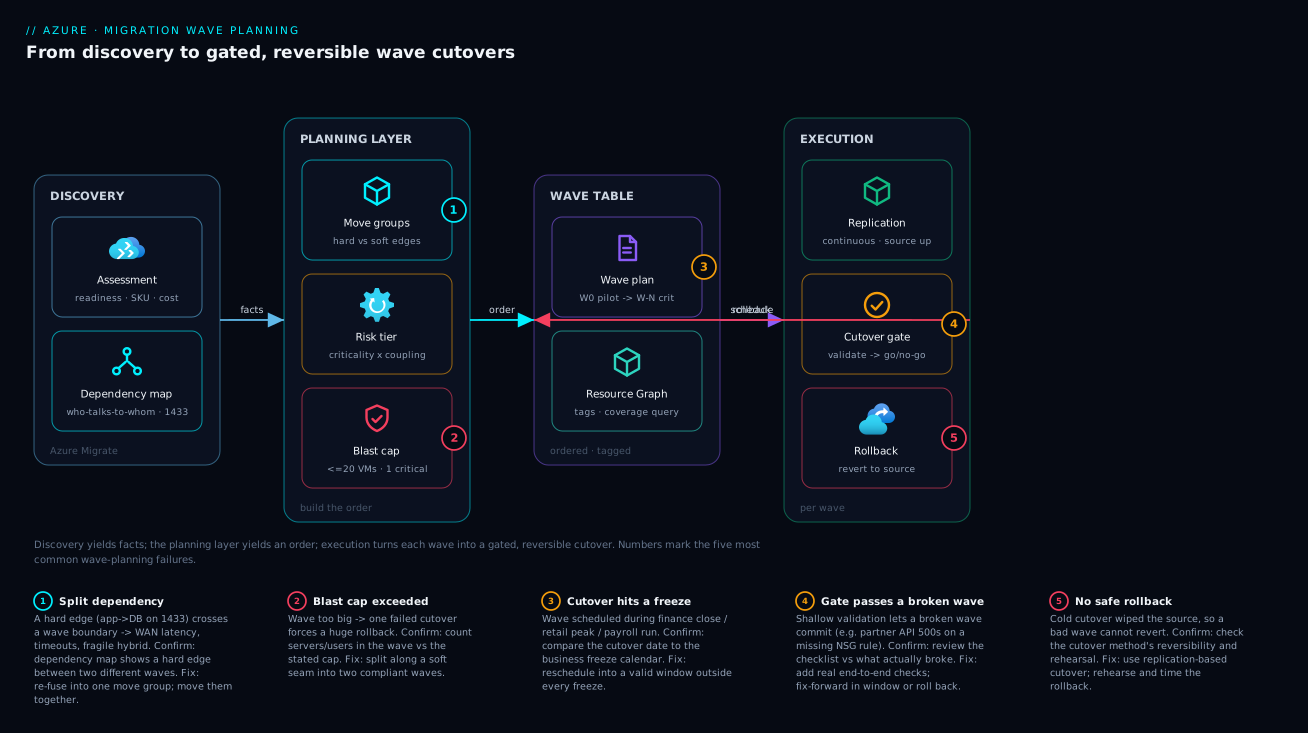
The shape to internalize: discovery produces facts, the planning layer produces an order, execution turns each wave into a gated, reversible cutover. Nothing crosses from plan to execution until its move group is whole, its tier is assigned, its wave fits the cap, and its window clears every freeze.
Real-world scenario
NorthBridge Retail (fictional, but a composite of real programs) ran a datacentre exit: 480 servers, a hard lease-end deadline 11 months out, and a retail business with an absolute freeze from mid-November through early January. Their first instinct was the classic mistake — “move the easy stuff first” — and an engineer drew up a plan that put the e-commerce web tier in an early wave because it was stateless and looked simple, leaving the order database for a later wave because “databases are scary.”
Dependency mapping killed that plan. Azure Migrate’s connection data showed the web tier making thousands of synchronous calls per minute to the order database on port 1433 — a textbook tight coupling. Splitting them across waves would have meant the Azure-hosted web tier reaching back over the WAN to an on-prem SQL Server for every page load: latency spikes, timeout storms, a fragile hybrid path open for two months. Worse, the graph revealed that three applications — the e-commerce site, the in-store POS sync service, and a partner API — shared a single SQL instance. That instance was an indivisible move group: all three had to move in the same wave as that one database server, or none could.
The replan tiered honestly. Wave 0 was a throwaway internal wiki, used purely to time the runbook (three attempts to get DNS TTLs and firewall rules right — exactly the gap you want to find on a wiki, not on checkout). Waves 1–2 were independent departmental apps with dedicated databases, used to build cadence. The shared-SQL trio became Wave 6: three customer-facing systems, one database, ~18 servers, capped and rehearsed with a two-hour rollback. Its window was a Saturday night in late October, before the November freeze, with the explicit fallback that if it slipped the whole trio waited until mid-January — attempting it during peak was off the table.
The cutover used continuous replication: the source kept serving customers right up to a brief Saturday-night final sync, so real downtime was 40 minutes, not the six hours a cold copy of that database would have taken. At the go/no-go gate, the validation checklist caught a real problem — the partner API was returning 500s because a firewall rule for the partner’s source IP hadn’t been recreated in the Azure NSG. Because the source was still intact, the call was easy: they fixed the NSG rule inside the window, re-validated, and committed. A cold cutover with the source already wiped would have forced a rollback or an extended outage into Sunday. The lease-end deadline was met with six weeks to spare, and the program’s repeated retro lesson was: the dependency map, not the gut feel, decides the order.
Advantages and disadvantages
Disciplined wave planning is not free — it front-loads analysis and stretches the timeline. Weigh it honestly:
| Advantages | Disadvantages |
|---|---|
| Contained blast radius — a bad cutover hurts a bounded set | More cutover weekends than a “big bang” |
| Dependencies never split — no fragile hybrid state | Significant up-front planning effort |
| Program de-risks early — runbook proven on safe waves | Longer overall calendar (hybrid state persists) |
| Each wave is rehearsed and rollback-ready | Coordination overhead per wave (comms, freezes) |
| Defensible to leadership — order has a stated rationale | Tempting to over-engineer the plan |
| Cutovers land in windows the business can absorb | Dependency data must be accurate or the plan is wrong |
| Plan is queryable/auditable via tags | Plan drifts if not maintained as the estate changes |
The disadvantages cluster around time and effort: wave planning trades a faster-looking “big bang” for a slower, safer cadence, and it is only as good as the dependency data feeding it. The advantages cluster around risk: every one of them is about making failure survivable. The decision is essentially risk appetite. For a small, loosely-coupled estate with a mature team and a hard deadline, a few large waves can be defensible. For anything critical, regulated, or tightly-coupled, the small-wave discipline pays for itself the first time a cutover goes wrong and the blast radius is 12 servers instead of 200.
The break-even case is the mid-size estate. Below ~50 servers, the planning overhead can outweigh the benefit — a handful of waves with obvious ordering. Above a few hundred servers with shared infrastructure, skipping wave planning is how programs end up cancelled. The honest middle path is the balanced sizing from the blast-radius table: a real cap, waves built from whole move groups, and a de-risking order — enough rigor to be safe, not so much that the plan becomes the project.
Hands-on lab
This lab builds a miniature wave plan end to end using Azure Resource Graph and tags — no migration tooling required, free-tier friendly. You will tag a small set of resources with a wave plan, then query the plan back out exactly as you would on a real program. (If you have no spare VMs, create two tiny B1s or substitute any existing resources; the mechanics are identical.)
1. Set variables and confirm your context.
RG="rg-wave-lab"
LOC="southeastasia"
az group create --name "$RG" --location "$LOC" -o table
2. Create three throwaway resources to stand in for three move groups. (Use the smallest SKU; delete at the end.)
# Three tiny resources to represent three workloads in different move groups
az vm create -g "$RG" -n vm-wiki    --image Ubuntu2204 --size Standard_B1s \
  --admin-username azureuser --generate-ssh-keys --no-wait
az vm create -g "$RG" -n vm-hrapp   --image Ubuntu2204 --size Standard_B1s \
  --admin-username azureuser --generate-ssh-keys --no-wait
az vm create -g "$RG" -n vm-hrdb    --image Ubuntu2204 --size Standard_B1s \
  --admin-username azureuser --generate-ssh-keys --no-wait
3. Tag the wave plan onto the resources. vm-wiki is the pilot (Wave 0); the HR app and its database share a move group and a wave (Wave 2), because they are tightly coupled:
az resource tag --tags migrationWave=0 moveGroup=pilot     criticality=low \
  -g "$RG" -n vm-wiki  --resource-type "Microsoft.Compute/virtualMachines"
az resource tag --tags migrationWave=2 moveGroup=hr-stack  criticality=medium \
  -g "$RG" -n vm-hrapp --resource-type "Microsoft.Compute/virtualMachines"
az resource tag --tags migrationWave=2 moveGroup=hr-stack  criticality=medium \
  -g "$RG" -n vm-hrdb  --resource-type "Microsoft.Compute/virtualMachines"
4. Query the wave plan back with Azure Resource Graph (the same query you’d run on a real estate to verify coverage):
az graph query -q "Resources
| where type == 'microsoft.compute/virtualmachines'
| where resourceGroup == 'rg-wave-lab'
| project name, wave = tostring(tags['migrationWave']),
          moveGroup = tostring(tags['moveGroup']),
          criticality = tostring(tags['criticality'])
| order by wave asc" -o table
Expected output groups vm-hrapp and vm-hrdb under wave 2 / move group hr-stack, and vm-wiki under wave 0 — your move-group integrity is now queryable.
5. Find plan gaps — any VM missing a wave tag is unplanned (the check that catches forgotten servers):
az graph query -q "Resources
| where type == 'microsoft.compute/virtualmachines'
| where resourceGroup == 'rg-wave-lab'
| where isempty(tostring(tags['migrationWave']))
| project name, status = 'UNPLANNED — assign a wave'" -o table
6. (Optional) Express the plan as IaC so it is version-controlled, not click-ops. A minimal Bicep that stamps wave tags onto a VM:
param location string = resourceGroup().location
param vmName string
param wave string
param moveGroup string
param criticality string

resource vm 'Microsoft.Compute/virtualMachines@2024-03-01' existing = {
  name: vmName
}

// Apply the wave-plan tags as a tags resource (merges onto the VM)
resource waveTags 'Microsoft.Resources/tags@2024-03-01' = {
  name: 'default'
  scope: vm
  properties: {
    tags: {
      migrationWave: wave
      moveGroup: moveGroup
      criticality: criticality
    }
  }
}
7. Teardown — delete everything so the lab costs nothing:
az group delete --name "$RG" --yes --no-wait
You now have the core loop of plan governance: tag the plan, query coverage, find unplanned servers, and (optionally) codify it. On a real program this same loop runs against hundreds of servers and becomes the live dashboard the steering committee reads.
Common mistakes & troubleshooting
Wave planning fails in predictable ways. Each row below is a real failure mode: the symptom you’d notice, the root cause, how to confirm it, and the fix.
| # | Symptom | Root cause | How to confirm | Fix |
|---|---|---|---|---|
| 1 | App broken/slow right after its wave | Its database was in a different wave (split dependency) | Dependency map shows a hard edge crossing a wave boundary | Re-fuse into one move group; move them together |
| 2 | One failed cutover forces a huge rollback | Wave too large — blast-radius cap ignored | Count systems/users in the wave vs the cap | Split the wave along a soft seam |
| 3 | “Independent” file server took down 9 systems | Hidden dependency not discovered | Re-run dependency analysis; check connection data | Extend discovery window; map then re-tier |
| 4 | Cutover collided with finance close | Business calendar not consulted | Compare cutover date to freeze calendar | Reschedule outside the freeze |
| 5 | Can’t move app 3 without apps 1,2,4 | They share one SQL instance (indivisible group) | Assessment shows one DB server, many app deps | Move all apps on that instance in one wave |
| 6 | Cutover failed on a quota error mid-window | Regional vCPU/IP quota too low for the wave | az vm list-usage shows used near limit |
Raise quota before the cutover weekend |
| 7 | Broken wave passed the go/no-go gate | Validation checklist too shallow | Review checklist vs what actually broke | Add real end-to-end checks; re-test |
| 8 | No safe way to abort a bad cutover | No rehearsed rollback / cold cutover wiped source | Check the cutover method’s reversibility | Use replication-based cutover; rehearse rollback |
| 9 | Hybrid traffic blocked after partial move | Firewall/NSG rule for cross-site path missing | Network Watcher / NSG effective rules | Pre-create the temporary hybrid rules |
| 10 | Plan drifted; servers cut over untracked | Tags/plan not maintained as estate changed | Resource Graph shows untagged or stale waves | Re-baseline tags; gate changes on the plan |
| 11 | Riskiest system cut over in week one | Order ignored de-risking (criticality not tiered) | Tier of the first waves vs business criticality | Re-order: pilot and Tier-1 first, Tier-4 last |
| 12 | Cutover ran long, spilled past the window | Rollback/cutover never timed in rehearsal | Compare rehearsal timing to the window length | Rehearse to a stopwatch; size window to fit |
The three most damaging are #1 (split dependency), #5 (shared backing store), and #8 (no rollback). All three are planning failures, not execution failures — baked in before the cutover night and discovered the hard way during it. The discipline that prevents all three is the same: trust the dependency map over intuition, build waves from whole move groups, and never schedule a cutover whose rollback you have not rehearsed and timed.
A short confirm-and-fix decision table for the live-incident moment, when a wave is mid-cutover and something is wrong:
| If during cutover you see… | It’s probably… | Do this |
|---|---|---|
| A dependent app erroring post-switch | A dependency you left on-prem | Check for cross-site calls; if a hard edge was split, roll back |
| Validation check failing, source intact | A config gap (NSG/DNS/firewall) | Fix forward inside the window; re-validate; only roll back if it can’t be fixed in time |
| Quota / capacity error on deploy | Regional limit hit | Abort this wave; raise quota; reschedule |
| Cutover running past the window | Underestimated time | Hit the go/no-go gate; if past point-of-no-return, push forward; else roll back |
| Performance far worse in Azure | Wrong SKU or a split chatty dependency | Validate sizing; if a tight coupling was split, that’s the cause |
Best practices
- Let the dependency map decide the order, not intuition. “It looks simple” is how the web tier gets moved ahead of its database. Every grouping and ordering decision should trace to a discovered edge.
- Build waves from whole move groups, never from individual servers. If you find yourself putting half a move group in one wave, you have a hard edge crossing a boundary — fuse it back.
- Label every dependency edge hard or soft. Hard edges fuse move groups; soft edges are the only seams you may cut. Write this down before sizing waves.
- Set an explicit blast-radius cap and state it to leadership. “One critical system, ~20 servers, two-hour rehearsed rollback” is defensible; “as big as we can fit” is not.
- De-risk early. Pilot first, then Tier-1 independent systems, then progressively more critical. Spend hard-won team trust on the crown jewels, never on week one.
- Attach an RTO and RPO to every move group. Those two numbers pick the cutover method and the window length. A workload without them is unplannable.
- Prefer replication-based cutover for reversibility. Keeping the source intact until the go/no-go gate is what makes a bad cutover survivable. Cold copies burn that safety net.
- Rehearse the cutover and the rollback, to a stopwatch. The window must fit the rehearsed time, not the optimistic one. An un-rehearsed rollback is not a rollback.
- Map the business freeze calendar before scheduling any wave. Close, peak, payroll, audits — subtract them all, then schedule in what remains.
- Codify the plan as tags (and ideally IaC). A wave plan trapped in a spreadsheet drifts and can’t be audited. Tagged resources make coverage queryable in Resource Graph.
- Define the go/no-go gate and its checklist before the night. The abort decision should be mechanical: checklist red and unfixable in window → roll back. No heroics.
- Keep a soak period before decommission. Don’t tear down the source the morning after. Let the wave run in Azure for an agreed soak, then decommission and realize the savings.
Security notes
Migration is a window of elevated risk: data is in motion, temporary access is granted, and hybrid paths are open. Bake security into the wave plan, not after it.
- Least-privilege the migration identity. The replication/migration service should use a scoped identity (managed identity or a tightly-scoped service principal) with only the roles it needs on the target resource groups — not Owner on the subscription. Audit it with the same rigor as any privileged role (see Azure RBAC custom roles and least privilege).
- Encrypt data in transit during replication. Replication traffic should traverse an encrypted, private path — over a VPN/ExpressRoute private peering or a service-private channel — never the public internet in clear text. Data-sensitive and regulated move groups (PII/PCI) should be tiered to reflect that and may need a private path before their wave can run.
- Treat temporary hybrid firewall rules as time-boxed. The cross-site rules you open for a split soft-dependency are attack surface. Document them, scope them to specific source IPs and ports, and remove them once the wave’s soak completes. A “temporary” rule left open for a year is a finding.
- Recreate, don’t loosen, security controls in the target. The #1 cutover security mistake is “it didn’t work, so we opened the NSG wide to get past the gate.” Recreate the exact on-prem rule set in the target NSG (the partner-IP rule from the scenario) rather than punching a hole. Validate effective rules with Network Watcher before declaring the wave done.
- Carry data classification into wave tiering. A move group handling regulated data is automatically higher-tier regardless of its technical simplicity — its window, encryption path and access controls all tighten. Tag classification alongside the wave so it’s visible.
- Lock down the source during the freeze. Once a wave’s source is frozen for cutover, restrict changes to it so no one mutates data after the final sync point — otherwise you risk silent data divergence between source and target.
Cost & sizing
Wave planning has two cost dimensions: the temporary cost of running the migration and a hybrid state, and the steady-state cost the assessment already estimated. Plan for both.
| Cost driver | When it applies | Rough magnitude | How to control it |
|---|---|---|---|
| Double-running (source + target) | During each wave’s soak period | ~2× that workload’s cost, briefly | Keep soak periods short and bounded |
| Replication storage/transfer | While replicating before cutover | Per-GB cache storage + egress | Don’t replicate everything months early |
| Hybrid connectivity (VPN/ExpressRoute) | While any wave is mid-migration | Hourly gateway + egress | Size the gateway to the migration, not forever |
| Cutover-weekend effort | Each wave’s window | Team hours (the real cost) | Fewer, well-rehearsed waves |
| Quota/SKU surprises | At cutover if under-planned | Failed cutover (worst cost) | Pre-flight quota per wave |
| Decommission savings (negative) | After soak, on source teardown | The whole point — DC exit savings | Don’t delay decommission; realize it |
The biggest hidden cost is prolonged hybrid state: every extra week a wave sits half-migrated, you pay for the source, the target, the replication storage and the connectivity gateway simultaneously — and you operate a split system. This is the real argument against waves that are too small (more, longer-lived hybrid states) and against starting replication months before cutover. Replicate close to the cutover, soak briefly, then decommission.
For the steady-state target cost, lean on the assessment’s sizing and then optimize: right-size against the recommendation, and apply reservations or savings plans to the predictable post-migration baseline (see Azure reservations vs savings plans). A cost-sequencing rule: migrate the cheapest-to-run-twice workloads early while the runbook is unproven, and save the expensive double-run workloads for late waves you cut over fast and decommission quickly.
Rough INR/USD intuition for the temporary overhead on a mid-size estate: a single VPN/ExpressRoute gateway for the migration window runs on the order of a few thousand rupees per day, replication cache storage scales with the data churned, and the double-run cost is just the target VMs’ run rate for the soak weeks. None of these are large against the DC-exit savings — but only if the hybrid window stays short. A migration that drags its hybrid state for a year quietly erases its own business case.
Interview & exam questions
1. What is a migration wave, and what defines its boundaries? A wave is a batch of workloads migrated and cut over together as a single reversible unit. Its boundaries are defined by four constraints: dependency integrity (no tight coupling split across the boundary), a blast-radius cap (bounded failure/rollback scope), risk ordering (de-risk early), and a cutover window the business can absorb. Maps to AZ-305 (designing migrations) and the CAF migrate methodology.
2. Why must an application and its primary database usually be in the same wave? Because the app↔database dependency is typically synchronous, chatty and latency-sensitive — a tight coupling. Splitting them across waves forces the migrated tier to call the other over the WAN, causing latency, timeouts and a fragile hybrid path for the duration of the gap. They form one indivisible move group.
3. Three applications share a single SQL Server instance. How does that constrain your waves? That instance is an indivisible move group: you cannot half-move a single server. All three applications must migrate in the same wave as that database server, or none of them can. This is why discovery must capture which database server each app uses, not merely that it uses one.
4. Explain blast radius and how it sizes a wave. Blast radius is the set of systems and users affected if a wave’s cutover fails and must roll back. You set a cap on it (e.g. one critical system, ~20 servers, two-hour rehearsed rollback) and size waves to stay under the cap. It is the primary risk lever and trades directly against the number of cutover weekends.
5. What is the “de-risk early” ordering principle and why does it matter? Order waves so the earliest are low-stakes (a pilot, then independent low-criticality systems) and the latest are business-critical and tightly-coupled. The first cutovers always surface runbook gaps; you want those surfaced on a dev wiki, not on payments. The team builds trust on safe waves and spends it on the crown jewels last.
6. How do RTO and RPO influence the cutover method? Tolerant RTO/RPO (hours) allows a cold/hard cutover in a maintenance window. Low RTO with near-zero RPO demands continuous replication with a brief final sync. Near-zero RTO/RPO needs an online database migration or a phased parallel run with gradual traffic shift. The objectives, not preference, pick the method.
7. Why prefer a replication-based cutover over a cold copy for risky waves? Because the source keeps running until the final sync, the cutover is reversible right up to the go/no-go gate — if validation fails, you roll back to the intact source with minutes of downtime. A cold copy that stops and wipes the source removes that safety net, turning a fixable config gap into a forced outage.
8. What is the go/no-go gate, and what decision does it govern? It is a checkpoint after cutover-and-validation where you decide to commit or roll back. With the validation checklist and the point-of-no-return defined in advance, the decision is mechanical: checklist green → commit and soak; checklist red and unfixable inside the window → roll back. It removes heroics from the abort decision.
9. How do business freeze calendars enter wave planning? You subtract every freeze (financial close, retail/seasonal peak, payroll runs, regulatory deadlines, change freezes) from the candidate cutover windows, leaving a valid-window map per workload. A wave’s window must satisfy the intersection of valid windows for every move group in it — a reason to group by business domain, which tends to share a calendar.
10. What’s the difference between a hard and a soft grouping rule? A hard rule is a coupling that cannot be split without breaking or dangerously degrading the system (app↔DB, cluster nodes, shared backing store) — it fuses components into one move group. A soft rule is a preference (async batch, reporting replica, shared file drop) that can be split temporarily at the cost of a hybrid path — these are the seams you may cut to fit a window.
11. How would you make a wave plan auditable and queryable rather than a static spreadsheet? Project the plan onto resources as tags (migrationWave, moveGroup, criticality, classification) and query coverage with Azure Resource Graph — including a query for untagged/unplanned servers. Ideally codify the tagging in IaC so it’s version-controlled. This turns the plan into a live dashboard and an audit trail.
12. A “low-risk independent” file server, once migrated, broke nine other systems. What went wrong and how do you prevent it? A hidden dependency was never discovered — the file server was actually a shared dependency for nine systems. Prevention: run dependency analysis over a long enough window to catch periodic/low-frequency calls, treat the connection data as authoritative over assumptions, and re-tier when discovery reveals new edges.
Quick check
- You discover an app makes thousands of synchronous calls per minute to a database on the same LAN. Hard or soft coupling, and what does that imply for waves?
- Your blast-radius cap is “≤ 20 servers, one critical system, two-hour rollback.” A candidate wave has 35 servers across two business domains. What do you do?
- A workload has an RTO of “a few hours” and an RPO of “a few hours.” Which cutover method and what window?
- Why should the pilot wave be a throwaway, non-production workload?
- During a cutover, a validation check fails but the source is still intact and replication is running. The gap is a missing NSG rule fixable in 15 minutes, and you have 90 minutes of window left. Commit or roll back?
Answers
- Tight (hard) coupling — synchronous, chatty, latency-sensitive. Implication: the app and database must be in the same move group and the same wave; never split them across a cutover boundary or the migrated tier will call the other over the WAN with latency and timeout problems.
- Split it along a soft seam. The wave violates the cap (35 > 20, and spanning two domains). Find a soft (loosely-coupled) seam from the dependency analysis and divide it into two compliant waves — ideally one per business domain so each shares a calendar.
- A hard/cold cutover in a weekend maintenance window is sufficient. With tolerant RTO and RPO you don’t need continuous replication or an online DB migration; stop the source, do the final copy, start in Azure inside the granted window.
- Because the first cutovers always surface runbook gaps — DNS TTLs, firewall rules, validation steps nobody wrote down. You want those gaps discovered on a system whose failure doesn’t matter, so the runbook is proven before any real workload cuts over.
- Fix forward, then commit. The source is intact (reversible), the gap is a known config fix, and it fits comfortably inside the remaining window. Recreate the NSG rule, re-validate the checklist, and commit. You only roll back if the gap can’t be fixed before the window closes or you pass the point of no return.
Glossary
- Migration wave — A batch of workloads migrated and cut over together as a single, reversible unit of work, sized by cutover risk.
- Move group — The smallest set of components that must migrate together because of hard couplings; the indivisible building block of a wave.
- Dependency — A directional reliance, “A calls B” (e.g. an app server depends on its database).
- Coupling — How damaging it is to separate a dependency across a cutover boundary; tight (synchronous, chatty) versus loose (asynchronous, occasional).
- Hard grouping rule — A coupling that cannot be split without breaking the system (app↔DB, cluster nodes, shared backing store).
- Soft grouping rule — A coupling that can be split temporarily at the cost of a hybrid path (async batch, reporting replica, shared file drop).
- Blast radius — The set of systems and users affected if a wave’s cutover fails and must be rolled back.
- Blast-radius cap — The stated limit on a wave’s size/impact (e.g. one critical system, ~20 servers, two-hour rollback) that governs wave sizing.
- Cutover — The switch of users and traffic from the source to Azure; for most methods it stops the source.
- Cutover window — The agreed period of downtime the business grants for a wave’s cutover.
- Hard (cold) cutover — Stop the source, take a final copy, start in Azure; downtime is the copy time.
- Replication-based (warm) cutover — Continuous replication keeps the source serving until a brief final sync and switch; downtime is minutes.
- RTO (Recovery Time Objective) — The maximum tolerable downtime for a workload.
- RPO (Recovery Point Objective) — The maximum tolerable data loss, measured as time.
- Go/no-go gate — The post-cutover checkpoint at which you commit (validation green) or roll back (validation red, unfixable in window).
- Point of no return — The moment in a cutover after which rolling back costs more than fixing forward.
- Freeze — A change-frozen business period (financial close, retail peak, payroll run, audit) during which no cutover may occur.
- Soak period — The agreed time a migrated workload runs in Azure before the source is decommissioned.
- De-risking order — Sequencing waves so the program proves its runbook on safe workloads first and tackles business-critical, tightly-coupled ones last.
Next steps
- Run or revisit discovery to get accurate dependency data before you finalize any order — start with Azure Migrate discovery, assessment and dependency mapping.
- Decide the right tool per workload (server replication vs database online migration vs DR-based cutover) with Azure Migrate vs Site Recovery vs Database Migration Service.
- Ground your per-wave RTO/RPO targets and cutover-method choices in Business continuity and disaster recovery: RTO/RPO fundamentals.
- Execute database cutovers with minimal downtime using Azure Database Migration Service: SQL online and offline walkthrough.
- Make the wave plan queryable and auditable by attaching it to a broader resource tagging strategy for governance and cost allocation.