Someone hands you a spreadsheet of 480 servers and a board mandate: “be out of the datacentre by Q3.” That is the moment every cloud migration begins, and it is the moment most of them quietly start to fail — not on the tooling, but on a single missing decision made 480 times: for this one workload, what do we actually do? Lift it as-is? Swap its database for a managed service? Rewrite it? Buy a SaaS replacement and delete it? The industry’s answer to “how do you decide, repeatably, across a whole estate” is the 6 Rs of migration: Rehost, Replatform, Refactor (Re-architect), Repurchase, Retire and Retain. Each R is a disposition — a verb you assign to a workload — and the entire art of a clean migration is assigning the right verb to the right workload and then mapping that verb to the right Azure landing spot.
This article is the mapping. We treat the 6 Rs not as a tidy diagram on a slide but as a working decision framework: what each R means in production terms, the exact Azure service it lands on (VM, App Service, AKS, Container Apps, SQL Managed Instance, SQL Database, a SaaS purchase, or the recycle bin), the effort and cost each carries, and — most importantly — the rules and anti-patterns for choosing between them when the workload is ambiguous. Microsoft’s Cloud Adoption Framework (CAF) and the AZ-305 exam both lean on this taxonomy, but the value here is operational, not academic: by the end you will be able to look at any line in that 480-server spreadsheet and assign it an R with a defensible reason.
You will also learn the things the slide never tells you: that Rehost is fast but inherits every sin of the old machine, that Replatform is where 80% of the real value lives for most enterprises, that Refactor is a product decision masquerading as an infrastructure decision, and that the two “lazy” Rs — Retire and Retain — are the ones that quietly save the most money and risk. We will ground every R in a concrete Azure target with az CLI and Bicep, walk a real migration-wave architecture, and close with the cost model, the interview answers, and the mistakes that turn a six-month migration into an eighteen-month one.
What problem this solves
The core problem is decision paralysis at scale. One server is easy to reason about. Four hundred and eighty servers, each with its own owner, runtime, database, compliance constraint and “don’t touch it, nobody knows how it works” reputation, is not a technical problem — it is a triage problem. Without a shared vocabulary, every workload becomes a bespoke debate, the debates don’t finish, and the datacentre lease renews because nobody could agree on what to do with the SQL box in the corner.
The 6 Rs solve this by giving you a small, fixed set of dispositions. Every workload gets exactly one. That single constraint is what makes a migration plannable: once each workload has an R, you can group them into waves, estimate effort, sequence dependencies, and forecast the bill. A migration backlog of “do something with 480 things” is unmanageable; a backlog of “320 Rehost, 90 Replatform, 25 Refactor, 20 Repurchase, 15 Retire, 10 Retain” is a project plan.
What breaks without this framework is predictable and expensive. Teams default everything to Rehost because it is the path of least resistance, then spend the next two years paying premium cloud prices to run inefficient VMs that still carry the old OS, the old patch debt and the old single-AZ fragility — a pattern so common it has a name, lift-and-shift-and-regret. Or they swing the other way and try to Refactor everything to microservices, blow the timeline by 300%, and ship nothing. The 6 Rs prevent both failure modes by forcing an explicit, per-workload choice with an explicit trade-off attached.
Who hits this: anyone running a datacentre-exit, a private-cloud-to-Azure move, an acquisition integration, or a “we said cloud-first three years ago and now we mean it” mandate. It bites hardest on organisations with large, old, heterogeneous estates — the exact place where ad-hoc decision-making collapses and a framework earns its keep. To frame the whole field before the deep dive, here is every R, the one-line verb, and the canonical Azure landing spot:
| R | The verb | What you change | Canonical Azure target | Relative effort |
|---|---|---|---|---|
| Rehost | “Lift and shift” | Nothing in the app; new host | Azure VM (IaaS) | Low |
| Replatform | “Lift, tinker and shift” | Swap a component (usually the DB or host) for managed PaaS | App Service · AKS · SQL MI / SQL DB | Medium |
| Refactor | “Re-architect” | The app’s internal design | Container Apps · AKS · Functions · Cosmos DB | High |
| Repurchase | “Drop and shop” | Replace the app with SaaS | Microsoft 365 · Dynamics · marketplace SaaS | Low–Medium |
| Retire | “Switch it off” | Delete it — nobody needs it | Nothing (decommission) | Very low |
| Retain | “Leave it alone” | Keep it where it is, for now | On-prem / Azure Arc-managed | None (deferred) |
Learning objectives
By the end of this article you can:
- Define all six Rs precisely — Rehost, Replatform, Refactor, Repurchase, Retire, Retain — and state the single thing each one changes about a workload.
- Map every R to its real Azure landing spot (VM, App Service, AKS, Container Apps, SQL Managed Instance, SQL Database, Functions, Cosmos DB, SaaS) and justify the choice.
- Run a per-workload decision tree that assigns the right R from a small set of inputs: OS support, licensing, change-freeze risk, database engine, and business value.
- Explain why Replatform is the highest-leverage R for most enterprises and where the “managed SQL” fork (SQL DB vs SQL Managed Instance) lands.
- Sequence a migration into waves so dependencies move together and Retire/Retain decisions shrink the backlog before you spend a rupee.
- Estimate the relative cost and effort of each R, and avoid the lift-and-shift-and-regret and refactor-everything anti-patterns.
- Map the 6 Rs to the Cloud Adoption Framework Migrate methodology and to the AZ-305 design exam.
Prerequisites & where this fits
You should be comfortable with the core Azure compute and data choices: what an Azure VM is (rented IaaS — you own the OS), what App Service and AKS are (PaaS for web apps; managed Kubernetes), and the difference between Azure SQL Database (a managed logical database) and Azure SQL Managed Instance (a near-100%-compatible managed SQL Server instance). You should know how to run az in Cloud Shell and read JSON output. Familiarity with the idea of a landing zone (the pre-built Azure foundation — subscriptions, networking, identity, policy — that workloads land into) helps but is not required.
This sits at the very front of the Migrate track, upstream of almost everything operational. It assumes you have at least started discovery — if you have not, Azure Migrate: discovery, assessment & dependency mapping is the article that produces the very spreadsheet this one teaches you to triage. The 6 Rs decision feeds directly into tooling choice, which is the subject of Azure Migrate vs Site Recovery vs Database Migration Service: once a workload is tagged Rehost you reach for Migrate’s server replication; once it is tagged Replatform-the-database you reach for the Database Migration Service. The whole framework is a chapter of Microsoft’s Cloud Adoption Framework, and the foundation those workloads land in is the enterprise-scale landing zone.
A quick map of who owns which decision, so you pull the right person into each triage:
| Decision | Primary input | Who usually owns it | The R it drives |
|---|---|---|---|
| Is this workload still needed? | Usage data, business sponsor | Business / app owner | Retire vs everything else |
| Can we move it without code change? | OS/runtime support matrix | Platform / infra team | Rehost vs Replatform |
| Should the database become managed? | Engine, compatibility, SLA | DBA / data team | Replatform (DB) |
| Is the app a strategic differentiator? | Roadmap, value to business | Product / architecture | Refactor vs Rehost |
| Could we just buy it instead? | SaaS availability, TCO | Procurement / architecture | Repurchase |
| Are we blocked by dependency/compliance? | Latency, data residency, ties | Security / network | Retain |
Core concepts
Five mental models make every later mapping obvious.
An R is a disposition, not a destination. The R you assign answers “what do we do to this workload,” and the Azure service is the consequence, not the choice. Rehost implies a VM; Replatform implies a managed component; Refactor implies a redesign. Keep the verb and the target separate in your head — you decide the verb from business and technical inputs, then the verb tells you the target. Teams that start from “we want to use AKS” and reverse into a disposition build the wrong thing.
Effort and value usually move together — and so does risk. As you walk Rehost → Replatform → Refactor, the engineering effort rises, the cloud-native value (elasticity, managed ops, lower run cost) rises with it, and so does the project risk of not finishing. Rehost is cheap, fast and low-value-add; Refactor is expensive, slow and high-value-add. The whole skill is spending high-effort Rs only where the value justifies the risk, and using low-effort Rs (including Retire and Retain) to clear the field so your scarce refactor capacity goes to the workloads that deserve it.
Rehost inherits everything. When you lift a VM into Azure unchanged, you inherit its operating system version, its patch backlog, its single-instance fragility, its over-provisioned 16 vCPUs that were sized for a 2014 peak, and its licensing model. The cloud does not fix any of that — it just relocates it, often at a higher run cost than on-prem because you are now paying retail compute for an inefficient design. Rehost buys speed and reversibility; it does not buy modernisation. That is fine when speed is the goal, and a trap when teams expect cloud benefits to appear by themselves.
Replatform is a surgical swap, not a rebuild. The middle R changes one thing — usually the most operationally painful thing — while leaving the application code essentially intact. The classic move is “take the app off the VM, run it on App Service or in a container, and point it at a managed SQL Managed Instance instead of a self-managed SQL Server.” The app barely notices; you stop patching an OS and a database engine forever. This is the highest-leverage R for typical enterprise line-of-business apps, which is why most of the real spreadsheet ends up here once teams understand it.
Retire and Retain are decisions, not non-decisions. A workload you switch off (Retire) costs nothing to run, carries no migration risk, and removes attack surface — and large estates are full of zombie servers that nobody has used in months. A workload you deliberately leave where it is (Retain) — because of a hardware dependency, a data-residency rule, a mainframe tie, or simply because its lease on life is short — is a legitimate, documented choice, not an admission of defeat. Both shrink the active migration backlog, and shrinking the backlog is often the single highest-value act in the whole programme.
The vocabulary in one table
Before the deep sections, pin down every moving part. The glossary repeats these for lookup; this table is the mental model side by side:
| Concept | One-line definition | Where it shows up | Why it matters |
|---|---|---|---|
| Disposition | The single R assigned to a workload | The migration backlog | One per workload; makes the plan tractable |
| Rehost | Move unchanged onto a new host | → Azure VM | Fastest exit; inherits all debt |
| Replatform | Swap one component for managed PaaS | → App Service / SQL MI | Highest leverage for LOB apps |
| Refactor | Re-architect the app’s internals | → Container Apps / Functions | Highest value and highest risk |
| Repurchase | Replace the app with SaaS | → M365 / Dynamics / SaaS | Deletes the workload entirely |
| Retire | Decommission — nobody needs it | → nothing | Free; removes risk and cost |
| Retain | Keep it in place, deliberately | → on-prem / Arc | Deferred, documented choice |
| Migration wave | A batch of workloads moved together | The schedule | Keeps dependencies in sync |
| Landing zone | The pre-built Azure foundation | Where workloads land | Targets must exist before you move |
| Cutover | The switch from old to new | The migration event | The risky moment; plan rollback |
| Dependency | A tie between two workloads | Discovery / mapping | Forces grouping into the same wave |
A note on counting: you will see this framework called “the 5 Rs,” “the 6 Rs,” and “the 7 Rs.” The original Gartner formulation was five (Rehost, Refactor, Revise/Replatform, Rebuild, Replace). AWS popularised six. Some add a seventh — Relocate — for moving an entire VMware estate wholesale (the Azure equivalent is Azure VMware Solution). This article uses the six that map cleanly to distinct Azure dispositions; treat Relocate as a special case of Rehost-at-estate-scale and you lose nothing.
R1 — Rehost (lift and shift)
Rehost moves a workload onto Azure infrastructure with no change to the application: same OS, same binaries, same configuration, new home. The Azure target is almost always an Azure VM (IaaS), and the tool is Azure Migrate: Server Migration, which replicates the on-prem disk and boots an identical machine in Azure. You are trading a physical or VMware host for an Azure VM and changing nothing above the hypervisor line.
Pick Rehost when speed and reversibility dominate: a hard lease deadline, a workload nobody is allowed to change (a vendor-supported appliance, a frozen compliance system), or a first wave you want to move fast to build momentum and prove the landing zone. It is the right call for the long tail of low-value, low-change apps where modernising would cost more than it saves.
The cost of Rehost is that you inherit everything and modernise nothing. The most important habit is to right-size on the way in — the on-prem box was almost certainly over-provisioned, and Azure bills for every vCPU-hour, so a lift-and-shift at the original size is a lift-and-shift of the original waste. The other habit is to claim Azure Hybrid Benefit for Windows Server and SQL Server licences you already own, which can cut the VM bill substantially.
| Rehost decision factor | Choose Rehost when… | Avoid Rehost when… |
|---|---|---|
| Timeline | Hard deadline, must move fast | You have months and a modernisation budget |
| Change tolerance | App is frozen / vendor-locked | App team actively wants to modernise |
| App value | Long-tail, low strategic value | Core differentiator worth re-architecting |
| Run cost sensitivity | Acceptable to pay IaaS prices | Run cost must drop immediately |
| Reversibility | You may need to roll back to on-prem | Migration is one-way and final |
The mechanics, end to end, with the gotcha each step hides:
| Step | What happens | The gotcha |
|---|---|---|
| Discover & assess | Migrate sizes the target VM and estimates cost | “As-is” sizing copies the over-provisioning |
| Replicate | Disk changes stream to Azure continuously | Initial seed of large disks can take days |
| Test failover | Boot a copy in an isolated VNet | Skipping this hides driver/boot issues |
| Cutover | Final sync, switch DNS, boot in Azure | Forgetting Hybrid Benefit doubles licence cost |
| Optimise | Right-size, add backup, harden | Most teams stop at cutover and never optimise |
A right-sized rehost VM in Bicep, with Hybrid Benefit and a managed disk:
resource vm 'Microsoft.Compute/virtualMachines@2024-07-01' = {
  name: 'lob-app-01'
  location: location
  properties: {
    hardwareProfile: { vmSize: 'Standard_D4s_v5' } // right-sized from 16 vCPU on-prem
    licenseType: 'Windows_Server'                   // Azure Hybrid Benefit — use the licence you own
    storageProfile: {
      osDisk: {
        createOption: 'FromImage'
        managedDisk: { storageAccountType: 'Premium_LRS' }
      }
    }
    osProfile: { computerName: 'lob-app-01', adminUsername: adminUser, adminPassword: adminPass }
    networkProfile: { networkInterfaces: [ { id: nic.id } ] }
  }
}
And the same intent via the CLI, claiming the benefit explicitly:
az vm create \
  --resource-group rg-migrate-wave1 \
  --name lob-app-01 \
  --image Win2022Datacenter \
  --size Standard_D4s_v5 \
  --license-type Windows_Server \
  --admin-username azadmin \
  --storage-sku Premium_LRS
R2 — Replatform (lift, tinker and shift)
Replatform keeps the application largely intact but swaps one or two components for a managed Azure service — almost always to escape an operational burden. The two highest-value swaps are the host (move a web app off its VM onto App Service or into a container) and the database (move SQL Server off a VM onto Azure SQL Managed Instance or Azure SQL Database). The code change is minimal — a connection string, a config setting, a Dockerfile — but you stop owning the OS, the patching, the backups and the high-availability plumbing forever.
This is the highest-leverage R for most enterprises, and the place where the real cloud value shows up without a rewrite. A line-of-business ASP.NET app on a VM, behind a self-managed SQL Server, replatforms beautifully: the app goes to App Service (managed runtime, autoscale, slots, free TLS), the database goes to SQL Managed Instance (managed patching, automated backups, built-in HA), and the application barely changes. You traded two machines you had to babysit for two managed services that babysit themselves.
The database fork is the decision that matters most, because it has the biggest compatibility and cost implications:
| Factor | Azure SQL Database | Azure SQL Managed Instance |
|---|---|---|
| What it is | A managed single logical database | A managed near-100% SQL Server instance |
| Compatibility | Most T-SQL; some surface gaps | Near-full SQL Server surface (SQL Agent, CLR, cross-DB) |
| Best for | New / modernised apps, scale-out | Lift-and-shift of existing SQL Server estates |
| Instance features | No SQL Agent, no cross-DB queries | SQL Agent, Service Broker, cross-DB, linked servers |
| Networking | Public + Private Endpoint | Deployed into your VNet (subnet) |
| Migration effort | Higher if app uses instance features | Lowest — closest to on-prem behaviour |
| Typical cost floor | Lower (serverless/DTU options) | Higher (vCore, instance-priced) |
The host fork is similar — App Service for most web apps, containers when you want portability or already have a Dockerfile:
| Host target | Replatform when… | Trade-off |
|---|---|---|
| App Service | Standard web app / API, supported runtime | Least effort; some platform constraints |
| Container Apps | You want containers + scale-to-zero, no cluster | Newer; serverless container model |
| AKS | You already run containers at scale, need full K8s | Most operational ownership of the three |
For the host decision specifically, Azure App Service vs Container Apps vs AKS walks the trade-offs in depth, and AKS vs Container Apps vs ACI: choosing compute covers the container-side fork. The database move is executed with the Database Migration Service.
The “tinker” — moving from a self-managed connection to a managed database — is mostly configuration. Provisioning the managed database in Bicep:
resource sqlServer 'Microsoft.Sql/servers@2023-08-01' = {
  name: 'sql-lob-prod'
  location: location
  properties: { administratorLogin: sqlAdmin, administratorLoginPassword: sqlPass }
}

resource db 'Microsoft.Sql/servers/databases@2023-08-01' = {
  parent: sqlServer
  name: 'lobdb'
  location: location
  sku: { name: 'GP_S_Gen5', tier: 'GeneralPurpose', family: 'Gen5', capacity: 2 } // serverless General Purpose
  properties: { autoPauseDelay: 60, minCapacity: json('0.5') } // scale-to-near-zero off-hours
}
And the App Service that hosts the replatformed app, wired to the database via a connection string app setting:
az webapp create \
  --resource-group rg-migrate-wave2 \
  --plan asp-lob-p1v3 \
  --name lob-app-web \
  --runtime "DOTNETCORE:8.0"

az webapp config connection-string set \
  --resource-group rg-migrate-wave2 \
  --name lob-app-web \
  --connection-string-type SQLAzure \
  --settings ProdDb="Server=tcp:sql-lob-prod.database.windows.net;Database=lobdb;Authentication=Active Directory Default;"
Note the connection string uses Microsoft Entra authentication (Active Directory Default) rather than a SQL password — replatforming is the natural moment to drop stored credentials in favour of managed identity, which the security section returns to.
R3 — Refactor / Re-architect
Refactor (also called Re-architect or, in some taxonomies, Rebuild) changes the application’s internal design to be cloud-native: decomposing a monolith into services, moving to event-driven or serverless patterns, replacing a relational store with a purpose-built one, adopting containers and orchestration as a first-class design choice rather than a hosting convenience. The Azure targets are the cloud-native building blocks — Azure Functions (serverless event handlers), Container Apps or AKS (orchestrated services), Cosmos DB (globally distributed NoSQL), Service Bus / Event Grid (messaging), and API Management (the front door for the new service surface).
Refactor delivers the most value — true elasticity, independent deployability, scale-to-zero economics, global distribution — and carries the most risk. It is a product decision wearing an infrastructure costume: you are changing how the software is built, which means roadmap, team structure and testing all change with it. Done for the right workload it is transformative; done reflexively across an estate it is how migrations miss their dates by years.
Reserve Refactor for the small set of workloads where the value is unmistakable:
| Refactor is justified when… | Refactor is a trap when… |
|---|---|
| The app is a core differentiator with an active roadmap | The app is stable, low-change, “just needs to run” |
| Demand is spiky and elasticity saves real money | Load is flat and predictable |
| The monolith blocks team velocity (every change is risky) | The team is small and the monolith is fine |
| You need global low-latency reads/writes | One region serves all users adequately |
| You are already mid-rewrite for product reasons | You are rewriting only to “be cloud-native” |
A useful discipline is strangler-fig: stand up the new cloud-native services alongside the monolith, route a slice of traffic to them, and grow the new surface while shrinking the old — rather than a big-bang rewrite. The relative weight of the cloud-native targets:
| Cloud-native target | Use it for | The thing it changes |
|---|---|---|
| Azure Functions | Event-driven glue, APIs, scheduled jobs | Per-execution billing; scale-to-zero |
| Container Apps | Microservices without managing a cluster | Serverless containers + KEDA scaling |
| AKS | Large-scale container platforms, full control | Full Kubernetes ownership |
| Cosmos DB | Global, low-latency, schema-flexible data | Replaces relational with distributed NoSQL |
| Service Bus / Event Grid | Decoupling services with messaging | Synchronous calls → async events |
A serverless event handler — the canonical refactor unit — in Bicep:
resource func 'Microsoft.Web/sites@2024-04-01' = {
  name: 'orders-processor'
  location: location
  kind: 'functionapp,linux'
  properties: {
    serverFarmId: consumptionPlan.id // Consumption: pay per execution, scale to zero
    siteConfig: {
      linuxFxVersion: 'DOTNET-ISOLATED|8.0'
      appSettings: [
        { name: 'FUNCTIONS_EXTENSION_VERSION', value: '~4' }
        { name: 'ServiceBusConnection__fullyQualifiedNamespace', value: '${sbNamespace}.servicebus.windows.net' }
      ]
    }
  }
}
R4 — Repurchase (drop and shop)
Repurchase replaces the workload entirely with a SaaS product — you stop running the application and start subscribing to one. The custom CRM becomes Dynamics 365 or Salesforce; the on-prem Exchange and file servers become Microsoft 365; the bespoke HR system becomes Workday; the home-grown ticketing tool becomes a marketplace SaaS. There is no Azure compute target because the point is that you no longer host the thing at all — though the Azure connection is real (identity via Microsoft Entra ID, integration via Logic Apps or API Management, data landing in Azure storage).
Repurchase is the best R when a mature SaaS already does the job better than your bespoke app ever will, and your app’s logic is not a competitive differentiator. Why migrate, patch and run a custom email or CRM system when a subscription removes the entire operational burden? The hard parts are not technical — they are data migration (getting years of history into the SaaS schema), integration (re-wiring the systems that talked to the old app), and organisational change (people must adopt new workflows).
| Repurchase fits when… | Repurchase fails when… |
|---|---|
| A mature SaaS covers the requirements | Your logic is genuinely bespoke / differentiating |
| The app is commodity (email, CRM, HR, ITSM) | Deep custom integrations can’t be reproduced |
| You want to exit ops entirely | Data residency / compliance blocks the SaaS |
| Per-user subscription economics work | Usage is so high that SaaS cost exceeds self-host |
| Change management is feasible | The org cannot absorb new workflows |
The trap is treating Repurchase as zero-effort. The licence is easy; the data and integration are the project. Budget for an export-transform-import of historical data and for rebuilding every interface the retired app exposed.
R5 — Retire (switch it off)
Retire is the disposition for workloads nobody needs any more: the report no one reads, the app replaced two reorganisations ago but never decommissioned, the dev/test box left running since a project that shipped in 2019. You do not migrate these — you decommission them. The Azure target is nothing; the saving is everything they would have cost to move and run.
Retire is consistently the most under-used and highest-value R. Discovery routinely shows that 10–20% of an estate is dead weight — servers with near-zero utilisation, no recent logins, no inbound dependencies. Every one you Retire is a workload you do not have to assess, move, test, secure or pay for. It is the cheapest win in the entire programme, and it has the pleasant side effect of shrinking attack surface: a switched-off server cannot be breached.
The evidence for Retire comes straight out of discovery — utilisation metrics, dependency maps, and a conversation with the owner:
| Retire signal | Where you see it | The confirmation |
|---|---|---|
| Near-zero CPU/network for weeks | Azure Migrate / monitoring | Sustained idle, not a quiet period |
| No inbound dependencies | Dependency map | Nothing else talks to it |
| No recent logins | Auth / access logs | Nobody has used it |
| Owner can’t justify it | Stakeholder review | “We’re not sure what that does” |
| Superseded by another system | App inventory | A newer app already does the job |
The discipline is to be sure before you delete: snapshot or back up first, switch off (not delete) for a cooling-off period, confirm nothing screamed, then decommission. Azure Migrate’s dependency mapping is the tool that proves a server has no inbound callers — the single most important Retire confirmation.
R6 — Retain (leave it alone, for now)
Retain (sometimes Revisit) is the deliberate choice to not migrate a workload — to leave it where it is, with a documented reason and usually a revisit date. This is not failure; it is portfolio management. Some workloads should not move yet, or ever.
You Retain when something genuinely blocks or de-justifies a move: a hard hardware or appliance dependency (a workload tied to specialised on-prem equipment), a data-residency or compliance constraint that the chosen region can’t satisfy, an app that is scheduled for retirement in a year (don’t migrate what you’ll soon delete), a latency-sensitive tie to other on-prem systems that aren’t moving, or simply a dependency that must move together but isn’t ready. The bridge for Retain-but-still-manage-centrally is Azure Arc, which projects on-prem and other-cloud servers into Azure’s control plane so you can govern, monitor and patch them with the same tools — without migrating the workload itself.
| Retain reason | The blocker | The follow-up |
|---|---|---|
| Hardware / appliance dependency | Tied to physical kit on-prem | Revisit when the dependency lifts |
| Data residency / compliance | Region can’t satisfy the rule | Revisit if/when a compliant option exists |
| Soon-to-retire app | Migrating it is wasted effort | Let it die on schedule |
| Latency to on-prem peers | Peers aren’t moving yet | Move together in a later wave |
| Unready dependency | Coupled workload not ready | Re-wave once the dependency moves |
The key is that Retain is explicit and dated, not “we forgot about it.” A Retain decision with no revisit date is just a hidden backlog item that will surprise you at the next lease renewal. Govern the Retained estate from Azure with Azure Arc so “left on-prem” doesn’t mean “outside your control plane.”
Mapping the Rs: a decision tree you can run
The whole framework collapses into a short series of questions, asked in order. The order matters — you ask the cheap, high-leverage questions first (Is it needed? Must it stay?) so you remove workloads from the active backlog before spending effort on them.
| # | Question | If YES | If NO |
|---|---|---|---|
| 1 | Is the workload still needed / used? | go to 2 | Retire |
| 2 | Is there a blocker forcing it to stay on-prem (now)? | Retain | go to 3 |
| 3 | Does a mature SaaS already do this job (commodity app)? | Repurchase | go to 4 |
| 4 | Is it a strategic differentiator worth re-architecting? | Refactor | go to 5 |
| 5 | Would swapping the DB/host for managed PaaS pay off? | Replatform | Rehost |
That single ordered list is the engine of the whole migration. Run it down every line of the spreadsheet and each workload exits with exactly one R. The same logic expressed as inputs and the disposition each combination implies:
| Still needed? | On-prem blocker? | SaaS exists? | Strategic? | Managed-PaaS payoff? | → Disposition |
|---|---|---|---|---|---|
| No | — | — | — | — | Retire |
| Yes | Yes | — | — | — | Retain |
| Yes | No | Yes | — | — | Repurchase |
| Yes | No | No | Yes | — | Refactor |
| Yes | No | No | No | Yes | Replatform |
| Yes | No | No | No | No | Rehost |
And because the most common real question is “I have a specific workload type — what does it usually become,” here is the by-workload mapping grid that resolves 90% of cases at a glance:
| Workload type | Usual R | Azure landing spot | Why |
|---|---|---|---|
| Frozen vendor appliance | Rehost | Azure VM | Can’t change it; just relocate |
| Legacy app, hard deadline | Rehost | Azure VM | Speed beats modernisation here |
| LOB web app + SQL Server | Replatform | App Service + SQL MI | Drop OS/DB ops, keep the code |
| .NET / Java web API | Replatform | App Service / Container Apps | Managed runtime, autoscale, slots |
| Self-managed SQL Server | Replatform | SQL Managed Instance | Near-100% compatible, managed |
| New / greenfield-ish data app | Replatform | SQL Database (serverless) | Cheaper floor, scale-out |
| Spiky, event-driven core app | Refactor | Functions + Service Bus | Elasticity + scale-to-zero |
| Monolith blocking velocity | Refactor | Container Apps / AKS | Independent deploy, decompose |
| Global low-latency app | Refactor | Cosmos DB + Front Door | Multi-region reads/writes |
| Custom CRM / email / HR | Repurchase | Dynamics 365 / M365 / SaaS | A mature SaaS does it better |
| Idle / zombie server | Retire | — | Nobody needs it |
| Appliance-tied / residency-locked | Retain | On-prem (Arc-managed) | A blocker forces it to stay |
Architecture at a glance
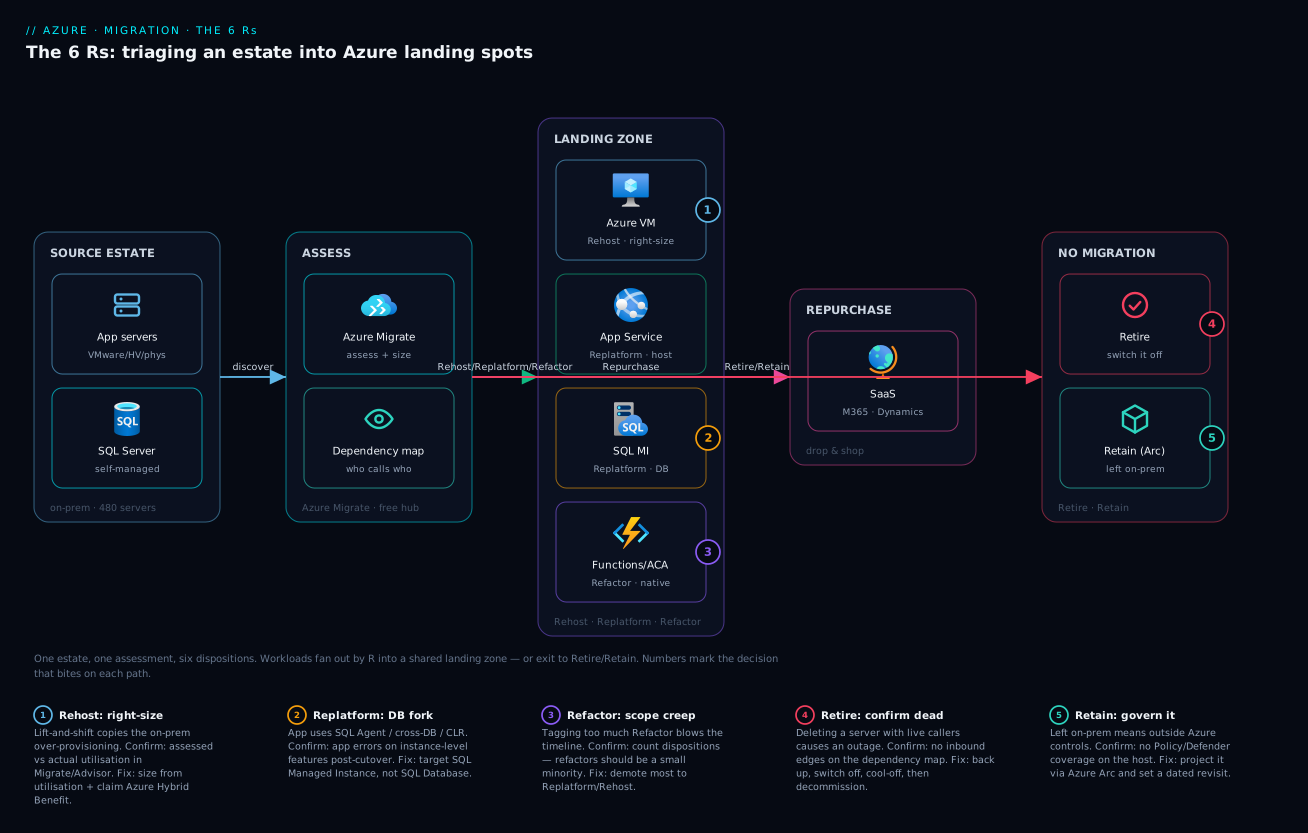
A real migration is not six independent moves — it is a single estate flowing through one discovery funnel and then fanning out by disposition into the right Azure landing spots, all on top of one shared landing zone. The diagram below traces that flow left to right: the source estate (VMware/Hyper-V/physical servers plus their SQL databases) feeds Azure Migrate, which assesses and produces the per-workload R. From there the workloads split. Rehost candidates replicate as Azure VMs (badge 1 marks the right-sizing decision that bites here). Replatform candidates split again — the app lands on App Service while its database moves, via the Database Migration Service, onto SQL Managed Instance (badge 2 marks the SQL DB vs SQL MI compatibility fork). Refactor candidates become cloud-native on Container Apps / Functions (badge 3 marks the scope-creep risk). And two arrows leave the funnel entirely: Retire (badge 4 — switched off, confirmed by the dependency map) and Retain (badge 5 — left on-prem under Azure Arc).
Read it as a triage funnel, not a pipeline: every workload enters once, gets exactly one disposition, and exits to exactly one destination — and the two “exits to nowhere” (Retire, Retain) are first-class outcomes, not leftovers. The whole right-hand side lands inside one enterprise-scale landing zone (the dashed boundary), so identity, networking and policy are shared rather than rebuilt per workload.
Real-world scenario
Northwind Logistics runs a regional freight business out of a single colo datacentre: 210 servers, a Windows-heavy estate, and a board mandate to exit the colo before the lease renews in nine months. The CIO’s first instinct — shared by the infra team — was “lift and shift everything, we’ll modernise later.” On paper that was the fast path. In practice it would have moved 210 servers’ worth of over-provisioning and patch debt into Azure at retail prices, and “later” never comes.
The architecture team ran the 6 Rs decision tree against the discovery export instead. Question 1 (still needed?) immediately removed 34 servers — dev/test boxes from finished projects, a reporting cluster superseded two years earlier, and three “we’re not sure what that does” machines with zero inbound dependencies, all tagged Retire after a two-week cooling-off period with everything switched off and nothing breaking. Question 2 (on-prem blocker?) caught 12 servers tied to a warehouse-floor control system on specialised hardware — tagged Retain, governed from Azure via Arc, with a revisit date set for after the hardware refresh. Question 3 (SaaS exists?) flagged the aging on-prem Exchange and file servers — 18 servers — for Repurchase onto Microsoft 365, deleting an entire class of patching forever.
That left 146 workloads to actually move. Question 4 (strategic differentiator?) was answered honestly: only the customer-facing shipment-tracking platform — spiky load, a roadmap, and a monolith that made every release scary — justified Refactor, decomposed over the following two quarters into Container Apps and Functions behind API Management using a strangler-fig approach. The remaining 131 workloads — the bulk, as it usually is — were Replatform or Rehost: the standard LOB apps and their SQL Servers replatformed onto App Service and SQL Managed Instance (dropping OS and database ops), while a dozen frozen vendor appliances and two hard-deadline apps were straight Rehosted onto right-sized VMs with Azure Hybrid Benefit.
The numbers told the story. By refusing the all-Rehost default, Northwind cut the migrating-workload count from 210 to 146 before writing a single migration runbook — the Retire and Retain decisions alone removed 30% of the work. The replatformed estate’s monthly run cost came in roughly 40% below the equivalent all-VM lift-and-shift, because managed PaaS right-sizes and scales where idle VMs do not. The one Refactor slipped by six weeks (refactors always do), but it was one workload’s slip, not the whole programme’s. They exited the colo with a month to spare. The lesson the CIO repeated afterwards: the migration was won in the triage, not the tooling — the cheapest, fastest wins came from the two Rs that move nothing at all.
Advantages and disadvantages
The 6 Rs framework itself is overwhelmingly positive — its only real downside is the discipline it demands. The trade-off lives between the Rs, which is the whole point:
| Aspect | Advantage | Disadvantage |
|---|---|---|
| As a framework | Turns an unmanageable estate into a plannable backlog | Requires honest, per-workload decisions (effort) |
| Rehost | Fastest, reversible, low risk | Inherits all debt; often higher run cost |
| Replatform | High value, modest effort, drops ops burden | Some app/connection changes; testing needed |
| Refactor | Highest value, true cloud-native economics | Highest cost and risk; can blow timelines |
| Repurchase | Exits operations entirely | Data migration + integration + change mgmt |
| Retire | Free; removes cost and attack surface | Must be certain; needs a cooling-off period |
| Retain | Avoids pointless or blocked moves | Defers the problem; needs a revisit date |
When each matters: Rehost matters when the clock is the constraint. Replatform matters for the broad middle of every enterprise estate and is where you should expect most workloads to land. Refactor matters for the handful of workloads where cloud-native economics or velocity are genuinely transformative — spend it sparingly. Repurchase matters when an app is commodity and a SaaS is mature. And the two quiet Rs matter most at the start: Retire and Retain shrink the backlog before you spend effort, which is why a disciplined team runs questions 1 and 2 before anything else.
Hands-on lab
This lab is conceptual-meets-practical: you will tag a small sample estate with dispositions, then stand up one landing spot per R so the mapping stops being abstract. Everything here fits inside a free or low-cost subscription; teardown is at the end. You need the Azure CLI and a resource group.
Step 1 — Create a resource group for the lab.
az group create --name rg-6rs-lab --location eastus
Step 2 — Model the sample estate. Imagine five workloads from a discovery export. Tag each with its disposition (in a real migration these tags live on the Azure Migrate assessment; here we use a simple table to make the decision explicit):
| Workload | Inputs | Disposition |
|---|---|---|
legacy-billing (frozen, deadline) |
needed, no blocker, no SaaS, not strategic, no PaaS payoff | Rehost |
crm-web + crm-sql (LOB app) |
needed, no blocker, no SaaS, not strategic, PaaS pays off | Replatform |
tracking-api (spiky, strategic) |
needed, no blocker, no SaaS, strategic | Refactor |
old-fileserver (commodity) |
needed, no blocker, SaaS exists (M365) | Repurchase |
report-2019 (idle, no callers) |
not needed | Retire |
Step 3 — Stand up the Rehost target (a right-sized VM).
az vm create \
  --resource-group rg-6rs-lab \
  --name legacy-billing \
  --image Win2022Datacenter \
  --size Standard_B2s \
  --license-type Windows_Server \
  --admin-username azadmin \
  --generate-ssh-keys
Expected output: JSON with a provisioningState of Succeeded and a public IP. The --license-type Windows_Server line is the Azure Hybrid Benefit claim — note it in the response.
Step 4 — Stand up the Replatform targets (App Service + a managed database).
az appservice plan create --resource-group rg-6rs-lab --name asp-crm --sku B1 --is-linux
az webapp create --resource-group rg-6rs-lab --plan asp-crm --name crm-web-$RANDOM --runtime "DOTNETCORE:8.0"
az sql server create --resource-group rg-6rs-lab --name sql-crm-$RANDOM --admin-user crmadmin --admin-password 'P@ssw0rd-Change-Me!'
Expected output: an App Service URL and a logical SQL server FQDN. This is the replatform shape — managed runtime plus managed database — without touching application code.
Step 5 — Stand up the Refactor target (a serverless function).
az storage account create --resource-group rg-6rs-lab --name strack$RANDOM --sku Standard_LRS
az functionapp create \
  --resource-group rg-6rs-lab \
  --name tracking-api-$RANDOM \
  --storage-account $(az storage account list -g rg-6rs-lab --query "[0].name" -o tsv) \
  --consumption-plan-location eastus \
  --runtime dotnet-isolated --functions-version 4
Expected output: a Function App on a Consumption plan — the scale-to-zero, pay-per-execution shape that defines the refactor target.
Step 6 — Model Retire. There is nothing to deploy — that’s the point. In a real estate you would snapshot and switch off. Here, simply confirm the decision is recorded; the absence of a resource is the Retire outcome.
Step 7 — Tear it all down.
az group delete --name rg-6rs-lab --yes --no-wait
You have now instantiated one landing spot for each active R and seen, concretely, why Retire is the cheapest of them all — it created nothing to delete.
Common mistakes & troubleshooting
The failures here are decision failures, not stack traces — but they are just as real, and each has a tell and a fix.
| # | Symptom | Root cause | How to confirm | Fix |
|---|---|---|---|---|
| 1 | Cloud bill higher than on-prem after migrating | Everything Rehosted at original (over-provisioned) size | Compare assessed vs actual VM utilisation in Migrate/Advisor | Right-size; replatform the candidates; claim Hybrid Benefit |
| 2 | Migration timeline blown by 2–3x | Too many workloads tagged Refactor | Count dispositions — refactors should be a small minority | Re-triage: most should be Replatform/Rehost |
| 3 | “Done” migration still pays the colo lease | Long tail of Retire/Retain never decided | Look for un-dispositioned workloads in the backlog | Run questions 1–2 first; tag every workload |
| 4 | Replatform to SQL Database fails on app features | App uses SQL Agent / cross-DB / CLR — not in SQL DB | App errors on instance-level features post-cutover | Target SQL Managed Instance, not SQL Database |
| 5 | Repurchase “done” but data/integrations missing | Treated SaaS swap as zero-effort | Old app’s interfaces have no replacement wired up | Budget data migration + integration as the real work |
| 6 | Retired server caused an outage | Deleted without confirming no inbound callers | Something broke pointing at the dead host | Always check dependency map; cool-off before delete |
| 7 | “Modernised to cloud” but no cloud benefits | Lift-and-shift mislabelled as modernisation | Still patching OSes, still single-instance, flat cost | Replatform the host/DB to managed services |
| 8 | Workloads moved but apps can’t reach each other | Dependent workloads split across different waves | App fails on a dependency still on-prem / not yet moved | Group dependencies into the same wave |
| 9 | Retain list keeps growing, nothing revisited | Retain used as “too hard” with no revisit date | Retained workloads have no follow-up date | Attach a dated revisit to every Retain |
| 10 | Cutover rolled back, no clean fallback | No tested rollback / test failover before cutover | Cutover failed and there was no rehearsed path back | Test failover into an isolated VNet first |
A compact decision-table version for mid-programme triage:
| If you see… | It’s probably… | Do this |
|---|---|---|
| Bill up, ops unchanged | Lift-and-shift-and-regret | Replatform host + DB; right-size |
| Timeline slipping badly | Refactor over-reach | Demote most refactors to replatform |
| Lease still being paid | Un-triaged long tail | Force a disposition on every workload |
| App breaks on managed DB | Wrong SQL target | SQL DB → SQL Managed Instance |
| SaaS swap stalled | Underestimated data/integration | Re-scope as a data + integration project |
Best practices
- Tag every workload with exactly one R — no “TBD.” An un-dispositioned workload is a hidden risk that surfaces at lease renewal. The backlog is only plannable when it is fully triaged.
- Run the cheap questions first. Ask “is it needed?” and “must it stay?” before anything else; Retire and Retain shrink the backlog before you spend effort, and that is the highest-leverage move in the programme.
- Expect most workloads to land on Replatform. For typical enterprise estates the broad middle is replatform, not rehost and not refactor. If your distribution is mostly Rehost, you are probably leaving value on the table.
- Ration your Refactor budget. Refactor only the handful of workloads where cloud-native economics or velocity are genuinely transformative; treat it as a product decision with a roadmap, not an infrastructure default.
- Right-size on the way in, always. The on-prem size is almost certainly wrong for the cloud. Use assessment data, not the legacy spec, to pick VM and PaaS tiers.
- Claim Azure Hybrid Benefit for Windows Server and SQL Server licences you already own — it materially lowers Rehost and Replatform run cost.
- Move dependencies together in waves. Map dependencies first; a workload whose database or peer is still on-prem will fail at cutover. Group, don’t scatter.
- Test failover before cutover. Boot a copy in an isolated VNet and validate it before the real switch — and keep a rehearsed rollback path.
- Make the landing zone exist first. Identity, networking and policy must be in place before workloads arrive, or every migration improvises its own foundation.
- Pick the database target by compatibility, not habit. SQL Managed Instance for lift-of-existing-SQL-Server; SQL Database for new/modernised apps that don’t need instance-level features.
- Cool off before you delete. Switch Retired workloads off (not delete) for a window, confirm nothing screamed, then decommission — with a backup taken first.
- Date every Retain. A Retain with no revisit date is just a deferral that will surprise you later.
Security notes
Migration is the best opportunity you will ever get to fix security debt rather than relocate it — and each R changes the security posture differently.
Rehost relocates your security debt unchanged. A lifted VM carries its old OS, its old open ports, its old local accounts and its old unpatched software into Azure. Treat the cutover as the moment to harden: apply NSGs, enable Microsoft Defender for Cloud, turn on disk encryption, and bring the VM under update management. Do not let “lift and shift” become “lift the vulnerabilities and shift them.”
Replatform is the moment to kill stored credentials. When you move an app onto App Service and its database onto SQL Managed Instance or SQL Database, switch the connection from a SQL password to Microsoft Entra authentication with a managed identity — the app authenticates as itself, no secret in config. Put any remaining secrets in Key Vault referenced by managed identity, and deploy the managed database into your VNet (SQL MI) or behind a Private Endpoint (SQL DB) so it is never reachable from the public internet.
Refactor lets you design least-privilege from scratch. Cloud-native targets — Functions, Container Apps, AKS — should each get their own managed identity scoped to exactly what they touch (a specific Service Bus queue, a single Cosmos container), with no shared “god” credential. This is far easier to do while re-architecting than to retrofit later.
Repurchase shifts the trust boundary to the SaaS vendor. You stop owning the app’s security but inherit a new shared-responsibility line: federate identity through Microsoft Entra ID (SSO + Conditional Access), review the vendor’s data-residency and compliance posture, and govern access centrally rather than per-app.
Retire reduces attack surface — but delete safely. A decommissioned server is the most secure server. Just ensure you back up first (in case of recall) and revoke its credentials and firewall rules so a half-deleted host doesn’t linger as an exposed, unpatched orphan.
Retain still needs central governance. A Retained on-prem workload is outside Azure-native controls unless you bring it in via Azure Arc, which lets you apply Azure Policy, Defender for Cloud and update management to servers you never migrated.
Cost & sizing
The 6 Rs are as much a cost framework as a technical one — the R you choose largely determines the run bill. The dominant driver is simple: managed PaaS lets you right-size and scale to demand, while lifted VMs pay for idle capacity around the clock.
| R | Primary cost driver | How to control it | Rough relative run cost |
|---|---|---|---|
| Rehost | VM size × hours (always-on) | Right-size; Hybrid Benefit; reserved instances; auto-shutdown for non-prod | Highest for equivalent capacity |
| Replatform | PaaS tier (App Service plan, vCore/DTU) | Right tier; serverless DB autopause; scale rules | Lower — pay closer to actual use |
| Refactor | Per-execution / per-request (Consumption) | Scale-to-zero; event-driven; right concurrency | Lowest for spiky loads; can spike under heavy steady load |
| Repurchase | Per-user SaaS subscription | Licence right-sizing; tier selection | Predictable per-seat |
| Retire | Nothing | — | Zero (and removes the old bill) |
| Retain | On-prem cost continues | Arc for governance; plan the exit | Unchanged (deferred) |
The biggest savings levers, in order of impact:
| Lever | Applies to | Typical effect |
|---|---|---|
| Retire dead workloads | The estate | Removes 10–20% of cost outright |
| Right-size from utilisation | Rehost, Replatform | Often 30–50% off the as-is size |
| Azure Hybrid Benefit | Windows/SQL VMs & SQL PaaS | Material discount on licence portion |
| Reserved Instances / Savings Plans | Steady-state VMs/PaaS | Large discount for 1–3yr commit |
| Serverless DB autopause | Replatform (SQL DB serverless) | Near-zero compute when idle |
| Scale-to-zero | Refactor (Functions, Container Apps) | No charge when no traffic |
Rough figures to anchor estimates (Indian-region pay-as-you-go, illustrative): a right-sized Standard_D4s_v5 rehost VM runs roughly ₹20,000–30,000/month before discounts; a B1/P1v3 App Service plan plus a serverless SQL Database for a replatformed LOB app commonly lands well under that and drops your patching effort to zero; a Consumption Function App handling bursty traffic can cost a few hundred rupees a month because it charges only for executions. The free tier covers an F1 App Service plan and a generous Functions execution grant, enough to prototype the replatform and refactor shapes at no cost. For the full estate-level cost model, Azure FinOps & cost management at scale and Azure Advisor cost recommendations carry the optimisation detail.
Interview & exam questions
Q: Name the 6 Rs of cloud migration. Rehost (lift and shift), Replatform (lift, tinker and shift), Refactor/Re-architect, Repurchase (drop and shop), Retire, and Retain. Each is a per-workload disposition; you assign exactly one to every workload in the estate.
Q: What is the difference between Rehost and Replatform? Rehost moves the workload onto a new host (an Azure VM) with no change to the application. Replatform keeps the app largely intact but swaps one component — typically the host or the database — for a managed Azure service like App Service or SQL Managed Instance, to shed operational burden without a rewrite.
Q: When would you choose Refactor over Replatform? When the workload is a strategic differentiator that would genuinely benefit from cloud-native architecture — spiky demand that rewards elasticity, a monolith that blocks team velocity, or a need for global low-latency data. Refactor costs the most and risks the timeline the most, so reserve it for the few workloads where the value is unmistakable.
Q: A workload uses SQL Server Agent jobs and cross-database queries. Replatform to Azure SQL Database or SQL Managed Instance? SQL Managed Instance. SQL Database is a single logical database without instance-level features like SQL Agent, cross-database queries, Service Broker or CLR; SQL Managed Instance offers near-100% SQL Server surface compatibility, which is exactly what a lift-of-existing-SQL-Server needs.
Q: Why is Retire often the highest-value disposition? Because a retired workload costs nothing to assess, move, run or secure, and discovery typically finds 10–20% of an estate is dead weight. It is the cheapest win available and it shrinks attack surface, so disciplined teams hunt for Retire candidates before doing any migration work.
Q: What does Retain mean, and how do you keep a Retained workload governed? Retain is the deliberate decision to leave a workload on-prem — because of a hardware/appliance dependency, a data-residency rule, an imminent retirement, or an unready dependency. To govern it from Azure without migrating it, project it into the Azure control plane with Azure Arc, which applies Policy, Defender for Cloud and update management to non-Azure servers.
Q: How do the 6 Rs map to the Cloud Adoption Framework? They are the disposition taxonomy within the CAF Migrate methodology. Discovery and assessment (Azure Migrate) produce the inventory; you assign each workload an R; then you plan waves, prepare the landing zone, and migrate. The Rs are the bridge between “assess” and “migrate.”
Q: What is the most common 6 Rs anti-pattern, and how do you avoid it? Defaulting everything to Rehost (“lift-and-shift-and-regret”), which relocates over-provisioning and patch debt into Azure at retail prices with no cloud benefit. Avoid it by honestly running the decision tree per workload — most enterprise workloads should land on Replatform, where managed PaaS delivers real value for modest effort.
Q: How do you decide migration wave order? By dependency and risk. Map dependencies first so coupled workloads (an app and its database, or two apps that talk) move in the same wave; sequence low-risk, high-confidence workloads early to build momentum and validate the landing zone, and save the riskiest refactors for when the foundation is proven.
Q: Where do Azure Migrate, Database Migration Service and Site Recovery fit relative to the Rs? Azure Migrate’s Server Migration executes Rehost (and assesses the whole estate). The Database Migration Service executes the database half of a Replatform. Azure Site Recovery is primarily a DR tool, occasionally used as a migration mechanism. The R is the decision; these tools are how you carry it out.
Q: Which certification covers this, and at what depth? AZ-305 (Designing Microsoft Azure Infrastructure Solutions) expects you to recommend a migration approach per workload — choosing Rehost vs Replatform vs Refactor and the right Azure target — and to align it to the Cloud Adoption Framework. The depth is decision-level: given a scenario, pick the disposition and justify it.
Quick check
- A frozen vendor appliance must be out of the datacentre in six weeks and cannot be changed. Which R, and which Azure target?
- Your team tags 70% of the estate as Refactor and the timeline triples. What went wrong and what is the fix?
- An app relies on SQL Server Agent jobs. Replatform it to SQL Database or SQL Managed Instance — and why?
- Discovery shows a server with near-zero CPU for two months and no inbound dependencies. Which R, and what must you do before acting?
- Which two Rs should you evaluate first when triaging an estate, and why?
Answers
- Rehost, onto an Azure VM — speed and “can’t change it” both point straight at lift-and-shift; right-size it and claim Hybrid Benefit on the way in.
- Refactor was massively over-used; it is the highest-effort, highest-risk R. Re-triage — most workloads should be Replatform or Rehost, with Refactor reserved for the few strategic, elasticity-hungry apps.
- SQL Managed Instance — SQL Database lacks instance-level features like SQL Agent; SQL Managed Instance gives near-full SQL Server compatibility, so the Agent jobs keep working.
- Retire — it’s a zombie. Before deleting: confirm no inbound callers on the dependency map, back it up, and switch it off for a cooling-off period before decommissioning.
- Retire and Retain — asking “is it needed?” and “must it stay?” first removes workloads from the active backlog before you spend any migration effort, which is the highest-leverage move available.
Glossary
- 6 Rs — The set of migration dispositions: Rehost, Replatform, Refactor, Repurchase, Retire, Retain.
- Rehost — Move a workload onto a new host (Azure VM) with no application change; “lift and shift.”
- Replatform — Keep the app largely intact but swap a component (host or database) for managed PaaS.
- Refactor / Re-architect — Change the app’s internal design to be cloud-native (services, serverless, distributed data).
- Repurchase — Replace the workload with a SaaS product; you stop hosting it.
- Retire — Decommission a workload nobody needs; the target is nothing.
- Retain — Deliberately leave a workload in place (on-prem), with a documented reason and revisit date.
- Disposition — The single R assigned to a workload; the unit that makes a migration plannable.
- Migration wave — A batch of workloads migrated together so dependencies stay in sync.
- Cutover — The switch from the old workload to the new one; the risky moment that needs a rollback plan.
- Landing zone — The pre-built Azure foundation (subscriptions, networking, identity, policy) workloads land into.
- Azure Hybrid Benefit — Using on-prem Windows/SQL Server licences you own to lower Azure VM/PaaS cost.
- SQL Managed Instance — A managed Azure service with near-100% SQL Server instance compatibility.
- Azure SQL Database — A managed single logical database; lighter and cheaper, without instance-level features.
- Azure Arc — Projects non-Azure servers into the Azure control plane for governance without migrating them.
- Strangler-fig — Incrementally replacing a monolith by routing slices of traffic to new services beside it.
- Cloud Adoption Framework (CAF) — Microsoft’s guidance whose Migrate methodology houses the 6 Rs taxonomy.
Next steps
- Produce the spreadsheet this article triages with Azure Migrate: discovery, assessment & dependency mapping.
- Pick the right tool for each disposition with Azure Migrate vs Site Recovery vs Database Migration Service.
- Execute the database half of a Replatform with the Database Migration Service walkthrough.
- Land your migrated workloads on a proper foundation with the enterprise-scale landing zone.
- Choose the host target for a Replatform or Refactor with Azure App Service vs Container Apps vs AKS.
- Govern the workloads you Retain — and everything else — from one control plane with Azure Arc explained.