Every cloud provider has one architecture that everything else is measured against, and on Google Cloud it is the three-tier web application: a global external HTTPS load balancer in front, two rows of virtual machines in managed instance groups (MIGs) in the middle, and a Cloud SQL database with a hot standby at the back. It is the pattern the Associate Cloud Engineer and Professional Cloud Architect exams keep returning to, the pattern most lift-and-shift migrations land on first, and — more importantly — the pattern that teaches you how GCP’s networking, compute and data services actually snap together. If you can build and explain this one diagram, you understand half of Google Cloud.
The mental model is simple and worth memorising before any command: one front door, two stateless rooms, one stateful vault. The front door is a single global anycast IP owned by Google’s edge — it terminates TLS, caches static files, blocks attacks and picks a healthy backend. The two rooms are the web tier (serves pages, talks to the app tier) and the app tier (business logic, talks to the database); both are disposable VMs that a MIG creates, destroys, heals and scales without your involvement, which is exactly why they must hold no state. The vault is Cloud SQL running in regional high-availability mode: every write is synchronously copied to a standby in a second zone, so losing a zone loses no committed data. Everything else in this article — subnets, firewall rules, health checks, NAT — exists to wire those four things together safely.
By the end you will be able to build this architecture from a blank project with gcloud and Terraform, explain why each piece was chosen over its alternatives, predict exactly what happens when a VM, a zone or the database primary dies, and put a monthly price on a small deployment in both INR and USD. You will also know when not to build it — because for many new applications, Cloud Run gets you the same outcome with far less machinery.
What problem this solves
The architecture exists to kill the failure modes of the way most applications start life: one virtual machine running the web server, the application code and the database side by side. That single-VM setup is cheap and easy, and it fails in completely predictable ways the moment real users arrive.
| What breaks on a single VM | Why it happens | How the three-tier design prevents it |
|---|---|---|
| Site down during any reboot, kernel patch or resize | One machine is the whole stack; maintenance = outage | Two+ VMs per tier behind a load balancer; MIG rolling updates replace VMs one at a time |
| Traffic spike takes the site down | Vertical limit — you can only buy a bigger VM, with a reboot | Autoscaler adds VMs horizontally in minutes, removes them when the spike passes |
| Zone outage takes everything | VM and its disk live in exactly one zone | Regional MIGs spread VMs across 2–3 zones; Cloud SQL HA keeps a standby in another zone |
| A crashed process stays crashed at 3 a.m. | Nobody is watching; no supervisor above systemd | Autohealing health-checks every VM and recreates any that stop answering |
| Database dies with the VM’s disk | Data and compute share one failure domain | Cloud SQL is a separate managed service with synchronous replication, backups and point-in-time recovery |
| One leaked SSH key exposes everything | Web, app and data share one OS and one IP | Tiers are separated by firewall rules; the database accepts connections only from the app tier; no VM has a public IP |
| Attack traffic hits your CPU | Every request, hostile or not, reaches your box | Cloud Armor filters at Google’s edge; Cloud CDN serves static content before it touches a VM |
Who hits this? Anyone migrating a classic LAMP/Java/.NET workload from on-prem or another cloud, anyone whose framework assumes long-lived servers (sticky sessions, local caches, background threads), and anyone who needs OS-level control — custom kernels, agents, licensed software — that containers-as-a-service platforms do not offer. That is a very large share of real workloads, which is why this “boring” pattern still runs much of the internet.
Learning objectives
By the end of this article you can:
- Draw the full request path — client → global load balancer → web MIG → internal load balancer → app MIG → Cloud SQL — and name every GCP resource on it.
- Create a custom-mode VPC with per-tier subnets and explain why auto-mode is the wrong default for production.
- Assemble the global external HTTPS load balancer from its five parts: forwarding rule, target proxy, URL map, backend service and health check — and attach Cloud CDN and Cloud Armor to it.
- Build an instance template and a regional MIG with autoscaling and autohealing, and explain the difference between those two features.
- Deploy Cloud SQL with
availability-type=REGIONAL, private IP only, and describe the failover sequence step by step. - Write per-tier firewall rules using network tags or service accounts, and give VMs internet egress through Cloud NAT without any public IPs.
- Estimate the monthly cost of a small deployment in INR/USD and identify the three biggest levers to reduce it.
- Decide, with a checklist, when this architecture is right versus Cloud Run, App Engine or GKE.
Prerequisites & where this fits
You need a GCP project with billing enabled, the gcloud CLI installed and authenticated, and roughly the Editor role (or the granular set: Compute Admin, Cloud SQL Admin, Service Account User). You should know what a VM, an IP address and a firewall are; you do not need prior GCP networking experience — the VPC model is explained from zero below.
Where this sits: this is the reference architecture for Compute Engine-based serving. It assumes you have already decided VMs are the right compute — if you have not, read GCP Compute Options Compared first. The VPC concepts here scale up later into org-wide designs covered in Shared VPC networking, and the zone/region reasoning builds directly on GCP regions, zones and resiliency. Everything below uses one region (asia-south1, Mumbai) and one project to stay concrete.
Core concepts
Ten resources make up the entire system. Learn these and the diagram reads itself.
| Component | What it is | Scope | Role in the three-tier design |
|---|---|---|---|
| VPC network | Your private IP space; global container for subnets, routes, firewall rules | Global | One custom-mode VPC holds all tiers |
| Subnet | A regional IP range inside the VPC | Regional | One per tier: web 10.10.1.0/24, app 10.10.2.0/24 |
| Firewall rule | Allow/deny filter applied to VM interfaces by tag or service account | Global (VPC-wide) | Enforces tier isolation: LB→web, web→app, app→SQL only |
| Instance template | Frozen recipe for a VM: machine type, image, startup script, tags, service account | Global (immutable) | The “class” from which the MIG stamps out identical VMs |
| Managed instance group (MIG) | Controller that keeps N identical VMs running from a template | Regional (here) | One per tier; owns autoscaling, autohealing, rolling updates |
| Health check | Prober that calls a URL/port on each VM on a schedule | Global | Two consumers: LB (route traffic) and MIG (recreate VMs) |
| Backend service | LB-side object that groups instance groups and holds the health check, balancing mode, CDN and Armor settings | Global | The glue between the URL map and the web MIG |
| Global external HTTPS LB | Google-edge proxy: anycast IP + target proxy + URL map | Global | The only public entry point; TLS ends here |
| Cloud SQL (regional) | Managed MySQL/PostgreSQL/SQL Server with a synchronous standby in a second zone | Regional | The stateful vault; private IP only |
| Cloud NAT + Cloud Router | Managed source-NAT for VMs without external IPs | Regional | Lets private VMs reach package repos and APIs; inbound stays impossible |
Two distinctions trip up almost every newcomer, so fix them now. First, autoscaling vs autohealing: autoscaling changes how many VMs exist (based on load); autohealing changes which VMs exist (recreating ones that fail the health check). A MIG can do either, both or neither. Second, the same health check mechanism serves two masters: the load balancer uses it to decide where to send traffic (fail = drain traffic away), and the MIG uses it to decide whether a VM should live (fail = delete and recreate). You typically attach the same or similar checks in both places, with the MIG’s version being more lenient — you want traffic drained before the VM is executed.
Before building, here is the decision ledger — every major choice in this architecture and why it wins for the base case:
| Layer | Choice made | Why | The alternative and when it wins instead |
|---|---|---|---|
| Network | Custom-mode VPC | You control CIDRs; no surprise subnets in 40+ regions; clean room for peering later | Auto-mode: only for throwaway experiments |
| Entry point | Global external HTTPS LB | One anycast IP worldwide, TLS at the edge, integrates CDN + Armor + backend buckets | Regional external ALB: data-residency proxies, Standard network tier |
| Web/app compute | Regional MIG of small VMs | Zone-spread by default, autohealing, rolling updates; cheap horizontal scale | Zonal MIG: never for production (one-zone blast radius) |
| Tier-to-tier hop | Internal passthrough LB | Stable VIP (10.10.2.100) so web VMs never track app VM IPs; TCP-level, near-zero overhead |
Internal ALB: when you need L7 routing/headers between tiers |
| Database | Cloud SQL REGIONAL | Synchronous standby, automatic failover, same IP after failover; zero replication code | Zonal + backups: dev/test where 30+ min restore is acceptable |
| Static assets | GCS bucket + Cloud CDN via backend bucket | Offloads images/JS/CSS from VMs entirely; pennies per GB | Serving from nginx: only if assets are truly tiny |
| Egress | Cloud NAT | VMs stay unreachable from internet but can still apt upgrade and call APIs |
Public IPs per VM: never — it multiplies attack surface |
| VM identity | Per-tier service accounts | Firewall rules and IAM both key off identity; tags are editable, SAs are not | Network tags: fine to start, weaker as a security boundary |
The network layer: custom-mode VPC, subnets and firewall rules
A GCP VPC is global — a single VPC spans every region, and only its subnets are regional. That is unusual (AWS and Azure scope networks to a region) and it means one VPC comfortably hosts this whole architecture, with room to add a second region later without any peering. Create it in custom mode, which starts with zero subnets, rather than auto mode, which silently creates a subnet in every GCP region with predetermined 10.128.0.0/9 ranges that will collide with something eventually.
gcloud compute networks create three-tier-vpc --subnet-mode=custom

gcloud compute networks subnets create web-subnet \
  --network=three-tier-vpc --region=asia-south1 \
  --range=10.10.1.0/24 --enable-private-ip-google-access

gcloud compute networks subnets create app-subnet \
  --network=three-tier-vpc --region=asia-south1 \
  --range=10.10.2.0/24 --enable-private-ip-google-access
--enable-private-ip-google-access lets VMs without public IPs still reach Google APIs (GCS, Cloud Logging) over internal routes — you want this on every production subnet.
| Subnet / range | CIDR | Region | Used by | Notes |
|---|---|---|---|---|
web-subnet |
10.10.1.0/24 | asia-south1 | Web-tier MIG | 251 usable IPs — plenty for a 2–6 VM group |
app-subnet |
10.10.2.0/24 | asia-south1 | App-tier MIG + internal LB VIP | VIP pinned at 10.10.2.100 |
| PSA range | 10.20.0.0/16 | Global (peered) | Cloud SQL private IP | Allocated for private services access, not a normal subnet |
(optional) proxy-only |
10.10.3.0/24 | asia-south1 | Internal Application LB, if you choose L7 inside | Only needed if you swap the passthrough ILB for an internal ALB |
Firewall rules are where the “tiers” actually become tiers. GCP firewall rules are VPC-wide, stateful, and applied to VM network interfaces selected by network tag or service account. Two implied rules exist on every VPC: allow all egress, deny all ingress — so you only write allow-ingress rules, and each one should be as narrow as the architecture allows:
| Rule name | Direction | Source | Target | Ports | Why it exists |
|---|---|---|---|---|---|
allow-lb-to-web |
Ingress | 130.211.0.0/22, 35.191.0.0/16 |
tag web-tier |
tcp:80 | Global LB data plane and health checks come from these two Google ranges — miss this rule and every backend shows UNHEALTHY |
allow-hc-to-app |
Ingress | 130.211.0.0/22, 35.191.0.0/16 |
tag app-tier |
tcp:8080 | Health checks for the internal LB use the same ranges |
allow-web-to-app |
Ingress | SA web-sa@… |
SA app-sa@… |
tcp:8080 | The only path into the app tier; identity-based, not IP-based |
allow-iap-ssh |
Ingress | 35.235.240.0/20 |
tag web-tier, app-tier |
tcp:22 | SSH via Identity-Aware Proxy tunnels — no bastion, no public IPs |
| (implied) | Ingress | everything else | all | all | Denied. The database is protected additionally by living outside the VPC behind private services access |
gcloud compute firewall-rules create allow-lb-to-web \
  --network=three-tier-vpc --allow=tcp:80 \
  --source-ranges=130.211.0.0/22,35.191.0.0/16 --target-tags=web-tier

gcloud compute firewall-rules create allow-web-to-app \
  --network=three-tier-vpc --allow=tcp:8080 \
  --source-service-accounts=web-sa@PROJECT_ID.iam.gserviceaccount.com \
  --target-service-accounts=app-sa@PROJECT_ID.iam.gserviceaccount.com

gcloud compute firewall-rules create allow-iap-ssh \
  --network=three-tier-vpc --allow=tcp:22 \
  --source-ranges=35.235.240.0/20 --target-tags=web-tier,app-tier
Note the mix: Google-range rules use tags (simple, and the source is an IP range anyway), but the web→app rule uses service accounts on both sides. A tag can be added to any VM by anyone with instance-edit permission, silently granting it network access; a service account can only be attached at VM creation/stop, and requires iam.serviceAccountUser on that SA. For inter-tier trust, identity beats labels. One rule cannot mix tags and service accounts — pick one scheme per rule.
Finally, egress. No VM in this design has an external IP, so none of them can reach the internet — which breaks apt, pip, webhook calls and every third-party API. Cloud NAT fixes this: a regional, fully managed source-NAT that translates outbound connections to one or more static IPs you control, with no inbound path whatsoever.
gcloud compute routers create nat-router \
  --network=three-tier-vpc --region=asia-south1

gcloud compute routers nats create nat-all \
  --router=nat-router --region=asia-south1 \
  --nat-all-subnet-ip-ranges --auto-allocate-nat-external-ips \
  --enable-logging
If a partner needs to allowlist your egress IP, swap auto-allocation for a reserved static address (--nat-external-ip-pool). Watch the default of 64 ports per VM if your app opens many parallel outbound connections — port exhaustion shows up as mysterious timeouts, and --enable-logging is how you catch it.
The front door: global external HTTPS load balancer
GCP’s load-balancer family is a frequent source of confusion because “load balancer” is really five products. Orient once, then move on:
| Load balancer | Scope | OSI layer | Public? | Use in this architecture |
|---|---|---|---|---|
| Global external Application LB | Global | L7 (HTTP/S) | Yes | The front door — chosen |
| Regional external Application LB | Regional | L7 | Yes | Data-residency or Standard-tier setups |
| Internal Application LB | Regional | L7 | No | Alternative web→app hop if you need L7 rules |
| Internal passthrough Network LB | Regional | L4 (TCP/UDP) | No | The web→app hop — chosen |
| External passthrough Network LB | Regional | L4 | Yes | Non-HTTP public protocols (game servers, SMTP) |
The global external Application Load Balancer is not a VM pair you manage — it is a slice of the Google Front End (GFE) fleet, the same edge that serves Google Search. Your users hit a single anycast IP announced from every Google edge location; TLS terminates at the edge nearest them; the request rides Google’s backbone to your backends. That is why one IP serves Mumbai and Frankfurt users with local TLS latency, with no DNS-based geo-routing to manage.
You assemble it from five chained resources — this chain is the thing to memorise for both real work and exams:
| # | Resource | What it does | gcloud noun |
|---|---|---|---|
| 1 | Global static IP + forwarding rule | The anycast VIP; binds IP:443 to a proxy | compute addresses / compute forwarding-rules |
| 2 | Target HTTPS proxy | Terminates TLS; holds certificates | compute target-https-proxies |
| 3 | URL map | Routes by host/path: /static/* → bucket, rest → web tier |
compute url-maps |
| 4 | Backend service | Groups the MIG(s); holds health check, balancing mode, Cloud CDN + Armor attachments | compute backend-services |
| 5 | Health check | Marks each backend VM healthy/unhealthy | compute health-checks |
Build the chain bottom-up, because each layer references the one below it:
# 5) Health check: poll /healthz on :80 every 10s
gcloud compute health-checks create http web-hc \
  --port=80 --request-path=/healthz \
  --check-interval=10s --timeout=5s \
  --healthy-threshold=2 --unhealthy-threshold=3

# 4) Backend service (EXTERNAL_MANAGED = the modern global ALB)
gcloud compute backend-services create web-backend \
  --load-balancing-scheme=EXTERNAL_MANAGED --protocol=HTTP \
  --port-name=http --health-checks=web-hc --global

gcloud compute backend-services add-backend web-backend --global \
  --instance-group=web-mig --instance-group-region=asia-south1 \
  --balancing-mode=UTILIZATION --max-utilization=0.8

# 3) URL map: default to web tier, /static/* to a CDN-backed bucket
gcloud compute backend-buckets create static-assets \
  --gcs-bucket-name=my-shop-static --enable-cdn --cache-mode=CACHE_ALL_STATIC

gcloud compute url-maps create web-map --default-service=web-backend
gcloud compute url-maps add-path-matcher web-map \
  --path-matcher-name=static --default-service=web-backend \
  --backend-bucket-path-rules="/static/*=static-assets"

# 2) Google-managed certificate + HTTPS proxy
gcloud compute ssl-certificates create web-cert \
  --domains=shop.example.com --global
gcloud compute target-https-proxies create web-proxy \
  --url-map=web-map --ssl-certificates=web-cert

# 1) Anycast IP + forwarding rule
gcloud compute addresses create web-ip --global --ip-version=IPV4
gcloud compute forwarding-rules create web-https-fr --global \
  --load-balancing-scheme=EXTERNAL_MANAGED \
  --address=web-ip --target-https-proxy=web-proxy --ports=443
Point your domain’s A record at the web-ip address before expecting the managed certificate to activate — Google validates domain control by resolving the name to the LB, and the cert sits in PROVISIONING until DNS propagates (typically 15–60 minutes).
The health check deserves respect; its four knobs decide how fast failures are detected and how twitchy the system is:
| Setting | Value here | Meaning | Gotcha |
|---|---|---|---|
check-interval |
10s | Probe frequency per prober | Probes come from many GFEs; VMs see more than 1 per 10s — normal, don’t “fix” it |
timeout |
5s | How long a probe waits | Must be ≤ interval; a slow /healthz that queries the DB will flap under load |
healthy-threshold |
2 | Consecutive passes to become healthy | Higher = slower to re-admit a recovered VM |
unhealthy-threshold |
3 | Consecutive fails to be marked down | With 10s interval: ~30s to drain a dead VM |
request-path |
/healthz |
The endpoint probed | Make it cheap and honest: return 200 only if the process can actually serve; never call downstream DBs from the web tier’s check |
Two edge attachments complete the front door. Cloud CDN you have already enabled on the backend bucket — static assets now serve from Google’s edge caches and most image/CSS/JS requests never reach a VM. Cloud Armor is a WAF and DDoS policy evaluated at the edge, before your VPC:
gcloud compute security-policies create edge-policy

# Block SQL injection using the preconfigured WAF ruleset
gcloud compute security-policies rules create 1000 \
  --security-policy=edge-policy \
  --expression="evaluatePreconfiguredWaf('sqli-v33-stable', {'sensitivity': 1})" \
  --action=deny-403

# Rate-limit any single client IP to 120 requests/minute
gcloud compute security-policies rules create 2000 \
  --security-policy=edge-policy \
  --src-ip-ranges="*" --action=throttle \
  --rate-limit-threshold-count=120 --rate-limit-threshold-interval-sec=60 \
  --conform-action=allow --exceed-action=deny-429 --enforce-on-key=IP

gcloud compute backend-services update web-backend \
  --global --security-policy=edge-policy
A starter policy for a public web app looks like this:
| Priority | Rule | Action | Purpose |
|---|---|---|---|
| 1000 | evaluatePreconfiguredWaf('sqli-v33-stable', …) |
deny-403 | OWASP SQL-injection signatures |
| 1100 | evaluatePreconfiguredWaf('xss-v33-stable', …) |
deny-403 | Cross-site-scripting signatures |
| 2000 | all IPs, >120 req/min | throttle → deny-429 | Per-client rate limit; blunts scrapers and credential stuffing |
| 3000 | origin.region_code not in serving list (optional) |
deny-403 | Geo-fence if your product is single-market |
| 2147483647 | default | allow | Everything that survived the gauntlet |
Start new WAF rules in --preview mode: they log matches without blocking, so you can check for false positives in the logs before enforcing.
The compute tiers: instance templates and managed instance groups
Both middle tiers follow one pattern: an instance template describes a VM, a regional MIG keeps N copies of it alive across zones, an autoscaler decides N, and autohealing replaces broken copies. The VMs must be cattle: anything a VM needs, it installs from its startup script or a baked image at boot; anything it produces worth keeping goes to Cloud SQL or GCS, never to its own disk.
gcloud iam service-accounts create web-sa --display-name="web tier"

gcloud compute instance-templates create web-template-v1 \
  --machine-type=e2-small \
  --image-family=debian-12 --image-project=debian-cloud \
  --region=asia-south1 --subnet=web-subnet --no-address \
  --tags=web-tier \
  --service-account=web-sa@PROJECT_ID.iam.gserviceaccount.com \
  --scopes=cloud-platform \
  --metadata-from-file=startup-script=web-startup.sh
--no-address is the line that makes the whole tier private — combined with Cloud NAT for egress and the LB for ingress, no VM is ever directly reachable from the internet. Templates are immutable: to change anything, create web-template-v2 and roll the MIG onto it, which is exactly what makes deployments repeatable.
gcloud compute instance-groups managed create web-mig \
  --region=asia-south1 --template=web-template-v1 --size=2

gcloud compute instance-groups managed set-named-ports web-mig \
  --region=asia-south1 --named-ports=http:80

# Autoscaling: 2–6 VMs, target 60% average CPU
gcloud compute instance-groups managed set-autoscaling web-mig \
  --region=asia-south1 --min-num-replicas=2 --max-num-replicas=6 \
  --target-cpu-utilization=0.60 --cool-down-period=90

# Autohealing: recreate any VM failing /healthz, after a 180s boot grace
gcloud compute instance-groups managed update web-mig \
  --region=asia-south1 --health-check=web-hc --initial-delay=180
The named port line matters more than it looks: the backend service forwards to the port name (http), and the MIG resolves that name to 80. Mismatch the two and you get a wall of 502s with perfectly healthy VMs. The --initial-delay on autohealing is the other classic trap — it is the grace period a new VM gets to boot and start passing checks. Set it shorter than your actual boot-plus-startup-script time and the MIG will kill every VM before it finishes booting, forever. Time a real boot, then add 50%.
Choosing the autoscaler signal:
| Signal | Flag | Best for | Trade-off |
|---|---|---|---|
| CPU utilisation | --target-cpu-utilization=0.60 |
CPU-bound app servers (this design) | Blind to memory- or IO-bound saturation |
| LB serving capacity | --target-load-balancing-utilization |
Web tiers where you’ve set max-rate-per-instance on the backend |
Requires honest per-VM capacity numbers |
| Custom Cloud Monitoring metric | --update-stackdriver-metric |
Queue depth, requests-in-flight, JVM heap | You must publish and maintain the metric |
| Schedule | --set-schedule |
Predictable daily/market-hours peaks | Doesn’t react to surprises; combine with CPU |
Scaling in is deliberately slower than scaling out: the autoscaler uses the peak of the trailing 10-minute stabilisation window before removing VMs, so brief dips do not trigger churn. Do not fight this by shrinking cool-down-period to make scale-in “snappier” — flapping group size is worse than a few spare VM-minutes.
The app tier repeats the pattern with app-sa, app-subnet, e2-medium, port 8080 and its own health check — plus one extra resource: an internal passthrough Network Load Balancer so web VMs call one stable VIP instead of tracking app VM IPs:
gcloud compute health-checks create tcp app-hc \
  --region=asia-south1 --port=8080

gcloud compute backend-services create app-ilb-backend \
  --load-balancing-scheme=INTERNAL --protocol=TCP \
  --region=asia-south1 \
  --health-checks=app-hc --health-checks-region=asia-south1

gcloud compute backend-services add-backend app-ilb-backend \
  --region=asia-south1 \
  --instance-group=app-mig --instance-group-region=asia-south1

gcloud compute forwarding-rules create app-ilb-fr \
  --region=asia-south1 --load-balancing-scheme=INTERNAL \
  --network=three-tier-vpc --subnet=app-subnet \
  --address=10.10.2.100 --ip-protocol=TCP --ports=8080 \
  --backend-service=app-ilb-backend
The web tier’s config now contains exactly one line about the app tier: API_URL=http://10.10.2.100:8080. App VMs can scale 2→8 and be recreated freely; nothing upstream notices.
In Terraform, the whole web tier compresses into three resources — this is the shape you would actually commit:
resource "google_compute_instance_template" "web" {
  name_prefix  = "web-template-"
  machine_type = "e2-small"
  tags         = ["web-tier"]

  disk {
    source_image = "debian-cloud/debian-12"
    auto_delete  = true
    boot         = true
  }
  network_interface {          # no access_config block = no public IP
    subnetwork = google_compute_subnetwork.web.id
  }
  service_account {
    email  = google_service_account.web.email
    scopes = ["cloud-platform"]
  }
  metadata_startup_script = file("web-startup.sh")
  lifecycle { create_before_destroy = true }
}

resource "google_compute_region_instance_group_manager" "web" {
  name               = "web-mig"
  region             = "asia-south1"
  base_instance_name = "web"
  version { instance_template = google_compute_instance_template.web.id }

  auto_healing_policies {
    health_check      = google_compute_health_check.web.id
    initial_delay_sec = 180
  }
  named_port {
    name = "http"
    port = 80
  }
}

resource "google_compute_region_autoscaler" "web" {
  name   = "web-autoscaler"
  region = "asia-south1"
  target = google_compute_region_instance_group_manager.web.id

  autoscaling_policy {
    min_replicas    = 2
    max_replicas    = 6
    cooldown_period = 90
    cpu_utilization { target = 0.60 }
  }
}
The data tier: Cloud SQL HA and Cloud Storage
The database is the one component you cannot treat as cattle, so you buy resilience instead of building it. Cloud SQL with --availability-type=REGIONAL runs your primary in one zone and a standby in another zone of the same region, with storage replicated synchronously — a write is not acknowledged to your app until it is durable in both zones. The standby is not a read replica; it serves no traffic and exists purely to take over.
First, give the database a private address. Cloud SQL instances live in a Google-managed VPC that is peered to yours through private services access (PSA) — you allocate an IP range once per VPC, then every private Cloud SQL instance draws from it:
gcloud compute addresses create google-managed-services-range \
  --global --purpose=VPC_PEERING --network=three-tier-vpc \
  --addresses=10.20.0.0 --prefix-length=16

gcloud services vpc-peerings connect \
  --service=servicenetworking.googleapis.com \
  --ranges=google-managed-services-range --network=three-tier-vpc

gcloud sql instances create prod-pg \
  --database-version=POSTGRES_16 --edition=enterprise \
  --tier=db-custom-2-8192 --region=asia-south1 \
  --availability-type=REGIONAL \
  --network=projects/PROJECT_ID/global/networks/three-tier-vpc \
  --no-assign-ip \
  --storage-type=SSD --storage-size=50 --storage-auto-increase \
  --backup-start-time=21:30 --enable-point-in-time-recovery
The equivalent Terraform, trimmed to the settings that matter:
resource "google_sql_database_instance" "prod" {
  name             = "prod-pg"
  database_version = "POSTGRES_16"
  region           = "asia-south1"

  settings {
    edition           = "ENTERPRISE"
    tier              = "db-custom-2-8192"
    availability_type = "REGIONAL"          # zonal standby + auto failover

    ip_configuration {
      ipv4_enabled    = false               # private IP only
      private_network = google_compute_network.vpc.id
    }
    backup_configuration {
      enabled                        = true
      start_time                     = "21:30"
      point_in_time_recovery_enabled = true
    }
  }
  deletion_protection = true
}
Know exactly what each availability option buys before you pay for it:
| Option | What you get | Data-loss window (RPO) | Downtime on zone failure (RTO) | Cost vs zonal |
|---|---|---|---|---|
Zonal (ZONAL) |
One instance, automated backups + PITR | Seconds–minutes via WAL replay, but restore is manual | 30+ min (restore to new instance) | 1× |
Regional HA (REGIONAL) |
Synchronous standby in second zone, automatic failover | Zero for committed transactions | Typically ~1–2 min, automatic | ~2× |
| + Read replica(s) | Async copy serving reads (same or different region) | n/a (replica, not backup) | Manual promotion if used for DR | +1× each |
| Cross-region replica (DR) | Async replica in another region | Seconds of replication lag | Minutes–hours incl. promotion + reroute | +1× in DR region |
The failover sequence is worth being able to narrate: (1) Cloud SQL’s health system detects the primary or its zone is unresponsive for roughly a minute; (2) the standby is promoted — it already has every committed byte because replication is synchronous; (3) the instance’s private IP address moves with the role, so your app’s connection string never changes; (4) existing connections drop and the app’s connection pool reconnects; total observed disruption is typically one to two minutes. Two consequences for your application code: enable connection-pool validation (test-on-borrow or a short max-lifetime) so dead connections are discarded fast, and make writes idempotent or retry-safe because an in-flight transaction at failover time is rolled back. Note what HA does not cover: it will not survive a region outage (that needs the cross-region replica) and it will not undo a bad DELETE — that is what point-in-time recovery is for.
The second data-tier citizen is Cloud Storage for static assets — product images, JS/CSS bundles, downloads. You already wired the bucket to the LB as a CDN-backed backend bucket, so uploads land in GCS and get served from edge caches worldwide without consuming one web-VM CPU cycle. Keep the bucket private and let the LB do the serving; users never need storage.googleapis.com URLs.
Monitoring and alerting: knowing it works
Google Cloud’s Cloud Monitoring collects LB, MIG and Cloud SQL metrics automatically; install the Ops Agent via the startup script to add in-guest memory and disk metrics, which Compute Engine cannot see from outside. The golden minimum is five alerts — enough to catch every failure class in the next section:
- LB 5xx ratio —
loadbalancing.googleapis.com/https/request_countfiltered toresponse_code_class=500, alerting above ~1% for 5 minutes. This is your users’ experience. - Backend healthy count — alert when healthy backends in either MIG drops below 2; you are one failure from an outage.
- MIG size at max — when
instance_group_sizeequalsmax-num-replicasfor 15 minutes, you have hit the scaling ceiling; raise it deliberately, not during the incident. - Cloud SQL CPU, memory and disk — sustained CPU >80%, memory >90% or disk >85% (auto-increase helps but alerts you to runaway growth).
- Uptime check on
https://shop.example.com/healthzfrom 3+ global locations — catches DNS, certificate and Armor misconfigurations that internal metrics never see.
Wire them to a notification channel that wakes someone up, and add Cloud SQL’s database/replication/state if you deploy read replicas. For deeper coverage of metrics, dashboards and SLO alerting on GCP, see Cloud Monitoring and operations.
What fails when: the resilience walkthrough
The point of the whole design is how it behaves when things break. Walk each failure through the diagram:
| Failure event | What the platform does | User impact | Data impact | Your required action |
|---|---|---|---|---|
| One web/app VM crashes | LB health check drains it in ~30s; autohealing recreates it in ~2–4 min | None to a blip; other VMs absorb load | None (stateless) | None — read the log later |
| App process hangs (VM up, port dead) | Same as crash: health check fails, drain, recreate | Requests to that VM time out for ≤30s | None | Fix the leak; autohealing already restored service |
| Entire zone goes down | Regional MIGs lose ~half their VMs; LB routes to surviving zone; autoscaler rebuilds capacity in remaining zones; Cloud SQL fails over to standby | Minutes of elevated latency; DB writes pause ~1–2 min | Zero committed data lost (synchronous standby) | Verify capacity; consider temporarily raising max replicas |
| Cloud SQL primary instance fails | Automatic failover promotes standby; same IP | ~1–2 min of DB errors; pools reconnect | Zero committed; in-flight transactions rolled back | Confirm app recovered; review failover notification |
| Bad deployment (new template crashes) | Rolling update health-gates new VMs; canary batch never goes healthy | Little to none if you roll by 1 with health gating | None | Roll back: update-instances/set template back to v1 |
| Traffic spike 5× | Cloud Armor rate-limits abusers; CDN absorbs static hits; autoscaler adds VMs (minutes) | Brief latency rise while scaling | None | Nothing if max replicas is sized; else raise it |
| Region outage (rare, real) | Nothing automatic in this single-region design | Full outage | Committed data safe in backups + cross-region replica if configured | Execute DR: promote cross-region replica, repoint, or wait |
| Certificate expiry | Google-managed certs auto-renew | None | None | None — this is why you chose managed certs |
The two rows that stretch this architecture are the last two. Region-level DR means a second region with its own MIGs (scaled to zero or minimal), a cross-region Cloud SQL replica, and the global LB’s second backend — a topic beyond this article’s Basic scope but a natural extension, since the global load balancer is already multi-region-ready. Everything else — VM death, zone death, database failover, deployment failure — this design absorbs automatically, which is precisely what you are paying the ~2× HA premium and the multi-VM floor for.
Architecture at a glance
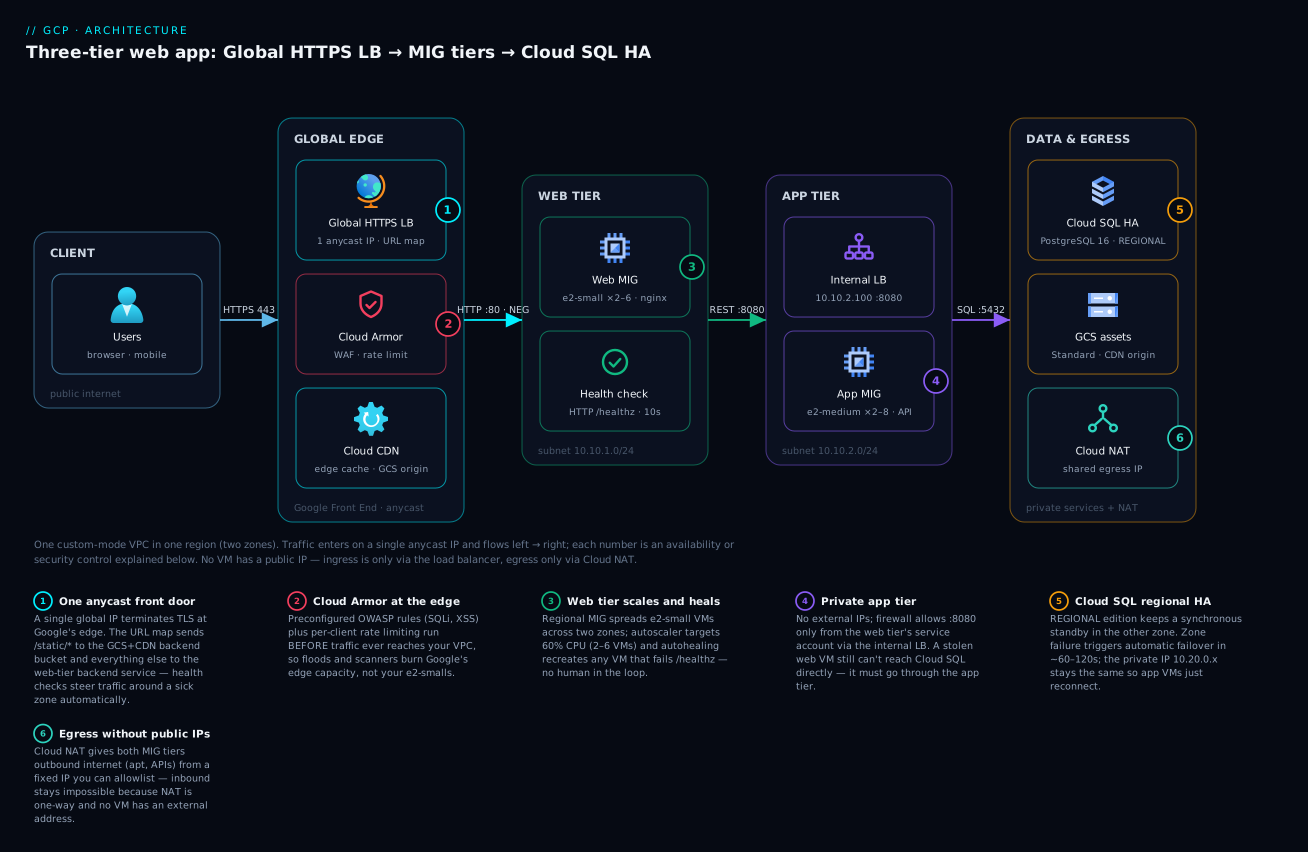
Read the diagram left to right, the same direction a request travels. A user resolves shop.example.com to the single anycast IP and lands on the nearest Google edge, where TLS terminates, Cloud Armor’s WAF and rate rules run, and Cloud CDN answers /static/* from cache via the GCS backend bucket. Everything dynamic rides Google’s backbone to the URL map’s default backend — the web-tier MIG, two to six e2-small VMs spread across two Mumbai zones, each health-checked on /healthz every 10 seconds. Web VMs call the app tier through one stable internal VIP (10.10.2.100:8080), behind which the app-tier MIG scales independently. App VMs speak PostgreSQL over private IP to Cloud SQL, whose regional HA keeps a synchronous standby in the second zone. Neither tier has any public IP; their only path out is Cloud NAT’s fixed egress address. Each numbered badge marks a control that keeps the system alive — the anycast front door, edge WAF, tier autoscaling/autohealing, tier isolation, database failover and NAT-only egress — and the legend beneath the diagram narrates each one.
Real-world scenario
SaralPay, a Pune-based utility-payments startup, ran its Django + PostgreSQL stack on a single 8-vCPU VM at a local hosting provider. Traffic was spiky in the worst way: 80% of monthly volume landed in the last five days of the month when electricity bills fell due, peaking around 9 p.m. Every month-end brought the same incident — CPU pinned, PostgreSQL starved of memory by Gunicorn workers, and a 40-minute outage while someone rebooted and prayed. A payments partner made 99.9% availability contractual, and the team moved to GCP.
They deployed this exact architecture in asia-south1: web tier of 2–6 e2-small VMs running nginx, app tier of 2–8 e2-medium VMs running the Django API, db-custom-2-8192 Cloud SQL PostgreSQL in REGIONAL mode, Cloud CDN over a static bucket for bill-receipt PDFs and JS bundles, Cloud Armor with the SQLi ruleset and a 120 req/min per-IP throttle (bill-scraping bots were a known plague), and Cloud NAT with one reserved IP that their SMS gateway partner allowlisted.
Two things went wrong in week one, both instructive. First, every backend showed UNHEALTHY even though curl localhost/healthz worked on every VM — they had written firewall rules for their own office IPs but not for 130.211.0.0/22 and 35.191.0.0/16, so the GFE probes were silently dropped and the LB returned 502 to the world. One firewall rule fixed it in minutes (and is now the first thing they check anywhere). Second, autohealing entered a kill loop on the app tier: --initial-delay was set to 60 seconds, but pip-installing dependencies in the startup script took 3–4 minutes, so the MIG recreated every VM before it ever went healthy. They rebuilt the tier on a custom image with dependencies pre-baked (boot fell to ~70 seconds), set initial-delay=180, and the loop stopped. The bake-vs-bootstrap lesson stuck: startup scripts are for configuration, not for downloading half of PyPI.
Month-end arrived. The web tier scaled 2→5 and the app tier 2→7 between 8 and 11 p.m., then drifted back overnight. p95 latency held at 210 ms versus the old 1.8 s meltdown. Cloud Armor’s throttle rule absorbed a scraper botnet that had previously been indistinguishable from an outage — 4.2 million requests denied with 429 over three evenings, none of which touched a VM. Three months in, a genuine asia-south1-b disruption took out one web VM, two app VMs and the Cloud SQL primary; failover completed in 84 seconds, the MIGs rebuilt in zone -a, and the incident channel’s summary read “customers noticed nothing.” Monthly bill: about ₹38,000 — 22% more than the old hosting contract, for an availability story the old setup could never tell.
Advantages and disadvantages
| Advantages | Disadvantages |
|---|---|
| Survives VM, process and zone failures automatically; no single point of failure below the region | Always-on floor cost: 4+ VMs and ~2× database price even at zero traffic |
| Scales horizontally in minutes with no code changes | Scaling reacts in minutes, not milliseconds — sudden 20× spikes outrun it |
| Full OS control: agents, kernels, licensed software, weird runtimes all work | You own OS patching, image hygiene and startup tooling (toil that serverless deletes) |
| One anycast IP, edge TLS, CDN and WAF from a single LB config | The LB’s five-resource chain is verbose and unintuitive at first |
| Tier isolation by identity-based firewall; DB unreachable from the internet | More pieces = more to misconfigure (health-check firewall, named ports, initial delay) |
| Portable mental model: same shape works on any cloud or on-prem | Single-region as shown; true region DR is an additional project |
| Predictable performance — no cold starts, warm caches, long-lived connections | Capacity planning returns: you must choose machine types and max replicas |
The pattern earns its complexity when the workload is steady-plus-spiky, stateful at the edges (sessions, uploads, long connections), OS-dependent, or simply already written for servers. It loses to serverless when traffic is bursty-to-zero, the team is tiny, or the app is a clean stateless container — weigh that honestly in the alternatives section below.
Hands-on lab
This lab builds the front half of the architecture — VPC, web MIG with autoscaling/autohealing, and a global HTTP load balancer — in ~30 minutes. It uses two e2-micro VMs and one forwarding rule; if you tear down within an hour the cost is a few rupees (the LB and VMs bill hourly; nothing here has a large minimum). HTTPS needs a domain, so the lab uses HTTP on port 80; the HTTPS upgrade is the cert + proxy swap shown earlier.
- Set the stage:
export PROJECT_ID=$(gcloud config get-value project)
export REGION=asia-south1
gcloud services enable compute.googleapis.com
- Network, firewall and NAT (the VMs will have no public IPs, and the startup script needs
apt— so NAT goes in first, exactly as in production):
gcloud compute networks create lab-vpc --subnet-mode=custom
gcloud compute networks subnets create lab-web \
  --network=lab-vpc --region=$REGION --range=10.50.1.0/24
gcloud compute firewall-rules create lab-allow-lb \
  --network=lab-vpc --allow=tcp:80 \
  --source-ranges=130.211.0.0/22,35.191.0.0/16 --target-tags=web

gcloud compute routers create lab-rtr --network=lab-vpc --region=$REGION
gcloud compute routers nats create lab-nat --router=lab-rtr --region=$REGION \
  --nat-all-subnet-ip-ranges --auto-allocate-nat-external-ips
- Startup script — every VM serves its own hostname so you can watch balancing:
cat > startup.sh <<'EOF'
#!/bin/bash
apt-get update && apt-get install -y nginx
echo "Hello from $(hostname)" > /var/www/html/index.html
echo "ok" > /var/www/html/healthz
EOF
- Template and regional MIG:
gcloud compute instance-templates create lab-template \
  --machine-type=e2-micro --image-family=debian-12 \
  --image-project=debian-cloud --region=$REGION \
  --subnet=lab-web --no-address --tags=web \
  --metadata-from-file=startup-script=startup.sh

gcloud compute instance-groups managed create lab-mig \
  --region=$REGION --template=lab-template --size=2
gcloud compute instance-groups managed set-named-ports lab-mig \
  --region=$REGION --named-ports=http:80
Expected: gcloud compute instances list shows two VMs named lab-mig-xxxx in different zones, each with an internal IP only. Give the startup script 2–3 minutes — it pulls nginx through the NAT you created in step 2.
- Health check, autohealing, autoscaling:
gcloud compute health-checks create http lab-hc \
  --port=80 --request-path=/healthz \
  --check-interval=10s --unhealthy-threshold=3

gcloud compute instance-groups managed update lab-mig \
  --region=$REGION --health-check=lab-hc --initial-delay=180
gcloud compute instance-groups managed set-autoscaling lab-mig \
  --region=$REGION --min-num-replicas=2 --max-num-replicas=4 \
  --target-cpu-utilization=0.60
- The load balancer chain (HTTP flavour):
gcloud compute backend-services create lab-backend \
  --load-balancing-scheme=EXTERNAL_MANAGED --protocol=HTTP \
  --port-name=http --health-checks=lab-hc --global
gcloud compute backend-services add-backend lab-backend --global \
  --instance-group=lab-mig --instance-group-region=$REGION \
  --balancing-mode=UTILIZATION --max-utilization=0.8

gcloud compute url-maps create lab-map --default-service=lab-backend
gcloud compute target-http-proxies create lab-proxy --url-map=lab-map
gcloud compute addresses create lab-ip --global
gcloud compute forwarding-rules create lab-fr --global \
  --load-balancing-scheme=EXTERNAL_MANAGED \
  --address=lab-ip --target-http-proxy=lab-proxy --ports=80
- Verify health, then traffic (allow 3–5 minutes for the LB to program globally):
gcloud compute backend-services get-health lab-backend --global
# ...healthState: HEALTHY  (x2)

IP=$(gcloud compute addresses describe lab-ip --global --format='value(address)')
for i in {1..6}; do curl -s http://$IP/; done
# Hello from lab-mig-7k2p
# Hello from lab-mig-x9qd   <- alternating hostnames = balancing works
- Watch autohealing earn its keep — delete a VM and observe the MIG replace it:
gcloud compute instance-groups managed delete-instances lab-mig \
  --region=$REGION --instances=$(gcloud compute instances list \
  --filter="name~lab-mig" --format="value(name)" --limit=1)
watch gcloud compute instance-groups managed list-instances lab-mig --region=$REGION
# One instance goes DELETING, a fresh one appears CREATING, then RUNNING
Meanwhile curl in another terminal never fails: the surviving VM carries the traffic.
- Teardown (order matters — dependents first):
gcloud compute forwarding-rules delete lab-fr --global -q
gcloud compute target-http-proxies delete lab-proxy -q
gcloud compute url-maps delete lab-map -q
gcloud compute backend-services delete lab-backend --global -q
gcloud compute addresses delete lab-ip --global -q
gcloud compute instance-groups managed delete lab-mig --region=$REGION -q
gcloud compute instance-templates delete lab-template -q
gcloud compute health-checks delete lab-hc -q
gcloud compute routers nats delete lab-nat --router=lab-rtr --region=$REGION -q
gcloud compute routers delete lab-rtr --region=$REGION -q
gcloud compute firewall-rules delete lab-allow-lb -q
gcloud compute networks subnets delete lab-web --region=$REGION -q
gcloud compute networks delete lab-vpc -q
Common mistakes & troubleshooting
The same six or seven mistakes account for nearly every broken first deployment of this architecture. The playbook:
| # | Symptom | Root cause | How to confirm | Fix |
|---|---|---|---|---|
| 1 | All backends UNHEALTHY, site returns 502, yet curl localhost works on every VM |
Missing firewall rule for Google’s health-check/proxy ranges | gcloud compute backend-services get-health web-backend --global shows UNHEALTHY; no probe lines in nginx access log |
Allow tcp:80 from 130.211.0.0/22,35.191.0.0/16 to the tier’s tag/SA |
| 2 | Backends healthy but LB serves 502 | Named-port mismatch: backend service says http, MIG maps it to the wrong number (or not at all); or app bound to 127.0.0.1 |
gcloud compute instance-groups managed describe web-mig --region=… | grep -A2 namedPorts; ss -ltnp on a VM |
set-named-ports web-mig --named-ports=http:80; bind the app to 0.0.0.0 |
| 3 | MIG endlessly deletes and recreates VMs | Autohealing initial-delay shorter than boot + startup script |
gcloud compute operations list --filter="operationType=compute.instances.repair.recreateInstance" shows a drumbeat of repairs |
Raise --initial-delay to real boot time ×1.5; bake slow installs into a custom image |
| 4 | VMs can’t apt-get/reach APIs; startup script hangs |
--no-address without Cloud NAT |
gcloud compute routers nats list --router=… empty; curl -m5 https://pypi.org times out on VM |
Create Cloud Router + Cloud NAT in the region (see network section) |
| 5 | App tier can’t reach Cloud SQL: connection timed out |
Private services access never set up, or instance created with public IP only | gcloud services vpc-peerings list --network=three-tier-vpc empty; instance has no PRIVATE address in gcloud sql instances describe |
Allocate PSA range + vpc-peerings connect, then recreate/patch the instance with --network |
| 6 | Managed certificate stuck PROVISIONING for hours |
Domain’s A record not pointing at the LB IP (or CAA blocks Google) | gcloud compute ssl-certificates describe web-cert shows FAILED_NOT_VISIBLE; dig +short shop.example.com ≠ LB IP |
Fix DNS to the global IP; wait; check CAA allows pki.goog |
| 7 | Users see stale HTML after a deploy | FORCE_CACHE_ALL on a backend serving dynamic content, or long Cache-Control on HTML |
Response header age: > 0 on dynamic pages |
Use CACHE_ALL_STATIC (caches only static types), set Cache-Control: no-store on HTML, gcloud compute url-maps invalidate-cdn-cache web-map --path "/*" for emergencies |
| 8 | Autoscaler flaps: add 2 VMs, delete 2, repeat | Target CPU too close to idle baseline; cool-down shorter than boot; scale-in fighting stabilisation | Monitoring → autoscaler recommendation chart oscillates | Raise target to 0.6–0.7, set cool-down ≈ boot time, accept slow scale-in as designed |
| 9 | Can’t SSH — VMs have no external IP | Expecting direct SSH to private VMs | gcloud compute ssh web-xxxx hangs |
gcloud compute ssh web-xxxx --tunnel-through-iap + firewall allow tcp:22 from 35.235.240.0/20 |
| 10 | Firewall rule “doesn’t work” | Rule targets tag web-tier but template attaches none / SA rule mixed with tag rule |
gcloud compute firewall-rules describe vs gcloud compute instances describe --format='value(tags.items, serviceAccounts[].email)' |
Align targeting: one scheme per rule; add the tag/SA to the template and roll the MIG |
Habit worth forming: after any change, run the three status commands in order — backend-services get-health (is the LB happy?), instance-groups managed list-instances (is the MIG stable?), sql instances describe (is the DB RUNNABLE?). Ninety percent of issues show up in the first one.
Best practices
- Bake images, don’t bootstrap. Use a custom image (or Packer) with dependencies pre-installed; keep startup scripts to configuration. Faster boot = faster scaling and honest autohealing delays.
- Version instance templates (
web-template-v1,-v2, …) and deploy with rolling updates gated on health checks; keep the previous template around for one-command rollback. - Separate service accounts per tier, each with the minimum roles (web: none beyond logging/monitoring; app:
cloudsql.clientplus its GCS buckets). Never run tiers as the Compute Engine default service account. - Write firewall rules against service accounts for tier-to-tier trust; reserve tags for coarse, low-stakes grouping.
- No public IPs, anywhere. Ingress only via the LB, egress only via Cloud NAT, operator access only via IAP. This single rule removes whole attack classes.
- Make
/healthzhonest but shallow — it should verify the process serves requests, not interrogate the database; deep checks turn one dependency wobble into a full-fleet eviction. - Set MIG minimums to 2 in production, always across ≥2 zones; a min of 1 turns every autohealing event into an outage.
- Enable deletion protection and PITR on Cloud SQL the day you create it; both are cheap insurance against the most common self-inflicted disasters.
- Load-test to find real per-VM capacity, then set
max-utilization/autoscaler targets from data — guessing capacity is how month-end surprises happen. - Alert on “one failure from trouble” (healthy count = min, MIG at max, disk at 85%) rather than only on user-visible failure; the former gives you hours, the latter minutes.
- Practice the failure drills quarterly: delete a VM, trigger a manual Cloud SQL failover (
gcloud sql instances failover prod-pg) in staging, and time the recovery. Untested failover is a hypothesis, not a capability.
Security notes
The design is secure-by-topology before any product is added: the database accepts connections only from the peered PSA range (and practically, only the app subnet can route there), app VMs accept only the web tier’s service account on 8080, web VMs accept only Google’s proxy ranges on 80, and nothing has a public IP. Preserve that topology and most scanner findings evaporate.
Identity: give each tier its own service account and grant roles/cloudsql.client only to app-sa; use IAM database authentication or at minimum store DB passwords in Secret Manager (fetched by the startup script or app at boot with secretmanager.secretAccessor), never in instance metadata or images. Operator access goes through IAP with 2FA-backed Google identities — auditable in Cloud Logging, revocable centrally, no shared keys. For a deeper treatment of SA hygiene, see service accounts and least privilege.
Edge: keep Cloud Armor’s preconfigured SQLi/XSS rules in enforce mode once tuned, keep the per-IP throttle permanently (it is your cheapest DDoS layer), and remember the global LB absorbs volumetric L3/L4 attacks by design — only well-formed HTTPS ever reaches your VPC. Encrypt in transit end to end if your compliance requires it: TLS terminates at the edge, and you can re-encrypt to backends by switching the backend service protocol to HTTPS with certs on the VMs. Data at rest is encrypted by default everywhere on GCP; add CMEK on Cloud SQL and the GCS bucket only if policy demands customer-managed keys. Finally, turn on VPC Flow Logs and firewall rules logging for the two subnets — when something odd happens, the question is always “who talked to whom”, and these answer it.
Cost & sizing
What drives the bill, in order: the VM floor (min replicas × 730 hours), Cloud SQL’s HA multiplier, then the long tail of LB, NAT, storage and egress. Approximate list prices for the small production deployment below (asia-south1, on-demand, July 2026 ballpark; ₹ at ~85/USD — always confirm in the pricing calculator):
| Component | Spec | ~USD/mo | ~INR/mo |
|---|---|---|---|
| Web tier | 2 × e2-small (2 vCPU shared, 2 GB) baseline | $28 | ₹2,400 |
| App tier | 2 × e2-medium (2 vCPU shared, 4 GB) baseline | $56 | ₹4,800 |
| Boot disks | 4 × 20 GB balanced PD | $10 | ₹850 |
| Cloud SQL | db-custom-2-8192, REGIONAL, 50 GB SSD, PITR | $260 | ₹22,100 |
| Global LB | 1 forwarding rule + data processing (~100 GB) | $27 | ₹2,300 |
| Cloud Armor | 1 policy + 3 rules + requests (Standard) | $10 | ₹850 |
| Cloud NAT | 1 gateway + ~50 GB processed | $12 | ₹1,000 |
| GCS + CDN | 10 GB Standard + ~100 GB CDN egress | $10 | ₹850 |
| Monitoring/logging | Within free allotments at this scale | ~$0 | ~₹0 |
| Total (baseline) | scales up with traffic via autoscaler | ~$413 | ~₹35,100 |
Read the table with three observations. First, Cloud SQL HA is ~63% of the bill — which is why dev/test environments should run ZONAL (roughly halves the DB line) and be switched off outside working hours. Second, the compute floor is small because E2 shared-core machines are genuinely cheap; resist the urge to “size up just in case” — that is the autoscaler’s job. Third, the LB, Armor and NAT lines are effectively fixed overhead: they cost the same at 10 users as at 10,000, so this architecture gets cheaper per user as traffic grows.
Right-sizing levers, biggest first: (1) committed use discounts — a 1-year resource commitment on the always-on floor (2+2 VMs and the DB) typically saves 25–40%; (2) drop non-prod to zonal SQL and single-VM MIGs; (3) schedule-based autoscaling to pre-warm for known peaks instead of raising the minimum permanently; (4) push more assets behind CDN — cache-egress is cheaper than VM-served egress and offloads CPU. The GCP free tier (one e2-micro in us-west1/us-central1/us-east1, 30 GB PD, 5 GB GCS) will not run this architecture, but it does make the hands-on lab nearly free if you build it in a free-tier region with e2-micro instances.
Alternatives: Cloud Run, App Engine, GKE
This pattern is the right default for VM-shaped workloads — not the right default for everything. The honest comparison:
| Consideration | Compute Engine three-tier (this article) | Cloud Run | App Engine standard | GKE |
|---|---|---|---|---|
| Unit you manage | VMs (OS and up) | A container image | Your code (runtime-locked) | A cluster + containers |
| Scale-to-zero | No — 2-VM floor per tier | Yes — pay per request when idle | Yes (standard) | No — node floor |
| Cold starts | None | Possible (mitigable with min instances) | Possible | None |
| OS access / agents / licensed software | Full | None (sandboxed container) | None | Node-level with effort |
| WebSockets / long-lived connections / sticky state | Natural fit | Supported with limits (request timeouts) | Constrained | Natural fit |
| Ops burden | Patching, images, capacity | Near zero | Near zero | Highest — upgrades, node pools, mesh |
| Cost at spiky/low traffic | Poor (always-on floor) | Excellent | Good | Poor |
| Cost at high steady traffic | Good (CUDs, no per-request premium) | Can exceed VMs | Similar | Good at scale |
| Best when | Lift-and-shift, OS control, steady+spiky mix, long connections | Stateless containers, bursty traffic, small teams | Legacy GAE apps | Many services, platform team exists |
Decision in one paragraph: if your application is a clean stateless container and you have no OS-level requirements, build it on Cloud Run first — you inherit the same global LB, Armor and CDN via a serverless NEG, keep Cloud SQL exactly as designed here, and delete the entire MIG/NAT/patching layer. Choose the Compute Engine three-tier when at least one of these is true: the app assumes servers (sessions, local disk, background workers), you need agents/kernel control/licensed software, connections are long-lived, or you are migrating something that works and rewriting is not on the table. Choose GKE only when you are running many services and someone owns the cluster as a product. App Engine standard is today mostly the answer to “we already run on App Engine.”
Interview & exam questions
Mapped to Associate Cloud Engineer (ACE) and Professional Cloud Architect (PCA) exam domains.
- Q: Walk me through what happens when a user requests
https://shop.example.com/in this architecture. A: DNS resolves to the LB’s global anycast IP; the nearest GFE terminates TLS and evaluates Cloud Armor rules; the URL map matches the default rule to the web backend service; a healthy web-MIG VM (chosen by balancing mode and proximity) serves the request, calling the app tier via the internal LB VIP, which queries Cloud SQL over private IP. Static paths short-circuit at the CDN/backend bucket. - Q: Why a custom-mode VPC instead of auto-mode? (ACE) A: Auto-mode creates a
/20subnet in every region from10.128.0.0/9, which wastes address space, surprises security reviews, and collides with on-prem or peered ranges later. Custom mode starts empty so you allocate only what you design. - Q: A MIG’s VMs are all healthy locally, but the load balancer reports them UNHEALTHY. Most likely cause? (ACE/PCA) A: No firewall rule allowing
130.211.0.0/22and35.191.0.0/16to the backend port — health probes never arrive. Confirm withbackend-services get-health, fix with an ingress allow rule targeting the tier. - Q: Distinguish autoscaling from autohealing. (ACE) A: Autoscaling adjusts the number of instances based on a signal like CPU or LB utilisation; autohealing replaces individual instances that fail the MIG’s health check. They are independent policies on the same MIG.
- Q: What exactly does
availability-type=REGIONALbuy on Cloud SQL, and what does it not? (PCA) A: A synchronously replicated standby in a second zone with automatic failover (~1–2 min, same IP, zero committed-data loss). It does not survive region loss (needs a cross-region replica), does not serve reads, and does not protect against bad SQL — that’s PITR/backups. - Q: Why does the app tier sit behind an internal load balancer instead of web VMs calling app VMs directly? A: The ILB VIP decouples the tiers: app VMs can be autoscaled, autohealed and rolled without web-tier config changes, and health checking ensures traffic goes only to live instances.
- Q: How do VMs without external IPs install OS updates, and how would a partner allowlist your traffic? (ACE) A: Cloud NAT provides source-NAT egress via a Cloud Router; reserve a static external IP for the NAT gateway and the partner allowlists that fixed address. Inbound remains impossible.
- Q: Network tags vs service accounts as firewall targets — trade-off? (PCA) A: Tags are flexible but mutable by anyone with instance edit rights, so they are a weak security boundary; service accounts require stop/start and
serviceAccountUserpermission to change, making them the stronger identity for tier-to-tier rules. A single rule cannot mix both. - Q: Where would you place Cloud CDN and Cloud Armor in this design, and what do they attach to? (ACE) A: Both attach at the LB layer: CDN is enabled on the backend service or backend bucket (here, the static-assets bucket); Armor is a security policy attached to the backend service. Both act at the edge, before the VPC.
- Q: Your MIG keeps recreating instances every few minutes and none go into service. Diagnose. A: Classic autohealing kill loop — the health check’s
initial-delayis shorter than boot + startup script time, so instances are repaired before becoming healthy. Confirm via repair operations in the audit log; fix by raising initial delay or baking a faster image. - Q: How would you extend this architecture to survive a region outage? (PCA) A: Add a second region: regional MIGs there as additional backends on the same global backend service (it is already global), a cross-region Cloud SQL read replica promoted during DR, and either failover automation or a documented runbook; decide RPO/RTO first since async replication implies possible seconds of data loss.
- Q: When would you recommend Cloud Run over this architecture? (PCA) A: Stateless containerised app, spiky or low traffic, no OS-level needs, small ops team — Cloud Run removes patching/capacity work, scales to zero, and still fronts with the same global LB and Cloud SQL. Keep the three-tier when OS control, long-lived connections or lift-and-shift constraints dominate.
Quick check
- Which two IP ranges must your firewall allow for the global external Application Load Balancer’s proxies and health checks to reach backends?
- A regional MIG has
min=2, max=6, target CPU=0.60. Average CPU sits at 30% for an hour. How many VMs are running, and why won’t it drop to one? - During a Cloud SQL regional failover, what happens to the instance’s private IP address and to committed transactions?
- Your VMs were created with
--no-addressand the startup script hangs onapt-get update. What is missing? - Which resource in the LB chain decides that
/static/*goes to a backend bucket instead of the web MIG?
Answers
130.211.0.0/22and35.191.0.0/16.- Two — the autoscaler never goes below
min-num-replicas, which is set to 2 precisely so autohealing or a zone issue never leaves you at zero. - The IP stays the same (it moves with the primary role) and committed transactions are preserved because the standby is synchronously replicated; in-flight transactions are rolled back.
- Cloud NAT (plus its Cloud Router) in that region — private VMs have no other path to the internet.
- The URL map, via a path matcher rule pointing at the backend bucket.
Glossary
- Anycast IP: a single IP address announced from many locations at once; clients reach the nearest Google edge automatically.
- Autohealing: MIG feature that recreates instances failing a health check.
- Autoscaler: MIG companion that adjusts instance count toward a target signal (CPU, LB utilisation, custom metric, schedule).
- Backend bucket: LB backend that serves a GCS bucket, optionally through Cloud CDN.
- Backend service: LB resource grouping backends with a health check, balancing mode, and CDN/Armor attachments.
- Cloud Armor: edge WAF and DDoS policy engine attached to LB backend services.
- Cloud NAT: managed source-NAT giving private VMs outbound internet with no inbound path.
- GFE (Google Front End): Google’s global edge proxy fleet that terminates TLS for the global LB.
- Instance template: immutable VM recipe (machine type, image, script, identity) used by MIGs.
- Internal passthrough Network LB: regional L4 load balancer with a private VIP, used between tiers.
- MIG (Managed Instance Group): controller keeping N identical VMs from a template, zonal or regional.
- Named port: key:value on an instance group mapping a service name (
http) to a port number (80) for backend services. - Private services access (PSA): VPC peering arrangement that gives managed services like Cloud SQL private IPs in your address plan.
- PITR (point-in-time recovery): Cloud SQL’s ability to restore to any moment, powered by continuous WAL/binlog archiving.
- Regional availability (Cloud SQL): HA mode with a synchronous standby in a second zone and automatic failover.
- URL map: LB routing table matching host/path to backend services or buckets.
Next steps
- Solidify the compute decision behind this design with GCP Compute Options Compared — when VMs beat containers and serverless, and vice versa.
- Go deeper on zone/region failure math and SLAs in GCP Regions, Zones and Resiliency, then extend this architecture to two regions.
- When one project becomes many, evolve the network into a hub with Shared VPC networking.
- Rebuild this exact workload without VMs in Cloud Run explained and compare the operational load.
- Instrument what you built using Cloud Monitoring and operations — dashboards, uptime checks and alerting policies for every layer here.