You have worked through the course, deployed apps to a local cluster, broken things, and fixed them. Now you want two outcomes: pass a Kubernetes interview without freezing on the “a pod is stuck, what do you do?” question, and turn that knowledge into a certification that hiring managers actually recognise. This lesson is the bridge. It maps the four CNCF certifications to where you are, points each exam topic back to a lesson you have already done, and then drills the questions interviewers really ask — with model answers you can say out loud.
The most important thing to internalise up front: the CKAD, CKA, and CKS are hands-on, terminal exams. There are no multiple-choice questions. You are dropped into a live cluster and told to make something work, fast. So is a good technical interview, really — the strongest answers describe a procedure, not a definition. We will practise both.
In a nutshell
A Kubernetes interview is not a vocabulary test. Interviewers already assume you can recite that “a Pod is the smallest deployable unit” — reciting it back proves nothing. What they are actually probing is whether you can reason about a running system: given a symptom, do you know where to look, in what order, and why? Think of it like a car-mechanic interview. Nobody asks a mechanic to define “engine.” They pop the hood on a car that won’t start and watch how you narrow it down — battery, fuel, spark — without panicking. Kubernetes interviews pop the hood on a broken cluster.
There are four big areas interviewers circle back to, and it helps to picture them as layers you can move between:
- The object model — Pods, Deployments, Services, ConfigMaps: what the pieces are and how they own each other.
- Troubleshooting method — given “it’s broken,” the ordered loop you run (
describe→ events → logs → ownership chain). This is the single most-tested skill. - Trade-offs — “you could do X, but here’s when you wouldn’t.” Deployment vs StatefulSet, NodePort vs LoadBalancer vs Ingress, requests vs limits. Seniors are hired on trade-offs.
- Operations & security — rollouts, RBAC, NetworkPolicy, “what happens when a node dies.” The CKA/CKS territory.
Structure every answer the same way and you will sound senior even when you are nervous: (1) restate the situation in one sentence to show you understood it, (2) name the mental model (“a Service is just a label query”), (3) walk the procedure or trade-off out loud, (4) end with the fix and how you’d verify it. That four-beat shape — situation, model, procedure, verify — is the through-line of this whole lesson. The rest is practice.
Level: Advanced (capstone) · Time: ~35 min
Learning objectives
By the end of this lesson you will be able to:
- Choose the right certification for your role and explain the KCNA → CKAD/CKA → CKS ladder, including the hands-on exam format and tooling.
- Map every major exam domain to a specific course lesson so your study plan has no blind spots.
- Answer the five classic troubleshooting interview questions (crashing pod, Service with no endpoints, pending pod, RBAC denied, stuck rollout) with a structured, procedural method.
- Handle senior-level design and scenario questions — multi-tenant cluster design, a live debug share-screen, requests-vs-limits trade-offs — with the vocabulary of an operator, not a memoriser.
- Apply exam-day techniques —
kubectlaliases,--dry-run=client -o yaml, fastkubectl explain, and time management — that turn a 2-hour practical into a manageable one. - Run a mock troubleshooting drill on a free local cluster and self-assess against a rubric.
Prerequisites & where this fits
This is the final lesson of the Kubernetes Zero-to-Hero course. It assumes you have done the fundamentals — containers and images, the control-plane/node architecture, the core objects (Pods, Deployments, Services), and the kubectl apply workflow — and ideally the capstone, where you shipped a small multi-service app with autoscaling, network policy, and GitOps. You do not need to memorise anything new here. The goal is to consolidate what you know into interview- and exam-ready form. Everything in the labs uses free, local tooling: Docker (or Podman) plus a local cluster with kind, minikube, or k3d. Nothing to pay for.
The CNCF certification ladder
The Cloud Native Computing Foundation (CNCF) and the Linux Foundation run a coherent ladder of Kubernetes certifications. Think of it as one entry-level knowledge check, two role-based practical exams, and one advanced security specialisation.
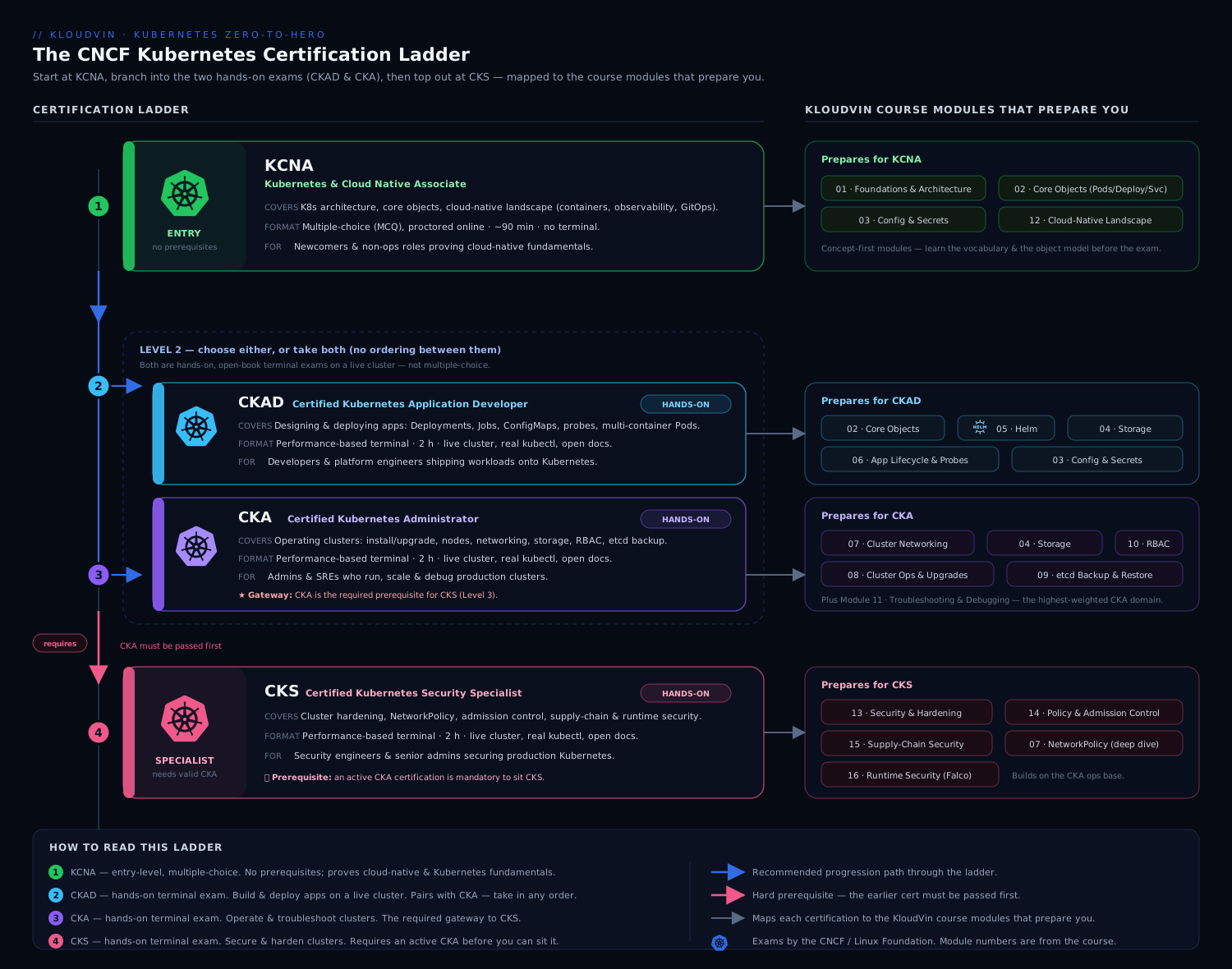
The diagram above shows the progression and the gating: KCNA is the optional on-ramp, CKAD and CKA are the two parallel role-based exams most people target, and CKS sits on top — and crucially, you must hold a current CKA before you are allowed to sit the CKS.
| Cert | Full name | Format | Length | Passing | Who it’s for |
|---|---|---|---|---|---|
| KCNA | Kubernetes and Cloud Native Associate | Multiple choice (proctored, online) | 90 min | ~75% | Newcomers, managers, career-switchers wanting a credible foundation |
| CKAD | Certified Kubernetes Application Developer | Hands-on, live cluster terminal | 2 hours | 66% | Developers who deploy to and run on Kubernetes |
| CKA | Certified Kubernetes Administrator | Hands-on, live cluster terminal | 2 hours | 66% | Operators / platform / SRE who run clusters |
| CKS | Certified Kubernetes Security Specialist | Hands-on, live cluster terminal | 2 hours | 67% | Security-focused engineers hardening clusters (requires active CKA) |
A few details that matter for planning:
- The practical exams are open-book — for one specific book. During CKAD/CKA/CKS you may keep the official Kubernetes documentation (
kubernetes.io/docs, plus a small allow-list like the Helm and Trivy docs for CKS) open in a second browser tab. You may not use Google, blogs, ChatGPT, or your own notes. This is why fast in-cluster lookup (kubectl explain,kubectl -h) and bookmarking the docs beforehand is a real exam skill. - They are performance-based and time-boxed. You SSH-style into a set of clusters and complete ~15–20 weighted tasks. Each task tells you which cluster context to use — switching context with
kubectl config use-contextis the very first thing you do per question. - Certifications expire after two years and the exam tracks the recent Kubernetes releases, so the curriculum is a moving target. Always check the current curriculum PDF on the Linux Foundation training site before you book.
Which one should you take first?
For most engineers coming out of this course, the honest answer is: CKAD or CKA — skip straight to a hands-on exam, because that is what proves you can do the job and it is what this course trained you for. KCNA is worthwhile if you want a low-stakes confidence builder, you are non-technical-but-adjacent (a manager or PM), or your employer reimburses it. Pick CKAD if you spend your day writing app manifests, Helm charts, and debugging your own workloads; pick CKA if you operate clusters — nodes, etcd, upgrades, RBAC, networking. Then, if security is your path, do CKS last.
Topic-to-lesson map
Here is the payoff for finishing the course: nearly every exam domain is something you have already practised. Use this table to find your weak spots and re-read the matching lesson before exam day.
| Exam domain | Certs | Where you learned it in this course |
|---|---|---|
| Containers, images, layers, registries | KCNA, CKAD | Containers & Docker Basics |
| Control plane, nodes, etcd, kubelet, the reconciliation loop | KCNA, CKA | What Is Kubernetes? Architecture |
| Pods, ReplicaSets, Deployments, rolling updates & rollback | KCNA, CKAD, CKA | Pods, Deployments & Services |
| Services, ClusterIP/NodePort/LoadBalancer, label selectors | CKAD, CKA | Pods, Deployments & Services |
| ConfigMaps, Secrets, namespaces | CKAD, CKA | Pods, Deployments & Services |
kubectl, kubeconfig/contexts, imperative vs declarative, logs/exec/port-forward |
CKAD, CKA | kubectl First Steps |
| Health probes, resource requests/limits, autoscaling (HPA) | CKAD, CKA | Capstone + Autoscaling: HPA, KEDA, Karpenter |
| Ingress / Gateway API, traffic routing | CKAD, CKA | Gateway API: HTTPRoute & traffic splitting |
| RBAC, least privilege, ServiceAccounts | CKA, CKS | Least-Privilege RBAC design |
| NetworkPolicy, default-deny, zero-trust pod networking | CKS | Default-Deny NetworkPolicies & Cilium |
| Pod Security Admission, supply-chain, image signing, policy-as-code | CKS | Kyverno policy-as-code + Pod Security Admission |
| GitOps deployment workflow | (job skill) | GitOps with Argo CD |
The two CKA-only gaps the course touches only lightly are cluster lifecycle (kubeadm upgrades, etcd backup/restore) and node troubleshooting (a down kubelet, full disk). Those are pure exam-prep topics — practise them directly against the official docs, because they rarely come up day-to-day on a managed cluster like AKS or EKS.
How to think in a Kubernetes interview
Before the question bank, internalise the meta-skill. Almost every Kubernetes troubleshooting question — in an interview and on the exam — yields to the same loop:
- Describe the object, top-down:
kubectl getto see status, thenkubectl describeto read the Events at the bottom. Events are where Kubernetes tells you, in plain English, why it is unhappy. - Read the logs if the container actually started:
kubectl logs <pod>, andkubectl logs <pod> --previousfor the crashed instance. - Follow the chain of ownership: Deployment → ReplicaSet → Pod → Node, and Service → Endpoints → Pod. Most “it doesn’t work” problems are a broken link in one of those chains.
Say that loop out loud in interviews. Interviewers are not grading whether you memorised a flag — they are grading whether you have a method that does not panic. “First I’d describe the pod and read the events, then check logs with --previous…” beats any amount of trivia.
Interview questions (with model answers)
These five scenarios cover the overwhelming majority of “debug this” interview rounds and CKA/CKAD troubleshooting tasks. For each: the symptom, how to diagnose, and the likely fixes.
1. “A pod keeps restarting — CrashLoopBackOff. Walk me through it.”
Model answer. CrashLoopBackOff means the container starts, exits, and Kubernetes keeps restarting it with an increasing back-off delay — so the problem is the container process, not scheduling. My procedure:
kubectl describe pod <pod>          # check Events + Last State + exit code
kubectl logs <pod> --previous       # logs from the crashed instance, not the restarting one
I read the exit code first. Exit Code 1 (or any non-zero app error) means the application itself crashed — bad config, a missing env var or Secret, a database it can’t reach, an unhandled exception on startup; the logs will say which. Exit Code 137 means it was OOM-killed (SIGKILL after exceeding its memory limit) — I’d raise the memory limit or fix the leak. Exit Code 127 means “command not found” — a bad command/args or an entrypoint that isn’t in the image. A subtle one: if a liveness probe is failing, the kubelet kills and restarts the container even though the app is fine — so I always check whether the probe’s path/port/initialDelaySeconds are realistic. Fix follows the cause: correct the config/Secret, fix the image entrypoint, bump memory, or loosen the probe.
Going one level deeper for a senior answer: the back-off is exponential — roughly 10s, 20s, 40s, doubling to a cap of 5 minutes — so a pod that has been crashing a while retries slowly; you don’t wait it out, you just read --previous logs immediately. Decode the exit codes precisely: 137 is 128 + 9 (SIGKILL — usually the OOM killer or a failed liveness probe), 143 is 128 + 15 (SIGTERM — a graceful shutdown the app mishandled or ignored during termination), and 1/2 are the app’s own errors. Watch for an init container failing: the pod shows Init:CrashLoopBackOff and the main containers never start, so you read kubectl logs <pod> -c <init-container>. And always separate the two root causes that look identical from the outside: a genuinely broken app versus a healthy app being killed by an over-aggressive liveness probe. The tell is in describe — repeated Liveness probe failed events paired with a Killing/Started cycle mean the probe, not the app; the fix there is a longer initialDelaySeconds/failureThreshold, or a startupProbe for a slow boot.
2. “I created a Service but nothing reaches it. The Service has no endpoints.”
Model answer. “No endpoints” almost always means the Service’s selector doesn’t match any running, ready pods. The Service is just a label query; if the query returns nothing, there is nowhere to route. I check the chain:
kubectl get endpoints <svc>                 # empty (or <none>) confirms it
kubectl describe svc <svc>                   # note the Selector
kubectl get pods --show-labels               # do any pod labels match that selector?
The usual causes, in order of frequency: (1) selector/label mismatch — e.g. the Service selects app=web but the Deployment’s pod template labels them app=frontend; (2) the pods exist but are not Ready, because a readiness probe is failing — an unready pod is deliberately removed from endpoints, which is the system working as designed; (3) targetPort mismatch — the Service forwards to a container port the app isn’t actually listening on, so endpoints populate but connections still fail. Fix: align the labels (or the selector), get the readiness probe passing, and confirm targetPort equals the real containerPort.
The modern detail that impresses: since Kubernetes 1.21+ the source of truth is EndpointSlices, not the older monolithic Endpoints object — kubectl get endpointslices -l kubernetes.io/service-name=<svc> shows them, and kubectl get endpoints is now a compatibility view over the slices. Two more traps worth naming: if targetPort is a named port (e.g. targetPort: http), the container must declare ports: [{name: http}] or the slice never populates; and a headless Service (clusterIP: None) has endpoints but no virtual IP, so “I can’t connect via the ClusterIP” there is by design — you resolve individual pod DNS instead. I’d close by pointing out the readiness angle is a feature, not a bug: pulling unready pods out of rotation is exactly the mechanism that makes zero-downtime rollouts safe.
3. “A pod is stuck in Pending and never schedules.”
Model answer. Pending means the scheduler hasn’t been able to place it on a node, so this is a scheduling problem, not an application one. The events tell you exactly why:
kubectl describe pod <pod> # the Events line says e.g. "0/3 nodes are available: ..."
The common reasons the scheduler reports: (1) insufficient resources — “Insufficient cpu/memory”; the pod’s requests exceed what any node has free, so I’d lower the requests or add/scale nodes; (2) taints with no matching toleration — “node(s) had untolerated taint”; add the right toleration or target a different node pool; (3) node affinity / nodeSelector matches nothing — the constraint is too strict; (4) an unbound PersistentVolumeClaim — the pod is waiting on storage that can’t be provisioned (no matching PV or StorageClass); (5) all nodes cordoned/unschedulable. The fix is dictated by the message — and the headline lesson for the interviewer is that you let describe tell you, rather than guessing.
For a senior framing, I’d add two things. First, the fast one-liner when the pod is long-gone or you want the raw scheduler verdict: kubectl get events --sort-by=.lastTimestamp surfaces the FailedScheduling message directly. Second, the subtler modern causes juniors miss: topology spread constraints (whenUnsatisfiable: DoNotSchedule) or strict pod anti-affinity can make a pod unschedulable even when nodes have plenty of capacity, because it’s the placement rule — not resources — that’s unsatisfiable; and with PriorityClass in play, a low-priority pod can sit Pending while a higher-priority one preempts to get scheduled. The interviewer wants to see that you don’t reflexively blame CPU — you read the exact describe line and match it to the right lever.
4. “A user (or a CI pipeline) gets Error from server (Forbidden). Diagnose the RBAC.”
Model answer. RBAC in Kubernetes is purely additive with no deny rules, so Forbidden simply means no RoleBinding or ClusterRoleBinding grants this subject that verb on that resource in that namespace. I don’t guess — I ask the API server with kubectl auth can-i:
kubectl auth can-i create deployments -n team-payments \
  --as system:serviceaccount:team-payments:ci-deployer
That impersonation (--as, and --as-group for groups) reproduces the exact decision. Then I locate the gap: confirm which Role/ClusterRole grants the missing apiGroup/resource/verb, and check that a binding actually ties it to this subject in the right namespace — a frequent bug is a Role and RoleBinding created in default when the workload runs in another namespace. The fix is least-privilege: add the specific verb to a scoped Role and bind it with a RoleBinding, rather than reaching for cluster-admin. (I’d reference the Least-Privilege RBAC approach here.) The trap to call out: a RoleBinding referencing a ClusterRole grants those permissions only in the binding’s namespace, which surprises people.
Two power moves round this out. kubectl auth can-i --list --as system:serviceaccount:<ns>:<sa> dumps everything that subject can do — far faster than probing verbs one at a time when you’re mapping a gap or auditing over-permission. And know the two binding shapes cold: a RoleBinding (namespaced) grants a Role or a ClusterRole’s rules but only inside that one namespace; a ClusterRoleBinding grants cluster-wide. The classic production bug is a ClusterRole that exists but was never bound, or was bound with a RoleBinding in the wrong namespace. On the API-group detail: Forbidden messages name the exact group and resource (“cannot create resource "deployments" in API group "apps"”), so you copy that string straight into the Role’s rules — no guessing which apiGroups value to use.
5. “A Deployment rollout is stuck — kubectl rollout status never completes.”
Model answer. A stuck rollout means the new ReplicaSet’s pods aren’t becoming Ready, so the Deployment won’t finish swapping the old ones out. I look at it from both ends:
kubectl rollout status deployment/<name>     # confirms it's wedged
kubectl get rs -l app=<name>                  # old vs new ReplicaSet, desired/current/ready
kubectl describe deployment <name>            # conditions: Progressing / Available
kubectl get pods -l app=<name>                # what state are the NEW pods in?
The new pods being stuck points at the real failure, which is usually one of the scenarios above: a bad image tag (ImagePullBackOff), a crash on startup (CrashLoopBackOff), a failing readiness probe (pods never go Ready so the rollout waits forever), or Pending due to resources. There’s also a quota angle: with the default RollingUpdate strategy and maxSurge, the new pods need headroom — if a ResourceQuota or node capacity blocks the surge, the rollout stalls. I diagnose the new pods, fix the underlying cause, and if I need to stop the bleeding immediately I roll back: kubectl rollout undo deployment/<name>. Mentioning kubectl rollout undo unprompted signals you’ve operated this in anger.
The detail that signals real operating experience: a Deployment doesn’t hang forever by default — progressDeadlineSeconds (default 600s) flips the Progressing condition to False with reason ProgressDeadlineExceeded, so kubectl describe deployment will literally tell you it gave up trying. Two configuration traps to name: maxUnavailable: 0 combined with maxSurge: 0 is a deadlock (nothing is allowed to move); and if someone ran kubectl rollout pause, the rollout is intentionally frozen — kubectl rollout resume un-sticks it, and there’s nothing to “fix.” Rollback is the emergency brake, but kubectl rollout history deployment/<name> (and --revision=N for the detail) first shows you what you’d be rolling back to, so you don’t undo blindly.
A sixth question shows up constantly: “imperative vs declarative — which and why?” Strong answer: declarative (
kubectl apply -fagainst version-controlled YAML, ideally via GitOps) is the production default because it’s reproducible, reviewable, and self-documenting. Imperativekubectl create/run/exposeis for speed — scaffolding, quick debugging, and especially the exam, where you generate YAML fast with--dry-run=client -o yamland then edit it.
Going deeper
Senior and staff interviews move past “what’s broken” to “what would you build, and what did you trade away to get there.” These questions have no single right answer — the interviewer is grading the shape of your thinking: do you ask about constraints, name trade-offs, and know where the sharp edges are? Here are the archetypes and how to attack them.
“Design a multi-tenant cluster for 30 teams.”
Start by refusing to answer until you’ve scoped it — that refusal is itself the signal they want. Ask: hard multi-tenancy (hostile tenants, e.g. a SaaS running untrusted customer code) or soft (trusted internal teams sharing infra)? The answer changes everything that follows.
For soft multi-tenancy, one cluster with strong guardrails is the pragmatic default: a namespace per team as the isolation unit; ResourceQuota + LimitRange per namespace so no team can starve the others of CPU/memory; RBAC scoped so a team admins only its own namespace; a default-deny NetworkPolicy per namespace so tenants can’t reach each other unless explicitly allowed; and policy-as-code (Kyverno/Gatekeeper) enforcing house rules — every pod has limits, no :latest, nothing privileged. The crucial caveat to say out loud: namespaces are not a security boundary on their own — every pod shares the node kernel — so for anything approaching hostile workloads you escalate to virtual clusters (vCluster), hierarchical namespaces, or a cluster per tenant, trading operational cost for real isolation. That whole spectrum is the subject of the multi-tenancy lesson.
The trade-off sentence that lands: “One big cluster is cheaper and simpler to operate but shares a blast radius and a control plane; cluster-per-tenant is the strongest isolation but multiplies upgrade, cost, and operational overhead. I’d start with namespaces + quotas + policy and only split out the tenants that genuinely need the harder boundary.”
“Debug this CrashLoopBackOff live — share your screen.”
This is the live version of question 1, and now they’re watching your hands, not just your words. Narrate every step so a silent terminal never leaves them guessing what you’re thinking:
kubectl get pod <pod> -o wide            # confirm the state + which node it's on
kubectl describe pod <pod>               # Events, Last State, exit code, probe results
kubectl logs <pod> --previous            # the crashed instance's own words
kubectl get events --sort-by=.lastTimestamp | tail -20
What they’re really watching for: (1) do you read Events and the exit code before you touch logs? (2) do you reach for --previous without being told? (3) when you find the cause, do you fix the manifest and re-apply rather than hot-patching the live pod (which the controller will revert)? (4) do you verify — kubectl get pod -w until Running, then kubectl rollout status? A candidate who kubectl edits the running pod to “make it green” and calls it done fails the hidden test: the Deployment owns that pod and will recreate it from the old spec the moment it’s rescheduled. If you want the fuller, systematic version of this loop across pods, nodes, networking, storage and RBAC, that’s the troubleshooting methodology lesson.
“Requests vs limits — how do you set them, and what breaks if you get it wrong?”
A pure trade-off question. A strong answer distinguishes the two precisely first: requests drive scheduling (the scheduler reserves that much and uses it to bin-pack nodes) and determine the pod’s QoS class; limits drive enforcement (CPU is throttled at the limit, memory over the limit gets the container OOM-killed). Then the trade-offs, which is what they’re actually after:
- Requests too high → poor bin-packing; nodes look full while sitting idle, and you pay for slack you never use.
- Requests too low / omitted →
BestEffort/Burstablepods are evicted first under node pressure, and noisy neighbours can starve you. - CPU limit too low → mysterious tail latency from CFS throttling with no crash and no obvious error — invisible unless you watch
container_cpu_cfs_throttled_periods_total. - No memory limit → a single leaky pod can OOM the whole node and take neighbours down with it.
- requests == limits →
GuaranteedQoS: most predictable and evicted last, but the least dense and most expensive.
The senior close names the asymmetry juniors miss: “I set memory requests ≈ limits, because memory is incompressible — headroom there is dangerous, not helpful; I give latency-sensitive services a CPU request but a generous-or-absent CPU limit to avoid throttling; and I let a VPA recommend values from real usage rather than guessing.” Compressible (CPU, throttled) versus incompressible (memory, OOM-killed) is the distinction that marks the answer as senior.
“A node goes NotReady. What happens to its pods, and when?”
This tests whether you know the control loop’s timers, not just the concept. The node controller marks a node NotReady after it misses heartbeats past the node-monitor-grace-period (default 40s). Pods aren’t evicted instantly — the node gets a node.kubernetes.io/not-ready taint, and the tolerationSeconds (default 300s) on the toleration Kubernetes auto-adds to every pod is the grace window before eviction. So there’s roughly a five-minute gap where pods on a dead node still show Running but are unreachable. A Deployment’s ReplicaSet then notices the shortfall and schedules replacements elsewhere; a StatefulSet will not force-delete and reschedule its pod automatically — it protects identity and storage, so a stuck StatefulSet pod on a genuinely dead node sometimes needs a manual kubectl delete pod <pod> --force --grace-period=0. Naming that StatefulSet caveat, and the ~5-minute window, is a strong senior signal — it shows you’ve thought about what “highly available” actually costs in seconds.
Exam-day tips
The CKAD/CKA/CKS are won on speed and accuracy under time pressure. The knowledge is necessary but not sufficient — these mechanics are what separate a pass from a near-miss.
Set up your aliases in the first 60 seconds. Every cluster gives you a fresh shell. Type this once and save minutes across 17 questions:
alias k=kubectl
export do="--dry-run=client -o yaml"   # "do" = dry-run output
export now="--force --grace-period=0"  # delete pods instantly
source <(kubectl completion bash)      # tab-completion
complete -o default -F __start_kubectl k
Generate, don’t type, YAML. Hand-writing manifests is slow and typo-prone. Scaffold with the imperative generators plus $do, then edit:
k run nginx --image=nginx $do > pod.yaml
k create deployment web --image=nginx --replicas=3 $do > deploy.yaml
k create svc clusterip web --tcp=80:8080 $do > svc.yaml
k create cronjob hello --image=busybox --schedule="*/1 * * * *" $do -- echo hi > cj.yaml
Use kubectl explain instead of guessing field names. It works offline, inside the exam: k explain pod.spec.containers.resources or k explain deployment.spec.strategy --recursive gives you the exact schema. This is faster than hunting through the docs tab.
Manage time ruthlessly. There are ~15–20 weighted tasks in 2 hours — roughly 6–7 minutes each, but the weights differ. Read the weight on each question. Triage: skip anything you can’t crack in ~2 minutes and flag it; bank the easy points first. A 2% question and a 13% question both cost you time — do the 13% ones. Always run kubectl config use-context <ctx> from the question prompt before you touch anything, and after a change, verify it (k get, k rollout status) — a task that “looks done” but didn’t apply earns zero.
Bookmark the docs you’ll actually open: the YAML examples for Pods, Deployments, Services, Ingress, PV/PVC, NetworkPolicy, and (for CKS) Pod Security and the Trivy/Falco pages. In the exam you copy-paste-and-edit from these constantly. Knowing where a snippet lives is a graded skill in disguise.
Common mistakes & troubleshooting
These trip people up both in interviews and on the exam itself.
| Symptom / mistake | Cause | Fix |
|---|---|---|
| Edited a manifest but nothing changed | Forgot to kubectl apply it, or applied in the wrong context |
Re-apply; run kubectl config current-context first, every time |
| “Why no endpoints?” panic | Reading the Service in isolation | Always check kubectl get endpoints + pod labels + readiness together |
| Burned 15 min hand-typing YAML | Not using generators | <cmd> --dry-run=client -o yaml > f.yaml, then edit |
logs shows nothing useful on a crash |
Reading the current (restarting) container | Use kubectl logs <pod> --previous |
Widened RBAC to cluster-admin to “make it work” |
Treating Forbidden as a blocker, not a diagnosis | kubectl auth can-i ... --as ..., then grant the specific verb |
| Rollout “stuck” but you only looked at the Deployment | The new pods are the real problem | kubectl get pods -l app=<name> and diagnose those |
Common beginner mistakes
These are interview-specific traps — not cluster bugs, but the ways smart, well-prepared people talk themselves out of an offer.
- Reciting definitions instead of describing behaviour. “A Service is a stable network endpoint for a set of pods” is a flashcard. It doesn’t show you understand that the Service is a label query that can silently match nothing. The fix: for every object, be ready to say what it does at runtime and how it fails, not just what it is.
- Memorising commands without the mental model. Knowing
kubectl get endpointsexists is useless if you can’t explain why endpoints would be empty. Interviewers probe exactly there — “okay, but why?” Learn the causal chain (selector → ready pods → endpoints → routing) and the commands fall out of it. - Ignoring trade-offs — giving one answer as if it’s the only one. “I’d use a LoadBalancer Service.” For what? A senior answer always carries an “it depends”: NodePort for a quick test, LoadBalancer for a single cloud-exposed service, Ingress/Gateway for many HTTP routes behind one address. Naming the alternative you didn’t pick, and why, is what separates mid from senior.
- Jumping to a fix before diagnosing. “It’s CrashLoopBackOff, I’d bump the memory.” Based on what? Guessing a fix signals you’ll do exactly that in production. Always diagnose out loud first (
describe, exit code, logs), then prescribe. - Hot-patching the running pod. Reaching for
kubectl edit podto fix a Deployment’s pod — the controller reverts it, and you’ve just shown you don’t understand ownership. Edit the Deployment; let the ReplicaSet roll the change. - Claiming
:latestis fine / “it works on my machine.” Saying you’d deployimage:latesttells the interviewer you’ve never debugged a mystery rollout where two nodes pulled different builds of the same tag. Pin a digest or a real version tag; it’s a five-second tell that quietly costs you credibility. - Freezing on “I don’t know.” Not knowing etcd’s raft internals is fine; going silent is not. The recoverable move: “I haven’t operated that directly, but here’s how I’d reason about it — or how I’d find out,” then narrate. Interviewers hire method, and method survives gaps in trivia.
Practice challenges
Six graded interview questions, escalating from conceptual warm-up to senior design and security. Try to answer each out loud first — using the four-beat structure from the nutshell — then open the model answer. The italic line under each tells you what the interviewer is actually grading, which is rarely the surface question.
Challenge 1 — Readiness vs liveness (conceptual, warm-up)
Explain the difference between a readiness probe and a liveness probe, and give one concrete scenario where confusing them causes an outage.
<details> <summary>Model answer</summary>
A readiness probe controls traffic: while it fails, the pod is pulled from Service endpoints but left running. A liveness probe controls lifecycle: while it fails past its failureThreshold, the kubelet restarts the container. The classic self-inflicted outage from confusing them is putting a deep dependency check — “can I reach the database?” — into the liveness probe. When the database blips, every replica fails liveness at once, the kubelet restarts them all simultaneously, and a two-second dependency hiccup becomes a full CrashLoopBackOff outage. The same check in a readiness probe would simply have drained traffic until the DB recovered, then let it back in — no restarts. Rule of thumb: liveness = “am I wedged/deadlocked and need a kick?” (cheap, local, self-referential); readiness = “should I receive traffic right now?” (may legitimately include dependencies). Add a startupProbe for slow-booting apps so liveness doesn’t kill them mid-boot.
</details>
What the interviewer is really testing: whether you grasp that the two probes have completely different blast radii — and that a dependency check in the wrong one turns a blip into an outage.
Challenge 2 — StatefulSet vs Deployment (conceptual, trade-off)
When would you reach for a StatefulSet instead of a Deployment? Name two things a StatefulSet gives you and one real cost.
<details> <summary>Model answer</summary>
Reach for a StatefulSet when pods need stable identity and stable per-pod storage — databases, message brokers, anything where “pod-0” must always be pod-0 with its own volume. Two things it gives you: (1) stable network identity — predictable pod names plus a per-pod DNS record via a headless Service (pod-0.svc, pod-1.svc), so peers can find each other to form a cluster/quorum; (2) stable, per-pod persistent storage — each replica gets its own PVC from volumeClaimTemplates, which survives reschedules and is re-attached to the same ordinal. It also gives ordered, sequential rollout and scaling (0,1,2… up; reverse order down). The cost: it’s slower and more fragile to operate — an ordered rollout means one stuck pod blocks the rest, scaling is deliberate, and node failure doesn’t self-heal (Kubernetes won’t force-delete a StatefulSet pod, to protect identity and data). If the workload is stateless, a Deployment is simpler and self-healing. The trap: don’t reach for a StatefulSet just because the app talks to a database — you need one only when the app is the stateful thing.
</details>
What the interviewer is really testing: whether you pick StatefulSet for the right reason (identity + storage) rather than cargo-culting it, and whether you can name its operational cost.
Challenge 3 — ImagePullBackOff (hands-on scenario)
kubectl get pods shows a pod in ImagePullBackOff. Walk through diagnosing it, and name the three most common root causes.
<details> <summary>Model answer</summary>
ImagePullBackOff (preceded by ErrImagePull) means the kubelet can’t pull the image — this happens before the container ever runs, so it’s never an app bug and logs are useless. Diagnose:
kubectl describe pod <pod> # the Events line gives the exact pull error
The three usual root causes, all disambiguated verbatim by that Events line: (1) wrong image name or tag — a typo or a tag that doesn’t exist in the registry (“manifest unknown”); (2) private registry without credentials — the pod needs an imagePullSecret and it’s missing or wrong (“unauthorized” / “pull access denied”); (3) registry unreachable or rate-limited — no network path to the registry, or Docker Hub’s anonymous pull limit (“toomanyrequests”). Fixes follow: correct the tag; attach a valid imagePullSecret and reference it on the pod spec or ServiceAccount; or fix networking / authenticate to lift the rate limit. On the exam, k describe and reading that one line is the whole answer.
</details>
What the interviewer is really testing: that you know pull failures are pre-runtime (so logs is the wrong tool) and that describe Events — not guessing — tells you which of the three it is.
Challenge 4 — HPA not scaling (hands-on scenario)
A teammate says “the HorizontalPodAutoscaler isn’t scaling even though the pods are clearly busy.” How do you debug it?
<details> <summary>Model answer</summary>
Walk the HPA’s inputs top-down:
kubectl describe hpa <name>   # conditions + current/target + recent events
kubectl top pods              # is usage actually above target? (needs metrics-server)
The usual causes: (1) no metrics — metrics-server isn’t installed, so the HPA shows <unknown> for current utilisation and has nothing to act on (the number-one cause on fresh clusters); (2) no resource requests set — a CPU-utilisation HPA is a percentage of requests, so with no requests.cpu the utilisation is undefined and it won’t scale; (3) already at maxReplicas — it’s “not scaling” because it’s capped; (4) stabilisation window / cooldown — recent scale events or downscale-stabilisation deliberately delay the next change; (5) the target is a custom/external metric the adapter isn’t actually serving. kubectl describe hpa spells out which — it shows the AbleToScale, ScalingActive, and ScalingLimited conditions plus events. Fix accordingly: install metrics-server, set requests, raise the ceiling, or wait out the window.
</details>
What the interviewer is really testing: whether you understand an HPA is a control loop with hard prerequisites (metrics + requests) and can explain why it silently does nothing, instead of assuming it’s “broken.”
Challenge 5 — Zero-downtime deploy with migrations (design / senior)
Design a zero-downtime deployment strategy for a stateless API that also needs to run a database schema migration. What are the moving parts?
<details> <summary>Model answer</summary>
Two problems stacked: rolling the app safely, and running a schema change without breaking either the old or the new version while both are live. The moving parts:
- Rolling update with
maxUnavailable: 0andmaxSurge: 1(or a percentage) so new pods come up before old ones leave — plus a real readiness probe so traffic only shifts to pods that are genuinely serving. That alone gives zero-downtime for a stateless API. - Backward-compatible migrations via the expand/contract (parallel-change) pattern — the actual hard part. You never make a breaking schema change in the same release as the code that needs it. Release N adds the new column/table (old code ignores it); release N+1 starts writing/reading it; release N+2 removes the old column once nothing references it. This keeps old and new pods both valid during the overlap window when both run at once.
- Run the migration as a discrete step, not in the app’s start-up path — a Kubernetes Job (or an
initContainer/ Helm/Argo hook) that must succeed before the rollout proceeds — so 30 replicas don’t race to run the same migration. - PodDisruptionBudget so that voluntary disruptions (a node drain during the deploy) can’t take the API below its minimum available replicas.
Senior close: the hard part isn’t the Kubernetes mechanics, it’s the schema discipline — expand/contract is what actually makes it zero-downtime; maxUnavailable: 0 just handles the pods.
</details>
What the interviewer is really testing: whether you know zero-downtime is a database/versioning problem as much as a rollout-strategy one — naming expand/contract is the tell.
Challenge 6 — Leaked ServiceAccount token (senior / security)
A pod’s ServiceAccount token has leaked. Walk through containment, then what you’d change so the next leak hurts far less.
<details> <summary>Model answer</summary>
Contain first, then shrink the blast radius. Containment:
- Invalidate the token. For a modern bound ServiceAccount token (time-limited, audience-scoped — the default since 1.24) the token is projected per-pod, so deleting the affected pods rotates it; for a legacy long-lived Secret token, the token is a static credential, so revoking it means deleting the Secret. If in genuine doubt, delete and recreate the ServiceAccount.
- Assess exposure:
kubectl auth can-i --list --as system:serviceaccount:<ns>:<sa>shows exactly what that token could do, and the API server audit log shows what it did.
Reduce future pain:
- Least-privilege RBAC so the token was near-useless to begin with — a scoped Role, no
cluster-admin, no cluster-widesecretsread. automountServiceAccountToken: falseon pods that never call the API (most don’t) — the single most common needless exposure.- Bound tokens with short TTLs, and prefer workload identity (IRSA / Workload Identity / SPIFFE) over static Secrets for cloud access.
- Default-deny NetworkPolicy so even a valid token can’t be used from a compromised pod to freely reach the API server or lateral services.
</details>
What the interviewer is really testing: whether you think in blast radius — the CKS mindset — containing the credential and designing so the next leak is a non-event.
Best practices
- Practise on a real keyboard against a real cluster, not flashcards. The exam is muscle memory. Spin up kind/minikube nightly and time yourself.
- Learn the failure modes deliberately. Deploy a broken Service, a crashing pod, a too-tight RBAC role on purpose, then fix them. You remember what you’ve debugged.
- Default to declarative + GitOps for anything real; keep imperative generators for speed and exams.
- Re-read the curriculum PDF the week before booking — domains and weights shift with releases.
- In interviews, narrate your method (
describe→ events → logs → ownership chain). The procedure is the answer.
Security notes
The CKS deserves a specific mention because its mindset differs from CKA/CKAD: it assumes the cluster is already compromised and asks how you’d limit the blast radius. The recurring themes are least-privilege RBAC (no standing cluster-admin, scoped Roles, auth can-i audits), default-deny NetworkPolicies so a popped pod can’t talk laterally, Pod Security Admission at restricted to stop privileged/host-mounting pods, supply-chain controls (image signing, scanning with Trivy, admission policy with Kyverno/Gatekeeper), and runtime detection with Falco. If you’re heading for CKS, treat the security lessons in this course as core, not optional — start with default-deny networking and Kyverno policy-as-code.
Quick check
- Which Kubernetes certifications are hands-on terminal exams, and which is multiple choice?
- Your Service has no endpoints. What is the single most likely cause, and what one command confirms it?
- A pod is
Pending. Which singlekubectlcommand tells you why, and where in its output do you look? - What does
--dry-run=client -o yamldo, and why is it the most important flag on exam day? - RBAC has no deny rules. Given that, what does an
Error: Forbiddenactually mean, and how do you reproduce the decision for a specific ServiceAccount?
Answers
- CKAD, CKA, and CKS are hands-on, live-cluster terminal exams. KCNA is multiple choice. (CKS additionally requires an active CKA before you may sit it.)
- The selector doesn’t match any ready pods (label mismatch, or pods not Ready). Confirm with
kubectl get endpoints <svc>(empty), then comparekubectl describe svc <svc>Selector againstkubectl get pods --show-labels. kubectl describe pod <pod>— read the Events section at the bottom; it states the scheduling reason verbatim (e.g. “Insufficient cpu”, “untolerated taint”, unbound PVC).- It renders a manifest locally without contacting the API server and prints it as YAML — so you scaffold a correct object instantly (
> file.yaml) and edit, instead of hand-typing. On the exam it’s the fastest path to nearly any “create an X” task. - It means no binding grants that subject the verb/resource/namespace combination — access is purely additive, so the permission was simply never granted. Reproduce it with
kubectl auth can-i <verb> <resource> -n <ns> --as system:serviceaccount:<ns>:<sa>.
Exercise
Mock troubleshooting drill (timed, free, local). Recreate the five interview scenarios on a local cluster and fix each one against the clock — this is the single best exam rehearsal.
-
Create a local cluster (free / local):
kind create cluster --name cka-drill kubectl config use-context kind-cka-drill -
Break things on purpose. Apply a small manifest that contains four planted faults: a Deployment whose container uses a non-existent image tag (
nginx:doesnotexist→ImagePullBackOff); a Service whose selector isapp=webwhile the pod template labels areapp=frontend(→ no endpoints); a pod requestingcpu: "64"(→Pending, insufficient resources); and a Deployment with a liveness probe pointing at the wrong port (→CrashLoopBackOff-style restarts). -
Diagnose each, narrating the loop:
kubectl get→kubectl describe(read Events) →kubectl logs --previous. Write down the root cause for each before you touch the fix. Time yourself: aim for under 6 minutes per fault. -
Fix and verify: correct the image tag, align the Service selector to the pod labels, lower the CPU request, fix the probe port. Verify with
kubectl get endpoints,kubectl rollout status, andkubectl get pods(allRunning/Ready). -
Self-assess against this rubric:
Criterion Target Found root cause from describe/logs(not by guessing)All 4 Fixed each via an edited manifest, then re-applied All 4 Verified Ready/endpoints after each fix All 4 Whole drill completed Under 25 minutes -
Cleanup (so you pay nothing and leave no clusters running):
kind delete cluster --name cka-drill
Cost note: free / local. kind runs the whole cluster in Docker on your laptop — no cloud account, no charges.
Certification mapping
This lesson is the meta-lesson for the whole certification ladder, so the mapping is the ladder itself:
- KCNA — validates that you can talk about everything in this lesson: the architecture, the object model, the cert ladder. A good first credential; pure recall.
- CKAD — the developer practical. Reuses the topic map’s app-facing rows: Pods/Deployments/Services, ConfigMaps/Secrets, probes & resources, the imperative generators, and fast troubleshooting of your own workloads (questions 1, 2, 5 above).
- CKA — the administrator practical. Adds cluster lifecycle (kubeadm upgrades, etcd backup/restore), node and control-plane troubleshooting, RBAC (question 4), and networking/Services internals (question 3). The single most exam-specific gaps versus this course are etcd and node repair — drill those directly.
- CKS — the security specialist. Builds on a current CKA with default-deny NetworkPolicies, Pod Security Admission, RBAC hardening, supply-chain (image signing, Trivy/SBOM), and runtime detection (Falco). See the Security notes above for the lesson trail.
Glossary
- CNCF — Cloud Native Computing Foundation; the body (with the Linux Foundation) that defines and administers these certifications.
- Performance-based / hands-on exam — an exam where you complete real tasks in a live cluster from a terminal, rather than answering multiple-choice questions.
CrashLoopBackOff— a pod state where the container repeatedly starts, exits, and is restarted with an increasing delay; the app/process is failing, not scheduling.ImagePullBackOff— a pre-runtime state where the kubelet cannot pull the container image (bad tag, missing pull secret, or unreachable/rate-limited registry); the container never starts, so logs are empty.- Endpoints — the list of ready pod IPs a Service routes to, derived from its label selector; “no endpoints” means the selector matched nothing ready.
- EndpointSlice — the scalable, sharded successor to the Endpoints object (default since 1.21) that records which pod IPs back a Service;
kubectl get endpointsis now a compatibility view over these. Pending— a pod that the scheduler has not yet placed on a node, almost always due to resources, taints, affinity, or unbound storage.- RBAC (Role-Based Access Control) — Kubernetes authorization built from Roles/ClusterRoles and (Cluster)RoleBindings; purely additive, with no deny rules.
kubectl auth can-i— a command that asks the API server whether a subject is allowed an action; with--asit impersonates a user/ServiceAccount to reproduce a decision, and--listdumps everything a subject can do.--dry-run=client -o yaml— renders a manifest locally without creating the object, used to scaffold YAML quickly.- Liveness / readiness / startup probe — health checks; a failing liveness probe restarts the container, a failing readiness probe removes the pod from Service endpoints, and a startup probe gates the other two until a slow-booting container has started.
- QoS class (Quality of Service) —
Guaranteed,Burstable, orBestEffort, derived from a pod’s requests/limits; it determines eviction order under node pressure (BestEffort is evicted first). - StatefulSet — a controller for pods that need stable identity and per-pod persistent storage (databases, brokers); ordered rollout/scaling, and no automatic force-reschedule on node loss.
- PriorityClass / preemption — a pod-priority value; a higher-priority
Pendingpod can evict (“preempt”) lower-priority pods to get itself scheduled. - PodDisruptionBudget (PDB) — a policy capping how many pods of a workload may be voluntarily disrupted at once (e.g. during a node drain), protecting availability during maintenance and rollouts.
- HPA (HorizontalPodAutoscaler) — a control loop that scales replica count from a metric (usually CPU utilisation as a percentage of requests); needs metrics-server and resource requests to function.
- Expand/contract (parallel-change) migration — releasing schema changes in additive stages (add → use → remove) so old and new app versions stay compatible during a rolling update; the basis of zero-downtime deploys.
- Bound ServiceAccount token — a time-limited, audience-scoped API token projected into a pod (default since 1.24), replacing legacy non-expiring Secret tokens.
- Blast radius — the scope of damage if a credential, pod, or node is compromised; minimising it (least-privilege RBAC, default-deny networking) is the core CKS mindset.
- Context (kubeconfig) — a named cluster + user + namespace tuple;
kubectl config use-contextswitches which cluster your commands target — the first move on every exam question.
Next steps
You’ve finished the Kubernetes Zero-to-Hero course. To keep going beyond the certifications and into production-grade, real-world Kubernetes, read these next:
- The CKA / CKAD / CKS / KCNA Exam-Prep Kit — the companion drill-and-checklist resource: domain weightings, timed practice tasks, and a docs-bookmark list to rehearse against.
- Azure Enterprise Architecture: Production Microservices on AKS — see every course concept assembled into a real managed-cluster reference architecture.
- Designing Zero-Trust Pod Networking: Default-Deny NetworkPolicies and Cilium L7-Aware Rules — the deep dive behind the CKS networking domain.
- GitOps at Scale with Argo CD: App-of-Apps, ApplicationSets & Progressive Delivery — the declarative deployment workflow that hiring managers increasingly expect.