The question that keeps a security team awake is not “did we configure the firewall correctly?” — it is “is someone inside our account right now, and would we know?” Preventive controls — IAM policies, security groups, SCPs, bucket policies — decide what is allowed. They cannot tell you that a leaked access key is being used from a Tor exit node in another continent, that an EC2 instance has started beaconing to a command-and-control domain, that a compromised container is mining Monero, or that someone just disabled CloudTrail to cover their tracks. Those are behaviours, and behaviours only show up in the telemetry your account is already producing — API calls, network flows, DNS lookups. Amazon GuardDuty is the managed service that reads that telemetry continuously, applies machine learning and curated threat intelligence to it, and raises a finding the moment the behaviour looks malicious — with no agents to deploy for its foundational sources and nothing for you to run.
This article is the deep, hands-on reference for running GuardDuty in production, from a single account to a whole organization. We treat it as a five-stage pipeline — ingest → analyse → find → route → respond — and go through each stage option by option: the foundational data sources (CloudTrail management and S3 data events, VPC Flow Logs, DNS query logs) that GuardDuty reads without you enabling them; the protection plans (S3, EKS audit logs and runtime, Malware Protection for EC2/EBS and S3, RDS, Lambda, and the agent-based Runtime Monitoring) that add resource-specific detectors; the finding taxonomy (ThreatPurpose:ResourceType/ThreatFamilyName) and its severity bands; multi-account rollout through a delegated administrator on AWS Organizations with auto-enable; and the response plane — findings to EventBridge driving SNS and Lambda remediation, suppression rules, trusted and threat IP lists, and the Security Hub and Detective integrations. Because this is a document you open the day an alert fires, every setting, feature name, finding type, cost driver and failure mode is laid out as a table you can scan mid-incident.
By the end you will stop treating “GuardDuty is enabled” as the finish line and start treating it as the starting line. You will know why a freshly-enabled detector shows nothing (and why that is correct), why an EventBridge rule that matches "severity": ["High"] never fires, why Malware Protection scans fail on KMS-encrypted volumes, why a new org account is silently unprotected, and how to wire the whole detect-and-respond loop with aws guardduty and Terraform in a way that survives an org-wide rollout. The detection is AWS’s job; making the findings reach the right place and trigger the right action is yours, and that is the craft this article teaches.
What problem this solves
GuardDuty solves the detection gap that prevention leaves wide open: you can lock every door and still not know when someone climbs through a window with a stolen key. IAM, SCPs and security groups stop unauthorised actions, but they are blind to authorised-but-malicious ones — a valid credential used by the wrong person, a legitimately-running instance now under an attacker’s control, a permitted S3 read that is actually mass exfiltration. Detecting those requires continuously modelling normal behaviour and flagging deviations, correlated against known-bad indicators. Building that yourself means standing up a SIEM, piping in CloudTrail/Flow Logs/DNS, writing detection rules, and curating threat intel — months of work and a full-time team. GuardDuty is that capability as a switch you flip.
What breaks without it, concretely: an access key committed to a public GitHub repo is used within minutes to spin up dozens of GPU instances for crypto mining — and the first you hear of it is the bill. A web server with an SSRF bug has its instance-role credentials stolen and used from an external IP to enumerate your S3 buckets — invisible, because every one of those API calls is authorised by the role. A compromised container starts a reverse shell to a C2 server — nothing in your preventive stack even looks at outbound DNS. Each of these is a real, common breach pattern, and each produces a distinctive signature in telemetry GuardDuty is already reading.
Who hits this: every account that holds anything worth stealing — which is every account. GuardDuty is the detective baseline that frameworks (PCI-DSS, SOC 2, HIPAA, ISO 27001, FedRAMP, CIS AWS Foundations) assume you have, and the feeder for Security Hub and Amazon Detective. To frame the field before the deep dive, here is what GuardDuty does, what it does not, and where each responsibility actually lives:
| Capability | Does GuardDuty do it? | How | Where the answer lives | Common wrong assumption |
|---|---|---|---|---|
| Detect stolen-credential use | Yes | ML + threat intel on CloudTrail | Findings console / EventBridge | “IAM already stops this” (IAM allows the valid key) |
| Detect crypto-mining / C2 traffic | Yes | DNS + Flow Log analysis | CryptoCurrency:*, Backdoor:* findings |
“My SG blocks inbound” (this is outbound) |
| Detect malware on an instance | Yes (with Malware Protection) | Agentless EBS snapshot scan | Execution:EC2/MaliciousFile |
“GuardDuty scans files by default” (needs the plan) |
| Detect S3 data exfiltration | Yes (with S3 Protection) | CloudTrail S3 data events | Exfiltration:S3/* findings |
“Data events are on by default” (they cost extra) |
| Detect anomalous API behaviour | Yes | Per-principal behavioural baseline | */AnomalousBehavior findings |
“It’s signature-only” (it also learns your baseline) |
| Block the malicious action | No | GuardDuty is detective, not inline | — | “GuardDuty will stop the attacker” (you wire response) |
| Deploy agents to detect | Not for foundational sources | Reads existing telemetry | — | “I must install something” (only Runtime Monitoring uses an agent) |
| Investigate the blast radius | Indirectly | Hands off to Amazon Detective | Detective graph | “GuardDuty shows the full story” (Detective does the pivot) |
| Notify / ticket | Indirectly | EventBridge → SNS/Lambda/ticket | Your EventBridge targets | “GuardDuty emails me” (you wire the notification) |
Learning objectives
By the end of this article you can:
- Enable GuardDuty end to end — the detector, the finding-publishing frequency, and the protection plans — via Console,
aws guarddutyand Terraform, and prove it is analysing. - Explain the foundational data sources GuardDuty reads agentlessly (CloudTrail management + S3 data events, VPC Flow Logs, DNS query logs) and why you neither enable nor pay their base cost for GuardDuty’s use.
- Choose and configure every protection plan — S3, EKS (audit + runtime), Malware Protection (EC2/EBS + S3), RDS, Lambda, and Runtime Monitoring — and know each one’s data source, detector and cost model.
- Read a finding’s
ThreatPurpose:ResourceType/ThreatFamilyNametype and its numeric severity, and map both to an action. - Roll GuardDuty out across an organization with a delegated administrator and auto-enable, and fix members that never enable.
- Wire automated response: an EventBridge rule matching on numeric severity into SNS and a containment Lambda, plus suppression rules and trusted/threat IP lists to control noise.
- Integrate with Security Hub (normalised findings) and Amazon Detective (investigation), and control cost (per GB analysed, per million events, per vCPU-hour, per GB scanned).
This maps directly to SCS-C02 (Security Specialty — threat detection, incident response, GuardDuty/Detective/Security Hub), SOA-C02 (SysOps — enabling and operating GuardDuty, EventBridge automation), and touches SAP-C02 (Professional — org-wide security operations).
Prerequisites & where this fits
You should be comfortable with the AWS account model (accounts, regions, IAM roles and service-linked roles), reading JSON, running the AWS CLI, and the basics of EventBridge rules, SNS, Lambda, S3 and AWS Organizations. Familiarity with the telemetry sources helps enormously, because GuardDuty is only as good as your understanding of what it reads: AWS CloudTrail and Config: Audit and Compliance at Scale explains the management/data events GuardDuty analyses, and VPC Flow Logs for Network Troubleshooting explains the network records behind its Recon, Backdoor and Trojan findings. If you route findings to actions, Amazon EventBridge Rules & Event Bus Hands-On is the routing layer this article builds on.
GuardDuty sits in the Security / detective layer, alongside — not instead of — your preventive controls. It assumes an org foundation (AWS Organizations, SCPs & Multi-Account Guardrails) so you can enable it once and have every account covered, and it complements AWS Config (Config asks “is this resource configured correctly?”; GuardDuty asks “is something behaving maliciously?”). Here is who owns which layer during a real security program, so you call the right person when a finding fires:
| Layer | What lives here | Who usually owns it | What GuardDuty contributes |
|---|---|---|---|
| Account structure | OUs, accounts, SCPs | Platform / landing-zone team | Delegated admin scoped to the org |
| Preventive controls | IAM, SGs, bucket policies | Service + platform teams | Detects what slipped through |
| Detection plane | GuardDuty detectors, plans | Security engineering | The findings themselves |
| Response plane | EventBridge, SNS, Lambda, SOAR | Security + platform | The trigger for automated action |
| Investigation | Detective, log analysis | Incident response / SOC | The finding to pivot from |
| Aggregation / reporting | Security Hub, dashboards | Security leadership / GRC | Normalised findings (ASFF) |
| Cost | Per-source usage | FinOps + security | Data-volume tuning |
Core concepts
Six mental models make every later decision obvious.
GuardDuty is detective, not preventive. It never blocks anything. It observes behaviour, judges it, and emits a finding — the response is a separate plane you wire. Internalise this and you stop expecting GuardDuty to “stop” an attacker and start using it to catch and contain one fast.
The detector is the on-switch, one per region per account. A detector is the GuardDuty resource in a region; enabling GuardDuty is creating a detector. It has a single DetectorId, a finding-publishing frequency, and a set of enabled features (protection plans). GuardDuty is regional — a detector in ap-south-1 analyses ap-south-1 activity and raises ap-south-1 findings; you enable it in every region you use (and, ideally, every region you don’t, to catch activity where you have no workloads).
Foundational sources are agentless and free to GuardDuty. GuardDuty consumes its own independent stream of CloudTrail management events, VPC Flow Logs and DNS query logs. You do not have to enable CloudTrail or Flow Logs for GuardDuty, and you are not billed the CloudTrail/Flow-Log cost for GuardDuty’s copy. This is the single most misunderstood fact about the service: turning GuardDuty on does not require — or double-bill — your logging setup.
A finding is a typed, scored verdict. A finding names what was detected using the taxonomy ThreatPurpose:ResourceTypeAffected/ThreatFamilyName.DetectionMechanism!Artifact (e.g. CryptoCurrency:EC2/BitcoinTool.B!DNS), carries a severity number (1.0–8.9, bucketed Low/Medium/High), the affected resource, the actor, and rich context. Findings are the atoms you route and act on.
Protection plans add detectors on top of the baseline. The baseline (CloudTrail + Flow Logs + DNS) is always on. Protection plans — S3 Protection, EKS Protection, Malware Protection, RDS Protection, Lambda Protection, Runtime Monitoring — each add a new data source and a new family of detectors for a specific resource, each with its own cost and (for Runtime Monitoring) an agent.
Multi-account runs from a delegated administrator. In an organization, you designate one account (ideally a dedicated security account) as the GuardDuty delegated administrator. From there you auto-enable GuardDuty — and chosen protection plans — for every existing and future member account, so a new account is protected from birth with no per-account clicking.
The vocabulary in one table
Pin down every moving part before the deep sections; the glossary repeats these for lookup:
| Concept | One-line definition | Where it lives | Why it matters |
|---|---|---|---|
| Detector | The GuardDuty resource that analyses a region | One per region per account | Off in a region → zero visibility there |
| Foundational data source | CloudTrail / Flow Logs / DNS GuardDuty reads | Consumed internally | Agentless baseline; free to GuardDuty |
| Protection plan / feature | Add-on detector for a resource type | Detector features | Extra coverage + extra cost |
| Finding | A typed, scored detection | Findings store (90-day) | The unit you route and act on |
| Finding type | ThreatPurpose:ResourceType/ThreatFamily |
On the finding | Tells you what and how bad |
| Severity | 1.0–8.9, Low/Medium/High band | On the finding (detail.severity) |
The routing key for response |
| Finding-publishing frequency | 15 min / 1 h / 6 h for updates | Detector setting | New findings ship in ~5 min regardless |
| Suppression rule | A filter with action ARCHIVE | Per detector | Auto-archives noise before it alerts |
| Trusted IP list | Allowlist — no findings for these IPs | Per detector | Silences known-good sources |
| Threat IP list | Your own known-bad IPs to alert on | Per detector | Adds to AWS’s threat intel |
| Delegated administrator | The org’s GuardDuty admin account | One per org | Auto-enable + org-wide view |
| Publishing destination | Export findings to S3 | Per detector | Long-term retention beyond 90 days |
Data sources: what GuardDuty analyses
Everything starts with telemetry. GuardDuty’s power is that it reads streams you are already generating (or that AWS generates on your behalf) without you configuring, storing or paying the base cost of them for its use.
The foundational sources (always on, agentless)
These three are enabled the moment you create a detector; you cannot turn them off individually, and they need no agent:
| Foundational source | What GuardDuty reads | Example detections | You must enable it? | You pay its base cost? |
|---|---|---|---|---|
| CloudTrail management events | Control-plane API calls (who/what/when/from where) | Stolen-key use, Stealth:* (CloudTrail disabled), PrivilegeEscalation:* |
No — GuardDuty pulls its own copy | No — free to GuardDuty |
| VPC Flow Logs | Accepted/rejected network flows across ENIs | Recon:EC2/PortProbe*, Backdoor:EC2/*, brute-force |
No — independent stream | No — free to GuardDuty |
| DNS query logs | Domain lookups via AWS-provided DNS resolvers | CryptoCurrency:*!DNS, Trojan:EC2/DNSDataExfiltration, C2 domains |
No — automatic | No — free to GuardDuty |
The DNS source has one real caveat worth memorising: GuardDuty only sees DNS when instances use the AWS-provided resolver (the VPC .2 resolver / Route 53 Resolver). If a workload uses a third-party DNS resolver or its own, GuardDuty is blind to those lookups and the !DNS family of findings will not fire for it. This is a genuine detection gap, not a bug.
Optional sources behind protection plans
The remaining sources are each gated behind a protection plan you explicitly enable — they add both coverage and cost:
| Optional source | Behind which plan | What it reads | Cost basis |
|---|---|---|---|
| CloudTrail S3 data events | S3 Protection | Object-level GetObject/PutObject/DeleteObject |
Per million events |
| EKS audit logs | EKS Protection (audit) | Kubernetes API audit log | Per million events |
| Runtime events | Runtime Monitoring | OS-level process/network/file events (agent) | Per vCPU-hour |
| EBS volume data | Malware Protection for EC2 | Snapshot of the EBS volume, scanned | Per GB scanned |
| S3 object content | Malware Protection for S3 | Newly uploaded objects | Per GB + per object |
| RDS login activity | RDS Protection | Login attempts to Aurora/RDS | Per source volume |
| Lambda network activity | Lambda Protection | VPC/network flows from functions | Per GB analysed |
Agentless vs agent-based — the one distinction that matters
Almost everything GuardDuty does is agentless — it reads logs and metadata AWS already has. The single exception is Runtime Monitoring, which needs the GuardDuty security agent (an eBPF-based agent) running on the instance/pod/task to see inside the OS:
| Aspect | Agentless (baseline + most plans) | Agent-based (Runtime Monitoring) |
|---|---|---|
| What it sees | API calls, network flows, DNS, audit logs | Process exec, file access, in-OS network, syscalls |
| Deployment | Nothing to install | GuardDuty agent (EKS add-on / ECS-Fargate / EC2 via SSM) |
| Latency | Log-delivery latency | Near real-time, in the kernel |
| Catches | External-facing behaviour | On-host compromise (reverse shell, in-memory miner) |
| Cost basis | Per event / per GB | Per vCPU-hour |
| Best for | Broad, zero-friction coverage | High-value hosts needing runtime depth |
Protection plans, option by option
The baseline detector catches a lot; the protection plans are how you extend it to specific resources. Each is a feature you enable on the detector (via the Features API, the console toggles, or a Terraform aws_guardduty_detector_feature). Know each plan’s data source, what it catches, and its cost basis:
| Protection plan | Feature name (API) | Data source | Representative findings | Cost basis |
|---|---|---|---|---|
| S3 Protection | S3_DATA_EVENTS |
CloudTrail S3 data events | Exfiltration:S3/ObjectRead.Unusual, Discovery:S3/* |
Per million S3 data events |
| EKS Audit Log Monitoring | EKS_AUDIT_LOGS |
Kubernetes audit logs | Discovery:Kubernetes/*, Policy:Kubernetes/* |
Per million audit events |
| Malware Protection for EC2 | EBS_MALWARE_PROTECTION |
Snapshot of EBS volume | Execution:EC2/MaliciousFile, Execution:EC2/SuspiciousFile |
Per GB scanned |
| Malware Protection for S3 | (separate resource) | Uploaded S3 objects | Object:S3/MaliciousFile (protected-bucket scan) |
Per GB + per object |
| RDS Protection | RDS_LOGIN_EVENTS |
RDS/Aurora login activity | CredentialAccess:RDS/*, Discovery:RDS/* |
Per login-event volume |
| Lambda Protection | LAMBDA_NETWORK_LOGS |
Lambda VPC/network activity | CryptoCurrency:Lambda/*, Backdoor:Lambda/* |
Per GB analysed |
| Runtime Monitoring | RUNTIME_MONITORING |
GuardDuty agent (EKS/ECS/EC2) | Execution:Runtime/*, CryptoCurrency:Runtime/*, DefenseEvasion:Runtime/* |
Per vCPU-hour |
S3 Protection
S3 Protection points GuardDuty at CloudTrail S3 data events — the object-level operations (GetObject, PutObject, DeleteObject, ListObjects) that management events do not cover. It is what surfaces Exfiltration:S3/ObjectRead.Unusual (a principal suddenly reading vastly more objects than its baseline) and Discovery:S3/MaliciousIPCaller (a known-bad IP listing your buckets). It is the highest-value and highest-cost-risk plan, because S3 data-event volume on a busy bucket is enormous — this is badge 2 in the diagram and a recurring line in the cost section.
EKS Protection — audit logs vs runtime
EKS Protection has two independent halves. EKS Audit Log Monitoring (EKS_AUDIT_LOGS) is agentless: GuardDuty reads the managed Kubernetes audit log and detects control-plane abuse — anonymous API access, a container launched with privileged: true, a service account granted cluster-admin. EKS Runtime Monitoring is the agent-based half (now folded under the broader Runtime Monitoring feature) that sees inside the pods:
| EKS coverage | Half | Agent? | Catches |
|---|---|---|---|
| Audit log monitoring | EKS Protection | No | API-level abuse, anonymous access, privilege grants |
| Runtime monitoring | Runtime Monitoring | Yes (EKS add-on) | In-pod exec, crypto miner, reverse shell, file tampering |
Malware Protection — EC2/EBS vs S3
Malware Protection for EC2 is agentless: when a GuardDuty finding suggests possible malware on an instance (or you trigger an on-demand scan), GuardDuty takes a snapshot of the attached EBS volumes, mounts and scans it in AWS-managed infrastructure, and raises Execution:EC2/MaliciousFile if it finds something — without touching the running instance. It requires the dedicated service-linked role AWSServiceRoleForAmazonGuardDutyMalwareProtection, and if your volumes use a customer-managed KMS key, that key’s policy must let the role kms:Decrypt/kms:CreateGrant or the scan fails silently (badge 5). Malware Protection for S3 is a separate feature that scans newly uploaded objects to buckets you designate and can tag or move infected objects.
| Dimension | Malware Protection for EC2 | Malware Protection for S3 |
|---|---|---|
| Trigger | GuardDuty finding or on-demand | Every new object upload to a protected bucket |
| Mechanism | Snapshot + scan EBS volume | Scan the object |
| Touches the resource? | No (scans a snapshot copy) | Reads the object |
| KMS gotcha | CMK policy must allow the Malware SLR | KMS on the bucket must allow the scan role |
| Cost basis | Per GB scanned | Per GB + per object |
| Key finding | Execution:EC2/MaliciousFile |
Object:S3/MaliciousFile result tag |
RDS, Lambda and Runtime Monitoring
RDS Protection analyses login activity to Aurora (MySQL/PostgreSQL-compatible) and supported RDS engines, catching brute-force and anomalous logins (CredentialAccess:RDS/AnomalousBehavior.SuccessfulLogin) — agentless, low overhead, high signal. Lambda Protection watches network activity from your functions to catch a compromised function mining crypto or talking to C2. Runtime Monitoring is the deep, agent-based plane across EKS, ECS (including Fargate), and EC2, giving OS-level visibility — the only way to catch an in-memory miner or a reverse shell that never touches the network in a way Flow Logs would flag:
| Runtime Monitoring target | How the agent is managed | Additional config flag |
|---|---|---|
| EKS | GuardDuty-managed EKS add-on | EKS_ADDON_MANAGEMENT |
| ECS on Fargate | Injected sidecar, GuardDuty-managed | ECS_FARGATE_AGENT_MANAGEMENT |
| EC2 | Agent via SSM, GuardDuty-managed | EC2_AGENT_MANAGEMENT |
Finding types, taxonomy and severity
A finding is the product. Reading it fluently — type, resource, severity, actor — is most of the operational skill.
The taxonomy
Every finding type follows the same grammar. Learn to parse it and you can triage without opening the docs:
| Segment | Meaning | Example value |
|---|---|---|
| ThreatPurpose | The attacker’s goal / phase | CryptoCurrency, UnauthorizedAccess, Backdoor |
| ResourceTypeAffected | What was targeted | EC2, S3, IAMUser, Kubernetes, RDS, Lambda, Runtime |
| ThreatFamilyName | The specific behaviour | BitcoinTool, SSHBruteForce, DNSDataExfiltration |
| DetectionMechanism (opt.) | Variant / method | .B, .Custom |
Artifact (opt., after !) |
The signal that tripped it | !DNS (seen via DNS) |
So CryptoCurrency:EC2/BitcoinTool.B!DNS reads: “crypto-mining purpose, on an EC2 instance, Bitcoin tooling variant B, detected via a DNS lookup.”
ThreatPurpose — the full vocabulary
The ThreatPurpose prefix maps to attacker intent (loosely aligned to MITRE ATT&CK tactics). Knowing the list lets you group and prioritise findings:
| ThreatPurpose | What it means | Typical example |
|---|---|---|
Recon |
Scanning / probing your estate | Recon:EC2/PortProbeUnprotectedPort |
UnauthorizedAccess |
Access from a suspicious source | UnauthorizedAccess:EC2/SSHBruteForce |
CryptoCurrency |
Crypto-mining activity | CryptoCurrency:EC2/BitcoinTool.B!DNS |
Backdoor |
C2 / remote-control behaviour | Backdoor:EC2/C&CActivity.B!DNS |
Trojan |
Trojan-style traffic (exfil, blackhole) | Trojan:EC2/DNSDataExfiltration |
Exfiltration |
Data being taken out | Exfiltration:S3/ObjectRead.Unusual |
Impact |
Resource abuse / damage | Impact:EC2/AbusedDomainRequest.Reputation |
Discovery |
Enumerating resources/permissions | Discovery:S3/MaliciousIPCaller |
Persistence |
Establishing durable access | Persistence:IAMUser/AnomalousBehavior |
PrivilegeEscalation |
Gaining more permission | PrivilegeEscalation:IAMUser/AdministrativePermissions |
DefenseEvasion |
Hiding / disabling controls | DefenseEvasion:Runtime/ProcessInjection.Proc |
CredentialAccess |
Stealing credentials | CredentialAccess:RDS/AnomalousBehavior.SuccessfulLogin |
Execution |
Running malicious code | Execution:EC2/MaliciousFile |
Policy |
Risky configuration/behaviour | Policy:S3/BucketAnonymousAccessGranted |
Stealth |
Covering tracks | Stealth:IAMUser/CloudTrailLoggingDisabled |
PenTest |
Known pen-test tooling | PenTest:IAMUser/KaliLinux |
Severity bands
Severity is a number GuardDuty assigns; the console buckets it into bands. detail.severity is numeric — the fact that trips every EventBridge rule (badge 4):
| Band | Severity value | Meaning | Typical response |
|---|---|---|---|
| Low | 1.0–3.9 | Suspicious but low-impact; often recon or policy | Review in batch; suppress if benign |
| Medium | 4.0–6.9 | Real concern; investigate | Ticket + investigate within SLA |
| High | 7.0–8.9 | Active compromise likely | Page on-call; auto-contain |
| Critical (attack sequence) | Console-labelled Critical | Correlated multi-step attack (Extended Threat Detection) | Immediate incident |
GuardDuty Extended Threat Detection additionally correlates individual findings into attack sequence findings that describe a multi-step intrusion end to end and are surfaced at Critical severity — treat those as a declared incident, not a single alert.
Sample finding types you will actually see
The staples, grouped by what they tell you — these are the ones to build response rules around first:
| Finding type | Severity (typical) | What happened |
|---|---|---|
UnauthorizedAccess:EC2/SSHBruteForce |
Low–Medium | Repeated SSH login attempts against/from an instance |
UnauthorizedAccess:IAMUser/MaliciousIPCaller |
High | An IAM principal called the API from a known-bad IP |
UnauthorizedAccess:IAMUser/InstanceCredentialExfiltration.OutsideAWS |
High | Instance-role creds used from outside AWS (SSRF hallmark) |
CryptoCurrency:EC2/BitcoinTool.B!DNS |
High | Instance resolved a known mining-pool domain |
Backdoor:EC2/C&CActivity.B!DNS |
High | Instance beaconed to a command-and-control domain |
Trojan:EC2/DNSDataExfiltration |
High | Data tunnelled out over DNS queries |
Exfiltration:S3/ObjectRead.Unusual |
Medium–High | A principal read S3 objects far outside its baseline |
PrivilegeEscalation:IAMUser/AdministrativePermissions |
Low–Medium | A principal granted itself admin-level permissions |
Stealth:IAMUser/CloudTrailLoggingDisabled |
Medium | CloudTrail was disabled/deleted (evidence tampering) |
Policy:IAMUser/RootCredentialUsage |
Low | The root user was used (should be near-never) |
Execution:EC2/MaliciousFile |
High | Malware Protection found a known-bad file on a volume |
Recon:EC2/PortProbeUnprotectedPort |
Low | An open port is being probed from the internet |
Anatomy of a finding (the fields you route on)
When a finding lands in EventBridge, these are the fields your rule and Lambda read:
Field (detail.*) |
Holds | Used for |
|---|---|---|
type |
The finding type string | Allowlist/denylist in rules |
severity |
Numeric severity | The primary routing key |
id |
Unique finding ID | Dedupe; get-findings lookup |
accountId / region |
Where it fired | Multi-account routing |
resource.resourceType |
Instance, AccessKey, S3Bucket… |
Which containment path to take |
resource.instanceDetails |
Instance ID, SGs, ENIs, tags | The Lambda’s target to isolate |
service.action |
The action (network/DNS/API/…) | Understand the behaviour |
service.additionalInfo.sample |
true for [SAMPLE] findings |
Exclude samples from destructive automation |
service.count |
How many times aggregated | Escalation on repeat |
title / description |
Human summary | The SNS/ticket body |
Multi-account: delegated administrator & Organizations
One account is a demo; a real estate is dozens. GuardDuty’s org model lets you enable and govern the whole thing from one place.
Enable methods
| Method | How it works | Scales to | Use when |
|---|---|---|---|
| Standalone | Enable per account manually | 1–2 accounts | A single account or a sandbox |
| Invitation-based | An admin invites accounts; they accept | Tens (manual) | No Organizations, or curated members |
| Organizations + delegated admin | Delegate to a security account; auto-enable | The whole org, automatically | You use Organizations (almost always) |
For anything past a couple of accounts, use the delegated administrator pattern: from the management account, register a dedicated security account as the GuardDuty admin, then from that account set auto-enable so every existing and future member is protected without a per-account dance.
Auto-enable settings
The autoEnableOrganizationMembers value on the org configuration is the switch that decides who gets covered — and getting it wrong is why “a new account is unprotected” (badge 5) happens:
| Value | Effect | Trade-off |
|---|---|---|
ALL |
Enable for all existing and new member accounts | Full coverage; the right default |
NEW |
Enable only for future new accounts | Existing accounts stay uncovered — a common blind spot |
NONE |
Do not auto-enable anyone | You must enable each account by hand |
You set auto-enable per feature too — you can auto-enable the core detector for ALL but leave, say, Runtime Monitoring off by default to control cost, enabling it only on high-value accounts.
Member account relationship states
When you diagnose “this account has no findings,” check its membership state first:
| RelationshipStatus | Meaning | Fix |
|---|---|---|
Enabled |
Member is active and monitored | None |
Created / Invited |
Invitation sent, not accepted | Accept from the member (accept-administrator-invitation) |
Disabled |
Member exists but GuardDuty is off | Enable the detector in the member |
Removed |
Member was disassociated | Re-associate from the admin |
EmailVerificationInProgress |
Invitation email pending | Wait / resend |
Response: EventBridge, suppression and IP lists
A finding sitting in the console changes nothing. The response plane is what turns detection into action, and it is entirely yours to build.
Findings to EventBridge
GuardDuty publishes findings to the default EventBridge bus in the detector’s region, with source = aws.guardduty and detail-type = "GuardDuty Finding". New findings publish within about 5 minutes; updates to existing findings are batched at the finding-publishing frequency (default 6 hours — set it to FIFTEEN_MINUTES if you want fast updates). The rule that routes them is where the classic mistake lives — detail.severity is a number:
{
  "source": ["aws.guardduty"],
  "detail-type": ["GuardDuty Finding"],
  "detail": {
    "severity": [ { "numeric": [ ">=", 7 ] } ]
  }
}
| Pattern you write | Does it match? | Why |
|---|---|---|
"severity": ["High"] |
No | Severity is a number, not a string — never matches |
"severity": [8] |
Only exactly 8 | Misses 7.0–7.9 and 8.1–8.9 |
"severity": [{"numeric": [">=", 7]}] |
Yes | The correct high-severity match |
| Rule on a custom bus | No | Findings go to the default bus |
| Rule in the wrong region | No | Findings are regional; rule must be co-located |
Response targets
From the EventBridge rule you fan out to whatever should react — several targets at once is normal:
| Target | Does what | Use for |
|---|---|---|
| SNS topic | Email/SMS/Slack/PagerDuty a human | Notification, on-call paging |
| Lambda | Programmatic containment | Isolate SG, revoke keys, snapshot forensics |
| Step Functions | Orchestrated multi-step playbook | Approval + contain + ticket + notify |
| SSM Automation | Run a runbook against the resource | Standardised remediation |
| SQS | Buffer to a SOAR / SIEM consumer | Decoupled downstream processing |
| Kinesis Firehose | Stream to S3/OpenSearch/partner | Long-term analytics |
Suppression rules vs trusted/threat IP lists
Three different noise-and-signal controls people constantly confuse — here is exactly what each does:
| Control | What it does | Effect on findings | Set with |
|---|---|---|---|
| Suppression rule | A saved filter with action = ARCHIVE | Matching findings are auto-archived — not sent to EventBridge/Security Hub | create-filter --action ARCHIVE |
| Trusted IP list | An allowlist of IPs/CIDRs | GuardDuty stops generating findings for that source | create-ip-set --activate |
| Threat IP list | Your own known-bad IPs | GuardDuty generates findings when they appear | create-threat-intel-set --activate |
Two operational rules: you get one active trusted IP list per detector (up to 2,000 addresses), and suppression rules are the right tool for “this finding type from this benign scanner is expected” — they let the finding generate (so you keep the record) but archive it so it never pages anyone. Reach for a trusted IP list to silence a source entirely (your corporate NAT egress, a vulnerability scanner’s IP), and a threat IP list to add intel GuardDuty does not have (IOCs from your threat feed).
Security Hub and Detective
Two integrations complete the picture. Security Hub, when enabled alongside GuardDuty, automatically ingests every finding normalised to the AWS Security Finding Format (ASFF), so GuardDuty sits in one console next to Inspector, Macie and Config findings. Amazon Detective is the investigation tool: from a GuardDuty finding you pivot into Detective’s behaviour graph to see the full context — every API call, every connection, the baseline — that the single finding summarises.
| Integration | What it adds | Direction | Enable how |
|---|---|---|---|
| Security Hub | Normalised findings (ASFF) in one pane | GuardDuty → Security Hub | Enable both; integration is automatic |
| Amazon Detective | Graph-based investigation of the finding | Pivot from a finding | Enable Detective; “Investigate” link appears |
| EventBridge | Programmatic routing | GuardDuty → your targets | Always on (default bus) |
| S3 export | Retention beyond 90 days | GuardDuty → S3 (KMS) | create-publishing-destination |
Architecture at a glance
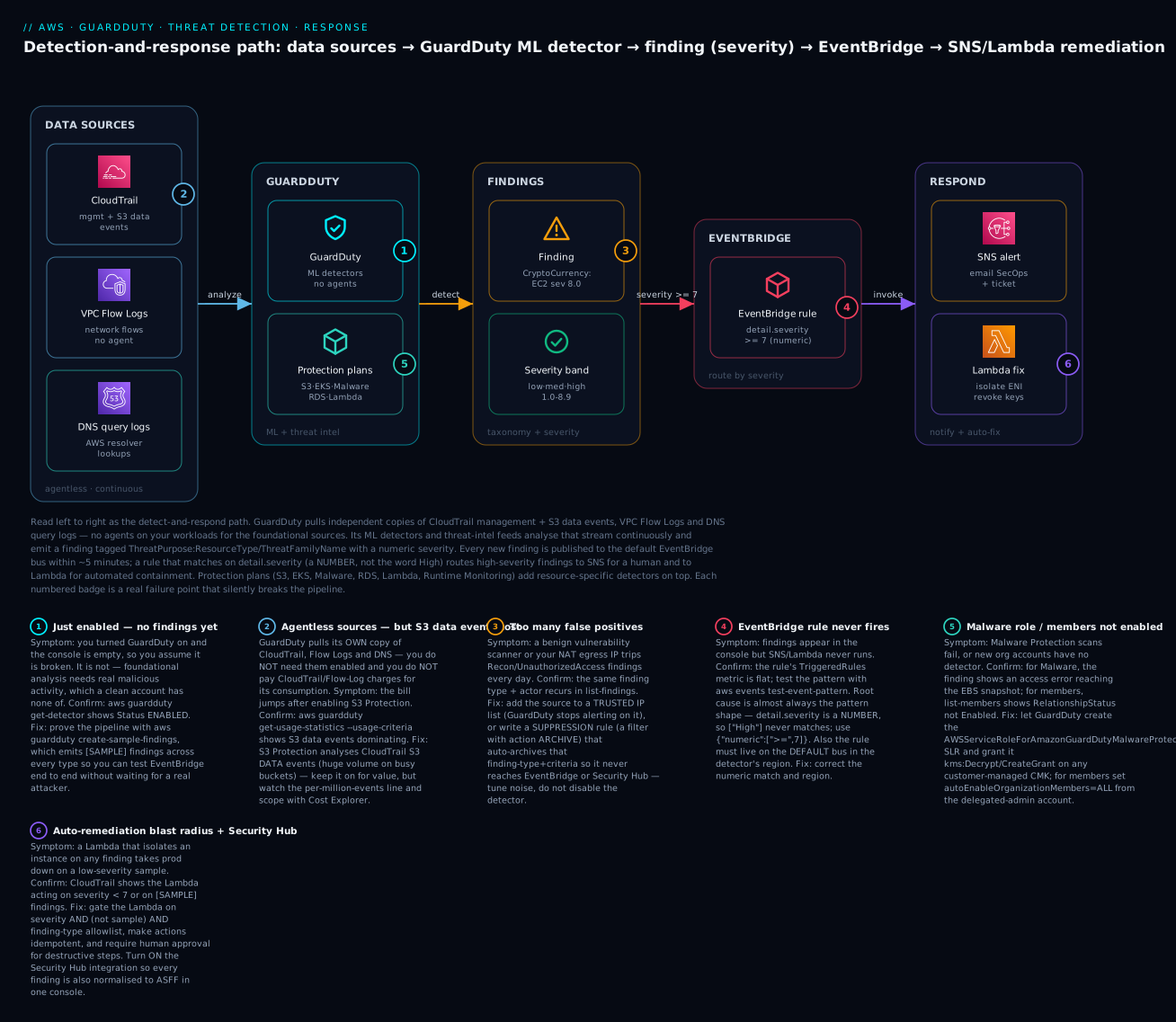
The diagram traces the detect-and-respond pipeline left to right. In DATA SOURCES, GuardDuty reads independent copies of CloudTrail (management + S3 data events), VPC Flow Logs, and DNS query logs — agentless, with nothing to install on your workloads. Those streams feed the GUARDDUTY zone, where the ML detectors and threat-intel feeds analyse behaviour and the protection plans (S3, EKS, Malware, RDS, Lambda, Runtime Monitoring) add resource-specific detection. Detection produces a FINDING tagged with the ThreatPurpose:ResourceType/ThreatFamilyName taxonomy and a numeric severity band. That finding is published to the default EVENTBRIDGE bus, where a rule matching detail.severity numerically (>= 7) routes it into the RESPOND zone — SNS to notify a human and a Lambda to contain the resource (isolate its ENI, revoke the exposed key).
The six numbered badges mark where the pipeline silently breaks: a freshly-enabled detector with no findings yet (badge 1 — use create-sample-findings); the agentless-but-costly S3 data events driving the bill (badge 2); false positives from a benign scanner that need a suppression rule or trusted IP list (badge 3); an EventBridge rule that never fires because it matched the word “High” instead of the numeric severity, or lives on the wrong bus/region (badge 4); Malware Protection scans failing on a customer-managed KMS key, or new org members never enabled (badge 5); and an over-eager auto-remediation Lambda that acts on low-severity or [SAMPLE] findings and takes prod down (badge 6). The legend narrates each as symptom, the exact confirm command, and the fix.
Real-world scenario
Meridian Freight, a fictional but realistic logistics SaaS, runs a 19-account AWS organization across ap-south-1 and eu-west-1. The security function is two engineers and an on-call rotation shared with platform. GuardDuty had been “enabled” for a year — but only in the two accounts someone remembered, only in ap-south-1, and with no automated response: findings landed in a console nobody opened between audits. The monthly GuardDuty bill was a comfortable ₹6,000, which should have been the first clue that it was not doing much.
The incident began on a Friday. A developer pushed a debugging branch that logged environment variables, and a build container’s .env — carrying a long-lived IAM access key — ended up in a public build artifact. Within nine minutes, GuardDuty in the build account (which, crucially, had never been enabled) would have raised UnauthorizedAccess:IAMUser/MaliciousIPCaller and then CryptoCurrency:EC2/BitcoinTool.B!DNS as the attacker launched eight g5.xlarge instances to mine. But that account was dark. The first signal was a budget alert on Sunday: compute spend up ₹4.1 lakh. By then the miners had run for two days.
The post-incident review wrote the new standard, and it maps one-to-one to this article’s failure badges. First, they fixed the coverage gap: they registered their dedicated security account as the GuardDuty delegated administrator from the management account, then set autoEnableOrganizationMembers = ALL for every region they operate in plus every region they do not — because the attacker had specifically launched in us-west-2, where Meridian had zero workloads and zero visibility (badge 5). Twenty minutes of Terraform closed a hole that had cost them ₹4.1 lakh.
Second, they built the response plane they never had. An EventBridge rule on the default bus in each region matched detail.severity at >= 7 — and they caught the string-vs-number trap in review, having first written "severity": ["High"], tested it with aws events test-event-pattern, and watched it match nothing (badge 4). The corrected rule fanned out to an SNS topic (PagerDuty + a SecOps Slack channel) and a containment Lambda that, for a compromised instance, moved it into a quarantine security group with no egress and snapshotted its volumes for forensics. Critically — having read badge 6 the hard way in a tabletop — they gated the Lambda on severity >= 7 AND service.additionalInfo.sample != true AND type in (allowlist), so a [SAMPLE] finding or a low-severity port probe could never quarantine production.
Third, they turned on the plans that would have caught this earlier and cheaper: S3 Protection (to catch the exfiltration attempt on their shipment-data bucket) and Malware Protection for EC2. The Malware plan immediately failed its first scan — the volumes used a customer-managed KMS key whose policy did not permit the AWSServiceRoleForAmazonGuardDutyMalwareProtection role (badge 5 again). One key-policy statement granting the role kms:Decrypt and kms:CreateGrant fixed it. Fourth, they tuned noise: their nightly vulnerability scanner had been generating Recon:EC2/PortProbeUnprotectedPort every night, so they added its source to a trusted IP list and wrote a suppression rule for that finding type from that IP — keeping the record, killing the page (badge 3).
The bill went from ₹6,000 to about ₹31,000/month — S3 data-event analysis was the bulk (badge 2) — and the CFO signed it without blinking, because the one-page incident review put ₹4.1 lakh of avoidable spend next to a ₹25,000 delta. The line that went on the wall: “An enabled detector nobody routes is a smoke alarm with the battery out. Cover every region, wire the response, and never let automation act on a sample.” The order is the lesson:
| Phase | Finding | Action | Effect |
|---|---|---|---|
| Pre-incident | GuardDuty on in 2/19 accounts, 1 region | — | Build account + us-west-2 were dark |
| Sunday | ₹4.1 lakh compute spike | Budget alert (not GuardDuty) caught it | Two days of mining |
| Day 1 | No org coverage | Delegated admin + autoEnable=ALL, all regions |
Every account/region covered |
| Day 1 | No response plane | EventBridge severity>=7 → SNS + contain Lambda |
Detection now triggers action |
| Day 2 | Rule matched nothing | Fixed ["High"] → {"numeric":[">=",7]} |
Rule fires correctly |
| Day 2 | Malware scan failed | KMS key policy → allow Malware SLR | Scans succeed |
| Week 1 | Nightly scanner noise | Trusted IP list + suppression rule | Signal without the page |
Advantages and disadvantages
| Advantages | Disadvantages |
|---|---|
| Agentless for foundational sources — nothing to deploy | Runtime Monitoring depth needs an agent |
| Managed ML + curated threat intel, always current | Detective only — never blocks the attack itself |
| One-switch enable; org-wide via delegated admin | Cost scales with data volume (S3 data events especially) |
| Reads telemetry you already have, free to GuardDuty | You still must build the response plane |
| Rich, MITRE-aligned finding taxonomy | Tuning noise (suppression/trusted IPs) is ongoing work |
| Native EventBridge integration for automation | Findings retained only 90 days unless you export |
| Regional isolation limits blast radius | Regional means you must enable every region |
| Feeds Security Hub + Detective natively | DNS detections blind if you don’t use AWS DNS |
GuardDuty earns its cost the first time it catches a stolen key or a miner in minutes instead of a fortnight — but only if you have paid the operational tax up front: enabled in every region, rolled out org-wide with auto-enable, wired to a response plane that acts on high severity, and tuned so real findings are not buried under benign noise. Enable it and walk away, and you get a bill and a console nobody reads.
Hands-on lab
You will enable GuardDuty with S3 Protection and Malware Protection, generate sample findings, wire an EventBridge rule into SNS and a containment Lambda that reacts to high-severity findings, add a suppression rule and a trusted IP list, and set up the delegated-admin pattern — via aws guardduty/events and Terraform — then tear it down. Region ap-south-1, account 111122223333. ⚠️ GuardDuty is not free beyond the 30-day trial — foundational analysis, S3 data events and Malware scans all bill; the teardown at the end stops the meter.
Step 0 — Prerequisites
aws sts get-caller-identity            # confirm account + region
export AWS_DEFAULT_REGION=ap-south-1
export ACCT=$(aws sts get-caller-identity --query Account --output text)
Step 1 — Enable the detector with protection plans
# Create the detector, publish finding UPDATES every 15 min, turn on S3 + EBS Malware
aws guardduty create-detector \
  --enable \
  --finding-publishing-frequency FIFTEEN_MINUTES \
  --features '[
    {"Name":"S3_DATA_EVENTS","Status":"ENABLED"},
    {"Name":"EBS_MALWARE_PROTECTION","Status":"ENABLED"}
  ]'
# { "DetectorId": "12abc34d567e8f90..." }

export DET=$(aws guardduty list-detectors --query 'DetectorIds[0]' --output text)
echo "Detector: $DET"
Verify (expected output):
aws guardduty get-detector --detector-id $DET \
  --query '{status:Status,freq:FindingPublishingFrequency}'
# { "status": "ENABLED", "freq": "FIFTEEN_MINUTES" }
Console path: GuardDuty → Enable GuardDuty; then Settings → Protection plans to toggle S3, Malware, EKS, RDS, Lambda, Runtime Monitoring. The service-linked role AWSServiceRoleForAmazonGuardDuty is created automatically; enabling Malware adds AWSServiceRoleForAmazonGuardDutyMalwareProtection.
Step 2 — Create the SNS topic and containment Lambda
# SNS topic + your email subscription (confirm via the email link)
export TOPIC=$(aws sns create-topic --name guardduty-high-sev --query TopicArn --output text)
aws sns subscribe --topic-arn $TOPIC --protocol email --notification-endpoint secops@example.com
A minimal containment Lambda (Python) that is safe by construction — it ignores samples and low severity:
# handler.py — quarantine only on real, high-severity instance findings
import json, boto3
ec2 = boto3.client("ec2")
QUARANTINE_SG = "sg-0quarantinenoegress"

def handler(event, _ctx):
    d = event["detail"]
    if d.get("service", {}).get("additionalInfo", {}).get("sample") is True:
        return {"skipped": "sample finding"}
    if d.get("severity", 0) < 7:
        return {"skipped": f"severity {d.get('severity')} < 7"}
    res = d.get("resource", {})
    if res.get("resourceType") != "Instance":
        return {"skipped": f"not an instance: {res.get('resourceType')}"}
    iid = res["instanceDetails"]["instanceId"]
    ec2.modify_instance_attribute(InstanceId=iid, Groups=[QUARANTINE_SG])
    return {"quarantined": iid, "type": d["type"]}
Package and create it (assume an execution role guardduty-responder with ec2:ModifyInstanceAttribute scoped to your instances):
zip fn.zip handler.py
export FN=$(aws lambda create-function --function-name gd-contain \
  --runtime python3.12 --handler handler.handler --zip-file fileb://fn.zip \
  --role arn:aws:iam::$ACCT:role/guardduty-responder \
  --query FunctionArn --output text)
Step 3 — Wire the EventBridge rule (the numeric-severity trap)
# Rule on the DEFAULT bus, matching HIGH severity NUMERICALLY
aws events put-rule --name gd-high-sev \
  --event-pattern '{
    "source": ["aws.guardduty"],
    "detail-type": ["GuardDuty Finding"],
    "detail": { "severity": [ { "numeric": [ ">=", 7 ] } ] }
  }'

# Two targets: SNS (notify) and Lambda (contain)
aws events put-targets --rule gd-high-sev --targets \
  "Id"="sns","Arn"="$TOPIC" \
  "Id"="fn","Arn"="$FN"

# Let EventBridge invoke the Lambda
aws lambda add-permission --function-name gd-contain \
  --statement-id gd-events --action lambda:InvokeFunction \
  --principal events.amazonaws.com \
  --source-arn arn:aws:events:ap-south-1:$ACCT:rule/gd-high-sev

# Prove the pattern BEFORE trusting it — this is the badge-4 check
aws events test-event-pattern \
  --event-pattern '{"detail":{"severity":[{"numeric":[">=",7]}]}}' \
  --event '{"detail":{"severity":8}}'
# { "Result": true }        # ["High"] would return false here
Step 4 — Generate sample findings and watch the pipeline
# Emit [SAMPLE] findings across a couple of high-severity types
aws guardduty create-sample-findings --detector-id $DET --finding-types \
  "CryptoCurrency:EC2/BitcoinTool.B!DNS" \
  "UnauthorizedAccess:IAMUser/InstanceCredentialExfiltration.OutsideAWS"

# List what landed
aws guardduty list-findings --detector-id $DET \
  --query 'FindingIds | length(@)'
# 2  (or more)

# Inspect one — note the [SAMPLE] title and numeric severity
FID=$(aws guardduty list-findings --detector-id $DET --query 'FindingIds[0]' --output text)
aws guardduty get-findings --detector-id $DET --finding-ids $FID \
  --query 'Findings[0].{type:Type,sev:Severity,sample:Service.AdditionalInfo.Sample,title:Title}'
# { "type": "CryptoCurrency:EC2/BitcoinTool.B!DNS", "sev": 8, "sample": true, "title": "[SAMPLE] ..." }
You should receive the SNS email; the Lambda logs will show it skipped the sample (proving the safety gate works). Swap in a non-sample test later against a throwaway instance to see a real quarantine.
Step 5 — Add a suppression rule and a trusted IP list
# Suppression: auto-ARCHIVE benign nightly-scanner port probes from one IP
aws guardduty create-filter --detector-id $DET --name suppress-scanner \
  --action ARCHIVE --rank 1 --finding-criteria '{
    "Criterion": {
      "type": { "Equals": ["Recon:EC2/PortProbeUnprotectedPort"] },
      "service.action.networkConnectionAction.remoteIpDetails.ipAddressV4": { "Equals": ["198.51.100.24"] }
    }
  }'

# Trusted IP list: upload the file to S3 first, then register + activate it
printf "203.0.113.10\n203.0.113.0/28\n" > trusted-ips.txt
aws s3 cp trusted-ips.txt s3://acme-gd-lists-$ACCT/trusted-ips.txt
aws guardduty create-ip-set --detector-id $DET --name trusted-corp-egress \
  --format TXT --location https://s3.amazonaws.com/acme-gd-lists-$ACCT/trusted-ips.txt \
  --activate
Step 6 — Set up the delegated-admin pattern (org)
# In the MANAGEMENT account: designate the security account as GuardDuty admin
aws guardduty enable-organization-admin-account --admin-account-id 444455556666

# In the DELEGATED-ADMIN (security) account: auto-enable ALL members, every region
aws guardduty update-organization-configuration --detector-id $DET \
  --auto-enable-organization-members ALL

# Confirm membership
aws guardduty list-members --detector-id $DET \
  --query 'Members[].{acct:AccountId,status:RelationshipStatus}'
# [ { "acct": "5555...", "status": "Enabled" }, ... ]
Step 7 — The core of the lab as Terraform
resource "aws_guardduty_detector" "main" {
  enable                       = true
  finding_publishing_frequency = "FIFTEEN_MINUTES"
}

resource "aws_guardduty_detector_feature" "s3" {
  detector_id = aws_guardduty_detector.main.id
  name        = "S3_DATA_EVENTS"
  status      = "ENABLED"
}

resource "aws_guardduty_detector_feature" "malware" {
  detector_id = aws_guardduty_detector.main.id
  name        = "EBS_MALWARE_PROTECTION"
  status      = "ENABLED"
}

resource "aws_guardduty_filter" "suppress_scanner" {
  detector_id = aws_guardduty_detector.main.id
  name        = "suppress-scanner"
  action      = "ARCHIVE"
  rank        = 1
  finding_criteria {
    criterion {
      field  = "type"
      equals = ["Recon:EC2/PortProbeUnprotectedPort"]
    }
  }
}

resource "aws_guardduty_ipset" "trusted" {
  detector_id = aws_guardduty_detector.main.id
  name        = "trusted-corp-egress"
  format      = "TXT"
  location    = "https://s3.amazonaws.com/acme-gd-lists-111122223333/trusted-ips.txt"
  activate    = true
}

# Org rollout (run in the delegated-admin account)
resource "aws_guardduty_organization_admin_account" "this" {
  admin_account_id = "444455556666"
}

resource "aws_guardduty_organization_configuration" "this" {
  detector_id                      = aws_guardduty_detector.main.id
  auto_enable_organization_members = "ALL"
}

# The EventBridge rule → SNS + Lambda
resource "aws_cloudwatch_event_rule" "gd_high" {
  name          = "gd-high-sev"
  event_pattern = jsonencode({
    source        = ["aws.guardduty"]
    "detail-type" = ["GuardDuty Finding"]
    detail        = { severity = [{ numeric = [">=", 7] }] }
  })
}

resource "aws_cloudwatch_event_target" "sns" {
  rule = aws_cloudwatch_event_rule.gd_high.name
  arn  = aws_sns_topic.high.arn
}
Step 8 — Teardown (stops the billing)
| # | Action | Command |
|---|---|---|
| 1 | Delete the trusted IP set | aws guardduty delete-ip-set --detector-id $DET --ip-set-id <id> |
| 2 | Delete the suppression filter | aws guardduty delete-filter --detector-id $DET --filter-name suppress-scanner |
| 3 | Remove EventBridge targets + rule | aws events remove-targets --rule gd-high-sev --ids sns fn then aws events delete-rule --name gd-high-sev |
| 4 | Delete the Lambda | aws lambda delete-function --function-name gd-contain |
| 5 | Delete the SNS topic | aws sns delete-topic --topic-arn $TOPIC |
| 6 | Disable org auto-enable (admin acct) | aws guardduty update-organization-configuration --detector-id $DET --auto-enable-organization-members NONE |
| 7 | Remove the delegated admin (mgmt acct) | aws guardduty disable-organization-admin-account --admin-account-id 444455556666 |
| 8 | Delete the detector (stops all billing) | aws guardduty delete-detector --detector-id $DET |
| 9 | Empty + delete the lists bucket | aws s3 rb s3://acme-gd-lists-$ACCT --force |
⚠️ Deleting the detector is what halts GuardDuty charges. Disabling a protection plan (update-detector --features ... Status=DISABLED) stops that plan’s charges while keeping the baseline running — the right move if you only want to trim cost.
Common mistakes & troubleshooting
This is the section you open when a finding fires — or fails to. The playbook first (symptom → fix), then the operation-error reference, a decision table, and prose on the nastiest failures.
| # | Symptom | Root cause | Confirm (exact command / console path) | Fix |
|---|---|---|---|---|
| 1 | No findings at all after enabling | Just enabled; a clean account has no real malicious activity | aws guardduty get-detector --detector-id $DET → Status: ENABLED |
Prove the pipeline with create-sample-findings; real findings arrive as activity occurs |
| 2 | EventBridge rule never fires | Pattern matched the word "High", not numeric severity |
aws events test-event-pattern returns false |
Use {"numeric":[">=",7]}; severity is a number |
| 3 | Rule still never fires (pattern correct) | Rule on a custom bus or wrong region | Rule’s TriggeredRules metric is flat |
Put the rule on the default bus in the detector’s region |
| 4 | Lambda not invoked, SNS works | Missing lambda:InvokeFunction permission for EventBridge |
aws lambda get-policy lacks events.amazonaws.com |
aws lambda add-permission --principal events.amazonaws.com |
| 5 | Too many false positives | Benign scanner / NAT egress trips recurring findings | Same type+IP repeats in list-findings |
Trusted IP list (silence source) or suppression rule (archive type) |
| 6 | Suppressed findings still page you | Filter action is not ARCHIVE, or SIEM reads pre-archive |
get-filter shows wrong Action; check export timing |
Set --action ARCHIVE; archived findings skip EventBridge |
| 7 | New org account is unprotected | autoEnable is NEW/NONE, or not set per region |
describe-organization-configuration; list-members |
Set auto-enable-organization-members ALL in every region |
| 8 | Member shows no data | Membership not Enabled (invitation not accepted) |
list-members → RelationshipStatus not Enabled |
Accept invitation / re-associate; prefer org auto-enable |
| 9 | Malware Protection scans fail | Volume CMK policy blocks the Malware SLR | Finding/console shows KMS access error on the snapshot | Grant AWSServiceRoleForAmazonGuardDutyMalwareProtection kms:Decrypt/kms:CreateGrant on the CMK |
| 10 | Bill much higher than expected | S3 data-event volume (S3 Protection) dominates | get-usage-statistics --usage-statistic-type SUM_BY_DATA_SOURCE |
Keep S3 Protection but budget it; scope Runtime Monitoring to key accounts |
| 11 | No !DNS findings for a workload |
Workload uses non-AWS DNS resolver | Instance’s /etc/resolv.conf / DHCP options |
Use the AWS-provided resolver, or accept the gap and lean on Flow Logs |
| 12 | Findings not in Security Hub | Security Hub off, or GuardDuty integration disabled | Security Hub → Integrations → GuardDuty status | Enable Security Hub; the integration is automatic once both are on |
| 13 | Updated findings arrive slowly | Finding-publishing frequency is the 6 h default | get-detector → FindingPublishingFrequency: SIX_HOURS |
Set FIFTEEN_MINUTES (affects updates; new findings still ~5 min) |
| 14 | Auto-remediation quarantined prod | Lambda acted on a [SAMPLE] or low-severity finding |
CloudTrail shows the action on sample:true / severity<7 |
Gate on severity>=7 AND sample!=true AND type in allowlist |
| 15 | Can’t enable delegated admin | Trusted access for GuardDuty not enabled in Organizations | organizations describe-organization; SCP denies it |
Enable trusted access; run enable-organization-admin-account from mgmt |
Operation / API error reference
| Error | Where it appears | Meaning | Fix |
|---|---|---|---|
BadRequestException: The request failed because a detector already exists |
create-detector |
One detector per region already present | Use list-detectors + update-detector |
AccessDeniedException on enable-organization-admin-account |
Org admin setup | Not run from management account / no trusted access | Run from management; enable GuardDuty trusted access |
InvalidInputException: finding-criteria |
create-filter |
Malformed criterion field/condition | Match documented field paths + Equals/GreaterThan keys |
BadRequestException: KMS key ... access denied |
Malware scan | CMK policy blocks the Malware SLR | Add the SLR to the key policy |
| Lambda not triggered (no error) | EventBridge → Lambda | No resource policy for events.amazonaws.com |
add-permission with the rule ARN as source |
LimitExceededException on IP set |
create-ip-set |
One active trusted IP list per detector | Merge addresses into the single active list |
ResourceNotFoundException on get-findings |
Cross-region call | Findings are regional | Call in the detector’s region |
Decision table — read the symptom, name the cause
| If you see… | It’s probably… | Do this |
|---|---|---|
| Zero findings on a new detector | Normal — no malicious activity yet | create-sample-findings to test the pipeline |
| SNS fires but Lambda does not | Missing invoke permission | add-permission for events.amazonaws.com |
| Nothing fires at all | String severity match, or wrong bus/region | test-event-pattern; use numeric on default bus |
| The same benign finding daily | Known scanner / your own IP | Trusted IP list + suppression rule |
| A new account with no findings | Auto-enable not ALL in that region |
update-organization-configuration ... ALL |
| Malware findings never appear / error | KMS on the volume blocks the scan | Grant the Malware SLR on the CMK |
| Bill creeping up | S3 data events / Runtime vCPU-hours | get-usage-statistics; scope plans |
The three nastiest failures, in prose
“Enabled but dark.” The most expensive GuardDuty failure is a detector that is on where you look and off where the attacker goes. GuardDuty is regional and per-account; a compromise in a region or account with no detector produces no finding, and the console you do watch stays reassuringly empty. The Meridian incident is the archetype — miners launched in us-west-2, where there was no detector, and the first alarm was the bill. The only defence is org-wide auto-enable (autoEnableOrganizationMembers = ALL) applied in every region, including the ones you do not use, so there is nowhere dark to hide. Treat “GuardDuty is enabled” as a per-region, per-account assertion you verify, not a global fact.
The string-vs-number severity trap. detail.severity is a number (8), not a label (“High”). An EventBridge pattern of "severity": ["High"] is syntactically valid, deploys cleanly, and matches nothing forever — so your high-severity findings sail past a rule that looks correct in the console. The fix is {"numeric": [">=", 7]}, and the discipline is to test-event-pattern every rule against a sample event before trusting it. This one silent mismatch is behind a large share of “GuardDuty didn’t alert us” post-mortems where GuardDuty had, in fact, detected everything.
Automation that acts on samples. The moment you connect a containment Lambda to GuardDuty, create-sample-findings — the very tool you use to test — becomes a loaded gun, because sample findings carry real high severities (8.0) and a real (fictitious) instance ID. A naïve Lambda that quarantines “any instance in a high-severity finding” will happily isolate whatever the sample references, or loop. Every response function must check service.additionalInfo.sample != true and gate on a finding-type allowlist and be idempotent, with destructive steps (terminate, delete) behind human approval. Build the safety gate before you build the action, not after the first false quarantine.
Best practices
| # | Practice | Why |
|---|---|---|
| 1 | Enable GuardDuty in every region, including unused ones | Attackers target regions you don’t watch |
| 2 | Roll out via delegated admin + autoEnable=ALL |
New accounts are covered from birth |
| 3 | Delegate admin to a dedicated security account, not the management account | Least privilege; blast-radius isolation |
| 4 | Wire a response plane (EventBridge → SNS + Lambda) on day one | Detection without routing changes nothing |
| 5 | Match severity numerically and test-event-pattern every rule |
Avoids the silent string-vs-number miss |
| 6 | Gate automation on severity, sample!=true, and a type allowlist |
Prevents acting on samples or low-severity noise |
| 7 | Set finding-publishing frequency to 15 minutes | Faster updates to existing findings |
| 8 | Tune noise with trusted IP lists + suppression rules, not by disabling plans | Keep signal, kill the pages |
| 9 | Enable Security Hub so findings land in one normalised pane | Correlate GuardDuty with Inspector/Macie/Config |
| 10 | Export findings to S3 (KMS) for retention beyond 90 days | Findings age out otherwise |
| 11 | Budget S3 Protection and Runtime Monitoring explicitly | They are the dominant cost levers |
| 12 | Rehearse the response with sample findings in a tabletop | Proves the whole loop before a real incident |
Security notes
GuardDuty is a security control, so its own posture and the response plane it drives must be least-privilege and tamper-resistant.
| Concern | Risk | Control |
|---|---|---|
| Response-Lambda permissions | An over-broad role can wreck prod | Scope to exact actions (ec2:ModifyInstanceAttribute on tagged instances) |
| Sample-finding automation | Samples trigger destructive actions | Gate on sample!=true + type allowlist + idempotency |
| Detector tamper | Attacker disables GuardDuty to go dark | SCP denying guardduty:DeleteDetector/DisassociateFromMasterAccount (break-glass only) |
| Finding retention | 90-day window loses evidence | Export to a central, KMS-encrypted, Object-Locked S3 bucket in the security account |
| Malware SLR + CMK | Broad key access, or failed scans | Grant the Malware SLR only kms:Decrypt/kms:CreateGrant on the specific CMKs |
| Trusted IP list abuse | A too-broad allowlist blinds detection | Keep it minimal; review who can edit the IP set |
| Cross-account finding export | Leaking finding data | Restrict the publishing-destination bucket policy to the org |
| Delegated-admin scope | The admin account sees everything | Delegate to a dedicated security/audit account only |
Key IAM actions to gate, and to whom:
| Action | Grants | Give to |
|---|---|---|
guardduty:CreateDetector / UpdateDetector |
Turn detection on/off, change plans | Platform automation only |
guardduty:DeleteDetector |
Disable detection | Nobody in prod (SCP-deny; break-glass) |
guardduty:EnableOrganizationAdminAccount |
Set the org admin | Management-account automation only |
guardduty:CreateFilter / CreateIPSet |
Change what is suppressed/trusted | Security engineering (reviewed) |
guardduty:CreateSampleFindings |
Emit test findings | Security engineering (never near live destructive automation) |
guardduty:GetFindings / ListFindings |
Read the findings | SOC / responders, read-only |
Cost & sizing
GuardDuty has a 30-day free trial per account/region (and per newly-added protection plan), which is genuinely useful for right-sizing before you commit. After that, you pay for volume analysed, and the drivers differ per source. The figures below are indicative (US/most regions, first pricing tier) and tier down with volume — always confirm with get-usage-statistics and Cost Explorer for your account.
| Cost driver | Roughly | Note |
|---|---|---|
| CloudTrail management events | ~$4.00 per million events | Baseline; tiers down at volume |
| VPC Flow Logs + DNS analysis | ~$1.00 per GB (first 500 GB) | Baseline; the network/DNS detectors |
| S3 data events (S3 Protection) | ~$0.50–$0.90 per million events | Often the largest line on busy buckets |
| EKS audit logs | per million audit events | Only with EKS Protection |
| Runtime Monitoring | per vCPU-hour of the agent | Scope to high-value hosts/accounts |
| Malware Protection for EC2 | ~$0.02 per GB scanned | Only when a scan is triggered |
| Malware Protection for S3 | per GB + per object scanned | Only for protected buckets |
| RDS / Lambda Protection | per login-event / per GB | Usually modest |
| Finding storage (90 days) | included | S3 export is separate S3 cost |
A worked example for a single mid-size account — steady CloudTrail/Flow-Log/DNS volume, S3 Protection on a moderately busy data bucket, Malware on triggered scans, no Runtime Monitoring:
| Component | Estimate | Monthly (USD) | Monthly (INR ≈ ₹83/$) |
|---|---|---|---|
| CloudTrail mgmt events (~15M) | 15 × $4.00 | ~$60 | ~₹4,980 |
| Flow Logs + DNS (~120 GB) | 120 × $1.00 | ~$120 | ~₹9,960 |
| S3 data events (~150M) | ~150 × $0.70 | ~$105 | ~₹8,720 |
| Malware scans (~200 GB triggered) | 200 × $0.02 | ~$4 | ~₹330 |
| Total (indicative) | — | ~$289 | ~₹24,000 |
Multiply by account count for an org — which is why scoping the expensive plans matters at scale. The levers, ranked by impact:
| Lever | Saves | Trade-off |
|---|---|---|
| Scope Runtime Monitoring to key accounts/hosts | Large (per vCPU-hour) | Less runtime depth on lower-value hosts |
| Budget S3 Protection per bucket importance | Large (data-event volume) | Losing it blinds S3 exfil detection |
| Disable plans in low-risk sandbox accounts | Moderate | Sandboxes are less monitored |
| Keep the baseline everywhere, plans selectively | Moderate | Uniform coverage vs targeted depth |
| Use the free trial to measure before committing | Avoids surprises | 30 days only |
The one anti-pattern: do not turn off the baseline detector to save money. The baseline (CloudTrail/Flow Logs/DNS) is where the highest-severity, lowest-cost detections live — stolen keys, C2, mining. Trim the plans (especially S3 data events and Runtime Monitoring) if you must, never the detector.
Interview & exam questions
Q1. What is GuardDuty and how is it different from a preventive control like IAM or a security group? GuardDuty is a managed threat-detection service that continuously analyses CloudTrail, VPC Flow Logs and DNS (plus optional sources) with ML and threat intel to raise findings. It is detective, not preventive — it detects malicious behaviour after the fact and never blocks it, whereas IAM/SGs decide what is allowed up front. You need both. (SCS-C02)
Q2. Which data sources does GuardDuty read by default, and do you have to enable them? The foundational sources are CloudTrail management events, VPC Flow Logs, and DNS query logs. You do not enable them for GuardDuty and are not billed their base cost for GuardDuty’s use — GuardDuty consumes its own independent copy. Optional sources (S3 data events, EKS audit logs, runtime events, etc.) sit behind protection plans. (SCS-C02)
Q3. Explain the finding type CryptoCurrency:EC2/BitcoinTool.B!DNS. It parses as ThreatPurpose:ResourceType/ThreatFamilyName.Variant!Artifact — a crypto-mining-purpose finding, on an EC2 instance, Bitcoin tooling variant B, detected via a DNS lookup to a known mining domain. (SCS-C02)
Q4. Your EventBridge rule for high-severity findings never fires, though findings exist. Why, most likely? The pattern probably matches "severity": ["High"] — a string — but detail.severity is a number. Use {"numeric": [">=", 7]}. Also confirm the rule is on the default bus in the detector’s region. (SOA-C02)
Q5. How do you roll GuardDuty out to a 50-account organization so new accounts are covered automatically? Register a dedicated security account as the delegated administrator, then set autoEnableOrganizationMembers = ALL (per region) so every existing and future member gets a detector — no invitations, no per-account clicks. (SAP-C02)
Q6. What is the difference between a suppression rule, a trusted IP list, and a threat IP list? A suppression rule is a filter with action ARCHIVE that auto-archives matching findings (they generate but never alert). A trusted IP list is an allowlist — GuardDuty stops generating findings for those IPs. A threat IP list is your own known-bad IPs that GuardDuty will alert on, adding to its intel. (SCS-C02)
Q7. How does Malware Protection for EC2 scan an instance without an agent? On a triggering finding (or on demand), GuardDuty takes a snapshot of the EBS volumes, scans the snapshot in AWS-managed infrastructure, and raises Execution:EC2/MaliciousFile if it finds malware — the running instance is untouched. It needs the Malware service-linked role, and if volumes use a customer-managed KMS key, that key must permit the role. (SCS-C02)
Q8. A freshly-enabled detector shows no findings. Is it broken? No — foundational detection needs real malicious activity, and a clean account has none. Verify get-detector shows Status: ENABLED, then prove the pipeline with create-sample-findings, which emits [SAMPLE] findings you can route end to end. (SOA-C02)
Q9. Why must automated response gate on service.additionalInfo.sample? Because create-sample-findings produces findings with real high severities and a resource reference; a containment Lambda that ignores the sample flag will act on test findings — quarantining or terminating whatever they reference. Gate on sample != true, a type allowlist, and severity. (SCS-C02)
Q10. How do GuardDuty, Security Hub and Detective fit together? GuardDuty detects and emits findings; Security Hub ingests them normalised to ASFF so they sit alongside other security findings in one pane; Detective is where you investigate — pivoting from a finding into a behaviour graph to see the full context. Detection, aggregation, investigation. (SCS-C02)
Q11. What are the dominant GuardDuty cost drivers and how do you control them? Volume analysed: CloudTrail events, Flow-Log/DNS GB, and especially S3 data events (S3 Protection) and Runtime Monitoring vCPU-hours. Control them by scoping the expensive plans to high-value accounts/buckets — never by disabling the baseline detector, which carries the highest-value detections. (SOA-C02)
Q12. GuardDuty is enabled but you were still breached with no alert. Name two configuration causes. The compromise happened in a region or account with no detector (GuardDuty is regional/per-account), or the finding fired but the EventBridge rule never matched (string-vs-numeric severity, wrong bus/region). Both are why “enable everywhere + test every rule” is the rule. (SCS-C02)
Quick check
- You enable GuardDuty and see no findings after an hour. What is the first thing you do to confirm the pipeline works, and with which command?
- Your high-severity EventBridge rule never fires though the console shows high-severity findings. What is the single most likely bug?
- Which protection plan reads CloudTrail S3 data events, and why is it the biggest cost-risk plan?
- How do you make GuardDuty cover a brand-new account in your organization automatically, with no manual step?
- A containment Lambda quarantined a production instance during a test. What two gates were missing?
Answers
- Emit test findings with
aws guardduty create-sample-findings --detector-id $DET --finding-types ...(after confirmingget-detectorshowsStatus: ENABLED). A clean account legitimately has no real findings; samples exercise the whole route. - The pattern matched the string
"High"instead of the numericdetail.severity. Use{"numeric": [">=", 7]}andtest-event-patternit. (Also verify it is on the default bus in the detector’s region.) - S3 Protection — it analyses CloudTrail S3 data events, whose volume on a busy bucket is enormous, so it is billed per million data events and often dominates the GuardDuty bill.
- Register a delegated administrator and set
autoEnableOrganizationMembers = ALL(per region) — every existing and future member gets a detector automatically. - It did not check
service.additionalInfo.sample != true(so it acted on a[SAMPLE]finding) and had no finding-type allowlist (and ideally aseverity >= 7gate) — the three gates every response function needs.
Glossary
| Term | Definition |
|---|---|
| GuardDuty | Managed threat-detection service that analyses AWS telemetry with ML + threat intel and raises findings; detective, not preventive. |
| Detector | The per-region, per-account GuardDuty resource; enabling GuardDuty creates it. |
| Foundational data source | CloudTrail management events, VPC Flow Logs, and DNS query logs — read agentlessly and free to GuardDuty. |
| Protection plan / feature | An optional add-on detector (S3, EKS, Malware, RDS, Lambda, Runtime Monitoring), each with its own data source and cost. |
| Finding | A typed, scored detection of suspicious or malicious behaviour, retained 90 days. |
| Finding type | The ThreatPurpose:ResourceType/ThreatFamilyName.Variant!Artifact classification string. |
| ThreatPurpose | The attacker-intent prefix of a finding type (Recon, UnauthorizedAccess, CryptoCurrency, Backdoor, …). |
| Severity | A numeric score 1.0–8.9 bucketed Low/Medium/High (Critical for attack sequences); detail.severity in the event. |
| Runtime Monitoring | The agent-based plan giving OS-level visibility on EKS, ECS/Fargate and EC2. |
| Malware Protection | Agentless EBS-snapshot scanning for EC2, and object scanning for S3. |
| Delegated administrator | The org account (ideally a security account) that governs GuardDuty and auto-enables members. |
| Auto-enable | The autoEnableOrganizationMembers setting (ALL/NEW/NONE) that covers member accounts automatically. |
| Suppression rule | A filter with action ARCHIVE that auto-archives matching findings so they never alert. |
| Trusted IP list | An allowlist of IPs GuardDuty will not raise findings for (one active list per detector). |
| Threat IP list | A custom list of known-bad IPs GuardDuty will raise findings on. |
| Finding-publishing frequency | How often updates to existing findings publish (15 min / 1 h / 6 h); new findings publish in ~5 min. |
Next steps
- Understand the telemetry GuardDuty reads by pairing it with AWS CloudTrail and Config: Audit and Compliance at Scale and VPC Flow Logs for Network Troubleshooting.
- Build the response plane in depth with Amazon EventBridge Rules & Event Bus Hands-On and a containment Lambda function.
- Roll detection out safely across accounts on the foundation from AWS Organizations, SCPs & Multi-Account Guardrails and AWS Control Tower Guardrails.
- Complement behavioural detection with configuration drift detection in AWS Config: Resource Inventory, Compliance Rules & Remediation.
- Extend containment to the data layer by hardening bucket exposure with S3 Bucket Policies & Block Public Access.