Every other lesson in this course teaches you a tool: how systemd starts a service, how nginx terminates TLS, how Pacemaker fences a node, how cloud-init finishes a boot. This lesson teaches you the thing those tools are for — judgement. Specifically: given a workload, how much reliability and scale does it actually need, what does that cost, and what is the concrete Linux architecture that delivers it without over-building?
The reason this matters is that reliability is not free and it is not linear. Going from “one server that mostly stays up” to “a fleet that survives a datacentre losing power” is not one decision — it is four or five, each one adding cost, moving parts, and operational discipline. Architects who don’t understand the ladder make one of two expensive mistakes: they under-provision (a payments system running on a single box with a nightly backup, one bad disk from catastrophe), or they over-engineer (a five-person startup running a multi-region Kubernetes-of-VMs fleet to serve a brochure site, drowning in platform work they can’t staff). The whole skill is putting a workload on the lowest rung that meets its requirement, and knowing how to climb the next rung later without a rewrite.
This lesson lays out that ladder as five rungs, each a complete architecture. For each you’ll get the same five things: what it is, what climbing to it adds, what it costs, when it’s right, and how it fails. Then we thread the cross-cutting concerns — identity, secrets, observability, backup/DR, security, cost — up all five rungs, give you a framework for choosing, name the anti-patterns that sink teams, and finish with a lab where you climb rung 1 to rung 3 on a single VM.
Why this matters
Here is the pattern, played out ten thousand times: someone spins up one server, installs a web server, an application, and a database on it, points a domain at it, and ships. It works. Traffic grows. One day the box falls over — a disk fills, the kernel OOM-kills the database, a apt upgrade needs a reboot at the worst possible time — and the whole thing is down, hard, until a human logs in and fixes it by hand. That outage is the moment the team discovers, expensively, that they never chose an architecture. They defaulted into one.
The mental model that prevents this is a ladder. Reliability and scale come in discrete rungs, and each rung is defined by which failures it survives and which it doesn’t. Rung 1 survives nothing — any component death is a full outage. Rung 3 survives losing a node. Rung 4 survives it unattended, at 3 a.m., with nobody watching. Rung 5 survives losing an availability zone or a region. You don’t get from rung 1 to rung 4 by “adding more RAM”; you get there by deliberately eliminating single points of failure one tier at a time, and each elimination has a name, a cost, and a failure mode of its own.
The second half of the model is that cost and complexity climb with the rung, and faster than the reliability does. Rung 1→2 roughly triples your host count and adds a private network; rung 3 doubles that again and introduces the two hardest problems in distributed systems, shared state and consistency; rung 4 adds quorum, fencing, and the risk of split-brain; rung 5 demands a build pipeline, everything-as-code, and the discipline never to touch a running box. Treat each rung as a purchase — real money and real operational load — and buy only the reliability the business needs. The platform work to run rung 5 well will bankrupt the attention of a team that only needed rung 3.
Keep one more idea in mind as we climb: the goal is to climb without a rewrite. If rung 1 is built with the right seams — the app already reaches the database over the network rather than a local socket, sessions already live outside the process, config already comes from files rather than hand-edits — then climbing to rung 3 is adding boxes and a load balancer, not rebuilding the application. Architecture at rung 1 is mostly about leaving the doors open to rung 3.
The ladder: five rungs and one rule
The five rungs run from a single all-in-one box to a self-healing, elastic fleet. Read this diagram left-to-right — it is the exact path most production systems travel, and the rest of the lesson is one section per zone.
Each zone names what that rung adds over the one before it: rung 2 splits the tiers onto a private network; rung 3 puts a load balancer or floating VIP in front of redundant, replicated tiers so the system survives a node loss; rung 4 makes that failover automatic and unattended with Pacemaker and mandatory STONITH fencing; rung 5 stops mutating servers entirely, replacing them from golden images across multiple regions. The badges mark the one lesson at each rung you must not get wrong — the SPOF at rung 1, that redundancy is useless without a load balancer at rung 3, that automatic HA is impossible without fencing at rung 4, that rung 5 rebuilds rather than patches — and, at the centre, the meta-rule: pick the right rung; don’t just climb the highest.
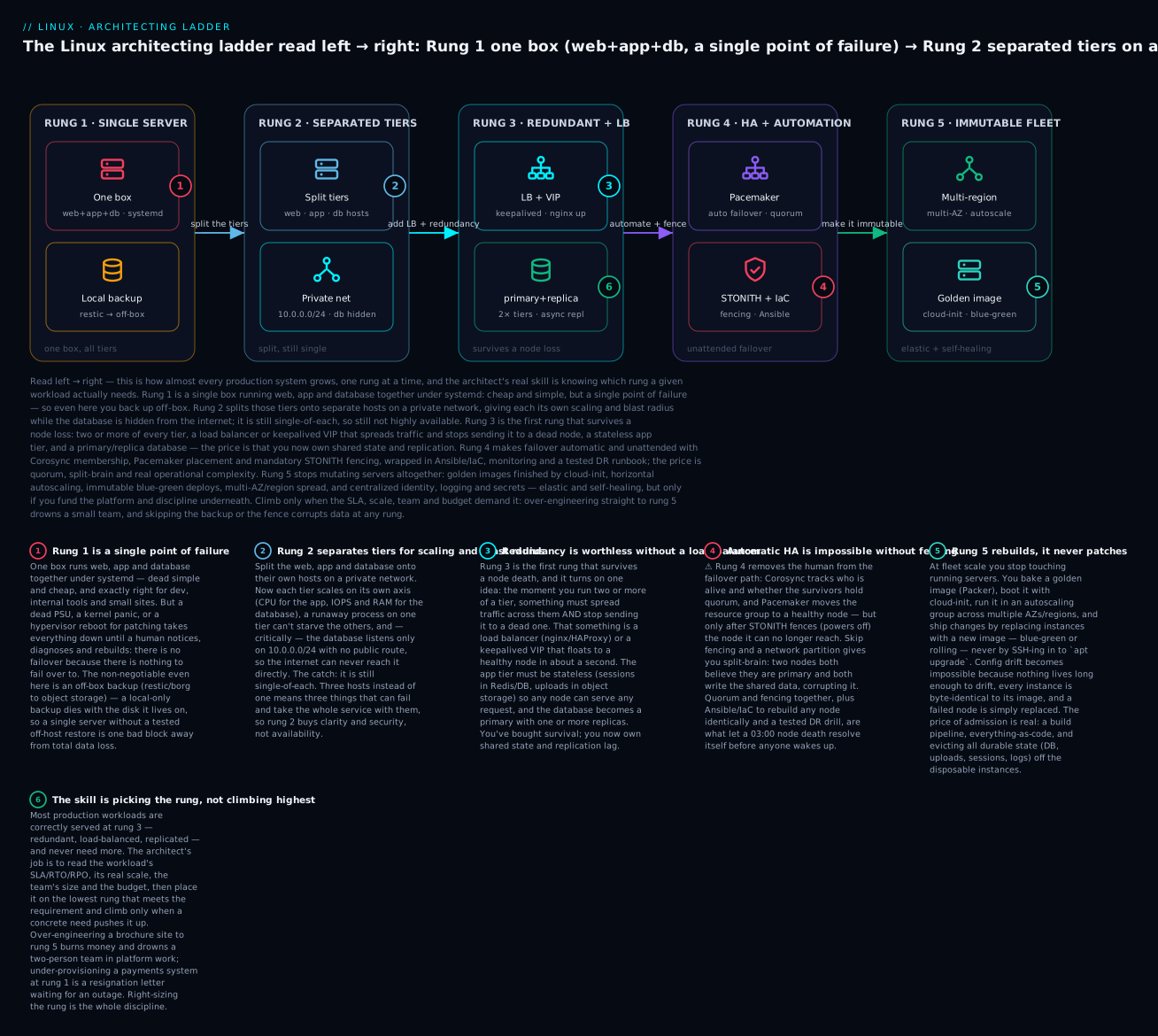
The one rule that governs the whole ladder: match the rung to the workload, then build the lowest rung that meets the requirement with the doors open to the next one. Here is the whole ladder in a single table — keep coming back to it.
| Rung | The architecture | What it adds | Survives | Realistic SLA | Rough monthly cost | Right for |
|---|---|---|---|---|---|---|
| 1 · Single server | One box: web + app + DB together, systemd, local + off-box backup | The baseline; nothing to coordinate | Process restarts only | ~99% (best-effort) | ₹500–2,000 (1 VM) | Dev, internal tools, small/low-stakes sites |
| 2 · Separated tiers | Web / app / DB on separate hosts, private network | Independent scaling, blast-radius isolation, a hidden DB | Same as rung 1 (still single-of-each) | ~99% | ₹2,000–8,000 (3 VMs) | Growing apps, clearer scaling, a security boundary |
| 3 · Redundancy + LB | 2+ of each tier behind a load balancer / VIP, stateless app, primary+replica DB | Survival of a single node loss | One node per tier | ~99.9% | ₹8,000–30,000 (6+ VMs, LB) | Real production, revenue-bearing, an SLA on paper |
| 4 · HA + automation | Pacemaker/Corosync or managed LB, auto failover + fencing, Ansible/IaC, monitoring, tested DR | Unattended failover, reproducible rebuilds, DR | Node loss with no human, some DC events | ~99.95% | ₹30,000–1,00,000+ | Systems with a contractual SLA, on-call teams |
| 5 · Immutable fleet | Golden images + cloud-init, autoscaling, immutable/blue-green, multi-AZ/region, everything-as-code | Elasticity, self-healing, region survival | AZ/region loss, traffic spikes | 99.95–99.99%+ | Elastic; scales with load | High-scale, high-stakes, platform-funded teams |
Each row survives strictly more than the one above and costs strictly more — that monotonic trade is the ladder. Now let’s build each rung.
Rung 1 — The single server
The architecture. One Linux host does everything. A web server (nginx) serves static assets and reverse-proxies to an application process; the application (gunicorn, PHP-FPM, a Node service) runs as a local service; the database (PostgreSQL or MySQL) runs on the same box; and all three are supervised by systemd so they start on boot, restart on crash, and log to journald. Backups run from a systemd timer or cron. There is one public IP, one hostname, one set of everything.
This is not a toy. A correctly built single server — hardened SSH, a firewall, TLS from Let’s Encrypt, a tuned database, automated off-box backups — will happily serve a real business for years. Its virtue is that there is nothing to coordinate: no replication, no quorum, no load balancer, no consistency problem. Everything is local, so everything is simple and fast (the app reaches the database over a loopback socket at memory speed).
| Component | What runs it | Where it lives | Managed by |
|---|---|---|---|
| Web / TLS edge | nginx | :80 → 301 → :443 |
systemd unit nginx.service |
| Application | gunicorn / PHP-FPM / node | 127.0.0.1 or a unix socket |
systemd unit + socket |
| Database | PostgreSQL / MySQL | loopback, /var/lib/pgsql |
systemd unit postgresql.service |
| Scheduled jobs | cron / systemd timers | /etc/systemd/system/*.timer |
systemd timers |
| Backups | restic / borg / pgdump | off-box (object storage) | timer → restic backup |
| Logs | journald | /var/log/journal |
journalctl |
What it adds. Over “nothing”, rung 1 adds supervision and durability. The systemd units mean a crashed process comes back without a human; Restart=on-failure and a watchdog turn a segfault into a two-second blip instead of an outage. The off-box backup means a destroyed disk is a restore, not a rebuild-from-memory. Getting systemd right here is the foundation for every rung above — the unit files you write now are the same ones a golden image bakes at rung 5. (See the lesson on systemd units, services, targets & journald.)
What it costs. Almost nothing — one VM, ₹500–2,000/month. The cost is risk, not money. Every component shares one fault domain: one kernel, one disk, one PSU, one network card, one maintenance window. There is no isolation and no redundancy anywhere, so any one thing breaking takes the whole service down.
When it’s right. Development and staging; internal tools with a handful of users; personal sites and blogs; anything where an hour of downtime a month is genuinely fine and the data loss window can be “since the last nightly backup”. If the honest answer to “what happens if this is down for two hours during business hours?” is “we’re mildly annoyed”, rung 1 is correct and anything more is waste.
How it fails. Every failure is total, because there is one of everything.
| Failure | Blast radius | Your only recovery |
|---|---|---|
| Kernel panic / hardware fault | Whole service down | Reboot / rebuild host, restore data |
| Disk full (logs, DB, uploads) | DB stops accepting writes; site errors | SSH in, free space, restart — manual |
| OOM killer reaps the database | App errors, data risk on unclean stop | Restart DB, check integrity, add RAM |
| Bad deploy / config edit | Site broken until reverted | Roll back by hand; hope you have the old config |
apt upgrade needs a reboot |
Planned outage on a live box | Schedule a maintenance window |
| Disk dies with local-only backup | Total data loss | Restore from off-box backup — if you have one |
⚠️ The single deadliest rung-1 mistake is a local-only backup. A backup on the same disk (or same host) as the data dies with it. At rung 1, above all else, your backup must leave the box — restic or borg to object storage, encrypted, on a timer, tested with a real restore. A single server with a genuine off-host, tested restore is a defensible architecture; one without it is an accident waiting to happen. The backup & recovery lesson is not optional reading for rung 1 — it is the load-bearing wall.
Rung 2 — Separated tiers
The architecture. Take the three things that were sharing one box — web, application, database — and give each its own host on a private network. The web/app hosts have public interfaces (or sit behind a public LB later); the database host has no public route at all and listens only on the private subnet, say 10.0.0.0/24. The tiers talk to each other over that private network: the app connects to the database at 10.0.0.20:5432, not localhost.
Crucially, you are still running one of each. Rung 2 is not about redundancy — it’s about separation of concerns. You’ve turned one fault domain into three, and drawn a security boundary around the data.
| Tier | Host | Software | Why it’s separate |
|---|---|---|---|
| Web / edge | web01 (public) |
nginx, TLS | Public attack surface; scales on connections/bandwidth |
| Application | app01 (private) |
gunicorn / PHP-FPM | CPU-bound; scales on request rate; deploys often |
| Database | db01 (private, no public IP) |
PostgreSQL / MySQL | RAM/IOPS-bound; rarely changes; must be hidden |
What it adds. Three real things. First, independent scaling: the app is CPU-bound and deploys ten times a day, the database is RAM/IOPS-bound and rarely changes, so you size and tune each on its own axis — fast NVMe and RAM for the DB, cores for the app — without one starving the other. (Tuning the DB as its own tier is a topic in itself; see hosting databases: Postgres/MySQL tuning.) Second, blast-radius isolation: a memory leak in the app can no longer OOM-kill the database on a different kernel. Third, and most important, a security boundary: the database has no path to the internet — an attacker who compromises the web tier must still cross the private network, and the DB’s firewall only accepts the app tier’s address. The web tier’s hardening now protects a thinner surface with the crown jewels behind it.
| What separation buys | What separation costs |
|---|---|
| Each tier sized and tuned independently | 3 hosts to patch, monitor, and back up instead of 1 |
| A memory/CPU spike on one tier can’t kill another | Network latency between tiers (µs → ms) replaces a loopback socket |
| Database hidden on a private subnet, no public route | More firewall rules, private DNS, inter-tier auth to manage |
| Deploy the app without touching the DB host | 3× the surface for a single failure to strike |
| Clear ownership boundaries for a growing team | Config must name hosts by address, not localhost |
What it costs. Roughly three VMs instead of one (₹2,000–8,000/month), plus the operational overhead of a private network, private DNS, and inter-tier firewall rules. And a subtle new cost: latency — the app-to-DB hop that used to be a loopback socket is now a network round-trip. On a good private network that’s sub-millisecond and irrelevant, but it’s no longer free, and a chatty app doing 200 queries per request will feel it.
When it’s right. A growing application that has outgrown one box’s resources but doesn’t yet need to survive a node failure; any situation where you want the database on a private, hardened tier for security or compliance; a team large enough that separate tiers give clearer ownership. Rung 2 is also the natural staging post on the way to rung 3 — you separate first, then you make each tier redundant.
How it fails. Exactly like rung 1, three times over. Because each tier is still single-of-each, any one host dying is still a full outage — db01 reboots for a kernel patch and the whole app is down, because there is no second database. Separation improves manageability and security, not availability; if a stakeholder hears “we split it into three servers” and concludes “so it’s more reliable now”, correct them — it is arguably less reliable, because three things can now independently take the service down.
Rung 3 — Redundancy and load balancing
The architecture. This is the rung where the system first survives a failure. Run two or more of every tier and put something in front of each redundant tier that (a) spreads traffic across the healthy members and (b) stops sending traffic to a dead one. For the stateless tiers (web, app) that “something” is a load balancer — nginx or HAProxy doing L7 balancing, or a pair of them made highly available with a keepalived floating VIP via VRRP. For the database, which can’t simply be cloned, you run a primary with one or more replicas and replicate writes from primary to replica.
Two design constraints make rung 3 work, and skipping either breaks it:
- The app tier must be stateless. Any node must be able to serve any request, so no request may depend on data held only in one node’s memory. Sessions move to Redis or the database; uploads move to shared/object storage; in-process caches become a shared cache. Leave a login session in one node’s local memory and the LB will send the next request elsewhere and log the user out — the classic rung-3 bug.
- State lives in exactly one authoritative place per datum, and is replicated. The database is the authority for durable data; it has a primary that takes writes and replicas that take reads and stand ready to be promoted.
| Tier | How many | How traffic spreads | How state is handled |
|---|---|---|---|
| Web / app | 2+ identical, stateless | LB (nginx/HAProxy) or keepalived VIP | None local — sessions/uploads externalised |
| Load balancer | 2 (active/backup) | keepalived VRRP floats a VIP | Config only; no app state |
| Database | 1 primary + 1–2 replicas | App writes → primary; reads → replicas | Streaming replication primary → replica |
| Shared state | Redis / object store | App reaches it over the network | Sessions, cache, uploads live here |
What it adds. Survival of a single node loss. Kill one app node and the LB routes around it; the user never notices. Kill the active load balancer and keepalived floats the VIP to the backup in about a second. Lose the primary database and you promote a replica (manually at rung 3 — automatic promotion is rung 4). This is the rung that takes you from ~99% to ~99.9% — from hours of downtime to a survivable blip. The load-balancing and VIP mechanics here — VRRP, health checks, gratuitous ARP — are the lightweight tier of the high-availability lesson, and the nginx/reverse-proxy front end is the production web stack lesson.
Load balancers come in two flavours, and you should know which you’re running:
| Type | Operates at | Sees | Typical tools | Use when |
|---|---|---|---|---|
| L4 (transport) | TCP/UDP | IPs and ports | keepalived+IPVS, HAProxy (tcp), cloud NLB | Raw throughput, non-HTTP, TLS passthrough |
| L7 (application) | HTTP | URLs, headers, cookies | nginx, HAProxy (http), cloud ALB | Path routing, sticky sessions, header rewrites |
And the balancing algorithm matters once nodes aren’t identical in load:
| Algorithm | Behaviour | Best when |
|---|---|---|
| Round-robin | Next node in rotation | Nodes and requests are uniform |
| Least-connections | Node with fewest active conns | Long-lived or uneven requests |
| IP hash / sticky | Same client → same node | You must pin a session (avoid if you can) |
| Weighted | Proportional to node capacity | Mixed instance sizes |
What it costs. Money and a genuinely harder problem. You’ve roughly doubled the host count again (six or more VMs plus the LB, ₹8,000–30,000/month), but the real cost is state and consistency. Replication introduces lag: a read from a replica may be milliseconds behind the primary, so a user who writes and immediately reads may not see their own change if the read hit a lagging replica. You now reason about read-your-writes consistency and failover promotion, and externalising session/upload state is real work. Rung 3 is where “distributed systems” stops being a phrase and becomes your Tuesday.
Database replication itself comes in modes with a direct RPO/latency trade:
| Replication mode | On commit, primary waits for… | RPO on primary loss | Cost |
|---|---|---|---|
| Asynchronous | Nothing (replica catches up after) | Up to the replication lag (seconds) | Fast writes; can lose recent commits |
| Synchronous | At least one replica to confirm | ~0 (no acknowledged write is lost) | Every commit pays a network round-trip |
| Semi-synchronous | One replica to receive (not apply) | Near-0 | Middle ground; common default |
When it’s right. Any real production system that carries revenue or a reputation; anything with an SLA written on paper; the moment “we were down for two hours” becomes a sentence someone has to explain to a customer. This is the rung most production workloads should be on, and where most should stop. It survives the failure that actually happens most — a single node dying — without the crushing operational weight of full unattended HA.
How it fails. Rung 3’s failure modes are subtler than rung 1’s, because it mostly works:
- Stateful app tier — sessions or uploads pinned to one node; failover logs users out or loses their files. The bug is that the app was never made truly stateless.
- The LB is a new SPOF — a single load balancer in front of redundant app nodes just moves the single point of failure to the LB. You need two LBs with keepalived, or a managed LB that is itself redundant.
- Manual DB failover is slow — promoting a replica by hand at 3 a.m. is an RTO measured in “however long until someone wakes up and runs the runbook”. That pain is exactly what rung 4 automates.
- Split-brain on naive DB failover — promote a replica while the old primary is still alive and writable and you get two primaries diverging. Rung 4’s fencing exists to prevent precisely this.
Rung 4 — High availability and automation
The architecture. Rung 3 survives a node loss but needs a human to drive the recovery for anything stateful (promoting a DB replica, deciding a node is really dead). Rung 4 removes the human. A cluster resource manager — Pacemaker driven by Corosync for membership and quorum — watches the nodes and, when one fails, automatically moves its resources (a VIP, a filesystem mount, a service) to a healthy node. Before it moves anything off a node it can no longer reach, it fences that node with STONITH (“Shoot The Other Node In The Head”) — powering it off via IPMI/iDRAC/iLO, a cloud API, or an SBD watchdog — so the failed node can’t wake up and corrupt shared data. Around this sits the automation that makes the whole thing reproducible: configuration management (Ansible) and infrastructure-as-code so any node can be rebuilt identically, monitoring and alerting so you know when a failover happened, and a tested disaster-recovery runbook so you can rebuild the whole thing in a new location.
| Component | Its job | If it’s missing… |
|---|---|---|
| Corosync | Membership + quorum (who’s alive, do we have a majority) | No agreement on liveness; can’t safely act |
| Pacemaker | Places resource groups on valid nodes; drives failover | No automatic failover; back to manual |
| STONITH / fencing | Powers off an unreachable node before moving its resources | Split-brain → data corruption |
| Resource agents | Start/stop/monitor a VIP, FS, service (OCF scripts) | The cluster can’t manage the resource |
| Quorum device / SBD | Breaks ties in even-node clusters; watchdog fencing | 2-node clusters risk split-brain |
What it adds. Unattended failover and reproducibility. A node dies at 03:00; Corosync notices it’s gone, confirms the survivors hold quorum, Pacemaker fences the dead node and brings its VIP + service up elsewhere, and the only evidence by morning is a moved IP and a line in the cluster log. Separately, because everything is in Ansible and IaC, a lost node is rebuilt with one command to a byte-for-byte identical state — no snowflake hand-configuration. This is the rung that takes you from ~99.9% to ~99.95%, and it does so by removing human reaction time from the recovery path. The full Pacemaker/Corosync/STONITH build is the heart of the high-availability lesson; the Ansible + golden-image automation is the fleet-management lesson.
The automation half of rung 4 is as important as the cluster half:
| Automation layer | Tool | What it guarantees |
|---|---|---|
| Config management | Ansible (push), or pull agents | Every node converges to a declared state; no drift |
| Infrastructure-as-code | Terraform / cloud templates | Hosts, networks, LBs are versioned and reproducible |
| Monitoring + alerting | Prometheus + Alertmanager, etc. | You know a failover happened and why |
| Tested DR | Runbook + rehearsed restore | You can rebuild in a new location, proven not hoped |
What it costs. A large step up in operational complexity, and the two hardest concepts in clustering: quorum and split-brain. A partition that splits a cluster in half can leave both halves thinking they’re in charge — and if both run the same service on the same shared storage, they corrupt it. Quorum (a majority of votes) and fencing (proving the other node is dead) together prevent this; getting them right is genuinely hard, and two-node clusters need a quorum device or SBD to break ties. You now need people who understand the cluster on call, and a culture of rehearsing failover on purpose (pcs node standby) rather than discovering at 3 a.m. that it never worked. Cost climbs to ₹30,000–1,00,000+/month and, more importantly, into salaried expertise.
| Scenario | A correct rung-4 cluster does… |
|---|---|
| One node crashes cleanly | Survivors keep quorum; Pacemaker moves resources; fences the dead node |
| Network partitions 2-node cluster | Quorum device breaks the tie; the loser fences itself (SBD) or is fenced |
| A node hangs but doesn’t die | STONITH powers it off before its resources start elsewhere |
stonith-enabled=false |
⚠️ Unsupported. First real partition corrupts shared data |
| Whole site lost | DR runbook rebuilds the cluster elsewhere from IaC + backups |
When it’s right. Systems with a contractual SLA where a two-hour manual recovery is a breach; where the cost of downtime per hour exceeds the cost of the cluster and its on-call rota; and teams mature enough to operate one. If nobody on the team can confidently explain what STONITH does and why stonith-enabled=false is forbidden, you are not ready for rung 4 — a badly run cluster is less reliable than a well-run rung 3, because split-brain corrupts data in ways a simple architecture never could.
How it fails. Almost always at fencing or quorum: disabled STONITH corrupts data on the first partition, a 2-node cluster with no tie-breaker splits its brain, and an untested failover that “should work” doesn’t because a resource agent was misconfigured and nobody ran the drill. At rung 4 the failure modes move from hardware to the cluster logic itself, and they are only found by rehearsing.
Rung 5 — Immutable, auto-scaling, multi-region fleet
The architecture. The top rung inverts the relationship with servers: you never change a running one. Instead you bake a golden image (with Packer) that already contains the OS, the hardened config, and the application; you boot copies of it, each finished on first boot by cloud-init reading instance metadata; you run N of them in an autoscaling group that grows and shrinks with load; and you deploy changes by replacing instances with a new image — blue-green or rolling — never by SSH-ing in to patch. The fleet spans multiple availability zones and regions so the loss of a whole datacentre is survivable. Identity, logging, and secrets are centralized (an identity provider, a log pipeline, a secrets manager) because there are too many ephemeral instances to configure individually. And everything — images, infra, config, pipelines — is code in a repository.
| Building block | Tool / mechanism | What it delivers |
|---|---|---|
| Golden image | Packer → versioned image (AMI, etc.) | Byte-identical, pre-baked instances |
| First-boot finish | cloud-init + instance metadata | Per-instance identity without hand-config |
| Horizontal autoscaling | ASG / MIG + scaling policy | Capacity tracks load automatically |
| Immutable deploys | Blue-green / rolling / instance refresh | Ship by replacement, roll back by re-pointing |
| Multi-AZ / region | Spread instances + data across zones | Survive a zone or region loss |
| Central identity | SSSD/IdP, OS Login, SSO | One place to grant/revoke access fleet-wide |
| Central logging | Ship logs off the box (pipeline) | Logs outlive the instance that made them |
| Central secrets | Vault / cloud secrets manager | No secrets baked into images or on disk |
What it adds. Elasticity and self-healing at fleet scale. Traffic triples on a launch day → the autoscaler adds instances; it subsides → they’re removed and you stop paying. An unhealthy instance is terminated and replaced from the image, no human involved. Config drift becomes impossible because nothing lives long enough to drift; every instance is byte-identical to its image, so “works on that box but not this one” cannot happen, and a bad deploy is rolled back by re-pointing the launch template at the previous image in seconds. This is the immutable-infrastructure discipline in full, built on golden images and cloud-init from the fleet-management lesson and the cloud-instance mechanics of Linux in the cloud: AWS/Azure/GCP instances.
| Rollout strategy | How it replaces the fleet | Trade-off |
|---|---|---|
| Rolling | Replace N at a time behind the LB until all are new | Slow; brief mixed-version window |
| Blue-green | Stand up a whole new fleet, cut traffic over, keep old as instant rollback | Doubles capacity briefly; costs more |
| Canary | Send a small % of traffic to new instances, watch metrics, proceed | Safest; needs good metrics + traffic control |
| Instance refresh | Cloud-native: the group replaces instances per a min-healthy policy | Managed for you; less fine-grained control |
What it costs. A platform investment and a discipline tax. You need a build pipeline (image bakes on every change), everything genuinely as code, centralized identity/logging/secrets, and — the hard one — you must evict all durable state off the instances. An immutable instance can be terminated at any second, so databases, uploaded files, sessions, and logs must live somewhere the instance isn’t: managed databases, block volumes that survive termination, object storage, a central log sink. Making a tier immutable is often really the exercise of removing state from it. This is months of platform engineering, and it only pays off at a scale and stakes that justify it.
| Mutable (rungs 1–4) | Immutable (rung 5) | |
|---|---|---|
| How change happens | Modify the running server | Replace it from a new image |
| Config drift | Accumulates; must be detected + fixed | Impossible — nothing lives long enough |
| Rollback | Reverse the change (fragile) | Re-point to the previous image (instant) |
| Debugging a bad box | Investigate its mutation history | It has none — compare it to the image |
| State on the instance | Fine to keep local | Must be externalised — or it’s lost on replace |
| Server lifespan | Months to years | Hours to days |
When it’s right. High scale (traffic that varies enough that autoscaling saves real money), high stakes (an SLA that demands surviving a region loss), and — non-negotiable — a team funded to build and run the platform. Rung 5 without that investment is the single most expensive mistake in this lesson: all the complexity of a multi-region immutable fleet, none of the payoff, because you can’t staff it.
How it fails. Rung 5 fails when it’s adopted for prestige rather than need: a small team builds a rung-5 fleet, can’t maintain the pipeline, and ends up with worse reliability than a boring rung 3 would have given them — the sophisticated machine needs sophisticated operators it doesn’t have. The other classic failure is forgotten state: a tier declared “immutable” that quietly kept something durable on local disk, so an autoscale-down or instance refresh silently deletes data nobody realised was there.
Cross-cutting concerns up the ladder
Six concerns run through every rung and change shape as you climb; an architecture is only as good as how it handles these. This matrix is the one to internalise — read a column to see what a given rung demands of you across all six.
| Concern | Rung 1 (single) | Rung 2 (separated) | Rung 3 (redundant) | Rung 4 (HA/auto) | Rung 5 (fleet) |
|---|---|---|---|---|---|
| Identity / access | Local users, SSH keys | Per-tier accounts, jump host | Central sudo policy, key mgmt | LDAP/SSSD, Ansible-managed users | Central IdP/SSO, OS Login, short-lived creds |
| Secrets | Root-owned .env, chmod 600 |
Same, per host | Config-mgmt templated, restricted | Vault/secrets store, rotated | Secrets manager, injected at boot, never on disk |
| Observability | journalctl on the box |
Per-host logs, basic checks | Central log ship + LB metrics | Prometheus + Alertmanager, dashboards | Fleet metrics, tracing, SLO alerting |
| Backup / DR | Off-box restic, tested restore | Per-tier backups, DB dumps | Replica + PITR, LB config in git | Cross-site DR, rehearsed runbook | Multi-region data, automated failover drills |
| Security / hardening | CIS baseline, firewall, fail2ban | Private DB, per-tier firewalls | Segmented net, LB WAF, mTLS | Fencing, IaC-enforced baseline, auditd | Immutable = tiny window, image scanning, zero-trust |
| Cost / effort | ₹500–2k, hours/month | ₹2–8k, days to set up | ₹8–30k, real ops time | ₹30k–1L+, on-call team | Elastic spend, a funded platform team |
Two things jump out. First, every concern gets more sophisticated as you climb, and none can lag — a rung-4 cluster with rung-1 secrets (a plaintext .env copied to five nodes) is undone by its weakest concern. Second, backup and DR must be strong at every rung, including rung 1. Redundancy is not backup: a replicated database faithfully copies a DROP TABLE to every replica in milliseconds. You need point-in-time backups from the very first box; the backup & recovery lesson applies at every rung.
The other lens on the ladder is which single point of failure each rung eliminates. Climbing is, mechanically, the sequential removal of SPOFs — and this table tells you exactly where each one dies:
| Single point of failure | Present through | Eliminated at | By what mechanism |
|---|---|---|---|
| App process crash | — | Rung 1 | systemd Restart=on-failure |
| Tiers contending for resources | Rung 1 | Rung 2 | Separate hosts per tier |
| A single app/web node | Rungs 1–2 | Rung 3 | 2+ nodes behind a load balancer |
| The load balancer itself | Rung 3 (naive) | Rung 3 (done right) | 2 LBs + keepalived VIP, or managed LB |
| Manual DB failover time | Rungs 1–3 | Rung 4 | Pacemaker auto-promotion + fencing |
| Human reaction time at 3 a.m. | Rungs 1–3 | Rung 4 | Unattended cluster failover |
| A whole availability zone | Rungs 1–4 | Rung 5 | Multi-AZ spread + autoscaling |
| A whole region | Rungs 1–4 | Rung 5 | Multi-region data + traffic failover |
| Configuration drift | Rungs 1–4 | Rung 5 | Immutable images, rebuild-not-patch |
How to choose your rung
The decision is not “how reliable do I want to be” (everyone wants infinite reliability for free). It’s a negotiation between four inputs and their cost. Get explicit numbers for each before you draw a single box.
Input 1 — SLA / RTO / RPO. Three numbers that define the reliability requirement precisely, each mapping to a rung.
- SLA (the target uptime) — expressed in “nines”. Each nine costs roughly an order of magnitude more effort.
| Availability | “Nines” | Downtime / year | Downtime / month | Realistic rung |
|---|---|---|---|---|
| 99% | two nines | 3.65 days | 7.2 hours | Rung 1–2 |
| 99.9% | three nines | 8.77 hours | 43.8 minutes | Rung 3 |
| 99.95% | — | 4.38 hours | 21.9 minutes | Rung 4 |
| 99.99% | four nines | 52.6 minutes | 4.4 minutes | Rung 4–5 |
| 99.999% | five nines | 5.26 minutes | 26 seconds | Rung 5 + more |
- RTO (Recovery Time Objective) — how long you may take to recover from a failure. A manual restore is hours (rung 1); a manual replica promotion is tens of minutes (rung 3); automatic failover is seconds to a minute (rung 4+).
- RPO (Recovery Point Objective) — how much data you may lose, measured in time. A nightly backup is an RPO of up to 24 hours (rung 1); async replication is seconds (rung 3); synchronous replication is ~zero (rung 3–4 done carefully).
| Requirement | Rung 1 | Rung 2 | Rung 3 | Rung 4 | Rung 5 |
|---|---|---|---|---|---|
| RTO (recover in…) | Hours (manual) | Hours (manual) | Minutes (manual promote) | Seconds–1 min (auto) | Seconds (auto + regional) |
| RPO (may lose…) | Up to last backup | Up to last backup | Seconds (async) → ~0 (sync) | ~0 (sync + fencing) | ~0, cross-region |
Input 2 — Scale. Not vanity metrics — the real, peak, concurrent load, and how much it varies. A steady load fits a fixed rung-3 cluster fine; a load that swings 10× between quiet and peak is what justifies rung-5 autoscaling, since you pay for the peak only when it happens. Flat traffic makes autoscaling worthless — rung-5 complexity for rung-3 needs.
Input 3 — Team size and maturity. The most under-weighted input. A rung is only viable if your team can operate it. A cluster you can’t debug is a liability, not an asset.
| Team | Sustainable rung | Why |
|---|---|---|
| 1 person / side project | Rung 1–2 | No capacity for on-call or cluster ops |
| Small team, no dedicated ops | Rung 2–3 | Can run redundancy; not a fencing cluster |
| Team with on-call ops | Rung 3–4 | Can operate and rehearse a cluster |
| Platform / SRE team | Rung 4–5 | Can build and run immutable fleets |
Input 4 — Budget. Both money (the VM/LB/managed-service bill) and attention (the scarcer currency). Rung 5’s real cost isn’t the cloud bill; it’s the engineer-months of platform work. For a budget-conscious build, the sweet spot is almost always a well-run rung 3: it survives the failure that actually happens, on a bill you can predict, with ops load a small team can carry.
Putting it together, the decision table most teams actually need:
| If your workload is… | Choose | Because |
|---|---|---|
| Dev/staging, internal tool, personal site | Rung 1 | Downtime is cheap; simplicity wins |
| Growing app, wants a hidden DB / clearer tiers | Rung 2 | Manageability + security, not yet HA |
| Revenue-bearing, has an SLA, “can’t be down for hours” | Rung 3 | Survives a node loss; sane cost/ops |
| Contractual SLA, a 2-hour manual recovery is a breach | Rung 4 | Unattended failover; needs a real team |
| High/variable scale, must survive a region, platform-funded | Rung 5 | Elastic + self-healing; only if you can staff it |
| Unsure, small team, want the safe default | Rung 3 | The right home for most production workloads |
Anti-patterns
The ladder has a small number of failure modes that recur across every organisation. Recognise them by name.
| Anti-pattern | Why it bites | The fix |
|---|---|---|
| Premature rung 5 | Multi-region immutable fleet for a workload (and team) that needed rung 3; all the complexity, none of the payoff | Build rung 3; climb only when a concrete need (scale/SLA) forces it |
| Skipping backups | “It’s replicated, so it’s safe” — but replication faithfully copies a DROP TABLE everywhere |
Independent, off-box, point-in-time backups at every rung, tested |
| Stateful app tier | Sessions/uploads pinned to one node; the LB logs users out or loses files on failover | Externalise state: sessions in Redis/DB, uploads in object storage |
| HA without fencing | stonith-enabled=false → a partition gives two primaries → corrupted data |
Fencing is mandatory: STONITH via IPMI/cloud API/SBD, and rehearse it |
| A single load balancer | Redundant app nodes behind one LB just relocates the SPOF to the LB | Two LBs + keepalived VIP, or a managed LB that is itself redundant |
| Under-provisioning the stakes | A payments/health system left at rung 1 to “save money”; one disk from disaster | Match the rung to the cost of failure, not the cost of the servers |
| Untested DR / failover | The runbook “should work”; at 3 a.m. it doesn’t, because nobody ran the drill | Rehearse failover on purpose (pcs node standby); test restores routinely |
| Snowflake servers | Hand-configured boxes nobody can reproduce; the config lives only in one person’s memory | Config management (Ansible) + IaC from rung 3 up; no manual edits |
The two deadliest are the mirror image of each other: over-engineering (premature rung 5) wastes a team’s finite attention on machinery it can’t run, and under-provisioning (rung 1 for something that carries real risk) is a bet that nothing will ever break. Both come from the same root cause — not doing the SLA/RTO/RPO conversation before choosing an architecture. Have that conversation, write the numbers down, and the rung usually chooses itself.
Hands-on lab: climbing rung 1 → 3 on one VM
This lab is a worked migration. You’ll build a rung-1 service, split it to rung 2, then make it rung 3 — surviving a backend death — all on a single VM or container by simulating each tier as a separate process on its own port. The point is to feel the SPOF appear and disappear, and to see that climbing was additive, not a rewrite.
⚠️ Run this on a throwaway VM/container, not a machine you care about. Everything binds to loopback; nothing is exposed.
The migration at a glance:
| Step | From → To | What changes | New SPOF status |
|---|---|---|---|
| 1–2 | — → Rung 1 | One nginx + one app on :9001 + a data file |
Everything is a SPOF |
| 3 | Rung 1 → Rung 2 | App becomes its own supervised service on loopback | Tiers separated, still single |
| 4 | Rung 2 → Rung 3 | Add a 2nd app backend; nginx upstream load-balances both |
Survives one backend death |
| 5 | Verify | Kill backend 1; traffic keeps flowing via backend 2 | SPOF eliminated for the app tier |
Step 1 — install the pieces (Debian/Ubuntu and RHEL/Fedora).
# Debian/Ubuntu
sudo apt update && sudo apt install -y nginx python3 curl

# RHEL/Fedora/Rocky
sudo dnf install -y nginx python3 curl
You should see nginx and python3 install cleanly. What just happened: you have a web tier (nginx) and a runtime for a tiny app tier (python3).
Step 2 — rung 1: one app process, served by nginx. Create a trivial app that identifies which backend answered:
sudo mkdir -p /opt/app
sudo tee /opt/app/app.py >/dev/null <<'PY'
import http.server, socketserver, os, sys
PORT = int(sys.argv[1])
NAME = os.environ.get("BACKEND_NAME", "backend-?")
class H(http.server.BaseHTTPRequestHandler):
    def do_GET(self):
        self.send_response(200); self.end_headers()
        self.wfile.write(f"hello from {NAME} on :{PORT}\n".encode())
    def log_message(self, *a): pass
socketserver.TCPServer(("127.0.0.1", PORT), H).serve_forever()
PY

# Run backend 1 in the foreground once to prove it works
BACKEND_NAME=backend-1 python3 /opt/app/app.py 9001 &
curl -s http://127.0.0.1:9001/
# Expected: hello from backend-1 on :9001
kill %1
What just happened: you have a working rung-1 app. Right now nginx, the app, and (imagine) a database would all be one fault domain. Kill this process and the “site” is down — that’s the SPOF.
Step 3 — rung 2: make the app a supervised service (tier separation). Instead of a hand-run process, give the app tier its own systemd unit — the same seam you’d use to put it on its own host:
sudo tee /etc/systemd/system/app@.service >/dev/null <<'UNIT'
[Unit]
Description=Demo app backend on port %i
After=network.target

[Service]
Environment=BACKEND_NAME=backend-%i
ExecStart=/usr/bin/python3 /opt/app/app.py %i
Restart=on-failure

[Install]
WantedBy=multi-user.target
UNIT

sudo systemctl daemon-reload
sudo systemctl enable --now app@9001
systemctl --no-pager status app@9001 | head -5
curl -s http://127.0.0.1:9001/
# Expected: hello from backend-9001 on :9001
What just happened: the app tier is now a separately supervised service (a templated unit — app@9001 — so we can start more copies in one command). It restarts on crash and is logically its own tier. On a real rung-2 build this unit would run on app01, and nginx on web01 would proxy to it over the private network. (This templated-unit pattern is straight from the systemd lesson.)
Step 4 — rung 3: add a second backend and load-balance. Redundancy plus a load balancer is what makes the app tier survive a node loss. Start a second backend, then configure nginx as an upstream load balancer across both:
# Bring up a 2nd, identical backend — one command thanks to the template
sudo systemctl enable --now app@9002
curl -s http://127.0.0.1:9002/
# Expected: hello from backend-9002 on :9002

# Configure nginx to balance across both backends, with health checks
sudo tee /etc/nginx/conf.d/ladder.conf >/dev/null <<'NGINX'
upstream app_pool {
    server 127.0.0.1:9001 max_fails=1 fail_timeout=5s;
    server 127.0.0.1:9002 max_fails=1 fail_timeout=5s;
}
server {
    listen 8080;
    location / {
        proxy_pass http://app_pool;
        proxy_next_upstream error timeout http_502 http_503;
    }
}
NGINX

sudo nginx -t && sudo systemctl reload nginx
# Hit the LB several times — traffic spreads across both backends
for i in $(seq 1 6); do curl -s http://127.0.0.1:8080/; done
Expected output — round-robin across the two backends:
hello from backend-9001 on :9001
hello from backend-9002 on :9002
hello from backend-9001 on :9001
hello from backend-9002 on :9002
hello from backend-9001 on :9001
hello from backend-9002 on :9002
What just happened: you are now at rung 3 for the app tier. nginx is the load balancer; max_fails/fail_timeout is its health check; two stateless backends serve identical responses. The migration was additive — you added a second unit and an nginx block, and never rewrote the app.
Step 5 — prove it survives a node loss. Kill one backend and confirm traffic keeps flowing:
# Simulate backend-1 dying
sudo systemctl stop app@9001

# The LB routes around the dead node — every request now served by backend-9002
for i in $(seq 1 6); do curl -s http://127.0.0.1:8080/; done
# Expected: every line is "hello from backend-9002 on :9002" — zero errors
What just happened: the SPOF for the app tier is gone. At rung 1, killing the app killed the site; at rung 3, killing a backend is invisible to the user because the load balancer stopped sending it traffic. That single difference — from “a node loss is an outage” to “a node loss is a non-event” — is the entire reason rung 3 exists.
Step 6 — clean up.
sudo systemctl disable --now app@9001 app@9002
sudo rm -f /etc/systemd/system/app@.service /etc/nginx/conf.d/ladder.conf /opt/app/app.py
sudo systemctl daemon-reload && sudo nginx -t && sudo systemctl reload nginx
To carry this to a real rung 3 you’d change three things: run the two backends on separate hosts, put a second nginx with keepalived in front so the LB itself isn’t a SPOF, and back the app with a primary+replica database instead of a stateless demo. But the shape — redundant tiers behind a balancer that health-checks them — is exactly what you just built.
Common mistakes and troubleshooting
| Symptom | Likely cause | Fix |
|---|---|---|
| “We split into 3 servers but it’s less reliable” | Rung 2 mistaken for HA; still single-of-each | It’s not HA — go to rung 3 (redundancy + LB) for availability |
| Users randomly logged out after adding a 2nd app node | Stateful app tier; sessions live in one node’s memory | Externalise sessions (Redis/DB); make the tier stateless |
| Failover works in a drill but loses data in a real outage | Async replication + promoted a lagging replica | Use sync/semi-sync for zero-RPO, or accept and document the RPO |
| Cluster reboots nodes “for no reason” | Fencing firing correctly on missed heartbeats/quorum loss | Don’t disable STONITH — fix the network/timeouts causing missed beats |
| Two DB primaries after a failover | Split-brain: promoted a replica without fencing the old primary | Fencing (STONITH) is mandatory; add a quorum device to 2-node clusters |
| Autoscale-down deleted data | State left on an “immutable” instance’s local disk | Evict all durable state to managed DB / block volume / object store |
| One LB in front of redundant nodes still causes outages | The load balancer itself is now the SPOF | Two LBs + keepalived VIP, or a managed redundant LB |
| Restore fails during a real incident | Backups never tested; wrong path/permissions/encryption key | Rehearse restores routinely; an untested backup is not a backup |
Three gotchas deserve prose because they cost the most.
“Redundancy is not backup” is the one that ends companies. Teams reach rung 3, see the database replicating to two replicas, and quietly stop worrying about backups. Then someone runs a bad migration or a DELETE without a WHERE, and the primary faithfully replicates that destruction everywhere in milliseconds. Replication protects against hardware loss; only an independent, point-in-time backup protects against logic loss (a bad query, a bug, ransomware). You need both — and you need to have restored from the backup recently enough to trust it.
The single load balancer is the SPOF everyone forgets. Put one load balancer in front of redundant app nodes and the LB is now a single box — you’ve moved the single point of failure, not removed it. Anything that fronts redundancy must itself be redundant: two LBs with keepalived floating a VIP, or a managed cloud LB that is redundant by construction. Draw the architecture and hunt for any box that appears exactly once in the request path — that box is your remaining SPOF.
Disabling fencing because it’s annoying is how rung-4 clusters corrupt data. New operators hit STONITH rebooting nodes during setup and set stonith-enabled=false to stop the noise — disabling the one mechanism that prevents split-brain. Those reboots are the cluster working: a node missed its heartbeats and was fenced before it could damage shared data. The fix is never to disable fencing; it’s to fix the timeouts or network flakiness causing the missed beats. A cluster without fencing will, on its first real partition, mount shared storage on two nodes at once and corrupt it.
Cheat-sheet
The ladder, its mechanisms, and the commands that build each rung — bookmark this.
| Rung | Defining tech | The one thing you must not skip |
|---|---|---|
| 1 Single | systemd, journald, restic | Off-box, tested backup |
| 2 Separated | Private net, per-tier firewalls | DB has no public route |
| 3 Redundant | LB/keepalived VIP, DB replica, stateless app | The LB must itself be redundant |
| 4 HA/auto | Corosync, Pacemaker, STONITH, Ansible/IaC | Fencing is mandatory; rehearse failover |
| 5 Fleet | Packer, cloud-init, autoscaling, blue-green | Evict all durable state off instances |
| Command | What it does | Rung |
|---|---|---|
systemctl enable --now app@9001 |
Start + persist a templated service instance | 1–3 |
Restart=on-failure (unit) |
Auto-restart a crashed process | 1+ |
restic backup / -r s3:... |
Off-box, encrypted, deduplicated backup | 1+ |
ss -tlnp |
See which tier listens on which port/interface | 2+ |
upstream {} + proxy_pass (nginx) |
Load-balance across redundant backends | 3+ |
proxy_next_upstream (nginx) |
Retry the next backend on a failed one | 3+ |
pcs status |
Show where every cluster resource is running | 4 |
pcs node standby <n> |
Rehearse failover by draining a node on purpose | 4 |
pcs property set stonith-enabled=true |
Keep fencing on — never set it false | 4 |
ansible-playbook site.yml --check --diff |
Detect config drift without changing anything | 3–5 |
packer build image.pkr.hcl |
Bake a versioned golden image | 5 |
| autoscaling group + instance refresh | Replace the fleet from a new image | 5 |
| Number to know | Value |
|---|---|
| 99% uptime | 3.65 days down/year |
| 99.9% uptime | 8.77 hours down/year |
| 99.99% uptime | 52.6 minutes down/year |
| RTO | How fast you recover (rung 1 hours → rung 4 seconds) |
| RPO | How much data you may lose (nightly → async secs → sync ~0) |
Interview and exam questions
Q: A team says “we moved from one server to three separate servers, so we’re now highly available.” What’s wrong? A: Separation (rung 2) is not redundancy (rung 3). Three single-of-each tiers means three things that can each take the whole service down — it’s arguably less available than one box, not more. HA requires 2+ of each tier behind a load balancer or VIP, plus a replicated database. Separation buys manageability and security, not availability.
Q: Why is a single load balancer in front of redundant app nodes a design smell? A: It relocates the single point of failure to the load balancer. Fronting redundancy with one LB means the LB’s death is a total outage. Fix it with two LBs and a keepalived floating VIP (VRRP), or a managed LB that is redundant by construction.
Q: Define RTO and RPO and give the rung where each becomes “seconds”. A: RTO (Recovery Time Objective) is how long recovery may take; it reaches seconds at rung 4 with automatic Pacemaker failover. RPO (Recovery Point Objective) is how much data you may lose in time; it reaches ~zero at rung 3–4 with synchronous replication. A nightly-backup rung-1 system has an RTO of hours and an RPO of up to 24 hours.
Q: Why is fencing (STONITH) mandatory in a rung-4 cluster, and what happens without it?
A: Before Pacemaker moves a resource off a node it can’t reach, STONITH powers that node off, guaranteeing it’s truly dead. Without fencing, a network partition can leave two nodes both believing they’re primary and both writing shared storage — split-brain — which corrupts data. Quorum plus fencing together prevent this; stonith-enabled=false is unsupported and eventually corrupts data.
Q: Your database is replicated to two replicas. Do you still need backups? Why?
A: Yes. Replication protects against hardware loss but faithfully copies logical destruction — a bad DELETE, a broken migration, ransomware — to every replica instantly. Only an independent, point-in-time backup (tested) protects against logic errors. Redundancy is not backup; you need both at every rung.
Q: What makes an app tier “stateless”, and why does rung 3 require it? A: Stateless means any node can serve any request because no request depends on data held only in one node’s local memory or disk — sessions live in Redis/DB, uploads in object storage. Rung 3 puts a load balancer in front of multiple app nodes, so a request can land on any of them; if a session or file lived on only one node, failover would log the user out or lose the file.
Q: When is climbing to rung 5 (immutable, autoscaling, multi-region) the wrong call? A: When the workload’s scale is flat (autoscaling saves nothing), the SLA doesn’t require surviving a region loss, or — most importantly — the team can’t staff the platform. Rung 5 without platform investment gives you all the complexity and none of the payoff, often producing worse reliability than a well-run rung 3.
Q: What is config drift, and which rung makes it impossible? A: Drift is the accumulation of undocumented, per-server changes so no two boxes are truly identical. Config management (Ansible) detects and corrects it from rung 3 up; rung 5’s immutable infrastructure makes it impossible, because instances are replaced from a golden image rather than modified and don’t live long enough to drift.
Q (RHCSA-style): You have two app nodes on 127.0.0.1:9001 and :9002. Write the nginx directive that load-balances across them and fails over on error.
A: An upstream block plus proxy_pass and proxy_next_upstream:
upstream app_pool { server 127.0.0.1:9001; server 127.0.0.1:9002; }
server { listen 8080; location / {
    proxy_pass http://app_pool;
    proxy_next_upstream error timeout http_502 http_503;
} }
Q (LFCS-style): How do you rehearse a Pacemaker failover without waiting for a real outage, and why must you?
A: pcs node standby <node> drains all resources off a node, forcing the cluster to relocate them exactly as it would on a real failure; pcs node unstandby restores it. You rehearse because an untested failover routinely fails in the real event (a misconfigured resource agent, a fencing gap) — the drill is how you find out before 3 a.m. rather than during it.
Q: A stakeholder wants “five nines” for a brochure website. How do you respond as an architect? A: Push back with the numbers. Five nines is ~26 seconds of downtime a month and demands rung-5 multi-region infrastructure and a platform team — enormous cost for a site whose real cost of downtime is near zero. Ask for the actual cost of an hour of downtime; for a brochure site the honest requirement is rung 1–2, and 99.9% (rung 3) is already generous. Right-sizing the SLA is part of the job.
Q: What does “climb without a rewrite” mean, and how do you design rung 1 to allow it? A: It means moving up a rung should be adding infrastructure, not rebuilding the app. You enable it at rung 1 by building the right seams: the app reaches the database over a network address (not a hard-coded local socket), sessions and uploads already live outside the process, and config comes from files/environment rather than hand-edits. Then climbing to rung 3 is “add nodes, a load balancer, and a replica”, not “re-architect the application”.
Key takeaways
- Reliability comes in discrete rungs, not a slider. Each rung survives strictly more failure than the one below and costs strictly more — pick the lowest rung that meets the requirement, not the highest.
- The five rungs are: single server → separated tiers → redundancy + load balancer → automated HA with fencing → immutable multi-region fleet. Climbing is the sequential elimination of single points of failure, each with a named cost and failure mode.
- Rung 3 is where most production workloads belong and should stop. Redundant, load-balanced, replicated, it survives the failure that actually happens (a node dying) without the operational weight of full clustering.
- Redundancy is not backup, and a single load balancer is still a SPOF. The fixes: independent tested backups at every rung, and making the LB itself redundant with keepalived.
- Automatic HA (rung 4) is impossible without fencing. STONITH plus quorum prevents split-brain;
stonith-enabled=falseguarantees eventual corruption. Never disable it — rehearse failover instead. - Rung 5 is a platform investment, not a prestige purchase. It pays off only at scale, high stakes, and with a team funded to run it; adopted prematurely it is less reliable than a boring rung 3.
- Choose the rung from four inputs — SLA/RTO/RPO, scale, team size, budget — before drawing a single box. Write the numbers down and the rung usually chooses itself.
- Design rung 1 with the doors open to rung 3. Network-addressed dependencies, externalised state, and file-based config make climbing later additive, not a rewrite.