There is a moment on every hands-on Linux exam that separates the people who pass from the people who re-book. You have configured a filesystem, started a service, opened a firewall port — everything works, you can see it working — and then the grader reboots your machine before scoring it. The mount you forgot to add to /etc/fstab is gone. The service you started but never enabled does not come back. The firewall rule you added but never made permanent has evaporated. You scored zero on a task you solved, because on these exams the task is not “make it work” — the task is “make it survive a reboot, and prove it.”
That single fact is why a Linux certification is worth the money and the weeks. Not for the PDF badge — for what preparing for it forces into your hands. Almost every confusing production incident you will ever hit — a box that won’t boot after an fstab edit, a service that vanishes after a patch-and-reboot, an SELinux denial nobody can explain, a firewall change that “didn’t take” — is the same muscle the exam grades. Certification prep is the most structured, adversarial, deadline-driven way to build that muscle that exists.
This lesson is your map. It compares the four certifications that recruiters and HR filters actually recognise — CompTIA Linux+ (XK0-005), LFCS, RHCSA (EX200) and RHCE (EX294) — on format, cost, difficulty and career value; tells you which one to sit for your goal; breaks down the objective domains of each and maps every objective to the Linux Zero-to-Hero lesson that teaches it; hands you a 26-task practice bank built in the shape of real exam tasks (with worked solutions you can collapse and try yourself first); and closes with the exam-day strategy and study plan that turn “I know Linux” into “I passed.”
A note before we start: exam codes, prices, objective weights and even which certifications exist all change over time. Everything here is accurate to the current exam versions at time of writing, but the objective list on the official exam page is always the source of truth — check it before you book. Treat this lesson as the strategy and the skills map, not the fine print.
Why a certification is worth sitting (and which one)
Let’s be honest about what a certification does and does not do, because it changes which one you should sit — and whether you should sit one at all.
| A Linux cert does | A Linux cert does not |
|---|---|
| Get your CV past the HR keyword filter and the ATS | Make you a good engineer on its own (that’s the prep, not the paper) |
| Prove a floor of hands-on skill an employer can trust | Replace real production experience |
| Force structured, deadline-driven, hands-on practice | Teach judgement — when not to do a thing |
| Open specific doors: RHEL shops, gov/defence, MSPs, DevOps roles | Guarantee a job or a raise by itself |
| Give you a concrete goal that stops open-ended “learn Linux” drift | Stay valid forever — most expire in ~3 years |
The mental model to carry through this lesson: you are not collecting certificates, you are buying a specific door. Linux+ and LFCS open the “I can be trusted with a Linux box” door — vendor-neutral, good for a first role or a career pivot. RHCSA opens the “RHEL sysadmin” door that banks, telcos, government contractors and large enterprises screen for explicitly. RHCE opens the “automation / platform engineer” door. Pick the door your target job posting is standing behind, sit that exam, and skip the rest until a new door matters.
The rest of this lesson assumes you have some Linux under your belt already — the Linux Zero-to-Hero foundation lessons, or equivalent time in a terminal. If you are brand new, work the foundation tier first; certification prep is where you sharpen skills, not where you acquire them cold.
The Linux certification landscape at a glance
Here is the whole field on one screen. Read it top to bottom to place the certs, then we will go exam by exam.
| Cert | Body | Format | Length | Distro focus | Level | Approx. cost (USD) | Validity |
|---|---|---|---|---|---|---|---|
| CompTIA Linux+ (XK0-005) | CompTIA | Multiple-choice + performance-based questions (PBQs) | ~90 min, ≤90 Q | Vendor-neutral (Debian + RHEL families) | Foundation → intermediate | ~$358 | 3 yrs (renew via CE) |
| LFCS | Linux Foundation | 100% performance-based (live terminal) | ~2 hours | Vendor-neutral; pick exam env (Ubuntu / CentOS-derived) | Foundation → intermediate | ~$395 (often bundled) | 3 yrs |
| RHCSA (EX200) | Red Hat | 100% performance-based (real RHEL 9) | 2.5 hours | RHEL only | Intermediate | ~$500 | 3 yrs |
| RHCE (EX294) | Red Hat | 100% performance-based (Ansible on RHEL 9) | 4 hours | RHEL only | Advanced | ~$500 | 3 yrs |
| LFCE | Linux Foundation | (Historically hands-on; program restructured — see below) | — | Vendor-neutral | Advanced | — | — |
Two columns deserve emphasis before anything else, because they drive how you study, not just which exam you pick.
“Format” is the column that decides whether dumps work. CompTIA Linux+ is the only cert here with a bank of questions — multiple-choice plus a handful of performance-based simulations. LFCS, RHCSA and RHCE have no questions at all. You are dropped onto a live system with a list of tasks and a clock, and you either produce the requested end state or you don’t. There is nothing to memorise-and-regurgitate; you pass by having done the tasks so many times they are reflex. This is the single most important thing to internalise: for three of these four, the exam is a lab, and the only way to prepare for a lab is to lab.
“Distro focus” decides how transferable it is. Linux+ and LFCS teach you Linux; RHCSA and RHCE teach you Red Hat Enterprise Linux specifically — dnf, nmcli, firewalld, SELinux enforcing by default, podman, and Red Hat’s exact tooling. RHEL skills transfer to Rocky, Alma and CentOS Stream one-for-one and to Fedora mostly; they transfer to Debian/Ubuntu conceptually but with different commands (apt, ufw/nftables, AppArmor). Choose vendor-neutral if you don’t know where you’ll land; choose Red Hat if you know you’re heading into an enterprise RHEL shop.
Here is the same field arranged as a decision — the question is never “which cert is best?” but “which cert for my goal?”
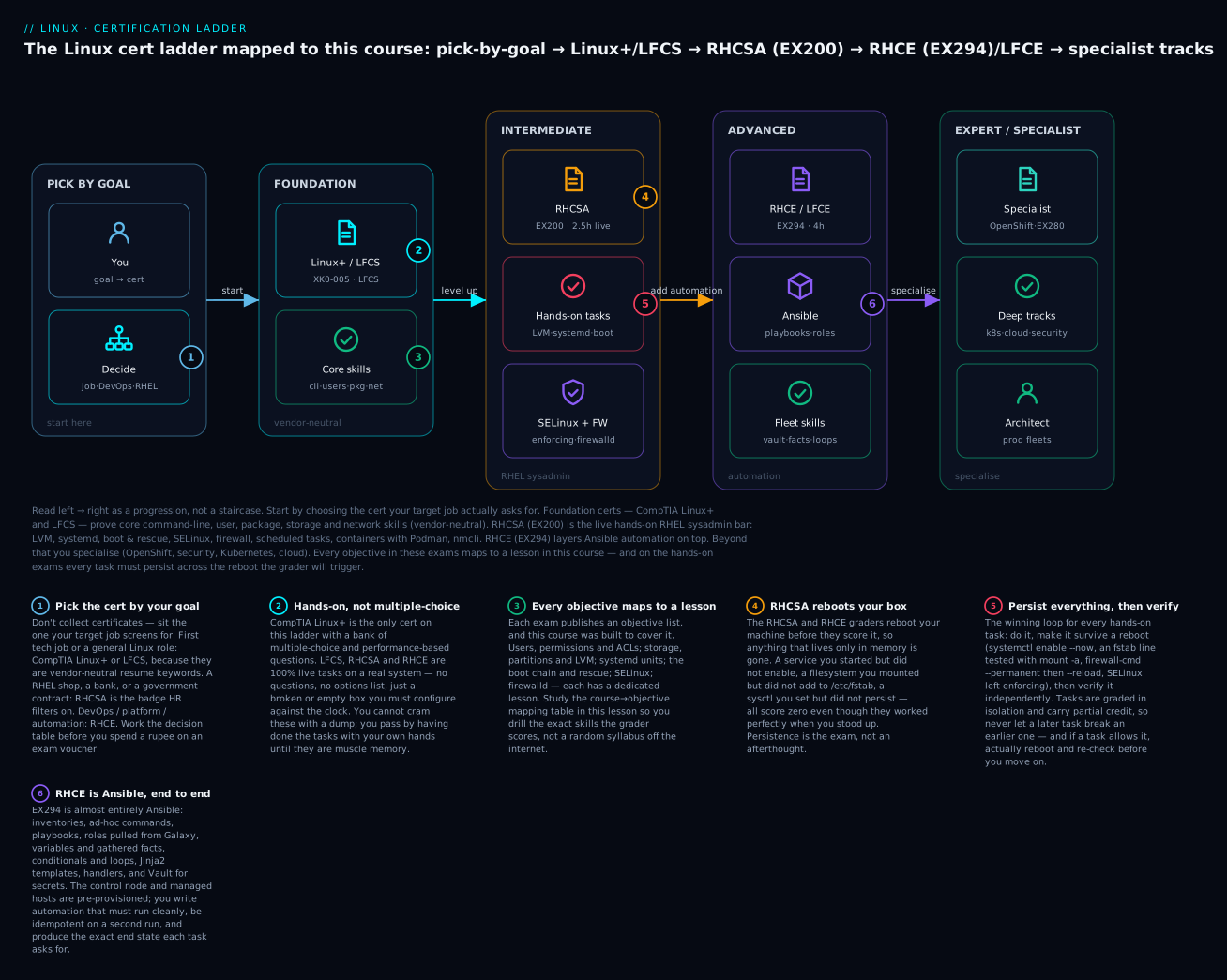
Read the ladder left to right as a progression, not a staircase you must climb in order. Most people enter at exactly one rung: a career-changer sits Linux+ or LFCS and stops; an enterprise sysadmin sits RHCSA directly; a platform engineer who already knows Linux jumps to RHCE. Badge 1 is the whole game — pick the rung your target job posting names. The rest of the badges (hands-on not multiple-choice, map course to objectives, RHCSA reboots your box, persist everything, RHCE is Ansible) are the strategy we unpack for the rest of this lesson.
Which cert for which goal
| Your goal | Sit this | Then maybe | Why |
|---|---|---|---|
| First tech job / helpdesk → sysadmin | CompTIA Linux+ or LFCS | RHCSA | Vendor-neutral resume keyword; proves a trustworthy floor |
| Career pivot into Linux from Windows/support | LFCS | RHCSA | Hands-on, forces real skill, respected, no MCQ theatre |
| Enterprise / RHEL shop / bank / gov / defence | RHCSA (EX200) | RHCE | The badge these employers filter CVs on, full stop |
| DevOps / platform / SRE / automation | RHCSA → RHCE | Kubernetes (CKA), cloud | RHCE = Ansible, the enterprise automation lingua franca |
| Cloud engineer (AWS/Azure/GCP Linux fleets) | RHCSA or LFCS | Cloud cert + CKA | Cloud Linux is still Linux; pair with a cloud badge |
| Academic proof / apprenticeship requirement | CompTIA Linux+ | — | Widely accepted by training frameworks and funding bodies |
| You already run Linux daily, want the paper | RHCSA | RHCE | Skip the theory cert; go straight to the hands-on standard |
Format and time-pressure reality
The clock is a graded component. Here is what “performance-based” actually feels like per exam.
| Cert | Question style | Internet | Docs allowed | Time pressure | Retake policy (typical) |
|---|---|---|---|---|---|
| Linux+ | MCQ + drag/drop + PBQ simulations | No | Built-in only | Moderate — pacing matters, but you can guess-and-move | Buy a new voucher |
| LFCS | Live tasks, real terminal | No | man/--help + distro docs in a locked tab (check handbook) |
Real — ~2 h for a broad task list | One free retake usually included |
| RHCSA | Live tasks on RHEL 9, no questions | No | Local man + /usr/share/doc only |
High — 2.5 h, many tasks, a reboot to survive | Buy again; Learning Subscription may include retakes |
| RHCE | Live Ansible tasks on RHEL 9 | No | Local man, ansible-doc |
High — 4 h but the tasks are deep | As above |
The Red Hat exams are closed-book except the documentation already on the machine. You cannot Google an error. This is why man, --help, ansible-doc <module>, and /usr/share/doc/ fluency is itself an exam skill — practise finding the flag you half-remember inside the box, because that is all you will have.
Cost, logistics and value
| Consideration | Linux+ | LFCS | RHCSA | RHCE |
|---|---|---|---|---|
| Voucher cost (approx, USD) | ~$358 | ~$395 | ~$500 | ~$500 |
| Cheaper path | CompTIA bundles / student discounts | LF sales (frequent), training bundles | Red Hat Learning Subscription (course + exam + retakes) | Same Learning Subscription |
| Delivery | Testing centre or online proctored | Online proctored, anywhere | Online proctored or testing centre (RHEL 9) | Same |
| Prerequisite | None | None | None | Must hold/earn RHCSA to be awarded RHCE |
| Renewal | Continuing-education credits or re-exam | Re-exam | Re-exam (or earn a higher Red Hat cert) | Re-exam |
| Market signal | “Knows Linux” | “Can operate Linux hands-on” | “RHEL sysadmin, verified” | “Automates RHEL at scale” |
Budget note: Red Hat exams are the priciest, and regional pricing (including India) differs from the USD list — check your local Red Hat site. If cost is the constraint, the Red Hat Learning Subscription frequently works out cheaper than buying course + exam + a retake separately, and LFCS/Linux+ run regular discounts. You can build the entire practice lab for all four exams for free (covered below), so the only unavoidable cost is the voucher.
Vendor-neutral vs RHEL — the same skill, different commands
Because Linux+ and LFCS are distro-agnostic while the Red Hat exams are RHEL-specific, the same objective is tested with different tools. Keep this translation table in your head; it also makes you a better engineer.
| Task | Debian/Ubuntu (Linux+/LFCS may test) | RHEL (RHCSA/RHCE) |
|---|---|---|
| Install a package | apt install nginx |
dnf install nginx |
| Firewall | ufw / nftables |
firewalld (firewall-cmd) |
| Mandatory access control | AppArmor | SELinux (enforcing) |
| Network config | netplan / nmcli |
nmcli (NetworkManager) |
| Default MTA / init | systemd (both) | systemd |
| Containers | docker / podman |
podman (rootless, no daemon) |
| Package format | .deb (dpkg) |
.rpm (rpm) |
CompTIA Linux+ (XK0-005): the vendor-neutral broad base
Linux+ is the odd one out: it is the only cert here with a question bank, and its scope is the widest — it deliberately spans both the Debian and RHEL families and reaches into scripting, containers, git, and security in a way RHCSA does not. It is the natural first cert for someone who wants a broad, transferable, HR-recognised credential without committing to Red Hat.
Objective domains (XK0-005)
| Domain | Weight | What it covers |
|---|---|---|
| 1.0 System Management | 32% | Filesystems & FHS, storage, package management, processes, users/groups/permissions, networking, boot |
| 2.0 Security | 21% | Permissions/ACLs, SELinux/AppArmor basics, PAM, SSH hardening, firewalls, certificates, hardening |
| 3.0 Scripting, Containers, and Automation | 19% | Bash scripting, cron, git basics, containers, infrastructure-as-code concepts, Ansible awareness |
| 4.0 Troubleshooting | 28% | Diagnosing storage, network, CPU/memory, permissions, boot and service failures |
The two heaviest domains — System Management and Troubleshooting — are 60% of the exam between them, and they are exactly what the Linux Zero-to-Hero foundation and troubleshooting lessons drill.
This course → Linux+ objectives
| Linux+ objective area | Study these Linux Zero-to-Hero lessons |
|---|---|
| Users, groups, permissions | Users, groups & permissions |
| Storage, partitions, filesystems | Disks, partitions, filesystems & fstab, LVM |
| Services & boot | systemd units & services, boot process & GRUB |
| Security (MAC, firewall) | SELinux & AppArmor, firewalld & nftables |
| Scripting & automation | Bash scripting for sysadmins |
Must-know Linux+ skills the others don’t test as hard: writing a bash script with arguments, loops and conditionals from scratch; basic git (clone, commit, push, branch); container fundamentals (podman/docker run, images vs containers); reading logs to troubleshoot rather than configure. Its breadth is the point — Linux+ rewards a wide, shallow-to-medium command of the whole system, where RHCSA rewards deep RHEL-specific reflexes.
LFCS: the Linux Foundation hands-on sysadmin
LFCS is the vendor-neutral cert that is graded like a Red Hat exam: no questions, a live terminal, real tasks. It is an outstanding choice for a career-changer because it proves you can do the job, not just answer trivia about it, while staying distro-agnostic. You can typically choose your exam environment (an Ubuntu or a CentOS-derived system), which lets you play to your strengths.
Objective domains (LFCS)
| Domain | Approx. weight | What it covers |
|---|---|---|
| Operations Deployment | ~25% | Boot/reboot targets, packages, services, scheduling, containers, resource limits, kernel modules |
| Networking | ~25% | IP config, routing, DNS client, firewalls, SSH, name resolution, network troubleshooting |
| Storage | ~20% | Partitions, LVM, RAID, filesystems, mounts, swap, disk usage, quotas |
| Essential Commands | ~20% | Files, text processing, permissions, archives, git basics, finding files, redirection |
| Users and Groups | ~10% | Accounts, groups, sudo, password policy, environment |
LFCS domain names and weights are revised periodically by the Linux Foundation — always confirm the current version on the official exam page before you build a study plan around specific percentages.
This course → LFCS objectives
| LFCS domain | Study these lessons |
|---|---|
| Essential Commands | Foundation-tier files/text lessons + permissions |
| Users and Groups | Users, groups & permissions |
| Storage | Disks & fstab, LVM |
| Operations Deployment | systemd, boot |
| Networking | firewalls + networking-fundamentals lesson |
Because LFCS is hands-on, the practice-task bank below is your primary study tool for it — most RHCSA tasks map almost one-for-one onto LFCS tasks, with apt swapped for dnf and AppArmor swapped for SELinux.
RHCSA (EX200): the hands-on RHEL standard
RHCSA is the centre of gravity of the entire Linux certification world. It is the badge enterprises filter CVs on, the prerequisite for RHCE and the whole Red Hat Certified Architect ladder, and — because it is 100% hands-on — the one that genuinely changes how good you are. Two and a half hours, a real RHEL 9 system, a list of tasks, a reboot at the end. If you sit exactly one Linux exam in your career, make it this one.
Objective domains (EX200, RHEL 9)
| Objective category | Representative tasks |
|---|---|
| Essential tools | Navigate, manage files, use redirection/pipes, find/grep, archives (tar), man/docs, remote access (ssh) |
| Shell scripts | Simple scripts: conditionals, loops, positional args, command substitution |
| Operate running systems | Boot to targets, reboot, interrupt boot to gain root, identify/kill processes, tune services, journalctl |
| Local storage | Partitions (MBR/GPT), LVM (create/extend), configure swap |
| File systems | Create/mount XFS/ext4, network/autofs mounts, persistent mounts, ACLs, Stratis, LVM-VDO |
| Deploy/configure/maintain | Scheduled tasks (cron/at), tune boot target, install packages/repos, kernel updates, time/NTP |
| Basic networking | Static/dynamic IP with nmcli, hostname, name resolution, firewalld |
| Users and groups | Create/modify/delete accounts & groups, password aging, sudo, group directories |
| Manage security | File permissions/ACLs, SSH key auth, firewalld, SELinux (enforcing, booleans, ports, contexts) |
| Manage containers | Find/pull/run images with Podman, persistent storage, run a container as a systemd service |
Must-know RHCSA practical skills
These are the reflexes the exam grades. If any of these is not automatic for you, it is where your practice hours should go.
| Skill area | You must be able to, from memory | Course lesson |
|---|---|---|
| Users / perms / ACLs | Create users with UID/groups/expiry; setgid group dirs; setfacl/getfacl; sudo rules |
Users & permissions |
| Storage / LVM / swap | PV→VG→LV; mkfs.xfs; extend LV + xfs_growfs; add persistent swap |
LVM, disks & fstab |
| Stratis / VDO | Create a Stratis pool+fs; the x-systemd.requires fstab option; LVM-VDO compression |
disks & fstab |
| systemd | Write a unit; enable --now; timers; change default target; read journalctl |
systemd |
| Boot / rescue | Interrupt GRUB; rd.break to reset the root password; fix a boot-hanging fstab |
boot & GRUB |
| SELinux | Keep it enforcing; set booleans; label ports/contexts; restorecon; read denials |
SELinux |
| Firewall | firewall-cmd --permanent + --reload; services, ports, rich rules |
firewalld |
| Scheduling | User & system cron; at; systemd timers |
systemd + scheduling lessons |
| Containers | Podman pull/run rootless; volumes with :Z; container as a systemd service + linger |
containers lesson |
| Networking | nmcli static IP/gw/DNS; hostnamectl; persistence |
networking + firewalld lessons |
The time-pressure reality
Two and a half hours sounds generous until you are in it. The tasks are not hard individually — a competent RHEL admin can do any single one in a couple of minutes — but there are many of them, they interlock (task 9 configures a service task 3 needs), and the machine reboots before scoring. People fail RHCSA not because a task was too hard but because they (a) left a change un-persisted, (b) broke SELinux or networking and couldn’t recover, or © burned 40 minutes fighting one task and ran out of clock on five easy ones. The strategy section below is not optional reading for this exam — it is the exam.
RHCE (EX294): Ansible automation at scale
RHCE used to be a broad “advanced sysadmin” exam. Since RHEL 8 it is, for practical purposes, an Ansible exam. Four hours, a control node and several managed nodes already provisioned, and a list of automation tasks: write inventories, playbooks and roles that produce an exact end state, idempotently, using the right modules. You must hold (or earn) RHCSA to be awarded the RHCE, because RHCE assumes every RHCSA skill and automates it.
Objective domains (EX294, RHEL 9)
| Objective area | Representative tasks |
|---|---|
| RHCSA-level tasks | Everything RHCSA tests — now expressed as Ansible instead of by hand |
| Core Ansible | Install/config a control node; inventories (static + groups); ansible.cfg; ad-hoc commands |
| Managed nodes | Configure hosts for Ansible; privilege escalation (become); SSH keys |
| Playbooks | Tasks, plays, handlers, notify, tags, when, loops, blocks, error handling |
| Variables & facts | Host/group vars, gather_facts, ansible_facts, register, magic variables |
| Templates | Jinja2 templates (template module), filters, conditionals in templates |
| Roles & collections | Create roles; use Galaxy roles; ansible-galaxy; collections & FQCN modules |
| Advanced features | Ansible Vault for secrets; ansible-navigator/ansible-doc; parallelism; delegation |
This course → RHCE
| RHCE area | Where to learn it |
|---|---|
| The RHCSA half | Every lesson in the RHCSA mapping table above |
| Ansible core → advanced | The dedicated Ansible Zero-to-Hero course — inventories, playbooks, roles, templating, Vault, dynamic inventory, collections |
| Where automation meets fleets | Fleet management with cloud-init & Ansible |
Must-know RHCE skills: writing an idempotent playbook that passes cleanly on the second run (idempotency is graded — a play that re-does work every run is wrong); using fully-qualified module names (ansible.builtin.dnf, not just dnf); ansible-doc <module> to find parameters inside the exam; roles from ansible-galaxy; and Vault to encrypt secrets and decrypt them at runtime with a password file. Because RHCE is Ansible end to end, the Ansible course is your primary text; this lesson’s Ansible practice tasks (22–25) are a warm-up, not the whole meal.
Where LFCE and the specialist certs fit
Beyond RHCSA/RHCE the field fans out into specialisations rather than a single “next rung.” Two things worth knowing so you don’t chase a phantom.
LFCE. The Linux Foundation Certified Engineer was the LF’s advanced networking/services exam. The Linux Foundation has restructured its certification program, and the clear advanced hands-on path most engineers now pursue after core Linux is either Red Hat’s RHCE or the cloud-native track (Kubernetes). Don’t plan a career around “get the LFCE next” without checking whether it still exists in the form you expect — verify on the LF site.
| Where next after RHCSA/RHCE | Cert | Focus |
|---|---|---|
| Containers/orchestration | CKA / CKAD / CKS (Linux Foundation/CNCF) | Kubernetes admin / developer / security — all hands-on |
| Red Hat OpenShift | EX280 (Red Hat Certified OpenShift Administrator) | Managing OpenShift clusters |
| Red Hat specialist ladder | Various EX### exams → RHCA | Security, storage, automation, virtualization, cloud |
| Security | Red Hat EX415 (Security), plus vendor-neutral security certs | SELinux, hardening, compliance, auditing |
| Cloud | AWS/Azure/GCP associate/pro + Linux base | Running Linux fleets in cloud |
The honest summary: RHCSA is the universal floor, RHCE is the automation ceiling for pure RHEL, and everything above that is a specialisation you pick based on the platform you actually work on — Kubernetes, OpenShift, cloud, or security.
Build a free practice lab
You cannot pass a hands-on exam by reading. You need a disposable Linux box you can break and reset all day. The good news: the entire lab is free.
| Option | Best for | Notes |
|---|---|---|
KVM/libvirt + virt-install |
RHCSA/RHCE, most realistic | Free on any Linux host; snapshot with virsh snapshot-create-as; run 2–4 VMs for RHCE |
| VirtualBox + Vagrant | Windows/macOS hosts | Free; vagrant snapshot to reset; Vagrantfile spins up multi-node RHCE labs fast |
| VMware Workstation/Fusion Player | Those who prefer it | Free for personal use; good snapshots |
| Cloud VMs (AWS/Azure/GCP) | No spare local RAM | Pennies/hour; stop them when done; use spot/free-tier where possible |
| Podman/Docker containers | Quick command drills only | No systemd/boot/kernel — not enough for the full exam, but fine for practising podman, text tools, scripting |
| Red Hat Developer subscription | Genuine RHEL for RHCSA/RHCE | Free for individuals — real RHEL 9, no cost, the exact exam OS |
Which OS to install: for RHCSA/RHCE, use real RHEL 9 via the free Red Hat Developer subscription, or Rocky Linux 9 / AlmaLinux 9 (bug-for-bug RHEL rebuilds) if you’d rather not register. For LFCS, use Ubuntu 22.04/24.04 or a CentOS-derived system to match your chosen exam environment. For Linux+, keep one of each family around so you practise both apt and dnf.
The one habit that makes lab practice work: snapshot before every task, reset after. The whole point of a lab is to reach a broken state and recover from it — resetting the root password, un-hanging a bad fstab, fixing SELinux — and you can only practise recovery if you can trivially return to a clean state.
Minimal libvirt setup to get a resettable RHEL-family VM:
# One-time: a Rocky/RHEL 9 VM you can snapshot and reset all day
sudo dnf install -y libvirt virt-install   # RHEL/Fedora host
sudo systemctl enable --now libvirtd

# After install, take a clean snapshot you can roll back to:
sudo virsh snapshot-create-as --domain rhcsa-lab clean "Fresh install"
# ...break things practising a task...
sudo virsh snapshot-revert --domain rhcsa-lab clean   # back to clean in seconds
For an RHCE lab you need a control node plus 2–3 managed nodes on the same virtual network — a Vagrantfile with a small loop is the fastest way to stand that up and tear it down.
The practice-task bank
This is the heart of the lesson. Below are 26 tasks written in the shape of real exam tasks — imperative, specific, verifiable. Do not read the solutions first. Open a lab VM, set a 5-minute timer per task, and try it. Only then expand the solution to check your commands, your persistence, and your verification. Every solution ends by making the change survive a reboot and verifying it — because that is what the grader does.
Commands target RHEL 9 (RHCSA/RHCE); where a Debian/Ubuntu equivalent matters for LFCS/Linux+, it’s noted.
| # | Domain | Task |
|---|---|---|
| 1–4 | Users, permissions, ACLs, security | Accounts, setgid dirs, sudo, SUID audit |
| 5–8 | Storage | LVM, online grow, Stratis, swap |
| 9–11 | systemd | Service, timer, default target/failed unit |
| 12–13 | Boot & rescue | Reset root password, fix fstab hang |
| 14–15 | SELinux | Port label, restore contexts |
| 16–17 | Firewall | Service + rich rule, port |
| 18 | Networking | Static IP with nmcli |
| 19 | Scheduling | cron + at |
| 20–21 | Containers | Rootless Podman, container as a service |
| 22–25 | Ansible (RHCE) | Inventory/ad-hoc, playbook+template, role+Galaxy, Vault+loops |
| 26 | Scripting + troubleshooting | Bash script + live diagnosis |
Users, permissions, ACLs and security
Task 1 — Create a user precisely. Create user deploy with UID 1500, a comment “Deploy Account”, membership in a secondary group web, a login shell of /bin/bash, and an account that expires on 2027-12-31.
<details> <summary>Show solution</summary>
sudo groupadd web
sudo useradd -u 1500 -c "Deploy Account" -G web -s /bin/bash -e 2027-12-31 deploy
sudo passwd deploy                      # set a password if the task asks
# verify:
id deploy                               # uid=1500, groups include web
sudo chage -l deploy | grep 'Account expires'   # shows Dec 31, 2027
Debian/Ubuntu: identical; useradd is the same. (adduser is the Debian-friendly wrapper but useradd is portable and exam-safe.)
</details>
Task 2 — Shared group directory. Create /srv/webteam owned by group web, where every file created inside inherits the web group and members can read/write each other’s files, but nobody else can access it.
<details> <summary>Show solution</summary>
sudo mkdir -p /srv/webteam
sudo chgrp web /srv/webteam
sudo chmod 2770 /srv/webteam            # 2=setgid → new files inherit group; 770 = no "other" access
# verify:
ls -ld /srv/webteam                     # drwxrws--- ... web
The leading 2 (setgid) is the whole point: without it, files land in the creator’s primary group and teammates can’t collaborate. This is a classic RHCSA task.
</details>
Task 3 — Grant scoped sudo. Let members of group web run systemctl restart httpd (and only that) as root without a password.
<details> <summary>Show solution</summary>
echo '%web ALL=(root) NOPASSWD: /usr/bin/systemctl restart httpd' | \
  sudo tee /etc/sudoers.d/web-httpd
sudo visudo -cf /etc/sudoers.d/web-httpd     # ALWAYS syntax-check
sudo chmod 440 /etc/sudoers.d/web-httpd
⚠️ Never edit /etc/sudoers directly with a plain editor — a syntax error can lock everyone out of sudo. Use visudo or drop a file in /etc/sudoers.d/ and validate with visudo -c.
</details>
Task 4 — Security audit (Linux+ style). Find every world-writable file under /usr and every SUID binary on the system, and report them.
<details> <summary>Show solution</summary>
# world-writable files under /usr (should be almost none):
sudo find /usr -xdev -type f -perm -0002 -ls
# all SUID binaries (know why each exists):
sudo find / -xdev -type f -perm -4000 -ls 2>/dev/null
-xdev keeps find on one filesystem (doesn’t wander into /proc, NFS, etc.). Auditing SUID/world-writable files is core to the Linux+ Security and Troubleshooting domains and to CIS hardening.
</details>
Storage: LVM, Stratis, swap
Task 5 — LVM logical volume, mounted persistently. On the spare disk /dev/vdb, create a volume group datavg and a 2 GiB logical volume datalv, format it XFS, and mount it at /data so it survives reboots.
<details> <summary>Show solution</summary>
sudo pvcreate /dev/vdb
sudo vgcreate datavg /dev/vdb
sudo lvcreate -n datalv -L 2G datavg
sudo mkfs.xfs /dev/datavg/datalv                 # ⚠️ formatting is destructive
sudo mkdir -p /data
# persistent mount by UUID (survives device renames):
UUID=$(sudo blkid -s UUID -o value /dev/datavg/datalv)
echo "UUID=$UUID  /data  xfs  defaults  0 0" | sudo tee -a /etc/fstab
sudo systemctl daemon-reload
sudo mount -a                                     # MUST succeed with no error
findmnt /data                                     # verify it's mounted
mount -a is your reboot simulator: if it errors now, the box will hang or fail to mount on real boot. An LVM device path (/dev/datavg/datalv) is also accepted in fstab, but UUID is the safest habit.
</details>
Task 6 — Grow a filesystem online. /data is full. Extend datalv by 1 GiB and grow the XFS filesystem — with the filesystem mounted and in use, no downtime.
<details> <summary>Show solution</summary>
sudo lvextend -L +1G /dev/datavg/datalv          # extend the LV
sudo xfs_growfs /data                            # grow XFS onto the new space (online)
# or do both in one step:
# sudo lvextend -r -L +1G /dev/datavg/datalv      # -r resizes the fs too
df -h /data                                       # verify the new size
XFS can only grow, never shrink (know this — it’s a favourite exam/interview gotcha). For ext4 the grow command is resize2fs /dev/datavg/datalv instead of xfs_growfs.
</details>
Task 7 — Stratis pool and filesystem. Using disk /dev/vdc, create a Stratis pool pool1 and a filesystem share, mounted persistently at /stratis.
<details> <summary>Show solution</summary>
sudo dnf install -y stratisd stratis-cli
sudo systemctl enable --now stratisd
sudo stratis pool create pool1 /dev/vdc          # ⚠️ consumes the disk
sudo stratis filesystem create pool1 share
sudo mkdir -p /stratis
UUID=$(sudo blkid -s UUID -o value /dev/stratis/pool1/share)
# the x-systemd.requires option is MANDATORY or the box hangs on boot:
echo "UUID=$UUID /stratis xfs defaults,x-systemd.requires=stratisd.service 0 0" | \
  sudo tee -a /etc/fstab
sudo systemctl daemon-reload
sudo mount -a
findmnt /stratis
The x-systemd.requires=stratisd.service mount option is the make-or-break detail: without it, systemd tries to mount the Stratis filesystem before stratisd is running and the boot hangs. This is one of the most commonly-failed RHCSA storage tasks.
</details>
Task 8 — Add persistent swap. Add a 512 MiB swap volume on datavg, active now and after reboot.
<details> <summary>Show solution</summary>
sudo lvcreate -n swaplv -L 512M datavg
sudo mkswap /dev/datavg/swaplv                   # ⚠️ initialises swap signature
UUID=$(sudo blkid -s UUID -o value /dev/datavg/swaplv)
echo "UUID=$UUID  none  swap  sw  0 0" | sudo tee -a /etc/fstab
sudo swapon -a
swapon --show                                    # verify the new swap is active
swapon -a activates everything in fstab marked swap — the same command boot uses, so if it works now it works on reboot.
</details>
systemd
Task 9 — Write a systemd service. Create a service hello that runs /usr/local/bin/hello.sh at boot, restarts on failure, and starts now.
<details> <summary>Show solution</summary>
sudo tee /usr/local/bin/hello.sh >/dev/null <<'EOF'
#!/usr/bin/env bash
while true; do echo "hello $(date)"; sleep 30; done
EOF
sudo chmod +x /usr/local/bin/hello.sh

sudo tee /etc/systemd/system/hello.service >/dev/null <<'EOF'
[Unit]
Description=Hello service
After=network.target

[Service]
Type=simple
ExecStart=/usr/local/bin/hello.sh
Restart=on-failure

[Install]
WantedBy=multi-user.target
EOF

sudo systemctl daemon-reload
sudo systemctl enable --now hello.service        # enable = at boot; --now = also start it
systemctl status hello.service                   # verify active + enabled
enable --now is the exam reflex — it does both “start it” and “make it start at boot” in one command. enable alone starts nothing today; start alone survives no reboot. You need both, and the reboot will check.
</details>
Task 10 — systemd timer. Run /usr/local/bin/report.sh every day at 02:00 via a systemd timer (not cron).
<details> <summary>Show solution</summary>
sudo tee /etc/systemd/system/report.service >/dev/null <<'EOF'
[Unit]
Description=Daily report
[Service]
Type=oneshot
ExecStart=/usr/local/bin/report.sh
EOF

sudo tee /etc/systemd/system/report.timer >/dev/null <<'EOF'
[Unit]
Description=Run report daily at 02:00
[Timer]
OnCalendar=*-*-* 02:00:00
Persistent=true
[Install]
WantedBy=timers.target
EOF

sudo systemctl daemon-reload
sudo systemctl enable --now report.timer         # enable the TIMER, not the service
systemctl list-timers report.timer               # verify next run time
Enable the .timer, not the .service — a common slip. Persistent=true runs a missed job after the machine was off at 02:00.
</details>
Task 11 — Boot target and a failed unit. Set the system to boot to multi-user.target (no GUI) by default, and diagnose a service that fails to start.
<details> <summary>Show solution</summary>
sudo systemctl set-default multi-user.target     # persistent default target
systemctl get-default                            # verify

# diagnose a failing unit:
systemctl status myservice.service               # see the failure summary
journalctl -u myservice.service -b               # full logs this boot
systemctl list-units --failed                    # everything that failed
set-default writes the default.target symlink, so it persists. For live-switching without reboot you’d use systemctl isolate multi-user.target.
</details>
Boot and rescue
Task 12 — Reset a lost root password. You do not know the root password. Reset it from the GRUB menu on RHEL 9.
<details> <summary>Show solution</summary>
1. Reboot. At the GRUB menu, highlight the kernel entry and press  e
2. Find the line starting with  linux  (or linux16). Move to its end and append:
       rd.break
3. Press  Ctrl-x  to boot with that edit.
4. At the  switch_root:/#  prompt (you're in the initramfs, real root is at /sysroot, read-only):
mount -o remount,rw /sysroot
chroot /sysroot
passwd                       # type the new root password twice
touch /.autorelabel          # tell SELinux to relabel on next boot — CRITICAL on RHEL
exit
exit                         # boot continues; it relabels (may take a minute) and reboots
⚠️ On SELinux-enforcing RHEL, touch /.autorelabel is mandatory — without it, /etc/shadow gets the wrong SELinux context and you’re locked out worse than before. Don’t use the old init=/bin/bash trick on RHEL for this reason; rd.break is the correct procedure.
</details>
Task 13 — Fix a boot that hangs on fstab. Someone added a bad line to /etc/fstab and the box now drops to emergency mode on boot. Recover it.
<details> <summary>Show solution</summary>
# At the emergency prompt, log in as root, then:
mount -o remount,rw /            # make root writable
vi /etc/fstab                    # comment out or fix the bad line
mount -a                         # MUST return cleanly — this is the test the boot runs
systemctl daemon-reload
reboot                           # verify it now boots normally
The discipline that prevents this in the first place: after every fstab edit, run mount -a and only then reboot. If mount -a errors, boot will hang. This one habit turns a career’s worth of 3 a.m. boot failures into non-events.
</details>
SELinux
Task 14 — Let a service use a non-standard port. Configure the system so httpd is allowed to listen on TCP 8080 with SELinux enforcing (do not disable SELinux).
<details> <summary>Show solution</summary>
sudo setenforce 1                                # ensure enforcing now
sudo sed -i 's/^SELINUX=.*/SELINUX=enforcing/' /etc/selinux/config   # persist enforcing
# label 8080 as an http port (use -m if it already maps to another type):
sudo semanage port -a -t http_port_t -p tcp 8080 || \
  sudo semanage port -m -t http_port_t -p tcp 8080
sudo semanage port -l | grep '^http_port_t'      # verify 8080 is listed
If semanage is missing: sudo dnf install -y policycoreutils-python-utils. Disabling SELinux to “fix” this scores zero — the exam explicitly checks it’s still enforcing.
</details>
Task 15 — Restore file contexts. Content was moved into /web with mv (which preserves the wrong label) and httpd gets permission-denied. Fix the SELinux contexts.
<details> <summary>Show solution</summary>
# define the correct context rule for the custom docroot, then apply it:
sudo semanage fcontext -a -t httpd_sys_content_t "/web(/.*)?"
sudo restorecon -Rv /web
ls -Zd /web                                      # verify: httpd_sys_content_t
Using mv preserves the source’s SELinux label; cp (or restorecon afterwards) gives files the destination’s label. Adding the fcontext rule first means the label survives a future relabel — chcon alone does not. Read the denial with sudo ausearch -m avc -ts recent or sealert.
</details>
Firewall
Task 16 — Open a service, permanently. Allow HTTP through firewalld permanently, and allow SSH only from 192.168.10.0/24.
<details> <summary>Show solution</summary>
sudo firewall-cmd --permanent --add-service=http
sudo firewall-cmd --permanent --add-rich-rule=\
'rule family="ipv4" source address="192.168.10.0/24" service name="ssh" accept'
sudo firewall-cmd --reload                       # activate the permanent config
sudo firewall-cmd --list-all                     # verify services + rich rules
Two-step reflex: --permanent writes it, --reload activates it. A --permanent rule without --reload isn’t live; a live rule without --permanent dies on reboot. The grader reboots — you need both.
</details>
Task 17 — Open a raw port. Allow inbound TCP 8080 permanently.
<details> <summary>Show solution</summary>
sudo firewall-cmd --permanent --add-port=8080/tcp
sudo firewall-cmd --reload
sudo firewall-cmd --list-ports                   # verify 8080/tcp
Pair this with Task 14 — opening the firewall port does nothing if SELinux still blocks httpd from binding 8080. Real services need both the firewall and the SELinux port label. Forgetting one is the classic “it’s still not working” trap.
</details>
Networking
Task 18 — Static IP with nmcli. Configure interface ens3 with a static address 192.168.10.50/24, gateway 192.168.10.1, DNS 192.168.10.1 and 1.1.1.1, persistently, and set the hostname to server1.example.com.
<details> <summary>Show solution</summary>
sudo nmcli con mod ens3 ipv4.addresses 192.168.10.50/24 \
  ipv4.gateway 192.168.10.1 ipv4.dns "192.168.10.1 1.1.1.1" ipv4.method manual
sudo nmcli con down ens3 && sudo nmcli con up ens3   # apply
sudo hostnamectl set-hostname server1.example.com
# verify:
nmcli -g ip4.address con show ens3
hostnamectl status
nmcli con mod writes a persistent connection profile (under /etc/NetworkManager/system-connections/), so it survives reboot. Editing /etc/sysconfig/network-scripts by hand is the old way — nmcli is what the exam expects on RHEL 9.
</details>
Scheduling
Task 19 — cron and at. Schedule /usr/local/bin/backup.sh to run every day at 03:30 for user deploy, and schedule a one-off /usr/local/bin/oneoff.sh to run in 10 minutes.
<details> <summary>Show solution</summary>
# recurring, for user deploy:
sudo crontab -u deploy -l 2>/dev/null > /tmp/dc; echo "30 3 * * * /usr/local/bin/backup.sh" >> /tmp/dc
sudo crontab -u deploy /tmp/dc
sudo crontab -u deploy -l                         # verify
# one-off:
echo /usr/local/bin/oneoff.sh | at now + 10 minutes
atq                                               # verify the queued job
Cron fields are minute hour day-of-month month day-of-week. If at/atd is missing: sudo dnf install -y at && sudo systemctl enable --now atd.
</details>
Containers (Podman)
Task 20 — Rootless container with a volume and published port. As an ordinary user, run an httpd container serving ~/webroot, published on host port 8080.
<details> <summary>Show solution</summary>
podman pull docker.io/library/httpd:2.4
mkdir -p ~/webroot && echo "hi from the lab" > ~/webroot/index.html
podman run -d --name web -p 8080:80 \
  -v ~/webroot:/usr/local/apache2/htdocs:Z httpd:2.4
curl -s localhost:8080                            # verify: "hi from the lab"
The :Z suffix on the volume relabels it for SELinux so the container can read it — omit it and you get permission-denied on an enforcing system. Rootless Podman needs no daemon and no root; this is the RHEL container model.
</details>
Task 21 — Container as a systemd service at boot. Make the web container from Task 20 start automatically at boot as a rootless systemd user service, even when the user isn’t logged in.
<details> <summary>Show solution</summary>
mkdir -p ~/.config/systemd/user
cd ~/.config/systemd/user
podman generate systemd --new --files --name web     # writes container-web.service
systemctl --user daemon-reload
systemctl --user enable --now container-web.service
sudo loginctl enable-linger $USER                    # run user services without login
systemctl --user status container-web.service        # verify
enable-linger is the make-or-break step: without it, the user’s systemd instance stops when they log out and the container dies. On RHEL 9.3+, Quadlet (~/.config/containers/systemd/web.container) is the newer, preferred method — know both, as the exam objective is “start a container via systemd,” not one specific tool.
</details>
Ansible (RHCE)
Task 22 — Inventory and ad-hoc. Create a static inventory with a web group of two hosts, verify connectivity, and install httpd on the group with one ad-hoc command.
<details> <summary>Show solution</summary>
cat > inventory <<'EOF'
[web]
node1.example.com
node2.example.com
EOF
ansible -i inventory web -m ping                                  # verify reachability
ansible -i inventory web -b -m ansible.builtin.dnf \
  -a "name=httpd state=present"                                   # -b = become root
Use fully-qualified module names (ansible.builtin.dnf) — the exam expects FQCN and it’s what ansible-doc documents. -b is privilege escalation (become).
</details>
Task 23 — Playbook with a template and handler. Write a playbook that installs httpd, deploys an index page from a Jinja2 template showing each host’s hostname and IP, enables the service, and restarts httpd only when the page changes.
<details> <summary>Show solution</summary>
# site.yml
---
- name: Configure web servers
  hosts: web
  become: true
  tasks:
    - name: Install httpd
      ansible.builtin.dnf:
        name: httpd
        state: present
    - name: Deploy index from template
      ansible.builtin.template:
        src: index.html.j2
        dest: /var/www/html/index.html
      notify: Restart httpd
    - name: Enable and start httpd
      ansible.builtin.service:
        name: httpd
        enabled: true
        state: started
  handlers:
    - name: Restart httpd
      ansible.builtin.service:
        name: httpd
        state: restarted
{# index.html.j2 #}
Welcome to {{ ansible_facts['hostname'] }} at {{ ansible_facts['default_ipv4']['address'] }}
ansible-playbook -i inventory site.yml
ansible-playbook -i inventory site.yml            # run TWICE — 2nd run must be all "ok", 0 changed
Idempotency is graded: the handler fires only when the template changes, so a second run reports zero changes. That “0 changed” on the second run is the sign of a correct playbook.
</details>
Task 24 — Role and a Galaxy role. Create a role webserver that does the Task 23 work, and additionally install and use a role from Ansible Galaxy.
<details> <summary>Show solution</summary>
ansible-galaxy init roles/webserver              # scaffold role skeleton
# move tasks into roles/webserver/tasks/main.yml, template into roles/webserver/templates/
ansible-galaxy role install geerlingguy.nginx -p roles/   # install a Galaxy role locally
# playbook using both:
---
- name: Use roles
  hosts: web
  become: true
  roles:
    - webserver
    - geerlingguy.nginx
ansible-galaxy init gives you the standard tasks/ handlers/ templates/ vars/ defaults/ layout. For the exam you may be told to fetch a role from a given URL or Galaxy name — ansible-galaxy role install (or a requirements.yml) is the tool.
</details>
Task 25 — Vault, loops and conditionals. Store a database password in an encrypted Vault file and use it; install a list of packages with a loop, only on RHEL-family hosts.
<details> <summary>Show solution</summary>
ansible-vault create secret.yml                   # prompts for a vault password; add:  db_password: S3cr3t!
# (or encrypt an existing file:)  ansible-vault encrypt vars.yml
# play.yml
---
- name: Vault + loop + when
  hosts: web
  become: true
  vars_files:
    - secret.yml
  tasks:
    - name: Install packages (RHEL only)
      ansible.builtin.dnf:
        name: "{{ item }}"
        state: present
      loop:
        - httpd
        - mariadb-server
      when: ansible_facts['os_family'] == "RedHat"
    - name: Use the secret
      ansible.builtin.debug:
        msg: "DB password length is {{ db_password | length }}"
ansible-playbook -i inventory play.yml --ask-vault-pass
# or non-interactively:  --vault-password-file vault-pass.txt
Never commit the vault password; on the exam you’ll typically point --vault-password-file at a file the task tells you to create. loop iterates item; when gates on a gathered fact.
</details>
Scripting and troubleshooting
Task 26 — Bash script + live diagnosis. Write a script that prints every mounted filesystem over a usage threshold (default 80%), then diagnose a running system: what’s on port 8080, what’s eating CPU, and what’s filling /var.
<details> <summary>Show solution</summary>
#!/usr/bin/env bash
# diskcheck.sh — report filesystems over THRESHOLD percent full
set -euo pipefail
threshold=${1:-80}
df -P | awk -v t="$threshold" 'NR>1 { gsub(/%/,"",$5);
  if ($5+0 > t) printf "%-25s %s%%\n", $6, $5 }'
chmod +x diskcheck.sh && ./diskcheck.sh 70        # test with a 70% threshold
# live troubleshooting one-liners:
sudo ss -ltnp 'sport = :8080'                     # what's listening on 8080
ps -eo pid,pcpu,comm --sort=-pcpu | head          # top CPU consumers
sudo du -xhd1 /var 2>/dev/null | sort -h | tail   # biggest dirs under /var
The script uses ${1:-80} for a default argument and awk to compare the capacity column. The three diagnostic one-liners — ss for ports, ps --sort for CPU, du -xhd1 | sort -h for disk — are the Linux+ Troubleshooting domain in a nutshell, and set -euo pipefail is the strict-mode habit every bash scripting lesson drills.
</details>
Work every one of these until the solution is boring. When you can do all 26 without hesitating — and, crucially, when your first instinct after each is to persist it and verify it — you are ready to book.
Exam-day strategy: the performance-exam mindset
On a multiple-choice exam, strategy is minor. On a live hands-on exam it is a graded skill. Here is the mindset that passes RHCSA and RHCE.
| Principle | What to actually do |
|---|---|
| Read everything first | Skim all tasks before touching anything. Note dependencies (a firewall task that needs a service from another task) and do prerequisites in the right order. |
| Persist everything | Every change must survive reboot: systemctl enable --now, fstab + mount -a, firewall-cmd --permanent --reload, nmcli con mod, set-default. |
| Verify every task | After each task, prove it: findmnt, systemctl is-enabled --quiet && is-active, firewall-cmd --list-all, id, getfacl. Don’t assume — check. |
| Keep SELinux enforcing | Never setenforce 0 to “make it work.” Tasks explicitly check enforcing mode; disabling it fails multiple tasks silently. |
| Reboot mid-exam if allowed | If the exam permits, reboot after major storage/service work and confirm it comes back clean — before you’ve built more on top of it. |
| Time-box hard tasks | Stuck for 5+ minutes? Flag it, move on, come back. One hard task is worth the same as one easy one — never trade five easy marks for one stubborn one. |
| Don’t break earlier tasks | Tasks are graded independently but interconnect. Breaking networking or the firewall can cut you off or fail unrelated tasks. Change carefully. |
| Use the box’s own docs | No internet. Practise man, --help, ansible-doc, /usr/share/doc until finding a flag inside the exam is second nature. |
Gotchas that fail candidates
These are the specific, repeatable mistakes that turn a solved task into zero marks. Internalise this table — it is the difference between passing and re-booking.
| Gotcha | What happens | The fix / habit |
|---|---|---|
Started a service but didn’t enable it |
Gone after the grader’s reboot → 0 marks | Always systemctl enable --now, then systemctl is-enabled |
| Mounted a filesystem but didn’t add to fstab | Not mounted after reboot → 0 marks | Add fstab line, run mount -a, confirm with findmnt |
| fstab typo | Box hangs / drops to emergency on reboot | mount -a before every reboot; use UUIDs |
Stratis fs without x-systemd.requires |
Boot hangs waiting for the mount | Add x-systemd.requires=stratisd.service to the fstab options |
| Left SELinux permissive/disabled | Multiple “make it enforcing” tasks fail | Keep enforcing; fix with booleans/ports/restorecon, never setenforce 0 |
firewalld rule not --permanent or not --reloaded |
Rule not live, or dies on reboot | --permanent and --reload; verify with --list-all |
| Opened firewall but forgot SELinux port label | Service still can’t bind the port | Real services need firewall and semanage port |
Used chcon instead of semanage fcontext+restorecon |
Label reverts on relabel | Add an fcontext rule so it’s permanent |
Root password reset without touch /.autorelabel |
Locked out again (wrong shadow context) | Always relabel after an rd.break password reset |
enabled the service instead of the .timer |
Scheduled job never runs | Enable the .timer unit, check list-timers |
| Ansible play not idempotent | Fails “runs cleanly twice” grading | Use state=, handlers, and creates=; test with a second run |
| Ran out of time on one task | Easy marks left on the table | Time-box; flag and return |
The three that fail the most people, by a wide margin: not persisting a change (the reboot eats it), disabling SELinux to make something work (the exam checks enforcing), and forgetting to reload firewalld (the change never went live). If you fix nothing else in your habits, fix those three — do-it, persist-it, verify-it, every single time.
A realistic study plan
The honest answer to “how long?” is: it depends on your starting point, but here are grounded ranges for someone studying part-time (~1–2 focused hours a day) alongside a job.
| Cert | If you already know Linux | From a modest base | Weekly rhythm |
|---|---|---|---|
| CompTIA Linux+ | 3–5 weeks | 8–12 weeks | Read a domain, drill it in a lab, take practice PBQs |
| LFCS | 3–5 weeks | 8–10 weeks | Mostly lab: work the task bank until reflexive |
| RHCSA (EX200) | 4–6 weeks | 10–14 weeks | Lab every objective; timed full mock exams in the last 2 weeks |
| RHCE (EX294) | 4–6 weeks (post-RHCSA) | 8–12 weeks | Live in Ansible daily; write a playbook a day |
A sequence that works for most people aiming at the RHEL track: RHCSA first (it’s the floor and a prerequisite for the RHCE credential), then RHCE while the RHCSA muscle is fresh. If you’re vendor-neutral or job-hunting broadly, LFCS or Linux+ first to get an early, transferable badge, then RHCSA when a RHEL role appears.
The single highest-leverage study activity for the hands-on exams is the timed full mock exam. In the final two weeks, sit yourself down with a fresh lab VM, a list of ~15–20 tasks (mix the bank above with variations), and a strict clock. Score yourself after a reboot. Nothing else exposes your weak spots — the un-persisted change, the SELinux slip, the time sink — as ruthlessly as the clock and the reboot together.
Study resources (free and official)
| Resource | For | Notes |
|---|---|---|
| Official exam objectives page | All | The source of truth — study exactly what’s listed, nothing more |
| Red Hat Developer subscription | RHCSA/RHCE | Free real RHEL 9 for your lab |
man pages, --help, /usr/share/doc, ansible-doc |
Hands-on exams | The only docs you get in the exam — practise using them |
| Rocky/Alma Linux docs | RHCSA/RHCE | Free RHEL-compatible reference |
| CompTIA official study guide / objectives (XK0-005) | Linux+ | Domain-by-domain coverage + practice PBQs |
| The Linux Documentation Project / distro wikis | LFCS/Linux+ | Arch Wiki and Ubuntu docs are excellent even for other distros |
| This course | All | Every objective maps to a lesson — use the mapping tables above |
Paid video courses and practice-exam platforms exist and many are good, but none of them replace lab hours. Spend money on a voucher and, if anything, on a practice-exam platform for RHCSA — not on more videos.
Cheat-sheet: the commands the exams test
Bookmark this. These are the commands that appear, in some form, on the hands-on exams. If any is unfamiliar, that’s a gap to close.
Users, groups, permissions, ACLs
| Command | Does |
|---|---|
useradd -u UID -G grp -s /bin/bash -e YYYY-MM-DD name |
Create user with UID, group, shell, expiry |
usermod -aG grp name |
Add user to a supplementary group (-a or you replace them all) |
chage -l name / chage -M 90 name |
View / set password aging |
chmod 2770 dir |
setgid dir (group inheritance) |
setfacl -m u:alice:rwx file / getfacl file |
Set / view ACLs |
visudo -f /etc/sudoers.d/x |
Safely edit sudo rules |
Storage, LVM, Stratis, swap
| Command | Does |
|---|---|
pvcreate / vgcreate / lvcreate -L 2G -n lv vg |
Build the LVM stack |
lvextend -r -L +1G /dev/vg/lv |
Extend LV and filesystem in one step |
xfs_growfs /mnt / resize2fs /dev/vg/lv |
Grow XFS / ext4 (XFS can’t shrink) |
mkswap + fstab swap + swapon -a |
Persistent swap |
stratis pool create / filesystem create |
Stratis; fstab needs x-systemd.requires=stratisd.service |
blkid -s UUID -o value DEV |
Get UUID for a persistent fstab entry |
mount -a |
Test fstab before every reboot |
systemd, boot and rescue
| Command | Does |
|---|---|
systemctl enable --now unit |
Start now and at boot |
systemctl set-default multi-user.target |
Persistent boot target |
systemctl list-units --failed |
Everything that failed |
journalctl -u unit -b |
This-boot logs for a unit |
systemctl list-timers |
Verify a timer’s next run |
GRUB → e → append rd.break |
Enter initramfs to reset root pw |
touch /.autorelabel |
Mandatory SELinux relabel after root reset |
SELinux and firewall
| Command | Does |
|---|---|
getenforce / setenforce 1 |
Check / set enforcing (persist in /etc/selinux/config) |
semanage port -a -t http_port_t -p tcp 8080 |
Allow a service on a custom port |
semanage fcontext -a -t TYPE "/path(/.*)?" + restorecon -Rv /path |
Persistent file labels |
getsebool -a / setsebool -P bool on |
List / set a boolean permanently |
ausearch -m avc -ts recent / sealert |
Investigate a denial |
firewall-cmd --permanent --add-service=http + --reload |
Open a service, permanently + live |
firewall-cmd --permanent --add-port=8080/tcp + --reload |
Open a raw port |
Networking, scheduling, containers, Ansible
| Command | Does |
|---|---|
nmcli con mod ens3 ipv4.addresses .. ipv4.method manual |
Persistent static IP |
hostnamectl set-hostname host.example.com |
Set hostname |
crontab -e / crontab -u user -e |
Edit cron; min hour dom mon dow |
echo cmd | at now + 10 minutes / atq |
One-off scheduled job |
podman run -d -p 8080:80 -v host:ctr:Z img |
Rootless container, port, SELinux volume |
podman generate systemd --new --files --name c |
Container → systemd unit; loginctl enable-linger |
ansible -i inv grp -b -m ansible.builtin.dnf -a "name=x state=present" |
Ad-hoc install |
ansible-playbook -i inv site.yml (run twice!) |
Run a playbook; verify idempotency |
ansible-vault create/encrypt/view + --vault-password-file |
Encrypt & use secrets |
ansible-doc MODULE |
Find module parameters inside the exam |
Interview and exam questions
Q: I want a Linux cert but don’t know which. How do I choose? A: By the job you want, not by “which is best.” A first tech job or a broad, transferable badge → CompTIA Linux+ or LFCS. An enterprise/RHEL sysadmin role → RHCSA (it’s what those employers filter on). A DevOps/automation role → RHCSA then RHCE. Read the job postings you’re targeting and sit the cert they name.
Q: Are RHCSA and RHCE multiple-choice? A: No. Both are 100% performance-based — a real RHEL 9 system, a list of tasks, and a clock. There are no questions to answer; you produce the requested configuration and the machine is scored (after a reboot). LFCS is the same style. Only CompTIA Linux+ has a question bank.
Q: Why do people keep saying “the grader reboots your box”? A: Because RHCSA/RHCE score the machine’s state after a reboot, so any change that only lives in memory — a started-but-not-enabled service, a mounted-but-not-in-fstab filesystem, a non-permanent firewall rule — scores zero. Persistence is the exam.
Q: On RHCSA, a task says “httpd must listen on 8080.” I opened the firewall port but it still won’t start. Why? A: SELinux. By default, http_port_t doesn’t include 8080, so httpd is denied the bind. You need semanage port -a -t http_port_t -p tcp 8080 in addition to the firewall rule. Real services usually need three things aligned: the service config, the firewall, and SELinux.
Q: Can I just setenforce 0 if SELinux is in my way on the exam? A: No — that’s an automatic loss of marks. The exam checks that SELinux is enforcing. You fix SELinux problems with booleans (setsebool -P), port labels (semanage port) and context restores (restorecon), never by disabling it.
Q: (Task) Reset the root password on a RHEL 9 box you’re locked out of. A: Reboot, press e at GRUB, append rd.break to the linux line, Ctrl-x. Then mount -o remount,rw /sysroot, chroot /sysroot, passwd, touch /.autorelabel, exit, exit. The /.autorelabel is essential on SELinux systems or you lock yourself out worse.
Q: (Task) Make an XFS filesystem on an LV bigger while it’s mounted. A: lvextend -r -L +1G /dev/vg/lv grows the LV and the filesystem in one step (or lvextend then xfs_growfs /mnt). XFS grows online but can never shrink — that’s a deliberate design trade-off and a common gotcha.
Q: What does the RHCE actually test? A: Ansible, almost entirely. Inventories, ad-hoc commands, playbooks, variables and facts, conditionals and loops, Jinja2 templates, handlers, roles (including Galaxy), and Vault for secrets — all producing an exact, idempotent end state. It assumes every RHCSA skill and automates it.
Q: How do I know my Ansible playbook is “correct” on the exam? A: Run it twice. The first run makes changes; the second run must report 0 changed — that’s idempotency, and it’s graded. Use state=, creates=, and handlers so tasks don’t needlessly re-do work.
Q: Do certifications expire? A: Yes — most (Linux+, LFCS, RHCSA, RHCE) are valid ~3 years. Red Hat certs can be renewed by re-examining or by earning a higher Red Hat credential; Linux+ renews via continuing-education credits or re-exam. Plan for renewal, especially if it’s a job requirement.
Q: I can do every task in a lab. Am I ready? A: Almost — add the two exam-specific pressures. Sit a timed full mock (15–20 mixed tasks against the clock) and score yourself after a reboot. If you still pass under time pressure with everything persisting, you’re ready to book.
Key takeaways
- Pick the cert by the door it opens for your goal — Linux+/LFCS for a broad, transferable, first-job badge; RHCSA for RHEL sysadmin roles; RHCE for automation. Don’t collect certificates.
- Three of the four are hands-on, not multiple-choice. LFCS, RHCSA and RHCE are live tasks on a real system — you prepare by doing the tasks in a lab until they’re reflex, not by reading dumps.
- The exam is “make it persist and verify it,” not “make it work.” The grader reboots your box;
systemctl enable --now, fstab +mount -a,firewall-cmd --permanent --reloadare the exam. - The three biggest killers: un-persisted changes, disabling SELinux to “fix” something, and forgetting to reload firewalld. Fix those habits and you dodge most failures.
- Every objective maps to a lesson — users/permissions, storage/LVM, systemd, boot/rescue, SELinux, firewalld, scripting each have a dedicated Linux Zero-to-Hero lesson. Study the mapping tables, drill the 26-task bank.
- RHCE is Ansible end to end — idempotent playbooks, roles, facts, templates and Vault. The Ansible Zero-to-Hero course is your primary text for it.
- Build a free lab and snapshot obsessively. Real RHEL is free via Red Hat Developer; the only unavoidable cost is the voucher. Reset-to-clean is what makes practising recovery possible.
- In the last two weeks, do timed full mock exams and score after a reboot. Nothing else exposes the un-persisted change, the SELinux slip, and the time sink as ruthlessly.