Quick take: AWS cost optimization is not one big cut — it is four levers pulled in a deliberate order, run as a continuous loop. Right-size FIRST (Compute Optimizer + Graviton) so you commit to the real baseline, not a guessed one. Commit to that baseline with Savings Plans (Compute SP up to ~66%, EC2 Instance SP up to ~72%) and Reserved Instances, and push interruptible work to Spot (up to ~90% off). Eliminate waste relentlessly — idle instances, unattached EBS, old snapshots, unassociated EIPs,
gp2→gp3, S3 lifecycle, log retention. And architect for pay-per-use with serverless, auto-scaling, and caching. Wrap all four in the FinOps Inform → Optimize → Operate loop, on a foundation of tagging and the CUR as the source of truth. Do it out of order — commit before right-sizing — and you lock in waste for three years.
A platform team gets a mandate: “cut the AWS bill 30% this quarter.” The instinct is to buy a big three-year Reserved Instance commitment on day one, because the discount looks huge. Six weeks later they finish a right-sizing exercise, discover half the fleet was two sizes too big, downsize it — and now they are paying for reserved capacity they no longer use, utilization has cratered to 55%, and the “savings” evaporated into stranded commitment. The lesson every FinOps practitioner learns the hard way: the levers have an order. Right-size before you commit. Eliminate waste before you optimize what remains. Measure before you touch anything.
This article is the senior engineer’s playbook for doing it correctly. It is organized the way you should actually run cost optimization — as four levers inside a repeatable loop, not as a one-time cleanup. You will learn to pull right-sizing signals from AWS Compute Optimizer (EC2, Auto Scaling groups, EBS, Lambda, ECS on Fargate) backed by the CloudWatch metrics that matter, when to downsize versus modernize a family, and how a Graviton (ARM) migration buys ~20% better price-performance. You will learn the full commitment ladder — Compute vs EC2 Instance vs SageMaker Savings Plans, Standard vs Convertible Reserved Instances, regional vs zonal, term and payment options, and Spot — and how to reason about coverage versus utilization so you never over- or under-commit. You will learn to systematically eliminate waste: idle and stopped resources, unattached EBS volumes and orphaned snapshots, unassociated Elastic IPs, gp2→gp3, S3 lifecycle plus Intelligent-Tiering plus incomplete-multipart cleanup, CloudWatch Logs retention, over-provisioned RDS/OpenSearch/Kinesis/DynamoDB, and NAT/data-transfer reduction. Finally you will build the FinOps operating model — Inform → Optimize → Operate, showback/chargeback, tagging and cost allocation as the foundation, unit economics (cost per customer, per request), budgets with anomaly detection, and the CUR as the single source of truth.
By the end you will not just know the tools; you will know the sequence, the trade-offs, and the traps — right-sizing an instance into an out-of-memory crash, stranding a Savings Plan, buying an RI in the wrong region, running the wrong workload on Spot, flipping gp2→gp3 without checking the IOPS. Every lever comes with the aws CLI, Terraform where it genuinely applies (and an honest note where it does not), real rates, and a teardown.
What problem this solves
AWS is pay-as-you-go with no default ceiling, which means cost is an emergent property of thousands of individual decisions — an instance size here, a forgotten volume there, a data-transfer path nobody drew on the diagram. Left alone, a healthy AWS estate accretes 20–40% pure waste: over-provisioned compute sized for a load test that never recurs, storage nobody deletes, commitments that expired or never fit, and egress routed the expensive way. None of it shows up as an outage. It shows up as a bill that grows faster than the business.
The pain has three distinct shapes, and each lever targets one:
- Structural over-provisioning — the fleet is simply too big or too old-generation for its real load. Nobody right-sized because “it works” and downsizing feels risky. This is the right-sizing lever, and it is almost always the biggest single win because it compounds: a smaller instance is cheaper on-demand, cheaper to commit, and cheaper to run on Spot.
- Paying on-demand for predictable load — you have a steady baseline running 24×7 at full on-demand rates when a commitment (Savings Plan or RI) would cut it 40–72%, or an interruptible batch job running on-demand when Spot would cut it 90%. This is the purchasing lever.
- Accumulated waste and expensive defaults — unattached volumes, orphaned snapshots, idle load balancers,
gp2wheregp3is 20% cheaper, S3 objects that should have tiered to Glacier months ago, logs kept forever. This is the waste elimination lever, and it never ends — waste regenerates, so the sweep must be continuous.
Underneath all three is a governance problem: you cannot optimize what you cannot attribute. Without tags and a source-of-truth dataset (the CUR), “cut 30%” is a guess, savings are unverifiable, and no team owns its own spend. That is why FinOps is an operating model, not a project — the Inform → Optimize → Operate loop institutionalizes measurement, action, and accountability so the 30% you cut this quarter does not silently grow back next quarter. Who hits this? Everyone past the free-tier stage: startups burning runway, enterprises with a CFO asking why cloud is the second-biggest line item, and platform teams told to fund new work “from savings.”
Learning objectives
By the end of this article you can:
- Sequence the four cost levers correctly — right-size → commit → eliminate waste → architect — and explain why order matters (commitment stranding, compounding).
- Pull and interpret AWS Compute Optimizer recommendations for EC2, Auto Scaling groups, EBS, Lambda, and ECS, and know which CloudWatch signals (and the memory gap) drive them.
- Plan a Graviton (ARM) migration and quantify the price-performance gain and the compatibility work.
- Choose correctly across the commitment ladder: Compute vs EC2 Instance vs SageMaker Savings Plans, Standard vs Convertible RIs, regional vs zonal, 1yr/3yr, no/partial/all-upfront, and Spot.
- Reason about coverage vs utilization and design a commitment that covers the baseline without stranding.
- Run a systematic waste sweep: unattached EBS, old snapshots, unassociated EIPs,
gp2→gp3, S3 lifecycle + Intelligent-Tiering + incomplete-MPU cleanup, log retention, over-provisioned data services, NAT/transfer reduction. - Use architecture (serverless, auto-scaling, caching/CDN, VPC endpoints) as a cost lever, not just a reliability one.
- Stand up the FinOps operating model: tagging/cost allocation, showback/chargeback, unit economics, budgets + anomaly detection, and the CUR as source of truth.
Prerequisites & where this fits
You need an AWS account with billing/Cost Explorer access (management account or a principal granted ce, compute-optimizer, budgets, cur, and read on ec2), the AWS CLI v2 configured, and ideally Cost Explorer already enabled and a few weeks of history so recommendations have a baseline. Terraform is used where it genuinely codifies a lever (budgets, anomaly monitors, gp3 volumes, Compute Optimizer enrollment) — and this article is explicit about where it does not (you cannot idempotently “buy” a Savings Plan or RI in Terraform; that is a deliberate purchase).
Where this fits: this is the capstone of the cost/FinOps track. It assumes you already have the guardrails from AWS Cost Control 101: Cost Explorer, Budgets, Alerts & Free-Tier Guardrails (you cannot optimize without visibility and trip-wires), and it stands on the attribution foundation from AWS Tagging Strategy & Cost-Allocation Enforcement (without tags, none of this is measurable per team). It draws heavily on compute knowledge from Choosing EC2 Instance Types & Families and pairs with AWS EC2 Spot Instances: Savings & Interruptions for the interruptible lever. When a bill spikes, you triage it with AWS Cost-Spike & Anomaly-Detection Troubleshooting, and this whole discipline is the Cost Optimization pillar of the companion AWS Well-Architected Framework Review (wave sibling).
Core concepts
Cost optimization has a small but precise vocabulary. Get these exact, because the tools, the exam, and the invoice all use them literally.
| Term | What it means | Why it matters |
|---|---|---|
| FinOps | Cultural + operational practice bringing financial accountability to variable cloud spend | The framing: engineers, finance, product share ownership |
| Inform → Optimize → Operate | The three iterative FinOps phases | Sequence: see it, act on it, run it as a loop |
| Right-sizing | Matching resource size/type to actual utilization | Usually the biggest single win; compounds |
| Commitment | A 1/3-yr promise (Savings Plan / RI) traded for a discount | Cuts the steady baseline 40–72% |
| Coverage | % of eligible usage covered by a commitment | High = more savings, more risk |
| Utilization | % of a commitment you actually consume | Low = you over-committed (stranded) |
| Savings Plan (SP) | A $/hour spend commitment for a discount | Flexible commitment vehicle |
| Reserved Instance (RI) | A capacity/billing reservation for a discount | Older, less flexible than SP |
| Spot | Spare capacity at up to ~90% off, interruptible | For fault-tolerant / stateless work |
| Graviton | AWS ARM-based CPUs (Graviton2/3/4) | ~20% better price-performance |
| Waste | Paid-for resources delivering no value | Idle, unattached, orphaned, over-tiered |
| Showback / Chargeback | Reporting (showback) vs billing back (chargeback) cost to teams | Drives accountability |
| Unit economics | Cost per business unit (customer, request, GB) | The only metric that scales with the business |
| CUR | Cost and Usage Report — hourly line-item export to S3 | The source of truth |
| Amortized cost | Upfront commitment fees spread across the term | True run-rate with commitments |
The four levers, in order
The single most important idea in this article is that the levers are sequenced, because each one changes the input to the next.
| # | Lever | Typical saving | Effort | Risk | Why this order |
|---|---|---|---|---|---|
| 1 | Right-size (Compute Optimizer, Graviton) | 20–50% on affected resources | Medium | Under-provisioning / OOM | Do first: shrinks what you then commit to |
| 2 | Commit (Savings Plans, RIs, Spot) | 40–72% (SP/RI), up to 90% (Spot) | Low–Medium | Stranding, wrong scope | After right-sizing, so the baseline is real |
| 3 | Eliminate waste (idle, unattached, lifecycle) | 5–20% of total bill | Low | Deleting something in use | Continuous; cheap; do always |
| 4 | Architect (serverless, auto-scale, cache) | Structural, workload-specific | High | Re-engineering risk | Longest horizon; biggest structural wins |
If you invert 1 and 2 — commit before right-sizing — you strand the commitment the moment you shrink the fleet. If you skip lever 3, waste regenerates faster than you cut it. Lever 4 is the slow, structural work that pays off over quarters.
The FinOps loop
| Phase | Goal | Key activities | Tools | Output |
|---|---|---|---|---|
| Inform | Visibility & allocation | Tag, activate cost-allocation tags, build CUR, showback | Cost Explorer, CUR, tags, Cost Categories | “Who spends what, on what” |
| Optimize | Reduce & commit | Right-size, buy SP/RI, kill waste, re-architect | Compute Optimizer, ce recs, Trusted Advisor |
Realized savings |
| Operate | Govern continuously | Budgets, anomaly alerts, unit-cost KPIs, reviews | Budgets, Cost Anomaly Detection, dashboards | Sustained, no regrowth |
The commitment ladder
Think of purchasing as a ladder from cheapest-but-riskiest to safest-but-dearest. You cover each layer of demand with the right rung.
| Rung | Discount vs on-demand | Commitment | Interruptible? | Best for |
|---|---|---|---|---|
| Spot | Up to ~90% | None | Yes (2-min notice) | Batch, CI, stateless, fault-tolerant |
| EC2 Instance SP | Up to ~72% | 1/3-yr $/hr, one family+region | No | Stable, known-family baseline |
| Standard RI | Up to ~72% | 1/3-yr, specific config | No | Stable, unchanging config; zonal capacity |
| Compute SP | Up to ~66% | 1/3-yr $/hr, any family/region | No | Baseline you want flexibility on |
| Convertible RI | Up to ~66% | 1/3-yr, exchangeable | No | Baseline that may change family/OS |
| On-Demand | 0% (baseline) | None | No | Spiky, unpredictable, short-lived peak |
The design pattern: cover the flat 24×7 baseline with Savings Plans, put interruptible work on Spot, and leave the spiky top-of-the-curve on On-Demand. You almost never want 100% coverage — the variable peak belongs on-demand or Spot.
Right-sizing: Compute Optimizer, CloudWatch signals, and Graviton
Right-sizing is lever one because it changes every downstream number. It has three moves: downsize (same family, smaller), modernize (newer generation, same or better perf for less), and re-platform to Graviton (ARM for price-performance). AWS’s engine for all of this is Compute Optimizer.
AWS Compute Optimizer
Compute Optimizer is a free service that analyzes ~14 days of CloudWatch metrics (and configuration) and classifies each resource, then recommends a specific target with a projected price and performance risk. Enroll the account (or the whole org from the management account) once.
| Resource type | Signals it reads | Recommendation output | Notes |
|---|---|---|---|
| EC2 instances | CPU, network, EBS I/O, (memory if agent) | Up to 3 optimal instance options + risk | Core use case |
| Auto Scaling groups | Aggregate ASG utilization | Recommended instance type for the ASG | Right-sizes the launch template |
| EBS volumes | IOPS, throughput utilization | gp3/size/IOPS recommendation |
Finds gp2→gp3 + over-provisioned IOPS |
| Lambda functions | Duration, memory, cost | Recommended memory setting | Memory drives both speed and cost |
| ECS services on Fargate | Task CPU/memory utilization | Recommended task size | Fargate right-sizing |
| Commercial software licenses | License metrics | License edition recommendations | E.g. SQL Server edition |
| RDS (where supported) | DB instance + storage utilization | Instance class / storage recs | Newer coverage; verify in your region |
| Finding class | Meaning | Your action |
|---|---|---|
| Under-provisioned | Resource is too small; risk to performance | Upsize (this can raise cost — reliability first) |
| Over-provisioned | Resource is bigger than the load needs | Downsize — the savings finding |
| Optimized | Right-sized already | Leave it |
| None / not enough data | < 30 hrs of metrics, or unsupported | Wait for data; install agent for memory |
The paid add-on, enhanced infrastructure metrics, extends the lookback to 3 months so recommendations reflect monthly cycles (e.g. month-end batch) — worth it for spiky workloads.
# Enroll this account (or --include-member-accounts from the org management account)
aws compute-optimizer update-enrollment-status --status Active

# Confirm enrollment + how many resources are analysed
aws compute-optimizer get-enrollment-status

# Pull over-provisioned EC2 recommendations with the projected savings
aws compute-optimizer get-ec2-instance-recommendations \
  --filters name=Finding,values=Overprovisioned \
  --query 'instanceRecommendations[].{Id:instanceArn,Current:currentInstanceType,
           Rec:recommendationOptions[0].instanceType,
           Risk:recommendationOptions[0].performanceRisk}' --output table

# EBS volume recommendations (finds gp2→gp3 and over-provisioned IOPS)
aws compute-optimizer get-ebs-volume-recommendations \
  --query 'volumeRecommendations[].{Vol:volumeArn,
           Cur:currentConfiguration.volumeType,
           Rec:volumeRecommendationOptions[0].configuration.volumeType}' --output table

# Lambda memory right-sizing
aws compute-optimizer get-lambda-function-recommendations \
  --query 'lambdaFunctionRecommendations[].{Fn:functionArn,
           CurMem:currentMemorySize,
           RecMem:memorySizeRecommendationOptions[0].memorySize}' --output table
There is no first-class Terraform resource to “buy” a recommendation — right-sizing is an apply-with-judgment action. You can codify enrollment via the AWS API/CLI in a null-resource or an Organizations-level opt-in, and you codify the result (the new instance type in your launch template / aws_instance). Treat Compute Optimizer output as a work queue, not an auto-apply.
The CloudWatch signals that matter (and the memory trap)
Compute Optimizer is only as good as the metrics it sees, and the default EC2 metric set has a gaping hole: memory is not a default CloudWatch metric. The hypervisor cannot see guest RAM. If you right-size on CPU alone, you will happily shrink a memory-bound instance into an out-of-memory crash.
| Signal | Source | Default? | Right-size read | Caveat |
|---|---|---|---|---|
| CPUUtilization | Hypervisor | Yes | Sustained low → downsize candidate | Burstable (T-family) hides real need in credits |
| Memory | CloudWatch agent only | No | The missing dimension | Right-size without it → OOM |
| NetworkIn/Out | Hypervisor | Yes | High → don’t shrink network-bound | Some sizes cap bandwidth |
| EBSReadOps/WriteOps | Hypervisor | Yes | High IOPS → mind EBS-optimized limits | Shrinking can cut EBS bandwidth |
| DiskReadBytes (instance store) | Hypervisor | Yes | Local disk pressure | Only for instance-store types |
| CPUCreditBalance | Hypervisor (T-family) | Yes | Draining → under-provisioned burstable | Standard vs unlimited mode differs |
| StatusCheckFailed | Hypervisor | Yes | Health, not sizing | — |
| Custom app metrics | Your app / agent | No | p99 latency, queue depth, RPS | The real business signal |
The rule: before you downsize, confirm memory headroom via the CloudWatch agent (or an APM), and keep 20–30% headroom on the constraining dimension so a normal spike does not push you into throttling or OOM. Right-sizing is not “pick the smallest that fits the average”; it is “pick the smallest that survives the p99 with headroom.”
Downsize vs modernize the family
| Move | Example | Typical gain | Watch-out |
|---|---|---|---|
| Downsize within family | m5.2xlarge → m5.xlarge |
~50% (half the size) | Memory/IOPS headroom, connection limits |
| Modernize generation | m4.xlarge → m6i.xlarge |
~10–15% better price-perf | Requires ENA, NVMe drivers, newer AMI |
| Right-family | General m → compute c or memory r |
Fewer, cheaper right-shaped instances | Re-benchmark; wrong family wastes the other axis |
| Burstable for spiky low-avg | m6i.large → t3.large |
Cheaper if avg CPU is low | Credits exhaust under sustained load |
| Re-platform to Graviton | m6i.xlarge → m7g.xlarge |
~20% price-perf, sometimes more | ARM recompile / multi-arch image |
Modernizing is the most overlooked lever: newer generations (m4→m5→m6i→m7i) deliver more performance per dollar almost for free, but require a modern AMI with ENA and NVMe support — an old pinned AMI silently keeps you on expensive hardware.
Graviton: the price-performance lever
Graviton is AWS’s own ARM64 silicon (Graviton2 in *6g, Graviton3 in *7g, Graviton4 in *8g/r8g). For most scale-out, throughput-oriented workloads it delivers roughly 20% better price-performance than the equivalent x86 generation, and up to ~40% on some (web tiers, containerized microservices, in-memory caches, managed databases).
| Aspect | x86 (Intel/AMD) | Graviton (ARM64) | Note |
|---|---|---|---|
| Instance suffix | m6i, c6a, r6i |
m7g, c7g, r7g |
g = Graviton |
| Price-performance | Baseline | ~20% better (workload-dependent) | Measured, not list price alone |
| Binary compatibility | x86_64 | arm64 — must recompile | The main cost of the move |
| Managed services | Supported | RDS, ElastiCache, OpenSearch, Lambda, Fargate | Often a one-line switch |
| Container images | linux/amd64 |
linux/arm64 — build multi-arch |
docker buildx, manifest lists |
| Interpreted / JIT langs | Runs | Runs (Java, Python, Node, Go) | Usually zero code change |
| Native deps / drivers | x86 binaries | Need arm64 builds | Check every native dependency |
The migration playbook: start where the switch is nearly free — Lambda (set Architectures=["arm64"]), RDS/ElastiCache/OpenSearch (choose a Graviton instance class), and Fargate (cpuArchitecture: ARM64) — then move interpreted-language EC2/EKS workloads (build multi-arch images), and leave anything with x86-only native dependencies for last. Validate performance per workload; the price-perf gain assumes your app scales cleanly on ARM.
Purchasing & commitments: Savings Plans, RIs, and Spot
Once the fleet is right-sized, you cover the steady part of it with a commitment. Buying before right-sizing is the classic stranding mistake; buying the wrong shape is the classic flexibility mistake.
Savings Plans — three flavours
A Savings Plan is a commitment to spend a certain $/hour for 1 or 3 years, in exchange for a discount on matching usage. It is not tied to a specific instance; it is a spend commitment that AWS applies automatically to your highest-discount eligible usage first.
| Savings Plan type | Applies to | Flexibility | Max discount | Choose when |
|---|---|---|---|---|
| Compute SP | EC2 (any family/size/region/OS/tenancy), Fargate, Lambda | Highest — region/family/service agnostic | ~66% | You want savings and freedom to change shape |
| EC2 Instance SP | One instance family in one region (any size/OS/tenancy) | Medium — locked to family+region | ~72% | A large, stable, known-family baseline |
| SageMaker SP | SageMaker ML instance usage | SageMaker-scoped | ~64% | Steady ML training/inference |
The trade is explicit: EC2 Instance SP gives ~6 points more discount than Compute SP in exchange for locking the family and region. If you are confident m7g in ap-south-1 is your baseline for three years, take the extra discount. If you might shift to Graviton, Fargate, or another region, the Compute SP’s flexibility is worth the six points — it will keep applying its discount as you re-architect.
Reserved Instances — standard vs convertible, regional vs zonal
Reserved Instances predate Savings Plans and are being superseded by them for EC2, but they remain essential for services SPs do not cover (RDS, ElastiCache, OpenSearch, Redshift, DynamoDB reserved capacity) and where you need a zonal capacity reservation.
| RI dimension | Standard RI | Convertible RI |
|---|---|---|
| Max discount | Up to ~72% | Up to ~66% |
| Change family/OS/tenancy | No (modify size within family, Linux) | Yes — exchange for a different config |
| Sell in RI Marketplace | Yes | No |
| Best for | Config you are certain of for the term | Config that may evolve |
| Scope | Standard behaviour |
|---|---|
| Regional RI | Billing discount only, no capacity reservation; AZ + size flexibility (normalization factors) across the region |
| Zonal RI | Capacity reservation in a specific AZ; no size flexibility — guarantees you can launch |
Size flexibility on regional Linux RIs works through normalization factors — a reservation floats across sizes in the family by “footprint”:
| Size | Normalization factor |
|---|---|
nano |
0.25 |
micro |
0.5 |
small |
1 |
medium |
2 |
large |
4 |
xlarge |
8 |
2xlarge |
16 |
4xlarge |
32 |
So one m6i.4xlarge regional RI (factor 32) can instead cover eight m6i.large (4 each) — the discount applies by footprint, not by literal size. This is why a regional Convertible RI is the most flexible RI, and why for pure EC2 most teams now prefer a Compute Savings Plan (even more flexible, covers Fargate/Lambda too).
Term and payment options
Both SPs and RIs are bought on a 1-year or 3-year term with one of three payment options, and the discount ladders with your commitment:
| Term × Payment | Relative discount | Cash impact | Choose when |
|---|---|---|---|
| 1yr No Upfront | Lowest | None upfront, monthly | Uncertain baseline, preserve cash |
| 1yr Partial Upfront | Low–mid | Half upfront | Balanced |
| 1yr All Upfront | Mid | Full upfront | Have cash, want more off a 1-yr bet |
| 3yr No Upfront | Mid–high | None upfront, monthly | Confident baseline, keep cash |
| 3yr Partial Upfront | High | Half upfront | Confident + some cash |
| 3yr All Upfront | Highest | Full 3-yr upfront | Max discount, very stable baseline, cash-rich |
The pragmatic default for most teams: 1-year, No Upfront, Compute Savings Plan — it captures the bulk of the discount, preserves cash and flexibility, and is easy to re-ladder each year as the baseline grows. Step up to 3-year All Upfront only for the rock-stable floor of your usage.
Spot for interruptible workloads
Spot Instances are spare EC2 capacity at up to ~90% off on-demand, reclaimed with a 2-minute warning when AWS needs the capacity back. Spot is not a discount you “buy” — it is a different fulfillment model for work that can tolerate interruption.
| Workload | Spot fit? | Why |
|---|---|---|
| CI/CD build agents | Excellent | Retryable, stateless, short |
| Batch / data processing | Excellent | Checkpoint + resume; EMR/Batch handle it |
| Containerized stateless web | Good | Behind an ELB with capacity-rebalance + on-demand base |
| ML training (checkpointed) | Good | Resume from checkpoint on reclaim |
| Fault-tolerant queue workers | Good | SQS re-delivers on interruption |
| Stateful single-node DB | No | Interruption = data/availability loss |
| Licensed/quota-limited app | Caution | Re-launch churn may break licensing |
| Long non-checkpointed job | No | Loses hours of work on reclaim |
The mature pattern is a mixed-instances Auto Scaling group / EC2 Fleet: an on-demand (or Savings-Plan-covered) base capacity for the floor, plus a Spot portion across many instance types and AZs for the variable top, with capacity-rebalancing to drain gracefully. Full mechanics, interruption handling, and interruption-rate data are in AWS EC2 Spot Instances: Savings & Interruptions.
Coverage vs utilization — the two numbers that govern commitments
These two metrics are the whole game, and confusing them is how teams both over- and under-commit.
| Metric | Question it answers | Formula (intuition) | Target | If wrong |
|---|---|---|---|---|
| Utilization | “Am I using the commitment I bought?” | used commitment ÷ committed | ≥ 95% | Low → you over-committed (stranded $) |
| Coverage | “How much of my usage is on a commitment?” | eligible usage on a commitment ÷ total eligible | ~70–85% | Low → leaving on-demand savings on the table; too high → risk |
The design rule that reconciles them: commit to the baseline, not the peak. Set coverage so your commitment sits under the 24×7 floor of your usage curve — then utilization naturally stays near 100% (you always use at least the floor), and the variable usage above the floor rides on-demand or Spot. If you push coverage toward 100%, the first time you right-size or a workload ends, utilization collapses and you pay for nothing.
# What does AWS recommend you commit? (60-day lookback, 1yr, no-upfront Compute SP)
aws ce get-savings-plans-purchase-recommendation \
  --savings-plans-type COMPUTE_SP \
  --term-in-years ONE_YEAR \
  --payment-option NO_UPFRONT \
  --lookback-period-in-days SIXTY_DAYS \
  --query 'SavingsPlansPurchaseRecommendation.SavingsPlansPurchaseRecommendationSummary.{
           Hourly:HourlyCommitmentToPurchase,
           MonthlySavings:EstimatedMonthlySavingsAmount,
           ROI:EstimatedSavingsPercentage}' --output table

# Are the commitments I already own being used and covering enough?
aws ce get-savings-plans-utilization \
  --time-period Start=2026-06-01,End=2026-07-01 \
  --query 'Total.Utilization.UtilizationPercentage'

aws ce get-savings-plans-coverage \
  --time-period Start=2026-06-01,End=2026-07-01 \
  --query 'Total.Coverage.CoveragePercentage'

# EC2 RI angle: recommendation, coverage, utilization
aws ce get-reservation-purchase-recommendation --service "Amazon Elastic Compute Cloud - Compute"
aws ce get-reservation-coverage    --time-period Start=2026-06-01,End=2026-07-01
aws ce get-reservation-utilization --time-period Start=2026-06-01,End=2026-07-01
Terraform reality check: there is no aws_savingsplan or “buy RI” resource — a commitment is a financial purchase you make deliberately in the console or via a purchase CLI after reviewing the recommendation, precisely so it is never applied accidentally by terraform apply. What you do codify in Terraform is the governance around it: coverage/utilization budgets and anomaly monitors that alert when a commitment drifts.
# Alert if Savings Plans utilization drops below 95% (you over-committed / stranded)
resource "aws_budgets_budget" "sp_utilization" {
  name         = "sp-utilization-floor"
  budget_type  = "SAVINGS_PLANS_UTILIZATION"
  limit_amount = "95"
  limit_unit   = "PERCENTAGE"
  time_unit    = "MONTHLY"

  notification {
    comparison_operator        = "LESS_THAN"
    threshold                  = 95
    threshold_type             = "PERCENTAGE"
    notification_type          = "ACTUAL"
    subscriber_email_addresses = ["finops@example.com"]
  }
}

# Alert if coverage falls below your target (you're leaving discount on the table)
resource "aws_budgets_budget" "sp_coverage" {
  name         = "sp-coverage-target"
  budget_type  = "SAVINGS_PLANS_COVERAGE"
  limit_amount = "75"
  limit_unit   = "PERCENTAGE"
  time_unit    = "MONTHLY"

  notification {
    comparison_operator        = "LESS_THAN"
    threshold                  = 75
    threshold_type             = "PERCENTAGE"
    notification_type          = "ACTUAL"
    subscriber_email_addresses = ["finops@example.com"]
  }
}
Eliminating waste: the continuous sweep
Waste is the easiest saving to realize — no re-architecture, no commitment, no risk beyond deleting something in use. It is also the saving that regenerates, so this is a recurring sweep, ideally automated. Here is the catalog, with how each bills, how to find it, and the fix.
| # | Waste item | How it bills | Find it (CLI / Cost Explorer) | Fix | Rough rate |
|---|---|---|---|---|---|
| 1 | Idle running EC2 | Per-second, 24×7 | Compute Optimizer “not enough / low CPU”; CW < 5% CPU | Stop/terminate or schedule | Instance rate |
| 2 | Stopped EC2 (its EBS) | EBS still bills while stopped | describe-instances state=stopped + attached vols |
Snapshot + delete, or terminate | ~$0.08/GB-mo |
| 3 | Unattached EBS volumes | Full volume rate, detached | describe-volumes status=available |
Snapshot then delete | ~$0.08/GB-mo (gp3) |
| 4 | Orphaned snapshots | Per-GB, forever, incremental | describe-snapshots --owner-ids self |
Lifecycle / DLM retention policy | ~$0.05/GB-mo |
| 5 | Unassociated Elastic IPs | Idle EIP hourly | describe-addresses AssociationId==null |
Release them | ~$0.005/hr |
| 6 | Public IPv4 (all) | Every public IPv4 hourly | Usage type PublicIPv4:InUseAddress |
Reduce public IPs; use IPv6/private | ~$0.005/hr |
| 7 | gp2 volumes |
20% pricier than gp3 |
describe-volumes volume-type=gp2 |
Modify to gp3 (live) |
gp2 $0.10 vs gp3 $0.08/GB-mo |
| 8 | Idle load balancers | Per-hour + LCU/NLCU | Service ELB, CW RequestCount≈0 |
Delete unused ALB/NLB | ~$0.0225/hr + units |
| 9 | Verbose CloudWatch Logs | Ingest + storage | Service CloudWatch, IncomingBytes |
Cut log level; set retention; IA class | ~$0.50/GB ingest |
| 10 | Infinite log retention | Storage forever | Log groups with retention “Never expire” | Set 7/30/90-day retention | ~$0.03/GB-mo |
| 11 | Incomplete multipart uploads | Hidden S3 storage | S3 Storage Lens / lifecycle metrics | Lifecycle AbortIncompleteMultipartUpload |
S3 storage rate |
| 12 | Un-tiered S3 (Standard) | Standard rate for cold data | Storage Lens age/access analysis | Lifecycle → IA/Glacier or Int-Tiering | $0.023 → $0.004/GB-mo |
| 13 | Old S3 object versions | Every version billed | Versioned buckets, noncurrent versions | Lifecycle expire noncurrent | S3 storage rate |
| 14 | Over-provisioned RDS | Instance + Multi-AZ + storage | CE by instance type; low CPU/conn | Downsize, Single-AZ (non-prod), gp3 | Instance + storage |
| 15 | Provisioned-but-idle DynamoDB/Kinesis | Provisioned capacity/shards | CE service view; low consumed | On-demand or auto-scaling | Varies |
| 16 | Extra NAT gateways | Per-AZ hourly + per-GB | Usage type NatGateway-* |
Consolidate; VPC endpoints | $0.045/hr + $0.045/GB |
gp2 → gp3: free money, with one check
Migrating gp2 to gp3 is one of the highest-ROI moves in AWS: gp3 is about 20% cheaper per GB and decouples IOPS/throughput from size. It is a live modification — no downtime, no detach. The one check: gp2 gave you 3 IOPS/GB (and burst), so a large gp2 volume may have had more than gp3’s free baseline. gp3 includes 3,000 IOPS + 125 MB/s free; if your gp2 volume was ≥1,000 GB (≥3,000 IOPS baseline) or you rely on burst, you must provision matching IOPS/throughput on gp3 or you will regress performance.
| Attribute | gp2 | gp3 | Note |
|---|---|---|---|
| Price / GB-mo | ~$0.10 | ~$0.08 | ~20% cheaper |
| Baseline IOPS | 3 IOPS/GB (100–16,000) | 3,000 free, up to 16,000 | gp3 flat baseline |
| Burst IOPS | To 3,000 (< 1,000 GB) | N/A (baseline already 3,000) | gp2 burst gotcha |
| Baseline throughput | Scales with IOPS | 125 MB/s free, up to 1,000 | gp3 decoupled |
| Extra IOPS cost | Included in $/GB | ~$0.005/provisioned IOPS-mo > 3,000 | Only if you need > 3,000 |
| Extra throughput cost | Included | ~$0.04/MB/s-mo > 125 | Only if you need > 125 |
| Max size | 16 TiB | 16 TiB | Same |
# Find gp2 volumes and their size/IOPS so you can match on gp3
aws ec2 describe-volumes --filters Name=volume-type,Values=gp2 \
  --query 'Volumes[].{Id:VolumeId,GiB:Size,IOPS:Iops,AZ:AvailabilityZone}' --output table

# Live-migrate a small gp2 (< 1000 GiB, default 3000 IOPS is enough)
aws ec2 modify-volume --volume-id vol-0abc123 --volume-type gp3

# Large gp2 that had > 3000 baseline IOPS: match IOPS + throughput explicitly
aws ec2 modify-volume --volume-id vol-0def456 --volume-type gp3 \
  --iops 6000 --throughput 250
# New volumes: default to gp3 with the throughput/iops you actually need
resource "aws_ebs_volume" "data" {
  availability_zone = "ap-south-1a"
  size              = 500
  type              = "gp3"
  iops              = 3000   # free baseline; raise only if measured need
  throughput        = 125    # free baseline
  tags = { Name = "app-data", Environment = "prod", CostCenter = "platform" }
}
S3 lifecycle, Intelligent-Tiering, and incomplete uploads
S3 is a common waste sink because data lands in Standard and nobody moves it. Three levers:
| Storage class | Use case | Min duration | Retrieval | Rough $/GB-mo | Retrieval fee |
|---|---|---|---|---|---|
| S3 Standard | Hot, frequent | None | Instant | ~$0.023 | None |
| Intelligent-Tiering | Unknown/changing access | None | Instant (auto-tiers) | ~$0.023 → $0.004 | None (monitoring fee) |
| Standard-IA | Infrequent, ms access | 30 days | Instant | ~$0.0125 | Per-GB |
| One Zone-IA | Re-creatable infrequent | 30 days | Instant | ~$0.01 | Per-GB |
| Glacier Instant Retrieval | Archive, instant | 90 days | ms | ~$0.004 | Per-GB |
| Glacier Flexible Retrieval | Archive, mins–hours | 90 days | Minutes–hours | ~$0.0036 | Per-GB |
| Glacier Deep Archive | Cold, rarely | 180 days | ~12 hours | ~$0.00099 | Per-GB |
- Intelligent-Tiering is the safe default when access patterns are unknown: it auto-moves objects between frequent/infrequent/archive tiers based on access, with no retrieval fees — you pay a small per-object monitoring charge. For data with predictable aging, an explicit lifecycle policy (Standard → Standard-IA at 30 days → Glacier at 90) is cheaper because it avoids the monitoring fee.
- Incomplete multipart uploads are invisible in the console object list but bill as storage forever. Every bucket should carry a lifecycle rule to abort incomplete multipart uploads after 7 days.
- On versioned buckets, expire noncurrent versions or they accumulate silently.
resource "aws_s3_bucket_lifecycle_configuration" "data" {
  bucket = aws_s3_bucket.data.id

  rule {
    id     = "abort-incomplete-mpu"
    status = "Enabled"
    abort_incomplete_multipart_upload { days_after_initiation = 7 }
  }

  rule {
    id     = "tier-and-expire"
    status = "Enabled"
    filter { prefix = "logs/" }
    transition { days = 30  storage_class = "STANDARD_IA" }
    transition { days = 90  storage_class = "GLACIER" }
    expiration { days = 365 }
    noncurrent_version_expiration { noncurrent_days = 30 }
  }
}
The mechanics of classes, lifecycle transitions, and their minimum-duration gotchas are covered in depth in S3 Storage Classes & Lifecycle Policies and S3 Versioning, Lifecycle & Replication.
Over-provisioned data & streaming services
| Service | Over-provision signal | Right-size lever |
|---|---|---|
| RDS / Aurora | Low CPU/connections; Multi-AZ on non-prod; gp2 storage | Downsize class; Single-AZ for dev; gp3; Graviton r7g; RIs for steady DB |
| OpenSearch | Low search/index rate; hot storage for old indices | Smaller data nodes; UltraWarm/cold tiers; gp3; Graviton |
| Kinesis Data Streams | Idle provisioned shards | Switch to on-demand mode, or scale shards to throughput |
| DynamoDB | Provisioned capacity far above consumed | On-demand mode, or auto-scaling; Standard-IA table class; reserved capacity for steady |
| ElastiCache | Low CPU/memory pressure | Downsize nodes; Graviton r7g; reserved nodes |
| EMR | Long-running clusters idle between jobs | Transient clusters; Spot task nodes; auto-termination |
The pattern across all of them: choose the right capacity model (on-demand vs provisioned) before you tune the size, use Graviton classes where offered, migrate storage to gp3, and buy reserved capacity only for the steady floor after right-sizing.
NAT and data-transfer reduction
Data transfer and NAT are the “invisible” meters — they do not appear as resources in a console list, only as usage types in Cost Explorer. Reduce them structurally:
| Lever | What it cuts | How |
|---|---|---|
| Gateway VPC endpoints (S3/DynamoDB) | NAT data-processing + egress for S3/DDB | Free; traffic never touches NAT |
| Interface VPC endpoints (PrivateLink) | NAT/egress to AWS APIs | ~$0.01/hr + data, still cheaper than NAT at volume |
| Consolidate NAT gateways | Per-AZ NAT hours | One NAT for non-prod vs one-per-AZ |
| Keep traffic same-AZ | Cross-AZ $0.01/GB each way | AZ-aware routing, topology-aware hints |
| CloudFront / caching | Internet egress from origin | Cache at edge; 1 TB/mo free tier |
| Compress / batch | Egress volume | gzip, columnar formats, fewer round-trips |
| VPC endpoints for CI/registries | ECR/S3 pull egress via NAT | Interface/gateway endpoints |
Endpoint mechanics live in AWS PrivateLink & VPC Endpoints and NAT sizing in NAT Gateway & Private-Subnet Egress.
Architecture as a cost lever
The deepest savings are structural: change the cost model, not just the size. This is lever four — highest effort, longest horizon, biggest ceiling — because it converts fixed, always-on cost into pay-per-use.
| Pattern | Cost model shift | Saving mechanism | Trade-off |
|---|---|---|---|
| Serverless (Lambda/Fargate) | Per-request / per-second vs 24×7 | No idle cost; scales to zero | Cold starts; per-invoke cost at high volume |
| Auto Scaling to demand | Track the curve vs peak-provision | Pay for the actual load, not the peak | Needs headroom + warm-up tuning |
| Scheduled scale-down | Off-hours = off | Stop non-prod nights/weekends (~65% of a week) | Startup automation, state handling |
| Caching (ElastiCache/CloudFront) | Serve from cache vs recompute/re-fetch | Fewer origin calls, less egress, smaller DB | Cache invalidation complexity |
| CDN offload | Edge egress vs origin egress | Cheaper egress + fewer origin resources | Cache-key/TTL design |
| Spot fleets for batch | Interruptible vs on-demand | Up to 90% off | Checkpoint/retry engineering |
| Right storage for the job | Object/IA vs block/premium | Match durability+access to price | Access-pattern analysis |
| Managed vs self-managed | Pay for service vs run infra | Less ops + often cheaper at scale | Less control |
Two structural wins dominate in practice. First, auto-scaling and scheduled scale-down: a non-production fleet that runs 24×7 wastes ~65% of every week (168 hours, ~110 of them nights/weekends). Scheduling it off is a near-instant two-thirds cut with no re-architecture — see EC2 Auto Scaling & Launch Templates. Second, caching and CDN: every request served from CloudFront or ElastiCache is a request that did not hit (and did not need capacity on) your origin, and edge egress is cheaper than origin egress with the first 1 TB/mo free.
Architecture at a glance
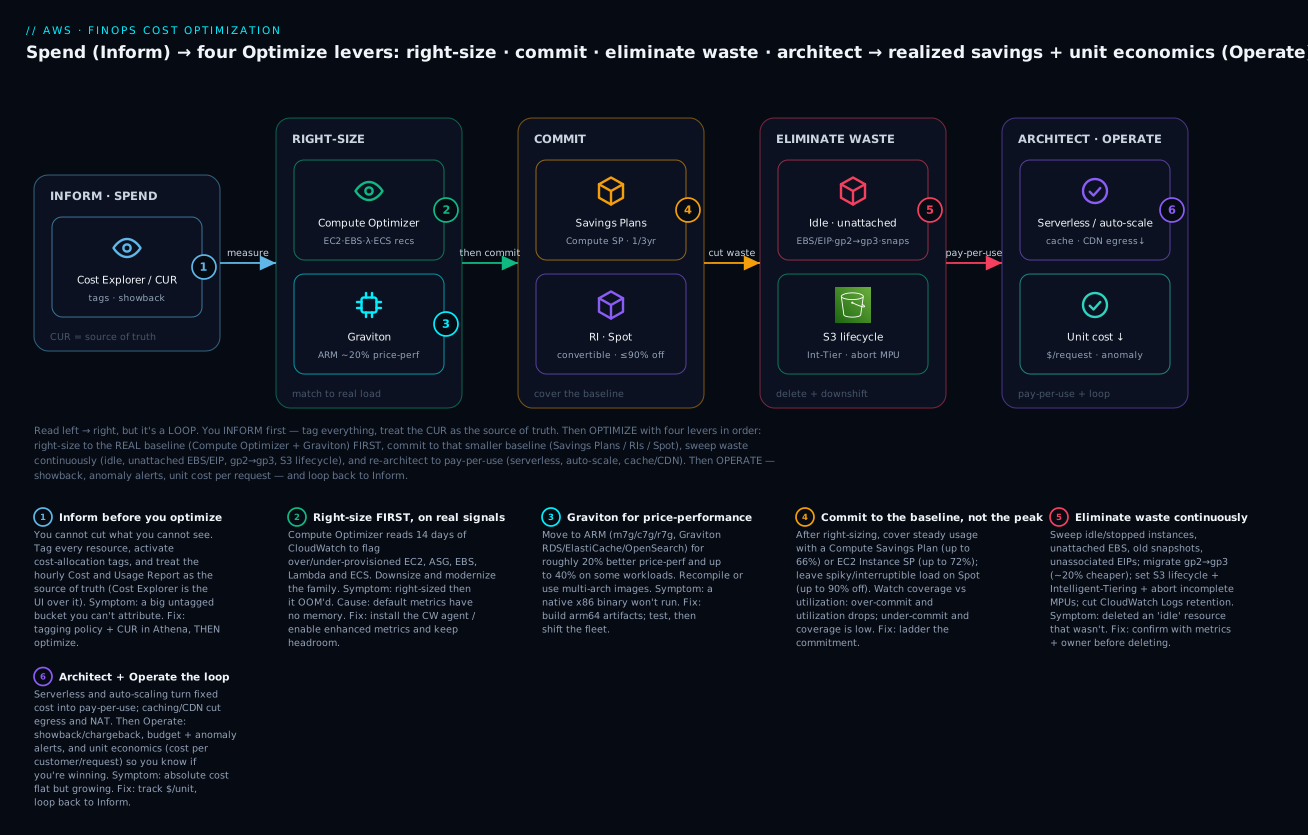
The diagram traces cost optimization as a left-to-right loop, not a one-shot cut. Start at INFORM · SPEND (badge 1): you cannot cut what you cannot see, so you tag every resource, activate cost-allocation tags, and treat the hourly CUR as the source of truth, with Cost Explorer as the UI on top — a big untagged bucket is a red flag you fix before optimizing. Then you pull the four Optimize levers in order. RIGHT-SIZE first: Compute Optimizer (badge 2) reads ~14 days of CloudWatch to flag over/under-provisioned EC2, ASG, EBS, Lambda and ECS, and Graviton (badge 3) buys ~20% price-performance on ARM — do this first because it shrinks the baseline you are about to commit to. Only then COMMIT (badge 4): cover the steady floor with a Compute Savings Plan (up to 66%) or EC2 Instance SP (up to 72%), push interruptible work to Spot (up to 90% off), and watch coverage vs utilization so you commit to the baseline, not the peak.
Continuously, ELIMINATE WASTE (badge 5): sweep idle and unattached resources, migrate gp2→gp3, set S3 lifecycle + Intelligent-Tiering, abort incomplete multipart uploads, and cut log retention. Finally ARCHITECT · OPERATE (badge 6): serverless and auto-scaling turn fixed cost into pay-per-use and caching/CDN cut egress — then you Operate the loop with showback/chargeback, budgets, anomaly alerts, and unit economics (cost per request), feeding results back to Inform. Read the legend as symptom · confirm · fix for each numbered lever.
Real-world scenario
LedgerLoop, a 40-person fintech SaaS in Pune, was spending $48,000/month on AWS and growing the bill 8% month-over-month while revenue grew 5% — the classic “cloud outpacing the business” signal that gets a CFO’s attention. They had never run a structured optimization; the estate was two years of accreted decisions. The mandate: cut 30% in a quarter, without a reliability regression, and prove it per-team.
They ran the loop in order. Inform first: a two-week tagging sprint (a tag policy enforcing Team, Environment, Service, backfilled with a script), cost-allocation tags activated, and the CUR wired into Athena. That alone was revelatory: 31% of spend was untagged, and once attributed, one “experimental” data pipeline nobody owned was costing $5,100/month — it was switched off that week (−$5,100).
Right-size second. Compute Optimizer flagged 62% of the EC2 fleet over-provisioned — a legacy of copy-pasted m5.2xlarge launch templates. They downsized in waves behind their load balancers, after installing the CloudWatch agent so they had memory data (one memory-bound m5.xlarge was correctly left alone — right-sizing it on CPU would have OOM’d it). They modernized m5→m6i and moved the stateless web tier and their ElastiCache and RDS to Graviton (m7g, r7g), netting ~22% on those. Right-sizing + Graviton cut compute ~$9,800/month.
Commit third — deliberately after right-sizing. With the fleet now smaller and stable, ce get-savings-plans-purchase-recommendation sized a 1-year No-Upfront Compute Savings Plan covering ~78% of the new baseline. Because they committed to the right-sized fleet, utilization held at 98% — had they bought three months earlier at the old size, they would have stranded a third of it. SP savings: ~$6,400/month. Their nightly Spark jobs moved to Spot task nodes on EMR (−$1,900).
Eliminate waste, continuously. The sweep found 1.4 TB of unattached gp3, 380 orphaned snapshots, 14 unassociated EIPs, 9 idle ALBs from deleted services, and every bucket on Standard with no lifecycle. gp2→gp3 where any remained, lifecycle rules to Glacier + abort-incomplete-MPU, and CloudWatch Logs retention capped at 30 days trimmed another $3,600/month.
The quarter’s result: $48,000 → $30,900/month, a 36% cut, verified per-team via tags. Then the Operate discipline that made it stick: a Compute-SP utilization budget alerting below 95%, coverage below 75%, Cost Anomaly Detection per service, and a unit-cost KPI — cost per 1,000 transactions — on the engineering dashboard. Six months later the absolute bill had grown with the business, but unit cost was down 29%, which is the number that actually proves optimization is working.
Advantages and disadvantages
| Advantages | Disadvantages |
|---|---|
| Right-sizing compounds into every other lever | Under-provisioning risks performance / OOM |
| Commitments cut the baseline 40–72% | Commitments strand if you shrink after buying |
| Spot delivers up to ~90% off | Spot needs fault-tolerant engineering |
| Waste elimination is low-risk, fast ROI | Waste regenerates — needs continuous sweep |
| Graviton ~20% price-perf, often one-line | ARM recompile / native-dependency work |
| Architecture converts fixed cost to pay-per-use | Re-architecture is high effort, long horizon |
| FinOps loop makes savings durable, per-team | Requires tagging discipline + org buy-in |
| Unit economics scale with the business | Absolute cost still grows as you grow |
The judgment: the levers are not equal and not simultaneous. For most estates, right-sizing + waste elimination are the fast 20–30%, commitments are the durable 15–25% on the now-right-sized baseline, and architecture is the multi-quarter structural play. Never let the visible discount of a commitment tempt you into buying before you have right-sized — the stranded-commitment failure is more expensive than the discount you were chasing.
Hands-on lab
You will (A) enroll and pull Compute Optimizer recommendations, (B) run a Savings Plans purchase recommendation and read coverage/utilization, © sweep for unattached EBS, old snapshots, unassociated EIPs, and gp2→gp3, (D) set a cost Budget with an action, and (E) codify the guardrails in Terraform, then tear down. Read-only analysis costs nothing; the ce API is $0.01/call.
⚠️ Cost note: Compute Optimizer, Cost Anomaly Detection, and the first two Budgets are free. Each
ceAPI call is $0.01.modify-volume(gp2→gp3), deleting volumes/snapshots, and releasing EIPs are real changes — only run them on resources you have confirmed are waste. Do not buy a Savings Plan in this lab; we only recommend.
Part A — Compute Optimizer right-sizing recommendations
# Enroll (idempotent). From the org management account add --include-member-accounts
aws compute-optimizer update-enrollment-status --status Active
aws compute-optimizer get-enrollment-status --query '{Status:status,Resources:numberOfMemberAccountsOptedIn}'

# Over-provisioned EC2 with current → recommended and the monthly saving
aws compute-optimizer get-ec2-instance-recommendations \
  --filters name=Finding,values=Overprovisioned \
  --query 'instanceRecommendations[].{Name:instanceName,Cur:currentInstanceType,
           Rec:recommendationOptions[0].instanceType,
           Risk:recommendationOptions[0].performanceRisk,
           SavingsPct:recommendationOptions[0].savingsOpportunity.savingsOpportunityPercentage}' \
  --output table

# EBS: surfaces gp2→gp3 and over-provisioned IOPS
aws compute-optimizer get-ebs-volume-recommendations \
  --query 'volumeRecommendations[].{Cur:currentConfiguration.volumeType,
           Rec:volumeRecommendationOptions[0].configuration.volumeType,
           SavePct:volumeRecommendationOptions[0].savingsOpportunity.savingsOpportunityPercentage}' \
  --output table
Expected: a table of instances whose finding is Overprovisioned, each with a smaller recommended type and a projected savings percentage. NotEnoughData means < 30 hours of metrics — wait, or note the memory gap (install the CloudWatch agent for memory-aware recommendations).
Part B — Savings Plans recommendation, coverage, and utilization
# What AWS recommends you commit (1yr, no-upfront Compute SP, 30-day lookback)
aws ce get-savings-plans-purchase-recommendation \
  --savings-plans-type COMPUTE_SP --term-in-years ONE_YEAR \
  --payment-option NO_UPFRONT --lookback-period-in-days THIRTY_DAYS \
  --query 'SavingsPlansPurchaseRecommendation.SavingsPlansPurchaseRecommendationSummary' \
  --output table

# If you already own commitments: are you using them, and how much is covered?
aws ce get-savings-plans-utilization \
  --time-period Start=2026-06-01,End=2026-07-01 \
  --query 'Total.Utilization.UtilizationPercentage' --output text

aws ce get-savings-plans-coverage \
  --time-period Start=2026-06-01,End=2026-07-01 \
  --granularity MONTHLY \
  --query 'Total.Coverage.CoveragePercentage' --output text
Expected: the recommendation shows an HourlyCommitmentToPurchase, an EstimatedMonthlySavingsAmount, and an EstimatedSavingsPercentage. Utilization should read ≥ 95% if you already own a well-sized plan; coverage in the 70–85% band means you are covering the baseline without over-committing.
Part C — Sweep for waste
# 1) Unattached EBS volumes (billing while attached to nothing)
aws ec2 describe-volumes --filters Name=status,Values=available \
  --query 'Volumes[].{Id:VolumeId,GiB:Size,Type:VolumeType,AZ:AvailabilityZone,Created:CreateTime}' \
  --output table

# 2) Snapshots you own older than a cutoff (candidate for a retention policy)
aws ec2 describe-snapshots --owner-ids self \
  --query 'Snapshots[?StartTime<=`2026-01-01`].{Id:SnapshotId,GiB:VolumeSize,Started:StartTime}' \
  --output table

# 3) Unassociated Elastic IPs (idle EIP charge)
aws ec2 describe-addresses \
  --query 'Addresses[?AssociationId==null].{IP:PublicIp,Alloc:AllocationId}' --output table

# 4) gp2 volumes still around (each ~20% pricier than gp3)
aws ec2 describe-volumes --filters Name=volume-type,Values=gp2 \
  --query 'Volumes[].{Id:VolumeId,GiB:Size,IOPS:Iops}' --output table

# --- Remediate ONLY confirmed waste ---
# gp2 → gp3 live (small volume, 3000 IOPS baseline is enough)
aws ec2 modify-volume --volume-id vol-0EXAMPLE --volume-type gp3
# Release an idle EIP
aws ec2 release-address --allocation-id eipalloc-0EXAMPLE
# Snapshot then delete an unattached volume (safety first)
aws ec2 create-snapshot --volume-id vol-0EXAMPLE --description "pre-delete safety"
aws ec2 delete-volume --volume-id vol-0EXAMPLE
Expected: four inventories of candidate waste. Confirm each is genuinely unused (owner, last-attach, application) before deleting — the modify-volume gp2→gp3 is safe and reversible-in-effect, but delete-volume/release-address are not.
Part D — A budget with an action (the backstop)
Create a monthly cost budget that, on breach, applies a restrictive IAM policy for approval (the closest thing to a stop):
ACCOUNT_ID=$(aws sts get-caller-identity --query Account --output text)

cat > budget.json <<EOF
{ "BudgetName":"finops-monthly-cap","BudgetLimit":{"Amount":"35000","Unit":"USD"},
  "TimeUnit":"MONTHLY","BudgetType":"COST" }
EOF

cat > notif.json <<EOF
[ { "Notification":{"NotificationType":"ACTUAL","ComparisonOperator":"GREATER_THAN",
      "Threshold":90,"ThresholdType":"PERCENTAGE"},
    "Subscribers":[{"SubscriptionType":"EMAIL","Address":"finops@example.com"}] } ]
EOF

aws budgets create-budget --account-id "$ACCOUNT_ID" \
  --budget file://budget.json --notifications-with-subscribers file://notif.json

aws budgets describe-budget --account-id "$ACCOUNT_ID" --budget-name finops-monthly-cap \
  --query 'Budget.{Name:BudgetName,Limit:BudgetLimit.Amount}' --output table
Expected: the budget lists with a $35,000 limit and a 90% actual alert.
Part E — Guardrails as Terraform
terraform { required_providers { aws = { source = "hashicorp/aws" } } }
provider "aws" { region = "ap-south-1" }

# Enroll Compute Optimizer via the API (no native resource; CLI-in-Terraform)
resource "null_resource" "compute_optimizer_enroll" {
  provisioner "local-exec" {
    command = "aws compute-optimizer update-enrollment-status --status Active"
  }
}

# Coverage + utilization guardrail budgets (alert on commitment drift)
resource "aws_budgets_budget" "sp_utilization" {
  name         = "sp-utilization-floor"
  budget_type  = "SAVINGS_PLANS_UTILIZATION"
  limit_amount = "95"
  limit_unit   = "PERCENTAGE"
  time_unit    = "MONTHLY"
  notification {
    comparison_operator        = "LESS_THAN"
    threshold                  = 95
    threshold_type             = "PERCENTAGE"
    notification_type          = "ACTUAL"
    subscriber_email_addresses = ["finops@example.com"]
  }
}

# Anomaly detection so a spike is caught in hours, not on the invoice
resource "aws_ce_anomaly_monitor" "services" {
  name              = "all-services"
  monitor_type      = "DIMENSIONAL"
  monitor_dimension = "SERVICE"
}

resource "aws_ce_anomaly_subscription" "daily" {
  name             = "anomalies-daily"
  frequency        = "DAILY"
  monitor_arn_list = [aws_ce_anomaly_monitor.services.arn]
  subscriber { type = "EMAIL"  address = "finops@example.com" }
  threshold_expression {
    dimension {
      key           = "ANOMALY_TOTAL_IMPACT_ABSOLUTE"
      values        = ["500"]
      match_options = ["GREATER_THAN_OR_EQUAL"]
    }
  }
}
Part F — Teardown
aws budgets delete-budget --account-id "$ACCOUNT_ID" --budget-name finops-monthly-cap
terraform destroy   # removes the guardrail budgets + anomaly monitor
# Leave Compute Optimizer enrolled (free) and any real gp3 migrations (they save money)
Expected: the budget and Terraform-managed guardrails are gone. Do not “undo” the gp2→gp3 migration or the waste deletions — those are the actual savings.
Common mistakes & troubleshooting
This is the playbook — the failure modes that turn a cost-optimization project into a regression or a stranded commitment. Scannable table first, then the worst ones in full.
| # | Symptom | Root cause | Confirm (exact cmd / console path) | Fix |
|---|---|---|---|---|
| 1 | Right-sized instance now OOM-kills the app | Downsized on CPU; memory not in default metrics | No mem_used_percent in CW; app logs show OOM/killed |
Install CloudWatch agent; upsize; keep 20–30% mem headroom |
| 2 | Savings Plan utilization dropped to 60% | Over-committed, or right-sized/ended workload after buying | ce get-savings-plans-utilization < 95% |
Buy to the baseline; let the plan expire; add Compute SP flexibility next time |
| 3 | Coverage is 40%, still paying lots on-demand | Under-committed | ce get-savings-plans-coverage low; big on-demand line |
Buy an additional SP to the steady floor |
| 4 | RI applies nothing / wrong instances | RI in wrong region/AZ/family, or zonal not regional | ce get-reservation-utilization low; RI scope zonal |
Use Convertible RI + exchange; prefer regional; or use a Compute SP |
| 5 | Spot workload keeps failing / data loss | Stateful/non-checkpointed job on Spot | Interruptions in describe-spot-instance-requests; app state lost |
Move to on-demand/SP; only checkpointed/stateless on Spot |
| 6 | gp2→gp3 tanked disk performance | gp2 had > 3,000 baseline IOPS (large vol) or relied on burst | describe-volumes old gp2 IOPS > 3,000; high latency now |
Provision matching --iops/--throughput on gp3 |
| 7 | Deleted an “idle” volume/EIP that was in use | Judged idle by name, not by metrics/owner | App breaks; resource was attached intermittently | Confirm via metrics + owner tag before delete; snapshot first |
| 8 | Can’t attribute 30% of the bill to a team | Resources untagged; tags not activated | Cost Explorer group-by tag shows big “No tag key” | Tag policy + backfill; activate cost-allocation tags |
| 9 | Anomaly alerts ignored (alert fatigue) | Threshold too low / individual frequency on noisy spend | Inbox full of tiny anomalies | Raise $ threshold; switch to daily digest; scope monitors |
| 10 | Compute Optimizer shows NotEnoughData |
< 30 hrs metrics or unsupported resource | get-ec2-instance-recommendations finding empty |
Wait for data; enable enhanced metrics; check support |
| 11 | Modernized generation, instance won’t boot | Old AMI lacks ENA/NVMe for new gen | Launch fails / no network on m6i+ |
Use a current AMI with ENA + NVMe drivers |
| 12 | Graviton migration: binary won’t run | x86 artifact on arm64 | exec format error; image linux/amd64 only |
Build arm64 / multi-arch image; rebuild native deps |
| 13 | Savings “vanished” next quarter | No Operate loop; waste regrew | Bill back up; new unattached/idle resources | Continuous sweep automation; unit-cost KPI; reviews |
| 14 | Bill flat but growing per-customer | Optimizing absolute cost, not unit cost | Unit-cost KPI trending up | Track $/request or $/customer; optimize the unit |
| 15 | Auto-scaling never scales down (cost stays high) | Scale-in blocked / cooldown / min too high | ASG activity shows no scale-in | Fix scale-in policy, cooldown, min size; scheduled scale-down |
The four that cost the most, in full:
1 — right-sized into an out-of-memory crash. The most damaging right-sizing failure is downsizing a memory-bound instance on CPU signal alone. The EC2 hypervisor cannot see guest RAM, so memory is not a default CloudWatch metric and Compute Optimizer’s default recommendation is CPU/network/EBS-weighted. Downsize a JVM heap or an in-memory cache on “low CPU” and it OOM-kills under load. Always install the CloudWatch agent (or an APM) to publish mem_used_percent, feed it into the decision (or enable Compute Optimizer’s memory support), and keep 20–30% headroom on the constraining dimension. Right-sizing is choosing the smallest that survives the p99 with headroom — not the smallest that fits the average.
2 & 3 — the stranded or under-covered commitment. This is the failure that inverts the whole project. Utilization answers “am I using what I bought” (target ≥ 95%); coverage answers “how much of my usage is on a commitment” (target ~70–85%). Buy before right-sizing, or buy to the peak instead of the baseline, and the moment you shrink the fleet your utilization collapses — you now pay for reserved capacity you do not use, and the discount is worse than on-demand would have been. Confirm with ce get-savings-plans-utilization and ...coverage. The fix is procedural: right-size first, then commit to the 24×7 floor so utilization stays near 100% while the variable top rides on-demand/Spot, and prefer Compute Savings Plans (or Convertible RIs) so a later re-architecture does not strand the commitment.
5 — Spot on the wrong workload. Spot’s up-to-90% discount is for interruptible work: stateless web behind a load balancer, checkpointed batch/ML, retryable CI, queue workers where the queue re-delivers. Put a stateful single-node database or a long non-checkpointed job on Spot and a reclaim (2-minute notice) is data loss or hours of lost work. Confirm suitability before, not after: does the work survive a node vanishing mid-flight? If not, it belongs on on-demand or a Savings Plan. The mature answer is a mixed-instances group — on-demand/SP base for the floor, Spot across many types/AZs for the top, with capacity-rebalancing.
6 — gp2→gp3 without checking IOPS. gp2 delivered 3 IOPS/GB (plus burst for small volumes), so a 1,000 GB+ gp2 volume had ≥ 3,000 baseline IOPS and a small volume leaned on burst credits. gp3 starts at a flat 3,000 IOPS / 125 MB/s free — great for most, but if you blindly modify-volume --volume-type gp3 on a large or burst-reliant gp2, you drop IOPS/throughput and latency spikes. Check the old gp2 IOPS with describe-volumes and provision matching --iops/--throughput on gp3 (still ~20% cheaper at equal performance). Never assume the free baseline is enough for a big volume.
CLI error / status reference
| Code / status | Where | Meaning | Fix |
|---|---|---|---|
OptInRequiredException |
compute-optimizer |
Account not enrolled | update-enrollment-status --status Active |
NotEnoughData (finding) |
compute-optimizer |
< 30 hrs metrics / unsupported | Wait; enable enhanced metrics |
DataUnavailableException |
ce API |
Cost Explorer not enabled / not ready | Enable CE; wait ~24h |
AccessDeniedException |
ce/budgets/compute-optimizer |
Missing billing IAM perms | Grant ce:*,budgets:*,compute-optimizer:* |
VolumeModification ... not allowed |
ec2 modify-volume |
Modified again within 6h, or unsupported | Wait 6h between modifications |
IncorrectState |
ec2 delete-volume |
Volume still attached | Detach first; confirm not in use |
AuthFailure/InvalidAddress |
ec2 release-address |
EIP already released / wrong ID | Re-list with describe-addresses |
exec format error |
runtime (Graviton) | x86 binary on arm64 | Build arm64/multi-arch artifact |
ThrottlingException |
ce API |
Too many calls ($0.01 each) | Back off; cache results |
ValidationException (budget) |
budgets |
Bad budget/notification JSON | Fix schema (ThresholdType, etc.) |
Anti-patterns
| Anti-pattern | Why it fails | Do instead |
|---|---|---|
| Commit before right-sizing | Strands the commitment when you shrink | Right-size, then commit to the new baseline |
| Buy to the peak | Utilization collapses off-peak | Commit to the 24×7 floor only |
| 3yr All-Upfront on a new workload | Locks an uncertain baseline for 3 years | 1yr No-Upfront Compute SP first |
| Chase the biggest % discount | EC2 Instance SP/Standard RI lock you in | Weigh flexibility; Compute SP for changing shape |
| Optimize absolute cost only | Grows with the business regardless | Track unit cost ($/request, $/customer) |
| One-time cleanup | Waste regenerates | Continuous, automated sweep |
| Delete by name/hunch | Kills something in use | Confirm via metrics + owner tag + snapshot |
| Right-size on CPU only | Memory-bound OOM | Include memory; keep headroom |
Decision table — which lever do I reach for?
| If you want to… | Reach for | Why |
|---|---|---|
| Cut cost with zero commitment | Right-size + waste sweep | No lock-in, fast ROI |
| Cut the steady 24×7 baseline | Compute/EC2 Instance Savings Plan | 40–72% on predictable load |
| Cut an interruptible batch job | Spot | Up to ~90% off |
| Keep flexibility to change shape | Compute SP / Convertible RI | Applies across family/region |
| Reserve capacity in a specific AZ | Zonal RI | Guarantees launch |
| Cut storage cost | gp2→gp3, S3 lifecycle/Int-Tiering | ~20% + tiering |
| Cut egress/NAT | VPC endpoints, caching, CDN | Removes the invisible meter |
| Make savings durable | FinOps Operate loop + unit KPIs | Prevents regrowth |
Best practices
- Sequence the levers: right-size → commit → eliminate waste → architect. Never commit before right-sizing — you will strand the commitment.
- Right-size on the constraining dimension with headroom. Include memory (CloudWatch agent), keep 20–30% headroom, size for the p99, not the average.
- Prefer Compute Savings Plans (1yr, No-Upfront) as the default commitment — flexible, cash-light, easy to re-ladder; step to EC2 Instance SP / 3yr only for the rock-stable floor.
- Commit to the baseline, not the peak. Keep coverage ~70–85% so utilization stays ≥ 95%; leave the variable top on on-demand/Spot.
- Move to Graviton wherever it is nearly free first — Lambda, RDS/ElastiCache/OpenSearch, Fargate — then interpreted-language EC2/EKS with multi-arch images.
- Default new EBS to
gp3; migrategp2live — but match IOPS/throughput on large or burst-reliant volumes. - Every bucket gets a lifecycle policy: abort incomplete MPUs (7 days), tier or Intelligent-Tier cold data, expire noncurrent versions.
- Cap CloudWatch Logs retention (7/30/90 days) and cut log verbosity — infinite retention is silent, growing waste.
- Automate the waste sweep (scheduled Lambda / Config rules / Trusted Advisor) — waste regenerates; a one-time cleanup does not hold.
- Tag everything and enforce it — without attribution, savings are unverifiable and no team owns its spend; this is the Inform foundation.
- Track unit economics ($/request, $/customer) on an engineering dashboard — it is the only metric that proves optimization as you grow.
- Run the Operate loop: SP utilization/coverage budgets, per-service anomaly detection tuned to avoid fatigue, and a monthly cost review that loops back to Inform.
Security notes
Cost optimization touches production capacity and reveals sensitive business signal — treat it with the same rigor as any change.
| Concern | Guidance |
|---|---|
| Least privilege for FinOps | Grant ce:*, compute-optimizer:*, budgets:*, cur:* and read-only ec2:Describe* to analysts — separate from resource-mutating admin |
| Right-sizing is a change | Downsizing/modifying volumes are production changes — go through change control, canary behind LBs, keep rollback (snapshots/AMIs) |
| Budget action policies are powerful | An IAM/SCP a budget action applies can lock out a team — scope tightly, prefer approval-required over auto-apply |
| Cost data is sensitive | Spend reveals architecture, scale, launch timing — restrict Cost Explorer/CUR to those who need it |
| CUR S3 bucket | Block public access, encrypt (SSE-S3/KMS), restrict the bucket policy to billingreports.amazonaws.com and analysts |
| Deletion safety | Snapshot before deleting volumes; require owner-tag confirmation before terminating “idle” resources; use recycle-bin/retention where available |
| Cross-account visibility | In an org, members see only their own cost unless the payer shares — don’t leak org-wide spend to one team |
| Audit the changes | Right-sizing, deletions, and commitment purchases are logged in CloudTrail — keep the trail for accountability |
Cost & sizing
The optimization tooling is nearly free; the savings are large. What the tools cost:
| Item | Cost | Notes |
|---|---|---|
| Compute Optimizer | Free (base) | Enhanced infrastructure metrics (3-mo lookback) is a small per-metric-hour add-on |
| Cost Explorer UI | Free | ce API is $0.01/request — cache scripted pulls |
| Cost Anomaly Detection | Free | Monitors + subscriptions cost nothing |
| AWS Budgets | First 2 free, then $0.02/budget/day | Utilization/coverage budgets count too |
| CUR | S3 storage + Athena scan | Parquet + partitioning keeps scans cheap |
| Trusted Advisor (cost checks) | Full checks need Business/Enterprise Support | Core checks free |
| Savings Plans / RIs | The commitment itself | The savings mechanism, not a fee |
Realistic magnitudes (INR/USD): the tooling for a full FinOps practice — Compute Optimizer, anomaly detection, a handful of budgets, a CUR in Athena — is effectively ₹0 to a few hundred rupees a month. The savings on a mid-size estate are transformative: right-sizing + waste elimination commonly recovers 15–30% of the bill, commitments another 15–25% of the right-sized compute, and Graviton ~20% of migrated workloads. On a $48,000/month estate that is $14,000–17,000/month — the tooling cost is a rounding error against it. The sizing rule: spend near-zero on the tooling, spend your effort on the sequence — right-size before you commit, sweep waste continuously, and run the loop so it does not grow back.
Interview & exam questions
1. Why must right-sizing precede buying commitments? (SAA-C03, SAP) — Because a Savings Plan or RI is sized to your usage baseline. If you commit first and then right-size (shrink) the fleet, your commitment utilization collapses — you pay for reserved capacity you no longer use, stranding the discount. Right-size to the real baseline, then commit to that smaller floor.
2. Compare Compute, EC2 Instance, and SageMaker Savings Plans. (SAA-C03) — Compute SP applies to EC2 (any family/region/OS), Fargate, and Lambda with the most flexibility, up to ~66% off. EC2 Instance SP locks to one family in one region for ~6 more points (up to ~72%). SageMaker SP covers SageMaker ML instances (up to ~64%). Choose Compute SP for flexibility, EC2 Instance SP for a stable known-family baseline.
3. What is the difference between coverage and utilization? (SOA-C02, SAP) — Utilization is the percentage of a commitment you actually consume (target ≥ 95%; low means you over-committed and stranded spend). Coverage is the percentage of eligible usage sitting on a commitment (target ~70–85%; low means you are under-committed and leaving discount unclaimed). You commit to the baseline so utilization stays high while coverage sits below the peak.
4. Standard vs Convertible RIs — when each? (SAA-C03) — Standard RIs give a higher discount (up to ~72%) but cannot change instance family/OS/tenancy (only modify size within family, and can be sold in the Marketplace). Convertible RIs (up to ~66%) can be exchanged for a different configuration. Use Standard when the config is certain for the term; Convertible when it may evolve. For pure EC2 flexibility, a Compute Savings Plan usually beats both.
5. Regional vs zonal RIs? (SAA-C03, ANS) — A regional RI gives a billing discount with no capacity guarantee but with AZ and size flexibility (via normalization factors) across the region. A zonal RI reserves capacity in a specific AZ (guarantees you can launch) but has no size flexibility. Use zonal only when you need a capacity guarantee in an AZ.
6. Why can right-sizing an instance cause an out-of-memory crash? (SOA-C02) — Because memory is not a default CloudWatch/EC2 metric (the hypervisor can’t see guest RAM), so a CPU-only right-sizing decision ignores memory pressure. Downsizing a memory-bound workload OOM-kills it. Install the CloudWatch agent for mem_used_percent and keep headroom.
7. What is the price-performance benefit of Graviton, and what is the migration cost? (SAA-C03) — Graviton (ARM64) typically delivers ~20% better price-performance (up to ~40% on some workloads). The migration cost is architecture: binaries must be recompiled for arm64 and container images built multi-arch; interpreted languages and managed services (RDS, Lambda, Fargate) are often near-zero-effort switches.
8. When is Spot the wrong choice? (SAA-C03, SOA-C02) — When the workload cannot tolerate a 2-minute interruption: stateful single-node databases, long non-checkpointed jobs, or anything where losing the node loses data or hours of work. Spot fits stateless, checkpointed, retryable, fault-tolerant workloads, ideally in a mixed-instances group with an on-demand base.
9. What must you check before migrating gp2 to gp3? (SOA-C02) — The gp2 volume’s baseline IOPS/throughput. gp2 gives 3 IOPS/GB (plus burst), so a large gp2 (≥1,000 GB) had ≥3,000 baseline IOPS. gp3’s free baseline is 3,000 IOPS / 125 MB/s; for larger or burst-reliant volumes you must provision matching IOPS/throughput on gp3 (still ~20% cheaper at equal performance).
10. Describe the FinOps Inform → Optimize → Operate loop. (SAP) — Inform: establish visibility and allocation (tagging, cost-allocation tags, CUR, showback). Optimize: reduce and commit (right-size, buy SP/RI, kill waste, re-architect). Operate: govern continuously (budgets, anomaly detection, unit-cost KPIs, reviews) and feed back into Inform. It is a loop because waste regenerates and the baseline changes.
11. Why track unit economics instead of absolute cost? (SAP) — Because absolute cost grows with the business even when you are optimizing well. Unit cost — cost per customer, per request, per GB — normalizes for growth, so a falling unit cost proves optimization is working even as the total bill rises. It is the metric that ties engineering cost to business value.
12. Your Savings Plan utilization dropped to 60% after a migration — what happened and what do you do? (SOA-C02, SAP) — A workload the plan was covering was right-sized, moved (e.g. to Graviton or another region an EC2 Instance SP didn’t cover), or ended, so less eligible usage matches the commitment. If it was a Compute SP it will re-apply broadly; if EC2 Instance SP the family/region lock is the issue. Let the plan run down, buy future commitments as flexible Compute SPs sized to the new baseline, and avoid re-committing until the estate is stable.
Quick check
- You are told to “cut 30% this quarter” and the RI discount looks huge. What must you do before buying any commitment, and why?
- Your Compute Savings Plan shows 98% utilization but only 45% coverage. Are you over- or under-committed, and what is the fix?
- A teammate downsized a Redis cache instance because CPU was low; it now crashes under load. What signal did they miss and how do you avoid it?
- Which workloads are safe on Spot, and name one that is not?
- Before running
modify-volume --volume-type gp3on a 2 TB gp2 volume, what one thing must you check?
Answers
- Right-size first. A commitment is sized to your baseline; if you buy at today’s (over-provisioned) size and then right-size down, utilization collapses and you pay for reserved capacity you no longer use — the stranded-commitment trap. Right-size, then commit to the smaller, real baseline.
- Under-committed. Utilization (98%) is healthy — you are using what you bought — but coverage (45%) means more than half your eligible usage is still on-demand. Buy an additional Savings Plan to raise coverage toward the 70–85% baseline band.
- Memory. Memory is not a default CloudWatch metric, so a CPU-only decision missed that the cache was memory-bound. Install the CloudWatch agent (
mem_used_percent) or enable Compute Optimizer memory support, size on the constraining dimension, and keep 20–30% headroom. - Safe: stateless web behind a load balancer, checkpointed batch/ML, retryable CI, queue workers (queue re-delivers). Not safe: a stateful single-node database or a long non-checkpointed job — a 2-minute reclaim means data or work loss.
- The gp2 baseline IOPS/throughput. A 2 TB gp2 had ~6,000 baseline IOPS (3 IOPS/GB); gp3’s free baseline is only 3,000 IOPS / 125 MB/s. You must provision matching
--iops/--throughputon gp3 or performance regresses (it is still ~20% cheaper at equal performance).
Glossary
| Term | Definition |
|---|---|
| FinOps | Operational practice bringing financial accountability to variable cloud spend across engineering, finance, and product |
| Inform → Optimize → Operate | The three iterative FinOps phases: visibility, action, continuous governance |
| Right-sizing | Matching resource size/type to actual utilization; the first and most compounding lever |
| Compute Optimizer | AWS service that reads CloudWatch metrics and recommends right-sized EC2/ASG/EBS/Lambda/ECS resources |
| Graviton | AWS ARM64 processors (Graviton2/3/4) delivering ~20% better price-performance than equivalent x86 |
| Savings Plan | A 1/3-year $/hour spend commitment traded for a discount; Compute (flexible), EC2 Instance (family+region), or SageMaker |
| Reserved Instance | A 1/3-year capacity/billing reservation; Standard (higher discount) or Convertible (exchangeable); regional or zonal |
| Spot | Spare EC2 capacity at up to ~90% off, reclaimed with 2-minute notice; for interruptible workloads |
| Coverage | Percentage of eligible usage sitting on a commitment (target ~70–85%) |
| Utilization | Percentage of a commitment actually consumed (target ≥ 95%); low = stranded |
| Normalization factor | The size “footprint” (nano 0.25 … 2xlarge 16) that lets a regional RI float across sizes in a family |
| gp3 | Current general-purpose SSD EBS type; ~20% cheaper than gp2 with 3,000 IOPS / 125 MB/s free baseline |
| Intelligent-Tiering | S3 storage class that auto-moves objects between access tiers with no retrieval fees |
| Showback / Chargeback | Reporting cost to a team (showback) vs actually billing it back (chargeback) |
| Unit economics | Cost per business unit (customer, request, GB) — the metric that scales with the business |
| CUR | Cost and Usage Report — hourly, resource-level line-item export to S3; the source of truth |
| Amortized cost | Upfront commitment fees spread across the term to show a true per-hour run-rate |
Next steps
You can now run cost optimization as a sequenced, continuous loop rather than a one-time cut. Extend outward:
- Foundation: If you have not set the guardrails, start with AWS Cost Control 101: Cost Explorer, Budgets, Alerts & Free-Tier Guardrails — visibility and trip-wires are the Inform phase.
- Attribution: Make every saving measurable per team with AWS Tagging Strategy & Cost-Allocation Enforcement — without tags, none of this is verifiable.
- Compute depth: Choose the right shape before you right-size with Choosing EC2 Instance Types & Families, and master the interruptible lever in AWS EC2 Spot Instances: Savings & Interruptions.
- When it spikes: Triage a sudden bill jump with AWS Cost-Spike & Anomaly-Detection Troubleshooting.
- The bigger picture: Fit cost optimization into the five pillars with the companion AWS Well-Architected Framework Review (wave sibling) — Cost Optimization is one pillar among reliability, security, performance, and operational excellence.