Quick take: AWS Database Migration Service (DMS) moves data between databases while the source stays online. You rent a replication instance (or let DMS Serverless provision capacity), point a source endpoint and a target endpoint at your two databases, and run a migration task that does one of three things: full-load (bulk-copy every existing row once), full-load + CDC (copy, then keep replaying every ongoing change so the target stays live), or CDC-only (stream changes into a target you already seeded). The magic and the danger both live in CDC — Change Data Capture — DMS tails the source transaction log (Oracle redo, PostgreSQL WAL, MySQL binlog, SQL Server MS-CDC), so if that log isn’t switched on the way DMS needs (
binlog_format=ROW,rds.logical_replication=1, supplemental logging, full recovery model), your task will full-load fine and then quietly fail to go ongoing. Get the log settings, the instance size, the table mappings, the LOB mode and the cutover drain right and you migrate a production database engine-to-engine with a maintenance window measured in seconds. Get them wrong and you truncate every CLOB at 32 KB, watch CDC latency climb for a week, or cut over and discover the last five minutes of orders never made it. This article takes every one of those decisions apart with real settings and metrics, then runs a full-load + CDC migration hands-on — watch CDCLatencyTarget fall to zero, validate row-by-row, drain, cut over — in bothaws dmsCLI and Terraform.
Almost every serious cloud project eventually needs to move a database that people are actively using: a 2 TB on-prem Oracle that finance queries all day, a self-run MySQL you want on RDS, a licensed SQL Server you want to modernize onto Aurora PostgreSQL. The naive path — mysqldump / expdp, copy the file, import on the other side — needs the source frozen for the whole export-transfer-import window, which for a real database is hours you do not have. AWS DMS exists to delete that outage. It copies the existing rows while the source keeps serving traffic, then replays every insert, update and delete that happened during and after the copy, until the target is a live mirror you can switch to on a moment’s notice.
This is the complete, production-grade treatment of running a DMS migration for someone who has to actually cut a live database over, not just pass a lab. We define the DMS mental model and every moving part — replication instance, endpoints, task, the three migration types. We go component by component: instance sizing and Multi-AZ, DMS Serverless and when its DCU model beats a fixed instance, endpoints (engines, drivers, SSL, Secrets Manager, endpoint settings), and task settings. We separate homogeneous migrations (same engine — on-prem Postgres → RDS Postgres) from heterogeneous ones (engine change — Oracle → Aurora Postgres) and place the Schema Conversion Tool (SCT) / DMS Schema Conversion exactly where it belongs. We take CDC mechanics apart per engine, decode the latency metrics you cut over on, write selection and transformation rules, tame LOBs (full vs limited vs inline), run the premigration assessment and data validation, and script the minimal-downtime cutover. Then we build the whole thing hands-on and tear it down.
By the end you can look at any migration and choose the instance, the migration type, the log settings, the mappings, the LOB mode and the validation strategy on purpose; launch a full-load + CDC task; read describe-table-statistics and the AWS/DMS CloudWatch metrics to know exactly when the target has caught up; validate the copy; and execute a drain-and-repoint cutover with a downtime window of seconds — every step as both an aws dms command and Terraform. This maps to the migration and database domains of SAA-C03 (Solutions Architect Associate), SOA-C02 (SysOps), and the DBS-C01 / Database Specialty body of knowledge.
What problem this solves
The problem DMS solves is moving a database that cannot go offline. Every migration forces the same brutal trade: a clean, consistent copy needs the source to stop changing, but the business needs the source to keep serving. Dump-and-restore resolves that trade by taking an outage — freeze the source, export, transfer, import, re-point — and for anything past a few gigabytes that outage runs from hours to a full day. DMS resolves it the other way: it takes a consistent snapshot while writes continue, remembers the exact log position where the snapshot began, and then replays every change from that position forward, so the target converges on the live source. The outage shrinks to the few seconds it takes to stop source writes, let the last changes drain, and flip the connection string.
What breaks without understanding it is rarely the full load — the bulk copy usually just works. It is the CDC half and the cutover. You launch a full-load + CDC task and it fails the instant full load finishes because the source binlog was on STATEMENT format, or PostgreSQL logical replication was never enabled, or the Oracle database had no supplemental logging — DMS cannot read a log that does not capture row-level before/after images. You get CDC running but latency climbs for days because you sized a dms.t3.medium for a database that commits 5,000 rows a second, and the target’s own secondary indexes and triggers fight every apply. You migrate a documents table and every large CLOB arrives truncated at 32 KB because limited LOB mode silently cuts anything past LobMaxSize. You “finish” and cut over, only to find rows written in the last five minutes are gone because you repointed the app before CDC had drained. And you skip validation entirely, so you cannot even prove the copy is correct — you just hope.
Who hits this: platform and database engineers running any real migration. It bites hardest on heterogeneous moves (Oracle/SQL Server → open-source Aurora/RDS, where data types and code do not map one-to-one), on large, write-heavy databases (instance sizing and CDC latency), on tables full of LOBs (the truncation trap) or without primary keys (CDC and validation both need them), and on anyone under a tight cutover window who has never watched CDC latency and does not know when it is safe to flip. Here is the whole field in one frame — the questions every DMS migration forces you to answer, whether or not you noticed answering them:
| The migration question | The trap if you don’t decide | What it costs to get wrong | Where in this article |
|---|---|---|---|
| Homogeneous or heterogeneous? | Assume the schema “just moves” | Broken data types, unconverted PL/SQL, failed load | Homogeneous vs heterogeneous |
| Which migration type? | Pick full-load and take an outage |
Hours of downtime, or a target that never catches up | Migration types |
| Is the source log switched on? | Start the task and hope | CDC never starts after full load | CDC mechanics |
| How big is the replication instance? | dms.t3.medium, the default-ish |
CDC latency climbs, changes spill to disk | The replication instance |
| How are LOBs handled? | Limited LOB mode, default LobMaxSize |
Every large LOB truncated silently | LOB handling |
| Which tables, renamed how? | Migrate everything as-is | Wrong case, wrong schema, junk tables copied | Table mappings |
| Did you validate? | Trust the row counts | Silent data corruption discovered in prod | Assessment & validation |
| When do you cut over? | Flip when full load ends | Lose every change written during/after load | Cutover strategy |
Learning objectives
By the end of this article you can:
- Explain what AWS DMS does and does not do — it moves data, not (by itself) schema and code — and place the replication instance, endpoints and task in one mental model.
- Size a replication instance (the
dms.t3/dms.c/dms.rfamilies), decide on Multi-AZ, and choose between a provisioned instance and DMS Serverless using the DCU model. - Configure source and target endpoints deliberately: engine, driver, port, SSL mode, Secrets Manager integration and the engine-specific endpoint settings that make or break CDC.
- Choose among the three migration types — full-load, full-load + CDC, CDC-only — and explain exactly what each does to the source log position and the target.
- Separate homogeneous from heterogeneous migrations and place SCT / DMS Schema Conversion (schema + code conversion, the assessment report) correctly — DMS moves rows, SCT moves structure.
- Get the source ready for CDC on any engine: MySQL
binlog_format=ROW, PostgreSQLrds.logical_replication, Oracle ARCHIVELOG + supplemental logging, SQL Server MS-CDC / full recovery, and read the latency metrics (CDCLatencySource/CDCLatencyTarget) you cut over on. - Write table-mapping rules — selection (include/exclude) and transformation (rename, re-case, re-type) — and choose a LOB mode (full / limited / inline) without truncating data.
- Run a premigration assessment, enable row-level data validation, and execute a drain-and-repoint cutover with near-zero downtime — the whole thing hands-on in
aws dmsCLI and Terraform, then torn down.
Prerequisites & where this fits
You need an AWS account, the AWS CLI v2 configured with a non-root IAM identity, and — because DMS lives inside a VPC — a VPC with at least two subnets in different Availability Zones that can reach both your source and target databases (privately for RDS/Aurora, or over VPN / Direct Connect for an on-prem source). You should be comfortable at a SQL shell (psql, sqlplus, mysql), reading JSON, and reading a Terraform resource block. Before DMS can do anything it needs three IAM roles to exist — the console creates them, but under IaC you must too: dms-vpc-role (managed policy AmazonDMSVPCManagementRole, lets DMS manage the ENIs it puts in your subnets), dms-cloudwatch-logs-role (AmazonDMSCloudWatchLogsRole, for task logs), and for S3/Redshift targets dms-access-for-endpoint.
This sits at the top of the Databases track — it assumes you already know how to run the databases on either end. If the target is fresh, launch it first with Launch Amazon RDS (MySQL & PostgreSQL) Hands-On: Networking, Backups & Secure Connect or, for a serverless target, Amazon Aurora & Serverless v2: Architecture, Auto-Scaling & Global Databases. Which engine you migrate to is its own decision, covered in AWS Databases: RDS, DynamoDB and Aurora — Choose the Right Store. The networking that lets DMS reach both ends leans on Security Groups vs NACLs: A Deep Dive and a Connectivity-Blocking Troubleshooting Guide and, for an on-prem source, AWS Site-to-Site VPN: Connecting On-Prem to a VPC, Hands-On. When endpoints will not connect, the causes overlap heavily with Can’t Connect to RDS? The Connection-Timeout & ‘Too Many Connections’ Playbook.
A quick map of who owns what during a migration, so you escalate to the right person fast:
| Layer | What lives here | Who usually owns it | Failure classes it causes |
|---|---|---|---|
| Source DB | The live data, the transaction log, DB privileges | DBA / app team | CDC won’t start (log off), no PK, unsupported types |
| Network path | VPC route, SG, NACL, VPN/DX to on-prem | Network / platform | Endpoint test-connection fails, timeouts |
| Replication instance | The DMS compute + its cached-change EBS | Platform / migration lead | Latency, disk spill, OOM, task crash |
| Endpoints | Connection, driver, SSL, secrets, settings | Migration lead | Auth failures, driver mismatch, CDC quirks |
| Task | Mappings, LOB, validation, error behaviour | Migration lead | Truncation, dropped tables, validation mismatch |
| Target DB | Schema, indexes, triggers, constraints | DBA / app team | Slow apply, constraint violations on load |
Core concepts
Five mental models make every later decision obvious.
DMS moves data, not the database engine’s furniture. A DMS task copies rows and replays row changes. It does not, on its own, convert your schema, your stored procedures, your triggers or your views — that is the job of SCT / DMS Schema Conversion, a separate step. For a homogeneous move (Postgres → Postgres) the schema is identical so DMS can create basic tables for you; for a heterogeneous move (Oracle → Aurora Postgres) you convert the schema and code with SCT first, then let DMS fill the tables. Confusing “migrate the data” with “migrate the database” is the single most common planning mistake.
The instance is a middleman that talks to two endpoints. A replication instance is a managed EC2-class box that DMS runs for you inside your VPC. It opens a client connection to the source endpoint and another to the target endpoint — it is just a very smart database client on both sides. It reads from the source and writes to the target; it never sits in the data path of your application. Its CPU decides how fast full load runs; its memory decides how many in-flight CDC changes it can cache before spilling to its own EBS volume; its network decides throughput. Everything about “is my migration fast enough” reduces to “is this middleman big enough.”
Full load and CDC are two different engines sharing one task. Full load does a SELECT *-style bulk read of existing rows and bulk-writes them to the target, table by table, in parallel sub-tasks. CDC does something entirely different: it tails the source transaction log and turns each logged change into an insert/update/delete on the target. A full-load + CDC task runs full load first — but crucially records the log position before the load starts, so that changes made during the (possibly long) load are captured and applied afterward as “cached changes,” and nothing is missed. The target is consistent only once those cached changes and the ongoing stream are applied.
CDC is only as good as the source log. DMS cannot invent change history. It reads what the source engine already writes to its transaction log — but only if that log captures row-level changes with enough detail. MySQL must log in ROW format with a FULL row image; PostgreSQL must be in logical WAL level with a replication slot; Oracle must be in ARCHIVELOG mode with supplemental logging so the redo records carry the key columns; SQL Server needs MS-CDC or the transaction log in full recovery. Miss the setting and full load succeeds while CDC silently never starts — the number-one CDC failure, and it has nothing to do with DMS.
You cut over on latency, not on a clock. Two metrics tell you the truth. CDCLatencySource is the lag (seconds) between a commit on the source and DMS capturing it — high values mean DMS can’t read the log fast enough. CDCLatencyTarget is the lag between capture and applying it to the target — high values mean the target can’t keep up. You are ready to cut over only when CDCLatencyTarget is at or near zero and incoming changes have drained. Cutting over on “full load finished” or “it’s been an hour” is how you lose the last minutes of writes.
The vocabulary in one table
Pin down every moving part before the deep sections. The glossary repeats these for lookup; this is the mental model side by side:
| Concept | One-line definition | Where it lives | Why it matters |
|---|---|---|---|
| Replication instance | Managed compute that runs the migration | Your VPC subnet group | Size drives speed + CDC latency |
| DMS Serverless | Auto-provisioned capacity in DCUs | Managed by AWS | No instance to size; scales itself |
| Source endpoint | Connection config to the source DB | DMS (points at your DB) | Drivers, SSL, CDC settings |
| Target endpoint | Connection config to the target DB | DMS (points at your DB) | Where rows land |
| Migration task | The unit that moves the data | On the instance | Migration type, mappings, settings |
| Full load | One-time bulk copy of existing rows | Task phase | The initial seed |
| CDC | Ongoing replay of source log changes | Task phase | Keeps target live; enables low downtime |
| Table mappings | Selection + transformation rules (JSON) | On the task | What moves and how it’s named/typed |
| LOB mode | How large objects are migrated | Task settings | Full / limited (truncates) / inline |
| Data validation | Row-by-row source↔target compare | Task settings | Proves correctness |
| Latency (source/target) | Lag capturing / applying changes | CloudWatch AWS/DMS |
The cutover signal |
| SCT / Schema Conversion | Converts schema + code (heterogeneous) | Separate tool/feature | Structure, not rows |
| Fleet Advisor | Discovers + right-sizes a DB fleet | DMS console | Pre-migration inventory |
The three DMS objects, and the order you build them
| Order | Object | CLI verb | Depends on | Deleted last-to-first |
|---|---|---|---|---|
| 1 | Replication subnet group | create-replication-subnet-group |
2+ subnets, 2 AZs | 5th |
| 2 | Replication instance | create-replication-instance |
subnet group, SG | 4th |
| 3 | Source endpoint | create-endpoint --endpoint-type source |
reachable source | 3rd |
| 4 | Target endpoint | create-endpoint --endpoint-type target |
reachable target | 3rd |
| 5 | Task | create-replication-task |
instance + both endpoints | 1st |
DMS components: the replication instance, endpoints and task
The replication instance — sizing, storage and Multi-AZ
The replication instance is the one thing you pay for by the hour and the one thing whose size you will second-guess. It comes in three families, and choosing the wrong family is the most common performance mistake:
| Family | Optimised for | Example classes | Use it when |
|---|---|---|---|
dms.t3 (burstable) |
Cheap, bursty, dev | dms.t3.micro/small/medium/large |
POCs, small one-off loads, learning |
dms.c5 / dms.c6i (compute) |
Fast full load throughput | dms.c5.large … dms.c5.24xlarge |
Big bulk copies, CPU-bound transforms |
dms.r5 / dms.r6i (memory) |
CDC and large transactions | dms.r5.large … dms.r6i.24xlarge |
Ongoing replication, big/long txns, LOBs |
The rule of thumb: c for the sprint, r for the marathon. Full load is CPU- and network-bound, so a compute-optimized class finishes the bulk copy faster. CDC is memory-bound, because DMS caches in-flight and reordered transactions in RAM before applying them in commit order; a memory-optimized r class holds more of that in memory instead of spilling to the instance’s EBS (CDCChangesDiskTarget climbing is the spill you want to avoid). For a migration that is both, size for the CDC phase — it runs far longer than the load.
| Instance knob | What it controls | Default / range | When to change | Gotcha |
|---|---|---|---|---|
--replication-instance-class |
vCPU + RAM | pick per family above | Latency high or load slow | t3 throttles on CPU credits under sustained load |
--allocated-storage |
EBS for logs + cached changes | 50 GB default, up to several TB | Long CDC gaps, big transactions | Fills when target lags → task errors |
--multi-az |
Standby in a second AZ | false |
Long-running / production-critical migration | ~2× cost; failover re-reads from last checkpoint |
--engine-version |
DMS engine (e.g. 3.5.x) |
latest GA | New source/target support, bug fixes | Upgrade before a long task, not during |
--vpc-security-group-ids |
Instance firewall | required | Always | Must allow egress to source + target ports |
--publicly-accessible |
Public IP on the instance | true if launched in a public subnet |
Almost always false | Public DMS instance is an attack surface |
--preferred-maintenance-window |
Patch window | assigned | Avoid your cutover window | A patch mid-migration restarts the instance |
Two numbers you cannot ignore: memory determines how many changes DMS caches (ChangeProcessingTuning.MemoryLimitTotal), and allocated storage is the safety net when the target falls behind — cached changes overflow to disk, and if that disk fills, the task fails. Size storage for your worst expected lag, not your average.
DMS Serverless — pay per DCU, skip the sizing
DMS Serverless removes the instance-sizing decision. Instead of a fixed class you define a replication config with a capacity range in DMS Capacity Units (DCUs) — each DCU is roughly 2 GB of RAM plus paired compute — and DMS provisions, scales and patches the capacity for you. You create a replication (not a “task”) and it auto-scales between your floor and ceiling as load changes.
| Aspect | Provisioned instance | DMS Serverless |
|---|---|---|
| Capacity unit | Instance class (fixed) | DCU range (MinCapacityUnits–MaxCapacityUnits) |
| Scaling | Manual modify-replication-instance |
Automatic within the range |
| API objects | instance + task | replication config + replication |
| CLI verbs | create-replication-instance / -task |
create-replication-config / start-replication |
| Multi-AZ | --multi-az toggle |
MultiAZ in --compute-config |
| Best for | Predictable load, full control, all features | Variable/intermittent load, less tuning |
| Watch out | You pay even when idle | Not every endpoint/feature is supported; min-capacity floor still bills |
| Serverless setting | Meaning | Typical value |
|---|---|---|
MinCapacityUnits |
Floor (always provisioned; always billed) | 1–2 DCU for small, 8+ for steady CDC |
MaxCapacityUnits |
Ceiling it can scale to | 16–64 DCU depending on peak |
MultiAZ |
HA standby | true for production cutovers |
ReplicationSubnetGroupId |
Where it runs | your DMS subnet group |
VpcSecurityGroupIds |
Firewall | egress to both DBs |
Choose Serverless when load is spiky or you do not want to babysit an instance; choose a provisioned r6i when you need every task-tuning knob, a specialised endpoint Serverless doesn’t yet support, or absolutely predictable performance for a big one-shot cutover.
Source and target endpoints — engines, drivers, SSL, secrets
An endpoint is a saved connection: which engine, which host/port, which credentials, which SSL mode, and a bag of engine-specific settings. DMS supports a wide matrix; here are the ones you meet most, and whether each can be a source, a target, or both:
--engine-name |
Source | Target | Notes |
|---|---|---|---|
mysql / mariadb |
✅ | ✅ | binlog ROW for CDC |
aurora (MySQL) |
✅ | ✅ | CDC from the writer / binlog |
postgres |
✅ | ✅ | logical replication for CDC |
aurora-postgresql |
✅ | ✅ | common heterogeneous target |
oracle |
✅ | ✅ | LogMiner or Binary Reader for CDC |
sqlserver |
✅ | ✅ | MS-CDC / MS-REPLICATION |
db2 / db2-zos |
✅ | ❌ | mainframe/LUW sources |
mongodb / documentdb |
✅ | ✅ | document sources/targets |
s3 |
✅ | ✅ | target = data-lake landing (Parquet/CSV) |
kinesis / kafka |
❌ | ✅ | stream CDC to an event pipeline |
redshift |
❌ | ✅ | analytics target (needs S3 staging role) |
opensearch / neptune / dynamodb |
❌ | ✅ | specialised targets |
Two endpoint decisions carry security weight — how you authenticate and how you encrypt in transit:
| Auth / TLS option | How to set it | When |
|---|---|---|
| Username + password (inline) | --username / --password |
Quick labs only — password is stored/visible |
| Secrets Manager | engine settings SecretsManagerSecretId + SecretsManagerAccessRoleArn |
Production — no plaintext, rotatable |
| IAM auth (RDS) | endpoint settings + role | Where the engine + DMS support it |
SSL mode none |
--ssl-mode none |
Never for real data |
SSL mode require |
--ssl-mode require |
Encrypt, don’t verify cert (min bar) |
SSL mode verify-ca |
--ssl-mode verify-ca + CA |
Encrypt + verify the CA chain |
SSL mode verify-full |
--ssl-mode verify-full + CA |
Encrypt + verify CA and hostname (best) |
Beyond auth, each engine exposes endpoint settings (older docs call these extra connection attributes) that tune CDC behaviour — the ones that actually matter:
| Engine | Key setting | What it does | Why you care |
|---|---|---|---|
| PostgreSQL | HeartbeatEnable=true |
Sends a periodic heartbeat write | Stops an idle replication slot pinning WAL and filling the source disk |
| PostgreSQL | CaptureDdls, PluginName |
DDL capture, pgoutput/test_decoding |
Controls how logical changes are decoded |
| MySQL | EventsPollInterval, ServerTimezone |
binlog poll cadence, TZ | Latency vs load; correct timestamps |
| Oracle | useLogminerReader=N |
Switch to Binary Reader | Faster CDC for high-volume / heavy-LOB redo |
| Oracle | readTableSpaceName, archivedLogDestId |
Where to read redo/archive | Multi-destination archive setups |
| SQL Server | safeguardPolicy |
How MS-CDC log is safeguarded | Prevents log truncation before DMS reads it |
| S3 (target) | DataFormat=parquet, CdcPath |
Output format + CDC folder | Data-lake shape |
Migration tasks and their settings
A task binds one source endpoint, one target endpoint and one instance, plus a migration type, table mappings (JSON) and task settings (JSON). The task settings JSON is large; you rarely set all of it, but you must know the groups:
| Settings group | Controls | Keys you’ll actually touch |
|---|---|---|
TargetMetadata |
LOB handling, parallel load, batch apply | FullLobMode, LimitedSizeLobMode, LobMaxSize, InlineLobMaxSize, BatchApplyEnabled, ParallelLoadThreads |
FullLoadSettings |
The bulk-copy phase | TargetTablePrepMode, MaxFullLoadSubTasks, CommitRate, CreatePkAfterFullLoad, TransactionConsistencyTimeout |
ValidationSettings |
Row-level validation | EnableValidation, ThreadCount, PartitionSize, FailureMaxCount, TableFailureMaxCount |
Logging |
CloudWatch task logs | EnableLogging, per-component LogonComponents severity |
ChangeProcessingTuning |
CDC apply behaviour + memory | BatchApplyPreserveTransaction, MemoryLimitTotal, MemoryKeepTime, CommitTimeout |
ControlTablesSettings |
DMS bookkeeping tables | ControlSchema, HistoryTableEnabled, StatusTableEnabled, SuspendedTablesTableEnabled |
ErrorBehavior |
What to do on data/table errors | DataErrorPolicy, TableErrorPolicy, ApplyErrorInsert/Update/DeletePolicy |
ChangeProcessingDdlHandlingPolicy |
DDL during CDC | Handle DROP/TRUNCATE/ALTER on the source |
TargetTablePrepMode is worth memorising because it decides what happens to existing target tables:
TargetTablePrepMode |
Behaviour on the target table | Use when |
|---|---|---|
DROP_AND_CREATE (default) |
Drop it, let DMS create a basic table | Homogeneous, DMS-created schema, throwaway target |
TRUNCATE_BEFORE_LOAD |
Keep the table (and its indexes), empty it | You pre-created the schema (e.g. via SCT) and want your indexes |
DO_NOTHING |
Leave existing rows in place | Appending, or CDC-only into a seeded table |
Migration types: full-load, full-load + CDC, CDC-only
The --migration-type is the most consequential single flag. It decides whether you take downtime, and how the target is seeded:
| Migration type | What it does | Downtime | When to use it |
|---|---|---|---|
full-load |
Bulk-copy existing rows once, then stop | Yes — source must be frozen to be consistent | Static data, dev refreshes, one-shot copies where the source can pause |
full-load-and-cdc |
Bulk-copy, then replay ongoing changes forever until you stop it | Near-zero | The default for live production migrations |
cdc |
Stream changes only, from a start point (LSN/SCN/time) | Depends | Target already seeded (native tools, a prior full load, or a snapshot); or continuous replication |
The mechanic that makes full-load-and-cdc safe: before full load begins, DMS records the source log position. Changes committed during the (possibly hours-long) load are captured as cached changes and applied after the load; changes committed after stream in continuously. Nothing between “load start” and “now” is lost. Contrast full-load alone, which has no memory of changes made during the copy — which is exactly why it needs a frozen source to be consistent.
cdc-only is the one people misuse. It does not copy existing rows; it assumes the target already has them and simply applies changes from a start point you give it — a native CdcStartPosition (a binlog position / LSN / SCN) or a CdcStartTime. Use it when you seeded the target another way (a faster native dump, an RDS snapshot, or a prior completed full-load task) and only need to catch up the delta, or when you want DMS as a permanent replication pipe (e.g. into S3 or Kinesis). Get the start point wrong and you either duplicate or skip data.
| If you… | It’s probably… | Do this |
|---|---|---|
| Can take a maintenance window and data is small/static | full-load |
Freeze source, load, cut over |
| Must migrate a live production DB with minimal downtime | full-load-and-cdc |
Load, let CDC drain, then repoint |
| Already seeded the target (snapshot / native dump) | cdc with a native start point |
Point CDC at the log position where the seed ended |
| Want a continuous feed to a lake / stream | full-load-and-cdc to S3/Kinesis |
Leave it running; never “cut over” |
Homogeneous vs heterogeneous (and where SCT fits)
The engine question splits every migration in two, and it decides whether you need a schema-conversion step at all:
| Homogeneous | Heterogeneous | |
|---|---|---|
| Definition | Same engine both ends | Engine changes |
| Example | on-prem Postgres → RDS Postgres | Oracle → Aurora PostgreSQL |
| Schema | Identical; DMS can create basic tables | Must be converted (types, code) first |
| Stored procs / triggers / views | Move as-is (dump the DDL) | Must be rewritten — SCT converts most |
| Data types | 1:1 | Mapped (Oracle NUMBER→numeric, CLOB→text, etc.) |
| Tooling | DMS alone (+ a native schema dump) | SCT / DMS Schema Conversion then DMS |
| Risk | Low | Higher — code and type edge cases |
DMS moves rows; SCT moves structure. The AWS Schema Conversion Tool (SCT) — and its in-console sibling DMS Schema Conversion — reads the source schema and converts tables, indexes, constraints, views, functions, packages and procedures to the target dialect, then applies them to the target. What it can convert automatically it does; what it cannot it flags in an assessment report as “action items” you fix by hand. The workflow for a heterogeneous move is always: SCT converts the schema and code → you apply it to the target → DMS loads the data into that pre-built schema (with TargetTablePrepMode = TRUNCATE_BEFORE_LOAD or DO_NOTHING so DMS keeps your converted tables and indexes rather than dropping them).
| SCT converts | Auto-converted (typical) | Needs manual work (typical) |
|---|---|---|
| Tables + basic types | Almost always | Exotic types, user-defined types |
| Indexes + PK/FK/constraints | Usually | Function-based / bitmap indexes |
| Views | Usually | Views over converted-away features |
| Stored procedures / functions | Mostly | Complex PL/SQL, dynamic SQL, packages |
| Triggers | Mostly | Autonomous transactions, compound triggers |
| Sequences | Yes (mapped to identity/sequence) | — |
| App SQL embedded in code | Flagged (SCT scans app code too) | Rewrite in the app |
The assessment report grades the whole job before you commit — it tells you what fraction converts automatically and roughly how much manual effort remains, so you can estimate a heterogeneous migration honestly instead of discovering the PL/SQL package that will not convert three weeks in. Fleet Advisor sits even earlier: it discovers the databases running across your on-prem fleet, collects their metrics, and recommends right-sized AWS targets, so you plan the whole portfolio (which DBs, which targets, which effort) before touching one.
CDC mechanics: reading the source transaction log
CDC is where migrations go wrong, and it is almost always a source problem, not a DMS one. DMS reads the change log the source engine already writes — but each engine needs specific settings so that log captures row-level changes DMS can replay. This table is the one to keep open when a task full-loads fine and then refuses to go ongoing:
| Source engine | Log DMS reads | Must-enable prerequisites | Confirm |
|---|---|---|---|
| MySQL / MariaDB / Aurora MySQL | Binary log (binlog) | binlog_format=ROW, binlog_row_image=FULL, binlog enabled + retained |
SHOW VARIABLES LIKE 'binlog_format'; |
| PostgreSQL / Aurora PostgreSQL | Write-Ahead Log (WAL) via logical replication | wal_level=logical (RDS: rds.logical_replication=1), replication role, a slot |
SHOW wal_level; / SELECT * FROM pg_replication_slots; |
| Oracle | Online/archived redo logs | ARCHIVELOG mode, supplemental logging (DB + PK), grants for LogMiner/Binary Reader | SELECT log_mode FROM v$database; / SELECT supplemental_log_data_min FROM v$database; |
| SQL Server | Transaction log via MS-CDC / MS-REPLICATION | FULL recovery model, MS-CDC enabled (or the log accessible), DMS user privileges | sys.sp_cdc_help_change_data_capture |
The engine-specific commands you run on the source before starting the task:
| Engine | Enable command (RDS shown where relevant) | Notes |
|---|---|---|
| MySQL (RDS) | set binlog_format=ROW in the parameter group; CALL mysql.rds_set_configuration('binlog retention hours', 24); |
Parameter change may need a reboot; retention must outlast your load |
| MySQL (self-managed) | binlog_format=ROW, binlog_row_image=FULL, log_bin=ON, expire_logs_days |
In my.cnf; restart |
| PostgreSQL (RDS) | set rds.logical_replication=1 (static → reboot); grant rds_replication to the DMS user |
Enables wal_level=logical, sets max_replication_slots/max_wal_senders |
| PostgreSQL (self-managed) | wal_level=logical, max_replication_slots, max_wal_senders; test_decoding/pgoutput |
Restart; DMS user needs REPLICATION |
| Oracle | ALTER DATABASE ADD SUPPLEMENTAL LOG DATA; + per-table PK supplemental logging; ARCHIVELOG on |
Binary Reader (useLogminerReader=N) for heavy volume |
| SQL Server | ALTER DATABASE … SET RECOVERY FULL; + EXEC sys.sp_cdc_enable_db; (+ per-table) |
DMS user needs CDC privileges |
Two source-side hazards bite specifically:
- PostgreSQL replication-slot WAL bloat. A logical replication slot holds WAL until DMS confirms it has consumed it. If the task stops (or lags badly) the source’s WAL cannot be recycled and the source disk fills — an outage on the database you are migrating away from. Set
HeartbeatEnable=trueon the source endpoint so DMS writes a periodic heartbeat that advances the slot, and always drop orphaned slots (SELECT pg_drop_replication_slot(...)) after a failed task. - Oracle supplemental logging gaps. If database-level minimal supplemental logging is on but a table lacks PK supplemental logging, DMS may fail to build the update’s
WHEREclause and either error or apply the wrong row. Add PK supplemental logging (DMS can do it if the user has the grant, or add it explicitly) for every replicated table.
The latency and throughput metrics you migrate by
Every metric is in CloudWatch namespace AWS/DMS, dimensioned by ReplicationInstanceIdentifier and ReplicationTaskIdentifier:
| Metric | Phase | Meaning | Watch for |
|---|---|---|---|
FullLoadThroughputRowsTarget |
Full load | Rows/sec written to target | Falling → target write bottleneck |
FullLoadThroughputBandwidthTarget |
Full load | KB/sec to target | Compare vs source read rate |
CDCLatencySource |
CDC | Seconds source-commit → DMS-capture | High → can’t read log fast enough |
CDCLatencyTarget |
CDC | Seconds DMS-capture → target-apply | The cutover signal — want ~0 |
CDCIncomingChanges |
CDC | Changes queued in DMS not yet applied | Should drain to 0 before cutover |
CDCChangesMemoryTarget |
CDC | Changes cached in RAM for target | Normal; rising with disk = pressure |
CDCChangesDiskTarget |
CDC | Changes spilled to instance EBS | > 0 sustained → instance too small |
CDCThroughputRowsTarget |
CDC | Change rows/sec applied | Below source change rate → falling behind |
FreeableMemory / CPUUtilization |
Both | Instance headroom | Low → scale the instance |
Total end-to-end lag is effectively CDCLatencySource + CDCLatencyTarget. A healthy CDC steady state has both near zero and CDCIncomingChanges flat and low. CDCLatencyTarget climbing while CDCLatencySource stays low is a target problem (indexes, triggers, undersized target, small CommitRate); the reverse is a source/instance problem (log-read throughput, instance CPU).
Table mappings: selection and transformation rules
Table mappings are a JSON document with two rule types. Selection rules decide which schemas and tables migrate; transformation rules change names, case and data types on the way. Order matters — DMS evaluates rules by rule-id.
| Selection rule field | Purpose | Example |
|---|---|---|
rule-type |
"selection" |
— |
object-locator.schema-name |
Schema to match (supports % wildcard) |
"SALES", "%" |
object-locator.table-name |
Table to match | "orders", "%" |
rule-action |
include or exclude |
"include" |
filters |
Row-level column filters (ranges, equality) | migrate only region='EU' |
Transformation rule-action |
Effect | Common use |
|---|---|---|
rename |
Rename schema/table/column | Map Oracle SALES → Postgres sales |
convert-lowercase / convert-uppercase |
Re-case object names | Oracle UPPER → Postgres lower |
add-prefix / remove-prefix / replace-prefix |
Adjust names | Strip TBL_ prefixes |
add-suffix / remove-suffix |
Adjust names | Environment suffixes |
remove-column |
Drop a column from the target | Exclude a deprecated field |
add-column |
Add a computed/constant column | Tag a migrated_at |
change-data-type |
Override a column’s target type | Force a wider numeric |
define-primary-key |
Declare a PK on the target | Give a keyless table a PK for CDC/validation |
add-before-image-columns |
Emit the pre-change values | Audit/lake CDC feeds |
A real mapping that includes one schema, excludes an audit table, and lowercases everything for a heterogeneous Oracle→Postgres move:
{
  "rules": [
    {
      "rule-type": "selection",
      "rule-id": "1", "rule-name": "include-sales",
      "object-locator": { "schema-name": "SALES", "table-name": "%" },
      "rule-action": "include", "filters": []
    },
    {
      "rule-type": "selection",
      "rule-id": "2", "rule-name": "exclude-audit",
      "object-locator": { "schema-name": "SALES", "table-name": "AUDIT_LOG" },
      "rule-action": "exclude", "filters": []
    },
    {
      "rule-type": "transformation",
      "rule-id": "3", "rule-name": "schema-lower",
      "rule-target": "schema", "object-locator": { "schema-name": "SALES" },
      "rule-action": "convert-lowercase"
    },
    {
      "rule-type": "transformation",
      "rule-id": "4", "rule-name": "table-lower",
      "rule-target": "table",
      "object-locator": { "schema-name": "SALES", "table-name": "%" },
      "rule-action": "convert-lowercase"
    }
  ]
}
LOB handling: full, limited and inline
LOBs (Large Objects) — CLOB, BLOB, TEXT, BYTEA, JSON, XML — are migrated differently from ordinary columns because they can be huge and their size is unknown until read. DMS gives three modes, and the default one truncates:
| LOB mode | Settings | Behaviour | Speed | Truncation risk | Requires PK? |
|---|---|---|---|---|---|
| Limited LOB (default) | LimitedSizeLobMode=true, LobMaxSize (KB) |
Bulk-migrates LOBs up to LobMaxSize; anything larger is truncated |
Fast | Yes — silent past LobMaxSize |
Yes |
| Full LOB | FullLobMode=true, LobChunkSize |
Migrates every LOB in chunks, any size, lossless | Slow (per-LOB lookups) | None | Yes |
| Inline LOB | InlineLobMaxSize + full mode on |
Small LOBs inline (fast), large ones via full-mode lookup | Best of both | None (if configured right) | Yes |
The trap is that limited LOB mode is the default and it truncates without error. If your LobMaxSize is 32 KB and a document column holds 200 KB values, every one of them arrives cut to 32 KB and the task reports success. The fixes, in order of preference:
| Situation | Choose | Why |
|---|---|---|
| LOBs are all small and you know the ceiling | Limited LOB, set LobMaxSize above the largest value |
Fastest; safe if the ceiling is real |
| LOBs vary wildly, correctness is non-negotiable | Full LOB mode | Lossless; accept the speed hit |
| Mostly small LOBs, a few large | Inline LOB (InlineLobMaxSize) |
Small ones fast inline, large ones lossless |
| Table has no primary key | Add one (define-primary-key) or exclude LOB cols |
DMS can’t migrate LOBs on a keyless table |
Two hard constraints: a table with LOB columns must have a primary or unique key for DMS to migrate the LOBs at all, and full/inline LOB modes disable BatchApplyEnabled for those tables, so they apply row by row (slower during CDC). Size your instance and window accordingly.
Premigration assessment and data validation
DMS gives you two safety nets — one before the task, one during it. Use both; skipping validation is how silent corruption reaches production.
Premigration assessment
The premigration assessment run (start-replication-task-assessment-run) inspects your task config against the source and writes a report to S3, flagging problems before you migrate. It catches the classes of issue that otherwise surface as mysterious mid-load failures:
| Assessment checks for | Example finding | Why it matters |
|---|---|---|
| Unsupported data types | Oracle BFILE, spatial types |
Won’t migrate; needs a workaround |
| Tables without a primary key | Keyless table selected for CDC | CDC + validation need a key |
| LOB columns without a key | CLOB table, no PK |
LOBs won’t migrate |
| Large-column / precision limits | NUMBER(38) → target precision |
Silent rounding/overflow |
| Unsupported source objects | Certain index/constraint types | Handle in SCT / manually |
| Type-to-type mapping risks | DATE/TIMESTAMP semantics |
Timezone / precision drift |
Data validation
Data validation (ValidationSettings.EnableValidation = true) makes DMS re-read both source and target after loading each row set, compare the rows (column by column, with type-aware comparison), and record every mismatch. It runs after full load and continuously during CDC. Per-table state shows up in describe-table-statistics:
ValidationState |
Meaning | Action |
|---|---|---|
Not enabled |
Validation off for the task | Enable it |
Pending records |
Comparison in progress | Wait |
Validated |
Source and target match | Good — safe to trust |
Mismatched records |
Rows differ | Investigate awsdms_validation_failures_v1 |
Suspended records |
Too many failures; validation paused for the table | Raise limits / fix data, re-validate |
No primary key |
Table can’t be validated | Add a key or accept no validation |
Table error |
Validation couldn’t run | Check logs |
Mismatches are written to a control table on the target, awsdms_validation_failures_v1, with the key, column and both values — so you can see exactly which rows diverged and why. DMS also maintains other control tables you should know:
| Control table (target) | Holds |
|---|---|
awsdms_validation_failures_v1 |
Row-level validation mismatches |
awsdms_apply_exceptions |
Changes that failed to apply during CDC |
awsdms_status |
Task status / position bookkeeping |
awsdms_suspended_tables |
Tables removed from the task after errors |
awsdms_history |
Historical task timeslot metrics |
Validation has limits: it needs a primary key, it does not compare LOB columns by default (SkipLobColumns), and very heavy validation adds load — tune ThreadCount and PartitionSize, and consider ValidationOnly runs on a quiet window.
Architecture at a glance
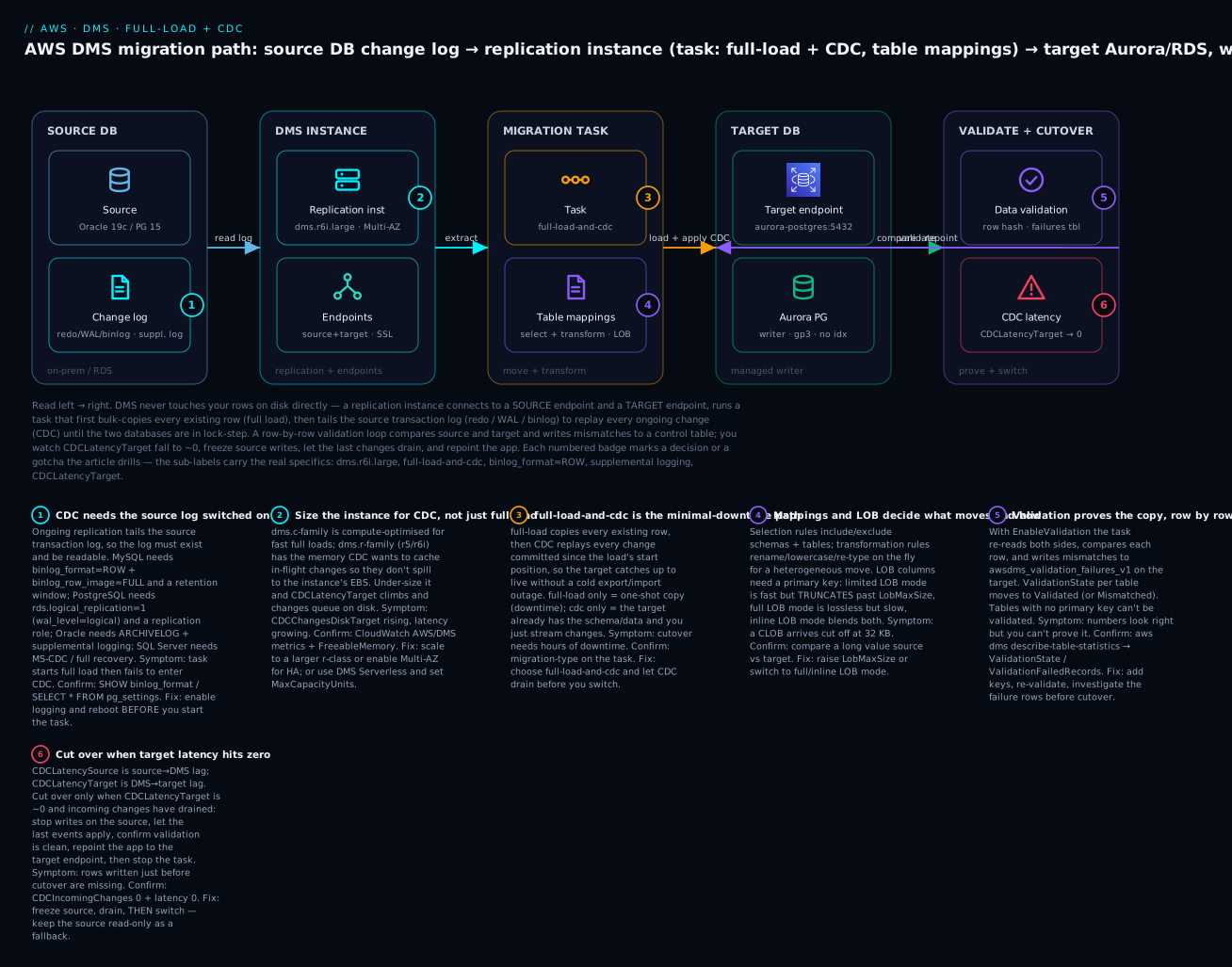
The diagram traces the real migration path left to right: the source database and its change log on the left; the replication instance with its two endpoints in the middle-left; the migration task (full-load + CDC) with its table mappings and LOB settings in the middle; the target Aurora/RDS on the right; and a validation + CDC-latency loop that compares the two databases and tells you when it is safe to cut over. Follow the numbered badges: (1) the source log must be switched on for CDC, (2) size the instance for the CDC marathon, (3) full-load-and-cdc is the minimal-downtime type, (4) mappings and LOB mode decide what moves and how, (5) validation proves the copy, and (6) you cut over only when CDCLatencyTarget hits zero and changes have drained.
Real-world scenario
Meridian Freight, a fictional but very typical logistics company, runs its core shipment system on a 2.3 TB Oracle 19c database in its own datacenter. Oracle licensing renewal is due, and the platform team has a mandate: get off Oracle and onto Aurora PostgreSQL in ap-south-1, with a cutover window the operations director will only grant if it is under ten minutes on a Sunday night. The database serves an API that writes ~1,200 transactions a second at peak and holds a SHIPMENT_DOCS table with scanned PDFs stored as BLOBs averaging 180 KB.
The team plans it as a heterogeneous migration in three tracks. First, SCT converts the schema and the ~340 PL/SQL objects; the assessment report says 91% converts automatically and flags 31 packages for manual rewrite — mostly DBMS_-heavy code the app team reworks over two sprints. The converted schema is applied to Aurora, indexes and all. Second, they stand up a dms.r6i.2xlarge replication instance (Multi-AZ, because this task will run for two weeks) over a Direct Connect link, with a source Oracle endpoint (Binary Reader, useLogminerReader=N, for the heavy redo volume) and an Aurora PostgreSQL target endpoint via Secrets Manager. Third, they design the task: full-load-and-cdc, TargetTablePrepMode=TRUNCATE_BEFORE_LOAD (keep the SCT-built tables and indexes), inline LOB mode with InlineLobMaxSize=64 for the mostly-small PDFs, and validation on.
The first full load surfaces two problems the premigration assessment had predicted. SHIPMENT_DOCS initially fails because two legacy rows had no matching PK supplemental logging on the source; they add it and resume. And CDCLatencyTarget sits at 40+ seconds during peak because Aurora’s secondary indexes on the two hottest tables slow every apply. They drop those non-essential indexes for the duration and rebuild them before cutover; latency falls under 3 seconds. Full load of 2.3 TB takes 19 hours; cached changes drain in 40 minutes; then CDC settles into a steady state with CDCLatencyTarget under 2 seconds and CDCIncomingChanges flat.
For two weeks the team runs validation-only passes and fixes three data-type edge cases SCT had mapped imperfectly (an Oracle NUMBER used as a boolean, mapped to numeric instead of boolean). On cutover night the runbook is anticlimactic: at 01:00 they set the app to read-only, watch CDCIncomingChanges fall to 0 and CDCLatencyTarget to 0, confirm every table’s ValidationState is Validated, stop the task, repoint the API’s connection string to the Aurora writer endpoint, and lift read-only. Total write-frozen window: 7 minutes 20 seconds. The Oracle source is kept running read-only for a week as a fallback that is never needed. The Oracle license is not renewed, and the monthly database bill drops by roughly 70%.
Advantages and disadvantages
| Advantages | Disadvantages |
|---|---|
| Near-zero-downtime cutover via full-load + CDC | CDC has real prerequisites on the source (log settings, privileges) |
| Heterogeneous engine changes (with SCT) | DMS moves data only — schema/code is a separate step |
| Source stays online throughout | You pay for and must size the instance (or DCUs) |
| Managed — no replication software to run | Latency tuning and LOB modes have a learning curve |
| Validation proves correctness row-by-row | Validation needs primary keys; skips LOBs by default |
| Also a continuous replication pipe (to S3/Kinesis) | Not for very small one-shot copies where native dump is simpler |
| Works across accounts/regions/on-prem | Long CDC tasks can spill to disk / bloat source WAL if under-sized |
When does each side matter? The advantages dominate for live production migrations and engine modernization — the two hardest cases, where the alternative is a long outage or a manual replication build. The disadvantages dominate for small, static datasets where a pg_dump/mysqldump is genuinely faster and simpler, and for teams who treat DMS as “click and it migrates” — the prerequisites, sizing and validation are not optional, and skipping them is where migrations fail publicly.
Hands-on lab
You will migrate a PostgreSQL database to Aurora PostgreSQL (a realistic homogeneous move with real CDC), using a full-load + CDC task. You will enable logical replication on the source, size a replication instance, wire both endpoints, run a premigration assessment, start the task, insert a row on the source and watch it appear on the target, read the CDC latency metrics, validate, and execute a drain-and-repoint cutover — then tear it all down. Everything is aws dms CLI first, then the complete Terraform stack. ⚠️ The replication instance, both databases, Secrets Manager, CloudWatch and cross-AZ data transfer all bill by the hour — do the teardown.
Assumptions: AWS CLI v2 configured; a VPC with two private subnets in different AZs; a source RDS PostgreSQL 15 and a target Aurora PostgreSQL 15 both reachable from those subnets; and the three DMS IAM roles present. Export variables:
export AWS_REGION=ap-south-1
export SUBNET_A=subnet-0aaa11112222      # private, AZ a
export SUBNET_B=subnet-0bbb33334444      # private, AZ b
export SOURCE_HOST=kv-src.abcdef.ap-south-1.rds.amazonaws.com
export TARGET_HOST=kv-tgt.cluster-abcdef.ap-south-1.rds.amazonaws.com
export DB_NAME=appdb
export DMS_SG=sg-0dms00000000000         # SG allowing egress to 5432 on both DBs
Step 0 — the DMS service roles (once per account)
The console auto-creates these; under CLI/IaC you make them once. They must have these exact names:
# dms-vpc-role: lets DMS manage ENIs in your VPC
aws iam create-role --role-name dms-vpc-role \
  --assume-role-policy-document '{"Version":"2012-10-17","Statement":[{"Effect":"Allow","Principal":{"Service":"dms.amazonaws.com"},"Action":"sts:AssumeRole"}]}'
aws iam attach-role-policy --role-name dms-vpc-role \
  --policy-arn arn:aws:iam::aws:policy/service-role/AmazonDMSVPCManagementRole

# dms-cloudwatch-logs-role: lets tasks write logs
aws iam create-role --role-name dms-cloudwatch-logs-role \
  --assume-role-policy-document '{"Version":"2012-10-17","Statement":[{"Effect":"Allow","Principal":{"Service":"dms.amazonaws.com"},"Action":"sts:AssumeRole"}]}'
aws iam attach-role-policy --role-name dms-cloudwatch-logs-role \
  --policy-arn arn:aws:iam::aws:policy/service-role/AmazonDMSCloudWatchLogsRole
Expected: two roles created. If they already exist, create-role returns EntityAlreadyExists — harmless.
Step 1 — prepare the source for CDC (logical replication)
On RDS PostgreSQL, rds.logical_replication is a static parameter — set it in the parameter group and reboot:
aws rds modify-db-parameter-group --db-parameter-group-name kv-src-pg15 \
  --parameters "ParameterName=rds.logical_replication,ParameterValue=1,ApplyMethod=pending-reboot"
aws rds reboot-db-instance --db-instance-identifier kv-src
aws rds wait db-instance-available --db-instance-identifier kv-src
Then on the source, create a DMS user with replication rights and a sample table:
-- as the master user, on the SOURCE
CREATE USER dms_user WITH PASSWORD 'ChangeMe-InSecretsMgr!';
GRANT rds_replication TO dms_user;          -- RDS: the replication role
GRANT SELECT ON ALL TABLES IN SCHEMA public TO dms_user;
ALTER DEFAULT PRIVILEGES IN SCHEMA public GRANT SELECT ON TABLES TO dms_user;

CREATE TABLE public.orders (
  id bigint PRIMARY KEY,                     -- PK: required for CDC + validation
  customer text NOT NULL,
  amount numeric(12,2) NOT NULL,
  created_at timestamptz DEFAULT now()
);
INSERT INTO public.orders (id, customer, amount)
SELECT g, 'cust-'||g, (g*1.5)::numeric FROM generate_series(1, 5000) g;
Expected: SHOW wal_level; now returns logical; the table has 5,000 rows and a primary key.
Step 2 — replication subnet group
aws dms create-replication-subnet-group \
  --replication-subnet-group-identifier kv-dms-subnets \
  --replication-subnet-group-description "DMS lab subnets" \
  --subnet-ids "$SUBNET_A" "$SUBNET_B"
Expected: a subnet group spanning two AZs. Fewer than two AZs → creation fails.
Step 3 — the replication instance
aws dms create-replication-instance \
  --replication-instance-identifier kv-dms-inst \
  --replication-instance-class dms.t3.medium \
  --allocated-storage 50 \
  --engine-version 3.5.3 \
  --replication-subnet-group-identifier kv-dms-subnets \
  --vpc-security-group-ids "$DMS_SG" \
  --no-publicly-accessible \
  --no-multi-az

aws dms wait replication-instance-available \
  --filters Name=replication-instance-id,Values=kv-dms-inst
RI_ARN=$(aws dms describe-replication-instances \
  --filters Name=replication-instance-id,Values=kv-dms-inst \
  --query 'ReplicationInstances[0].ReplicationInstanceArn' --output text)
echo "RI_ARN=$RI_ARN"
Expected: status goes creating → available (5–10 min). dms.t3.medium is fine for this tiny lab; a real CDC-heavy job wants a dms.r6i class.
Step 4 — source and target endpoints
SRC_ARN=$(aws dms create-endpoint \
  --endpoint-identifier kv-src-ep --endpoint-type source \
  --engine-name postgres \
  --server-name "$SOURCE_HOST" --port 5432 --database-name "$DB_NAME" \
  --username dms_user --password 'ChangeMe-InSecretsMgr!' \
  --ssl-mode require \
  --postgre-sql-settings 'HeartbeatEnable=true,HeartbeatFrequency=5' \
  --query 'Endpoint.EndpointArn' --output text)

TGT_ARN=$(aws dms create-endpoint \
  --endpoint-identifier kv-tgt-ep --endpoint-type target \
  --engine-name aurora-postgresql \
  --server-name "$TARGET_HOST" --port 5432 --database-name "$DB_NAME" \
  --username kvadmin --password 'TargetMasterPw!' \
  --ssl-mode require \
  --query 'Endpoint.EndpointArn' --output text)
echo "SRC_ARN=$SRC_ARN"; echo "TGT_ARN=$TGT_ARN"
Expected: two endpoint ARNs. HeartbeatEnable=true on the source is the setting that stops the logical slot from bloating source WAL. (In production, replace the inline passwords with SecretsManagerSecretId + SecretsManagerAccessRoleArn.)
Step 5 — test both connections from the instance
aws dms test-connection --replication-instance-arn "$RI_ARN" --endpoint-arn "$SRC_ARN"
aws dms test-connection --replication-instance-arn "$RI_ARN" --endpoint-arn "$TGT_ARN"

# poll until both say 'successful'
aws dms describe-connections \
  --filters Name=endpoint-arn,Values="$SRC_ARN" "$TGT_ARN" \
  --query 'Connections[].{ep:EndpointIdentifier,status:Status,msg:LastFailureMessage}'
Expected: both Status: successful. A failed here is almost always the security group / route — the instance’s SG must be allowed on 5432 at the database’s SG, and a route must exist. Fix the network before going further; the causes mirror the RDS connection-timeout playbook.
Step 6 — table mappings and task settings
cat > table-mappings.json <<'JSON'
{ "rules": [
  { "rule-type": "selection", "rule-id": "1", "rule-name": "all-public",
    "object-locator": { "schema-name": "public", "table-name": "%" },
    "rule-action": "include", "filters": [] }
] }
JSON

cat > task-settings.json <<'JSON'
{
  "TargetMetadata": {
    "SupportLobs": true, "FullLobMode": false,
    "LimitedSizeLobMode": true, "LobMaxSize": 64,
    "BatchApplyEnabled": true
  },
  "FullLoadSettings": {
    "TargetTablePrepMode": "DROP_AND_CREATE",
    "MaxFullLoadSubTasks": 8, "CommitRate": 10000,
    "CreatePkAfterFullLoad": false
  },
  "ValidationSettings": {
    "EnableValidation": true, "ThreadCount": 5
  },
  "Logging": { "EnableLogging": true }
}
JSON
Note: LimitedSizeLobMode with LobMaxSize: 64 KB is fine here because orders has no large LOBs — for a real documents table you would raise it or switch to full/inline mode.
Step 7 — create and start the full-load + CDC task
Optionally run a premigration assessment first (writes to an S3 bucket you own):
aws dms start-replication-task-assessment-run \
  --replication-task-arn "$TASK_ARN" \
  --service-access-role-arn arn:aws:iam::111122223333:role/dms-s3-assess \
  --result-location-bucket kv-dms-assessments \
  --assessment-run-name kv-preflight --include-all
Create and start the task:
TASK_ARN=$(aws dms create-replication-task \
  --replication-task-identifier kv-orders-migration \
  --source-endpoint-arn "$SRC_ARN" --target-endpoint-arn "$TGT_ARN" \
  --replication-instance-arn "$RI_ARN" \
  --migration-type full-load-and-cdc \
  --table-mappings file://table-mappings.json \
  --replication-task-settings file://task-settings.json \
  --query 'ReplicationTask.ReplicationTaskArn' --output text)

aws dms start-replication-task \
  --replication-task-arn "$TASK_ARN" \
  --start-replication-task-type start-replication
Expected: task status creating → starting → running. Full load of 5,000 rows finishes in seconds, then it enters CDC and stays running.
Step 8 — watch the migration and prove CDC is live
# Per-table progress + validation state
aws dms describe-table-statistics --replication-task-arn "$TASK_ARN" \
  --query 'TableStatistics[].{tbl:TableName,rows:FullLoadRows,ins:Inserts,upd:Updates,val:ValidationState}'
Expected: orders shows rows: 5000 and val: Validated. Now prove CDC by writing to the source and watching it land on the target:
-- on the SOURCE
INSERT INTO public.orders (id, customer, amount) VALUES (99999, 'cdc-proof', 42.00);
UPDATE public.orders SET amount = 43.00 WHERE id = 99999;
-- on the TARGET, seconds later
SELECT * FROM public.orders WHERE id = 99999;   -- amount = 43.00
And read the cutover metric:
aws cloudwatch get-metric-statistics --namespace AWS/DMS \
  --metric-name CDCLatencyTarget --period 60 --statistics Average \
  --dimensions Name=ReplicationInstanceIdentifier,Value=kv-dms-inst \
               Name=ReplicationTaskIdentifier,Value=kv-orders-migration \
  --start-time "$(date -u -v-15M +%Y-%m-%dT%H:%M:%SZ 2>/dev/null || date -u -d '15 min ago' +%Y-%m-%dT%H:%M:%SZ)" \
  --end-time "$(date -u +%Y-%m-%dT%H:%M:%SZ)" \
  --query 'sort_by(Datapoints,&Timestamp)[-1].Average'
Expected: a small number of seconds, trending toward 0.
Step 9 — the cutover (drain and repoint)
# 1) Freeze writes on the source app (app-side; e.g. set the DB read-only or stop the writer).
# 2) Wait until incoming changes drain and target latency is ~0:
aws dms describe-replication-tasks --filters Name=replication-task-arn,Values="$TASK_ARN" \
  --query 'ReplicationTasks[0].ReplicationTaskStats.{cdc:FullLoadProgressPercent,elapsed:ElapsedTimeMillis}'
# watch CDCIncomingChanges -> 0 and CDCLatencyTarget -> 0 in CloudWatch (Step 8)

# 3) Confirm every table validated:
aws dms describe-table-statistics --replication-task-arn "$TASK_ARN" \
  --query 'TableStatistics[?ValidationState!=`Validated`].TableName'   # expect: []

# 4) Stop the task and repoint the app to the target (Aurora writer endpoint).
aws dms stop-replication-task --replication-task-arn "$TASK_ARN"
Expected: the validation query returns an empty list, the task stops, and your application — now pointed at Aurora — serves reads and writes. Keep the source read-only for a while as a fallback.
Step 10 — teardown (⚠️ removes everything)
aws dms delete-replication-task --replication-task-arn "$TASK_ARN"
aws dms wait replication-task-deleted --filters Name=replication-task-arn,Values="$TASK_ARN"

aws dms delete-endpoint --endpoint-arn "$SRC_ARN"
aws dms delete-endpoint --endpoint-arn "$TGT_ARN"

aws dms delete-replication-instance --replication-instance-arn "$RI_ARN"
aws dms wait replication-instance-deleted \
  --filters Name=replication-instance-id,Values=kv-dms-inst

aws dms delete-replication-subnet-group \
  --replication-subnet-group-identifier kv-dms-subnets

# On the SOURCE: drop the logical replication slot DMS created, or WAL keeps piling up
# SELECT slot_name FROM pg_replication_slots; SELECT pg_drop_replication_slot('...');
Expected: each object deletes. The orphaned PostgreSQL replication slot is the one thing teardown won’t clean for you — drop it, or the source WAL grows until the disk fills.
The whole DMS stack as Terraform
terraform {
  required_providers { aws = { source = "hashicorp/aws", version = "~> 5.0" } }
}
provider "aws" { region = "ap-south-1" }

variable "private_subnet_ids" { type = list(string) } # two, different AZs
variable "dms_sg_id"          { type = string }
variable "source_host"        { type = string }
variable "target_host"        { type = string }

resource "aws_dms_replication_subnet_group" "this" {
  replication_subnet_group_id          = "kv-dms-subnets"
  replication_subnet_group_description  = "DMS lab subnets"
  subnet_ids                           = var.private_subnet_ids
}

resource "aws_dms_replication_instance" "this" {
  replication_instance_id     = "kv-dms-inst"
  replication_instance_class  = "dms.t3.medium"
  allocated_storage           = 50
  engine_version              = "3.5.3"
  multi_az                    = false
  publicly_accessible         = false
  replication_subnet_group_id = aws_dms_replication_subnet_group.this.replication_subnet_group_id
  vpc_security_group_ids      = [var.dms_sg_id]
}

resource "aws_dms_endpoint" "source" {
  endpoint_id   = "kv-src-ep"
  endpoint_type = "source"
  engine_name   = "postgres"
  server_name   = var.source_host
  port          = 5432
  database_name = "appdb"
  username      = "dms_user"
  password      = "ChangeMe-InSecretsMgr!"   # prefer secrets_manager_arn in real use
  ssl_mode      = "require"
  postgres_settings { heartbeat_enable = true, heartbeat_frequency = 5 }
}

resource "aws_dms_endpoint" "target" {
  endpoint_id   = "kv-tgt-ep"
  endpoint_type = "target"
  engine_name   = "aurora-postgresql"
  server_name   = var.target_host
  port          = 5432
  database_name = "appdb"
  username      = "kvadmin"
  password      = "TargetMasterPw!"
  ssl_mode      = "require"
}

resource "aws_dms_replication_task" "this" {
  replication_task_id      = "kv-orders-migration"
  migration_type           = "full-load-and-cdc"
  replication_instance_arn = aws_dms_replication_instance.this.replication_instance_arn
  source_endpoint_arn      = aws_dms_endpoint.source.endpoint_arn
  target_endpoint_arn      = aws_dms_endpoint.target.endpoint_arn
  table_mappings           = file("${path.module}/table-mappings.json")
  replication_task_settings = file("${path.module}/task-settings.json")
  # start_replication_task = true   # start on apply
}
terraform apply builds the identical stack. For DMS Serverless instead of an instance + task, swap the last two resources for a single aws_dms_replication_config with a compute_config block (min_capacity_units / max_capacity_units / multi_az), and run it with aws dms create-replication-config + aws dms start-replication.
Common mistakes & troubleshooting
The migration playbook. Symptom → root cause → the exact command or path to confirm → the fix. Endpoint connectivity failures overlap with the RDS connection-timeout playbook; the DMS-specific causes are all here.
| # | Symptom | Root cause | Confirm (exact command / path) | Fix |
|---|---|---|---|---|
| 1 | test-connection fails, Status: failed |
SG/route/NACL blocks the instance→DB path, or bad creds/SSL/driver | describe-connections --query '..LastFailureMessage'; check DB SG allows the DMS SG on 5432 |
Allow the DMS SG on the engine port at the DB; verify route/VPN; fix user/SSL |
| 2 | Full load works, then task fails to enter CDC | Source log not CDC-ready (binlog STATEMENT, wal_level!=logical, no supplemental logging) |
SHOW binlog_format; / SHOW wal_level; / SELECT supplemental_log_data_min FROM v$database; |
Enable ROW binlog / rds.logical_replication=1 / supplemental logging; reboot; restart task |
| 3 | CDC user lacks privilege, task errors on start | DMS user missing replication/CDC grants | Task log: permission error; check grants | GRANT rds_replication (PG) / replication + LogMiner grants (Oracle) / CDC role (SQL Server) |
| 4 | CDCLatencyTarget climbs for hours |
Target can’t keep up — indexes/triggers/FKs, small CommitRate, undersized target |
CloudWatch CDCLatencyTarget high, CDCLatencySource low |
Drop non-essential target indexes/triggers during load; raise CommitRate/ParallelApply; scale target |
| 5 | CDCLatencySource climbs, disk spill |
Instance can’t read the log fast enough / too small | CDCChangesDiskTarget > 0; FreeableMemory low |
Scale to a larger dms.r class (or raise Serverless MaxCapacityUnits) |
| 6 | Large text/blob values truncated on target | Limited LOB mode cut anything past LobMaxSize |
Compare a long value source vs target | Raise LobMaxSize, or switch to full/inline LOB mode |
| 7 | A table is skipped / ValidationState: No primary key |
No PK — CDC and validation both need one | describe-table-statistics shows the state |
Add a PK, or use a define-primary-key transformation rule |
| 8 | Validation shows Mismatched records |
Data-type mapping drift (heterogeneous), NULL/precision, TZ | Query awsdms_validation_failures_v1 on the target |
Fix the type mapping (change-data-type), re-validate the table |
| 9 | Full load is slow | Too few parallel sub-tasks / one giant table | describe-table-statistics shows one table stuck |
Raise MaxFullLoadSubTasks; use parallel-load (range/partition) for the big table |
| 10 | Source disk fills during/after CDC | Orphaned logical replication slot pins WAL | SELECT * FROM pg_replication_slots; shows a lagging slot |
Enable HeartbeatEnable; drop orphaned slots after a failed task |
| 11 | Task in running but 0 rows moving |
Selection rules matched nothing, or table filter excludes all | describe-table-statistics empty; re-read mappings |
Fix object-locator schema/table (case-sensitive!) and filters |
| 12 | Oracle CDC applies wrong/missing rows | PK supplemental logging missing on a table | SELECT * FROM dba_log_groups; |
Add PK supplemental logging per replicated table |
| 13 | Task fails with Out of memory |
CDC caching more than instance RAM allows | Task log OOM; FreeableMemory ≈ 0 |
Larger dms.r class; lower MemoryLimitTotal/MemoryKeepTime |
| 14 | create-replication-subnet-group fails |
Subnets don’t span ≥2 AZs | describe-subnets → AvailabilityZone |
Provide ≥2 subnets in different AZs |
| 15 | Console won’t create anything DMS | dms-vpc-role / dms-cloudwatch-logs-role missing |
aws iam get-role --role-name dms-vpc-role |
Create the roles with the exact names + managed policies (Step 0) |
| 16 | Cutover lost the last few minutes of writes | Repointed the app before CDC drained | CDCIncomingChanges/CDCLatencyTarget were > 0 at cutover |
Freeze source, wait for both to hit 0, validate, then repoint |
DMS task and instance states you’ll see
| State | Meaning | Healthy? |
|---|---|---|
creating |
Task/instance being provisioned | Transient |
ready |
Task created, not started | Yes |
starting |
Task spinning up | Transient |
running |
Full load and/or CDC in progress | Yes (CDC stays here) |
stopped |
Task stopped (see stop reason) | Expected after cutover |
stopping |
Task shutting down | Transient |
failed |
Task hit a fatal error | No — read the log |
modifying |
Config change applying | Transient |
testing |
test-connection running |
Transient |
moving |
Being moved between instances | Transient |
Common stop reasons (why a task stopped)
| Stop reason | Meaning |
|---|---|
FULL_LOAD_ONLY_FINISHED |
full-load type completed (no CDC) — expected |
STOPPED_AFTER_FULL_LOAD |
You set it to stop after load (before cached changes) |
STOPPED_AFTER_CACHED_EVENTS |
Stopped after applying cached changes |
NORMAL |
You stopped it (e.g. at cutover) |
RECOVERABLE_ERROR |
Transient error; task may retry |
FATAL_ERROR |
Unrecoverable — inspect the task log |
The nastiest three, in prose
CDC that never starts. By far the most common DMS incident: the task full-loads perfectly, flips to CDC, and immediately errors or sits doing nothing. The cause is always the source log. On MySQL the binlog is off or on STATEMENT format; on PostgreSQL wal_level is replica not logical (on RDS you forgot to set rds.logical_replication=1 and reboot); on Oracle the database is in NOARCHIVELOG or has no supplemental logging; on SQL Server the recovery model is SIMPLE. The fix is never in DMS — it is on the source, and every one of these settings needs to be in place before the task starts. Confirm the log setting with the engine’s own query (the CDC prerequisites table above) and, for anything static, reboot before you launch.
The LOB truncation you don’t see. Limited LOB mode is the default, and it truncates any LOB past LobMaxSize without raising an error — the task reports success and your data is silently corrupted. Teams discover it months later when a user opens a document that ends mid-sentence. The rule: if a table has LOB columns of unpredictable size, do not trust the default. Either measure the real maximum and set LobMaxSize safely above it, or use full/inline LOB mode and accept the throughput cost. And always validate — though note validation skips LOB columns by default, so for LOB-heavy tables a spot-check query comparing lengths on both sides is your real safety net.
Cutting over before the drain. The whole point of full-load + CDC is a tiny downtime window, and the whole risk is cutting over too early. If you repoint the application while CDCIncomingChanges or CDCLatencyTarget is still above zero, the changes still in flight never reach the target and are lost — usually the most recent writes, which are the ones people notice. The runbook is non-negotiable: freeze source writes first, watch both metrics fall to zero, confirm every table’s ValidationState is Validated, then repoint. Keep the old source read-only for a fallback window so a mistake is recoverable rather than terminal.
Best practices
- Fix the source log first. Before you even create the task, confirm CDC prerequisites on the source (ROW binlog / logical WAL / supplemental logging / full recovery) and reboot for any static change. This one habit prevents the most common failure.
- Size for the CDC marathon, not the full-load sprint. Full load is short; CDC runs for days. Pick a memory-optimized
dms.rclass (or set ServerlessMaxCapacityUnitsgenerously) and watchCDCChangesDiskTarget— sustained spill means scale up. - Convert schema with SCT, load data with DMS. For heterogeneous moves, run SCT first, apply the converted schema, then load with
TargetTablePrepMode = TRUNCATE_BEFORE_LOADso DMS keeps your converted tables and indexes. - Drop non-essential target indexes and triggers for the load. They slow every CDC apply. Rebuild them before cutover. This is the single biggest CDC-latency win.
- Never trust the default LOB mode blindly. Measure LOB sizes; raise
LobMaxSizeor use full/inline mode. Ensure every LOB table has a primary key. - Run the premigration assessment and turn validation on. The assessment catches unsupported types and keyless tables before they fail mid-load; validation proves the copy row by row.
- Enable heartbeats on PostgreSQL sources.
HeartbeatEnable=truestops an idle slot from bloating source WAL and filling the disk you are migrating away from. - Cut over on metrics, not the clock. Freeze the source, wait for
CDCIncomingChangesandCDCLatencyTargetto hit zero, validate, then repoint — and keep the source read-only as a fallback. - Use Secrets Manager for endpoint credentials. No plaintext passwords in endpoints, CLI history or Terraform state; rotate them.
- Keep the replication instance private.
--no-publicly-accessible, a tight SG that only egresses to the two DB ports, and Multi-AZ for any long-running production task. - Clean up after a failed task. Drop orphaned replication slots (PostgreSQL) and check the source log isn’t being pinned — teardown does not do this for you.
Security notes
DMS sits between two databases and holds credentials to both, so treat it as a high-value target. Credentials: store both endpoints’ passwords in Secrets Manager (SecretsManagerSecretId + a scoped SecretsManagerAccessRoleArn), never inline; the source DMS user should have the minimum grants CDC needs (SELECT + the replication role), not admin. Network: run the instance in private subnets with --no-publicly-accessible, and a security group whose egress is limited to the two database ports and whose ingress is nothing; reach on-prem sources over VPN or Direct Connect, never the public internet. Encryption: use SSL mode verify-full on both endpoints so data in transit is encrypted and the server cert and hostname are verified; the replication instance’s storage is KMS-encrypted at rest (--kms-key-id for a customer key). IAM: scope the DMS service roles tightly and use a customer-managed KMS key so you control who can decrypt cached changes. Audit: DMS API calls are logged to CloudTrail (see AWS CloudTrail and Config); task logs go to CloudWatch. Data residency: remember that during migration a copy of your data transits the replication instance — keep it in the same region/account boundary your compliance requires, and delete the instance (and its cached-change EBS) promptly after cutover.
| Security control | Setting | Why |
|---|---|---|
| Endpoint secrets | SecretsManagerSecretId + role |
No plaintext credentials |
| Least-privilege DB user | SELECT + replication role only | Blast-radius if the instance is compromised |
| Private instance | --no-publicly-accessible + tight SG |
No public attack surface |
| TLS | --ssl-mode verify-full |
Encrypt + verify both ends |
| At-rest encryption | --kms-key-id (customer CMK) |
Control decryption of cached changes |
| Audit | CloudTrail + CloudWatch task logs | Who did what; task diagnostics |
Cost & sizing
DMS itself has no per-migration fee — you pay for the replication instance (or DCUs), its storage, logs and data transfer. The instance-hour is the dominant cost, and it runs for the whole CDC window (often days or weeks), so class choice compounds:
| Cost driver | What it is | Rough figure (us-east-1, on-demand)* | Notes |
|---|---|---|---|
dms.t3.medium |
Burstable instance-hour | ~$0.075/hr (~₹6.2/hr) | Fine for labs/small loads |
dms.c5.large |
Compute instance-hour | ~$0.19/hr (~₹16/hr) | Fast full loads |
dms.r6i.large |
Memory instance-hour | ~$0.24/hr (~₹20/hr) | CDC-heavy |
| Multi-AZ | Standby | ~2× the above | Production/long tasks |
| Allocated storage | EBS for logs + cached changes | ~$0.115/GB-month | 50 GB default |
| DMS Serverless | Per DCU-hour | ~$0.10–0.20/DCU-hr | Scales with load; min-capacity floor still bills |
| Data transfer | Cross-AZ / out to internet | standard rates | Same-AZ/region is cheapest |
*Approximate — always verify on the AWS DMS pricing page; prices vary by region and change over time.
Sizing guidance: for a small homogeneous move, a dms.t3.medium is enough; for a large CDC-heavy or heterogeneous migration, start at dms.r6i.large/xlarge and scale on CDCLatencyTarget and CDCChangesDiskTarget. Free tier: AWS historically includes 750 hours/month of a single-AZ dms.t3.micro plus a small storage allowance for the first 12 months — enough to run this lab free if you stay on t3.micro (verify current terms). The biggest cost mistake is leaving a large Multi-AZ instance running for weeks after cutover — delete it the moment the source is decommissioned. The second is over-sizing “to be safe”: start moderate, watch the metrics, scale only when the data says so. DMS Serverless can be cheaper for spiky/intermittent replication because it scales down, but its min-capacity floor bills even when idle, so for a steady weeks-long CDC task a right-sized provisioned r6i is often cheaper.
Interview & exam questions
Q1. What are the three DMS migration types and when do you use each?
full-load (one-time bulk copy, needs a frozen source for consistency), full-load-and-cdc (bulk copy then ongoing change replay — the near-zero-downtime default for live migrations), and cdc (change-only, into a target you seeded another way, or as a continuous replication pipe). Maps to SAA-C03 / DBS-C01.
Q2. Does DMS migrate the schema and stored procedures? No — DMS migrates data (rows and row changes). Schema, indexes, views, procedures and triggers are converted by the Schema Conversion Tool (SCT) / DMS Schema Conversion, especially for heterogeneous moves. DMS can create basic target tables for homogeneous migrations, but real structure comes from SCT or a native schema dump.
Q3. A full-load + CDC task loads fine but never enters CDC. Where do you look?
The source transaction log settings. MySQL needs binlog_format=ROW; PostgreSQL needs wal_level=logical (RDS: rds.logical_replication=1 + reboot); Oracle needs ARCHIVELOG + supplemental logging; SQL Server needs FULL recovery / MS-CDC. It is a source-side prerequisite, not a DMS bug.
Q4. Which two metrics tell you it’s safe to cut over?
CDCLatencyTarget (lag applying changes to the target) and CDCIncomingChanges (changes queued but not applied). Cut over only when both are at/near zero after freezing source writes. CDCLatencySource tells you if DMS can read the source log fast enough.
Q5. What’s the difference between the three LOB modes?
Limited LOB mode (default) is fast but truncates anything past LobMaxSize; full LOB mode migrates any size losslessly but slowly (per-LOB lookups); inline LOB mode does small LOBs inline (fast) and large ones via full-mode lookup. All require a primary key on the table.
Q6. Why do LOB tables and CDC both require a primary key?
CDC needs a key to build the WHERE clause that targets the exact row for an update/delete; validation needs a key to pair source and target rows; and LOB migration needs a key to fetch each large value. A keyless table can be full-loaded but not reliably replicated or validated.
Q7. When would you pick DMS Serverless over a provisioned instance?
When load is spiky or intermittent and you don’t want to size/babysit an instance — Serverless scales DCUs automatically within a range. For a steady, predictable, weeks-long CDC task, or when you need a task-tuning knob or endpoint Serverless doesn’t support, a right-sized provisioned r instance is often cheaper and more controllable.
Q8. How do you migrate Oracle to Aurora PostgreSQL with minimal downtime?
Convert schema + PL/SQL with SCT and apply it to Aurora; enable Oracle ARCHIVELOG + supplemental logging; create a full-load-and-cdc task with TargetTablePrepMode=TRUNCATE_BEFORE_LOAD (keep the SCT schema); let full load and CDC catch up; validate; then freeze source, drain CDC, and repoint. A heterogeneous, near-zero-downtime pattern (DBS-C01).
Q9. What causes CDC latency to climb only on the target side?
The target can’t apply changes fast enough — usually secondary indexes, triggers and foreign keys on the target slowing every write, a small CommitRate, or an undersized target. CDCLatencyTarget high with CDCLatencySource low localises it to the target. Drop non-essential indexes/triggers for the load and rebuild before cutover.
Q10. Why can a PostgreSQL source disk fill up during a DMS migration?
A logical replication slot holds WAL until DMS confirms consumption; if the task stops or lags, WAL accumulates and the source disk fills. Prevent it with HeartbeatEnable=true on the source endpoint, and always drop orphaned slots after a failed/removed task.
Q11. What does the premigration assessment do? It inspects the task config against the source and reports blockers before migration — unsupported data types, tables without primary keys, LOB columns without keys, precision/type-mapping risks — writing the report to S3 so you fix them upfront instead of hitting mid-load failures.
Q12. Where do validation mismatches go and how do you investigate them?
To the awsdms_validation_failures_v1 control table on the target, with the key, column and both values. Per-table ValidationState (Validated / Mismatched records / No primary key) shows in describe-table-statistics. Investigate mismatches (often type-mapping drift on heterogeneous moves) and re-validate.
Quick check
- Which migration type gives near-zero downtime for a live production database, and why?
- Your PostgreSQL→Aurora task full-loads then won’t go ongoing. Name the one source setting to check first.
- A documents table’s large values arrive truncated. Which LOB setting caused it and what are two fixes?
- Which two CloudWatch metrics do you watch to know it’s safe to cut over?
- Why must a table have a primary key for both CDC and validation?
Answers
full-load-and-cdc. It bulk-copies existing rows while recording the source log position, then replays every change from that position onward, so the target stays live and downtime shrinks to the seconds it takes to freeze the source, drain CDC and repoint.rds.logical_replication(i.e.wal_level=logical). On RDS PostgreSQL it’s a static parameter that needs a reboot; without it the WAL doesn’t carry logical changes and CDC can’t start. (Plus the DMS user needs therds_replicationrole.)- Limited LOB mode (the default) truncated anything past
LobMaxSize. Fixes: raiseLobMaxSizeabove the largest real value, or switch to full or inline LOB mode (ensuring the table has a primary key). CDCLatencyTarget(lag applying to the target) andCDCIncomingChanges(unapplied queued changes) — both must be at/near zero after freezing source writes.- CDC needs the key to build the
WHEREclause that identifies the exact row to update/delete on the target, and validation needs it to pair source and target rows for comparison. Without a key DMS can full-load the table but cannot reliably replicate or validate it.
Glossary
| Term | Definition |
|---|---|
| AWS DMS | Managed service that migrates and replicates data between databases while the source stays online. |
| Replication instance | The managed compute that runs migration tasks, connecting to source and target endpoints inside your VPC. |
| DMS Serverless | Capacity model where DMS auto-provisions and scales in DCUs instead of a fixed instance class. |
| DCU | DMS Capacity Unit (~2 GB RAM + compute); the unit you set a min/max range of for Serverless. |
| Endpoint | Saved connection config (engine, host, port, creds, SSL, settings) for the source or target database. |
| Migration task | The unit binding one source + one target + one instance, with a migration type, mappings and settings. |
| Full load | The one-time bulk copy of existing rows. |
| CDC (Change Data Capture) | Ongoing replay of source transaction-log changes onto the target to keep it live. |
| Homogeneous migration | Same engine on both ends (e.g. Postgres→Postgres); schema moves as-is. |
| Heterogeneous migration | Engine changes (e.g. Oracle→Aurora Postgres); schema/code must be converted by SCT. |
| SCT / DMS Schema Conversion | Tool/feature that converts schema and code to the target dialect and produces an assessment report. |
| Fleet Advisor | DMS feature that discovers an on-prem database fleet and recommends right-sized AWS targets. |
| Table mappings | JSON selection (include/exclude) and transformation (rename/re-case/re-type) rules for a task. |
| LOB mode | How large objects migrate: limited (truncates past LobMaxSize), full (lossless, slow), inline (blended). |
| Data validation | Row-by-row source↔target comparison that records mismatches in awsdms_validation_failures_v1. |
| CDCLatencySource / Target | CloudWatch metrics: lag capturing changes from the source / applying them to the target. |
| Supplemental logging | Oracle setting that makes redo records carry the key columns CDC needs. |
| Replication slot | PostgreSQL object that retains WAL for a consumer; can bloat source WAL if a task stalls. |
Next steps
- If your migration target is a fresh relational database, launch it correctly first with Launch Amazon RDS (MySQL & PostgreSQL) Hands-On: Networking, Backups & Secure Connect.
- For a serverless, auto-scaling target — a common Oracle/SQL Server modernization landing spot — see Amazon Aurora & Serverless v2: Architecture, Auto-Scaling & Global Databases.
- Make the migrated database survive an AZ failure and scale reads with RDS High Availability: Multi-AZ vs Read Replicas (and When to Use Each).
- Protect the new database with centralized, immutable backups in AWS Backup Hands-On: Centralized, Cross-Account, Immutable Backups with Vault Lock.
- Deciding which engine to migrate to in the first place? Compare in AWS Databases: RDS, DynamoDB and Aurora — Choose the Right Store.
- Streaming DMS CDC into a data lake instead of a database? See AWS Data Lake and Analytics Architecture: S3, Glue, Athena, Redshift and Kinesis.