It is 02:14 on a Saturday and your phone is buzzing. The message is one of three: a GuardDuty finding titled UnauthorizedAccess:IAMUser/MaliciousIPCaller, an email from abuse@amazonaws.com saying “we have detected potentially abusive activity” with an access-key ID you recognise, or an AWS Cost Anomaly alert reporting that compute spend has jumped by ₹3 lakh since midnight. Different first signals, one root cause: a long-lived IAM access key that should have stayed secret is now in someone else’s hands — pushed to a public GitHub repo, baked into a mobile app, logged in a CI artifact, lifted from a laptop, or phished. From the moment that AKIA… string leaves your control, the clock is running, and the people on the other end have automated everything: bots scrape new GitHub commits within seconds, call sts:GetCallerIdentity to see what the key can do, and — if it can — start launching GPU instances to mine cryptocurrency within minutes.
This article is the playbook you open at 02:14. It applies the NIST SP 800-61 incident-response lifecycle — Prepare → Detect & Analyze → Contain → Eradicate → Recover → Post-Incident — to the single most common AWS security incident there is: compromised IAM credentials. It is deliberately, unapologetically defensive: every command here is something a defender runs on their own account to stop an attacker and prove what happened. There is no attacker tooling, no exploitation technique — just the response. The bulk of the article is a phased action playbook, a signals-to-meaning detection table, a CloudTrail + Athena investigation query set you can paste mid-incident, and hard-won prose on the three realities that turn a 20-minute cleanup into a three-day one: the multi-region mining sweep, the difference between deleting a key and revoking a live session, and persistence hunting.
By the end you will be able to run this incident cold — deactivate before you delete, attach an explicit deny before you investigate, revoke temporary sessions by token-issue-time rather than assuming key deletion did it, sweep every region for attacker infrastructure rather than the one your console defaults to, and rebuild from Infrastructure-as-Code rather than trusting a resource an attacker may have back-doored. You will practise the whole containment sequence safely on a throwaway user, and you will leave with the prevention backlog that stops the next leak from becoming an incident at all. Assume breach; respond fast; measure the blast radius; rebuild clean.
What problem this solves
The problem is that an IAM access key is a bearer credential — whoever holds the two strings (AWS_ACCESS_KEY_ID and AWS_SECRET_ACCESS_KEY) is that principal to AWS, from anywhere on the internet, with no second factor, until you intervene. There is no device binding, no IP restriction by default, no expiry. A leaked key is not a “risk”; it is an active session waiting to be used. And long-lived keys leak constantly: committed to git, embedded in a container image, written to a log, passed as a build-arg, shared in Slack, or scraped from an SSRF-vulnerable EC2 instance’s metadata endpoint. Every one of those is a Saturday-night page waiting to happen.
What breaks without a rehearsed response is not subtle — it is money and data. The default attacker playbook against a stolen key is crypto-mining: enumerate permissions, then RunInstances as many large GPU instances (g5.xlarge, p4d.24xlarge) as your Service Quotas allow, across every region simultaneously, and let them mine until you notice the bill. A more targeted attacker enumerates and exfiltrates: list S3 buckets, copy the interesting ones, dump Secrets Manager, read RDS. The worst attacker plants persistence — creates new users and keys, back-doors a role’s trust policy to trust their own account, drops a Lambda that re-mints keys on a schedule — so that revoking your one leaked key locks out nothing. Without a playbook, teams do the wrong thing in the wrong order under pressure: they delete the key first (destroying the forensic link), they forget the attacker’s temporary sessions survive key deletion, and they clean up the region they can see while eight regions keep mining.
Who hits this: every organisation with even one long-lived key, which is still most of them. It is the incident that AWS’s own abuse team, GuardDuty, and Cost Anomaly Detection are all built to catch, and the one the security certifications drill hardest. To frame responsibilities before the deep dive — what a leaked key can do, what AWS does automatically, and what is unambiguously your job:
| Concern | Does AWS handle it? | What AWS does | What you must do | Common wrong assumption |
|---|---|---|---|---|
| Detecting an exposed key | Partly | Scans public repos; sends an abuse notice; attaches a quarantine policy | Watch for the notice; act on it | “AWS deactivates it for me” (it does not delete/deactivate the key) |
| Detecting malicious use | Partly | GuardDuty findings on anomalous API calls | Enable GuardDuty everywhere; route findings | “IAM would have blocked it” (the key is a valid principal) |
| Stopping the key | No | — | Deactivate then delete the key yourself | “The quarantine policy stops everything” (it denies a subset of actions) |
| Killing live sessions | No | — | Revoke role sessions by aws:TokenIssueTime |
“Deleting the key kills the STS tokens” (it does not) |
| Removing attacker resources | No | — | Enumerate + delete across every region | “The console shows me everything” (it shows one region) |
| Refunding fraudulent spend | Sometimes | May grant a one-time credit for a first, well-handled event | File a support case with your timeline | “AWS always eats the mining bill” (it is discretionary) |
| Root cause + prevention | No | — | Kill long-lived keys, add SCPs, scan secrets | “Rotating the key is the fix” (the leak path is the fix) |
Learning objectives
By the end of this article you can:
- Run the NIST 800-61 lifecycle against a compromised-credentials incident — Prepare, Detect & Analyze, Contain, Eradicate, Recover, Post-Incident — without improvising the order.
- Read the detection signals (GuardDuty finding types, the AWS abuse notice and its automatic quarantine policy, a Cost Anomaly alert, anomalous
ConsoleLogin/RunInstancesinCloudTrail) and know what each one means and its first move. - Scope the blast radius with
CloudTrail+ Athena — build the table, then query byaccessKeyIdfor what was done, from where, in which regions, and what was created. - Contain correctly and in order: deactivate then delete the key, attach an explicit deny-all, disable console access, and revoke live STS sessions with the
aws:TokenIssueTime/AWSRevokeOlderSessionspolicy for roles — plus an account-wide SCP brake. - Eradicate attacker-created resources — rogue IAM users/roles/keys, back-doored trust policies, crypto-mining EC2 across all regions, new security groups, modified S3 policies — and hunt persistence.
- Recover by rotating every exposed secret, rebuilding from IaC, restoring data, and removing the temporary deny once clean — then write the blast-radius report and prevention backlog.
- Do all of it with
aws iam/cloudtrail/athenaCLI and Terraform, and rehearse the containment sequence safely on a throwaway user.
This maps to SCS-C02 (Security Specialty — incident response, IAM, detection and remediation is a whole domain), SOA-C02 (SysOps — operational response, GuardDuty, CloudTrail), and SAP-C02 (Professional — org-wide guardrails, SCPs, break-glass).
Prerequisites & where this fits
You should be comfortable with the AWS identity model — the difference between an IAM user (long-term keys), an IAM role (assumed, temporary STS credentials), and the root user — plus reading and writing JSON policies, running the AWS CLI with named profiles, and the basics of CloudTrail, Organizations/SCPs, and Athena. If any of those are shaky, ground them first: IAM Users, Groups, Roles & Policies: The Hands-On Foundation is the identity model this whole playbook manipulates, IAM Policy Evaluation & ‘Access Denied’ Troubleshooting explains why an explicit deny beats every allow (the mechanic behind your deny-all containment), and AWS CloudTrail & Config: Audit and Compliance at Scale is the evidence trail you will query.
This article sits at the response end of a security program — it assumes the detective and preventive layers exist and tells you what to do when they fire. It leans directly on Amazon GuardDuty Hands-On: Threat Detection & Automated Response for the signals, on AWS Organizations, SCPs & Multi-Account Guardrails for the account-wide brake and the prevention backlog, and on AWS IAM Identity Center: SSO & Permission Sets for the long-term fix (stop issuing long-lived keys at all). Here is who owns which phase during a real incident, so you page the right person at 02:14:
| IR phase | What happens | Who usually owns it | The one artifact it produces |
|---|---|---|---|
| Prepare | Controls, runbook, break-glass | Security + platform | This runbook, tested |
| Detect | A signal fires | On-call / SOC | The declared incident + severity |
| Analyze | Scope the blast radius | Incident responder | The CloudTrail/Athena timeline |
| Contain | Stop the bleed | Incident commander + responder | Key dead, sessions revoked |
| Eradicate | Remove the attacker | Responder + service owners | Clean-inventory sign-off |
| Recover | Rebuild + rotate | Service owners + platform | Restored, from-IaC systems |
| Post-incident | Report + backlog | IC + security leadership | Blast-radius report + fixes |
Core concepts
Six ideas make every later decision obvious.
Assume breach the instant a key is exposed. The moment a secret leaves your control — a public repo, a shared log, an untrusted machine — treat it as used, not at risk. Do not wait for proof of misuse before containing; the leak-to-exploitation window for a public key is often under ten minutes, far faster than a human triage. Containment is cheap and reversible (you can reactivate a key); a mining bill is not.
Credential type dictates the containment mechanic. This is the single most important distinction in the whole incident, and getting it wrong is why teams “revoke” a key and stay compromised. A long-term key (AKIA…, on an IAM user) is stopped by deactivating/deleting the key. A temporary credential (ASIA…, from sts:AssumeRole, an instance profile, or IAM Identity Center) has no key to delete — it lives until its TTL expires and is only invalidated by an aws:TokenIssueTime-conditioned deny on the role. Root credentials are a category of their own.
| Credential type | Prefix | Source | TTL | How you kill it |
|---|---|---|---|---|
| IAM user access key | AKIA… |
Created on an IAM user | None (long-lived) | update-access-key --status Inactive, then delete-access-key |
| STS temporary (assume-role) | ASIA… |
sts:AssumeRole / federation |
15 min – 12 h | Attach AWSRevokeOlderSessions (aws:TokenIssueTime deny) to the role |
| Instance-role credentials | ASIA… |
EC2 metadata (IMDS) | Auto-rotated, ≤ 6 h | Revoke role sessions and fix/stop the instance (the source) |
| IAM Identity Center session | ASIA… |
SSO permission set | Configurable (1–12 h) | Delete the user’s SSO sessions + revoke role sessions |
| Root access key | AKIA… (root) |
Root user (should not exist) | None | Delete the root key; rotate root password + MFA |
| Root console | — | Root email + password | Session-based | Rotate password, reset MFA, review |
Response is a separate plane from detection. GuardDuty, the abuse notice and the cost alarm tell you; they never act. Every containment and eradication step in this article is something you (or an automation you built) must execute. Detection without a rehearsed response is a smoke alarm with no fire brigade.
Explicit deny is your emergency brake. In IAM policy evaluation, an explicit Deny overrides any Allow, anywhere — identity policy, resource policy, permission boundary, or SCP. That is why the fastest, safest containment for a principal is to attach a Deny * on *: it neutralises the principal instantly regardless of what else grants it, and it is trivially reversible.
Scope before you eradicate. You cannot remove what you have not found, and you cannot prove the incident is over without a measured blast radius. CloudTrail is the ground truth of every API call the credential made; Athena turns 200 GB of JSON into a five-second query. Analysis precedes eradication for a reason.
Rebuild beats patch. Once a principal is compromised, anything it could modify is suspect. A resource an attacker touched may carry persistence you did not spot. The reliable recovery is to rebuild from Infrastructure-as-Code (your source of truth) and restore data from a known-good backup — not to “clean” a running instance and hope.
The vocabulary in one table
Pin these down before the phase-by-phase sections; the glossary repeats them for lookup:
| Term | One-line definition | Why it matters here |
|---|---|---|
| NIST 800-61 | The IR lifecycle: Prepare → Detect/Analyze → Contain → Eradicate → Recover → Post-Incident | The spine of this playbook |
| Blast radius | Everything the credential touched, created, read, or changed | What you must scope and clean |
| Containment | Stopping ongoing damage without erasing evidence | Deactivate before delete |
aws:TokenIssueTime |
Global condition key = when a temporary credential was minted | The lever to revoke live sessions |
AWSRevokeOlderSessions |
The inline role policy the console attaches to revoke sessions | Kills in-flight STS creds |
| Quarantine policy | An explicit deny-all (or AWS’s AWSCompromisedKeyQuarantineV2) |
The principal-level brake |
| SCP | Organizations Service Control Policy — an account-wide permission ceiling | The account-level brake |
| Break-glass role | A tightly-controlled emergency-only admin identity | How you respond when normal access is suspect |
| Persistence | Durable attacker access that survives killing the leaked key | The thing that re-compromises you |
| Opt-in region | A region disabled by default (e.g. ap-east-1) |
Must be enabled to sweep or be abused |
PREPARE — win the incident before it starts
Everything you do at 02:14 is easier if you did the boring work at noon on a Tuesday. Preparation is where a compromised-key incident is actually won: the difference between “the key never worked because there are no long-lived keys” and “the key had admin and mined eight regions for two days” is entirely pre-incident posture.
Eliminate the thing that leaks
The highest-leverage control is to stop issuing long-lived keys at all. A key that does not exist cannot be pushed to GitHub. Move humans to IAM Identity Center (temporary, SSO-issued credentials) and workloads to roles (instance profiles, IRSA for EKS, task roles for ECS). Reserve long-lived keys for the genuinely unavoidable (a few third-party integrations) and box them in.
| Control | What it removes | How | Residual risk |
|---|---|---|---|
| IAM Identity Center for humans | Human long-lived keys | SSO permission sets → ASIA… temp creds |
SSO session hijack (shorter TTL, MFA) |
| Roles for workloads | Service long-lived keys | Instance profile / IRSA / task role | SSRF stealing instance creds |
SCP: deny iam:CreateAccessKey |
New keys org-wide | SCP on the OU, exception for a break-glass path | A few sanctioned integrations |
| Permission boundaries | Blast radius of any key | Cap what any principal can do | Boundary misconfiguration |
| Short key rotation for the unavoidable | Stale-key exposure | Rotate ≤ 90 days; alert on age | The rotation window itself |
aws:SourceIp / VPC condition on keys |
Use from anywhere | Condition keys on the policy | Attacker inside the allowed range |
# SCP snippet: deny creation of new long-lived keys org-wide (attach to the OU)
# Exception: allow only a dedicated break-glass automation role to create them.
cat > deny-new-keys.json <<'JSON'
{
  "Version": "2012-10-17",
  "Statement": [{
    "Sid": "DenyLongLivedKeys",
    "Effect": "Deny",
    "Action": "iam:CreateAccessKey",
    "Resource": "*",
    "Condition": { "StringNotLike": { "aws:PrincipalArn": "arn:aws:iam::*:role/break-glass-key-admin" } }
  }]
}
JSON
Catch the leak at the source
Secrets escape through git. Two layers stop them: a pre-commit hook that blocks the commit locally, and push protection that blocks it server-side. Belt and suspenders, because developers disable hooks.
| Layer | Tool | Where it runs | Catches | Bypassable? |
|---|---|---|---|---|
| Pre-commit hook | gitleaks / git-secrets |
Developer laptop | The commit before it exists | Yes (--no-verify) |
| Server push protection | GitHub Secret Scanning push protection | GitHub, on push | The push to the remote | Only with explicit override |
| Repo history scan | trufflehog / gitleaks detect |
CI / scheduled | Keys already in history | No (audit) |
| AWS-side canary | AWS public-repo scanning | AWS, continuously | Keys that reached a public repo | No (AWS-run) |
| CI secret scan | gitleaks in the pipeline |
CI on every PR | New secrets in a branch | Fail the build |
# .pre-commit-config.yaml — block AWS keys before they are ever committed
repos:
  - repo: https://github.com/gitleaks/gitleaks
    rev: v8.18.0
    hooks:
      - id: gitleaks
Turn on the eyes and the brakes
The rest of preparation is the detective and response infrastructure this incident depends on — and the break-glass identity you will use if normal access is itself compromised.
| Prep control | Why it matters at 02:14 | Set up with |
|---|---|---|
| GuardDuty in every region | Detects the stolen-key use; regional, so gaps go dark | Delegated admin + autoEnable ALL (all regions) |
| Org-wide CloudTrail | The evidence you will Athena-query; org trail = every account | create-trail --is-organization-trail --is-multi-region-trail |
| CloudTrail log-file validation | Proves logs were not tampered with | --enable-log-file-validation |
| Cost Anomaly Detection + Budgets | Often the first signal (the bill) | ce create-anomaly-monitor; a budget alarm |
| A break-glass role | Respond when your normal identity is suspect | Tightly-scoped admin role, MFA, alert on every use |
| This runbook, tested | Muscle memory beats improvisation | Tabletop it quarterly (see the lab) |
| A pre-built quarantine policy | Attach in one command mid-incident | Store QuarantineDenyAll as a managed policy |
A break-glass role deserves emphasis: it is a highly-privileged role assumed only in emergencies, guarded by MFA, its every use alerting the whole security team, and its trust policy limited to a named set of responders. When the incident is your identity provider or your normal admin path, break-glass is how you still act. Store its access path offline, and make its use loud — a break-glass assumption at 02:14 should page everyone, precisely because it is rare.
DETECT & ANALYZE — read the signal, then scope it
The incident announces itself in one of a handful of ways. Your first job is to recognise the signal and its meaning; your second is to scope — turn “a key leaked” into “here is exactly what it did, from where, in which regions, and what it created.”
Signals → what they mean
This is the table to scan when the page fires. Each row is a signal, where you see it, what it most likely means, and your immediate first move.
| Signal | Where you see it | What it likely means | First move |
|---|---|---|---|
UnauthorizedAccess:IAMUser/InstanceCredentialExfiltration.OutsideAWS |
GuardDuty | Instance-role creds are being used outside AWS — the SSRF/stolen-role hallmark | Revoke role sessions and isolate the instance |
UnauthorizedAccess:IAMUser/MaliciousIPCaller |
GuardDuty | The principal called the API from a known-bad IP | Deactivate the key; scope in CloudTrail |
UnauthorizedAccess:IAMUser/TorIPCaller |
GuardDuty | API calls arriving via Tor | Treat as compromise; contain |
UnauthorizedAccess:IAMUser/ConsoleLoginSuccess.B |
GuardDuty | Anomalous successful console login | Force logout; rotate password; check MFA |
CryptoCurrency:EC2/BitcoinTool.B!DNS |
GuardDuty | A launched instance is mining | Terminate it; sweep all regions |
Recon:IAMUser/MaliciousIPCaller |
GuardDuty | The principal is enumerating your account | Contain before it escalates |
PrivilegeEscalation:IAMUser/AdministrativePermissions |
GuardDuty | The principal granted itself admin | Contain immediately; hunt persistence |
Persistence:IAMUser/AnomalousBehavior |
GuardDuty | New users/keys/policies being created | Enumerate + eradicate persistence |
Stealth:IAMUser/CloudTrailLoggingDisabled |
GuardDuty | CloudTrail was stopped/deleted — evidence tampering | Re-enable logging; assume active attacker |
Policy:IAMUser/RootCredentialUsage |
GuardDuty | The root user was used | Escalate to a root-compromise runbook |
Abuse notice from abuse@amazonaws.com / AWS Health |
Email + AWS Health Dashboard | AWS found your key exposed or abused | Confirm the key ID; contain now |
AWSCompromisedKeyQuarantineV2 attached to a user |
IAM console / CloudTrail | AWS auto-quarantined a key it found exposed | AWS did not stop the key — you still must |
| Cost Anomaly / Budget alarm | Cost Anomaly Detection, SNS | Unexpected compute spend — often mining | Find the region + resource; contain |
Unfamiliar sourceIPAddress / userAgent in CloudTrail |
CloudTrail / Athena | API calls from an unexpected client | Scope the full session |
Two rows carry extra weight. InstanceCredentialExfiltration.OutsideAWS is the tell that the compromised credential is a role stolen from an instance (usually via SSRF), which changes your containment — you cannot delete a key that does not exist; you revoke sessions and fix the instance. And the AWSCompromisedKeyQuarantineV2 policy is widely misunderstood: when AWS finds your key in a public repo, it emails you and attaches this AWS-managed policy to the user, which denies a curated set of high-risk actions (ec2:RunInstances, iam:CreateUser, iam:CreateAccessKey, lambda:CreateFunction, ec2:RequestSpotInstances, and more). It is a helpful speed bump — but it does not deactivate the key, does not cover every action, and can be detached by a principal that still has iam: permissions. Treat it as a warning light, not a fix.
Scope the blast radius with CloudTrail + Athena
Once you have a principal or an access-key ID, you need the whole story: every call it made, when, from where, in which regions, and — critically — what it created (the eradication list). Point Athena at your CloudTrail S3 bucket and query. First, create the table (once):
CREATE EXTERNAL TABLE cloudtrail_logs (
  eventVersion STRING,
  userIdentity STRUCT<
    type: STRING, principalId: STRING, arn: STRING, accountId: STRING,
    accessKeyId: STRING, userName: STRING,
    sessionContext: STRUCT<attributes: STRUCT<mfaAuthenticated: STRING, creationDate: STRING>>>,
  eventTime STRING, eventSource STRING, eventName STRING, awsRegion STRING,
  sourceIPAddress STRING, userAgent STRING, errorCode STRING, errorMessage STRING,
  requestParameters STRING, responseElements STRING, resources ARRAY<STRUCT<arn: STRING, accountId: STRING, type: STRING>>
)
ROW FORMAT SERDE 'com.amazon.emr.hive.serde.CloudTrailSerde'
STORED AS INPUTFORMAT 'com.amazon.emr.cloudtrail.CloudTrailInputFormat'
OUTPUTFORMAT 'org.apache.hadoop.hive.ql.io.HiveIgnoreKeyTextOutputFormat'
LOCATION 's3://my-org-cloudtrail-bucket/AWSLogs/111122223333/CloudTrail/';
Then run the investigation set. Each query answers one scoping question:
| # | Scoping question | Query shape |
|---|---|---|
| 1 | Everything this key did | WHERE useridentity.accesskeyid = 'AKIA…' |
| 2 | First and last activity | SELECT min(eventtime), max(eventtime) … |
| 3 | Which regions | GROUP BY awsregion |
| 4 | Which source IPs | GROUP BY sourceipaddress |
| 5 | What was created (eradication list) | WHERE eventname LIKE 'Create%' OR eventname='RunInstances' |
| 6 | Any privilege escalation | eventname IN ('AttachUserPolicy','PutUserPolicy','CreateAccessKey') |
| 7 | Any evidence tampering | eventname IN ('StopLogging','DeleteTrail','PutEventSelectors') |
| 8 | Any data access | eventsource='s3.amazonaws.com' AND eventname IN ('GetObject','ListBuckets') |
-- 1 + 3 + 5 combined: what the compromised key created, per region, most-recent first
SELECT eventtime, awsregion, eventname, sourceipaddress,
       json_extract_scalar(responseelements, '$.instancesSet.items[0].instanceId') AS ec2_id
FROM cloudtrail_logs
WHERE useridentity.accesskeyid = 'AKIAEXAMPLE1234567890'
  AND (eventname LIKE 'Create%' OR eventname IN ('RunInstances','RequestSpotInstances','PutUserPolicy','AttachUserPolicy'))
  AND eventtime > '2026-07-12T00:00:00Z'
ORDER BY eventtime DESC;

-- 7: did the attacker try to blind you? (CloudTrail tampering)
SELECT eventtime, eventname, sourceipaddress, errorcode
FROM cloudtrail_logs
WHERE useridentity.accesskeyid = 'AKIAEXAMPLE1234567890'
  AND eventname IN ('StopLogging','DeleteTrail','UpdateTrail','PutEventSelectors','DeleteFlowLogs');
For a fast look without Athena, CloudTrail Lake or the console Event history (filtered by Access key ID) covers the last 90 days of management events, and the CLI works for a quick pull:
# Quick management-event pull for one access key (last 90 days, current region)
aws cloudtrail lookup-events \
  --lookup-attributes AttributeKey=AccessKeyId,AttributeValue=AKIAEXAMPLE1234567890 \
  --query 'Events[].{t:EventTime,name:EventName,region:AwsRegion}' --output table
The output of the analyze phase is a timeline and an eradication list: the set of resources the credential created or modified, per region, that you will remove in the Eradicate phase. Do not skip it — an eradication done from memory misses the instance in the region you forgot.
CONTAIN — stop the bleed without destroying evidence
Containment is about stopping ongoing damage in seconds while preserving the evidence that Analyze needs. The order matters, and the mechanic depends on the credential type from the Core concepts table.
The containment sequence for a leaked IAM user key
Run these in order. Deactivate first (instant, reversible, keeps the key ID for CloudTrail correlation); layer the explicit deny (covers other keys and console); only delete after evidence capture.
export U=leaked-bot            # the compromised IAM user
export AK=AKIAEXAMPLE1234567890

# 1) DEACTIVATE the key — instant, reversible, preserves it for forensics
aws iam update-access-key --user-name $U --access-key-id $AK --status Inactive

# 2) Attach an explicit DENY-ALL — neutralises the principal regardless of any Allow
aws iam put-user-policy --user-name $U --policy-name QuarantineDenyAll \
  --policy-document '{"Version":"2012-10-17","Statement":[{"Effect":"Deny","Action":"*","Resource":"*"}]}'

# 3) Disable CONSOLE access (kills password sign-in)
aws iam delete-login-profile --user-name $U 2>/dev/null || echo "no console access"

# 4) Enumerate ALL of the user's keys (the attacker may have made more)
aws iam list-access-keys --user-name $U \
  --query 'AccessKeyMetadata[].{id:AccessKeyId,status:Status,created:CreateDate}' --output table

# 5) DELETE the key only AFTER you have captured the CloudTrail evidence tied to its ID
aws iam delete-access-key --user-name $U --access-key-id $AK
Why this exact order — each step defended:
| Step | Action | Why this, why now | If you skip it |
|---|---|---|---|
| 1 | Deactivate the key | Stops use in ~seconds; reversible; keeps the key ID valid in CloudTrail | The key keeps working while you think |
| 2 | Explicit deny-all | Covers the user’s other keys, console, and any future path; deny beats allow | A second key the attacker made stays live |
| 3 | Delete login profile | The attacker may have set a console password | Console sign-in survives key death |
| 4 | List all keys | Attackers create a second key as a backup credential | You revoke one key, they use the other |
| 5 | Delete the key | Permanent removal — but only after evidence capture | You lose the forensic link the ID provides |
Deactivate vs delete — the reversibility you want mid-incident
| Dimension | Deactivate (--status Inactive) |
Delete (delete-access-key) |
|---|---|---|
| Effect on use | Immediate — calls fail | Immediate — calls fail |
| Reversible? | Yes (--status Active) |
No |
| Key ID in CloudTrail | Preserved, still correlatable | Preserved historically, but gone from IAM |
| Right when | First move, always | After evidence capture, to finalise |
| Risk | None (you can undo a mistake) | Deleting the wrong key with no undo |
The nasty part: revoking live sessions
Here is the reality that catches experienced engineers. If the attacker used the leaked key to sts:AssumeRole (or the compromise is a role stolen from an instance via IMDS), then deleting the key does nothing to the temporary ASIA… credentials already minted — those live independently until their TTL expires, up to 12 hours (or 36 for a role chain), and the attacker keeps working the whole time. You must invalidate them by issue time, using the same mechanism the console’s Revoke active sessions button uses: an inline policy on the role that denies everything for any session minted before “now.”
# Revoke ALL current sessions of a role — deny anything issued before this instant.
# This is exactly what the console "Revoke active sessions" button attaches.
NOW=$(date -u +%Y-%m-%dT%H:%M:%SZ)
aws iam put-role-policy --role-name compromised-role \
  --policy-name AWSRevokeOlderSessions \
  --policy-document "{
    \"Version\": \"2012-10-17\",
    \"Statement\": [{
      \"Effect\": \"Deny\", \"Action\": \"*\", \"Resource\": \"*\",
      \"Condition\": { \"DateLessThan\": { \"aws:TokenIssueTime\": \"$NOW\" } }
    }]
  }"
aws:TokenIssueTime is present only on temporary credentials, so this policy denies the attacker’s older sessions while leaving legitimate new sessions (issued after $NOW) untouched — and it has no effect on long-term user keys, which is why user-key compromise is handled by deactivation instead. If the role was stolen from an EC2 instance, revoking sessions is only half the fix: the instance is still compromised and will simply mint new credentials from IMDS, so you must also isolate or stop the instance (move it to a no-egress quarantine security group and snapshot it for forensics).
| Compromise shape | The “kill it” action | The trap if you stop here |
|---|---|---|
| IAM user key leaked | Deactivate + delete the key; deny-all | An AssumeRole session it made survives — revoke role sessions too |
| Assume-role session abused | AWSRevokeOlderSessions on the role |
New sessions still allowed — also deny the source principal |
| Instance role stolen (SSRF) | Revoke role sessions | Instance re-mints creds from IMDS — isolate/stop the instance |
| Identity Center session | Delete SSO sessions + revoke role sessions | User keeps a cached session — also disable the SSO user |
The account-wide brake: a quarantine SCP
When you cannot touch IAM fast enough, when the compromised principal is your admin, or when you want an org-enforced ceiling that a rogue principal cannot remove, drop an SCP. SCPs sit above identity policies and cannot be altered from inside the member account. Two shapes: deny a specific principal, or quarantine the whole account.
{
  "Version": "2012-10-17",
  "Statement": [{
    "Sid": "QuarantineCompromisedPrincipal",
    "Effect": "Deny",
    "Action": "*",
    "Resource": "*",
    "Condition": {
      "StringLike": { "aws:PrincipalArn": "arn:aws:iam::111122223333:user/leaked-bot" },
      "BoolIfExists": { "aws:PrincipalIsAWSService": "false" }
    }
  }]
}
| Brake | Scope | Reversible | Use when | Caveat |
|---|---|---|---|---|
| Deny-all inline policy | One principal | Yes (delete policy) | You can reach IAM and know the principal | Removable by a principal with iam: if not also SCP-guarded |
AWSCompromisedKeyQuarantineV2 |
One user (AWS-attached) | Yes | AWS attached it after finding the key | Denies a subset of actions; not a full stop |
Deny-by-PrincipalArn SCP |
One principal, account-wide | Yes | The principal must be stopped org-side | Needs Organizations; ~immediate but not instant |
| Full-account quarantine SCP | Every principal in the account | Yes | Whole account is suspect / root compromise | Blocks you too — pair with a break-glass exception |
A full-account quarantine SCP must include an exception for your break-glass role, or you lock yourself out of your own incident:
{
  "Version": "2012-10-17",
  "Statement": [{
    "Sid": "FreezeAccountExceptBreakGlass",
    "Effect": "Deny",
    "NotAction": ["iam:*", "sts:*", "support:*", "cloudtrail:*"],
    "Resource": "*",
    "Condition": { "StringNotLike": { "aws:PrincipalArn": "arn:aws:iam::111122223333:role/break-glass" } }
  }]
}
ERADICATE — remove the attacker and their infrastructure
Containment stopped the credential. Eradication removes what the credential did — the rogue resources on your eradication list from the Analyze phase — and hunts the persistence that would let the attacker back in. This is where the multi-region sweep bites.
Enumerate and delete attacker-created resources
Work from your Athena eradication list, but verify against the live account per region — attackers create resources you must delete, and back-door resources you must repair.
| Resource class | What to look for | Enumerate with | Remove/repair |
|---|---|---|---|
| Rogue IAM users | Users created during the window | iam list-users filtered by CreateDate |
delete-user (after detaching) |
| Rogue access keys | New keys on existing or new users | iam list-access-keys per user |
delete-access-key |
| Rogue IAM roles | New roles, esp. with external trust | iam list-roles + inspect AssumeRolePolicyDocument |
delete-role |
| Back-doored trust policies | Existing roles now trusting an unknown account | iam get-role → trust policy principals |
Restore trust policy from IaC |
| New login profiles | Console passwords added to users | iam get-login-profile per user |
delete-login-profile |
| Inline/attached admin policies | Self-granted admin | iam list-user-policies / list-attached-user-policies |
Detach/delete |
| Crypto-mining EC2 | Large/GPU instances, all regions | ec2 describe-instances per region |
terminate-instances |
| Rogue security groups | 0.0.0.0/0 ingress, new SGs |
ec2 describe-security-groups per region |
Revoke rules / delete |
| New key pairs / launch templates | Attacker’s SSH access / re-launch | ec2 describe-key-pairs, describe-launch-templates |
Delete |
| Modified S3 bucket policies | Public/cross-account grants | s3api get-bucket-policy, get-public-access-block |
Restore policy; re-block public |
| New IAM identity providers | Rogue SAML/OIDC federation | iam list-saml-providers, list-open-id-connect-providers |
Delete |
| Persistence Lambda + trigger | Function that re-mints keys on a schedule | lambda list-functions, events list-rules per region |
Delete function + rule |
The multi-region sweep
The console defaults to one region. The attacker did not. A stolen key with RunInstances is used to launch miners in every enabled region at once, so eradication must loop over regions — including the opt-in ones you never use. Find your enabled regions, then sweep:
# List regions you can actually use (default + opt-in you enabled)
REGIONS=$(aws ec2 describe-regions --all-regions \
  --query 'Regions[?OptInStatus!=`not-opted-in`].RegionName' --output text)

# Sweep every region for RUNNING instances the attacker may have launched
for r in $REGIONS; do
  echo "== $r =="
  aws ec2 describe-instances --region "$r" \
    --filters Name=instance-state-name,Values=running \
    --query 'Reservations[].Instances[].{id:InstanceId,type:InstanceType,launched:LaunchTime,ip:PublicIpAddress}' \
    --output text
done

# Terminate a confirmed-rogue instance (snapshot first if you need forensics)
aws ec2 terminate-instances --region us-west-2 --instance-ids i-0rogueminer123
The two subtleties: opt-in regions (ap-east-1, me-south-1, af-south-1, eu-south-1, and others) are disabled by default, so an attacker can only use one if it was enabled in your account — a small mercy, and a reason to leave unused opt-in regions disabled. And attackers often raise Service Quotas first (a spot-fleet or on-demand vCPU limit increase) so they can launch more instances; check service-quotas and CloudTrail for RequestServiceQuotaIncrease during the window.
Hunt persistence — the step people skip
If you kill the leaked key and stop there, a competent attacker is back in minutes, because they planted durable access the moment they had permissions. Persistence hunting is the difference between “incident closed” and “incident re-opens Tuesday.” Check each mechanism:
| Persistence mechanism | How it re-grants access | How to find it | How to remove |
|---|---|---|---|
| New IAM user + key | A fresh credential you did not issue | iam list-users/list-access-keys vs your IaC |
Delete user + keys |
| Second key on a real user | Backup credential on a legit identity | list-access-keys shows 2 keys |
Delete the rogue key |
| Back-doored role trust | Role now trusts the attacker’s AWS account | Diff AssumeRolePolicyDocument vs IaC |
Restore trust policy |
| New role with external trust | Cross-account assume path | iam list-roles + trust principals |
Delete role |
| Login profile on a service user | Console access on a non-human user | get-login-profile per user |
Delete login profile |
| Lambda + EventBridge re-minter | Scheduled function re-creates keys | lambda list-functions + events list-rules (all regions) |
Delete both |
| Rogue SAML/OIDC provider | Federated login path | iam list-saml-providers |
Delete provider |
| IAM policy version rollback | A new default policy version grants admin | iam list-policy-versions |
Delete rogue version |
| EC2 user-data / SSH key | Re-entry on the next boot | Inspect launch templates + describe-key-pairs |
Remove key pair / template |
Run one authoritative dump and diff it against your Infrastructure-as-Code, which is your source of truth for “what should exist”:
# One command that dumps the entire IAM state — diff this against your Terraform
aws iam get-account-authorization-details > iam-actual.json
# Then compare users, roles, policies, and trust documents against `terraform state`.
RECOVER — rebuild clean, rotate everything, then release
Recovery restores normal operation safely. The governing rule from Core concepts: rebuild, don’t patch, and assume every secret the principal could read is compromised.
Rotate every exposed secret
If the compromised principal could read a secret, treat it as leaked — even if you have no evidence it was accessed. Absence of a GetSecretValue in CloudTrail is not proof; rotate anyway.
| Secret store | What to rotate | Command | Note |
|---|---|---|---|
| Secrets Manager | Every secret the principal could read | secretsmanager rotate-secret |
Prefer automatic rotation |
| SSM Parameter Store | SecureString params in scope |
Overwrite with put-parameter --overwrite |
Rotate the KMS key if it was exposed |
| RDS/Aurora master | DB master + app users | rds modify-db-instance --master-user-password |
And any credentials the DB stored |
| Third-party API keys | Stripe, Datadog, SendGrid, etc. | In the vendor console | AWS cannot rotate these for you |
| IAM keys elsewhere | Any other long-lived key the principal saw | Deactivate + reissue | Then kill long-lived keys for good |
| EC2 key pairs | SSH keys attacker may have seen | Replace and redeploy | Rebuild the instance anyway |
Rebuild from IaC, restore data from known-good backups
Do not clean a compromised instance and return it to service — you cannot prove it is free of persistence. Terminate it, and re-apply your Terraform to stand up a fresh one from source. Restore data from a backup taken before the compromise window, and verify the backup itself was not tampered with (attackers delete or encrypt backups).
# Rebuild the affected resource from your source of truth, not from the running (suspect) one
terraform plan  -target=aws_instance.app -out=rebuild.plan
terraform apply rebuild.plan

# Restore data from a snapshot taken BEFORE the incident window
aws rds restore-db-instance-to-point-in-time \
  --source-db-instance-identifier app-db \
  --target-db-instance-identifier app-db-restored \
  --restore-time 2026-07-11T23:00:00Z   # a timestamp before first attacker activity
Release: remove the temporary deny, then watch
Only after eradication is verified clean and secrets are rotated do you lift containment. Remove the quarantine deny and the revoke-sessions policy, re-enable the (rebuilt, key-less) workload, and watch closely — a heightened-monitoring period catches any persistence you missed.
| Recovery step | Action | Verify |
|---|---|---|
| Confirm clean | Diff IAM + per-region inventory vs IaC | No unexplained resources |
| Rotate secrets | Every store above | New values deployed, old revoked |
| Rebuild | terraform apply fresh resources |
Running from source of truth |
| Restore data | Point-in-time restore, pre-incident | Integrity-checked |
| Remove deny-all | iam delete-user-policy … QuarantineDenyAll |
Principal (or its replacement) usable |
| Remove revoke policy | iam delete-role-policy … AWSRevokeOlderSessions |
New sessions work |
| Heightened monitoring | GuardDuty + CloudTrail alerting, 2–4 weeks | No recurrence |
POST-INCIDENT — the report and the backlog
The incident is not over when the miners stop; it is over when it cannot happen the same way again. Two deliverables: a blast-radius report (what happened, for the record and any required disclosure) and a prevention backlog (the controls that make the leak a non-event next time).
The blast-radius report
| Section | What it captures | Source |
|---|---|---|
| Timeline | Leak → first use → detection → contained → eradicated | CloudTrail/Athena + your IR log |
| Root cause | How the key leaked (git, log, SSRF, phish) | Code review, the leak path |
| Scope of access | What the credential could and did do | IAM policy + CloudTrail |
| Resources created | Rogue users/roles/keys/EC2, per region | Athena eradication list |
| Data impact | What was read/exfiltrated (if any) | S3 data events, Flow Logs |
| Cost impact | Fraudulent spend | Cost Explorer, filtered to the window |
| Remediation | Everything you did, in order | Your IR log |
| Prevention | The backlog below, with owners + dates | This review |
The prevention backlog
| Priority | Prevention item | Stops | Owner |
|---|---|---|---|
| P0 | Kill long-lived keys — Identity Center + roles | The leak class entirely | Platform |
| P0 | SCP: deny iam:CreateAccessKey (except break-glass) |
New long-lived keys | Security |
| P0 | Secret scanning + push protection + pre-commit | Keys reaching git | Eng + Platform |
| P1 | GuardDuty in every region, org-wide auto-enable | Detection gaps | Security |
| P1 | Cost Anomaly + Budgets alarms | Slow-to-detect mining | FinOps + Security |
| P1 | Permission boundaries on all principals | Blast radius of any key | Security |
| P2 | SCP: deny unused regions (region restriction) | Multi-region mining sweep | Platform |
| P2 | Tested break-glass role + this runbook, quarterly | Slow/mis-ordered response | Security |
| P2 | Disable unused opt-in regions | Attack surface | Platform |
The full phased playbook (open this at 02:14)
Everything above, as one scannable action table — the artifact to print and keep. Phase, action, exact command or console step, and why that action in that phase.
| # | Phase | Action | Exact command / console step | Why |
|---|---|---|---|---|
| 1 | PREPARE | Ban long-lived keys | SCP Deny iam:CreateAccessKey; move to Identity Center + roles |
A key that does not exist cannot leak |
| 2 | PREPARE | Scan secrets pre-commit + on push | gitleaks pre-commit hook; GitHub push protection |
Catch the leak before it reaches a remote |
| 3 | PREPARE | GuardDuty every region, org-wide | update-organization-configuration --auto-enable-organization-members ALL (all regions) |
No dark region for the attacker to hide in |
| 4 | PREPARE | Org CloudTrail + validation + break-glass | create-trail --is-organization-trail --is-multi-region-trail --enable-log-file-validation; a break-glass role |
Tamper-evident evidence + a way to respond |
| 5 | DETECT | Read the signal | GuardDuty get-findings; AWS Health; Cost Anomaly |
Recognise what you are dealing with |
| 6 | DETECT | Confirm the abuse notice | AWS Health Dashboard; email from abuse@amazonaws.com |
AWS quarantine ≠ AWS fix; confirm the key ID |
| 7 | ANALYZE | Scope with Athena | Query cloudtrail_logs WHERE useridentity.accesskeyid = 'AKIA…' |
Measure the blast radius before you act |
| 8 | ANALYZE | Build the eradication list | WHERE eventname LIKE 'Create%' OR eventname='RunInstances' per region |
Know every resource to remove |
| 9 | CONTAIN | Deactivate the key | iam update-access-key --status Inactive |
Instant, reversible, evidence-preserving |
| 10 | CONTAIN | Attach explicit deny-all | iam put-user-policy … QuarantineDenyAll (Deny * on *) |
Deny beats every Allow; covers other paths |
| 11 | CONTAIN | Disable console access | iam delete-login-profile |
Kill password sign-in the attacker may have set |
| 12 | CONTAIN | Revoke role sessions | iam put-role-policy … AWSRevokeOlderSessions (aws:TokenIssueTime deny) |
Kill in-flight temporary creds key deletion misses |
| 13 | CONTAIN | Account brake (if needed) | Attach a quarantine SCP (principal or whole-account, with break-glass exception) | Org-enforced ceiling a rogue principal can’t lift |
| 14 | CONTAIN | Delete the key | iam delete-access-key (after evidence capture) |
Finalise removal once you have the forensics |
| 15 | ERADICATE | Delete rogue IAM | Delete new users/keys/roles/login profiles; restore trust policies | Remove created + repair back-doored identities |
| 16 | ERADICATE | Sweep EC2 all regions | Loop describe-regions → describe-instances → terminate-instances |
The miner is in a region you don’t watch |
| 17 | ERADICATE | Hunt persistence | Check trust policies, Lambda+EventBridge, IdPs, policy versions; diff get-account-authorization-details vs IaC |
Stop the attacker walking back in |
| 18 | RECOVER | Rotate every exposed secret | secretsmanager rotate-secret; SSM; RDS master; vendor keys |
Assume everything the principal saw is leaked |
| 19 | RECOVER | Rebuild from IaC + restore data | terraform apply fresh; point-in-time restore pre-incident |
Don’t trust a possibly-back-doored resource |
| 20 | RECOVER | Remove temporary deny; monitor | delete-user-policy/delete-role-policy; heightened GuardDuty/CloudTrail 2–4 wks |
Return to normal only when verified clean |
| 21 | POST | Blast-radius report | Timeline, root cause, scope, cost, remediation | The record + any required disclosure |
| 22 | POST | Prevention backlog | No keys, SCPs, boundaries, budget guardrails — with owners | Make the next leak a non-event |
Architecture at a glance
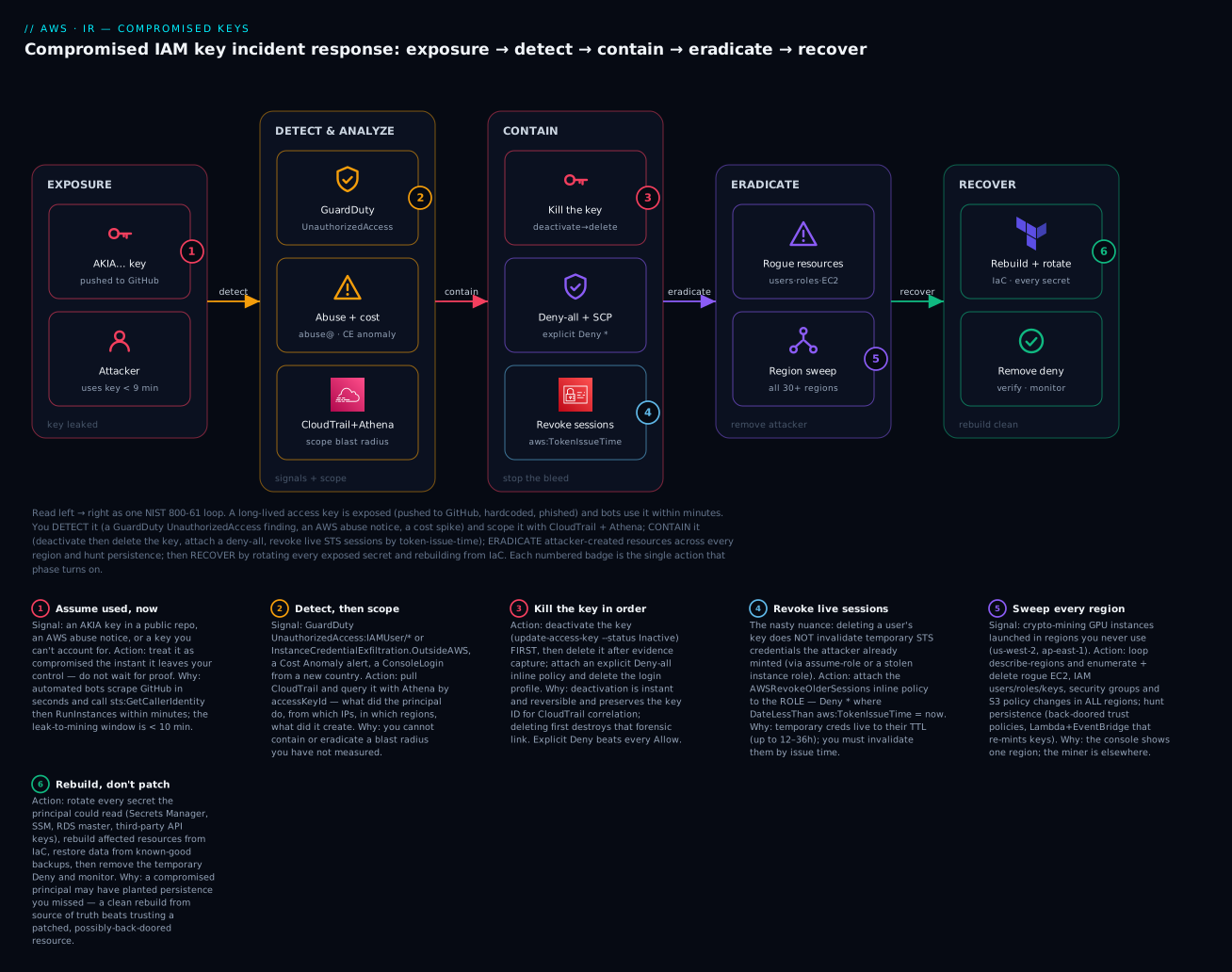
The diagram traces the incident as one left-to-right NIST loop. In EXPOSURE, a long-lived AKIA… key leaves your control — pushed to GitHub, hardcoded, or phished — and an automated attacker uses it within minutes (badge 1: assume it is used the instant it leaks). That triggers DETECT & ANALYZE, where the signal arrives (a GuardDuty UnauthorizedAccess:IAMUser/* finding, an AWS abuse notice, or a Cost Anomaly alert) and you scope it with CloudTrail + Athena — querying by accessKeyId for what the principal did, from which IPs, in which regions, and what it created (badge 2). Detection flows into CONTAIN: deactivate then delete the key, attach an explicit deny-all (badge 3), and — the trap — revoke live STS sessions by aws:TokenIssueTime for any role the attacker assumed, because deleting a key never touches the temporary credentials already minted (badge 4). Containment flows into ERADICATE, where you enumerate and delete attacker-created resources and sweep every region for crypto-mining EC2 and persistence (badge 5). Finally RECOVER rebuilds affected resources from Infrastructure-as-Code, rotates every secret the principal could read, restores data from a known-good backup, and lifts the temporary deny once verified clean (badge 6).
The six numbered badges mark the exact action each phase turns on, and the legend narrates each as signal · action · why — the leak-to-mining window, the scope-before-you-act rule, the deactivate-then-delete ordering, the session-vs-key distinction, the multi-region sweep, and rebuild-don’t-patch. Read together, the diagram is both the response flow and the map of where responders most often go wrong.
Real-world scenario
Aster Retail, a fictional but realistic e-commerce company, runs a 14-account AWS organisation. A backend engineer, debugging a flaky integration on a Friday evening, temporarily hardcoded a long-lived access key for a service account (svc-catalog-sync, which unfortunately carried a broad PowerUserAccess-style policy) into a script and pushed the branch to a public mirror of an internal repo by mistake. Within six minutes, an automated scraper had the key. By the time anyone noticed, the attacker had run sts:GetCallerIdentity, confirmed the key had wide permissions, and begun launching g5.2xlarge instances to mine.
The first signal was not GuardDuty — it was a Cost Anomaly Detection alert at 03:40, reporting a compute spike, because GuardDuty had been enabled in only the three regions Aster used, and the attacker had deliberately launched in us-west-2 and ap-northeast-2, where Aster had zero workloads and zero detection. A groggy on-call engineer opened the console, saw nothing wrong in ap-south-1 (their home region), and almost went back to bed — the miners were in regions the console does not show by default. The AWS abuse notice landed at 04:05, naming the exact key ID, which is what finally made the incident real.
The responder ran the playbook, and the two hard lessons in this article showed up exactly as written. First, they nearly stopped at “deleted the key.” But the Athena scoping query (WHERE useridentity.accesskeyid = 'AKIA…' grouped by eventName) revealed an AssumeRole into a deployment role and a fresh CreateAccessKey on a new IAM user the attacker had made — persistence. Deleting the leaked key would have left both the live role session and the backup key working. They attached AWSRevokeOlderSessions to the deployment role (killing the ASIA… session that had eight hours of TTL left) and deleted the rogue user and its key. Second, the multi-region sweep was not optional: a for loop over describe-regions found running miners in four regions, not the one the console showed, plus a raised on-demand vCPU quota in two of them (RequestServiceQuotaIncrease in CloudTrail) that the attacker had used to launch more instances than the default limits allowed.
Containment-to-eradication took about 40 minutes once the responder stopped improvising and followed the phased table. Recovery was deliberately conservative: rather than “cleaning” the launched instances, they terminated all of them and rebuilt the legitimate catalog-sync worker from Terraform, rotated every secret svc-catalog-sync could read (three Secrets Manager entries and the catalog RDS master password), and ran heightened GuardDuty alerting for three weeks. The fraudulent spend came to about ₹2.9 lakh; AWS granted a one-time credit after Aster filed a support case with a clean timeline, which the blast-radius report made easy to produce.
The post-incident backlog rewrote Aster’s posture and maps one-to-one to this article’s Prepare section. They moved every human to IAM Identity Center and every workload to roles, added an SCP denying iam:CreateAccessKey except for a single break-glass path, turned on GuardDuty in every region including the ones they do not use, added gitleaks as a pre-commit hook and CI gate plus GitHub push protection, and added a region-restriction SCP so a future stolen key cannot launch anything in us-west-2 at all. The line that went in the runbook: “Delete the key and you feel done; revoke the sessions and sweep the regions and you actually are. The bill is in the region you don’t watch, and the attacker is in the key you didn’t know they made.”
Advantages and disadvantages
A rehearsed, IaC-backed response has clear trade-offs against the tempting shortcut of “just delete the key and move on.”
| Advantages of the full playbook | Disadvantages / costs |
|---|---|
| Stops damage in seconds (deactivate + deny) | Requires prep: GuardDuty, CloudTrail, break-glass |
| Preserves evidence (deactivate before delete) | Deliberate ordering feels slow under panic |
| Catches live sessions key-deletion misses | Session revocation is a non-obvious extra step |
| Finds miners in every region, not just one | The multi-region sweep takes time and scripting |
| Removes persistence, so it does not recur | Persistence hunting is meticulous and easy to rush |
| Rebuild-from-IaC guarantees a clean state | Only works if your IaC is actually your source of truth |
| Produces a report that can win a credit | Documentation discipline mid-incident is hard |
| Prevention backlog stops the next one | Culture change (kill long-lived keys) meets resistance |
The full playbook matters most when the compromised principal was powerful (broad permissions, role-assumption ability) or when the attacker had time (detected by the bill, days later) — those are exactly the cases where the shortcuts (delete-and-done) leave live sessions, multi-region miners, and persistence in place. For a tightly-scoped, quickly-caught key with no RunInstances and no AssumeRole, the response collapses to steps 9–14, but you only know that by scoping first — which is why Analyze is never optional.
Hands-on lab
You will safely rehearse the containment sequence on a throwaway IAM user and a throwaway role — no attacker tooling, no real incident. You create a test user with a key and a test role, then practise the exact response: deactivate and delete the key, attach the deny-all, disable console access, apply AWSRevokeOlderSessions, and run the CloudTrail/Athena scoping queries against your own trail — then tear it all down. Region ap-south-1, account 111122223333. Everything here is free-tier-friendly except the Athena scan (a few paise per query) and any CloudTrail data-event storage you already have. ⚠️ Do this in a sandbox account, not production.
Step 0 — Prerequisites
aws sts get-caller-identity
export AWS_DEFAULT_REGION=ap-south-1
export ACCT=$(aws sts get-caller-identity --query Account --output text)
Step 1 — Create the throwaway “compromised” user and key
aws iam create-user --user-name ir-lab-victim
# Give it a benign, scoped policy (we are NOT simulating an attack, only the response)
aws iam attach-user-policy --user-name ir-lab-victim \
  --policy-arn arn:aws:iam::aws:policy/AmazonS3ReadOnlyAccess

# Create the key we will "find leaked" and then contain
aws iam create-access-key --user-name ir-lab-victim \
  --query 'AccessKey.{id:AccessKeyId,status:Status}' --output table
export AK=$(aws iam list-access-keys --user-name ir-lab-victim \
  --query 'AccessKeyMetadata[0].AccessKeyId' --output text)
echo "Lab key: $AK"
Expected: a table showing the new key with Status: Active.
Step 2 — Practise the containment sequence
# 1) Deactivate — instant, reversible
aws iam update-access-key --user-name ir-lab-victim --access-key-id $AK --status Inactive
aws iam list-access-keys --user-name ir-lab-victim \
  --query 'AccessKeyMetadata[0].Status' --output text      # Expected: Inactive

# 2) Explicit deny-all
aws iam put-user-policy --user-name ir-lab-victim --policy-name QuarantineDenyAll \
  --policy-document '{"Version":"2012-10-17","Statement":[{"Effect":"Deny","Action":"*","Resource":"*"}]}'
aws iam list-user-policies --user-name ir-lab-victim \
  --query 'PolicyNames' --output text                       # Expected: QuarantineDenyAll

# 3) Disable console access (there is none on this user — proves the safe no-op)
aws iam delete-login-profile --user-name ir-lab-victim 2>/dev/null || echo "no console access (expected)"

# 4) Enumerate all keys (confirm you did not miss one)
aws iam list-access-keys --user-name ir-lab-victim \
  --query 'AccessKeyMetadata[].{id:AccessKeyId,status:Status}' --output table
Step 3 — Practise session revocation on a throwaway role
# A role that trusts your own account (so you can assume it in the lab)
cat > trust.json <<JSON
{ "Version": "2012-10-17", "Statement": [
  { "Effect": "Allow", "Principal": { "AWS": "arn:aws:iam::$ACCT:root" }, "Action": "sts:AssumeRole" } ] }
JSON
aws iam create-role --role-name ir-lab-role --assume-role-policy-document file://trust.json

# Apply the SAME revoke policy the console's "Revoke active sessions" attaches
NOW=$(date -u +%Y-%m-%dT%H:%M:%SZ)
aws iam put-role-policy --role-name ir-lab-role --policy-name AWSRevokeOlderSessions \
  --policy-document "{\"Version\":\"2012-10-17\",\"Statement\":[{\"Effect\":\"Deny\",\"Action\":\"*\",\"Resource\":\"*\",\"Condition\":{\"DateLessThan\":{\"aws:TokenIssueTime\":\"$NOW\"}}}]}"

# Verify it is attached
aws iam get-role-policy --role-name ir-lab-role --policy-name AWSRevokeOlderSessions \
  --query 'PolicyDocument.Statement[0].Condition'
# Expected: {"DateLessThan": {"aws:TokenIssueTime": "2026-07-14T..Z"}}
Any temporary session for ir-lab-role minted before $NOW is now denied; a fresh assume-role (after $NOW) still works — exactly the live-session revocation behaviour, proven without any attacker.
Step 4 — Run the scoping queries against your own trail
If you have an Athena table over CloudTrail (create it with the DDL from the DETECT section), scope the lab user’s own activity:
SELECT eventtime, eventname, awsregion, sourceipaddress
FROM cloudtrail_logs
WHERE useridentity.username = 'ir-lab-victim'
ORDER BY eventtime DESC
LIMIT 50;
Without Athena, the same via the CLI (last 90 days, current region):
aws cloudtrail lookup-events \
  --lookup-attributes AttributeKey=Username,AttributeValue=ir-lab-victim \
  --query 'Events[].{t:EventTime,name:EventName}' --output table
You will see the very API calls you made in Steps 1–2 — the responder’s-eye view of the evidence trail.
Step 5 — The lab as Terraform (optional, for repeatable tabletops)
resource "aws_iam_user" "victim" {
  name          = "ir-lab-victim"
  force_destroy = true            # so teardown removes keys/policies with the user
}

resource "aws_iam_user_policy" "quarantine" {
  name = "QuarantineDenyAll"
  user = aws_iam_user.victim.name
  policy = jsonencode({
    Version   = "2012-10-17"
    Statement = [{ Effect = "Deny", Action = "*", Resource = "*" }]
  })
}

resource "aws_iam_role" "lab" {
  name               = "ir-lab-role"
  assume_role_policy = jsonencode({
    Version = "2012-10-17"
    Statement = [{ Effect = "Allow", Principal = { AWS = "arn:aws:iam::111122223333:root" }, Action = "sts:AssumeRole" }]
  })
}

resource "aws_iam_role_policy" "revoke_sessions" {
  name = "AWSRevokeOlderSessions"
  role = aws_iam_role.lab.id
  policy = jsonencode({
    Version = "2012-10-17"
    Statement = [{
      Effect = "Deny", Action = "*", Resource = "*"
      Condition = { DateLessThan = { "aws:TokenIssueTime" = "2026-07-14T12:00:00Z" } }
    }]
  })
}
Step 6 — Teardown
| # | Action | Command |
|---|---|---|
| 1 | Delete the lab key | aws iam delete-access-key --user-name ir-lab-victim --access-key-id $AK |
| 2 | Remove the deny-all | aws iam delete-user-policy --user-name ir-lab-victim --policy-name QuarantineDenyAll |
| 3 | Detach the managed policy | aws iam detach-user-policy --user-name ir-lab-victim --policy-arn arn:aws:iam::aws:policy/AmazonS3ReadOnlyAccess |
| 4 | Delete the user | aws iam delete-user --user-name ir-lab-victim |
| 5 | Remove the revoke policy | aws iam delete-role-policy --role-name ir-lab-role --policy-name AWSRevokeOlderSessions |
| 6 | Delete the role | aws iam delete-role --role-name ir-lab-role |
| 7 | (Terraform) tear down | terraform destroy |
⚠️ Everything created here is free; the only meter that ran was Athena’s per-query scan (paise) and any pre-existing CloudTrail data-event storage. Deleting the user and role returns you to zero.
Common mistakes & troubleshooting
This is the section you re-read during the incident, when the obvious action did not work. The playbook first (symptom → fix), then the operation-error reference, a decision table, and prose on the three nastiest realities.
| # | Symptom | Root cause | Confirm (exact command / console path) | Fix |
|---|---|---|---|---|
| 1 | You deleted the key but the attacker is still active | They used it to AssumeRole; the temporary session survives key deletion |
Athena: eventname='AssumeRole' for the key; sts calls still succeeding |
Attach AWSRevokeOlderSessions (aws:TokenIssueTime deny) to the role |
| 2 | You revoked sessions but new malicious calls keep coming | The source (a compromised EC2 via IMDS) re-mints creds | GuardDuty InstanceCredentialExfiltration; the instance still running |
Isolate/stop the instance (no-egress SG), then rebuild it |
| 3 | Deny-all attached, principal still acting | It is a different principal (a second key/user the attacker made) | iam list-access-keys shows 2 keys; new user in list-users |
Contain each principal; hunt persistence |
| 4 | Console still shows no problem | You are looking at your home region; miners are elsewhere | Loop describe-regions → describe-instances |
Sweep all regions; terminate rogue instances |
| 5 | Deny-all removed by the attacker | The principal still had iam:DeleteUserPolicy |
CloudTrail shows DeleteUserPolicy by the principal |
Use an SCP brake (principal cannot alter SCPs) |
| 6 | Can’t reproduce what the key did | CloudTrail management events only; data events off | get-event-selectors shows no data events |
Rely on management events; enable data events for next time |
| 7 | Athena query returns nothing | Wrong LOCATION/partition, or events outside range |
SELECT count(*) FROM cloudtrail_logs |
Fix the S3 path/partitions; widen the time filter |
| 8 | Deleted the key first, lost the trail | Deletion before evidence capture | The key ID no longer in list-access-keys |
Deactivate-first next time; the ID still resolves in CloudTrail history |
| 9 | GuardDuty never alerted | It was off in the region the attacker used | list-detectors empty in that region |
Enable GuardDuty in every region, org-wide |
| 10 | Bill keeps rising after cleanup | Missed a region, a spot fleet, or a raised quota | ec2 describe-spot-fleet-requests per region; service-quotas |
Sweep spot/fleet too; reset the quota increase |
| 11 | Locked yourself out with the freeze SCP | No break-glass exception in the quarantine SCP | You get AccessDenied on everything |
Edit the SCP from the management account; add the break-glass NotAction/exception |
| 12 | AWS “quarantine policy” present, attacker still mining | AWSCompromisedKeyQuarantineV2 denies a subset, not all |
The policy is attached but key still Active |
Deactivate/delete the key yourself; do full containment |
| 13 | Rotated the key, breach recurred a day later | You fixed the credential, not the leak path or persistence | Same root cause in code; new rogue user appears | Fix the leak path; diff IAM vs IaC for persistence |
| 14 | Rebuilt instance, still compromised | You restored from a tampered image/backup | Backup taken during the window; user-data altered | Restore from a pre-incident, integrity-checked backup |
| 15 | Root user was involved | A leaked/abused root credential — a different, worse incident | GuardDuty Policy:IAMUser/RootCredentialUsage |
Escalate to a root-compromise runbook: rotate root password + MFA, delete root keys, contact AWS Support |
Operation / API error reference
| Error | Where it appears | Meaning | Fix |
|---|---|---|---|
NoSuchEntity on delete-login-profile |
Containment step 3 | The user has no console password | Benign — expected for service users; continue |
AccessDenied after attaching deny-all |
Your own follow-up calls | The deny-all also denies you if you are that principal | Act as a different admin / break-glass identity |
LimitExceeded on create-access-key |
Reissuing a key | An IAM user allows only 2 access keys | Delete an old key first |
DeleteConflict on delete-user |
Eradicating a rogue user | The user still has attached policies/keys | Detach policies + delete keys first, then the user |
MalformedPolicyDocument on the revoke policy |
put-role-policy |
Bad JSON / wrong condition key | Use aws:TokenIssueTime with DateLessThan and a valid ISO-8601 time |
HIVE_BAD_DATA / zero rows in Athena |
Scoping query | Wrong SerDe or LOCATION path |
Use the CloudTrail SerDe; point LOCATION at …/CloudTrail/ |
OptInRequired sweeping a region |
Multi-region loop | The region is an opt-in region not enabled | Skip it (attacker can’t use it either) or enable + sweep |
RequestLimitExceeded during the sweep |
Looping describe-* fast |
API throttling across many regions | Back off / paginate; the sweep is not a race |
Decision table — read the symptom, name the cause
| If you see… | It’s probably… | Do this |
|---|---|---|
| Attacker active after key deletion | A surviving role session | Revoke sessions by aws:TokenIssueTime |
| New calls after session revocation | A compromised instance re-minting creds | Isolate/stop the instance |
| A second key you did not create | Persistence | Delete it; full persistence hunt |
| Clean home region, rising bill | Multi-region miners | Sweep every region |
| Your deny-all keeps getting removed | Principal still has iam: |
Switch to an SCP brake |
| A role now trusts an unknown account | A back-doored trust policy | Restore trust policy from IaC |
| GuardDuty silent during a real breach | Detector off in that region | Enable everywhere; investigate via CloudTrail |
| Breach recurs after “fixing” it | Leak path or persistence remains | Fix the source; diff IAM vs IaC |
The three nastiest realities, in prose
The multi-region mining sweep. The console is a liar of omission: it shows you one region, and the attacker used all of them. A stolen key with ec2:RunInstances is scripted to launch miners in every enabled region simultaneously — often after a quiet RequestServiceQuotaIncrease to raise the on-demand vCPU limit so they can launch more than the defaults allow. The only correct eradication is a programmatic loop over aws ec2 describe-regions that inspects running instances (and spot fleets, and launch templates) in each, because “I checked and it’s clean” almost always means “I checked ap-south-1.” Opt-in regions are a small mercy — an attacker can only use one you had already enabled — which is itself an argument for leaving unused opt-in regions disabled and adding a region-restriction SCP so a future stolen key has nowhere to launch.
Session-token revocation is not key deletion. This is the distinction that separates a real responder from someone who “handled it.” Deleting or deactivating an IAM user’s access key stops that key — but if the attacker used it (or a stolen instance role) to obtain temporary ASIA… credentials via sts:AssumeRole, those credentials are a separate, independent artifact that survives key deletion and remains valid until its TTL expires, up to 12 hours (36 for a chained role). You cannot delete a temporary credential; you invalidate it by attaching a Deny * conditioned on DateLessThan: aws:TokenIssueTime = now to the role — the AWSRevokeOlderSessions policy the console’s Revoke active sessions button attaches. And if the role was stolen from an EC2 instance via IMDS/SSRF, revoking sessions is still only half the job, because the compromised instance simply asks IMDS for fresh credentials — so you must also isolate or stop the instance itself. Kill the key, revoke the sessions, and neutralise the source.
Persistence hunting is the step that ends the incident — or doesn’t. A competent attacker’s first move after confirming a key works is not to mine; it is to ensure they keep access even after you notice. They create a new IAM user with its own key, or add a second key to a legitimate service account, or edit an existing role’s trust policy to add their own AWS account as a trusted principal, or drop a Lambda triggered by an EventBridge schedule that re-creates access keys every few hours, or register a rogue OIDC identity provider. Revoke the one leaked key and stop there, and you will be back in this incident by Tuesday, because none of that persistence touched the key you killed. The defence is mechanical and unglamorous: dump the entire IAM state with aws iam get-account-authorization-details, diff it against your Infrastructure-as-Code (your source of truth for what should exist), and treat every unexplained user, key, role, trust relationship, policy version, and identity provider as attacker persistence until proven otherwise. If your IaC is not actually authoritative, this incident is your reason to make it so.
Best practices
| # | Practice | Why |
|---|---|---|
| 1 | Assume breach the instant a key is exposed — contain first, prove later | The leak-to-exploitation window is minutes, not hours |
| 2 | Deactivate before you delete a key | Instant, reversible, and preserves the forensic link |
| 3 | Scope with CloudTrail + Athena before eradicating | You cannot remove what you have not measured |
| 4 | Always revoke role sessions, not just keys | Temporary creds survive key deletion by design |
| 5 | Sweep every region, including ones you never use | The miner is in the region your console hides |
| 6 | Hunt persistence by diffing IAM against IaC | A killed key does not remove a back-doored trust policy |
| 7 | Use an explicit deny-all as the principal brake | Deny overrides every allow, instantly and reversibly |
| 8 | Use an SCP when the principal can edit its own IAM | A rogue principal cannot alter an SCP |
| 9 | Rebuild from IaC; restore data from pre-incident backups | Never trust a resource an attacker may have back-doored |
| 10 | Rotate everything the principal could read | Absence of evidence of access is not evidence of absence |
| 11 | Kill long-lived keys — Identity Center + roles — as the real fix | You cannot leak a credential that does not exist |
| 12 | Keep a tested break-glass role and rehearse this runbook | Muscle memory beats improvisation at 02:14 |
Security notes
The response itself must be least-privilege and tamper-resistant — the tools you use to contain an attacker are exactly the tools an attacker wants.
| Concern | Risk | Control |
|---|---|---|
| Break-glass abuse | The emergency admin becomes an attacker’s prize | MFA, tight trust policy, alert on every assumption, offline access path |
| Deny-all self-lockout | Attaching deny-all to your own principal | Respond as a separate admin / break-glass identity |
| SCP self-lockout | A freeze SCP with no exception | Always include a break-glass NotAction/PrincipalArn exception |
| Evidence tampering | Attacker stops CloudTrail to blind you | Org trail + log-file validation + S3 Object Lock on the log bucket |
| Log-bucket compromise | Attacker deletes the evidence | Central, cross-account, KMS-encrypted, Object-Locked log bucket in a security account |
| Responder-role scope | An over-broad IR role is its own risk | Scope IR automation to exactly the actions it runs |
| Quarantine-policy removal | Principal detaches its own deny | Back it with an SCP the principal cannot touch |
| Key re-issuance | Reissuing a long-lived key repeats the risk | Reissue as a role/SSO where possible, not a new key |
Key IAM/Organizations actions to gate, and to whom:
| Action | Grants | Give to |
|---|---|---|
iam:CreateAccessKey |
New long-lived credentials | Almost nobody — SCP-deny except a break-glass path |
iam:UpdateAccessKey / DeleteAccessKey |
Contain a key | Incident responders |
iam:PutRolePolicy (revoke sessions) |
Kill live sessions | Incident responders |
organizations:AttachPolicy (SCP) |
The account-wide brake | Management-account IR automation only |
cloudtrail:StopLogging / DeleteTrail |
Blind the audit trail | Nobody in prod — SCP-deny; break-glass only |
iam:CreateUser / CreateRole |
Create identities (persistence surface) | Platform automation, reviewed |
sts:AssumeRole into break-glass |
Emergency admin | A named, MFA-guarded responder set |
Cost & sizing
Two very different numbers matter here: the cost of the incident (fraudulent spend + response effort) and the cost of the controls that prevent and detect it. The prevention stack is cheap relative to a single mining incident.
| Cost item | Roughly | Note |
|---|---|---|
| Crypto-mining spend (the incident) | ₹1–10 lakh+ per event | GPU on-demand across regions; the whole reason to respond fast |
| AWS credit for a first event | Discretionary | Often granted once with a clean timeline; not guaranteed |
| GuardDuty (detection) | ~$1/GB Flow-Log+DNS; ~$4/M CloudTrail events | Per account/region; the highest-value detector for this |
| CloudTrail (management events) | First copy free per account | The evidence trail — always on |
| CloudTrail data events (optional) | ~$0.10 per 100k events | S3/Lambda data events; extra depth, extra cost |
| Athena (scoping queries) | ~$5 per TB scanned | Partition your trail to scan less; queries are paise-to-rupees |
| Cost Anomaly Detection | Free | Often your first signal — enable it |
| Secret scanning (gitleaks) | Free (OSS) | Pre-commit + CI |
| GitHub push protection | Included in Advanced Security | Server-side backstop |
A worked comparison — the prevention stack for a mid-size account versus one mining incident:
| Line | Monthly (USD) | Monthly (INR ≈ ₹83/$) |
|---|---|---|
| GuardDuty (baseline, all regions used) | ~$40 | ~₹3,300 |
| CloudTrail mgmt events (first copy) | $0 | ₹0 |
| Athena (occasional IR queries) | ~$5 | ~₹415 |
| Cost Anomaly Detection + Budgets | $0 | ₹0 |
| Secret scanning + push protection | ~$0 | ₹0 |
| Prevention total | ~$45 | ~₹3,700 |
| One mining incident (single event) | $1,200–12,000+ | ₹1–10 lakh+ |
The math is not subtle: a month of prevention costs less than an hour of mining. The controls that most reduce incident cost, ranked: kill long-lived keys (removes the leak class), GuardDuty in every region (fast detection), a region-restriction SCP (caps the mining blast radius), and Cost Anomaly alarms (catches what detection missed). Never economise by disabling GuardDuty or CloudTrail in “unused” regions — that is precisely where the expensive incident happens.
Interview & exam questions
Q1. A developer pushed an IAM access key to a public GitHub repo. In order, what are your first four actions? (1) Deactivate the key (update-access-key --status Inactive) — instant and reversible. (2) Attach an explicit deny-all to the principal. (3) Scope the blast radius in CloudTrail/Athena by accessKeyId. (4) Delete the key after evidence capture. Deactivate before delete preserves the forensic link; deny-all covers other paths. (SCS-C02)
Q2. You deleted the compromised key, but malicious API calls continue. Why, and what do you do? The attacker used the key to sts:AssumeRole; the resulting temporary credentials survive key deletion until their TTL expires. Attach an AWSRevokeOlderSessions inline policy to the role — Deny * conditioned on DateLessThan: aws:TokenIssueTime = now — to invalidate all older sessions. (SCS-C02)
Q3. What is the difference between deactivating a key and revoking a session? Deactivating/deleting a key stops a long-lived IAM user credential. Revoking a session invalidates temporary ASIA… credentials (from assume-role or an instance profile) that have no key to delete — you deny by aws:TokenIssueTime. Different credential types need different mechanics. (SCS-C02)
Q4. GuardDuty is enabled but did not alert on a real compromise. Name two reasons. GuardDuty is regional — the attacker acted in a region with no detector — or the finding fired but the response plane (EventBridge rule) never routed it. Enable GuardDuty in every region, org-wide, and test your routing. (SOA-C02)
Q5. How do you contain a principal that keeps removing the deny-all policy you attach? The principal still has iam:DeleteUserPolicy. Use an SCP instead — it sits above identity policies and cannot be altered from inside the member account — denying the principal by aws:PrincipalArn, or freezing the whole account with a break-glass exception. (SAP-C02)
Q6. What does the AWS AWSCompromisedKeyQuarantineV2 policy do, and what does it not do? When AWS finds your key exposed, it attaches this managed policy, which denies a curated set of high-risk actions (RunInstances, CreateUser, CreateAccessKey, etc.). It does not deactivate the key, does not cover all actions, and can be detached by a principal with iam: permissions — so you must still do full containment. (SCS-C02)
Q7. Why must eradication loop over all regions? A stolen key with RunInstances is scripted to launch crypto-mining instances in every enabled region at once, often after raising Service Quotas. The console shows one region, so you must describe-regions and inspect each — otherwise you leave miners (and the bill) running. (SCS-C02)
Q8. What is “persistence” in this context, and how do you find it? Durable attacker access that survives killing the leaked key: new users/keys, a second key on a real user, back-doored role trust policies, a Lambda+EventBridge key re-minter, or a rogue identity provider. Find it by dumping iam get-account-authorization-details and diffing against your IaC. (SCS-C02)
Q9. Why rebuild from IaC instead of cleaning the compromised instance? Because you cannot prove a compromised resource is free of persistence (altered user-data, injected keys, a modified image). Rebuilding from your source-of-truth IaC and restoring data from a pre-incident, integrity-checked backup guarantees a known-good state. (SAP-C02)
Q10. Which single control most reduces the likelihood of this incident, and how? Eliminating long-lived keys — moving humans to IAM Identity Center and workloads to roles — because a temporary, SSO-issued or role-assumed credential cannot be committed to git and cannot be reused from anywhere for long. Back it with an SCP denying iam:CreateAccessKey. (SCS-C02)
Q11. What is a break-glass role and why does it matter during this incident? A tightly-scoped, MFA-guarded, emergency-only admin identity whose every use alerts the team. It matters because when the compromised principal is your normal admin path — or you freeze the account with an SCP — break-glass is how you still act, and its exception is what stops the freeze locking you out. (SCS-C02)
Q12. AWS sent an abuse notice about mining but your GuardDuty console is clean. What happened and what do you check first? GuardDuty was likely off in the region the attacker used, or the compromise pre-dated detection. Check the abuse notice’s key ID, scope that key in CloudTrail across all regions, and sweep for running instances region by region — do not trust the home-region console. (SOA-C02)
Quick check
- You just learned a long-lived key was pushed to GitHub. What is your very first command, and why that one rather than deleting the key?
- You deleted the key, but the attacker is still making API calls. What is the most likely reason, and how do you stop it?
- Your home-region console looks clean, but the bill is climbing. Where is the problem and how do you find it?
- The principal keeps removing the deny-all policy you attach. What containment mechanism do you switch to, and why does it work?
- You have removed the leaked key and the rogue instances. What is the one class of thing you must still hunt for before declaring the incident closed?
Answers
aws iam update-access-key --status Inactive— deactivate it. It stops the key in seconds, is fully reversible if you got the wrong key, and preserves the key ID so CloudTrail correlation still works. Deleting first is irreversible and severs the forensic link before you have scoped anything.- The attacker used the key to
sts:AssumeRole; the temporary credentials survive key deletion until their TTL expires. AttachAWSRevokeOlderSessionsto the role —Deny *withDateLessThan: aws:TokenIssueTime = now— and, if the role was stolen from an instance, isolate/stop the instance too. - In other regions — the console defaults to one region and the attacker launched miners across many. Loop
aws ec2 describe-regionsanddescribe-instances(and spot fleets) per region, and terminate the rogue instances; check for aRequestServiceQuotaIncreasetoo. - An SCP (Service Control Policy). It sits above identity policies and cannot be altered from inside the member account, so a rogue principal with
iam:permissions cannot remove it — deny byaws:PrincipalArnor freeze the account with a break-glass exception. - Persistence — new IAM users/keys, a second key on a real user, back-doored role trust policies, a Lambda+EventBridge key re-minter, or a rogue identity provider. Dump
iam get-account-authorization-detailsand diff against your IaC; anything unexplained is persistence until proven otherwise.
Glossary
| Term | Definition |
|---|---|
| NIST 800-61 | The incident-response lifecycle — Prepare, Detect & Analyze, Contain, Eradicate, Recover, Post-Incident — that structures this playbook. |
| Long-lived key | An IAM user access key (AKIA…) with no expiry; the credential type that leaks and the reason to move to roles/SSO. |
| Temporary credentials | Short-lived STS credentials (ASIA…) from assume-role, instance profiles, or SSO; invalidated by token-issue-time, not deletion. |
aws:TokenIssueTime |
The global condition key holding when a temporary credential was minted; the lever for revoking live sessions. |
AWSRevokeOlderSessions |
The inline role policy (a Deny * conditioned on DateLessThan: aws:TokenIssueTime) that the console’s Revoke active sessions attaches. |
| Deny-all / quarantine policy | An explicit Deny * on * attached to a principal to neutralise it instantly; explicit deny overrides every allow. |
AWSCompromisedKeyQuarantineV2 |
The AWS-managed policy AWS auto-attaches to a user whose key it found exposed; denies a subset of high-risk actions, not everything. |
| SCP | An Organizations Service Control Policy — an account-wide permission ceiling a member-account principal cannot alter; the account-level brake. |
| Break-glass role | A tightly-controlled, MFA-guarded, emergency-only admin identity used when normal access is compromised or frozen. |
| Blast radius | The full set of what a compromised credential did, created, read, or changed — the thing Analyze measures and Eradicate removes. |
| Persistence | Durable attacker access (new keys, back-doored trust, re-minter Lambda, rogue IdP) that survives killing the leaked key. |
| Multi-region sweep | Looping over every enabled region to find attacker resources the single-region console hides. |
| Opt-in region | A region disabled by default (e.g. ap-east-1); an attacker can only use one you enabled — a reason to leave them off. |
| IMDS | The EC2 Instance Metadata Service that vends role credentials to an instance; the source of stolen instance-role creds via SSRF. |
| CloudTrail SerDe | The Athena serializer/deserializer that lets you SQL-query CloudTrail JSON logs during scoping. |
Next steps
- Ground the identities this playbook manipulates in IAM Users, Groups, Roles & Policies: The Hands-On Foundation and understand why deny-all wins in IAM Policy Evaluation & ‘Access Denied’ Troubleshooting.
- Turn on the detection this response depends on with Amazon GuardDuty Hands-On: Threat Detection & Automated Response, and build the evidence trail you query in AWS CloudTrail & Config: Audit and Compliance at Scale.
- Build the account-wide brakes and the prevention backlog on AWS Organizations, SCPs & Multi-Account Guardrails and standardise them with AWS Control Tower Guardrails: A Multi-Account Foundation.
- Remove the root cause for good by moving humans off long-lived keys with AWS IAM Identity Center: SSO & Permission Sets and rotating the secrets you must keep with AWS Secrets Manager: Rotation Hands-On.
- Catch the mining bill early with AWS Billing, Cost Explorer, Budgets & Alerts Hands-On and investigate a spike with AWS Cost Spike & Anomaly Detection Troubleshooting.