Certifications prove you can pass an exam. A portfolio proves you can build, and in Kubernetes hiring that distinction is sharper than almost anywhere else, because the field is drowning in people who have watched a tutorial and kubectl apply-ed someone else’s YAML once. After twenty-two years of hiring infrastructure engineers — and a fair few of those years spent on the wrong side of a CrashLoopBackOff at 2 a.m. — I can tell you that the candidates who stand out are not the ones with the longest list of badges. They are the ones with a GitHub profile full of working, well-documented Kubernetes projects that map cleanly onto the job they want, and who can answer “walk me through something you shipped” without reaching for slideware.
This lesson is that map: a deliberately ordered ladder of six projects, each rung harder than the last, each chosen because it demonstrates a cluster of skills a hiring manager is actively probing for. For every project you get the brief (what you are building and why it matters), the components it exercises, a build outline, the GitHub deliverable that makes the work legible to a recruiter, and a copy-paste, quantified resume bullet to adapt the day you finish. We close with a GitHub presentation standard — an undocumented repo is worth almost nothing in a job hunt — and a mapping from each project to the certifications and roles it supports.
Build these in order. Crucially, every rung is buildable on free, local tooling — kind, minikube, or k3d on your laptop — so the whole ladder costs you nothing but time. By the top you will have a portfolio that tells a coherent story: I can deploy, package, operate, secure, productise, and federate Kubernetes. That story is the job.
In a nutshell
Think of a Kubernetes job hunt like applying to cook in a restaurant. A certificate from cooking school says you passed the test; the owner, though, wants to taste your food. A portfolio is that tasting menu — a handful of real, working Kubernetes projects on GitHub that a hiring manager can open, read, and actually run — and it proves, in a way no exam can, that you have built things rather than only read about them.
This lesson gives you six such projects arranged as a ladder: a deliberate order where each rung is a little harder and shows off a little more. The bottom rung is a starter dish anyone can finish in a weekend — take a small app, put it in containers, and run it on Kubernetes so a browser can reach it. The top rung is a senior-signal showpiece — run that same app across several clusters and prove you can survive one of them dying. In between, you package it, watch it, secure it, and turn it into a self-service platform other developers can use. The ladder is the whole point: it escalates from “I can deploy” (what a junior shows) to “I can run a platform an organisation depends on” (what a senior shows), and you climb only as high as the job you want requires.
Two things make this beginner-friendly. First, every rung reuses the app from the rung before, so you are always adding a skill to something you already understand rather than starting from a blank page. Second, the whole ladder runs free on your own laptop with a tool called kind (Kubernetes-in-Docker) — no cloud bill, no credit card. You do not have to climb all six to get hired; two or three finished, well-documented rungs that match the job you are chasing already put you ahead of most applicants, because most applicants have nothing runnable to show at all.
Level: Advanced, with a beginner on-ramp · Time: ~42 min to read; days-to-weeks per rung to build.
Learning objectives
By the end of this lesson you can:
- Explain why a portfolio beats a certification in a Kubernetes hiring conversation, and what an interviewer actually inspects when they open your GitHub.
- Build the six ladder projects — microservices deploy, Helm/Kustomize + GitOps, observability + autoscaling, security hardening, multi-tenant platform with an IDP, and multi-cluster with DR — using the right CNCF tooling for each, all on a free local cluster.
- Produce, for each project, a GitHub deliverable that is self-explanatory: a README, an architecture diagram, reproducible
make/kubectlsteps, and a teardown. - Write quantified resume bullets that survive a recruiter’s six-second scan and give an interviewer something concrete to probe.
- Present a repository to the GitHub presentation standard so a stranger can understand, trust, and reproduce your work in under five minutes.
- Map each project to the CNCF certifications and roles it supports, so your portfolio and your exam plan reinforce each other.
Prerequisites & where this fits
You should have finished the bulk of the Kubernetes Zero-to-Hero course (or have equivalent hands-on time): you understand the control-plane and node architecture, the core objects — Pods, Deployments, Services — the declarative kubectl apply workflow, and the production-readiness checklist (probes, requests/limits, rolling updates). This is the portfolio capstone of the course’s career track, sitting just before the final exam-prep kit, because the projects you build here become the raw material for your interview stories and the muscle memory for the hands-on CKA/CKAD/CKS exams. You will need Docker (or Podman), a local Kubernetes via kind/minikube/k3d, kubectl, helm, and a GitHub account. Nothing here requires a paid cloud account — and saying so in your README (“runs on a free local kind cluster”) is itself a signal of judgement.
Core concepts: what a Kubernetes portfolio actually proves
Before the projects, internalise three ideas — they determine whether your effort converts into offers.
A portfolio is evidence, not decoration. A certification says “I learned the material for an exam.” A repo with clean manifests, a GitOps pipeline that reconciles automatically, a hardening pass, and a written README says “I made independent technical decisions, handled the messy parts — the failing probe, the RBAC Forbidden, the policy that blocked my own deploy — and can explain them.” Interviewers trust the second far more, because it is much harder to fake. The Kubernetes ecosystem is enormous; what a hiring manager wants to see is not that you touched everything, but that you took one workload all the way through the lifecycle.
Quantify everything you can and document as you build — both are covered in depth in the presentation standard below. With that settled, each rung of the ladder adds a distinct, hireable skill cluster while reusing the workload from the rung before, so the projects compound into one connected platform rather than six disconnected toys:
| Rung | Project | New skill cluster it proves | Builds on |
|---|---|---|---|
| 1 | Deploy & expose a microservices app | Core objects, networking, ingress | — |
| 2 | Helm + Kustomize + GitOps (Argo CD) | Packaging, environments, declarative delivery | Rung 1 manifests |
| 3 | Observability (Prometheus/Grafana + SLOs) & autoscaling | Monitoring, SLOs, HPA/KEDA, capacity | Rung 2 GitOps |
| 4 | Secure it (RBAC, NetworkPolicy, Kyverno, signing) | Least privilege, zero-trust networking, supply chain | Rung 3 platform |
| 5 | Multi-tenant platform + Backstage IDP | Tenancy, policy guardrails, self-service, golden paths | Everything above |
| 6 | Multi-cluster + DR (fleet GitOps, Velero) | Fleet management, backup/restore, failover | The whole platform |
The arrow through these six is the story of a career: an application developer ships rung 1, a DevOps engineer owns rungs 2–3, an SRE owns rungs 3–4, and a platform engineer owns rungs 5–6. Build the ones that match the job you are chasing, but build them in order, because each genuinely depends on the last.
Project 1 — Deploy and Expose a Microservices Application
The brief. Take a small multi-service application — a front end, an API, and a datastore — containerise it, and run it on Kubernetes with each service as a Deployment, wired together by Services, exposed to the outside world through an Ingress, and configured through ConfigMaps and Secrets rather than baked-in values. This is the canonical “I can actually run things on Kubernetes” project: it forces you through the core object model in one finishable package, and it is the foundation every later rung extends. Do not over-reach on the application itself — a guestbook, a to-do app, or a cut-down version of the CNCF Online Boutique is plenty; the architecture is the point, not the domain.
Components. Deployments (one per service) · Services (ClusterIP for internal, the Ingress for external) · an Ingress controller (ingress-nginx) · ConfigMaps + Secrets · readiness/liveness probes · resource requests/limits · a Namespace per app · a local cluster (kind/minikube/k3d).
Build outline.
- Containerise each service with a small, multi-stage Dockerfile and load the images into your local cluster (
kind load docker-image …orminikube image load) so there is no registry to manage yet. - Write a Deployment per service with readiness and liveness probes, resource requests and limits, and a couple of replicas for the stateless tiers, all in their own Namespace.
- Expose each service internally with a
ClusterIPService, and verify the API can reach the datastore by DNS name (db.<namespace>.svc.cluster.local) — proving you understand cluster networking, not justlocalhost. - Install ingress-nginx and write an Ingress that routes a hostname (e.g.
boutique.localdev.me) to the front end, so the app is reachable from your browser through a single entry point. - Move all configuration into a ConfigMap and any credentials into a Secret, mounted as env vars or files — nothing hard-coded in the image.
Done when. kubectl get pods,svc,ingress -n <app> shows every pod Running, Services with ClusterIPs, and an Ingress with an address; the app answers in a browser through the Ingress host; nothing is hard-coded (config lives in a ConfigMap, credentials in a Secret); and a stranger brings the whole thing up on a fresh kind cluster with one make target. This is the rung to start on even if you have only ever run kubectl apply once — finish and document it before you look at any other.
GitHub deliverable. One repo with the Dockerfiles, the Kubernetes manifests (organised by service), and a Makefile or README that brings the whole thing up on a fresh kind cluster in two or three commands. The README leads with an architecture diagram (browser → Ingress → front end → API → datastore), a “how it works” section, the exact “deploy it yourself” commands, and a teardown (kind delete cluster). Screenshots of the running app and kubectl get pods,svc,ingress make it concrete.
Resume bullet (copy-paste, then adapt the numbers).
Deployed a 3-service microservices application to Kubernetes — Deployments, ClusterIP Services, and an ingress-nginx Ingress with externalised ConfigMap/Secret configuration and readiness/liveness probes — reproducible on a fresh cluster in under 5 minutes from a single
maketarget.
Project 2 — Package with Helm + Kustomize and Ship via GitOps
The brief. Take the rung-1 app from raw YAML to a packaged, environment-aware, declaratively delivered application: wrap it in a Helm chart for templating and release management, use Kustomize overlays to express dev/staging/prod differences without copy-pasting, and deploy it with Argo CD so the cluster state is driven by Git — push to the repo, and the cluster converges automatically. This is the leap from “I can apply manifests” to “I can operate a fleet of environments the way a real team does,” and GitOps is now the default delivery model in serious Kubernetes shops, so this rung is disproportionately valuable on a resume.
Components. Helm (chart, values, releases, rollback) · Kustomize (base + overlays, patches, generators) · Argo CD (Applications, sync, self-heal, the app-of-apps pattern) · a Git repo as the source of truth · the local cluster.
Build outline.
- Author a Helm chart for the app — templated Deployments/Services/Ingress, a sensible
values.yaml, and ahelm testhook — and confirmhelm install/helm upgrade/helm rollbackall behave. - Add Kustomize overlays (or Helm value files per environment) so
devruns one replica with debug logging andprodruns three with tighter limits — the same base, parameterised, no divergence. - Install Argo CD into the cluster and create an Application pointing at your Git repo, with automated sync, self-heal, and prune enabled, so the live state always matches Git.
- Demonstrate the GitOps loop end to end: change the replica count or image tag in a Git commit, watch Argo CD detect the drift and reconcile — and capture the before/after in a screenshot or a short GIF.
- Scale to the app-of-apps pattern: a parent Argo CD Application that manages several child Applications, so you are managing a platform, not a single workload.
Done when. helm install, helm upgrade, and helm rollback all behave; the same base renders dev (one replica, debug logging) and prod (three replicas, tight limits); an Argo CD Application reports Synced and Healthy; and a single Git commit changing the image tag or replica count reconciles to the cluster with zero manual kubectl apply. If GitOps is new to you, the mental acceptance test is simple: can you change what runs in the cluster without ever touching kubectl apply? When the answer is yes, this rung is done.
GitHub deliverable. A repo with the Helm chart, the Kustomize bases/overlays, and the Argo CD Application manifests, laid out so the GitOps structure is obvious (chart/, overlays/, argocd/). The README shows the GitOps flow as a diagram (Git → Argo CD → cluster), the bootstrap steps, and a section on how a change propagates. State the number of environments and applications the setup manages.
Resume bullet.
Re-platformed a Kubernetes application onto a GitOps delivery model — a parameterised Helm chart with Kustomize overlays for 3 environments, delivered through Argo CD with automated sync, self-heal, and prune — so every change ships by Git commit and the cluster reconciles desired state automatically with zero manual
kubectl apply.
Project 3 — Add Observability (Prometheus/Grafana + SLOs) and Autoscaling
The brief. Make the application observable and elastic to a Site Reliability Engineering standard: scrape metrics with Prometheus, visualise them in Grafana, define a Service-Level Objective with an error budget, alert on it with Alertmanager, and let the workload scale itself under load with a Horizontal Pod Autoscaler — then go beyond CPU with KEDA to scale on a real signal such as queue depth or requests-per-second. Most candidates can build something; far fewer can prove it stays healthy under load and tell you when it is not. This rung is the difference between a developer and an SRE, and it is an instant differentiator in reliability- and platform-focused interviews.
Components. Prometheus (scraping, PromQL, recording/alerting rules) · Grafana (dashboards) · Alertmanager (routing) · the kube-prometheus-stack Helm chart (the easy way to get all three) · the Horizontal Pod Autoscaler and KEDA (event-driven autoscaling) · a load generator (k6, hey, or fortio).
Build outline.
- Install the kube-prometheus-stack via Helm and add a ServiceMonitor so Prometheus scrapes your application’s
/metricsendpoint (instrument the app with a Prometheus client library if it does not expose metrics yet). - Build a Grafana dashboard that answers “is the service healthy?” at a glance — request rate, error rate, and P50/P95/P99 latency (the RED method) — and treat it as a product, not a data dump.
- Define a clear SLI and SLO — e.g. “99.5% of API requests succeed and return under 300 ms over a rolling window” — write the PromQL that measures it, add an error-budget burn panel, and wire an Alertmanager rule that fires when the budget burns too fast.
- Add a Horizontal Pod Autoscaler targeting CPU (or a custom metric), then drive load with
k6and capture the pods scaling out and back in — the screenshot that proves elasticity. - Add KEDA and scale a worker on an external signal (queue length, HTTP RPS, or a cron schedule, including scale-to-zero), demonstrating event-driven autoscaling beyond plain CPU.
Done when. A Grafana dashboard answers “is it healthy?” at a glance (rate, errors, latency); a written SLO has a PromQL query behind it and an error-budget burn alert wired to Alertmanager; and a k6 load test visibly scales the workload out and back, captured as a graph in the README. Don’t be put off by the “SRE-grade” framing — the whole rung reduces to one dashboard, one SLO sentence with the query that measures it, and one autoscaler you can watch move under load.
GitHub deliverable. A repo (or an /observability folder on the rung-2 project) with the Prometheus rules, the Grafana dashboard JSON committed as code, the HPA/KEDA manifests, and the load-test script. The README states your SLO and measured SLI, embeds a dashboard screenshot and the scaling graph under load, and explains the autoscaling triggers. Numbers are abundant here: SLO target, measured availability, P95 latency, replicas at peak, and time-to-scale.
Resume bullet.
Instrumented a Kubernetes workload for SRE — Prometheus/Grafana RED dashboards, a 99.5% availability SLO with error-budget burn alerting via Alertmanager, and event-driven autoscaling (HPA on CPU plus KEDA scale-to-zero on queue depth) — sustaining sub-300 ms P95 latency while autoscaling from 1 to 8 replicas under a k6 load test.
Project 4 — Secure It: RBAC, NetworkPolicy, Policy-as-Code and Image Signing
The brief. Harden the platform to a zero-trust, supply-chain-aware standard: lock down the API with least-privilege RBAC, default-deny pod-to-pod traffic with NetworkPolicies and open only what is needed, enforce guardrails with policy-as-code (Kyverno or OPA Gatekeeper), and prove the images you run are the ones you built by signing them with Cosign and admitting only verified images. Security is where junior portfolios fall silent and where senior candidates earn trust instantly — and the CKS exam is built almost entirely on this material, so this rung doubles as certification prep.
Components. Kubernetes RBAC (Roles, RoleBindings, ServiceAccounts) · NetworkPolicy (default-deny + explicit allows; a CNI that enforces it, e.g. Calico/Cilium on kind) · Kyverno or OPA Gatekeeper (policy-as-code) · Pod Security Admission (baseline/restricted) · Cosign + SBOM/SLSA (image signing and verification).
Build outline.
- Replace any broad permissions with least-privilege RBAC: a dedicated ServiceAccount per workload, scoped Roles/RoleBindings, and a deliberate demonstration that a token cannot do more than its job (the
Forbiddenyou expect is a feature). - Apply a default-deny
NetworkPolicyin the namespace, then add explicit allow rules so only the front end reaches the API and only the API reaches the datastore — and prove the deny works by showing a blocked connection. - Enforce the restricted Pod Security Admission profile on the namespace (no privilege escalation, non-root, dropped capabilities, read-only root filesystem) and fix the app to comply.
- Install Kyverno and add policies that enforce standards cluster-wide: require resource limits, require specific labels, disallow
latesttags, and require images from your registry — then watch a non-compliant deploy get rejected. - Sign your images with Cosign, generate an SBOM, and add a Kyverno
verifyImagespolicy (or a Sigstore policy controller) so the cluster admits only signed images — closing the supply-chain loop from build to runtime.
Done when. You can demonstrate a blocked connection under a default-deny NetworkPolicy (screenshot it); the restricted Pod Security profile is enforced on the namespace and the app complies without relaxing it; Kyverno rejects a deliberately non-compliant Deployment (missing limits, a latest tag, or an unapproved registry); and the cluster admits only Cosign-signed images. The proof on this rung is the negative — the screenshot of something being denied is the deliverable, and it is exactly what a security-minded interviewer wants to see, because anyone can show a thing that works.
GitHub deliverable. A repo (or a /security overlay on the platform) with the RBAC manifests, the NetworkPolicies, the Pod Security configuration, the Kyverno policies, and the signing/verification setup. The README documents your threat model in prose (“default-deny, least privilege, only signed images run”) — the senior signal — with screenshots of a blocked pod-to-pod connection, a rejected non-compliant deploy, and a signature verification. State the number of policies enforced and that no unsigned or over-privileged workload can run.
Resume bullet.
Hardened a Kubernetes platform to a zero-trust standard — least-privilege RBAC per ServiceAccount, default-deny NetworkPolicies with explicit allow-lists, the restricted Pod Security profile, 8+ Kyverno guardrail policies, and Cosign image signing with admission-time verification — so no over-privileged, non-compliant, or unsigned workload can run, and lateral pod-to-pod traffic is denied by default.
Project 5 — A Multi-Tenant Platform with Policy Guardrails and a Backstage IDP
The brief. Turn your cluster from “a place I run my app” into a self-service platform other teams can safely use: carve it into tenants with namespaces (or vCluster for stronger isolation), enforce fairness and safety with ResourceQuotas, LimitRanges, and policy guardrails, and put a Backstage Internal Developer Portal in front so a developer can provision a new, policy-compliant namespace-and-app from a golden-path template without ever touching raw YAML. This is the platform-engineering rung — the leap from operating a workload to building the paved road a whole organisation deploys on — and it is exactly what the fastest-growing infrastructure roles are hiring for.
Components. Multi-tenancy: namespaces, hierarchical namespaces, and vCluster · ResourceQuotas + LimitRanges (per-tenant fairness) · Kyverno (tenant-scoped guardrails, generate default policies/network policies per namespace) · RBAC (per-tenant access boundaries) · Backstage (software templates / golden paths, the Kubernetes plugin, TechDocs) · Argo CD (the engine that materialises what the portal requests).
Build outline.
- Define a tenant model: a namespace (or a vCluster) per team, each with a ResourceQuota and LimitRange so no tenant can starve the others, and RBAC that confines each team to its own space.
- Use Kyverno
generaterules so that creating a tenant namespace automatically materialises its default-deny NetworkPolicy, baseline RBAC, and required labels — the guardrails apply themselves, which is the whole point of a platform. - Stand up Backstage and author a software template (a golden path) that scaffolds a new service: a repo with a Helm chart, an Argo CD Application, and the tenant namespace request — all pre-wired to your standards.
- Wire the template’s output into the GitOps flow from rung 2, so a developer filling in the Backstage form ends with a running, policy-compliant app that Argo CD reconciles — self-service with guardrails, the platform-engineering ideal.
- Add the Backstage Kubernetes plugin (so developers see their workloads’ health in the portal) and TechDocs (so the golden path documents itself), making the platform genuinely usable by non-experts.
Done when. Creating a tenant namespace automatically generates its ResourceQuota, LimitRange, default-deny NetworkPolicy, and baseline RBAC; and a developer fills in a Backstage golden-path form and ends with a running, Argo-CD-reconciled, policy-compliant service without hand-writing any YAML. The acceptance test for a platform is whether a non-expert can self-serve safely — if a teammate who has never seen your cluster can provision a compliant app from the portal in minutes, you have built the paved road, and that is the rung’s whole senior signal.
GitHub deliverable. A repo with the tenant scaffolding (quota/limit/RBAC/Kyverno templates), the Backstage software template(s), and the Argo CD wiring. The README leads with the platform architecture diagram (developer → Backstage golden path → Git → Argo CD → policy-guarded tenant namespace), a short demo GIF of provisioning a new service from the portal, and a clear statement of the guardrails every tenant inherits. Quantify the number of tenants, the per-tenant quota, and the guardrails auto-applied.
Resume bullet.
Built a self-service multi-tenant Kubernetes platform — per-team namespaces/vClusters with ResourceQuotas, LimitRanges, and auto-generated Kyverno guardrails (default-deny networking + baseline RBAC), fronted by a Backstage golden-path template that provisions a compliant, GitOps-managed service in minutes — turning cluster operations into a paved road developers self-serve without writing raw YAML.
Project 6 — Multi-Cluster and Disaster Recovery: Fleet GitOps, Velero Backup and Failover
The brief. Take the platform from one cluster to many, and prove you can survive losing one: manage a fleet of clusters from a single GitOps control plane (Argo CD ApplicationSets), back up cluster state and persistent volumes with Velero, and demonstrate a failover — kill the primary, restore into the secondary, and show the app coming back within a target RTO/RPO. This is the apex rung: it proves you think about Kubernetes at organisation scale, including the thing every junior portfolio ignores — what happens when it breaks. It is rare, it is hard, and it is exactly what senior platform and SRE roles are screening for.
Components. Two (or more) clusters — easy and free with kind/k3d, which let you spin up several local clusters · Argo CD ApplicationSets (fleet GitOps: one definition fans out to every cluster) · Velero (scheduled backups + restore of resources and PVs to MinIO or any S3-compatible store) · a global/failover concept (DNS or a load balancer in prose; the local demo is the restore) · the multi-tenant platform from rung 5 as the payload.
Build outline.
- Create two local clusters (kind/k3d), register both with Argo CD, and use an ApplicationSet with a cluster generator so a single Git definition deploys your platform to every cluster in the fleet — change once, roll out everywhere.
- Run a stateful component (e.g. the rung-1 datastore with a PVC) so there is real data to protect, and load it with some recognisable records you can verify after a restore.
- Install Velero (backed by a local MinIO bucket) and configure a scheduled backup of the application namespace including its persistent volumes — and confirm the backup completes and the artefacts land in the bucket.
- Simulate a disaster: delete the namespace (or the whole cluster) on the primary, then
velero restoreinto the secondary cluster and show the workload and its data coming back — capture the timeline so you can state a real RTO/RPO. - Document the failover story in prose: how traffic would cut over (DNS/global load balancer) in a cloud setting, what is automated versus manual, and the trade-offs of active-passive versus active-active — the senior-level reasoning that frames the local demo.
Done when. One Argo CD ApplicationSet deploys the platform to two clusters from a single definition; a scheduled Velero backup of a stateful namespace (with its PVC) completes to a MinIO bucket; and a velero restore brings the app and its data back into the standby cluster, with a measured RTO/RPO written into a docs/dr-runbook.md. This is the apex rung — the one that proves you plan for the day something breaks, which almost no portfolio does — so the recovery you can measure and narrate is the whole deliverable.
GitHub deliverable. A repo with the ApplicationSet definition, the Velero schedule and backup-location config, the stateful workload, and a step-by-step DR runbook (docs/dr-runbook.md). The README leads with a multi-cluster diagram (Git → Argo CD ApplicationSet → cluster A + cluster B, with Velero backup/restore arrows), a recorded or screenshotted failover demonstration, and the measured RTO/RPO. State the number of clusters, the backup schedule, and the restore time you achieved.
Resume bullet.
Engineered a multi-cluster Kubernetes platform with disaster recovery — fleet GitOps via Argo CD ApplicationSets fanning one definition across N clusters, scheduled Velero backups of namespaces and persistent volumes, and a tested restore-and-failover runbook — recovering a stateful application with its data into a standby cluster within a sub-15-minute RTO.
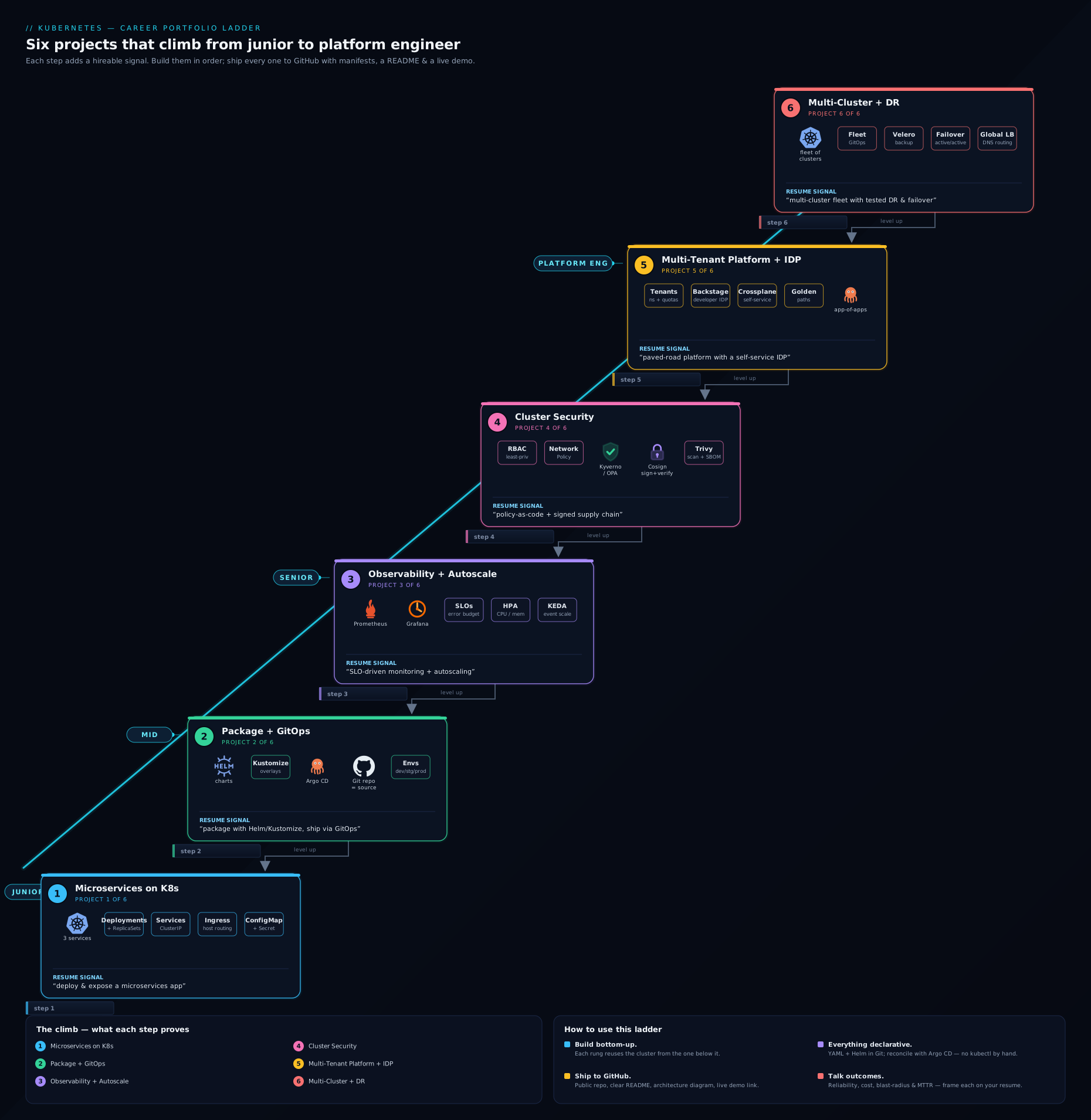
The diagram above shows the six projects as a rising ladder, with each rung’s headline CNCF tooling and the skill cluster it proves — read it as the order to build in and the story your finished GitHub profile will tell, from a single deployed app at the bottom to a federated, self-healing, disaster-ready platform at the top.
How to present each project on GitHub: the presentation standard
A project that is not legible to a stranger in five minutes is, for hiring purposes, half-finished. Hold every repo to this standard — it is the difference between a portfolio that gets you interviews and a graveyard of half-documented experiments.
The README is the product. A recruiter will read the README and look at the diagram; many never open the source. Lead with a one-sentence description of what the project does, then the diagram, then how it works, how to run it, and a teardown — with the most impressive thing (a demo GIF or a green CI badge) at the very top.
| README element | Why it matters | What “good” looks like |
|---|---|---|
| One-line summary | The six-second scan | “Multi-tenant Kubernetes platform with Backstage golden paths and GitOps.” |
| Architecture diagram | Shows you think in systems | A clean PNG/SVG of the components and traffic/data flow, embedded inline |
| Demo GIF / screenshots | Proof it actually runs | A short clip of kubectl get pods healthy, the app responding, Argo CD synced |
| “How it works” | Demonstrates understanding | A few paragraphs explaining the key decisions, not just the steps |
| “Deploy it yourself” | Shows reproducibility | Exact commands from a clean machine — ideally a single make up on kind |
| Teardown / cost note | Signals operational judgement | “Runs free on local kind; make down / kind delete cluster to clean up” |
| CI / lint status | Instant credibility | A green Actions badge running kubeconform/kube-linter/helm lint |
A few points deserve emphasis. The architecture diagram need not be fancy — a clean drawing (draw.io, Excalidraw, the Kubernetes/CNCF icon set) of components and traffic flow proves you think in systems, and is the single highest-leverage addition to a repo. Because these projects are local-first, make reproducibility your headline feature: a Makefile with make up that creates the kind cluster, installs everything, and brings the app to a healthy state is enormously persuasive — it says “I can be handed a laptop and ship.” Add a CI workflow that lints manifests (kubeconform, kube-linter) and runs helm lint; a green badge proves the YAML is real and valid. Keep the repo clean — meaningful commits, a sensible layout, a .gitignore that excludes kubeconfigs and rendered secrets, and no credentials ever committed (a leaked token or kubeconfig in Git history is an instant rejection from a security-conscious team; rungs 4–5 teach RBAC, sealed/external secrets, and signing precisely so there is nothing to leak). Finally, pin four to six of these repos to your GitHub profile and write a profile README that links them in ladder order, so the story greets every visitor.
Going deeper: turn a finished rung into an interview offer
A repo built to the standard above gets you noticed; what converts it into an offer is being able to talk about it like an engineer who owns production. This is the layer most candidates skip, and it is where the senior signal actually lives.
Rehearse each rung as a STAR story. Interviewers open with “walk me through something you built.” Have a 90-second answer per rung structured as Situation, Task, Action, Result: the situation (“a three-service app deployed by hand”), the task (“make releases reproducible and auditable”), the action (“wrapped it in a Helm chart, drove it with Argo CD, enabled self-heal and prune”), and the quantified result (“every change ships by commit across three environments, zero manual apply”). The result is your resume bullet said out loud — which is precisely why you wrote each bullet with a number in it.
Expect the deep-dive probe, and pre-load the honest answer. A good interviewer will not stop at the happy path; they will ask what broke and what you would change. The candidates who win are the ones who volunteer the messy part — the failing readiness probe, the RBAC Forbidden you had to debug, the Kyverno policy that blocked your own deploy — because struggling with and resolving a real failure is the thing a certification can never demonstrate. Keep a short “decisions & trade-offs” note (an ADR-style file) in each repo; it is the senior artefact that turns “I followed a tutorial” into “I made a call, and here is why.”
| Likely probe | Weak answer | Senior-signal answer |
|---|---|---|
| “Why this tool over the alternative?” | “It’s what the tutorial used.” | “Helm for packaging, Kustomize for env drift — I chose X here because Y; the trade-off was Z.” |
| “What broke, and how did you debug it?” | “It just worked.” | A specific failure, the signal you read (kubectl describe, events, logs), and the fix. |
| “How would this scale or fail in production?” | “I’d add more replicas.” | Concrete limits: control-plane load, HPA thrash, the CNI’s policy throughput, the DR RTO you measured. |
| “What would you do differently next time?” | “Nothing.” | An honest improvement: Gateway API over Ingress, external-secrets over sealed, cell-based tenancy. |
Tailor the depth to the audience. A recruiter wants the one-line summary and the fact that it runs; a hiring manager wants the architecture diagram and the trade-offs; a staff-level interviewer wants the failure modes and the numbers. The same repo serves all three if your README front-loads the summary and diagram and your spoken story can descend on demand — start shallow, and go one level deeper each time they ask “and then?”
Make the diagram do heavy lifting. Beyond “it exists,” a diagram that shows traffic and data flow plus the failure path — where a request dies, where DR kicks in — signals systems thinking far more than a box-and-line inventory. For the platform rungs, a two-level diagram (one context view of the whole platform, one component view of a request’s path) mirrors how architects actually communicate a design.
Record the demo once, reuse it everywhere. A 20–30 second GIF of make up bringing the platform to healthy, Argo CD going green, and the app responding is worth more than paragraphs — it is proof, it embeds in the README, and you can drop the same clip into a LinkedIn post or a job application. When you turn these rungs into full spoken answers, the interview & CKA/CKAD prep lesson drills the exact question patterns you will face.
Hands-on lab: scaffold the ladder on a free local cluster
You do not need a cloud account to start — you need a running cluster and the discipline to commit. This lab stands up the foundation (rung 1 plus the GitOps engine from rung 2) on kind, so you have a working base to extend through the rest of the ladder.
1. Create a free local cluster.
# Install kind + kubectl first (see kind.sigs.k8s.io). Then:
kind create cluster --name portfolio
kubectl cluster-info --context kind-portfolio
kubectl get nodes          # expect one control-plane node, STATUS Ready
2. Deploy the rung-1 microservices app (minimal example).
kubectl create namespace shop
kubectl create deployment web --image=nginx --replicas=2 -n shop
kubectl expose deployment web --port=80 --target-port=80 -n shop   # ClusterIP Service
kubectl get pods,svc -n shop                                       # all pods Running, Service has a ClusterIP
In a real project you would replace this with your own multi-stage-built images (kind load docker-image <img> --name portfolio) and add probes, limits, ConfigMaps, and an Ingress — but this proves the loop end to end.
3. Add an Ingress controller and expose the app.
helm repo add ingress-nginx https://kubernetes.github.io/ingress-nginx
helm install ingress-nginx ingress-nginx/ingress-nginx -n ingress-nginx --create-namespace
kubectl -n ingress-nginx rollout status deploy/ingress-nginx-controller
# then apply an Ingress routing your host to the `web` Service in `shop`
4. Install the GitOps engine (rung 2 foundation).
kubectl create namespace argocd
kubectl apply -n argocd -f https://raw.githubusercontent.com/argoproj/argo-cd/stable/manifests/install.yaml
kubectl -n argocd rollout status deploy/argocd-server
# point an Argo CD Application at your Git repo with automated sync + self-heal
Validation. kubectl get pods -A shows the app, ingress-nginx, and Argo CD all Running; the app answers through the Ingress; and once you connect an Argo CD Application, argocd app get <name> reports Synced and Healthy. From here, each rung is a new folder and a new commit on top of this base.
Cleanup.
kind delete cluster --name portfolio
Cost note. Nothing — kind runs entirely in local Docker. This is the whole point: state in your README that the entire ladder builds on a free local cluster and tears down with one command. That sentence signals exactly the cost-and-resource judgement hiring managers look for, and removes any “I didn’t have a cloud budget” excuse for not building.
Common beginner mistakes
These are portfolio strategy traps — misconceptions about what actually impresses a hiring manager — and they are distinct from the technical symptom→cause→fix problems in the troubleshooting table below. Each is a belief that quietly sinks a portfolio, followed by the reality that replaces it.
-
“More projects is better.” A GitHub full of six half-finished, undocumented experiments reads as worse than one polished, reproducible project, because it signals you don’t finish what you start. Reality: depth beats breadth. One rung taken all the way — README, diagram, CI, teardown — outperforms four abandoned ones. Ship and document rung n completely before you start n+1.
-
“The code speaks for itself.” It does not. A recruiter spends seconds and a hiring manager minutes; if the README doesn’t say what the project does and how to run it, the repo is invisible no matter how good the manifests are. Reality: the README is the product; the code is the evidence behind it.
-
“A toy is fine as long as it runs.” A guestbook that only ever prints “hello” proves you can
kubectl applyand nothing more. Reality: the lifecycle is the point — probes, config externalisation, observability, a real failure you handled. Take a modest app far rather than a trivial one nowhere. -
“I’ll add observability and security later.” Later never comes, and a project with no dashboards and no NetworkPolicy signals a developer who stops at “it works on my machine.” Reality: the rungs that separate a developer from an SRE or platform engineer are exactly observability (rung 3) and security (rung 4) — skip them and you skip the hireable signal.
-
“Copy-paste the tutorial and move on.” Interviewers recognise the unmodified CNCF Online Boutique manifests and the default kube-prometheus-stack on sight; a verbatim copy with your name on it is a negative signal. Reality: change something and be able to explain why — swap Ingress for Gateway API, add an SLO the tutorial lacked, tighten the policies. The delta is your contribution, and the “why” is your interview answer.
-
“Count the tools, win the job.” Listing fifteen CNCF logos you touched once impresses no one and invites a probe you cannot answer. Reality: hiring managers value one workload driven through the whole lifecycle over a scavenger hunt of half-used tools. Breadth without depth is a liability the moment someone asks a follow-up question.
-
“It’s just a demo, secrets don’t matter.” A kubeconfig or a token in public Git history is an instant, often unrecoverable rejection from any security-conscious team. Reality: treat every repo as production for secret hygiene —
.gitignorekubeconfigs, use Sealed or External Secrets, and never commit a credential (rung 4 exists to make this a reflex). -
“No teardown needed, it’s local.” Omitting a teardown and cost note throws away a free seniority signal and leaves reviewers wondering about your operational judgement. Reality: a one-command
make downand a “runs free on local kind” line prove cost-and-resource awareness that almost no junior portfolio demonstrates.
Common mistakes & troubleshooting
| Symptom / mistake | Likely cause | Fix |
|---|---|---|
| Great manifests, no interview traction | No README, no diagram, illegible to a non-author | Apply the presentation standard; lead with summary, diagram, and make up |
| Resume bullet reads “deployed an app to Kubernetes” and lands flat | No quantification | Add a number: replicas at peak, P95 latency, SLO, environments, RTO, policies |
kubectl get endpoints is empty; Service routes nowhere |
Service selector doesn’t match the pod labels |
Align the Service selector with the Deployment’s pod template labels |
Pods stuck ImagePullBackOff on a local cluster |
Image never loaded into the cluster | kind load docker-image <img> / minikube image load <img>, or push to a registry |
| NetworkPolicy “does nothing” | The CNI doesn’t enforce policy (default kind CNI) | Install a policy-enforcing CNI (Calico/Cilium) before testing default-deny |
Argo CD shows OutOfSync forever |
Manifests in Git differ from a controller mutating them, or self-heal off | Enable self-heal/prune; exclude controller-managed fields; reconcile the diff |
| Kyverno blocks your own deploy | A policy is stricter than your manifest (limits, labels, image source) | Read the rejection message; fix the manifest — that the policy works is the point |
| Committed a kubeconfig or secret to Git | No .gitignore; secrets in plain manifests |
Use Sealed/External Secrets; purge history; rotate; .gitignore kubeconfigs |
| Trying to build all six at once and finishing none | Scope overload | Build strictly in ladder order; ship and document rung n before starting n+1 |
Best practices
- Build in order, finish each rung. One finished, documented “deploy and expose” project beats four half-built repos. Shipping is the skill being demonstrated.
- GitOps from rung two onward. Once you have Argo CD, deliver every later rung through it. Click-ops teaches you the dashboard; declarative GitOps teaches you the job.
- Document as you build, not at the end. Write the README while the decisions are fresh; you will forget why you chose ingress-nginx over Gateway API, or KEDA over a plain HPA, a week later.
- Reuse across rungs. The rung-1 app is the thing you package in rung 2, observe in rung 3, secure in rung 4, multi-tenant in rung 5, and replicate in rung 6. A connected portfolio tells a far stronger story than six disconnected toys.
- Quantify relentlessly. If you can measure it — replicas, latency, error budget, policy count, restore time — put the number in the README and the resume bullet.
- Make it reproducible. A single
make upon a fresh kind cluster is the most persuasive thing in the repo: it proves a stranger can run your work. - Pin and curate. Pin your best four-to-six repos on your GitHub profile and write a profile README that links them in ladder order.
Security notes
These projects are also a chance to demonstrate secure-by-default habits, which hiring managers weight heavily — and rung 4 exists precisely to make security a first-class part of your portfolio, not an afterthought:
- Never commit secrets or kubeconfigs. Use Sealed Secrets or the External Secrets Operator so nothing sensitive lands in Git, and add a
.gitignorefor kubeconfigs and rendered manifests. A leaked token in public Git history is a hard, permanent rejection unless you rewrite history and rotate. - Default-deny everything, then allow. Apply a default-deny NetworkPolicy and least-privilege RBAC as the baseline, opening only what each workload needs — and prove the deny works, because demonstrating the negative is what convinces a security-minded interviewer.
- Enforce the restricted Pod Security profile — non-root, no privilege escalation, dropped capabilities, read-only root filesystem — and fix the app to comply rather than relaxing the policy.
- Prove provenance. Sign images with Cosign, generate an SBOM, and admit only verified images with Kyverno’s
verifyImages(or the Sigstore policy controller), so what runs in the cluster is provably what you built. - Guardrails as code. Express standards as Kyverno/OPA policies in Git so they are versioned, reviewable, and auto-applied to every new tenant — the platform-engineering way to make the secure path the default path.
Cost & sizing
The entire ladder is buildable for ₹0 if you stay local — and being disciplined about that is itself the lesson, because cost-and-resource awareness is rare and valued in candidates. The single highest-leverage habit is to add a teardown command to every README and actually run it between demos.
| Project | Where it runs / main “cost” | Keep it cheap by |
|---|---|---|
| 1 — Deploy & expose | Local kind/minikube | Free; kind delete cluster when done |
| 2 — Helm/Kustomize + GitOps | Local cluster + Argo CD | Free; one small cluster runs everything |
| 3 — Observability + autoscaling | kube-prometheus-stack (memory-hungry) | Give the kind node a few GB; scale Prometheus retention down |
| 4 — Security | Policy-enforcing CNI + Kyverno | Free; Calico/Cilium on kind add modest overhead |
| 5 — Multi-tenant + Backstage | Backstage + vClusters | Free locally; vClusters are lightweight; run Backstage in-cluster |
| 6 — Multi-cluster + DR | 2+ kind/k3d clusters + MinIO | Free; k3d clusters are tiny; tear down spares between demos |
If you do later run a rung on a managed cluster (AKS/EKS/GKE) for a screenshot, note in the README that the control plane and node VMs are the spend, <provider> aks/eks stop (or delete the node pool) between demos, and that the project is otherwise free on local Kubernetes — that single sentence signals judgement.
Interview & exam questions
- “Why should I hire you over someone with more Kubernetes certifications?” — Certifications show I learned the material; my portfolio shows I can apply it. I’ve shipped six end-to-end Kubernetes projects — from a deployed microservices app to a multi-cluster platform with DR, all GitOps-managed, hardened, and documented — and can walk you through the decisions in any of them.
- “Walk me through how a request reaches your microservices app.” — Browser → Ingress controller (ingress-nginx) matches the host/path → routes to the front-end
ClusterIPService → the front end calls the API by its in-cluster DNS name → the API reaches the datastore Service; config comes from a ConfigMap, secrets from a Secret, and every pod has readiness/liveness probes. - “What is GitOps and what does Argo CD actually do?” — GitOps makes Git the single source of truth for cluster state; Argo CD continuously compares the live cluster to the manifests in Git and reconciles any drift, with self-heal and prune, so you deploy by committing rather than running
kubectl apply. - “Helm or Kustomize — and why use both?” — Helm templates and packages an app with releases and rollback; Kustomize patches a plain-YAML base into per-environment overlays without templating. They compose well: Helm for the package, Kustomize (or per-env values) for environment differences — same base, no divergence.
- “What’s the difference between an SLI, an SLO, and an error budget, and how did you implement them?” — An SLI is the measured indicator (e.g. % of fast, successful requests); an SLO is the target (99.5% over a window); the error budget is the allowed shortfall (0.5%). In my observability project I measured the SLI in PromQL, alerted on the SLO via Alertmanager, and tracked budget burn on a Grafana panel.
- “HPA versus KEDA — when would you reach for KEDA?” — The HPA scales on CPU/memory or custom metrics; KEDA scales on external event sources (queue depth, HTTP RPS, cron, cloud signals) and supports scale-to-zero. I use the HPA for steady CPU-bound load and KEDA when the right signal is a queue or the workload should idle at zero replicas.
- “How do you stop a compromised pod moving laterally across the cluster?” — Default-deny NetworkPolicy so pods can’t talk unless explicitly allowed; least-privilege RBAC so the ServiceAccount token is near-useless if stolen; the restricted Pod Security profile (non-root, no escalation, dropped caps); and admit only signed images — defence in depth across network, identity, runtime, and supply chain.
- “How do you guarantee the image running in production is the one you built?” — Sign the image at build time with Cosign, generate an SBOM, and enforce a Kyverno
verifyImages(or Sigstore policy controller) admission policy that rejects any image without a valid signature from my key — so unsigned or tampered images never start. - “How do you let many teams share a cluster safely?” — Namespaces (or vClusters for stronger isolation) per tenant, each with a ResourceQuota and LimitRange for fairness, tenant-scoped RBAC for access boundaries, and Kyverno
generaterules that auto-apply a default-deny NetworkPolicy and baseline guardrails to every new tenant — self-service with guardrails, fronted by a Backstage golden path. - “How would you back up and recover a stateful Kubernetes workload?” — Velero for scheduled backups of namespaced resources and persistent volumes to object storage; to recover,
velero restoreinto a healthy (or standby) cluster. I tested it by deleting the namespace and restoring the app with its data, measuring the RTO/RPO, and documented the failover in a DR runbook. - “What is fleet GitOps and why an ApplicationSet?” — An Argo CD ApplicationSet generates many Applications from one definition (e.g. a cluster generator across the fleet), so a single Git change rolls a platform out to every cluster consistently — the multi-cluster equivalent of the app-of-apps pattern.
- “What’s the difference between a Deployment and a StatefulSet, and which did your datastore use?” — A Deployment manages interchangeable, stateless replicas; a StatefulSet gives stable network identities and stable per-pod PersistentVolumeClaims, which is what stateful stores need — so the datastore I backed up with Velero ran as a StatefulSet with a PVC.
Quick check
- What is the defining advantage of a portfolio over a certification in a Kubernetes hiring conversation?
- In the GitOps project, what does Argo CD do when the live cluster drifts from Git?
- Why does a NetworkPolicy sometimes appear to “do nothing” on a fresh kind cluster, and how do you fix it?
- Name the two autoscaling mechanisms in rung 3 and the key thing KEDA adds over a plain HPA.
- What single fact about where these projects run should you put in every README, and why?
Answers
- A portfolio is evidence you can build and make independent decisions under real failure conditions, which is far harder to fake than passing an exam — interviewers trust it more and can probe it concretely.
- Argo CD reconciles the drift: with self-heal and prune enabled, it brings the cluster back to the state declared in Git automatically, so Git remains the single source of truth.
- The default kind CNI does not enforce NetworkPolicy — you must install a policy-enforcing CNI such as Calico or Cilium before default-deny will actually block traffic.
- The Horizontal Pod Autoscaler (CPU/memory or custom metrics) and KEDA; KEDA scales on external event sources (e.g. queue depth) and supports scale-to-zero.
- That the whole ladder runs free on a local cluster (kind/minikube/k3d) and tears down with one command — it proves reproducibility and signals cost-and-resource judgement, which almost no junior portfolio demonstrates.
Exercise
Build Project 1 — deploy and expose a microservices application — end to end on a free local cluster, and present it to the standard in this lesson. Follow the build outline: containerise two or three services with multi-stage Dockerfiles, load them into a kind/minikube cluster, write a Deployment per service (with readiness/liveness probes and resource requests/limits), wire them with ClusterIP Services, expose the front end through an ingress-nginx Ingress, and externalise all configuration into a ConfigMap and a Secret. Then do the two things that turn a working project into a hiring asset: write the README to the presentation standard (one-line summary, embedded architecture diagram, demo GIF or screenshots, “how it works”, a single-command make up deploy, and a teardown), and draft your quantified resume bullet from the template above with your real numbers (services, replicas, time-to-deploy).
When you can hand a stranger that repo URL and they bring the whole thing up on their own machine and understand it in five minutes, you have completed the first rung — and you have a template, and a base cluster, for the other five.
Practice challenges
The Exercise above is challenge 1 in narrative form; here is the full graded ladder as shippable, checkable tasks. Treat each as a “ship this rung” job — not “read about it,” but “publish a repo a stranger can run.” They escalate from your first deploy to a senior-grade platform, and each is deliberately concrete so you know exactly when you are done. Expand each box for its acceptance criteria and hints; the build outline for every rung is in the project sections above.
Challenge 1 — Ship rung 1 to the standard (beginner). Deploy a 2–3 service app and publish it as a hiring-grade repo.
<details> <summary>Acceptance criteria & hints</summary>
Done when:
kubectl get pods,svc,ingress -n <app>shows every podRunning, Services with ClusterIPs, and an Ingress with an address.- The app loads in a browser through the Ingress hostname (e.g.
app.localdev.me). - No configuration or credential is baked into an image — everything comes from a ConfigMap/Secret.
- A stranger runs one command (
make up) on a fresh kind cluster and reaches a healthy app;make downcleans up. - The README leads with a one-line summary, an embedded architecture diagram, and screenshots.
Hints: load images with kind load docker-image <img> --name <cluster> to skip running a registry; *.localdev.me resolves to 127.0.0.1, so it needs no /etc/hosts edit for local Ingress; verify the DNS wiring with kubectl exec deploy/<api> -n <ns> -- nslookup db.<ns>.svc.cluster.local.
</details>
Challenge 2 — Make the YAML provably valid (beginner → intermediate). Add a CI workflow and a green badge to any rung.
<details> <summary>Acceptance criteria & hints</summary>
Done when: a GitHub Actions workflow runs kubeconform (or kube-linter) and helm lint on every push, fails the build on an invalid manifest, and a green badge sits at the top of the README.
Hints: kubeconform -strict -summary catches schema errors entirely offline; pipe rendered charts through it with helm template chart/ | kubeconform -strict; the badge markdown is .
</details>
Challenge 3 — Prove the GitOps loop (intermediate). Ship rung 2 and capture reconciliation on video.
<details> <summary>Acceptance criteria & hints</summary>
Done when: helm install/upgrade/rollback all behave; the same base renders dev (1 replica) and prod (3 replicas); an Argo CD Application reports Synced and Healthy; and a commit changing the image tag or replica count reconciles with no manual kubectl apply, captured as a short GIF.
Hints: set syncPolicy.automated with selfHeal: true and prune: true; demonstrate self-heal by manually editing a live Deployment (kubectl scale) and watching Argo CD revert it; record the terminal plus the Argo CD UI with asciinema or a screen recorder and export a GIF.
</details>
Challenge 4 — Prove it stays healthy under load (advanced). Ship rung 3 with an SLO and a scaling graph.
<details> <summary>Acceptance criteria & hints</summary>
Done when: a Grafana RED dashboard (rate, errors, duration) is committed as JSON; a written SLO (“99.5% of requests under 300 ms”) has a PromQL query and an error-budget burn alert behind it; and a k6 run visibly scales replicas out and back, with the graph embedded in the README.
Hints: install kube-prometheus-stack, expose app metrics, and add a ServiceMonitor; for the SLI use a ratio of fast-and-successful requests to total over a rolling window; drive load with k6 run --vus 50 --duration 2m script.js while watching kubectl get hpa -w.
</details>
Challenge 5 — Prove the negative (advanced). Ship rung 4 and demonstrate what is blocked.
<details> <summary>Acceptance criteria & hints</summary>
Done when: a default-deny NetworkPolicy blocks a connection you screenshot; the restricted Pod Security profile is enforced and the app complies; Kyverno rejects a deliberately non-compliant Deployment (missing limits or a latest tag); and the cluster admits only Cosign-signed images.
Hints: use a policy-enforcing CNI (Calico/Cilium) on kind or the deny won’t bite; test connectivity with kubectl exec <pod> -- wget -qO- --timeout=3 http://<svc>; sign with cosign sign and enforce with a Kyverno verifyImages rule; keep every rejection message as evidence — the block is the deliverable.
</details>
Challenge 6 — Prove you can lose a cluster (senior stretch). Ship rung 6 with a measured recovery.
<details> <summary>Acceptance criteria & hints</summary>
Done when: one Argo CD ApplicationSet deploys the platform to two local clusters; a scheduled Velero backup of a stateful namespace (with its PVC) completes to a MinIO bucket; and a velero restore brings the app and its data back into the standby cluster, with a measured RTO/RPO in docs/dr-runbook.md.
Hints: spin up two clusters with kind create cluster --name a / --name b (or k3d); use an ApplicationSet cluster generator so one definition fans out; point Velero’s AWS provider plugin at the in-cluster MinIO endpoint; load recognisable rows before the backup so you can prove the data survived the restore, not just the pods.
</details>
Certification mapping
This portfolio is the practical complement to the CNCF certification ladder; each project reinforces specific exams and the roles that hire for them. The performance-based CKA/CKAD/CKS exams reward exactly the muscle memory these projects build, so the ladder doubles as hands-on exam prep.
| Project | Reinforces certification(s) | Target roles it supports |
|---|---|---|
| 1 — Deploy & expose | KCNA, CKAD | Junior cloud / application developer on K8s |
| 2 — Helm/Kustomize + GitOps | CKAD, CKA | DevOps engineer, release engineer |
| 3 — Observability + autoscaling | CKA, CKAD | SRE, platform / DevOps engineer |
| 4 — Security | CKS | Security / platform engineer |
| 5 — Multi-tenant + Backstage IDP | CKA, CKS | Platform engineer, IDP / DevEx engineer |
| 6 — Multi-cluster + DR | CKA, CKS | Senior platform engineer, SRE, architect |
Taken together, the six projects give you concrete, demonstrable evidence across the entire KCNA → CKAD → CKA → CKS ladder, and branch credibly into platform-engineering and SRE roles — exactly the spread a versatile Kubernetes engineer needs.
Glossary
- GitOps — an operating model where Git is the single source of truth for cluster state and a controller (e.g. Argo CD) continuously reconciles the cluster to match it.
- Argo CD ApplicationSet — an Argo CD resource that generates many Applications from one template, used to deploy a platform across a fleet of clusters from a single definition.
- Helm chart — a versioned, templated package of Kubernetes manifests with release management and rollback.
- Kustomize overlay — an environment-specific patch over a shared base of plain-YAML manifests, avoiding copy-paste divergence between
dev/staging/prod. - SLI / SLO / error budget — the measured reliability indicator / the target for it / the allowed shortfall before you must stop shipping and fix reliability.
- HPA — Horizontal Pod Autoscaler; scales replicas on CPU/memory or custom metrics.
- KEDA — Kubernetes Event-Driven Autoscaling; scales on external event sources (queue depth, HTTP RPS, cron) and supports scale-to-zero.
- NetworkPolicy — a Kubernetes resource that controls pod-to-pod and pod-to-external traffic; enforced by the CNI (e.g. Calico, Cilium), default-allow until a policy selects a pod.
- Pod Security Admission (restricted) — the built-in admission profile enforcing non-root, no privilege escalation, dropped capabilities, and a read-only root filesystem.
- Kyverno — a policy-as-code engine for Kubernetes that can validate, mutate, generate, and verify image signatures at admission time.
- Cosign / SBOM — Sigstore’s image-signing tool / a Software Bill of Materials listing an image’s components, together proving provenance from build to runtime.
- Multi-tenancy / vCluster — sharing one cluster among teams safely; vCluster runs a lightweight virtual control plane per tenant for stronger isolation than a bare namespace.
- Backstage / golden path — an Internal Developer Portal / a templated, paved-road workflow that lets developers self-serve compliant resources without writing raw YAML.
- Velero — a tool for backing up and restoring Kubernetes resources and persistent volumes to object storage, used here for disaster recovery and cluster migration.
- RTO / RPO — Recovery Time Objective (how long to recover) / Recovery Point Objective (how much data loss is tolerable) — the two numbers that define a DR target.
- Quantified resume bullet — an achievement statement with a concrete number (replicas, latency, policy count, restore time) so it is credible and memorable.
- Portfolio (hiring sense) — a curated set of real, runnable projects on GitHub that serve as evidence of skill, as opposed to a certificate that attests only to an exam result.
- kind (Kubernetes-in-Docker) — a tool that runs a full Kubernetes cluster inside Docker containers on your laptop, for free, used throughout this lesson to build and tear down every rung locally.
- STAR — an interview answer structure — Situation, Task, Action, Result — for narrating something you built so the quantified result lands.
- ADR (Architecture Decision Record) — a short file recording a technical decision and its trade-offs; the artefact that turns “I followed a tutorial” into “I made a call.”
- RED method — Rate, Errors, Duration: the three signals a request-driven service dashboard should show at a glance.
- ServiceMonitor — a Prometheus Operator custom resource that tells Prometheus which pods or endpoints to scrape for metrics.
- kubeconform / kube-linter — offline validators that check Kubernetes manifests against the API schema and for best-practice issues; a green CI badge running them proves your YAML is real and valid.
- ClusterIP Service — the default Service type: a stable in-cluster virtual IP and DNS name that load-balances to a set of pods, reachable only from inside the cluster.
- Ingress / Ingress controller — the routing rules (Ingress) and the reverse proxy that implements them (controller, e.g. ingress-nginx) that send external HTTP(S) traffic by host/path to in-cluster Services.
- Definition of done / acceptance criteria — the concrete, checkable “done when…” conditions that prove a rung is actually complete rather than merely started.
Next steps
You now have a build plan for a portfolio that tells a complete Kubernetes story — deploy, package, operate, secure, productise, federate — and the standard to make every repo legible to a hiring manager. Build the six in order on a free local cluster, document as you go, and pin them to your profile.
- Next lesson: Kubernetes Exam-Prep Kit: KCNA, CKA, CKAD & CKS — turn these projects into certifications, with per-exam curriculum checklists, scenario practice tasks with worked solutions,
kubectlspeed tips, and exam-day logistics.
Related reading to go deeper on individual rungs:
- The Kubernetes Architecting Ladder: From a Single Cluster to Multi-Region — the architecture progression behind rungs 5 and 6, so requirements drive the design.
- GitOps with Argo CD: App-of-Apps & Progressive Delivery — the delivery engine behind rungs 2, 5 and 6.
- Kubernetes Autoscaling: HPA, KEDA & Karpenter — the depth behind the autoscaling in rung 3.
- Kyverno Policy-as-Code: Mutate, Generate & Image Verification — the guardrails and image-signing enforcement in rungs 4 and 5.
- Kubernetes Multi-Tenancy: vCluster, Hierarchical Namespaces & Quotas — the tenancy model that underpins the platform in rung 5.