At 02:10 a Regional impairment starts in ap-south-1. Not a clean outage — the EC2 control plane is slow, new instances stick in pending, and about a third of your API calls time out. Your incident channel fills with the same three questions every team asks in this exact moment, and none of them have good answers if you have not decided them in advance: how long can we be degraded before it is a business event (that is your RTO), how much of the last few minutes of data are we willing to lose in the handoff (that is your RPO), and does the thing we fail over to actually exist and actually work right now? Disaster recovery is the discipline of answering those three questions before the pager goes off — with an architecture, a runbook, and a rehearsal — instead of discovering the answers live at 02:10.
Disaster recovery (DR) is the set of processes and infrastructure that restore a workload after a disruption that a single Region (or a single Availability Zone) cannot absorb — a Regional control-plane event, a catastrophic bad deploy, a ransomware/data-corruption incident, or the loss of a data centre. Every DR design is a negotiation between two numbers and a bill: RTO (recovery time objective — how fast you must be back), RPO (recovery point objective — how much data you may lose), and cost. AWS gives you four canonical patterns that sit on a spectrum from cheap-and-slow to expensive-and-instant — Backup & Restore, Pilot Light, Warm Standby, and Multi-Site Active/Active — and a toolbox of building blocks (AWS Backup, cross-Region replicas, Aurora Global Database, S3 Cross-Region Replication, DynamoDB global tables, Route 53 failover, Application Recovery Controller, and AWS Elastic Disaster Recovery) that you assemble to hit your target numbers.
By the end of this article you will be able to define RTO and RPO precisely and compute them for a real workload, place any workload on the four-pattern spectrum and defend the choice on cost, wire the building blocks that deliver each pattern, run a failover and a failback without losing or corrupting data, and rehearse the whole thing in a game day — because the one iron law of this field is that untested DR is not DR, it is a wish. We will build a Warm Standby end to end, fail it over on purpose, watch traffic move, and fail it back. The tutorials that stop at “enable cross-Region replication” skip the parts that actually bite in an incident — the quota that was never raised in the second Region, the replica you cannot fail back, the health check that never flipped — and those are exactly what this article is about.
What problem this solves
A single AWS Region is engineered to be extraordinarily reliable, but “extraordinarily reliable” is not “cannot be impaired.” Regional events are rare and real: a control-plane degradation that stalls launches and API calls, a networking or DNS fault that browns out inter-service traffic, a dependency that a whole Region leans on going sick for hours. When one happens, everything you run in that Region is affected at once, across every AZ — because a Regional impairment is not an AZ failure that Multi-AZ can route around. Multi-AZ buys you survival of a data-centre loss; it buys you nothing when the Region’s own control plane is unhealthy. That is the gap DR strategy closes, and nothing inside one Region closes it.
There is a second, nastier class of disaster that even a second Region does not automatically solve: logical corruption. A bad migration, a buggy deploy, or a ransomware event corrupts or deletes your data — and if you are replicating continuously, the corruption replicates too, arriving in your DR Region seconds later. Infrastructure DR (a second Region) protects against losing the infrastructure; it does not protect against a valid-looking write that destroys your data. That is why point-in-time backups with immutability sit underneath every replication-based strategy, not beside it.
The pain is concrete and career-defining. A team that “has a DR plan” — a nightly RDS snapshot copied to another Region and a wiki page — discovers during a real event that: the restore takes four hours because it rehydrates a cold multi-hundred-GB snapshot; there are no AMIs for the app tier in the failover Region; the security groups, IAM roles and secrets the app needs were never created there; the service-quota for the instance type they need is at the default of a handful and the increase request takes days; and DNS failover is a human flipping a record with a one-hour TTL that then pins resolvers for an hour. Their measured recovery is nine hours against an RTO they told the board was one. Who hits this: anyone with a contractual or regulatory RTO/RPO (payments, health, trading, government), anyone whose revenue-per-minute makes a multi-hour outage a board-level event, and anyone who has ever written “highly available” on a slide without a rehearsal behind it.
What each protection level actually covers — this is why “we’re Multi-AZ” is not an answer to a Regional-outage or a corruption requirement:
| Failure event | Single instance | Multi-AZ (one Region) | Cross-Region DR | Backups + PITR |
|---|---|---|---|---|
| Instance / host dies | Down | Survives (other AZ) | Survives | N/A |
| AZ (data-centre) outage | Down | Survives | Survives | N/A |
| Regional control-plane impairment | Down | Down (all AZs) | Survives | Restore elsewhere (slow) |
| Regional network / DNS brownout | Down | Down | Survives | Restore elsewhere (slow) |
| Bad deploy poisons the Region | Down | Down | Survives (deploy per-Region) | Restore to point-in-time |
| Data corruption / bad migration | Down | Down | Replicates the corruption | Only this recovers it |
| Ransomware encrypts data | Down | Down | Replicates the encryption | Immutable backup recovers it |
Accidental DROP TABLE |
Lost | Lost | Replicated | PITR / backup recovers it |
Read the bottom four rows twice: cross-Region replication and logical-recovery are different problems, and a complete DR posture needs both. The rest of this article is mostly about the top rows — surviving infrastructure loss — but the lab and the security section keep the bottom rows honest.
Learning objectives
By the end of this article you can:
- Define RTO and RPO precisely, place them on a real incident timeline, and compute the RTO/RPO a given design actually delivers (not the marketing number).
- Place any workload on the four-pattern spectrum — Backup & Restore, Pilot Light, Warm Standby, Multi-Site Active/Active — and defend the choice on RTO, RPO and cost.
- Assemble the building blocks: AWS Backup cross-Region/cross-account copy, RDS/Aurora cross-Region read replicas and Aurora Global Database, S3 Cross-Region Replication, DynamoDB global tables, Route 53 failover with Application Recovery Controller readiness checks and routing controls, IaC to rebuild a Region, and AWS Elastic Disaster Recovery for lift-and-shift.
- Execute a failover and — the part everyone forgets — a failback, and reason about the data-consistency problem each creates.
- Quantify replication lag as live RPO, alarm on it, and know why planned and unplanned failover deliver different RPOs.
- Build a Warm Standby hands-on: a scaled-down app in a second Region behind Route 53 failover, replicated data, a simulated failover, and a clean failback and teardown.
- Run a DR game day, measure real numbers against the contract, and explain why untested DR is no DR.
- Model the cost of each pattern with rough INR/USD figures so the choice is a business decision, not a guess.
Prerequisites & where this fits
You should be comfortable with single-Region AWS at a production level: VPCs across multiple Availability Zones, an Application Load Balancer in front of Auto Scaling EC2 or ECS/EKS, RDS/Aurora and DynamoDB basics, Route 53 hosted zones and record types, IAM roles, S3, and infrastructure as code (Terraform or CloudFormation). You need the distinction between an AZ (an isolated, data-centre-scale failure domain inside a Region) and a Region (an independent geographic deployment with its own control plane); if that is fuzzy, read AWS Regions and Availability Zones: Resiliency from the Ground Up first, because the entire premise of cross-Region DR is that a Region is a blast radius you must be able to escape.
This article is the strategy and decision layer of the resilience track. It sits directly above three neighbours and points into each where the depth lives. For the single-Region high-availability foundation — Multi-AZ and read replicas — see RDS High Availability: Multi-AZ vs Read Replicas (and When to Use Each). For the top rung of the ladder, running both Regions hot, see AWS Multi-Region Active-Active Architecture: Route 53, Global Tables and Aurora Global Database. For the backup mechanics that underpin every pattern — plans, cross-Region copy and immutable vaults — see AWS Backup and Disaster Recovery: Protect Workloads Across Regions and the hands-on AWS Backup Hands-On: Centralized, Cross-Account, Immutable Backups with Vault Lock. DR is also one pillar (Reliability) of a Well-Architected review; a formal Well-Architected Reliability-pillar review is the governance wrapper that forces the RTO/RPO conversation onto the record, and this article is the technical substance that review interrogates.
Who pulls which lever during a real DR event — know this before the incident, not during it:
| Layer | What lives here | Who usually owns it | Its role in recovery |
|---|---|---|---|
| DNS / routing | Route 53 records, health checks, ARC controls | Platform / SRE | Steers users to the recovery Region |
| Compute | ALB, ASG/ECS/EKS, launch templates, AMIs | App / platform | Must scale up to absorb full load |
| Relational data | Aurora Global DB, RDS cross-Region replica | Data / DBA | Promotion sets the real RTO and RPO |
| NoSQL data | DynamoDB global tables | App / data | Already multi-Region; near-zero RPO |
| Object / files | S3 CRR, EFS replication, FSx | Platform | Object availability in the DR Region |
| Backups | AWS Backup plans, vaults, Vault Lock | Platform / security | The floor under everything; corruption recovery |
| Infra rebuild | Terraform / CloudFormation, quotas | Platform | Re-materialises the Region deterministically |
| Coordination | Runbook, comms, decision authority | Incident commander | Decides when to fail over and who says go |
Core concepts
Six mental models make every later decision obvious.
A Region is a blast radius; DR is how you escape it. AWS nests three failure domains: an instance/host, an Availability Zone, and a Region. Multi-AZ survives the middle; only a second Region survives the outer. Critically, your escape must be operationally independent of the sick Region — if failing over requires a control-plane call in the impaired Region (to scale, to promote, to change DNS), the impairment blocks your escape. This is static stability: the recovery Region must serve, and scale, using resources and control planes that already exist and are healthy elsewhere.
RTO and RPO are the contract; everything else is implementation. RTO is a time — from disruption to service restored. RPO is a quantity of data measured in time — the maximum acceptable gap between the last durable, recoverable data point and the moment of disruption. RTO answers “how long are we down?”; RPO answers “how much did we lose?” They are independent: you can have a tiny RPO (continuous replication) but a large RTO (nothing pre-provisioned to run on), or a large RPO (nightly backup) but a small RTO (a warm stack ready to attach it). Every pattern below is a specific pair of RTO/RPO bands at a specific cost.
Replication is asynchronous, and lag is your live RPO. Cross-Region replication is asynchronous by physics — synchronous replication across thousands of kilometres would add tens of milliseconds to every write and couple the two Regions’ availability. Asynchronous means there is always lag between a write committing at the source and appearing at the target, and that lag is your RPO at any instant. Lag of 700 ms means an unplanned failover loses up to 700 ms of writes; a spike to 40 s loses 40 s. This is why you alarm on lag — it is the single number that tells you what a failover will cost right now.
Planned and unplanned failover have different RPOs. A planned failover (you initiate it, both Regions healthy — a switchover) can drain in-flight replication and reach RPO 0. An unplanned failover (the primary is impaired) cannot drain what it cannot reach, so its RPO equals the replication lag at the moment of failure. Quoting “RPO 0” without saying “on a planned switchover” is the most common way DR designs mislead the people who sign off on them.
Failback is a first-class operation, not an afterthought. Failing over gets the attention; failing back to the original Region once it recovers is where teams lose data. You cannot simply “un-promote” — during the outage the DR Region accepted writes, so the original Region is now stale. Failback means seeding a fresh reverse replica from the new primary, letting it catch up, then a planned switch back in a maintenance window. Skipping the re-seed overwrites the good (DR) data with stale (original) data.
Untested DR is no DR. A DR design you have never exercised is a hypothesis, not a capability. The classic failure — the second Region was never a real peer (missing quotas, drifted IaC, no AMIs, a replica nobody ever promoted under load) — is only found by rehearsal. Game days that actually fail the primary, actually scale the DR stack, and actually measure RTO/RPO against the contract are the difference between a plan and a promise.
The vocabulary, side by side
| Term | One-line definition | Why it matters |
|---|---|---|
| RTO | Recovery time objective — max acceptable downtime | The clock the whole design races |
| RPO | Recovery point objective — max acceptable data loss (in time) | Sets replication frequency / mechanism |
| RTA / RPA | Recovery time/point actual — what you measured | The honest number a game day produces |
| DR Region | The Region you recover into | Must be operationally independent |
| Static stability | Recovery works without calling the sick Region | Failover must not depend on the failure |
| Failover | Shifting production to the DR Region | The recovery action |
| Failback | Returning production to the original Region | The forgotten, data-risky second half |
| Replication lag | Delay between source write and target visibility | The live RPO; alarm on it |
| Pilot Light | Data replicating, compute off/minimal | Cheap, scale-up-on-disaster |
| Warm Standby | Scaled-down full stack always running | Fast, mid-cost |
| DRS | AWS Elastic Disaster Recovery (block-level replication) | Lift-and-shift DR for servers |
| ARC | Application Recovery Controller (readiness + routing controls) | Deterministic failover + drift detection |
RTO and RPO: the two numbers that drive every decision
Everything in DR reduces to a pair of numbers a stakeholder signs off on. Get them wrong (too tight and you overspend; too loose and you fail the business) and no amount of clever architecture saves you. Define them precisely first.
RTO — recovery time objective — is the maximum tolerable duration between the disruption and full service restoration. It is a budget for downtime. If your RTO is 30 minutes, then from the instant ap-south-1 starts failing to the instant customers can transact again, you have 30 minutes — and that budget must cover detection, decision, failover execution, and validation, not just the technical cutover. Teams routinely quote an RTO that only counts the last step and are shocked when detection-plus-decision alone eats it.
RPO — recovery point objective — is the maximum tolerable amount of data loss, expressed as a span of time. It is a budget for lost writes. If your RPO is 5 minutes, then after recovery you must have every committed write up to at most 5 minutes before the disruption. RPO is set by your data-protection cadence: nightly backups give an RPO of up to 24 hours; asynchronous replication gives an RPO equal to the replication lag (often sub-second); synchronous replication gives an RPO of zero.
A worked example makes both concrete. Suppose the last good replication point before an outage was at 09:58:00, the outage hit at 09:58:45, you detected and declared at 10:01:00, failover completed at 10:07:00, and validation passed at 10:09:00.
| Moment | Time | What it tells you |
|---|---|---|
| Last recoverable data point | 09:58:00 | The point you can recover to |
| Disruption begins | 09:58:45 | The RPO clock stops here |
| RPO actual | 09:58:45 − 09:58:00 = 45 s | Data written 09:58:00→09:58:45 is lost |
| Detection + declaration | 10:01:00 | RTO clock is already running |
| Failover complete | 10:07:00 | Service technically up |
| Validation passed | 10:09:00 | Customers can actually transact |
| RTO actual | 10:09:00 − 09:58:45 = 10 m 15 s | Full downtime experienced |
Notice two things. First, RPO is measured backward from the disruption (data you lost), while RTO is measured forward from the disruption (time you were down) — they anchor on the same instant but point in opposite directions. Second, the 45-second RPO is the replication lag at 09:58:45; if replication had been lagging by 6 minutes, the RPO would have been 6 minutes even though nothing about the failover changed. That is why lag is a live SLO you alarm on, not a static property.
Map the numbers to what the business actually tolerates, because the pattern choice falls straight out of this table:
| Tier | Example workload | Typical RTO | Typical RPO | Pattern that fits |
|---|---|---|---|---|
| Tier-0 | Payments, trading, auth | Seconds–minutes | Seconds (~0) | Multi-Site Active/Active |
| Tier-1 | Core SaaS, checkout | Minutes | Seconds–minutes | Warm Standby |
| Tier-2 | Internal apps, back-office | 30 min–few hours | Minutes | Pilot Light |
| Tier-3 | Reporting, batch, dev/test | Hours–a day | Hours | Backup & Restore |
| Tier-4 | Archive, cold data | Days | Last backup | Backup & Restore (cold) |
What actually sets each number — so you know which lever to pull to tighten it:
| RTO is set by… | RPO is set by… |
|---|---|
| How much compute is pre-provisioned in the DR Region | Replication mechanism (sync / async / backup) |
| Whether promotion/scale-up is automated or manual | Replication frequency / lag |
| DNS TTL + client caching (how fast traffic moves) | Backup schedule (for restore-based patterns) |
| Service quotas in the DR Region (can you scale?) | Whether the failover is planned (drains) or unplanned |
| Detection + decision latency (human in the loop?) | Transaction batching / buffering before commit |
| IaC readiness (deterministic rebuild vs manual) | Whether writes are captured continuously (DRS/CDC) |
The single most useful sentence to say to a stakeholder: “A tighter RTO/RPO is always available — it just costs more, and here is the specific bill.” The next section is that bill.
The four DR strategies on the spectrum
AWS’s four canonical patterns are not a ladder you must climb — they are a menu, and most workloads should stop well short of the top. They line up on one axis: cost and complexity increase left to right; RTO and RPO shrink left to right. The entire choice is what runs in the DR Region in steady state: nothing, just the data, a scaled-down full stack, or a full-scale stack taking traffic.
The master comparison — the table to reason from:
| Dimension | Backup & Restore | Pilot Light | Warm Standby | Multi-Site Active/Active |
|---|---|---|---|---|
| DR-Region compute (steady state) | None | Off / minimal core | Running, scaled-down | Full production scale |
| DR-Region data (steady state) | Backups/snapshots only | Live-replicated | Live-replicated | Live, bi-directional |
| Typical RTO | Hours to a day | 10s of minutes–hours | Minutes | Seconds (near-zero) |
| Typical RPO | Hours (last backup) | Minutes (replica lag) | Seconds (replica lag) | Near-zero (real-time) |
| Failover action | Provision + restore everything | Scale up compute + promote data | Scale up + shift traffic | Shift traffic (already serving) |
| Traffic split (steady state) | 100 / 0 | 100 / 0 | 100 / 0 (or 99 / 1) | 50 / 50 (or geo-weighted) |
| Relative monthly cost | ~5–10% of prod | ~15–25% of prod | ~40–60% of prod | ~100%+ (often 2×+) |
| Operational complexity | Low | Medium | High | Highest |
| Conflict handling needed? | No | No | No (single-writer) | Yes, if multi-writer |
| Best for | Tier-3/4, dev/test, budget | Tier-2, important-not-critical | Tier-1, fast recovery, cost-aware | Tier-0, outage survival mandatory |
Backup & Restore — cheapest, slowest
You keep nothing running in the DR Region — only durable, cross-Region copies of your data (RDS snapshots, AMIs, EBS snapshots, S3 objects, AWS Backup recovery points). On disaster, you provision the entire environment from scratch (ideally from IaC) and restore the data into it. RTO is measured in hours because you are building a Region cold and rehydrating snapshots; RPO is your backup interval (nightly = up to 24 h; hourly = up to 1 h). It is the only affordable choice for tier-3/4 workloads and dev/test, and it is the floor under every other pattern — even active/active needs backups underneath it for corruption recovery.
| Backup & Restore aspect | Detail | Gotcha |
|---|---|---|
| What’s replicated | Snapshots, AMIs, S3 objects, backup recovery points | Copy them cross-Region or they die with the Region |
| Compute in DR | None until disaster | Rebuild from IaC — test the rebuild |
| RTO driver | Provision + restore time (cold) | Large snapshots rehydrate slowly (lazy-load) |
| RPO driver | Backup frequency | Nightly = up to 24 h of loss |
| Cost | Storage of copies only (~5–10%) | Cross-Region copy + storage + egress |
| Key AWS service | AWS Backup (cross-Region copy) | Vault Lock for ransomware immutability |
| Classic failure | No AMIs / IaC in DR Region | Rebuild is manual and slow → blown RTO |
Pilot Light — core data warm, compute dark
You keep the core data replicating live into the DR Region — a cross-Region read replica, DynamoDB global table, S3 CRR — but the compute is switched off or minimal (an AMI ready, an Auto Scaling group at zero, infrastructure defined but not running). On disaster, you ignite the pilot light: scale the ASG up, launch instances from the ready AMIs, promote the replica. RTO drops to tens of minutes (compute has to start and warm) and RPO to the replica lag (minutes or less). It is the sweet spot for tier-2 systems that matter but can tolerate a scale-up delay, and it costs far less than Warm Standby because you pay for the data replication and a little standing infrastructure, not for idle compute.
| Pilot Light aspect | Detail | Gotcha |
|---|---|---|
| What’s live in DR | Core data (replica/CRR/global table) | Data only — not the app tier |
| Compute in DR | Off / minimal; AMIs + templates ready | Must be scaled from ~0 on failover |
| RTO driver | Scale-up + promote + warm time | Cold start + quota limits can blow it |
| RPO driver | Replication lag | Sub-second to minutes |
| Cost | Data replication + minimal infra (~15–25%) | Cheaper than warm because compute is dark |
| Automate | Scale-up + promotion via runbook/IaC/DRS | Manual scale-up is the RTO killer |
| Classic failure | Quota for the needed instance type not raised | Scale-up fails mid-incident |
Warm Standby — a small copy always running
You keep a fully functional but scaled-down copy of the entire stack running in the DR Region — say the ASG at 20% of production, a smaller-but-live database replica, the ALB and everything wired. Because it is already running and serving health checks, failover is scale it up to full size and shift traffic — no cold start, no rebuild. RTO is minutes; RPO is the replica lag (seconds). This is the right answer for most tier-1 systems and the pattern we build in the lab. It costs more than Pilot Light because you pay for standing (if small) compute, but far less than active/active, and it removes the single biggest RTO risk — the untested cold start.
| Warm Standby aspect | Detail | Gotcha |
|---|---|---|
| What’s live in DR | Full stack, scaled-down (e.g. 20%) | Everything runs, just smaller |
| Compute in DR | Running, minimal capacity | Health checks already green |
| RTO driver | Scale-up + traffic shift | Fast — no rebuild, no cold start |
| RPO driver | Replication lag | Seconds |
| Cost | Standing small stack + replication (~40–60%) | The idle capacity is the bill |
| Failover | Scale ASG up, promote DB, flip Route 53 | Pre-warm before shifting all traffic |
| Classic failure | Scale-up hits a quota / lag spikes | Test scale-up under real load |
Multi-Site Active/Active — near-zero, most expensive
Both Regions run the full stack at production scale and both serve traffic continuously, with the data layer replicating bi-directionally. There is no “recovery” — a Regional event just means the impaired Region’s share of traffic shifts to the peer that is already handling its own. RTO and RPO approach zero. It is the only pattern that answers a seconds-RTO requirement, and it is the most expensive (100%+, often 2×+ with cross-Region data transfer) and most operationally demanding — the instant you accept writes in two Regions you inherit replication conflicts and a weaker consistency model. This pattern has its own deep-dive in AWS Multi-Region Active-Active Architecture; reach for it only when a multi-hour — or multi-minute — outage is existential.
| Active/Active aspect | Detail | Gotcha |
|---|---|---|
| What’s live in DR | Full stack, production scale, serving | It is a peer, not a standby |
| Compute in DR | Full, taking real traffic | Static stability: no dependency on peer |
| RTO driver | Traffic re-weighting only | Seconds |
| RPO driver | Replication lag (~0 on planned) | Near-zero |
| Cost | 100%+ (often 2×+ with data transfer) | The most expensive by far |
| New problem | Write conflicts, consistency model | Multi-writer = LWW or region-pinning |
| Classic failure | “Standby” was never load-tested as a peer | Prove it takes full load continuously |
Choosing — the decision table
| If your RTO / RPO requirement is… | And budget is… | Pick | Because |
|---|---|---|---|
| Hours / hours | Minimal | Backup & Restore | Cheapest; restore is fast enough |
| ~1 hour / minutes | Moderate | Pilot Light | Data is warm; compute scales up |
| Minutes / seconds | Higher | Warm Standby | Standing small stack removes cold start |
| Seconds / near-zero | Whatever it takes | Multi-Site Active/Active | Only pattern that hits it |
| Any / corruption recovery | Any | Backups + PITR underneath | Replication alone can’t undo bad writes |
| Lift-and-shift servers, minutes RTO | Moderate | AWS Elastic DR (DRS) | Block-level replication, no re-architecture |
The cost math nobody does up front
The tempting mistake is to right-size Warm Standby, forget it, and let it creep. Do the arithmetic explicitly. Suppose production is 10× c6i.large at ~$0.085/hr each. Here is the compute-only monthly delta (730 hrs, ₹83/$), ignoring data, transfer and the always-required backups:
| Pattern | DR compute (steady state) | Compute $/mo | Compute ₹/mo | Note |
|---|---|---|---|---|
| Backup & Restore | 0 instances | $0 | ₹0 | Pay only snapshot storage + copy |
| Pilot Light | ~1 instance idle + AMIs | ~$62 | ~₹5,150 | Plus replica storage |
| Warm Standby | ~2 instances (20%) | ~$124 | ~₹10,300 | Plus a live small DB |
| Active/Active | ~10 instances (100%) | ~$620 | ~₹51,500 | Plus cross-Region data transfer |
Two lessons hide in that table. First, the step from Pilot Light to Warm Standby is the cost of standing compute — justify it only if the cold-start RTO of Pilot Light genuinely fails your target. Second, the number above is the floor, not the bill — cross-Region data transfer (replication traffic egresses at ~$0.02/GB between Regions), replica storage, and the always-on backups on top can double it. Model the whole thing, then revisit quarterly, because a warm standby that silently scaled with production is a line item nobody is watching.
The DR building blocks
The four patterns are assembled from a small set of AWS primitives. Master the catalogue and you can compose any RTO/RPO target. Here is the map from building block to what it contributes:
| Building block | What it gives you | RTO contribution | RPO contribution | Used in patterns |
|---|---|---|---|---|
| AWS Backup (x-Region copy) | Centralized, immutable recovery points elsewhere | Restore time (slow) | Backup interval (hours) | All (floor); B&R primary |
| RDS cross-Region read replica | Async relational replica in DR Region | Promote (minutes) | Replica lag (seconds+) | Pilot Light, Warm Standby |
| Aurora Global Database | Storage-level replication, managed switchover | Promote (minutes) | <1 s (0 on switchover) | Warm Standby, Active/Active |
| S3 Cross-Region Replication | Object replication to DR bucket | Immediate (objects there) | Seconds–min (RTC 15-min SLA) | All that use S3 |
| DynamoDB global tables | Multi-Region, multi-active NoSQL | Immediate (data there) | Sub-second | Warm Standby, Active/Active |
| Route 53 failover + health checks | Automatic DNS cutover | Detection + TTL | N/A (routing) | Pilot Light+ |
| ARC routing controls + readiness | Deterministic failover + drift detection | Manual flip (seconds) | N/A | Warm Standby, Active/Active |
| IaC (Terraform/CloudFormation) | Deterministic Region rebuild | Rebuild time | N/A | B&R, Pilot Light |
| EFS / FSx replication | Read-only file-system copy in DR Region | Attach (minutes) | ~15 min | File-backed workloads |
| Global Accelerator | Anycast static IPs, backbone fail-away | Seconds (no DNS TTL) | N/A (routing) | Warm Standby, Active/Active |
| AWS Elastic DR (DRS) | Block-level server replication | Launch (minutes) | Sub-second (CDP) | Lift-and-shift DR |
AWS Backup — the immutable floor under everything
AWS Backup centralises backup policy across RDS, Aurora, EBS, EFS, DynamoDB, S3, EC2 (as AMIs) and more into backup plans with schedules, lifecycle, and — the DR-critical part — copy actions that replicate recovery points to a vault in another Region and/or another account. The cross-account copy is what survives a compromised or deleted primary account; Vault Lock in compliance mode makes recovery points immutable so ransomware cannot encrypt or delete your backups. AWS Backup also offers restore testing to automate the “did the backup actually restore?” question that teams otherwise never answer. This is the deep-dive topic of AWS Backup and Disaster Recovery and the hands-on AWS Backup Hands-On.
# A backup plan rule that copies recovery points cross-Region on every run
aws backup create-backup-plan --backup-plan '{
  "BackupPlanName": "prod-dr",
  "Rules": [{
    "RuleName": "daily-with-dr-copy",
    "TargetBackupVaultName": "prod-vault",
    "ScheduleExpression": "cron(0 5 * * ? *)",
    "StartWindowMinutes": 60,
    "Lifecycle": {"DeleteAfterDays": 35},
    "CopyActions": [{
      "DestinationBackupVaultArn": "arn:aws:backup:us-west-2:111122223333:backup-vault:dr-vault",
      "Lifecycle": {"DeleteAfterDays": 35}
    }]
  }]
}'
| AWS Backup DR property | Behaviour | Why it matters |
|---|---|---|
| Cross-Region copy action | Copies recovery points to a DR-Region vault | The copy is your DR data floor |
| Cross-account copy | Copies to an isolated account | Survives account compromise/deletion |
| Vault Lock (compliance) | Immutable, non-deletable for a retention period | Ransomware can’t destroy backups |
| Restore testing | Scheduled automated restores + validation | Answers “does it actually restore?” |
| Supported services | RDS, Aurora, EBS, EFS, DynamoDB, S3, EC2… | One policy plane for many services |
| RPO | The backup schedule (e.g. daily = 24 h) | Tighten cadence for a smaller RPO |
RDS cross-Region read replicas and Aurora Global Database
For relational data you have two DR mechanisms. A cross-Region read replica (RDS for MySQL, MariaDB, PostgreSQL, Oracle) ships changes asynchronously to a replica in the DR Region that you promote to a standalone primary on failover — simple, works on standard RDS, but the lag can be seconds-plus and promotion is a one-way door (you cannot un-promote). Aurora Global Database is the stronger option: it replicates at the storage layer to secondary Regions with typically sub-second lag and no load on the primary’s compute, supports a managed planned switchover (drains in-flight replication → RPO 0) and an unplanned failover with --allow-data-loss (RPO = lag). See Amazon Aurora & Serverless v2 and RDS High Availability for the mechanics.
# RDS: create a cross-Region read replica, then promote it on failover
aws rds create-db-instance-read-replica \
  --db-instance-identifier app-db-dr \
  --source-db-instance-identifier arn:aws:rds:ap-south-1:111122223333:db:app-db \
  --region us-west-2
# ...on disaster:
aws rds promote-read-replica --db-instance-identifier app-db-dr --region us-west-2

# Aurora Global DB: planned RPO-0 switchover vs unplanned failover
aws rds switchover-global-cluster --global-cluster-identifier app-global \
  --target-db-cluster-identifier arn:aws:rds:us-west-2:111122223333:cluster:app-usw2
aws rds failover-global-cluster --global-cluster-identifier app-global \
  --target-db-cluster-identifier arn:aws:rds:us-west-2:111122223333:cluster:app-usw2 \
  --allow-data-loss
| Relational DR option | Write model | Typical lag / RPO | Failover | Best for |
|---|---|---|---|---|
| Multi-AZ (same Region) | Single writer | 0 (sync standby) | Automatic, ~60–120 s | HA, not Regional DR |
| RDS cross-Region read replica | Single writer | Seconds+ | Promote (one-way) | Pilot Light / Warm Standby on RDS |
| Aurora Global Database | Single writer + forwarding | <1 s (0 planned) | Managed switchover / failover | Warm Standby / Active-Active |
S3 Cross-Region Replication and DynamoDB global tables
S3 Cross-Region Replication (CRR) asynchronously copies newly written objects to a destination bucket in another Region (both must have versioning on). It does not back-fill pre-existing objects — that needs S3 Batch Replication — and its lag is seconds to minutes unless you enable Replication Time Control (RTC), which guarantees a 15-minute replication SLA plus metrics. See S3 Data Management Hands-On. DynamoDB global tables make a table multi-Region and multi-active with sub-second replication and last-writer-wins conflict resolution — the data is simply already there in the DR Region, giving a near-zero RPO for NoSQL; see Amazon DynamoDB Hands-On.
| Store | DR mechanism | RPO | Key gotcha |
|---|---|---|---|
| S3 | CRR (+ RTC for 15-min SLA) | Seconds–min | New objects only; back-fill needs Batch Replication |
| S3 | Multi-Region Access Point | — | Single global endpoint with failover controls |
| DynamoDB | Global tables (multi-active) | Sub-second | LWW silently drops the losing concurrent write |
| EFS | Replication (read-only DR copy) | Minutes (RPO ~15 min) | DR copy is read-only until you fail over |
| ElastiCache | Global Datastore | Sub-second | Cache, not source of truth |
Route 53 failover, ARC readiness and routing controls
The routing tier is what actually moves users to the DR Region. A Route 53 failover routing policy pairs a primary record and a secondary record, each tied to a health check; when the primary’s health check flips unhealthy, DNS starts answering with the secondary. Speed is bounded by detection + record TTL + client caching, so keep TTL low (60 s) and probe a deep health path (/healthz that verifies the Region can truly serve), not /. The full setup and the why-isn’t-it-failing-over playbook are in Route 53 Health Checks & DNS Failover; the routing-policy mechanics are in Amazon Route 53 in Practice.
For gray failures and planned failovers, Application Recovery Controller (ARC) adds two things: readiness checks that continuously audit whether the DR Region is actually ready (capacity, quotas, config parity) and flag drift before an incident, and routing controls — highly available on/off switches, backed by a five-Region cluster, that you flip deliberately to shift traffic even when the impaired Region’s own APIs are unreachable. A safety rule stops you turning both Regions off at once.
# Route 53 failover: primary + secondary records, each health-checked
aws route53 change-resource-record-sets --hosted-zone-id Z123EXAMPLE --change-batch '{
  "Changes": [
    {"Action":"UPSERT","ResourceRecordSet":{"Name":"app.example.in","Type":"A","SetIdentifier":"primary",
      "Failover":"PRIMARY","HealthCheckId":"hc-primary",
      "AliasTarget":{"HostedZoneId":"Z35SXDOTRQ7X7K","DNSName":"alb-aps1.ap-south-1.elb.amazonaws.com","EvaluateTargetHealth":true}}},
    {"Action":"UPSERT","ResourceRecordSet":{"Name":"app.example.in","Type":"A","SetIdentifier":"secondary",
      "Failover":"SECONDARY",
      "AliasTarget":{"HostedZoneId":"Z1H1FL5HABSF5","DNSName":"alb-usw2.us-west-2.elb.amazonaws.com","EvaluateTargetHealth":true}}}
  ]
}'

# ARC: flip the routing control to fail traffic to the DR Region (data-plane endpoint)
aws route53-recovery-cluster update-routing-control-states --region us-west-2 \
  --update-routing-control-state-entries '[
    {"RoutingControlArn":"arn:aws:route53-recovery-control::111122223333:controlpanel/abc/routingcontrol/primary","RoutingControlState":"Off"},
    {"RoutingControlArn":"arn:aws:route53-recovery-control::111122223333:controlpanel/abc/routingcontrol/dr","RoutingControlState":"On"}]'
| Routing mechanism | When to use | Failover speed | Notes |
|---|---|---|---|
| Route 53 failover + health check | Automatic cutover on hard-down | Detection + TTL (~1–3 min) | Probe a deep health path; low TTL |
Route 53 evaluate_target_health |
Layer a fast second signal on the alias | Seconds faster | Won’t return a Region with no healthy targets |
| ARC routing control | Gray failure / planned / game day | Manual flip (seconds) | Control plane is Regionally independent |
| ARC readiness check | Catch DR drift before an incident | Continuous | Flags quota/capacity/config mismatch |
Infrastructure as code — the deterministic rebuild
For Backup & Restore and Pilot Light, the DR Region is (partly) rebuilt on failover, and the only way to make that fast and correct is IaC — the same Terraform or CloudFormation that built production, parameterised by Region. The trap is drift: production evolves, the DR template does not, and the rebuild produces a subtly different (broken) Region. Keep the DR Region in the same IaC, deploy to both on every change, and periodically apply it in DR to prove it still works. See AWS CloudFormation Hands-On.
# One module, two Regions via provider aliases — parity by construction
module "app_primary" {
  source    = "./modules/app-stack"
  providers = { aws = aws.aps1 }
  region    = "ap-south-1"
  asg_min   = 6          # full capacity
}
module "app_dr" {
  source    = "./modules/app-stack"
  providers = { aws = aws.usw2 }
  region    = "us-west-2"
  asg_min   = 2          # warm standby: scaled-down but same stack
}
AWS Elastic Disaster Recovery (DRS) — lift-and-shift DR
When you cannot re-architect a workload for cloud-native replication — a legacy app on EC2 or on-prem servers — AWS Elastic Disaster Recovery (DRS) gives you DR without touching the app. A lightweight replication agent performs continuous block-level replication of the whole server (OS, apps, data) into a low-cost staging area in the DR Region (cheap instances + EBS, so you are not paying for full-size compute in steady state — effectively Pilot Light for whole servers). On disaster you launch production-size instances from the latest (or a point-in-time) state in minutes, with sub-second RPO because replication is continuous. DRS also handles failback to the original Region, which is exactly the operation teams get wrong by hand.
| DRS aspect | Detail | Why it matters |
|---|---|---|
| Replication | Continuous, block-level, whole-server | Sub-second RPO, no app changes |
| Staging area | Low-cost instances + EBS in DR Region | Cheap steady state (Pilot-Light-like) |
| Launch on failover | Production-size instances in minutes | Minutes RTO |
| Point-in-time recovery | Launch from an earlier state | Recover from corruption, not just outage |
| Failback | Built-in reverse replication + cutover | The hard half, automated |
| Best for | Lift-and-shift, legacy, on-prem→AWS DR | No re-architecture required |
Failover and failback mechanics
Failover is the half everyone rehearses; failback is the half that loses data. Walk both, and the data-consistency problem that links them.
Failover — moving production to the DR Region — is a sequence, and automating the sequence is what turns an hours-long RTO into a minutes-long one:
| Step | Action | Automate with | Failure if skipped |
|---|---|---|---|
| 1 | Detect + declare the disaster | CloudWatch alarms + on-call | Slow detection eats the RTO budget |
| 2 | Promote / switch over the data tier | promote-read-replica / failover-global-cluster |
App connects to a read-only DB |
| 3 | Scale up DR compute to full size | ASG desired-capacity / DRS launch | DR Region is undersized → overload |
| 4 | Point the app at DR-Region endpoints | Config / Secrets Manager per-Region | App still calls the dead Region |
| 5 | Shift traffic (DNS / ARC) | Route 53 failover / ARC control | Users still routed to primary |
| 6 | Validate end-to-end | Synthetic canary / smoke tests | “Up” but not actually serving |
Failback — returning to the original Region once it recovers — is not the reverse of failover, because during the outage the DR Region accepted writes, so the original Region is now stale. The correct sequence:
| Step | Action | Why |
|---|---|---|
| 1 | Confirm the original Region is healthy | Don’t fail back into a still-sick Region |
| 2 | Establish reverse replication (new primary → old) | The old Region must catch up on missed writes |
| 3 | Let reverse replication drain to ~0 lag | Failing back before it catches up loses data |
| 4 | Schedule a planned switchover in a maintenance window | Planned = RPO 0; unplanned again = more loss |
| 5 | Switch traffic back; re-establish forward replication | Return to steady state |
| 6 | Validate + post-incident review | Capture RTA/RPA vs the contract |
The data-consistency problem. Both directions create it. On unplanned failover, writes committed to the primary but not yet replicated are lost (RPO). On failback, if you point traffic back before reverse-replication catches up, you lose the writes made in the DR Region during the outage. And underneath both, duplicates: a client that retried against the DR Region after the primary timed out may have written twice. The defences:
| Consistency risk | When it bites | Defence |
|---|---|---|
| Un-replicated writes lost | Unplanned failover | Alarm on lag; prefer planned switchover; reconcile from logs |
| DR writes overwritten | Premature failback | Reverse-replicate + drain before switching back |
| Duplicate writes | Retry across Regions | Idempotency keys — conditional write, dedup TTL |
| Split-brain (both accept writes) | Botched cutover | ARC safety rule; single-writer discipline |
| Sequence/ordering broken | Async replication reorders | Business-key idempotency, not positional order |
Planned versus unplanned, side by side — the RPO difference is the whole reason to rehearse proactive evacuation:
| Planned switchover | Unplanned failover | |
|---|---|---|
| Trigger | You initiate (maintenance, evacuation) | Region is impaired |
| Replication | Drained before cutover | Whatever replicated so far |
| RPO | 0 (no loss) | = replication lag at failure |
| Data-loss flag | None | --allow-data-loss (Aurora) |
| Use it for | Game days, proactive moves | Real disasters only |
DR testing — the game day
The one rule that outranks every architecture decision: untested DR is no DR. A design you have never exercised is a set of assumptions, and the assumption that fails is always the one nobody wrote down — the quota, the drift, the health check that pointed at / and stayed green while the app was dead. DR testing is how you convert assumptions into measured numbers (RTA/RPA) before a real event forces the measurement.
| Test type | What it proves | Frequency | Blast radius |
|---|---|---|---|
| Restore test | A backup actually restores + validates | Weekly (automate) | None (isolated restore) |
| Failover drill (tabletop) | The runbook and decision path are sound | Quarterly | None (paper) |
| Component failover | One tier fails over cleanly (e.g. DB) | Quarterly | Low |
| Game day (full failover) | The whole stack fails over + serves | Semi-annually | Real (use a canary/low-traffic window) |
| Failback drill | You can return without data loss | Semi-annually | Real |
| Chaos / FIS injection | Failover triggers under injected faults | Ongoing | Controlled |
What game days actually catch — the failure modes that only appear under a real cutover:
| Assumption that fails | How the game day exposes it | Fix it forces |
|---|---|---|
| “The DR Region can scale to full size” | Scale-up hits a service-quota wall | Pre-raise quotas; ARC readiness check |
| “Our IaC rebuilds the Region” | apply in DR errors on drift |
Deploy to both Regions every change |
| “Failover is automatic” | Health check never flipped (probed /) |
Deep health path; test the probe |
| “RPO is sub-second” | Measured lag was 40 s at cutover | Alarm on lag; investigate the spike |
| “We can fail back” | Promoted replica can’t reverse-replicate | Re-seed reverse replica; rehearse it |
| “The runbook is current” | Step 4 references a deleted role | Version the runbook with the IaC |
Run game days with a canary or a low-traffic window, a named incident commander, a stopwatch (measure detection→declaration→cutover→validation separately), and a written comparison of RTA/RPA against the contracted RTO/RPO. If the actuals miss the objectives, you have found the gap in a drill instead of an outage — which is the entire point.
Architecture at a glance
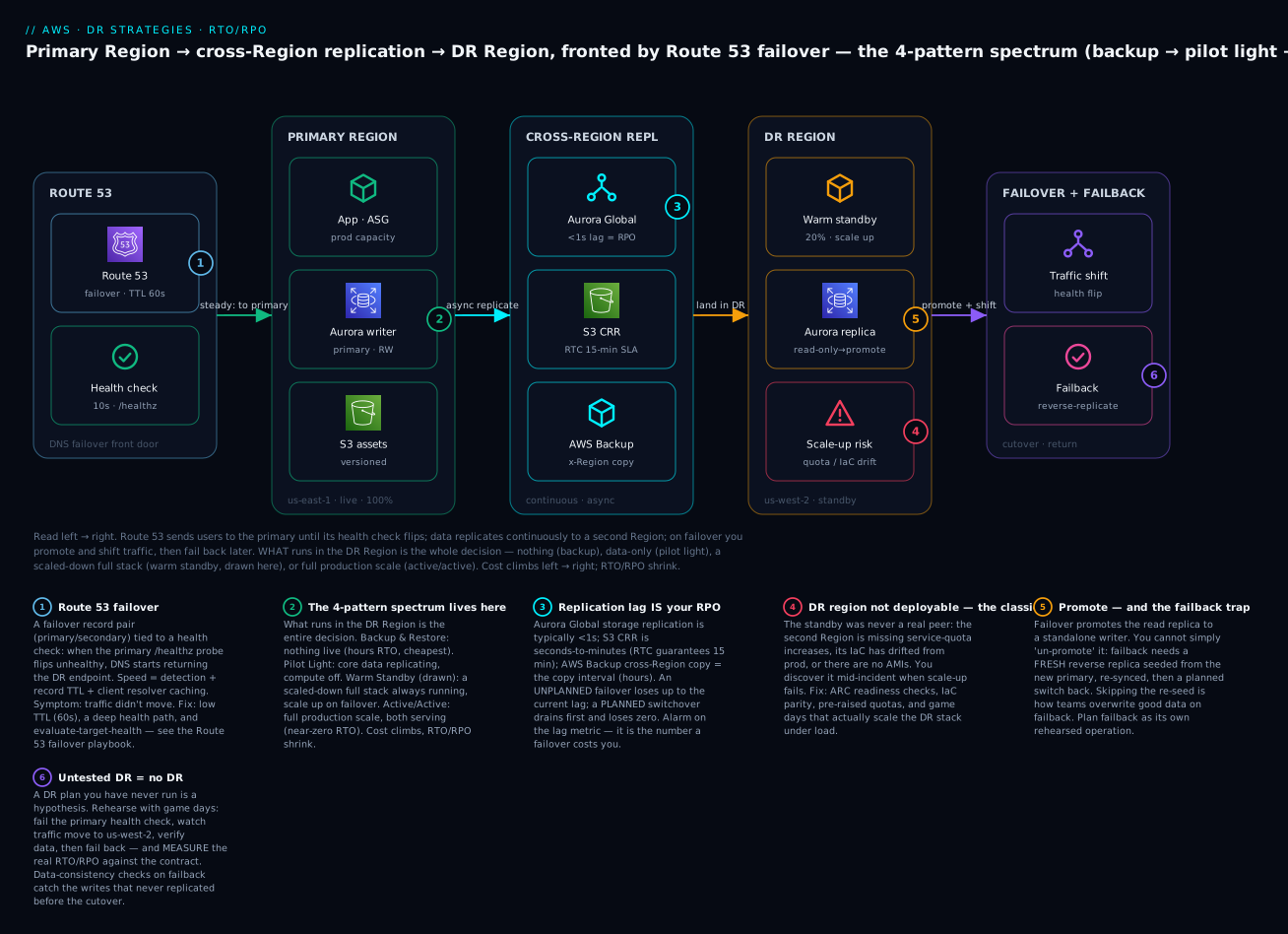
The diagram maps the whole strategy: Route 53 on the left as the DNS failover front door (a failover record pair tied to a health check on /healthz), the primary Region (ap-south-1, live, full capacity — app ASG, Aurora writer, versioned S3), the cross-Region replication band in the middle (Aurora Global with sub-second lag, S3 CRR with a 15-minute RTC SLA, AWS Backup cross-Region copies), the DR Region (us-west-2) holding a scaled-down warm-standby stack with a read-only Aurora replica ready to promote, and on the right the failover-and-failback actions (traffic shift on health flip, then reverse-replicated failback). Follow the badges: 1 marks the Route 53 failover trigger, 2 marks where the four-pattern spectrum is decided (what runs in the DR Region), 3 marks replication lag as your live RPO, 4 flags the classic “DR Region not deployable” trap (quota / IaC drift), 5 marks the promote-and-failback trap, and 6 marks the untested-DR-is-no-DR rule. The legend narrates each as a symptom, a confirmation and a fix.
Real-world scenario
FinServe Labs runs a lending platform in ap-south-1 — an ALB in front of 8× c6i.large on ECS, an Aurora PostgreSQL cluster, a DynamoDB table for KYC state, and S3 for document storage. Their regulator mandates RTO 30 minutes, RPO 5 minutes for the core loan-servicing API. Their existing “DR” was a nightly Aurora snapshot copied to us-west-2 and a Confluence page — an RPO of up to 24 hours and an untested RTO nobody had measured. An audit flagged it, and the remediation is a textbook Warm Standby.
What they built. They turned the Aurora cluster into an Aurora Global Database with a secondary in us-west-2 (sub-second lag), converted the DynamoDB table to a global table, enabled S3 CRR with RTC on the document bucket, and stood up a scaled-down copy of the ECS service (2 tasks vs 8) behind a DR-Region ALB — all from the same Terraform module with a region and desired_count parameter, so parity is guaranteed by construction. Route 53 failover records point at the primary ALB with a health check on /healthz (which checks DB reachability, not just the web server), and ARC readiness checks continuously verify the DR Region’s ECS capacity, Aurora status and — the audit’s specific ask — that the service quotas for c6i vCPUs in us-west-2 are raised to cover full production scale.
What went wrong in the first game day. The tabletop passed; the live game day did not. When they flipped the ARC routing control, traffic moved — but the DR ECS service could not scale from 2 to 8 tasks: the us-west-2 account had a default vCPU quota that capped it at 3 tasks. Readiness checks had been added after the quota was set and nobody had actually requested the increase — they had documented the requirement without executing it. The scale-up failed at 03:12 in the drill, the DR stack overloaded, and /healthz in the DR Region started failing too. Measured RTO in that first drill: never recovered within the window — a total miss, in a drill, exactly where you want to find it.
The fix and the outcome. They raised the us-west-2 quota (see AWS Service Quotas & Limits), wired the ARC readiness check to alarm if the quota headroom dropped below full-scale, and added a game-day step that actually scales the DR service to 8 under synthetic load rather than assuming it can. They also discovered on the failback drill that they had promoted the Aurora secondary and then tried to “just switch back” — losing the writes made during the drill window — until they added the reverse-replication-and-drain steps. Their next game day hit RTO 14 minutes, RPO 3 seconds against the 30-minute / 5-minute contract, measured with a stopwatch and written into the audit record. The lesson FinServe repeats to every new hire: the second Region was drawn correctly for months and would have failed the first real outage — only the game day turned the diagram into a capability.
Advantages and disadvantages
| Advantages | Disadvantages |
|---|---|
| Survives Regional impairment that Multi-AZ cannot | Adds real cost — from ~5% (B&R) to 2×+ (active/active) |
| RTO/RPO become explicit, contracted numbers | Tighter numbers cost disproportionately more |
| A spectrum lets you match spend to each workload’s tier | Choosing the wrong tier over/under-spends badly |
| Warm/active patterns remove the untested cold start | Standing capacity is a bill that silently creeps |
| Building blocks are managed (Global DB, CRR, DRS) | Managed ≠ automatic; you still own the runbook |
| Game days convert assumptions into measured capability | Testing takes real effort and discipline to sustain |
| DRS gives DR without re-architecting legacy apps | Replication ≠ corruption recovery — still need backups |
| Cross-Region copy + Vault Lock defeats ransomware | Bi-directional/multi-writer adds conflict complexity |
When each matters: the spectrum is the headline advantage — you are not forced to pay for active/active to get some DR. The dominant disadvantage is that DR is a recurring cost and a recurring discipline, not a one-time build; the teams that fail are not the ones who picked the wrong pattern but the ones who built it once and never tested it again while production drifted out from under it.
Hands-on lab: build a Warm Standby, fail it over, fail it back
You will build a scaled-down Warm Standby of a tiny web app in a second Region, front it with Route 53 failover + health checks, replicate data, simulate a failover by failing the primary health check, watch traffic move, then fail back and tear everything down. Primary is ap-south-1, DR is us-west-2.
⚠️ Cost warning. This lab creates resources that cost money. The ALBs (~$0.023/hr each, ~₹1.4/hr per pair), any EC2 instances, an optional Aurora Global Database (Aurora is not free-tier, ~$0.10+/hr per instance), Route 53 hosted-zone + health checks (~$0.50/health-check/mo for non-AWS endpoints; AWS-endpoint checks are cheaper), and cross-Region data transfer all bill. Do the whole lab in one sitting and run the teardown. Estimated cost if finished within ~2 hours: well under ₹200.
Step 0 — prerequisites
aws --version           # v2
aws sts get-caller-identity
export PRIMARY=ap-south-1
export DR=us-west-2
export DOMAIN=drlab.example.internal   # a hosted zone you control (or use a private zone)
You need a Route 53 hosted zone you control. For a pure lab without a real domain, create a private hosted zone or use a spare domain. This lab uses two ALBs as the failover targets; to keep it cheap, the “app” behind each ALB is a single small instance (or even a fixed-response ALB rule) exposing /healthz.
Step 1 — stand up the primary and DR app stacks (scaled-down DR)
The point of Warm Standby is that both stacks run, DR just smaller. Using Terraform with two provider aliases guarantees parity:
provider "aws" { alias = "primary", region = "ap-south-1" }
provider "aws" { alias = "dr",      region = "us-west-2" }

module "primary" {
  source        = "./modules/mini-app"
  providers     = { aws = aws.primary }
  name          = "drlab-primary"
  desired_count = 2          # full for the lab
}
module "dr" {
  source        = "./modules/mini-app"
  providers     = { aws = aws.dr }
  name          = "drlab-dr"
  desired_count = 1          # WARM STANDBY: scaled-down but running
}
Apply, and capture each ALB DNS name — these are your failover targets:
terraform apply -auto-approve
export ALB_PRIMARY=$(terraform output -raw primary_alb_dns)
export ALB_DR=$(terraform output -raw dr_alb_dns)
curl -s http://$ALB_PRIMARY/healthz   # expect: SERVING
curl -s http://$ALB_DR/healthz        # expect: SERVING  (warm — already up)
Expected output: both curls return SERVING. The DR stack is running now, at 1 task instead of 2 — that is the whole idea of Warm Standby. If DR returned nothing, its stack is not actually up; fix that before proceeding (a Warm Standby that isn’t warm is a Pilot Light).
Step 2 — replicate the data tier
Pick the path that matches your budget. Budget path (S3 CRR + Backup):
aws s3api create-bucket --bucket drlab-primary-$RANDOM --region $PRIMARY \
  --create-bucket-configuration LocationConstraint=$PRIMARY
aws s3api put-bucket-versioning --bucket drlab-primary-XXXX \
  --versioning-configuration Status=Enabled
# ...create the DR bucket (versioned) and a CRR rule with RTC (15-min SLA) as shown earlier
Proper Warm Standby path (Aurora Global Database) — costs more, delivers sub-second RPO:
aws rds create-global-cluster --global-cluster-identifier drlab-global \
  --source-db-cluster-identifier arn:aws:rds:ap-south-1:111122223333:cluster:drlab-primary
aws rds create-db-cluster --db-cluster-identifier drlab-dr \
  --global-cluster-identifier drlab-global --engine aurora-postgresql --region $DR
# Watch the lag — this IS your RPO:
aws cloudwatch get-metric-statistics --namespace AWS/RDS \
  --metric-name AuroraGlobalDBReplicationLag \
  --dimensions Name=DBClusterIdentifier,Value=drlab-dr \
  --start-time "$(date -u -v-1H +%FT%TZ)" --end-time "$(date -u +%FT%TZ)" \
  --period 60 --statistics Average Maximum --region $DR
Expected output: AuroraGlobalDBReplicationLag well under 1000 ms. That number is your live RPO; alarm on it.
Step 3 — create the health check and Route 53 failover records
# A health check against the PRIMARY /healthz, string-matching "SERVING"
HC_ID=$(aws route53 create-health-check \
  --caller-reference "drlab-$(date +%s)" \
  --health-check-config "Type=HTTP_STR_MATCH,FullyQualifiedDomainName=$ALB_PRIMARY,ResourcePath=/healthz,SearchString=SERVING,Port=80,RequestInterval=10,FailureThreshold=3" \
  --query 'HealthCheck.Id' --output text)
echo "health check: $HC_ID"
Then the failover record pair (primary tied to the health check, secondary as the fallback), with a low TTL so failover is fast:
ZONE_ID=<your-hosted-zone-id>
aws route53 change-resource-record-sets --hosted-zone-id $ZONE_ID --change-batch "{
  \"Changes\":[
   {\"Action\":\"UPSERT\",\"ResourceRecordSet\":{\"Name\":\"app.$DOMAIN\",\"Type\":\"CNAME\",\"TTL\":60,
     \"SetIdentifier\":\"primary\",\"Failover\":\"PRIMARY\",\"HealthCheckId\":\"$HC_ID\",
     \"ResourceRecords\":[{\"Value\":\"$ALB_PRIMARY\"}]}},
   {\"Action\":\"UPSERT\",\"ResourceRecordSet\":{\"Name\":\"app.$DOMAIN\",\"Type\":\"CNAME\",\"TTL\":60,
     \"SetIdentifier\":\"secondary\",\"Failover\":\"SECONDARY\",
     \"ResourceRecords\":[{\"Value\":\"$ALB_DR\"}]}}
  ]}"
Verify DNS resolves to the primary while it is healthy:
dig +short app.$DOMAIN CNAME     # expect: the PRIMARY ALB DNS name
aws route53 get-health-check-status --health-check-id $HC_ID   # expect: all checkers "Success"
Expected output: dig returns the primary ALB; the health check shows healthy across checker Regions.
Step 4 — simulate a failover (fail the primary health check)
Break the primary’s /healthz so the health check flips. The cleanest simulation is to make the primary return a non-SERVING body (or a 503) — e.g. set the app’s health flag to draining, or point the ALB health rule at a failing response. Then watch:
# Force the primary to stop reporting SERVING (app-specific; e.g. toggle a flag or stop the task)
aws ecs update-service --cluster drlab-primary --service drlab-primary --desired-count 0 --region $PRIMARY

# Watch the health check flip (within ~30s: interval 10s × threshold 3)
watch -n 5 "aws route53 get-health-check-status --health-check-id $HC_ID \
  --query 'HealthCheckObservations[].StatusReport.Status' --output text"

# Once unhealthy, DNS should return the DR ALB:
dig +short app.$DOMAIN CNAME     # expect: now the DR ALB DNS name
curl -s http://app.$DOMAIN/healthz   # expect: SERVING (served by DR)
Expected output: within ~30 seconds the health check flips to Failure, and dig now returns the DR ALB. Traffic has failed over. In a real event you would now also scale up the DR stack to full production size and promote the data tier:
aws ecs update-service --cluster drlab-dr --service drlab-dr --desired-count 2 --region $DR   # scale to full
# aws rds failover-global-cluster ... --allow-data-loss   # promote DR to writer (real disaster only)
Step 5 — fail back
Recover the primary, let it catch up, then return traffic in a controlled way (this is the step teams botch):
# 1. Bring the primary app back
aws ecs update-service --cluster drlab-primary --service drlab-primary --desired-count 2 --region $PRIMARY
curl -s http://$ALB_PRIMARY/healthz   # expect: SERVING again

# 2. (If you promoted the DB) re-establish reverse replication and let it DRAIN before switching back.
#    For Aurora Global DB, use a PLANNED switchover once lag ~0:
# aws rds switchover-global-cluster --global-cluster-identifier drlab-global \
#   --target-db-cluster-identifier <primary-cluster-arn>

# 3. The health check goes healthy → Route 53 automatically returns to the PRIMARY record
watch -n 5 "aws route53 get-health-check-status --health-check-id $HC_ID \
  --query 'HealthCheckObservations[].StatusReport.Status' --output text"
dig +short app.$DOMAIN CNAME     # expect: back to the PRIMARY ALB
Expected output: health check returns to Success, DNS returns to the primary ALB. Note the asymmetry: failover was automatic (health check flip), but failback of the data tier required a deliberate reverse-replicate-and-drain — you cannot just un-promote.
Step 6 — teardown (do this)
aws route53 change-resource-record-sets --hosted-zone-id $ZONE_ID --change-batch '{...DELETE both records...}'
aws route53 delete-health-check --health-check-id $HC_ID
# Aurora Global DB: remove the secondary from the global cluster, then delete clusters
aws rds remove-from-global-cluster --global-cluster-identifier drlab-global \
  --db-cluster-identifier arn:aws:rds:us-west-2:111122223333:cluster:drlab-dr
aws rds delete-global-cluster --global-cluster-identifier drlab-global
terraform destroy -auto-approve     # tears down both app stacks + ALBs
aws s3 rb s3://drlab-primary-XXXX --force   # and the DR bucket
Verify teardown: aws elbv2 describe-load-balancers in both Regions returns none of the lab ALBs, aws route53 list-health-checks no longer lists $HC_ID, and aws rds describe-global-clusters no longer lists drlab-global. Leftover ALBs, Aurora instances and health checks are the ones that quietly bill.
Common mistakes & troubleshooting
The DR playbook — the failure modes that actually happen, mapped to the exact confirmation command and fix:
| # | Symptom | Root cause | Confirm (command / console) | Fix |
|---|---|---|---|---|
| 1 | Failover didn’t happen; users still hit the dead Region | Health check never flipped — probing / which still 200s, or wrong path |
aws route53 get-health-check-status --health-check-id <id> shows Success |
Probe a deep /healthz that checks DB/deps; use string-match on a real token |
| 2 | Health check flipped but DNS still returns old Region | Client/resolver TTL caching; TTL set too high | dig app.example.in shows stale answer; check record TTL |
Lower TTL to 60 s (set before the incident); wait out cached TTLs |
| 3 | DNS won’t drop the Region even when unhealthy | evaluate_target_health false, or no health check on the record |
aws route53 get-hosted-zone / inspect record |
Set EvaluateTargetHealth=true on the alias; attach a health check |
| 4 | RPO worse than expected (minutes of loss) | Replication lag spike or backup-based RPO on a “replicated” claim | Check AuroraGlobalDBReplicationLag / ReplicationLatency metrics |
Alarm on lag; move from backup cadence to continuous replication |
| 5 | RPO is 24 h despite “cross-Region DR” | Only nightly backups copied; no live replication | Look for a replica/global table — there isn’t one | Add cross-Region read replica / Global DB / global table |
| 6 | DR Region wasn’t actually deployable | Missing service quotas in the DR Region (the classic) | aws service-quotas get-service-quota shows default cap |
Pre-raise quotas; ARC readiness check + alarm on headroom |
| 7 | DR rebuild produced a broken Region | IaC drift — prod changed, DR template didn’t | terraform plan in DR shows a large diff |
Deploy to both Regions every change; periodically apply in DR |
| 8 | Scale-up on failover failed | ASG/ECS couldn’t reach full size (quota / capacity) | ECS service events / ASG activity shows capacity errors |
Raise quotas; use capacity reservations; test scale-up under load |
| 9 | Data inconsistent after failback | Failed back before reverse-replication drained | Compare row counts / checksums between Regions | Reverse-replicate, drain to ~0 lag, then planned switchover |
| 10 | Promoted replica can’t fail back | Promotion is one-way; no path back to the old primary | describe-db-clusters shows a standalone, not a global member |
Seed a fresh reverse replica from the new primary; rehearse it |
| 11 | ARC routing control won’t flip | Calling the control-plane in the impaired Region; wrong data-plane endpoint | Call fails / times out | Use the data-plane route53-recovery-cluster regional endpoints (5-Region cluster) |
| 12 | Both Regions serving writes (split-brain) | Cutover left the old primary writable | Two writers accepting the same keys | ARC safety rule; single-writer discipline; idempotency keys |
| 13 | Duplicate orders/charges after failover | Client retried across Regions; non-idempotent writes | Duplicate business IDs in the data | Idempotency key + conditional write + dedup TTL |
| 14 | Warm-standby cost creeping | DR capacity scaled with prod, unwatched | Cost Explorer grouped by Region shows DR climbing | Right-size DR to the minimum warm size; review quarterly |
| 15 | “DR works” but never proven | No game day; plan is a wiki page | No RTA/RPA records exist | Run a game day; measure RTA/RPA vs contract |
| 16 | Corruption replicated to DR too | Relied on replication for all recovery | Bad data present in both Regions | Restore from point-in-time backup; Vault Lock for ransomware |
Error / status reference during a failover
| Signal | Where | Meaning | Action |
|---|---|---|---|
Health check Failure (all checkers) |
Route 53 | Endpoint genuinely down | Expected — failover should proceed |
Health check Failure (some checkers) |
Route 53 | Partial/network — possible false positive | Raise checker count; don’t over-react |
InsufficientInstanceCapacity |
EC2/ASG in DR | No capacity for the instance type | Diversify instance types; capacity reservation |
You have requested more vCPU… quota error |
EC2 in DR | Service quota cap hit | Raise quota (should be pre-raised) |
AuroraGlobalDBReplicationLag spike |
CloudWatch | RPO temporarily larger | Investigate; delay unplanned failover if you can |
DBClusterNotFoundFault on switchover |
RDS | Wrong cluster ARN / Region | Correct the target ARN |
Route 53 recovery-cluster ConflictException |
ARC | Safety rule blocked the flip | Intended guard against both-off/both-on |
SignatureDoesNotMatch on MRAP |
S3 | MRAP needs SigV4A signing | Use an SDK/tool that supports SigV4A |
ThrottlingException on failover API |
RDS / EC2 | Control plane throttled during mass failover | Retry with backoff; stagger promotions |
| Health check flaps green↔red | Route 53 | Failure threshold too low / probe timing out | Raise threshold; widen probe timeout; check the path |
The three nastiest, in prose
“The failover didn’t fail over” (rows 1–3) is the single most common DR incident, and it is almost always the routing tier, not the app. The health check probed / (which the web server answers even when the app is dead behind it), so it stayed green; or it flipped correctly but the record TTL was 3600 s and resolvers cached the dead answer for an hour; or the record had no health check attached at all and Route 53 happily kept returning the impaired Region. The fix is boring and must be in place before the incident: a deep health path that verifies real serving capability, a 60-second TTL, and evaluate_target_health on aliases. This exact class is covered end to end in the Route 53 Health Checks & DNS Failover playbook — read it as the companion to this article.
“The DR Region wasn’t actually deployable” (rows 6–8) is the trap that turns a drawn DR into a fictional one. The second Region looked complete on the diagram, but its service quotas were at defaults, its IaC had drifted months out of date, or there were no AMIs — so the moment you tried to scale it to production size, it couldn’t. This is only ever caught by a game day that actually scales the DR stack under load, or by ARC readiness checks that continuously audit capacity and quota headroom and alarm before an incident. Documenting “raise the quota” is not raising the quota — FinServe’s first game day failed on exactly this gap; see AWS Service Quotas & Limits.
“We failed over fine but couldn’t fail back” (rows 9–10) is the data-loss trap. Failover promoted the DR replica to a standalone writer; then, when the original Region recovered, the team tried to “switch back” and either lost the writes made during the outage (they failed back before reverse-replication caught up) or discovered there was no reverse-replication path at all (promotion is a one-way door). Failback is a first-class, separately rehearsed operation: establish reverse replication from the new primary, let it drain to near-zero lag, then perform a planned switchover in a maintenance window. If you have never rehearsed failback, you have only tested half your DR.
Best practices
- Set RTO and RPO first, per workload, with the business — the numbers are a contract, not an afterthought, and they determine the pattern. Write them down and revisit when tiering changes.
- Match the pattern to the tier, not the fear — most workloads are tier-1/2 and want Warm Standby or Pilot Light; reserve the 2×-cost active/active for genuinely tier-0 systems.
- Keep backups underneath every pattern — replication defends infrastructure; only point-in-time backups with Vault Lock defend against corruption and ransomware.
- Replicate cross-account, not just cross-Region, for your backups — so a compromised or deleted primary account cannot take your recovery points with it.
- Alarm on replication lag — it is your live RPO; a silent lag spike turns a “sub-second RPO” claim into minutes of loss at the worst moment.
- Probe a deep health path and keep TTLs low (60 s) — the routing tier is where most failovers fail; a
/probe and a 3600 s TTL are the classic footguns. - Pre-raise service quotas in the DR Region and audit them with ARC readiness checks — the second Region must be able to scale to full production size, proven, not assumed.
- Build both Regions from the same IaC — deploy to primary and DR on every change, and periodically apply in DR, to kill drift before it kills a failover.
- Automate the failover sequence — detection, promotion, scale-up, endpoint repoint, traffic shift; every manual step is minutes added to RTO and a human to page.
- Rehearse failback as its own operation — reverse-replicate, drain, planned switchover; never assume you can un-promote.
- Make every write idempotent — failover and retries produce duplicates; a business-key conditional write with a dedup TTL is mandatory, not optional.
- Run game days and measure RTA/RPA against the contract — untested DR is no DR; a plan you have never run is a hypothesis, and the assumption that fails is the one nobody wrote down.
Security notes
DR expands your data’s footprint to a second Region and often a second account, so the security posture has to travel with it. Encrypt everywhere and manage the keys per Region: RDS/Aurora, EBS, S3 and backups should be encrypted with KMS, and because a KMS key is Regional, cross-Region copies need a key in the destination Region (AWS Backup and snapshot-copy re-encrypt with a destination-Region key you specify) — a copy that references only the source key cannot be restored in the DR Region. Least-privilege the replication and failover roles: the S3 CRR role, the AWS Backup role, and any automation that promotes databases or flips routing controls should be tightly scoped and, ideally, assumable only by the DR automation, not by humans. Make backups immutable: Vault Lock in compliance mode prevents even an admin (or an attacker with admin) from deleting or shortening the retention of recovery points, which is the specific control that defeats ransomware — replication would just copy the encryption. Isolate the DR account: cross-account backup copies into a locked-down “vault” account with no standing human access is the pattern that survives a full compromise of the production account. Mind data residency: a DR Region in a different jurisdiction can violate residency or compliance rules — choose the DR Region for both distance-from-blast-radius and legal constraints. Finally, the DR Region’s IAM, security groups and secrets must already exist — a common failure is a DR stack that comes up but cannot authenticate to anything because the roles and Secrets Manager entries were never replicated; keep them in the same IaC as everything else.
Cost & sizing
DR cost is driven by four things: standing compute in the DR Region (the biggest lever — zero for Backup & Restore, full for active/active), replicated storage (snapshots, replica volumes, S3 copies — you pay for a second copy of the data), cross-Region data transfer (replication traffic egresses between Regions at ~$0.02/GB, which on a write-heavy workload is a real line item), and the backups themselves (always required, storage + copy). The way to right-size is to start from the RTO/RPO tier — do not pay for Warm Standby if the workload is genuinely tier-3 and a few hours of restore is fine.
| Cost driver | Backup & Restore | Pilot Light | Warm Standby | Active/Active |
|---|---|---|---|---|
| DR compute | ₹0 | Low (minimal) | Medium (scaled-down) | High (full) |
| Replicated storage | Snapshots only | Replica + snapshots | Replica + snapshots | Full + snapshots |
| Cross-Region transfer | Backup copies | Replication traffic | Replication traffic | Bi-directional (highest) |
| Route 53 health checks | Optional | Yes | Yes | Yes |
Rough monthly (10× c6i.large prod) |
~5–10% of prod | ~15–25% | ~40–60% | ~100%+ (often 2×+) |
Concrete anchors (₹83/$): a Route 53 health check on a non-AWS endpoint is ~$0.50/month (₹42); AWS-endpoint checks and HTTPS/string-match add small increments. Aurora Global Database adds a full secondary cluster’s instance cost plus ~$0.20 per million replicated write I/Os and cross-Region transfer — budget it as roughly a second Aurora cluster. AWS Elastic Disaster Recovery (DRS) has no charge for the DRS service itself for the first 90 days per source server, but you always pay for the staging-area EBS + lightweight replication servers + data transfer, which for a modest server is a few dollars a month in steady state and spikes only during a launch/drill. Free-tier reality: none of the interesting DR building blocks (Aurora, second-Region ALBs, cross-Region transfer) are meaningfully free-tier; S3 and DynamoDB have free-tier allowances but replication doubles the stored bytes. Do the cost math before choosing the pattern, and put a quarterly review on the calendar — a warm standby that silently scaled with production is the most common way DR cost creeps unnoticed.
Interview & exam questions
1. Define RTO and RPO and explain how they differ. RTO (recovery time objective) is the maximum tolerable downtime — time from disruption to restored service. RPO (recovery point objective) is the maximum tolerable data loss, expressed as a time span between the last recoverable data point and the disruption. RTO is measured forward from the disruption (time down); RPO backward (data lost). They are independent — you can have small RPO with large RTO or vice versa. (SAA-C03, SAP-C02)
2. Name the four DR strategies in order of increasing cost and decreasing RTO. Backup & Restore (hours RTO, cheapest), Pilot Light (tens of minutes), Warm Standby (minutes), Multi-Site Active/Active (seconds, most expensive). The differentiator is what runs in the DR Region: nothing, core data only, a scaled-down full stack, or a full-scale stack taking traffic. (SAA-C03)
3. A workload needs RTO 20 minutes, RPO 1 minute. Which pattern? Warm Standby: a scaled-down full stack is already running (so scale-up + traffic shift hits minutes of RTO) and continuous async replication gives seconds-to-a-minute of RPO. Pilot Light might make the RTO with fast automation but is riskier; Backup & Restore (hours) fails outright. (SAA-C03, SAP-C02)
4. Why does Multi-AZ not satisfy a Regional-DR requirement? Multi-AZ replicates across data centres within one Region and survives an AZ loss, but a Regional control-plane impairment affects all AZs simultaneously. Only a second, operationally independent Region survives a Regional event. (SAA-C03)
5. What is the difference in RPO between a planned Aurora Global Database switchover and an unplanned failover? A planned switchover drains in-flight replication before promoting, achieving RPO 0. An unplanned failover cannot drain the impaired primary, so RPO equals the replication lag at the moment of failure (hence --allow-data-loss). (SAP-C02, DBS-C01)
6. Your Route 53 failover didn’t move traffic even though the app was down. Give two likely causes. The health check probed a shallow path (like /) that the web server answered while the app was dead, so it never flipped; or the record TTL was too high and resolvers cached the stale answer. Fixes: deep health path with string-match, TTL 60 s, evaluate_target_health on aliases. (SOA-C02)
7. What is the “DR Region wasn’t deployable” failure and how do you prevent it? The standby was never a real peer — missing service-quota increases, drifted IaC, or no AMIs — so it can’t scale to production size on failover. Prevent with ARC readiness checks (continuous capacity/quota audit), IaC parity (deploy both Regions every change), pre-raised quotas, and game days that scale the DR stack under load. (SAP-C02)
8. Why is failback harder than failover, and how do you do it safely? During the outage the DR Region accepted writes, so the original Region is stale; you cannot un-promote. Safe failback: establish reverse replication from the new primary, let it drain to near-zero lag, then perform a planned switchover in a maintenance window. (SAP-C02)
9. When would you choose AWS Elastic Disaster Recovery (DRS) over cloud-native replication? For lift-and-shift and legacy/on-prem servers you cannot re-architect: DRS does continuous block-level replication of the whole server into a low-cost staging area and launches production-size instances on failover (sub-second RPO, minutes RTO), with built-in failback — no application changes. (SAP-C02)
10. Why do you still need backups if you have cross-Region replication? Replication copies everything, including logical corruption, ransomware encryption and bad migrations — the bad write arrives in the DR Region too. Only point-in-time backups (ideally immutable via Vault Lock) can recover to a pre-corruption state. (SAA-C03, SCS-C02)
11. What does “untested DR is no DR” mean in practice? A DR design you have never exercised is a set of unverified assumptions; the assumption that fails (quota, drift, health-check path) is the one nobody documented. Game days convert assumptions into measured RTA/RPA against the contracted RTO/RPO. (SAP-C02)
12. How is replication lag related to RPO, and why alarm on it? For asynchronous replication, the lag between a source write and its appearance at the target is the RPO at that instant — an unplanned failover loses up to the current lag. A lag spike silently enlarges your RPO, so you alarm on the lag metric to know what a failover would cost before you trigger it. (SAP-C02, DBS-C01)
Quick check
- In one sentence each, define RTO and RPO and state the direction (forward/backward from the disruption) each is measured.
- Which of the four patterns keeps a scaled-down full stack running in the DR Region, and what does its failover action consist of?
- Your “cross-Region DR” turns out to have an RPO of 24 hours. What is almost certainly the cause, and what one change fixes it?
- Name the single most common reason a Route 53 failover does not move traffic even though the primary is down.
- Why can you not simply “switch back” to the original Region after an unplanned failover, and what is the correct failback sequence?
Answers
- RTO is the maximum tolerable downtime, measured forward from the disruption (how long you’re down). RPO is the maximum tolerable data loss in time, measured backward from the disruption (how much you lost).
- Warm Standby keeps a scaled-down full stack running; failover is scale it up to full size and shift traffic (no cold start or rebuild).
- You only have nightly backups copied cross-Region, not live replication; add a cross-Region read replica / Aurora Global Database / DynamoDB global table so data replicates continuously (RPO → seconds).
- The health check probed a shallow path (like
/) that the web server still answered while the app was dead, so it never flipped to unhealthy — or the record TTL was too high and resolvers cached the stale answer. - During the outage the DR Region accepted writes, so the original Region is stale — un-promoting would lose those writes. Correct sequence: establish reverse replication from the new primary, let it drain to near-zero lag, then a planned switchover in a maintenance window.
Glossary
| Term | Definition |
|---|---|
| RTO (recovery time objective) | Maximum tolerable downtime from disruption to restored service. |
| RPO (recovery point objective) | Maximum tolerable data loss, expressed as a span of time before the disruption. |
| RTA / RPA | Recovery time/point actual — the values you measure in a real event or a game day. |
| Backup & Restore | DR pattern with only backups in the DR Region; provision and restore on disaster (hours RTO). |
| Pilot Light | DR pattern with core data replicating but compute off/minimal; scale up on disaster. |
| Warm Standby | DR pattern with a scaled-down full stack always running; scale up and shift on disaster. |
| Multi-Site Active/Active | DR pattern with full-scale stacks in both Regions both serving; near-zero RTO/RPO. |
| Failover | Shifting production to the DR Region during a disruption. |
| Failback | Returning production to the original Region after recovery — a separate, data-risky operation. |
| Replication lag | Delay between a source write committing and appearing at the target; the live RPO for async replication. |
| Aurora Global Database | Storage-level cross-Region Aurora replication with managed switchover (RPO 0) / failover. |
| S3 Cross-Region Replication (CRR) | Asynchronous replication of new S3 objects to a bucket in another Region; RTC gives a 15-min SLA. |
| DynamoDB global table | Multi-Region, multi-active DynamoDB table with sub-second replication and last-writer-wins. |
| Route 53 failover routing | A primary/secondary DNS record pair tied to health checks that cuts over automatically. |
| Application Recovery Controller (ARC) | Readiness checks (drift/quota audit) + routing controls (deterministic, Regionally-independent failover switches). |
| AWS Elastic Disaster Recovery (DRS) | Block-level continuous server replication into a low-cost staging area; launch on failover, with failback. |
| Vault Lock | AWS Backup feature making recovery points immutable, defeating ransomware/deletion. |
| Replication Time Control (RTC) | S3 CRR option guaranteeing a 15-minute replication SLA plus replication metrics. |
| Multi-Region Access Point (MRAP) | A single global S3 endpoint that routes to the nearest/healthy bucket with failover controls. |
| Static stability | The property that recovery works without depending on the impaired Region’s control plane. |
Next steps
- Build the top rung: AWS Multi-Region Active-Active Architecture: Route 53, Global Tables and Aurora Global Database — when seconds of RTO make Warm Standby insufficient.
- Master the backup floor under every pattern: AWS Backup and Disaster Recovery: Protect Workloads Across Regions and the hands-on AWS Backup Hands-On: Centralized, Cross-Account, Immutable Backups with Vault Lock.
- Fix the tier that breaks most failovers: Route 53 Health Checks & DNS Failover: Setup and a Why-Isn’t-It-Failing-Over Playbook and Amazon Route 53 in Practice: Records, Alias & Routing Policies.
- Get the data tier right: RDS High Availability: Multi-AZ vs Read Replicas, Amazon Aurora & Serverless v2: Architecture, Auto-Scaling & Global Databases, and S3 Data Management Hands-On: Versioning, Lifecycle & Cross-Region Replication.
- Close the classic gap before it closes your failover: AWS Service Quotas & Limits: Finding Them, Requesting Increases & Avoiding Throttling and rebuild the Region deterministically with AWS CloudFormation Hands-On: Your First Stack, Change Sets & Intrinsic Functions.