You have GuardDuty catching stolen keys, Inspector finding CVEs, Macie flagging exposed PII, IAM Access Analyzer surfacing public resources, and Config detecting drift. Each writes to its own console, with its own severity vocabulary, its own JSON shape, its own idea of what “high” means. On the morning an auditor asks “show me your compliance posture across all accounts and regions, ranked by severity, with evidence”, you are left tab-switching across six services and five accounts, hand-normalising severities in a spreadsheet. AWS Security Hub is the service that ends that — it is the cloud security posture management (CSPM) aggregator that pulls every finding into one place, normalises them all to a single schema, runs prescriptive security standards against your account, and rolls the whole thing up into a security score you can put on a dashboard.
This article is the deep, hands-on reference for running Security Hub in production, from a single account to a whole organization. We treat it as a four-stage machine — aggregate → normalise → assess → act — and go through each stage option by option: the AWS Security Finding Format (ASFF) that every finding is normalised into (and the exact fields — Severity.Label, Workflow.Status, RecordState, Compliance.Status — your rules and Lambdas read); the security standards (AWS Foundational Security Best Practices, CIS AWS Foundations Benchmark v1.2/v1.4/v3, PCI DSS, NIST SP 800-53), their controls, control status, the security score, and the consolidated control findings setting; the integrations that feed it and how it deduplicates; multi-account and multi-region aggregation through a delegated administrator, a finding-aggregation region, and central configuration; and the action plane — automation rules, custom actions, insights, and the EventBridge-driven remediation that turns a finding into a fix.
By the end you will stop treating “Security Hub is enabled” as the finish line and start treating it as the control plane for your entire security posture. You will know why every control shows “No data” the day you turn it on (and that the fix is AWS Config, not Security Hub), why findings from member accounts never reach the delegated admin, why the same S3 check appears five times, why an EventBridge rule copied from a GuardDuty tutorial never fires, and how to wire the whole aggregate-assess-remediate loop with aws securityhub and Terraform in a way that survives an org-wide rollout. The normalisation and the standards are AWS’s job; making the findings reach one pane, drive a score, and trigger the right action is yours, and that is the craft this article teaches.
What problem this solves
Security Hub solves the fragmentation problem that every multi-service, multi-account AWS security program hits: you cannot manage a posture you cannot see in one place. Each detective service is excellent in isolation and useless as a portfolio — GuardDuty’s severity is a number 1.0–8.9, Inspector’s is a CVSS-derived label, a partner tool has its own scale, and none of them know the others exist. Without an aggregator you have no single answer to “how are we doing?”, no consistent severity to route on, no compliance score to show an auditor, and no single place to attach a remediation. Building that yourself means a SIEM, a normalisation pipeline, a rules engine and a compliance-mapping effort — a project measured in quarters. Security Hub is that capability as a switch.
What breaks without it, concretely: an S3 bucket is made public in a member account nobody watches, and because the finding sits in that account’s Config console — not the security team’s — it is invisible until a breach. An auditor asks for CIS Benchmark evidence and you spend two weeks screenshotting controls by hand because nothing rolls it up. A critical Inspector CVE and a critical GuardDuty finding on the same instance are never correlated because they live in different tools. A remediation runbook exists but has no single trigger, so it never runs. Each of these is a real, common failure, and each is exactly what a normalised, aggregated, scored posture prevents.
Who hits this: every organization past its first production account — the moment you have more than one AWS account and more than one security service, fragmentation is your default state. Security Hub is the CSPM baseline that frameworks (PCI-DSS, SOC 2, HIPAA, ISO 27001, FedRAMP) assume, and the aggregation layer that feeds your SIEM/SOAR. To frame the field before the deep dive, here is what Security Hub does, what it does not, and where each responsibility actually lives:
| Capability | Does Security Hub do it? | How | Where the answer lives | Common wrong assumption |
|---|---|---|---|---|
| Aggregate findings from many services | Yes | Native + partner integrations → ASFF | Findings console / EventBridge | “It only shows its own findings” |
| Normalise every finding to one schema | Yes | The AWS Security Finding Format (ASFF) | Severity.Label, Types, Resources[] |
“Each product keeps its own format” |
| Run compliance standards (CIS, PCI…) | Yes | Controls backed by AWS Config rules | Standards → controls, security score | “It checks compliance without Config” |
| Detect threats itself (behavioural) | No | That is GuardDuty’s job | GuardDuty findings (ingested here) | “Security Hub replaces GuardDuty” |
| Scan for vulnerabilities itself | No | That is Inspector’s job | Inspector findings (ingested here) | “Security Hub scans my EC2/ECR” |
| Evaluate resource configuration | Indirectly | Via AWS Config service-linked rules | Control status (passed/failed) | “It has its own config engine” |
| Give one compliance score | Yes | Passed ÷ enabled controls, per standard | Summary / standard score | “The score includes No-data controls” |
| Remediate the finding | No (you wire it) | EventBridge → SSM/Lambda/SOAR | Your automation targets | “Security Hub auto-fixes findings” |
| Aggregate across accounts & regions | Yes | Delegated admin + finding aggregator | Aggregation (home) region | “It is per-account, per-region only” |
| De-duplicate the same issue | Partially | Same Id+ProductArn updates in place |
Consolidated control findings | “It merges all products about a resource” |
Learning objectives
By the end of this article you can:
- Enable Security Hub end to end — the hub, default standards, and the consolidated control findings setting — via Console,
aws securityhuband Terraform, and read the security score. - Parse a finding in the AWS Security Finding Format (ASFF) and name the exact fields your rules act on:
Severity.LabelvsSeverity.Normalized,Workflow.Status,RecordState,Compliance.Status,ProductArn,FindingProviderFields. - Choose and enable the right security standards (FSBP, CIS v1.2/v1.4/v3, PCI DSS, NIST 800-53), understand controls, control status (passed/failed/disabled/No data), and how the security score is computed.
- Explain why control-based standards depend on AWS Config and fix the “No data” state that this dependency causes.
- Roll Security Hub out across an organization with a delegated administrator, a finding-aggregation region, and central configuration with configuration policies.
- Understand every integration that feeds Security Hub, how findings are deduplicated, and why the same check can appear once per standard (and how consolidated control findings fixes it).
- Wire the action plane: an automation rule to auto-triage on ingest, a custom action and an EventBridge rule matching
detail.findings[].Severity.Labelinto SNS and a remediation Lambda, plus insights for trend-spotting. - Control cost (per security check and per finding-ingestion event) and secure the aggregation plane.
This maps directly to SCS-C02 (Security Specialty — security posture management, ASFF, standards, aggregation, automated remediation), SOA-C02 (SysOps — enabling and operating Security Hub, EventBridge automation), and touches SAP-C02 (Professional — org-wide security operations and central configuration).
Prerequisites & where this fits
You should be comfortable with the AWS account model (accounts, regions, IAM roles and service-linked roles), reading and writing JSON, running the AWS CLI, and the basics of EventBridge, SNS, Lambda, and AWS Organizations. Crucially, you should understand AWS Config, because Security Hub’s control-based standards are built on it: AWS Config: Resource Inventory, Compliance Rules & Remediation Hands-On explains the configuration recorder and rules that back nearly every control, and AWS CloudTrail and Config: Audit and Compliance at Scale explains the audit trail those checks read. Familiarity with the detective services that feed Security Hub helps too — Amazon GuardDuty Hands-On: Threat Detection & Automated Response and Amazon Inspector Hands-On: Continuous Vulnerability Scanning for EC2, ECR & Lambda are the two biggest producers.
Security Hub sits in the Security / aggregation & posture layer — above the individual detective services, feeding your response plane and SIEM. It assumes an org foundation (AWS Organizations, SCPs & Multi-Account Guardrails) so you can enable it once and aggregate the whole estate, and it is the natural roll-up point for a landing zone (AWS Control Tower Guardrails: Multi-Account Foundation). Here is who owns which layer during a real security program, so you know who to call when the score drops:
| Layer | What lives here | Who usually owns it | What Security Hub contributes |
|---|---|---|---|
| Account structure | OUs, accounts, SCPs | Platform / landing-zone team | Delegated admin scoped to the org |
| Configuration recording | AWS Config recorder + rules | Platform / security engineering | The evaluation engine behind controls |
| Threat detection | GuardDuty detectors | Security engineering | Ingests GuardDuty findings (ASFF) |
| Vulnerability scanning | Inspector | Security engineering | Ingests Inspector findings (ASFF) |
| Posture aggregation | Security Hub | Security engineering | The one pane + the score |
| Response plane | EventBridge, SSM, Lambda, SOAR | Security + platform | The trigger for remediation |
| Compliance reporting | Standards, score, evidence | Security leadership / GRC | The auditor-facing score & controls |
| Cost | Checks + finding volume | FinOps + security | Consolidated findings tuning |
Core concepts
Six mental models make every later decision obvious.
Security Hub is an aggregator and posture manager, not a detector. It generates almost no findings of its own from raw telemetry — the only findings it originates are control findings (the result of running a standard’s checks). Everything else it ingests from other products. Internalise this and you stop expecting Security Hub to “find” threats or CVEs and start using it to collect, score and route what the specialists find.
Everything becomes ASFF. The AWS Security Finding Format is the normalised JSON schema every finding is coerced into. GuardDuty’s numeric severity, Inspector’s CVSS, a partner’s proprietary scale — all mapped to one Severity.Label (INFORMATIONAL/LOW/MEDIUM/HIGH/CRITICAL). This normalisation is the entire point: one schema means one filter language, one severity to route on, one Lambda that understands every finding.
Standards are collections of controls; controls are mostly Config rules. A security standard (FSBP, CIS, PCI DSS, NIST 800-53) is a curated set of controls, each a single, prescriptive check like “S3 buckets should block public access” (S3.1). Most controls are evaluated by an AWS Config service-linked rule — which is why the Config recorder must be on or controls read “No data.” This one dependency is the source of the most common Security Hub confusion.
The security score is passed-over-enabled. For each enabled standard, Security Hub computes a security score = the proportion of passed controls to enabled controls that have data, as a percentage. Controls in the No data state are excluded (they neither help nor hurt), disabled controls are excluded, and the overall score rolls the enabled standards together. A score that will not move is almost always a re-evaluation lag or a No-data problem, not a scoring bug.
Aggregation is a delegated-admin + home-region story. In an organization you designate one account (ideally a dedicated security account) as the delegated administrator, and you designate one region as the finding-aggregation (home) region that all other linked regions roll up into. Get either wrong and members or regions go dark in the console you actually watch.
The action plane is yours. Security Hub can auto-triage on ingest with automation rules (set severity, workflow status, notes), and it emits every finding to EventBridge, plus on-demand custom actions. But the remediation — the SSM document, the Lambda, the SOAR ticket — you build. Security Hub tees up the action; it never pulls the trigger.
The vocabulary in one table
Pin down every moving part before the deep sections; the glossary repeats these for lookup:
| Concept | One-line definition | Where it lives | Why it matters |
|---|---|---|---|
| Hub | The Security Hub resource in a region/account | One per region per account | Off in a region → no aggregation there |
| ASFF | AWS Security Finding Format — the normalised schema | Every finding | One schema to filter and route |
| Finding | A single normalised security observation | Findings store (90-day active) | The unit you triage and act on |
| Product | An integration that sends findings (ProductArn) |
On the finding | Identifies the source; dedup key |
| Standard | A curated set of controls (FSBP, CIS…) | Enabled per hub | Drives the compliance score |
| Control | One prescriptive check (e.g. S3.1) |
Within a standard | Passed/failed/disabled/No data |
| Security control ID | Cross-standard control id (S3.1) |
On consolidated findings | One finding across standards |
| Security score | % passed of enabled controls with data | Summary + per standard | The auditor-facing number |
| Workflow status | NEW / NOTIFIED / SUPPRESSED / RESOLVED | Workflow.Status |
Triage state you manage |
| Record state | ACTIVE / ARCHIVED | RecordState |
Whether it is current |
| Delegated administrator | The org’s Security Hub admin account | One per org | Org-wide enable + aggregation |
| Finding-aggregation region | The home region others roll into | One per org | Cross-region single pane |
| Automation rule | Auto-update finding fields on ingest | Per admin (org) / account | Triage without humans |
| Custom action | A named on-demand → EventBridge trigger | Per hub | Human-in-the-loop remediation |
| Insight | A saved grouping of related findings | Managed + custom | Trend / hotspot spotting |
The AWS Security Finding Format (ASFF)
Every finding — whether from GuardDuty, Inspector, a control, or a third-party product — arrives as one JSON object conforming to the ASFF. Read it fluently and you can filter, route and remediate anything.
Top-level fields you will actually use
ASFF has dozens of fields; these are the ones your filters, automation rules and Lambdas read constantly:
| Field | Holds | Used for |
|---|---|---|
SchemaVersion |
ASFF version (2018-10-08) |
Compatibility |
Id |
Unique finding id within a product | Dedup key (with ProductArn) |
ProductArn |
The product that sent it | Filter by source; dedup key |
ProductName / CompanyName |
Human product/vendor name | Readable filters |
GeneratorId |
The rule/check that generated it | Group by check |
AwsAccountId |
Account the finding is about | Multi-account routing |
Region |
Region the finding is about | Multi-region routing |
Types |
Namespaced finding-type taxonomy | Classify (e.g. Software and Configuration Checks/...) |
CreatedAt / UpdatedAt |
Timestamps | Freshness, SLA |
Severity |
Label, Normalized, Original |
The primary routing key |
Title / Description |
Human summary | SNS/ticket body |
Resources[] |
The affected resource(s) | The remediation target |
Compliance |
Status, SecurityControlId, RelatedRequirements |
Control result + mapping |
Workflow |
Status (triage state) |
NEW/NOTIFIED/SUPPRESSED/RESOLVED |
RecordState |
ACTIVE / ARCHIVED |
Is it current |
Remediation |
Recommendation + URL | What to do |
Note |
Free-text analyst note | Human context |
ProductFields / UserDefinedFields |
Provider / your key-values | Custom routing |
FindingProviderFields |
Provider’s own severity/types/confidence | Survives customer updates |
Severity: Label vs Normalized vs Original — the field that trips everyone
This is the single most important ASFF detail for automation. Severity has three representations, and your EventBridge rule must match the right one:
| Severity field | Type / values | Set by | Use it for |
|---|---|---|---|
Severity.Label |
INFORMATIONAL / LOW / MEDIUM / HIGH / CRITICAL |
Provider (preferred) | EventBridge/filter matching — the canonical field |
Severity.Normalized |
Integer 0–100 |
Provider (legacy) | Numeric thresholds; being deprecated in favour of Label |
Severity.Original |
Provider’s own string (e.g. 8.0, CVSS 9.1) |
Provider | Human context only — do not route on it |
The Normalized-to-Label mapping is fixed: 0 = INFORMATIONAL, 1–39 = LOW, 40–69 = MEDIUM, 70–89 = HIGH, 90–100 = CRITICAL. Route on Severity.Label. The classic failure — the analogue of GuardDuty’s numeric trap — is writing an EventBridge pattern against detail.severity (which does not exist for Security Hub) instead of detail.findings[].Severity.Label.
Workflow status — the triage lifecycle you own
Workflow.Status is your field, not the provider’s — it tracks where a finding is in your process:
| Workflow status | Meaning | Set by | Auto-transitions |
|---|---|---|---|
NEW |
Untriaged (default on first import) | Security Hub | A re-failed control goes RESOLVED→NEW |
NOTIFIED |
You pinged the resource owner | You / automation | Stays until you move it |
SUPPRESSED |
Accepted risk / false positive; hide it | You / automation | Stays SUPPRESSED even if it recurs |
RESOLVED |
You fixed it | You / automation | Auto RESOLVED→NEW if the check fails again |
SUPPRESSED is the key one: a suppressed finding does not resurface and is excluded from the “active findings” you page on — the right state for a reviewed, accepted exception. Automation rules most often set NOTIFIED (auto-ticket) or SUPPRESSED (auto-mute known-benign).
Record state and compliance status
Two more small enums drive filtering and the score:
| Field | Values | Meaning |
|---|---|---|
RecordState |
ACTIVE |
The finding is current |
RecordState |
ARCHIVED |
Superseded (control passed, resource deleted) — hidden by default |
Compliance.Status |
PASSED |
The control check passed |
Compliance.Status |
FAILED |
The control check failed |
Compliance.Status |
WARNING |
Check ran but result is inconclusive |
Compliance.Status |
NOT_AVAILABLE |
Could not evaluate (often the No data cause) |
Compliance.Status appears only on control findings. NOT_AVAILABLE is what you see when the backing Config rule cannot evaluate — the machine-level signature of the “No data” control state. The default findings view filters to RecordState = ACTIVE and Workflow.Status in (NEW, NOTIFIED) — remember that when a finding “disappears,” because it was very likely archived or resolved, not deleted.
The two APIs that write findings
Understanding who can change what prevents a class of “my update got overwritten” bugs:
| API | Who calls it | Can set | Cannot set |
|---|---|---|---|
BatchImportFindings |
The product (integration) that owns the ProductArn |
Provider fields, its own Severity, Types, RecordState |
Your Workflow.Status, Note |
BatchUpdateFindings |
You (or an automation rule) | Workflow, Note, customer Severity, Criticality, UserDefinedFields |
Provider-owned fields (in FindingProviderFields) |
This split is why FindingProviderFields exists: it holds the provider’s authoritative severity/types so that when you update a finding (via BatchUpdateFindings), you do not clobber the provider’s assessment, and when the provider re-imports, it does not clobber your triage. Automation rules are, in effect, managed BatchUpdateFindings calls that run automatically on ingest.
Security standards, controls and the security score
Aggregation gives you one pane; standards give you a posture. This is where Security Hub earns its “compliance” name.
The standards, side by side
Enable the standards that match your obligations; more is not better (each control that fails or reads No data is noise and cost). The current catalogue:
| Standard | Version(s) | Focus | Typical driver | ARN shape |
|---|---|---|---|---|
| AWS Foundational Security Best Practices | v1.0.0 | AWS-specific security hygiene (broadest) | The default everyone should run | …::standards/aws-foundational-security-best-practices/v/1.0.0 |
| CIS AWS Foundations Benchmark | v1.2.0, v1.4.0, v3.0.0 | Industry baseline (Center for Internet Security) | Auditor/customer asks for CIS | …::standards/cis-aws-foundations-benchmark/v/3.0.0 |
| PCI DSS | v3.2.1, v4.0.1 | Payment-card data controls | You store/process card data | …::standards/pci-dss/v/4.0.1 |
| NIST SP 800-53 | Rev. 5 | US federal control catalogue (huge) | FedRAMP / government workloads | …::standards/nist-800-53/v/5.0.0 |
| AWS Resource Tagging Standard | v1.0.0 | Required-tag enforcement | Governance / cost allocation | …::standards/aws-resource-tagging-standard/v/1.0.0 |
| Service-Managed Standard: AWS Control Tower | v1.0.0 | Control-Tower-managed detective controls | You use Control Tower | …::ruleset/service-managed-standard-aws-control-tower/v/1.0.0 |
Practical guidance: run FSBP everywhere (it is the broadest AWS-specific set), add one CIS version (prefer v3.0.0 on new estates; keep v1.2.0/v1.4.0 only if an auditor pins that version), and add PCI DSS or NIST 800-53 only in the accounts that carry that obligation — enabling NIST 800-53 (hundreds of controls) org-wide is a classic cost-and-noise mistake.
CIS versions compared
Because “enable CIS” is ambiguous, know what you are choosing:
| CIS version | Controls (approx.) | Notes |
|---|---|---|
| v1.2.0 | ~43 | Oldest; uses the legacy ruleset ARN; keep only for legacy audit scope |
| v1.4.0 | ~58 | Adds newer checks; standard standards ARN |
| v3.0.0 | ~35 (consolidated, higher quality) | Current; best signal-to-noise; prefer on new estates |
Control status — the four states
A control is either evaluated or not, and if evaluated, passing or not. Get these four straight and the score makes sense:
| Control status | What it means | Counts toward score? | Typical cause |
|---|---|---|---|
| Passed | The check succeeded on all in-scope resources | Yes (numerator + denominator) | Resource is compliant |
| Failed | At least one in-scope resource failed | Yes (denominator only) | A non-compliant resource exists |
| No data | The check could not run | No (excluded entirely) | Config recorder off / no in-scope resource |
| Disabled | You turned the control off | No (excluded) | Intentionally not applicable |
| Unknown | Transient evaluation error | No | Retry / service issue |
The trap: a fresh account with the Config recorder off shows every control as No data, which excludes them from the score — so the score may read a misleadingly high 100% (or blank) precisely when you have no coverage. “100% and No data everywhere” means broken, not secure.
How the security score is computed
The formula is simple once you know No-data controls are excluded:
| Element | Rule |
|---|---|
| Per-control input | Only controls with status Passed or Failed count (data present) |
| Numerator | Count of Passed controls (enabled, with data) |
| Denominator | Count of enabled controls with data (Passed + Failed) |
| Per-standard score | round( Passed ÷ (Passed + Failed) × 100 ) % |
| Overall score | The enabled standards rolled together (same ratio across all) |
| Excluded | No data, Disabled, Unknown controls |
So fixing one failed resource moves both the numerator and the ratio; disabling a perpetually-failing control you have accepted also raises the score (legitimately, since it leaves the denominator). A score that will not budge after a fix is almost always the backing Config rule not having re-evaluated yet, or the finding still ACTIVE pending its next check.
Consolidated control findings — the setting that cuts duplicates
A single check like “S3 buckets should block public access” belongs to several standards at once (FSBP S3.1, CIS, PCI…). By default on modern accounts, consolidated control findings is ON, and Security Hub emits one finding per security check (keyed by the cross-standard SecurityControlId, e.g. S3.1) regardless of how many standards include it. Turn it off (legacy behaviour) and you get one finding per standard-control pair — the same issue five times, five times the finding volume, five times the ingestion cost:
ControlFindingGenerator value |
Behaviour | Finding key | Effect |
|---|---|---|---|
SECURITY_CONTROL (consolidated, recommended) |
One finding per check across all standards | Compliance.SecurityControlId (S3.1) |
Less volume, less cost, less noise |
STANDARD_CONTROL (legacy) |
One finding per standard + control pair | Per-standard control id | Duplicate findings, higher cost |
Set it to SECURITY_CONTROL unless a downstream system genuinely needs the per-standard split. This is the direct fix for “why does the same finding appear five times?” (badge 3).
Integrations: what feeds Security Hub, and how it dedups
Security Hub’s value is proportional to what you plug into it. Integrations come in two flavours — AWS-native (findings flow automatically once both services are on) and partner/custom (you subscribe or push).
Native AWS integrations
Turn these on and their findings arrive as ASFF with no pipeline to build:
| Source service | What it contributes | Direction | Enable |
|---|---|---|---|
| GuardDuty | Threat-detection findings | → Security Hub | Automatic when both on |
| Inspector | EC2/ECR/Lambda CVE & network findings | → Security Hub | Automatic when both on |
| Macie | Sensitive-data (PII) findings | → Security Hub | Automatic when both on |
| IAM Access Analyzer | Public/cross-account access findings | → Security Hub | Automatic when both on |
| AWS Config | Backs control evaluation (+ can send rule findings) | ↔ | Recorder required for controls |
| Firewall Manager | WAF/SG/network-policy compliance | → Security Hub | Automatic when both on |
| Systems Manager Patch Manager | Patch-compliance findings | → Security Hub | Automatic when configured |
| Health | Security-relevant account events | → Security Hub | Automatic |
| Detective | Investigation pivot (link from a finding) | Link out | Enable Detective |
| Audit Manager | Consumes findings as evidence | Security Hub → | Enable Audit Manager |
Partner and custom integrations
Beyond AWS services, Security Hub takes findings from dozens of partners and your own code:
| Integration type | How findings flow | Example |
|---|---|---|
| Partner (send) | Partner product calls BatchImportFindings with its ProductArn |
Palo Alto, CrowdStrike, Wiz, Qualys |
| Partner (receive) | Partner reads your findings to act | SOAR/ticketing (Splunk, ServiceNow) |
| Partner (update) | Partner updates finding workflow | Ticketing tools |
| Custom (your code) | You call BatchImportFindings with a custom ProductArn |
Home-grown scanner, CI checks |
| Security Lake | Findings exported to OCSF in your data lake | Long-term analytics |
To send your own findings you first register a product ARN in your account (arn:aws:securityhub:<region>:<account>:product/<account>/default) and then BatchImportFindings well-formed ASFF against it.
How deduplication actually works — and why you still see “duplicates”
The rule is precise: a finding is uniquely identified by the pair (ProductArn, Id). Re-importing the same pair updates the existing finding (bumping UpdatedAt) rather than creating a new one — that is the dedup. What Security Hub does not do is merge findings from different products about the same resource. So the “duplicates” people report are almost always one of these:
| “Duplicate” pattern | Real cause | Fix |
|---|---|---|
| Same check appears once per standard | Consolidated control findings OFF | Set ControlFindingGenerator = SECURITY_CONTROL |
| GuardDuty and a partner report the same threat | Two products, two ProductArns — by design |
Correlate via Resources[]; suppress the weaker one |
| Same finding “keeps coming back” | Control re-evaluates and re-fails → RESOLVED→NEW | Actually fix the resource; the finding archives on pass |
| Two findings, tiny id difference | Provider changed its Id scheme |
Suppress old; keep new |
The AWS Config dependency — the number-one gotcha
This deserves its own emphasis because it is the single most common Security Hub failure. The majority of FSBP and CIS controls are evaluated by AWS Config service-linked rules. Security Hub creates and manages those rules for you (you should not create them by hand), but it cannot evaluate anything if the AWS Config configuration recorder is off or is not recording the resource type a control targets:
| Symptom | Because | Confirm | Fix |
|---|---|---|---|
| All (or most) controls show No data | Config recorder disabled | aws configservice describe-configuration-recorder-status → recording: false |
Enable the recorder for the required resource types, all regions |
| One control is No data, others fine | Recorder not recording that resource type | describe-configuration-recorder → check recordingGroup |
Set allSupported: true (or add the type) |
| Score looks perfect but coverage is nil | No-data controls excluded from score | Compare control counts by status | Enable Config; re-check once rules evaluate |
You pay for AWS Config’s recording and rule evaluations separately — Security Hub controls ride on top of that Config cost. Treat “enable AWS Config with the recorder on, everywhere” as a hard prerequisite, not an optional companion.
Multi-account and multi-region: delegated admin, aggregation region, central configuration
One account in one region is a demo. Real Security Hub is org-wide and cross-region, and there are three distinct mechanisms — do not conflate them.
Enablement models
| Model | How it works | Scales to | Use when |
|---|---|---|---|
| Standalone | Enable per account/region by hand | 1–2 accounts | A single account or sandbox |
| Invitation-based | An admin invites accounts; they accept | Tens (manual) | No Organizations |
| Organizations + delegated admin (local config) | Delegate to a security account; auto-enable members | The whole org | You use Organizations |
| Organizations + delegated admin (central config) | Delegate + configuration policies from the home region | The whole org, all linked regions | You want one policy to rule them all |
Delegated administrator
From the management account you register one account — ideally a dedicated security/audit account, never the management account — as the Security Hub delegated administrator. From that admin account you then govern members:
| Setting | Values | Effect |
|---|---|---|
AutoEnable (members) |
true / false |
New org accounts get Security Hub automatically |
AutoEnableStandards |
DEFAULT / NONE |
Whether new accounts also get the default standards |
Member MemberStatus |
Enabled / Created / Invited / Removed |
Whether a member is actually reporting |
With central configuration the AutoEnable toggles move into configuration policies instead (see below), and you set --no-auto-enable.
Finding-aggregation (home) region
Security Hub is regional; to get one cross-region pane you create a finding aggregator in your chosen home (aggregation) region and link the others. Findings, insights and (with central config) policies from linked regions become visible and updatable in the home region:
RegionLinkingMode |
Effect | Use when |
|---|---|---|
ALL_REGIONS |
Aggregate every current and future region | Default for most — full coverage |
ALL_REGIONS_EXCEPT_SPECIFIED |
All regions except an exclusion list | Data-residency carve-outs |
SPECIFIED_REGIONS |
Only an explicit include list | Minimal, tightly-scoped estates |
Pick the home region deliberately — it is where your team works and where automation rules and EventBridge remediation should live. Moving it later is disruptive.
Central configuration and configuration policies
Central configuration is the modern way to manage the org: from the home region, the delegated admin authors configuration policies that declare which standards and controls are enabled (and control parameters), then associates each policy with the org root, an OU, or specific accounts. One policy can cover every linked region:
| Concept | What it is | Notes |
|---|---|---|
| Configuration policy | A named set: enable Security Hub? which standards? which controls? | Authored in the home region |
| Association | Binding a policy to root / OU / account | Inherited down the OU tree unless overridden |
| Centrally managed account | Account whose config comes from a policy | Cannot self-edit those settings |
| Self-managed account | Account that manages its own config | Opts out of central policy |
| Prerequisites | Delegated admin + Organizations + finding aggregator (home region) | Central config requires the aggregator |
The payoff: “FSBP + CIS v3, with S3.1 and EC2.2 enforced, minus three noisy controls” becomes one policy applied to the whole org across all regions — no per-account, per-region drift. Without central config you fall back to local configuration, where each account/region is enabled and tuned independently (fine for small estates, unmanageable at scale).
The action plane: automation rules, custom actions, insights & EventBridge
A finding in a console changes nothing. Three mechanisms turn Security Hub from a dashboard into a control loop.
Automation rules — triage on ingest
Automation rules run automatically as findings are ingested/updated in the aggregation region (org-wide from the delegated admin, or per-account) and apply field updates when criteria match — the managed form of BatchUpdateFindings:
| Element | What it does | Example |
|---|---|---|
| Criteria | ASFF-field filters that select findings | ComplianceStatus = PASSED, ProductName = Inspector |
| Rule order | Lower number runs first; first match can stop | RuleOrder = 1 runs before 2 |
| Action type | Currently FINDING_FIELDS_UPDATE |
Update fields on match |
| Fields you can set | Workflow.Status, Note, Severity.Label, Criticality, Confidence, UserDefinedFields, Types |
Auto-suppress, auto-notify, re-severity |
Three high-value patterns: auto-suppress INFORMATIONAL/passed findings so they never page anyone; auto-notify (set NOTIFIED) for findings on a specific team’s tagged resources; and auto-elevate severity to CRITICAL when a finding’s resource carries a data-classification=pii tag. The crucial gotcha: automation rules are not retroactive — they act only on findings ingested after the rule exists (badge 4).
Custom actions — human-in-the-loop to EventBridge
A custom action is a named button in the console (with an ActionTarget ARN). An analyst selects one or more findings, chooses the action, and Security Hub emits a Security Hub Findings - Custom Action event to the default EventBridge bus carrying those findings — the clean way to trigger on-demand remediation or ticketing without auto-acting on everything:
| Mechanism | Trigger | EventBridge detail-type |
Use for |
|---|---|---|---|
| Findings - Imported | Every new/updated finding (automatic) | Security Hub Findings - Imported |
Real-time auto-remediation, streaming to SIEM |
| Findings - Custom Action | Analyst clicks a custom action | Security Hub Findings - Custom Action |
Deliberate, selective remediation/ticketing |
| Insight Results | Custom-action on an insight | Security Hub Insight Results |
Act on a grouped set |
The EventBridge event shape — where automation goes to die
This is the Security Hub analogue of GuardDuty’s numeric-severity trap, and it bites everyone who copies a GuardDuty pattern. In a Security Hub Findings - Imported event, detail.findings is an array of ASFF findings, so severity lives at detail.findings[].Severity.Label — there is no detail.severity:
{
  "source": ["aws.securityhub"],
  "detail-type": ["Security Hub Findings - Imported"],
  "detail": {
    "findings": {
      "Severity": { "Label": ["HIGH", "CRITICAL"] },
      "Workflow": { "Status": ["NEW"] },
      "RecordState": ["ACTIVE"]
    }
  }
}
| Pattern you write | Does it match? | Why |
|---|---|---|
detail.severity: [{"numeric":[">=",7]}] |
No | That is the GuardDuty shape; Security Hub has no detail.severity |
detail.findings.Severity.Label: ["High"] |
No | Labels are UPPERCASE (HIGH) |
detail.findings.Severity.Label: ["HIGH","CRITICAL"] |
Yes | Correct — matches inside the array |
| Rule on a custom bus | No | Security Hub publishes to the default bus |
| Rule in a non-aggregation region | Only local findings | Put it in the aggregation region for org-wide coverage |
Because findings is an array, your Lambda must iterate event['detail']['findings'] — a handler that reads event['detail']['findings'][0] silently ignores the rest of a batch.
Insights — trend-spotting, not remediation
An insight is a saved grouping of findings by an attribute (ResourceType, AwsAccountId, SecurityControlId, severity…), surfacing “where is the concentration?” Security Hub ships ~dozens of managed insights (e.g. “AWS resources with the most findings”) and you can author custom ones. Insights identify hotspots and drive prioritisation; they are not a remediation mechanism (though a custom action on an insight’s results can be).
| Insight kind | Source | Editable | Use |
|---|---|---|---|
| Managed | AWS-provided (~40+) | No | Out-of-the-box trends |
| Custom | You define filters + GroupByAttribute |
Yes | Your team’s prioritisation views |
Architecture at a glance
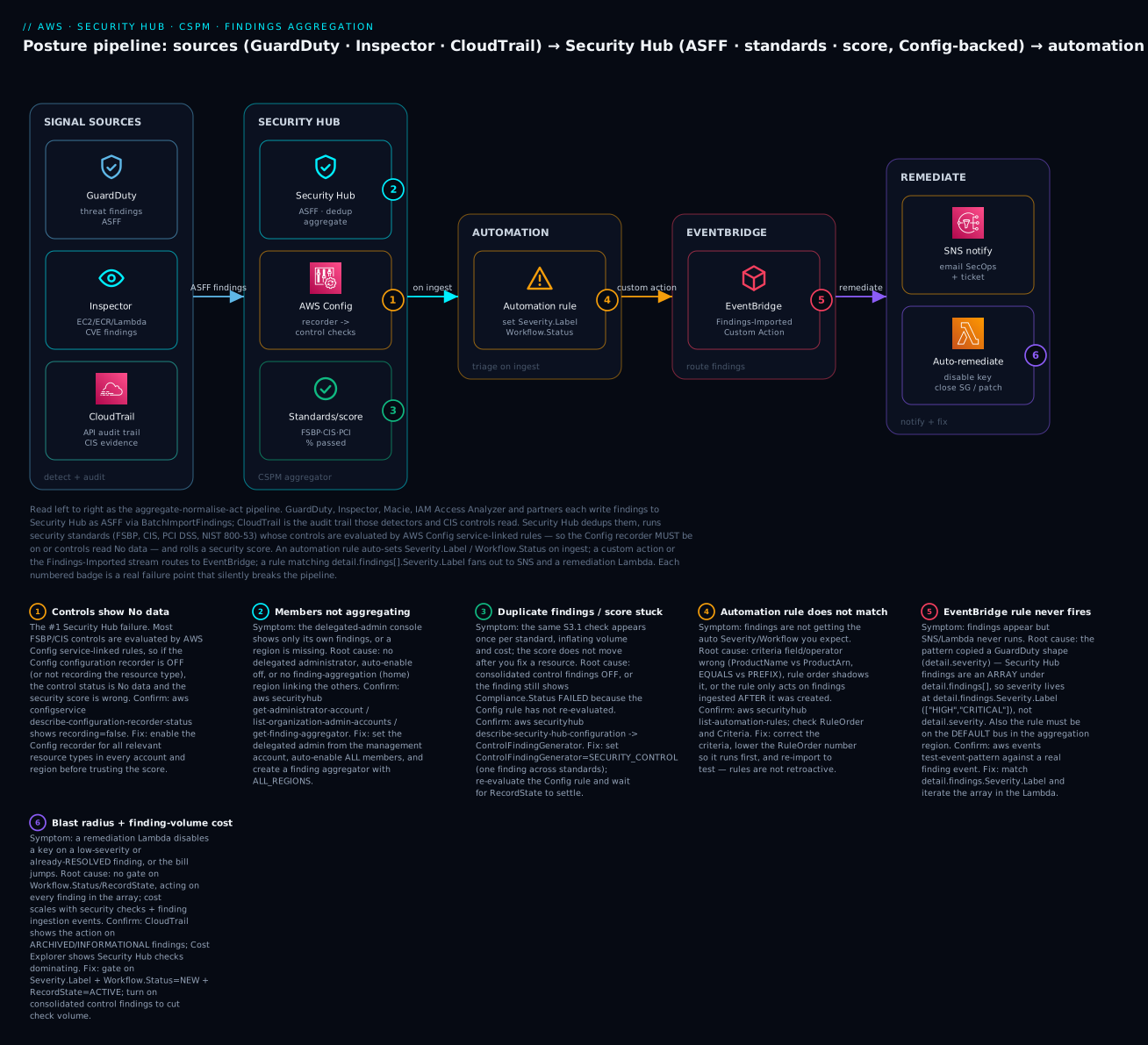
The diagram traces the aggregate-normalise-assess-act pipeline left to right. In SIGNAL SOURCES, GuardDuty (threat findings), Inspector (EC2/ECR/Lambda CVEs) and the CloudTrail audit trail feed the platform — each detective product writes findings to Security Hub as ASFF via BatchImportFindings, while CloudTrail is the evidence many CIS controls check. Those land in SECURITY HUB, where findings are deduplicated and normalised, the AWS Config service-linked rules evaluate the enabled standards’ controls (so the Config recorder must be on), and the standards/score node rolls FSBP, CIS and PCI results into a security score. On ingest, an AUTOMATION rule auto-sets Severity.Label and Workflow.Status; a custom action or the Findings-Imported stream routes to EVENTBRIDGE; and a rule matching detail.findings[].Severity.Label fans out to REMEDIATE — an SNS topic to notify a human and a Lambda to auto-remediate (disable an exposed key, close a security group, trigger a patch).
The six numbered badges mark where the pipeline silently breaks: controls stuck at No data because the AWS Config recorder is off (badge 1 — the number-one issue); member accounts or regions not aggregating to the delegated admin / home region (badge 2); duplicate findings and a stuck score from consolidated-control-findings being off (badge 3); an automation rule that does not match because of wrong criteria, rule order, or its non-retroactive nature (badge 4); an EventBridge rule that never fires because it used the GuardDuty detail.severity shape instead of detail.findings[].Severity.Label (badge 5); and a remediation Lambda with too much blast radius acting on archived/low-severity findings, plus finding-volume cost (badge 6). The legend narrates each as symptom, the exact confirm command, and the fix.
Real-world scenario
Aldenmark Payments, a fictional but realistic fintech, runs a 23-account AWS organization across ap-south-1, eu-west-1 and us-east-1. They process card data, so PCI DSS is non-negotiable, and they had “turned on Security Hub” a year earlier — in exactly two accounts, in one region, with default standards, and nobody looking at the score between audits. The quarterly PCI evidence pull took an engineer nine days of screenshots. The monthly Security Hub bill was a suspiciously low ₹2,400, which should have been the first clue it was covering almost nothing.
The reckoning came in two forms. First, an external pen-tester found a public S3 bucket in a member account holding tokenised-but-sensitive logs — a bucket whose S3.1/S3.8 control had been failing for months in that account’s own console, invisible to the security team because nothing aggregated it. Second, the auditor rejected their CIS evidence because it was CIS v1.2.0 screenshots while the audit scope had moved to v3.0.0. Both were posture-management failures, not detection failures — the findings existed; nobody could see or score them centrally.
The remediation rebuilt Security Hub the right way, and it maps one-to-one to this article’s failure badges. First, coverage: from the management account they registered the dedicated security account as the Security Hub delegated administrator, created a finding aggregator in ap-south-1 (their home region) with RegionLinkingMode = ALL_REGIONS, and adopted central configuration — one configuration policy (FSBP + CIS v3.0.0 org-wide; PCI DSS v4.0.1 only on the cardholder-data OU) associated at the org root. Twenty minutes of Terraform gave them one pane across 23 accounts and every region (badge 2).
Second, the “No data” wall. The moment central config enabled controls, the console lit up with No data across most controls (badge 1) — because AWS Config’s recorder was off in 18 of 23 accounts. They had assumed Security Hub “did its own checks.” Enabling the Config recorder (all supported resource types, every region) via the landing zone turned No-data into real Passed/Failed and produced the first honest score they had ever seen: 68%, not the fictional 100% the No-data exclusion had implied.
Third, the duplicate storm. With FSBP + CIS + PCI all enabled, the same S3.1 check appeared three times per bucket, tripling finding volume and the bill. They flipped ControlFindingGenerator to SECURITY_CONTROL (consolidated control findings), collapsing it to one finding per check keyed by SecurityControlId — volume and cost dropped by roughly two-thirds (badge 3).
Fourth, the action plane they never had. An automation rule (RuleOrder = 1) auto-suppressed passed/informational findings so on-call was never paged by green checks, and a second rule set Workflow.Status = NOTIFIED on findings tagged to the payments team. A custom action “Escalate to SOAR” let analysts push selected findings to ServiceNow. And an EventBridge rule — which they first wrote (copying a GuardDuty runbook) as detail.severity and watched match nothing until they corrected it to detail.findings[].Severity.Label = ["CRITICAL"] with Workflow.Status = ["NEW"] (badge 5) — fanned CRITICAL/NEW findings to SNS and a remediation Lambda. That Lambda, gated hard on Severity.Label, Workflow.Status = NEW and RecordState = ACTIVE (badge 6), auto-applied Block Public Access to any newly-public bucket within a minute.
The nine-day PCI evidence pull became a one-click export from the aggregation region. The bill rose from ₹2,400 to about ₹18,000/month — dominated by security checks across 23 accounts — and the CISO signed it without a blink, because the one-page summary put a public cardholder-log bucket that had been failing silently for months next to a ₹15,600 delta. The line that went on the wall: “An enabled hub nobody aggregates is a dashboard with the cable unplugged. Turn on Config, aggregate everything, consolidate the findings, and only automate on active, high-severity, new.” The order is the lesson:
| Phase | Finding | Action | Effect |
|---|---|---|---|
| Pre-incident | Hub on in 2/23 accounts, 1 region, no aggregation | — | Public bucket invisible centrally |
| Trigger | Public S3 bucket failing S3.1 for months |
Pen-tester found it, not the team | Data exposure risk |
| Trigger | CIS evidence was v1.2.0, audit needed v3.0.0 | — | Audit rejected |
| Day 1 | No org coverage | Delegated admin + aggregator + central config | One pane, 23 accounts, all regions |
| Day 1 | Controls all “No data” | Enable AWS Config recorder everywhere | Real score: 68% (not fake 100%) |
| Day 2 | Same check 3× (FSBP+CIS+PCI) | ControlFindingGenerator = SECURITY_CONTROL |
~2/3 less volume + cost |
| Day 2 | No response plane | EventBridge → SNS + remediation Lambda | Detection now triggers a fix |
| Day 2 | Rule matched nothing | Fixed detail.severity → detail.findings[].Severity.Label |
Rule fires correctly |
Advantages and disadvantages
| Advantages | Disadvantages |
|---|---|
| One pane for every security finding, normalised to ASFF | Aggregates only — no threat/vuln detection of its own |
| Prescriptive standards (FSBP/CIS/PCI/NIST) + a score | Control-based standards require AWS Config (extra cost/setup) |
| Org-wide via delegated admin + central configuration | Central config + aggregation region has real setup complexity |
| Consolidated control findings cut duplicate volume/cost | Legacy default (per-standard) can silently multiply cost |
| Native EventBridge integration for automation | You still build the remediation plane yourself |
| Automation rules auto-triage without code | Rules are not retroactive; only act on new ingests |
| Cross-region + cross-account single view (home region) | Regional service — aggregator + home region must be chosen well |
| Feeds SIEM/SOAR/Security Lake and Audit Manager | Cost scales with checks × resources × accounts × regions |
Security Hub earns its cost the first time an auditor asks for a compliance score and you export it in one click, or the first time a public bucket in an unwatched account shows up on your dashboard instead of in a breach report — but only if you have paid the operational tax: AWS Config on everywhere, aggregation configured, consolidated findings on, the right standards (not all of them) in the right accounts, and automation gated so it acts only on active, high-severity, new findings.
Hands-on lab
You will enable Security Hub with FSBP + CIS v3.0.0 and consolidated control findings, confirm the AWS Config dependency, read the score and a failed control, create an automation rule, wire a custom action and an EventBridge rule into SNS and a remediation Lambda, set up the delegated-admin + finding-aggregation pattern — via aws securityhub/events and Terraform — then tear it down. Region ap-south-1, account 111122223333. ⚠️ Security Hub is not free beyond the 30-day trial — you pay per security check and per finding-ingestion event, and controls require AWS Config (also billed). The teardown at the end stops the meter.
Step 0 — Prerequisites
aws sts get-caller-identity                       # confirm account + region
export AWS_DEFAULT_REGION=ap-south-1
export ACCT=$(aws sts get-caller-identity --query Account --output text)
export REGION=$AWS_DEFAULT_REGION
Step 1 — Ensure AWS Config is recording (the dependency)
Security Hub controls will read No data without this. Confirm the recorder is on:
aws configservice describe-configuration-recorder-status \
  --query 'ConfigurationRecordersStatus[0].{name:name,recording:recording,lastStatus:lastStatus}'
# { "name": "default", "recording": true, "lastStatus": "SUCCESS" }
If recording is false (or the command returns nothing), enable AWS Config first — see AWS Config: Resource Inventory, Compliance Rules & Remediation Hands-On. Do not proceed expecting control results until this reads true.
Step 2 — Enable Security Hub with consolidated findings, no default standards
# Enable the hub; we choose standards explicitly, and turn ON consolidated control findings
aws securityhub enable-security-hub \
  --no-enable-default-standards \
  --control-finding-generator SECURITY_CONTROL \
  --tags team=security,env=prod

# Confirm the hub and its settings
aws securityhub describe-hub \
  --query '{arn:HubArn,gen:ControlFindingGenerator,autoControls:AutoEnableControls}'
# { "arn": "arn:aws:securityhub:ap-south-1:111122223333:hub/default",
#   "gen": "SECURITY_CONTROL", "autoControls": true }
Console path: Security Hub → Go to Security Hub → choose standards → Enable Security Hub. Settings → General exposes Consolidated control findings and Auto-enable new controls.
Step 3 — Subscribe to FSBP and CIS v3.0.0
aws securityhub batch-enable-standards --standards-subscription-requests "[
  {\"StandardsArn\":\"arn:aws:securityhub:${REGION}::standards/aws-foundational-security-best-practices/v/1.0.0\"},
  {\"StandardsArn\":\"arn:aws:securityhub:${REGION}::standards/cis-aws-foundations-benchmark/v/3.0.0\"}
]"

# Verify what is enabled
aws securityhub get-enabled-standards \
  --query 'StandardsSubscriptions[].{std:StandardsArn,status:StandardsStatus}' --output table
Standards take up to a few hours to fully evaluate the first time (the backing Config rules must run). Do not judge the score in the first ten minutes.
Step 4 — Read the score and a failed control
# List failing FSBP controls (control findings that FAILED and are ACTIVE)
aws securityhub get-findings --filters '{
  "ComplianceStatus":[{"Value":"FAILED","Comparison":"EQUALS"}],
  "RecordState":[{"Value":"ACTIVE","Comparison":"EQUALS"}],
  "WorkflowStatus":[{"Value":"NEW","Comparison":"EQUALS"}]
}' --max-items 5 \
  --query 'Findings[].{id:Compliance.SecurityControlId,sev:Severity.Label,title:Title}' --output table
# e.g. S3.8  | CRITICAL | S3 Block Public Access setting should be enabled ...
The overall security score is on the Security Hub Summary page (Console); programmatically you compare control counts by status. A control at S3.8 / FAILED / CRITICAL is your first fix candidate.
Step 5 — Create an automation rule (auto-suppress passed/informational)
aws securityhub create-automation-rule \
  --rule-name "suppress-passed-informational" \
  --rule-order 1 --rule-status ENABLED \
  --description "Auto-suppress passed or informational findings so they never page" \
  --criteria '{
    "ComplianceStatus":[{"Value":"PASSED","Comparison":"EQUALS"}]
  }' \
  --actions '[{
    "Type":"FINDING_FIELDS_UPDATE",
    "FindingFieldsUpdate":{
      "Workflow":{"Status":"SUPPRESSED"},
      "Note":{"Text":"auto-suppressed: control passed","UpdatedBy":"automation-rule"}
    }
  }]'

aws securityhub list-automation-rules \
  --query 'AutomationRulesMetadata[].{name:RuleName,order:RuleOrder,status:RuleStatus}' --output table
Remember: this affects only findings ingested after the rule is created — it is not retroactive.
Step 6 — Create the SNS topic, custom action, and remediation Lambda
export TOPIC=$(aws sns create-topic --name sh-critical --query TopicArn --output text)
aws sns subscribe --topic-arn $TOPIC --protocol email --notification-endpoint secops@example.com

# A custom action (for deliberate, analyst-triggered routing to EventBridge)
aws securityhub create-action-target \
  --name "Escalate to SOAR" --id "EscalateToSOAR" \
  --description "Send selected findings to the SOAR queue"
# { "ActionTargetArn": "arn:aws:securityhub:ap-south-1:111122223333:action/custom/EscalateToSOAR" }
A remediation Lambda that is safe by construction — it iterates the findings array and gates on active/new/high severity:
# handler.py — remediate ONLY active, NEW, high/critical S3 public-access findings
import boto3
s3control = boto3.client("s3control")
STS = boto3.client("sts")

def handler(event, _ctx):
    acct = STS.get_caller_identity()["Account"]
    acted = []
    for f in event.get("detail", {}).get("findings", []):          # iterate the ARRAY
        sev  = f.get("Severity", {}).get("Label")
        wf   = f.get("Workflow", {}).get("Status")
        rec  = f.get("RecordState")
        if sev not in ("HIGH", "CRITICAL") or wf != "NEW" or rec != "ACTIVE":
            continue                                                 # gate: blast-radius control
        for r in f.get("Resources", []):
            if r.get("Type") == "AwsS3Bucket":
                # enforce account-level Block Public Access as the safe remediation
                s3control.put_public_access_block(
                    AccountId=acct,
                    PublicAccessBlockConfiguration={
                        "BlockPublicAcls": True, "IgnorePublicAcls": True,
                        "BlockPublicPolicy": True, "RestrictPublicBuckets": True})
                acted.append(r.get("Id"))
    return {"remediated": acted}
zip fn.zip handler.py
export FN=$(aws lambda create-function --function-name sh-remediate \
  --runtime python3.12 --handler handler.handler --zip-file fileb://fn.zip \
  --role arn:aws:iam::$ACCT:role/securityhub-responder \
  --query FunctionArn --output text)
Step 7 — Wire the EventBridge rule (the ASFF array trap)
# Match CRITICAL/HIGH, NEW, ACTIVE findings — note detail.findings[].Severity.Label
aws events put-rule --name sh-critical-new \
  --event-pattern '{
    "source": ["aws.securityhub"],
    "detail-type": ["Security Hub Findings - Imported"],
    "detail": {
      "findings": {
        "Severity": { "Label": ["HIGH","CRITICAL"] },
        "Workflow": { "Status": ["NEW"] },
        "RecordState": ["ACTIVE"]
      }
    }
  }'

aws events put-targets --rule sh-critical-new --targets \
  "Id"="sns","Arn"="$TOPIC" \
  "Id"="fn","Arn"="$FN"

aws lambda add-permission --function-name sh-remediate \
  --statement-id sh-events --action lambda:InvokeFunction \
  --principal events.amazonaws.com \
  --source-arn arn:aws:events:$REGION:$ACCT:rule/sh-critical-new

# Prove the pattern BEFORE trusting it — this is the badge-5 check
aws events test-event-pattern \
  --event-pattern '{"detail":{"findings":{"Severity":{"Label":["HIGH","CRITICAL"]}}}}' \
  --event '{"detail":{"findings":[{"Severity":{"Label":"CRITICAL"}}]}}'
# { "Result": true }     # a detail.severity pattern would return false here
Step 8 — Set up delegated admin + finding aggregation (org)
# In the MANAGEMENT account: designate the security account as the Security Hub admin
aws securityhub enable-organization-admin-account --admin-account-id 444455556666

# In the DELEGATED-ADMIN (security) account: create the finding aggregator (home = ap-south-1)
aws securityhub create-finding-aggregator --region-linking-mode ALL_REGIONS

# Auto-enable members (local config) OR switch to central config
aws securityhub update-organization-configuration --auto-enable --auto-enable-standards DEFAULT

# Confirm
aws securityhub list-organization-admin-accounts \
  --query 'AdminAccounts[].{acct:AccountId,status:Status}'
aws securityhub get-finding-aggregator \
  --finding-aggregator-arn $(aws securityhub list-finding-aggregators \
    --query 'FindingAggregators[0].FindingAggregatorArn' --output text) \
  --query '{home:FindingAggregationRegion,mode:RegionLinkingMode}'
# { "home": "ap-south-1", "mode": "ALL_REGIONS" }
Step 9 — The core of the lab as Terraform
data "aws_region" "current" {}

resource "aws_securityhub_account" "this" {
  enable_default_standards  = false
  control_finding_generator = "SECURITY_CONTROL"   # consolidated control findings
  auto_enable_controls      = true
}

resource "aws_securityhub_standards_subscription" "fsbp" {
  standards_arn = "arn:aws:securityhub:${data.aws_region.current.name}::standards/aws-foundational-security-best-practices/v/1.0.0"
  depends_on    = [aws_securityhub_account.this]
}

resource "aws_securityhub_standards_subscription" "cis3" {
  standards_arn = "arn:aws:securityhub:${data.aws_region.current.name}::standards/cis-aws-foundations-benchmark/v/3.0.0"
  depends_on    = [aws_securityhub_account.this]
}

resource "aws_securityhub_automation_rule" "suppress_passed" {
  description = "Auto-suppress passed findings"
  rule_name   = "suppress-passed-informational"
  rule_order  = 1
  rule_status = "ENABLED"
  criteria {
    compliance_status { comparison = "EQUALS" value = "PASSED" }
  }
  action {
    type = "FINDING_FIELDS_UPDATE"
    finding_fields_update {
      workflow { status = "SUPPRESSED" }
      note { text = "auto-suppressed: control passed" updated_by = "terraform" }
    }
  }
  depends_on = [aws_securityhub_account.this]
}

resource "aws_securityhub_action_target" "escalate" {
  name        = "Escalate to SOAR"
  identifier  = "EscalateToSOAR"
  description = "Send selected findings to the SOAR queue"
  depends_on  = [aws_securityhub_account.this]
}

# Org rollout (run in the delegated-admin account)
resource "aws_securityhub_organization_admin_account" "admin" {
  admin_account_id = "444455556666"
}

resource "aws_securityhub_finding_aggregator" "agg" {
  linking_mode = "ALL_REGIONS"
  depends_on   = [aws_securityhub_account.this]
}

resource "aws_securityhub_organization_configuration" "org" {
  auto_enable           = true
  auto_enable_standards = "DEFAULT"
  depends_on            = [aws_securityhub_finding_aggregator.agg, aws_securityhub_organization_admin_account.admin]
}

# EventBridge rule → SNS + remediation Lambda
resource "aws_cloudwatch_event_rule" "sh_critical" {
  name = "sh-critical-new"
  event_pattern = jsonencode({
    source        = ["aws.securityhub"]
    "detail-type" = ["Security Hub Findings - Imported"]
    detail = {
      findings = {
        Severity    = { Label = ["HIGH", "CRITICAL"] }
        Workflow    = { Status = ["NEW"] }
        RecordState = ["ACTIVE"]
      }
    }
  })
}

resource "aws_cloudwatch_event_target" "sns" {
  rule = aws_cloudwatch_event_rule.sh_critical.name
  arn  = aws_sns_topic.critical.arn
}
For central configuration (instead of auto_enable), you would use aws_securityhub_organization_configuration with an organization_configuration { configuration_type = "CENTRAL" } block plus aws_securityhub_configuration_policy and aws_securityhub_configuration_policy_association resources — declaring the standards/controls once and associating them to the org root.
Step 10 — Teardown (stops the billing)
| # | Action | Command |
|---|---|---|
| 1 | Remove EventBridge targets + rule | aws events remove-targets --rule sh-critical-new --ids sns fn then aws events delete-rule --name sh-critical-new |
| 2 | Delete the Lambda | aws lambda delete-function --function-name sh-remediate |
| 3 | Delete the SNS topic | aws sns delete-topic --topic-arn $TOPIC |
| 4 | Delete the custom action | aws securityhub delete-action-target --action-target-arn <arn> |
| 5 | Delete the automation rule | aws securityhub batch-delete-automation-rules --automation-rules-arns <arn> |
| 6 | Delete the finding aggregator | aws securityhub delete-finding-aggregator --finding-aggregator-arn <arn> |
| 7 | Disable org auto-enable (admin acct) | aws securityhub update-organization-configuration --no-auto-enable --auto-enable-standards NONE |
| 8 | Remove the delegated admin (mgmt acct) | aws securityhub disable-organization-admin-account --admin-account-id 444455556666 |
| 9 | Disable standards | aws securityhub batch-disable-standards --standards-subscription-arns <arn> <arn> |
| 10 | Disable Security Hub (stops hub billing) | aws securityhub disable-security-hub |
⚠️ Disabling Security Hub stops its charges but not AWS Config’s — if you enabled Config only for this lab, disable its recorder separately. Disabling a single standard (batch-disable-standards) stops that standard’s check charges while keeping the hub running — the right move to trim cost without going dark.
Common mistakes & troubleshooting
This is the section you open when the score is wrong, findings are missing, or automation is silent. The playbook first (symptom → fix), then the operation-error reference, a decision table, and prose on the nastiest failures.
| # | Symptom | Root cause | Confirm (exact command / console path) | Fix |
|---|---|---|---|---|
| 1 | Controls all show “No data” | AWS Config recorder off / not recording the type | aws configservice describe-configuration-recorder-status → recording:false |
Enable the Config recorder (all supported types) in every account/region |
| 2 | Score reads 100% but coverage feels wrong | No-data controls excluded from score | Compare control counts by status in the console | Enable Config; a real score appears once controls have data |
| 3 | Member-account findings missing from admin | No delegated admin / auto-enable off | list-organization-admin-accounts; list-members status |
Set delegated admin (mgmt acct) + --auto-enable / central policy |
| 4 | A whole region is missing | No finding-aggregation region linking it | get-finding-aggregator → region not linked |
create-finding-aggregator --region-linking-mode ALL_REGIONS |
| 5 | Same check appears 3–5× | Consolidated control findings OFF | describe-hub → ControlFindingGenerator: STANDARD_CONTROL |
Set --control-finding-generator SECURITY_CONTROL |
| 6 | EventBridge rule never fires | Pattern used GuardDuty detail.severity shape |
test-event-pattern returns false |
Match detail.findings[].Severity.Label (UPPERCASE) |
| 7 | Rule fires but Lambda misses findings | Handler reads findings[0], not the array |
Lambda logs show one finding per batch | Iterate event['detail']['findings'] |
| 8 | Lambda not invoked, SNS works | Missing lambda:InvokeFunction for EventBridge |
aws lambda get-policy lacks events.amazonaws.com |
add-permission --principal events.amazonaws.com |
| 9 | Automation rule doesn’t apply | Wrong criteria/order, or not retroactive | list-automation-rules; check RuleOrder/Criteria |
Fix criteria; lower RuleOrder; re-import to test |
| 10 | Score won’t move after a fix | Backing Config rule hasn’t re-evaluated | Finding still FAILED/ACTIVE in get-findings |
Re-evaluate the Config rule; wait for the next check |
| 11 | Suppressed findings keep returning | Fixed the symptom, not set SUPPRESSED; or it’s a new id |
get-findings shows Workflow.Status: NEW |
Set Workflow.Status = SUPPRESSED via rule/BatchUpdateFindings |
| 12 | Can’t enable delegated admin | Trusted access for Security Hub not enabled in Orgs | organizations list-aws-service-access-for-organization |
Enable trusted access; run enable-organization-admin-account from mgmt |
| 13 | Standard stuck “Enabling” / no controls | First evaluation still running, or Config missing | get-enabled-standards; recorder status |
Wait for evaluation; ensure Config is on |
| 14 | Bill much higher than expected | Per-standard duplication or too many standards/accounts | Cost Explorer → Security Hub; check ControlFindingGenerator |
Consolidate findings; scope NIST/PCI to relevant accounts only |
| 15 | Third-party findings not arriving | Product integration not accepted/subscribed | Console → Integrations → the product status | Accept/subscribe the integration; verify its ProductArn |
| 16 | Central config not applying to an account | Account is self-managed, or policy not associated | get-configuration-policy-association |
Associate the policy; switch the account to centrally-managed |
Operation / API error reference
| Error | Where it appears | Meaning | Fix |
|---|---|---|---|
ResourceConflictException: Account already ... subscribed |
enable-security-hub |
Hub already enabled in this region | Use describe-hub / update-security-hub-configuration |
InvalidAccessException |
Most securityhub calls |
Security Hub not enabled in this account/region | enable-security-hub first |
AccessDeniedException on enable-organization-admin-account |
Org admin setup | Not run from management, or no trusted access | Run from management; enable Security Hub trusted access |
InvalidInputException: StandardsArn |
batch-enable-standards |
Wrong ARN or region segment | Use the region-correct standards ARN |
LimitExceededException (automation rules) |
create-automation-rule |
Per-account rule limit reached | Consolidate rules; delete unused |
ResourceNotFoundException (aggregator) |
get-finding-aggregator |
No aggregator / wrong region | Create it in the intended home region |
| Lambda not triggered (no error) | EventBridge → Lambda | No resource policy for events.amazonaws.com |
add-permission with the rule ARN as source |
| Findings not updating your fields | BatchImportFindings vs BatchUpdateFindings |
Provider re-import ignores your triage | Use BatchUpdateFindings for Workflow/Note |
Decision table — read the symptom, name the cause
| If you see… | It’s probably… | Do this |
|---|---|---|
| Every control “No data” | AWS Config recorder off | Enable the Config recorder everywhere |
| 100% score, empty console | No-data exclusion masking zero coverage | Enable Config; re-check control counts |
| The same finding N times | Consolidated control findings off | ControlFindingGenerator = SECURITY_CONTROL |
| A member/region absent | No delegated admin / no aggregator | Set admin + create finding aggregator |
| Nothing fires on findings | GuardDuty-shape EventBridge pattern | Match detail.findings[].Severity.Label |
| Lambda handles only one finding | Not iterating the array | Loop detail.findings |
| Automation rule ignored | Wrong criteria / not retroactive | Fix criteria; test on new ingests |
| Bill creeping up | Duplication / too many standards | Consolidate; scope standards to accounts |
The three nastiest failures, in prose
“No data” everywhere — and the fake 100%. The most dangerous Security Hub state is not a low score; it is a high one built on nothing. Because most controls are AWS Config rules, an account with the recorder off has every control in the No data state — and No-data controls are excluded from the score. The result is a console that can read a reassuring 100% (or blank) at the exact moment you have zero coverage. The confirm is one command — describe-configuration-recorder-status — and the fix is to treat “AWS Config recorder on, all supported resource types, every account and region” as a hard prerequisite you verify before you ever quote a score. Never report a Security Hub score without first proving Config is recording.
The ASFF array trap in EventBridge. Security Hub findings arrive at EventBridge as an array under detail.findings, and severity is a label at detail.findings[].Severity.Label — not the detail.severity numeric field GuardDuty uses. An engineer who copies a GuardDuty remediation runbook writes "detail": {"severity": [{"numeric": [">=", 7]}]}, deploys it cleanly, and it matches nothing forever — so CRITICAL findings sail past a rule that looks correct. Two disciplines defeat it: match detail.findings.Severity.Label with UPPERCASE labels, and test-event-pattern every rule against a real finding event before trusting it. And because it is an array, the Lambda must iterate — a handler that reads only findings[0] silently drops the rest of a batched event.
Automation that acts on the wrong findings. The moment you connect a remediation Lambda, every finding in the stream is a potential trigger — including archived findings (a control that just passed re-imports as RecordState: ARCHIVED), suppressed ones, and low-severity noise. A naïve “if it’s an S3 finding, lock the bucket” handler will act on findings that are no longer true, or fight a human who just suppressed the alert. Every remediation must gate on the full triad — Severity.Label in your set and Workflow.Status = NEW and RecordState = ACTIVE — be idempotent, and keep destructive actions (delete, detach, terminate) behind human approval via a custom action rather than the automatic Findings-Imported stream. Build the gate before the action, not after the first bad remediation.
Best practices
| # | Practice | Why |
|---|---|---|
| 1 | Enable AWS Config (recorder on) before trusting any control or score | Controls are Config rules; no recorder = No data = fake score |
| 2 | Turn on consolidated control findings (SECURITY_CONTROL) |
One finding per check; less noise, less cost |
| 3 | Run FSBP everywhere; add one CIS version (prefer v3.0.0) | Broadest AWS coverage + a recognised baseline |
| 4 | Scope PCI DSS / NIST 800-53 to the accounts that need them | Avoids hundreds of irrelevant controls + cost |
| 5 | Roll out via delegated admin to a dedicated security account | Least privilege; org-wide governance |
| 6 | Create a finding-aggregation (home) region with ALL_REGIONS |
One cross-region pane; nowhere goes dark |
| 7 | Use central configuration + configuration policies at scale | One policy, all accounts/regions, no drift |
| 8 | Automation rules to auto-suppress passed/informational and auto-notify | Humans see only what matters |
| 9 | Match EventBridge on detail.findings[].Severity.Label and test-event-pattern it |
Avoids the silent GuardDuty-shape miss |
| 10 | Gate remediation on Severity.Label + Workflow.Status=NEW + RecordState=ACTIVE |
Prevents acting on archived/suppressed/low-sev findings |
| 11 | Prefer custom actions for destructive remediation | Human-in-the-loop for irreversible steps |
| 12 | Export to Security Lake / S3 for retention beyond 90 days | Active findings age out otherwise |
Security notes
Security Hub is the security control plane, so its own posture and the remediation it drives must be least-privilege and tamper-resistant.
| Concern | Risk | Control |
|---|---|---|
| Remediation-Lambda permissions | An over-broad role can damage prod | Scope to exact actions on tagged resources; gate on the triad |
| Auto-remediation blast radius | Acting on archived/suppressed findings | Require Workflow=NEW + RecordState=ACTIVE; custom action for destructive steps |
| Hub tamper | Attacker disables Security Hub to hide | SCP denying securityhub:DisableSecurityHub/DeleteMembers (break-glass only) |
| Finding retention | 90-day active window loses evidence | Export to a central, KMS-encrypted, Object-Locked S3 bucket / Security Lake |
| Delegated-admin scope | The admin sees the whole org | Delegate only to a dedicated security/audit account |
| Cross-account finding update | A member altering triage state | Restrict BatchUpdateFindings via IAM; log via CloudTrail |
| Standard/control disablement | Silently lowering the bar | Alarm on UpdateStandardsControl/BatchUpdateStandardsControlAssociations |
| Integration trust | A rogue product importing false findings | Review subscribed ProductArns; least-privilege BatchImportFindings |
Key IAM actions to gate, and to whom:
| Action | Grants | Give to |
|---|---|---|
securityhub:EnableSecurityHub / UpdateSecurityHubConfiguration |
Turn the hub on/off, change consolidation | Platform automation only |
securityhub:DisableSecurityHub |
Go dark | Nobody in prod (SCP-deny; break-glass) |
securityhub:EnableOrganizationAdminAccount |
Set the org admin | Management-account automation only |
securityhub:BatchEnableStandards / UpdateStandardsControl |
Change standards/controls (the bar) | Security engineering (reviewed) |
securityhub:CreateActionTarget / CreateAutomationRule |
Change triage/remediation routing | Security engineering |
securityhub:BatchUpdateFindings |
Change workflow/severity of findings | SOC / responders (scoped) |
securityhub:GetFindings / GetInsights |
Read the posture | Auditors / responders, read-only |
Cost & sizing
Security Hub has a 30-day free trial per account/region, useful for right-sizing before you commit. After that you pay on two meters: security checks (per control evaluation) and finding-ingestion events (per finding imported/updated). Automation rules and the console are not separately billed; AWS Config (which backs controls) is billed by Config, separately. Figures below are indicative (us-east-1, first pricing tier) and tier down with volume — always confirm with Cost Explorer.
| Cost driver | Roughly | Note |
|---|---|---|
| Security checks | ~$0.0010 per check (first 100k/acct/region/mo) | Tiers to ~$0.0008, then lower |
| Finding-ingestion events | First 10,000/acct/region/mo free, then ~$0.00003 each | Updates count as ingestion events |
| Automation rules | included | No separate charge |
| Standards / controls | (drive the check count) | More standards × more resources = more checks |
| AWS Config (dependency) | billed by Config | Recorder + rule evaluations, separate line |
| Finding export (S3 / Security Lake) | S3 / Security Lake cost | For retention beyond 90 days |
The number of security checks is roughly enabled controls × in-scope resources × re-evaluations, which is why consolidated control findings (one finding per check instead of per standard) and scoping heavy standards to relevant accounts are the two biggest levers. A worked example for a single mid-size account — FSBP + CIS v3.0.0, consolidated findings on, moderate resource count:
| Component | Estimate | Monthly (USD) | Monthly (INR ≈ ₹83/$) |
|---|---|---|---|
| Security checks (~40k checks) | 40,000 × $0.0010 | ~$40 | ~₹3,320 |
| Finding ingestion (~60k events, 10k free) | 50,000 × $0.00003 | ~$1.50 | ~₹125 |
| AWS Config (recorder + rules, dependency) | varies | ~$25 | ~₹2,075 |
| Total (indicative) | — | ~$66 | ~₹5,500 |
Multiply the checks and ingestion by account count for an org — which is why scoping and consolidation matter at scale. The levers, ranked by impact:
| Lever | Saves | Trade-off |
|---|---|---|
Consolidated control findings (SECURITY_CONTROL) |
Large (kills per-standard duplication) | None material — enable it |
| Scope NIST/PCI to relevant accounts only | Large (hundreds of controls) | Those accounts must still meet the obligation |
| Disable low-value controls you have accepted | Moderate (fewer checks) | Must document the accepted risk |
| Turn off default standards in sandboxes | Moderate | Sandboxes are less monitored |
| Use the 30-day trial to measure first | Avoids surprises | 30 days only |
The one anti-pattern: do not enable every standard in every account “to be safe.” NIST 800-53 alone is hundreds of controls; multiplied by resources and accounts it dominates the bill while drowning the signal. Enable the standards you are obligated to, where you are obligated, with consolidation on.
Interview & exam questions
Q1. What is AWS Security Hub, and how is it different from GuardDuty or Inspector? Security Hub is a CSPM aggregator and posture manager — it collects findings from many services, normalises them to ASFF, runs compliance standards, and produces a security score. It does not detect threats (GuardDuty) or scan for vulnerabilities (Inspector) itself; it ingests their findings. The only findings it originates are control findings from running standards. (SCS-C02)
Q2. What is the ASFF and why does it matter? The AWS Security Finding Format is the single JSON schema every finding is normalised into. It matters because one schema means one filter language, one severity to route on (Severity.Label), and one remediation Lambda that understands findings from every product — the whole point of aggregation. (SCS-C02)
Q3. Your Security Hub controls all show “No data.” Why? Most FSBP/CIS controls are evaluated by AWS Config service-linked rules, so if the Config configuration recorder is off (or not recording the resource type), the controls cannot evaluate and read No data. Confirm with describe-configuration-recorder-status; fix by enabling the recorder in every account/region. (SCS-C02, SOA-C02)
Q4. How is the security score calculated, and why can a No-data account read 100%? The score is passed controls ÷ enabled controls with data, as a percentage; No-data and disabled controls are excluded. An account with the Config recorder off has every control in No data, all excluded — so the ratio can compute to a misleading 100% (or blank) despite zero coverage. (SCS-C02)
Q5. Why does the same control finding appear once per standard, and how do you fix it? Because consolidated control findings is off (ControlFindingGenerator = STANDARD_CONTROL), emitting one finding per standard+control pair. Set it to SECURITY_CONTROL so Security Hub emits one finding per check across all standards, keyed by SecurityControlId — cutting volume and cost. (SCS-C02)
Q6. Your EventBridge rule for Security Hub never fires though findings exist. Most likely cause? The pattern used the GuardDuty shape detail.severity. Security Hub findings are an array at detail.findings, so severity is detail.findings[].Severity.Label with UPPERCASE labels (HIGH/CRITICAL). Also confirm the rule is on the default bus in the aggregation region. (SOA-C02)
Q7. How do you aggregate Security Hub across a 30-account, 3-region org so everything lands in one pane? Register a dedicated security account as the delegated administrator (from the management account), create a finding aggregator in your home region with RegionLinkingMode = ALL_REGIONS, and use central configuration with a configuration policy to enable Security Hub, standards and controls across the org. (SAP-C02)
Q8. What is the difference between an automation rule and a custom action? An automation rule runs automatically on ingest, matching criteria and updating fields (workflow, severity, note) — auto-triage with no human. A custom action is an analyst-triggered button that emits selected findings to EventBridge — deliberate, human-in-the-loop routing, ideal for destructive remediation. (SCS-C02)
Q9. Why must a remediation Lambda gate on Workflow.Status and RecordState? Because the Findings-Imported stream includes archived findings (a control that just passed) and suppressed ones. Acting on those remediates issues that are no longer true or fights an analyst’s decision. Gate on Severity.Label + Workflow.Status = NEW + RecordState = ACTIVE, and iterate the findings array. (SCS-C02)
Q10. Which standards would you enable for a card-processing workload, and where? FSBP everywhere (broadest AWS hygiene), CIS v3.0.0 as the recognised baseline, and PCI DSS — but PCI only in the accounts/OU that handle cardholder data, not org-wide, to avoid irrelevant controls and cost. (SCS-C02)
Q11. What are the two Security Hub cost meters, and the biggest lever to control them? Security checks (per control evaluation) and finding-ingestion events. The biggest levers are consolidated control findings (one finding per check, not per standard) and scoping heavy standards (NIST/PCI) to only the accounts that need them. (SOA-C02)
Q12. BatchImportFindings vs BatchUpdateFindings — who uses which? The product/integration that owns a ProductArn uses BatchImportFindings to create/update its own findings; you use BatchUpdateFindings to change Workflow.Status, Note, and customer severity without clobbering provider fields (which live in FindingProviderFields). Automation rules are managed BatchUpdateFindings. (SCS-C02)
Quick check
- You enable Security Hub and every control shows “No data.” What is the one dependency to check, and with which command?
- Why can an account with no coverage display a security score of 100%?
- The same
S3.1check appears three times per bucket. Which single setting fixes it, and to what value? - Your EventBridge rule copied from a GuardDuty runbook never fires for Security Hub. What is the field-shape bug?
- Which three ASFF fields must a remediation Lambda check before acting, to avoid blast-radius mistakes?
Answers
- AWS Config — the configuration recorder must be on. Confirm with
aws configservice describe-configuration-recorder-status(look forrecording: true). Most controls are Config rules; no recorder means No data. - Because No-data and disabled controls are excluded from the score (passed ÷ enabled-with-data). An account with the recorder off has every control in No data, all excluded, so the ratio can compute to a misleading 100% despite zero real coverage.
- Consolidated control findings — set
ControlFindingGenerator = SECURITY_CONTROL(viaenable-security-hub/update-security-hub-configurationor the console’s Consolidated control findings). It emits one finding per check across all standards. - Security Hub findings are an array under
detail.findings, so severity isdetail.findings[].Severity.Label(UPPERCASEHIGH/CRITICAL) — not GuardDuty’sdetail.severitynumeric field. The Lambda must also iterate the array. Severity.Label(is it high enough?),Workflow.Status(is itNEW, not suppressed/notified/resolved?), andRecordState(is itACTIVE, not archived?). Gate on all three and be idempotent.
Glossary
| Term | Definition |
|---|---|
| Security Hub | The CSPM service that aggregates findings, normalises them to ASFF, runs security standards, and produces a security score; an aggregator, not a detector. |
| ASFF | AWS Security Finding Format — the single JSON schema every finding is normalised into. |
| Finding | A normalised security observation in ASFF, retained ~90 days active. |
Product / ProductArn |
An integration that sends findings; part of the (ProductArn, Id) dedup key. |
| Standard | A curated set of controls (FSBP, CIS, PCI DSS, NIST 800-53) that drives the compliance score. |
| Control | A single prescriptive check within a standard (e.g. S3.1), mostly backed by an AWS Config rule. |
| Security control ID | The cross-standard identifier (S3.1) used when consolidated control findings is on. |
| Security score | The percentage of passed controls out of enabled controls with data; No-data/disabled excluded. |
| Consolidated control findings | The SECURITY_CONTROL setting that emits one finding per check across all standards instead of one per standard. |
| Workflow status | Your triage state on a finding: NEW / NOTIFIED / SUPPRESSED / RESOLVED. |
| Record state | Whether a finding is current: ACTIVE or ARCHIVED. |
| Delegated administrator | The org account (ideally a security account) that governs Security Hub and aggregates members. |
| Finding-aggregation region | The home region into which linked regions’ findings roll up for a single cross-region pane. |
| Central configuration | Managing standards/controls org-wide via configuration policies authored in the home region. |
| Automation rule | A rule that auto-updates finding fields (workflow, severity, note) on ingest — managed BatchUpdateFindings. |
| Custom action | An analyst-triggered action that emits selected findings to EventBridge for deliberate remediation. |
| Insight | A saved grouping of related findings by an attribute, for trend/hotspot spotting (managed or custom). |
Next steps
- Fix the number-one dependency first with AWS Config: Resource Inventory, Compliance Rules & Remediation Hands-On and the audit foundation in AWS CloudTrail and Config: Audit and Compliance at Scale.
- Feed richer findings into the hub with Amazon GuardDuty Hands-On: Threat Detection & Automated Response and Amazon Inspector Hands-On: Continuous Vulnerability Scanning for EC2, ECR & Lambda.
- Build the remediation plane in depth with Amazon EventBridge Rules & Event Bus Hands-On, an SNS fan-out topic, and a containment Lambda function.
- Lay the org foundation for org-wide aggregation with AWS Organizations, SCPs & Multi-Account Guardrails and AWS Control Tower Guardrails: Multi-Account Foundation.
- Close common failing controls at the source with S3 Bucket Policies & Block Public Access and KMS Encryption Keys & Envelope Encryption Hands-On.