The uncomfortable truth about vulnerability management is that a clean scan is a photograph, not a promise. You scan an image at build time, it passes, you ship it — and three weeks later a new CVE lands against a library you baked in, and nothing tells you. The image did not change; the world changed. Your instance fleet drifts as packages age; a log4j-shaped event breaks on a Friday and the only question that matters is “which of our 900 instances, images and functions actually contain the vulnerable package, and which of those can an attacker reach?” A point-in-time scanner answers that the next time someone remembers to run it. Amazon Inspector answers it continuously, because it re-evaluates your existing inventory against its vulnerability database every time a new CVE is published — with no re-scan to schedule and, for most of what it covers, no agent to deploy.
This is the deep, hands-on reference for the modern Amazon Inspector — the automated, continuous service (often called Inspector v2, API namespace inspector2) that replaced the old Inspector Classic assessment-template model. We treat it as a pipeline — discover → inventory → match → score → route → respond — and walk each stage option by option: the three scan targets (EC2 via the SSM agent or agentless EBS snapshots, ECR container images with scan-on-push and continuous rescan, and Lambda functions plus your Lambda code); the finding types (package vulnerability with a CVE, network reachability, and code vulnerability); the Inspector risk score — CVSS re-weighted by real network reachability and real-world exploitability (EPSS and known-exploit signals); the vulnerability-intelligence database and how findings appear and auto-close as CVEs land and packages get patched; findings into Security Hub and EventBridge for routing and auto-ticketing; suppression rules, SBOM export (CycloneDX / SPDX), CI/CD scanning before an image ever reaches a registry, and org-wide rollout through a delegated administrator with auto-activate. Because this is the document you open the day a CVE trends, every setting, scan-status reason, finding field, cost driver and failure mode is a table you can scan mid-incident.
By the end you will stop treating “the scan passed” as safety and start treating Inspector as a live feed you route and act on. You will know why an EC2 instance shows zero findings (and why the fix is almost always the same SSM story as every other Systems Manager feature), why an image scanned once never gets re-evaluated, why a CVSS 9.8 vulnerability can legitimately show as Medium in Inspector, why an EventBridge rule copied from your GuardDuty setup never fires (severity here is a string, not a number), and how to wire the whole detect-and-ticket loop with aws inspector2 and Terraform so it survives an org-wide rollout. Finding the vulnerabilities is Inspector’s job; making those findings reach the right queue and get patched is yours, and that is the craft this article teaches.
What problem this solves
Inspector solves the coverage-and-currency gap that every point-in-time scanner leaves open. Traditional scanning has two failure modes baked in. First, coverage: someone has to remember to run it, against the right targets, and interpret the output — so the instance that spun up yesterday, the image in the repo nobody deploys from, and the Lambda a contractor left behind are exactly the ones that go unscanned. Second, currency: a scan is true only at the instant it runs. The CVE that matters most is often published after your last scan, against code you have not touched — and a photograph from last Tuesday cannot see it. Building continuous coverage yourself means standing up a scanner fleet, an agent rollout, a package-to-CVE matching engine, and a feed of curated vulnerability intelligence, then keeping all of it current forever. Inspector is that capability as a switch you flip per account, per resource type.
What breaks without it, concretely: a base image built eight months ago sails through its build-time scan, gets deployed to 40 tasks, and silently carries a critical glibc or openssl CVE disclosed last month — invisible, because nobody re-scanned a passing image. An EC2 fleet accumulates unpatched OS packages because the patching cadence slipped, and the first anyone hears of it is a pen-test report. A Lambda function bundles a vulnerable requests or urllib3 version in a layer, and there is no image and no host to “scan” in the traditional sense at all. Each of these is a real, common exposure, and each produces a distinctive package-to-CVE match that Inspector finds continuously.
Who hits this: every account that runs compute — which is every account. Vulnerability management is a baseline control that every framework (PCI-DSS 6.x, SOC 2, HIPAA, ISO 27001, FedRAMP, CIS AWS Foundations) assumes you have, and Inspector is the AWS-native way to satisfy it for EC2, containers and serverless in one place, feeding Security Hub so it sits alongside your other findings. To frame the field before the deep dive, here is what Inspector does, what it does not, and where each answer actually lives:
| Capability | Does Inspector do it? | How | Where the answer lives | Common wrong assumption |
|---|---|---|---|---|
| Find OS-package CVEs on EC2 | Yes | SSM inventory or agentless snapshot → DB match | PACKAGE_VULNERABILITY findings |
“I need an Inspector agent” (it uses the SSM agent) |
| Find language-package CVEs (app deps) | Yes | Deep inspection (EC2) / image + Lambda scan | Findings with a language package | “It only scans the OS” (enhanced scans app deps too) |
| Continuously re-scan as new CVEs land | Yes | Re-matches existing inventory automatically | New findings with a later firstObservedAt |
“A passing scan means safe forever” |
| Scan a container image | Yes (enhanced) | On push + continuous rescan | ECR enhanced scanning | “ECR basic scanning is the same” (basic = OS only, no rescan) |
| Scan Lambda dependencies | Yes | Analyses the function package + layers | PACKAGE_VULNERABILITY on the function |
“You can’t scan serverless” |
| Scan my Lambda code | Yes (Lambda code scanning) | Static analysis of your source | CODE_VULNERABILITY findings |
“It only checks dependencies” |
| Tell me what’s reachable from the internet | Yes (EC2) | Network path analysis of SG/NACL/routes | NETWORK_REACHABILITY findings |
“It only lists CVEs” |
| Patch the vulnerability | No | Inspector detects; you remediate | — | “Inspector fixes it” (wire SSM Patch Manager) |
| Block a bad image at the pipeline | Indirectly | CI/CD scan (inspector-scan) you gate on |
Your pipeline’s exit code | “It stops deploys by itself” |
| Score by real-world risk | Yes | Inspector score = CVSS + reach + exploit | inspectorScore on the finding |
“Severity is just the CVSS” |
Learning objectives
By the end of this article you can:
- Activate Amazon Inspector end to end for EC2, ECR, Lambda and Lambda code — via Console,
aws inspector2and Terraform — and prove each resource type is being scanned withlist-coverage. - Explain how EC2 scanning works through the SSM agent (managed instance +
AmazonSSMManagedInstanceCore) versus agentless EBS-snapshot scanning, and choose hybrid mode. - Configure ECR enhanced scanning — basic vs enhanced, scan-on-push vs continuous, and the rescan duration — and know why an aged image drops out of continuous monitoring.
- Enable Lambda standard scanning (dependency CVEs) and Lambda code scanning (your source), and know the supported-runtime and activity constraints.
- Read a finding’s type (
PACKAGE_VULNERABILITY/NETWORK_REACHABILITY/CODE_VULNERABILITY), its CVE, affected package and fixed version, and the Inspector risk score versus the raw CVSS and EPSS. - Route findings to Security Hub (ASFF) and EventBridge (severity is a string), write suppression rules, export an SBOM, and scan in CI/CD before an image reaches a registry.
- Roll Inspector out across an organization with a delegated administrator and auto-activate, and control the cost (per EC2 instance / per image scan / per Lambda function).
This maps directly to SCS-C02 (Security Specialty — vulnerability management, Inspector, Security Hub), SOA-C02 (SysOps — enabling and operating Inspector, SSM prerequisites, EventBridge automation), and SAP-C02 (Professional — org-wide security operations and cost control).
Prerequisites & where this fits
You should be comfortable with the AWS account model (accounts, regions, IAM roles and service-linked roles), containers and Amazon ECR (see Amazon ECR Hands-On: Push, Pull, Scan & Lifecycle Container Images), the basics of AWS Systems Manager (the SSM agent and managed instances — the same machinery every SSM feature depends on), Lambda packaging (dependencies and layers, per AWS Lambda Layers & Packaging: Managing Dependencies the Right Way), and EventBridge rules and SNS for routing (see Amazon EventBridge Hands-On: Event Buses, Rules, Patterns & Pipes).
Inspector sits in the Security / detective layer, next to — not instead of — your other controls. It complements Amazon GuardDuty Hands-On: Threat Detection & Automated Response (GuardDuty asks “is something behaving maliciously right now?”; Inspector asks “what known vulnerabilities do my resources contain, and how reachable are they?”) and AWS Config: Resource Inventory, Compliance Rules & Remediation Hands-On (Config asks “is this resource configured to policy?”). All three feed Amazon Security Hub Hands-On: Findings, Standards & Compliance, which is where you actually work the aggregated queue. Here is who owns which layer during a real security program, so you route a finding to the right team:
| Layer | What lives here | Who usually owns it | What Inspector contributes |
|---|---|---|---|
| Account structure | OUs, accounts, SCPs | Platform / landing-zone team | Delegated admin scoped to the org |
| Build pipeline | CI/CD, image build | App + platform teams | CI/CD SBOM scan before push |
| Compute inventory | EC2, ECR, Lambda | Service teams | Continuous discovery + scanning |
| Vulnerability detection | The scanner + vuln DB | Security engineering | The findings themselves |
| Remediation | Patching, redeploy | Service + platform teams | The CVE + fixed-version to apply |
| Aggregation / reporting | Security Hub, dashboards | Security leadership / GRC | Normalised findings (ASFF) |
| Response automation | EventBridge, SNS, ticketing | Security + platform | The trigger for a ticket / runbook |
| Cost | Per-resource usage | FinOps + security | Per-instance / per-image / per-function |
Core concepts
Six mental models make every later decision obvious.
Inspector v2 is continuous and automated — Classic was not. The old Amazon Inspector Classic (API inspector) was an assessment-template model: you installed the Inspector agent, defined an assessment target and template with rules packages, and ran an assessment on a schedule or on demand. The modern Amazon Inspector (API inspector2) has no templates and no runs — you activate it per resource type and it automatically discovers and continuously scans everything, re-evaluating as new CVEs arrive. If you read a doc mentioning “assessment templates,” “rules packages,” or “the Inspector agent,” it is about Classic and does not apply here.
Activation is per account, per region, per resource type. You enable Inspector separately for EC2, ECR, LAMBDA (dependencies) and LAMBDA_CODE (source) — and it is regional, like almost everything in AWS. A resource type you did not activate is simply not scanned; a region you did not activate is dark. This granularity is the point: you can run ECR scanning everywhere but scope the pricier Lambda code scanning to production accounts.
Most of Inspector is agentless; EC2 is the exception that uses the SSM agent (or agentless snapshots). There is no Inspector agent anymore. ECR images and Lambda functions are scanned entirely from the service side with nothing on the resource. EC2 has two mechanisms: agent-based scanning that reads a software inventory through the SSM agent (which most instances already run), and agentless scanning that takes an EBS snapshot and inventories it without any agent — with a hybrid mode that uses the agent where available and falls back to snapshots where it is not.
A finding is a package-to-CVE match with a risk score. A finding names what is vulnerable: a type (PACKAGE_VULNERABILITY, NETWORK_REACHABILITY, or CODE_VULNERABILITY), the affected resource, the CVE (for package findings), the vulnerable package and its fixed version, and an Inspector score — a 0–10 number derived from the CVSS base score but re-weighted by whether the resource is actually network-reachable and whether the CVE is actually being exploited. Findings are the atoms you route and act on.
Scanning is continuous — findings appear and auto-close on their own. Because Inspector holds a live inventory, when a new CVE is published against a package you already have, it generates a finding without any re-push or redeploy. Conversely, when you patch the package, the next scan auto-closes the finding. You are not running scans; you are subscribed to a feed.
Multi-account runs from a delegated administrator. In an organization you delegate Inspector to one account (ideally a dedicated security account) as the delegated administrator, then auto-activate chosen resource types for every existing and future member — so a new account is scanned from birth with no per-account clicking.
The vocabulary in one table
Pin down every moving part before the deep sections; the glossary repeats these for lookup:
| Concept | One-line definition | Where it lives | Why it matters |
|---|---|---|---|
| Amazon Inspector (v2) | Continuous, automated vulnerability management | Per account/region | The service this article covers |
| Inspector Classic | The old assessment-template scanner | API inspector |
Deprecated; different model entirely |
| Resource type | EC2 / ECR / LAMBDA / LAMBDA_CODE | Activation setting | You enable each independently |
| Coverage | Whether a resource is actually being scanned | list-coverage |
Scan status + reason lives here |
| Scan status reason | Why a resource is / isn’t scanned | On the coverage record | The #1 troubleshooting field |
| Finding | A vulnerability detected on a resource | Findings store | The unit you route and act on |
| Finding type | PACKAGE / NETWORK_REACHABILITY / CODE | On the finding | What kind of exposure it is |
| CVE | The public vulnerability identifier | vulnerabilityId |
Matches the vuln DB entry |
| Inspector score | CVSS re-weighted by reach + exploit | inspectorScore |
Drives the severity band |
| EPSS | Probability the CVE is exploited soon | epss.score |
Real-world prioritisation |
| Severity | CRITICAL/HIGH/MEDIUM/LOW/INFORMATIONAL | severity (a string) |
The EventBridge routing key |
| Suppression rule | A filter that hides matching findings | Per account | Kills noise, keeps the record |
| SBOM | Software bill of materials export | S3 (CycloneDX/SPDX) | Inventory for audit / supply chain |
| Delegated administrator | The org’s Inspector admin account | One per org | Auto-activate + org-wide view |
Scan targets, option by option
Everything Inspector does hangs off what it scans. The three targets have genuinely different mechanics, and most operational pain lives in the EC2 and ECR details.
| Resource type | Activation name | Mechanism | Finding types produced | Cost basis |
|---|---|---|---|---|
| EC2 | EC2 |
SSM-agent inventory or agentless EBS snapshot | PACKAGE_VULNERABILITY, NETWORK_REACHABILITY |
Per instance / month |
| ECR images | ECR |
Server-side image scan (enhanced) | PACKAGE_VULNERABILITY |
Per image scan + rescans |
| Lambda functions | LAMBDA |
Server-side scan of package + layers | PACKAGE_VULNERABILITY |
Per function / month |
| Lambda code | LAMBDA_CODE |
Static analysis of your source | CODE_VULNERABILITY |
Per function / month |
EC2 — the SSM story (and the agentless escape hatch)
EC2 scanning is where practitioners lose the most time, and the cause is almost always the same one that bites every other AWS Systems Manager feature: the instance is not a managed instance. Inspector’s agent-based EC2 scanning does not ship its own agent — it uses the SSM agent already present on most modern AMIs to collect a software inventory (via SSM associations Inspector creates for you, named with a do-not-delete suffix), then matches that inventory against the vulnerability database. For that to work, the instance must be a fully managed SSM instance:
| Requirement | Why | How to confirm | If missing |
|---|---|---|---|
| SSM agent installed + running | It collects the package inventory | sudo systemctl status amazon-ssm-agent |
Install/start the agent (baked into Amazon Linux, recent Ubuntu) |
Instance profile with AmazonSSMManagedInstanceCore |
SSM API access from the instance | Check the attached IAM role’s policies | Attach the managed policy to the instance profile |
| Network path to SSM endpoints | Agent must reach ssm/ec2messages/ssmmessages |
NAT/IGW or VPC endpoints reachable | Add a NAT route or the three SSM interface endpoints |
| Instance is “Managed” in Fleet Manager | Proves SSM sees it | Systems Manager → Fleet Manager | Fix the three items above; wait for check-in |
| Supported OS | Inspector must know the OS’s advisories | list-coverage reason ≠ UNSUPPORTED_OS |
Use a supported distro or scan agentlessly |
| Instance running | Agent-based needs a live agent | Instance state = running | Agentless can scan stopped/unreachable instances |
When SSM cannot reach an instance — a hardened image with no agent, an isolated subnet, a third-party appliance — you have the agentless escape hatch. Agentless scanning takes a point-in-time EBS snapshot, inventories it in AWS-managed infrastructure, and produces the same package findings without any agent or SSM connectivity. The recommended account setting is hybrid (EC2_HYBRID) scan mode: agent-based where SSM works (which also enables deep inspection of application/language packages on Linux), agentless everywhere else. Choose deliberately:
| EC2 scan mode | Value | How it inventories | Covers language (app) packages? | Best for |
|---|---|---|---|---|
| Agent-based only | EC2_SSM_AGENT_BASED |
SSM agent software inventory | Yes, via deep inspection (Linux) | Fleets fully managed by SSM |
| Hybrid (recommended) | EC2_HYBRID |
Agent where possible, else snapshot | Agent hosts: yes; agentless: OS + supported langs | Mixed estates with SSM gaps |
| Agentless (within hybrid) | — | EBS snapshot inventory | OS + supported language packages | Instances SSM cannot reach / stopped |
Deep inspection deserves a callout: by default, agent-based Linux scanning inventories OS packages and application libraries in a set of default paths; you can add up to five custom paths with update-ec2-deep-inspection-configuration when your app installs dependencies somewhere non-standard. If deep inspection has no data yet you will see coverage reasons like DEEP_INSPECTION_NO_INVENTORY — normal right after activation.
EC2 also produces the second finding class: network reachability. Inspector analyses your security groups, NACLs, route tables, IGWs, VPC peering and load balancers to determine whether a port on the instance is reachable from the internet or another VPC, and raises a NETWORK_REACHABILITY finding describing the open port range and the full network path. This is what turns “port 3389 is open” into “port 3389 is open and reachable from 0.0.0.0/0 through this IGW,” which is the version that matters.
ECR — basic vs enhanced, on-push vs continuous
ECR has two scanning worlds, and conflating them is a classic mistake. Basic scanning is a native ECR feature (no Inspector) that checks OS packages only against an open-source CVE feed, on push or manually — it is fine for a sanity check but it does not scan application dependencies and it does not continuously rescan. Enhanced scanning is Amazon Inspector: OS packages and programming-language packages, with continuous rescanning as new CVEs land. Activating Inspector for ECR flips the registry’s scanning configuration to enhanced.
| Dimension | ECR basic scanning | ECR enhanced scanning (Inspector) |
|---|---|---|
| Powered by | Native ECR (open-source feed) | Amazon Inspector |
| Scans OS packages | Yes | Yes |
| Scans language/app packages | No | Yes |
| Continuous rescan on new CVEs | No | Yes |
| Findings in Security Hub | No | Yes (ASFF) |
| Cost | Free | Per image scan + rescans |
| Set via | ECR registry scanning config | Activating Inspector ECR |
Within enhanced scanning, two settings govern when an image is scanned:
| Setting | Values | Default | Effect | Gotcha |
|---|---|---|---|---|
| Scan frequency | Scan on push / Continuous | Continuous (on activation) | On-push scans once at push; continuous also re-scans as CVEs land | On-push-only images never get re-evaluated |
Rescan duration (ecrRescanDuration) |
LIFETIME, DAYS_180, DAYS_90, DAYS_30, DAYS_14 |
DAYS_90 |
How long after the last push or pull an image stays under continuous rescan | An idle image ages out of continuous monitoring |
| Inclusion filters | Repo name patterns | All repos | Scope enhanced scanning to chosen repos | Unlisted repos fall back to basic/none |
The rescan-duration mechanic is the subtle one. With the default DAYS_90, an image that is not pushed or pulled for 90 days drops out of continuous rescanning (coverage reason becomes SCAN_ELIGIBLE rather than continuously monitored) — because Inspector assumes an image nobody pulls is not running. A pull resets the clock. For images backing long-lived production services, set rescanDuration = LIFETIME so they are always re-evaluated. Images can also fail to scan for structural reasons — an unsupported base OS (UNSUPPORTED_OS), an image larger than the scan size limit (IMAGE_SIZE_EXCEEDED), or an unsupported manifest media type.
Lambda — dependencies and your code
Lambda scanning has two independently-activated halves. Lambda standard scanning (LAMBDA) inventories the application dependencies in the function’s deployment package and its layers, matching them against the vuln DB — the same PACKAGE_VULNERABILITY findings you get elsewhere, for a resource that has no host or image to scan. Lambda code scanning (LAMBDA_CODE) is different in kind: it runs static analysis on your own source code to find code-level flaws — injection, weak crypto, hardcoded credentials, unvalidated input — and raises CODE_VULNERABILITY findings with the offending file, line range, and a suggested remediation, using automated-reasoning detectors.
| Lambda scanning | Activation | What it inspects | Finding type | Note |
|---|---|---|---|---|
| Standard | LAMBDA |
Bundled + layer dependencies | PACKAGE_VULNERABILITY |
The serverless equivalent of image scanning |
| Code | LAMBDA_CODE |
Your application source | CODE_VULNERABILITY |
Static analysis; can surface hardcoded secrets |
Two constraints to internalise. First, supported runtimes matter — standard and code scanning each support a set of managed runtimes (Java, Node.js, Python, Go, .NET, Ruby among them); a function on an unsupported or deprecated runtime shows UNSUPPORTED_RUNTIME in coverage. Second, Inspector scans functions with recent activity — a function must have been invoked or updated within a rolling window (about 90 days); functions that have sat idle beyond that are not scanned until they are updated or invoked again, so a long-dormant function can legitimately show no coverage.
| Lambda coverage reason | Meaning | Action |
|---|---|---|
SUCCESSFUL |
Scanned normally | None |
UNSUPPORTED_RUNTIME |
Runtime not supported for scanning | Migrate to a supported runtime |
EXCLUDED_BY_TAG |
Excluded by your tag rules | Adjust the exclusion tag if unintended |
NO_INVENTORY / PENDING_INITIAL_SCAN |
Scan not completed yet | Wait for the initial scan |
RESOURCE_TERMINATED |
Function deleted | None |
Finding types, the risk score and the vuln database
A finding is the product; reading it fluently — type, CVE, package, and which score to trust — is most of the operational skill.
The three finding types
| Finding type | Applies to | What it tells you | Key fields |
|---|---|---|---|
PACKAGE_VULNERABILITY |
EC2, ECR, Lambda | A package matches a known CVE | vulnerabilityId (CVE), vulnerablePackages[], fixAvailable |
NETWORK_REACHABILITY |
EC2 | A port is reachable over a network path | openPortRange, protocol, networkPath |
CODE_VULNERABILITY |
Lambda code | A flaw in your source | filePath, startLine/endLine, detectorId |
Anatomy of a package finding (the fields you route on)
When a finding lands in EventBridge or Security Hub, these are the fields your rule, ticket and dashboards read:
Field (detail.*) |
Holds | Used for |
|---|---|---|
type |
PACKAGE_VULNERABILITY etc. |
Which handling path |
severity |
CRITICAL/HIGH/… (string) |
The primary routing key |
status |
ACTIVE / SUPPRESSED / CLOSED |
Ignore non-active in automation |
inspectorScore |
0–10 (CVSS re-weighted) | Prioritisation |
packageVulnerabilityDetails.vulnerabilityId |
The CVE | Cross-ref advisories |
packageVulnerabilityDetails.vulnerablePackages[] |
Package, version, fixedInVersion | The exact remediation |
packageVulnerabilityDetails.cvss[] |
CVSS base score(s) + vector | The raw score |
epss.score |
Exploit probability (0–1) | Real-world urgency |
exploitAvailable |
YES / NO |
Known exploit exists |
fixAvailable |
YES / NO / PARTIAL |
Is there a patch to apply? |
resources[].id |
Instance / image digest / function ARN | The thing to fix |
firstObservedAt / lastObservedAt |
Timing | Detect “new CVE, old resource” |
The Inspector risk score vs CVSS vs EPSS — the confusion, resolved
The single most common Inspector question is “why does this CVSS 9.8 vulnerability show as Medium?” The answer is that a finding carries three different numbers, and the severity band follows the one that accounts for your environment:
| Score | Range | Comes from | Answers | On the finding |
|---|---|---|---|---|
| CVSS base score | 0–10 | NVD / vendor advisory | “How bad is this CVE in the abstract?” | packageVulnerabilityDetails.cvss[] |
| Inspector score | 0–10 | CVSS re-weighted by Inspector | “How bad is it for this resource?” | inspectorScore (+ score details) |
| EPSS | 0–1 (probability) | Exploit Prediction Scoring System | “How likely is exploitation soon?” | epss.score |
The Inspector score starts from CVSS but adjusts it using network reachability (a remote-code-execution CVE on a port nothing can reach is scored down) and exploitability signals (a CVE with a known, in-the-wild exploit is scored up). The finding’s Inspector score details panel shows exactly which CVSS metrics were re-weighted and why. The severity band (CRITICAL/HIGH/…) is derived from the Inspector score, which is why it can differ from the CVSS band. The right prioritisation is not “sort by CVSS descending” — it is exploitAvailable = YES and high epss.score and fixAvailable = YES, because that is a vulnerability that is exploitable, being exploited, and fixable today.
| Severity band | Typical Inspector score | Meaning | Typical response |
|---|---|---|---|
| Critical | 9.0–10.0 | Severe + often reachable/exploited | Patch now; page if exploitable |
| High | 7.0–8.9 | Serious | Ticket within SLA |
| Medium | 4.0–6.9 | Real but lower urgency | Batch into the patch cycle |
| Low | 0.1–3.9 | Minor | Track; often suppressed |
| Informational | 0.0 | No security impact / context | Review |
| Untriaged | — | Severity not yet determined | Re-check after enrichment |
The vulnerability database and the finding lifecycle
Inspector maintains a vulnerability-intelligence database aggregated from 50+ sources — the NVD for CVSS, plus vendor and distro advisories (Amazon Linux Security Center, Debian, Ubuntu USN, Red Hat, Alpine secdb, and language ecosystems). It also folds in exploitability signals (known-exploited catalogues) and EPSS. Because Inspector keeps a live inventory of your packages, the lifecycle runs itself:
| Lifecycle event | What triggers it | What Inspector does |
|---|---|---|
| Initial scan | You activate a resource type | Inventories every discovered resource, emits findings |
| New resource | An instance launches / image pushed / function deployed | Scans it automatically |
| New CVE published | A source adds a CVE affecting a package you have | Generates a new finding — no redeploy |
| CVE data updated | CVSS/exploit/EPSS changes | Updates the finding’s scores/severity |
| You patch | Package upgraded to fixedInVersion |
Next scan closes the finding (CLOSED) |
| Resource removed | Instance terminated / image/function deleted | Findings closed / removed |
| You suppress | A suppression rule matches | Finding status → SUPPRESSED (kept, hidden) |
The operational takeaway is badge 4 in the diagram: a finding whose firstObservedAt is later than the resource’s creation is a new CVE against old code — exactly the exposure a point-in-time scanner never shows you.
Routing: Security Hub, EventBridge, suppression and SBOM
A finding in the Inspector console changes nothing until you route it. Inspector integrates on two axes — an aggregation path (Security Hub) and an event path (EventBridge) — plus the controls to tune and export.
| Integration | What it adds | Direction | Enable how |
|---|---|---|---|
| Security Hub | Findings normalised to ASFF in one pane | Inspector → Security Hub | Enable both; ingest is automatic |
| EventBridge | Programmatic routing on finding events | Inspector → your targets | Always on (default bus) |
| SBOM export | Inventory export for audit/supply chain | Inspector → S3 (KMS) | create-sbom-export |
| CI/CD scan | Scan an SBOM in the pipeline | Your pipeline → inspector-scan |
inspector-sbomgen + scan API |
Findings to EventBridge — severity is a string
Inspector publishes to the default EventBridge bus in the finding’s region, with source = "aws.inspector2". The event detail-type tells you what happened:
detail-type |
Fires when | Use for |
|---|---|---|
Inspector2 Finding |
A finding is created or its state changes | Ticketing, notification, auto-remediation |
Inspector2 Coverage |
A resource’s scan coverage changes | Detecting newly-unscanned resources |
Inspector2 Scan |
An on-push/initial scan completes | Pipeline gates, “scan done” signals |
The trap here is the mirror image of GuardDuty’s. In GuardDuty, detail.severity is a number and matching the word "High" fails. In Inspector, detail.severity is a string — so people who copy their GuardDuty numeric pattern get a rule that never fires:
{
  "source": ["aws.inspector2"],
  "detail-type": ["Inspector2 Finding"],
  "detail": {
    "severity": ["CRITICAL"],
    "status": ["ACTIVE"],
    "exploitAvailable": ["YES"]
  }
}
| Pattern you write | Does it match? | Why |
|---|---|---|
"severity": ["CRITICAL"] |
Yes | Severity is a string in Inspector |
"severity": [{"numeric": [">=", 9]}] |
No | Numeric match on a string field never matches |
"severity": ["Critical"] |
No | Values are UPPERCASE — case-sensitive |
Add "status": ["ACTIVE"] |
Filters out suppressed/closed | Avoids acting on non-active findings |
Add "exploitAvailable": ["YES"] |
Narrows to exploitable | The right gate for auto-paging |
| Rule on a custom bus / wrong region | No | Findings publish to the default bus, regionally |
From the rule you fan out to whatever should react:
| Target | Does what | Use for |
|---|---|---|
| SNS topic | Email/Slack/PagerDuty a human | Critical-finding notification |
| Lambda | Create a Jira/ServiceNow ticket | Auto-ticketing with the CVE + fixed version |
| SSM Automation | Run a patch runbook | Remediate (e.g., Patch Manager on the instance) |
| Step Functions | Orchestrated triage playbook | Enrich + approve + ticket + notify |
| SQS | Buffer to a SOAR/SIEM | Decoupled downstream processing |
Suppression rules — hide noise, keep the record
An Inspector suppression rule is a filter with action SUPPRESS. Matching findings move to status SUPPRESSED — they are not deleted; they are retained (so you keep the audit trail and can review them) but excluded from the active list and from Security Hub’s active findings. This is the right tool for an accepted risk (“this CVE has no fix and we have a compensating control”), a dev-only exposure, or a false positive on a package you have patched out-of-band. You build the filter from finding criteria:
| Filter criterion (common) | Example use |
|---|---|
severity |
Suppress everything LOW/INFORMATIONAL |
vulnerabilityId (CVE) |
Accept a specific CVE with a documented reason |
resourceTags |
Suppress a whole env=sandbox fleet |
ecrImageRepositoryName |
Ignore a deliberately-old test image repo |
awsAccountId |
Scope by account |
fixAvailable |
e.g., focus only on YES (fixable) findings |
findingType |
Suppress NETWORK_REACHABILITY where handled elsewhere |
The discipline (badge 6): suppress by specific, documented criteria — a named CVE, a named repo, a tag — and record the justification, never a blanket “hide everything above the pain threshold.” A too-broad suppression rule is how a real critical finding disappears.
SBOM export and CI/CD scanning
Inspector can export a Software Bill of Materials for its monitored resources to S3, in CycloneDX 1.4 or SPDX 2.3 format — the machine-readable inventory auditors, supply-chain tooling and your own “which of us runs xz?” queries want. It needs an S3 bucket and (for the encryption) a KMS key the Inspector service role can use (see AWS KMS Hands-On: Keys, Key Policies & Envelope Encryption).
| SBOM format | Standard | Good for |
|---|---|---|
| CycloneDX 1.4 | OWASP CycloneDX | Security/vuln tooling, most SBOM consumers |
| SPDX 2.3 | Linux Foundation SPDX | License compliance, broad interchange |
Separately, CI/CD scanning lets you catch a vulnerable image before it ever reaches a registry. The inspector-sbomgen tool generates an SBOM from a container image or directory in your pipeline, and the lightweight inspector-scan API (aws inspector-scan scan-sbom) evaluates that SBOM against Inspector’s database and returns the vulnerabilities as CycloneDX — which your pipeline can fail on by severity. AWS ships plugins/actions for Jenkins, GitHub Actions, GitLab and CodeCatalyst, so a build stage can block a critical image the same way it blocks a failing unit test. This path is billed per scan and does not require activating continuous scanning on any resource — it is a pure pipeline gate that pairs naturally with CI/CD on AWS: CodePipeline + CodeBuild Hands-On.
Multi-account: delegated administrator & auto-activate
One account is a demo; a real estate is dozens. Inspector’s org model lets you activate and govern the whole thing from one place.
| Method | How it works | Scales to | Use when |
|---|---|---|---|
| Standalone | Activate per account manually | 1–2 accounts | A single account or sandbox |
| Organizations + delegated admin | Delegate to a security account; auto-activate | The whole org, automatically | You use Organizations (almost always) |
From the management account you register a dedicated security account as the Inspector delegated administrator; from that account you set auto-activate per resource type so every existing and future member is scanned. Getting auto-activate wrong is why “a new account is unscanned” happens — you set it per resource type, and it applies to new members automatically but you must associate existing members too.
| Auto-activate control | Effect | Note |
|---|---|---|
autoEnable.ec2 = true |
New members get EC2 scanning | Set per resource type |
autoEnable.ecr = true |
New members get ECR enhanced scanning | Often the cheapest to run everywhere |
autoEnable.lambda = true |
New members get Lambda standard scanning | Modest cost |
autoEnable.lambdaCode = true |
New members get Lambda code scanning | Pricier — scope to prod if needed |
| Associate existing members | associate-member per existing account |
Auto-activate covers new, not retroactive |
When you diagnose “this member has no findings,” check its association state first:
Member relationshipStatus |
Meaning | Fix |
|---|---|---|
ENABLED |
Associated and scanning | None |
CREATED / INVITED |
Association started, not complete | Complete association from the member |
DISABLED |
Member exists, Inspector off | Activate resource types in the member |
REMOVED |
Disassociated | Re-associate from the admin |
ACCOUNT_SUSPENDED |
AWS account suspended | Resolve the account status |
Architecture at a glance
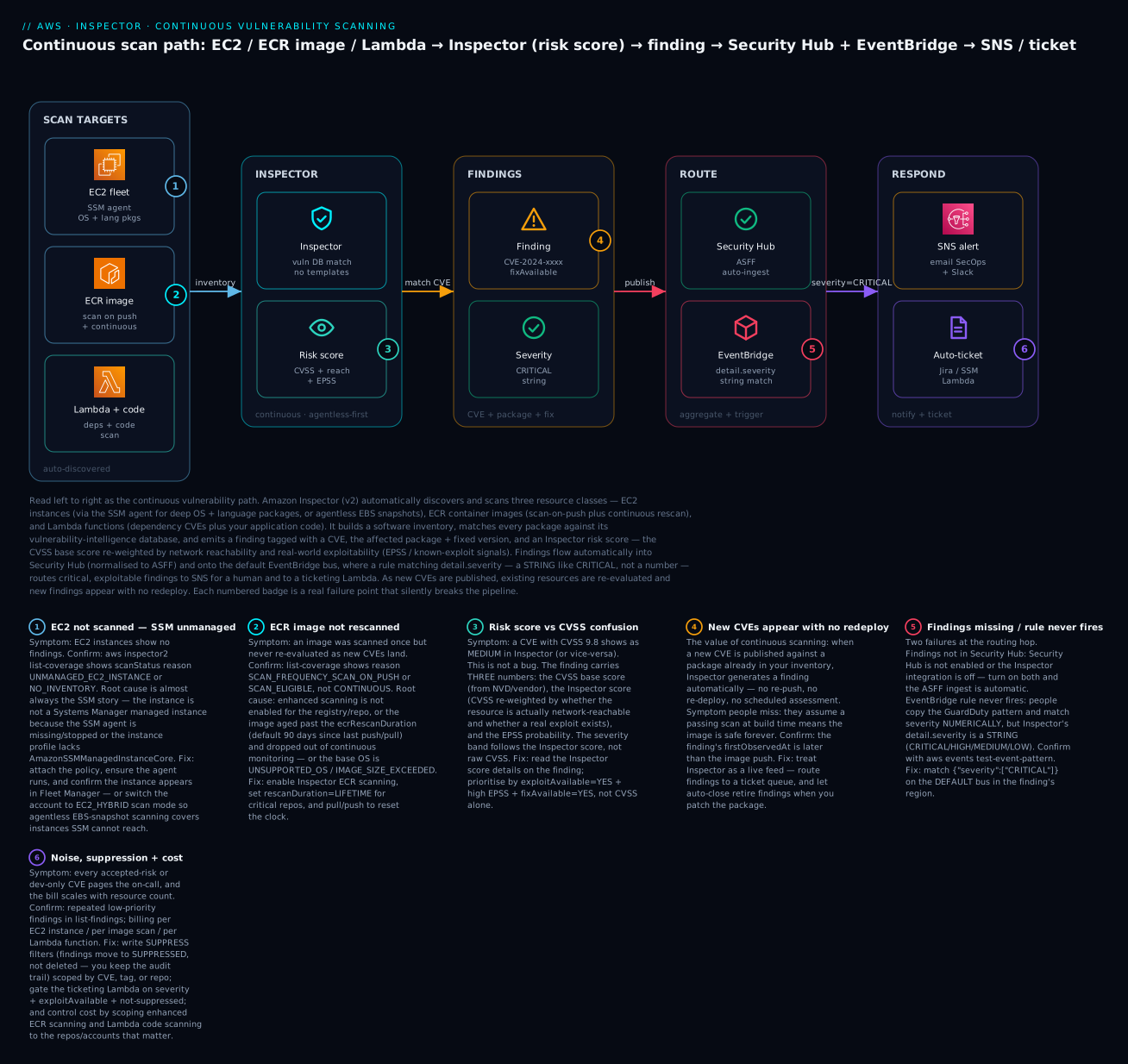
The diagram traces the continuous vulnerability pipeline left to right. In SCAN TARGETS, Inspector auto-discovers and scans three resource classes: EC2 instances (through the SSM agent for a deep OS + language-package inventory, or agentless EBS snapshots where SSM cannot reach), ECR container images (scan-on-push plus continuous rescan), and Lambda functions plus your Lambda code. Those inventories feed the INSPECTOR zone, where every package is matched against the vulnerability-intelligence database and each match is assigned an Inspector risk score — the CVSS base score re-weighted by real network reachability and real-world exploitability (EPSS and known-exploit signals). Matching produces a FINDING carrying the CVE, the vulnerable package and its fixed version, and a severity band expressed as a string (CRITICAL, HIGH, …). Findings flow automatically into Security Hub (normalised to ASFF) and onto the default EventBridge bus, where a rule matching detail.severity as a string routes critical, exploitable findings into the RESPOND zone — SNS to notify a human and a ticketing Lambda (or SSM Automation runbook) to open a Jira ticket with the exact package to patch.
The six numbered badges mark where the pipeline silently breaks: an EC2 instance that is not an SSM managed instance and so is never scanned (badge 1 — the UNMANAGED_EC2_INSTANCE reason); an ECR image scanned once on push but never continuously rescanned, or aged past its rescan duration (badge 2); the risk-score-versus-CVSS confusion when a high-CVSS CVE scores lower because nothing can reach it (badge 3); the continuous-scan value where a new CVE generates a finding with no redeploy (badge 4); findings missing from Security Hub, or an EventBridge rule that never fires because it matched severity numerically instead of as a string (badge 5); and noise plus cost — accepted-risk findings paging the on-call and the bill scaling with resource count, both tamed with suppression rules and scoping (badge 6). The legend narrates each as symptom, the exact confirm command, and the fix.
Real-world scenario
Northwind Analytics, a fictional but realistic data-platform company, runs a 23-account AWS organization across ap-south-1 and eu-west-1: a mix of EC2 batch workers, roughly 140 ECR repositories feeding ECS, and about 300 Lambda functions. Vulnerability management was a quarterly ritual — a contractor ran an image scanner against “the important repos,” produced a spreadsheet, and the platform team patched what they could before the next audit. Between quarters, the estate was a black box. The ECR “scan on push” toggle was on, which everyone treated as coverage, so nobody looked again.
The incident began when a widely-used compression library disclosed a critical remote-code-execution CVE on a Tuesday. Northwind’s images had all passed their build-time scans months earlier — scan on push had returned clean, once, and never looked again (badge 2). The vulnerable library was baked into a base image that backed 31 of the 140 repositories, running in production. With only scan-on-push, none of those images were re-evaluated when the CVE landed; the spreadsheet was six weeks stale; and the security team’s honest answer to “are we affected?” was “we’ll get back to you.” It took two engineers most of a day grepping Dockerfiles and pulling images by hand to build the list the tooling should have produced in seconds.
The post-incident review rebuilt the program around Amazon Inspector, and it maps one-to-one to this article’s failure badges. First, they activated Inspector for EC2, ECR, LAMBDA and LAMBDA_CODE org-wide: registered their dedicated security account as the delegated administrator, set auto-activate for all four resource types, and — catching badge “auto-activate covers new, not existing” — ran associate-member across all 23 existing accounts, in both regions. They flipped ECR to enhanced scanning and set rescanDuration = LIFETIME on the production repositories, so an idle-but-deployed image could never age out of continuous monitoring again. The moment enhanced scanning caught up, Inspector produced the exact list of affected images — 31 repos, each with the image digest, the vulnerable package version, and the fixedInVersion — in the console, no grepping.
Second, the EC2 side revealed a coverage hole nobody knew about. list-coverage showed 60-odd instances with reason UNMANAGED_EC2_INSTANCE — a legacy Packer-built AMI whose instance profile predated the SSM managed policy, so the SSM agent was installed but the instances were never managed (badge 1). Rather than chase 60 instance profiles overnight, they switched the account to EC2_HYBRID scan mode, and agentless snapshot scanning covered every one of them within hours while they fixed the profiles properly. Third, they built the response plane they never had. An EventBridge rule on the default bus in each region matched detail.severity = "CRITICAL" and detail.exploitAvailable = "YES" and detail.status = "ACTIVE" — and they caught the string-vs-number trap in review, having first copied their GuardDuty rule’s {"numeric":[">=",9]} pattern, tested it with aws events test-event-pattern, and watched it match nothing (badge 5). The corrected rule fanned out to SNS (PagerDuty + a SecOps Slack channel) and a ticketing Lambda that opened a Jira issue pre-filled with the CVE, the affected resource, and the fixed version — so remediation started with a work item, not a war room.
Fourth, they tuned the inevitable noise. Their data-science sandbox deliberately ran pinned-old images for reproducibility, generating dozens of accepted-risk findings; rather than disable scanning, they wrote a suppression rule scoped to resourceTags: env=ds-sandbox with a documented justification, keeping the record while killing the pages (badge 6). And they wired SBOM export to a KMS-encrypted S3 bucket so the next “are we running xz?” question was a single query, not a fire drill. Fifth, to shift left, they added an inspector-scan stage to their image pipelines that failed the build on any CRITICAL finding — so the next baked-in critical CVE would be caught before the image ever reached ECR.
The Inspector bill landed at roughly ₹78,000/month — dominated by the ECR image scans across 140 repos and the Lambda code scanning on 300 functions — and the CFO signed it without a second look, because the one-page review put “two engineers, most of a day, to answer are we affected” next to “now: a filtered list in ten seconds, and a build that blocks the next one.” The line that went on the wall: “Scan-on-push is a photograph. We needed a live feed, everywhere, wired to a ticket.” The order is the lesson:
| Phase | Finding | Action | Effect |
|---|---|---|---|
| Pre-incident | ECR “scan on push” only | — | Images scanned once, never re-evaluated |
| Tuesday | Critical CVE in a base image | Manual grep across Dockerfiles | A day to answer “are we affected?” |
| Day 1 | No org coverage | Delegated admin + auto-activate + associate-member (both regions) |
All 23 accounts scanned |
| Day 1 | Images age out | ECR enhanced + rescanDuration=LIFETIME on prod |
Always re-evaluated |
| Day 1 | 60 instances unscanned | UNMANAGED_EC2_INSTANCE → switch to EC2_HYBRID |
Agentless covers them immediately |
| Day 2 | No response plane | EventBridge severity=CRITICAL + exploit → SNS + ticket Lambda |
Findings become work items |
| Day 2 | Rule matched nothing | Fixed {"numeric":...} → "CRITICAL" (string) |
Rule fires correctly |
| Week 1 | Sandbox noise | Suppression rule by tag + SBOM export | Signal without the pages |
| Week 2 | Prevent recurrence | inspector-scan build gate on CRITICAL |
The next bad image is blocked pre-push |
Advantages and disadvantages
| Advantages | Disadvantages |
|---|---|
| Continuous — re-scans existing inventory as new CVEs land | Detective only; never patches for you |
| Agentless for ECR, Lambda, and (optionally) EC2 | Agent-based EC2 depth still leans on SSM |
| One service for EC2, containers and serverless | Cost scales with resource count (images, functions) |
| Risk score re-weights CVSS by reachability + exploitability | Score model can surprise until you read the details |
| Native Security Hub (ASFF) + EventBridge integration | You still build the ticketing/remediation plane |
| Org-wide via delegated admin + auto-activate | Auto-activate covers new, not existing members |
| SBOM export + CI/CD pipeline scanning | CI/CD scan is a separate, per-scan-billed path |
| Auto-closes findings when you patch | Suppression tuning is ongoing work |
Inspector earns its cost the first time a log4j-class CVE drops and you have the affected-resource list in ten seconds instead of a day of grepping — but only if you have paid the operational tax up front: activated for every resource type in every region, rolled out org-wide (including associate-member for existing accounts), EC2 fully SSM-managed or in hybrid mode, wired to a response plane that opens tickets, and tuned so accepted risks are documented-and-suppressed rather than ignored. Activate it and never route it, and you get a bill and a console nobody reads.
Hands-on lab
You will activate Inspector for EC2, ECR, Lambda and Lambda code; confirm coverage; push a known-vulnerable container image and read its findings, risk score and affected packages; create a suppression rule; wire an EventBridge rule into SNS on critical findings; export an SBOM; express the core as Terraform; and tear it all down. Region ap-south-1, account 111122223333. ⚠️ Inspector is not free beyond the 15-day trial — you pay per EC2 instance, per image scan, and per Lambda function; the teardown at the end stops the meter.
Step 0 — Prerequisites
aws sts get-caller-identity            # confirm account + region
export AWS_DEFAULT_REGION=ap-south-1
export ACCT=$(aws sts get-caller-identity --query Account --output text)
Step 1 — Activate Inspector for all resource types
# Turn on EC2, ECR, Lambda (deps) and Lambda code scanning for THIS account
aws inspector2 enable \
  --resource-types EC2 ECR LAMBDA LAMBDA_CODE \
  --account-ids $ACCT
Verify (expected output):
aws inspector2 batch-get-account-status --account-ids $ACCT \
  --query 'accounts[0].resourceState.{ec2:ec2.status,ecr:ecr.status,lambda:lambda.status,code:lambdaCode.status}'
# { "ec2": "ENABLED", "ecr": "ENABLED", "lambda": "ENABLED", "code": "ENABLED" }
Console path: Inspector → Activate Inspector; then Settings → Account management to toggle each resource type. Activation creates the service-linked role AWSServiceRoleForAmazonInspector2 automatically, and (for EC2 agent-based scanning) SSM associations named with a do-not-delete suffix.
Step 2 — Set EC2 hybrid mode + ECR rescan duration, then check coverage
# Prefer hybrid EC2 scanning (agent where SSM works, agentless elsewhere)
# and keep production images under continuous rescan for their lifetime.
aws inspector2 update-configuration \
  --ec2-configuration scanMode=EC2_HYBRID \
  --ecr-configuration rescanDuration=LIFETIME

aws inspector2 get-configuration \
  --query '{ec2:ec2Configuration.scanModeState.scanMode,ecr:ecrConfiguration.rescanDurationState.rescanDuration}'
# { "ec2": "EC2_HYBRID", "ecr": "LIFETIME" }
Check what is actually covered — this is the command you will live in when something is not scanned:
# EC2 coverage with the all-important scan-status REASON
aws inspector2 list-coverage \
  --filter-criteria '{"resourceType":[{"comparison":"EQUALS","value":"AWS_EC2_INSTANCE"}]}' \
  --query 'coveredResources[].{id:resourceId,status:scanStatus.statusCode,reason:scanStatus.reason}'
# e.g. [ { "id": "i-0abc...", "status": "INACTIVE", "reason": "UNMANAGED_EC2_INSTANCE" } ]
A reason of UNMANAGED_EC2_INSTANCE or NO_INVENTORY is the SSM story from the deep section — fix the instance profile / agent, or rely on hybrid agentless.
Step 3 — Push a known-vulnerable image to ECR
Create a repo and build an image that deliberately pins old, vulnerable OS and Python packages so enhanced scanning has something to find:
aws ecr create-repository --repository-name vuln-demo \
  --image-scanning-configuration scanOnPush=true >/dev/null
export REPO=$(aws ecr describe-repositories --repository-names vuln-demo \
  --query 'repositories[0].repositoryUri' --output text)

cat > Dockerfile <<'EOF'
# Old base + pinned old libraries with known CVEs (for demo only)
FROM public.ecr.aws/docker/library/python:3.9-slim
RUN pip install --no-cache-dir "urllib3==1.26.4" "requests==2.19.1"
EOF

aws ecr get-login-password | docker login --username AWS --password-stdin "${REPO%/*}"
docker build -t $REPO:demo .
docker push $REPO:demo
Step 4 — Read the findings: CVE, risk score, affected package
Enhanced scanning runs on push; give it a minute, then list this repo’s findings sorted by severity:
aws inspector2 list-findings \
  --filter-criteria '{"ecrImageRepositoryName":[{"comparison":"EQUALS","value":"vuln-demo"}]}' \
  --sort-criteria field=SEVERITY,sortOrder=DESC \
  --query 'findings[0].{sev:severity,cve:packageVulnerabilityDetails.vulnerabilityId,inspectorScore:inspectorScore,exploit:exploitAvailable,fix:fixAvailable,pkg:packageVulnerabilityDetails.vulnerablePackages[0].name,ver:packageVulnerabilityDetails.vulnerablePackages[0].version,fixedIn:packageVulnerabilityDetails.vulnerablePackages[0].fixedInVersion}'
Expected output (illustrative):
{
  "sev": "HIGH", "cve": "CVE-2021-33503", "inspectorScore": 7.5,
  "exploit": "NO", "fix": "YES",
  "pkg": "urllib3", "ver": "1.26.4", "fixedIn": "1.26.5"
}
Note the three-number story: the finding shows the CVE, an Inspector score (7.5 here), whether an exploit exists and a fix is available, and the exact package version to upgrade to (fixedInVersion). Compare inspectorScore to the CVSS in packageVulnerabilityDetails.cvss[] to see the re-weighting.
Step 5 — Create a suppression rule
Suppress LOW/INFORMATIONAL noise so the active queue is only what matters — findings move to SUPPRESSED, not deleted:
aws inspector2 create-filter \
  --name suppress-low-noise \
  --action SUPPRESS \
  --description "Accepted: low/informational findings triaged in batch" \
  --filter-criteria '{
    "severity": [
      {"comparison":"EQUALS","value":"LOW"},
      {"comparison":"EQUALS","value":"INFORMATIONAL"}
    ]
  }'

# Confirm it exists
aws inspector2 list-filters --query 'filters[].{name:name,action:action}'
# [ { "name": "suppress-low-noise", "action": "SUPPRESS" } ]
Step 6 — Wire EventBridge → SNS on CRITICAL findings (severity is a STRING)
export TOPIC=$(aws sns create-topic --name inspector-critical --query TopicArn --output text)
aws sns subscribe --topic-arn $TOPIC --protocol email --notification-endpoint secops@example.com

# Rule on the DEFAULT bus, matching severity as a STRING (not numeric!)
aws events put-rule --name insp-critical \
  --event-pattern '{
    "source": ["aws.inspector2"],
    "detail-type": ["Inspector2 Finding"],
    "detail": { "severity": ["CRITICAL"], "status": ["ACTIVE"] }
  }'

aws events put-targets --rule insp-critical \
  --targets "Id"="sns","Arn"="$TOPIC"

# Allow EventBridge to publish to the topic (topic policy) — then PROVE the pattern:
aws events test-event-pattern \
  --event-pattern '{"detail":{"severity":["CRITICAL"]}}' \
  --event '{"detail":{"severity":"CRITICAL"}}'
# { "Result": true }        # {"numeric":[">=",9]} would return false here
Step 7 — Export an SBOM
# A KMS-encrypted bucket to receive the SBOM (Inspector service role must use the key)
aws s3 mb s3://northwind-sbom-$ACCT
aws inspector2 create-sbom-export \
  --report-format CYCLONE_DX_1_4 \
  --s3-destination "bucketName=northwind-sbom-$ACCT,keyPrefix=sbom,kmsKeyArn=arn:aws:kms:ap-south-1:$ACCT:key/abcd-ef01" \
  --resource-filter-criteria '{"ecrImageRepositoryName":[{"comparison":"EQUALS","value":"vuln-demo"}]}'
# { "reportId": "..." }   # poll get-sbom-export; the CycloneDX JSON lands in s3://.../sbom/
Step 8 — The core of the lab as Terraform
# Activate Inspector for this account (all four resource types)
resource "aws_inspector2_enabler" "this" {
  account_ids    = ["111122223333"]
  resource_types = ["EC2", "ECR", "LAMBDA", "LAMBDA_CODE"]
}

# Suppression rule: hide low/informational, keep the record
resource "aws_inspector2_filter" "suppress_low" {
  name        = "suppress-low-noise"
  action      = "SUPPRESS"
  description = "Accepted: low/informational triaged in batch"
  filter_criteria {
    severity {
      comparison = "EQUALS"
      value      = "LOW"
    }
    severity {
      comparison = "EQUALS"
      value      = "INFORMATIONAL"
    }
  }
}

# Org rollout (run in the delegated-admin account)
resource "aws_inspector2_delegated_admin_account" "this" {
  account_id = "444455556666"
}

resource "aws_inspector2_organization_configuration" "this" {
  auto_enable {
    ec2         = true
    ecr         = true
    lambda      = true
    lambda_code = true
  }
  depends_on = [aws_inspector2_delegated_admin_account.this]
}

# Route CRITICAL findings to SNS (severity is a STRING)
resource "aws_cloudwatch_event_rule" "insp_critical" {
  name = "insp-critical"
  event_pattern = jsonencode({
    source        = ["aws.inspector2"]
    "detail-type" = ["Inspector2 Finding"]
    detail        = { severity = ["CRITICAL"], status = ["ACTIVE"] }
  })
}

resource "aws_cloudwatch_event_target" "sns" {
  rule = aws_cloudwatch_event_rule.insp_critical.name
  arn  = aws_sns_topic.critical.arn
}
Step 9 — Teardown (stops the billing)
| # | Action | Command |
|---|---|---|
| 1 | Remove EventBridge target + rule | aws events remove-targets --rule insp-critical --ids sns then aws events delete-rule --name insp-critical |
| 2 | Delete the SNS topic | aws sns delete-topic --topic-arn $TOPIC |
| 3 | Delete the suppression filter | aws inspector2 delete-filter --arn <filter-arn> |
| 4 | Delete the demo ECR repo (+ images) | aws ecr delete-repository --repository-name vuln-demo --force |
| 5 | Empty + delete the SBOM bucket | aws s3 rb s3://northwind-sbom-$ACCT --force |
| 6 | Disable org auto-activate (admin acct) | aws inspector2 update-organization-configuration --auto-enable ec2=false,ecr=false,lambda=false,lambdaCode=false |
| 7 | Remove the delegated admin (mgmt acct) | aws inspector2 disable-delegated-admin-account --delegated-admin-account-id 444455556666 |
| 8 | Deactivate Inspector (stops all billing) | aws inspector2 disable --resource-types EC2 ECR LAMBDA LAMBDA_CODE --account-ids $ACCT |
⚠️ Deactivating the resource types with disable is what halts Inspector charges. You can also disable a single type (e.g., drop LAMBDA_CODE to trim cost) while keeping the others running.
Common mistakes & troubleshooting
This is the section you open when a resource is not scanned — or a finding never reaches a human. The playbook first (symptom → fix), then the scan-status-reason reference, an error reference, a decision table, and prose on the nastiest failures.
| # | Symptom | Root cause | Confirm (exact command / console path) | Fix |
|---|---|---|---|---|
| 1 | EC2 instance shows no findings | Not an SSM managed instance (agent missing/stopped, or no AmazonSSMManagedInstanceCore) |
aws inspector2 list-coverage → reason UNMANAGED_EC2_INSTANCE; Systems Manager → Fleet Manager |
Attach AmazonSSMManagedInstanceCore to the instance profile; ensure the agent runs and reaches SSM endpoints — or switch to EC2_HYBRID for agentless |
| 2 | EC2 covered but no app-dependency CVEs | Deep inspection has no inventory yet, or app path is non-standard | list-coverage → DEEP_INSPECTION_NO_INVENTORY; check custom paths |
Wait for inventory; add app dirs via update-ec2-deep-inspection-configuration (up to 5 paths) |
| 3 | ECR image scanned once, never again | Scan frequency is on-push only, or image aged past rescanDuration |
list-coverage → SCAN_FREQUENCY_SCAN_ON_PUSH or SCAN_ELIGIBLE |
Enable enhanced/continuous; set rescanDuration=LIFETIME for prod; pull the image to reset the clock |
| 4 | An ECR image never scans at all | Unsupported base OS, oversized image, or unsupported manifest | list-coverage → UNSUPPORTED_OS / IMAGE_SIZE_EXCEEDED |
Use a supported base image; reduce size; rebuild with a supported manifest type |
| 5 | Lambda function not scanned | Unsupported runtime, or no recent activity (idle > ~90 days) | list-coverage → UNSUPPORTED_RUNTIME; check last-modified/invoke |
Migrate to a supported runtime; invoke/update the function to bring it into scope |
| 6 | Lambda code findings absent | LAMBDA_CODE not activated (separate from LAMBDA) |
batch-get-account-status → lambdaCode.status = DISABLED |
enable --resource-types LAMBDA_CODE |
| 7 | Findings not in Security Hub | Security Hub off, or the Inspector integration disabled | Security Hub → Integrations → Amazon Inspector status | Enable Security Hub; the ASFF ingest is automatic once both are on |
| 8 | EventBridge rule never fires | Matched severity numerically (copied from GuardDuty); Inspector severity is a string | aws events test-event-pattern returns false |
Match {"severity":["CRITICAL"]} (UPPERCASE) on the default bus in the finding’s region |
| 9 | “CVSS 9.8 but shows Medium” | Inspector score re-weighted CVSS by reachability/exploitability | Open the finding → Inspector score details | Not a bug — prioritise by exploitAvailable+epss+fixAvailable, read the score breakdown |
| 10 | Suppression rule not applying | Filter criteria don’t match (wrong field/value/case) | get-filter; compare criteria to a real finding’s fields |
Correct the criterion (e.g., exact CVE, tag key/value, repo name); SUPPRESS acts on new evaluations |
| 11 | Suppressed findings still alerting | SIEM/EventBridge reads pre-suppression, or rule matches SUPPRESSED |
Rule lacks status:["ACTIVE"]; check downstream |
Add "status":["ACTIVE"] to the pattern; suppressed findings are excluded from active/Security Hub |
| 12 | New org account is unscanned | Auto-activate off, or existing member never associated | describe-organization-configuration; list-members |
Set auto-enable per type; run associate-member for existing accounts (auto covers only new) |
| 13 | Member shows no data | Association not ENABLED |
list-members → relationshipStatus ≠ ENABLED |
associate-member / re-associate from the delegated admin |
| 14 | Bill higher than expected | Resource count — image scans + Lambda code scanning dominate | Cost Explorer by usage type; Inspector usage totals | Scope enhanced ECR / LAMBDA_CODE to key repos/accounts; suppress isn’t a cost lever |
| 15 | Findings never close after patching | Package not actually updated in the running artifact, or image not re-pulled/rescanned | list-findings still ACTIVE; check the deployed version |
Redeploy the patched artifact; ensure the image is under continuous rescan so the fix is observed |
| 16 | Can’t set delegated admin | Trusted access for Inspector not enabled in Organizations, or not run from mgmt | organizations list-aws-service-access-for-organization |
Enable trusted access; run enable-delegated-admin-account from the management account |
Scan-status reason reference (the field you triage on)
list-coverage returns a scanStatus.reason for every resource — memorise the common ones:
| Reason | Applies to | Meaning | Fix |
|---|---|---|---|
SUCCESSFUL |
all | Scanned normally | None |
PENDING_INITIAL_SCAN |
all | First scan in progress | Wait |
UNMANAGED_EC2_INSTANCE |
EC2 | Not an SSM managed instance | SSM profile/agent, or hybrid agentless |
NO_INVENTORY |
EC2 | SSM inventory not collected | Ensure SSM inventory association runs |
STALE_INVENTORY |
EC2 | Inventory older than expected | Check SSM agent connectivity |
EC2_INSTANCE_STOPPED |
EC2 (agent) | Stopped; agent can’t report | Agentless (hybrid) covers stopped |
UNSUPPORTED_OS |
EC2/ECR | OS/base image not supported | Use a supported OS |
DEEP_INSPECTION_NO_INVENTORY |
EC2 | No app-package inventory yet | Wait; add custom paths |
SCAN_FREQUENCY_SCAN_ON_PUSH |
ECR | On-push only, no continuous | Enable continuous / enhanced |
SCAN_ELIGIBLE |
ECR | Eligible but not continuously scanned (aged out) | Pull image / rescanDuration=LIFETIME |
IMAGE_SIZE_EXCEEDED |
ECR | Image over the scan size limit | Reduce image size |
UNSUPPORTED_RUNTIME |
Lambda | Runtime not scannable | Migrate runtime |
EXCLUDED_BY_TAG |
all | Excluded by a tag rule | Adjust the exclusion tag |
ACCESS_DENIED |
all | Inspector role lacks permission | Check the service-linked role / KMS |
RESOURCE_TERMINATED |
all | Resource deleted | None |
Operation / API error reference
| Error | Where it appears | Meaning | Fix |
|---|---|---|---|
AccessDeniedException on enable |
Activation | Caller lacks inspector2:Enable or SLR can’t be created |
Grant the permission; allow the service-linked role |
ValidationException: resourceType |
enable/disable |
Typo in resource type | Use EC2 ECR LAMBDA LAMBDA_CODE exactly |
ConflictException |
enable-delegated-admin-account |
A delegated admin already set | get-delegated-admin-account; disable then re-set |
AccessDeniedException on delegated admin |
Org setup | Not run from management / no trusted access | Run from mgmt; enable Inspector trusted access |
KMS AccessDeniedException |
create-sbom-export |
Inspector role can’t use the KMS key | Add the Inspector service role to the key policy |
ResourceNotFoundException on list-findings |
Cross-region call | Findings are regional | Call in the finding’s region |
| Rule fires but SNS silent | EventBridge → SNS | Topic policy denies events.amazonaws.com |
Add the EventBridge principal to the topic policy |
ThrottlingException |
Bulk list-* |
API rate exceeded | Back off / paginate |
Decision table — read the symptom, name the cause
| If you see… | It’s probably… | Do this |
|---|---|---|
EC2 with UNMANAGED_EC2_INSTANCE |
SSM not managing the instance | Fix the profile/agent, or use EC2_HYBRID |
| Image scanned once, never again | On-push-only or aged out | Continuous + rescanDuration=LIFETIME |
| High CVSS, low Inspector severity | Reachability/exploit re-weighting | Read Inspector score details; trust the risk score |
| Rule on the console but nothing fires | Numeric severity match on a string | test-event-pattern; use ["CRITICAL"] |
| Findings not in Security Hub | Hub off or integration disabled | Enable both; ingest is automatic |
| New account unscanned | Auto-activate covers only new | associate-member existing accounts |
| Bill creeping up | Image/Lambda-code volume | Scope enhanced ECR / LAMBDA_CODE |
| No Lambda code findings | LAMBDA_CODE not activated |
Enable the LAMBDA_CODE type |
The three nastiest failures, in prose
“Enabled but unscanned” — the SSM trap on EC2. The most common and most frustrating Inspector failure is an account where Inspector is unmistakably on, the ECR and Lambda findings roll in, and yet EC2 shows almost nothing. The cause is nearly always that the instances are not Systems Manager managed instances — the SSM agent is present (it ships in the AMI) but the instance profile never got AmazonSSMManagedInstanceCore, or the instance has no network path to the SSM endpoints, so SSM never adopts it and Inspector has no inventory to scan. The tell is list-coverage returning UNMANAGED_EC2_INSTANCE or NO_INVENTORY, and the same instances missing from Fleet Manager. This is the same story as every other SSM-dependent feature (Session Manager, Patch Manager, Run Command), which is why “is it a managed instance?” should be your first EC2 question. The fast mitigation is to switch the account to EC2_HYBRID so agentless snapshot scanning covers the instances immediately, while you fix the instance profiles properly.
The string-vs-number severity trap (the reverse of GuardDuty). Teams that already run GuardDuty automation confidently copy their EventBridge pattern — and GuardDuty’s detail.severity is a number, so the pattern uses {"numeric": [">=", 7]}. In Inspector, detail.severity is a string ("CRITICAL", "HIGH", …), so that numeric pattern is syntactically valid, deploys cleanly, and matches nothing forever — your critical findings sail past a rule that looks correct. The fix is {"severity": ["CRITICAL"]} (uppercase, case-sensitive), and the discipline is the same either way: test-event-pattern every rule against a sample event before you trust it. Knowing that these two flagship security services encode severity differently is exactly the kind of detail that separates a working response plane from a silent one.
Trusting scan-on-push as continuous coverage. ECR’s “scan on push” toggle feels like coverage — the image is scanned, findings appear, everyone moves on. But on-push scanning fires once, at push, and never again; the CVE that matters most is usually disclosed weeks after the push, against a package already in the image. An image that passed its push scan in March can be riddled with critical CVEs by June while its status still reads “scanned.” Only enhanced continuous scanning re-evaluates existing images as new CVEs land — and even then, an image nobody pulls will age out of continuous monitoring after the rescanDuration (default 90 days) unless you pull it or set LIFETIME. Treat “the scan passed” as a photograph, not a promise: enable continuous scanning, pin production repos to LIFETIME, and let Inspector be the live feed that tells you when March’s clean image becomes June’s incident.
Best practices
| # | Practice | Why |
|---|---|---|
| 1 | Activate all four resource types in every region | Unscanned types/regions are blind spots |
| 2 | Roll out via delegated admin + auto-activate, and associate-member existing accounts |
New and existing accounts covered |
| 3 | Delegate admin to a dedicated security account, not management | Least privilege; blast-radius isolation |
| 4 | Make EC2 fully SSM-managed, and run EC2_HYBRID |
Deep inspection where possible, agentless everywhere else |
| 5 | Use ECR enhanced continuous scanning, rescanDuration=LIFETIME on prod |
Images re-evaluated as CVEs land; no age-out |
| 6 | Match severity as a string and test-event-pattern every rule |
Avoids the silent GuardDuty-copy miss |
| 7 | Prioritise by exploitAvailable + epss + fixAvailable, not raw CVSS |
Fix what is exploitable, exploited and fixable |
| 8 | Route findings to a ticket queue, not just email | Remediation needs an owner and an SLA |
| 9 | Suppress accepted risks by specific, documented criteria | Kills noise without hiding real criticals |
| 10 | Shift left with inspector-scan in CI/CD, failing on CRITICAL |
Block the next bad image before push |
| 11 | Export SBOMs to a KMS-encrypted bucket regularly | Answer “who runs X?” in seconds at audit/incident |
| 12 | Enable Security Hub so Inspector sits with your other findings | One normalised queue across services |
Security notes
Inspector is a security control, so its own posture and the plane it drives must be least-privilege and tamper-resistant.
| Concern | Risk | Control |
|---|---|---|
| Ticketing-Lambda permissions | An over-broad role can be abused | Scope to exactly what it needs (create ticket / read finding) |
| SBOM bucket exposure | SBOMs reveal your exact software inventory | Private bucket, KMS encryption, Block Public Access, org-scoped policy |
| SBOM KMS access | Broad key access, or failed exports | Grant the Inspector service role only the specific key |
| Suppression abuse | A too-broad rule hides real criticals | Suppress by named CVE/tag/repo; log a justification; restrict who can create filters |
| Deactivation tamper | Attacker disables Inspector to go dark | SCP denying inspector2:Disable/DisableDelegatedAdminAccount (break-glass only) |
| Delegated-admin scope | The admin account sees the whole org’s exposure | Delegate to a dedicated security/audit account only |
| Lambda code findings | Code scanning can surface hardcoded secrets | Treat CODE_VULNERABILITY secret findings as an incident; rotate immediately |
| Cross-account SBOM/finding export | Leaking vulnerability data | Restrict export destinations to the org |
Key IAM actions to gate, and to whom:
| Action | Grants | Give to |
|---|---|---|
inspector2:Enable / Disable |
Turn scanning on/off per type | Platform automation only |
inspector2:Disable (broad) |
Stop vulnerability detection | Nobody in prod (SCP-deny; break-glass) |
inspector2:EnableDelegatedAdminAccount |
Set the org admin | Management-account automation only |
inspector2:CreateFilter (SUPPRESS) |
Change what is hidden | Security engineering (reviewed) |
inspector2:CreateSbomExport |
Export the software inventory | Security engineering (to a controlled bucket) |
inspector2:ListFindings / BatchGetFindingDetails |
Read the findings | SOC / responders, read-only |
inspector2:UpdateConfiguration |
Change scan mode / rescan duration | Platform automation only |
Cost & sizing
Inspector has a 15-day free trial per account/region, useful for right-sizing before you commit. After that, you pay for what is scanned, and the drivers differ per resource type. The figures below are indicative (US/most regions, first pricing tier) and tier down with volume — always confirm with Cost Explorer and the Inspector usage totals for your account.
| Cost driver | Roughly | Note |
|---|---|---|
| EC2 instance scanning | ~$1.25 per instance / month | Prorated hourly; same for agent-based or agentless |
| ECR initial image scan | ~$0.09 per image scanned | The first scan of a new image |
| ECR re-scan (continuous) | ~$0.01 per re-scan | Each continuous re-evaluation as CVEs land |
| Lambda standard scanning | ~$0.30 per function / month | Dependency CVEs |
| Lambda code scanning | ~$0.90 per function / month | Static code analysis — the pricier Lambda option |
CI/CD scan (inspector-scan) |
per scan | Separate from continuous; a pipeline gate |
| SBOM export | S3 + KMS cost only | The export itself is not separately metered |
A worked example for a single mid-size account — 120 EC2 instances, 140 ECR repos with steady pushes, 300 Lambda functions with code scanning on:
| Component | Estimate | Monthly (USD) | Monthly (INR ≈ ₹83/$) |
|---|---|---|---|
| EC2 (120 instances) | 120 × $1.25 | ~$150 | ~₹12,450 |
| ECR scans (~1,500 initial + ~6,000 rescans) | 1,500×$0.09 + 6,000×$0.01 | ~$195 | ~₹16,200 |
| Lambda standard (300 fns) | 300 × $0.30 | ~$90 | ~₹7,470 |
| Lambda code (300 fns) | 300 × $0.90 | ~$270 | ~₹22,410 |
| Total (indicative) | — | ~$705 | ~₹58,500 |
Multiply by account count for an org — which is why scoping the expensive levers matters at scale. The levers, ranked by impact:
| Lever | Saves | Trade-off |
|---|---|---|
| Scope Lambda code scanning to prod accounts | Large (per function) | Less code coverage on lower-value functions |
| Scope enhanced ECR to active repos (inclusion filters) | Large (per-scan volume) | Unlisted repos fall back to basic/none |
| Right-size the EC2 fleet (Inspector bills per instance) | Moderate | Independent of Inspector, but it caps this line |
| Deactivate types in low-risk sandbox accounts | Moderate | Sandboxes are less monitored |
| Use the 15-day trial to measure before committing | Avoids surprises | 15 days only |
The one anti-pattern: do not turn off ECR continuous scanning to save the re-scan pennies. The continuous re-evaluation of existing images is the entire reason Inspector beats a point-in-time scanner — dropping it for a few rupees of re-scan charges is trading your only defence against the new-CVE-on-old-image case, which is exactly the case that becomes an incident.
Interview & exam questions
Q1. How is Amazon Inspector (v2) different from Inspector Classic? Classic used an assessment-template model — you installed the Inspector agent, defined targets and templates with rules packages, and ran assessments on a schedule. The modern Inspector (inspector2) is continuous and automated: you activate it per resource type and it auto-discovers and continuously scans EC2, ECR and Lambda, re-evaluating as new CVEs are published — no agent, no templates, no runs. (SCS-C02)
Q2. Which resources can Inspector scan, and what does each need? EC2 (via the SSM agent for deep OS + language packages, or agentless EBS snapshots), ECR container images (enhanced scanning, on-push + continuous), Lambda functions (dependency CVEs), and Lambda code (static source analysis). Each is activated independently and is regional. (SCS-C02)
Q3. An EC2 instance shows no Inspector findings although ECR and Lambda work. Why, most likely? The instance is not a Systems Manager managed instance — the SSM agent isn’t running, the instance profile lacks AmazonSSMManagedInstanceCore, or there’s no path to SSM endpoints. list-coverage shows UNMANAGED_EC2_INSTANCE. Fix the SSM prerequisites or switch to EC2_HYBRID for agentless snapshot scanning. (SOA-C02)
Q4. Explain the difference between ECR basic and enhanced scanning. Basic is native ECR: OS packages only, on push or manual, no continuous rescan, free. Enhanced is Amazon Inspector: OS and language packages, continuous rescanning as CVEs land, findings in Security Hub — billed per scan. (SCS-C02)
Q5. A CVE with CVSS 9.8 shows as Medium in Inspector. Is that a bug? No. A finding carries three numbers: the CVSS base score, the Inspector score (CVSS re-weighted by whether the resource is network-reachable and whether the CVE is actually exploited), and EPSS. The severity band follows the Inspector score. Read the score details and prioritise by exploitAvailable + epss + fixAvailable. (SCS-C02)
Q6. You copied your GuardDuty EventBridge rule and now Inspector criticals never fire. Why? GuardDuty’s detail.severity is a number; Inspector’s is a string. A {"numeric":[">=",9]} pattern never matches a string field. Use {"severity":["CRITICAL"]} (uppercase) on the default bus in the finding’s region, and test-event-pattern it. (SOA-C02)
Q7. What is the value of continuous scanning over scan-on-push? Scan-on-push fires once; the CVE that matters is usually disclosed later, against a package already in the image. Continuous scanning re-evaluates existing images/instances/functions as new CVEs are published, generating findings with no redeploy — and auto-closing them when you patch. (SCS-C02)
Q8. What does the ECR rescan duration control, and what’s the gotcha? ecrRescanDuration (LIFETIME / 180 / 90 / 30 / 14 days, default 90) is how long after the last push or pull an image stays under continuous rescan. An idle image ages out of continuous monitoring; a pull resets the clock. Set LIFETIME for production repos. (SCS-C02)
Q9. How do suppression rules work, and how do they differ from deleting a finding? A suppression rule is a filter with action SUPPRESS; matching findings move to status SUPPRESSED — retained (audit trail preserved) but excluded from the active list and Security Hub. You suppress accepted risks by specific criteria (a named CVE, a tag, a repo) with a documented justification. (SCS-C02)
Q10. How do you scan an image before it reaches a registry? Use CI/CD scanning: inspector-sbomgen generates an SBOM in the pipeline, and aws inspector-scan scan-sbom evaluates it against Inspector’s database, returning vulnerabilities you can fail the build on. AWS ships plugins for Jenkins, GitHub Actions, GitLab and CodeCatalyst. It’s billed per scan and needs no continuous activation. (DVA-C02 / SCS-C02)
Q11. How do you cover a 50-account org so new accounts are scanned automatically? Register a dedicated security account as the delegated administrator, set auto-activate per resource type, and — since auto-activate only covers new members — run associate-member for existing accounts. Do it in every region. (SAP-C02)
Q12. What are Inspector’s dominant cost drivers and how do you control them? Resource count: per EC2 instance, per ECR image scan (initial + rescans), per Lambda function (standard + the pricier code scanning). Control by scoping enhanced ECR (inclusion filters) and LAMBDA_CODE to key repos/accounts — never by disabling ECR continuous scanning, which is the whole point. (SOA-C02)
Quick check
- Inspector’s ECR and Lambda findings appear, but EC2 shows nothing. What is the first command you run, and what reason confirms the most common cause?
- Your critical-finding EventBridge rule never fires though the console shows criticals. What is the single most likely bug, given you also run GuardDuty?
- Why can a CVSS 9.8 vulnerability legitimately appear as Medium severity in Inspector?
- An image passed its scan-on-push in March. Why might it be full of critical CVEs in June with its status still “scanned,” and what setting prevents the blind spot?
- You set auto-activate on the delegated admin, but an existing account still has no findings. What step did you miss?
Answers
aws inspector2 list-coveragefiltered toAWS_EC2_INSTANCE; ascanStatus.reasonofUNMANAGED_EC2_INSTANCE(orNO_INVENTORY) confirms the instance is not an SSM managed instance — attachAmazonSSMManagedInstanceCore, ensure the agent runs, or switch toEC2_HYBRIDfor agentless.- You matched
detail.severitynumerically (as GuardDuty requires), but Inspector’s severity is a string. Use{"severity":["CRITICAL"]}(uppercase) on the default bus in the region, andtest-event-patternit. - The finding’s severity band follows the Inspector score, which re-weights the CVSS base score by real network reachability and exploitability — an RCE on a port nothing can reach, with no known exploit, is scored down. Read the Inspector score details.
- Scan-on-push fires once and never re-evaluates; a CVE disclosed after March is never matched. Enhanced continuous scanning (with
rescanDuration=LIFETIMEon prod repos) re-evaluates the existing image as new CVEs land. - Auto-activate covers only new members. You must run
associate-memberfor existing accounts (and confirmrelationshipStatus = ENABLED).
Glossary
| Term | Definition |
|---|---|
| Amazon Inspector (v2) | Managed, continuous, automated vulnerability-management service for EC2, ECR and Lambda; API namespace inspector2. |
| Inspector Classic | The deprecated predecessor using assessment templates, rules packages and an installed agent; API inspector. |
| Resource type | The independently-activated scan target: EC2, ECR, LAMBDA, LAMBDA_CODE. |
| Coverage | Whether and how a resource is being scanned; read with list-coverage, including the scan-status reason. |
| Scan mode (EC2) | EC2_SSM_AGENT_BASED or EC2_HYBRID (agent where possible, agentless EBS-snapshot fallback). |
| Deep inspection | Agent-based scanning of application/language packages (not just OS) on Linux EC2, in default + custom paths. |
| Agentless scanning | EC2 scanning via a point-in-time EBS snapshot, with no SSM agent required. |
| Enhanced scanning (ECR) | Inspector-powered image scanning of OS + language packages with continuous rescan (vs native basic scanning). |
| Rescan duration | ecrRescanDuration (LIFETIME/180/90/30/14 days) — how long after last push/pull an image stays continuously scanned. |
| Finding type | PACKAGE_VULNERABILITY, NETWORK_REACHABILITY, or CODE_VULNERABILITY. |
| Inspector score | A 0–10 score derived from CVSS but re-weighted by network reachability and exploitability; drives the severity band. |
| CVSS score | The vendor/NVD base score for a CVE, shown alongside the Inspector score. |
| EPSS | Exploit Prediction Scoring System — probability (0–1) a CVE will be exploited soon; on the finding. |
| Severity | The band CRITICAL/HIGH/MEDIUM/LOW/INFORMATIONAL/UNTRIAGED — a string in the EventBridge event. |
| Suppression rule | A filter with action SUPPRESS; matching findings become SUPPRESSED (retained but hidden from active). |
| SBOM | Software Bill of Materials export (CycloneDX 1.4 / SPDX 2.3) of monitored resources, to S3. |
| CI/CD scan | inspector-sbomgen + inspector-scan scan-sbom — a pipeline gate that scans an SBOM before push. |
| Delegated administrator | The org account (ideally a security account) that governs Inspector and auto-activates members. |
Next steps
- Pair vulnerability detection with the container registry it scans in Amazon ECR Hands-On: Push, Pull, Scan & Lifecycle Container Images and deploy the scanned images with Amazon ECS on Fargate: Deploy Your First Service Behind an ALB (Hands-On).
- Aggregate Inspector alongside your other findings in Amazon Security Hub Hands-On: Findings, Standards & Compliance, and add behavioural detection with Amazon GuardDuty Hands-On: Threat Detection & Automated Response.
- Complement vulnerability findings with configuration compliance in AWS Config: Resource Inventory, Compliance Rules & Remediation Hands-On and the audit trail in AWS CloudTrail and Config: Audit and Compliance at Scale.
- Build the response plane in depth with Amazon EventBridge Hands-On: Event Buses, Rules, Patterns & Pipes and shift scanning left into CI/CD on AWS: CodePipeline + CodeBuild Hands-On.
- Roll detection out safely across accounts on the foundation from AWS Organizations & SCPs: Building Multi-Account Guardrails Step by Step.