You have built — or inherited — a real enterprise CI/CD platform on Azure DevOps. It is not a toy. It is one organisation split into projects-by-responsibility: an IaC project holding Terraform modules with one Git repo per module; a templates project holding centralised reusable YAML; a packages project hosting Azure Artifacts feeds for Maven, NuGet, npm and Python; and many application projects (web, function, mobile) that consume all three. A single self-hosted agent fleet on a VM Scale Set sits in the hub network and serves every project, elastic and ephemeral. Three pipelines per app — a PR gate, a CI build, a CD promotion through Dev → SIT → QA → Staging → UAT → Pre-Prod → Production — wire in Veracode scans, Key Vault secrets, internal-feed enforcement, Liquibase database changelogs, Playwright and WebdriverIO test grids, Azure Load Testing, blue-green via App Service deployment slots, and Datadog release tracking. It deploys into a CAF landing zone: a management-group hierarchy, a Key Vault per scope, a hub-spoke network with private endpoints. It works. And then someone says: we are standardising on GitHub. Or the new business unit is on Bitbucket. Or the data platform team lives entirely in AWS.
This article is the translation map. Not a vague “GitHub also has pipelines” hand-wave — a line-by-line, primitive-by-primitive equivalence of every moving part of that Azure DevOps platform into GitHub (Actions + Packages + ARC runners), Bitbucket (Pipelines + pipes + self-hosted runners + Artifactory) and AWS (CodePipeline + CodeBuild + CodeArtifact + CDK). For each concept — multi-project org structure, the three pipelines, reusable templates, package feeds, the runner fleet, secrets, environments and approvals, IaC pipelines, security/test/observability tooling — you get a side-by-side mapping table and a concrete equivalent snippet you can paste. The reference architecture is the constant; the four control planes are the variable. By the end you will be able to look at any piece of the Azure DevOps platform and name its exact counterpart on the other three, know what is a clean one-to-one swap and what has no equivalent and must be re-architected, and choose deliberately rather than by org-chart accident.
Two framing rules before we start, because they save the most pain. First: the pipeline engine is the smallest part of a CI/CD platform. Anyone can translate steps: from one YAML dialect to another. The hard, expensive, differentiating parts are reusable-template distribution, package-feed governance, the self-hosted compute fleet, OIDC-based secretless cloud auth, and gated multi-stage promotion — and those are where the four platforms diverge sharply. Second: never invent product features. Where Azure DevOps has a capability one of the others genuinely lacks (and there are several), this article says so plainly and gives the real workaround, rather than pretending parity. That honesty is the whole value of a translation map.
What problem this solves
The pain is concrete and recurring. A platform team has years of institutional knowledge encoded in an Azure DevOps estate — variable groups linked to Key Vault, a templates repo every app extends, an internal-feed-enforcement policy that blocks public package pulls, a scale-set agent pool with custom images baked by Packer. A new mandate arrives: consolidate onto GitHub Enterprise after an acquisition, or support a Bitbucket-native team, or build the AWS data platform with native tooling so the bill rolls into the existing AWS commitment. Suddenly someone has to answer, precisely, what is the GitHub equivalent of a variable group linked to Key Vault? and does Bitbucket have reusable templates like our YAML templates project? and how do we do slot-swap blue-green on AWS? Get it wrong and you either rebuild a worse version of what you had, or you copy the Azure DevOps shape onto a platform that fights it.
What breaks without this map: teams reach for the nearest superficial analogue and miss the load-bearing detail. They put secrets in plaintext GitHub Actions variables because they did not realise environment-scoped secrets + OIDC is the real equivalent of a Key-Vault-linked variable group. They copy a 600-line YAML template into forty repos because they did not know GitHub reusable workflows exist. They wire CodePipeline stages by hand in the console and lose the version-controlled, reviewable pipeline-as-code they had. They run everything on hosted runners and blow the bill, or expose build agents to the public internet because they did not replicate the hub-network isolation the VMSS pool gave them for free.
Who hits this: platform engineers running multi-team CI/CD; architects scoping a tool migration or a multi-cloud strategy; SREs who own the runner fleet; security teams who own feed governance and secret hygiene; and any senior engineer who joined a shop on one tool and must now reason fluently about another. The skill this article builds is structural fluency — seeing the same platform underneath four different vendor skins, so the choice of skin becomes a deliberate engineering decision instead of a one-way door walked through blind.
Before the plane-by-plane detail, here is the whole platform at a glance — each of the six planes, how portable it is, and the one fact that dominates its translation. Read this as the executive summary the rest of the article expands:
| Plane | Azure DevOps anchor | Portability | The one fact that dominates the translation |
|---|---|---|---|
| 1 · Org & repos | Org → projects → repos | Medium | GitHub has no “project” layer — rebuild isolation as teams + rulesets |
| 2 · Pipelines | 3 YAML pipelines | High | Trigger semantics and parallel-vs-sequential ordering differ |
| 3 · Templates | extends templates |
Low | Whole-pipeline reuse varies sharply (best: GH reusable workflows / CDK) |
| 4 · Feeds | Azure Artifacts | Low | GitHub Packages lacks Python; upstream-proxy governance must survive |
| 5 · Runner fleet | VMSS scale-set agents | Medium | Preserve ephemerality + scale-to-zero + network isolation by design |
| 6 · Secrets/identity | Key Vault + MI + WIF | High | OIDC/role-assumption is the secretless road; variables ≠ secrets |
| 7 · Environments/gates | Environments + approvals | High | Manual-approval surface moves; slot-swap stays in the cloud layer |
| 8 · IaC pipelines | Terraform + azurerm state | High | Only the state backend changes if you deploy to AWS (S3+DynamoDB) |
| 9 · Security/test/obs | Veracode/Datadog/etc. | Highest | Third-party tools invoke the same way on every engine |
| 10 · Mobile | Android + iOS pipelines | Medium | AWS has no hosted macOS — EC2 Mac for iOS |
Learning objectives
By the end of this article you can:
- Map the Azure DevOps multi-project organisation (IaC, templates, packages, app projects) to GitHub orgs + repos + rulesets, a Bitbucket workspace, and AWS accounts + CodeCommit/Git providers — and explain where project-level isolation becomes repo/team/account isolation.
- Translate all three pipelines (PR gate, CI build, CD promotion) into GitHub Actions workflows, Bitbucket Pipelines and CodePipeline + CodeBuild, with the correct trigger semantics for each.
- Replace centralised YAML templates with GitHub reusable workflows + composite actions, Bitbucket pipes + shared YAML, and shared buildspecs + CDK pipeline constructs — and know which gives true parameterised reuse.
- Re-platform Azure Artifacts feeds (Maven/NuGet/npm/Python with internal-feed enforcement) onto GitHub Packages, JFrog Artifactory and AWS CodeArtifact, preserving upstream proxying and pull governance.
- Rebuild the shared self-hosted agent fleet (VMSS scale-set agents in the hub) as GitHub Actions Runner Controller (ARC) on Kubernetes, Bitbucket self-hosted runners, and a CodeBuild reserved-capacity/EC2 fleet — keeping it ephemeral, autoscaled and network-isolated.
- Convert Key Vault + managed identity secret flow into Actions secrets + OIDC, Bitbucket secured variables + OIDC, and Secrets Manager + IAM roles — making cloud auth secretless on every platform.
- Reproduce gated environments (Dev → … → Prod with lead/manager approval) and slot-swap blue-green using GitHub Environments, Bitbucket deployments and CodePipeline approvals + CodeDeploy/App Service slots.
- Run a decision process to choose Azure DevOps vs GitHub vs Bitbucket vs AWS for a given org, and diagnose the common failure modes of each during and after a migration.
Prerequisites & where this fits
You should already know the Azure DevOps platform this article translates from — or at least its shape. If any of these are fuzzy, read them first: the Azure DevOps YAML template library for reusable stages, jobs and steps is the centralised-templates project; Azure Artifacts feeds with upstream sources and versioning is the packages project; variable groups, secret files and the library linked to Key Vault is the secret-injection mechanism; and secret management in pipelines with Key Vault and managed identity for zero plaintext is the secretless principle we carry across. The runner-fleet failure mode is covered in the Azure DevOps pipeline stuck with no agent in the queue.
You should be comfortable with CI/CD fundamentals generally — if not, the CI/CD pipeline explained end to end and GitHub Actions fundamentals: workflows, jobs, runners and secrets set the baseline, and CI/CD platforms compared is the shorter companion to this deep dive. You should know GitFlow branching (Git branching strategies explained), the deployment-strategy vocabulary (blue-green, canary and rolling), and at least the names of the security and observability tools in play.
Where this fits: it is the portability layer of the platform-engineering discipline. It sits above any single tool and below strategy. It assumes the reference architecture is settled and asks only: render this same architecture in a different vendor’s primitives. It is one part of a six-blog enterprise-CI/CD series; this is the cross-platform translation chapter. Here is the layer map of who owns what during a translation, so you pull the right people into the room:
| Platform layer | Azure DevOps primitive | Who owns the translation | Hardest part to move |
|---|---|---|---|
| Org / repo topology | Organisation → projects → repos | Platform + EM | Project-level isolation has no exact GitHub twin |
| Pipeline engine | Azure Pipelines YAML | Platform + app teams | Trigger semantics differ per tool |
| Reusable templates | templates project YAML |
Platform (central) | True parameterised reuse varies a lot |
| Package feeds | Azure Artifacts | Platform + security | Internal-feed enforcement / upstream proxy |
| Compute fleet | VMSS scale-set agents | SRE / infra | Network isolation + autoscale to zero |
| Secrets / identity | Key Vault + MI + variable groups | Security | OIDC federation setup per cloud |
| Environments / gates | Environments + approvals | Platform + release mgmt | Manual-approval and slot-swap mechanics |
| Observability | Datadog + Azure Monitor | SRE | Tool-agnostic — moves cleanly |
Core concepts
Six mental models make every later mapping obvious. Internalise these and the translation tables read as confirmation rather than revelation.
A CI/CD platform is six planes, not one tool. The Azure DevOps “platform” is really six independent planes that happen to ship under one brand: (1) source & org topology — where code and project boundaries live; (2) the pipeline engine — what executes stages; (3) reusable assets — templates and shared logic; (4) artifact feeds — where built packages are governed and served; (5) the compute fleet — the agents/runners that do the work; (6) secrets & identity — how the pipeline proves who it is to the cloud. When you “move to GitHub” you are moving six planes, and each can be swapped, kept, or replaced by a third party independently. You can run GitHub source with CodeBuild compute and Artifactory feeds. The brand is a default bundle, not a monolith.
Project-by-responsibility is an isolation pattern, and isolation is what you translate. The reference org puts IaC, templates, packages and each app in separate projects not for tidiness but for blast-radius and permission isolation: the IaC team’s Terraform module repos have different reviewers, policies and service connections than a web app. GitHub has no “project” container between org and repo, so that isolation re-expresses as repos + teams + rulesets + environments (or, at the limit, multiple orgs). Bitbucket has the workspace as the org and projects as folders of repos — a near-exact match. AWS has no source-org concept at all unless you adopt CodeCommit or bring your own Git; isolation there lives in accounts and IAM. Translating the org is translating the isolation model, not the folder names.
Reusable templates are the platform’s force multiplier — and the least portable plane. A central templates project with one extended YAML that forty apps inherit is how you enforce “every pipeline scans with Veracode and restores from the internal feed” without copy-paste. The equivalents differ in how reuse works: GitHub has reusable workflows (a whole called workflow with inputs/secrets) and composite actions (a packaged sequence of steps); Bitbucket has pipes (a Docker-container build step you call with variables) plus YAML anchors and imported shared config; AWS has shared buildspec files plus, for the pipeline shape itself, CDK pipeline constructs authored in code. Parameterised, versioned, governed reuse is strongest on GitHub and AWS-CDK, weaker on Bitbucket. This plane decides how much your translation costs.
The compute fleet is infrastructure you own, on every platform. The shared VMSS scale-set agent pool — ephemeral VMs, autoscaled, in the hub network, baked with tools — is not a CI feature, it is a fleet of machines you run. Its equivalents are also fleets you run: Actions Runner Controller (ARC) scheduling ephemeral runner pods on AKS/EKS; Bitbucket self-hosted runners as containers or on a VM/Kubernetes; a CodeBuild reserved-capacity fleet or a self-managed EC2/ECS fleet. The properties you are preserving — ephemerality (fresh environment per job), autoscale (including to zero), and network isolation (agents reach private endpoints, not the public internet) — are the contract. The hosted/cloud runners every vendor also offers are the managed alternative you fall back to when isolation and custom tooling do not matter.
Secretless is the destination, and OIDC is the road. The mature Azure DevOps pattern is a workload-identity-federation service connection: the pipeline presents a short-lived OIDC token to Entra ID and assumes a role, so no cloud secret is ever stored. Every target platform has the same mechanism: GitHub Actions OIDC to an Azure federated credential / AWS IAM role / GCP workload identity; Bitbucket Pipelines OIDC to the same; CodePipeline/CodeBuild simply run as an IAM role natively. The translation of “Key Vault + managed identity” is therefore two-layered: the cloud auth becomes OIDC/role-assumption (no stored secret), and the application secrets (DB passwords, API keys) become the platform’s secret store fetched at runtime — Actions/Bitbucket secrets, or Secrets Manager. Read workload identity federation for secretless CI/CD before you wire any of it.
Gated promotion is a state machine with human edges. Dev → SIT → QA → Staging → UAT → Pre-Prod → Production with lead/manager approval at the production edge is a deployment state machine where some transitions require a human. The primitives that express it: Azure DevOps environments + approval checks; GitHub environments + required reviewers + wait timers; Bitbucket deployment environments + deployment permissions; AWS CodePipeline stages + manual-approval actions. Blue-green-by-slot (deploy to a staging slot, warm it, swap atomically) translates to GitHub/Bitbucket deploying to an App Service staging slot then az webapp deployment slot swap (the cloud mechanism is identical regardless of CI tool), or on native AWS to CodeDeploy blue/green target-group shifting. The gate is CI; the swap is cloud.
The vocabulary in one table
Before the deep sections, pin every term to its four-way equivalent. The glossary repeats these for lookup; this is the Rosetta stone you keep open:
| Concept (Azure DevOps) | GitHub | Bitbucket | AWS |
|---|---|---|---|
| Organisation | Organisation (Enterprise) | Workspace | AWS Organization (accounts) |
| Project | (no equivalent — use repos/teams) | Project (repo folder) | Account / OU |
| Repo (one per module) | Repository | Repository | CodeCommit repo / external Git |
| Pipeline (YAML) | Workflow (Actions) | Pipeline (bitbucket-pipelines.yml) |
CodePipeline + CodeBuild |
| Stage / Job / Step | Job / Step | Stage / Step / Script | Stage / Action / buildspec phase |
| YAML template (extends) | Reusable workflow / composite action | Pipe + shared YAML import | Shared buildspec + CDK construct |
| Azure Artifacts feed | GitHub Packages | Artifactory (or BB-hosted) | CodeArtifact |
| Scale-set agent pool | ARC runner scale set | Self-hosted runner | CodeBuild fleet / EC2 fleet |
| Microsoft-hosted agent | GitHub-hosted runner | Bitbucket-hosted (Atlassian) | CodeBuild on-demand |
| Variable group | Repo/env variables + secrets | Workspace/repo/deployment variables | SSM Parameter Store group |
| Variable group → Key Vault | Environment secrets / external-secrets | Secured variable from vault | Secrets Manager reference |
| Service connection | OIDC federated credential / token | OIDC / app password / token | IAM role (assumed) |
| Environment + approval | Environment + required reviewers | Deployment environment + perms | CodePipeline manual-approval |
| Deployment slot swap | (call az slot swap) |
(call az slot swap) |
CodeDeploy blue/green |
| Branch policy (PR gate) | Branch protection / ruleset | Branch restriction / merge check | (PR provider) + pipeline gate |
Plane 1 — Organisation & repository topology
The reference org is one Azure DevOps organisation containing distinct projects: iac (Terraform modules, one Git repo per module), pipeline-templates (centralised YAML), packages (Azure Artifacts feeds), and many app projects (web-portal, function-apps, mobile). Each project carries its own repos, boards, pipelines, service connections and permissions. The defining property is project-scoped isolation: a service connection or agent pool can be shared org-wide or fenced to one project; reviewers and policies are set per project.
How the four model org → project → repo
The central question is where does the “project” boundary go when the target has no project container. GitHub jumps straight from organisation to repository, so the boundary becomes a combination of repos, teams (with CODEOWNERS), rulesets, and environments — and for hard isolation, multiple organisations. Bitbucket maps almost exactly: a workspace is the org, a project is a named folder of repos, so iac/templates/packages become Bitbucket projects verbatim. AWS has no source-control org unless you adopt CodeCommit; the real AWS isolation unit is the account (or OU), so the natural translation is IaC, build and per-environment deploys live in separate accounts, with the Git source either CodeCommit repos or an external GitHub/Bitbucket connection.
| Azure DevOps construct | GitHub | Bitbucket | AWS | Notes on the gap |
|---|---|---|---|---|
| Organisation | Organisation | Workspace | AWS Organization | All four are the top tenant boundary |
Project (iac) |
(none) → repos + team + ruleset | Project IAC |
Account / OU | GitHub loses a layer; rebuild with teams |
Project (pipeline-templates) |
A dedicated repo, e.g. org/.github or org/ci-templates |
Project TEMPLATES |
Shared-services account + repo | Templates often live in one special repo |
Project (packages) |
GitHub Packages (org-scoped) | Project + Artifactory | CodeArtifact domain | Feeds detach from “project” entirely |
App project (web-portal) |
Repo(s) + team | Project WEB |
App account + repo | One repo or many, by service |
| One repo per module | One repo per module | One repo per module | One CodeCommit repo per module | The per-module-repo rule survives everywhere |
| Project-scoped permissions | Team + repo roles + rulesets | Project/repo permissions | IAM + SCP per account | GitHub needs explicit team design |
| Project-scoped service connection | Repo/env secret + OIDC subject claim | Repo/deployment OIDC | Account-scoped IAM role | Scope moves from project to repo/env/account |
The honest gaps: GitHub’s missing project layer means you must design the isolation that Azure DevOps gave you structurally — usually a naming convention (iac-network, iac-keyvault, app-web-portal), teams that own slices, and org rulesets that apply branch policy across repo sets by pattern. Bitbucket is the cleanest one-to-one here. AWS forces a different axis entirely: you stop thinking “projects” and start thinking “accounts,” which is arguably better for blast radius but is a re-architecture, not a rename.
Branching, tags and PR gates across the four
GitFlow (feature/* → development → release/* → main, plus hotfix/*) and semantic version tags (1.0, 2.0, 2.1) are tool-agnostic — Git is Git. What differs is how each platform gates a merge. Azure DevOps uses branch policies (required reviewers, build validation, comment resolution). The equivalents:
| Gate mechanism | Azure DevOps | GitHub | Bitbucket | AWS-side |
|---|---|---|---|---|
| Require PR review | Branch policy: min reviewers | Branch protection / ruleset: required approvals | Branch restriction: minimum approvals | Provider-native (GH/BB) |
| Require green build | Build validation policy | Required status check | Required builds passing | CodeBuild webhook on PR |
Block direct push to main |
Branch policy (no direct push) | Restrict push / require PR | Prevent direct pushes | Provider-native |
| Resolve comments | Comment-resolution policy | Conversation resolution | (manual) | Provider-native |
| Linked work item | Work-item check | (via PR body / Action) | Jira smart commits | Provider-native |
| Protected tag pattern | Tag-creation permissions | Tag rulesets | Tag/branch permissions | Provider-native |
The PR pipeline (lint, code analysis, unit tests, coverage, Veracode SCA/pipeline/container scans) is wired as build validation on Azure DevOps. On GitHub it is a workflow on: pull_request whose success is a required status check. On Bitbucket it is a pull-requests: pipeline plus a merge check that requires the build to pass. On a GitHub/Bitbucket-fronted AWS setup, CodeBuild subscribes to the PR webhook and reports back a status. The semantic — no merge until the gate is green and a human approved — is identical; only the configuration surface moves.
Plane 2 — The three pipelines (PR, CI, CD)
This is the plane everyone fixates on and the easiest to translate, so we move quickly on the engine and slowly on the semantics that bite. The reference platform has three pipelines per app: a PR pipeline (gates merges), a CI pipeline (secrets from Key Vault → restore from internal feed → build → Veracode SCA → unit + integration tests → publish artifacts), and a CD pipeline (promote Dev → SIT → QA → Staging → UAT → Pre-Prod → Production with Veracode policy/container scans, tests, slot-swap, gated prod). In Azure DevOps these are YAML pipelines, often one multi-stage file or three linked files, running on the shared agent pool.
Trigger semantics — the part that actually differs
The engines all run “stages of jobs of steps.” The divergence is what starts them and how stages relate. Get this table wrong and your migrated pipeline either runs on the wrong events or runs everything at once:
| Trigger / structure | Azure DevOps | GitHub Actions | Bitbucket Pipelines | AWS CodePipeline |
|---|---|---|---|---|
| On PR | pr: trigger + branch policy |
on: pull_request: |
pipelines: pull-requests: |
CodeBuild PR webhook |
| On push to branch | trigger: (CI) |
on: push: branches: |
pipelines: branches: |
Source stage on branch |
| Manual / gated run | Environment check / manual | on: workflow_dispatch: |
custom: pipeline (manual) |
Manual-approval action |
| Scheduled | schedules: cron |
on: schedule: cron: |
pipelines: custom: + scheduler |
EventBridge schedule |
| Tag push | trigger: tags: |
on: push: tags: |
pipelines: tags: |
Source on tag |
| Stage ordering | stages: (sequential) |
jobs: + needs: (DAG) |
Sequential steps; stages group |
Pipeline stages (sequential) |
| Manual gate between stages | Approval check on environment | environment: protection on a job |
Deployment env + manual trigger | Manual-approval action |
| Parallel fan-out | Multiple jobs / matrix |
strategy: matrix |
Parallel steps |
Parallel actions in a stage |
| Reuse another pipeline | template: / extends: |
uses: reusable workflow |
pipe: / import |
CDK construct / nested |
The subtle traps, enumerated because each has cost me hours somewhere:
| Trap | Azure DevOps behaviour | The platform that differs | What to do |
|---|---|---|---|
| PR trigger on forks | pr: runs with limited access |
GitHub: pull_request from forks has no secrets |
Use pull_request_target carefully or gate on label |
| Sequential vs DAG | stages run in order by default |
GitHub jobs run in parallel unless needs: |
Add needs: to recreate ordering |
| Implicit checkout | Azure DevOps auto-checks-out source | GitHub & Bitbucket need explicit checkout (actions/checkout; BB clones by default) |
Add the checkout step on GitHub |
| Concurrency | Pipeline-level controls | GitHub concurrency: group cancels in-progress |
Set concurrency to avoid double-deploys |
| Stage-scoped variables | Variable groups per stage | GitHub job/step env; environment secrets |
Map variable groups to env-scoped secrets |
| Artifact passing | publish/download build artifacts |
GitHub upload-/download-artifact; BB artifacts:; AWS S3 + input/output artifacts |
Each plane has its own artifact bus |
The CI pipeline, four ways (worked snippet per tool)
Here is the same CI pipeline — get secrets, restore from the internal feed with enforcement, build, scan, test, publish — expressed in each engine. These are deliberately complete enough to paste and adapt.
Azure DevOps (the source of truth):
# azure-pipelines-ci.yml — runs on the shared scale-set pool
trigger:
  branches: { include: [ development, 'release/*', main ] }
pool: { name: 'hub-vmss-linux' }      # shared self-hosted scale-set agents
variables:
  - group: 'app-web-portal-ci'         # variable group, secrets linked to Key Vault
stages:
  - stage: build
    jobs:
      - job: build_test
        steps:
          - task: NuGetAuthenticate@1   # auth to the internal Azure Artifacts feed
          - script: |
              dotnet restore --source "$(INTERNAL_FEED_URL)"   # internal-feed enforcement
              dotnet build -c Release --no-restore
            displayName: Restore (internal feed only) + build
          - script: ./veracode-sca.sh   # Veracode SCA scan
            env: { VERACODE_API_ID: $(VERACODE_API_ID), VERACODE_API_KEY: $(VERACODE_API_KEY) }
          - script: dotnet test --no-build --collect:"XPlat Code Coverage"
          - publish: $(Build.ArtifactStagingDirectory)
            artifact: drop
GitHub Actions:
# .github/workflows/ci.yml
on:
  push: { branches: [ development, 'release/**', main ] }
jobs:
  build_test:
    runs-on: [ self-hosted, hub, linux ]   # ARC runner scale set in the hub
    environment: ci
    permissions: { id-token: write, contents: read, packages: read }
    steps:
      - uses: actions/checkout@v4
      - uses: actions/setup-dotnet@v4
        with: { dotnet-version: '8.0' }
      - name: Restore (internal feed only) + build
        run: |                            # NuGet.config points ONLY at GitHub Packages
          dotnet restore --configfile nuget.internal.config
          dotnet build -c Release --no-restore
        env: { NUGET_AUTH_TOKEN: ${{ secrets.GITHUB_TOKEN }} }
      - name: Veracode SCA
        run: ./veracode-sca.sh
        env: { VERACODE_API_ID: ${{ secrets.VERACODE_API_ID }}, VERACODE_API_KEY: ${{ secrets.VERACODE_API_KEY }} }
      - run: dotnet test --no-build --collect:"XPlat Code Coverage"
      - uses: actions/upload-artifact@v4
        with: { name: drop, path: '**/bin/Release/**' }
Bitbucket Pipelines:
# bitbucket-pipelines.yml
pipelines:
  branches:
    development:
      - step:
          name: Build + test
          runs-on: [ self.hosted, linux, hub ]   # self-hosted runner in the hub
          caches: [ dotnetcore ]
          script:
            - dotnet restore --configfile nuget.internal.config   # Artifactory internal feed
            - dotnet build -c Release --no-restore
            - pipe: docker://myorg/veracode-sca:1   # Veracode as a pipe
              variables: { VERACODE_API_ID: $VERACODE_API_ID, VERACODE_API_KEY: $VERACODE_API_KEY }
            - dotnet test --no-build
          artifacts: [ '**/bin/Release/**' ]
AWS CodeBuild (buildspec) driven by CodePipeline:
# buildspec-ci.yml (CodeBuild project runs on the reserved-capacity fleet)
version: 0.2
phases:
  install:
    commands:
      - aws codeartifact login --tool dotnet --domain corp --repository internal  # internal feed
  build:
    commands:
      - dotnet restore --source https://corp-...d.codeartifact.<region>.amazonaws.com/nuget/internal/v3/index.json
      - dotnet build -c Release --no-restore
      - ./veracode-sca.sh            # VERACODE_* injected from Secrets Manager
      - dotnet test --no-build --collect:"XPlat Code Coverage"
artifacts:
  files: [ '**/bin/Release/**' ]
Four dialects, one pipeline. Note what is identical (the build/scan/test commands) and what is plane-specific (auth to the feed, secret injection, artifact declaration, runner targeting). That separation — your logic is portable, the platform wiring is not — is the whole lesson of this plane.
Mapping the three pipelines as units
| Pipeline | Azure DevOps shape | GitHub shape | Bitbucket shape | AWS shape |
|---|---|---|---|---|
| PR gate | Build-validation YAML on PR | on: pull_request + required check |
pull-requests: + merge check |
CodeBuild PR webhook → status |
| CI build | Multi-stage build YAML on push |
on: push workflow |
branches: pipeline |
CodePipeline source→build (CodeBuild) |
| CD promote | Multi-stage env YAML, gated | Workflow with environment: gates |
deployments: + manual triggers |
CodePipeline deploy stages + approval |
| Cross-pipeline reuse | extends a template |
uses: reusable workflow |
pipe: shared logic |
CDK construct / shared buildspec |
| Secret source | Variable group → Key Vault | Env secrets / OIDC | Secured vars / OIDC | Secrets Manager / IAM role |
| Runner | Scale-set pool | ARC scale set | Self-hosted runner | CodeBuild fleet |
Plane 3 — Reusable templates & shared logic
This is the plane that separates a platform from a pile of pipelines, and the plane where the four diverge most. The reference architecture’s pipeline-templates project holds centralised YAML that every app extends: a build-dotnet.yml template, a veracode-scan.yml template, a deploy-appservice.yml template, each parameterised. An app pipeline is a thin extends: plus parameter values. Change the template once; every consumer inherits it on the next run (pinned by ref). This is how “every pipeline enforces the internal feed and scans with Veracode” is guaranteed, not hoped for.
The reuse primitives, compared honestly
GitHub splits reuse into two tools that you must not confuse. A reusable workflow is an entire workflow called with uses: from another workflow — it has its own jobs, takes typed inputs: and secrets:, and runs as one or more jobs in the caller’s run. A composite action packages a sequence of steps into a single step you drop into any job. Rule of thumb: reusable workflow = a whole pipeline stage/job you reuse; composite action = a reusable chunk of steps inside a job. Bitbucket’s main reuse unit is the pipe — a Docker container that performs one task, invoked with variables (Atlassian and third parties publish many; you build your own as a repo + pipe.yml) — supplemented by YAML anchors and import: of shared definitions. AWS has no first-class pipeline-template object; reuse comes from shared buildspec files (committed once, referenced by many CodeBuild projects) and, for the pipeline shape, CDK or CloudFormation where the pipeline itself is code you instantiate per app.
| Reuse capability | Azure DevOps (extends/template) |
GitHub | Bitbucket | AWS |
|---|---|---|---|---|
| Reuse a whole pipeline/stage | extends: a template |
Reusable workflow (uses:) |
(limited) custom pipeline + import | CDK construct / nested CFN |
| Reuse a sequence of steps | steps template (- template:) |
Composite action | Pipe (containerised) | Shared buildspec / local action |
| Typed parameters | parameters: with types |
inputs: (typed) |
Pipe variables: (strings) |
CDK props (typed) / buildspec env |
| Pass secrets in | Variable group / inherited | secrets: (or secrets: inherit) |
Secured variables | IAM role / Secrets Manager |
| Version pinning | Tag/branch of templates repo | @v1 / SHA of the action/workflow |
Pipe :tag / repo ref |
npm/asset version of CDK construct |
| Central enforcement | Required template / pipeline | Org required workflows / rulesets | Workspace merge checks | Service Catalog / SCP + shared lib |
| Marketplace ecosystem | Tasks (extensions) | Actions Marketplace (huge) | Pipe library (moderate) | None native; community CDK |
| Where it lives | pipeline-templates project |
org/.github or a ci-templates repo |
A shared repo + workspace | A construct library / shared S3 |
Translating one template: the deploy-to-App-Service template
To make it concrete, here is the central deploy template translated. In Azure DevOps the app pipeline does:
# app pipeline — extends the central deploy template
resources:
  repositories:
    - repository: templates
      type: git
      name: pipeline-templates/templates   # the central project/repo
      ref: refs/tags/v3.2.0
extends:
  template: deploy-appservice.yml@templates
  parameters:
    appName: app-web-portal
    environment: SIT
    slot: staging
    swap: true
GitHub — the central logic is a reusable workflow in org/ci-templates, the app calls it:
# app repo: .github/workflows/cd.yml
jobs:
  deploy_sit:
    uses: my-org/ci-templates/.github/workflows/deploy-appservice.yml@v3.2.0
    with: { appName: app-web-portal, environment: SIT, slot: staging, swap: true }
    secrets: inherit
Bitbucket — the deploy is a pipe you publish and every repo calls:
# app repo: bitbucket-pipelines.yml
- step:
    deployment: sit
    script:
      - pipe: docker://my-org/deploy-appservice-pipe:3.2.0
        variables: { APP_NAME: app-web-portal, ENVIRONMENT: SIT, SLOT: staging, SWAP: "true" }
AWS — the deploy is a CDK construct instantiated per app/environment:
// app's pipeline stack (CDK) — reuse the shared construct
new DeployAppServiceStage(this, 'SIT', {
  appName: 'app-web-portal', environment: 'SIT', slot: 'staging', swap: true,
});  // the construct lives in @my-org/ci-constructs, versioned in CodeArtifact
Same intent, four reuse models. The strongest parameterised/versioned reuse is GitHub reusable workflows and AWS-CDK constructs; Bitbucket pipes are excellent for step-level reuse but awkward for whole-pipeline reuse; Azure DevOps extends remains the most pipeline-native of all. If your platform leans heavily on extends-style whole-pipeline templates (most enterprise estates do), GitHub reusable workflows are the closest faithful translation and Bitbucket the one that needs the most rethinking.
Enforcement — making reuse mandatory, not optional
A template no one is forced to use is a suggestion. Azure DevOps enforces via required templates and pipeline permissions. The equivalents:
| Enforcement goal | Azure DevOps | GitHub | Bitbucket | AWS |
|---|---|---|---|---|
| Every repo must run the scan job | Required template in policy | Org required workflows | Workspace-level merge check | Service Catalog product / SCP guardrail |
| Only approved pipeline can deploy | Pipeline permissions on env | Environment + deployment branch rules | Deployment permissions | IAM on the deploy role |
| No pipeline edits without review | Branch policy on YAML file | CODEOWNERS on .github/ |
Branch restriction on YAML | PR review on the CDK repo |
| Pin to a vetted template version | Ref a tag of templates repo | Pin @SHA + allowed-actions policy |
Pin pipe :tag + allowed list |
Version-pin the construct package |
| Block unverified third-party logic | Marketplace restrictions | Allowed-actions allowlist | Allowed pipes (self-host) | Construct allowlist in the lib |
Plane 4 — Package feeds (Maven, NuGet, npm, Python)
The reference packages project hosts Azure Artifacts feeds for Maven, NuGet, npm and Python, with internal-feed enforcement in CI: the build restores only from the internal feed, which proxies approved public packages via upstream sources and hosts the org’s own libraries. This gives three things at once — a single trusted source of truth, a cache that survives public-registry outages, and a governance choke point where you can block or vet public packages. Translating it means preserving upstream proxying and pull governance, not just “a place to push packages.”
The feed translation matrix
| Capability | Azure Artifacts | GitHub Packages | JFrog Artifactory | AWS CodeArtifact |
|---|---|---|---|---|
| Maven | Yes | Yes | Yes | Yes |
| NuGet | Yes | Yes | Yes | Yes |
| npm | Yes | Yes | Yes | Yes |
| Python (PyPI) | Yes | No (use 3rd party) | Yes | Yes |
| Upstream proxy (public → cached) | Upstream sources | Limited (per-ecosystem) | Remote repos (strong) | Upstream to public + caching |
| Host private packages | Yes | Yes | Yes | Yes |
| Internal-feed enforcement | feed URL + auth in config | scope @org + token |
virtual repo + resolution | aws codeartifact login only source |
| Retention / cleanup | Retention policies | Versions + cleanup | Retention + watches | Domain/repo policies |
| Auth in CI | PAT / NuGetAuthenticate |
GITHUB_TOKEN / PAT |
Access token / OIDC | OIDC/IAM → login token |
| Org-wide scope | Org feed | Org packages | Global instance | Domain across accounts |
| Best at | Azure-native breadth | GitHub-native, free-ish | Universal, enterprise-grade | AWS-native, IAM-governed |
The two honest caveats. First, GitHub Packages does not host PyPI/Python; if you have a Python feed (the reference platform does), GitHub-native means a gap you fill with a third party (Artifactory, a self-hosted PyPI, or CodeArtifact). Artifactory is the universal answer precisely because it covers every ecosystem and has the strongest remote-repository proxying model, which is the cleanest match to Azure Artifacts upstream sources. CodeArtifact is the natural AWS choice and supports upstream-to-public with caching, IAM-governed.
Internal-feed enforcement, four ways
Enforcement means the build cannot silently pull from public registries — the config points only at the internal feed, and the runner has no path to public registries (or is policy-blocked). The mechanism per platform:
NuGet (GitHub Packages) — a NuGet.config that lists only the internal source:
<!-- nuget.internal.config — no nuget.org entry; only the internal GitHub Packages feed -->
<configuration>
  <packageSources>
    <clear/>
    <add key="internal" value="https://nuget.pkg.github.com/my-org/index.json"/>
  </packageSources>
</configuration>
npm (Artifactory) — an .npmrc registry pin with always-auth:
# .npmrc — resolve everything through the Artifactory virtual repo
registry=https://artifactory.corp/artifactory/api/npm/npm-virtual/
//artifactory.corp/artifactory/api/npm/npm-virtual/:_authToken=${ARTIFACTORY_TOKEN}
always-auth=true
Python / pip (CodeArtifact) — login rewrites pip’s index to the internal repo:
# Only the CodeArtifact repo is a valid index after login; public PyPI is not configured
aws codeartifact login --tool pip --domain corp --repository internal
pip install -r requirements.txt   # resolves from CodeArtifact (which upstreams to PyPI, cached)
Maven (Artifactory) — a settings.xml mirror that forces all traffic through the virtual repo:
<!-- settings.xml — mirrorOf '*' forces every resolution through Artifactory -->
<mirrors>
  <mirror>
    <id>corp-virtual</id>
    <mirrorOf>*</mirrorOf>
    <url>https://artifactory.corp/artifactory/maven-virtual</url>
  </mirror>
</mirrors>
The principle is identical to Azure Artifacts: clear the default sources, pin to the internal feed, authenticate, and let the feed upstream-proxy approved public packages. The deeper governance — which public packages are allowed — lives in the feed (Artifactory watches/Xray, CodeArtifact upstream allowlists, GitHub Packages org policy), and pairs with the SCA scan (Veracode) so a malicious or vulnerable dependency is caught at the choke point. See artifact registry management for the deeper feed-governance treatment that applies across all four.
Plane 5 — The self-hosted runner fleet
The reference platform runs a centralised self-hosted agent fleet on a VM Scale Set in the hub network, shared by every project, elastic and ephemeral (autoscaled, fresh agent per job-ish). This is the most under-appreciated plane: it is not a CI feature, it is a fleet of machines you operate, with three load-bearing properties — ephemerality (clean environment per job, no state leakage), autoscale (including scale-to-zero when idle to control cost), and network isolation (agents sit in the hub and reach private endpoints to PaaS; they are not on the public internet). Translating it is translating those three properties onto the target’s runner model.
Runner-fleet equivalents
| Property | Azure DevOps scale-set agents | GitHub | Bitbucket | AWS |
|---|---|---|---|---|
| Self-hosted fleet | VMSS agent pool | Actions Runner Controller (ARC) on K8s; or VMSS-style runners | Self-hosted runner (container / VM / K8s) | CodeBuild reserved-capacity fleet; or EC2/ECS fleet |
| Ephemeral per job | Yes (agent recycled) | ARC ephemeral runner pods | --ephemeral-style, container per run |
CodeBuild containers are ephemeral; EC2 fleet you manage |
| Autoscale | Azure DevOps scales the VMSS | ARC scales pods (HRA); KEDA on queue depth | Scale via K8s/ASG of runner pods | CodeBuild fleet scales; EC2 via ASG |
| Scale to zero | Yes (min 0) | ARC min 0 | Possible (scale the deployment) | On-demand CodeBuild = effectively zero idle |
| Network isolation | Hub VNet, private endpoints | Runners in a private subnet/VPC; PrivateLink | Runner in your VPC/subnet | CodeBuild in a VPC; reach private subnets |
| Custom image / tools | Packer-baked VMSS image | Runner container image / AMI | Runner container image | Custom CodeBuild image (ECR) / AMI |
| Managed fallback | Microsoft-hosted agents | GitHub-hosted runners | Atlassian-hosted | CodeBuild on-demand (managed) |
| Cost model | VM-hours (you run the VMSS) | Node-hours (you run the cluster) | Runner-hours / build-minutes | Build-minutes or fleet-hours |
The three properties, preserved
Ephemerality. On GitHub, ARC schedules an ephemeral runner pod per job — it registers, runs one job, deregisters, and the pod is gone, so no workspace or credential survives. On Bitbucket, self-hosted runners run each step in a fresh container. On AWS, CodeBuild containers are inherently single-use; a self-managed EC2 fleet must be designed to recycle instances (terminate-on-idle) to match. The Azure DevOps scale-set behaviour — recycle the agent VM after a job — is the bar; ARC and CodeBuild meet it natively, an EC2 fleet you must engineer to.
Autoscale, including to zero. This is where ARC shines: a HorizontalRunnerAutoscaler (often with KEDA scaling on Actions queue depth) takes the pool from 0 → N on demand and back to 0 when idle, exactly like the VMSS min-0 behaviour. A minimal ARC runner-set:
# ARC RunnerScaleSet (Helm values) — ephemeral, autoscaled, in the hub cluster
githubConfigUrl: https://github.com/my-org
runnerScaleSetName: hub-linux
minRunners: 0          # scale to zero when idle (cost control)
maxRunners: 50
template:
  spec:
    nodeSelector: { workload: ci }     # land on CI node pool in the private cluster
    containers:
      - name: runner
        image: ghcr.io/my-org/actions-runner:custom   # Packer-equivalent: your tools baked in
CodeBuild on-demand is the simplest scale-to-zero of all: you pay per build-minute and there is no idle fleet at all; a reserved-capacity fleet trades some idle cost for warm, low-latency, consistent-environment builds (the closer analogue to a warm VMSS). Bitbucket self-hosted runners scale by scaling their Kubernetes deployment or ASG.
Network isolation. The reference agents live in the hub and reach PaaS over private endpoints — no public egress to databases or storage. Reproduce this by placing runners in a private subnet/VPC: ARC runner pods on nodes in a private AKS/EKS subnet with private endpoints / PrivateLink to your data stores; Bitbucket runners on a VM/cluster in your VPC; CodeBuild projects configured with a VPC so the build container gets an ENI in your private subnet and reaches private resources. Hosted runners (GitHub-/Atlassian-/CodeBuild-on-demand without VPC) cannot do this — they are on the vendor’s network — which is exactly why the enterprise pattern is self-hosted. The decision:
| Choose self-hosted when… | Choose hosted/managed when… |
|---|---|
| Builds must reach private endpoints / on-prem | Builds only need the public internet |
| You need custom/baked tooling or large caches | Vanilla toolchains suffice |
| Compliance requires control of the build host | No data-residency/host-control requirement |
| Sustained high build volume (cheaper at scale) | Spiky/low volume (managed is cheaper to operate) |
| You can operate a fleet (SRE capacity exists) | You want zero infra to run |
When isolation and custom tooling genuinely do not matter, the managed/hosted fallback is the right call — here is what each vendor’s managed runner gives you, so you know exactly what you trade away from the self-hosted fleet:
| Managed-runner trait | Microsoft-hosted | GitHub-hosted | Bitbucket-hosted | CodeBuild on-demand |
|---|---|---|---|---|
| Fresh environment per job | Yes | Yes | Yes | Yes |
| Reach private endpoints | No | No (unless larger-runner + PrivateLink) | No | Yes if VPC-configured |
| Custom baked image | No | No (use container job) | No | Yes (ECR image) |
| macOS available | Yes (premium) | Yes (premium) | Yes (premium) | No (EC2 Mac instead) |
| Larger/GPU sizes | Limited SKUs | Larger runners | Memory tiers | Many compute types incl. GPU |
| Billing unit | Parallel-job / minute | Per-minute (OS-multiplied) | Build-minute (per plan) | Build-minute (per compute type) |
| Operate any infra? | No | No | No | No |
| Best for | Azure-native light jobs | OSS / light jobs | Atlassian light jobs | AWS jobs needing VPC reach |
The decisive line is private-endpoint reach: only CodeBuild’s managed option can join a VPC, so on GitHub/Bitbucket “reach a private database” forces self-hosted, while on AWS a VPC-configured CodeBuild project does it without a self-managed fleet. That single capability often decides whether a team can use managed runners at all.
If your agents “stop showing up,” the diagnosis is the same shape on every platform — the no-agent-in-queue troubleshooting flow (capabilities/demands mismatch, pool offline, scale stuck at zero) maps directly to ARC controller logs, Bitbucket runner status, and CodeBuild fleet health. The self-hosted-fleet ARC/Kubernetes deep dive is in self-hosted runners: autoscaling, ephemeral, Kubernetes, and the keyless multi-cloud OIDC pattern in GitHub Actions OIDC keyless deploys across clouds.
Plane 6 — Secrets & identity
The reference CI pipeline gets secrets from Key Vault and the platform authenticates to Azure via managed identity / workload-identity-federation service connections — ideally zero plaintext secrets anywhere. There are two distinct things to translate: (a) application secrets (DB passwords, third-party API keys, the Veracode API ID/key) that the pipeline fetches and injects, and (b) cloud authentication (how the pipeline proves identity to the target cloud to deploy), which the mature pattern makes secretless via OIDC.
Cloud auth — OIDC everywhere (the secretless layer)
| Auth mechanism | Azure DevOps | GitHub Actions | Bitbucket Pipelines | AWS-native |
|---|---|---|---|---|
| To Azure | WIF service connection (OIDC → Entra) | OIDC → Azure federated credential | OIDC → Azure federated credential | n/a |
| To AWS | (OIDC → IAM role, or keys) | OIDC → IAM role (AssumeRoleWithWebIdentity) |
OIDC → IAM role | Runs as an IAM role natively |
| To GCP | WIF (OIDC → WIF pool) | OIDC → workload identity pool | OIDC → workload identity pool | n/a |
| Stored long-lived secret? | No (with WIF) | No (with OIDC) | No (with OIDC) | No (role assumption) |
| Identity subject claim | Service connection | repo:org/repo:environment:prod |
repo/deployment UUID | The execution role |
| Scope control | Per service connection | Per environment / branch claim | Per deployment env | Per role / account |
The GitHub OIDC-to-Azure pattern that replaces a Key-Vault-linked service connection:
jobs:
  deploy:
    environment: production
    permissions: { id-token: write, contents: read }   # id-token: write = request OIDC token
    steps:
      - uses: azure/login@v2
        with:                                            # no client secret — federated credential
          client-id: ${{ vars.AZURE_CLIENT_ID }}
          tenant-id: ${{ vars.AZURE_TENANT_ID }}
          subscription-id: ${{ vars.AZURE_SUBSCRIPTION_ID }}
…paired with the Azure-side federated credential (created once with Terraform/CLI) that trusts the GitHub OIDC subject:
resource "azuread_application_federated_identity_credential" "gh_prod" {
  application_id = azuread_application.cicd.id
  display_name   = "github-prod"
  issuer         = "https://token.actions.githubusercontent.com"
  subject        = "repo:my-org/app-web-portal:environment:production"  # the OIDC subject claim
  audiences      = ["api://AzureADTokenExchange"]
}
The AWS-native case is even simpler: CodePipeline and CodeBuild run as IAM roles, so there is no stored credential at all — the build’s permissions are the role. On AWS the equivalent of “scope the service connection to prod” is “the prod deploy stage uses a prod-scoped role you can only assume from that pipeline.” For the full secretless treatment across platforms, see workload identity federation for secretless CI/CD and securing workload identities with conditional access.
Application secrets — store + fetch
| Secret need | Azure DevOps | GitHub | Bitbucket | AWS |
|---|---|---|---|---|
| Store a secret | Variable group → Key Vault | Repo/org/env secret | Secured/workspace variable | Secrets Manager / SSM |
| Scope to one environment | Library + env approval | Environment secret | Deployment variable | Resource policy on the secret |
| Fetch from a real vault at runtime | Key Vault reference | azure/get-keyvault-secrets or external-secrets |
Pull from vault in script | aws secretsmanager get-secret-value |
| Rotate | Rotate in Key Vault | Rotate in source vault → re-sync | Rotate in vault | Rotation Lambda / managed |
| Mask in logs | Auto-masked | Auto-masked | Auto-masked (secured) | Manual / no-echo |
| File secret (cert, JSON) | Secure file | Base64 secret / encrypted file | Secured file variable | Secrets Manager binary |
| Never in plaintext | Yes (KV-linked) | Yes (secrets, not vars) | Yes (secured, not plain) | Yes (Secrets Manager) |
The trap that bites teams new to GitHub: variables are not secrets. A value in vars: is visible; a value in secrets: is masked and access-controlled. The faithful translation of “variable group with secrets linked to Key Vault” is environment-scoped secrets (plus OIDC for cloud auth), not environment variables. Keep the source of truth in a real vault (Key Vault/Secrets Manager) and either sync to platform secrets or fetch at runtime — see pipeline secrets management and the Azure-specific Key Vault, keys, secrets and certificates.
Plane 7 — Environments, approvals & blue-green promotion
The CD pipeline promotes through Dev → SIT → QA → Staging → UAT → Pre-Prod → Production, with Veracode policy/container scans at the gates, tests at each stage, blue-green via App Service deployment slots (deploy to staging slot → swap to production), and a gated production release authorised by leads + production managers, tracked in Datadog. This is a deployment state machine with human-approved edges and an atomic-swap cutover.
Environments & manual approval
| Promotion construct | Azure DevOps | GitHub | Bitbucket | AWS CodePipeline |
|---|---|---|---|---|
| Define an environment | Environment object | Environment | Deployment environment | (Stage, by convention) |
| Require human approval | Approval check | Required reviewers | Deployment permissions | Manual-approval action |
| Restrict who approves | Specific groups | Reviewer teams | Deployment-permission users | IAM on approval |
| Wait/cooldown before deploy | Delay/business hours | Wait timer | (manual) | Manual gate timing |
| Restrict which branch deploys | Branch control check | Deployment branch rules | Branch-based pipeline | Source branch |
| Track deployment history | Environment timeline | Environment deployments | Deployment dashboard | Pipeline history |
| Sequential env order | Stage dependencies | needs: between jobs |
Step order | Stage order |
| Parallel envs (e.g. multi-region) | Multiple jobs | Matrix / multiple jobs | Parallel steps | Parallel actions |
The seven-stage chain on GitHub is seven jobs, each pinned to an environment whose protection rules encode the gate; production gets required reviewers + a branch rule:
jobs:
  dev:      { uses: ./.github/workflows/deploy.yml, with: { env: Dev } }
  sit:      { needs: dev,      uses: ./.github/workflows/deploy.yml, with: { env: SIT } }
  qa:       { needs: sit,      uses: ./.github/workflows/deploy.yml, with: { env: QA } }
  staging:  { needs: qa,       uses: ./.github/workflows/deploy.yml, with: { env: Staging } }
  uat:      { needs: staging,  uses: ./.github/workflows/deploy.yml, with: { env: UAT } }
  preprod:  { needs: uat,      uses: ./.github/workflows/deploy.yml, with: { env: PreProd } }
  prod:     { needs: preprod,  uses: ./.github/workflows/deploy.yml, with: { env: Production } }
            # Production environment = required reviewers (leads + prod managers) + branch rule on main
Blue-green: the swap is cloud, the gate is CI
Crucially, slot-swap blue-green is an Azure App Service mechanism, independent of the CI tool. Whether GitHub, Bitbucket or Azure DevOps drives it, the cutover is the same: deploy to the staging slot, warm it, then az webapp deployment slot swap. So the CI translation is trivial — any engine can run the same az commands:
# Identical on GitHub/Bitbucket/AzDO: deploy to staging slot, warm, swap atomically
az webapp deploy --name app-web-portal -g rg-prod --slot staging --src-path ./drop.zip
az webapp config appsettings set --name app-web-portal -g rg-prod --slot staging \
  --settings WEBSITE_SWAP_WARMUP_PING_PATH=/healthz WEBSITE_SWAP_WARMUP_PING_STATUSES=200
az webapp deployment slot swap --name app-web-portal -g rg-prod --slot staging --target-slot production
On native AWS, the equivalent blue-green is CodeDeploy shifting traffic between target groups (for ECS/Lambda/EC2), or two App Runner/ECS task sets with a weighted shift. The mapping of deployment strategies to native mechanisms:
| Strategy | App Service (any CI) | AWS native | Notes |
|---|---|---|---|
| Blue-green | Staging slot → swap | CodeDeploy blue/green (target groups) | Atomic cutover, instant rollback by swap-back |
| Canary | Slot + % traffic routing |
CodeDeploy canary (e.g. 10% then 100%) | Gradual; pair with metric gates |
| Rolling | Multiple instances, sequential | ECS rolling / ASG rolling | Slower, no second environment |
| Rollback | Swap back to old slot | CodeDeploy auto-rollback on alarm | Keep the previous version warm |
The strategy vocabulary and when to pick each is covered in deployment strategies: blue-green, canary, rolling and progressive delivery with feature flags. The production gate — leads + managers authorising — is the same human edge in every tool; only the approver-configuration surface moves.
Plane 8 — IaC pipelines (Terraform modules & root configs)
The IaC plane is its own pipeline shape. Each Terraform module repo has main.tf, variables.tf, outputs.tf, locals.tf and .tpl templates; root configs reference modules by Git source + version/tag; state is azurerm remote state; and there are separate Non-Prod and Prod apply pipelines. Translating this is mostly about three things: the state backend, the module source/versioning, and the plan→approve→apply gate — the Terraform mechanics are identical, only the surrounding CI and backend change.
IaC pipeline translation
| IaC element | Azure DevOps platform | GitHub | Bitbucket | AWS |
|---|---|---|---|---|
| Module repo (one per module) | Repo in iac project |
Repo (iac-*) |
Repo in IAC project |
CodeCommit repo / external |
| Module source ref | Git source + tag in root | Git source + tag (?ref=v1.2.0) |
Git source + tag | Git / CodeCommit + tag, or registry |
| State backend | azurerm (blob + lock) |
azurerm (unchanged) |
azurerm (unchanged) |
s3 + DynamoDB lock |
| Plan job | terraform plan on PR |
plan on pull_request |
plan on PR pipeline |
CodeBuild plan |
| Apply (Non-Prod) | Non-Prod apply pipeline | Workflow + nonprod env |
deployments: nonprod |
CodePipeline non-prod stage |
| Apply (Prod) | Prod apply pipeline (gated) | Workflow + prod env (reviewers) |
deployments: prod (perms) |
Pipeline prod stage + approval |
| Plan-as-gate | Plan artifact reviewed | Plan in PR / artifact | Plan output | Plan reviewed before apply action |
| Auth to cloud | WIF service connection | OIDC → role | OIDC → role | Execution IAM role |
| Drift / what-if | plan/what-if in CI |
plan in CI |
plan in CI |
plan in CI |
The one substantive change moving to AWS-native is the state backend: azurerm (a storage-account blob with lease-based locking) becomes S3 + DynamoDB (object versioning + a lock table). If you keep deploying to Azure from GitHub/Bitbucket, the azurerm backend is unchanged — only the CI engine moved. The remote-state setup is detailed in Terraform azurerm remote state with blob backend and locking; module composition and versioning (the “reference by Git source + tag” pattern) in Terraform module design, composition and versioning and authoring module structure, inputs, outputs and versioning. The plan-gate-then-apply discipline is a shift-left quality gate applied to infrastructure.
A GitHub IaC apply job, gated and OIDC-authed, deploying an Azure landing-zone module:
jobs:
  plan:
    runs-on: [ self-hosted, hub, linux ]
    permissions: { id-token: write, contents: read }
    steps:
      - uses: actions/checkout@v4
      - uses: azure/login@v2
        with: { client-id: ${{ vars.AZURE_CLIENT_ID }}, tenant-id: ${{ vars.AZURE_TENANT_ID }}, subscription-id: ${{ vars.AZURE_SUBSCRIPTION_ID }} }
      - run: |
          terraform init           # azurerm backend, unchanged from Azure DevOps
          terraform plan -out tfplan
      - uses: actions/upload-artifact@v4
        with: { name: tfplan, path: tfplan }
  apply_prod:
    needs: plan
    environment: prod-iac          # required reviewers gate the apply (Prod apply pipeline)
    runs-on: [ self-hosted, hub, linux ]
    permissions: { id-token: write, contents: read }
    steps:
      - uses: actions/download-artifact@v4
        with: { name: tfplan }
      - run: terraform apply tfplan
Plane 9 — Security, test & observability (tool-agnostic)
The good news: this plane is the most portable because the tools are third-party and run as steps/containers on any engine. Veracode (SCA, pipeline scan, container scan, policy scan), Liquibase (database changelogs), Playwright (UI), WebdriverIO (API), Azure Load Testing (JMX), Applivery (mobile distribution) and Datadog (observability/release tracking) all call the same CLIs/APIs regardless of CI tool. The translation is mostly how you invoke a tool (task vs action vs pipe vs buildspec) and where the secret comes from, not the tool itself.
Security & test tool invocation
| Tool / purpose | Azure DevOps | GitHub | Bitbucket | AWS |
|---|---|---|---|---|
| Veracode SCA | Veracode task | Veracode action / CLI | Veracode pipe | CLI in buildspec |
| Veracode pipeline scan | Veracode task | CLI step | Pipe / CLI | CLI in buildspec |
| Veracode container scan | Veracode task | CLI step | Pipe / CLI | CLI in buildspec |
| Veracode policy scan (gate) | Veracode task + gate | CLI + fail-on-policy | Pipe + fail step | CLI + fail-on-policy |
| Liquibase update/rollback | CLI / task | CLI step | CLI / pipe | CLI in buildspec |
| Playwright (UI) | npm script step | npx playwright test |
npm script step | buildspec npm step |
| WebdriverIO (API) | npm script step | npx wdio run |
npm script step | buildspec npm step |
| Azure Load Testing (JMX) | Load Testing task | azure/load-testing action |
az load test in script |
az load in buildspec |
| Code analysis (SonarQube) | Sonar task | Sonar action / scanner | Sonar pipe | Scanner in buildspec |
Liquibase database versioning — the same four ways
The DB plane (get secrets from Key Vault → prep changelogs → update/rollback against Azure MySQL/PostgreSQL/MS SQL) is just Liquibase invoked from CI with the right secret source:
# Identical Liquibase mechanics on any engine; only the secret source differs per platform
liquibase --changeLogFile=db/changelog-master.xml \
  --url="jdbc:postgresql://psql-prod.postgres.database.azure.com:5432/app?sslmode=require" \
  --username="$DB_USER" --password="$DB_PASS" update      # rollback: --tag / rollbackCount
On Azure DevOps DB_USER/DB_PASS come from a Key-Vault-linked variable group; on GitHub from environment secrets (or fetched from Key Vault via OIDC); on Bitbucket from secured variables; on AWS from Secrets Manager. The changelog and the update/rollback verbs do not change. The change-gating discipline (review the SQL like code, run update in a gated stage, keep rollback ready) is the data-tier version of the same promotion model.
Observability & release tracking
| Observability need | Azure DevOps stack | Cross-platform equivalent | Notes |
|---|---|---|---|
| Release/deploy marker | Datadog release tracking | Datadog (any CI) | datadog-ci posts a deployment event |
| App metrics/traces | Datadog + Azure Monitor | Datadog / OTel / CloudWatch | Tool-agnostic |
| Pipeline observability | Azure DevOps analytics | Datadog CI Visibility / native | Same datadog-ci works everywhere |
| Deploy-to-incident correlation | Datadog | Datadog | Independent of CI engine |
| Logs/metrics/traces model | Datadog | Datadog / OTel | See the SLO article |
Because Datadog is invoked the same way on every engine, observability moves cleanly — datadog-ci deployment mark in a CodeBuild buildspec is identical to the GitHub step. To prove how little changes, here is the same release marker across the four engines — only the step wrapper and the API-key source differ:
| Engine | How datadog-ci is invoked |
API key source |
|---|---|---|
| Azure DevOps | script: datadog-ci deployment mark … |
Variable group → Key Vault |
| GitHub Actions | run: npx @datadog/datadog-ci deployment mark … |
secrets.DATADOG_API_KEY |
| Bitbucket | script: - npx @datadog/datadog-ci deployment mark … |
Secured variable |
| AWS CodeBuild | commands: - npx @datadog/datadog-ci deployment mark … |
Secrets Manager |
The command, its --env/--revision flags, and the resulting Datadog deployment event are identical — which is exactly why deploy-to-incident correlation survives any CI migration untouched. The conceptual model (logs, metrics, traces, SLOs) is in observability: logs, metrics, traces and SLOs, and the platform-health framing in DORA metrics and platform engineering.
Plane 10 — Mobile & specialised delivery surfaces
The platform also ships mobile (Android + iOS) with a distinct pipeline shape: Veracode SCA, internal-feed enforcement, versioning, build APK/IPA, certificate install for iOS, and distribution via Applivery → Alpha/TestFlight → Play Store/App Store. This translates with two wrinkles unique to mobile: build hosts (iOS requires macOS) and code-signing secret handling.
| Mobile element | Azure DevOps | GitHub | Bitbucket | AWS |
|---|---|---|---|---|
| Android build | Linux/Windows agent | Linux runner | Linux runner | CodeBuild (Linux) |
| iOS build (needs macOS) | macOS agent (hosted) | macOS runner (hosted) | macOS runner | No native macOS → EC2 Mac / 3rd party |
| Build APK | Gradle step | Gradle step | Gradle step | Gradle in buildspec |
| Build IPA | xcodebuild + signing | xcodebuild + signing | xcodebuild + signing | xcodebuild on EC2 Mac |
| iOS cert/profile install | Install-cert task / security |
apple-actions/import-codesign-certs |
security/fastlane match |
security on EC2 Mac |
| Versioning | Build number / tag | run-number / tag |
Build number / tag | Pipeline exec id / tag |
| Distribute (Applivery) | Applivery CLI/API | Applivery CLI/API | Applivery CLI/API | Applivery CLI/API |
| TestFlight / Play | Store-connect / Play API | fastlane / store API |
fastlane / store API |
fastlane on Mac host |
The one hard gap is AWS has no first-class hosted macOS runner for CodeBuild; iOS on AWS means EC2 Mac instances (dedicated-host, hourly, with a 24-hour minimum allocation) self-managed as a runner, or a third-party Mac-cloud. GitHub and Bitbucket both offer hosted macOS runners, which is a real operational advantage for iOS-heavy shops. Everything else — Applivery distribution, store-connect upload, versioning, Veracode, feed enforcement — calls the same CLIs and translates cleanly. Certificate handling follows the secrets plane: the signing cert/profile is a file secret (base64 in a secret on GitHub/Bitbucket, Secrets Manager binary on AWS), imported into the keychain at build time, never committed.
Architecture at a glance
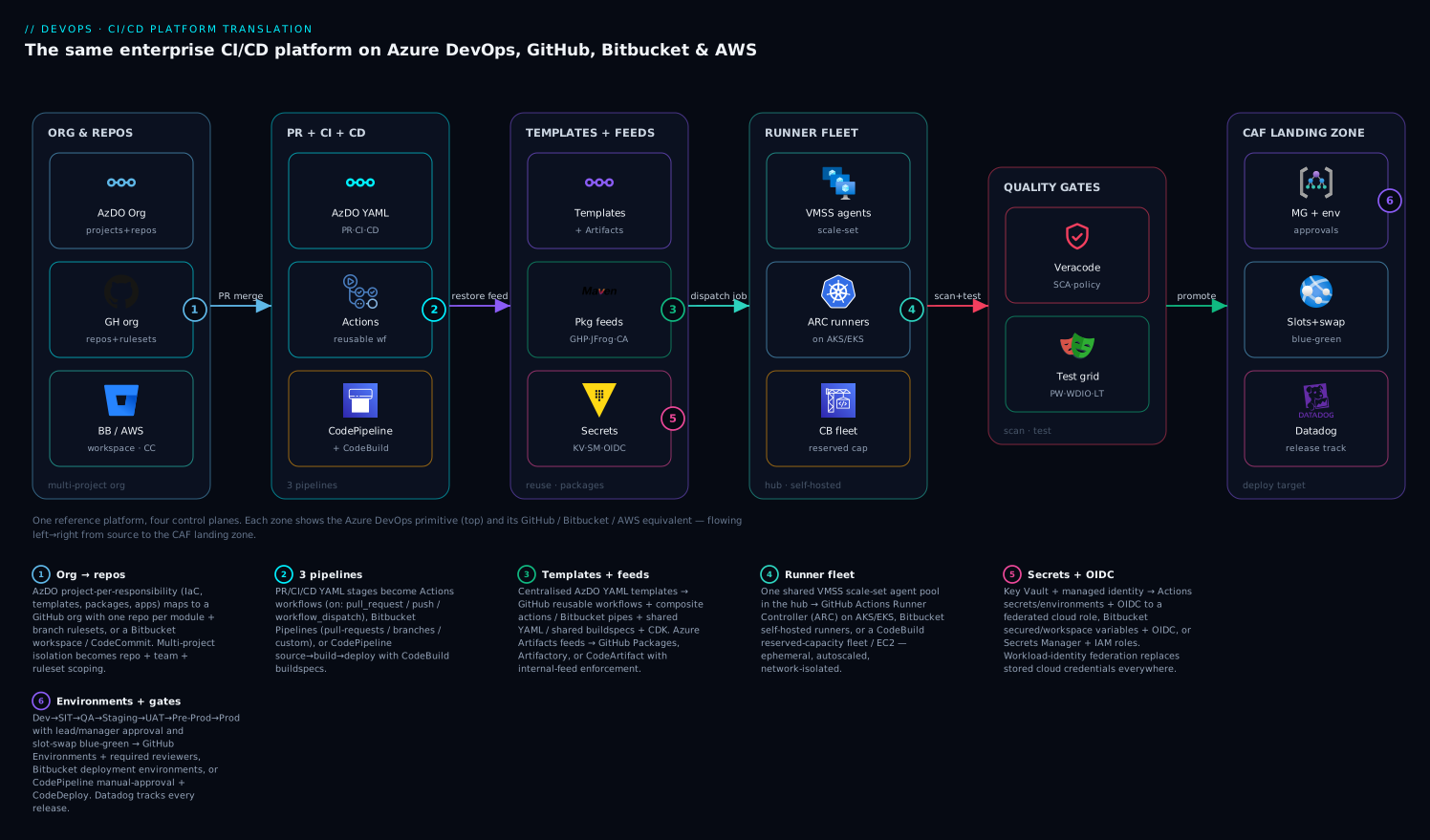
Read the diagram left to right as a single request following the GitFlow path from a developer’s branch all the way to the CAF landing zone — and read each zone vertically as a four-way equivalence. The first zone, Org & Repos, shows the Azure DevOps organisation-of-projects with its top primitive (a generic pipeline glyph, because Azure DevOps/Repos use no brand icon) and, stacked beneath, the GitHub org-with-rulesets and the Bitbucket-workspace / CodeCommit equivalents — the project-by-responsibility isolation re-expressed three ways. The PR-merge arrow carries the branch into the second zone, PR + CI + CD, where the three pipelines live: the Azure DevOps YAML, the GitHub Actions reusable workflow, and the CodePipeline-plus-CodeBuild pair. From there the restore-feed arrow reaches the third zone, Templates + Feeds, which fuses the two central planes — the reusable templates and the package feeds (GitHub Packages / Artifactory / CodeArtifact) — alongside the secrets node (Key Vault / Secrets Manager / OIDC) that every build draws from.
The dispatch-job arrow then lands on the fourth zone, the Runner Fleet: the shared VMSS scale-set agents in the hub, with their cross-platform twins — ARC ephemeral runners on Kubernetes and the CodeBuild reserved-capacity fleet — all ephemeral, autoscaled and network-isolated. Built artifacts flow through the scan-and-test arrow into the fifth zone, Quality Gates, where Veracode (SCA, policy, container) and the test grid (Playwright, WebdriverIO, Azure Load Testing) gate the release tool-agnostically. Finally the promote arrow crosses into the sixth zone, the CAF Landing Zone — the management-group hierarchy with its gated Dev→…→Prod environments and lead/manager approvals, the App Service slot-swap blue-green cutover, and Datadog tracking the release. Six numbered badges mark the highest-leverage translation points: the org→repos isolation remap (1), the three-pipeline engine swap (2), the template-and-feed reuse plane (3), the runner-fleet rebuild (4), the secrets-and-OIDC secretless layer (5), and the environments-and-gates promotion model (6). The legend narrates each as what it is in Azure DevOps → what it becomes on the other three.
Real-world scenario
The acquisition that forced a translation. A mid-size insurance platform — call it the carrier — ran the exact reference architecture on Azure DevOps: one organisation, an iac project with thirty-one Terraform module repos, a pipeline-templates project whose extends-templates fed forty-two app pipelines, a packages project with Maven/NuGet/npm/Python feeds under internal-feed enforcement, and a 40-instance VMSS agent pool in the hub. They acquired a smaller insurtech that was all-in on GitHub Enterprise and had a contractual mandate to consolidate tooling within nine months. The board heard “they both do CI/CD, just merge them” and budgeted three weeks. The platform team knew better and used this translation map to scope it honestly.
The scoping came back in plane order. Source/org (plane 1): GitHub had no project layer, so the thirty-one module repos and forty-two app repos moved one-to-one, but the project-scoped isolation had to be rebuilt as teams + CODEOWNERS + org rulesets — two weeks of design, not a rename. Pipelines (plane 2): the three-pipeline shape ported cleanly; the only real defects were GitHub’s parallel-by-default jobs (they had to add needs: everywhere to restore the Azure DevOps sequential stages) and the missing implicit checkout. Templates (plane 3): the big one — the extends-templates became GitHub reusable workflows in a new ci-templates repo, and because reusable workflows map so closely to extends, this was faithful but still a six-week rewrite-and-test across forty-two consumers. Feeds (plane 4): the genuine blocker — GitHub Packages does not host Python. Their Python feed had no GitHub-native home, so they stood up Artifactory for Python (and, after a cost review, moved all four ecosystems to Artifactory for one consistent governance model with strong remote-proxy upstreams). Runners (plane 5): the VMSS pool became an ARC runner scale set on their existing private AKS cluster, ephemeral and scale-to-zero, in the same hub network reaching the same private endpoints — a clean conceptual swap that still took an SRE three weeks to harden.
What went wrong: a team migrated one app early and put the Veracode API key in a plaintext Actions variable (not a secret), and it surfaced in a fork PR’s logs. The translation map’s secrets-plane rule — variables are not secrets; environment-scoped secrets + OIDC is the real equivalent of a KV-linked variable group — became a hard lint in the ci-templates repo afterward. What went right: because cloud auth moved to OIDC federated credentials instead of stored service-principal secrets, the migration removed every long-lived Azure credential from CI as a side effect — a security upgrade the audit team credited to the move. Final timeline: seven months, not three weeks, dominated by the templates rewrite (plane 3) and the Python-feed re-platform (plane 4) — exactly the two planes this article flags as least portable. The lesson the carrier wrote into its runbook: translate plane by plane, and budget for the templates and feeds planes; the pipeline-engine swap everyone fears is the cheap part.
Advantages and disadvantages
Each platform is a deliberate trade, not a ranking. Here is the honest two-column view per platform, then prose on when each matters.
| Platform | Advantages | Disadvantages |
|---|---|---|
| Azure DevOps | Most mature multi-project model; extends-templates are the most pipeline-native reuse; first-class environments/approvals; deep Azure + Boards/Repos integration; scale-set agents are a polished managed fleet |
Microsoft-ecosystem gravity; smaller marketplace than Actions; less “code-native” than CDK; Atlassian/AWS shops feel it as an outsider |
| GitHub | Largest Actions marketplace; reusable workflows + composite actions are excellent reuse; OIDC everywhere; ARC is a strong K8s-native fleet; where most OSS and talent already live | No project layer (rebuild isolation); Packages lacks Python; pull_request fork-secret model surprises people; jobs parallel-by-default trips Azure DevOps migrants |
| Bitbucket | Cleanest org/project match to Azure DevOps (workspace + project); tight Jira integration; simple YAML; hosted macOS for iOS | Weakest whole-pipeline reuse (pipes are step-level); smaller pipe ecosystem; fewer enterprise governance knobs; often paired with Artifactory for feeds |
| AWS | IAM-native secretless (runs as a role); CodeArtifact + CDK give code-defined pipelines and feeds; deepest AWS integration; CodeBuild VPC + fleet for isolation | No source-org/project model (accounts instead); console-config drift risk without CDK; no hosted macOS (EC2 Mac for iOS); steepest re-architecture from Azure DevOps shapes |
When each matters: choose Azure DevOps when the estate is Azure-centric and the extends-template + environment model is load-bearing — you already have the best fit. Choose GitHub when you want the largest ecosystem, the team already lives there, and you can invest in rebuilding the project-isolation layer; the reuse story is excellent and OIDC is first-class. Choose Bitbucket when you are an Atlassian/Jira shop and value the near-exact org/project match — but accept you will likely bolt on Artifactory and rethink whole-pipeline reuse. Choose AWS-native when the workloads are AWS and you want the bill and the identity model unified under IAM with pipelines-as-CDK-code — but budget for the biggest structural shift, because you are trading a source-org model for an account model. The deeper side-by-side is in CI/CD platforms compared.
Hands-on lab
This lab translates one slice of the platform — a CI build that enforces an internal feed, scans, tests and publishes — from Azure DevOps to GitHub Actions, on free tiers, so you feel the translation in your hands. About 30–40 minutes. Teardown at the end.
1. Prerequisites. A GitHub account (free Actions minutes on public repos), git, and the gh CLI authenticated (gh auth login). No cloud account needed — we keep it engine-only.
2. Create the repo and the internal-feed config. Make a public repo and add a NuGet config pinned to only GitHub Packages (the internal-feed-enforcement translation):
gh repo create translate-ci-lab --public --clone && cd translate-ci-lab
cat > nuget.internal.config <<'EOF'
<configuration>
  <packageSources>
    <clear/>
    <add key="internal" value="https://nuget.pkg.github.com/OWNER/index.json"/>
  </packageSources>
</configuration>
EOF
3. Add a trivial app + test so there is something to build and test:
dotnet new classlib -n Lib && dotnet new xunit -n Lib.Tests
dotnet add Lib.Tests/Lib.Tests.csproj reference Lib/Lib.csproj
dotnet new sln -n Lab && dotnet sln add Lib Lib.Tests
4. Write the translated CI workflow — the GitHub equivalent of the reference CI pipeline (build from internal-only feed, test, upload artifact). Note the explicit checkout (Azure DevOps would auto-checkout) and the masked-secret pattern:
mkdir -p .github/workflows
cat > .github/workflows/ci.yml <<'EOF'
on: { push: { branches: [ main ] }, pull_request: {} }
jobs:
  build_test:
    runs-on: ubuntu-latest          # GitHub-hosted; swap for [self-hosted,hub] in prod
    permissions: { contents: read, packages: read }
    steps:
      - uses: actions/checkout@v4    # explicit — unlike Azure DevOps auto-checkout
      - uses: actions/setup-dotnet@v4
        with: { dotnet-version: '8.0' }
      - run: dotnet build -c Release        # would use --configfile nuget.internal.config with real feed
      - run: dotnet test --no-build -c Release
      - uses: actions/upload-artifact@v4
        with: { name: drop, path: '**/bin/Release/**' }
EOF
5. Commit and watch it run. Push and tail the run:
git add -A && git commit -m "Translate Azure DevOps CI to GitHub Actions" && git push -u origin main
gh run watch                # expected: build_test job green, 'drop' artifact uploaded
Expected output: the build_test job goes green, the test step reports passing xUnit tests, and a drop artifact appears on the run page. You have just executed the same CI logic (build → test → publish) the reference Azure DevOps pipeline runs — only the wiring (explicit checkout, runs-on, upload-artifact, feed-config pin) changed.
6. Translate one more thing — the secret. Add a masked secret and prove variables differ from secrets:
gh secret set DEMO_SECRET --body "s3cr3t-not-in-logs"
# In ci.yml add a step:  - run: echo "len=${#DEMO_SECRET}"  with env: { DEMO_SECRET: ${{ secrets.DEMO_SECRET }} }
# Re-run: the value is masked in logs. Put the same value in `vars:` and it prints — that's the trap.
7. Teardown. Remove the repo (and the artifact/secret go with it):
gh repo delete translate-ci-lab --yes
You have translated the CI plane end to end on a free tier. The same shape extends to the other planes: swap ubuntu-latest for [self-hosted, hub] to use a real ARC fleet, replace the build with a uses: reusable workflow for the templates plane, and add an environment: to a deploy job for the gates plane.
To cement what the lab actually changed versus the Azure DevOps original, here is the line-by-line diff of concepts you just translated — the same logic, different wiring:
| Concept in the lab | Azure DevOps original | What you wrote on GitHub | Why it changed |
|---|---|---|---|
| Trigger | trigger: / pr: |
on: { push, pull_request } |
Different event syntax, same intent |
| Checkout | Implicit (auto) | Explicit actions/checkout@v4 |
GitHub does not auto-checkout |
| Runner | pool: hub-vmss-linux |
runs-on: ubuntu-latest (→ [self-hosted,hub]) |
Hosted for the lab; self-hosted in prod |
| Internal feed | --source $(INTERNAL_FEED_URL) |
--configfile nuget.internal.config (<clear/>) |
Pin config instead of a feed-URL variable |
| Secret | Variable group → Key Vault | secrets.DEMO_SECRET (masked) |
Env/repo secret, never a vars: variable |
| Artifact | publish: … artifact: drop |
actions/upload-artifact@v4 |
Different artifact bus, same hand-off |
| Test | dotnet test … --collect |
dotnet test --no-build |
Identical — test logic is portable |
Common mistakes & troubleshooting
The failure modes of a translation cluster by plane. Each row is a real symptom, its root cause, the exact way to confirm it, and the fix.
| # | Symptom | Plane / root cause | How to confirm | Fix |
|---|---|---|---|---|
| 1 | Secret printed in PR logs | Secrets — value put in vars: not secrets: |
Open the run log; the value is visible | Move to secrets:; for forks, gate with pull_request_target + label |
| 2 | All CD stages run at once | Pipelines — GitHub jobs parallel by default | Run graph shows no dependencies | Add needs: to chain stages in order |
| 3 | “Nothing to do / no source” | Pipelines — missing explicit checkout | Build can’t find files | Add actions/checkout@v4 (Azure DevOps auto-checks-out) |
| 4 | Build pulls from public registry | Feeds — config not cleared/pinned | dotnet restore logs show nuget.org |
<clear/> + internal source only; block public egress on runner |
| 5 | Python feed has no home on GitHub | Feeds — GitHub Packages lacks PyPI | Packages UI has no Python | Use Artifactory / CodeArtifact for Python |
| 6 | Forty repos drift from the template | Templates — copy-paste instead of reuse | git grep finds duplicated YAML |
Convert to reusable workflow + org required-workflow |
| 7 | OIDC deploy fails AADSTS700213 / no-match |
Identity — federated-credential subject mismatch | Compare token sub claim to the credential subject |
Set subject to repo:org/repo:environment:<env> exactly |
| 8 | Runners never pick up jobs | Fleet — labels/scale-to-zero/controller down | ARC controller logs; runner-set status | Fix labels/runs-on; check HRA/KEDA min/max; restart controller |
| 9 | iOS build fails on AWS | Mobile — no hosted macOS on CodeBuild | CodeBuild has no macOS image | Use EC2 Mac instance as a runner, or hosted macOS on GH/BB |
| 10 | Prod deploy needs no approval | Gates — environment protection not set | Environment has no required reviewers | Add required reviewers + deployment branch rule on main |
| 11 | Veracode policy scan doesn’t block | Security — non-zero exit not failing the job | Job green despite policy failures | Use the fail-on-policy flag; don’t swallow the exit code |
| 12 | Liquibase can’t reach the DB | Network — runner not in the private network | Connection timeout to private FQDN | Run on self-hosted runner in the VPC/VNet with private endpoint access |
| 13 | Slot swap “works” but users still see old | Deploy — warmed wrong slot / no swap call | App still on prod slot | Deploy to staging slot, then az webapp deployment slot swap |
| 14 | Costs spike after migration | Fleet — hosted runners instead of self-hosted | Billing shows huge runner minutes | Move sustained load to self-hosted ARC/CodeBuild fleet |
Deeper on the three that hurt most
OIDC subject mismatch (row 7) is the single most common deploy-time failure when translating the secretless layer. The federated credential’s subject must match the OIDC token’s sub claim exactly, and the claim differs by trigger context. Confirm by decoding the token GitHub mints (or read the error, which prints the unmatched subject), then align the credential. A per-environment deploy needs repo:org/repo:environment:production; a branch-triggered job needs repo:org/repo:ref:refs/heads/main. One credential per distinct subject.
| OIDC subject pattern | Matches | Use for |
|---|---|---|
repo:org/repo:environment:production |
Jobs with environment: production |
Gated prod deploys |
repo:org/repo:ref:refs/heads/main |
Pushes to main |
CI on the default branch |
repo:org/repo:pull_request |
PR-triggered runs | PR-time read-only checks |
repo:org/repo:ref:refs/tags/* |
Tag pushes | Release-tag deploys |
Template drift (row 6) is the slow-motion failure of the templates plane. Without enforcement, teams fork the central YAML and diverge; six months later “every pipeline scans with Veracode” is no longer true. Confirm with a git grep across repos for the scan step’s absence; fix by converting to a reusable workflow and making it an org required workflow so it cannot be skipped. The enforcement is the point — a template you can opt out of is a documentation file.
Cost regression (row 14) bites when a migration defaults to hosted runners “to get it working” and never moves back to the self-hosted fleet. The reference platform’s VMSS pool is cheap at sustained volume precisely because you own the VMs; hosted runners bill per-minute and dominate the bill at scale. Confirm in billing (runner/build minutes line item); fix by repointing runs-on to the self-hosted ARC scale set (or a CodeBuild reserved fleet) for everything except light, isolation-irrelevant jobs.
Best practices
Production-grade rules for any translation, learned the hard way:
- Translate plane by plane, in order. Org → pipelines → templates → feeds → runners → secrets → gates. Each plane is independently testable; do not big-bang all six.
- Budget for templates and feeds; the engine is cheap. The pipeline-YAML swap everyone fears is the easy part. The reusable-template rewrite and the feed re-platform (especially Python on GitHub) dominate the timeline.
- Make reuse mandatory, not optional. A central template is worthless if teams can skip it. Use org required-workflows / merge checks / Service-Catalog guardrails so the scan-and-feed-enforcement template cannot be bypassed.
- Go secretless first. Replace stored cloud credentials with OIDC/role-assumption before anything else — it removes a class of leaks and is a clean security win the audit team will thank you for.
- Variables are not secrets. Drill this into every team on GitHub/Bitbucket. The faithful translation of a KV-linked variable group is environment-scoped secrets + OIDC, never plain variables.
- Keep the source of truth in a real vault. Sync to platform secrets if you must, but Key Vault / Secrets Manager remains the system of record so rotation is centralised.
- Preserve the three fleet properties explicitly. Ephemerality, autoscale-to-zero, and network isolation do not come free on every runner model — design them (ARC ephemeral + KEDA + private subnet; CodeBuild VPC).
- Pin everything by version. Pin reusable workflows/actions/pipes/constructs to a tag or SHA, and allowlist third-party actions/pipes — unpinned third-party logic is a supply-chain risk.
- Recreate sequential ordering deliberately on GitHub. Jobs run in parallel by default; add
needs:to restore the Azure DevOps stage order you depend on. - Gate production with humans on every platform. Required reviewers / manual-approval actions / deployment permissions — the leads-and-managers approval edge must survive the translation.
- Keep the swap in the cloud layer. Slot-swap blue-green is an App Service mechanism; let any CI engine call the same
azswap so the deployment strategy is CI-tool-independent. - Track releases tool-agnostically.
datadog-ci deployment markruns identically everywhere; wire it into every CD path so deploy-to-incident correlation survives the move.
Security notes
The translation is a security opportunity as much as a risk. Least privilege, secretless auth, isolation and supply-chain governance all get re-examined when you move planes — do them right.
- Secretless cloud auth is the headline win. OIDC federated credentials (GitHub/Bitbucket → Azure/AWS/GCP) and IAM role-assumption (AWS-native) eliminate stored cloud credentials. Scope each credential/role to the narrowest subject — per environment, per repo — so a compromised PR cannot assume prod.
- Secrets stay in a vault, scoped to environments. Never widen a secret’s scope to “org” for convenience. Environment-scoped secrets + required reviewers mean a prod secret is only reachable from a gated prod deploy.
- Lock the feed as a supply-chain choke point. Internal-feed enforcement plus Veracode SCA at the build is your dependency-poisoning defence. Block public-registry egress on runners so a build cannot silently pull an unvetted package — pair this with SBOM consumption and admission verification.
- Pin and allowlist third-party CI logic. Unpinned actions/pipes are remote code in your build. Pin to SHAs, maintain an allowed-actions/allowed-pipes list, and review the central templates repo with
CODEOWNERS. - Isolate the runner fleet on the network. Self-hosted runners in a private subnet reaching private endpoints — never on the public internet — is the same posture the VMSS hub pool gave you. Hosted runners on the vendor network cannot meet a private-endpoint requirement.
- Mind the fork-PR secret model. On GitHub,
pull_requestfrom forks deliberately gets no secrets; do not work around it withpull_request_targetcarelessly, or you hand untrusted code your secrets. Gate elevated PR runs behind a maintainer label. - Guard the secret-sprawl surface. Scanning for committed secrets is mandatory on every platform — see secret sprawl, pipeline scanning and remediation. A leaked credential in history must be rotated, not just deleted.
- Keep human approval at the prod edge. The lead/manager gate is a security control, not a formality — it is the deliberate human check before production change. Required reviewers must be enforced, with break-glass logged.
Cost & sizing
What drives the bill differs by plane and platform; here is what actually moves the number and how to right-size it. Figures are rough and region/contract-dependent — validate against your own rate card.
| Cost driver | Azure DevOps | GitHub | Bitbucket | AWS |
|---|---|---|---|---|
| Hosted compute | Microsoft-hosted parallel jobs | Actions minutes (per-minute) | Build minutes (per plan) | CodeBuild build-minutes |
| Self-hosted compute | VMSS VM-hours | Cluster node-hours (ARC) | Runner host-hours | Fleet-hours / EC2 + build-min |
| Per-user / seat | Per-user licence | Per-user (Enterprise) | Per-user | None (IAM) |
| Package storage | Artifacts storage GB | Packages storage/egress | Artifactory licence + storage | CodeArtifact storage + requests |
| Secrets store | Key Vault ops | Free (Actions secrets) | Free (variables) | Secrets Manager per-secret/month |
| macOS (iOS) | macOS agent minutes (premium) | macOS minutes (premium) | macOS minutes (premium) | EC2 Mac (24-hr min dedicated host) |
| Egress | Mostly internal | Packages/artifact egress | Egress | Cross-AZ / NAT / egress |
The dominant lever on every platform is hosted vs self-hosted compute. Hosted runners are per-minute and convenient but expensive at sustained volume; a self-hosted fleet (VMSS / ARC / CodeBuild reserved / EC2) is cheaper per build-hour at scale but costs SRE time to operate and idle VM-hours unless it scales to zero. The decision per workload:
| If the workload is… | Run it on… | Because… |
|---|---|---|
| Light, spiky, public-internet-only | Hosted / on-demand | No fleet to operate; per-minute is cheap at low volume |
| Sustained high volume | Self-hosted fleet | Per-build-hour is far cheaper than per-minute at scale |
| Needs private-endpoint reach | Self-hosted (or CodeBuild-in-VPC) | Hosted runners are on the vendor network |
| Needs custom/baked tooling or big caches | Self-hosted | Control the image and warm caches |
| iOS (macOS) | Hosted macOS (GH/BB) or EC2 Mac (AWS) | macOS host is a premium everywhere; batch the builds |
| Compliance-controlled host | Self-hosted in your network | You own the build host and its network posture |
| Overnight idle window | Scale-to-zero fleet (ARC min 0 / on-demand) | Pay nothing for idle; the biggest single saving |
Right-sizing rules: run light, isolation-irrelevant jobs on hosted runners (no fleet to babysit); move sustained, private-network-dependent builds to the self-hosted fleet; and make the fleet scale to zero (ARC min 0, CodeBuild on-demand) so you do not pay for idle. In INR terms, a 40-instance always-on agent fleet that should scale to zero overnight can easily waste five figures a month in idle VM-hours — the scale-to-zero behaviour the reference VMSS pool already has is the single biggest saving to preserve. macOS for iOS is a notable premium everywhere (hosted macOS minutes cost multiples of Linux; EC2 Mac carries a 24-hour minimum dedicated-host allocation), so batch iOS builds rather than running a Mac host idle.
Free-tier reality for learning: GitHub Actions is free on public repos and includes a monthly allotment on private; Bitbucket includes build minutes per plan; AWS CodeBuild/CodePipeline have small free tiers; Azure DevOps includes one free Microsoft-hosted parallel job. All four are enough to build and test the translation lab above at zero cost — the bill only starts at sustained private-repo, self-hosted-fleet, macOS scale.
Interview & exam questions
Q1. What is the GitHub equivalent of an Azure DevOps multi-project organisation, and what is lost?
GitHub goes organisation → repository with no project layer in between. You rebuild project-scoped isolation with repositories, teams (and CODEOWNERS), org rulesets applied by repo pattern, and environments — or multiple orgs for hard isolation. What is “lost” is the structural project boundary; you re-express it as a naming-and-teams convention. Bitbucket, by contrast, has a near-exact match (workspace + project). Maps to platform-engineering and GitHub-admin assessments.
Q2. Translate “a variable group with secrets linked to Key Vault” to GitHub. Why is the naive translation wrong?
The correct translation is environment-scoped secrets (masked, access-controlled) plus OIDC for cloud auth, keeping Key Vault as the source of truth. The naive translation — environment variables — is wrong because variables are visible and unmasked; only secrets: are protected. This distinction is the most common security mistake when teams move from Azure DevOps to GitHub.
Q3. How do you make a centralised pipeline template mandatory on each platform? Azure DevOps: required template + pipeline permissions. GitHub: convert to a reusable workflow and set it as an org required workflow (plus pin and allowlist). Bitbucket: workspace-level merge checks. AWS: a Service Catalog product or SCP guardrail plus a versioned shared construct. The principle: a template you can opt out of is documentation, not enforcement.
Q4. What is the AWS-native equivalent of the shared scale-set agent pool, and how do you preserve ephemerality, autoscale and isolation? A CodeBuild reserved-capacity fleet (or a self-managed EC2/ECS fleet). Ephemerality: CodeBuild containers are single-use natively; an EC2 fleet must recycle instances. Autoscale: CodeBuild scales by demand; on-demand is effectively scale-to-zero. Isolation: configure the CodeBuild project with a VPC so the build gets an ENI in a private subnet and reaches private resources — the equivalent of the hub-network VMSS placement.
Q5. Which package feed translations have gaps, and how do you fill them? GitHub Packages does not host Python (PyPI). Fill it with Artifactory, CodeArtifact, or a self-hosted PyPI. Artifactory is the universal answer (every ecosystem, strong remote-proxy upstreams ≈ Azure Artifacts upstream sources). CodeArtifact is the AWS-native choice with IAM-governed upstream-to-public caching. Preserve internal-feed enforcement by clearing default sources and pinning to the internal feed.
Q6. Explain the OIDC subject-claim trap when translating service connections.
The Azure/AWS-side federated credential’s subject must match the CI token’s sub claim exactly, and the claim varies by trigger (environment:, ref:, pull_request, tags). A mismatch yields a no-match/AADSTS700213-class auth failure. You create one credential per distinct subject — e.g. repo:org/repo:environment:production for gated prod deploys.
Q7. How does blue-green slot-swap translate across CI tools, and what changes on native AWS?
On App Service it does not change with the CI tool — deploy to the staging slot, warm it, then az webapp deployment slot swap; any engine runs the same az commands. The gate is CI; the swap is cloud. On native AWS, the equivalent is CodeDeploy blue/green shifting traffic between target groups (ECS/Lambda/EC2), with auto-rollback on a CloudWatch alarm.
Q8. Why do all Azure DevOps CD stages “run at once” after a naive GitHub migration, and how do you fix it?
Azure DevOps stages run sequentially by default; GitHub jobs run in parallel unless you declare needs:. The fix is to add needs: to recreate the dependency chain (dev → sit → qa → …). This and the missing implicit checkout are the two most common porting defects.
Q9. What moves cleanly in a translation, and why?
The security/test/observability plane — Veracode, Liquibase, Playwright, WebdriverIO, Azure Load Testing, Datadog — because the tools are third-party and invoked the same way (CLI/action/pipe/buildspec) on any engine. Only the invocation wrapper and secret source change; the tool and its commands do not. Observability via datadog-ci is identical everywhere.
Q10. When would you choose Bitbucket over GitHub for translating this platform? When you are an Atlassian/Jira shop and value the near-exact org/project match (workspace + project ≈ organisation + project) and hosted macOS for iOS. You accept weaker whole-pipeline reuse (pipes are step-level), a smaller ecosystem, and typically bolting on Artifactory for feeds. If parameterised whole-pipeline reuse is central, GitHub reusable workflows are the better fit.
Q11. How do you keep the migration from regressing on cost? Do not leave everything on hosted runners. Hosted is per-minute and dominates the bill at sustained volume. Move sustained, private-network builds to the self-hosted fleet (ARC/CodeBuild reserved/EC2) and make it scale to zero so idle VM-hours vanish — preserving the reference VMSS pool’s min-0 behaviour is the biggest single saving.
Q12. What is the correct order to translate the platform, and which planes dominate the timeline?
Plane order: org → pipelines → templates → feeds → runners → secrets → gates. The templates plane (rewriting extends-templates into reusable workflows/pipes/constructs and re-testing every consumer) and the feeds plane (re-platforming registries, especially Python on GitHub) dominate the timeline. The pipeline-engine swap everyone fears is comparatively cheap.
Quick check
- What replaces the Azure DevOps “project” layer on GitHub, which has no such container?
- On GitHub, what is the real equivalent of “a variable group with secrets linked to Key Vault” — and what is the trap?
- Which package ecosystem does GitHub Packages not support, and what do you use instead?
- Why might all your CD stages run simultaneously after porting an Azure DevOps multi-stage pipeline to GitHub Actions?
- Is App Service slot-swap blue-green dependent on the CI tool? Where does the swap actually happen?
Answers
- Repos + teams (
CODEOWNERS) + org rulesets + environments, or multiple orgs for hard isolation — you rebuild the project-scoped isolation as a teams-and-naming convention. (Bitbucket, by contrast, has a near-exact workspace+project match.) - Environment-scoped secrets + OIDC, keeping Key Vault as the source of truth. The trap is using environment variables, which are visible and unmasked — only
secrets:are protected. - Python (PyPI). Use Artifactory, AWS CodeArtifact, or a self-hosted PyPI; Artifactory is the universal choice with the strongest remote-proxy upstreams.
- Because GitHub jobs run in parallel by default — Azure DevOps stages are sequential. You must add
needs:to recreate the dependency order (and add an explicitactions/checkout). - No — the swap is an Azure App Service mechanism (
az webapp deployment slot swap); any CI engine runs the sameazcommands. The gate is CI; the swap is cloud. Native AWS uses CodeDeploy blue/green instead.
Glossary
- Plane (CI/CD plane): one of the six independent layers of a CI/CD platform — source/org, pipeline engine, reusable assets, package feeds, compute fleet, secrets/identity — each translatable on its own.
- Reusable workflow (GitHub): an entire workflow called with
uses:from another, taking typedinputs:andsecrets:— the closest equivalent of an Azure DevOpsextendstemplate. - Composite action (GitHub): a packaged sequence of steps invoked as a single step inside a job — the equivalent of an Azure DevOps steps template.
- Pipe (Bitbucket): a Docker-container build step invoked with variables; Bitbucket’s primary reuse unit, best for step-level (not whole-pipeline) reuse.
- Buildspec (AWS): the YAML file defining a CodeBuild project’s phases/commands; shared buildspecs are AWS’s step-reuse mechanism.
- CDK pipeline construct: an AWS pipeline defined as code (TypeScript/Python) and instantiated per app/environment — AWS’s whole-pipeline reuse model.
- ARC (Actions Runner Controller): the Kubernetes controller that schedules ephemeral GitHub Actions runner pods, autoscaling (often via KEDA) to zero — the GitHub equivalent of the VMSS scale-set agent pool.
- CodeArtifact: AWS’s managed package registry (Maven/NuGet/npm/Python) with IAM-governed upstream-to-public caching — the AWS equivalent of Azure Artifacts.
- OIDC federated credential: a trust between a CI provider’s OIDC issuer and a cloud identity, letting the pipeline assume a role with no stored secret — the secretless replacement for a service-connection secret.
- Internal-feed enforcement: configuring the build to resolve packages only from the internal feed (default sources cleared, public egress blocked), so unvetted public packages cannot be pulled.
- Environment (deployment): a named promotion target with protection rules (required reviewers, branch rules, wait timers) — the unit on which approvals and OIDC subjects are scoped.
- Slot swap (blue-green): deploying to an App Service staging slot, warming it, then atomically swapping it into production — a cloud mechanism independent of the CI tool.
- Required workflow (GitHub): an org-level workflow forced to run on matching repos — the enforcement mechanism that makes a central template mandatory.
- Reserved-capacity fleet (CodeBuild): a pool of warm CodeBuild compute for low-latency, consistent-environment builds — the closer analogue to a warm VMSS than on-demand CodeBuild.
- Workspace / project (Bitbucket): Bitbucket’s top tenant (workspace) and repo-folder (project) — the near-exact structural match to an Azure DevOps organisation and project.
Next steps
- Read the companion overview, CI/CD platforms compared, for the shorter side-by-side that this deep dive expands.
- Lock down the secretless layer with workload identity federation for secretless CI/CD before translating the secrets plane on any platform.
- Translate the feeds plane carefully using artifact registry management and the Azure-native Azure Artifacts feeds with upstream sources.
- Reproduce the central-templates plane with the patterns in the Azure DevOps YAML template library, then map them to GitHub reusable workflows.
- Ground the deployment-gates plane in deployment strategies: blue-green, canary, rolling and measure the result with DORA metrics and platform engineering.