Most Well-Architected reviews are theatre. A partner or an internal architect books a two-hour call, walks a checklist, exports a PDF with a reassuring risk score, and everyone files it under “done.” Six months later the architecture has drifted, a launch fell over on a single-AZ database, the bill doubled on idle capacity, and nobody can find the review — let alone tell you which of its findings were ever fixed. The AWS Well-Architected Framework did not fail those teams. They ran it as a checkbox when it is designed to be a continuous operating rhythm.
The Framework is three things. It is a mental model — six pillars (Operational Excellence, Security, Reliability, Performance Efficiency, Cost Optimization, Sustainability), each with a handful of design principles and a set of pointed questions that ask how you actually do the thing, not whether you have heard of it. It is a method — the Well-Architected Framework Review (WAFR): you scope a workload, answer the question set, and the process surfaces High-Risk Issues (HRIs) you rank into a backlog. And it is a tool — the free AWS Well-Architected Tool (aws wellarchitected) that stores your answers, computes risk, tracks milestones, and generates a prioritized improvement plan you can re-run after every major change.
This article teaches the review as a senior architect actually runs it. You will learn every pillar’s design principles and the concrete questions each one asks (enumerated, not hand-waved); the general design principles that sit above all six; how to reason explicitly about trade-offs — because every choice that strengthens one pillar taxes another; how to drive the Well-Architected Tool from workload definition through HRIs, milestones and improvement plan; when to layer a lens (Serverless, SaaS, ML, Data Analytics, IoT, Financial Services); how Trusted Advisor, Security Hub and Compute Optimizer feed real evidence into your answers; and how the whole thing becomes a cadence wired into launches and change management rather than a one-off. Then you will run it for real with the CLI and Terraform, and study the anti-patterns that turn a review into theatre.
What problem this solves
The pain WA addresses is not “our architecture is bad.” It is that architecture quality is invisible until it fails, and it fails along axes nobody was watching. A team optimizes hard for shipping speed and cost, and reliability quietly rots until a Region event or an AZ failure exposes it — on the worst possible day. WA makes the invisible visible before the incident, and turns “we should probably improve that someday” into an owned, prioritized, tracked item.
| Symptom in production | Root cause (an un-surfaced risk) | What a real WA review does instead |
|---|---|---|
| A launch falls over because the database was single-AZ | Reliability was never questioned; “it worked in staging” | REL questions force the multi-AZ / failover / DR answer before launch, as an HRI if missing |
| The bill doubles on idle and over-provisioned capacity | No one owns Cost Optimization; rightsizing is nobody’s job | COST questions surface unmanaged demand and decommissioning gaps; Compute Optimizer feeds the evidence |
| A breach traces back to a public S3 bucket and long-lived keys | Security posture assumed, never enumerated | SEC questions enumerate identity, least privilege, data protection; Security Hub findings back the answers |
| An incident has no runbook, no owner, and a 3-hour MTTR | Operational Excellence treated as “ops will handle it” | OPS questions demand observability, runbooks, game days, and post-incident learning |
| p99 latency degrades as traffic grows and no one notices | Performance never measured against a target | PERF questions tie architecture choices to measured goals and continuous review |
| The review PDF exists but nothing was ever fixed | WA run as a one-time checkbox; HRIs had no owner | HRIs become backlog items with owners; milestones track improvement over time |
| “Passed” the review, then changed everything | No re-review after major change; the answers are now fiction | Re-review is triggered by change; a new milestone captures the new baseline |
Who hits this: every team past the prototype stage. Startups skip WA because “we’ll fix it when we scale” — then the scale event is the fix, at 3 a.m. Enterprises run WA as a compliance ritual and wonder why findings never close. The teams that get value treat WA as continuous risk management for architecture: a recurring conversation that produces a ranked, owned backlog and measures whether last quarter’s risks actually shrank.
Learning objectives
By the end of this article you will be able to:
- Explain all six pillars — their design principles and the specific questions each asks — well enough to run a review without reading the docs mid-call.
- Apply the general design principles (stop guessing capacity, test at production scale, automate experimentation, evolve, drive with data, game days) as the lens above the six pillars.
- Reason about trade-offs explicitly — name what each design choice costs in another pillar (reliability↔cost, performance↔cost, security↔operational friction) and defend the balance.
- Drive the Well-Architected Tool end to end — define a workload, answer the question set, read HRIs and MRIs, capture a milestone, and export the improvement plan.
- Choose and apply lenses — know when Serverless, SaaS, ML, Data Analytics, IoT or Financial Services lenses add questions your workload needs.
- Wire in evidence sources — use Trusted Advisor, Security Hub, Compute Optimizer and Config so answers are backed by data, not opinion.
- Run WA as a cadence — who attends, when to review (before launches, after change, after incidents), and how findings feed a prioritized backlog.
- Provision and review a workload as code with
aws wellarchitectedand Terraform, and recognize the anti-patterns that make reviews worthless.
Prerequisites & where this fits
You should have designed or operated at least one non-trivial AWS workload — something with a load balancer, compute tier, a database, IAM, and a bill you have had to explain. WA is meta-architecture: it reviews the systems you already know how to build. If a whole pillar is unfamiliar, this article is a fine map, but pair it with the hands-on pieces linked throughout.
| You should be comfortable with… | Why it matters for the review |
|---|---|
| A real workload topology (VPC → ALB → compute → RDS/DynamoDB) | The unit of review is a workload; you answer questions about a specific system, not AWS in the abstract |
| IAM roles, policies, least privilege | Half of the Security pillar is identity and permissions; see IAM Policy Evaluation & Access Denied Troubleshooting |
| Multi-AZ, failover, backups, RTO/RPO | Reliability questions are unanswerable without these; see AWS Backup & Disaster Recovery Strategies |
| Reading a bill: Cost Explorer, tags, RIs/Savings Plans | Cost Optimization asks how you govern, monitor and decommission spend |
| CloudWatch metrics/alarms, tracing | Operational Excellence and Performance both hinge on observability |
Terraform aws provider basics |
The lab provisions the workload as code with aws_wellarchitected_workload |
Where it fits in the bigger picture: WA is the governance layer over everything else. It does not replace deep skills in three-tier web architecture or multi-region active-active — it audits whether you applied them well. It is a SAA-C03 and SAP-C02 staple (the “which pillar / which principle” and “improve this design” questions), and every AWS Partner engagement of any size runs a WAFR. It sits directly upstream of your FinOps practice (Cost Optimization & FinOps Rightsizing) and your DR strategy (Disaster Recovery: RTO/RPO).
Core concepts
Before the pillars, get the vocabulary and the shape of the thing exact. WA has precise terms, and reviews go wrong when people use them loosely.
The six pillars at a glance
Each pillar is a lens on the same workload. You do not pick one; you review through all six, and their tension is the point.
| Pillar | Question prefix | Optimizes for | The cost of ignoring it |
|---|---|---|---|
| Operational Excellence | OPS |
Running and evolving the workload; learning from operations | Long MTTR, hero-driven ops, no runbooks, changes that break blind |
| Security | SEC |
Protecting data, systems, and assets; least privilege | Breaches, data exfiltration, compliance failures, blast radius |
| Reliability | REL |
Doing the right thing correctly and consistently; recovery | Outages, data loss, missed SLAs, launch-day failures |
| Performance Efficiency | PERF |
Using resources efficiently to meet requirements as they change | Slow responses, over/under-provisioning, wrong service choice |
| Cost Optimization | COST |
Delivering business value at the lowest price point | Waste, idle capacity, surprise bills, no unit economics |
| Sustainability | SUS |
Minimizing the environmental impact of the workload | Energy-inefficient designs, over-provisioning, wasted compute |
The general design principles
Above the six pillars sit six general design principles — cloud-native habits that make every pillar easier. Cite these when a review reveals a systemic gap.
| # | General design principle | What it means in practice | The on-prem habit it replaces |
|---|---|---|---|
| 1 | Stop guessing your capacity needs | Scale elastically to demand; no more sizing for a peak you imagined | Buying servers for year-3 peak on day 1 |
| 2 | Test systems at production scale | Spin up prod-scale test environments on demand, tear them down after | Never load-testing because the hardware was too expensive |
| 3 | Automate to make experimentation easier | Infrastructure as code so you can create/revert changes cheaply | Manual, irreversible, undocumented changes |
| 4 | Allow for evolutionary architectures | Design so the system can change as requirements change | “Big design up front,” frozen for years |
| 5 | Drive architectures using data | Decide from real metrics (CloudWatch, cost, latency), not opinion | Architecture by seniority or habit |
| 6 | Improve through game days | Rehearse failure and load regularly to find weaknesses first | Discovering the failure mode during the real incident |
The Well-Architected vocabulary
| Term | Precise meaning | Why it trips people up |
|---|---|---|
| Workload | The resources and code that together deliver business value (e.g. one application/service) | It is not an account or a Region; scope it to a system you can reason about |
| Lens | A set of questions/best practices for a domain (base Framework, or Serverless, SaaS, ML…) | Every review uses the base wellarchitected lens; others are additive |
| Pillar | One of the six categories the questions are grouped under | Sustainability was added in Dec 2021 — older material shows five |
| Question | A prompt like “How do you protect your data at rest?” | You answer by selecting the best practices you actually follow |
| Best practice / choice | A specific practice under a question you tick if you do it | Leaving high-weight practices unticked creates risk |
| Risk | The Tool’s verdict per question: High, Medium, None, Unanswered, Not applicable | Driven by which practices are missing, not how many |
| HRI (High-Risk Issue) | A question whose missing practices are weighted high risk | These are the backlog; fix these first |
| MRI (Medium-Risk Issue) | A question with medium-weight gaps | Second priority; don’t ignore, don’t panic |
| Milestone | An immutable snapshot of the workload’s answers at a point in time | Used to prove improvement between reviews |
| Improvement plan | The Tool’s prioritized list of fixes for unmet practices, with guidance links | The output that feeds your backlog |
How risk is computed
The Tool does not average your ticks. Each best practice carries a weight; leaving a high-weight practice unselected on a question makes that whole question a High-Risk Issue. This is why “we do most of it” still shows red — you skipped the one that matters.
| Risk state | What produces it | What to do |
|---|---|---|
| High | A high-weight best practice on the question is not selected | Treat as an HRI: own it, schedule it, fix before it bites |
| Medium | Only medium-weight practices are missing | Backlog it; batch these after HRIs |
| None | All the practices that matter are selected | Note the evidence; re-check at re-review |
| Unanswered | You have not answered the question yet | Finish the review — unanswered ≠ safe |
| Not applicable | You marked the question out of scope with a reason | Legitimate for genuinely irrelevant questions; abused when gaming |
The six pillars, question by question
This is the core of a real review. For each pillar: the design principles, then the actual question set, then how a senior reviewer reads the answers. Question numbering follows the current Framework; AWS revises the wording and occasionally the count, so treat the numbers as a stable-enough map, not scripture.
Operational Excellence (OPS)
Operational Excellence is about running and evolving the workload: getting work into production safely, understanding health, and learning from every event. It is the pillar teams most often under-invest in because it has no launch-day glamour — until the 3 a.m. page with no runbook.
Design principles:
| # | Design principle | What good looks like |
|---|---|---|
| 1 | Perform operations as code | Runbooks and infra are code; operations are automated and versioned |
| 2 | Make frequent, small, reversible changes | Small deploys behind flags; easy rollback; low blast radius |
| 3 | Refine operations procedures frequently | Runbooks and playbooks reviewed and improved on a cadence |
| 4 | Anticipate failure | Pre-mortems, game days, failure injection before prod finds it |
| 5 | Learn from all operational events | Blameless post-incident reviews; metrics drive improvement |
| 6 | Use managed services (newer revisions) | Offload undifferentiated ops to AWS-managed services |
The question set:
| Q | Question (paraphrased) | What a strong answer shows |
|---|---|---|
| OPS 1 | How do you determine what your priorities are? | Business, compliance, and operational priorities are explicit and shared |
| OPS 2 | How do you structure your organization to support your outcomes? | Clear ownership; teams mapped to workloads and outcomes |
| OPS 3 | How does organizational culture support your outcomes? | Psychological safety, blameless learning, empowered teams |
| OPS 4 | How do you implement observability? | Metrics, logs, traces designed in; you can answer “is it healthy?” |
| OPS 5 | How do you reduce defects and improve flow into production? | CI/CD, testing, small changes, quality gates |
| OPS 6 | How do you mitigate deployment risks? | Canary/blue-green, automated rollback, feature flags |
| OPS 7 | How do you know you are ready to support a workload? | Operational readiness reviews, runbooks, on-call defined |
| OPS 8 | How do you understand the health of your workload? | Business + technical KPIs, dashboards, alarms tied to SLOs |
| OPS 9 | How do you understand the health of your operations? | Ops metrics (deploy frequency, MTTR, change-fail rate) tracked |
| OPS 10 | How do you manage workload and operations events? | Alerting, escalation, runbooks, automated responses |
| OPS 11 | How do you evolve operations? | Post-incident learning feeds back; you improve the system of work |
How a reviewer reads it: OPS 4/8/10 are where most teams show red — they can deploy but cannot observe. Wire OPS answers to real tooling — see CloudWatch Metrics, Alarms & Dashboards and X-Ray Distributed Tracing.
Security (SEC)
Security protects information, systems, and assets while delivering business value. It is the pillar where “we think we’re fine” is most dangerous — enumerate, don’t assume.
Design principles:
| # | Design principle | What good looks like |
|---|---|---|
| 1 | Implement a strong identity foundation | Least privilege, centralized identity, no long-lived root usage |
| 2 | Enable traceability | Every action logged (CloudTrail), monitored, and alertable |
| 3 | Apply security at all layers | Defense in depth: edge, VPC, subnet, instance, app, data |
| 4 | Automate security best practices | Guardrails as code; auto-remediation; no manual gatekeeping |
| 5 | Protect data in transit and at rest | TLS everywhere, KMS encryption, tokenization where needed |
| 6 | Keep people away from data | No direct human access to prod data; use tooling and automation |
| 7 | Prepare for security events | Incident response runbooks, game days, forensics readiness |
The question set:
| Q | Question (paraphrased) | What a strong answer shows |
|---|---|---|
| SEC 1 | How do you securely operate your workload? | Accounts separated, guardrails (SCPs), threat model, patching |
| SEC 2 | How do you manage identities for people and machines? | Central IdP, SSO, roles over keys, no shared credentials |
| SEC 3 | How do you manage permissions? | Least privilege, permission boundaries, regular access review |
| SEC 4 | How do you detect and investigate security events? | GuardDuty, Security Hub, centralized logging, alerting |
| SEC 5 | How do you protect network resources? | Segmentation, security groups, WAF, private subnets |
| SEC 6 | How do you protect compute resources? | Hardened AMIs, patch automation, no public SSH, SSM access |
| SEC 7 | How do you classify your data? | Data classification scheme; tagging by sensitivity |
| SEC 8 | How do you protect data at rest? | KMS encryption, key rotation, least-privilege key policies |
| SEC 9 | How do you protect data in transit? | TLS enforced, cert management, no plaintext internal traffic |
| SEC 10 | How do you respond to incidents? | IR plan, runbooks, isolation automation, forensic capture |
| SEC 11 | How do you validate application security? | SAST/DAST, dependency scanning, security in the pipeline |
How a reviewer reads it: SEC 2/3 (identity and permissions) and SEC 8 (data at rest) are the highest-leverage HRIs — a strong identity foundation shrinks the blast radius of everything else. Back answers with real tooling: GuardDuty Threat Detection, KMS Encryption & Envelope Keys, and org-level guardrails via Organizations SCPs.
Reliability (REL)
Reliability is the ability of a workload to perform its function correctly and consistently, and to recover from failure. It has the most questions because “reliable” spans foundations, architecture, change, and failure management.
Design principles:
| # | Design principle | What good looks like |
|---|---|---|
| 1 | Automatically recover from failure | Health checks + automation replace failed components without humans |
| 2 | Test recovery procedures | You regularly prove failover and restore work (game days) |
| 3 | Scale horizontally to increase availability | Many small units, not one big one; no single points of failure |
| 4 | Stop guessing capacity | Auto Scaling to demand; monitor saturation, not vibes |
| 5 | Manage change through automation | Infra + change as code; reviewed, repeatable, reversible |
The question set:
| Q | Question (paraphrased) | What a strong answer shows |
|---|---|---|
| REL 1 | How do you manage service quotas and constraints? | Quotas tracked and raised ahead of need; see Service Quotas & Limit Increases |
| REL 2 | How do you plan your network topology? | Non-overlapping CIDRs, multi-AZ subnets, HA connectivity |
| REL 3 | How do you design your workload service architecture? | Loosely coupled services, clear boundaries |
| REL 4 | How do you design interactions to prevent failures? | Idempotency, throttling, backpressure, quotas |
| REL 5 | How do you design interactions to withstand failures? | Retries with backoff+jitter, circuit breakers, timeouts |
| REL 6 | How do you monitor workload resources? | Health metrics, alarms, synthetic canaries |
| REL 7 | How do you adapt to changes in demand? | Auto Scaling, load-based provisioning |
| REL 8 | How do you implement change? | Automated, tested, reversible deployments |
| REL 9 | How do you back up data? | Automated backups, tested restores, cross-Region/account copies |
| REL 10 | How do you use fault isolation? | Multi-AZ, cell-based/bulkhead design, blast-radius limits |
| REL 11 | How do you design to withstand component failures? | Redundancy, health checks, graceful degradation |
| REL 12 | How do you test reliability? | Chaos/failure injection, game days, load tests |
| REL 13 | How do you plan for disaster recovery? | Defined RTO/RPO; backup-restore → pilot light → warm standby → active-active |
How a reviewer reads it: REL 9/10/13 are the launch-blocking HRIs. “We have backups” is not an answer — “we test restores monthly and our documented RTO is 30 minutes” is. Map DR strategy against RTO/RPO in Disaster Recovery: RTO/RPO and HA patterns in RDS Multi-AZ & Read Replicas and Multi-Region Active-Active.
Performance Efficiency (PERF)
Performance Efficiency is using computing resources efficiently to meet requirements, and maintaining that efficiency as demand changes and technology evolves. The 2023 revision consolidated the older eight questions into five.
Design principles:
| # | Design principle | What good looks like |
|---|---|---|
| 1 | Democratize advanced technologies | Consume managed/advanced services instead of hand-building them |
| 2 | Go global in minutes | Deploy to multiple Regions/edges to cut latency for users |
| 3 | Use serverless architectures | Remove the need to run and maintain servers where you can |
| 4 | Experiment more often | Cheap, fast experiments to find the best-performing option |
| 5 | Consider mechanical sympathy | Pick the technology that fits the access pattern and goal |
The question set:
| Q | Question (paraphrased) | What a strong answer shows |
|---|---|---|
| PERF 1 | How do you select the best-performing architecture / cloud resources? | Data-driven selection against a defined performance target |
| PERF 2 | How do you select and use compute resources? | Right instance family/size, Graviton, serverless where it fits; see EC2 Instance Types & Families |
| PERF 3 | How do you store, manage, and access data? | Storage/database matched to access pattern; caching |
| PERF 4 | How do you select and configure networking resources? | Placement, edge, protocol and MTU choices tuned to the workload |
| PERF 5 | How do you evolve to keep taking advantage of new releases? | Continuous review; adopt new instance types/services as they ship |
How a reviewer reads it: PERF 1 and PERF 5 catch the common failure — a design that was efficient at launch and never revisited. The tell is a workload still on an older instance generation with no benchmark against a target.
Cost Optimization (COST)
Cost Optimization is running systems to deliver business value at the lowest price point. It is a practice (Cloud Financial Management / FinOps), not a one-time cleanup.
Design principles:
| # | Design principle | What good looks like |
|---|---|---|
| 1 | Implement Cloud Financial Management | FinOps function; cost is owned, budgeted, and reported |
| 2 | Adopt a consumption model | Pay for what you use; scale down/off when idle |
| 3 | Measure overall efficiency | Unit economics: cost per transaction/customer/feature |
| 4 | Stop spending on undifferentiated heavy lifting | Managed services over self-run infrastructure |
| 5 | Analyze and attribute expenditure | Tagging, cost allocation, showback/chargeback |
The question set:
| Q | Question (paraphrased) | What a strong answer shows |
|---|---|---|
| COST 1 | How do you implement Cloud Financial Management? | A FinOps owner, budgets, and a cadence for cost review |
| COST 2 | How do you govern usage? | Guardrails, policies, account structure that controls spend |
| COST 3 | How do you monitor usage and cost? | Cost Explorer, budgets, anomaly detection; see Cost Explorer, Budgets & Alerts |
| COST 4 | How do you decommission resources? | Idle/orphaned resources are found and removed automatically |
| COST 5 | How do you evaluate cost when you select services? | Cost is a first-class factor in service choice |
| COST 6 | How do you meet cost targets on type, size, and number? | Rightsizing against real utilization (Compute Optimizer) |
| COST 7 | How do you use pricing models to reduce cost? | Savings Plans/RIs/Spot matched to workload; see EC2 Spot Instances |
| COST 8 | How do you plan for data transfer charges? | Egress and inter-AZ transfer designed and monitored |
| COST 9 | How do you manage demand and supply resources? | Scale to demand; buffers/queues absorb spikes |
| COST 10 | How do you evaluate new services? | Regular review to adopt cheaper/better options |
| COST 11 | How do you evaluate the cost of effort? | You weigh engineering effort against the savings it yields |
How a reviewer reads it: COST 3/4/6 are where money leaks. Tie answers to real allocation via Tagging Strategy & Cost Allocation and catch regressions with Cost Spike Anomaly Detection. The deep FinOps mechanics live in Cost Optimization & FinOps Rightsizing.
Sustainability (SUS)
Sustainability, added in December 2021, addresses the long-term environmental impact of your cloud workloads — chiefly by maximizing utilization and minimizing wasted resources. It overlaps heavily with Cost and Performance: efficient designs tend to be greener and cheaper.
Design principles:
| # | Design principle | What good looks like |
|---|---|---|
| 1 | Understand your impact | Measure the workload’s resource footprint and set a baseline |
| 2 | Establish sustainability goals | Explicit targets (e.g. per-transaction resource intensity) |
| 3 | Maximize utilization | Right-size and consolidate; idle capacity is wasted energy |
| 4 | Adopt more efficient hardware/software | Graviton, newer generations, efficient runtimes |
| 5 | Use managed services | Shared, high-utilization AWS services beat under-used private ones |
| 6 | Reduce downstream impact | Less client-side compute, smaller payloads, fewer devices strained |
The question set:
| Q | Question (paraphrased) | What a strong answer shows |
|---|---|---|
| SUS 1 | How do you select Regions for sustainability? | Region choice considers carbon intensity alongside latency/cost |
| SUS 2 | How do you use demand/user-behavior patterns? | Scale to real demand; batch and defer non-urgent work |
| SUS 3 | How do you use software and architecture patterns? | Efficient code, async, right-sized components, caching |
| SUS 4 | How do you use data access and usage patterns? | Lifecycle policies, tiering, delete/aggregate cold data |
| SUS 5 | How do hardware management practices help? | Newest efficient instances (Graviton), minimal footprint |
| SUS 6 | How do dev/deployment processes help? | Efficient build/test envs; shut down non-prod off-hours |
How a reviewer reads it: SUS answers usually fall out of good Cost and Performance work. If COST 4/6 are strong, SUS 3/5 are close behind. The distinct SUS insight is Region carbon intensity (SUS 1) and shutting down non-prod (SUS 6).
Trade-offs between the pillars
Here is the sentence that separates a real review from a checklist: every choice that strengthens one pillar taxes another. A review that reports six green pillars either got lucky or is lying. The skill is not maximizing all six — it is choosing the balance deliberately, per workload, and documenting why.
The trade-off matrix
| You strengthen… | You often tax… | The mechanism |
|---|---|---|
| Reliability (multi-AZ, multi-Region, redundancy) | Cost | Duplicate infrastructure, cross-Region transfer, idle standby capacity |
| Reliability (more nines, failover automation) | Performance | Extra hops, quorum writes, health-check overhead, synchronous replication |
| Security (encryption, WAF, deep inspection, MFA) | Performance & Operational friction | Crypto/inspection latency; more approval gates slow delivery |
| Performance (bigger instances, provisioned throughput) | Cost & Sustainability | Over-provisioning burns money and energy for headroom you may not use |
| Cost (aggressive rightsizing, Spot, single-AZ) | Reliability & Performance | Too-small instances throttle; Spot interruptions; single-AZ risk |
| Operational simplicity (fewer moving parts) | Performance or Cost | A managed service may cost more or be less tunable than DIY |
| Sustainability (consolidation, off-hours shutdown) | Reliability/availability | Less redundancy and 24/7 capacity to cut waste |
How to reason about a trade-off explicitly
Do not resolve trade-offs by instinct. Make them a decision with an owner and a rationale.
| Step | Question to answer | Example (a payments API) |
|---|---|---|
| 1. Name the requirement | What does the business actually need on this axis? | 99.95% availability, p99 < 200ms, PCI compliance |
| 2. Identify the tension | Which pillars pull against each other here? | Reliability (multi-AZ Aurora) vs Cost (2× DB spend) |
| 3. Quantify both sides | What does each option cost / risk, in numbers? | Multi-AZ adds ~$400/mo; an outage costs ~$50k/hr |
| 4. Decide against the requirement | Which side does the business requirement favor? | Reliability wins — the outage cost dwarfs the DB delta |
| 5. Document the trade | Record the decision, owner, and revisit trigger | “Multi-AZ chosen; revisit if DB spend > 20% of bill” |
| 6. Set a review trigger | When does this decision get re-examined? | At next WA re-review or if traffic 3×'s |
The Framework calls these conscious trade-offs: a security control that adds 20ms is fine for a banking API and unacceptable for a real-time ad bidder. The same answer can be an HRI for one workload and correct for another — which is exactly why you review a workload, not “AWS.”
The Well-Architected Tool, end to end
The AWS Well-Architected Tool (WA Tool) is a free service in the console and API that stores your review, computes risk, and tracks improvement over time. It is the system of record for the process above.
Defining a workload
A workload definition scopes and contextualizes the review. Get the scope right: too broad (“all of prod”) and answers are meaningless; too narrow (“one Lambda”) and you drown in reviews.
| Field | What it sets | Notes / gotcha |
|---|---|---|
| Name | Human label for the workload | Unique, stable; you’ll reference it for years |
| Description | What the workload does | Enough context for a future reviewer to understand scope |
| Environment | PRODUCTION or PREPRODUCTION |
Drives how AWS weights certain guidance |
| AWS Regions | Where it runs | Informs Reliability/DR and Sustainability answers |
| Non-AWS Regions | Hybrid/on-prem locations | For hybrid workloads |
| Account IDs | Accounts in scope | Ties the workload to real resources |
| Industry / Industry type | Optional context | Can surface industry-relevant guidance |
| Lenses | Base wellarchitected + any additive lenses |
Base is always applied; add Serverless/SaaS/etc. |
| Review owner | Accountable person/team | Required; the “who owns HRIs” answer starts here |
| Trusted Advisor activation | Link Trusted Advisor to inform answers | Surfaces relevant checks against best practices |
| Tags | Cost/ownership metadata on the workload resource | Useful for governing many workloads |
Answering the question set
For each question you select the best practices you follow. The Tool then computes the question’s risk.
| Answering action | What it means | When to use |
|---|---|---|
| Select best practices | Tick each practice you genuinely implement | The normal path; be honest, not aspirational |
| “None of these” | You follow none of the listed practices | Honest and useful — it should create risk |
| Mark question not applicable | The question is out of scope for this workload | Only when truly irrelevant; requires a reason |
| Not-applicable reason | OUT_OF_SCOPE, BUSINESS_PRIORITIES, ARCHITECTURE_CONSTRAINTS, OTHER |
Documents why — the audit trail against gaming |
| Notes | Free text per question | Record evidence, links, decisions, and trade-offs |
The discipline: answer for the workload as it is today, not as you plan it to be. Aspirational ticks hide the exact risks the review exists to find.
Risk findings: HRIs and MRIs
After answering, the Tool summarizes risk per pillar and overall. The lens review returns risk counts:
| Count | Meaning | Priority |
|---|---|---|
HIGH |
High-Risk Issues (HRIs) | Fix first; these are your near-term backlog |
MEDIUM |
Medium-Risk Issues (MRIs) | Batch after HRIs |
NONE |
Questions with no material risk | Evidence to re-verify next review |
UNANSWERED |
Not yet answered | Finish the review; unanswered hides risk |
NOT_APPLICABLE |
Marked out of scope | Legitimate only with a real reason |
An HRI is not a failing grade — it is a prioritized work item. A brand-new workload with a dozen HRIs is normal; a workload whose HRI count never drops between milestones is the actual problem.
Milestones
A milestone is an immutable snapshot of the workload’s answers and risk at a moment in time. This is how you prove improvement rather than assert it.
| Use a milestone… | Why |
|---|---|
| Before a major launch | Baseline “what we knew and accepted at launch” |
| After closing a batch of HRIs | Show the risk count actually dropped |
| At each recurring review | Trend risk over quarters |
| Before/after a major architecture change | Bracket the change with evidence |
Milestones are immutable — you cannot edit a past snapshot, which is exactly what makes them trustworthy for audits and for measuring progress.
The improvement plan
The improvement plan is the Tool’s prioritized list of unmet best practices, HRIs first, each linking to prescriptive guidance. This is the output you turn into backlog tickets.
| Improvement-plan field | What you do with it |
|---|---|
| Question + pillar | Groups the work by domain and owner |
| Risk (HIGH/MEDIUM) | Sets priority order |
| Improvement items (missing practices) | Each becomes a concrete task |
| Guidance URL | The “how to fix” for the assignee |
Export it, assign owners and due dates, and drop it into Jira/Backlog. The plan without owners is the single most common way WA dies.
Re-reviews and cadence
WA is a loop, not a line. You re-answer after change, snapshot a new milestone, and compare.
| Re-review trigger | Why now |
|---|---|
| Before a major launch | Catch launch-blocking HRIs while you can still fix them |
| After a major architecture change | Old answers are now fiction; re-baseline |
| After an incident | The incident is evidence; fold lessons into REL/OPS |
| On a recurring cadence (e.g. quarterly) | Drift happens silently; scheduled reviews catch it |
| When a new lens applies | Adopting serverless/ML adds a question set |
Lenses — when to apply which
The base Well-Architected Framework lens applies to every workload. Lenses add domain-specific questions and best practices on top. Apply a lens when your workload’s shape means the base questions miss things that matter.
| Lens | Apply when the workload… | Adds questions about |
|---|---|---|
| Serverless Applications | Is built on Lambda/API Gateway/Step Functions/EventBridge | Cold starts, concurrency, event sources, idempotency, per-function IAM; see Serverless Web Application Architecture |
| SaaS | Is multi-tenant software you sell to customers | Tenant isolation, noisy-neighbor, per-tenant metering, onboarding |
| Machine Learning | Trains/serves ML models | Data lineage, model governance, training cost, inference scaling, bias |
| Data Analytics | Is a data lake / pipeline / warehouse | Ingestion, catalog, governance, query cost; see Data Lake Analytics Architecture |
| IoT | Connects fleets of devices | Device identity, edge, intermittent connectivity, OTA updates |
| Financial Services Industry | Is a regulated FSI workload | Regulatory controls, auditability, resilience, data residency |
| Sustainability | (Now a core pillar, not a separate lens) | Covered by SUS in the base lens since Dec 2021 |
| Custom lens | Has org-specific standards to enforce | Your own questions/best practices, shareable across accounts |
Rules of thumb: (1) always run the base lens; (2) add one domain lens that matches the workload’s dominant pattern — a serverless SaaS product is primarily SaaS with Serverless as a strong second; (3) don’t stack five lenses on a simple app — you will drown in questions and finish nothing; (4) build a custom lens when you have internal standards (naming, tagging, guardrails) you want every team’s review to check.
Data sources that inform your answers
Answers backed by evidence beat answers backed by opinion. Wire these AWS services into the review so ticks are defensible and gaps are surfaced automatically.
| Data source | What it tells you | Feeds these pillars |
|---|---|---|
| Trusted Advisor | Checks across cost, performance, security, fault tolerance, service limits, ops | COST, PERF, SEC, REL, OPS |
| Security Hub | Aggregated findings + posture score vs AWS FSBP / CIS standards | SEC (and ops of security) |
| Compute Optimizer | Rightsizing recommendations for EC2, ASG, EBS, Lambda, ECS/Fargate, RDS | COST, PERF, SUS |
| AWS Config | Resource inventory + compliance rules; drift and non-conformance | SEC, REL, OPS; see AWS Config Compliance Rules |
| Cost Explorer / Budgets / CUR | Spend, forecasts, anomalies, unit trends | COST, SUS |
| CloudWatch / X-Ray | Metrics, logs, traces, alarms — real health and latency | OPS, PERF, REL |
| IAM Access Analyzer | External/over-broad access, unused permissions | SEC |
| CloudTrail | Full audit trail of API actions | SEC, OPS; see CloudTrail Audit & Compliance |
| AWS Health Dashboard | Events affecting your resources | REL, OPS |
The WA Tool’s Trusted Advisor integration is the tightest coupling: activate it on the workload and the Tool surfaces relevant Trusted Advisor checks next to the best practices they inform, so a failing check becomes visible risk instead of an untested claim.
The review process — who, when, and how findings flow
A review is a facilitated conversation, not a form one person fills alone. Who is in the room and when you meet decides whether findings are real.
| Role | Who | Responsibility in the review |
|---|---|---|
| Facilitator | Architect / internal WA lead / AWS SA or Partner | Runs the session, asks the questions, stays neutral |
| Workload owner | Product/engineering lead for the workload | Accountable for the answers and for closing HRIs |
| Builders | Devs + ops/SRE who run it | Ground truth on how it actually works |
| Security/Compliance | SecOps / GRC | SEC pillar accuracy, regulatory context |
| Finance/FinOps | Cost owner | COST pillar reality, budgets, unit economics |
| Scribe | Anyone | Captures notes, decisions, and trade-offs per question |
| Cadence trigger | Timing | Output |
|---|---|---|
| New workload design | Before build | Early HRIs shape the architecture cheaply |
| Before a major launch | 2–4 weeks pre-launch | Launch-blocking HRIs with owners and dates |
| After major change | Right after | Fresh milestone; re-baselined risk |
| Post-incident | Within the retro | REL/OPS gaps folded into the plan |
| Recurring | Quarterly or semi-annually | Trend line of risk across milestones |
How findings flow into work: the improvement plan → export → each HRI becomes a backlog item with an owner, a due date, and the guidance link → milestones prove the count dropped. The Framework is only as good as this hand-off; findings that never reach the backlog are the review failing silently.
Architecture at a glance
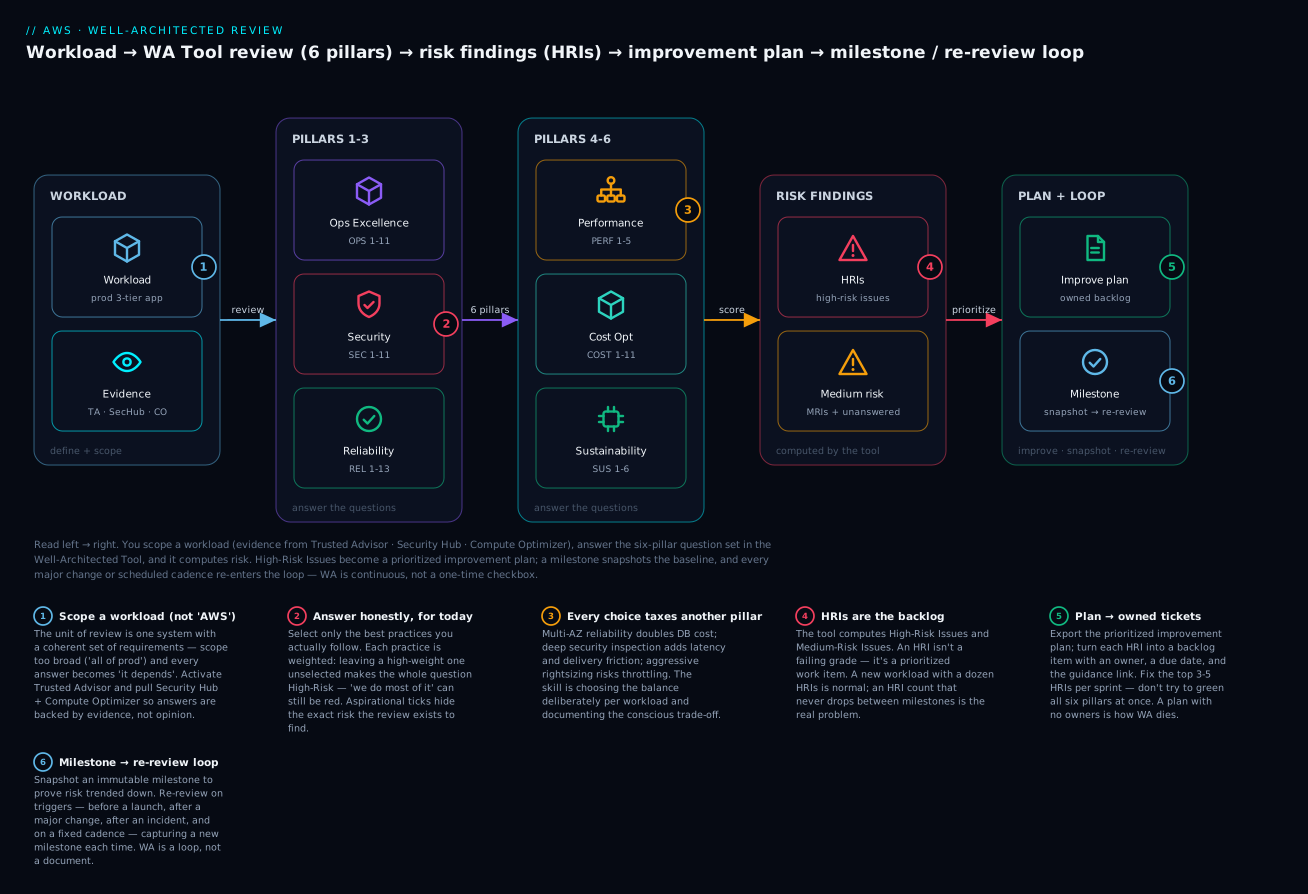
The diagram traces the review as a loop, left to right. You define a workload (with Trusted Advisor, Security Hub and Compute Optimizer wired in as evidence), answer the six-pillar question set in the Well-Architected Tool, and the Tool computes risk — surfacing High-Risk Issues and medium-risk items. HRIs become a prioritized improvement plan you turn into an owned backlog; a milestone snapshots the baseline, and every major change or scheduled cadence re-enters the loop. The point the picture makes: WA is a cycle, not a document.
Real-world scenario
Meridian Freight runs a logistics platform on AWS — a three-tier web app (ALB → EC2 Auto Scaling → RDS) plus a serverless events pipeline for shipment tracking. They had never run a formal WA review; the architecture had grown by accretion over three years. A near-miss — an AZ event that almost took the tracking API down because RDS was single-AZ — finally forced the conversation.
The facilitator (an internal architect) scoped two workloads, not one: “Tracking API” (the customer-facing path) and “Analytics pipeline” (internal reporting), because their reliability and cost requirements were completely different. For the Tracking API they ran the base lens plus the Serverless lens; for Analytics, the base lens plus Data Analytics. They activated Trusted Advisor and pulled Compute Optimizer and Security Hub reports the day before, so answers were evidence-backed.
The first review produced 11 HRIs on the Tracking API. The top three were unambiguous: REL 13 (no documented DR, no tested restores), REL 10 (single-AZ RDS — the near-miss), and SEC 3 (an over-broad IAM role the EC2 fleet had carried since a 2023 debugging session). Compute Optimizer flagged the fleet as 40% over-provisioned, which turned into two COST HRIs. Critically, they did not try to fix everything. They captured a milestone (“pre-remediation baseline”), exported the improvement plan, and put exactly five items into the next sprint — the two reliability HRIs, the IAM HRI, and two rightsizing items — each with a named owner and a due date.
The trade-off conversation was the valuable part. Moving RDS to Multi-AZ added roughly $380/month; the team quantified an outage of the Tracking API at ~$18k/hour in SLA credits and lost bookings, and the decision took ninety seconds. Rightsizing the fleet reduced cost by ~$1,100/month and, by consolidating onto fewer, better-utilized Graviton instances, quietly improved their Sustainability answers too — the same change satisfied COST 6, PERF 2, and SUS 5. Six weeks later they re-reviewed, captured a “post-sprint-1” milestone, and the HRI count on the Tracking API had dropped from 11 to 6. That delta — provable, owned, and trending down — is what a real review produces. The PDF nobody reads produces zero.
Advantages and disadvantages
| Advantages | Disadvantages / costs |
|---|---|
| Surfaces invisible architecture risk before it becomes an incident | Takes real time from senior people (a review is hours, not minutes) |
| Free tool; the Framework is public and vendor-standard | Value is zero without follow-through on HRIs |
| Common language across teams, partners, and AWS | Easy to game if answered aspirationally or to “pass” |
| Prioritizes work by risk, not by whoever shouts loudest | Question wording can feel abstract until you’ve done a few |
| Milestones prove improvement over time (great for audits) | Numbering/wording shifts between Framework revisions |
| Lenses extend it to serverless, SaaS, ML, data, IoT, FSI | Over-scoping (“all of prod”) makes answers meaningless |
| Integrates evidence (Trusted Advisor, Security Hub, Compute Optimizer) | Requires org discipline to keep the cadence going |
When the advantages dominate: any workload heading for or already at production scale, especially before a launch or after growth. When to keep it lightweight: a two-week prototype that will be thrown away — do a conversation against the pillars, skip the formal tooling. The disadvantages are almost all process failures, not tool failures; the tool is nearly free, the discipline is not.
Hands-on lab
You will define a workload in the Well-Architected Tool, answer a representative slice across the pillars, generate HRIs, capture a milestone, and export the improvement plan — first with the aws wellarchitected CLI, then the same workload as Terraform. The WA Tool itself is free; the only caution is not leaving demo resources you create elsewhere.
Prerequisites: AWS CLI v2 configured (aws sts get-caller-identity works), permissions for wellarchitected:* (see the IAM policy in Security notes), and jq for readability.
Step 1 — Confirm access and list lenses
aws sts get-caller-identity --query Account --output text
# 123456789012

# List the lenses available to you (base + AWS official lenses)
aws wellarchitected list-lenses \
  --query 'LensSummaries[].{Alias:LensAlias,Name:LensName,Type:LensType}' \
  --output table
Expected: a table including wellarchitected (the base Framework) and AWS lenses such as serverless, softwareasaservice, dataanalytics, machinelearning, iot.
Step 2 — Create the workload
WORKLOAD_ID=$(aws wellarchitected create-workload \
  --workload-name "meridian-tracking-api" \
  --description "Customer-facing shipment tracking API (ALB -> EC2 ASG -> RDS + serverless events)" \
  --environment PRODUCTION \
  --aws-regions "ap-south-1" "us-east-1" \
  --review-owner "architecture-team@meridian.example" \
  --lenses "wellarchitected" \
  --tags Team=platform,CostCenter=logistics \
  --query 'WorkloadId' --output text)

echo "Workload: $WORKLOAD_ID"
# Workload: 1a2b3c4d5e6f...
⚠️ Cost note: creating a workload is free. The --lenses wellarchitected base lens is always applied; you can attach more in the next step.
Step 3 — (Optional) attach the Serverless lens
aws wellarchitected associate-lenses \
  --workload-id "$WORKLOAD_ID" \
  --lens-aliases "arn:aws:wellarchitected::aws:lens/serverless"
Step 4 — See the questions for a pillar
# List Reliability questions and their current answer status
aws wellarchitected list-answers \
  --workload-id "$WORKLOAD_ID" \
  --lens-alias wellarchitected \
  --pillar-id reliability \
  --query 'AnswerSummaries[].{Q:QuestionId,Title:QuestionTitle,Risk:Risk}' \
  --output table
Expected: every REL question listed with Risk: UNANSWERED — your starting point.
Step 5 — Answer a representative slice across pillars
Grab the choice IDs for one question, then select the practices you follow. (Choice IDs look like <question_id>_<choice>.)
# Inspect choices for the DR question (REL 13)
aws wellarchitected get-answer \
  --workload-id "$WORKLOAD_ID" \
  --lens-alias wellarchitected \
  --question-id "plan_for_disaster_recovery_dr_rel13" \
  --query 'Answer.Choices[].{Id:ChoiceId,Title:Title}' --output table

# Select the practices you actually do (example choice IDs)
aws wellarchitected update-answer \
  --workload-id "$WORKLOAD_ID" \
  --lens-alias wellarchitected \
  --question-id "plan_for_disaster_recovery_dr_rel13" \
  --selected-choices "choice1_id" "choice2_id" \
  --notes "Backups exist; restores not yet tested. RTO undefined."
Repeat for a slice that will produce mixed risk — e.g. answer SEC 2/SEC 8, REL 10, COST 6, OPS 4, PERF 2 honestly. Mark a genuinely irrelevant question not applicable:
aws wellarchitected update-answer \
  --workload-id "$WORKLOAD_ID" \
  --lens-alias wellarchitected \
  --question-id "some_out_of_scope_question" \
  --is-applicable false \
  --reason OUT_OF_SCOPE \
  --notes "No on-prem component in this workload."
Step 6 — Generate and read the risk findings (HRIs)
aws wellarchitected get-lens-review \
  --workload-id "$WORKLOAD_ID" \
  --lens-alias wellarchitected \
  --query '{Pillars:PillarReviewSummaries[].{Pillar:PillarName,Risks:RiskCounts}, Total:RiskCounts}'
Expected (illustrative):
{
  "Pillars": [
    { "Pillar": "Reliability", "Risks": { "HIGH": 2, "MEDIUM": 1, "UNANSWERED": 8 } },
    { "Pillar": "Security",    "Risks": { "HIGH": 1, "MEDIUM": 2, "UNANSWERED": 6 } }
  ],
  "Total": { "HIGH": 3, "MEDIUM": 5, "NONE": 4, "UNANSWERED": 40, "NOT_APPLICABLE": 1 }
}
HIGH is your HRI count. These are the backlog.
Step 7 — Export the improvement plan
aws wellarchitected list-lens-review-improvements \
  --workload-id "$WORKLOAD_ID" \
  --lens-alias wellarchitected \
  --query 'ImprovementSummaries[].{Q:QuestionTitle,Pillar:PillarId,Risk:Risk,Url:ImprovementPlanUrl}' \
  --output table
Each HIGH row becomes a ticket with the Url as the “how to fix.” Export the full report as PDF for stakeholders:
aws wellarchitected get-lens-review-report \
  --workload-id "$WORKLOAD_ID" \
  --lens-alias wellarchitected \
  --query 'Base64String' --output text | base64 --decode > wa-review.pdf
Step 8 — Capture a milestone (the baseline)
aws wellarchitected create-milestone \
  --workload-id "$WORKLOAD_ID" \
  --milestone-name "pre-remediation-baseline" \
  --query 'MilestoneNumber' --output text
# 1

aws wellarchitected list-milestones \
  --workload-id "$WORKLOAD_ID" \
  --query 'MilestoneSummaries[].{N:MilestoneNumber,Name:MilestoneName,When:RecordedAt}' \
  --output table
The milestone is immutable — re-review later, snapshot again, and compare the HRI counts.
Step 9 — The same workload as Terraform
The Terraform aws provider manages the workload (and lens shares); the answers, milestones, and reports are review-time operations you do via CLI/console/API. Provision the workload as code so it is reproducible and governed:
terraform {
  required_providers {
    aws = { source = "hashicorp/aws", version = "~> 5.0" }
  }
}

provider "aws" {
  region = "ap-south-1"
}

resource "aws_wellarchitected_workload" "tracking_api" {
  name               = "meridian-tracking-api-tf"
  description        = "Customer-facing shipment tracking API, managed as code"
  environment        = "PRODUCTION"
  aws_regions        = ["ap-south-1", "us-east-1"]
  review_owner       = "architecture-team@meridian.example"
  lenses             = ["wellarchitected"]

  # Declare which pillars matter most for this workload (drives prioritization)
  pillar_priorities  = [
    "reliability",
    "security",
    "operationalExcellence",
    "performance",
    "costOptimization",
    "sustainability",
  ]

  tags = {
    Team       = "platform"
    CostCenter = "logistics"
    ManagedBy  = "terraform"
  }
}

output "workload_id" {
  value = aws_wellarchitected_workload.tracking_api.id
}
terraform init && terraform apply
# aws_wellarchitected_workload.tracking_api: Creation complete after 3s [id=...]
⚠️ Terraform gotcha: the base wellarchitected lens is implicitly present. On some provider versions, listing it in lenses (or attaching AWS lenses out of band) causes a perpetual diff — pin your provider version and keep lens management consistent (all in Terraform or all via CLI, not both).
Step 10 — Teardown
# CLI-created workload
aws wellarchitected delete-workload --workload-id "$WORKLOAD_ID"

# Terraform-created workload
terraform destroy
Deleting a workload removes its answers and milestones. There is nothing metered to leave running, but keep your account tidy — and keep the exported PDF/plan before you delete, since the findings are the deliverable.
Common mistakes & troubleshooting
WA fails far more often on process than on tooling. This is the review anti-patterns playbook: the pattern, how it shows up, why it happens, how to confirm it, and the fix. Treat the “fix” column as the actual practice.
| # | Anti-pattern (symptom) | Root cause | How to confirm | Fix |
|---|---|---|---|---|
| 1 | WA run once, then never again — a stale PDF from last year | Treated as a checkbox, not a cadence | No milestone newer than the last launch; list-milestones shows one entry |
Schedule recurring re-reviews; trigger one on every major change and post-incident |
| 2 | All-pillars-at-once overwhelm — 40 findings, team freezes | Tried to fix everything simultaneously | Improvement plan exported but no tickets created | Rank by risk; put only the top 3–5 HRIs into the next sprint |
| 3 | HRIs with no owner — findings exist, nothing closes | No hand-off from plan to backlog | HRI count flat across two milestones | Each HRI → a ticket with a named owner and due date |
| 4 | Ignoring trade-offs — six green pillars reported | Answered to “pass,” not to reflect reality | Cost and reliability both “None” risk on a lean startup — implausible | Force the trade-off conversation; document conscious trade-offs per question |
| 5 | Wrong lens or no lens — serverless app reviewed only on base | Didn’t match lens to workload shape | Serverless workload, no serverless lens attached |
Attach the matching domain lens; re-answer the added questions |
| 6 | Reviewing too late — first review after launch | WA seen as an audit, not a design input | Review date later than go-live date | Move the review 2–4 weeks before launch; make HRIs launch-blocking |
| 7 | Gaming the answers — everything ticked, or everything “N/A” | Incentive to look good / finish fast | Many NOT_APPLICABLE with reason OTHER and no notes |
Require a real reason + evidence for N/A; facilitator challenges ticks |
| 8 | No re-review after change — answers now fiction | Architecture changed, review didn’t | Big deploys in CloudTrail, no new milestone since | Re-review on change; bracket changes with before/after milestones |
| 9 | Over-scoped workload — “all of production” as one workload | Scope set too broad to answer meaningfully | Answers full of “it depends / partially” | Split into workloads with coherent, distinct requirements |
| 10 | Answers without evidence — opinions, not data | Didn’t wire in Trusted Advisor/Compute Optimizer | “We rightsize” but Compute Optimizer shows 40% over-provisioned | Pull Trusted Advisor/Security Hub/Compute Optimizer before answering |
| 11 | One person fills the form alone — blind spots everywhere | No cross-functional room | Security/FinOps never in the review | Facilitated session with owner, builders, security, and FinOps present |
| 12 | Findings never reach the backlog — plan exported, filed, forgotten | Missing plan→work hand-off | Improvement-plan PDF in a drive, zero linked tickets | Automate export→ticket creation; review HRI burn-down each cadence |
| 13 | Milestone hoarding without action — many snapshots, flat risk | Measuring, not improving | HRI count identical across five milestones | Tie each milestone to a remediation sprint; expect the count to drop |
| 14 | Confusing “not applicable” with “not done” — hiding gaps as N/A | Misunderstanding the answer semantics | High N/A rate on core pillars (SEC/REL) | Reserve N/A for genuinely out-of-scope; a gap you haven’t closed is risk, not N/A |
CLI error reference
| Error / status | Meaning | Likely cause | Fix |
|---|---|---|---|
AccessDeniedException on wellarchitected:* |
IAM denies the call | Missing wellarchitected permissions |
Attach a policy allowing the needed actions (see Security notes) |
ResourceNotFoundException (workload) |
Workload ID wrong or deleted | Typo, wrong Region, or already torn down | Re-list with list-workloads; WA data is Regional — use the right Region |
ValidationException on create-workload |
Bad parameter | Invalid --environment (must be PRODUCTION/PREPRODUCTION) or malformed Region |
Fix the enum/Region list; review required fields |
ConflictException |
Concurrent update / duplicate | Two updates to the same answer, or duplicate workload name | Retry; ensure unique workload names |
Lens not in list-lenses |
Lens not available/associated | AWS lens not attached, or Region without it | associate-lenses with the lens ARN; check Region support |
Terraform perpetual diff on lenses |
Base lens implicit vs declared | Provider treats base lens differently | Pin provider version; manage lenses consistently in one place |
ThrottlingException |
API rate limit | Scripting many update-answer calls in a tight loop |
Add backoff/jitter; batch where possible |
The nastiest real failures
The confident green review. The most dangerous WA output is a review with no HRIs run by a team that has never had an incident. Green does not mean safe — it often means the questions were answered aspirationally. The confirm: cross-check the “None” answers against evidence (Trusted Advisor fault-tolerance checks, Compute Optimizer, Security Hub score). If the tools disagree with the ticks, the ticks are wrong. The fix is cultural: reward finding risk, not hiding it.
The orphaned improvement plan. A team runs a genuinely good review, exports a plan with real HRIs — and then it sits in a shared drive. Three months later the same HRIs surface in the next review, unchanged. The confirm is the flat HRI count between milestones. The only fix is the hand-off discipline: every HRI becomes a ticket with an owner and a date, and the HRI burn-down is reviewed at each cadence like any other backlog.
Scope sprawl. Someone defines “Production” as a single workload and tries to answer REL/SEC/COST for a dozen unrelated systems at once. Every answer becomes “it depends,” risk is meaningless, and the review stalls. The confirm: answers littered with “partially.” The fix is to split into workloads with coherent, distinct requirements — the tracking API and the analytics pipeline are two workloads, not one, precisely because their reliability and cost bars differ.
Best practices
- Scope workloads tightly and coherently. One system with one set of requirements per workload. Split when requirements diverge.
- Run the review before the launch, not as a post-launch audit. HRIs are cheapest to fix on a whiteboard.
- Answer honestly, for today. The review’s value is the gaps it finds; aspirational ticks destroy that value.
- Make trade-offs conscious and documented. Record what each choice costs another pillar and why you chose the balance.
- Turn every HRI into an owned, dated backlog item. No owner, no fix. This is the single highest-leverage habit.
- Prioritize ruthlessly: HRIs before MRIs, and only a handful per sprint. Do not try to green every pillar at once.
- Snapshot milestones around change — before launch, after each remediation sprint, at each cadence — to prove risk is trending down.
- Wire in evidence: activate Trusted Advisor on the workload; pull Security Hub and Compute Optimizer before answering.
- Match one lens to the workload’s dominant pattern; build a custom lens for internal standards you want every team checked against.
- Re-review on triggers: major change, post-incident, and a fixed cadence (quarterly/semi-annual). Drift is silent.
- Facilitate cross-functionally: owner, builders, security, and FinOps in the room. One person answering alone is blind.
- Treat “not applicable” as sacred: only for genuinely out-of-scope questions, always with a reason and evidence.
Security notes
The WA Tool stores your answers and notes — treat those notes as sensitive, because they describe exactly where your architecture is weak.
| Concern | Practice |
|---|---|
| Least privilege for reviewers | Grant wellarchitected actions scoped to intent; separate read from write |
| Read-only stakeholders | Give execs/auditors Get*/List* only — they consume, not edit |
| Sensitive notes | Don’t paste secrets, keys, or full ARNs of sensitive resources into notes |
| Cross-account sharing | Share workloads/custom lenses via the Tool’s sharing, not by copying data around |
| Audit trail | WA API calls are in CloudTrail — monitor who edits answers and milestones |
| Encryption | WA data is encrypted at rest by AWS; your job is controlling access to it |
A minimal split-privilege pair — writers who run reviews, readers who consume them:
{
  "Version": "2012-10-17",
  "Statement": [
    {
      "Sid": "WAReviewer",
      "Effect": "Allow",
      "Action": [
        "wellarchitected:CreateWorkload",
        "wellarchitected:UpdateAnswer",
        "wellarchitected:CreateMilestone",
        "wellarchitected:AssociateLenses",
        "wellarchitected:Get*",
        "wellarchitected:List*"
      ],
      "Resource": "*"
    }
  ]
}
{
  "Version": "2012-10-17",
  "Statement": [
    {
      "Sid": "WAReadOnly",
      "Effect": "Allow",
      "Action": ["wellarchitected:Get*", "wellarchitected:List*"],
      "Resource": "*"
    }
  ]
}
Tie the human identities behind these to your central IdP and SSO rather than IAM users — the same “strong identity foundation” (SEC 1/2) the review itself asks about.
Cost & sizing
The Well-Architected Tool is free — no charge for workloads, reviews, milestones, lenses, or reports. The cost of WA is entirely people-time and remediation, and the return is avoided incidents and removed waste.
| Cost element | Rough magnitude | Notes |
|---|---|---|
| WA Tool usage | ₹0 / $0 | The service, custom lenses, and reports are free |
| A single review (people-time) | 3–6 hours across 4–6 people | The real cost; budget it like any design activity |
| Evidence tooling | Trusted Advisor (full checks) needs Business/Enterprise Support | Security Hub, Config, Compute Optimizer are separately priced |
| Remediation | Varies wildly | Multi-AZ adds spend; rightsizing removes it — often net-negative |
| Recurring cadence | ~1–2 days/quarter per major workload | Amortized cheaply against one avoided outage |
Sizing the practice: review your handful of Tier-1 (customer-facing, revenue) workloads every quarter; Tier-2 semi-annually; Tier-3 and prototypes get a lightweight pillar conversation, not the full tool. The economics almost always favor the review — a single prevented single-AZ outage or one rightsizing pass typically pays for a year of reviews. Pair the cost findings with a real FinOps loop in Cost Optimization & FinOps Rightsizing and Cost Explorer, Budgets & Alerts.
Interview & exam questions
1. Name the six pillars of the Well-Architected Framework. Operational Excellence, Security, Reliability, Performance Efficiency, Cost Optimization, and Sustainability. Sustainability was added in December 2021; older material lists five. Map to SAA-C03/SAP-C02 “which pillar” questions.
2. What is a High-Risk Issue (HRI)? A question whose missing best practices are weighted high-risk. It is not a failing grade but a prioritized work item — the top of your improvement backlog. Medium-Risk Issues (MRIs) are second priority.
3. What is the difference between a pillar and a lens?
A pillar is one of the six core categories the questions are grouped under. A lens is a set of questions/best practices — the base wellarchitected lens applies to every workload, and additive lenses (Serverless, SaaS, ML, Data Analytics, IoT, FSI) add domain-specific questions.
4. Give a concrete reliability↔cost trade-off and how you’d decide. Multi-AZ RDS roughly doubles database cost but removes a single-AZ failure mode. Decide against the business requirement: quantify the outage cost per hour vs the monthly delta. If an outage costs $18k/hour and Multi-AZ adds $380/month, reliability wins — and you document the conscious trade-off.
5. What is a milestone and why is it immutable? An immutable snapshot of a workload’s answers and risk at a point in time. Immutability is what lets you prove improvement between reviews and trust the record for audits — you can’t retroactively edit history.
6. How does the Tool compute risk — is it an average of ticked practices? No. Each best practice is weighted; leaving a high-weight practice unselected makes the whole question a High-Risk Issue regardless of how many others you ticked. “We do most of it” can still be red.
7. When should you run a Well-Architected review? Before major launches (2–4 weeks prior), after major architecture changes, after incidents, and on a recurring cadence (e.g. quarterly for Tier-1 workloads). It is continuous, not one-time.
8. Which AWS services provide evidence for your answers? Trusted Advisor (cost/perf/security/fault-tolerance/limits), Security Hub (security posture), Compute Optimizer (rightsizing), Config (compliance/inventory), Cost Explorer (spend), CloudWatch/X-Ray (health/latency), IAM Access Analyzer (over-broad access).
9. What are the general design principles? Stop guessing capacity; test at production scale; automate to make experimentation easier; allow evolutionary architectures; drive architectures using data; improve through game days. They sit above all six pillars.
10. When would you build a custom lens? When your organization has standards (naming, tagging, guardrails, regulatory controls) you want every team’s review to check. A custom lens adds your own questions/best practices and is shareable across accounts.
11. A team reports six green pillars on a lean startup workload. What’s your reaction? Skepticism. Green usually means aspirational answers, especially when Cost and Reliability both show no risk. Cross-check “None” answers against Trusted Advisor/Compute Optimizer/Security Hub; if the evidence disagrees, the answers are wrong.
12. How do WA findings become real change? Export the improvement plan, turn each HRI into a backlog ticket with an owner and due date and the guidance link, and track HRI burn-down against milestones each cadence. A plan without owners is the most common way WA dies.
Quick check
- How many pillars are there, and which one was added most recently?
- What makes a question a High-Risk Issue rather than Medium?
- Why is reviewing a workload (not “AWS” in general) important for trade-offs?
- Name one reliability↔cost and one security↔operations trade-off.
- Which command exports the prioritized improvement plan, and which captures a baseline snapshot?
Answers
- Six pillars; Sustainability was added in December 2021 (before that there were five).
- A high-weight best practice is left unselected on that question — weighting, not the count of missing practices, drives the risk level.
- Because the same answer can be correct for one workload and an HRI for another — a 20ms security control is fine for a bank and unacceptable for a real-time bidder. Trade-offs only make sense against a specific workload’s requirements.
- Reliability↔cost: multi-AZ/multi-Region redundancy doubles infra spend. Security↔operations: more approval gates / inspection add friction and latency to delivery.
aws wellarchitected list-lens-review-improvementsexports the plan;aws wellarchitected create-milestonecaptures the baseline snapshot.
Glossary
| Term | Definition |
|---|---|
| Well-Architected Framework | AWS’s six-pillar framework of design principles, questions, and best practices for building good cloud workloads |
| Pillar | One of six categories: Operational Excellence, Security, Reliability, Performance Efficiency, Cost Optimization, Sustainability |
| Design principle | A guiding habit within a pillar (e.g. “automatically recover from failure”) |
| General design principle | One of six cross-pillar habits (stop guessing capacity, test at scale, automate, evolve, drive with data, game days) |
| WAFR | Well-Architected Framework Review — the facilitated process of answering the question set for a workload |
| Workload | The resources and code that together deliver business value; the unit of review |
| Lens | A question/best-practice set — base Framework or a domain lens (Serverless, SaaS, ML, Data Analytics, IoT, FSI) or a custom lens |
| Question | A prompt (e.g. “How do you protect your data at rest?”) answered by selecting best practices |
| Best practice / choice | A specific practice under a question you select if you follow it |
| Risk | The Tool’s verdict per question: High, Medium, None, Unanswered, or Not applicable |
| HRI | High-Risk Issue — a question with high-weight missing practices; top-priority backlog |
| MRI | Medium-Risk Issue — a question with medium-weight gaps; second priority |
| Milestone | An immutable snapshot of a workload’s answers and risk at a point in time |
| Improvement plan | The Tool’s prioritized list of fixes for unmet practices, with guidance links |
| Conscious trade-off | A deliberately chosen, documented balance where strengthening one pillar taxes another |
| Trusted Advisor | AWS service providing checks (cost/perf/security/fault-tolerance/limits) that inform answers |
Next steps
- Run a real review on your most important workload using AWS Three-Tier Web Application Architecture as the reference topology, and split it into coherent workloads before you start.
- Deepen the Reliability answers with Disaster Recovery: RTO/RPO Strategies, AWS Backup & Disaster Recovery Strategies, and Multi-Region Active-Active Architecture.
- Turn Cost HRIs into an actual FinOps loop with Cost Optimization & FinOps Rightsizing and Tagging Strategy & Cost Allocation.
- Strengthen the Security pillar with GuardDuty Threat Detection, AWS Config Compliance Rules, and Organizations SCPs.
- Back your Operational Excellence and Performance answers with real telemetry via CloudWatch Metrics, Alarms & Dashboards and X-Ray Distributed Tracing.